

1. 개요
AI 에이전트는 자율적으로 작동하고, 학습하고, 환경과 상호작용하여 목표를 달성하는 능력을 통해 작업 자동화와 의사 결정을 혁신하며 빠르게 인기를 얻고 있습니다.
이 Codelab에서는 엔드 투 엔드 멀티 에이전트 시스템을 빌드하여 시작하는 방법을 안내합니다. 통화 MCP 서버를 빌드하고, MCP 서버를 사용하고 Agent2Agent (A2A) 프로토콜을 통해 노출되는 통화 에이전트를 빌드하고, A2A를 통해 통화 에이전트를 사용하는 프로세스 내 날씨 하위 에이전트가 있는 여행 에이전트를 빌드하고, 마지막으로 모든 서비스를 Cloud Run에 배포합니다.

핵심 기술
모델 컨텍스트 프로토콜(MCP)
모델 컨텍스트 프로토콜 (MCP)은 애플리케이션이 LLM에 컨텍스트와 도구를 제공하는 방식을 표준화하는 개방형 프로토콜입니다. MCP는 AI 애플리케이션을 위한 USB-C 포트와 같습니다. AI 모델을 외부 데이터 소스, API, 도구에 연결하는 표준화된 방법을 제공합니다.
이 Codelab에서 currency_mcp_server는 공개 Frankfurter API를 기반으로 하는 스트리밍 가능한 HTTP (/mcp)를 통해 get_exchange_rate 도구를 노출합니다.
에이전트 개발 키트(ADK)
에이전트 개발 키트 (ADK)는 AI 에이전트를 개발하고 배포하기 위한 유연한 조정 프레임워크입니다. ADK는 모델에 구애받지 않고 배포 환경에 구애받지 않으며 다른 프레임워크와의 호환성을 위해 빌드됩니다. ADK는 에이전트 개발을 표준 소프트웨어 엔지니어링과 유사하게 만들어 복잡한 에이전트형 워크플로를 쉽게 만들고, 테스트하고, 조정할 수 있도록 지원합니다.
ADK는 사용자 대화를 처리하고, 대화형 웹 UI를 제공하고, McpToolset를 통해 MCP 도구에 연결하고, A2A 통신을 관리합니다.
Agent2Agent(A2A) 프로토콜
Agent2Agent (A2A) 프로토콜은 AI 에이전트 간의 통신과 협업을 지원하도록 설계된 개방형 표준입니다. MCP가 에이전트와 도구 간의 연결을 표준화하는 것처럼, A2A는 에이전트 간의 협업을 표준화합니다. 다양한 프레임워크, 호스팅 환경, 조직에서 에이전트가 빌드되는 세상에서 A2A는 탐색 및 작업 위임을 위한 공통 언어를 제공합니다.
ADK는 currency_agent를 A2A 서비스 (to_a2a)로 노출하고 travel_agent가 이를 AgentTool (RemoteA2aAgent)로 원격으로 사용할 수 있도록 합니다.
로컬 하위 에이전트와 원격 A2A 에이전트 비교
이 아키텍처는 멀티 에이전트 설계에서 중요한 패턴을 보여줍니다.
- 로컬 에이전트 도구 (
weather_agent): 네트워크 지연 시간이나 프로토콜 직렬화 오버헤드 없이 오케스트레이터 내에서AgentTool로 인프로세스 실행됩니다. - 원격 에이전트 도구 (
currency_agent): 독립적인 마이크로서비스로 실행되며, A2A 프로토콜을 통해 네트워크 전반에서 호출됩니다.
학습할 내용
- 스트리밍 가능한 HTTP를 통해 FastMCP를 사용하여 로컬 MCP 서버를 만들고 테스트하는 방법
- MCP 도구를 사용하는 ADK로 에이전트를 빌드하는 방법 (
McpToolset) - ADK 에이전트를 A2A 서버로 노출하는 방법 (
to_a2a) - A2A Python 클라이언트 (
a2a.client)를 사용하여 A2A 서버를 테스트하는 방법 - 로컬 하위 에이전트 도구와 원격 A2A 에이전트를 결합하는 조정자 에이전트를 빌드하는 방법
- ADK 웹 UI를 사용하여 로컬에서 전체 멀티 에이전트 시스템을 실행하고 테스트하는 방법
- 세 가지 구성요소를 모두 컨테이너화하여 Google Cloud Run에 배포하는 방법
필요한 항목
- 브라우저(예: Chrome)
- 결제가 사용 설정된 Google Cloud 프로젝트.
2. 시작하기 전에
프로젝트 만들기
Google Cloud 프로젝트가 없으면 만듭니다.
Google Cloud 콘솔의 프로젝트 선택기 페이지에서 Google Cloud 프로젝트를 선택하거나 만듭니다.
또한 Cloud 프로젝트에 결제가 사용 설정되어 있는지 확인합니다. 프로젝트에 결제가 사용 설정되어 있는지 확인하는 방법을 알아보세요.
Cloud Shell 활성화
Google Cloud Shell은 Google Cloud 콘솔 내에서 직접 제공되는 대화형 브라우저 기반 개발 환경입니다. 로컬에 도구를 설치할 필요 없이 Google Cloud를 시작하는 가장 쉬운 방법입니다.
이 링크를 클릭하여 Cloud Shell을 활성화합니다. Cloud Shell에서 해당 버튼을 클릭하여 Cloud Shell 터미널 (클라우드 명령어 실행용)과 편집기 (파일 보기용) 간에 전환할 수 있습니다.
Cloud Shell에 연결되면 인증이 완료되었는지 확인합니다.
gcloud auth list
gcloud 명령어가 프로젝트를 알고 있는지 확인합니다.
gcloud config list project
프로젝트 ID를 설정합니다.
export PROJECT_ID=<YOUR_GOOGLE_CLOUD_PROJECT_ID>
gcloud config set project $PROJECT_ID
Cloud API 사용 설정
Cloud Run, Cloud Build, Artifact Registry, Vertex AI에 필요한 API를 사용 설정합니다.
gcloud services enable run.googleapis.com \
                       cloudbuild.googleapis.com \
                       artifactregistry.googleapis.com \
                       aiplatform.googleapis.com
코드 가져오기
저장소를 클론하고 python 디렉터리로 이동합니다.
git clone https://github.com/meteatamel/getting-started-mcp-a2a-adk.git
cd getting-started-mcp-a2a-adk/python
uv로 종속 항목 설치
uv는 빠른 Python 패키지 및 프로젝트 매니저입니다. Cloud Shell에 사전 설치되어 있습니다. 로컬에서 실행하는 경우 다음과 같이 설치할 수 있습니다.
# macOS and Linux
curl -LsSf https://astral.sh/uv/install.sh | sh

# Windows (PowerShell)
# powershell -ExecutionPolicy ByPass -c "irm https://astral.sh/uv/install.ps1 | iex"
Python 디렉터리는 통합된 uv로 구성됩니다.
Workspace. 다음을 실행하여 모든 작업공간 구성원 (currency_mcp_server, currency_agent, travel_agent)의 모든 종속 항목을 단일 가상 환경에 설치합니다.
uv sync
환경 변수 구성
python 디렉터리의 .env 파일에서 환경 변수를 구성합니다.
옵션 A: Gemini Enterprise (Google Cloud / Cloud Shell)
echo "GOOGLE_GENAI_USE_ENTERPRISE=TRUE" >> .env \
&& echo "GOOGLE_CLOUD_PROJECT=$PROJECT_ID" >> .env \
&& echo "GOOGLE_CLOUD_LOCATION=global" >> .env
옵션 B: Google AI Studio (로컬 API 키)
Google AI Studio의 API 키를 사용하려면 다음 안내를 따르세요.
echo "GOOGLE_API_KEY=<your_api_key_here>"<>>/span>  .env \
&& echo "GOOGLE_GENAI_USE_ENTERPRISE=FALSE" >> .env
3. 통화 MCP 서버 만들기
에이전트를 만들기 전에 먼저 통화 변환 도구를 노출하는 MCP 서버를 살펴봅니다.
MCP 서버를 사용하면 경량 프로그램을 작성하여 기능을 도구로 노출할 수 있습니다. 그러면 에이전트 (또는 여러 에이전트)가 표준화된 모델 컨텍스트 프로토콜을 사용하여 이러한 도구에 액세스할 수 있습니다.
FastMCP Python 패키지를 활용하여 get_exchange_rate라는 단일 도구를 노출하는 MCP 서버를 만들 수 있습니다. get_exchange_rate 도구는 Frankfurter API를 호출하여 두 통화 간의 현재 환율을 가져옵니다.
MCP 서버의 코드는 currency_mcp_server/server.py에 있습니다.
import asyncio
import logging
import os

import httpx
from fastmcp import FastMCP

logger = logging.getLogger(__name__)
logging.basicConfig(format="[%(levelname)s]: %(message)s", level=logging.INFO)

mcp = FastMCP("Currency MCP Server 💵")


@mcp.tool()
def get_exchange_rate(
    currency_from: str = "USD",
    currency_to: str = "EUR",
    currency_date: str = "latest",
):
    """Use this to get current exchange rate.

    Args:
        currency_from: The currency to convert from (e.g., "USD").
        currency_to: The currency to convert to (e.g., "EUR").
        currency_date: The date for the exchange rate or "latest". Defaults to "latest".

    Returns:
        A dictionary containing the exchange rate data, or an error message if the request fails.
    """
    logger.info(
        f"--- 🛠️ Tool: get_exchange_rate called for converting {currency_from} to {currency_to} ---"
    )
    try:
        response = httpx.get(
            f"https://api.frankfurter.dev/v1/{currency_date}",
            params={"from": currency_from, "to": currency_to},
        )
        response.raise_for_status()

        data = response.json()
        if "rates" not in data:
            logger.error(f"❌ rates not found in response: {data}")
            return {"error": "Invalid API response format."}
        logger.info(f"✅ API response: {data}")
        return data
    except httpx.HTTPError as e:
        logger.error(f"❌ API request failed: {e}")
        return {"error": f"API request failed: {e}"}
    except ValueError:
        logger.error("❌ Invalid JSON response from API")
        return {"error": "Invalid JSON response from API."}


if __name__ == "__main__":
    port = int(os.getenv("PORT", 8080))
    logger.info(f"🚀 MCP server started on port {port}")
    # Could also use 'sse' transport, host="0.0.0.0" required for Cloud Run.
    asyncio.run(
        mcp.run_async(
            transport="http",
            host="0.0.0.0",
            port=port,
        )
    )
로컬에서 MCP 서버 시작
터미널에서 MCP 서버를 시작합니다.
uv run python currency_mcp_server/server.py
서버는 /mcp (http://localhost:8080/mcp)에서 사용할 수 있는 스트리밍 가능 HTTP 엔드포인트와 함께 포트 8080에서 시작됩니다.
MCP 서버 테스트
두 번째 터미널 창을 열고 (첫 번째 창에서 MCP 서버를 실행 중인 상태로 유지) python 폴더 (cd getting-started-mcp-a2a-adk/python)로 이동한 후 테스트 스크립트를 실행합니다.
uv run python currency_mcp_server/test_server.py
테스트 스크립트는 FastMCP의 Client를 사용하여 MCP 엔드포인트에 연결하고 도구를 나열한 후 get_exchange_rate를 호출합니다.
Connecting to MCP server at: http://localhost:8080/mcp
--- 🛠️  Tool found: get_exchange_rate ---
--- 🪛  Calling get_exchange_rate tool for USD to EUR ---
--- ✅  Success: {"amount":1.0,"base":"USD","date":"2026-09-29","rates":{"EUR":0.84919}} ---
좋습니다. 실시간 환율 도구를 노출하는 작동하는 MCP 서버가 있습니다. 다음 단계를 위해 이 터미널을 열어 둡니다.
4. ADK로 통화 에이전트 만들기
이제 에이전트 개발 키트 (ADK)를 사용하여 통화 에이전트를 만들 차례입니다.
ADK는 McpToolset 클래스를 통해 MCP 도구에 대한 기본 제공 지원을 제공합니다. 통화 에이전트는 StreamableHTTPConnectionParams를 사용하여 MCP 서버에 연결합니다.
currency_agent/agent.py에서 통화 에이전트 정의를 살펴보세요.
import logging
import os
from urllib.parse import urlparse

from dotenv import load_dotenv
from google.adk.agents import LlmAgent
from google.adk.a2a.utils.agent_to_a2a import to_a2a
from google.adk.tools.mcp_tool import McpToolset, StreamableHTTPConnectionParams

logger = logging.getLogger(__name__)
logging.basicConfig(format="[%(levelname)s]: %(message)s", level=logging.INFO)

load_dotenv()

SYSTEM_INSTRUCTION = (
    "You are a specialized assistant for currency conversions. "
    "Your sole purpose is to use the 'get_exchange_rate' tool to answer questions about currency exchange rates. "
    "If the user asks about anything other than currency conversion or exchange rates, "
    "politely state that you cannot help with that topic and can only assist with currency-related queries. "
    "Do not attempt to answer unrelated questions or use tools for other purposes."
)

mcp_server_url = os.getenv("MCP_SERVER_URL", "http://localhost:8080/mcp")
if not mcp_server_url.endswith("/mcp"):
    mcp_server_url = f"{mcp_server_url.rstrip('/')}/mcp"

logger.info(f"--- 🔧 Loading MCP tools from MCP Server at {mcp_server_url}... ---")
logger.info("--- 🤖 Creating ADK Currency Agent... ---")

root_agent = LlmAgent(
    model="gemini-3.8-flash",
    name="currency_agent",
    description="An agent that can help with currency conversions",
    instruction=SYSTEM_INSTRUCTION,
    tools=[
        McpToolset(
            connection_params=StreamableHTTPConnectionParams(
                url=mcp_server_url
            )
        )
    ],
)
McpToolset가 HTTP를 통해 실행 중인 MCP 서버에서 직접 get_exchange_rate 도구를 자동으로 검색하고 로드하는 방식을 확인합니다.
ADK 웹 UI로 통화 에이전트 테스트
ADK의 개발 웹 인터페이스를 사용하여 에이전트를 격리된 상태에서 테스트할 수 있습니다. 두 번째 터미널에서 다음을 실행합니다.
uv run adk web --allow_origins "*" currency_agent
http://localhost:8000에서 브라우저를 열거나 Cloud Shell에서 웹 미리보기를 클릭합니다.

에이전트에 다음과 같이 질문합니다.
"250달러는 유로로 얼마야?"
에이전트가 get_exchange_rate MCP 도구를 호출하고 변환된 금액을 반환하는 것을 확인할 수 있습니다. 계속하기 전에 Ctrl+C를 사용하여 adk web 프로세스를 중지하세요.
5. Agent2Agent(A2A) 프로토콜
Agent2Agent (A2A) 프로토콜은 AI 에이전트 간의 통신과 협업을 지원하도록 설계된 개방형 표준입니다.
최신 멀티 에이전트 시스템에서 에이전트는 다양한 프레임워크 (ADK, LangChain, CrewAI, AutoGen)를 사용하여 빌드되고 다양한 인프라에 배포되는 경우가 많습니다. A2A는 표준화된 통신 계약을 정의하여 이러한 사일로를 허뭅니다.

A2A의 주요 개념
- 에이전트 탐색 (에이전트 카드): 모든 A2A 호환 에이전트는
/.well-known/agent-card.json에서 호스팅되는 표준 JSON 파일을 통해 기능, 지원되는 I/O 모드, 인증 요구사항, 기술을 알립니다. - 에이전트 기술 (
AgentSkill): 에이전트가 실행할 수 있는 특정 기능 또는 도구입니다. 다른 에이전트는 이러한 기술을 읽고 작업을 위임할 시기를 결정합니다. - JSON-RPC 통신: 에이전트는 HTTP JSON-RPC 2.0과 같은 표준 전송을 통해 구조화된 메시지, 작업, 아티팩트를 교환합니다.
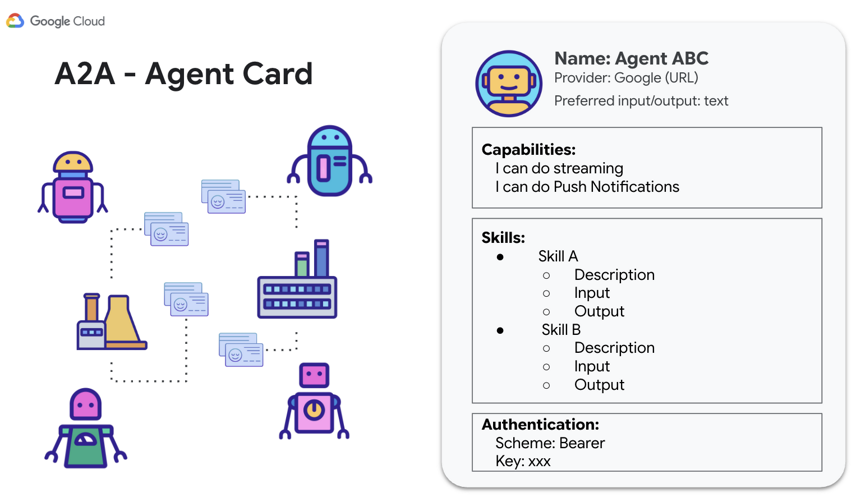
다음 단계에서는 ADK 통화 에이전트를 A2A 서버로 노출하여 다른 에이전트가 이를 검색하고 통화 변환 작업을 위임할 수 있도록 합니다.
6. 통화 에이전트를 A2A 서버로 노출
ADK는 to_a2a() 유틸리티 함수를 사용하여 모든 LlmAgent를 A2A 호환 서버로 쉽게 전환할 수 있습니다.
currency_agent/agent.py의 하단 부분을 검토합니다.
# Make the agent A2A-compatible
PORT = int(os.getenv("PORT", 8081))
AGENT_URL = os.getenv("AGENT_URL")

if AGENT_URL:
    parsed = urlparse(AGENT_URL)
    protocol = parsed.scheme or "https"
    host = parsed.hostname
    port = parsed.port or 443
else:
    protocol = "http"
    host = "localhost"
    port = PORT

a2a_app = to_a2a(root_agent, host=host, port=port, protocol=protocol)

if __name__ == "__main__":
    import uvicorn

    logger.info(f"🚀 Starting currency_agent on port {PORT}")
    uvicorn.run(a2a_app, host="0.0.0.0", port=PORT)
to_a2a() 도우미는 자동으로 다음을 수행합니다.
LlmAgent의 도구 및 요청 사항을 검사합니다.- 기술을 설명하는 A2A
AgentCard를 생성합니다 (예:currency_agent-get_exchange_rate). - JSON-RPC 엔드포인트를 지원하는 FastAPI 애플리케이션 (
a2a_app)에 에이전트를 래핑합니다. AGENT_URL(또는 localhost)를 기반으로 에이전트 카드에 공지된url를 동적으로 구성합니다.
통화 에이전트 A2A 서버 시작
두 번째 터미널에서 통화 에이전트를 시작합니다.
uv run python currency_agent/agent.py
서버가 포트 8081에서 시작됩니다.
[INFO]: --- 🔧 Loading MCP tools from MCP Server at http://localhost:8080/mcp... ---
[INFO]: --- 🤖 Creating ADK Currency Agent... ---
[INFO]: 🚀 Starting currency_agent on port 8081
INFO:     Started server process
INFO:     Waiting for application startup.
INFO:     Application startup complete.
INFO:     Uvicorn running on http://0.0.0.0:8081 (Press CTRL+C to quit)
에이전트 카드 검사
브라우저에서 에이전트 카드 엔드포인트(http://localhost:8081/.well-known/agent-card.json)로 이동합니다.
자동 생성된 JSON 메타데이터가 표시됩니다.
{
  "name": "currency_agent",
  "description": "An agent that can help with currency conversions",
  "supportedInterfaces": [
    {
      "url": "http://localhost:8081",
      "protocolBinding": "JSONRPC",
      "protocolVersion": "1.0"
    }
  ],
  "version": "0.0.1",
  "capabilities": {
    "streaming": true
  },
  "defaultInputModes": [
    "text/plain"
  ],
  "defaultOutputModes": [
    "text/plain"
  ],
  "skills": [
    {
      "id": "currency_agent",
      "name": "model",
      "description": "An agent that can help with currency conversions",
      "tags": [
        "llm"
      ]
    },
    {
      "id": "currency_agent-get_exchange_rate",
      "name": "get_exchange_rate",
      "description": "Use this to get current exchange rate.",
      "tags": [
        "llm",
        "tools"
      ]
    }
  ]
}
A2A 클라이언트로 테스트
세 번째 터미널을 열고 python 폴더 (cd getting-started-mcp-a2a-adk/python)로 이동한 후 전용 A2A 테스트 클라이언트 스크립트를 사용하여 A2A 엔드포인트를 테스트합니다.
uv run python currency_agent/test_a2aclient.py
클라이언트는 A2ACardResolver를 사용하여 에이전트 카드를 확인하고 JSON-RPC 메시지를 전달합니다.
🔄 Fetching the agent card at http://localhost:8081
✅ Successfully fetched the agent card
====================================================
                     AgentCard
====================================================
Name        : currency_agent
Description : An agent that can help with currency conversions
Interfaces  : [0] http://localhost:8081  (JSONRPC 1.0)
Skills      : currency_agent, currency_agent-get_exchange_rate
====================================================
🔄 Initializing a non-streaming client
Sending request: "how much is 100 USD in GBP?"
Response:
100 USD is currently equal to approximately 73.37 GBP...
이제 통화 에이전트가 완전하게 작동하는 A2A 서버로 작동합니다.
7. 여행 에이전트 빌드
이제 조정하는 여행 에이전트를 빌드합니다. 이 에이전트는 ADK 에이전트가 두 가지 도구 패러다임을 손쉽게 결합하는 방법을 보여줍니다.
- 로컬 에이전트 도구 (
weather_agent): 동일한 Python 런타임에서 실행되는 프로세스 내 ADK 하위 에이전트로, 네트워크 또는 직렬화 지연 시간을 방지합니다. - 원격 에이전트 도구 (
currency_agent):RemoteA2aAgent를 사용하여 A2A 프로토콜을 통해 네트워크를 통해 연결된 외부 에이전트입니다.
                    +-----------------------------+
                    |        travel_agent         |
                    | (Orchestrator with Web UI)  |
                    +--------------+--------------+
                                   |
             +---------------------+---------------------+
             | (In-process call)                         | (A2A Network Hop)
             v                                           v
+-------------------------+                 +-------------------------+
|   weather_agent         |                 |   currency_agent        |
|  (Local AgentTool)      |                 |  (Remote A2A Agent)     |
|  Calls wttr.in API      |                 |  Calls Currency MCP Svc |
+-------------------------+                 +-------------------------+
1. 지역 날씨 하위 에이전트
travel_agent/subagents/weather_agent.py를 살펴보세요.
import logging
import httpx
from google.adk.agents import LlmAgent

logger = logging.getLogger(__name__)

SYSTEM_INSTRUCTION = (
    "You are a specialized assistant for providing weather forecasts and conditions for travel destinations. "
    "Your sole purpose is to use the 'get_weather' tool to fetch weather information. "
    "Provide clear, concise summaries of current weather conditions, temperatures, and forecasts to help travelers pack and plan."
)


def get_weather(location: str = "London") -> dict:
    """Gets the current weather and forecast for a given location or city."""
    logger.info(f"--- 🌤️ Tool: get_weather called for {location} ---")
    try:
        response = httpx.get(
            f"https://wttr.in/{location}?format=j1",
            headers={"User-Agent": "curl/7.68.0"},
            timeout=8.0,
        )
        response.raise_for_status()
        data = response.json()
        current = data["current_condition"][0]
        return {
            "location": location,
            "condition": current.get("weatherDesc", [{}])[0].get("value", "Unknown"),
            "temperature_celsius": f"{current.get('temp_C', 'N/A')}°C",
            "temperature_fahrenheit": f"{current.get('temp_F', 'N/A')}°F",
            "humidity": f"{current.get('humidity', 'N/A')}%",
            "wind_speed_kmph": f"{current.get('windspeedKmph', 'N/A')} km/h",
        }
    except Exception as e:
        logger.warning(f"⚠️ Weather lookup failed: {e}. Returning simulated estimate.")
        return {
            "location": location,
            "condition": "Partly Cloudy",
            "temperature_celsius": "20°C",
            "temperature_fahrenheit": "68°F",
            "humidity": "55%",
            "wind_speed_kmph": "10 km/h",
            "note": f"Live data unavailable ({e}); showing estimated conditions.",
        }


weather_agent = LlmAgent(
    model="gemini-3.8-flash",
    name="weather_agent",
    description="A local specialist agent that provides current weather reports and forecasts for travel destinations.",
    instruction=SYSTEM_INSTRUCTION,
    tools=[get_weather],
)
날씨 에이전트는 LlmAgent이며, wttr.in에서 실시간 날씨를 가져오는 함수 도구를 갖추고 있고, 복원력 있는 대체 기능을 제공합니다.
2. 여행사 조정자
이제 travel_agent/agent.py를 살펴보겠습니다.
import logging
import os
from dotenv import load_dotenv
from google.adk.agents import LlmAgent
from google.adk.tools.agent_tool import AgentTool
from google.adk.agents.remote_a2a_agent import RemoteA2aAgent, AGENT_CARD_WELL_KNOWN_PATH

try:
    from travel_agent.subagents.weather_agent import weather_agent
except ImportError:
    from subagents.weather_agent import weather_agent

logger = logging.getLogger(__name__)
logging.basicConfig(format="[%(levelname)s]: %(message)s", level=logging.INFO)

load_dotenv()

SYSTEM_INSTRUCTION = (
    "You are a helpful travel assistant. You help users plan trips, recommend places, "
    "and answer travel-related questions.\n\n"
    "- Whenever a user asks about currency exchange rates or money conversions, "
    "delegate the request to the 'currency_agent' tool.\n"
    "- Whenever a user asks about the weather, climate, or forecasts for a destination, "
    "delegate the request to the 'weather_agent' tool."
)

CURRENCY_AGENT_URL = os.getenv("CURRENCY_AGENT_URL", "http://localhost:8081").rstrip("/")

logger.info(
    "--- 🔗 Connecting to Remote A2A Currency Agent at %s... ---",
    CURRENCY_AGENT_URL,
)

currency_remote_agent = RemoteA2aAgent(
    name="currency_agent",
    agent_card=f"{CURRENCY_AGENT_URL}{AGENT_CARD_WELL_KNOWN_PATH}",
    description="An agent that can help with currency conversions and exchange rates.",
)

logger.info("--- 🤖 Creating ADK Travel Agent... ---")

root_agent = LlmAgent(
    model="gemini-3.8-flash",
    name="travel_agent",
    description="A travel assistant that can help plan trips, check weather forecasts via the local weather agent, and convert currencies via the remote currency agent.",
    instruction=SYSTEM_INSTRUCTION,
    tools=[
        AgentTool(agent=currency_remote_agent),
        AgentTool(agent=weather_agent),
    ],
)

if __name__ == "__main__":
    import uvicorn
    from google.adk.cli.fast_api import get_fast_api_app

    PORT = int(os.getenv("PORT", 8082))
    logger.info(f"🚀 Starting travel_agent Web UI on port {PORT}")
    app = get_fast_api_app(web=True, allow_origins=["*"], agents_dir=os.path.dirname(__file__) or ".")
    uvicorn.run(app, host="0.0.0.0", port=PORT)
주요 특징:
RemoteA2aAgent는http://localhost:8081/.well-known/agent-card.json에서 통화 에이전트의 카드를 가져옵니다.currency_remote_agent와weather_agent는 모두 ADK의AgentTool를 사용하여 래핑됩니다.travel_agent/agent.py를 실행하면get_fast_api_app(web=True)를 사용하여 포트8082에서 ADK 웹 UI가 직접 부팅됩니다.
8. 로컬에서 멀티 에이전트 시스템 실행 및 테스트
이제 세 가지 구성요소가 모두 준비되었습니다. 로컬에서 전체 시스템을 실행하고 테스트해 보겠습니다.
세 가지 서비스 모두 실행
서비스가 getting-started-mcp-a2a-adk/python 디렉터리에서 세 개의 별도 터미널 창에서 다음 순서로 실행되는지 확인합니다.
터미널 1 (통화 MCP 서버):
uv run python currency_mcp_server/server.py
(포트 8080에서 실행 중)
터미널 2 (통화 A2A 에이전트):
uv run python currency_agent/agent.py
(포트 8081에서 실행 중)
터미널 3 (웹 UI가 있는 여행사):
uv run python travel_agent/agent.py
(포트 8082에서 실행 중)
ADK 웹 UI를 통한 테스트
http://localhost:8082에서 브라우저를 열거나 Cloud Shell의 포트 8082에서 웹 미리보기를 사용합니다.
여행 에이전트에게 두 도구가 모두 필요한 복합 질문을 합니다.
"런던으로 여행을 가려고 해. 날씨는 어때? 그리고 200유로는 파운드로 얼마야?"
실행 흐름을 확인합니다.
- 여행 에이전트가 웹 UI에서 요청을 수신합니다.
- 날씨 질문을 처리 중인 로컬
weather_agent에 위임하고, 이 로컬 는wttr.in에서 현재 상태를 가져옵니다. - A2A 프로토콜을 통한 통화 변환을 포트 8081의
currency_agent에 위임합니다. currency_agent는 MCP를 통해 포트 8080에서currency_mcp_server를 호출하여 환율을 가져옵니다.- 모든 결과가 종합되어 하나의 유용한 답변으로 제공됩니다.

명령줄을 통해 테스트
브라우저를 열지 않고 CLI에서 직접 쿼리를 테스트할 수도 있습니다.
uv run adk run travel_agent "What is the weather in London and how much is 100 USD in EUR?"
이제 로컬 머신에서 모든 것이 원활하게 작동하므로 전체 시스템을 Google Cloud Run에 배포해 보겠습니다.
9. Cloud Run에 멀티 에이전트 시스템 배포
각 구성요소에는 자체 Dockerfile 및 독립적인 pyproject.toml가 있으므로 Cloud Run에 독립적으로 빌드하고 배포할 수 있습니다.
gcloud를 사용하여 각 서비스를 배포하고 URL을 자동으로 연결합니다.
환경 변수 설정하기
Cloud 프로젝트 ID 및 대상 리전을 설정합니다.
export PROJECT_ID=<YOUR_GOOGLE_CLOUD_PROJECT_ID>
export REGION=us-central1
1단계: 통화 MCP 서버 배포
소스에서 직접 MCP 서버를 배포합니다.
# 1. Deploy MCP server
gcloud run deploy currency-mcp-server \
  --source currency_mcp_server \
  --region $REGION \
  --allow-unauthenticated

# 2. Capture the deployed MCP server URL
MCP_SERVER_URL=$(gcloud run services describe currency-mcp-server --region $REGION --format='value(status.url)')/mcp
echo "MCP Server URL: $MCP_SERVER_URL"
2단계: 통화 에이전트 배포
currency-agent의 공개 URL은 첫 번째 배포 시 할당되므로 먼저 서비스를 배포하고 URL을 캡처한 후 AGENT_URL 환경 변수를 업데이트하여 A2A 에이전트 카드가 올바른 공개 HTTPS 주소를 알리도록 합니다.
# 1. Deploy Currency Agent connected to the deployed MCP Server
gcloud run deploy currency-agent \
  --source currency_agent \
  --region $REGION \
  --allow-unauthenticated \
  --update-env-vars MCP_SERVER_URL="$MCP_SERVER_URL",GOOGLE_GENAI_USE_ENTERPRISE="true",GOOGLE_CLOUD_PROJECT="$PROJECT_ID",GOOGLE_CLOUD_LOCATION="global"

# 2. Capture its assigned Cloud Run URL
CURRENCY_AGENT_URL=$(gcloud run services describe currency-agent --region $REGION --format='value(status.url)')
echo "Currency Agent URL: $CURRENCY_AGENT_URL"

# 3. Update AGENT_URL so the agent advertises its public HTTPS endpoint in its Agent Card
gcloud run services update currency-agent \
  --region $REGION \
  --update-env-vars AGENT_URL="$CURRENCY_AGENT_URL"
3단계: 여행 에이전트 배포
이제 CURRENCY_AGENT_URL로 구성하여 여행 에이전트를 배포합니다.
# 1. Deploy Travel Agent (with ADK Web UI) connected to Currency Agent
gcloud run deploy travel-agent \
  --source travel_agent \
  --region $REGION \
  --allow-unauthenticated \
  --update-env-vars CURRENCY_AGENT_URL="$CURRENCY_AGENT_URL",GOOGLE_GENAI_USE_ENTERPRISE="true",GOOGLE_CLOUD_PROJECT="$PROJECT_ID",GOOGLE_CLOUD_LOCATION="global"

# 2. Capture its assigned Cloud Run URL
TRAVEL_AGENT_URL=$(gcloud run services describe travel-agent --region $REGION --format='value(status.url)')
echo "Travel Agent URL: $TRAVEL_AGENT_URL"
10. Cloud Run에서 멀티 에이전트 시스템 테스트
세 가지 마이크로서비스가 모두 배포되었으므로 Cloud Run에서 각 레이어를 확인해 보겠습니다.
1. 원격 MCP 서버 테스트
명령줄에서 배포된 Cloud Run MCP 서버를 테스트합니다.
MCP_SERVER_URL="$MCP_SERVER_URL" uv run python currency_mcp_server/test_server.py
도구가 나열되고 Cloud Run에서 성공적으로 호출됩니다.
2. A2A를 통해 통화 에이전트 테스트
A2A 테스트 클라이언트를 사용하여 배포된 통화 에이전트를 테스트합니다.
AGENT_URL="$CURRENCY_AGENT_URL" uv run python currency_agent/test_a2aclient.py
클라이언트는 Cloud Run에서 원격 에이전트 카드를 가져오고 HTTPS JSON-RPC를 통해 메시지를 교환합니다.
3. Cloud Run에서 여행 에이전트 웹 UI 테스트
브라우저에서 $TRAVEL_AGENT_URL을 여세요.
전체 ADK 웹 UI는 Cloud Run에서 직접 제공됩니다. 질문해 보기
"도쿄 여행을 계획 중이야. 날씨는 어때? 그리고 500달러는 엔화로 얼마야?"
[Browser]
   │
   ▼ (HTTPS)
[Cloud Run: travel-agent]
   ├──> Local in-process tool: weather_agent (wttr.in)
   └──> A2A JSON-RPC (HTTPS)
           │
           ▼
        [Cloud Run: currency-agent]
           └──> MCP Streamable HTTP (HTTPS)
                   │
                   ▼
                [Cloud Run: currency-mcp-server] (Frankfurter API)
세 서비스 모두 서버리스 인프라에서 독립적으로 확장되며 개방형 프로토콜을 통해 원활하게 통신합니다.
11. 축하 및 정리
학습한 내용
수고하셨습니다 프로덕션급 멀티 에이전트 시스템을 빌드하고 배포했습니다.
- 모델 컨텍스트 프로토콜 (MCP): 스트리밍 가능한 HTTP를 통해 실시간 API 도구를 노출하는 FastMCP 서버를 만들었습니다.
- 에이전트 개발 키트 (ADK):
LlmAgent를 사용하여 모듈식 에이전트를 빌드하고,McpToolset를 사용하여 MCP 도구를 연결하고, ADK 웹 UI를 호스팅했습니다. - Agent2Agent (A2A) 프로토콜: 에이전트를 A2A 서비스 (
to_a2a)로 노출하고, 에이전트 카드 (agent-card.json)를 게시하고,RemoteA2aAgent를 사용하여 원격 에이전트를 사용했습니다. - 멀티 에이전트 아키텍처: 로컬 인 프로세스 하위 에이전트 (
weather_agent)와 분산 원격 에이전트 (currency_agent)를 결합했습니다. - Cloud Run 서버리스 배포: 자동화된 구성 연결을 통해 세 가지 서비스를 모두 컨테이너화하고 배포했습니다.
전체 코드 (Python 및 Java 구현 모두 포함)와 향후 업데이트는 getting-started-mcp-a2a-adk 저장소를 참고하세요.
삭제
이 Codelab에서 만든 Cloud Run 서비스에 대한 요금이 Google Cloud 계정에 청구되지 않도록 하려면 다음 단계를 따르세요.
배포된 Cloud Run 서비스를 삭제합니다.
gcloud run services delete currency-mcp-server --region $REGION --quiet
gcloud run services delete currency-agent --region $REGION --quiet
gcloud run services delete travel-agent --region $REGION --quiet
또는 이 Codelab 전용 프로젝트를 만든 경우 전체 프로젝트를 종료할 수 있습니다.
gcloud projects delete $PROJECT_ID