

1. 總覽
AI 代理正迅速普及,能自主運作、學習及與環境互動,達成目標,徹底顛覆工作自動化和決策方式。
本程式碼實驗室將協助您建構端對端多代理系統,您將建構貨幣 MCP 伺服器,以及使用 MCP 伺服器並透過 Agent2Agent (A2A) 通訊協定公開的貨幣代理。接著,您會建構旅遊代理,並在其中加入天氣子代理,透過 A2A 使用貨幣代理。最後,您會將所有服務部署至 Cloud Run。

核心技術
Model Context Protocol (MCP)
Model Context Protocol (MCP) 是一項開放式通訊協定,規範應用程式為 LLM 提供脈絡資訊和工具的方式。MCP 就像是 AI 應用程式的 USB-C 連接埠,提供標準化方式,將 AI 模型連結至外部資料來源、API 和工具。
在本程式碼實驗室中,currency_mcp_server 會透過 Streamable HTTP (/mcp) 公開 get_exchange_rate 工具,並由公開的 Frankfurter API 提供支援。
Agent Development Kit (ADK)
Agent Development Kit (ADK) 是彈性十足的自動化調度管理框架,可用於開發及部署 AI 代理。ADK 不受特定模型或部署環境限制,且與其他框架相容。ADK 讓代理開發過程更像標準軟體工程,可輕鬆建立、測試及自動調度管理複雜的 Agentic Workflows。
ADK 會處理使用者對話、提供互動式網頁 UI、透過 McpToolset 連線至 MCP 工具,以及管理 A2A 通訊。
Agent2Agent (A2A) 通訊協定
Agent2Agent (A2A) 通訊協定是一項開放標準,旨在讓 AI 代理之間能通訊及協作。就像 MCP 標準化代理與工具之間的連線一樣,A2A 也標準化代理之間的協作!在代理建構於不同框架、託管環境和組織的世界中,A2A 提供通用語言,用於探索和委派工作。
ADK 會將 currency_agent 公開為 A2A 服務 (to_a2a),並允許 travel_agent 透過遠端方式將其做為 AgentTool (RemoteA2aAgent) 使用。
本機子代理與遠端 A2A 代理
這個架構突顯了多代理設計中的重要模式:
- 本機代理工具 (
weather_agent):在自動化調度管理工具中以AgentTool形式執行,不會產生網路延遲或通訊協定序列化負擔。 - 遠端代理工具 (
currency_agent):以獨立微服務的形式執行,透過 A2A 通訊協定在網路上呼叫。
課程內容
- 如何使用 FastMCP 透過 Streamable HTTP 建立及測試本機 MCP 伺服器
- 如何使用 ADK 建構採用 MCP 工具的代理 (
McpToolset) - 如何將 ADK 代理公開為 A2A 伺服器 (
to_a2a) - 如何使用 A2A Python 用戶端 (
a2a.client) 測試 A2A 伺服器 - 如何建構整合本機子代理工具和遠端 A2A 代理的協調器代理
- 如何使用 ADK 網頁 UI,在本機執行及測試完整的多代理系統
- 如何將這三個元件容器化並部署至 Google Cloud Run
軟硬體需求
- 瀏覽器,例如 Chrome。
- 已啟用計費功能的 Google Cloud 專案。
2. 事前準備
建立專案
如果沒有 Google Cloud 專案,請先建立一個。
在 Google Cloud 控制台的專案選取器頁面中,選取或建立 Google Cloud 專案。
此外,請確認 Cloud 專案已啟用計費功能。瞭解如何確認專案是否已啟用計費功能。
啟用 Cloud Shell
Google Cloud Shell 是互動式、以瀏覽器為基礎的開發環境,直接在 Google Cloud 控制台中提供。這是開始使用 Google Cloud 最簡單的方式,不必在本機安裝工具。
按一下這個連結,啟用 Cloud Shell。點選 Cloud Shell 中的對應按鈕,即可在 Cloud Shell 終端機 (用於執行雲端指令) 和編輯器 (用於查看檔案) 之間切換。
連至 Cloud Shell 後,請確認您已通過驗證:
gcloud auth list
確認 gcloud 指令知道您的專案:
gcloud config list project
設定專案 ID:
export PROJECT_ID=<YOUR_GOOGLE_CLOUD_PROJECT_ID>
gcloud config set project $PROJECT_ID
啟用 Cloud API
啟用 Cloud Run、Cloud Build、Artifact Registry 和 Vertex AI 的必要 API:
gcloud services enable run.googleapis.com \
                       cloudbuild.googleapis.com \
                       artifactregistry.googleapis.com \
                       aiplatform.googleapis.com
取得程式碼
複製存放區,然後前往 python 目錄:
git clone https://github.com/meteatamel/getting-started-mcp-a2a-adk.git
cd getting-started-mcp-a2a-adk/python
使用 uv 安裝依附元件
uv 是快速的 Python 套件和專案管理工具。並已預先安裝於 Cloud Shell。如果在本機執行,可以按照下列方式安裝:
# macOS and Linux
curl -LsSf https://astral.sh/uv/install.sh | sh

# Windows (PowerShell)
# powershell -ExecutionPolicy ByPass -c "irm https://astral.sh/uv/install.ps1 | iex"
Python 目錄結構為統一的 uv
Workspace。執行下列指令,將所有工作區成員 (currency_mcp_server、currency_agent 和 travel_agent) 的所有依附元件安裝到單一虛擬環境:
uv sync
設定環境變數
在 python 目錄的 .env 檔案中設定環境變數:
選項 A:Gemini Enterprise (Google Cloud / Cloud Shell)
echo "GOOGLE_GENAI_USE_ENTERPRISE=TRUE" >> .env \
&& echo "GOOGLE_CLOUD_PROJECT=$PROJECT_ID" >> .env \
&& echo "GOOGLE_CLOUD_LOCATION=global" >> .env
選項 B:Google AI Studio (本機 API 金鑰)
如果想改用 Google AI Studio 的 API 金鑰,請按照下列步驟操作:
echo "GOOGLE_API_KEY=<your_api_key_here>"<>>/span>  .env \
&& echo "GOOGLE_GENAI_USE_ENTERPRISE=FALSE" >> .env
3. 建立貨幣 MCP 伺服器
建立代理前,您會先探索提供貨幣換算工具的 MCP 伺服器。
MCP 伺服器可讓您編寫輕量程式,將功能公開為工具。接著,一或多個代理就能使用標準化的 Model Context Protocol 存取這些工具。
您可以使用 FastMCP Python 套件建立 MCP 伺服器,並公開名為 get_exchange_rate 的單一工具。get_exchange_rate 工具會呼叫 Frankfurter API,取得兩種貨幣之間的目前匯率。
MCP 伺服器的程式碼位於 currency_mcp_server/server.py:
import asyncio
import logging
import os

import httpx
from fastmcp import FastMCP

logger = logging.getLogger(__name__)
logging.basicConfig(format="[%(levelname)s]: %(message)s", level=logging.INFO)

mcp = FastMCP("Currency MCP Server 💵")


@mcp.tool()
def get_exchange_rate(
    currency_from: str = "USD",
    currency_to: str = "EUR",
    currency_date: str = "latest",
):
    """Use this to get current exchange rate.

    Args:
        currency_from: The currency to convert from (e.g., "USD").
        currency_to: The currency to convert to (e.g., "EUR").
        currency_date: The date for the exchange rate or "latest". Defaults to "latest".

    Returns:
        A dictionary containing the exchange rate data, or an error message if the request fails.
    """
    logger.info(
        f"--- 🛠️ Tool: get_exchange_rate called for converting {currency_from} to {currency_to} ---"
    )
    try:
        response = httpx.get(
            f"https://api.frankfurter.dev/v1/{currency_date}",
            params={"from": currency_from, "to": currency_to},
        )
        response.raise_for_status()

        data = response.json()
        if "rates" not in data:
            logger.error(f"❌ rates not found in response: {data}")
            return {"error": "Invalid API response format."}
        logger.info(f"✅ API response: {data}")
        return data
    except httpx.HTTPError as e:
        logger.error(f"❌ API request failed: {e}")
        return {"error": f"API request failed: {e}"}
    except ValueError:
        logger.error("❌ Invalid JSON response from API")
        return {"error": "Invalid JSON response from API."}


if __name__ == "__main__":
    port = int(os.getenv("PORT", 8080))
    logger.info(f"🚀 MCP server started on port {port}")
    # Could also use 'sse' transport, host="0.0.0.0" required for Cloud Run.
    asyncio.run(
        mcp.run_async(
            transport="http",
            host="0.0.0.0",
            port=port,
        )
    )
在本機啟動 MCP 伺服器
在終端機啟動 MCP 伺服器:
uv run python currency_mcp_server/server.py
伺服器會在通訊埠 8080 啟動,並在 /mcp (http://localhost:8080/mcp) 提供可串流的 HTTP 端點。
測試 MCP 伺服器
開啟第二個終端機視窗 (讓 MCP 伺服器在第一個視窗中執行),前往 python 資料夾 (cd getting-started-mcp-a2a-adk/python),然後執行測試指令碼:
uv run python currency_mcp_server/test_server.py
測試指令碼會使用 FastMCP 的 Client 連線至 MCP 端點、列出工具,並叫用 get_exchange_rate:
Connecting to MCP server at: http://localhost:8080/mcp
--- 🛠️  Tool found: get_exchange_rate ---
--- 🪛  Calling get_exchange_rate tool for USD to EUR ---
--- ✅  Success: {"amount":1.0,"base":"USD","date":"2026-09-29","rates":{"EUR":0.84919}} ---
太棒了!您已成功建構 MCP 伺服器,可公開即時貨幣工具。請勿關閉這個終端機,以便執行後續步驟。
4. 使用 ADK 建立貨幣代理
現在,請使用 Agent Development Kit (ADK) 建立貨幣代理。
ADK 透過 McpToolset 類別,提供 MCP 工具的內建支援。貨幣代理會使用 StreamableHTTPConnectionParams 連線至 MCP 伺服器。
查看 currency_agent/agent.py 中的貨幣代理定義:
import logging
import os
from urllib.parse import urlparse

from dotenv import load_dotenv
from google.adk.agents import LlmAgent
from google.adk.a2a.utils.agent_to_a2a import to_a2a
from google.adk.tools.mcp_tool import McpToolset, StreamableHTTPConnectionParams

logger = logging.getLogger(__name__)
logging.basicConfig(format="[%(levelname)s]: %(message)s", level=logging.INFO)

load_dotenv()

SYSTEM_INSTRUCTION = (
    "You are a specialized assistant for currency conversions. "
    "Your sole purpose is to use the 'get_exchange_rate' tool to answer questions about currency exchange rates. "
    "If the user asks about anything other than currency conversion or exchange rates, "
    "politely state that you cannot help with that topic and can only assist with currency-related queries. "
    "Do not attempt to answer unrelated questions or use tools for other purposes."
)

mcp_server_url = os.getenv("MCP_SERVER_URL", "http://localhost:8080/mcp")
if not mcp_server_url.endswith("/mcp"):
    mcp_server_url = f"{mcp_server_url.rstrip('/')}/mcp"

logger.info(f"--- 🔧 Loading MCP tools from MCP Server at {mcp_server_url}... ---")
logger.info("--- 🤖 Creating ADK Currency Agent... ---")

root_agent = LlmAgent(
    model="gemini-3.8-flash",
    name="currency_agent",
    description="An agent that can help with currency conversions",
    instruction=SYSTEM_INSTRUCTION,
    tools=[
        McpToolset(
            connection_params=StreamableHTTPConnectionParams(
                url=mcp_server_url
            )
        )
    ],
)
請注意,McpToolset 如何透過 HTTP,直接從執行中的 MCP 伺服器自動探索並載入 get_exchange_rate 工具。
使用 ADK 網頁 UI 測試貨幣代理
您可以使用 ADK 的開發網頁介面,單獨測試代理。在第二個終端機中執行:
uv run adk web --allow_origins "*" currency_agent
在瀏覽器中開啟 http://localhost:8000 (或點選 Cloud Shell 中的「網頁預覽」)。
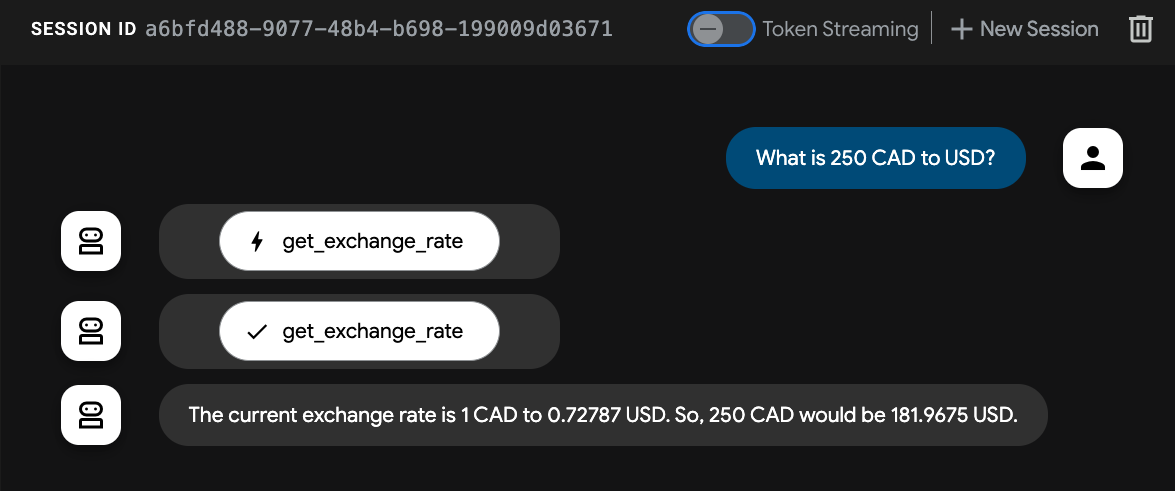
詢問代理:
「250 美元等於多少歐元?」
您會看到代理叫用 get_exchange_rate MCP 工具,並傳回換算後的金額。請先使用 Ctrl+C 停止 adk web 程序,再繼續操作。
5. Agent2Agent (A2A) 通訊協定
Agent2Agent (A2A) 通訊協定是一項開放標準,旨在讓 AI 代理之間能通訊及協作。
在現代多代理系統中,代理通常是以不同框架 (ADK、LangChain、CrewAI、AutoGen) 建構,並部署在不同基礎架構上。A2A 則定義標準化通訊合約,打破這些孤島。
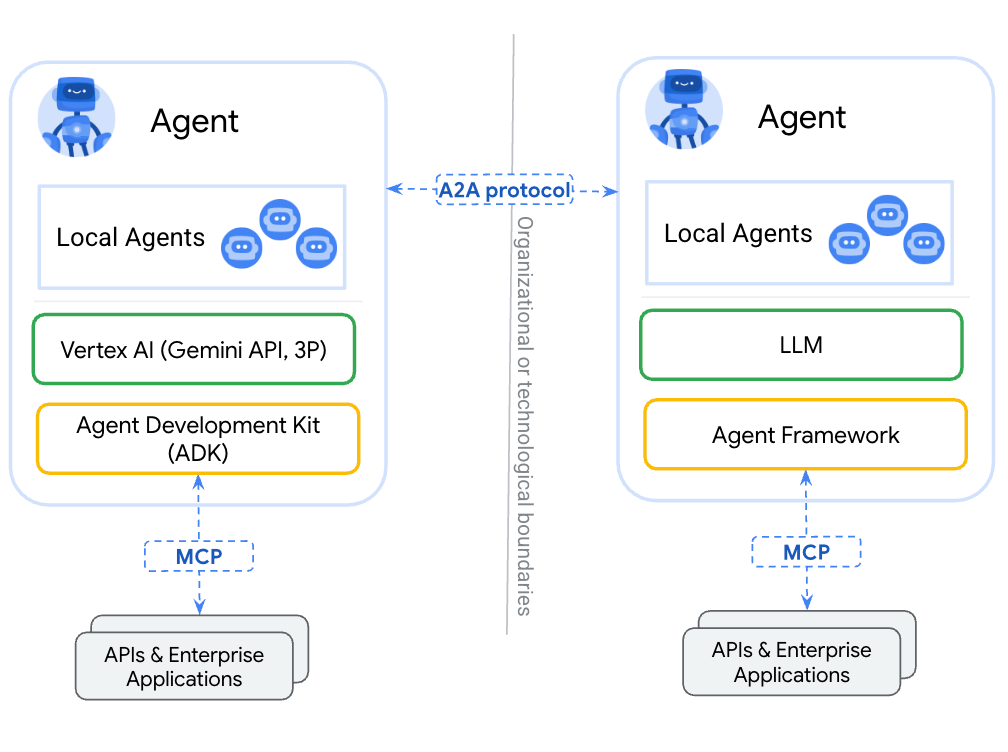
A2A 的重要概念
- 代理探索 (代理資訊卡):每個符合 A2A 規範的代理都會透過託管於
/.well-known/agent-card.json的標準 JSON 檔案,宣傳其能力、支援的 I/O 模式、驗證需求和技能。 - 代理技能 (
AgentSkill):代理可執行的特定功能或工具。其他代理會讀取這些技能,決定何時委派工作。 - JSON-RPC 通訊:代理透過 HTTP JSON-RPC 2.0 等標準傳輸方式,交換結構化訊息、工作和構件。

在下一個步驟,您會將 ADK 貨幣代理公開為 A2A 伺服器,讓其他代理能找到該代理,並將貨幣換算工作委派給該代理!
6. 將貨幣代理公開為 A2A 伺服器
ADK 提供 to_a2a() 公用函式,可輕鬆將任何 LlmAgent 轉換為與 A2A 相容的伺服器。
查看 currency_agent/agent.py 的底部:
# Make the agent A2A-compatible
PORT = int(os.getenv("PORT", 8081))
AGENT_URL = os.getenv("AGENT_URL")

if AGENT_URL:
    parsed = urlparse(AGENT_URL)
    protocol = parsed.scheme or "https"
    host = parsed.hostname
    port = parsed.port or 443
else:
    protocol = "http"
    host = "localhost"
    port = PORT

a2a_app = to_a2a(root_agent, host=host, port=port, protocol=protocol)

if __name__ == "__main__":
    import uvicorn

    logger.info(f"🚀 Starting currency_agent on port {PORT}")
    uvicorn.run(a2a_app, host="0.0.0.0", port=PORT)
to_a2a() 輔助程式會自動執行下列操作:
- 檢查
LlmAgent的工具和指令。 - 生成 A2A
AgentCard,說明其技能 (例如currency_agent-get_exchange_rate)。 - 將代理封裝在支援 JSON-RPC 端點的 FastAPI 應用程式 (
a2a_app) 中。 - 根據
AGENT_URL(或 localhost),動態設定代理資訊卡中通告的url。
啟動 Currency Agent A2A 伺服器
在第二個終端機啟動貨幣代理:
uv run python currency_agent/agent.py
伺服器會在通訊埠 8081 啟動:
[INFO]: --- 🔧 Loading MCP tools from MCP Server at http://localhost:8080/mcp... ---
[INFO]: --- 🤖 Creating ADK Currency Agent... ---
[INFO]: 🚀 Starting currency_agent on port 8081
INFO:     Started server process
INFO:     Waiting for application startup.
INFO:     Application startup complete.
INFO:     Uvicorn running on http://0.0.0.0:8081 (Press CTRL+C to quit)
檢查代理資訊卡
在瀏覽器中,前往代理資訊卡端點:http://localhost:8081/.well-known/agent-card.json
您會看到自動生成的 JSON 中繼資料:
{
  "name": "currency_agent",
  "description": "An agent that can help with currency conversions",
  "supportedInterfaces": [
    {
      "url": "http://localhost:8081",
      "protocolBinding": "JSONRPC",
      "protocolVersion": "1.0"
    }
  ],
  "version": "0.0.1",
  "capabilities": {
    "streaming": true
  },
  "defaultInputModes": [
    "text/plain"
  ],
  "defaultOutputModes": [
    "text/plain"
  ],
  "skills": [
    {
      "id": "currency_agent",
      "name": "model",
      "description": "An agent that can help with currency conversions",
      "tags": [
        "llm"
      ]
    },
    {
      "id": "currency_agent-get_exchange_rate",
      "name": "get_exchange_rate",
      "description": "Use this to get current exchange rate.",
      "tags": [
        "llm",
        "tools"
      ]
    }
  ]
}
使用 A2A 用戶端進行測試
開啟第三個終端機,前往 python 資料夾 (cd getting-started-mcp-a2a-adk/python),然後使用專屬的 A2A 測試用戶端指令碼測試 A2A 端點:
uv run python currency_agent/test_a2aclient.py
用戶端會使用 A2ACardResolver 解析代理資訊卡,並調度 JSON-RPC 訊息:
🔄 Fetching the agent card at http://localhost:8081
✅ Successfully fetched the agent card
====================================================
                     AgentCard
====================================================
Name        : currency_agent
Description : An agent that can help with currency conversions
Interfaces  : [0] http://localhost:8081  (JSONRPC 1.0)
Skills      : currency_agent, currency_agent-get_exchange_rate
====================================================
🔄 Initializing a non-streaming client
Sending request: "how much is 100 USD in GBP?"
Response:
100 USD is currently equal to approximately 73.37 GBP...
貨幣代理現在已是功能完整的 A2A 伺服器!
7. 建構旅行社
現在要建構自動調度管理的旅遊服務專員。這個代理展示了 ADK 代理如何輕鬆結合兩種不同的工具模式:
- 本機代理工具 (
weather_agent):在相同 Python 執行階段中執行的程序內 ADK 子代理,可避免任何網路或序列化延遲。 - 遠端代理工具 (
currency_agent):透過網路使用 A2A 通訊協定和RemoteA2aAgent連線的外部代理。
                    +-----------------------------+
                    |        travel_agent         |
                    | (Orchestrator with Web UI)  |
                    +--------------+--------------+
                                   |
             +---------------------+---------------------+
             | (In-process call)                         | (A2A Network Hop)
             v                                           v
+-------------------------+                 +-------------------------+
|   weather_agent         |                 |   currency_agent        |
|  (Local AgentTool)      |                 |  (Remote A2A Agent)     |
|  Calls wttr.in API      |                 |  Calls Currency MCP Svc |
+-------------------------+                 +-------------------------+
1. 當地天氣子代理
請查看 travel_agent/subagents/weather_agent.py:
import logging
import httpx
from google.adk.agents import LlmAgent

logger = logging.getLogger(__name__)

SYSTEM_INSTRUCTION = (
    "You are a specialized assistant for providing weather forecasts and conditions for travel destinations. "
    "Your sole purpose is to use the 'get_weather' tool to fetch weather information. "
    "Provide clear, concise summaries of current weather conditions, temperatures, and forecasts to help travelers pack and plan."
)


def get_weather(location: str = "London") -> dict:
    """Gets the current weather and forecast for a given location or city."""
    logger.info(f"--- 🌤️ Tool: get_weather called for {location} ---")
    try:
        response = httpx.get(
            f"https://wttr.in/{location}?format=j1",
            headers={"User-Agent": "curl/7.68.0"},
            timeout=8.0,
        )
        response.raise_for_status()
        data = response.json()
        current = data["current_condition"][0]
        return {
            "location": location,
            "condition": current.get("weatherDesc", [{}])[0].get("value", "Unknown"),
            "temperature_celsius": f"{current.get('temp_C', 'N/A')}°C",
            "temperature_fahrenheit": f"{current.get('temp_F', 'N/A')}°F",
            "humidity": f"{current.get('humidity', 'N/A')}%",
            "wind_speed_kmph": f"{current.get('windspeedKmph', 'N/A')} km/h",
        }
    except Exception as e:
        logger.warning(f"⚠️ Weather lookup failed: {e}. Returning simulated estimate.")
        return {
            "location": location,
            "condition": "Partly Cloudy",
            "temperature_celsius": "20°C",
            "temperature_fahrenheit": "68°F",
            "humidity": "55%",
            "wind_speed_kmph": "10 km/h",
            "note": f"Live data unavailable ({e}); showing estimated conditions.",
        }


weather_agent = LlmAgent(
    model="gemini-3.8-flash",
    name="weather_agent",
    description="A local specialist agent that provides current weather reports and forecasts for travel destinations.",
    instruction=SYSTEM_INSTRUCTION,
    tools=[get_weather],
)
天氣代理是 LlmAgent,具備函式工具,可從 wttr.in 擷取即時天氣資訊,並有彈性的備用機制。
2. 旅行社自動調度管理工具
現在來看看 travel_agent/agent.py:
import logging
import os
from dotenv import load_dotenv
from google.adk.agents import LlmAgent
from google.adk.tools.agent_tool import AgentTool
from google.adk.agents.remote_a2a_agent import RemoteA2aAgent, AGENT_CARD_WELL_KNOWN_PATH

try:
    from travel_agent.subagents.weather_agent import weather_agent
except ImportError:
    from subagents.weather_agent import weather_agent

logger = logging.getLogger(__name__)
logging.basicConfig(format="[%(levelname)s]: %(message)s", level=logging.INFO)

load_dotenv()

SYSTEM_INSTRUCTION = (
    "You are a helpful travel assistant. You help users plan trips, recommend places, "
    "and answer travel-related questions.\n\n"
    "- Whenever a user asks about currency exchange rates or money conversions, "
    "delegate the request to the 'currency_agent' tool.\n"
    "- Whenever a user asks about the weather, climate, or forecasts for a destination, "
    "delegate the request to the 'weather_agent' tool."
)

CURRENCY_AGENT_URL = os.getenv("CURRENCY_AGENT_URL", "http://localhost:8081").rstrip("/")

logger.info(
    "--- 🔗 Connecting to Remote A2A Currency Agent at %s... ---",
    CURRENCY_AGENT_URL,
)

currency_remote_agent = RemoteA2aAgent(
    name="currency_agent",
    agent_card=f"{CURRENCY_AGENT_URL}{AGENT_CARD_WELL_KNOWN_PATH}",
    description="An agent that can help with currency conversions and exchange rates.",
)

logger.info("--- 🤖 Creating ADK Travel Agent... ---")

root_agent = LlmAgent(
    model="gemini-3.8-flash",
    name="travel_agent",
    description="A travel assistant that can help plan trips, check weather forecasts via the local weather agent, and convert currencies via the remote currency agent.",
    instruction=SYSTEM_INSTRUCTION,
    tools=[
        AgentTool(agent=currency_remote_agent),
        AgentTool(agent=weather_agent),
    ],
)

if __name__ == "__main__":
    import uvicorn
    from google.adk.cli.fast_api import get_fast_api_app

    PORT = int(os.getenv("PORT", 8082))
    logger.info(f"🚀 Starting travel_agent Web UI on port {PORT}")
    app = get_fast_api_app(web=True, allow_origins=["*"], agents_dir=os.path.dirname(__file__) or ".")
    uvicorn.run(app, host="0.0.0.0", port=PORT)
主要亮點:
RemoteA2aAgent從http://localhost:8081/.well-known/agent-card.json擷取貨幣代理的資訊卡。currency_remote_agent和weather_agent都是使用 ADK 的AgentTool包裝。- 執行
travel_agent/agent.py會直接使用get_fast_api_app(web=True)在通訊埠8082啟動 ADK 網頁 UI。
8. 在本機執行及測試多代理系統
現在三個元件都已準備就緒!我們在本機執行並測試完整系統。
同時執行三項服務
請確認服務在三個獨立的終端機視窗中執行 (從 getting-started-mcp-a2a-adk/python 目錄),順序如下:
終端機 1 (貨幣 MCP 伺服器):
uv run python currency_mcp_server/server.py
(在通訊埠 8080 執行)
第 2 航廈 (Currency A2A 代理):
uv run python currency_agent/agent.py
(在通訊埠 8081 執行)
終端機 3 (具有網頁 UI 的旅行社):
uv run python travel_agent/agent.py
(在通訊埠 8082 執行)
透過 ADK 網頁 UI 測試
在瀏覽器中開啟 http://localhost:8082 (或在 Cloud Shell 中使用通訊埠 8082 的「網頁預覽」)。
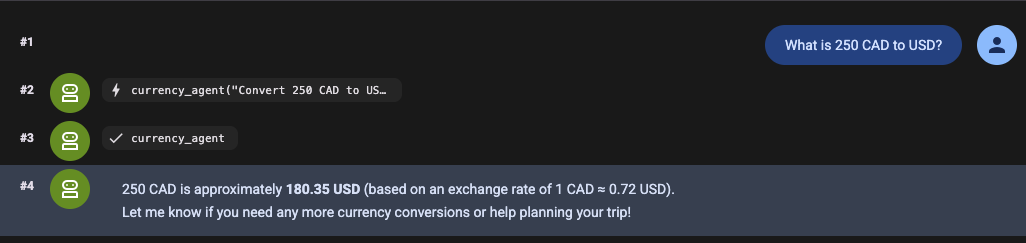
向旅遊服務專員提出需要同時使用兩項工具的複合問題:
「我正在規劃倫敦之旅,天氣如何?200 歐元可以換多少英鎊?」
觀看執行流程:
- 旅行社在網頁 UI 中收到要求。
- 它會將天氣問題委派給本機
weather_agent,後者會從wttr.in擷取目前的天氣狀況。 - 它會透過 A2A 通訊協定,將貨幣換算作業委派給通訊埠 8081 上的
currency_agent。 currency_agent透過 MCP 呼叫通訊埠 8080 上的currency_mcp_server,擷取匯率。- 所有結果都會統整成一則實用的答案,並傳回給您!
透過指令列測試
您也可以直接從 CLI 測試查詢,不必開啟瀏覽器:
uv run adk run travel_agent "What is the weather in London and how much is 100 USD in EUR?"
現在,所有項目都能在本機電腦上順利運作,接著請將整個系統部署至 Google Cloud Run!
9. 將多代理系統部署至 Cloud Run
每個元件都有自己的 Dockerfile 和獨立的 pyproject.toml,因此可以獨立建構並部署至 Cloud Run。
您將使用 gcloud 部署各項服務,並自動將網址連結在一起。
設定環境變數
設定雲端專案 ID 和目標區域:
export PROJECT_ID=<YOUR_GOOGLE_CLOUD_PROJECT_ID>
export REGION=us-central1
步驟 1:部署貨幣 MCP 伺服器
直接從來源部署 MCP 伺服器:
# 1. Deploy MCP server
gcloud run deploy currency-mcp-server \
  --source currency_mcp_server \
  --region $REGION \
  --allow-unauthenticated

# 2. Capture the deployed MCP server URL
MCP_SERVER_URL=$(gcloud run services describe currency-mcp-server --region $REGION --format='value(status.url)')/mcp
echo "MCP Server URL: $MCP_SERVER_URL"
Step 2:部署貨幣代理
currency-agent 的公開網址是在首次部署時指派,因此請先部署服務、擷取網址,然後更新 AGENT_URL 環境變數,讓 A2A 代理資訊卡顯示正確的公開 HTTPS 位址:
# 1. Deploy Currency Agent connected to the deployed MCP Server
gcloud run deploy currency-agent \
  --source currency_agent \
  --region $REGION \
  --allow-unauthenticated \
  --update-env-vars MCP_SERVER_URL="$MCP_SERVER_URL",GOOGLE_GENAI_USE_ENTERPRISE="true",GOOGLE_CLOUD_PROJECT="$PROJECT_ID",GOOGLE_CLOUD_LOCATION="global"

# 2. Capture its assigned Cloud Run URL
CURRENCY_AGENT_URL=$(gcloud run services describe currency-agent --region $REGION --format='value(status.url)')
echo "Currency Agent URL: $CURRENCY_AGENT_URL"

# 3. Update AGENT_URL so the agent advertises its public HTTPS endpoint in its Agent Card
gcloud run services update currency-agent \
  --region $REGION \
  --update-env-vars AGENT_URL="$CURRENCY_AGENT_URL"
步驟 3:部署旅遊服務專員
現在,請部署旅遊服務專員,並使用 CURRENCY_AGENT_URL 進行設定:
# 1. Deploy Travel Agent (with ADK Web UI) connected to Currency Agent
gcloud run deploy travel-agent \
  --source travel_agent \
  --region $REGION \
  --allow-unauthenticated \
  --update-env-vars CURRENCY_AGENT_URL="$CURRENCY_AGENT_URL",GOOGLE_GENAI_USE_ENTERPRISE="true",GOOGLE_CLOUD_PROJECT="$PROJECT_ID",GOOGLE_CLOUD_LOCATION="global"

# 2. Capture its assigned Cloud Run URL
TRAVEL_AGENT_URL=$(gcloud run services describe travel-agent --region $REGION --format='value(status.url)')
echo "Travel Agent URL: $TRAVEL_AGENT_URL"
10. 在 Cloud Run 測試多代理系統
部署完三個微服務後,請在 Cloud Run 驗證各層。
1. 測試遠端 MCP 伺服器
在指令列測試已部署的 Cloud Run MCP 伺服器:
MCP_SERVER_URL="$MCP_SERVER_URL" uv run python currency_mcp_server/test_server.py
您應該會看到工具已列出,並在 Cloud Run 上成功叫用。
2. 透過 A2A 測試貨幣代理
使用 A2A 測試用戶端,測試已部署的 Currency Agent:
AGENT_URL="$CURRENCY_AGENT_URL" uv run python currency_agent/test_a2aclient.py
用戶端會從 Cloud Run 擷取遠端代理資訊卡,並透過 HTTPS JSON-RPC 交換訊息。
3. 在 Cloud Run 測試旅遊服務專員網頁 UI
在瀏覽器中開啟 $TRAVEL_AGENT_URL!
完整的 ADK 網頁 UI 會直接從 Cloud Run 提供。問題範例:
「我正在規劃東京之旅,天氣如何?500 美元可以換多少日圓?」
[Browser]
   │
   ▼ (HTTPS)
[Cloud Run: travel-agent]
   ├──> Local in-process tool: weather_agent (wttr.in)
   └──> A2A JSON-RPC (HTTPS)
           │
           ▼
        [Cloud Run: currency-agent]
           └──> MCP Streamable HTTP (HTTPS)
                   │
                   ▼
                [Cloud Run: currency-mcp-server] (Frankfurter API)
這三項服務在無伺服器基礎架構上獨立調度資源,並透過開放式通訊協定順暢通訊!
11. 恭喜與清理
學習成果
恭喜!您已建構並部署正式環境等級的多代理系統:
- Model Context Protocol (MCP):建立 FastMCP 伺服器,透過 Streamable HTTP 公開 Live API 工具。
- Agent Development Kit (ADK):使用
LlmAgent建構模組化代理、使用McpToolset連結 MCP 工具,並託管 ADK 網頁 UI。 - Agent2Agent (A2A) 通訊協定:將代理公開為 A2A 服務 (
to_a2a)、發布代理資訊卡 (agent-card.json),並使用RemoteA2aAgent叫用遠端代理。 - 多代理架構:結合本機程序內子代理 (
weather_agent) 和分散式遠端代理 (currency_agent)。 - Cloud Run 無伺服器部署:將這三項服務容器化並部署,同時自動設定連結。
如要查看完整程式碼 (包括 Python 和 Java 實作) 和日後更新,請前往 getting-started-mcp-a2a-adk 存放區。
清除所用資源
如要避免系統向您的 Google Cloud 帳戶收取本程式碼實驗室建立的 Cloud Run 服務費用,請按照下列步驟操作:
刪除已部署的 Cloud Run 服務:
gcloud run services delete currency-mcp-server --region $REGION --quiet
gcloud run services delete currency-agent --region $REGION --quiet
gcloud run services delete travel-agent --region $REGION --quiet
或者,如果您為這個程式碼實驗室建立了專屬專案,可以關閉整個專案:
gcloud projects delete $PROJECT_ID