

1. 簡介
Google Antigravity 是代理式開發平台,旨在協助您在代理時代進行開發。Antigravity 是 AI 代理的中央指揮中心,提供統一平台,可啟動、監控及調度代理活動。
在本程式碼研究室中,我們將先瞭解代理技能,這是一種輕量級的開放格式,可運用專業知識和工作流程擴充 AI 代理的功能。您將瞭解代理程式技能的定義、優點和建構方式。接著,您將建構多項 Agent Skills,包括 Git 格式化工具、範本產生器、工具程式碼架構等,全都可在 Antigravity 中使用。
需求條件:
- 已安裝並設定 Antigravity。
- 瞭解 Google Antigravity 的基本知識。建議先完成「開始使用 Google Antigravity」程式碼研究室。
2. 為什麼要使用技能
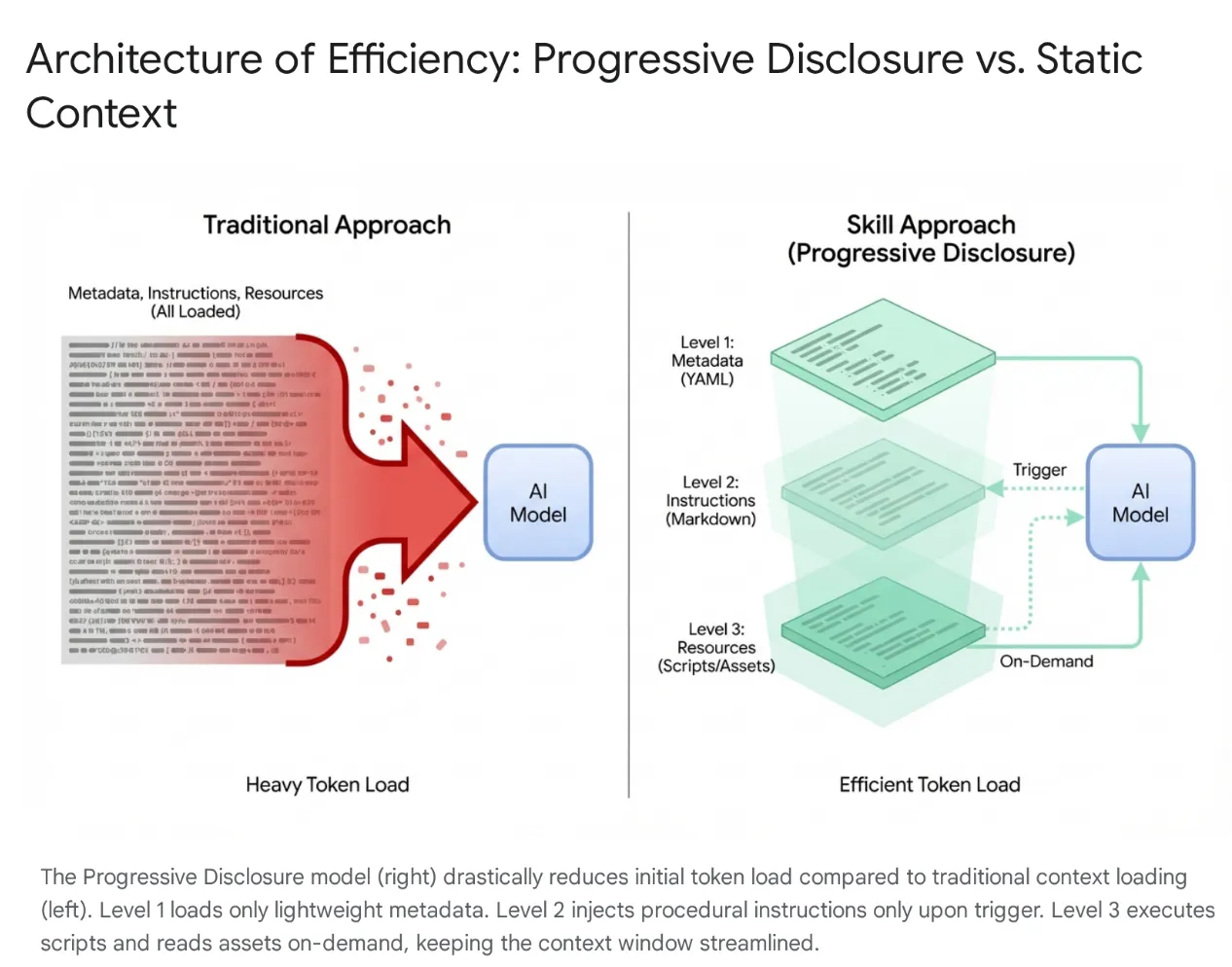
現代 AI 代理已從簡單的監聽器演變為複雜的推理器,可與本機檔案系統和外部工具 (透過 MCP 伺服器) 整合。不過,如果隨意將整個程式碼集和數百種工具載入代理,就會導致情境飽和和「工具膨脹」。即使上下文窗口很大,將 4 萬到 5 萬個未使用的工具權杖傾印到主動記憶體中,也會導致高延遲、浪費資金,以及「脈絡腐敗」,也就是模型會因不相關的資料而感到困惑。
解決方案:代理程式技能
為解決這個問題,Anthropic 推出代理程式技能,將架構從單體式內容載入轉移至漸進式揭露。模型不必在工作階段開始時「記憶」每個特定工作流程 (例如資料庫遷移或安全性稽核),而是將這些功能封裝成可探索的模組化單元。
運作方式
模型一開始只會接觸到輕量的「選單」中繼資料。只有在使用者意圖與技能完全相符時,才會載入大量程序知識 (指令和指令碼)。這可確保要求重構驗證中介軟體的開發人員取得安全環境,而不需載入不相關的 CSS 管道,讓環境保持精簡、快速且符合成本效益。
3. Agent Skills 和 Antigravity
在 Antigravity 生態系統中,「技能」是專門的訓練模組,可彌合一般模型與特定情境之間的差距。當使用者要求執行相關工作時,代理程式會「裝備」一組定義的指令和通訊協定,例如資料庫遷移標準或安全檢查。透過動態載入這些執行通訊協定,Skills 可有效將 AI 從一般程式設計師轉變為專家,嚴格遵守組織編纂的最佳做法和安全標準。
什麼是 Antigravity 的 Skill?
在 Google Antigravity 中,技能是指以目錄為基礎的套件,內含定義檔 (SKILL.md) 和選用的支援資產 (指令碼、參照、範本)。
這是隨需擴充功能的機制。
- 隨選:與一律會載入的系統提示不同,只有在代理程式判斷技能與使用者目前的要求相關時,才會載入代理程式的情境。這項做法可最佳化脈絡視窗,避免代理程式受到無關指令干擾。在有數十種工具的大型專案中,這種選擇性載入對於效能和推理準確度至關重要。
- 功能擴充:技能不僅能提供指示,還能執行動作。透過 Python 或 Bash 指令碼組合,技能可讓代理程式在本機或外部網路執行複雜的多步驟動作,使用者不必手動執行指令。這項功能可將代理程式從文字生成器轉變為工具使用者。
技能與生態系統 (工具、規則和工作流程)
Model Context Protocol (MCP) 就像代理的「雙手」,可提供與 GitHub 或 PostgreSQL 等外部系統的持續連線,而 Skills 則像「大腦」,可指揮代理。
MCP 會處理有狀態的基礎架構,而 Skills 則是輕量型暫時性工作定義,可封裝使用這些工具的方法。採用無伺服器方法後,代理程式就能執行臨時工作 (例如產生修訂記錄或遷移),不必執行持續性程序,也不會產生作業負擔,且只會在工作處於啟用狀態時載入內容,並在工作完成後立即釋出內容。
技能由代理程式觸發:模型會自動偵測使用者意圖,並動態提供所需專業知識。這種架構可實現強大的可組合性;舉例來說,全域規則可強制在資料庫變更期間使用「安全遷移」技能,單一工作流程則可協調多項技能,建構穩固的部署管道。
4. 建立技能
在 Antigravity 中建立技能時,請遵循特定目錄結構和檔案格式。這項標準化作業可確保技能具備可攜性,且代理程式能可靠地剖析及執行技能。設計刻意簡化,採用 Markdown 和 YAML 等廣為人知的格式,降低開發人員擴充 IDE 功能的門檻。
目錄結構
典型的技能目錄如下所示:
my-skill/
├── SKILL.md # The definition file
├── scripts/ # [Optional] Python, Bash, or Node scripts
     ├── run.py
     └── util.sh
├── references/ # [Optional] Documentation or templates
     └── api-docs.md
└── assets/ # [Optional] Static assets (images, logos)
這種結構可有效區分關注事項。邏輯 (scripts) 會與指令 (SKILL.md) 和知識 (references) 分開,反映標準軟體工程實務。
SKILL.md 定義檔
SKILL.md 檔案是 Skill 的大腦,這項參數會說明技能內容、使用時機和執行方式。
這項服務包含兩個部分:
- YAML 前頁內容
- Markdown 內文。
YAML Frontmatter
這是中繼資料層。這是代理程式高階路由器編列索引的唯一技能部分。使用者傳送提示時,代理程式會根據所有可用技能的說明欄位,進行提示的語意比對。
---
name: database-inspector
description: Use this skill when the user asks to query the database, check table schemas, or inspect user data in the local PostgreSQL instance.
---
關鍵欄位:
- 名稱:非必填。範圍內的名稱不得重複。可使用小寫字母和連字號 (例如
postgres-query、pr-reviewer)。如未提供,預設會使用目錄名稱。 - 說明:這是必填欄位,也是最重要的欄位。這項功能就像「觸發字詞」,該字串必須清楚易懂,大型語言模型才能辨識語義相關性。「資料庫工具」這類籠統的說明不夠充分,例如「針對本機 PostgreSQL 資料庫執行唯讀 SQL 查詢,以擷取使用者或交易資料。Use this for debugging data states" ensures the skill is picked up correctly.
Markdown 內文
主體包含指令。這是「提示工程」的檔案。技能啟動後,這項內容會插入代理程式的內容視窗。
內容應包含:
- 目標:清楚說明這項技能的用途。
- 指令:逐步邏輯。
- 範例:少量樣本的輸入和輸出內容,可引導模型效能。
- 限制:「請勿」規則 (例如「請勿執行 DELETE 查詢」)。
SKILL.md 內文範例:
Database Inspector

Goal
To safely query the local database and provide insights on the current data state.

Instructions
- Analyze the users natural language request to understand the data need.
- Formulate a valid SQL query.
 - CRITICAL: Only SELECT statements are allowed.
- Use the script scripts/query_runner.py to execute the SQL.
 - Command: python scripts/query_runner.py "SELECT * FROM..."
- Present the results in a Markdown table.

Constraints
- Never output raw user passwords or API keys.
- If the query returns > 50 rows, summarize the data instead of listing it all.
整合指令碼
技能最實用的功能之一,就是能將執行作業委派給指令碼。這項功能可讓代理程式執行 LLM 無法直接執行的動作 (例如執行二進位檔、進行複雜的數學運算,或與舊版系統互動)。
腳本會放在 scripts/ 子目錄中。SKILL.md 會依相對路徑參照這些檔案。
5. 編寫技能
本節的目標是建構整合至 Antigravity 的技能,並逐步展示各種功能,例如資源/指令碼等。
您可以從 Github 存放區下載技能:https://github.com/rominirani/antigravity-skills。
在瞭解如何建構這些技能前,我們先來看看如何設定這些技能,並在 Antigravity 系列產品中提供這些技能。下列資料夾適用於發布本實驗室時。
使用 Antigravity 或 Antigravity CLI
您可以在兩個範圍定義 Skills,包括專案專屬和使用者專屬 (即全域) Skills:
- 全域範圍 (
~/.gemini/config/skills/):適用於所有 Antigravity 產品 (Antigravity、Antigravity IDE、Antigravity CLI) 和專案。這些技能適用於使用者電腦上的所有專案。這類指令適用於一般公用程式,例如「Format JSON」、「Generate UUIDs」、「Review Code Style」,或與個人生產力工具整合。 - 專案/工作區範圍 (
<project-root>/.agents/skills/):這項設定會將技能限制在特定專案內。這項功能非常適合專案專屬指令碼,例如部署至特定環境、管理該應用程式的資料庫,或是為專有架構產生樣板程式碼。
在 Antigravity 或 Antigravity CLI 中安裝 Skills
在本教學課程中,我們只需要完成下列步驟 (您也可以自行操作):
步驟 1:執行 git clone https://github.com/rominirani/antigravity-skills
步驟 2:現在,您可以根據使用 Antigravity 或 Antigravity CLI,前往 antigravity-skills/skills_tutorial 資料夾。
步驟 3:你會看到一組技能,分別歸類在各自的資料夾中。複製下列 4 個資料夾:
git-commit-formatterlicense-header-adderdatabase-schema-validatorjson-to-pydantic
產品的目標技能資料夾 (專案範圍或全域範圍)。
步驟 4:如果您使用 Antigravity 或 Antigravity CLI,請將其複製到 <project-root>/.agents/skills/ (專案範圍)。
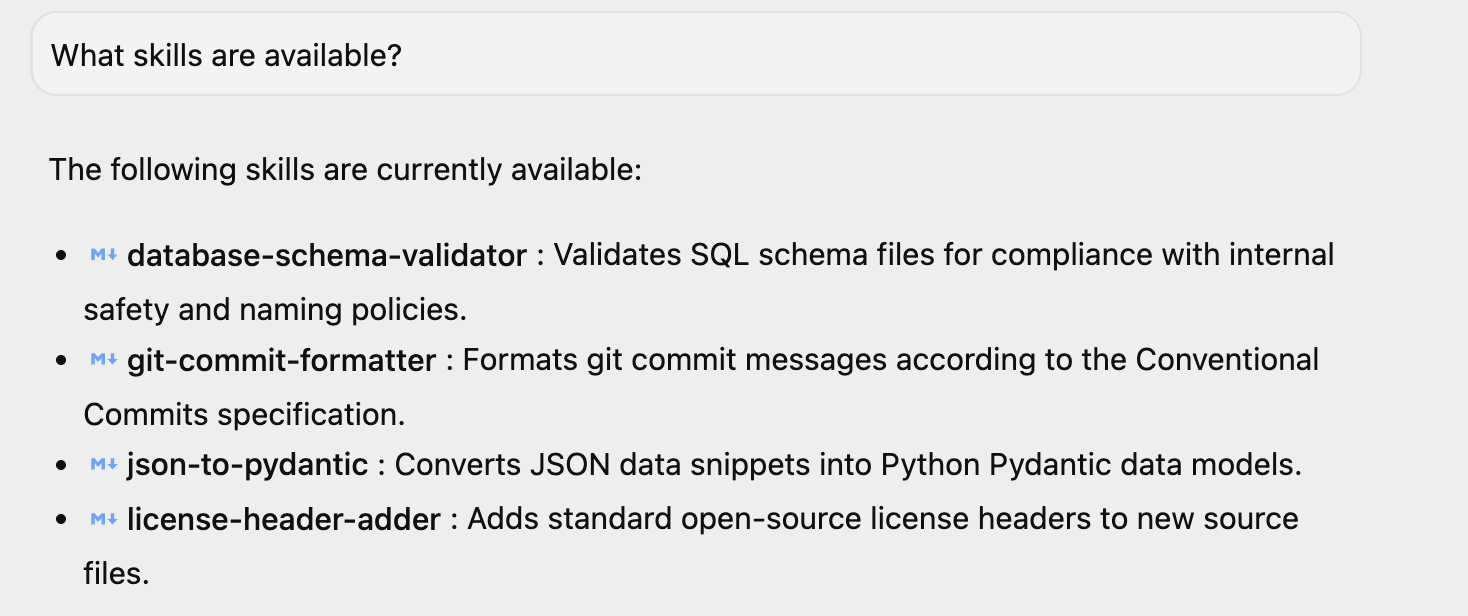
啟動 Antigravity 後,你可以問簡單的問題「有哪些技能?」,系統會回答相同的問題。您會看到列出的 4 項技能。如果您在環境中安裝了其他技能,也可能會看到這些技能。
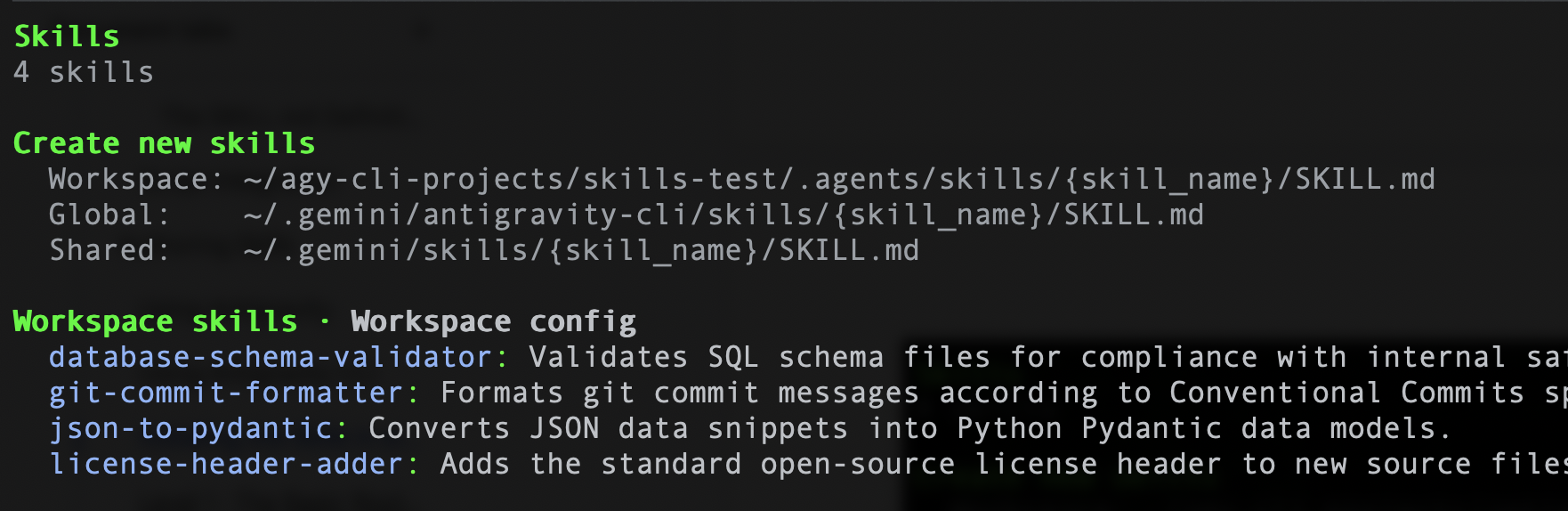
同樣地,如果您使用 Antigravity CLI,可以輸入下列指令 /skills,系統應會列出 4 項技能。下方顯示範例 :
我們已瞭解如何設定技能,現在就來看看各項技能,並瞭解這些技能的建構方式。您也可以使用這些範本建立自己的技能。
第 1 級:基本路由器 ( git-commit-formatter)
我們將此視為技能的「Hello World」。
開發人員通常會編寫延遲提交訊息,例如「wip」、「fix bug」、「updates」。手動強制執行「傳統提交」既繁瑣又容易忘記。讓我們實作一項 Skill,強制執行 Conventional Commits 規格。只要指示代理程式規則,就能讓代理程式擔任執行者。
git-commit-formatter/
└── SKILL.md  (Instructions only)
SKILL.md 檔案如下所示:
---
name: git-commit-formatter
description: Formats git commit messages according to Conventional Commits specification. Use this when the user asks to commit changes or write a commit message.
---

Git Commit Formatter Skill

When writing a git commit message, you MUST follow the Conventional Commits specification.

Format
`<type>[optional scope]: <description>`

Allowed Types
- **feat**: A new feature
- **fix**: A bug fix
- **docs**: Documentation only changes
- **style**: Changes that do not affect the meaning of the code (white-space, formatting, etc)
- **refactor**: A code change that neither fixes a bug nor adds a feature
- **perf**: A code change that improves performance
- **test**: Adding missing tests or correcting existing tests
- **chore**: Changes to the build process or auxiliary tools and libraries such as documentation generation

Instructions
1. Analyze the changes to determine the primary `type`.
2. Identify the `scope` if applicable (e.g., specific component or file).
3. Write a concise `description` in an imperative mood (e.g., "add feature" not "added feature").
4. If there are breaking changes, add a footer starting with `BREAKING CHANGE:`.

Example
`feat(auth): implement login with google`
如何在 Antigravity 中執行這個範例
下列步驟假設您已在本機電腦上安裝 Git,並正確設定。
假設您已啟動 Antigravity 或 Antigravity CLI,請按照下列步驟操作:
步驟 1:設定測試 Git 存放區
請專員設定乾淨的獨立目錄,用於測試 Git 作業。
你的提示詞:
Create a folder named git_test in the workspace, initialize a git repository inside it, and create an initial file auth.py with def login(): pass. Stage this file and make an initial commit.
提交時,系統會觸發技能,並根據我們在技能中擷取的建議格式化提交訊息。
我已建立資料夾、初始化 Git 存放區、建立初始檔案、暫存檔案,並使用傳統式提交訊息規格提交檔案:
 1. Created folder and initialized git repository:
     • Directory: git_test
     • Initialized empty Git repository in git_test/.git/
 2. Created initial file:
     • File: auth.py
     • Defined: auth.py:1-2
 3. Staged and committed changes:
     • Commit message: feat(auth): add initial login function
步驟 2:變更程式碼
請代理程式修改程式碼,以便提交變更。
你的提示詞:
In the git_test folder, modify auth.py to add Google Login functionality.
代理程式會編輯檔案以新增功能,為提交階段做準備。
步驟 3:暫存並提交變更
要求代理程式暫存變更並建立提交,即可觸發 git-commit-formatter 技能。
你的提示詞:
Stage the changes in the git_test folder and commit them. Make sure to format the commit message using the Conventional Commits skill.
代理程式會執行 git add auth.py,分析差異比較以判斷 auth 模組是否新增了功能,並在執行 git commit 前,擬定類似 feat(auth): implement google login 的傳統提交訊息。
步驟 4:驗證 Git 記錄
請專員擷取 Git 記錄,確認格式化的提交內容已成功記錄。
你的提示詞:
Show me the git log in the git_test folder.
代理程式會執行 git log -n 5,並傳回顯示格式化提交訊息的輸出內容。
第 2 級:資產使用率 (license-header-adder)
這是「參考」模式。
公司專案中的每個來源檔案可能都需要特定的 20 行 Apache 2.0 授權標頭。直接將這段靜態文字放入提示 (或 SKILL.md) 中,會浪費資源。每次建立索引時都會消耗權杖,且模型可能會在法律文件中「幻覺」出錯別字。建議您將靜態文字卸載至 resources/ 資料夾中的純文字檔案。只有在需要時,技能才會指示代理程式讀取這個檔案。
您可以在 skills 目錄的 license-header-adder 資料夾中找到檔案。
license-header-adder/
├── SKILL.md
└── resources/
   └── HEADER_TEMPLATE.txt  (The heavy text)
SKILL.md 檔案如下所示:
---
name: license-header-adder
description: Adds the standard open-source license header to new source files. Use involves creating new code files that require copyright attribution.
---

# License Header Adder Skill

This skill ensures that all new source files have the correct copyright header.

## Instructions

1. **Read the Template**:
  First, read the content of the header template file located at `resources/HEADER_TEMPLATE.txt`.

2. **Prepend to File**:
  When creating a new file (e.g., `.py`, `.java`, `.js`, `.ts`, `.go`), prepend the `target_file` content with the template content.

3. **Modify Comment Syntax**:
  - For C-style languages (Java, JS, TS, C++), keep the `/* ... */` block as is.
  - For Python, Shell, or YAML, convert the block to use `#` comments.
  - For HTML/XML, use `<!-- ... -->`.
如何在 Antigravity 中執行這個範例
如果您已執行先前的範例,授權標頭就會新增完畢。你可以在這裡查看或嘗試使用新提示。
假設您已啟動 Antigravity 或 Antigravity CLI,請按照下列步驟操作:
步驟 1:使用範例程式碼建立 Python 檔案
你的提示詞:
Create a new file my_script.py with the following python code:

def hello():
   print("Hello, World!")
發生情況 (說明):代理程式叫用檔案寫入工具 (write_to_file),直接在您的有效工作區目錄中建立名為 my_script.py 的新檔案,並將基本 Python 函式寫入該檔案。此外,提示詞也觸發了 license-header-adder 技能。代理程式找到並讀取授權範本檔案 (HEADER_TEMPLATE.txt),將註解樣式從 C 樣式區塊註解 (/* ... */) 修改為 Python 樣式註解 (#),然後使用 replace_file_content 工具將其加到檔案頂端。
步驟 2:驗證檔案內容
請查看 my_script.py 檔案。頂端會顯示授權標頭。
第 3 級:透過範例學習 (json-to-pydantic)
「少量樣本」模式。
將鬆散資料 (例如 JSON API 回應) 轉換為嚴格程式碼 (例如 Pydantic 模型) 時,需要做出數十項決策。我們應該如何命名類別?我們應該使用 Optional 嗎?snake_case 或 camelCase?以英文撰寫這 50 條規則既繁瑣又容易出錯。
LLM 是模式比對引擎。
使用黃金範例 (Input -> Output) 撰寫技能,通常比詳細的指令更有效。
前往包含技能檔案的 json-to-pydantic/ 資料夾,如下所示:
json-to-pydantic/
├── SKILL.md
└── examples/
   ├── input_data.json   (The Before State)
   └── output_model.py   (The After State)
SKILL.md 檔案如下所示:
---
name: json-to-pydantic
description: Converts JSON data snippets into Python Pydantic data models.
---

# JSON to Pydantic Skill

This skill helps convert raw JSON data or API responses into structured, strongly-typed Python classes using Pydantic.

Instructions

1. **Analyze the Input**: Look at the JSON object provided by the user.
2. **Infer Types**:
  - `string` -> `str`
  - `number` -> `int` or `float`
  - `boolean` -> `bool`
  - `array` -> `List[Type]`
  - `null` -> `Optional[Type]`
  - Nested Objects -> Create a separate sub-class.

3. **Follow the Example**:
  Review `examples/` to see how to structure the output code. notice how nested dictionaries like `preferences` are extracted into their own class.

  - Input: `examples/input_data.json`
  - Output: `examples/output_model.py`

Style Guidelines
- Use `PascalCase` for class names.
- Use type hints (`List`, `Optional`) from `typing` module.
- If a field can be missing or null, default it to `None`.
/examples 資料夾中會有 JSON 檔案和輸出檔案 (即 Python 檔案)。兩者如下所示:
input_data.json
{
   "user_id": 12345,
   "username": "jdoe_88",
   "is_active": true,
   "preferences": {
       "theme": "dark",
       "notifications": [
           "email",
           "push"
       ]
   },
   "last_login": "2024-03-15T10:30:00Z",
   "meta_tags": null
}
output_model.py
from pydantic import BaseModel, Field
from typing import List, Optional

class Preferences(BaseModel):
   theme: str
   notifications: List[str]

class User(BaseModel):
   user_id: int
   username: str
   is_active: bool
   preferences: Preferences
   last_login: Optional[str] = None
   meta_tags: Optional[List[str]] = None
如何在 Antigravity 中執行這個範例
假設您已啟動 Antigravity 或 Antigravity CLI,請按照下列步驟操作:
步驟 1:使用範例資料建立 JSON 檔案
要求代理程式建立新檔案 product.json,內含原始 JSON 酬載。
你的提示詞:
Create a new file product.json with the following JSON:

{
 "product": "Widget",
 "cost": 10.99,
 "stock": null
}
步驟 2:將 JSON 轉換為 Pydantic 模型
觸發 json-to-pydantic 技能,將 JSON 資料轉換為結構化 Pydantic 類別。
你的提示詞:
Convert the JSON in product.json to a Pydantic model and save it to product_model.py.
步驟 3:驗證輸出內容
請查看 product_model.py 檔案。其中會包含完成的 Pydantic 模型。
第 4 級:程序邏輯 (database-schema-validator)
這是「工具使用」模式。
如果您詢問 LLM「這個結構定義是否安全?」,即使缺少重要的主鍵,LLM 也可能會說一切正常,因為 SQL 看起來正確無誤。
我們將這項檢查委派給確定性指令碼。我們的 database-schema-validator 技能會將代理程式導向我們編寫的 Python 指令碼。指令碼會提供二元 (True/False) 真實值。
database-schema-validator/
├── SKILL.md
└── scripts/
   └── validate_schema.py  (The Validator)
SKILL.md 檔案如下所示:
---
name: database-schema-validator
description: Validates SQL schema files for compliance with internal safety and naming policies.
---

# Database Schema Validator Skill

This skill ensures that all SQL files provided by the user comply with our strict database standards.

Policies Enforced
1. **Safety**: No `DROP TABLE` statements.
2. **Naming**: All tables must use `snake_case`.
3. **Structure**: Every table must have an `id` column as PRIMARY KEY.

Instructions

1. **Do not read the file manually** to check for errors. The rules are complex and easily missed by eye.
2. **Run the Validation Script**:
  Use the `run_command` tool to execute the python script provided in the `scripts/` folder against the user's file.

  `python scripts/validate_schema.py <path_to_user_file>`

3. **Interpret Output**:
  - If the script returns **exit code 0**: Tell the user the schema looks good.
  - If the script returns **exit code 1**: Report the specific error messages printed by the script to the user and suggest fixes.
validate_schema.py 檔案如下所示:
import sys
import re

def validate_schema(filename):
   """
   Validates a SQL schema file against internal policy:
   1. Table names must be snake_case.
   2. Every table must have a primary key named 'id'.
   3. No 'DROP TABLE' statements allowed (safety).
   """
   try:
       with open(filename, 'r') as f:
           content = f.read()

       lines = content.split('\n')
       errors = []

       # Check 1: No DROP TABLE
       if re.search(r'DROP TABLE', content, re.IGNORECASE):
           errors.append("ERROR: 'DROP TABLE' statements are forbidden.")

       # Check 2 & 3: CREATE TABLE checks
       table_defs = re.finditer(r'CREATE TABLE\s+(?P<name>\w+)\s*\((?P<body>.*?)\);', content, re.DOTALL | re.IGNORECASE)

       for match in table_defs:
           table_name = match.group('name')
           body = match.group('body')

           # Snake case check
           if not re.match(r'^[a-z][a-z0-9_]*$', table_name):
               errors.append(f"ERROR: Table '{table_name}' must be snake_case.")

           # Primary key check
           if not re.search(r'\bid\b.*PRIMARY KEY', body, re.IGNORECASE):
               errors.append(f"ERROR: Table '{table_name}' is missing a primary key named 'id'.")

       if errors:
           for err in errors:
               print(err)
           sys.exit(1)
       else:
           print("Schema validation passed.")
           sys.exit(0)

   except FileNotFoundError:
       print(f"Error: File '{filename}' not found.")
       sys.exit(1)

if __name__ == "__main__":
   if len(sys.argv) != 2:
       print("Usage: python validate_schema.py <schema_file>")
       sys.exit(1)

   validate_schema(sys.argv[1])
如何在 Antigravity 中執行這個範例
假設您已啟動 Antigravity 或 Antigravity CLI,請按照下列步驟操作:
步驟 1:使用範例資料建立 SQL 檔案
要求代理建立新檔案 bad_schema.sql,其中包含多項政策違規事項。
你的提示詞:
Create a new file bad_schema.sql with the following SQL:

DROP TABLE IF EXISTS legacy_users;

CREATE TABLE userProfile (
    id INT PRIMARY KEY,
    bio TEXT
);

CREATE TABLE posts (
    title TEXT,
    content TEXT,
    created_at TIMESTAMP
);

CREATE TABLE comments (
    id INT PRIMARY KEY,
    post_id INT,
    body TEXT
);
上述結構定義檔案違反了所有三項政策:使用禁止的 DROP TABLE 陳述式、使用 camelCase 做為 userProfile 資料表名稱,以及忘記 posts 資料表中的 id 主鍵。
步驟 2:驗證 SQL 結構定義
觸發 database-schema-validator 技能,對檔案執行 Python 驗證指令碼。
請注意,在某些情況下,Antigravity 會自動觸發
database-schema-validator
技能。
你的提示詞:
Validate bad_schema.sql using the database-schema-validator skill.
步驟 3:驗證輸出內容
虛擬服務專員會回報失敗情形,並直接在對話中顯示指令碼發現的具體錯誤。輸出範例如下所示:
Validation of bad_schema.sql failed with the following policy errors:

 ### Validation Errors

   ERROR: 'DROP TABLE' statements are forbidden.
   ERROR: Table 'userProfile' must be snake_case.
   ERROR: Table 'posts' is missing a primary key named 'id'.
 ──────
 ### Suggested Fixes

 1. Remove Destructive Statements:
     • Delete DROP TABLE IF EXISTS legacy_users; to comply with the safety policy prohibiting DROP TABLE operations.
 2. Fix Naming Conventions:
     • Rename table userProfile to user_profile to satisfy the snake_case naming policy.
 3. Add Primary Key:
     • Add an id INT PRIMARY KEY column to the posts table to comply with table structure requirements.

 ──────
 ### Compliant Schema Example

   CREATE TABLE user_profile (
       id INT PRIMARY KEY,
       bio TEXT
   );

   CREATE TABLE posts (
       id INT PRIMARY KEY,
       title TEXT,
       content TEXT,
       created_at TIMESTAMP
   );

   CREATE TABLE comments (
       id INT PRIMARY KEY,
       post_id INT,
       body TEXT
   );
6. 開發人員工具包 (Agents CLI Skills)
「動作和生命週期」模式。
開發 AI 代理程式時,會重複執行生命週期工作,包括架構樣板檔案、設定本機執行階段環境、執行測試提示,以及啟動互動式遊樂場。
Agents CLI Skills 會將這個生命週期專業知識封裝到特定代理程式技能中,因此您不必強迫程式設計助理猜測目錄結構,或從頭編寫樣板代理程式設定。
Agent CLI (指令列介面) 技能可直接在終端機中,為開發人員提供簡化的自動化功能,縮短原始程式碼與自主執行作業之間的差距。Agent Development Kit (ADK) 著重於程式輔助架構,提供 SDK、API 和結構藍圖,協助您建構及協調 AI 代理,而 Agent CLI 技能則提供運作能力。開發人員可透過這項工具在本機架構、測試及部署代理程式,並快速取得意見回饋,完全略過繁重的 UI 負擔。
如果對應至 Google Cloud,Agent CLI 技能可做為企業級基礎架構的直接管道。您不必在控制台中逐一點選,只要使用 CLI 指令,就能立即封裝代理程式工作流程、管理存取權限,並將其部署至 Google Cloud 生態系統 (例如 Vertex AI 或 Cloud Run)。這項功能可將複雜的雲端架構工作,轉換為簡單且可重現的終端機指令,讓您更輕鬆地將自主代理程式整合至現有的 CI/CD 部署管道。
如何安裝
確認已安裝 Python 3.11+、Node.js 和 uv 套件管理工具。接著在終端機中執行設定指令:
uvx google-agents-cli setup
這項指令會安裝 agents-cli 二進位檔,並在程式碼助理的環境中註冊其專門技能,用於架構和評估。
注意:技能會安裝在 ~/.agents/skills 資料夾中,Antigravity 可以看見這個資料夾。如要在 Antigravity CLI 中查看這些技能,必須將其移至 ~/.gemini/antigravity-cli/skills 資料夾 (全域範圍)。
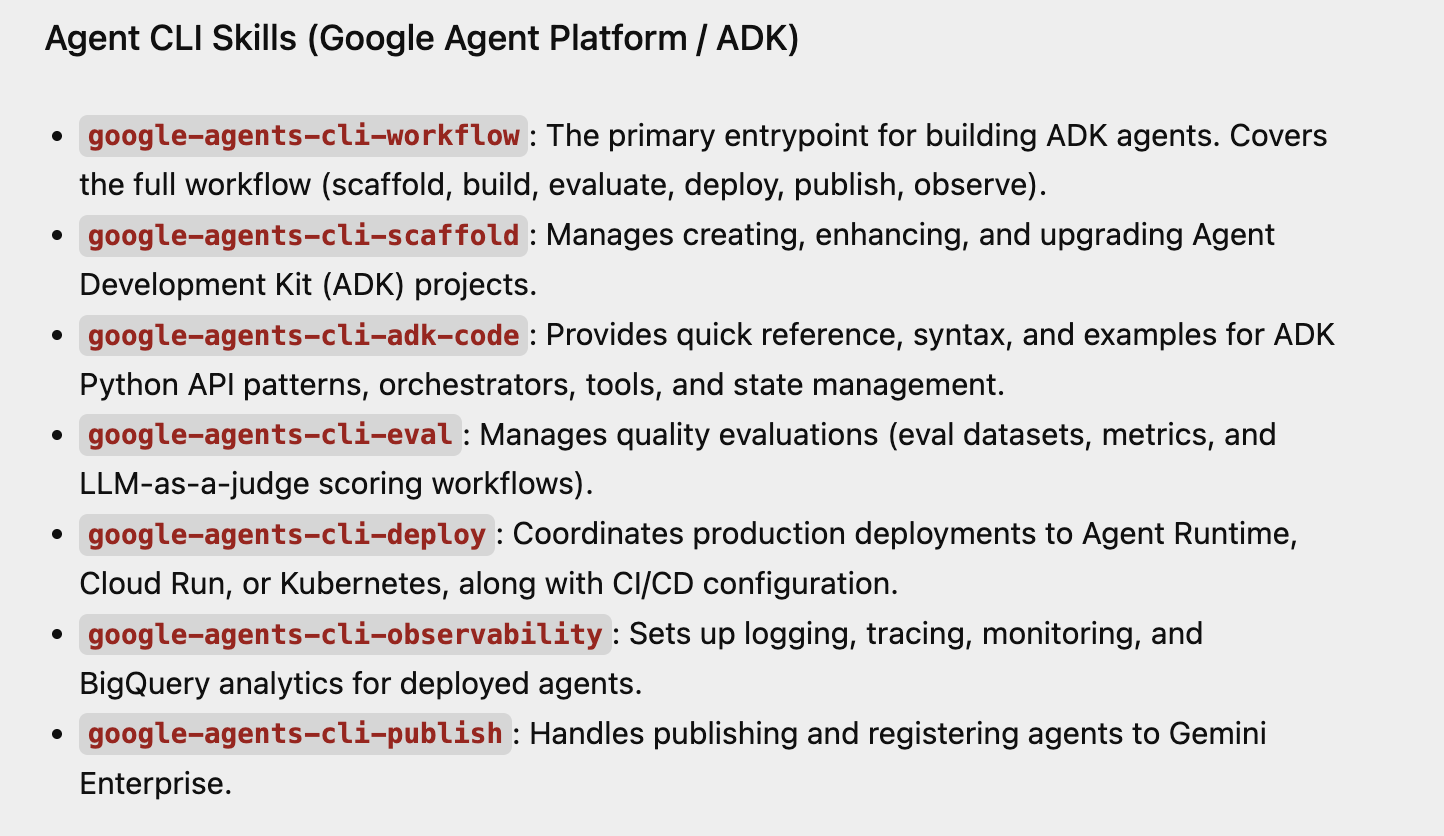
只要詢問有哪些技能可用,即可確認技能是否已載入 Antigravity。以下是我們剛安裝的 Agent CLI Skills 部分回應範例。
逐步操作說明
uvx google-agents-cli setup完成後,您就能在本機電腦上啟動、互動及測試 AI 代理程式。
步驟 1:架構並初始化新的代理專案
執行建立指令,搭建標準化版面配置。建立專案後,您必須先安裝專案依附元件,才能執行任何執行工作。
# 1. Create a lightweight prototype project structure
agents-cli create weather-assistant --prototype --yes

# 2. Move into the directory and install required ADK dependencies
cd weather-assistant
agents-cli install
幕後作業:這會建立乾淨的工作區,內含 app/agent.py (核心程式碼)、pyproject.toml (套件中繼資料) 和 agents-cli-manifest.yaml (專案追蹤器)。
步驟 2:執行本機測試查詢
對代理執行快速直接的指令列測試。如果您未使用 Google Cloud 的 ADC (應用程式預設憑證),請務必在終端機中匯出 GEMINI_API_KEY。如要取得 Gemini API 金鑰,請前往這個頁面。取得金鑰後,請在終端機中透過下列指令匯出金鑰。我們也會在這裡將 GOOGLE_GENAI_USE_VERTEXAI 設為 FALSE。
export GEMINI_API_KEY="YOUR_GEMINI_API_KEY"
export GOOGLE_GENAI_USE_VERTEXAI=FALSE
在終端機中輸入下列指令:
agents-cli run "How are you?"
幕後運作方式:CLI 會在終端機的記憶體中,完整初始化 Agent Development Kit (ADK) 生命週期。這項工具會透過本機憑證安全地傳送提示,並將即時串流回應直接記錄回指令列。
步驟 3:啟動互動式網頁 Playground
啟動內建的本機網頁式測試區,以視覺化方式與代理程式互動。
agents-cli playground
幕後作業:CLI 會啟動 ADK 網頁 UI 伺服器,通常可透過 http://localhost:8080 或備援 http://127.0.0.1:8000 存取,並完成熱重載。在網頁介面中,選取頂端「Select an app」下拉式選單中的「app」,然後在網頁應用程式右側的對話介面與代理互動。
7. 使用 npx skills 安裝 Agent Skills
npx skills 是由 Vercel Labs 開發的指令列工具,可做為 AI 代理程式 (例如 Antigravity、Claude Code、GitHub Copilot、Cursor 和 Cline) 的套件管理員。這是開放式代理技能生態系統的 CLI。
如要使用 npx skills 套件下載及安裝 Agent Skills,請注意,這會將 Skills 放在 ~/.agents/skills 資料夾中。雖然該頁面提到 Antigravity 等工具會從這個資料夾擷取技能,但請注意,撰寫本文時,Antigravity 會從這個資料夾擷取技能,但 Antigravity CLI 不會。如先前所述,您需要將安裝在 ~/.agents/skills 資料夾中的技能,複製到 Antigravity CLI 的專案或全域範圍,也就是技能資料夾。
- 專案範圍:位於
<project-root>/.agents/skills/。 - 全球範圍:位於
~/.gemini/antigravity-cli/skills/。
8. 恭喜
恭喜!您已成功使用 Google Antigravity 建構第一個 Agent 技能、設定該技能,並新增自訂功能。
您也成功在專案和全域範圍內設定一系列 Agent Skills,讓自訂工具派上用場!
現在,您已準備好讓 Antigravity 處理專案中的繁重工作,並以自己的方式編寫程式碼。
9. 參考文件
- 程式碼研究室:開始使用 Google Antigravity
- 官方網站:https://antigravity.google/
- 說明文件:https://antigravity.google/docs
- 下載:https://antigravity.google/download
- Antigravity Skills 說明文件:https://antigravity.google/docs/skills