
1. Introduction
Most backend software does not actually need an AI model to write paragraphs, it just needs a fast, trustworthy answer to a bounded question: Yes or no? Which support team owns this ticket? How urgent is it?
Early dedicated classifiers such as TypeSafe AI's Jev recently sparked developer interest in "yes/no" models by showing what happens when you drop slow, token-by-token JSON generation and score closed-set decisions in a single pass.
Google DeepMind's Gemini Decisions API (powered by gemini-decision-1) brings this capability natively into the google-genai SDK, letting you evaluate up to 1,000 yes/no (noul), multiple-choice (choice), and ordered-scale (score) questions in one pass with calibrated probabilities, zero output tokens, and built-in multimodal support across text, photos, audio, video, and PDFs.
What you'll do
- Set up a local Python environment and connect to
gemini-decision-1using a Google AI Studio API key. - Run sample programs ranging from routing tickets, safety rules and multimodal data decision making, that will help you understand the Gemini Decisions API.
What you'll learn
- Why prompting a chat LLM for JSON creates latency, cost, parsing, and confidence issues on simple routing decisions.
- How the three question types:
noul(yes/no),choice(pick one option), andscore(ordered scale), work together in a singleclient.decisions.createcall. - How to control multimodal token spend using
resolutionand inspect usage withinput_tokens_by_modality.
What you'll need
- Python 3.11+ and
gitinstalled on your machine (or Google Cloud Shell). - A Gemini API Key from Google AI Studio (no Google Cloud project setup is needed for this codelab).
2. Understanding the Gemini Decisions API
Why Asking a Chat LLM for JSON Slows Down Backends
Chat LLMs were built to have conversations with people. When you ask an assistant to write an email or explain a bug, waiting a few seconds while words stream onto the screen feels completely natural.
Problems start when backend services use that same chat workflow just to make a quick routing decision, like deciding where to send "Where is my order #19028?" or whether it is safe to fulfill automatically.
Using Chat models for these use cases results in responses being too slow, costly and most importantly brittle, which results in unreliable confidence in taking a certain action or proceeding in a specific direction for agents.
How gemini-decision-1 Works
Instead of generating text token-by-token, gemini-decision-1 reads your input once and scores all of your questions in a single pass—returning calibrated probabilities directly.
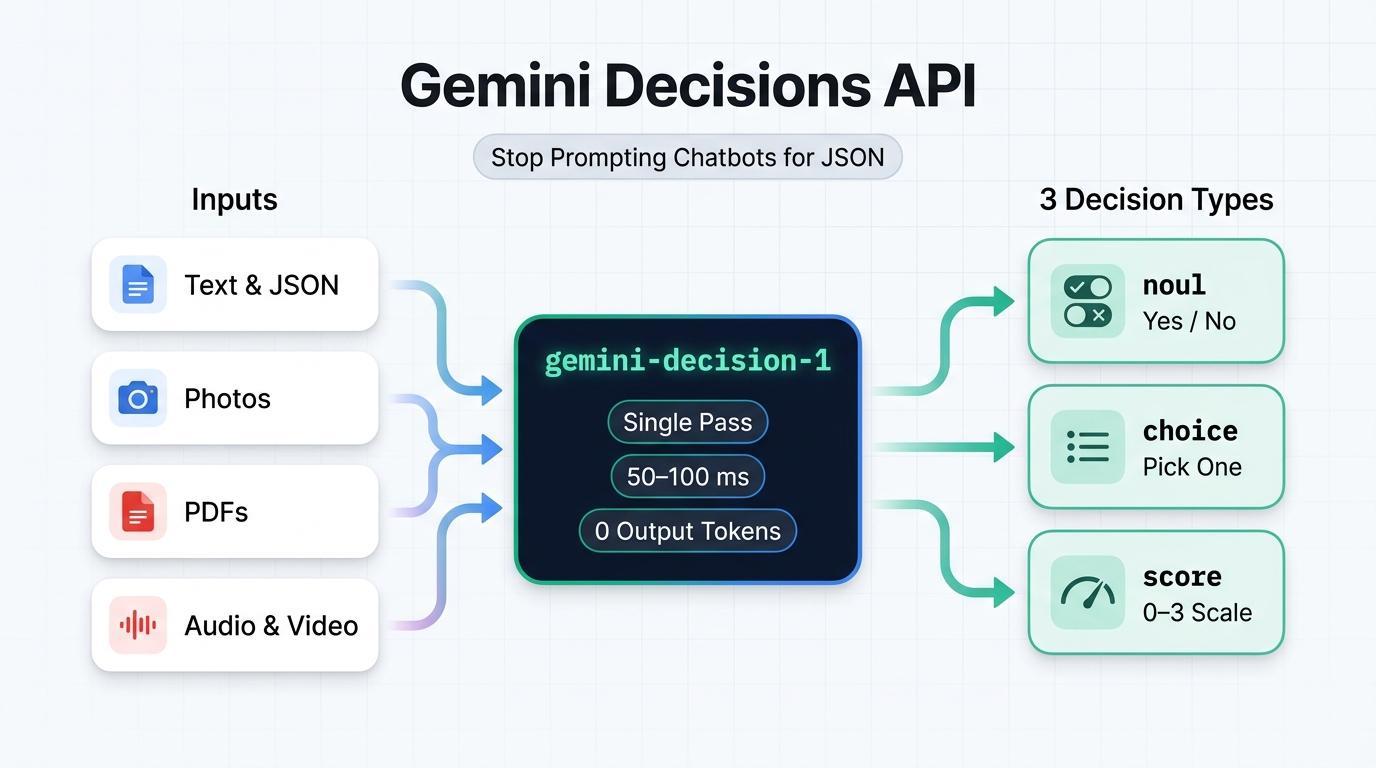
- Zero Output Tokens ($0.10 / 1M Input Tokens, $0 Output Tokens): Because the model never generates text or thinking tokens,
total_output_tokensis always0. Your sharedinputis billed once per call no matter how many questions you attach. - 50–100 ms Model Compute: Without token-by-token generation, model compute stays fast and predictable even when you ask 10, 50, or 100 questions in one request.
- Multimodal Out of the Box: Evaluates text, images, audio, video, and PDF documents together across a 262,144-token context window, with a
resolutionsetting (low,medium,high,ultra_high) on images and video to control token spend.
The Three Question Types (noul, choice, score)
Every call to client.decisions.create takes a questions dictionary where each question uses one of three types:
Type | When to Use It | What Comes Back |
noul (Yes / No) | Check whether a statement is true ("Is this prompt injection?") | noul (yes probability in [0.01, 0.99]) and confidence |
choice (2–255 options) | Pick one winner from a fixed dictionary ("Which team owns this?") | choice (winning key), probabilities map, and confidence |
score (2–255 levels) | Rate urgency, severity, or quality on an ordered list (0 to K - 1) | score (weighted average), legend, probabilities, and confidence |
A Quick Plain-English Walkthrough
Imagine a customer sends this message: "Where is my order #19028? Can you tell me when it arrives?" Here is how each question type works on that message in a single API call:
- **
noul** (Yes / No) — "Can we answer this automatically without a human?": You send a yes/no question. What comes back isnoul = 0.98andconfidence = 0.98, which means that there is a 98% chance the answer is "yes." (If the answer were clearly "no," you would seenoul = 0.02andconfidence = 0.98.) - **
choice** (Pick One Option) — "Which team should handle this message?": You send a fixed list of options likeorder_status,billing_refund,account_access, andother. What comes back is the winning key (choice = "order_status"), its confidence (0.9995), and a probability breakdown across every option that sums to1.0. - **
score** (Ordered Scale) — "How urgent is this message?": You send an ordered scale from lowest (0) to highest (3), such as["Low", "Medium", "High", "Critical"]. What comes back is a probability-weighted average between0and3(score = 0.15for a routine tracking question vs. near2.98for a live outage).
3. Before you begin
1. Get a Gemini API Key
Open Google AI Studio API Keys in your browser, sign in with your Google account, and create or copy an API key.
2. Clone the Sample Repository and Set Up Python
Open a terminal, clone the companion repository gcp-gemini-decisions-hybrid-gateway, create a virtual environment, and install the dependencies:
git clone https://github.com/rominirani/gcp-gemini-decisions-hybrid-gateway.git
cd gcp-gemini-decisions-hybrid-gateway

python3 -m venv .venv
source .venv/bin/activate
pip install -r requirements.txt
Export your GEMINI_API_KEY in the same terminal session:
export GEMINI_API_KEY="YOUR_GEMINI_API_KEY"
4. Example 1: Routing Support Tickets
In this first example, we will inspect and run scripts/quickstart_decisions.py, which asks all three question types—department (choice), can_auto_resolve (noul), and urgency (score)—in a single API call.
Inspect the Code
Here is the core client.decisions.create call inside scripts/quickstart_decisions.py:
from google import genai

client = genai.Client(api_key=api_key, http_options={"api_version": "v1beta"})

result = client.decisions.create(
    model="gemini-decision-1",
    input=query_text,
    questions={
        "department": {
            "type": "choice",
            "instructions": "Which operational queue should handle this customer message?",
            "criteria": {
                "order_status": "Order tracking, delivery dates, or shipment status.",
                "billing_refund": "Duplicate charges, invoices, credits, or refund requests.",
                "subscription_cancel": "Canceling or pausing a recurring subscription.",
                "account_access": "Password resets, expired 2FA/MFA codes, or login lockouts.",
                "complex_incident": "Production outages, HTTP 500 errors, or legal questions.",
                "other": "Anything outside these specific categories.",
            },
        },
        "can_auto_resolve": {
            "type": "noul",
            "instructions": "Can this request be fulfilled deterministically by an automated "
                            "backend lookup or webhook without custom investigation?",
            "criteria": {
                "true_description": "Routine single-intent request such as checking tracking.",
                "false_description": "Outage, legal question, or ambiguous billing dispute.",
            },
        },
        "urgency": {
            "type": "score",
            "instructions": "Rate the operational urgency and severity of this message.",
            "criteria": [
                "Low: Routine informational or tracking question.",
                "Medium: Standard account, subscription, or billing request.",
                "High: Time-sensitive customer impact or repeated billing failure.",
                "Critical: Production-halting outage, data loss risk, or security incident.",
            ],
        },
    },
)

dept = result.answers["department"]
auto = result.answers["can_auto_resolve"]
urg = result.answers["urgency"]

# The API returns raw probabilities; our script sets the cutoff for auto-handling (80%):
auto_decision = auto.noul >= 0.80
Notice that last line (auto.noul >= 0.80): the Decisions API itself never hardcodes a cutoff—it returns the raw noul probability (0.01 to 0.99), and your Python code decides how strict the threshold should be.
Run 1A: Simple Order-Tracking Question
Run the script with its default order-tracking question:
python scripts/quickstart_decisions.py
You will see live JSON output similar to this:
{
  "query": "Where is my order #19028? Can you tell me when it arrives?",
  "model": "gemini-decision-1",
  "latency_ms": 944.61,
  "department": {
    "choice": "order_status",
    "confidence": 0.9995,
    "probabilities": {
      "billing_refund": 0.0001,
      "other": 0.0001,
      "complex_incident": 0.0002,
      "subscription_cancel": 0.0,
      "order_status": 0.9995,
      "account_access": 0.0001
    }
  },
  "can_auto_resolve": {
    "noul_probability_yes": 0.98,
    "confidence": 0.98,
    "decision": true
  },
  "urgency": {
    "expected_score_0_to_3": 0.1524,
    "top_level": "Low: Routine informational or tracking question.",
    "confidence": 0.8717
  },
  "suggested_action": "DISPATCH_TRACKING_WEBHOOK",
  "usage": {
    "total_input_tokens": 424,
    "total_output_tokens": 0,
    "estimated_cost_usd": 4.24e-05
  }
}
(Note: Local first-call latency includes initial TLS connection setup from your machine; when running warm inside Google Cloud Run in us-central1, this same call finishes in ~155–195 ms.)
Run 1B: Unverified $140 Refund Request
Now pass a $140 duplicate-charge claim without any invoice attached yet:
python scripts/quickstart_decisions.py \
  "I was billed twice ($140 total) on invoice #8812 for one seat. Refund $70 right now."
Inspect the live output:
{
  "query": "I was billed twice ($140 total) on invoice #8812 for one seat. Refund $70 right now.",
  "model": "gemini-decision-1",
  "latency_ms": 602.23,
  "department": {
    "choice": "billing_refund",
    "confidence": 0.9993,
    "probabilities": {
      "other": 0.0001,
      "complex_incident": 0.0,
      "order_status": 0.0001,
      "billing_refund": 0.9993,
      "subscription_cancel": 0.0004,
      "account_access": 0.0001
    }
  },
  "can_auto_resolve": {
    "noul_probability_yes": 0.4282,
    "confidence": 0.5718,
    "decision": false
  },
  "urgency": {
    "expected_score_0_to_3": 1.3634,
    "top_level": "Medium: Standard account, subscription, or billing request.",
    "confidence": 0.5987
  },
  "suggested_action": "INITIATE_BILLING_WORKFLOW",
  "usage": {
    "total_input_tokens": 433,
    "total_output_tokens": 0,
    "estimated_cost_usd": 4.33e-05
  }
}
Look at how those two independent questions work together:
- Where should this ticket go? (
department = billing_refund,0.9993): The customer is asking for a refund on an invoice, sogemini-decision-1is 99.93% sure it belongs in the Billing queue. - Should code execute it automatically? (
can_auto_resolve = 0.4282->decision: false): Handing back$70from a text claim alone needs verification. Because0.4282falls below ourauto.noul >= 0.80cutoff,decisioncomes backfalse.
5. Example 2: Running 8 Policy Checks in One Call
In real backend applications, an incoming message usually needs more than one check before your code touches a database or triggers a tool. With chat LLMs, making 8 separate calls multiplies your latency and bills your input text 8 times—while stuffing 8 rules into one giant JSON prompt makes the model miss edge cases.
Let's inspect scripts/parallel_guardrails.py, which evaluates 8 independent checks (prompt injection, raw PII/secrets, instant-refund eligibility, chargeback threats, target queue, tool selection, churn risk, and abuse level) in one decisions.create call.
How the Script Works
Step 1: Pass Event Metadata and Text Together as input
Passing a serialized JSON dictionary as input lets gemini-decision-1 check structured fields (like amount_usd and order_age_days) alongside the free-form customer message—billing the shared payload only once:
event = {
    "event_id": "evt-03-clean-refund",
    "customer_tier": "PREMIUM",
    "order_age_days": 6,
    "amount_usd": 34.0,
    "message": "Order #77102 arrived yesterday with a cracked mug handle. Could I get a $34 refund?",
}
Step 2: Score All 8 Questions in a Single Pass
We define 4 noul questions, 2 choice questions, and 2 score questions in EIGHT_PARALLEL_QUESTIONS and pass them in one call:
EIGHT_PARALLEL_QUESTIONS = {
    "prompt_injection_attempt": { "type": "noul", "instructions": "...", "criteria": {...} },
    "contains_raw_pii_or_secrets": { "type": "noul", "instructions": "...", "criteria": {...} },
    "eligible_for_instant_refund": {
        "type": "noul",
        "instructions": "Does this request qualify for instant automated refund under policy "
                        "(amount <= $50, order_age_days <= 30, clear defect or duplicate)?",
        "criteria": {...},
    },
    "threatens_chargeback_or_legal": { "type": "noul", ... },
    "target_queue": { "type": "choice", ... },
    "selected_mcp_tool": { "type": "choice", ... },
    "churn_risk": { "type": "score", ... },      # 0..3 (Low -> Severe)
    "abuse_toxicity": { "type": "score", ... },  # 0..2 (Benign -> Hostile)
}

result = client.decisions.create(
    model="gemini-decision-1",
    input=json.dumps(event),             # Shared input — billed once
    questions=EIGHT_PARALLEL_QUESTIONS,  # All 8 questions scored in parallel
)
a = result.answers
Step 3: Combine Answers with Priority Rules in Python
Because each question returns its own independent score inside result.answers, our Python code checks safety risks first (prompt injection and leaked secrets) before allowing any automated refund:
if a["prompt_injection_attempt"].noul >= 0.70:
    gate_verdict = "QUARANTINE_ADVERSARIAL_INPUT"
elif a["contains_raw_pii_or_secrets"].noul >= 0.75:
    gate_verdict = "REDACT_PII_BEFORE_STORAGE"
elif a["threatens_chargeback_or_legal"].noul >= 0.75 or a["churn_risk"].score >= 2.3:
    gate_verdict = "ROUTE_TO_VIP_RETENTION_SPECIALIST"
elif a["eligible_for_instant_refund"].noul >= 0.85 and a["selected_mcp_tool"].confidence >= 0.80:
    gate_verdict = "AUTO_EXECUTE_INSTANT_REFUND"
else:
    gate_verdict = f"DISPATCH_{a['selected_mcp_tool'].choice.upper()}"
Run the Script
Execute scripts/parallel_guardrails.py to test three sample messages: a prompt-injection attempt, an accidentally pasted sk_live_... API key, and a clean $34 damaged-mug refund:
python scripts/parallel_guardrails.py
Review the live output across all three test events:
[
  {
    "event_id": "evt-01-injection",
    "gate_verdict": "QUARANTINE_ADVERSARIAL_INPUT",
    "questions_evaluated_in_parallel": 8,
    "latency_ms": 626.34,
    "signals": {
      "prompt_injection_prob": 0.9766,
      "raw_pii_prob": 0.0426,
      "instant_refund_prob": 0.0275,
      "target_queue": "security_trust",
      "selected_mcp_tool": "quarantine_security_event"
    },
    "usage": { "total_input_tokens": 977, "total_output_tokens": 0, "estimated_cost_usd": 9.77e-05 }
  },
  {
    "event_id": "evt-02-pii-leak",
    "gate_verdict": "REDACT_PII_BEFORE_STORAGE",
    "questions_evaluated_in_parallel": 8,
    "latency_ms": 724.48,
    "signals": {
      "prompt_injection_prob": 0.0548,
      "raw_pii_prob": 0.9755,
      "instant_refund_prob": 0.0292,
      "target_queue": "security_trust",
      "selected_mcp_tool": "quarantine_security_event"
    },
    "usage": { "total_input_tokens": 999, "total_output_tokens": 0, "estimated_cost_usd": 9.99e-05 }
  },
  {
    "event_id": "evt-03-clean-refund",
    "gate_verdict": "AUTO_EXECUTE_INSTANT_REFUND",
    "questions_evaluated_in_parallel": 8,
    "latency_ms": 625.68,
    "signals": {
      "prompt_injection_prob": 0.0133,
      "raw_pii_prob": 0.01,
      "instant_refund_prob": 0.9676,
      "target_queue": "billing_ops",
      "selected_mcp_tool": "issue_instant_credit"
    },
    "usage": { "total_input_tokens": 987, "total_output_tokens": 0, "estimated_cost_usd": 9.87e-05 }
  }
]
Evaluating all 8 checks together cost roughly $0.000099 per event with 0 output tokens.
6. Example 3: Checking Photos and PDFs Without OCR
Normally, when a user submits a claim with an attachment—like a facility inspection photo or a PDF invoice—your backend has to run a separate OCR or vision pipeline first just to extract text before routing rules can run. Because gemini-decision-1 is natively multimodal, we can send both the written claim and the raw attachment together in one decisions.create call.
What We Are Going to Test
scripts/multimodal_triage.py tests two scenarios—each pairing a short written claim with an attachment:
Scenario 1: Facility Inspection Photo (low vs. high resolution)
- User's written claim: "Breakroom counter check before 9 AM client meeting. Small coffee spill spotted next to wiping cloth."
Attached photo (03-multimodal-triage/spill.jpg): Shows a small dark coffee spill on a light counter with a patterned wiping cloth right next to it:

Scenario 2: Duplicate-Billed PDF Invoice (Raw PDF Bytes, Zero OCR)
- User's written claim: "I was double-charged $45 twice ($90 total) on invoice INV-8812. Attached is my PDF invoice."
- Attached PDF (
03-multimodal-triage/sample_invoice_8812.pdf): A 1-page invoice listingLine 1: Pro Plan Monthly Subscription ... $45.00andLine 2: Pro Plan Monthly Subscription [DUPLICATE] $45.00($90.00total).
What We Expect to See
- Spill photo (low vs. high resolution): Both runs should spot the small counter spill and give the same answer—while
lowresolution uses far fewer image tokens. - PDF invoice (no OCR): Attaching
sample_invoice_8812.pdfproves the customer really was billed twice, so the model should read the PDF directly and approve the refund.
Walk Through the Code
Instead of passing a single string to input, scripts/multimodal_triage.py passes a list of content blocks—starting with a text block (ending in \n), followed by either an image block or a document (application/pdf) block:
# For Run 1a & 1b: Pass an image URL and set resolution ("low" vs. "high")
image_block = {
    "type": "image",
    "uri": "https://storage.googleapis.com/generativeai-downloads/images/spill.jpg",
    "mime_type": "image/jpeg",
    "resolution": "low",  # or "high" in Run 1b
}

# For Run 2: Read raw PDF bytes from disk and base64-encode them as a "document" block
# (Note: PDF document blocks do not take a "resolution" setting)
pdf_block = {
    "type": "document",
    "data": base64.b64encode(pdf_bytes).decode("ascii"),
    "mime_type": "application/pdf",
}

result = client.decisions.create(
    model="gemini-decision-1",
    input=[
        {"type": "text", "text": f"Claim Statement: {claim_text}\nAttached Evidence:\n"},
        media_block,  # either image_block or pdf_block
    ],
    questions=MULTIMODAL_QUESTIONS,
)
To compare token usage between resolution="low" and resolution="high", the script also reads result.usage.input_tokens_by_modality, which splits input tokens into "text" vs. "image".
Run the Script and Check the Results
python scripts/multimodal_triage.py
Inspect the live JSON output across all three runs:
[
  {
    "experiment": "1a_photo_resolution_low",
    "resolution": "low",
    "evidence_supports_claim_prob": 0.9532,
    "disposition": "local_cleanup_or_self_service",
    "disposition_confidence": 0.9863,
    "severity_expected_0_to_3": 1.0319,
    "tokens_by_modality": { "text": 441, "image": 266 },
    "total_input_tokens": 707,
    "total_output_tokens": 0,
    "estimated_cost_usd": 7.07e-05
  },
  {
    "experiment": "1b_photo_resolution_high",
    "resolution": "high",
    "evidence_supports_claim_prob": 0.9154,
    "disposition": "local_cleanup_or_self_service",
    "disposition_confidence": 0.9825,
    "severity_expected_0_to_3": 1.0471,
    "tokens_by_modality": { "text": 441, "image": 1064 },
    "total_input_tokens": 1505,
    "total_output_tokens": 0,
    "estimated_cost_usd": 0.0001505
  },
  {
    "experiment": "2_pdf_duplicate_invoice_zero_ocr",
    "resolution": null,
    "latency_ms": 676.98,
    "evidence_supports_claim_prob": 0.9578,
    "disposition": "automated_credit_or_replacement",
    "disposition_confidence": 0.9367,
    "severity_expected_0_to_3": 1.9849,
    "tokens_by_modality": { "text": 587, "image": 520 },
    "total_input_tokens": 1107,
    "total_output_tokens": 0,
    "estimated_cost_usd": 0.0001107
  }
]
Two quick takeaways from the output:
lowresolution used 4x fewer image tokens (266 vs. 1,064): Both runs gave the exact same answer (local_cleanup_or_self_serviceat >98% confidence). Save"high"or"ultra_high"for tiny text or fine print.- The PDF invoice approved the refund with zero OCR: With
sample_invoice_8812.pdfattached,evidence_supports_claim_probjumped to0.9578and the model selectedautomated_credit_or_replacementin ~677 ms.
7. Congratulations
Congratulations! You have used the Gemini Decisions API (
gemini-decision-1
) in Python to route support tickets with calibrated probabilities, run 8 independent safety and policy guardrails in a single pass, and verify photos and PDF invoices without a separate OCR step, all with zero output tokens.
When you are ready to go further, check out the additional folders in the companion repository—including 02-hybrid-gateway/ (deploying a fast Cloud Run service that hands off complex tickets to gemini-3.8-flash) and 06-adk-workflows/ (combining the Decisions API with Google ADK 2.0 Workflows).
Reference docs
- Official Launch Post: Making quick work of bounded choices with the Gemini Decisions API
- Developer Documentation: Gemini Decisions API Guide (Google AI for Developers)
- Interactive Playground: Try Gemini Decision 1 in Google AI Studio
- Sample Code Repository: https://github.com/rominirani/gcp-gemini-decisions-hybrid-gateway