

1. はじめに
ほとんどのバックエンド ソフトウェアは、実際には AI モデルに段落を記述させる必要はなく、限定された質問に対する迅速で信頼できる回答を必要としているだけです。「はい」か「いいえ」か?このチケットを担当しているサポートチームはどこですか?緊急性はどの程度か?
TypeSafe AI の Jev などの初期の専用分類器は、低速なトークンごとの JSON 生成を廃止し、クローズド セットの決定を 1 回のパスでスコアリングするとどうなるかを示すことで、最近「はい / いいえ」モデルに対するデベロッパーの関心を呼び起こしました。
Google DeepMind の Gemini Decisions API(gemini-decision-1 を搭載)は、この機能を google-genai SDK にネイティブに組み込み、最大 1,000 個の yes/no(noul)、多肢選択式(choice)、順序尺度(score)の質問を、調整された確率、ゼロ出力トークン、テキスト、写真、音声、動画、PDF にわたる組み込みのマルチモーダル サポートを使用して、1 回のパスで評価できます。
演習内容
- ローカルの Python 環境を設定し、Google AI Studio API キーを使用して
gemini-decision-1に接続します。 - チケットのルーティング、安全ルール、マルチモーダル データの意思決定など、Gemini Decisions API の理解に役立つサンプル プログラムを実行します。
学習内容
- チャット LLM に JSON をプロンプトすると、単純なルーティングの決定でレイテンシ、費用、解析、信頼性の問題が発生する理由。
- 3 つの質問タイプ(
noul(はい / いいえ)、choice(1 つのオプションを選択)、score(順序付きスケール))が 1 つのclient.decisions.create呼び出しでどのように連携するか。 resolutionを使用してマルチモーダル トークンの使用量を制御し、input_tokens_by_modalityを使用して使用量を検査する方法。
必要なもの
- Python 3.11 以降と
gitがマシン(または Google Cloud Shell)にインストールされている。 - Google AI Studio の Gemini API キー(この Codelab では Google Cloud プロジェクトの設定は必要ありません)。
2. Gemini Decisions API について
チャット LLM に JSON をリクエストするとバックエンドが遅くなる理由
チャット LLM は、人間と会話するように構築されています。アシスタントにメールの作成やバグの説明を依頼したとき、画面に言葉が流れるまで数秒待つのは完全に自然なことです。
問題は、バックエンド サービスが同じチャット ワークフローを使用して、「注文 #19028 はどこにありますか?」の送信先や、自動的に処理しても安全かどうかを判断するなど、迅速なルーティングの決定を行う場合に発生します。
これらのユースケースにチャットモデルを使用すると、レスポンスが遅くなり、コストがかかり、最も重要な点として、脆弱性が生じます。その結果、エージェントが特定のアクションを実行したり、特定の方向に進んだりする際の信頼性が低下します。
gemini-decision-1 の仕組み
gemini-decision-1 は、テキストをトークンごとに生成するのではなく、入力を 1 回読み取り、すべての質問を 1 回のパスでスコアリングして、調整された確率を直接返します。
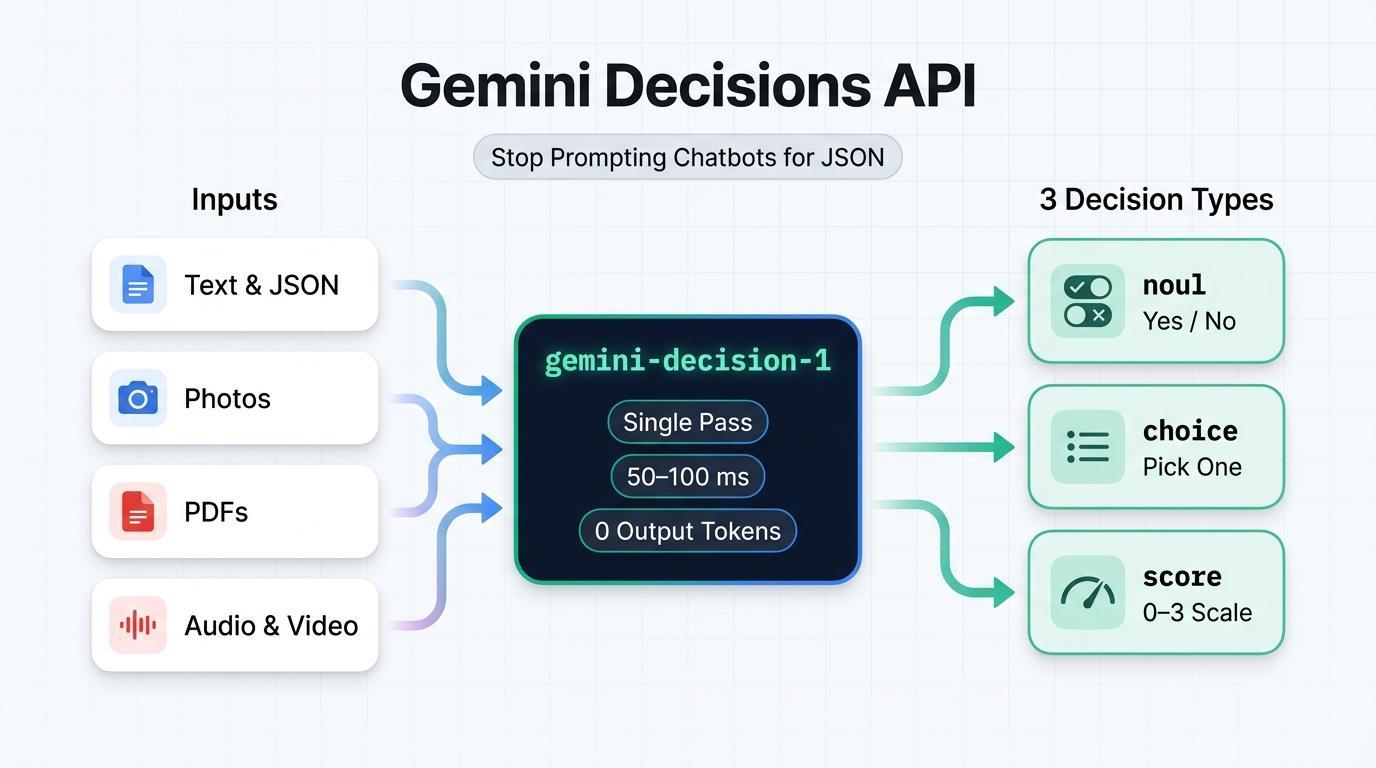
- 出力トークンがゼロ(100 万入力トークンあたり $0.10、出力トークンは $0): モデルは生成されたテキストや思考トークンを生成しないため、
total_output_tokensは常に0です。共有inputは、添付する質問の数に関係なく、1 回の呼び出しにつき 1 回請求されます。 - 50 ~ 100 ミリ秒のモデル計算: トークンごとの生成を行わないため、1 つのリクエストで 10、50、100 個の質問をしても、モデル計算は高速で予測可能なままです。
- マルチモーダルをすぐに利用可能: 262,144 トークンのコンテキスト ウィンドウ全体で、テキスト、画像、音声、動画、PDF ドキュメントをまとめて評価します。画像と動画に
resolution設定(low、medium、high、ultra_high)を適用して、トークンの消費を制御します。
3 種類の質問(noul、選択、スコア)
client.decisions.create を呼び出すたびに questions 辞書が使用されます。各質問では、次の 3 つのタイプのいずれかが使用されます。
型 | 使用する状況 | 返却されるもの |
noul(はい / いいえ) | ステートメントが真かどうかを確認する(「これはプロンプト インジェクションですか?」) | noul([0.01, 0.99] の範囲の「はい」の確率)と信頼度 |
選択肢(2 ~ 255 個のオプション) | 固定辞書から 1 つの勝者を選択する(「このチームはどのチームが所有しているか?」) | 選択(勝者キー)、確率マップ、信頼度 |
スコア(2 ~ 255 レベル) | 順序付きリスト(0 ~ K - 1)で緊急度、重大度、品質を評価する | スコア(加重平均)、凡例、確率、信頼度 |
わかりやすいクイック ウォークスルー
お客様から「注文番号 19028 はどこにありますか?いつ届くか教えてもらえますか?」1 回の API 呼び出しで、各質問タイプがそのメッセージに対してどのように機能するかを以下に示します。
- **
noul** (はい / いいえ)- 「人間が介在せずに自動的に回答できるか」: 「はい」か「いいえ」で答えられる質問を送信します。返されるのはnoul = 0.98とconfidence = 0.98で、これは答えが「はい」である確率が 98% であることを意味します。(答えが明らかに「いいえ」の場合は、noul = 0.02とconfidence = 0.98が表示されます)。 - **
choice** (1 つ選択)- 「このメッセージはどのチームが対応すべきですか?」:order_status、billing_refund、account_access、otherなどの固定オプションのリストを送信します。返されるのは、最も可能性の高いキー(choice = "order_status")、その信頼度(0.9995)、および合計が1.0になるすべてのオプションの確率の内訳です。 score** (順序尺度)- 「このメッセージの緊急度はどの程度ですか?」: 最低(0)から最高(3)までの順序付けられたスケール(["Low", "Medium", "High", "Critical"]など)を送信します。返されるのは、0と3の確率加重平均です(日常的なトラッキングに関する質問の場合はscore = 0.15、ライブのサービスの停止の場合は2.98に近い値)。
3. 始める前に
1. Gemini API キーを取得する
ブラウザで Google AI Studio API キーを開き、Google アカウントでログインして、API キーを作成またはコピーします。
2. サンプル リポジトリのクローンを作成して Python を設定する
ターミナルを開き、コンパニオン リポジトリ gcp-gemini-decisions-hybrid-gateway のクローンを作成し、仮想環境を作成して、依存関係をインストールします。
git clone https://github.com/rominirani/gcp-gemini-decisions-hybrid-gateway.git
cd gcp-gemini-decisions-hybrid-gateway

python3 -m venv .venv
source .venv/bin/activate
pip install -r requirements.txt
同じターミナル セッションで GEMINI_API_KEY をエクスポートします。
export GEMINI_API_KEY="YOUR_GEMINI_API_KEY"
4. 例 1: サポート チケットのルーティング
最初の例では、scripts/quickstart_decisions.py を調べて実行します。これは、1 回の API 呼び出しで 3 つの質問タイプ(department(choice)、can_auto_resolve(noul)、urgency(score))をすべて尋ねます。
コードを検査する
scripts/quickstart_decisions.py 内のコア client.decisions.create 呼び出しは次のとおりです。
from google import genai

client = genai.Client(api_key=api_key, http_options={"api_version": "v1beta"})

result = client.decisions.create(
    model="gemini-decision-1",
    input=query_text,
    questions={
        "department": {
            "type": "choice",
            "instructions": "Which operational queue should handle this customer message?",
            "criteria": {
                "order_status": "Order tracking, delivery dates, or shipment status.",
                "billing_refund": "Duplicate charges, invoices, credits, or refund requests.",
                "subscription_cancel": "Canceling or pausing a recurring subscription.",
                "account_access": "Password resets, expired 2FA/MFA codes, or login lockouts.",
                "complex_incident": "Production outages, HTTP 500 errors, or legal questions.",
                "other": "Anything outside these specific categories.",
            },
        },
        "can_auto_resolve": {
            "type": "noul",
            "instructions": "Can this request be fulfilled deterministically by an automated "
                            "backend lookup or webhook without custom investigation?",
            "criteria": {
                "true_description": "Routine single-intent request such as checking tracking.",
                "false_description": "Outage, legal question, or ambiguous billing dispute.",
            },
        },
        "urgency": {
            "type": "score",
            "instructions": "Rate the operational urgency and severity of this message.",
            "criteria": [
                "Low: Routine informational or tracking question.",
                "Medium: Standard account, subscription, or billing request.",
                "High: Time-sensitive customer impact or repeated billing failure.",
                "Critical: Production-halting outage, data loss risk, or security incident.",
            ],
        },
    },
)

dept = result.answers["department"]
auto = result.answers["can_auto_resolve"]
urg = result.answers["urgency"]

# The API returns raw probabilities; our script sets the cutoff for auto-handling (80%):
auto_decision = auto.noul >= 0.80
最後の行(auto.noul >= 0.80)に注目してください。Decisions API 自体はカットオフをハードコードしません。生の noul 確率(0.01~0.99)を返し、Python コードがしきい値の厳格さを決定します。
実行 1A: 注文追跡に関する簡単な質問
デフォルトの注文追跡の質問を使用してスクリプトを実行します。
python scripts/quickstart_decisions.py
次のようなライブ JSON 出力が表示されます。
{
  "query": "Where is my order #19028? Can you tell me when it arrives?",
  "model": "gemini-decision-1",
  "latency_ms": 944.61,
  "department": {
    "choice": "order_status",
    "confidence": 0.9995,
    "probabilities": {
      "billing_refund": 0.0001,
      "other": 0.0001,
      "complex_incident": 0.0002,
      "subscription_cancel": 0.0,
      "order_status": 0.9995,
      "account_access": 0.0001
    }
  },
  "can_auto_resolve": {
    "noul_probability_yes": 0.98,
    "confidence": 0.98,
    "decision": true
  },
  "urgency": {
    "expected_score_0_to_3": 0.1524,
    "top_level": "Low: Routine informational or tracking question.",
    "confidence": 0.8717
  },
  "suggested_action": "DISPATCH_TRACKING_WEBHOOK",
  "usage": {
    "total_input_tokens": 424,
    "total_output_tokens": 0,
    "estimated_cost_usd": 4.24e-05
  }
}
(注: ローカルの最初の呼び出しのレイテンシには、マシンからの初期 TLS 接続の設定が含まれます。us-central1 の Google Cloud Run 内でウォーム状態で実行すると、同じ呼び出しが約 155 ~ 195 ミリ秒で完了します)。
実行 1B: 未確認の 140 ドルの払い戻しリクエスト
次に、請求書がまだ添付されていない $140 の二重請求の申し立てを渡します。
python scripts/quickstart_decisions.py \
  "I was billed twice ($140 total) on invoice #8812 for one seat. Refund $70 right now."
ライブ出力を検査します。
{
  "query": "I was billed twice ($140 total) on invoice #8812 for one seat. Refund $70 right now.",
  "model": "gemini-decision-1",
  "latency_ms": 602.23,
  "department": {
    "choice": "billing_refund",
    "confidence": 0.9993,
    "probabilities": {
      "other": 0.0001,
      "complex_incident": 0.0,
      "order_status": 0.0001,
      "billing_refund": 0.9993,
      "subscription_cancel": 0.0004,
      "account_access": 0.0001
    }
  },
  "can_auto_resolve": {
    "noul_probability_yes": 0.4282,
    "confidence": 0.5718,
    "decision": false
  },
  "urgency": {
    "expected_score_0_to_3": 1.3634,
    "top_level": "Medium: Standard account, subscription, or billing request.",
    "confidence": 0.5987
  },
  "suggested_action": "INITIATE_BILLING_WORKFLOW",
  "usage": {
    "total_input_tokens": 433,
    "total_output_tokens": 0,
    "estimated_cost_usd": 4.33e-05
  }
}
この 2 つの独立した質問がどのように連携するかを見てみましょう。
- このチケットはどこに転送すればよいですか?(
department = billing_refund、0.9993): お客様が請求書の払い戻しを求めているため、gemini-decision-1は 99.93% の確度で請求キューに属すると判断しています。 - コードを自動的に実行する必要があるか。(
can_auto_resolve = 0.4282->decision: false): テキストによる申し立てのみから$70を返却するには、確認が必要です。0.4282がauto.noul >= 0.80のカットオフを下回っているため、decisionはfalseを返します。
5. 例 2: 1 回の呼び出しで 8 つのポリシー チェックを実行する
実際のバックエンド アプリケーションでは、通常、着信したメッセージは、コードがデータベースにアクセスしたり、ツールをトリガーしたりする前に、複数のチェックを必要とします。チャット LLM で 8 回の個別の呼び出しを行うと、レイテンシが 8 倍になり、入力テキストの料金が 8 倍になります。一方、8 つのルールを 1 つの巨大な JSON プロンプトに詰め込むと、モデルがエッジケースを見逃すことになります。
scripts/parallel_guardrails.py を調べてみましょう。これは、1 回の decisions.create 呼び出しで 8 つの独立したチェック(プロンプト インジェクション、未加工の PII / シークレット、即時払い戻しの対象、チャージバックの脅威、ターゲット キュー、ツールの選択、チャーンリスク、不正行為レベル)を評価します。
スクリプトの仕組み
ステップ 1: イベント メタデータとテキストを一緒に入力として渡す
シリアル化された JSON 辞書を input として渡すと、gemini-decision-1 は自由形式の顧客メッセージとともに構造化フィールド(amount_usd や order_age_days など)をチェックできます。共有ペイロードの課金は 1 回のみです。
event = {
    "event_id": "evt-03-clean-refund",
    "customer_tier": "PREMIUM",
    "order_age_days": 6,
    "amount_usd": 34.0,
    "message": "Order #77102 arrived yesterday with a cracked mug handle. Could I get a $34 refund?",
}
ステップ 2: 8 つの質問すべてを 1 回で採点する
EIGHT_PARALLEL_QUESTIONS で 4 つの noul 質問、2 つの choice 質問、2 つの score 質問を定義し、1 回の呼び出しで渡します。
EIGHT_PARALLEL_QUESTIONS = {
    "prompt_injection_attempt": { "type": "noul", "instructions": "...", "criteria": {...} },
    "contains_raw_pii_or_secrets": { "type": "noul", "instructions": "...", "criteria": {...} },
    "eligible_for_instant_refund": {
        "type": "noul",
        "instructions": "Does this request qualify for instant automated refund under policy "
                        "(amount <= $50, order_age_days <= 30, clear defect or duplicate)?",
        "criteria": {...},
    },
    "threatens_chargeback_or_legal": { "type": "noul", ... },
    "target_queue": { "type": "choice", ... },
    "selected_mcp_tool": { "type": "choice", ... },
    "churn_risk": { "type": "score", ... },      # 0..3 (Low -> Severe)
    "abuse_toxicity": { "type": "score", ... },  # 0..2 (Benign -> Hostile)
}

result = client.decisions.create(
    model="gemini-decision-1",
    input=json.dumps(event),             # Shared input — billed once
    questions=EIGHT_PARALLEL_QUESTIONS,  # All 8 questions scored in parallel
)
a = result.answers
ステップ 3: Python で回答と優先度ルールを組み合わせる
各質問は result.answers 内で独自の独立したスコアを返すため、Python コードは、自動払い戻しを許可する前に、まず安全性のリスク(プロンプト インジェクションとシークレットの漏洩)を確認します。
if a["prompt_injection_attempt"].noul >= 0.70:
    gate_verdict = "QUARANTINE_ADVERSARIAL_INPUT"
elif a["contains_raw_pii_or_secrets"].noul >= 0.75:
    gate_verdict = "REDACT_PII_BEFORE_STORAGE"
elif a["threatens_chargeback_or_legal"].noul >= 0.75 or a["churn_risk"].score >= 2.3:
    gate_verdict = "ROUTE_TO_VIP_RETENTION_SPECIALIST"
elif a["eligible_for_instant_refund"].noul >= 0.85 and a["selected_mcp_tool"].confidence >= 0.80:
    gate_verdict = "AUTO_EXECUTE_INSTANT_REFUND"
else:
    gate_verdict = f"DISPATCH_{a['selected_mcp_tool'].choice.upper()}"
スクリプトを実行する
scripts/parallel_guardrails.py を実行して、3 つのサンプル メッセージ(プロンプト インジェクションの試行、誤って貼り付けられた sk_live_... API キー、クリーンな $34 破損したマグカップの払い戻し)をテストします。
python scripts/parallel_guardrails.py
3 つのテストイベントすべてでライブ出力を確認します。
[
  {
    "event_id": "evt-01-injection",
    "gate_verdict": "QUARANTINE_ADVERSARIAL_INPUT",
    "questions_evaluated_in_parallel": 8,
    "latency_ms": 626.34,
    "signals": {
      "prompt_injection_prob": 0.9766,
      "raw_pii_prob": 0.0426,
      "instant_refund_prob": 0.0275,
      "target_queue": "security_trust",
      "selected_mcp_tool": "quarantine_security_event"
    },
    "usage": { "total_input_tokens": 977, "total_output_tokens": 0, "estimated_cost_usd": 9.77e-05 }
  },
  {
    "event_id": "evt-02-pii-leak",
    "gate_verdict": "REDACT_PII_BEFORE_STORAGE",
    "questions_evaluated_in_parallel": 8,
    "latency_ms": 724.48,
    "signals": {
      "prompt_injection_prob": 0.0548,
      "raw_pii_prob": 0.9755,
      "instant_refund_prob": 0.0292,
      "target_queue": "security_trust",
      "selected_mcp_tool": "quarantine_security_event"
    },
    "usage": { "total_input_tokens": 999, "total_output_tokens": 0, "estimated_cost_usd": 9.99e-05 }
  },
  {
    "event_id": "evt-03-clean-refund",
    "gate_verdict": "AUTO_EXECUTE_INSTANT_REFUND",
    "questions_evaluated_in_parallel": 8,
    "latency_ms": 625.68,
    "signals": {
      "prompt_injection_prob": 0.0133,
      "raw_pii_prob": 0.01,
      "instant_refund_prob": 0.9676,
      "target_queue": "billing_ops",
      "selected_mcp_tool": "issue_instant_credit"
    },
    "usage": { "total_input_tokens": 987, "total_output_tokens": 0, "estimated_cost_usd": 9.87e-05 }
  }
]
8 つのチェックをすべて評価すると、イベントあたりの費用は約 $0.000099、出力トークンは 0 になります。
6. 例 3: OCR を使用せずに写真と PDF を確認する
通常、ユーザーが添付ファイル(施設の検査写真や PDF の請求書など)を含む申請を送信すると、バックエンドは、ルーティング ルールを実行する前に、まず別の OCR またはビジョン パイプラインを実行してテキストを抽出する必要があります。gemini-decision-1 はネイティブにマルチモーダルであるため、1 回の decisions.create 呼び出しで書面による請求と未加工の添付ファイルの両方を一緒に送信できます。
テスト対象
scripts/multimodal_triage.py は、短い文章による主張と添付ファイルを組み合わせた 2 つのシナリオをテストします。
シナリオ 1: 施設検査の写真(低解像度と高解像度)
- ユーザーの書面による申し立て: 「午前 9 時のクライアント ミーティングの前に休憩室のカウンターをチェック。拭き取り用の布の横に、コーヒーが少しこぼれているのが見えます。」
添付の写真(03-multimodal-triage/spill.jpg): 明るい色のカウンターにこぼれた少量の濃いコーヒーと、そのすぐ横にある模様入りの拭き取り布が写っています。

シナリオ 2: 重複請求の PDF 請求書(未加工の PDF バイト、OCR なし)
- お客様の書面による申し立て: 「請求書 INV-8812 で 45 ドルが 2 回(合計 90 ドル)二重請求されました。PDF 形式の請求書を添付します。」
- 添付の PDF(
03-multimodal-triage/sample_invoice_8812.pdf):Line 1: Pro Plan Monthly Subscription ... $45.00とLine 2: Pro Plan Monthly Subscription [DUPLICATE] $45.00(合計$90.00)が記載された 1 ページの請求書。
今後の見通し
- こぼれた写真(低解像度 vs. 高解像度): どちらの実行でも小さなカウンターのこぼれを検出し、同じ答えが得られるはずです。一方、
low解像度では画像トークンがはるかに少なくなります。 - PDF 請求書(OCR なし):
sample_invoice_8812.pdfを添付すると、お客様に実際に二重請求が行われたことが証明されるため、モデルは PDF を直接読み取り、払い戻しを承認する必要があります。
コードのチュートリアル
scripts/multimodal_triage.py は、input に単一の文字列を渡すのではなく、コンテンツ ブロックのリストを渡します。このリストは、text ブロック(\n で終わる)で始まり、その後に image ブロックまたは document(application/pdf)ブロックが続きます。
# For Run 1a & 1b: Pass an image URL and set resolution ("low" vs. "high")
image_block = {
    "type": "image",
    "uri": "https://storage.googleapis.com/generativeai-downloads/images/spill.jpg",
    "mime_type": "image/jpeg",
    "resolution": "low",  # or "high" in Run 1b
}

# For Run 2: Read raw PDF bytes from disk and base64-encode them as a "document" block
# (Note: PDF document blocks do not take a "resolution" setting)
pdf_block = {
    "type": "document",
    "data": base64.b64encode(pdf_bytes).decode("ascii"),
    "mime_type": "application/pdf",
}

result = client.decisions.create(
    model="gemini-decision-1",
    input=[
        {"type": "text", "text": f"Claim Statement: {claim_text}\nAttached Evidence:\n"},
        media_block,  # either image_block or pdf_block
    ],
    questions=MULTIMODAL_QUESTIONS,
)
resolution="low" と resolution="high" のトークン使用量を比較するために、スクリプトは result.usage.input_tokens_by_modality も読み取ります。これにより、入力トークンが "text" と "image" に分割されます。
スクリプトを実行して結果を確認する
python scripts/multimodal_triage.py
3 つの実行すべてでライブ JSON 出力を確認します。
[
  {
    "experiment": "1a_photo_resolution_low",
    "resolution": "low",
    "evidence_supports_claim_prob": 0.9532,
    "disposition": "local_cleanup_or_self_service",
    "disposition_confidence": 0.9863,
    "severity_expected_0_to_3": 1.0319,
    "tokens_by_modality": { "text": 441, "image": 266 },
    "total_input_tokens": 707,
    "total_output_tokens": 0,
    "estimated_cost_usd": 7.07e-05
  },
  {
    "experiment": "1b_photo_resolution_high",
    "resolution": "high",
    "evidence_supports_claim_prob": 0.9154,
    "disposition": "local_cleanup_or_self_service",
    "disposition_confidence": 0.9825,
    "severity_expected_0_to_3": 1.0471,
    "tokens_by_modality": { "text": 441, "image": 1064 },
    "total_input_tokens": 1505,
    "total_output_tokens": 0,
    "estimated_cost_usd": 0.0001505
  },
  {
    "experiment": "2_pdf_duplicate_invoice_zero_ocr",
    "resolution": null,
    "latency_ms": 676.98,
    "evidence_supports_claim_prob": 0.9578,
    "disposition": "automated_credit_or_replacement",
    "disposition_confidence": 0.9367,
    "severity_expected_0_to_3": 1.9849,
    "tokens_by_modality": { "text": 587, "image": 520 },
    "total_input_tokens": 1107,
    "total_output_tokens": 0,
    "estimated_cost_usd": 0.0001107
  }
]
出力から、次の 2 つのことがわかります。
low解像度では、使用された画像トークンが 4 分の 1(266 対 1,064)でした。どちらの実行でも、まったく同じ回答が得られました(local_cleanup_or_self_service、信頼度 98% 超)。"high"または"ultra_high"は、小さなテキストや細かい文字に使用します。- PDF 形式の請求書で、OCR を使用せずに払い戻しを承認:
sample_invoice_8812.pdfが添付された状態で、evidence_supports_claim_probは0.9578に切り替え、モデルは約 677 ミリ秒でautomated_credit_or_replacementを選択しました。
7. 完了
おめでとうございます!Gemini Decisions API(
gemini-decision-1
) を使用して、調整された確率でサポート チケットをルーティングし、8 つの独立した安全性とポリシーのガードレールを 1 回のパスで実行し、個別の OCR ステップなしで写真と PDF 請求書を検証します。これらはすべてゼロ出力トークンで行われます。
さらに進める準備ができたら、コンパニオン リポジトリの追加フォルダを確認してください。これには、02-hybrid-gateway/(複雑なチケットを gemini-3.8-flash に引き渡す高速な Cloud Run サービスをデプロイする)や 06-adk-workflows/(Decisions API と Google ADK 2.0 ワークフローを組み合わせる)などがあります。
リファレンス ドキュメント
- 公式リリース投稿: Gemini Decisions API で限定された選択肢を迅速に処理する
- デベロッパー向けドキュメント: Gemini Decisions API ガイド(Google AI for Developers)
- インタラクティブなプレイグラウンド: Google AI Studio で Gemini Decision 1 を試す
- サンプルコード リポジトリ: https://github.com/rominirani/gcp-gemini-decisions-hybrid-gateway