

1. 소개
대부분의 백엔드 소프트웨어는 실제로 단락을 작성하는 데 AI 모델이 필요하지 않으며, 제한된 질문에 대한 빠르고 신뢰할 수 있는 답변만 필요합니다. 예 또는 아니요? 이 티켓은 어느 지원팀에서 담당하나요? 얼마나 긴급한가요?
TypeSafe AI의 Jev와 같은 초기 전용 분류기는 최근 느린 토큰별 JSON 생성을 중단하고 단일 패스로 폐쇄형 집합 결정에 점수를 매길 때 어떤 일이 발생하는지 보여줌으로써 '예/아니요' 모델에 대한 개발자의 관심을 불러일으켰습니다.
gemini-decision-1로 구동되는 Google DeepMind의 Gemini Decisions API는 이 기능을 google-genai SDK에 기본적으로 제공하므로, 보정된 확률, 출력 토큰 0개, 텍스트, 사진, 오디오, 동영상, PDF 전반에 걸친 기본 제공 멀티모달 지원을 통해 한 번에 최대 1, 000개의 yes/no(noul), 객관식(choice), 순서형 척도(score) 질문을 평가할 수 있습니다.
실행할 작업
- 로컬 Python 환경을 설정하고 Google AI Studio API 키를 사용하여
gemini-decision-1에 연결합니다. - 티켓 라우팅, 안전 규칙, 멀티모달 데이터 의사 결정에 이르는 샘플 프로그램을 실행하여 Gemini Decisions API를 이해하는 데 도움을 받습니다.
학습할 내용
- 간단한 라우팅 결정에서 채팅 LLM에 JSON을 프롬프팅할 때 지연 시간, 비용, 파싱, 신뢰도 문제가 발생하는 이유
- 세 가지 질문 유형인
noul(예/아니요),choice(옵션 하나 선택),score(순서가 지정된 척도)이 단일client.decisions.create호출에서 함께 작동하는 방식 resolution를 사용하여 멀티모달 토큰 지출을 제어하고input_tokens_by_modality를 사용하여 사용량을 검사하는 방법
필요한 항목
- Python 3.11 이상 및
git이 머신(또는 Google Cloud Shell)에 설치되어 있어야 합니다. - Google AI Studio의 Gemini API 키(이 Codelab에는 Google Cloud 프로젝트 설정이 필요하지 않음)
2. Gemini Decisions API 이해하기
채팅 LLM에 JSON을 요청하면 백엔드가 느려지는 이유
채팅 LLM은 사람과 대화하도록 빌드되었습니다. 어시스턴트에게 이메일을 작성하거나 버그를 설명해 달라고 요청할 때 화면에 단어가 표시되는 동안 몇 초간 기다리는 것은 지극히 자연스러운 일입니다.
백엔드 서비스가 "내 주문 #19028은 어디에 있나요?"를 어디로 보낼지 또는 자동으로 처리해도 안전한지 결정하는 등 빠른 라우팅 결정을 내리기 위해 동일한 채팅 워크플로를 사용할 때 문제가 발생합니다.
이러한 사용 사례에 채팅 모델을 사용하면 응답이 너무 느리고 비용이 많이 들며, 무엇보다도 불안정하여 에이전트가 특정 작업을 수행하거나 특정 방향으로 진행하는 데 있어 신뢰성이 떨어집니다.
gemini-decision-1 작동 방식
gemini-decision-1은 토큰별로 텍스트를 생성하는 대신 입력을 한 번 읽고 한 번에 모든 질문에 점수를 매겨 보정된 확률을 직접 반환합니다.
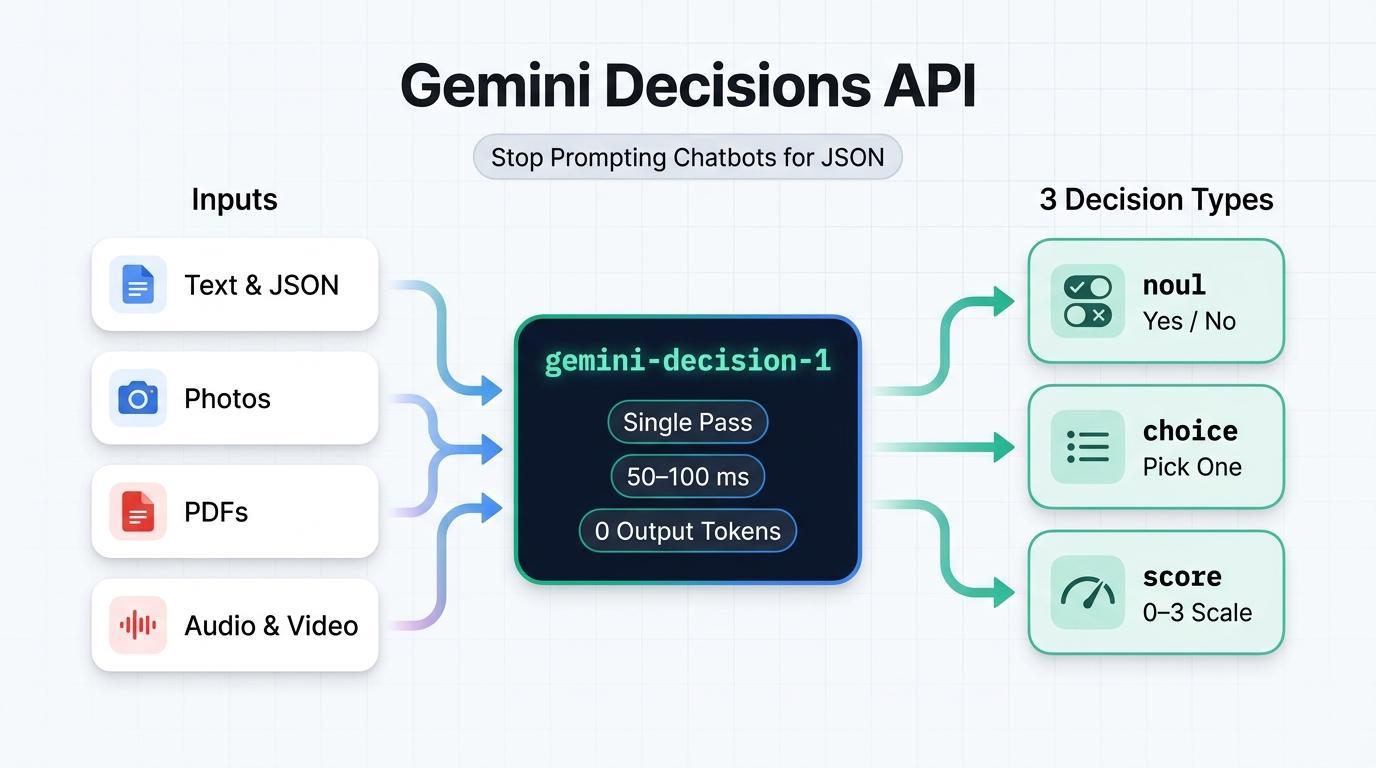
- 출력 토큰 없음(입력 토큰 100만 개당 0.10달러, 출력 토큰 0달러): 모델이 텍스트나 사고 토큰을 생성하지 않으므로
total_output_tokens는 항상0입니다. 공유된input는 첨부된 질문 수와 관계없이 호출당 한 번 청구됩니다. - 50~100ms 모델 연산: 토큰별 생성이 없으므로 한 요청에서 10개, 50개 또는 100개의 질문을 하더라도 모델 연산이 빠르고 예측 가능하게 유지됩니다.
- 기본 멀티모달: 262, 144 토큰 컨텍스트 윈도우에서 텍스트, 이미지, 오디오, 동영상,PDF 문서를 함께 평가하며, 이미지와 동영상에
resolution설정(low,medium,high,ultra_high)을 적용하여 토큰 사용량을 제어합니다.
세 가지 질문 유형(noul, choice, score)
client.decisions.create를 호출할 때마다 questions 사전을 사용하며, 각 질문은 다음 세 가지 유형 중 하나를 사용합니다.
유형 | 사용 시기 | 반환되는 항목 |
noul(예/아니요) | 문장이 참인지 확인("이것이 프롬프트 인젝션인가요?") | noul(예 확률 [0.01, 0.99]) 및 신뢰도 |
선택(2~255개 옵션) | 고정된 사전에서 승자 한 명 선택('이 항목을 소유한 팀은 어디인가요?') | 선택(우승 키), 확률 맵, 신뢰도 |
점수(2~255레벨) | 순서가 지정된 목록(0~K - 1)에서 긴급성, 심각도 또는 품질 평가 | 점수(가중 평균), 범례, 확률, 신뢰도 |
간단한 일반 영어 안내
고객이 다음과 같은 메시지를 보낸다고 가정해 보겠습니다. "주문 #19028은 어디에 있나요? 언제 도착하는지 알려줄 수 있나요?" 다음은 단일 API 호출에서 각 질문 유형이 해당 메시지에 작동하는 방식입니다.
- **
noul** (예/아니요) — '사람이 개입하지 않고도 자동으로 답변할 수 있나요?': 예/아니요 질문을 보냅니다. 반환되는 값은noul = 0.98및confidence = 0.98이며, 이는 답이 '예'일 확률이 98% 임을 의미합니다. (답이 명확하게 '아니요'인 경우noul = 0.02및confidence = 0.98가 표시됩니다.) - **
choice** (옵션 하나 선택) — '이 메시지는 어느 팀에서 처리해야 하나요?':order_status,billing_refund,account_access,other와 같은 고정된 옵션 목록을 전송합니다. 반환되는 값은 우승 키(choice = "order_status"), 신뢰도(0.9995), 합계가1.0인 모든 옵션의 확률 분석입니다. - **
score** (순서 척도) — '이 메시지는 얼마나 긴급한가요?': 가장 낮은 값(0)부터 가장 높은 값(3)까지 정렬된 척도(예:["Low", "Medium", "High", "Critical"])를 전송합니다. 반환되는 값은0와3사이의 확률 가중 평균입니다(일상적인 추적 질문의 경우score = 0.15, 실시간 서비스 중단의 경우2.98에 가까움).
3. 시작하기 전에
1. Gemini API 키 가져오기
브라우저에서 Google AI Studio API 키를 열고 Google 계정으로 로그인한 후 API 키를 만들거나 복사합니다.
2. 샘플 저장소 클론 및 Python 설정
터미널을 열고 컴패니언 저장소 gcp-gemini-decisions-hybrid-gateway를 클론하고 가상 환경을 만든 후 종속 항목을 설치합니다.
git clone https://github.com/rominirani/gcp-gemini-decisions-hybrid-gateway.git
cd gcp-gemini-decisions-hybrid-gateway

python3 -m venv .venv
source .venv/bin/activate
pip install -r requirements.txt
동일한 터미널 세션에서 GEMINI_API_KEY를 내보냅니다.
export GEMINI_API_KEY="YOUR_GEMINI_API_KEY"
4. 예시 1: 지원 티켓 라우팅
이 첫 번째 예시에서는 단일 API 호출에서 세 가지 질문 유형(department(choice), can_auto_resolve(noul), urgency(score))을 모두 요청하는 scripts/quickstart_decisions.py를 검사하고 실행합니다.
코드 검사
다음은 scripts/quickstart_decisions.py 내의 핵심 client.decisions.create 호출입니다.
from google import genai

client = genai.Client(api_key=api_key, http_options={"api_version": "v1beta"})

result = client.decisions.create(
    model="gemini-decision-1",
    input=query_text,
    questions={
        "department": {
            "type": "choice",
            "instructions": "Which operational queue should handle this customer message?",
            "criteria": {
                "order_status": "Order tracking, delivery dates, or shipment status.",
                "billing_refund": "Duplicate charges, invoices, credits, or refund requests.",
                "subscription_cancel": "Canceling or pausing a recurring subscription.",
                "account_access": "Password resets, expired 2FA/MFA codes, or login lockouts.",
                "complex_incident": "Production outages, HTTP 500 errors, or legal questions.",
                "other": "Anything outside these specific categories.",
            },
        },
        "can_auto_resolve": {
            "type": "noul",
            "instructions": "Can this request be fulfilled deterministically by an automated "
                            "backend lookup or webhook without custom investigation?",
            "criteria": {
                "true_description": "Routine single-intent request such as checking tracking.",
                "false_description": "Outage, legal question, or ambiguous billing dispute.",
            },
        },
        "urgency": {
            "type": "score",
            "instructions": "Rate the operational urgency and severity of this message.",
            "criteria": [
                "Low: Routine informational or tracking question.",
                "Medium: Standard account, subscription, or billing request.",
                "High: Time-sensitive customer impact or repeated billing failure.",
                "Critical: Production-halting outage, data loss risk, or security incident.",
            ],
        },
    },
)

dept = result.answers["department"]
auto = result.answers["can_auto_resolve"]
urg = result.answers["urgency"]

# The API returns raw probabilities; our script sets the cutoff for auto-handling (80%):
auto_decision = auto.noul >= 0.80
마지막 줄(auto.noul >= 0.80)을 보면 Decisions API 자체는 기준점을 하드코딩하지 않고 원시 noul 확률(0.01~0.99)을 반환하며, Python 코드가 기준점의 엄격성을 결정합니다.
실행 1A: 간단한 주문 추적 질문
기본 주문 추적 질문으로 스크립트를 실행합니다.
python scripts/quickstart_decisions.py
다음과 유사한 실시간 JSON 출력이 표시됩니다.
{
  "query": "Where is my order #19028? Can you tell me when it arrives?",
  "model": "gemini-decision-1",
  "latency_ms": 944.61,
  "department": {
    "choice": "order_status",
    "confidence": 0.9995,
    "probabilities": {
      "billing_refund": 0.0001,
      "other": 0.0001,
      "complex_incident": 0.0002,
      "subscription_cancel": 0.0,
      "order_status": 0.9995,
      "account_access": 0.0001
    }
  },
  "can_auto_resolve": {
    "noul_probability_yes": 0.98,
    "confidence": 0.98,
    "decision": true
  },
  "urgency": {
    "expected_score_0_to_3": 0.1524,
    "top_level": "Low: Routine informational or tracking question.",
    "confidence": 0.8717
  },
  "suggested_action": "DISPATCH_TRACKING_WEBHOOK",
  "usage": {
    "total_input_tokens": 424,
    "total_output_tokens": 0,
    "estimated_cost_usd": 4.24e-05
  }
}
(참고: 로컬 첫 호출 지연 시간은 머신의 초기 TLS 연결 설정을 포함합니다. us-central1의 Google Cloud Run 내에서 웜 실행 시 동일한 호출이 약 155~195ms 내에 완료됩니다.)
실행 1B: 확인되지 않은 140달러 환불 요청
이제 아직 인보이스가 첨부되지 않은 $140 중복 청구 신고를 전달합니다.
python scripts/quickstart_decisions.py \
  "I was billed twice ($140 total) on invoice #8812 for one seat. Refund $70 right now."
실시간 출력을 검사합니다.
{
  "query": "I was billed twice ($140 total) on invoice #8812 for one seat. Refund $70 right now.",
  "model": "gemini-decision-1",
  "latency_ms": 602.23,
  "department": {
    "choice": "billing_refund",
    "confidence": 0.9993,
    "probabilities": {
      "other": 0.0001,
      "complex_incident": 0.0,
      "order_status": 0.0001,
      "billing_refund": 0.9993,
      "subscription_cancel": 0.0004,
      "account_access": 0.0001
    }
  },
  "can_auto_resolve": {
    "noul_probability_yes": 0.4282,
    "confidence": 0.5718,
    "decision": false
  },
  "urgency": {
    "expected_score_0_to_3": 1.3634,
    "top_level": "Medium: Standard account, subscription, or billing request.",
    "confidence": 0.5987
  },
  "suggested_action": "INITIATE_BILLING_WORKFLOW",
  "usage": {
    "total_input_tokens": 433,
    "total_output_tokens": 0,
    "estimated_cost_usd": 4.33e-05
  }
}
이 두 가지 독립적인 질문이 어떻게 함께 작동하는지 살펴보세요.
- 이 티켓은 어디로 보내야 하나요? (
department = billing_refund,0.9993): 고객이 인보이스 환불을 요청하고 있으므로gemini-decision-1는 이 요청이 결제 대기열에 속할 확률이 99.93% 라고 판단합니다. - 코드가 자동으로 실행되어야 하나요? (
can_auto_resolve = 0.4282->decision: false): 텍스트 소유권 주장에서$70을(를) 다시 전달하려면 확인이 필요합니다.0.4282가auto.noul >= 0.80기준점보다 낮으므로decision는false로 돌아옵니다.
5. 예시 2: 한 번의 호출로 8개의 정책 검사 실행
실제 백엔드 애플리케이션에서는 코드가 데이터베이스를 터치하거나 도구를 트리거하기 전에 수신 메시지에 일반적으로 두 번 이상의 검사가 필요합니다. 채팅 LLM을 사용하면 8개의 개별 호출을 수행하면 지연 시간이 늘어나고 입력 텍스트가 8번 청구됩니다. 반면 8개의 규칙을 하나의 거대한 JSON 프롬프트에 넣으면 모델이 극단적인 사례를 놓치게 됩니다.
scripts/parallel_guardrails.py를 살펴보겠습니다. 이 도구는 한 번의 decisions.create 호출로 8가지 독립적인 검사(프롬프트 인젝션, 원시 PII/비밀, 즉시 환불 자격 요건, 지불 거절 위협, 타겟 대기열, 도구 선택, 이탈 위험, 악용 수준)를 평가합니다.
스크립트 작동 방식
1단계: 이벤트 메타데이터와 텍스트를 함께 입력으로 전달
직렬화된 JSON 사전을 input로 전달하면 gemini-decision-1에서 자유 형식 고객 메시지와 함께 구조화된 필드(예: amount_usd 및 order_age_days)를 확인할 수 있으며, 공유 페이로드에 대해 한 번만 청구됩니다.
event = {
    "event_id": "evt-03-clean-refund",
    "customer_tier": "PREMIUM",
    "order_age_days": 6,
    "amount_usd": 34.0,
    "message": "Order #77102 arrived yesterday with a cracked mug handle. Could I get a $34 refund?",
}
2단계: 한 번에 8개 질문 모두 채점하기
EIGHT_PARALLEL_QUESTIONS에서 noul 질문 4개, choice 질문 2개, score 질문 2개를 정의하고 한 번의 호출로 전달합니다.
EIGHT_PARALLEL_QUESTIONS = {
    "prompt_injection_attempt": { "type": "noul", "instructions": "...", "criteria": {...} },
    "contains_raw_pii_or_secrets": { "type": "noul", "instructions": "...", "criteria": {...} },
    "eligible_for_instant_refund": {
        "type": "noul",
        "instructions": "Does this request qualify for instant automated refund under policy "
                        "(amount <= $50, order_age_days <= 30, clear defect or duplicate)?",
        "criteria": {...},
    },
    "threatens_chargeback_or_legal": { "type": "noul", ... },
    "target_queue": { "type": "choice", ... },
    "selected_mcp_tool": { "type": "choice", ... },
    "churn_risk": { "type": "score", ... },      # 0..3 (Low -> Severe)
    "abuse_toxicity": { "type": "score", ... },  # 0..2 (Benign -> Hostile)
}

result = client.decisions.create(
    model="gemini-decision-1",
    input=json.dumps(event),             # Shared input — billed once
    questions=EIGHT_PARALLEL_QUESTIONS,  # All 8 questions scored in parallel
)
a = result.answers
3단계: Python에서 답변과 우선순위 규칙 결합하기
각 질문은 result.answers 내에서 자체적인 독립 점수를 반환하므로 Python 코드는 자동 환불을 허용하기 전에 안전 위험(프롬프트 인젝션 및 유출된 비밀번호)을 먼저 확인합니다.
if a["prompt_injection_attempt"].noul >= 0.70:
    gate_verdict = "QUARANTINE_ADVERSARIAL_INPUT"
elif a["contains_raw_pii_or_secrets"].noul >= 0.75:
    gate_verdict = "REDACT_PII_BEFORE_STORAGE"
elif a["threatens_chargeback_or_legal"].noul >= 0.75 or a["churn_risk"].score >= 2.3:
    gate_verdict = "ROUTE_TO_VIP_RETENTION_SPECIALIST"
elif a["eligible_for_instant_refund"].noul >= 0.85 and a["selected_mcp_tool"].confidence >= 0.80:
    gate_verdict = "AUTO_EXECUTE_INSTANT_REFUND"
else:
    gate_verdict = f"DISPATCH_{a['selected_mcp_tool'].choice.upper()}"
스크립트 실행
scripts/parallel_guardrails.py를 실행하여 프롬프트 인젝션 시도, 실수로 붙여넣은 sk_live_... API 키, 정상적인 $34 손상된 머그 환불 등 세 가지 샘플 메시지를 테스트합니다.
python scripts/parallel_guardrails.py
세 가지 테스트 이벤트 모두에서 실시간 출력을 검토합니다.
[
  {
    "event_id": "evt-01-injection",
    "gate_verdict": "QUARANTINE_ADVERSARIAL_INPUT",
    "questions_evaluated_in_parallel": 8,
    "latency_ms": 626.34,
    "signals": {
      "prompt_injection_prob": 0.9766,
      "raw_pii_prob": 0.0426,
      "instant_refund_prob": 0.0275,
      "target_queue": "security_trust",
      "selected_mcp_tool": "quarantine_security_event"
    },
    "usage": { "total_input_tokens": 977, "total_output_tokens": 0, "estimated_cost_usd": 9.77e-05 }
  },
  {
    "event_id": "evt-02-pii-leak",
    "gate_verdict": "REDACT_PII_BEFORE_STORAGE",
    "questions_evaluated_in_parallel": 8,
    "latency_ms": 724.48,
    "signals": {
      "prompt_injection_prob": 0.0548,
      "raw_pii_prob": 0.9755,
      "instant_refund_prob": 0.0292,
      "target_queue": "security_trust",
      "selected_mcp_tool": "quarantine_security_event"
    },
    "usage": { "total_input_tokens": 999, "total_output_tokens": 0, "estimated_cost_usd": 9.99e-05 }
  },
  {
    "event_id": "evt-03-clean-refund",
    "gate_verdict": "AUTO_EXECUTE_INSTANT_REFUND",
    "questions_evaluated_in_parallel": 8,
    "latency_ms": 625.68,
    "signals": {
      "prompt_injection_prob": 0.0133,
      "raw_pii_prob": 0.01,
      "instant_refund_prob": 0.9676,
      "target_queue": "billing_ops",
      "selected_mcp_tool": "issue_instant_credit"
    },
    "usage": { "total_input_tokens": 987, "total_output_tokens": 0, "estimated_cost_usd": 9.87e-05 }
  }
]
8가지 검사를 모두 함께 평가하는 데 드는 비용은 이벤트당 약 $0.000099이며 출력 토큰은 0개입니다.
6. 예시 3: OCR 없이 사진 및 PDF 확인하기
일반적으로 사용자가 시설 검사 사진이나 PDF 인보이스와 같은 첨부파일이 포함된 클레임을 제출하면 백엔드에서 라우팅 규칙을 실행하기 전에 먼저 별도의 OCR 또는 비전 파이프라인을 실행하여 텍스트를 추출해야 합니다. gemini-decision-1는 기본적으로 멀티모달이므로 decisions.create 호출 한 번으로 작성된 청구서와 원본 첨부파일을 모두 보낼 수 있습니다.
테스트할 항목
scripts/multimodal_triage.py는 두 가지 시나리오를 테스트합니다. 각 시나리오는 짧은 서면 주장과 첨부파일을 쌍으로 구성합니다.
시나리오 1: 시설 점검 사진(저해상도와 고해상도 비교)
- 사용자의 서면 주장: "오전 9시 고객 회의 전에 휴게실 카운터를 확인했습니다. 행주 옆에 커피가 조금 쏟아져 있습니다."
첨부된 사진(03-multimodal-triage/spill.jpg): 밝은색 카운터에 어두운색 커피가 조금 쏟아져 있고 바로 옆에 패턴이 있는 행주가 있습니다.

시나리오 2: 중복 청구된 PDF 인보이스(원시 PDF 바이트, OCR 없음)
- 사용자의 서면 이의 제기: 'INV-8812 인보이스에 45달러가 두 번(총 90달러) 이중 청구되었습니다. PDF 인보이스를 첨부했습니다."
- 첨부된 PDF(
03-multimodal-triage/sample_invoice_8812.pdf):Line 1: Pro Plan Monthly Subscription ... $45.00및Line 2: Pro Plan Monthly Subscription [DUPLICATE] $45.00(총$90.00)가 나열된 1페이지 인보이스입니다.
예상되는 결과
- 흘린 음식 사진(저해상도와 고해상도): 두 실행 모두 조리대에 흘린 작은 음식을 발견하고 동일한 답변을 제공해야 합니다. 단,
low해상도는 훨씬 적은 이미지 토큰을 사용합니다. - PDF 인보이스(OCR 없음):
sample_invoice_8812.pdf를 첨부하면 고객에게 실제로 두 번 청구되었음을 증명할 수 있으므로 모델이 PDF를 직접 읽고 환불을 승인해야 합니다.
코드 살펴보기
scripts/multimodal_triage.py는 단일 문자열을 input에 전달하는 대신 콘텐츠 블록 목록을 전달합니다. 이 목록은 text 블록(\n로 끝남)으로 시작하고 그 뒤에 image 블록 또는 document(application/pdf) 블록이 옵니다.
# For Run 1a & 1b: Pass an image URL and set resolution ("low" vs. "high")
image_block = {
    "type": "image",
    "uri": "https://storage.googleapis.com/generativeai-downloads/images/spill.jpg",
    "mime_type": "image/jpeg",
    "resolution": "low",  # or "high" in Run 1b
}

# For Run 2: Read raw PDF bytes from disk and base64-encode them as a "document" block
# (Note: PDF document blocks do not take a "resolution" setting)
pdf_block = {
    "type": "document",
    "data": base64.b64encode(pdf_bytes).decode("ascii"),
    "mime_type": "application/pdf",
}

result = client.decisions.create(
    model="gemini-decision-1",
    input=[
        {"type": "text", "text": f"Claim Statement: {claim_text}\nAttached Evidence:\n"},
        media_block,  # either image_block or pdf_block
    ],
    questions=MULTIMODAL_QUESTIONS,
)
resolution="low"와 resolution="high" 간의 토큰 사용량을 비교하기 위해 스크립트는 입력 토큰을 "text"와 "image"로 분할하는 result.usage.input_tokens_by_modality도 읽습니다.
스크립트 실행 및 결과 확인
python scripts/multimodal_triage.py
세 번의 실행 모두에서 실시간 JSON 출력을 검사합니다.
[
  {
    "experiment": "1a_photo_resolution_low",
    "resolution": "low",
    "evidence_supports_claim_prob": 0.9532,
    "disposition": "local_cleanup_or_self_service",
    "disposition_confidence": 0.9863,
    "severity_expected_0_to_3": 1.0319,
    "tokens_by_modality": { "text": 441, "image": 266 },
    "total_input_tokens": 707,
    "total_output_tokens": 0,
    "estimated_cost_usd": 7.07e-05
  },
  {
    "experiment": "1b_photo_resolution_high",
    "resolution": "high",
    "evidence_supports_claim_prob": 0.9154,
    "disposition": "local_cleanup_or_self_service",
    "disposition_confidence": 0.9825,
    "severity_expected_0_to_3": 1.0471,
    "tokens_by_modality": { "text": 441, "image": 1064 },
    "total_input_tokens": 1505,
    "total_output_tokens": 0,
    "estimated_cost_usd": 0.0001505
  },
  {
    "experiment": "2_pdf_duplicate_invoice_zero_ocr",
    "resolution": null,
    "latency_ms": 676.98,
    "evidence_supports_claim_prob": 0.9578,
    "disposition": "automated_credit_or_replacement",
    "disposition_confidence": 0.9367,
    "severity_expected_0_to_3": 1.9849,
    "tokens_by_modality": { "text": 587, "image": 520 },
    "total_input_tokens": 1107,
    "total_output_tokens": 0,
    "estimated_cost_usd": 0.0001107
  }
]
출력에서 얻을 수 있는 두 가지 간단한 정보는 다음과 같습니다.
low해상도는 이미지 토큰을 4배 적게 사용했습니다(266개 대 1,064개). 두 실행 모두 정확히 동일한 답변을 제공했습니다(local_cleanup_or_self_service, 98% 이상의 신뢰도). 작은 텍스트나 세부사항에는"high"또는"ultra_high"를 사용하세요.- OCR이 없는 환불을 승인한 PDF 인보이스:
sample_invoice_8812.pdf가 첨부된 상태에서evidence_supports_claim_prob가0.9578로 바로 이동했고 모델은 약 677ms 만에automated_credit_or_replacement를 선택했습니다.
7. 축하합니다
수고하셨습니다 Gemini Decisions API(
gemini-decision-1
)를 사용하여 보정된 확률로 지원 티켓을 라우팅하고, 한 번에 8개의 독립적인 안전 및 정책 가드레일을 실행하고, 별도의 OCR 단계 없이 사진과 PDF 인보이스를 확인할 수 있습니다. 이 모든 작업이 출력 토큰 없이 가능합니다.
더 자세히 알아볼 준비가 되면 컴패니언 저장소의 추가 폴더를 확인하세요. 여기에는 02-hybrid-gateway/(복잡한 티켓을 gemini-3.8-flash에 전달하는 빠른 Cloud Run 서비스 배포) 및 06-adk-workflows/(Decisions API를 Google ADK 2.0 워크플로와 결합)가 포함됩니다.