

1. 簡介
大多數後端軟體其實不需要 AI 模型來撰寫段落,只需要快速、可靠地回答特定問題:是或否?哪個支援團隊負責這張支援單?有多緊急?
早期專用分類器 (例如 TypeSafe AI 的 Jev) 最近引起開發人員對「是/否」模型的興趣,因為這類模型展示了在單次傳遞中,捨棄緩慢的逐一符記 JSON 生成,並對封閉集決策進行評分的結果。
Google DeepMind 的 Gemini Decisions API (由 gemini-decision-1 驅動) 將這項功能原生整合至 google-genai SDK,讓您能一次評估多達 1,000 個yes/no (noul)、選擇題 (choice) 和排序量表 (score) 問題,並提供校準機率、零輸出權杖,以及內建的多模態支援,涵蓋文字、相片、音訊、影片和 PDF。
執行步驟
- 設定本機 Python 環境,並使用 Google AI Studio API 金鑰連線至
gemini-decision-1。 - 執行範例程式,包括轉送票證、安全規則和多模態資料決策,瞭解 Gemini Decisions API。
課程內容
- 為什麼在簡單的路由決策中,提示對話式大型語言模型產生 JSON 會導致延遲、成本、剖析和信賴度問題。
- 三種問題類型:
noul(是/否)、choice(選擇一個選項) 和score(排序量表),如何在單一client.decisions.create呼叫中搭配運作。 - 如何使用
resolution控制多模態詞元支出,並透過input_tokens_by_modality檢查用量。
軟硬體需求
- 電腦 (或 Google Cloud Shell) 已安裝 Python 3.11 以上版本和
git。 - Google AI Studio 的 Gemini API 金鑰 (本程式碼實驗室不需要設定 Google 雲端專案)。
2. 瞭解 Gemini Decisions API
Why Asking a Chat LLM for JSON Slows Down Backends
對話式 LLM 是為了與人對話而建立。當你要求助理撰寫電子郵件或解釋錯誤時,等待幾秒鐘讓文字顯示在螢幕上,感覺完全自然。
如果後端服務使用相同的對話工作流程,只為了快速決定轉送目的地 (例如決定要將「我的訂單 #19028 在哪裡?」傳送至何處,或是否可以安全地自動履行訂單),就會開始出現問題。
如果將 Chat 模型用於這些用途,回覆速度會過慢、成本過高,最重要的是不穩定,導致代理無法可靠地採取特定行動或朝特定方向前進。
gemini-decision-1 的運作方式
gemini-decision-1 不會逐一生成文字詞元,而是會讀取輸入內容一次,並一次為所有問題評分,直接傳回校正後的機率。
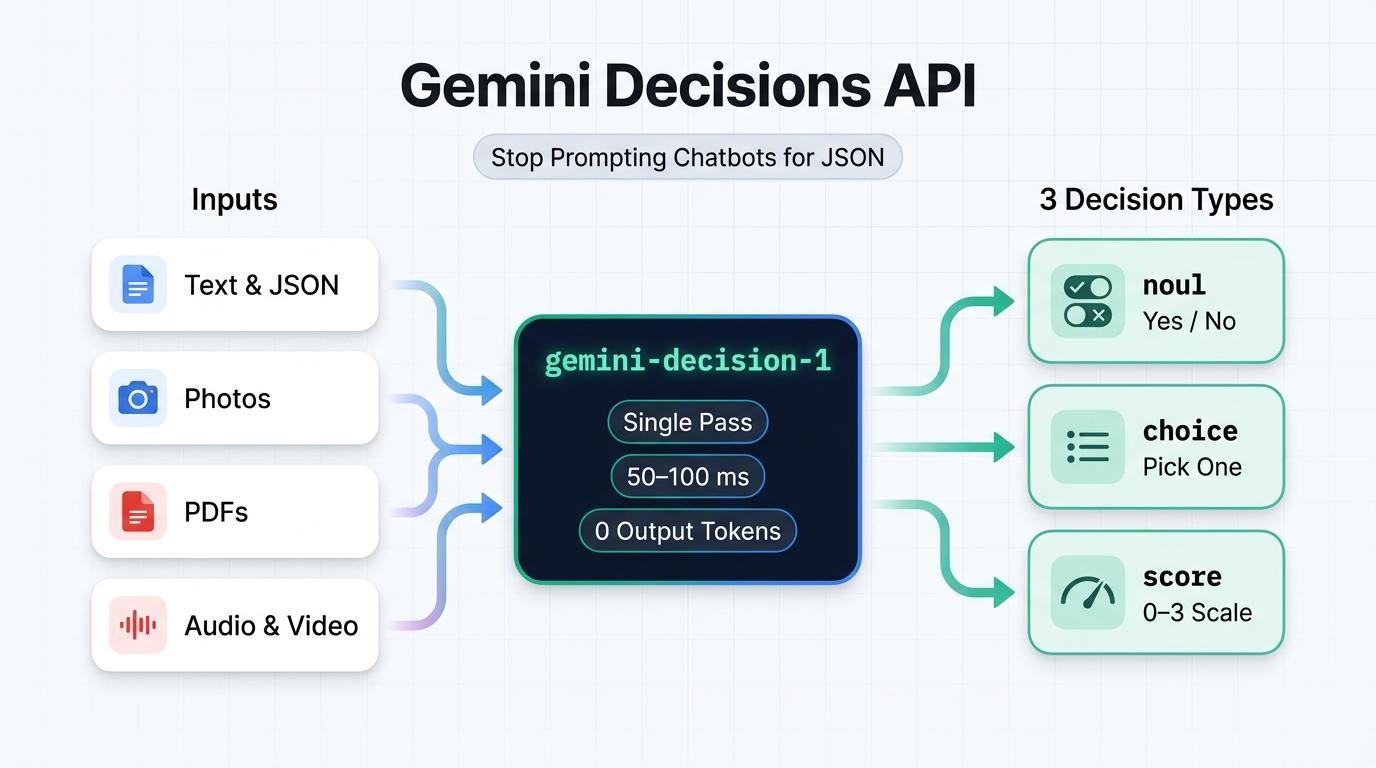
- 零輸出詞元 (每 100 萬個輸入詞元 $0.10 美元,輸出詞元 $0 美元):由於模型不會生成文字或思考詞元,
total_output_tokens一律為0。無論附加多少問題,共用input每次呼叫只會計費一次。 - 50 至 100 毫秒的模型運算:不採用逐詞元生成方式,即使在單一要求中提出 10、50 或 100 個問題,模型運算速度仍能保持快速且可預測。
- 現成的多模態功能:在 262,144 個詞元的脈絡視窗中,一併評估文字、圖片、音訊、影片和 PDF 文件,並可對圖片和影片進行
resolution設定 (low、medium、high、ultra_high),控制詞元用量。
三種問題類型 (noul、choice、score)
每次呼叫 client.decisions.create 都會使用 questions 字典,其中每個問題都會使用下列三種類型之一:
類型 | 使用時機 | What Comes Back |
noul (是/否) | 檢查陳述是否屬實 (「這是提示詞注入嗎?」) | noul (yes probability in [0.01, 0.99]) and confidence |
選項 (2 至 255 個選項) | 從固定字典中挑選一個贏家 (「哪個團隊擁有這個?」) | 選擇 (勝出鍵)、機率對應和信賴度 |
分數 (2 至 255 級) | 依據已排序的清單 (0 到 K - 1) 評估緊急程度、嚴重程度或品質 | 分數 (加權平均值)、圖例、機率和可信度 |
快速入門指南
假設顧客傳送了這則訊息:「我的訂單 #19028 在哪裡?可以告訴我什麼時候會到嗎?」以下說明在單一 API 呼叫中,各問題類型如何處理該訊息:
- **
noul** (是/否) -「我們能否在不經人工處理的情況下自動回答這個問題?」:您傳送是非題。傳回的值是noul = 0.98和confidence = 0.98,表示答案為「是」的機率為 98%。(如果答案明確為「否」,則會顯示noul = 0.02和confidence = 0.98)。 - **
choice** (Pick One Option) — "Which team should handle this message?": 您傳送固定的選項清單,例如order_status、billing_refund、account_access和other。傳回的內容包括勝出的鍵 (choice = "order_status")、其信賴度 (0.9995),以及每個選項的機率細目 (總和為1.0)。 - **
score** (有序量表) -「這則訊息有多緊急?」:您傳送了從最低 (0) 到最高 (3) 的排序量表,例如["Low", "Medium", "High", "Critical"]。系統會傳回0到3之間的機率加權平均值 (一般追蹤問題為score = 0.15,即時服務中斷則接近2.98)。
3. 事前準備
1. 取得 Gemini API 金鑰
在瀏覽器中開啟 Google AI Studio API 金鑰,使用 Google 帳戶登入,然後建立或複製 API 金鑰。
2. 複製範例存放區並設定 Python
開啟終端機,複製隨附的存放區 gcp-gemini-decisions-hybrid-gateway,建立虛擬環境,然後安裝依附元件:
git clone https://github.com/rominirani/gcp-gemini-decisions-hybrid-gateway.git
cd gcp-gemini-decisions-hybrid-gateway

python3 -m venv .venv
source .venv/bin/activate
pip install -r requirements.txt
在同一個終端機工作階段中匯出 GEMINI_API_KEY:
export GEMINI_API_KEY="YOUR_GEMINI_API_KEY"
4. 範例 1:轉送支援單
在第一個範例中,我們會檢查並執行 scripts/quickstart_decisions.py,在單一 API 呼叫中提出所有三種問題類型:department (choice)、can_auto_resolve (noul) 和 urgency (score)。
檢查程式碼
以下是 scripts/quickstart_decisions.py 內的核心 client.decisions.create 呼叫:
from google import genai

client = genai.Client(api_key=api_key, http_options={"api_version": "v1beta"})

result = client.decisions.create(
    model="gemini-decision-1",
    input=query_text,
    questions={
        "department": {
            "type": "choice",
            "instructions": "Which operational queue should handle this customer message?",
            "criteria": {
                "order_status": "Order tracking, delivery dates, or shipment status.",
                "billing_refund": "Duplicate charges, invoices, credits, or refund requests.",
                "subscription_cancel": "Canceling or pausing a recurring subscription.",
                "account_access": "Password resets, expired 2FA/MFA codes, or login lockouts.",
                "complex_incident": "Production outages, HTTP 500 errors, or legal questions.",
                "other": "Anything outside these specific categories.",
            },
        },
        "can_auto_resolve": {
            "type": "noul",
            "instructions": "Can this request be fulfilled deterministically by an automated "
                            "backend lookup or webhook without custom investigation?",
            "criteria": {
                "true_description": "Routine single-intent request such as checking tracking.",
                "false_description": "Outage, legal question, or ambiguous billing dispute.",
            },
        },
        "urgency": {
            "type": "score",
            "instructions": "Rate the operational urgency and severity of this message.",
            "criteria": [
                "Low: Routine informational or tracking question.",
                "Medium: Standard account, subscription, or billing request.",
                "High: Time-sensitive customer impact or repeated billing failure.",
                "Critical: Production-halting outage, data loss risk, or security incident.",
            ],
        },
    },
)

dept = result.answers["department"]
auto = result.answers["can_auto_resolve"]
urg = result.answers["urgency"]

# The API returns raw probabilities; our script sets the cutoff for auto-handling (80%):
auto_decision = auto.noul >= 0.80
請注意最後一行 (auto.noul >= 0.80):Decisions API 本身不會硬式編碼截止值,而是傳回原始 noul 機率 (0.01 至 0.99),並由 Python 程式碼決定門檻的嚴格程度。
執行 1A:簡單的訂單追蹤問題
執行指令碼,並使用預設的訂單追蹤問題:
python scripts/quickstart_decisions.py
您會看到類似下方的即時 JSON 輸出內容:
{
  "query": "Where is my order #19028? Can you tell me when it arrives?",
  "model": "gemini-decision-1",
  "latency_ms": 944.61,
  "department": {
    "choice": "order_status",
    "confidence": 0.9995,
    "probabilities": {
      "billing_refund": 0.0001,
      "other": 0.0001,
      "complex_incident": 0.0002,
      "subscription_cancel": 0.0,
      "order_status": 0.9995,
      "account_access": 0.0001
    }
  },
  "can_auto_resolve": {
    "noul_probability_yes": 0.98,
    "confidence": 0.98,
    "decision": true
  },
  "urgency": {
    "expected_score_0_to_3": 0.1524,
    "top_level": "Low: Routine informational or tracking question.",
    "confidence": 0.8717
  },
  "suggested_action": "DISPATCH_TRACKING_WEBHOOK",
  "usage": {
    "total_input_tokens": 424,
    "total_output_tokens": 0,
    "estimated_cost_usd": 4.24e-05
  }
}
(注意:本機首次呼叫延遲時間包含從機器設定初始 TLS 連線的時間;在 us-central1 的 Google Cloud Run 內執行暖機時,這項呼叫會在約 155 至 195 毫秒內完成。)
執行 1B:未經驗證的 $140 美元退款要求
現在,請傳遞$140重複扣款申請,但不附上任何應付憑據:
python scripts/quickstart_decisions.py \
  "I was billed twice ($140 total) on invoice #8812 for one seat. Refund $70 right now."
檢查即時輸出內容:
{
  "query": "I was billed twice ($140 total) on invoice #8812 for one seat. Refund $70 right now.",
  "model": "gemini-decision-1",
  "latency_ms": 602.23,
  "department": {
    "choice": "billing_refund",
    "confidence": 0.9993,
    "probabilities": {
      "other": 0.0001,
      "complex_incident": 0.0,
      "order_status": 0.0001,
      "billing_refund": 0.9993,
      "subscription_cancel": 0.0004,
      "account_access": 0.0001
    }
  },
  "can_auto_resolve": {
    "noul_probability_yes": 0.4282,
    "confidence": 0.5718,
    "decision": false
  },
  "urgency": {
    "expected_score_0_to_3": 1.3634,
    "top_level": "Medium: Standard account, subscription, or billing request.",
    "confidence": 0.5987
  },
  "suggested_action": "INITIATE_BILLING_WORKFLOW",
  "usage": {
    "total_input_tokens": 433,
    "total_output_tokens": 0,
    "estimated_cost_usd": 4.33e-05
  }
}
請看看這兩個獨立問題如何搭配運作:
- 這張票證應儲存在何處?(
department = billing_refund,0.9993):客戶要求退還帳單款項,因此gemini-decision-1有 99.93% 的把握,認為這封郵件屬於「帳單」佇列。 - 程式碼是否應自動執行?(
can_auto_resolve = 0.4282->decision: false):如果只根據文字聲明就將$70交還,則需要驗證。由於0.4282低於auto.noul >= 0.80截止值,decision會傳回false。
5. 範例 2:在一次呼叫中執行 8 項政策檢查
在實際的後端應用程式中,收到的訊息通常需要經過多項檢查,程式碼才會存取資料庫或觸發工具。如果使用對話 LLM,發出 8 次獨立呼叫會導致延遲時間倍增,且輸入文字會計費 8 次。如果將 8 項規則塞進一個巨大的 JSON 提示,模型可能會遺漏邊緣案例。
接著來檢查 scripts/parallel_guardrails.py,這個函式會在一次 decisions.create 呼叫中評估 8 項獨立檢查 (提示詞注入、原始 PII/機密、即時退款資格、交易退單威脅、目標佇列、工具選取、流失風險和濫用程度)。
指令碼運作方式
步驟 1:將事件中繼資料和文字一併做為輸入內容傳遞
將序列化 JSON 字典做為 input 傳遞,可讓 gemini-decision-1 檢查結構化欄位 (例如 amount_usd 和 order_age_days) 以及任意形式的顧客訊息,且只會對共用酬載計費一次:
event = {
    "event_id": "evt-03-clean-refund",
    "customer_tier": "PREMIUM",
    "order_age_days": 6,
    "amount_usd": 34.0,
    "message": "Order #77102 arrived yesterday with a cracked mug handle. Could I get a $34 refund?",
}
步驟 2:一次評估所有 8 個問題
我們在 EIGHT_PARALLEL_QUESTIONS 中定義 4 個 noul 問題、2 個 choice 問題和 2 個 score 問題,並在一次呼叫中傳遞這些問題:
EIGHT_PARALLEL_QUESTIONS = {
    "prompt_injection_attempt": { "type": "noul", "instructions": "...", "criteria": {...} },
    "contains_raw_pii_or_secrets": { "type": "noul", "instructions": "...", "criteria": {...} },
    "eligible_for_instant_refund": {
        "type": "noul",
        "instructions": "Does this request qualify for instant automated refund under policy "
                        "(amount <= $50, order_age_days <= 30, clear defect or duplicate)?",
        "criteria": {...},
    },
    "threatens_chargeback_or_legal": { "type": "noul", ... },
    "target_queue": { "type": "choice", ... },
    "selected_mcp_tool": { "type": "choice", ... },
    "churn_risk": { "type": "score", ... },      # 0..3 (Low -> Severe)
    "abuse_toxicity": { "type": "score", ... },  # 0..2 (Benign -> Hostile)
}

result = client.decisions.create(
    model="gemini-decision-1",
    input=json.dumps(event),             # Shared input — billed once
    questions=EIGHT_PARALLEL_QUESTIONS,  # All 8 questions scored in parallel
)
a = result.answers
步驟 3:在 Python 中結合答案與優先順序規則
由於每個問題都會在 result.answers 傳回獨立分數,因此 Python 程式碼會先檢查安全風險 (提示詞注入和外洩機密),再允許自動退款:
if a["prompt_injection_attempt"].noul >= 0.70:
    gate_verdict = "QUARANTINE_ADVERSARIAL_INPUT"
elif a["contains_raw_pii_or_secrets"].noul >= 0.75:
    gate_verdict = "REDACT_PII_BEFORE_STORAGE"
elif a["threatens_chargeback_or_legal"].noul >= 0.75 or a["churn_risk"].score >= 2.3:
    gate_verdict = "ROUTE_TO_VIP_RETENTION_SPECIALIST"
elif a["eligible_for_instant_refund"].noul >= 0.85 and a["selected_mcp_tool"].confidence >= 0.80:
    gate_verdict = "AUTO_EXECUTE_INSTANT_REFUND"
else:
    gate_verdict = f"DISPATCH_{a['selected_mcp_tool'].choice.upper()}"
執行指令碼
執行 scripts/parallel_guardrails.py,測試三個範例訊息:提示詞注入嘗試、不小心貼上的 sk_live_... API 金鑰,以及乾淨的 $34 馬克杯損壞退款:
python scripts/parallel_guardrails.py
查看這三個測試事件的即時輸出內容:
[
  {
    "event_id": "evt-01-injection",
    "gate_verdict": "QUARANTINE_ADVERSARIAL_INPUT",
    "questions_evaluated_in_parallel": 8,
    "latency_ms": 626.34,
    "signals": {
      "prompt_injection_prob": 0.9766,
      "raw_pii_prob": 0.0426,
      "instant_refund_prob": 0.0275,
      "target_queue": "security_trust",
      "selected_mcp_tool": "quarantine_security_event"
    },
    "usage": { "total_input_tokens": 977, "total_output_tokens": 0, "estimated_cost_usd": 9.77e-05 }
  },
  {
    "event_id": "evt-02-pii-leak",
    "gate_verdict": "REDACT_PII_BEFORE_STORAGE",
    "questions_evaluated_in_parallel": 8,
    "latency_ms": 724.48,
    "signals": {
      "prompt_injection_prob": 0.0548,
      "raw_pii_prob": 0.9755,
      "instant_refund_prob": 0.0292,
      "target_queue": "security_trust",
      "selected_mcp_tool": "quarantine_security_event"
    },
    "usage": { "total_input_tokens": 999, "total_output_tokens": 0, "estimated_cost_usd": 9.99e-05 }
  },
  {
    "event_id": "evt-03-clean-refund",
    "gate_verdict": "AUTO_EXECUTE_INSTANT_REFUND",
    "questions_evaluated_in_parallel": 8,
    "latency_ms": 625.68,
    "signals": {
      "prompt_injection_prob": 0.0133,
      "raw_pii_prob": 0.01,
      "instant_refund_prob": 0.9676,
      "target_queue": "billing_ops",
      "selected_mcp_tool": "issue_instant_credit"
    },
    "usage": { "total_input_tokens": 987, "total_output_tokens": 0, "estimated_cost_usd": 9.87e-05 }
  }
]
如果 8 項檢查全部評估,則每項事件的費用約為 $0.000099 美元,輸出詞元為 0 個。
6. 範例 3:不使用 OCR 檢查相片和 PDF
一般來說,當使用者提交附有附件 (例如設施檢查相片或 PDF 帳單) 的理賠申請時,後端必須先執行獨立的光學字元辨識 (OCR) 或視覺管道,才能擷取文字並執行路由規則。gemini-decision-1 原生支援多模態,因此我們可以在一次 decisions.create 呼叫中,同時傳送書面理賠申請和原始附件。
測試內容
scripts/multimodal_triage.py 測試兩種情境,每種情境都包含簡短的書面聲明和附件:
情境 1:設施檢查相片 (低解析度與高解析度)
- 使用者書面聲明:「在上午 9 點與客戶開會前,檢查休息室櫃台。抹布旁有少量咖啡溢出。
附圖 (03-multimodal-triage/spill.jpg):淺色流理台上有少量深色咖啡漬,旁邊放著一塊有圖案的抹布:

情境 2:重複計費的 PDF 應付憑據 (原始 PDF 位元組,零 OCR)
- 使用者書面聲明:「月結單 INV-8812 向我重複收取兩次 $45 美元 (總共 $90 美元)。附件是我的 PDF 應付憑據。」
- 附加 PDF (
03-multimodal-triage/sample_invoice_8812.pdf):1 頁月結單,列出Line 1: Pro Plan Monthly Subscription ... $45.00和Line 2: Pro Plan Monthly Subscription [DUPLICATE] $45.00(總計$90.00)。
預期結果
- 溢出物相片 (低解析度與高解析度):兩次執行都應偵測到小溢出物,並給出相同答案,但
low解析度使用的圖片權杖數量少得多。 - PDF 應付憑據 (無 OCR):附加
sample_invoice_8812.pdf可證明客戶確實被重複收費,因此模型應直接讀取 PDF 並核准退款。
程式碼逐步解說
scripts/multimodal_triage.py 不會將單一字串傳遞至 input,而是傳遞內容區塊清單,開頭為 text 區塊 (結尾為 \n),後面接著 image 區塊或 document (application/pdf) 區塊:
# For Run 1a & 1b: Pass an image URL and set resolution ("low" vs. "high")
image_block = {
    "type": "image",
    "uri": "https://storage.googleapis.com/generativeai-downloads/images/spill.jpg",
    "mime_type": "image/jpeg",
    "resolution": "low",  # or "high" in Run 1b
}

# For Run 2: Read raw PDF bytes from disk and base64-encode them as a "document" block
# (Note: PDF document blocks do not take a "resolution" setting)
pdf_block = {
    "type": "document",
    "data": base64.b64encode(pdf_bytes).decode("ascii"),
    "mime_type": "application/pdf",
}

result = client.decisions.create(
    model="gemini-decision-1",
    input=[
        {"type": "text", "text": f"Claim Statement: {claim_text}\nAttached Evidence:\n"},
        media_block,  # either image_block or pdf_block
    ],
    questions=MULTIMODAL_QUESTIONS,
)
為了比較 resolution="low" 和 resolution="high" 的詞元用量,指令碼也會讀取 result.usage.input_tokens_by_modality,將輸入詞元分為 "text" 和 "image"。
執行指令碼並查看結果
python scripts/multimodal_triage.py
檢查這三次執行的即時 JSON 輸出內容:
[
  {
    "experiment": "1a_photo_resolution_low",
    "resolution": "low",
    "evidence_supports_claim_prob": 0.9532,
    "disposition": "local_cleanup_or_self_service",
    "disposition_confidence": 0.9863,
    "severity_expected_0_to_3": 1.0319,
    "tokens_by_modality": { "text": 441, "image": 266 },
    "total_input_tokens": 707,
    "total_output_tokens": 0,
    "estimated_cost_usd": 7.07e-05
  },
  {
    "experiment": "1b_photo_resolution_high",
    "resolution": "high",
    "evidence_supports_claim_prob": 0.9154,
    "disposition": "local_cleanup_or_self_service",
    "disposition_confidence": 0.9825,
    "severity_expected_0_to_3": 1.0471,
    "tokens_by_modality": { "text": 441, "image": 1064 },
    "total_input_tokens": 1505,
    "total_output_tokens": 0,
    "estimated_cost_usd": 0.0001505
  },
  {
    "experiment": "2_pdf_duplicate_invoice_zero_ocr",
    "resolution": null,
    "latency_ms": 676.98,
    "evidence_supports_claim_prob": 0.9578,
    "disposition": "automated_credit_or_replacement",
    "disposition_confidence": 0.9367,
    "severity_expected_0_to_3": 1.9849,
    "tokens_by_modality": { "text": 587, "image": 520 },
    "total_input_tokens": 1107,
    "total_output_tokens": 0,
    "estimated_cost_usd": 0.0001107
  }
]
從輸出內容中,可以快速瞭解兩件事:
low解析度使用的圖片詞元數量減少 4 倍 (266 對比 1,064):兩次執行都給出完全相同的答案 (local_cleanup_or_self_service,信賴度 >98%)。"high"或"ultra_high"則適合用於微小文字或附屬細則。- PDF 帳單核准退款,OCR 零錯誤:附加
sample_invoice_8812.pdf後,evidence_supports_claim_prob跳轉至0.9578,模型在大約 677 毫秒內選取automated_credit_or_replacement。
7. 恭喜
恭喜!您已使用 Gemini Decisions API (
gemini-decision-1
),以校準機率轉送支援單、在單次執行中執行 8 個獨立的安全和政策防護措施,以及驗證相片和 PDF 帳單,不需另外進行 OCR 步驟,而且輸出詞元數為零。
準備好進一步探索時,請查看隨附存放區中的其他資料夾,包括 02-hybrid-gateway/ (部署快速的 Cloud Run 服務,將複雜的票證交給 gemini-3.8-flash 處理) 和 06-adk-workflows/ (將 Decisions API 與 Google ADK 2.0 Workflows 結合)。