
1. Overview
This codelab covers the fundamentals of Spanner Omni, why it serves as the ultimate data foundation for autonomous AI agents, and a rough end-to-end implementation of an edge-deployed, agentic Pickleball tactical coach and match simulator powered by Spanner Omni (Relational + Graph GQL), Python Flask, and Gemini 3.8 Flash.
Problem
Modern interactive sports platforms and real-time gaming environments require handling three disparate workloads simultaneously:
High-Concurrency Operational Transactions:
Court reservations, player memberships, billing, and tournament schedules requiring strict ACID serializability to eliminate double-booking conflicts.
Connected Graph Telemetry:
Continuous rally shot sequences, transition Markov chains, and zone coverage graphs requiring low-latency traversal without bulky ETL pipelines.
Sub-Millisecond Edge Responsiveness:
Fast-paced 60 FPS physics simulations where wide-area cloud network roundtrips (100–200ms) would introduce unacceptable jitter.
Historically, engineering teams solved this by stitching together fragmented architectures that looked something like this: PostgreSQL for transactional data, Neo4j for shot graphs, Redis for edge caching, and background synchronization pipelines. This introduces architectural drift, high operational complexity, and eventual consistency delays.
How we do it!
By deploying Google Cloud Spanner Omni at the edge and coupling it with Google Gemini 3.8 Flash, we built the Spanner Omni Pickleball Game — a single-engine sports gaming platform that unifies relational business logic, native ISO GQL shot telemetry, and real-time tactical AI coaching.
Spanner Omni
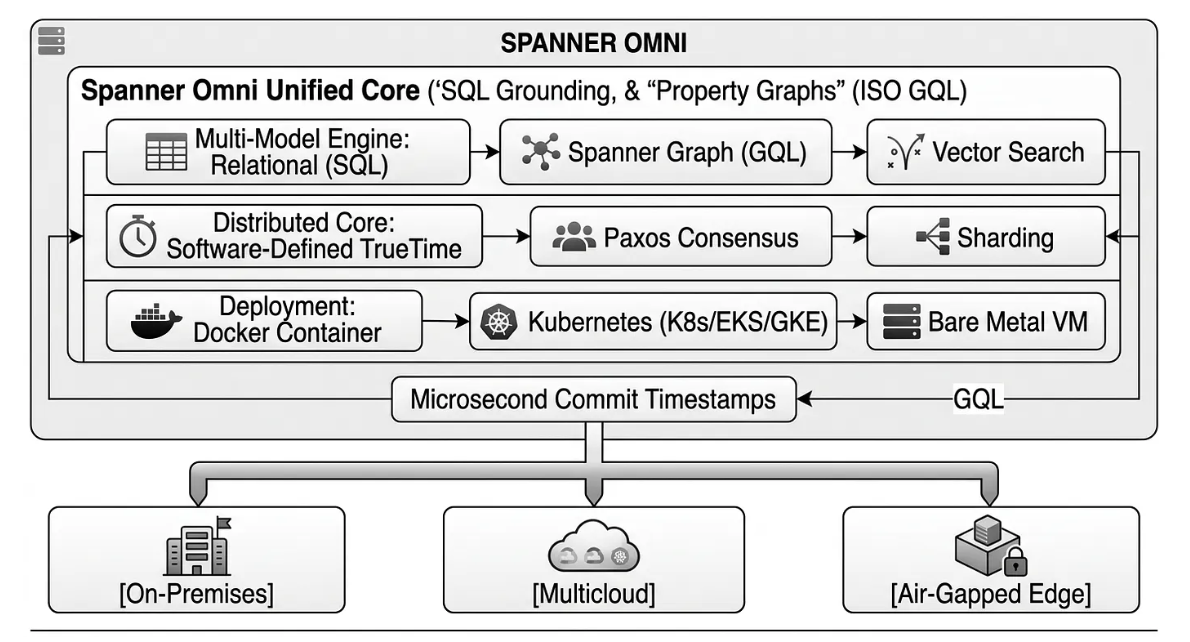
Spanner Omni brings Google's planetary-scale distributed database engine — complete with horizontal scalability, ACID transactions, and multi-model capabilities (Relational, Graph, Vector, and Analytics) — into self-managed, on-premises, multicloud, and air-gapped environments. Spanner Omni is a downloadable, self-managed edition of Google Cloud Spanner. It delivers Spanner's core distributed database capabilities — automatic sharding, Paxos-based replication, and strong external consistency — wherever you choose to run it:
What you'll learn
In this codelab, you will transition from traditional siloed database architectures to a modern, unified edge database solution. You will learn to:
- Deploy and Orchestrate Spanner Omni locally using Docker to manage high-performance, single-instance relational workloads.
- Design a Unified Relational & ISO GQL Graph Schema that maps transactional business models alongside high-dimensional game telemetry without requiring external database synchronization.
- Implement Strict ACID Serializability inside Python read-write transactions to programmatically prevent race conditions and eliminate double-booking conflicts.
- Build a Native GraphRAG Pipeline that leverages SQL-integrated ISO GQL graph queries to feed real-time, contextually grounded match telemetry straight into Google Gemini for instant tactical coaching.
Requirements
- A standard local machine or development VM running Linux (Ubuntu 22.04+), macOS, or Windows.
- Docker Desktop or Docker Engine installed and running.
- Python 3.10 or higher installed.
- A text editor or IDE (such as VS Code or PyCharm).
- An active Google Gemini API Key. (Note: No Google Cloud billing account is required to run Spanner Omni locally since it runs under a free-tier, self-managed developer evaluation license).
2. Spanner Omni Deployment & Configuration
In this step, we will spin up our local edge database instance. Spanner Omni runs inside a highly optimized container, giving you planetary-scale relational capabilities on your local developer laptop.
- Open your terminal and create a persistent Docker volume to store your database schemas and game telemetry:
docker volume create spanner_omni_data
- Pull and start the official Spanner Omni container image configured in single-server developer mode:
docker run -d --name spanner-omni \
  -p 9010:9010 -p 9020:9020 \
  -v spanner_omni_data:/spanner \
  us-docker.pkg.dev/spanner-omni/images/spanner-omni:2026.r2.1-beta \
  start-single-server
- Ensure the container launched successfully:
docker ps
🛠️ Quick One-Liner Troubleshooting: If your launch fails because ports 9010 or 9020 are already in use by background processes or legacy emulator runs, execute this cleanup script in your terminal:
pkill -f "spanner" || true
fuser -k 9010/tcp 9020/tcp 2>/dev/null || true
docker rm -f spanner-local spanner-omni spanner-omni-local 2>/dev/null || true
3. Relational & ISO GQL Graph DDL Schema Design
With Spanner Omni active, we can establish our database schema. This schema acts as our single source of truth, unifying relational business entities (such as Courts, Players, and Bookings) with fast, connected graph telemetry schemas (Shots, Zones, and Transitions).
To create the operational and telemetry tables:
- Connect to your database using the Spanner CLI or your application client
- Run the following DDL statements
No action needed from you at this point as we are addressing this in the application code:
-- ============================================================================
-- 1. OPERATIONAL & FACILITY MANAGEMENT (RELATIONAL ACID)
-- ============================================================================

CREATE TABLE Courts (
    court_id INT64 NOT NULL,
    name STRING(100) NOT NULL,
    location STRING(100) NOT NULL,
    surface_type STRING(50) NOT NULL,
    is_indoor BOOL NOT NULL,
    hourly_rate FLOAT64 NOT NULL,
    has_lighting BOOL NOT NULL,
    created_at TIMESTAMP NOT NULL OPTIONS (allow_commit_timestamp=true)
) PRIMARY KEY (court_id);

CREATE TABLE Players (
    player_id INT64 NOT NULL,
    name STRING(100) NOT NULL,
    email STRING(100) NOT NULL,
    skill_level STRING(20) NOT NULL,
    phone STRING(50),
    created_at TIMESTAMP NOT NULL OPTIONS (allow_commit_timestamp=true)
) PRIMARY KEY (player_id);

CREATE TABLE Bookings (
    booking_id INT64 NOT NULL,
    court_id INT64 NOT NULL,
    player_id INT64 NOT NULL,
    booking_date DATE NOT NULL,
    start_hour INT64 NOT NULL,
    end_hour INT64 NOT NULL,
    player_name STRING(100) NOT NULL,
    court_name STRING(100) NOT NULL,
    status STRING(20) NOT NULL,
    notes STRING(MAX),
    created_at TIMESTAMP NOT NULL OPTIONS (allow_commit_timestamp=true)
) PRIMARY KEY (booking_id);

CREATE TABLE MatchRequests (
    match_id INT64 NOT NULL,
    player_id INT64 NOT NULL,
    player_name STRING(100) NOT NULL,
    court_id INT64,
    court_name STRING(100),
    play_date DATE NOT NULL,
    start_hour INT64 NOT NULL,
    skill_required STRING(20) NOT NULL,
    match_type STRING(20) NOT NULL,
    spots_open INT64 NOT NULL,
    status STRING(20) NOT NULL,
    notes STRING(MAX),
    created_at TIMESTAMP NOT NULL OPTIONS (allow_commit_timestamp=true)
) PRIMARY KEY (match_id);

-- ============================================================================
-- 2. TACTICAL GAME TELEMETRY & PROPERTY GRAPH (ISO GQL)
-- ============================================================================

CREATE TABLE CourtZones (
    zone_id STRING(50) NOT NULL,
    name STRING(100) NOT NULL,
    is_kitchen BOOL NOT NULL,
    side STRING(50) NOT NULL
) PRIMARY KEY (zone_id);

CREATE TABLE Shots (
    shot_id STRING(50) NOT NULL,
    player_id STRING(50) NOT NULL,
    shot_type STRING(100) NOT NULL,
    speed_mph FLOAT64,
    spin_type STRING(50),
    outcome STRING(50),
    from_zone_id STRING(50),
    to_zone_id STRING(50)
) PRIMARY KEY (shot_id);

CREATE TABLE ShotTransitions (
    transition_id STRING(50) NOT NULL,
    from_shot_id STRING(50) NOT NULL,
    to_shot_id STRING(50) NOT NULL,
    rally_depth INT64,
    pressure_level STRING(20)
) PRIMARY KEY (transition_id);

-- ============================================================================
-- 3. MATCH SESSIONS & AI COACHING HISTORY
-- ============================================================================

CREATE TABLE GameSessions (
    session_id STRING(50) NOT NULL,
    player_id INT64 NOT NULL,
    player_score INT64 NOT NULL,
    bot_score INT64 NOT NULL,
    bot_difficulty STRING(20) NOT NULL,
    winner STRING(20) NOT NULL,
    rally_length INT64 NOT NULL,
    fault_type STRING(100),
    coaching_summary STRING(MAX),
    created_at TIMESTAMP NOT NULL OPTIONS (allow_commit_timestamp=true)
) PRIMARY KEY (session_id);
cat << 'EOF' > Dockerfile
FROM ollama/ollama:latest
ENV OLLAMA_HOST=0.0.0.0:8080
ENV OLLAMA_MODELS=/root/.ollama
ENV MODEL=gemma4:e2b
RUN ollama serve & sleep 5 && ollama pull $MODEL
ENTRYPOINT ["ollama", "serve"]
EOF
💡 Why Commit Timestamps Matter: Specifying OPTIONS (allow_commit_timestamp=true) enables monotonic, microsecond-accurate ordering across all local node replicas. This is critical for synchronizing high-speed game events (like line-call video footage) with corresponding database shot telemetry logs.
4. ACID Concurrency Control & Double-Booking Prevention
In active sports booking portals, multiple users often race to reserve the same court timeslots. To prevent race conditions, we will write a Python read-write transaction in Spanner Omni to ensure absolute, double-booking proof serializability.
No action needed from your end now, just observe the code:
from google.cloud import spanner

def create_booking_transaction(transaction, booking_data):
    # 1. Query for existing overlapping confirmed bookings on the same court
    query = """
        SELECT booking_id, player_name, start_hour, end_hour
        FROM Bookings
        WHERE court_id = @court_id
          AND booking_date = @booking_date
          AND status = 'CONFIRMED'
          AND NOT (end_hour <= @start_hour OR start_hour >= @end_hour)
    """
    params = {
        "court_id": booking_data["court_id"],
        "booking_date": booking_data["booking_date"],
        "start_hour": booking_data["start_hour"],
        "end_hour": booking_data["end_hour"],
    }
    param_types = {
        "court_id": spanner.param_types.INT64,
        "booking_date": spanner.param_types.DATE,
        "start_hour": spanner.param_types.INT64,
        "end_hour": spanner.param_types.INT64,
    }

    results = list(transaction.execute_sql(query, params=params, param_types=param_types))

    if results:
        conflict = results[0]
        raise ValueError(
            f"Court conflict: Already booked by {conflict[1]} ({conflict[2]}:00-{conflict[3]}:00)"
        )

    # 2. Insert new confirmed booking with Spanner commit timestamp
    insert_stmt = """
        INSERT INTO Bookings (
            booking_id, court_id, player_id, booking_date, start_hour, end_hour,
            player_name, court_name, status, notes, created_at
        ) VALUES (
            @booking_id, @court_id, @player_id, @booking_date, @start_hour, @end_hour,
            @player_name, @court_name, 'CONFIRMED', @notes, PENDING_COMMIT_TIMESTAMP()
        )
    """
    # execute_update statement writing to Spanner Omni...
    transaction.execute_update(insert_stmt, params=booking_data, param_types=booking_types)
5. Real-Time 60 FPS Physics & Adjustable DUPR Bot Engine
The frontend of our application utilizes a 2.5D HTML5 Canvas simulation rendering at 60 Frames Per Second (FPS). This rendering runs completely decoupled from the database layers to maintain buttery-smooth performance, flushing telemetry only when rallies finish.
The simulator features an adjustable OmniBot AI engine that leverages a difficulty matrix based on real-world DUPR (Dynamic Universal Pickleball Rating) levels.
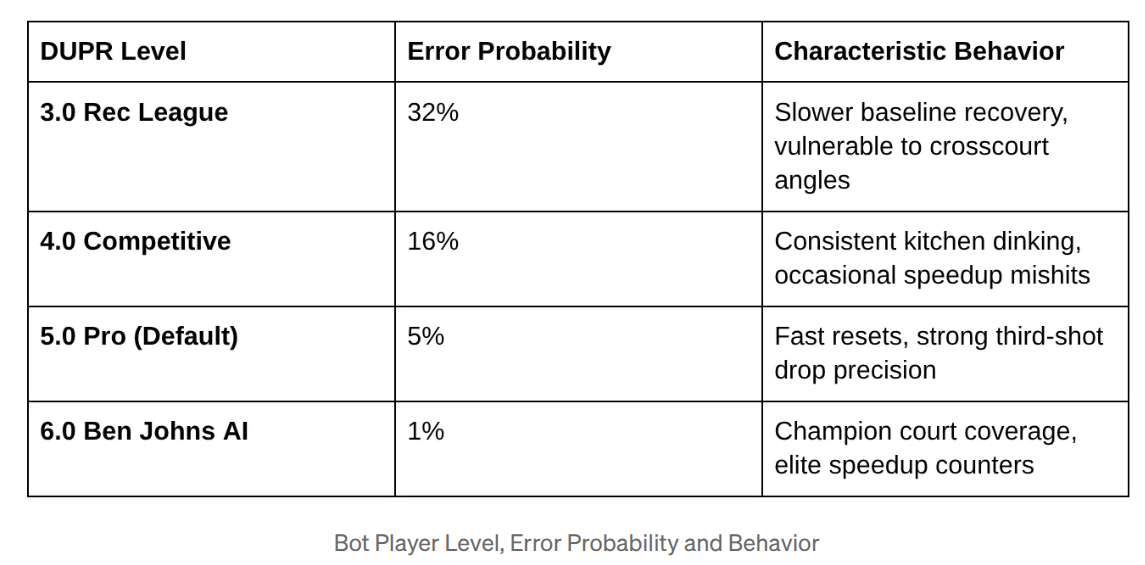
No action needed from your end now, just observe the details.
6. ISO GQL Shot Telemetry Graph Processing
At the conclusion of each rally, the frontend posts the connected trajectory graph to our backend endpoint /api/rally-end. Every shot is recorded as a relational node, and sequences are linked dynamically via transition edges.
No action needed from your end now, just observe the code:
@app.route("/api/execute-shot", methods=["POST"])
def execute_shot():
    data = request.json or {}
    shot_id = f"shot_{int(time.time()*1000)}"

    # 1. Insert the Shot Node
    insert_shot_sql = """
        INSERT INTO Shots (shot_id, player_id, shot_type, speed_mph, spin_type, outcome, from_zone_id, to_zone_id)
        VALUES (@shot_id, @player_id, @shot_type, @speed, @spin, @outcome, @from_zone, @to_zone)
    """

    # 2. If part of a continuous rally, link with a ShotTransition Edge
    if data.get("prev_shot_id"):
        transition_id = f"trans_{int(time.time()*1000)}"
        insert_trans_sql = """
            INSERT INTO ShotTransitions (transition_id, from_shot_id, to_shot_id, rally_depth, pressure_level)
            VALUES (@trans_id, @from_shot, @to_shot, @depth, @pressure)
        """
        # Executed within a single, unified Spanner Omni transaction...
By leveraging Spanner's native ISO GQL graph querying engine, a coach or analytics program can query complex, deep-hop structural patterns instantly without running bulky database joins:
-- Find highest-frequency transition sequences leading to player unforced errors
GRAPH PickleballTelemetry
MATCH (s1:Shots)-[t:ShotTransitions]->(s2:Shots)
WHERE s1.shot_type = 'Speedup' AND s2.outcome = 'FAULT_NET'
RETURN s1.speed_mph, s2.from_zone_id, COUNT(*) AS occurrences
ORDER BY occurrences DESC
LIMIT 5;
7. Gemini AI Tactical Coaching & Grounded RAG Chat
Now, we will activate the brain of our application: Google Gemini 3.8 Flash. Our Python backend uses the model to deliver three real-time AI capabilities grounded directly by Spanner Omni.
The system uses Google Gemini 3.8 Flash for some distinct real-time AI workflows:
Real-Time Rally Breakdown & Tactical Referee:
After every point, Gemini analyzes the shot chain, bot difficulty, and court positioning.
Spanner Multi-Table Grounded AI Concierge & Match Analyst:
Users can query court schedules, facility rates, and ask "How did I do against OmniBot?" in natural language. The backend dynamically queries Spanner Omni across four domains (Courts, Bookings, GameSessions, and Shots) to ground Gemini with zero hallucinations.
Real-Time Performance Analytics API (/api/performance):
Aggregates live win-loss ratios, average rally depth, and recent game sessions directly from Spanner Omni's GameSessions table for the player dashboard.
No action needed from your end now, just observe the details.
8. Configure, Run and Test!
Let's launch the complete application on your local machine to verify the system end-to-end.
- Open your host terminal and clone the project repository:
git clone https://github.com/AbiramiSukumaran/pickleball

cd pickleball
- Get your Gemini API Key by following steps in the following documentation:
https://medium.com/google-cloud/get-api-key-from-google-ai-studio-b2d2059a171d
- Open the
.envfile in your editor and configure your environment details:
SPANNER_EMULATOR_HOST="localhost:9010"
SPANNER_PROJECT="PROJECT_ID"
SPANNER_INSTANCE="omni-instance"
SPANNER_DATABASE="pickleball-db"
GEMINI_API_KEY="REPLACE_WITH_YOUR_ACTUAL_GEMINI_KEY"
- Install Python dependencies and run the application:
pip install -r requirements.txt

python app.py
- Open your web browser and navigate to
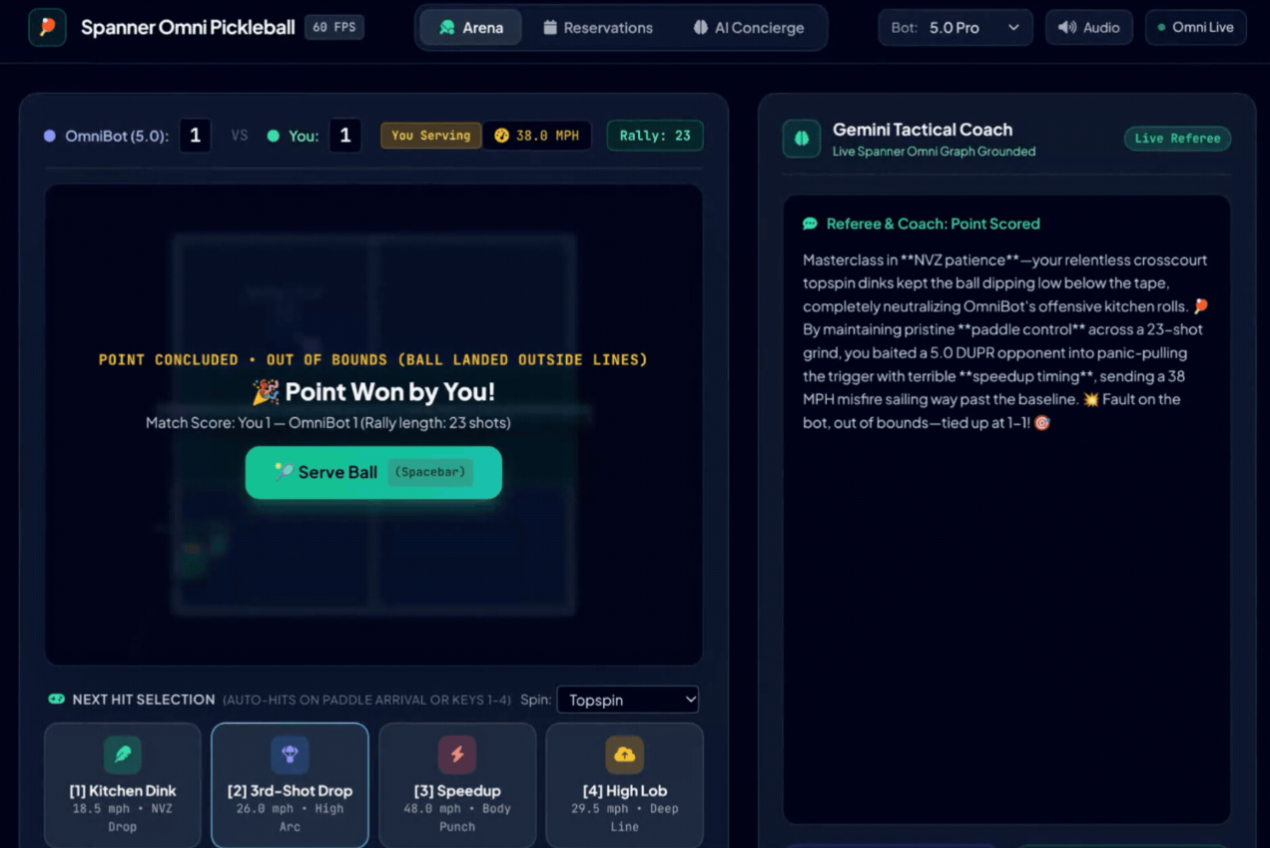
http://localhost:5000to start playing! You can book court times on the Reservation Tab, play against the adjustable DUPR OmniBot, and consult your real-time Gemini Match Analyst on the court side.
Open the web browser or click the link to the app running in your localhost!
9. Congratulations!
By completing this codelab, you have witnessed a paradigm shift in database engineering. For years, building responsive, real-time agents at the edge (on factory floors, in military zones, or court-side sports networks) forced painful design compromises: gluing together fragile ETL pipelines between isolated transactional systems, separate graph nodes, and vector search indices.
Spanner Omni dismantles this trade-off. It combines planet-scale distributed consistency, ISO GQL graph querying, and relational performance into a single, downloadable local container. No matter your domain, Spanner Omni guarantees your edge agents have an unshakeable ground truth.