
1. Before you begin
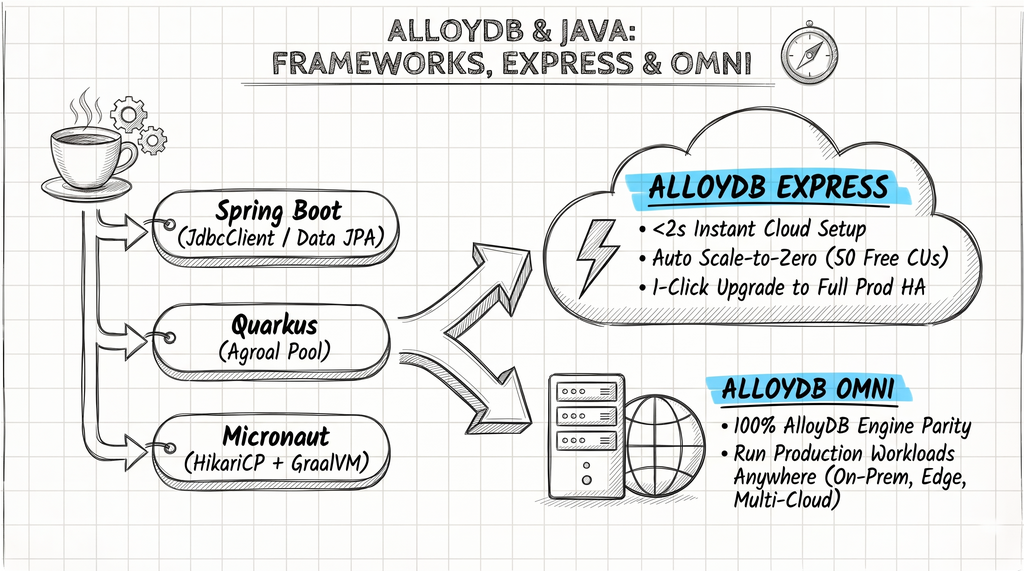
Once your Java application is connected to AlloyDB for PostgreSQL using the AlloyDB Java Connector and passwordless IAM Database Authentication, real-world application development begins. Two practical engineering questions immediately follow:
- How do you write clean, idiomatic data-access code against AlloyDB in Spring Boot, and how does that compare to Micronaut and Quarkus?
- Where should your AlloyDB databases live across inner-loop development, CI/CD, and production environments? Specifically, how do AlloyDB Express and AlloyDB Omni fit together so Java teams can iterate in seconds without sacrificing enterprise engine fidelity?
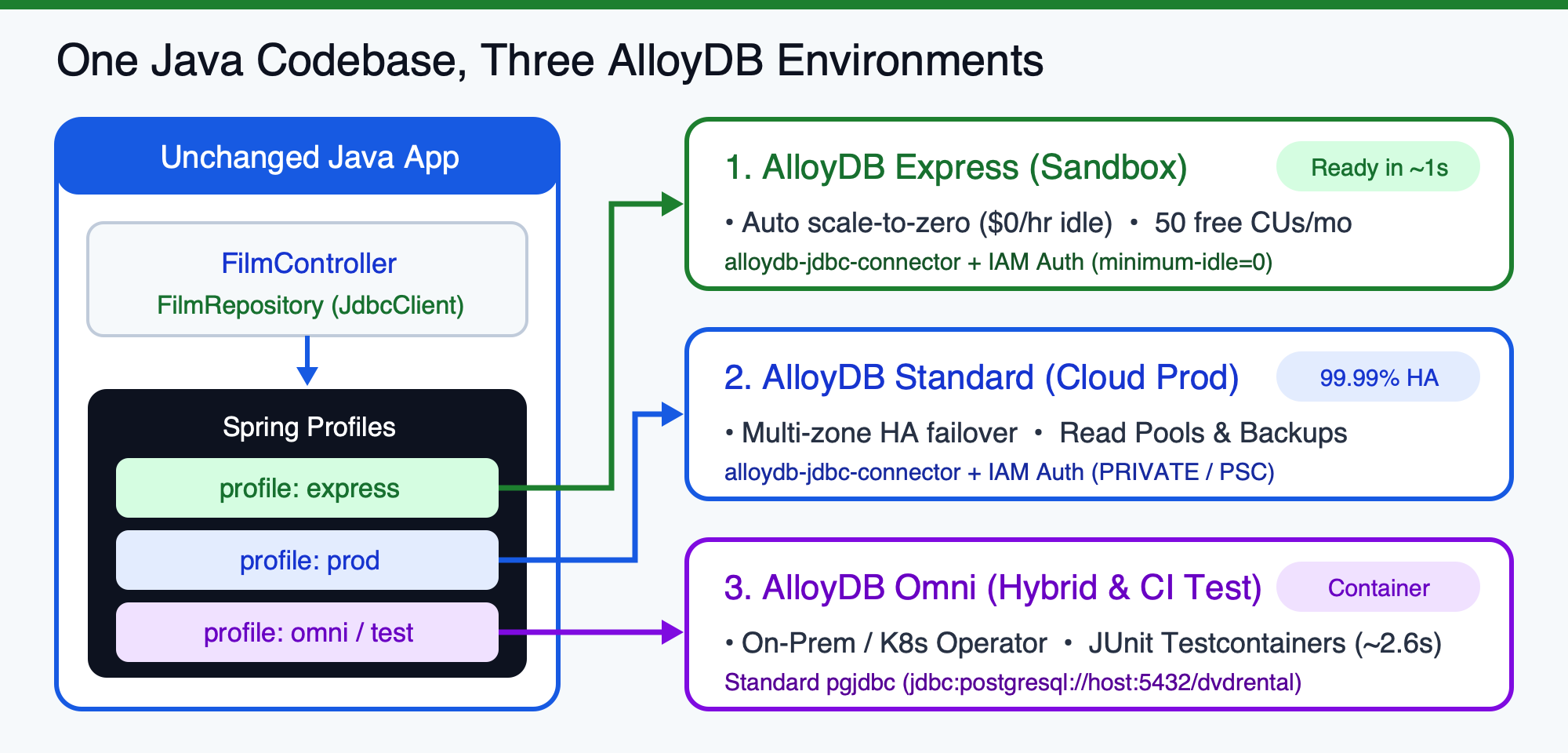
One Java Codebase, Three AlloyDB Deployment Models
Until recently, Java developers who wanted to prototype or run integration tests against AlloyDB-specific features such as ScaNN vector indexes, the Columnar Engine, or AlloyDB AI without paying for an always-on production cloud cluster ran AlloyDB Omni containers on their laptops as a workaround.
Today, AlloyDB Express and AlloyDB Omni play distinct, complementary roles alongside standard AlloyDB Clusters:
Dimension | AlloyDB Express | AlloyDB Omni | AlloyDB Cluster (Standard) |
Where It Runs | Fully managed in Google Cloud | Anywhere: On-Prem, Kubernetes/OpenShift, Edge, AWS/Azure, or local Docker | Fully managed in Google Cloud |
Provisioning Time | Under 2 seconds (measured: 0.27s cluster + 0.78s primary instance) | Seconds (container: ~2.6s in Testcontainers) / Minutes (K8s Operator) | ~10–15 minutes |
Scaling & Cost Model | Auto scales to zero after 15m idle ( | Self-managed infrastructure + per-vCPU subscription (free for dev/test) | Always-on enterprise cluster (99.99% SLA, Read Pools, Cross-Region DR) |
Java JDBC Connection |
| Standard |
|
Sweet Spot for Java Teams | Inner-loop cloud dev, feature-branch sandboxes, AI agents (MCP), staging | Hybrid/on-prem production (data sovereignty, low-latency edge) + CI Testcontainers | Mission-critical cloud production workloads |
Prerequisites
- Completion of the (Connect Java Applications to AlloyDB for PostgreSQL with IAM Authentication)[https://codelabs.developers.google.com/java-alloydb-connectivity] codelab or familiarity with the AlloyDB Java Connector (
com.google.cloud.alloydb.SocketFactory). - Familiarity with Java 17+, Apache Maven, Spring Boot, and JUnit 5.
What you'll do
- Build a clean repository and REST layer in Spring Boot 4.0 using
JdbcClient, Javarecordtypes, and PostgreSQL's single-round-tripUPDATE ... RETURNINGclause. - Compare how the same data layer is implemented in Micronaut Data JDBC and Quarkus (Hibernate ORM with Panache).
- Provision an AlloyDB Express PostgreSQL 18 sandbox in ~1 second and configure HikariCP so your local app allows the database to auto-pause compute.
- Configure Spring Profiles (
express,prod, andomni) so the exact same Java codebase runs across Google Cloud, on-premises Kubernetes, and air-gapped CI pipelines. - Write fast, offline JUnit 5 + Testcontainers integration tests using Spring Boot's
@ServiceConnectionandgoogle/alloydbomni:16with the AlloyDB Columnar Engine enabled.
What you'll need
- A Google Cloud project with billing enabled and the AlloyDB API (
alloydb.googleapis.com) enabled. - The
roles/alloydb.admin(orroles/owner) IAM role on your project. - Java 17 or higher (Java 21 LTS recommended) and Apache Maven installed.
gcloudCLI installed and authenticated (gcloud auth loginandgcloud auth application-default login).- Docker or Podman installed locally (for running the Testcontainers integration test with
google/alloydbomni:16).
2. Build the Data and REST Layer in Spring Boot with JdbcClient
Because the AlloyDB Java Connector sits transparently underneath the standard javax.sql.DataSource, your repository and controller classes do not need a single line of cloud-specific connection boilerplate. You can focus purely on domain modeling, SQL, and transaction boundaries.
For relational workloads on AlloyDB where you want full control over PostgreSQL-specific SQL features such as UPDATE ... RETURNING, JSONB operators, CTEs, or vector distance queries (<=>) without the overhead of a stateful ORM session, Spring Boot 3.2+'s fluent JdbcClient paired with Java record types is a great choice.
Create the Maven Project (pom.xml)
Create a new directory for your Spring Boot project and add the following pom.xml. Notice that we include alloydb-jdbc-connector for cloud environments (express and prod profiles) alongside spring-boot-starter-test and spring-boot-testcontainers for local integration testing:
mkdir -p java-alloydb-express-omni/src/main/java/com/example/alloydb \
         java-alloydb-express-omni/src/main/resources \
         java-alloydb-express-omni/src/test/java/com/example/alloydb
cd java-alloydb-express-omni
Create pom.xml:
<?xml version="1.0" encoding="UTF-8"?>
<project xmlns="http://maven.apache.org/POM/4.0.0"
         xmlns:xsi="http://www.w3.org/2001/XMLSchema-instance"
         xsi:schemaLocation="http://maven.apache.org/POM/4.0.0 https://maven.apache.org/xsd/maven-4.0.0.xsd">
    <modelVersion>4.0.0</modelVersion>

    <parent>
        <groupId>org.springframework.boot</groupId>
        <artifactId>spring-boot-starter-parent</artifactId>
        <version>4.0.5</version>
        <relativePath/>
    </parent>

    <groupId>com.example.alloydb</groupId>
    <artifactId>java-alloydb-express-omni</artifactId>
    <version>0.0.1-SNAPSHOT</version>

    <properties>
        <java.version>17</java.version>
    </properties>

    <dependencyManagement>
        <dependencies>
            <dependency>
                <groupId>com.google.cloud</groupId>
                <artifactId>libraries-bom</artifactId>
                <version>26.54.0</version>
                <type>pom</type>
                <scope>import</scope>
            </dependency>
        </dependencies>
    </dependencyManagement>

    <dependencies>
        <dependency>
            <groupId>org.springframework.boot</groupId>
            <artifactId>spring-boot-starter-jdbc</artifactId>
        </dependency>
        <dependency>
            <groupId>org.springframework.boot</groupId>
            <artifactId>spring-boot-starter-web</artifactId>
        </dependency>
        <dependency>
            <groupId>org.postgresql</groupId>
            <artifactId>postgresql</artifactId>
            <scope>runtime</scope>
        </dependency>
        <dependency>
            <groupId>com.google.cloud</groupId>
            <artifactId>alloydb-jdbc-connector</artifactId>
        </dependency>

        <!-- Test dependencies for JUnit 5 + AlloyDB Omni Testcontainers (Testcontainers 2.x in Spring Boot 4.0+) -->
        <dependency>
            <groupId>org.springframework.boot</groupId>
            <artifactId>spring-boot-starter-test</artifactId>
            <scope>test</scope>
        </dependency>
        <dependency>
            <groupId>org.springframework.boot</groupId>
            <artifactId>spring-boot-testcontainers</artifactId>
            <scope>test</scope>
        </dependency>
        <dependency>
            <groupId>org.testcontainers</groupId>
            <artifactId>testcontainers-postgresql</artifactId>
            <scope>test</scope>
        </dependency>
        <dependency>
            <groupId>org.testcontainers</groupId>
            <artifactId>testcontainers-junit-jupiter</artifactId>
            <scope>test</scope>
        </dependency>
    </dependencies>

    <build>
        <plugins>
            <plugin>
                <groupId>org.springframework.boot</groupId>
                <artifactId>spring-boot-maven-plugin</artifactId>
            </plugin>
        </plugins>
    </build>
</project>
Implement FilmRepository with JdbcClient and UPDATE ... RETURNING
Create src/main/java/com/example/alloydb/FilmRepository.java.
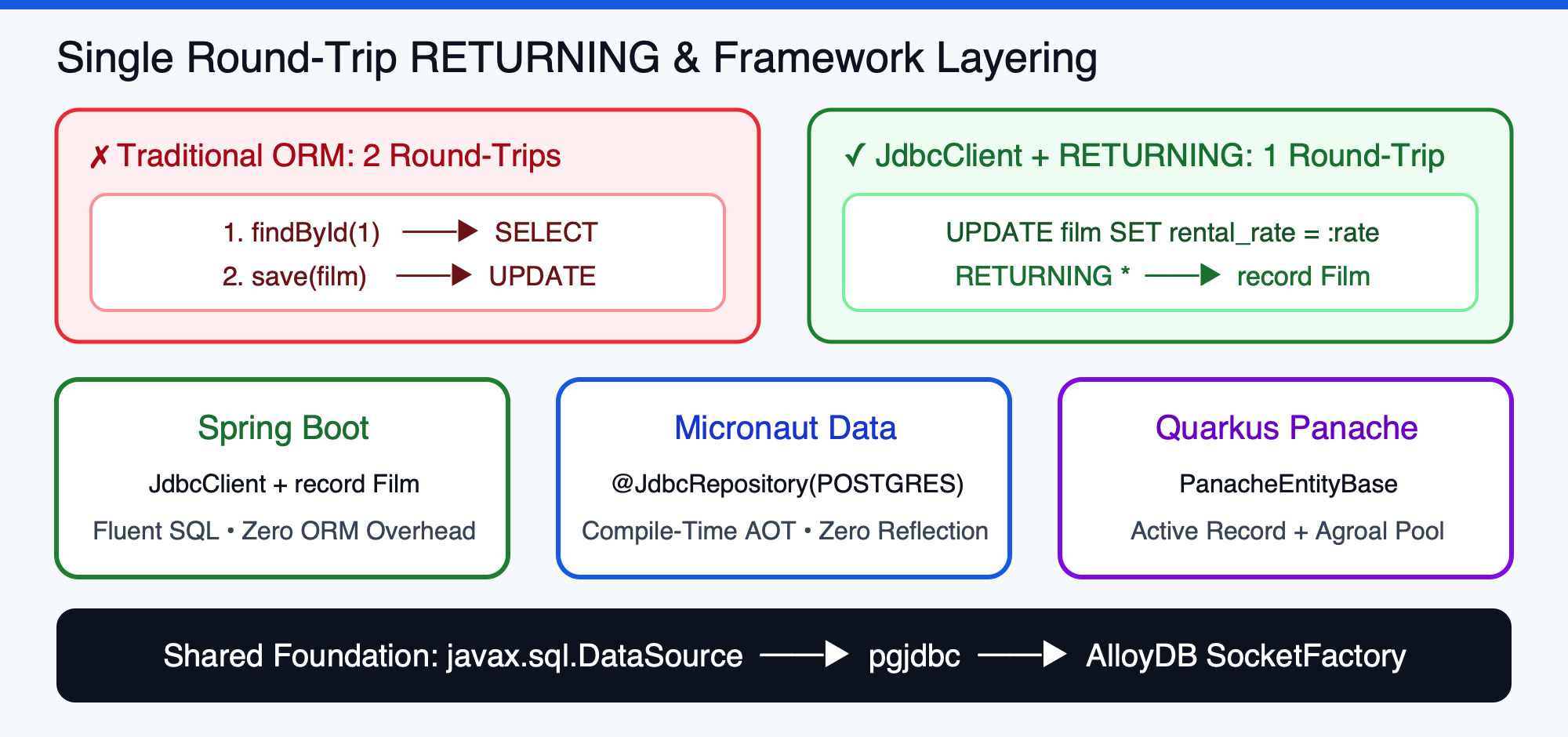
Notice how updateRentalRate() uses PostgreSQL's native RETURNING clause to mutate the row and project the updated columns back into a Film record in a single network round-trip to AlloyDB, rather than issuing a separate SELECT and UPDATE:
package com.example.alloydb;

import org.springframework.jdbc.core.simple.JdbcClient;
import org.springframework.stereotype.Repository;
import org.springframework.transaction.annotation.Transactional;

import java.math.BigDecimal;
import java.util.List;
import java.util.Optional;

@Repository
public class FilmRepository {

    public record Film(Integer filmId, String title, String rating, BigDecimal rentalRate) {}

    private final JdbcClient jdbcClient;

    public FilmRepository(JdbcClient jdbcClient) {
        this.jdbcClient = jdbcClient;
    }

    @Transactional(readOnly = true)
    public List<Film> findTopFilmsByRating(String rating, int limit) {
        return jdbcClient.sql("""
                SELECT film_id AS filmId, title, rating, rental_rate AS rentalRate
                FROM public.film
                WHERE rating = :rating
                ORDER BY rental_rate DESC, film_id ASC
                LIMIT :limit
                """)
            .param("rating", rating)
            .param("limit", limit)
            .query(Film.class)
            .list();
    }

    @Transactional(readOnly = true)
    public Optional<Film> findById(int filmId) {
        return jdbcClient.sql("""
                SELECT film_id AS filmId, title, rating, rental_rate AS rentalRate
                FROM public.film
                WHERE film_id = :filmId
                """)
            .param("filmId", filmId)
            .query(Film.class)
            .optional();
    }

    /**
     * Uses PostgreSQL's native RETURNING clause to update and fetch the modified row
     * in a single network round-trip to AlloyDB.
     */
    @Transactional
    public Optional<Film> updateRentalRate(int filmId, BigDecimal newRate) {
        return jdbcClient.sql("""
                UPDATE public.film
                SET rental_rate = :newRate
                WHERE film_id = :filmId
                RETURNING film_id AS filmId, title, rating, rental_rate AS rentalRate
                """)
            .param("newRate", newRate)
            .param("filmId", filmId)
            .query(Film.class)
            .optional();
    }
}
Let's now expose the Repository via FilmController and Add a Startup Verification Runner. For that, create src/main/java/com/example/alloydb/FilmController.java:
package com.example.alloydb;

import com.example.alloydb.FilmRepository.Film;
import org.springframework.http.ResponseEntity;
import org.springframework.web.bind.annotation.*;

import java.math.BigDecimal;
import java.util.List;

@RestController
@RequestMapping("/api/films")
public class FilmController {

    private final FilmRepository filmRepository;

    public FilmController(FilmRepository filmRepository) {
        this.filmRepository = filmRepository;
    }

    @GetMapping
    public List<Film> getFilmsByRating(
            @RequestParam(defaultValue = "PG") String rating,
            @RequestParam(defaultValue = "5") int limit) {
        return filmRepository.findTopFilmsByRating(rating, limit);
    }

    @PatchMapping("/{filmId}/rate")
    public ResponseEntity<Film> updateRate(
            @PathVariable int filmId,
            @RequestParam BigDecimal rate) {
        return filmRepository.updateRentalRate(filmId, rate)
            .map(ResponseEntity::ok)
            .orElseGet(() -> ResponseEntity.notFound().build());
    }
}
Next, create src/main/java/com/example/alloydb/AlloyDbSpringApplication.java with a CommandLineRunner (annotated with @Profile("!test") so it runs during spring-boot:run but stays out of the way during unit/integration tests):
package com.example.alloydb;

import com.example.alloydb.FilmRepository.Film;
import org.springframework.boot.CommandLineRunner;
import org.springframework.boot.SpringApplication;
import org.springframework.boot.autoconfigure.SpringBootApplication;
import org.springframework.context.annotation.Bean;
import org.springframework.context.annotation.Profile;

import java.math.BigDecimal;
import java.util.List;

@SpringBootApplication
public class AlloyDbSpringApplication {

    public static void main(String[] args) {
        System.exit(SpringApplication.exit(SpringApplication.run(AlloyDbSpringApplication.class, args)));
    }

    @Bean
    @Profile("!test")
    CommandLineRunner verifyDataLayer(FilmRepository filmRepository, FilmController filmController) {
        return args -> {
            System.out.println(">>> 1. Querying top PG-rated films via JdbcClient (FilmRepository):");
            List<Film> pgFilms = filmRepository.findTopFilmsByRating("PG", 5);
            pgFilms.forEach(f -> System.out.printf("  #%d: %s (%s) - $%s%n",
                    f.filmId(), f.title(), f.rating(), f.rentalRate()));

            System.out.println(">>> 2. Testing PostgreSQL UPDATE ... RETURNING on film #1 (FilmRepository):");
            var original = filmRepository.findById(1).orElseThrow();
            var updated = filmRepository.updateRentalRate(1, new BigDecimal("2.49")).orElseThrow();
            System.out.printf("  Updated film #1 in single round-trip: %s -> new rate $%s%n",
                    updated.title(), updated.rentalRate());

            System.out.println(">>> 3. Testing FilmController endpoints (GET /api/films & PATCH /api/films/1/rate):");
            var controllerFilms = filmController.getFilmsByRating("PG", 3);
            System.out.printf("  GET /api/films returned %d films (first: %s)%n",
                    controllerFilms.size(), controllerFilms.get(0).title());
            var patchResponse = filmController.updateRate(1, original.rentalRate());
            System.out.printf("  PATCH /api/films/1/rate status=%s, restored rate=$%s%n",
                    patchResponse.getStatusCode(), patchResponse.getBody().rentalRate());
        };
    }
}
3. Compare Idiomatic Repositories in Micronaut and Quarkus
Because the AlloyDB Java Connector operates at the DataSource / JDBC driver level, Micronaut and Quarkus applications use their idiomatic data-access libraries in the exact same way, with zero AlloyDB-specific code inside their repositories.
Micronaut Data JDBC (Compile-Time Repository)
Micronaut Data JDBC generates the JDBC repository implementation at compile time via annotation processing which means zero runtime reflection, minimal memory footprint, and instant startup.
To use Micronaut Data JDBC on AlloyDB:
- Add
io.micronaut.data:micronaut-data-jdbcto<dependencies>inpom.xml. - Register
io.micronaut.data:micronaut-data-processorinsidemaven-compiler-plugin's
<!-- In Micronaut pom.xml <dependencies> -->
<dependency>
    <groupId>io.micronaut.data</groupId>
    <artifactId>micronaut-data-jdbc</artifactId>
</dependency>

<!-- In Micronaut pom.xml <build><plugins> under maven-compiler-plugin -->
<annotationProcessorPaths combine.children="append">
    <path>
        <groupId>io.micronaut.data</groupId>
        <artifactId>micronaut-data-processor</artifactId>
        <version>${micronaut.data.version}</version>
    </path>
</annotationProcessorPaths>
Now define the entity record and repository interface:
package com.example.alloydb;

import io.micronaut.data.annotation.Id;
import io.micronaut.data.annotation.MappedEntity;
import io.micronaut.data.jdbc.annotation.JdbcRepository;
import io.micronaut.data.model.query.builder.sql.Dialect;
import io.micronaut.data.repository.CrudRepository;
import java.math.BigDecimal;
import java.util.List;

@MappedEntity("film")
public record Film(@Id Integer filmId, String title, String rating, BigDecimal rentalRate) {}

@JdbcRepository(dialect = Dialect.POSTGRES)
public interface MicronautFilmRepository extends CrudRepository<Film, Integer> {
    List<Film> findTop5ByRatingOrderByRentalRateDesc(String rating);
}
Quarkus (Hibernate ORM with Panache)
In Quarkus, you can inject AgroalDataSource directly or add io.quarkus:quarkus-hibernate-orm-panache to pom.xml and use Panache active records or repositories on top of the AlloyDB connection pool:
package com.example.alloydb;

import io.quarkus.hibernate.orm.panache.PanacheEntityBase;
import io.quarkus.panache.common.Page;
import io.quarkus.panache.common.Sort;
import jakarta.persistence.*;
import java.math.BigDecimal;
import java.util.List;

@Entity
@Table(name = "film")
public class FilmEntity extends PanacheEntityBase {
    @Id
    @Column(name = "film_id")
    public Integer filmId;
    public String title;
    public String rating;
    @Column(name = "rental_rate")
    public BigDecimal rentalRate;

    public static List<FilmEntity> findTopByRating(String rating, int limit) {
        return find("rating", Sort.by("rentalRate").descending(), rating)
            .page(Page.ofSize(limit))
            .list();
    }
}
4. Provision an AlloyDB Express Sandbox and Configure Scale-to-Zero
AlloyDB Express removes the friction of waiting 10–15 minutes for cloud database infrastructure during inner-loop development, feature-branch CI/CD runs, or AI agent workflows with:
- Instant Provisioning (<2s): Spin up an AlloyDB Express PostgreSQL 18 cluster and primary instance in just over one second (
0.27scluster +0.78s1-vCPU primary instance = 1.05s total in oureurope-west2benchmark). - Automatic Scale-to-Zero: After 15 minutes of inactivity, AlloyDB Express automatically pauses compute (so
$0.00/hrwhile paused) and wakes up transparently within seconds when your Java app sends its next query. Combined with 50 free Compute Units per month, every developer can now have their own isolated cloud database. - Cloud Security & Gemini AI Out of the Box: Runs inside Google Cloud with real IAM Database Authentication, Private Service Connect (PSC), and built-in Vertex AI / Gemini SQL functions such as
ai.if,ai.rank, orai.generate. - 1-Click In-Place Upgrade to Full HA: you can upgrade an Express sandbox to a full AlloyDB cluster (adding High Availability, Read Pools, and continuous backups) without changing your data, IAM users, or
alloydbInstanceNameJDBC URI.
Enable Required APIs and Provision the AlloyDB Express Cluster
Notice that AlloyDB Express instances use --enable-public-dns (which provides a public DNS endpoint like *.a.europe-west2.alloydb.s.cloud.goog.) rather than --assign-inbound-public-ip. When connecting with the AlloyDB Java Connector (alloydbIpType=PUBLIC), the connector handles mTLS 1.3 authentication automatically without requiring --authorized-external-networks IP allowlisting.
Here are the commands to run in your terminal:
export PROJECT_ID="<PROJECT_ID>"
export EXPRESS_REGION="europe-west2"
export EXPRESS_CLUSTER="my-express-cluster"
export EXPRESS_INSTANCE="my-express-primary"
export IAM_USER="<YOUR_EMAIL>"

# Ensure required Google Cloud APIs are enabled
gcloud services enable \
    alloydb.googleapis.com \
    compute.googleapis.com \
    cloudresourcemanager.googleapis.com \
    iam.googleapis.com \
    serviceusage.googleapis.com \
    --project="${PROJECT_ID}"

# Create the AlloyDB Express PostgreSQL 18 cluster (<1s)
gcloud beta alloydb clusters create "${EXPRESS_CLUSTER}" \
    --region="${EXPRESS_REGION}" \
    --password="<DB_ADMIN_PASSWORD>" \
    --enable-express \
    --project="${PROJECT_ID}"

# Create the 1-vCPU zonal primary instance with Public DNS & IAM auth (<1s)
gcloud beta alloydb instances create "${EXPRESS_INSTANCE}" \
    --cluster="${EXPRESS_CLUSTER}" \
    --region="${EXPRESS_REGION}" \
    --instance-type=PRIMARY \
    --cpu-count=1 \
    --enable-public-dns \
    --database-flags=alloydb.iam_authentication=on \
    --project="${PROJECT_ID}"

# Register your IAM user with superuser/postgres roles for sandbox development
gcloud alloydb users create "${IAM_USER}" \
    --cluster="${EXPRESS_CLUSTER}" \
    --region="${EXPRESS_REGION}" \
    --type=IAM_BASED \
    --db-roles="postgres,alloydbsuperuser" \
    --project="${PROJECT_ID}"
Create the dvdrental database and seed the public.film table on your new AlloyDB Express instance using AlloyDB Studio in the Google Cloud Console (or via gcloud beta alloydb connect):
CREATE DATABASE dvdrental;
Then connect to dvdrental and run:
CREATE TABLE IF NOT EXISTS public.film (
    film_id SERIAL PRIMARY KEY,
    title VARCHAR(255) NOT NULL,
    rating VARCHAR(10) NOT NULL,
    rental_rate NUMERIC(4,2) NOT NULL
);

TRUNCATE TABLE public.film;
INSERT INTO public.film (film_id, title, rating, rental_rate) VALUES
    (1, 'Academy Dinosaur', 'PG', 0.99),
    (6, 'Agent Truman', 'PG', 2.99),
    (12, 'Alaska Phantom', 'PG', 0.99),
    (13, 'Ali Forever', 'PG', 4.99),
    (19, 'Amadeus Holy', 'PG', 0.99),
    (21, 'American Circus', 'R', 4.99);
Configure application-express.properties for Scale-to-Zero
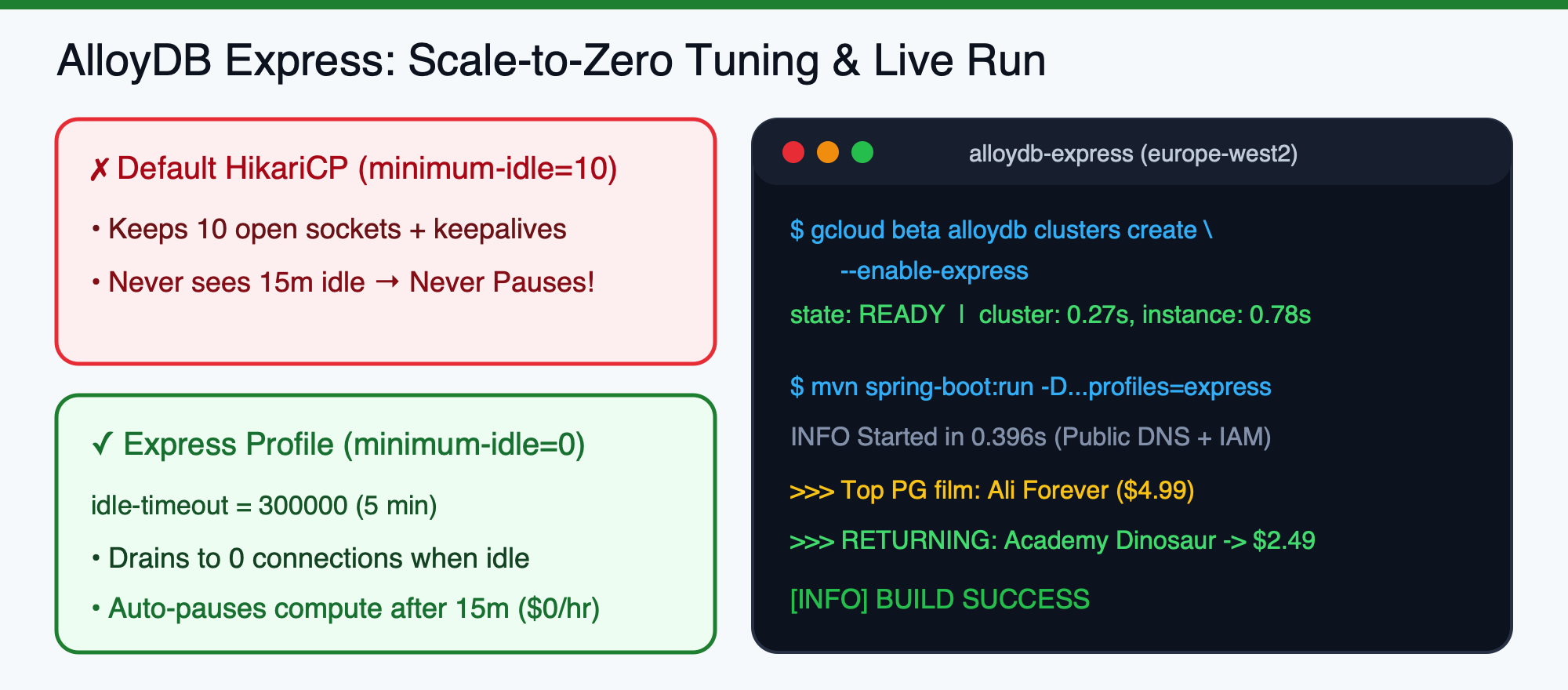
By default, HikariCP maintains minimum-idle=10 open connections and sends periodic keepalive queries. If you leave that default in place while developing against AlloyDB Express, the database will never see 15 minutes of zero connections and will never auto-pause!
Create src/main/resources/application-express.properties and set spring.datasource.hikari.minimum-idle=0 and idle-timeout=300000 (5 minutes) so HikariCP drains idle sockets when you step away:
# src/main/resources/application-express.properties
spring.main.web-application-type=none
spring.datasource.url=jdbc:postgresql:///dvdrental?socketFactory=com.google.cloud.alloydb.SocketFactory&alloydbInstanceName=${ALLOYDB_EXPRESS_URI}&alloydbEnableIAMAuth=true&alloydbIpType=PUBLIC
spring.datasource.username=${ALLOYDB_IAM_USER}

# Let HikariCP drop to 0 connections when idle so AlloyDB Express can auto-pause after 15m!
spring.datasource.hikari.minimum-idle=0
spring.datasource.hikari.maximum-pool-size=5
spring.datasource.hikari.idle-timeout=300000
spring.datasource.hikari.connection-timeout=30000
Then run your Spring Boot application with the express profile active:
export ALLOYDB_EXPRESS_URI="projects/${PROJECT_ID}/locations/${EXPRESS_REGION}/clusters/${EXPRESS_CLUSTER}/instances/${EXPRESS_INSTANCE}"
export ALLOYDB_IAM_USER="${IAM_USER}"

mvn spring-boot:run -Dspring-boot.run.profiles=express
You should see output similar to the following as Spring Boot connects to your AlloyDB Express PostgreSQL instance over Public DNS using IAM Authentication, executes the JdbcClient query, and performs the single-round-trip UPDATE ... RETURNING:
>>> 1. Querying top PG-rated films via JdbcClient (FilmRepository):
  #13: Ali Forever (PG) - $4.99
  #6: Agent Truman (PG) - $2.99
  #1: Academy Dinosaur (PG) - $0.99
>>> 2. Testing PostgreSQL UPDATE ... RETURNING on film #1 (FilmRepository):
  Updated film #1 in single round-trip: Academy Dinosaur -> new rate $2.49
>>> 3. Testing FilmController endpoints (GET /api/films & PATCH /api/films/1/rate):
  GET /api/films returned 3 films (first: Ali Forever)
  PATCH /api/films/1/rate status=200 OK, restored rate=$0.99
5. Run Workloads and Integration Tests with AlloyDB Omni
While AlloyDB Express handles rapid cloud prototyping, AlloyDB Omni is Google Cloud's downloadable, enterprise-grade database edition designed to run production workloads outside Google Cloud as well as air-gapped CI integration tests.
Configure the omni Profile for Hybrid / On-Premises Production
When your Java service runs on-premises, at a retail/factory edge site, on Red Hat OpenShift / Kubernetes (managed by the AlloyDB Omni Kubernetes Operator), or in another cloud, AlloyDB Omni provides the exact same AlloyDB query planner, Columnar Engine, ScaNN vector index, and AlloyDB AI capabilities.
Because AlloyDB Omni runs on your own network rather than behind the Google Cloud AlloyDB Admin API, your Java application connects using the standard org.postgresql:postgresql driver. No SocketFactory required.
Create src/main/resources/application-omni.properties:
# src/main/resources/application-omni.properties (On-Prem / K8s / Multi-Cloud AlloyDB Omni)
# Set OMNI_SSLMODE=prefer or disable when connecting to a local unencrypted Docker container
spring.datasource.url=jdbc:postgresql://${OMNI_HOST:localhost}:${OMNI_PORT:5432}/dvdrental?sslmode=${OMNI_SSLMODE:require}
spring.datasource.username=${OMNI_DB_USER:postgres}
spring.datasource.password=${OMNI_DB_PASSWORD}
Let's write an Air-Gapped Integration Test with JUnit 5, @ServiceConnection, and Testcontainers
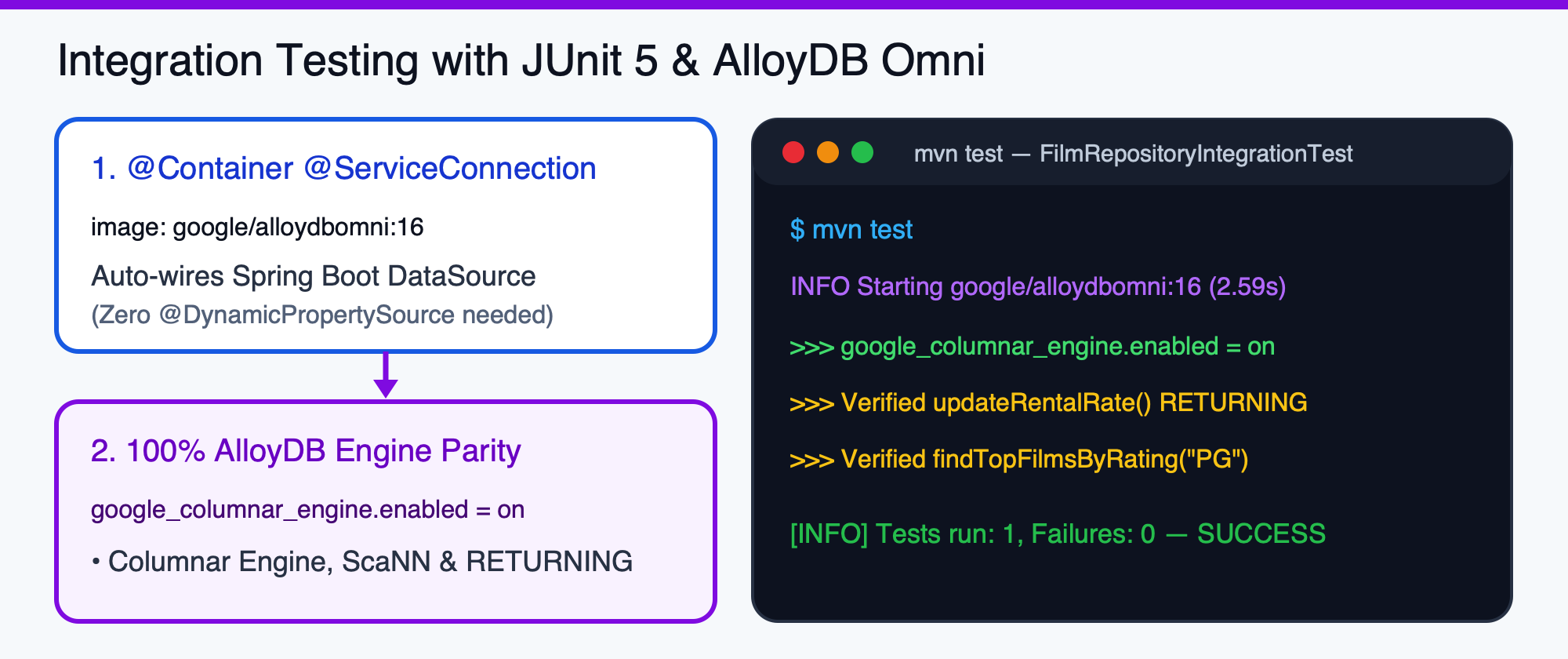
Because AlloyDB Omni is distributed as a standard OCI container image (google/alloydbomni:16), it also solves a classic Java testing problem: how do you run fast, offline JUnit integration tests that exercise AlloyDB-specific features (like the Columnar Engine or ScaNN vector indexes) that fail on a stock postgres:16 image?
With Spring Boot's @ServiceConnection and Testcontainers, you can spin up an ephemeral google/alloydbomni:16 container during mvn test with zero manual @DynamicPropertySource boilerplate.
Now create src/test/java/com/example/alloydb/FilmRepositoryIntegrationTest.java:
package com.example.alloydb;

import com.example.alloydb.FilmRepository.Film;
import org.junit.jupiter.api.BeforeEach;
import org.junit.jupiter.api.Test;
import org.springframework.beans.factory.annotation.Autowired;
import org.springframework.boot.test.context.SpringBootTest;
import org.springframework.boot.testcontainers.service.connection.ServiceConnection;
import org.springframework.jdbc.core.simple.JdbcClient;
import org.springframework.test.context.ActiveProfiles;
import org.testcontainers.postgresql.PostgreSQLContainer;
import org.testcontainers.junit.jupiter.Container;
import org.testcontainers.junit.jupiter.Testcontainers;
import org.testcontainers.utility.DockerImageName;

import java.math.BigDecimal;
import java.util.List;

import static org.assertj.core.api.Assertions.assertThat;

@SpringBootTest
@Testcontainers
@ActiveProfiles("test")
class FilmRepositoryIntegrationTest {

    // Spin up AlloyDB Omni as a drop-in PostgreSQL container for Spring Boot's @ServiceConnection
    @Container
    @ServiceConnection
    static PostgreSQLContainer alloydbOmni = new PostgreSQLContainer(
        DockerImageName.parse("google/alloydbomni:16")
            .asCompatibleSubstituteFor("postgres")
    ).withCommand("postgres", "-c", "google_columnar_engine.enabled=on");

    @Autowired
    private FilmRepository filmRepository;

    @Autowired
    private JdbcClient jdbcClient;

    @BeforeEach
    void setUpSchema() {
        jdbcClient.sql("""
                CREATE TABLE IF NOT EXISTS public.film (
                    film_id SERIAL PRIMARY KEY,
                    title VARCHAR(255) NOT NULL,
                    rating VARCHAR(10) NOT NULL,
                    rental_rate NUMERIC(4,2) NOT NULL
                );
                TRUNCATE TABLE public.film;
                INSERT INTO public.film (film_id, title, rating, rental_rate) VALUES
                    (1, 'Academy Dinosaur', 'PG', 0.99),
                    (2, 'Ace Goldfinger', 'G', 4.99);
                """).update();
    }

    @Test
    void shouldQueryAndUpdateFilmUsingReturningClause() {
        String columnarEnabled = jdbcClient.sql("SHOW google_columnar_engine.enabled")
            .query(String.class)
            .single();
        assertThat(columnarEnabled).isEqualTo("on");

        var updated = filmRepository.updateRentalRate(1, new BigDecimal("2.49"));
        assertThat(updated).isPresent();
        assertThat(updated.get().rentalRate()).isEqualByComparingTo("2.49");

        List<Film> pgFilms = filmRepository.findTopFilmsByRating("PG", 5);
        assertThat(pgFilms).hasSize(1);
        assertThat(pgFilms.get(0).title()).isEqualTo("Academy Dinosaur");
    }
}
Run the Integration Test Suite
Ensure your local Docker or Podman daemon is running, then execute mvn test:
mvn test
Testcontainers pulls google/alloydbomni:16 (if not already cached), starts the container in ~2.6 seconds, injects the dynamic JDBC URL into Spring Boot's DataSource via @ServiceConnection, verifies that google_columnar_engine.enabled is on, and validates your FilmRepository methods:
[INFO] Running com.example.alloydb.FilmRepositoryIntegrationTest
INFO tc.google/alloydbomni:16 -- Creating container for image: google/alloydbomni:16
INFO tc.google/alloydbomni:16 -- Container google/alloydbomni:16 started in PT2.59S
[INFO] Tests run: 1, Failures: 0, Errors: 0, Skipped: 0 -- in com.example.alloydb.FilmRepositoryIntegrationTest
[INFO] BUILD SUCCESS
6. Clean up
Although AlloyDB Express automatically scales to zero after 15 minutes of inactivity and includes 50 free Compute Units per month, you can delete the sandbox cluster and local project files when you are finished experimenting:
gcloud beta alloydb clusters delete "${EXPRESS_CLUSTER}" \
    --region="${EXPRESS_REGION}" \
    --force \
    --project="${PROJECT_ID}" \
    --quiet
7. Congratulations
You have built an idiomatic Java data layer for AlloyDB and verified it across both AlloyDB Express in Google Cloud and AlloyDB Omni in Testcontainers!
What you've accomplished
- Built a Single-Round-Trip Repository in Spring Boot: Used
JdbcClient, Javarecordtypes, and PostgreSQL'sUPDATE ... RETURNINGclause to eliminate extra database round-trips and ORM session overhead. - Compared Micronaut Data JDBC and Quarkus Panache: Saw how Micronaut's compile-time
@JdbcRepositoryand Quarkus'sPanacheEntityBaselayer cleanly over the same AlloyDBDataSource. - Provisioned AlloyDB Express in ~1 Second: Created an AlloyDB Express PostgreSQL 18 cluster and 1-vCPU primary instance in
europe-west2and tuned HikariCP (minimum-idle=0) to preserve automatic scale-to-zero. - Tested Offline with AlloyDB Omni & Testcontainers: Used Spring Boot's
@ServiceConnectionandgoogle/alloydbomni:16withgoogle_columnar_engine.enabled=onto run fast, high-fidelity JUnit 5 integration tests.