
1. Introduction
This Codelab explores Cloud Next Generation Firewall (NGFW) Essentials for internal Application Load Balancers (ALB) and proxy Network Load Balancers (NLB) using regional network firewall policies.
Cloud NGFW is a fully distributed firewall service with advanced threat protection and micro-segmentation capabilities to protect Google Cloud workloads. Enabling Cloud NGFW at the load balancer level applies consistent firewall policy rules to any TCP traffic ingressing internal proxy-based load balancers. It simplifies provisioning an organizational security posture by offering broader enforcement of policies for all services.
The following Cloud NGFW and Cloud load balancer products and features are covered in this Codelab:
- Cloud NGFW Essentials
- Regional network firewall policies
- Regional internal Application Load Balancer
- Backend managed instance group (MIG) and Private Service Connect (PSC) network endpoint group (NEG)
NOTE: Refer to Cloud NFGW documentation for the latest supported features and limitations of firewall policy rules for load balancer targets.
What you learn
- Enabling basic Cloud NGFW firewall policy rules targeting load balancers
- Protecting an internal consumer load balancer service with VM instance and PSC backends
- Testing client access and verifying firewall logs
What you need
- A Google Cloud project
- Familiarity with Google Cloud networking concepts and using Google Cloud CLI
- IAM permissions:
roles/compute.instanceAdmin.v1,roles/compute.networkAdmin,roles/compute.securityAdmin, androles/storage.admin
2. Concepts
Firewall feature tiers
Cloud NGFW has three feature tiers: Essentials, Standard, and Enterprise. Each progressive tier offers additional levels of network traffic filtering and inspection capabilities.
A summary of Cloud NGFW Essentials filtering capabilities:
Tier | Capability | Network layers | Example rule parameters |
Essentials | IP address & range filtering | IP |
|
Essentials | Address groups | IP |
|
Essentials | Protocol & port Filtering | TCP |
|
Essentials | Secure tags | Metadata |
|
Essentials | Network type filtering | IP / metadata |
|
Load balancer forwarding rules explicitly define the destination TCP port. The firewall rule --layer4-configs= parameter can only specify tcp. The port value is implied by the forwarding rule itself.
Address groups and network types can be useful to make firewall policy rules more efficient. The network types VPC_NETWORKS and INTRA_VPC are supported with firewall policy rules for load balancers.
NOTE: Firewall policy rules for load balancers only support --direction=INGRESS. These rules are designed to control access to services exposed by the load balancer.
Data plane filtering
Cloud NFGW Essentials features cover basic Layer 3 (IP address) and Layer 4 (TCP port) stateful firewall rules. These firewall policy rule features are all performed efficiently in the load balancer data plane without the need for full packet inspection.
Cloud NGFW Essentials policy rules targeting VM instances are enforced in the distributed VPC network fabric as part of the core Google Cloud software-defined network (Andromeda). Packet filtering and firewall policy rules are enforced at the hypervisor level of each individual VM instance, before the packet reaches the VM instance network interface.
Cloud NGFW Essentials policy rules targeting load balancers are enforced using the underlying technologies of Google Cloud load balancers, specifically the Envoy service proxy infrastructure. Using the same Cloud NFGW resource model and rule structure, stateful packet filtering is enforced directly in the proxy-based load balancer data plane.
Load balancer targets
There are a few key differences between Cloud NGFW policies targeting load balancers and policies targeting VM instances.
Firewall policy rules can be applied to target a single load balancer by specifying --target-type=INTERNAL_MANAGED_LB along with the specific reference to the load balancer forwarding rule --target-forwarding-rules=FR_NAME. To target all load balancer forwarding rules in the VPC network region (where region is scoped by the policy), the specific reference should be omitted, and only the --target-type=INTERNAL_MANAGED_LB flag is needed.
If the --target-type parameter is not set in the rule configuration, then the rule defaults to automatically apply to all VM instances and not the load balancers.
Codelab network
This Codelab uses a single project with one VPC network and the following resources:
- Two regional subnets
- One regional network firewall policy
- Three regional internal Application Load Balancers
wwwHTTP service with VM instance group backendapiHTTP service with VM instance group backendgcsHTTPS service with PSC NEG backend to Google APIs
- Two VM instances to test various allow and deny policies
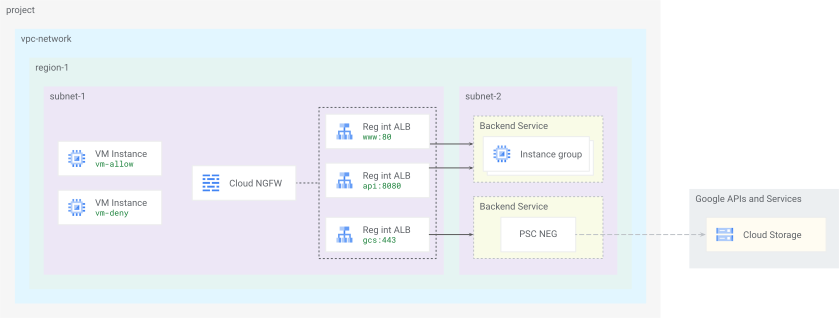
Fig 1. Codelab network
Firewall policy rules targeting load balancers are linked to the load balancer forwarding rule resources. Load balancers themselves are made up of individually defined resources configured together to provide a complete load balancing service. The forwarding rule definition directly references a specific target proxy resource defined for it.
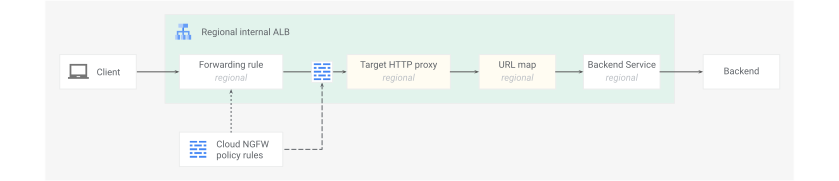
Fig 1. Cloud NFGW for load balancer resources
Cloud NGFW Essentials filters are programmed into the load balancer data plane and implemented at the defined target proxy service layer–analogous to a VM instance interface–using the same distributed and consistent firewall mechanisms to enforce policies.
3. Project setup
Access your project
This Codelab uses a single Google Cloud project. Configuration steps use gcloud cli CLI and Linux shell commands.
Start by accessing your Google Cloud project command line:
- Cloud Shell at
shell.cloud.google.com, or - A local terminal with
gcloudCLI installed
Set your Project ID
gcloud config set project YOUR_PROJECT_ID_HERE
Enable API services
gcloud services enable \
  cloudresourcemanager.googleapis.com \
  compute.googleapis.com \
  dns.googleapis.com \
  networksecurity.googleapis.com \
  certificatemanager.googleapis.com
Set shell environment variables
# set your region preference
export REGION_1="us-west1"
# set your zone preference
export ZONE_1="us-west1-c"
# fetch project info and verify vars set
export PROJECT_ID=$(gcloud config list --format="value(core.project)")
export PROJECT_NO=$(gcloud projects describe ${PROJECT_ID} --format="value(projectNumber)")
echo ${REGION_1}
echo ${ZONE_1}
echo ${PROJECT_ID}
echo ${PROJECT_NO}
4. Network foundation
In this section you will deploy a network foundation with:
- Global VPC network and regional subnets
- Regional network firewall policy to secure the VPC network
- Cloud Router and Cloud NAT for servers to fetch software packages
- IP address reservations and DNS records for load balancer ingress
Create network resources
# create vpc network
gcloud compute networks create vnet-foo --subnet-mode=custom
# create subnet for clients
gcloud compute networks subnets create subnet-foo-1 \
  --network=vnet-foo \
  --region=${REGION_1} \
  --range=10.0.0.0/24 \
  --enable-private-ip-google-access
# create subnet for backend servers
gcloud compute networks subnets create subnet-foo-2 \
  --network=vnet-foo \
  --region=${REGION_1} \
  --range=172.16.0.0/24 \
  --enable-private-ip-google-access
# create proxy subnet
gcloud compute networks subnets create subnet-foo-3 \
  --purpose=REGIONAL_MANAGED_PROXY \
  --role=ACTIVE \
  --network=vnet-foo \
  --region=${REGION_1} \
  --range=172.16.128.0/23
Create firewall components
The basic regional network firewall policy created here will be used later when adding load balancer specific targets. The policy must be in the same region as the load balancer.
Create address group
Start by creating an address group to identify the source health check probe IP ranges that support load balancer functionality. These ranges need to be allowed for the load balancer backends to be considered healthy. It will also be used later with firewall policy rules targeting load balancers.
# create address group
gcloud network-security address-groups create uhc-probes \
  --description="health check probes" \
  --type=IPv4 \
  --capacity=42 \
  --location=${REGION_1}
# add ip ranges to address group
gcloud network-security address-groups add-items uhc-probes \
  --items=35.191.0.0/16,130.211.0.0/22 \
  --location=${REGION_1}
Create firewall policy
# create fw policy
gcloud compute network-firewall-policies create fw-policy-foo-${REGION_1} \
  --description="foo fw ${REGION_1}" \
  --region=${REGION_1}
# create fw policy rule to allow in iap
gcloud compute network-firewall-policies rules create 1001 \
  --description="allow iap for ssh" \
  --firewall-policy=fw-policy-foo-${REGION_1} \
  --firewall-policy-region=${REGION_1} \
  --action=allow \
  --direction=INGRESS \
  --layer4-configs=tcp:22 \
  --src-ip-ranges=35.235.240.0/20
# create fw policy rule to allow in health checks
gcloud compute network-firewall-policies rules create 1002 \
  --description="allow health checks to backends" \
  --firewall-policy=fw-policy-foo-${REGION_1} \
  --firewall-policy-region=${REGION_1} \
  --action=allow \
  --direction=INGRESS \
  --layer4-configs=tcp \
  --src-address-groups=projects/${PROJECT_ID}/locations/${REGION_1}/addressGroups/uhc-probes
# create fw policy rule to allow in lb proxies
gcloud compute network-firewall-policies rules create 1003 \
  --description="allow lb proxy" \
  --firewall-policy=fw-policy-foo-${REGION_1} \
  --firewall-policy-region=${REGION_1} \
  --action=allow \
  --direction=INGRESS \
  --layer4-configs=tcp:80,tcp:443,tcp:8080 \
  --src-ip-ranges=172.16.128.0/23
# associate fw policy to vnet
gcloud compute network-firewall-policies associations create \
  --name=fw-policy-association-foo-${REGION_1} \
  --firewall-policy=fw-policy-foo-${REGION_1} \
  --network=vnet-foo \
  --firewall-policy-region=${REGION_1}
Configure network services
Create Cloud Router and NAT Gateway
# create router for nat
gcloud compute routers create cr-nat-foo \
  --network=vnet-foo \
  --asn=16550 \
  --region=${REGION_1}
# create nat gateway
gcloud compute routers nats create natgw-foo \
  --router=cr-nat-foo \
  --region=${REGION_1} \
  --auto-allocate-nat-external-ips \
  --nat-all-subnet-ip-ranges
Reserve IP addresses
# reserve vip for lb www service
gcloud compute addresses create vip-foo-www \
  --region=${REGION_1} \
  --subnet=subnet-foo-1 \
  --addresses=10.0.0.101
# reserve vip for lb api service
gcloud compute addresses create vip-foo-api \
  --region=${REGION_1} \
  --subnet=subnet-foo-1 \
  --addresses=10.0.0.102
# reserve vip for lb gcs service
gcloud compute addresses create vip-foo-gcs \
  --region=${REGION_1} \
  --subnet=subnet-foo-1 \
  --addresses=10.0.0.103
Create DNS records
# create dns zone
gcloud dns managed-zones create zone-foo \
  --description="private zone for foo" \
  --dns-name=foo.com \
  --networks=vnet-foo \
  --visibility=private
# create dns record for www service
gcloud dns record-sets create www.foo.com \
  --zone=zone-foo \
  --type=A \
  --ttl=300 \
  --rrdatas="10.0.0.101"
# create dns record for api service
gcloud dns record-sets create api.foo.com \
  --zone=zone-foo \
  --type=A \
  --ttl=300 \
  --rrdatas="10.0.0.102"
# create dns record for gcs service
gcloud dns record-sets create gcs.foo.com \
  --zone=zone-foo \
  --type=A \
  --ttl=300 \
  --rrdatas="10.0.0.103"
This concludes the network setup portion... next on to configuring load balancers.
5. Load balancer services
In this section you will deploy load balancer components (backend services, URL maps, target proxies, and forwarding rules) for three services:
wwwservice (ilb-foo-www) on port80apiservice (ilb-foo-api) on port8080gcsservice (ilb-foo-gcs) on port443with TLS certificate
Along with the supporting backend resources:
- VM instances running HTTP servers in a managed instance group
- Private Service Connect (PSC) network endpoint group (NEG) to Google APIs
- Google Cloud Storage (GCS) bucket
Setup backend resources
Create VM instance group servers
The www load balancer will use the VM instance group backend servers running Apache web server listening on port 80.
The api load balancer will use the same VM instance group listening on port 8080.
# create vm startup config with http server
cat > vm-server-startup.sh << 'OEOF'
#! /bin/bash
set -e
apt-get update
apt-get install apache2 -y
vm_hostname="$(curl -H "Metadata-Flavor:Google" \
http://169.254.169.254/computeMetadata/v1/instance/name)"
vm_zone="$(curl -H "Metadata-Flavor:Google" \
http://169.254.169.254/computeMetadata/v1/instance/zone | cut -d/ -f4)"
echo "www served from: $vm_hostname in zone $vm_zone on port 80" | \
tee /var/www/html/index.html
echo "Listen 8080" | tee -a /etc/apache2/ports.conf
mkdir -p /var/www/api
echo "api served from: $vm_hostname in zone $vm_zone on port 8080" | \
tee /var/www/api/index.html
tee /etc/apache2/sites-available/api.conf << EOF
<VirtualHost *:8080>
    DocumentRoot /var/www/api
</VirtualHost>
EOF
a2ensite api.conf
systemctl restart apache2
OEOF
# create managed instance group template
gcloud compute instance-templates create mig-template-foo \
  --machine-type=e2-micro \
  --network=vnet-foo \
  --region=${REGION_1} \
  --subnet=subnet-foo-2 \
  --no-address \
  --shielded-secure-boot \
  --metadata-from-file=startup-script=vm-server-startup.sh
# create regional managed instance group
gcloud compute instance-groups managed create mig-foo \
  --region=${REGION_1} \
  --size=2 \
  --template=mig-template-foo \
  --base-instance-name=service-foo
# create named ports for instance group
gcloud compute instance-groups managed set-named-ports mig-foo \
  --named-ports=www-port:80,api-port:8080 \
  --region=${REGION_1}
Create storage bucket
The gcs load balancer will use the PSC NEG backend to connect through the Google APIs frontend to the Cloud Storage bucket.
# create random bucket name
export BUCKET=$(openssl rand -hex 12)
echo ${BUCKET}
NOTE: Environment variables are lost once the shell session is closed. Note the bucket name if needed to complete in a future session.
# create bucket
gcloud storage buckets create gs://${BUCKET} --location=${REGION_1}
# give compute sa object admin role on bucket
gcloud storage buckets add-iam-policy-binding gs://${BUCKET} \
  --member=serviceAccount:${PROJECT_NO}-compute@developer.gserviceaccount.com \
  --role=roles/storage.objectAdmin
Create certificate
The gcs load balancer will terminate client HTTPS requests with a self-signed certificate deployed to the target HTTPS proxy.
# create cert
openssl req -x509 -newkey rsa:2048 \
  -nodes \
  -days 365 \
  -keyout foo-gcs-key.pem \
  -out foo-gcs-cert.pem \
  -subj "/CN=Foo, Inc." \
  -addext "subjectAltName=DNS:gcs.foo.com"
# upload to certificate manager
gcloud certificate-manager certificates create cert-foo-gcs \
  --private-key-file=foo-gcs-key.pem \
  --certificate-file=foo-gcs-cert.pem \
  --location=${REGION_1}
Create load balancer components
Use the following script to automate the deployment of the load balancer components. This will help with speed and accuracy across all the configuration elements involved.
Deploy load balancer creation script
# create script file
cat > create_lbs.sh << EOF
#!/bin/bash
set -e

# --- Create load balancer for www service port 80 ---
echo "--- Creating Load Balancer for WWW Service (ilb-foo-www) on port 80 ---"

echo "ilb-foo-www: creating health check (hc-foo-www)"
gcloud compute health-checks create http hc-foo-www \
  --use-serving-port \
  --region=${REGION_1}

echo "ilb-foo-www: creating backend service (bes-foo-www)"
gcloud compute backend-services create bes-foo-www \
  --load-balancing-scheme=INTERNAL_MANAGED \
  --protocol=HTTP \
  --port-name=www-port \
  --health-checks=hc-foo-www \
  --health-checks-region=${REGION_1} \
  --region=${REGION_1}

echo "ilb-foo-www: adding managed instance group (mig-foo) to backend service (bes-foo-www)"
gcloud compute backend-services add-backend bes-foo-www \
  --balancing-mode=UTILIZATION \
  --instance-group=mig-foo \
  --instance-group-region=${REGION_1} \
  --region=${REGION_1}

echo "ilb-foo-www: creating url map (ilb-foo-www)"
gcloud compute url-maps create ilb-foo-www \
  --default-service=bes-foo-www \
  --region=${REGION_1}

echo "ilb-foo-www: creating target http proxy (proxy-foo-www)"
gcloud compute target-http-proxies create proxy-foo-www \
  --url-map=ilb-foo-www \
  --url-map-region=${REGION_1} \
  --region=${REGION_1}

echo "ilb-foo-www: creating forwarding rule (fr-foo-www)"
gcloud compute forwarding-rules create fr-foo-www \
  --load-balancing-scheme=INTERNAL_MANAGED \
  --network=vnet-foo \
  --subnet=subnet-foo-1 \
  --subnet-region=${REGION_1} \
  --address=vip-foo-www \
  --ports=80 \
  --target-http-proxy=proxy-foo-www \
  --target-http-proxy-region=${REGION_1} \
  --region=${REGION_1}

echo "--- Successfully created Load Balancer for WWW Service (ilb-foo-www) ---"
echo

# --- Create load balancer for api service port 8080 ---
echo "--- Creating Load Balancer for API Service (ilb-foo-api) on port 8080 ---"

echo "ilb-foo-api: creating health check (hc-foo-api)"
gcloud compute health-checks create http hc-foo-api \
  --use-serving-port \
  --region=${REGION_1}

echo "ilb-foo-api: creating backend service (bes-foo-api)"
gcloud compute backend-services create bes-foo-api \
  --load-balancing-scheme=INTERNAL_MANAGED \
  --protocol=HTTP \
  --port-name=api-port \
  --health-checks=hc-foo-api \
  --health-checks-region=${REGION_1} \
  --region=${REGION_1}

echo "ilb-foo-api: adding managed instance group (mig-foo) to backend service (bes-foo-api)"
gcloud compute backend-services add-backend bes-foo-api \
  --balancing-mode=UTILIZATION \
  --instance-group=mig-foo \
  --instance-group-region=${REGION_1} \
  --region=${REGION_1}

echo "ilb-foo-api: creating url map (ilb-foo-api)"
gcloud compute url-maps create ilb-foo-api \
  --default-service=bes-foo-api \
  --region=${REGION_1}

echo "ilb-foo-api: creating target http proxy (proxy-foo-api)"
gcloud compute target-http-proxies create proxy-foo-api \
  --url-map=ilb-foo-api \
  --url-map-region=${REGION_1} \
  --region=${REGION_1}

echo "ilb-foo-api: creating forwarding rule (fr-foo-api)"
gcloud compute forwarding-rules create fr-foo-api \
  --load-balancing-scheme=INTERNAL_MANAGED \
  --network=vnet-foo \
  --subnet=subnet-foo-1 \
  --subnet-region=${REGION_1} \
  --address=vip-foo-api \
  --ports=8080 \
  --target-http-proxy=proxy-foo-api \
  --target-http-proxy-region=${REGION_1} \
  --region=${REGION_1}

echo "--- Successfully created Load Balancer for API Service (ilb-foo-api) ---"
echo

# --- Create load balancer for gcs service port 443 ---
echo "--- Creating Load Balancer for GCS Service (ilb-foo-gcs) on port 443 ---"

echo "ilb-foo-gcs: creating network endpoint group (neg-psc-gcs)"
gcloud compute network-endpoint-groups create neg-psc-gcs \
  --network-endpoint-type=private-service-connect \
  --psc-target-service=storage.${REGION_1}.rep.googleapis.com \
  --region=${REGION_1}

echo "ilb-foo-gcs: creating backend service (bes-foo-gcs)"
gcloud compute backend-services create bes-foo-gcs \
  --load-balancing-scheme=INTERNAL_MANAGED \
  --protocol=HTTPS \
  --region=${REGION_1}

echo "ilb-foo-gcs: adding network endpoint group (neg-psc-gcs) to backend service (bes-foo-gcs)"
gcloud compute backend-services add-backend bes-foo-gcs \
  --network-endpoint-group=neg-psc-gcs \
  --network-endpoint-group-region=${REGION_1} \
  --region=${REGION_1}

echo "ilb-foo-gcs: creating url map (ilb-foo-gcs)"
gcloud compute url-maps create ilb-foo-gcs \
  --default-service=bes-foo-gcs \
  --region=${REGION_1}

echo "ilb-foo-gcs: creating target https proxy (proxy-foo-gcs)"
gcloud compute target-https-proxies create proxy-foo-gcs \
  --url-map=ilb-foo-gcs \
  --url-map-region=${REGION_1} \
  --certificate-manager-certificates=cert-foo-gcs \
  --region=${REGION_1}

echo "ilb-foo-gcs: creating forwarding rule (fr-foo-gcs)"
gcloud compute forwarding-rules create fr-foo-gcs \
  --load-balancing-scheme=INTERNAL_MANAGED \
  --network=vnet-foo \
  --subnet=subnet-foo-1 \
  --subnet-region=${REGION_1} \
  --address=vip-foo-gcs \
  --ports=443 \
  --target-https-proxy=proxy-foo-gcs \
  --target-https-proxy-region=${REGION_1} \
  --region=${REGION_1}

echo "--- Successfully created Load Balancer for GCS Service (ilb-foo-gcs) ---"
echo

echo "All load balancers created successfully."
EOF
# make script executable
chmod +x create_lbs.sh
# run script
./create_lbs.sh
NOTE: This script takes a number of minutes to complete.
Verify load balancer creation
Check forwarding rules and backend services have been deployed.
# check forwarding rules
gcloud compute forwarding-rules list
# check backend services
gcloud compute backend-services list
This concludes the load balancer setup portion... next on to configuring client VM instances.
6. Client access
Create VM client resources
In this section you will deploy clients and verify end to end connectivity.
Create VM instances
# set variables for client ip addresses
export VM_ALLOW_IP="10.0.0.11"
export VM_DENY_IP="10.0.0.12"
echo ${VM_ALLOW_IP}
echo ${VM_DENY_IP}
# create client 1 vm
gcloud compute instances create vm-allow \
  --machine-type=e2-micro \
  --zone=${ZONE_1} \
  --subnet=subnet-foo-1 \
  --no-address \
  --private-network-ip=${VM_ALLOW_IP} \
  --scopes=cloud-platform \
  --shielded-secure-boot
# create client 2 vm
gcloud compute instances create vm-deny \
  --machine-type=e2-micro \
  --zone=${ZONE_1} \
  --subnet=subnet-foo-1 \
  --no-address \
  --private-network-ip=${VM_DENY_IP} \
  --scopes=cloud-platform \
  --shielded-secure-boot
Test baseline service
Test from client vm-allow
NOTE: The VM instances will come online and be accessible over ssh using IAP shortly after issuing the instances create commands. You may need to wait a moment if the request fails on first try.
# send request to foo www service
gcloud compute ssh vm-allow --zone=${ZONE_1} --command="
  curl -s www.foo.com"
# send request to foo api service
gcloud compute ssh vm-allow --zone=${ZONE_1} --command="
  curl -s api.foo.com:8080"
Test uploading a file to Google Cloud Storage through the load balancer.
# send request to foo gcs service
gcloud compute ssh vm-allow --zone=${ZONE_1} --command="
  echo 'test one on the way' > test-upload-1.txt
  TOKEN=\$(gcloud auth print-access-token)
  curl -s -k -X POST \"https://gcs.foo.com/upload/storage/v1/b/${BUCKET}/o?uploadType=media&name=test-upload-object-1.txt\" \
  -H \"Authorization: Bearer \${TOKEN}\" \
  -H \"Content-Type: text/plain\" \
  --data-binary @test-upload-1.txt"
The Cloud Storage API response confirms the network path is working correctly.
Test from client vm-deny
# send request to foo www service
gcloud compute ssh vm-deny --zone=${ZONE_1} --command="
  curl -s www.foo.com"
# send request to foo api service
gcloud compute ssh vm-deny --zone=${ZONE_1} --command="
  curl -s api.foo.com:8080"
# send request to foo gcs service
gcloud compute ssh vm-deny --zone=${ZONE_1} --command="
  echo 'test two on the way' > test-upload-2.txt
  TOKEN=\$(gcloud auth print-access-token)
  curl -s -k -X POST \"https://gcs.foo.com/upload/storage/v1/b/${BUCKET}/o?uploadType=media&name=test-upload-object-2.txt\" \
  -H \"Authorization: Bearer \${TOKEN}\" \
  -H \"Content-Type: text/plain\" \
  --data-binary @test-upload-2.txt"
NOTE: These tests should also succeed because no firewall rules have targeted the load balancer yet.
This concludes all the main setup portions... next on to creating load balancer firewall rules.
7. Load balancer firewall
In this section you will deploy firewall policy rules targeting load balancers. The sequence of configurations will build toward a security posture that permits vm-allow access and blocks vm-deny traffic to all services.
Allow select traffic to fr-foo-www
Add a new firewall policy rule to the existing firewall policy fw-policy-foo-${REGION_1}
- Allow a source IP range that includes
vm-allowand excludesvm-denyIP addresses - Add an additional source filter
INTRA_VPCto make use of network type in a firewall policy rule targeting the load balancer
The source network type of INTRA_VPC and VPC_NETWORKS are supported in firewall policies rules targeting load balancers when used in combination with another source parameter. The evaluation logic is an AND between the two source parameters. Here the traffic must meet the criteria for INTRA_VPC and --src-ip-ranges=${VM_ALLOW_IP}/32 to be allowed.
Create rule to allow vm-allow targeting fr-foo-www
# create fw policy rule
gcloud beta compute network-firewall-policies rules create 2001 \
  --description="allow vm traffic to fr-www" \
  --firewall-policy=fw-policy-foo-${REGION_1} \
  --firewall-policy-region=${REGION_1} \
  --enable-logging \
  --action=allow \
  --direction=INGRESS \
  --layer4-configs=tcp \
  --src-network-type=INTRA_VPC \
  --src-ip-ranges=${VM_ALLOW_IP}/32 \
  --target-type=INTERNAL_MANAGED_LB \
  --target-forwarding-rules=projects/${PROJECT_ID}/regions/${REGION_1}/forwardingRules/fr-foo-www
Test from client vm-allow
# send request to foo www service
gcloud compute ssh vm-allow --zone=${ZONE_1} --command="
  curl -s www.foo.com"
Test from client vm-deny
# send request to foo www service
gcloud compute ssh vm-deny --zone=${ZONE_1} --command="
  curl -s www.foo.com"
NOTE: This succeeds because the implicit default firewall policy rule behavior for load balancers is --action=allow. A default (catchall) deny rule is needed to change this.
Deny default traffic to fr-foo-www
Add a new lower priority (higher priority number) firewall policy rule.
- Deny all traffic from any source IP address
- Traffic from
vm-allowtofr-foo-wwwwill be allowed before hitting the deny rule
Create rule to deny traffic targeting fr-foo-www
# create fw policy rule
gcloud beta compute network-firewall-policies rules create 2999 \
  --description="allow vm traffic to fr-www" \
  --firewall-policy=fw-policy-foo-${REGION_1} \
  --firewall-policy-region=${REGION_1} \
  --enable-logging \
  --action=deny \
  --direction=INGRESS \
  --layer4-configs=tcp \
  --src-ip-ranges=0.0.0.0/0 \
  --target-type=INTERNAL_MANAGED_LB \
  --target-forwarding-rules=projects/${PROJECT_ID}/regions/${REGION_1}/forwardingRules/fr-foo-www
Considerations for health checks
Like with firewall policy rules targeting VM instances, the default catchall (implicit) deny ingress rule blocks traffic sourced from the health check probe ranges destined to load balancer backends. So an explicit allow rule was configured to allow ingress health check probe ranges (see rule 1002).
IMPORTANT: Similarly, when creating a catchall (explicit) deny ingress rule for load balancer targets, another higher priority (lower priority number) rule must be created to allow ingress from the health check probe range. This rule needs to target the load balancer(s).
# create fw policy rule
gcloud beta compute network-firewall-policies rules create 2002 \
  --description="allow health checks to fr-www" \
  --firewall-policy=fw-policy-foo-${REGION_1} \
  --firewall-policy-region=${REGION_1} \
  --action=allow \
  --direction=INGRESS \
  --layer4-configs=tcp \
  --src-address-groups=projects/${PROJECT_ID}/locations/${REGION_1}/addressGroups/uhc-probes \
  --target-type=INTERNAL_MANAGED_LB \
  --target-forwarding-rules=projects/${PROJECT_ID}/regions/${REGION_1}/forwardingRules/fr-foo-www
Test from client vm-deny
# send request to foo www service
gcloud compute ssh vm-deny --zone=${ZONE_1} --command="
  curl -s www.foo.com"
This should now fail because firewall rule 2999 denies all traffic sourced from the VPC network. The higher priority (lower priority number) rule 2001 only allowed a source range that includes vm-allow.
Stop curl process by pressing Ctrl+C.
# send request to foo api service
gcloud compute ssh vm-deny --zone=${ZONE_1} --command="
  curl -s api.foo.com:8080"
vm-deny can still access the API service! This succeeded because the firewall rule was only specifically applied to the forwarding rule fr-foo-www and did not target fr-foo-api.
Update rules to target all load balancers
NOTE: Firewall policy rules can be applied to all load balancers in a VPC network by omitting --target-forwarding-rules=FR_NAME.
Change the firewall policy rules to now apply to all load balancer forwarding rule targets in the VPC network.
- Create a new ingress allow rule
2003targeting all forwarding rules to allow VM traffic (vm-allowIP range) - Create a new ingress allow rule
2004targeting all forwarding rules to allow health checks (uhc-probesaddress group) traffic. - Create new ingress deny rule
2998targeting all forwarding rules as a catchall deny for all other traffic
Modify firewall rules to target all load balancers
# create fw policy rule
gcloud beta compute network-firewall-policies rules create 2003 \
  --description="allow vm traffic to all vnet lb fr" \
  --firewall-policy=fw-policy-foo-${REGION_1} \
  --firewall-policy-region=${REGION_1} \
  --enable-logging \
  --action=allow \
  --direction=INGRESS \
  --layer4-configs=tcp  \
  --src-ip-ranges=${VM_ALLOW_IP}/32 \
  --target-type=INTERNAL_MANAGED_LB
# create fw policy rule
gcloud beta compute network-firewall-policies rules create 2004 \
  --description="allow health checks to all vnet lb fr" \
  --firewall-policy=fw-policy-foo-${REGION_1} \
  --firewall-policy-region=${REGION_1} \
  --enable-logging \
  --action=allow \
  --direction=INGRESS \
  --layer4-configs=tcp \
  --src-address-groups=projects/${PROJECT_ID}/locations/${REGION_1}/addressGroups/uhc-probes \
  --target-type=INTERNAL_MANAGED_LB
# create fw policy rule
gcloud beta compute network-firewall-policies rules create 2998 \
  --description="deny all vnet traffic to all vnet lb fr" \
  --firewall-policy=fw-policy-foo-${REGION_1} \
  --firewall-policy-region=${REGION_1} \
  --enable-logging \
  --action=deny \
  --direction=INGRESS \
  --layer4-configs=tcp \
  --src-ip-ranges=0.0.0.0/0 \
  --target-type=INTERNAL_MANAGED_LB
The previous firewall policy rules targeting explicit load balancer forwarding rules can be removed since they are now redundant with the rules targeting all forwarding rules in the VPC network.
# delete redundant fw policy rules
gcloud beta compute network-firewall-policies rules delete 2001 \
  --firewall-policy=fw-policy-foo-${REGION_1} \
  --firewall-policy-region=${REGION_1}

gcloud beta compute network-firewall-policies rules delete 2002 \
  --firewall-policy=fw-policy-foo-${REGION_1} \
  --firewall-policy-region=${REGION_1}

gcloud beta compute network-firewall-policies rules delete 2999 \
  --firewall-policy=fw-policy-foo-${REGION_1} \
  --firewall-policy-region=${REGION_1}
Test from client vm-deny
# send request to foo api service
gcloud compute ssh vm-deny --zone=${ZONE_1} --command="
  curl -s api.foo.com:8080"
This should now fail because fr-foo-api is also targeted by all firewall policy rules with --target-type=INTERNAL_MANAGED_LB.
Stop curl process by pressing Ctrl+C.
Test downloading a file from Google Cloud Storage through the load balancer.
# send request to foo gcs service
gcloud compute ssh vm-deny --zone=${ZONE_1} --command="
  TOKEN=\$(gcloud auth print-access-token)
  curl -s -k \"https://gcs.foo.com/storage/v1/b/${BUCKET}/o/test-upload-object.txt?alt=media\" \
  -H \"Authorization: Bearer \${TOKEN}\" \
  -o test-download.txt"
Stop curl process by pressing Ctrl+C.
Test from client vm-allow
# send request to foo www service
gcloud compute ssh vm-allow --zone=${ZONE_1} --command="
  curl -s www.foo.com"
# send request to foo api service
gcloud compute ssh vm-allow --zone=${ZONE_1} --command="
  curl -s api.foo.com:8080"
# send request to foo gcs service
gcloud compute ssh vm-allow --zone=${ZONE_1} --command="
  TOKEN=\$(gcloud auth print-access-token)
  curl -s -k \"https://gcs.foo.com/storage/v1/b/${BUCKET}/o/test-upload-object-1.txt?alt=media\" \
  -H \"Authorization: Bearer \${TOKEN}\" \
  -o test-download-1.txt"
Verify download content
# send request from vm
gcloud compute ssh vm-allow --zone=${ZONE_1} --command="
  cat test-download-1.txt"
All of the load balancers services are available to vm-allow and are successfully blocked to vm-deny.
This concludes the testing portion... next a brief look at logging.
8. Firewall rules logging
The firewall log format has fields and records for rules that target load balancers (--target-type=INTERNAL_MANAGED_LB).
The logs will contain an additional field labeled load_balancer_details with more information on the load balancer where the firewall policy rule was targeted. This is analogous to the InstanceDetails field format when VM instances are targeted in firewall policy rules.
load_balancer_details.forwarding_rule_nameshows the target forwarding rule of the firewall policy ruleload_balancer_details.typeindicates which flavor of proxy-based load balancer is targetedload_balancer_details.url_map_namelogs the URL map resource used when the type is an application load balancer
View logs
Query the firewall logs to see the results of the firewall policy rules.
gcloud logging read \
  "logName=projects/${PROJECT_ID}/logs/compute.googleapis.com%2Ffirewall \
  AND (jsonPayload.connection.src_ip=\"${VM_ALLOW_IP}\" OR jsonPayload.connection.src_ip=\"${VM_DENY_IP}\")" \
  --project=${PROJECT_ID} \
  --freshness=30m \
  --limit=50 \
  --format="table(
    timestamp:label=TIMESTAMP,
    jsonPayload.connection.src_ip:label=SRC_IP,
    jsonPayload.connection.src_port:label=SRC_PORT,
    jsonPayload.connection.dest_ip:label=DEST_IP,
    jsonPayload.connection.dest_port:label=DEST_PORT,
    jsonPayload.disposition:label=ACTION,
    jsonPayload.rule_details.priority:label=PRIORITY,
    jsonPayload.load_balancer_details.forwarding_rule_name:label=FWD_RULE
  )"
The log output shows the effective rules enforced by the policy:
- All
vm-allowtraffic to all load balancers is allowed by rule2011 - All traffic destined to load balancers is denied by rule
2998
TIMESTAMP                       SRC_IP     SRC_PORT  DEST_IP     DEST_PORT  ACTION   PRIORITY  FWD_RULE
YYYY-MM-DDTHH:MM:SS.850967068Z  10.0.0.11  48480     10.0.0.103  443        ALLOWED  2003      fr-foo-gcs
YYYY-MM-DDTHH:MM:SS.418613380Z  10.0.0.11  37340     10.0.0.101  80         ALLOWED  2003      fr-foo-www
YYYY-MM-DDTHH:MM:SS.213234118Z  10.0.0.12  55950     10.0.0.103  443        DENIED   2998      fr-foo-gcs
YYYY-MM-DDTHH:MM:SS.981484412Z  10.0.0.11  41738     10.0.0.101  80         ALLOWED  2003      fr-foo-www
YYYY-MM-DDTHH:MM:SS.189358071Z  10.0.0.12  55950     10.0.0.103  443        DENIED   2998      fr-foo-gcs
YYYY-MM-DDTHH:MM:SS.061463883Z  10.0.0.12  55950     10.0.0.103  443        DENIED   2998      fr-foo-gcs
YYYY-MM-DDTHH:MM:SS.965498098Z  10.0.0.12  53284     10.0.0.102  8080       DENIED   2998      fr-foo-api
Logs are also viewable in Google Cloud Console using Logs Explorer. Navigate to console.cloud.google.com/logs/query and use the standard VPC firewall log compute.googleapis.com/firewall.
logName=projects/${PROJECT_ID}/logs/compute.googleapis.com%2Ffirewall
This concludes the logging portion... on to clean up!
9. Cleanup
# delete client compute resources
gcloud -q compute instances delete vm-deny --zone=${ZONE_1}

gcloud -q compute instances delete vm-allow --zone=${ZONE_1}

# next
# delete load balancer resources for gcs
gcloud -q compute forwarding-rules delete fr-foo-gcs --region=${REGION_1}

gcloud -q compute target-https-proxies delete proxy-foo-gcs --region=${REGION_1}

gcloud -q compute url-maps delete ilb-foo-gcs --region=${REGION_1}

gcloud -q compute backend-services delete bes-foo-gcs --region=${REGION_1}

gcloud -q compute addresses delete vip-foo-gcs --region=${REGION_1}

# next
# delete load balancer resources for api
gcloud -q compute forwarding-rules delete fr-foo-api --region=${REGION_1}

gcloud -q compute target-http-proxies delete proxy-foo-api --region=${REGION_1}

gcloud -q compute url-maps delete ilb-foo-api --region=${REGION_1}

gcloud -q compute backend-services delete bes-foo-api --region=${REGION_1}

gcloud -q compute health-checks delete hc-foo-api --region=${REGION_1}

gcloud -q compute addresses delete vip-foo-api --region=${REGION_1}

# next
# delete load balancer resources for www
gcloud -q compute forwarding-rules delete fr-foo-www --region=${REGION_1}

gcloud -q compute target-http-proxies delete proxy-foo-www --region=${REGION_1}

gcloud -q compute url-maps delete ilb-foo-www --region=${REGION_1}

gcloud -q compute backend-services delete bes-foo-www --region=${REGION_1}

gcloud -q compute health-checks delete hc-foo-www --region=${REGION_1}

gcloud -q compute addresses delete vip-foo-www --region=${REGION_1}

# next
# delete service backend resources
gcloud -q storage rm --recursive gs://${BUCKET}

gcloud -q certificate-manager certificates delete cert-foo-gcs --location=${REGION_1}

gcloud -q compute network-endpoint-groups delete neg-psc-gcs --region=${REGION_1}

gcloud -q compute instance-groups managed delete mig-foo --region=${REGION_1}

gcloud -q compute instance-templates delete mig-template-foo --global

# next
# delete dns, nat, fw resources
gcloud -q dns record-sets delete gcs.foo.com --type=A --zone=zone-foo

gcloud -q dns record-sets delete api.foo.com --type=A --zone=zone-foo

gcloud -q dns record-sets delete www.foo.com --type=A --zone=zone-foo

gcloud -q dns managed-zones delete zone-foo

gcloud -q compute routers delete cr-nat-foo --region=${REGION_1}

gcloud -q compute network-firewall-policies associations delete \
  --firewall-policy=fw-policy-foo-${REGION_1} \
  --name=fw-policy-association-foo-${REGION_1} \
  --firewall-policy-region=${REGION_1}

gcloud -q compute network-firewall-policies delete fw-policy-foo-${REGION_1} --region=${REGION_1}

gcloud -q network-security address-groups delete uhc-probes --location=${REGION_1}

# next
# delete network resources
gcloud -q compute networks subnets delete subnet-foo-3 --region=${REGION_1}

gcloud -q compute networks subnets delete subnet-foo-2 --region=${REGION_1}

gcloud -q compute networks subnets delete subnet-foo-1 --region=${REGION_1}

gcloud -q compute networks delete vnet-foo

# next
# delete shell variables and local files
unset PROJECT_ID REGION_1 ZONE_1 VM_ALLOW_IP VM_DENY_IP BUCKET

rm vm-server-startup.sh create_lbs.sh foo-gcs-key.pem foo-gcs-cert.pem

# end
10. Conclusion
Congratulations! You have successfully configured Cloud NGFW Essentials for load balancers!
Feel free to offer any comments, questions, or corrections by using this feedback form
Thank you!