
1. Introduction
Structured query language (SQL) is the industry standard for data warehouse analysis. However, expressing complex procedural logic, math computations, text cleaning, or machine learning preparation workflows in pure SQL can be highly challenging.
Data teams have historically extracted massive datasets from BigQuery when complex custom Python processing was required, processed them in external custom virtual machines or clusters, and loaded results back. This approach introduces high network latency, increases compliance risks by moving data, and creates infrastructure management overhead.
BigQuery Managed Python User-Defined Functions (UDFs) resolve these issues by running custom code on serverless resources that automatically scale to millions of rows. Google Cloud manages compilation, image building, security patching, and execution, allowing you to run custom calculations directly where your data resides.
In this codelab, you will build an analytical and text-preprocessing pipeline on StackOverflow community data, preparing it for downstream reporting and machine learning.
Prerequisites
- A Google Cloud project with billing enabled.
- Basic understanding of SQL, IAM, and BigQuery concepts.
What you'll learn
- How to call a pre-compiled public Python UDF on a public dataset to analyze data distributions.
- How to deploy your own custom Python UDF using
beautifulsoup4to clean unstructured data. - How to configure a BigQuery Cloud Resource connection to securely download machine learning assets and perform local ML tokenization with the Hugging Face transformers library using in-memory container caching.
- How to chain these steps into a single, high-performance SQL pipeline.
2. Setup and requirements
Start Cloud Shell
While Google Cloud can be operated remotely from your laptop, in this codelab you will be using Google Cloud Shell, a command line environment running in the Cloud.
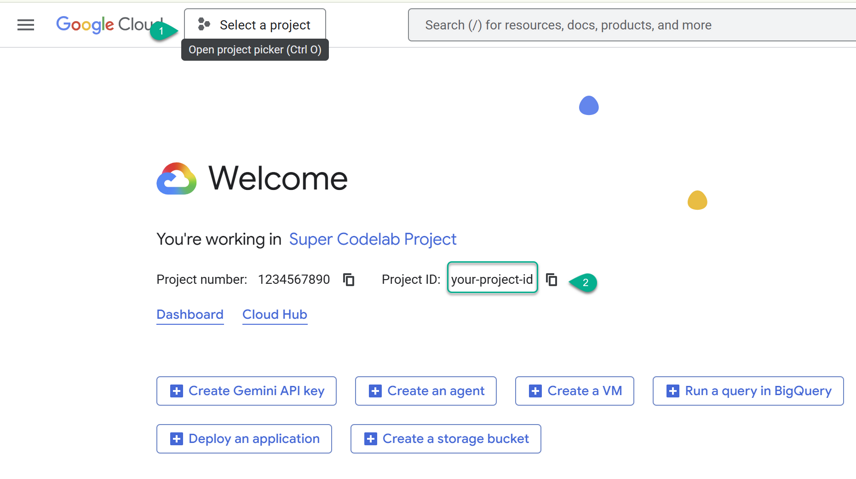
- Navigate to the Google Cloud Console, then select or create a Google Cloud project.
- ⚠️ Note the Project ID. You will use it throughout this lab.
- Open Cloud Shell in a new tab: https://shell.cloud.google.com/.
- If prompted, click Authorize.
- Replace
PROJECT_IDand paste the following command into the terminal:
cat << 'EOF' > env.sh
#!/bin/bash
# env.sh: Environment variables for BigQuery Python UDFs codelab

# ⚠️ Replace 'YOUR_PROJECT_ID' with your actual Google Cloud Project ID
export PROJECT_ID="YOUR_PROJECT_ID"
export REGION="us"
export BQ_DATASET="python_udfs"
export BQ_RESOURCE_CONN="external_api_connection"
EOF
Apply the variables to your active session:
source ./env.sh
Enable APIs and Create BigQuery Dataset
Enable the necessary Google Cloud services in your project and create the target dataset:
# Enable API Services
gcloud services enable \
  bigquery.googleapis.com \
  bigqueryconnection.googleapis.com --quiet

# Create BigQuery Dataset
bq mk --location=${REGION} --dataset ${PROJECT_ID}:${BQ_DATASET}
3. Explore Data Distributions with a Public Python UDF
Before deploying custom code, it is helpful to explore the dataset and filter out low-quality noise. In this step, you will analyze StackOverflow questions to find active users and understand the statistical distribution of their question scores.
Why use a Python UDF for this?
Calculating multiple, exact percentiles (such as the 25th, 50th, 75th, and 95th percentiles) on grouped arrays of data is complex and resource-heavy in pure SQL. Standard SQL analytic functions like PERCENTILE_CONT expect flat columns of rows rather than nested arrays. To compute exact percentiles of pre-aggregated arrays per row, you would have to write verbose subqueries that unnest, sort, and re-aggregate for each percentile metric, which is inefficient.
By using NumPy, Python's highly optimized scientific library inside a UDF, you can compute exact mathematical percentiles on an array of numbers with a single line of code.
Execution
Google Cloud hosts several pre-compiled public UDFs (Click on the Routines tab). Because BigQuery requires explicit type matching, we will use a common table expression (CTE) to pre-aggregate the data and cast the integer arrays to floating-point arrays using an UNNEST expression.
Run the following query in the BigQuery Studio Console:
WITH raw_user_scores AS (
  -- 1. Pre-aggregate user scores into an array
  SELECT
    owner_user_id,
    ARRAY_AGG(score) AS scores
  FROM
    `bigquery-public-data.stackoverflow.posts_questions`
  WHERE
    owner_user_id IS NOT NULL
  GROUP BY
    owner_user_id
  HAVING
    ARRAY_LENGTH(scores) >= 5
  LIMIT 5
)
SELECT
  owner_user_id,
  scores,
  -- 2. Cast arrays to FLOAT64 and call the public percentile Python UDF
  `bigquery-public-data.python_udfs.percentiles`(
    ARRAY(SELECT CAST(s AS FLOAT64) FROM UNNEST(scores) AS s),
    [25.0, 50.0, 75.0, 95.0]
  ) AS score_percentiles
FROM
  raw_user_scores;
This lets you understand user performance instantly without needing to configure permissions or write custom Python code first.
Verifying the Results
Because this query returns nested array types (scores and score_percentiles), the default tabular Results tab in BigQuery Studio may display flattened or truncated output, making it difficult to inspect the array elements.
To view the structured, nested output:
- In the query results pane, locate the tab bar (which defaults to Results).
- Click on the JSON tab.
You should see a structured JSON array representing the rows, similar to the following:
[{
  "owner_user_id": "533463",
  "scores": ["0", "0", "-1", "0", "0", "2", "-1", "1", "0", "0", "-1", "0", "-3", "1", "1", "0", "1", "2", "3", "1", "0", "0", "1", "0", "0", "3", "6", "11", "0", "1", "0", "0", "3", "17", "0", "1", "1", "3", "5", "-2", "1", "-1", "-1", "2", "3", "0", "0", "0", "5", "0", "4", "0", "0", "0", "3", "3", "0", "140", "0", "1", "3", "0", "0", "-2", "-1", "0", "0", "2", "0", "9", "9", "0", "0", "1", "0", "0", "1", "-1", "0", "0", "0", "0"],
  "score_percentiles": ["0.0", "0.0", "1.75", "8.8500000000000085"]
}, {
  "owner_user_id": "13502536",
  "scores": ["0", "1", "0", "-5", "0", "1", "0", "1", "0", "0", "-2", "0", "1", "0", "1", "0", "0", "1", "0", "1", "0", "0"],
  "score_percentiles": ["0.0", "0.0", "1.0", "1.0"]
}, {
  "owner_user_id": "1170153",
  "scores": ["1", "0", "1", "0", "1", "0", "2", "0", "0", "0", "10", "5", "1", "0", "0", "2", "0", "2", "3", "-1", "1", "0", "1", "0", "0", "1", "0", "2", "0", "4", "0", "3", "0", "0", "2", "0", "0", "1", "0"],
  "score_percentiles": ["0.0", "0.0", "1.5", "4.1000000000000014"]
}, {
  "owner_user_id": "8558174",
  "scores": ["0", "0", "-1", "1", "2", "0"],
  "score_percentiles": ["0.0", "0.0", "0.75", "1.75"]
}, {
  "owner_user_id": "1073044",
  "scores": ["0", "1", "0", "0", "2", "2", "2", "1", "1", "1", "2", "1", "0", "2", "3", "1"],
  "score_percentiles": ["0.75", "1.0", "2.0", "2.25"]
}]
Understanding the Output
scores: The complete array of raw question scores posted by each unique user.score_percentiles: An array containing four computed floating-point values. These correspond exactly to the requested percentiles:[25th, 50th, 75th, and 95th]percentiles. For example, for user533463, the 95th percentile score of their questions is approximately8.85, indicating that their top questions score highly.
4. Clean Text Natively by Creating a Custom UDF
Once target users are identified, we want to analyze their post content. However, raw forum posts often contain messy HTML tags and entities. We need to strip these to improve readability and reduce downstream model costs.
To understand why this is necessary, let's first inspect what the raw, unformatted Stack Overflow post body actually looks like. Run the following query in the BigQuery Studio Console:
SELECT
  id,
  title,
  body AS raw_html_body
FROM
  `bigquery-public-data.stackoverflow.posts_questions`
  -- Check specific questions that we will use in our final pipeline
WHERE
  id IN (9, 17, 33969)
ORDER BY
  id ASC;
If you examine the output, you will see a mix of formatting tags such as <p>, <b>, <code>, and others embedded inside the text. Processing these directly using downstream machine learning tokenizers would introduce unnecessary noise and artificially inflate token ingestion costs.
Why use a Python UDF for this?
Parsing HTML reliably using regular expressions (Regex) in pure SQL is fragile and prone to parsing errors. Running a robust Python library like beautifulsoup4 directly within your queries offers a reliable way to strip tags.
Run the following DDL query to deploy the persistent clean_html function in your dataset:
CREATE OR REPLACE FUNCTION `YOUR_PROJECT_ID.python_udfs.clean_html`(html_content STRING)
RETURNS STRING
LANGUAGE python
OPTIONS (
  runtime_version = 'python-3.11',
  entry_point = 'strip_tags',
  packages = ['beautifulsoup4>=4.12.0']
) AS r'''
from bs4 import BeautifulSoup

def strip_tags(html_content):
    if not html_content:
        return ""
    soup = BeautifulSoup(html_content, "html.parser")
    return soup.get_text(separator=" ")
''';
Verify the function's output with a simple query:
SELECT `YOUR_PROJECT_ID.python_udfs.clean_html`('<p>Hello <b>world</b>!</p>') AS cleaned_text;
You should see the stripped text without HTML elements:
+----------------+
| cleaned_text   |
+----------------+
| Hello  world ! |
+----------------+
5. Secure External Integrations and Advanced ML Processing
Now that we have clean text, we need to prepare it for machine learning models or Large Language Models (LLMs) like Gemma. LLMs cannot read raw text directly; they process numerical token IDs.
To convert our clean text into tokens, we will import Hugging Face's transformers library and load a pre-trained Google T5 tokenizer directly inside our database.
Create the Cloud Resource Connection
Run the following query in the BigQuery Studio Console to establish a secure connection:
CREATE CONNECTION IF NOT EXISTS `YOUR_PROJECT_ID.us.external_api_connection`
OPTIONS (
  connection_type = "CLOUD_RESOURCE",
  friendly_name = "Hugging Face Hub Egress Connection",
  description = "Connection used to securely download model configs from public ML hubs"
);
Create the Tokenizer UDF
Now, deploy the custom tokenizer UDF. Notice how the get_tokenizer() helper function checks if the global variable tokenizer is already initialized before attempting a download:
CREATE OR REPLACE FUNCTION `YOUR_PROJECT_ID.python_udfs.tokenize`(text STRING)
RETURNS ARRAY<INT64>
LANGUAGE python
WITH CONNECTION `YOUR_PROJECT_ID.us.external_api_connection`
OPTIONS (
  runtime_version = 'python-3.11',
  entry_point = 'tokenize',
  packages = ['transformers', 'sentencepiece']
) AS r'''
from transformers import T5TokenizerFast

# Initialize global variable for in-memory container caching
tokenizer = None

def get_tokenizer():
    global tokenizer
    if tokenizer is None:
        # Securely download T5 tokenizer config from Hugging Face Hub (runs once per warm container)
        tokenizer = T5TokenizerFast.from_pretrained("t5-base")
    return tokenizer

def tokenize(text):
    if not text:
        return []
    try:
        t = get_tokenizer()
        # Convert raw clean text into integer token IDs
        return [int(x) for x in t.encode(text)]
    except Exception:
        return []
''';
Test the tokenizer with a simple query to verify it successfully downloads the asset and returns an array of integer IDs:
SELECT `YOUR_PROJECT_ID.python_udfs.tokenize`('Hello world!') AS token_ids;
Switch to the JSON tab in your query results panel to see the structured array:
[
  {
    "token_ids": ["8774", "296", "55", "1"]
  }
]
6. Run the end-to-end preprocessing pipeline
Now that all three steps of our pipeline are ready, we can chain them together into a single SQL query using Common Table Expressions (CTEs).
This pipeline represents a modern data engineering workflow:
- Isolate active users and their top-scoring questions using the public percentile UDF.
- Strip raw HTML formatting from the text locally using our clean_html UDF.
- Convert the cleaned text into token arrays using our cached tokenize UDF.
Execute the following pipeline query in the BigQuery Studio Console:
WITH raw_user_scores AS (
  -- Step 1: Pre-aggregate scores to safely run percentiles with deterministic ordering
  SELECT
    owner_user_id,
    ARRAY_AGG(score ORDER BY id ASC) AS scores
  FROM
    `bigquery-public-data.stackoverflow.posts_questions`
  WHERE
    owner_user_id IS NOT NULL
  GROUP BY
    owner_user_id
  HAVING
    ARRAY_LENGTH(scores) >= 5
  ORDER BY
    owner_user_id ASC
  LIMIT 3
),
active_users AS (
  -- Step 1: Extract exact percentile limits using the public UDF)
  SELECT
    owner_user_id,
    percentiles_arr AS score_percentiles,
    -- Extract the 95th percentile score from the array's 4th element (OFFSET 3) directly
    percentiles_arr[OFFSET(3)] AS p95_score
  FROM (
    SELECT
      owner_user_id,
      `bigquery-public-data.python_udfs.percentiles`(
        ARRAY(SELECT CAST(s AS FLOAT64) FROM UNNEST(scores) AS s),
        [25.0, 50.0, 75.0, 95.0]
      ) AS percentiles_arr
    FROM
      raw_user_scores
  )
),
target_questions AS (
  -- Isolate high-scoring questions from active users
  SELECT
    q.id,
    q.owner_user_id,
    q.title,
    q.body AS raw_body,
    u.score_percentiles
  FROM
    `bigquery-public-data.stackoverflow.posts_questions` q
  JOIN
    active_users u ON q.owner_user_id = u.owner_user_id
  WHERE
    -- Explicit cast for robust comparison
    q.score >= CAST(u.p95_score AS FLOAT64)
),
cleaned_data AS (
  -- Step 2: Clean HTML tags natively
  SELECT
    id,
    owner_user_id,
    title,
    score_percentiles,
    `YOUR_PROJECT_ID.python_udfs.clean_html`(raw_body) AS cleaned_body
  FROM
    target_questions
),
tokenized_data AS (
  -- Step 3: Perform local ML tokenization on the clean preview text
  SELECT
    id,
    owner_user_id,
    title,
    score_percentiles,
    SUBSTR(cleaned_body, 1, 120) AS cleaned_body_preview,
    `YOUR_PROJECT_ID.python_udfs.tokenize`(SUBSTR(cleaned_body, 1, 120)) AS token_ids
  FROM
    cleaned_data
)
SELECT
  id,
  owner_user_id,
  title,
  score_percentiles,
  cleaned_body_preview AS cleaned_body,
  token_ids,
  ARRAY_LENGTH(token_ids) AS token_count
FROM
  tokenized_data
ORDER BY
  id ASC;
Switch to the JSON tab in BigQuery Studio to examine the structured output.
[{
  "id": "9",
  "owner_user_id": "1",
  "title": "How do I calculate someone\u0027s age based on a DateTime type birthday?",
  "score_percentiles": ["22.5", "61.5", "346.75", "1762.0"],
  "cleaned_body": "Given a DateTime representing a person\u0027s birthday, how do I calculate their age in years?",
  "token_ids": ["9246", "3", "9", "7678", "13368", "9085", "3", "9", "568", "31", "7", "3591", "6", "149", "103", "27", "11837", "70", "1246", "16", "203", "58", "1"],
  "token_count": "23"
}, {
  "id": "17",
  "owner_user_id": "2",
  "title": "Binary Data in MySQL",
  "score_percentiles": ["3.5", "10.0", "90.0", "184.09999999999997"],
  "cleaned_body": "How do I store binary data in MySQL ?",
  "token_ids": ["571", "103", "27", "1078", "14865", "331", "16", "27563", "3", "58", "1"],
  "token_count": "11"
}, {
  "id": "33969",
  "owner_user_id": "3",
  "title": "Best way to implement request throttling in ASP.NET MVC?",
  "score_percentiles": ["3.25", "14.0", "24.75", "175.25"],
  "cleaned_body": "We\u0027re experimenting with various ways to throttle user actions in a given time period : Limit question/answer posts Limi",
  "token_ids": ["101", "31", "60", "3", "26718", "28", "796", "1155", "12", "28731", "1139", "2874", "16", "3", "9", "787", "97", "1059", "3", "10", "18185", "822", "87", "3247", "3321", "3489", "10908", "23", "1"],
  "token_count": "29"
}]
7. Appendix: How the Pipeline Works & Auditing Execution Costs
This section provides a deep dive into the specific mechanics of the end-to-end preprocessing query and demonstrates how to monitor the exact slot-consumption and managed container costs of your execution.
Pipeline Architectural Breakdown
WITH raw_user_scores AS (
  SELECT
    owner_user_id,
    ARRAY_AGG(score ORDER BY id ASC) AS scores
  FROM
    `bigquery-public-data.stackoverflow.posts_questions`
  WHERE
    owner_user_id IS NOT NULL
  GROUP BY
    owner_user_id
  HAVING
    ARRAY_LENGTH(scores) >= 5
  ORDER BY
    owner_user_id ASC
  LIMIT 3
)
This first query segment gathers raw question scores for active Stack Overflow contributors. It consolidates each user's scores into a single array (ARRAY_AGG) while enforcing a deterministic sorting order (ORDER BY id). The dataset is filtered to only include users with at least five questions to establish a valid statistical baseline.
active_users AS (
  SELECT
    owner_user_id,
    percentiles_arr AS score_percentiles,
    -- Extract the 95th percentile score from the array's 4th element (OFFSET 3) directly
    percentiles_arr[OFFSET(3)] AS p95_score
  FROM (
    SELECT
      owner_user_id,
      `bigquery-public-data.python_udfs.percentiles`(
        ARRAY(SELECT CAST(s AS FLOAT64) FROM UNNEST(scores) AS s),
        [25.0, 50.0, 75.0, 95.0]
      ) AS percentiles_arr
    FROM
      raw_user_scores
  )
)
To identify top contributors, this segment uses the public percentiles Python UDF to find exact score distributions (25th, 50th, 75th, and 95th percentiles). To avoid executing this computationally intensive UDF multiple times, the calculation is wrapped in a nested subquery. The 95th percentile benchmark is then retrieved directly from the resulting array at index position three (OFFSET(3)).
target_questions AS (
  -- Isolate high-scoring questions from active users
  SELECT
    q.id,
    q.owner_user_id,
    q.title,
    q.body AS raw_body,
    u.score_percentiles
  FROM
    `bigquery-public-data.stackoverflow.posts_questions` q
  JOIN
    active_users u ON q.owner_user_id = u.owner_user_id
  WHERE
    -- Explicit cast for robust comparison
    q.score >= CAST(u.p95_score AS FLOAT64)
)
The original questions are joined with the list of active users to retrieve posts that met or exceeded the 95th percentile threshold. To prevent database type comparison errors, the benchmark score is converted explicitly via a CAST operation into a FLOAT64 type before evaluation.
cleaned_data AS (
  -- Clean HTML tags natively
  SELECT
    id,
    owner_user_id,
    title,
    score_percentiles,
    `YOUR_PROJECT_ID.python_udfs.clean_html`(raw_body) AS cleaned_body
  FROM
    target_questions
)
Raw post bodies frequently contain messy markup and HTML boilerplate that degrade downstream machine learning inputs. Instead of using complex regular expressions, the pipeline calls our custom clean_html Python UDF. It dynamically spins up a Python runtime inside an isolated container, using the BeautifulSoup library to strip out elements cleanly and output plain, readable text.
tokenized_data AS (
  -- Perform local ML tokenization on the clean preview text (called only once)
  SELECT
    id,
    owner_user_id,
    title,
    score_percentiles,
    SUBSTR(cleaned_body, 1, 120) AS cleaned_body_preview,
    `YOUR_PROJECT_ID.python_udfs.tokenize`(SUBSTR(cleaned_body, 1, 120)) AS token_ids
  FROM
    cleaned_data
)
To prepare the clean text preview for generative model ingestion, the pipeline invokes our custom tokenize Python UDF on a 120-character slice. The UDF securely reaches out to the Hugging Face Hub to download the Google T5 tokenizer parameters. Because the tokenizer instance is loaded into a global variable, the warm container caches the configuration, letting subsequent rows undergo fast in-memory tokenization without network latency.
SELECT
  id,
  owner_user_id,
  title,
  score_percentiles,
  cleaned_body_preview AS cleaned_body,
  token_ids,
  ARRAY_LENGTH(token_ids) AS token_count
FROM
  tokenized_data
ORDER BY
  id ASC;
The final query block outputs the processed dataset. Rather than executing the tokenization UDF a second time to count the generated tokens, BigQuery's native ARRAY_LENGTH function is applied directly to the pre-calculated token_ids array. This strategy cuts down on redundant CPU cycles, container operations, and overall execution costs.
Auditing Slot-Consumption & Managed UDF Costs
While BigQuery is rolling out comprehensive cost-visibility dashboards directly in the Google Cloud Console UI, engineers can programmatically audit the exact slot-consumption and managed container execution costs of any query using BigQuery Job IDs.
To audit your query execution, locate your Job ID.
- In BigQuery Studio, you can find this by navigating to the Query history tab at the bottom of the console
- Click on your executed pipeline query
- In the Job Information details panel, locate the Job ID field.
Once you have identified your pure Job ID, replace your JOB_ID in the query below and execute it in BigQuery Studio:
SELECT
  job_id,
  total_slot_ms,
  external_service_costs
FROM
  `YOUR_PROJECT_ID.region-us`.INFORMATION_SCHEMA.JOBS
WHERE
  job_id = "JOB_ID";
Switch to the JSON tab in BigQuery Studio to examine the structured output. You should receive a payload similar to the following:
[{
  "job_id": "bquxjob_1234f5a_67ea8c9051a",
  "total_slot_ms": "815459",
  "external_service_costs": [{
    "external_service": "MANAGED_ROUTINE_EXECUTION",
    "bytes_processed": null,
    "bytes_billed": null,
    "slot_ms": "3000",
    "reserved_slot_count": null,
    "billing_method": "SERVICES_SKU"
  }]
}]
Understanding the output:
total_slot_ms: The total computation time in milliseconds used across all query stages. For this unified pipeline, execution typically averages around 815k slot milliseconds.external_service_costs: An array that breaks down resources utilized outside of the standard BigQuery analysis engine.external_service: The value "MANAGED_ROUTINE_EXECUTION" confirms the cost belongs specifically to the serverless container execution hosting our custom Python UDF environment.slot_ms: The value "3000" represents the exact milliseconds of specialized compute resources consumed inside the warm container runtime to execute the Python logic.billing_method: The value "SERVICES_SKU" denotes that these localized container charges are billed dynamically through the specialized BigQuery Services SKU based on container execution duration and memory overhead. At standard US multi-region compute pricing of $0.06 per slot-hour (refer to the BigQuery Services Pricing Page), the pure execution cost of 3,000 slot-ms is calculated as (3,000ms / 3,600,000ms) * $0.06 = $0.00005 USD, demonstrating a cost-efficient workflow.
8. Clean up cloud resources
To avoid incurring continuous charges or consuming project quotas, delete your BigQuery dataset and connections in Cloud Shell:
# Cleanup BigQuery routines
bq rm -f --routine ${PROJECT_ID}:${BQ_DATASET}.clean_html
bq rm -f --routine ${PROJECT_ID}:${BQ_DATASET}.tokenize

# Cleanup connection
bq rm -f --connection --location=${REGION} ${PROJECT_ID}.${REGION}.${BQ_RESOURCE_CONN}

# Cleanup BigQuery Dataset
bq rm -r -f -d ${PROJECT_ID}:${BQ_DATASET}
9. Congratulations!
You have completed the codelab on building and securing Python UDFs within the BigQuery Serverless runtime.
In this codelab, you learned how to:
- Explore Data with Public UDFs: Call pre-compiled public Python UDFs on Stack Overflow datasets to perform mathematical percentile operations on aggregated arrays.
- Integrate Third-Party Packages: Deploy a custom persistent UDF utilizing the standard Python runtime and the
beautifulsoup4library to strip raw HTML tags natively inside your SQL queries. - Configure Secure External Connections: Create a BigQuery Cloud Resource Connection to securely grant isolated UDF containers outbound network access to fetch external assets without hardcoding credentials.
- Implement Local Tokenization with In-Memory Caching: Import the Hugging Face
transformerslibrary to load a T5 tokenizer, utilizing global variables to cache configuration files and process rows inside warm containers. - Audit Execution Performance and Costs: Programmatically query regional INFORMATION_SCHEMA.JOBS views using BigQuery Job IDs to track slot-consumption (
total_slot_ms) and container usage costs (external_service_costs).
What's next?
- Review Best Practices & Quotas: Learn about execution limits, concurrency, and memory considerations in the BigQuery Python UDF limits guide.
- Deep-Dive into Cost Optimization: Understand how billing works for containerized UDF environments and external connection calls in the BigQuery Pricing documentation.
- Build AI-Powered Applications inside BigQuery: Go beyond basic text manipulation and learn how to construct end-to-end multimodal systems. Run through the Build an AI-Powered Vehicle Marketplace with BigQuery and Gemini Models codelab to leverage semantic search and Gemini models directly inside your data warehouse.