

۱. مقدمه
Structured query language (SQL) is the industry standard for data warehouse analysis. However, expressing complex procedural logic, math computations, text cleaning, or machine learning preparation workflows in pure SQL can be highly challenging.
Data teams have historically extracted massive datasets from BigQuery when complex custom Python processing was required, processed them in external custom virtual machines or clusters, and loaded results back. This approach introduces high network latency, increases compliance risks by moving data, and creates infrastructure management overhead.
BigQuery Managed Python User-Defined Functions (UDFs) resolve these issues by running custom code on serverless resources that automatically scale to millions of rows. Google Cloud manages compilation, image building, security patching, and execution, allowing you to run custom calculations directly where your data resides.
در این آزمایشگاه کد، شما یک خط لوله تحلیلی و پیشپردازش متن روی دادههای انجمن StackOverflow ایجاد خواهید کرد و آن را برای گزارشهای بعدی و یادگیری ماشین آماده خواهید کرد.
پیشنیازها
- یک پروژه گوگل کلود با قابلیت پرداخت.
- آشنایی اولیه با مفاهیم SQL، IAM و BigQuery
آنچه یاد خواهید گرفت
- چگونه یک UDF عمومی پایتون از پیش کامپایل شده را روی یک مجموعه داده عمومی فراخوانی کنیم تا توزیع دادهها را تجزیه و تحلیل کنیم.
- چگونه UDF پایتون سفارشی خود را با استفاده از
beautifulsoup4برای پاکسازی دادههای بدون ساختار مستقر کنید. - How to configure a BigQuery Cloud Resource connection to securely download machine learning assets and perform local ML tokenization with the Hugging Face transformers library using in-memory container caching.
- چگونه این مراحل را به صورت زنجیرهای در یک خط لوله SQL واحد و با کارایی بالا قرار دهیم.
۲. تنظیمات و الزامات
شروع پوسته ابری
اگرچه میتوان از راه دور و از طریق لپتاپ، گوگل کلود را مدیریت کرد، اما در این آزمایشگاه کد، از گوگل کلود شل ، یک محیط خط فرمان که در فضای ابری اجرا میشود، استفاده خواهید کرد.
- به کنسول گوگل کلود بروید، سپس یک پروژه گوگل کلود انتخاب یا ایجاد کنید .
- ⚠️ شناسه پروژه را یادداشت کنید. در طول این آزمایش از آن استفاده خواهید کرد.
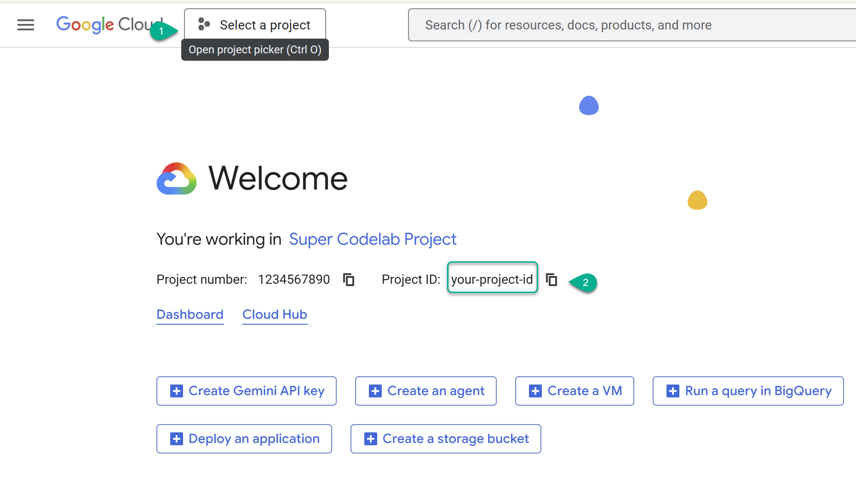
- Cloud Shell را در یک برگه جدید باز کنید: https://shell.cloud.google.com/ .
- در صورت درخواست، روی «مجاز کردن» کلیک کنید.
-
PROJECT_IDرا جایگزین کنید و دستور زیر را در ترمینال وارد کنید:
cat << 'EOF' > env.sh
#!/bin/bash
# env.sh: Environment variables for BigQuery Python UDFs codelab

# ⚠️ Replace 'YOUR_PROJECT_ID' with your actual Google Cloud Project ID
export PROJECT_ID="YOUR_PROJECT_ID"
export REGION="us"
export BQ_DATASET="python_udfs"
export BQ_RESOURCE_CONN="external_api_connection"
EOF
متغیرها را در جلسه فعال خود اعمال کنید:
source ./env.sh
فعال کردن APIها و ایجاد مجموعه داده BigQuery
سرویسهای لازم گوگل کلود را در پروژه خود فعال کنید و مجموعه داده هدف را ایجاد کنید:
# Enable API Services
gcloud services enable \
  bigquery.googleapis.com \
  bigqueryconnection.googleapis.com --quiet

# Create BigQuery Dataset
bq mk --location=${REGION} --dataset ${PROJECT_ID}:${BQ_DATASET}
۳. بررسی توزیع دادهها با یک UDF عمومی پایتون
Before deploying custom code, it is helpful to explore the dataset and filter out low-quality noise. In this step, you will analyze StackOverflow questions to find active users and understand the statistical distribution of their question scores.
چرا از UDF پایتون برای این کار استفاده کنیم؟
محاسبهی صدکهای دقیق چندگانه (مانند صدکهای ۲۵، ۵۰، ۷۵ و ۹۵) روی آرایههای گروهبندیشده از دادهها در SQL خالص پیچیده و نیازمند منابع زیادی است. توابع تحلیلی استاندارد SQL مانند PERCENTILE_CONT به جای آرایههای تودرتو، ستونهای مسطح از ردیفها را انتظار دارند. برای محاسبهی صدکهای دقیق آرایههای از پیش تجمیعشده در هر ردیف، باید زیرپرسوجوهای طولانی بنویسید که برای هر معیار صدک، جدا، مرتبسازی و دوباره تجمیع شوند، که ناکارآمد است.
با استفاده از NumPy، کتابخانه علمی بسیار بهینهشده پایتون در داخل یک UDF، میتوانید صدکهای ریاضی دقیقی را روی آرایهای از اعداد با یک خط کد محاسبه کنید.
اعدام
Google Cloud hosts several pre-compiled public UDFs (Click on the Routines tab). Because BigQuery requires explicit type matching, we will use a common table expression (CTE) to pre-aggregate the data and cast the integer arrays to floating-point arrays using an UNNEST expression.
کوئری زیر را در کنسول BigQuery Studio اجرا کنید:
WITH raw_user_scores AS (
  -- 1. Pre-aggregate user scores into an array
  SELECT
    owner_user_id,
    ARRAY_AGG(score) AS scores
  FROM
    `bigquery-public-data.stackoverflow.posts_questions`
  WHERE
    owner_user_id IS NOT NULL
  GROUP BY
    owner_user_id
  HAVING
    ARRAY_LENGTH(scores) >= 5
  LIMIT 5
)
SELECT
  owner_user_id,
  scores,
  -- 2. Cast arrays to FLOAT64 and call the public percentile Python UDF
  `bigquery-public-data.python_udfs.percentiles`(
    ARRAY(SELECT CAST(s AS FLOAT64) FROM UNNEST(scores) AS s),
    [25.0, 50.0, 75.0, 95.0]
  ) AS score_percentiles
FROM
  raw_user_scores;
این به شما امکان میدهد عملکرد کاربر را فوراً و بدون نیاز به پیکربندی مجوزها یا نوشتن کد پایتون سفارشی، درک کنید.
تأیید نتایج
Because this query returns nested array types ( scores and score_percentiles ), the default tabular Results tab in BigQuery Studio may display flattened or truncated output, making it difficult to inspect the array elements.
برای مشاهده خروجی ساختار یافته و تو در تو:
- در پنجره نتایج پرس و جو، نوار تب (که به طور پیشفرض روی Results تنظیم شده است) را پیدا کنید.
- روی تب JSON کلیک کنید.
شما باید یک آرایه JSON ساختاریافته که نشاندهنده ردیفها است را ببینید، مشابه زیر:
[{
  "owner_user_id": "533463",
  "scores": ["0", "0", "-1", "0", "0", "2", "-1", "1", "0", "0", "-1", "0", "-3", "1", "1", "0", "1", "2", "3", "1", "0", "0", "1", "0", "0", "3", "6", "11", "0", "1", "0", "0", "3", "17", "0", "1", "1", "3", "5", "-2", "1", "-1", "-1", "2", "3", "0", "0", "0", "5", "0", "4", "0", "0", "0", "3", "3", "0", "140", "0", "1", "3", "0", "0", "-2", "-1", "0", "0", "2", "0", "9", "9", "0", "0", "1", "0", "0", "1", "-1", "0", "0", "0", "0"],
  "score_percentiles": ["0.0", "0.0", "1.75", "8.8500000000000085"]
}, {
  "owner_user_id": "13502536",
  "scores": ["0", "1", "0", "-5", "0", "1", "0", "1", "0", "0", "-2", "0", "1", "0", "1", "0", "0", "1", "0", "1", "0", "0"],
  "score_percentiles": ["0.0", "0.0", "1.0", "1.0"]
}, {
  "owner_user_id": "1170153",
  "scores": ["1", "0", "1", "0", "1", "0", "2", "0", "0", "0", "10", "5", "1", "0", "0", "2", "0", "2", "3", "-1", "1", "0", "1", "0", "0", "1", "0", "2", "0", "4", "0", "3", "0", "0", "2", "0", "0", "1", "0"],
  "score_percentiles": ["0.0", "0.0", "1.5", "4.1000000000000014"]
}, {
  "owner_user_id": "8558174",
  "scores": ["0", "0", "-1", "1", "2", "0"],
  "score_percentiles": ["0.0", "0.0", "0.75", "1.75"]
}, {
  "owner_user_id": "1073044",
  "scores": ["0", "1", "0", "0", "2", "2", "2", "1", "1", "1", "2", "1", "0", "2", "3", "1"],
  "score_percentiles": ["0.75", "1.0", "2.0", "2.25"]
}]
درک خروجی
-
scores: مجموعه کامل نمرات خام سوالات ارسال شده توسط هر کاربر منحصر به فرد. -
score_percentiles: An array containing four computed floating-point values. These correspond exactly to the requested percentiles:[25th, 50th, 75th, and 95th]percentiles. For example, for user533463, the 95th percentile score of their questions is approximately8.85, indicating that their top questions score highly.
۴. متن را به صورت بومی با ایجاد یک UDF سفارشی، تمیز کنید
Once target users are identified, we want to analyze their post content. However, raw forum posts often contain messy HTML tags and entities. We need to strip these to improve readability and reduce downstream model costs.
برای درک اینکه چرا این امر ضروری است، ابتدا بررسی میکنیم که بدنه پست خام و بدون قالببندی Stack Overflow در واقع چگونه به نظر میرسد. کوئری زیر را در کنسول BigQuery Studio اجرا کنید:
SELECT
  id,
  title,
  body AS raw_html_body
FROM
  `bigquery-public-data.stackoverflow.posts_questions`
  -- Check specific questions that we will use in our final pipeline
WHERE
  id IN (9, 17, 33969)
ORDER BY
  id ASC;
If you examine the output, you will see a mix of formatting tags such as <p>, <b>, <code>, and others embedded inside the text. Processing these directly using downstream machine learning tokenizers would introduce unnecessary noise and artificially inflate token ingestion costs.
چرا از UDF پایتون برای این کار استفاده کنیم؟
Parsing HTML reliably using regular expressions (Regex) in pure SQL is fragile and prone to parsing errors. Running a robust Python library like beautifulsoup4 directly within your queries offers a reliable way to strip tags.
برای پیادهسازی تابع clean_html پایدار در مجموعه داده خود، کوئری DDL زیر را اجرا کنید:
CREATE OR REPLACE FUNCTION `YOUR_PROJECT_ID.python_udfs.clean_html`(html_content STRING)
RETURNS STRING
LANGUAGE python
OPTIONS (
  runtime_version = 'python-3.11',
  entry_point = 'strip_tags',
  packages = ['beautifulsoup4>=4.12.0']
) AS r'''
from bs4 import BeautifulSoup

def strip_tags(html_content):
    if not html_content:
        return ""
    soup = BeautifulSoup(html_content, "html.parser")
    return soup.get_text(separator=" ")
''';
خروجی تابع را با یک پرس و جوی ساده بررسی کنید:
SELECT `YOUR_PROJECT_ID.python_udfs.clean_html`('<p>Hello <b>world</b>!</p>') AS cleaned_text;
شما باید متن حذف شده را بدون عناصر HTML ببینید:
+----------------+
| cleaned_text   |
+----------------+
| Hello  world ! |
+----------------+
۵. یکپارچهسازیهای خارجی امن و پردازش پیشرفته یادگیری ماشینی
حالا که متن تمیزی داریم، باید آن را برای مدلهای یادگیری ماشین یا مدلهای زبان بزرگ (LLM) مانند Gemma آماده کنیم. LLMها نمیتوانند متن خام را مستقیماً بخوانند؛ آنها شناسههای توکن عددی را پردازش میکنند.
برای تبدیل متن سادهمان به توکنها، کتابخانهی transformers مربوط به Hugging Face را ایمپورت میکنیم و یک توکنساز Google T5 از پیش آموزشدیده را مستقیماً درون پایگاه دادهمان بارگذاری میکنیم.
ایجاد اتصال منابع ابری
برای ایجاد یک اتصال امن، کوئری زیر را در کنسول BigQuery Studio اجرا کنید:
CREATE CONNECTION IF NOT EXISTS `YOUR_PROJECT_ID.us.external_api_connection`
OPTIONS (
  connection_type = "CLOUD_RESOURCE",
  friendly_name = "Hugging Face Hub Egress Connection",
  description = "Connection used to securely download model configs from public ML hubs"
);
ایجاد توکنایزر UDF
حالا، توکنساز سفارشی UDF را مستقر کنید. توجه کنید که چگونه تابع کمکی get_tokenizer() قبل از اقدام به دانلود، بررسی میکند که آیا متغیر سراسری tokenizer از قبل مقداردهی اولیه شده است یا خیر:
CREATE OR REPLACE FUNCTION `YOUR_PROJECT_ID.python_udfs.tokenize`(text STRING)
RETURNS ARRAY<INT64>
LANGUAGE python
WITH CONNECTION `YOUR_PROJECT_ID.us.external_api_connection`
OPTIONS (
  runtime_version = 'python-3.11',
  entry_point = 'tokenize',
  packages = ['transformers', 'sentencepiece']
) AS r'''
from transformers import T5TokenizerFast

# Initialize global variable for in-memory container caching
tokenizer = None

def get_tokenizer():
    global tokenizer
    if tokenizer is None:
        # Securely download T5 tokenizer config from Hugging Face Hub (runs once per warm container)
        tokenizer = T5TokenizerFast.from_pretrained("t5-base")
    return tokenizer

def tokenize(text):
    if not text:
        return []
    try:
        t = get_tokenizer()
        # Convert raw clean text into integer token IDs
        return [int(x) for x in t.encode(text)]
    except Exception:
        return []
''';
توکنساز را با یک کوئری ساده آزمایش کنید تا مطمئن شوید که با موفقیت فایل را دانلود میکند و آرایهای از شناسههای صحیح را برمیگرداند:
SELECT `YOUR_PROJECT_ID.python_udfs.tokenize`('Hello world!') AS token_ids;
برای مشاهده آرایه ساختاریافته، به تب JSON در پنل نتایج کوئری خود بروید:
[
  {
    "token_ids": ["8774", "296", "55", "1"]
  }
]
۶. اجرای خط لوله پیشپردازش سرتاسری
اکنون که هر سه مرحله از pipeline ما آماده است، میتوانیم آنها را با استفاده از عبارات جدول مشترک (CTE) در یک کوئری SQL واحد به هم پیوند دهیم.
این خط لوله نشاندهنده یک گردش کار مهندسی داده مدرن است:
- کاربران فعال و سوالات با بالاترین امتیاز آنها را با استفاده از UDF درصد عمومی جدا کنید.
- قالببندی خام HTML را با استفاده از UDF مربوط به clean_html از متن به صورت محلی حذف کنید.
- متن پاکشده را با استفاده از UDF توکنایز شدهی کششدهی ما به آرایههای توکن تبدیل کنید.
کوئری pipeline زیر را در کنسول BigQuery Studio اجرا کنید:
WITH raw_user_scores AS (
  -- Step 1: Pre-aggregate scores to safely run percentiles with deterministic ordering
  SELECT
    owner_user_id,
    ARRAY_AGG(score ORDER BY id ASC) AS scores
  FROM
    `bigquery-public-data.stackoverflow.posts_questions`
  WHERE
    owner_user_id IS NOT NULL
  GROUP BY
    owner_user_id
  HAVING
    ARRAY_LENGTH(scores) >= 5
  ORDER BY
    owner_user_id ASC
  LIMIT 3
),
active_users AS (
  -- Step 1: Extract exact percentile limits using the public UDF)
  SELECT
    owner_user_id,
    percentiles_arr AS score_percentiles,
    -- Extract the 95th percentile score from the array's 4th element (OFFSET 3) directly
    percentiles_arr[OFFSET(3)] AS p95_score
  FROM (
    SELECT
      owner_user_id,
      `bigquery-public-data.python_udfs.percentiles`(
        ARRAY(SELECT CAST(s AS FLOAT64) FROM UNNEST(scores) AS s),
        [25.0, 50.0, 75.0, 95.0]
      ) AS percentiles_arr
    FROM
      raw_user_scores
  )
),
target_questions AS (
  -- Isolate high-scoring questions from active users
  SELECT
    q.id,
    q.owner_user_id,
    q.title,
    q.body AS raw_body,
    u.score_percentiles
  FROM
    `bigquery-public-data.stackoverflow.posts_questions` q
  JOIN
    active_users u ON q.owner_user_id = u.owner_user_id
  WHERE
    -- Explicit cast for robust comparison
    q.score >= CAST(u.p95_score AS FLOAT64)
),
cleaned_data AS (
  -- Step 2: Clean HTML tags natively
  SELECT
    id,
    owner_user_id,
    title,
    score_percentiles,
    `YOUR_PROJECT_ID.python_udfs.clean_html`(raw_body) AS cleaned_body
  FROM
    target_questions
),
tokenized_data AS (
  -- Step 3: Perform local ML tokenization on the clean preview text
  SELECT
    id,
    owner_user_id,
    title,
    score_percentiles,
    SUBSTR(cleaned_body, 1, 120) AS cleaned_body_preview,
    `YOUR_PROJECT_ID.python_udfs.tokenize`(SUBSTR(cleaned_body, 1, 120)) AS token_ids
  FROM
    cleaned_data
)
SELECT
  id,
  owner_user_id,
  title,
  score_percentiles,
  cleaned_body_preview AS cleaned_body,
  token_ids,
  ARRAY_LENGTH(token_ids) AS token_count
FROM
  tokenized_data
ORDER BY
  id ASC;
برای بررسی خروجی ساختاریافته، به تب JSON در BigQuery Studio بروید.
[{
  "id": "9",
  "owner_user_id": "1",
  "title": "How do I calculate someone\u0027s age based on a DateTime type birthday?",
  "score_percentiles": ["22.5", "61.5", "346.75", "1762.0"],
  "cleaned_body": "Given a DateTime representing a person\u0027s birthday, how do I calculate their age in years?",
  "token_ids": ["9246", "3", "9", "7678", "13368", "9085", "3", "9", "568", "31", "7", "3591", "6", "149", "103", "27", "11837", "70", "1246", "16", "203", "58", "1"],
  "token_count": "23"
}, {
  "id": "17",
  "owner_user_id": "2",
  "title": "Binary Data in MySQL",
  "score_percentiles": ["3.5", "10.0", "90.0", "184.09999999999997"],
  "cleaned_body": "How do I store binary data in MySQL ?",
  "token_ids": ["571", "103", "27", "1078", "14865", "331", "16", "27563", "3", "58", "1"],
  "token_count": "11"
}, {
  "id": "33969",
  "owner_user_id": "3",
  "title": "Best way to implement request throttling in ASP.NET MVC?",
  "score_percentiles": ["3.25", "14.0", "24.75", "175.25"],
  "cleaned_body": "We\u0027re experimenting with various ways to throttle user actions in a given time period : Limit question/answer posts Limi",
  "token_ids": ["101", "31", "60", "3", "26718", "28", "796", "1155", "12", "28731", "1139", "2874", "16", "3", "9", "787", "97", "1059", "3", "10", "18185", "822", "87", "3247", "3321", "3489", "10908", "23", "1"],
  "token_count": "29"
}]
۷. پیوست: نحوه عملکرد خط لوله و حسابرسی هزینههای اجرا
This section provides a deep dive into the specific mechanics of the end-to-end preprocessing query and demonstrates how to monitor the exact slot-consumption and managed container costs of your execution.
تجزیه معماری خط لوله
WITH raw_user_scores AS (
  SELECT
    owner_user_id,
    ARRAY_AGG(score ORDER BY id ASC) AS scores
  FROM
    `bigquery-public-data.stackoverflow.posts_questions`
  WHERE
    owner_user_id IS NOT NULL
  GROUP BY
    owner_user_id
  HAVING
    ARRAY_LENGTH(scores) >= 5
  ORDER BY
    owner_user_id ASC
  LIMIT 3
)
This first query segment gathers raw question scores for active Stack Overflow contributors. It consolidates each user's scores into a single array ( ARRAY_AGG ) while enforcing a deterministic sorting order ( ORDER BY id ). The dataset is filtered to only include users with at least five questions to establish a valid statistical baseline.
active_users AS (
  SELECT
    owner_user_id,
    percentiles_arr AS score_percentiles,
    -- Extract the 95th percentile score from the array's 4th element (OFFSET 3) directly
    percentiles_arr[OFFSET(3)] AS p95_score
  FROM (
    SELECT
      owner_user_id,
      `bigquery-public-data.python_udfs.percentiles`(
        ARRAY(SELECT CAST(s AS FLOAT64) FROM UNNEST(scores) AS s),
        [25.0, 50.0, 75.0, 95.0]
      ) AS percentiles_arr
    FROM
      raw_user_scores
  )
)
برای شناسایی مشارکتکنندگان برتر، این بخش percentiles عمومی پایتون UDF برای یافتن توزیعهای دقیق امتیاز (صدکهای ۲۵، ۵۰، ۷۵ و ۹۵) استفاده میکند. برای جلوگیری از اجرای چندین باره این UDF که از نظر محاسباتی فشرده است، محاسبه در یک زیرپرسوجوی تودرتو قرار میگیرد. سپس معیار صدک ۹۵ مستقیماً از آرایه حاصل در موقعیت شاخص سه ( OFFSET(3) ) بازیابی میشود.
target_questions AS (
  -- Isolate high-scoring questions from active users
  SELECT
    q.id,
    q.owner_user_id,
    q.title,
    q.body AS raw_body,
    u.score_percentiles
  FROM
    `bigquery-public-data.stackoverflow.posts_questions` q
  JOIN
    active_users u ON q.owner_user_id = u.owner_user_id
  WHERE
    -- Explicit cast for robust comparison
    q.score >= CAST(u.p95_score AS FLOAT64)
)
The original questions are joined with the list of active users to retrieve posts that met or exceeded the 95th percentile threshold. To prevent database type comparison errors, the benchmark score is converted explicitly via a CAST operation into a FLOAT64 type before evaluation.
cleaned_data AS (
  -- Clean HTML tags natively
  SELECT
    id,
    owner_user_id,
    title,
    score_percentiles,
    `YOUR_PROJECT_ID.python_udfs.clean_html`(raw_body) AS cleaned_body
  FROM
    target_questions
)
Raw post bodies frequently contain messy markup and HTML boilerplate that degrade downstream machine learning inputs. Instead of using complex regular expressions, the pipeline calls our custom clean_html Python UDF. It dynamically spins up a Python runtime inside an isolated container, using the BeautifulSoup library to strip out elements cleanly and output plain, readable text.
tokenized_data AS (
  -- Perform local ML tokenization on the clean preview text (called only once)
  SELECT
    id,
    owner_user_id,
    title,
    score_percentiles,
    SUBSTR(cleaned_body, 1, 120) AS cleaned_body_preview,
    `YOUR_PROJECT_ID.python_udfs.tokenize`(SUBSTR(cleaned_body, 1, 120)) AS token_ids
  FROM
    cleaned_data
)
برای آمادهسازی پیشنمایش متن تمیز برای دریافت مدل مولد، خط لوله، UDF پایتون tokenize سفارشی ما را روی یک برش ۱۲۰ کاراکتری فراخوانی میکند. UDF به طور ایمن به Hugging Face Hub متصل میشود تا پارامترهای توکنایزر Google T5 را دانلود کند. از آنجا که نمونه توکنایزر در یک متغیر سراسری بارگذاری شده است، کانتینر گرم پیکربندی را ذخیره میکند و به ردیفهای بعدی اجازه میدهد تا توکنایز شدن سریع در حافظه را بدون تأخیر شبکه انجام دهند.
SELECT
  id,
  owner_user_id,
  title,
  score_percentiles,
  cleaned_body_preview AS cleaned_body,
  token_ids,
  ARRAY_LENGTH(token_ids) AS token_count
FROM
  tokenized_data
ORDER BY
  id ASC;
The final query block outputs the processed dataset. Rather than executing the tokenization UDF a second time to count the generated tokens, BigQuery's native ARRAY_LENGTH function is applied directly to the pre-calculated token_ids array. This strategy cuts down on redundant CPU cycles, container operations, and overall execution costs.
حسابرسی مصرف اسلات و هزینههای مدیریتشده UDF
While BigQuery is rolling out comprehensive cost-visibility dashboards directly in the Google Cloud Console UI, engineers can programmatically audit the exact slot-consumption and managed container execution costs of any query using BigQuery Job IDs.
برای بررسی اجرای کوئری خود، شناسهی کار (Job ID) آن را پیدا کنید.
- در BigQuery Studio، میتوانید این را با رفتن به تب Query history در پایین کنسول پیدا کنید.
- روی کوئری خط لوله اجرا شده خود کلیک کنید
- در پنل جزئیات اطلاعات شغل ، فیلد شناسه شغل را پیدا کنید.
پس از شناسایی شناسه خالص شغل خود، JOB_ID خود را در پرس و جوی زیر جایگزین کنید و آن را در BigQuery Studio اجرا کنید:
SELECT
  job_id,
  total_slot_ms,
  external_service_costs
FROM
  `YOUR_PROJECT_ID.region-us`.INFORMATION_SCHEMA.JOBS
WHERE
  job_id = "JOB_ID";
برای بررسی خروجی ساختاریافته، به تب JSON در BigQuery Studio بروید. باید فایلی مشابه زیر دریافت کنید:
[{
  "job_id": "bquxjob_1234f5a_67ea8c9051a",
  "total_slot_ms": "815459",
  "external_service_costs": [{
    "external_service": "MANAGED_ROUTINE_EXECUTION",
    "bytes_processed": null,
    "bytes_billed": null,
    "slot_ms": "3000",
    "reserved_slot_count": null,
    "billing_method": "SERVICES_SKU"
  }]
}]
درک خروجی:
-
total_slot_ms: کل زمان محاسبه بر حسب میلیثانیه که در تمام مراحل پرسوجو استفاده میشود. برای این خط لوله یکپارچه، اجرا معمولاً به طور متوسط حدود ۸۱۵ هزار میلیثانیه اسلات است. -
external_service_costs: آرایهای که منابع مورد استفاده خارج از موتور تحلیل استاندارد BigQuery را تجزیه و تحلیل میکند. -
external_service: مقدار "MANAGED_ROUTINE_EXECUTION" تأیید میکند که هزینه بهطور خاص متعلق به اجرای کانتینر بدون سرور است که محیط پایتون UDF سفارشی ما را میزبانی میکند. -
slot_ms: مقدار "3000" نشان دهنده میلی ثانیه دقیق از منابع محاسباتی تخصصی مصرف شده در زمان اجرای محفظه گرم برای اجرای منطق پایتون است. -
billing_method: مقدار "SERVICES_SKU" نشان میدهد که این هزینههای کانتینر محلی به صورت پویا از طریق SKU تخصصی BigQuery Services بر اساس مدت زمان اجرای کانتینر و سربار حافظه محاسبه میشوند. با قیمت استاندارد محاسبات چند منطقهای ایالات متحده، 0.06 دلار به ازای هر اسلات-ساعت (به صفحه قیمتگذاری BigQuery Services مراجعه کنید)، هزینه اجرای خالص 3000 اسلات-میلیثانیه به صورت (3000 میلیثانیه / 3600000 میلیثانیه) * 0.06 دلار = 0.00005 دلار آمریکا محاسبه میشود که نشاندهنده یک گردش کار مقرون به صرفه است.
۸. منابع ابری را پاکسازی کنید
برای جلوگیری از هزینههای مداوم یا مصرف سهمیههای پروژه، مجموعه داده BigQuery و اتصالات خود را در Cloud Shell حذف کنید:
# Cleanup BigQuery routines
bq rm -f --routine ${PROJECT_ID}:${BQ_DATASET}.clean_html
bq rm -f --routine ${PROJECT_ID}:${BQ_DATASET}.tokenize

# Cleanup connection
bq rm -f --connection --location=${REGION} ${PROJECT_ID}.${REGION}.${BQ_RESOURCE_CONN}

# Cleanup BigQuery Dataset
bq rm -r -f -d ${PROJECT_ID}:${BQ_DATASET}
۹. تبریک میگویم!
شما آزمایشگاه کد مربوط به ساخت و ایمنسازی UDFهای پایتون در محیط زمان اجرای BigQuery Serverless را به پایان رساندید.
در این آزمایشگاه کد، شما یاد گرفتید که چگونه:
- کاوش دادهها با UDFهای عمومی: UDFهای عمومی پایتون از پیش کامپایل شده را در مجموعه دادههای Stack Overflow فراخوانی کنید تا عملیات درصدگیری ریاضی را روی آرایههای تجمیعشده انجام دهید.
- ادغام بستههای شخص ثالث: با استفاده از زمان اجرای استاندارد پایتون و کتابخانه
beautifulsoup4یک UDF پایدار سفارشی مستقر کنید تا تگهای خام HTML را به صورت بومی در داخل کوئریهای SQL خود حذف کنید. - Configure Secure External Connections: Create a BigQuery Cloud Resource Connection to securely grant isolated UDF containers outbound network access to fetch external assets without hardcoding credentials.
- Implement Local Tokenization with In-Memory Caching: Import the Hugging Face
transformerslibrary to load a T5 tokenizer, utilizing global variables to cache configuration files and process rows inside warm containers. - Audit Execution Performance and Costs: Programmatically query regional INFORMATION_SCHEMA.JOBS views using BigQuery Job IDs to track slot-consumption (
total_slot_ms) and container usage costs (external_service_costs).
بعدش چی؟
- مرور بهترین شیوهها و سهمیهها: در راهنمای محدودیتهای UDF پایتون BigQuery، درباره محدودیتهای اجرا، همزمانی و ملاحظات حافظه اطلاعات کسب کنید.
- عمیقاً به بهینهسازی هزینه بپردازید: نحوهی عملکرد صورتحساب برای محیطهای UDF کانتینری و تماسهای اتصال خارجی را در مستندات قیمتگذاری BigQuery درک کنید.
- Build AI-Powered Applications inside BigQuery: Go beyond basic text manipulation and learn how to construct end-to-end multimodal systems. Run through the Build an AI-Powered Vehicle Marketplace with BigQuery and Gemini Models codelab to leverage semantic search and Gemini models directly inside your data warehouse.