

1. 簡介
管理大規模資料處理工作負載時,往往需要編寫複雜的 ETL 程式碼,並調整基礎架構,感覺就像在兩者之間取得平衡。您將瞭解如何使用 Managed Service for Apache Spark,透過不斷增加的 AI 脈絡,將複雜的 Spark 偵錯作業轉換為自我修復的運作工作流程。
這項轉變顯示 AI 功能直接取決於環境脈絡。本程式碼實驗室涵蓋營運成熟度的六個主要階段,說明資料工程師如何從手動剖析記錄,轉變為具備自主 AI 代理技能和雲端原生可觀測性,並由基礎雲端架構提供支援。
架構元件
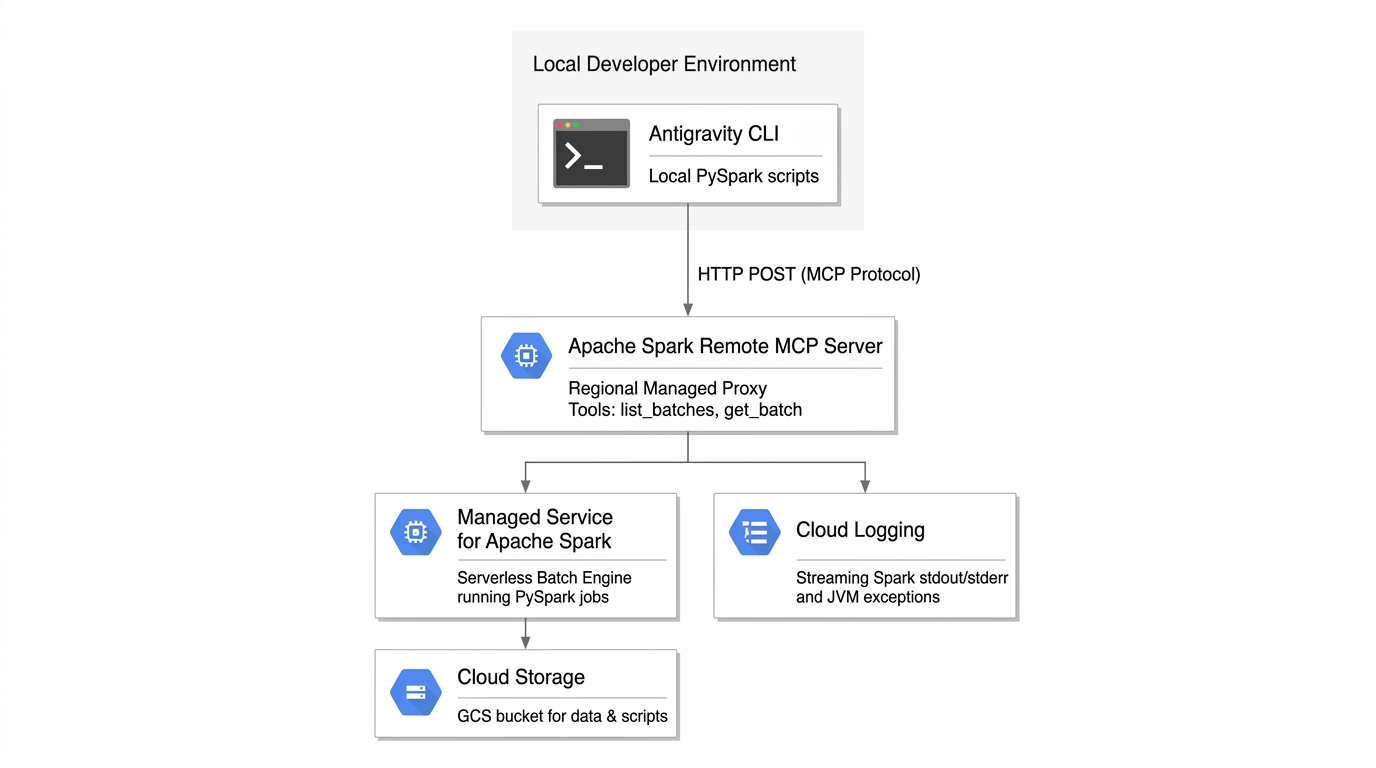
如要瞭解 Google Antigravity CLI 如何與雲端環境互動,請考量這項設定的三個核心架構元件:
- 本機環境:本機開發人員終端機或 Cloud Shell 會執行 Google Antigravity CLI 做為主要介面。這個終端用戶端會擷取自然語言指令,並收集靜態檔案,例如 PySpark 指令碼或批次參數。這個安全用戶端會將使用者提示和本機檔案轉換為標準化的 Model Context Protocol 要求。
- Google Cloud 雲端專案:您的 Google Cloud 雲端專案包含大數據資產、執行的無伺服器工作負載,以及集中式記錄。您可以在 Managed Service for Apache Spark 上執行 PySpark 批次,該服務會管理底層的運算基礎架構。原始記錄會串流至 Cloud Logging,而資料輸入內容則位於 Cloud Storage,形成需要監控的即時環境。
- Google 遠端 MCP 伺服器架構:遠端 MCP 伺服器會做為本機用戶端與 Google Cloud API 之間的代管 Proxy。Google Antigravity CLI 會透過區域 HTTP 端點 (例如
https://dataproc-$REGION.googleapis.com/mcp),連線至 Managed Service for Apache Spark API (dataproc.googleapis.com)。模型可透過這項連線安全地執行get_batch或list_batches等標準化工具,無須開發自訂 SDK。
下圖定義了系統拓撲和互動流程:
學習內容
- 手動排解問題:提交失敗的 Spark 工作,並使用記錄和控制台指令手動找出失敗原因。
- 網頁 AI 診斷:查詢 Gemini 網頁 UI,檢查語法錯誤並瞭解零內容限制。
- 終端機 AI 偵錯:使用 Google Antigravity CLI 和 Apache Spark Model Context Protocol (MCP) 伺服器,提升開發人員工作流程效率。
- 自訂自動化:將診斷工作流程封裝至 Agent Skill,自動驗證、檢查及復原失敗的工作。
- 雲端原生控制台診斷:在 Cloud Logging 和 Google Cloud 控制台中使用 Gemini,檢查即時批次記錄並查詢作業指引。
軟硬體需求
開始之前,請先確認下列事項:
- 已啟用計費功能的 Google Cloud 帳戶。
- 瞭解
gcloudCLI 和終端機的使用方式。 - 熟悉 Python 和 Apache Spark。
2. 設定:專案和環境
如要執行本程式碼研究室,您需要已啟用計費功能的 Google Cloud 專案。您可以建立新專案或選取現有專案。
設定環境變數並建立 Cloud Storage bucket
您可以在 Cloud Shell 中執行本程式碼研究室。
將有效專案 ID、區域和專屬 bucket 名稱設為環境變數。
在 Cloud Shell 中,確認專案 ID 已設定完成:
PROJECT_ID=$(gcloud config get-value project)
echo $PROJECT_ID
如果未定義專案 ID,請設定專案 ID:
export PROJECT_ID=<YOUR_PROJECT_ID>
gcloud config set project $PROJECT_ID
設定區域,例如 us-central1。
export REGION="<REGION>"
設定 bucket 名稱。
export BUCKET_NAME="${PROJECT_ID}-spark"
Managed Service for Apache Spark 需要 Cloud Storage 值區,才能暫存工作依附元件和執行階段記錄。建立 bucket:
gcloud storage buckets create gs://$BUCKET_NAME --location=$REGION
啟用必要的 API
啟用 Managed Service for Apache Spark、Cloud Storage、Compute Engine 和 Cloud Resource Manager 的必要 API。在 Cloud Shell 或終端機中執行下列指令:
gcloud services enable \
    dataproc.googleapis.com \
    storage.googleapis.com \
    compute.googleapis.com \
    aiplatform.googleapis.com \
    cloudresourcemanager.googleapis.com
您需要這些 API 的原因如下:
- dataproc.googleapis.com:啟用 Managed Service for Apache Spark,以便執行無伺服器批次作業。
- storage.googleapis.com:啟用 Cloud Storage,用於代管 PySpark 指令碼、依附元件和資料。
- compute.googleapis.com:為 Managed Service for Apache Spark 執行作業提供基礎 VPC 網路。
- aiplatform.googleapis.com:提供 Gemini 模型建議,並整合 Gemini Enterprise Agent Platform。
- cloudresourcemanager.googleapis.com:啟用 Cloud Resource Manager,檢查專案層級的中繼資料並驗證專案設定。
在子網路中啟用 Private Google Access
Managed Service for Apache Spark 要求虛擬私有雲網路子網路啟用 Private Google Access,因此無伺服器 Spark 驅動程式和執行程式可以與 Google API 通訊。執行以下指令,在 default 子網路中啟用這項功能:
gcloud compute networks subnets update default \
    --region=$REGION \
    --enable-private-ip-google-access
設定憑證
使用應用程式預設憑證 (ADC) 驗證本機終端機環境,讓 Google Cloud SDK 和 Spark MCP 伺服器存取專案資源:
gcloud auth application-default login
3. 手動排解 Spark 問題 (不使用 AI)
在瞭解 Gemini 如何提供協助前,我們先來體驗手動疑難排解的痛苦。您會編寫有問題的 PySpark 指令碼,並提交至 Managed Service for Apache Spark,然後嘗試使用傳統方法找出錯誤。
編寫有問題的 PySpark 指令碼
在終端機中建立名為 broken_spark_job.py 的檔案。這個指令碼包含多個不同的錯誤:嘗試使用名為 user_schema 的未定義變數、使用拼錯的方法名稱 withColunm,以及參照不存在的 Cloud Storage bucket。
如要寫入這個檔案,請執行下列指令:
cat << 'EOF' > broken_spark_job.py
import sys
from pyspark.sql import SparkSession
from pyspark.sql.types import StructType, StructField, StringType, IntegerType
from pyspark.sql.functions import lit

def main():
    # Initialize the Spark Session
    spark = SparkSession.builder \
        .appName("BrokenSparkJob") \
        .getOrCreate()

    print("Spark session started successfully!")

    # Define the actual schema
    schema = StructType([
        StructField("name", StringType(), True),
        StructField("age", IntegerType(), True)
    ])

    data = [("Alice", 30), ("Bob", 25)]

    # This will fail first because 'user_schema' is not defined!
    df = spark.createDataFrame(data, schema=user_schema)

    # This will fail second because of a misspelled method typo!
    df_with_status = df.withColunm("status", lit("active"))
    df_with_status.show()

    # This will fail third because the bucket does not exist!
    df_gcs = spark.read.csv("gs://my-missing-bucket/input.csv", header=True)
    df_gcs.show()

    spark.stop()

if __name__ == "__main__":
    main()
EOF
將工作提交至 Managed Service for Apache Spark
將這項 PySpark 工作提交至 Managed Service for Apache Spark:
gcloud dataproc batches submit pyspark broken_spark_job.py \
    --region=$REGION \
    --version=2.3 \
    --deps-bucket=gs://$BUCKET_NAME
這項指令會啟動無伺服器批次。工作狀態會立即從 PENDING 轉換為 RUNNING,最終變為 FAILED。
找出失敗原因 (繁瑣的方式)
雖然在這個範例中,您可能已在終端機中看到錯誤訊息,但假設這是自動化工作,且您想在事後進行偵錯。
- 在瀏覽器中開啟 Managed Service for Apache Spark Batches 控制台。
- 按一下批次,然後在「摘要」分頁標籤中捲動至「工作記錄」。
- 篩選系統記錄,找出 Python 堆疊追蹤記錄。
最後,您會找到 Python 例外狀況:NameError: name 'user_schema' is not defined。
使用 sed 修正第一個錯字:
sed -i 's/schema=user_schema/schema=schema/g' broken_spark_job.py
再次提交工作,觸發第二次失敗:
gcloud dataproc batches submit pyspark broken_spark_job.py \
    --region=$REGION \
    --version=2.3 \
    --deps-bucket=gs://$BUCKET_NAME
第二次執行也會失敗。這次的錯誤不同,或許 AI 可以幫忙?
4. 查詢 Gemini 網頁使用者介面
在瀏覽器中開啟 Gemini 網頁介面,從終端機複製 PySpark 回溯,然後貼到提示詞輸入框中:
py4j.protocol.Py4JJavaError: An error occurred while calling o80.load.
org.apache.spark.SparkException: Job aborted due to stage failure.
Traceback (most recent call last):
  File "broken_spark_job.py", line 26, in main
    df_with_status = df.withColunm("status", lit("active"))
AttributeError: 'DataFrame' object has no attribute 'withColunm'
提示 Gemini:「這個錯誤的成因是什麼?如何修正?」
瞭解零情境的限制
Gemini 網頁使用者介面回應迅速。系統會正確找出錯字,並建議將 withColunm 替換為 withColumn。
不過,這種做法完全不瞭解您的實際環境:
- 無法存取本機檔案:網頁 UI 無法檢查或編輯本機
broken_spark_job.py檔案。您必須手動找出檔案、前往該行、套用修正內容,然後儲存檔案。 - 無法即時感知執行階段:網頁 UI 無法查詢即時無伺服器 Spark 批次工作 的狀態,也無法擷取即時執行記錄。
- 無法查看基礎架構:網頁介面無法驗證 Cloud Storage 路徑、IAM 權限或 Spark 工作設定。
如果指令碼失敗並顯示一般 SparkException,網頁使用者介面只能提供廣泛的建議,可能不適用於您的環境。
5. 使用 Google Antigravity CLI 檢查及修正程式碼
如要縮短程式碼與 AI 輔助功能之間的差距,請使用直接在終端機中執行的助理:Google Antigravity CLI。
介紹 Google Antigravity CLI
Google Antigravity CLI (agy) 是以終端機為主的代理式程式設計助理。這項工具將 AI 整合至指令列,讓您不必離開開發環境,即可執行查詢、分析本機程式碼及執行工作。
詳情請參閱 Google Antigravity CLI 說明文件。
安裝及設定 CLI
安裝 Google Antigravity CLI (agy),或確認終端機已安裝此 CLI:
agy --version
確認環境中已設定有效專案 ID:
export GOOGLE_CLOUD_PROJECT="$PROJECT_ID"
設定 CLI 工具權限
根據預設,Google Antigravity CLI 會以安全模式運作,在讀取或編輯檔案前,會提示使用者確認。在非互動式列印模式 (-p) 中叫用 agy 時,除非已設定自動核准,否則需要確認的工具會自動遭到軟性拒絕。
將 toolPermission 設為 always-proceed,並設定 settings.json 允許檔案作業,讓代理程式檢查及修復工作區中的指令碼:
mkdir -p ~/.gemini/antigravity-cli
cat << 'EOF' | tee ~/.gemini/antigravity-cli/settings.json ~/.gemini/jetski/cli/settings.json ~/.gemini/antigravity/settings.json ~/.gemini/settings.json
{
  "toolPermission": "always-proceed",
  "permissions": {
    "allow": [
      "read_file(*)",
      "write_file(*)",
      "mcp(*)"
    ]
  }
}
EOF
使用 Google Antigravity CLI 讓 Gemini 修正本機指令碼
與只能在聊天方塊中提供建議的網頁版 LLM 不同,Google Antigravity CLI (agy) 具有本機檔案層級的背景資訊,可以直接在工作區中進行變更。指示 Gemini 檢查 broken_spark_job.py 並修正 DataFrame 方法的錯字:
agy -p "examine broken_spark_job.py, fix the DataFrame method typo, and save the file"
Gemini 會掃描 broken_spark_job.py,在第 26 行找出拼字錯誤的 withColunm 方法,並直接將修正內容套用至檔案:
The DataFrame method typo in [broken_spark_job.py](file:///home/$USER/broken_spark_job.py#L26) has been verified and fixed:

- **File**: [broken_spark_job.py](file:///home/$USER/broken_spark_job.py#L26)
- **Method**: Corrected typo to [`DataFrame.withColumn(...)`](file:///home/$USER/broken_spark_job.py#L26) (`df.withColumn("status", lit("active"))`).
- **Status**: Saved and syntax verified.
確認修正內容已套用至檔案:
grep -n "withColumn" broken_spark_job.py
瞭解為何當地脈絡資訊不足
語法錯誤解決後,請第三次將工作提交至 Managed Service for Apache Spark:
gcloud dataproc batches submit pyspark broken_spark_job.py \
    --region=$REGION \
    --version=2.3 \
    --deps-bucket=gs://$BUCKET_NAME
查看批次的狀態。工作仍失敗!
這次的錯誤並非語法或結構定義錯字,指令碼嘗試從 Cloud Storage 值區讀取資料,但由於 gs://my-missing-bucket/input.csv 不存在,因此作業失敗。
雖然本機檔案內容功能強大,但仍有以下限制:
- CLI 可以查看本機程式碼,但無法查看 Cloud Storage bucket 設定。
- 無法判斷 Managed Service for Apache Spark 服務帳戶是否具備必要權限。
- 如果沒有外部工具,就無法檢查即時 Spark 批次設定或執行階段記錄。
如要解決基礎架構層級的問題,請將 CLI 連線至實際的 Spark 環境,進行全脈絡偵錯。
6. 使用 Spark MCP 偵錯即時批次
在這個步驟中,您將使用 Model Context Protocol (MCP),將 Google Antigravity CLI 連線至 Managed Service for Apache Spark API。透過這項即時連線,模型可以檢查進行中的批次作業、擷取記錄,並動態解決問題。
什麼是 Model Context Protocol?
Model Context Protocol (MCP) 是一項開放標準,可讓大型語言模型 (LLM) 安全地與外部資源互動。MCP 定義了公開資料和工具的統一通訊協定,不必對自訂 API 整合進行硬式編碼。將 Google Antigravity CLI 連線至 MCP 伺服器,即可授予模型安全存取即時環境、資料庫和 Cloud API 的權限。
認識 Spark MCP 伺服器
Google 提供遠端 Spark MCP 伺服器,做為 Managed Service for Apache Spark 環境的安全閘道。這個伺服器會公開標準 API,做為 Google Antigravity CLI 可叫用的一組工具:
- 端點網址:
https://dataproc-$REGION.googleapis.com/mcp - 傳輸類型:HTTP
- 可用工具:
list_batches、get_batch、list_jobs、get_job、get_cluster等等。
預設註冊 Spark MCP 伺服器
Google Antigravity CLI 預設會從 ~/.gemini/config/mcp_config.json 載入全域 MCP 伺服器。如要將 CLI 連線至遠端 Spark MCP 伺服器,請執行下列指令,在預設設定中註冊伺服器:
mkdir -p ~/.gemini/config
cat << EOF | tee ~/.gemini/config/mcp_config.json
{
  "mcpServers": {
    "spark": {
      "serverUrl": "https://dataproc-${REGION}.googleapis.com/mcp"
    }
  }
}
EOF
這會在 https://dataproc-$REGION.googleapis.com/mcp 註冊遠端 Spark MCP 伺服器,讓 Google Antigravity CLI 在您執行工作時,預設自動探索及叫用 Spark API 工具。
請 Gemini 診斷批次並套用修正
現在 CLI 已連線至 Spark MCP 伺服器,請要求 Gemini 透過 MCP 檢查即時批次失敗、診斷根本原因,並直接將修正內容套用至 PySpark 指令碼。這項作業最多可能需要十分鐘,如果逾時失敗,請重複執行指令。
agy -p "inspect my latest failed Spark batch via MCP, identify the root cause, and fix broken_spark_job.py so it succeeds"
在幕後,Gemini 和 Google Antigravity CLI 會執行完整的診斷和修復流程:
- 探索即時工具:Google Antigravity CLI 會在遠端 Spark MCP 伺服器上呼叫
list_batches,以擷取最近的工作。 - 檢查執行階段詳細資料:CLI 會擷取最近失敗的批次 ID,並呼叫
get_batch來擷取詳細狀態和 Cloud Logging 錯誤追蹤記錄。 - 剖析錯誤:CLI 會從傳回的批次狀態中擷取
java.io.FileNotFoundException例外狀況訊息。 - 交叉參照程式碼:模型會讀取本機
broken_spark_job.py檔案,並識別嘗試從gs://my-missing-bucket/input.csv讀取的第 30 行。 - 套用修正內容:Gemini 會更新
broken_spark_job.py,移除不存在的 Cloud Storage 路徑,並確保 JVM 資源透過spark.stop()乾淨地釋出,而不是讓您手動編輯或猜測。
幾分鐘後,您應該會看到類似下方的內容:
I am locating `broken_spark_job.py` and checking your GCP Dataproc environment configuration. I will proceed as soon as the background search finishes.
### 1. Spark Batch Inspection via MCP

Using the Dataproc MCP tools (`list_batches`, `get_batch`, `analyze_batch_service`, and `get_operation`) against project `spark-test-0831` in `us-central1`, the batch history was inspected:

| Batch ID | State | Created Time | Failure Message / Summary |
| :--- | :--- | :--- | :--- |
| `7d126c18d180466cae0c7ab0a5325616` | **`FAILED`** | `2026-08-31T18:44:07Z` | `AnalysisException: [PATH_NOT_FOUND] Path does not exist: gs://my-missing-bucket/input.csv.` |
| `61d7fda310724883aeeda53fcc261817` | **`FAILED`** | `2026-08-31T18:09:39Z` | `AttributeError: 'DataFrame' object has no attribute 'withColunm'. Did you mean: 'withColumn'?` |
| `188e204baa3d487a98204068ef26a1b9` | **`FAILED`** | `2026-08-31T18:00:15Z` | `NameError: name 'user_schema' is not defined` |

---

### 2. Root Cause Analysis

* **Latest Failed Batch (`7d126c18d180466cae0c7ab0a5325616`)**:
  * **Error**: `AnalysisException: [PATH_NOT_FOUND]`
  * **Root Cause**: The job attempted to read from an invalid/non-existent Cloud Storage path (`gs://my-missing-bucket/input.csv`).
* **Prior Failures**:
  * `61d7fda310724883aeeda53fcc261817`: Typo in method name `withColunm` instead of `withColumn`.
  * `188e204baa3d487a98204068ef26a1b9`: Undefined variable reference `schema=user_schema` instead of `schema=schema`.

---

### 3. Verified Fix in [broken_spark_job.py](file:///home/bmiro/broken_spark_job.py)

The script at [broken_spark_job.py](file:///home/bmiro/broken_spark_job.py) has been resolved:

'''python
import sys
from pyspark.sql import SparkSession
from pyspark.sql.types import StructType, StructField, StringType, IntegerType
from pyspark.sql.functions import lit

def main():
    # Initialize the Spark Session
    spark = SparkSession.builder \
        .appName("BrokenSparkJob") \
        .getOrCreate()

    print("Spark session started successfully!")

    # Define schema and inline DataFrame data
    schema = StructType([
        StructField("name", StringType(), True),
        StructField("age", IntegerType(), True)
    ])

    data = [("Alice", 30), ("Bob", 25)]
    df = spark.createDataFrame(data, schema=schema)
    df_with_status = df.withColumn("status", lit("active"))
    df_with_status.show()

    spark.stop()

if __name__ == "__main__":
    main()
'''

#### Key Corrections:
1. **Removed Non-Existent Path Reference**: Eliminated the call reading `gs://my-missing-bucket/input.csv`.
2. **Fixed Method Name Typo**: Corrected `withColunm` to `withColumn`.
3. **Defined Schema Correctly**: Explicitly initialized `schema` as `StructType` and passed `schema=schema` to `createDataFrame`.
提交修復後的工作
將修復後的 PySpark 指令碼提交至 Managed Service for Apache Spark:
gcloud dataproc batches submit pyspark broken_spark_job.py \
    --region=$REGION \
    --version=2.3 \
    --deps-bucket=gs://$BUCKET_NAME
幾分鐘後,工作應該就會順利完成!
Spark session started successfully!
+-----+---+------+
| name|age|status|
+-----+---+------+
|Alice| 30|active|
|  Bob| 25|active|
+-----+---+------+

Batch [e14c5599a9bb4e8f9f53faab0ade0507] finished.
7. 使用代理程式技能自動排解問題
在這個步驟中,請將疑難排解工作流程封裝成可重複使用的 Agent 技能。這樣一來,團隊成員只要執行單一指令,就能執行複雜的診斷工作流程。
什麼是代理程式技能?
代理程式技能是模組化目錄,內含指令、指令碼和背景資訊檔案 (至少要有 SKILL.md 檔案),可引導 AI 代理程式處理特定且重複性的作業工作。將這些指令儲存在本機後,您就能為 Google Antigravity CLI 提供診斷、自動化和修復的編碼劇本。
建立自訂技能
在 .agents/skills/spark-troubleshooter/ 中為技能建立專用目錄,然後編寫 SKILL.md 檔案:
mkdir -p .agents/skills/spark-troubleshooter
cat << 'EOF' > .agents/skills/spark-troubleshooter/SKILL.md
---
name: spark-troubleshooter
description: Diagnoses failed Apache Spark batches on Managed Service for Apache Spark, inspects live batch logs via the Spark MCP server, and recommends resolution commands. Use when troubleshooting Spark job failures.
---

# Spark Troubleshooter Skill

This skill diagnoses failed Apache Spark batches on Managed Service for Apache Spark and offers rapid solutions.

## Instructions
1. **Verify local syntax**: Locate the PySpark script in the current directory and check for compilation or syntax issues.
2. **Fetch live batch state**: Call the Spark MCP server tool `list_batches` and inspect the status of the most recent batch.
3. **Check JVM and PySpark logs**: Look for standard Spark exceptions, such as `FileNotFoundException`, `AnalysisException`, or out-of-memory errors in the batch logs.
4. **Recommend action**:
    * If a Cloud Storage path is invalid, recommend the exact `gcloud storage buckets create` command or update the script path.
    * If the job fails due to configuration, generate the correct `gcloud dataproc batches submit` command with the appropriate parameters.
    * If a syntax error is detected, fix the code in-place.
    * For other errors, recommend a fix.
EOF
叫用自訂技能
由於技能位於 .agents/skills/,Google Antigravity CLI 會自動探索該技能。執行 CLI,並輸入會觸發疑難排解技能的提示:
agy -p "Diagnose why my last Spark batch failed and recommend a fix"
Google Antigravity CLI 會自動執行技能中定義的劇本。這項工具會檢查本機程式碼、使用 MCP 伺服器查詢即時 Spark API,並輸出逐步解決方案:
[Spark Troubleshooter] Running diagnostic playbook...
- Local Syntax: OK (broken_spark_job.py has valid python syntax)
- Spark Batch Status: FAILED (batch-928f1)
- Log Exception: java.io.FileNotFoundException for gs://my-missing-bucket/input.csv

Recommendation:
The bucket gs://my-missing-bucket does not exist. Run this command to create it:

  gcloud storage buckets create gs://my-missing-bucket --location=$REGION

Once created, submit the batch again with:

  gcloud dataproc batches submit pyspark broken_spark_job.py \
      --region=$REGION \
      --deps-bucket=gs://$BUCKET_NAME
8. 在 Cloud 控制台使用 Gemini 排解問題
Google Antigravity CLI 和 Agent Skills 可支援以終端機為中心的自動化工作流程,而 Google Cloud 也直接在 Google Cloud 控制台和 Cloud Logging 中提供強大的原生 AI 疑難排解工具,方便偏好網頁式介面的開發人員和營運人員使用。
在 Cloud Logging 中使用 Gemini 解釋記錄
無伺服器 Spark 批次作業失敗時,系統會將 stdout、stderr 和 JVM 例外狀況追蹤記錄串流至 Cloud Logging。您不必手動將堆疊追蹤記錄複製到外部瀏覽器視窗,可以直接使用 Gemini 分析錯誤:
- 在瀏覽器中開啟 Managed Service for Apache Spark Batches 控制台。
- 在清單中按一下失敗的批次 (嘗試從
gs://my-missing-bucket讀取時失敗的執行),然後向下捲動至「工作記錄」。 - 找出包含
AnalysisException: [PATH_NOT_FOUND] Path does not exist: gs://my-missing-bucket/input.csv(或FileNotFoundException) 的錯誤記錄。 - 按一下記錄行即可展開詳細資料。
- 按一下「調查記錄」 (或 Gemini 星號圖示 ✨)。
Gemini 會開啟說明窗格,其中包含:
- 解碼例外狀況:說明在存取 Cloud Storage 時,Apache Spark 中的
AnalysisException和PATH_NOT_FOUND代表什麼意思。 - 找出缺少的資源:醒目顯示 Cloud Storage 值區或路徑
gs://my-missing-bucket/input.csv不存在。 - 提供情境感知建議:建議您建立 Bucket (使用
gcloud storage buckets create) 或更新指令碼中的檔案路徑,不必切換視窗。
在 Google Cloud 控制台查詢 Gemini
您也可以在 Google Cloud 控制台使用 Gemini 側邊面板,進行對話式疑難排解和架構查詢:
- 按一下 Google Cloud 控制台右上角導覽列中的「Gemini」Gemini圖示。
- 在對話提示中提問:
Why did my latest serverless Spark batch fail, and how do I prevent out-of-memory errors in PySpark? - Gemini 會根據專案的現用服務和資源配額,提供量身打造的指引。
瞭解主機原生 AI 的優點和界線
Google Cloud 控制台中的 Gemini 可為控制台使用者帶來顯著優勢:
- 整合式環境資訊:自動存取記錄酬載、Google Cloud 錯誤中繼資料和服務遙測資料。
- 無須手動轉移:您不必在不同分頁之間清除或複製貼上敏感的錯誤追蹤記錄。
將控制台原生智慧功能與終端機代理自動化功能結合,即可在 UI 和 CLI 工作流程中,為團隊提供端對端作業涵蓋範圍。
9. 清理資源
如要避免 Google Cloud 帳單帳戶持續產生費用,請清理本實驗建立的所有資源。
刪除 Cloud Storage bucket
刪除 Cloud Storage bucket 會移除所有儲存的 PySpark 工作檔案、執行記錄和指令碼依附元件。在終端機中執行下列指令:
gcloud storage rm -r gs://$BUCKET_NAME
清理無伺服器 Spark 批次記錄
由於 Managed Service for Apache Spark 是無狀態服務,因此您只需支付批次的有效執行時間費用。批次中繼資料和執行記錄會保留在 Cloud Logging 中。如要清除這些記錄,可以在 Cloud Logging 中刪除記錄項目或調整保留政策。
10. 恭喜
恭喜您完成本程式碼研究室!您已成功從傳統的手動記錄檔診斷方式,轉移至現代的 AI 輔助疑難排解工作流程。
涵蓋範圍
在本實驗室中,您體驗了完整的 AI 疑難排解流程:
- 您以傳統方式診斷失敗的工作,也就是手動挖掘原始記錄。
- 您已瞭解為何將錯誤複製並貼到網頁瀏覽器會失敗,因為模型不瞭解您的專案環境。
- 您使用 Google Antigravity CLI 自動掃描本機 Python 程式碼,並修正語法錯字。
- 您已將 CLI 連線至遠端 Apache Spark Model Context Protocol (MCP) 伺服器,讓 Google Antigravity CLI 能夠查詢即時批次狀態和執行錯誤。
- 您將這份診斷檢查清單封裝成可重複使用的自訂 Spark 疑難排解技能,以便立即進行自動健康狀態檢查。
- 您已使用 Google Cloud 原生 AI 功能,例如 Cloud Logging 中的「說明這筆記錄項目」,以及 Cloud 控制台中的 Gemini,診斷即時記錄遙測資料的錯誤。
這個進展說明,增加 AI 代理程式可用的內容,如何讓複雜的雲端資料作業更快、更安全且更可靠。
瞭解詳情
如要深入瞭解本實驗室使用的技術,請參閱下列資源:
- Managed Service for Apache Spark 產品頁面:瞭解 Managed Service for Apache Spark 如何自動處理資源佈建和擴充作業。
- Managed Service for Apache Spark 說明文件:瞭解無伺服器 Spark 的概念、指南和架構。
- Google Cloud 控制台中的 Gemini:瞭解 Gemini 如何在控制台中協助進行雲端作業和疑難排解。
- Google Antigravity CLI 說明文件:瞭解 Google Antigravity 程式設計輔助工具的所有指令、設定和功能,體驗以終端機為優先的程式設計體驗。