
1. Introduction
Over 80% of enterprise data resides in unstructured formats—PDF engineering manuals, standard operating procedures (SOPs), compliance certificates, and equipment schematics stored in Cloud Storage. Because traditional catalogs only index relational table schemas, these documents remain "Dark Data": invisible to enterprise search, disconnected from structured inventory tables, and unverified for regulatory compliance.
When an auditor or AI agent asks, "Which hardware SKUs require UL-153 safety certification and what are their thermal hazard levels?", a catalog that only indexes SQL tables cannot answer. The facts are locked inside unstructured PDFs in Cloud Storage.
Architectural solution: multimodal metadata-as-code
In this codelab, you build an end-to-end Metadata-as-Code pipeline in Google Cloud that turns unstructured PDF manuals in Cloud Storage into schema-enforced Knowledge Catalog assets using Gemini Enterprise Agent Platform (Google GenAI SDK, google-genai):
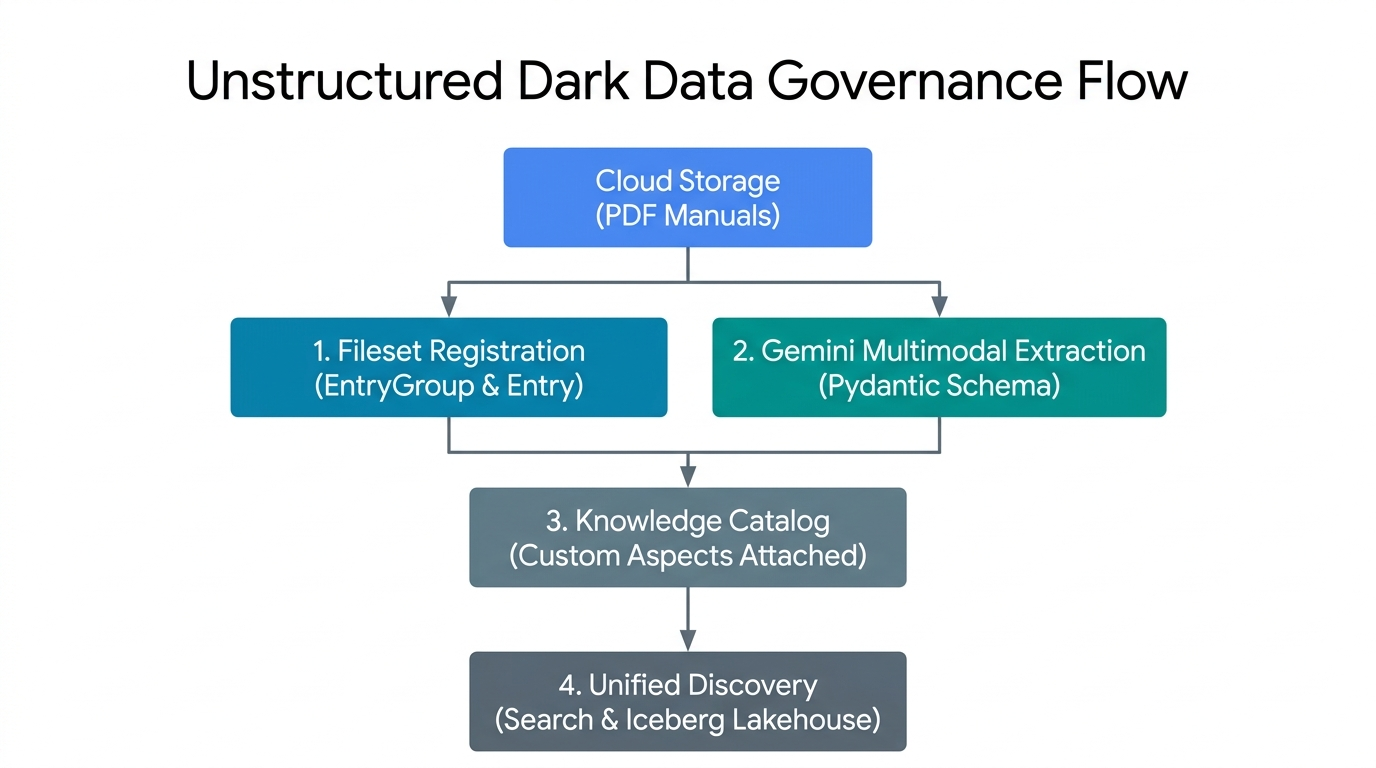
- Fileset Registration (
EntryGroup&Entry): Groups unstructured PDFs in Cloud Storage into governed logical fileset entries in Knowledge Catalog. - Gemini Multimodal Extraction (Pydantic Schema): Invokes Gemini Enterprise Agent Platform on raw PDF bytes with deterministic
response_schemavalidation. - Control Plane Aspect Binding: Attaches the validated operational and compliance JSON payloads as strongly typed
Aspectinstances on the catalog entry. - Unified Catalog Discovery: Makes the unstructured PDF filesets and their extracted metadata discoverable via
SearchEntriesRequest.
Key concepts: Knowledge Catalog control plane primitives
Imagine your team stores hundreds of PDF product manuals in Cloud Storage. To make those files easy to find and check in Knowledge Catalog, think of the five building blocks like organizing paper manuals in an office filing cabinet:
EntryGroup(A locked cabinet for one team): A cabinet with a lock on it. Only teammates with permission (roles/dataplex.entryCreator) can put folders inside. You must empty every folder out of the cabinet before you can remove the cabinet itself.EntryType(A folder category label): A label that tells people what kind of asset a folder represents—for example, "PDF Manual Collection" instead of "Database Table."Entry(A file folder with a storage link): The catalog folder for your PDF manuals. Instead of holding heavy paper copies, the folder holds a location card pointing to the exact Cloud Storage bucket (gs://...) where the real PDF files live.AspectType(A blank checklist form): A reusable blank form with pre-printed boxes (for example, a "Safety Checklist" asking foroperational_hazard_levelas text andconfidence_scoreas a number from0.0to1.0). You create this blank form once and reuse it across thousands of folders.Aspect(A filled-out checklist attached to a folder): After Gemini Enterprise Agent Platform reads the PDF manual and fills in the blanks, that completed checklist is clipped onto theEntryfolder. Because each checklist has its own key (aspect_keys), the engineering team and the legal team can each attach their own checklist to the same folder without overwriting each other's work.
All five regional resources live under projects/{project}/locations/{location}/:
Primitive & Relative Path | Role in Knowledge Catalog | Deletion & IAM Rule |
| Logical container that groups entries and controls team access ( | Must contain zero child |
| Category definition for a class of assets ( | Delete only after all entries using this type are removed. |
| Catalog record linking a physical Cloud Storage URI ( | Lives inside an |
| Reusable schema template defining typed | Created once per region and shared across entries. |
| Validated JSON metadata matching an | Updated using |
What you'll build
Using the companion scripts in codelabs/metadata-as-code-lab, you will run and inspect a 7-stage pipeline:
schemas.py— Dual PydanticBaseModelschemas (DarkDataExtractedMetadataandDocumentGovernanceMetadata) paired 1:1 with Knowledge CatalogAspectTypetemplates.step2_provision.py— Idempotent provisioning of customEntryGroup,EntryType, andAspectTypeblueprints.step3_register_fileset.py— Upload ofLUM-LIG-DES-8G8J_manual.pdfto Cloud Storage and registration as a governed FilesetEntry.step4_extract_metadata.py— Dynamic flagship Gemini model discovery and multimodal PDF extraction usinggoogle-genai.step5_attach_aspects.py,step6_search_catalog.py, &step7_verify_assertions.py— Surgical aspect attachment, exponential-backoff catalog search, and end-to-end control plane assertions.
Prerequisites & what you'll need
- A Google Cloud project with billing enabled and Google Cloud Shell (pre-installed with
gcloud,git,python3, andpip). - IAM permissions to manage Knowledge Catalog resources (
roles/dataplex.admin), provision Cloud Storage buckets and objects (roles/storage.admin), and invoke Gemini Enterprise Agent Platform (roles/aiplatform.user). - A web browser such as Google Chrome.
2. Setup and requirements
Clone the companion repository in Cloud Shell
Open Google Cloud Console, launch Cloud Shell, and perform a sparse checkout of codelabs/metadata-as-code-lab, which includes the sample PDF engineering manual (LUM-LIG-DES-8G8J_manual.pdf) and all Python scripts:
git clone --branch main --depth 1 --filter=blob:none --sparse \
  https://github.com/GoogleCloudPlatform/devrel-demos.git
cd devrel-demos
git sparse-checkout set codelabs/metadata-as-code-lab
cd codelabs/metadata-as-code-lab
ls -la
Configure environment variables
Set your project ID, regional control plane location, and target Cloud Storage bucket in Cloud Shell:
export PROJECT_ID="${PROJECT_ID:-$(gcloud config get-value project)}"
gcloud config set project $PROJECT_ID

export REGION="us-central1"
export BUCKET_NAME="${PROJECT_ID}-dark-data-manuals"
export GEMINI_LOCATION="global"

echo "Configured Project ID        : $PROJECT_ID"
echo "Knowledge Catalog Region     : $REGION"
echo "Gemini Endpoint Location     : $GEMINI_LOCATION"
echo "Target Cloud Storage Bucket  : $BUCKET_NAME"
Enable APIs and install dependencies
Enable the required Google Cloud APIs and install the Python dependencies (google-genai, google-cloud-dataplex, pydantic, and pandas) from requirements.txt:
gcloud services enable \
  dataplex.googleapis.com \
  storage.googleapis.com \
  aiplatform.googleapis.com \
  --quiet
python3 -m pip install --upgrade --quiet --user --break-system-packages -r requirements.txt
3. Define Pydantic schemas and aspect templates
schemas.py defines two complementary contracts that pair client-side Pydantic validation with server-side Knowledge Catalog AspectType templates:
DarkDataExtractedMetadata: Operational attributes extracted from the PDF (document title, domain ontology, safety hazard level, authoring/version provenance, executive summary, and extraction confidence score).DocumentGovernanceMetadata: Regulatory compliance codes (UL-153, FCC Part 15, CE-LVD, RoHS), stewardship owner, retention policy, and a reference table identifier string (lakehouse_cross_ref_table) for linking the PDF manual to downstream inventory tables.
Inspect schemas.py
First, DarkDataExtractedMetadata uses Pydantic Field constraints (ge=0.0, le=1.0, meaning greater/less than or equal to, on confidence_score) to constrain Gemini Enterprise Agent Platform's JSON output:
class DarkDataExtractedMetadata(BaseModel):
    document_title: str = Field(
        description="Official document title or product model name extracted from the PDF manual."
    )
    # ... domain_ontology, operational_hazard_level, author_provenance ...
    version_provenance: str = Field(
        description="Document version, revision code, or publication standard identifier."
    )
    # ... document_summary ...
    confidence_score: float = Field(
        ge=0.0,
        le=1.0,
        description="AI extraction confidence metric between 0.0 and 1.0.",
    )
Second, extracted_aspect_template mirrors those exact field names and maps Python's str and float types to Knowledge Catalog's string and double record_fields. Note that the AspectType.MetadataTemplate protobuf contract requires every field in record_fields to declare a unique, strictly positive 1-based integer index (1 through 7)—omitting or duplicating index causes create_aspect_type to fail with 400 INVALID_ARGUMENT:
extracted_aspect_template = {
    "name": "DarkDataExtractedMetadata",
    "type": "record",
    "record_fields": [
        {
            "name": "document_title",
            "type": "string",
            "index": 1,
            "annotations": {"description": "Official document title or product model name."},
        },
        # ... fields 2 through 6 (string) ...
        {
            "name": "confidence_score",
            "type": "double",
            "index": 7,
            # ... annotations ...
        },
    ],
}
Validate the schema module
Run schemas.py to verify your environment configuration and compile both schemas:
python3 schemas.py
Configured Project ID         : your-project-id
Knowledge Catalog Region      : us-central1
Gemini Endpoint Location      : global
Governed Fileset Storage URI  :
  gs://your-project-id-dark-data-manuals/sop-pdfs/LUM-LIG-DES-8G8J_manual.pdf
Target Fileset Entry ID       : sop-manuals-fileset-lum8g8j
✓ Defined DarkDataExtractedMetadata and DocumentGovernanceMetadata
  Pydantic schemas.
✓ Prepared Knowledge Catalog AspectType metadata templates.
4. Provision namespaces and custom aspect types
Before registering fileset entries or attaching metadata, step2_provision.py provisions three control plane resources in Knowledge Catalog:
EntryGroup:dark-data-fileset-groupEntryType:unstructured-pdf-filesetAspectTypeBlueprints:dark-data-extracted-metadataanddocument-governance-aspect
Idempotent provisioning in step2_provision.py
Each creation call in step2_provision.py wraps the long-running operation (op.result()) in a try / except AlreadyExists block so the script can be re-run safely without failing on existing resources:
# Provision AspectType 1: dark-data-extracted-metadata
try:
    at1_op = catalog_client.create_aspect_type(
        parent=parent_location,
        aspect_type_id=EXTRACTED_ASPECT_TYPE_ID,
        aspect_type=AspectType(
            name=extracted_aspect_type_name,
            display_name="Dark Data Multimodal Extracted Metadata",
            # ... description ...
            metadata_template=extracted_aspect_template,
        ),
    )
    if hasattr(at1_op, "result"):
        at1_op.result()
    print(f"Created AspectType: {extracted_aspect_type_name}")
except AlreadyExists:
    print(f"AspectType already exists; retrieving live resource: {extracted_aspect_type_name}")

live_extracted_aspect_type = catalog_client.get_aspect_type(name=extracted_aspect_type_name)
Once metadata_template=extracted_aspect_template is registered, Knowledge Catalog enforces the schema at the API boundary—any subsequent update_entry() call that passes a string to confidence_score (double) is rejected.
Run step2_provision.py
Execute the provisioning script and confirm that the custom aspect types are registered in your region:
python3 step2_provision.py
gcloud dataplex aspect-types list --location=$REGION
Created EntryGroup:
  projects/your-project-id/locations/us-central1/entryGroups/
  dark-data-fileset-group
Created EntryType :
  projects/your-project-id/locations/us-central1/entryTypes/
  unstructured-pdf-fileset
Created AspectType:
  projects/your-project-id/locations/us-central1/aspectTypes/
  dark-data-extracted-metadata
Created AspectType:
  projects/your-project-id/locations/us-central1/aspectTypes/
  document-governance-aspect
✓ All Knowledge Catalog namespaces and AspectType blueprints are active.
5. Register unstructured fileset entries
Rather than cluttering the catalog with millions of isolated file pointers, Knowledge Catalog groups related documents in Cloud Storage (gs://YOUR_BUCKET/sop-pdfs/*.pdf) into logical Fileset Entries—either via automated discovery scans (DataScanServiceClient) or direct programmatic registration (CatalogServiceClient.create_entry).
How step3_register_fileset.py maps storage to the catalog
step3_register_fileset.py uploads LUM-LIG-DES-8G8J_manual.pdf to gs://${BUCKET_NAME}/sop-pdfs/LUM-LIG-DES-8G8J_manual.pdf and registers the governed Entry:
fully_qualified_fileset_uri = f"gcs:{BUCKET_NAME}"
fileset_entry_spec = Entry(
    name=fileset_entry_name,
    entry_type=entry_type_resource_name,
    fully_qualified_name=fully_qualified_fileset_uri,
    entry_source=EntrySource(
        resource=VIRTUAL_STORAGE_URI,
        system="Cloud Storage",
        platform="Google Cloud",
        display_name="LUM-LIG-DES-8G8J Unstructured SOP & Technical Manual Fileset",
        # ... description ...
        location=REGION,
    ),
)

create_entry_op = catalog_client.create_entry(
    parent=entry_group_resource_name,
    entry_id=FILESET_ENTRY_ID,
    entry=fileset_entry_spec,
)
Notice the distinct roles of the two URI fields on Entry:
fully_qualified_name=fully_qualified_fileset_uri(f"gcs:{BUCKET_NAME}"): Uses the canonicalgcs:{bucket_name}FQN scheme required by Knowledge Catalog to correlate the logical catalog entry with the underlying Cloud Storage bucket.entry_source.resource=VIRTUAL_STORAGE_URI: Stores the physicalgs://object URI inspected by downstream extraction workers.
Run step3_register_fileset.py
python3 step3_register_fileset.py
Created Cloud Storage bucket:
  gs://your-project-id-dark-data-manuals in us-central1
Uploaded unstructured PDF manual to:
  gs://your-project-id-dark-data-manuals/sop-pdfs/LUM-LIG-DES-8G8J_manual.pdf
Registered governed Fileset Entry:
  projects/your-project-id/locations/us-central1/entryGroups/
  dark-data-fileset-group/entries/sop-manuals-fileset-lum8g8j
  -> Fully Qualified Name : gcs:your-project-id-dark-data-manuals
  -> Physical Resource URI:
  gs://your-project-id-dark-data-manuals/sop-pdfs/LUM-LIG-DES-8G8J_manual.pdf
  -> Source System        : Cloud Storage
6. Extract document metadata with Gemini
step4_extract_metadata.py reads the raw PDF bytes and invokes Gemini Enterprise Agent Platform (genai_client.models.generate_content) using two key patterns:
1. Dynamic flagship model discovery
Instead of hardcoding brittle model version strings, the script queries genai_client.models.list() and sorts active candidates by (is_ga_channel, semantic_version_tuple) to pick the newest General Availability (GA) flash model:
genai_client = genai.Client(
    vertexai=True,
    project=PROJECT_ID,
    location=GEMINI_LOCATION,
)

for model_obj in genai_client.models.list():
    raw_id = (model_obj.name or "").split("/")[-1]
    # Filter to flagship Gemini Flash models (version >= 3.0) and prioritize GA over preview
    ...
    discovered_candidates.append((is_ga_channel, ver_tuple, raw_id))

discovered_candidates.sort(key=lambda item: (item[0], item[1]), reverse=True)
2. Schema-constrained multimodal extraction (Part.from_bytes + response_schema)
Passing response_mime_type="application/json" and response_schema=DarkDataExtractedMetadata (followed by DocumentGovernanceMetadata) constrains token decoding directly to the Pydantic JSON schema:
with open(LOCAL_PDF_PATH, "rb") as pdf_file:
    raw_pdf_bytes = pdf_file.read()

extraction_response = genai_client.models.generate_content(
    model=candidate_model,
    contents=[
        types.Part.from_bytes(data=raw_pdf_bytes, mime_type="application/pdf"),
        extraction_prompt,
    ],
    config=types.GenerateContentConfig(
        response_mime_type="application/json",
        response_schema=DarkDataExtractedMetadata,
        temperature=0.1,
    ),
)

extracted_dark_data = json.loads(extraction_response.text)
validated_extraction = DarkDataExtractedMetadata(**extracted_dark_data)
Run step4_extract_metadata.py
python3 step4_extract_metadata.py
Dynamically discovered active GA model currency :
  gemini-3.8-flash (version (3, 8))
Loaded unstructured PDF manual at: LUM-LIG-DES-8G8J_manual.pdf
Read unstructured PDF document (1184 bytes).
  Executing multimodal extraction with gemini-3.8-flash...
✓ Multimodal extraction completed using model: gemini-3.8-flash
✓ Governance classification completed using model: gemini-3.8-flash

--- Extracted Multimodal Operational Metadata ---
Extracted Attribute    Multimodal Value
document_title    LUM-LIG-DES-8G8J Contemporary Linen Desk Lamp
domain_ontology    Electrical Hardware & Lighting Systems
operational_hazard_level    MEDIUM
author_provenance    Global Hardware Safety & Lighting Systems Engin
version_provenance    Rev 4.2
document_summary    This document outlines standard operating proce
confidence_score    0.99

--- Extracted Governance & Inventory Cross-Reference Metadata ---
Governance Attribute    Classification Value
compliance_classifications    UL-153 Portable Luminaires, FCC Part 15, CE-LVD
stewardship_owner    Global Hardware Safety & Lighting Systems Engin
retention_policy    10-Year Active Product Lifecycle Archival
lakehouse_cross_ref_table    lakehouse.your-project-id.retail_hardware
governance_status    VERIFIED_PRODUCTION
7. Attach validated aspects to catalog entries
step5_attach_aspects.py binds the validated JSON payloads (extracted_metadata.json and governance_metadata.json) onto the sop-manuals-fileset-lum8g8j entry via catalog_client.update_entry().
Surgical aspect mutation in step5_attach_aspects.py
extracted_aspect_key = f"{PROJECT_ID}.{REGION}.{EXTRACTED_ASPECT_TYPE_ID}"
governance_aspect_key = f"{PROJECT_ID}.{REGION}.{GOVERNANCE_ASPECT_TYPE_ID}"

updated_entry_payload = Entry(
    name=fileset_entry_name,
    entry_type=entry_type_resource_name,
    fully_qualified_name=fully_qualified_fileset_uri,
    aspects={
        extracted_aspect_key: Aspect(
            aspect_type=extracted_aspect_type_name,
            data=extracted_data,
        ),
        governance_aspect_key: Aspect(
            aspect_type=governance_aspect_type_name,
            data=governance_data,
        ),
    },
)

update_op = catalog_client.update_entry(
    request=dataplex_v1.UpdateEntryRequest(
        entry=updated_entry_payload,
        update_mask={"paths": ["aspects"]},
        aspect_keys=[extracted_aspect_key, governance_aspect_key],
    )
)
Passing both update_mask={"paths": ["aspects"]} and aspect_keys=[extracted_aspect_key, governance_aspect_key] scopes the mutation strictly to these two aspect keys—leaving entry_source and any aspects owned by other teams untouched.
Run step5_attach_aspects.py
python3 step5_attach_aspects.py
Successfully bound 2 Aspect(s) to Entry:
  projects/your-project-id/locations/us-central1/entryGroups/
  dark-data-fileset-group/entries/sop-manuals-fileset-lum8g8j

=== Live Attached Aspect: document-governance-aspect ===
Catalog Field    Authoritative Stored Value
compliance_classifications    UL-153 Portable Luminaires, FCC Part 15, CE-LVD
stewardship_owner    Global Hardware Safety & Lighting Systems Engin
retention_policy    10-Year Active Product Lifecycle Archival
lakehouse_cross_ref_table    lakehouse.your-project-id.retail_hardware
governance_status    VERIFIED_PRODUCTION

=== Live Attached Aspect: dark-data-extracted-metadata ===
Catalog Field    Authoritative Stored Value
document_title    LUM-LIG-DES-8G8J Contemporary Linen Desk Lamp
domain_ontology    Electrical Hardware & Lighting Systems
operational_hazard_level    MEDIUM
author_provenance    Global Hardware Safety & Lighting Systems Engin
version_provenance    Rev 4.2
document_summary    This document outlines standard operating proce
confidence_score    0.99
Dual-track verification
- Track 1 (CLI Verification): Inspect the entry with all attached aspects via
gcloud:gcloud dataplex entries describe sop-manuals-fileset-lum8g8j \ --entry-group=dark-data-fileset-group \ --location=$REGION \ --view=ALL - Track 2 (Console UI Inspection):
- Open the Knowledge Catalog Search Console, search for LUM-LIG-DES-8G8J Unstructured SOP & Technical Manual Fileset (
sop-manuals-fileset-lum8g8j), and select the matching entry from the results. - Under Optional tags and aspects, verify that both Dark Data Multimodal Extracted Metadata and Document Governance & Inventory Cross-Reference Aspect display the extracted hazard level (
MEDIUM), compliance codes (UL-153, FCC Part 15, CE-LVD, RoHS), and cross-reference table string (lakehouse_cross_ref_table).
- Open the Knowledge Catalog Search Console, search for LUM-LIG-DES-8G8J Unstructured SOP & Technical Manual Fileset (
8. Query governed dark data in the catalog
Once custom aspects are attached, unstructured PDF manuals in Cloud Storage become discoverable through Knowledge Catalog search (catalog_client.search_entries()).
Polling search_entries() in step6_search_catalog.py
step6_search_catalog.py polls search_entries() with exponential backoff and reads the canonicalized aspect keys via .endswith():
search_query = f"entrygroup={entry_group_resource_name} name:{FILESET_ENTRY_ID}"

while elapsed_seconds < max_wait_seconds:
    catalog_search_results = list(
        catalog_client.search_entries(
            request=dataplex_v1.SearchEntriesRequest(
                name=parent_location,
                query=search_query,
            )
        )
    )
    if catalog_search_results:
        break
    backoff_seconds = min(5 * (2 ** attempt), 30)
    time.sleep(backoff_seconds)
    ...

for k, asp in detailed_entry.aspects.items():
    if k.endswith(f".{REGION}.{EXTRACTED_ASPECT_TYPE_ID}"):
        print(f"    Domain Ontology     : {asp.data.get('domain_ontology')}")
        print(f"    Hazard Level        : {asp.data.get('operational_hazard_level')}")
    elif k.endswith(f".{REGION}.{GOVERNANCE_ASPECT_TYPE_ID}"):
        print(f"    Compliance Codes    : {asp.data.get('compliance_classifications')}")
        print(f"    Lakehouse Join Table: {asp.data.get('lakehouse_cross_ref_table')}")
Run step6_search_catalog.py
python3 step6_search_catalog.py
Executing Knowledge Catalog search query:
  'entrygroup=projects/your-project-id/locations/us-central1/entryGroups/
  dark-data-fileset-group name:sop-manuals-fileset-lum8g8j'...

✓ Discovered 1 governed asset(s) in Knowledge Catalog:

[1] Entry Resource Name :
    projects/your-project-id/locations/us-central1/entryGroups/
    dark-data-fileset-group/entries/sop-manuals-fileset-lum8g8j
    Fully Qualified Name: gcs:your-project-id-dark-data-manuals
    Entry Type :
    projects/your-project-id/locations/us-central1/entryTypes/
    unstructured-pdf-fileset
    Physical Storage URI:
    gs://your-project-id-dark-data-manuals/sop-pdfs/LUM-LIG-DES-8G8J_manual.pdf
    Domain Ontology     : Electrical Hardware & Lighting Systems
    Hazard Level        : MEDIUM
    Compliance Codes    : UL-153 Portable Luminaires, FCC Part 15, CE-LVD, RoHS
    Lakehouse Join Table:
    lakehouse.your-project-id.retail_hardware.luminaire_sku_inventory_iceberg
Dual-track verification
- Track 1 (CLI Search): Query the search index directly via
gcloud:gcloud dataplex entries search "name:sop-manuals-fileset-lum8g8j" --project=$PROJECT_ID - Track 2 (Console UI Natural-Language Search):
- Open the Knowledge Catalog Search Console and search for
LUM-LIG-DES-8G8JorUL-153. - Observe how Knowledge Catalog surfaces the governed Cloud Storage PDF fileset entry and its attached metadata aspects.
- Open the Knowledge Catalog Search Console and search for
9. Verify end-to-end governance assertions
step7_verify_assertions.py runs deterministic assertions against live Knowledge Catalog control plane responses to verify that the EntryGroup, EntryType, both custom AspectType blueprints, the bound EntryView.ALL aspect payloads (confidence_score bounds and lakehouse_cross_ref_table string), and search index discovery all succeed:
verify_eg = catalog_client.get_entry_group(name=entry_group_resource_name)
assert verify_eg.name == entry_group_resource_name, "EntryGroup resource name mismatch."

verify_entry = catalog_client.get_entry(
    request=dataplex_v1.GetEntryRequest(
        name=fileset_entry_name,
        view=dataplex_v1.EntryView.ALL,
    )
)
bound_extracted = next(
    (
        asp for k, asp in verify_entry.aspects.items()
        if k.endswith(f".{REGION}.{EXTRACTED_ASPECT_TYPE_ID}")
    ),
    None,
)
bound_governance = next(
    (
        asp for k, asp in verify_entry.aspects.items()
        if k.endswith(f".{REGION}.{GOVERNANCE_ASPECT_TYPE_ID}")
    ),
    None,
)

assert bound_extracted is not None, f"Aspect '{EXTRACTED_ASPECT_TYPE_ID}' not found on live Entry."
assert bound_governance is not None, (
    f"Aspect '{GOVERNANCE_ASPECT_TYPE_ID}' not found on live Entry."
)
assert (
    bound_extracted.data.get("document_title") == expected_extraction["document_title"]
), "Extracted title mismatch."
assert (
    0.0 <= float(bound_extracted.data.get("confidence_score", -1.0)) <= 1.0
), "Invalid confidence score in catalog."
assert (
    "lakehouse" in str(bound_governance.data.get("lakehouse_cross_ref_table", "")).lower()
), "Missing Lakehouse cross-reference."
...
assert len(search_results) >= 1, "Expected at least 1 search result in Knowledge Catalog."
Run step7_verify_assertions.py
python3 step7_verify_assertions.py && echo "Verification exit code: $?"
Running substantive end-to-end verification assertions...
✓ All 5 substantive verification assertions passed
  against live Google Cloud control plane state!
Verification exit code: 0
10. Architect an event-driven pipeline
While running Python scripts interactively in Cloud Shell is ideal for building and testing your governance contracts, enterprise environments receive thousands of new or revised PDF engineering manuals, supplier compliance certificates, and SOP documents daily from ERP, Product Lifecycle Management (PLM), and vendor portals. Running batch scripts manually quickly creates governance blind spots between document upload and catalog indexing.
In production, platform teams operationalize the exact code you ran in Steps 4 and 5 as a zero-touch, event-driven pipeline:
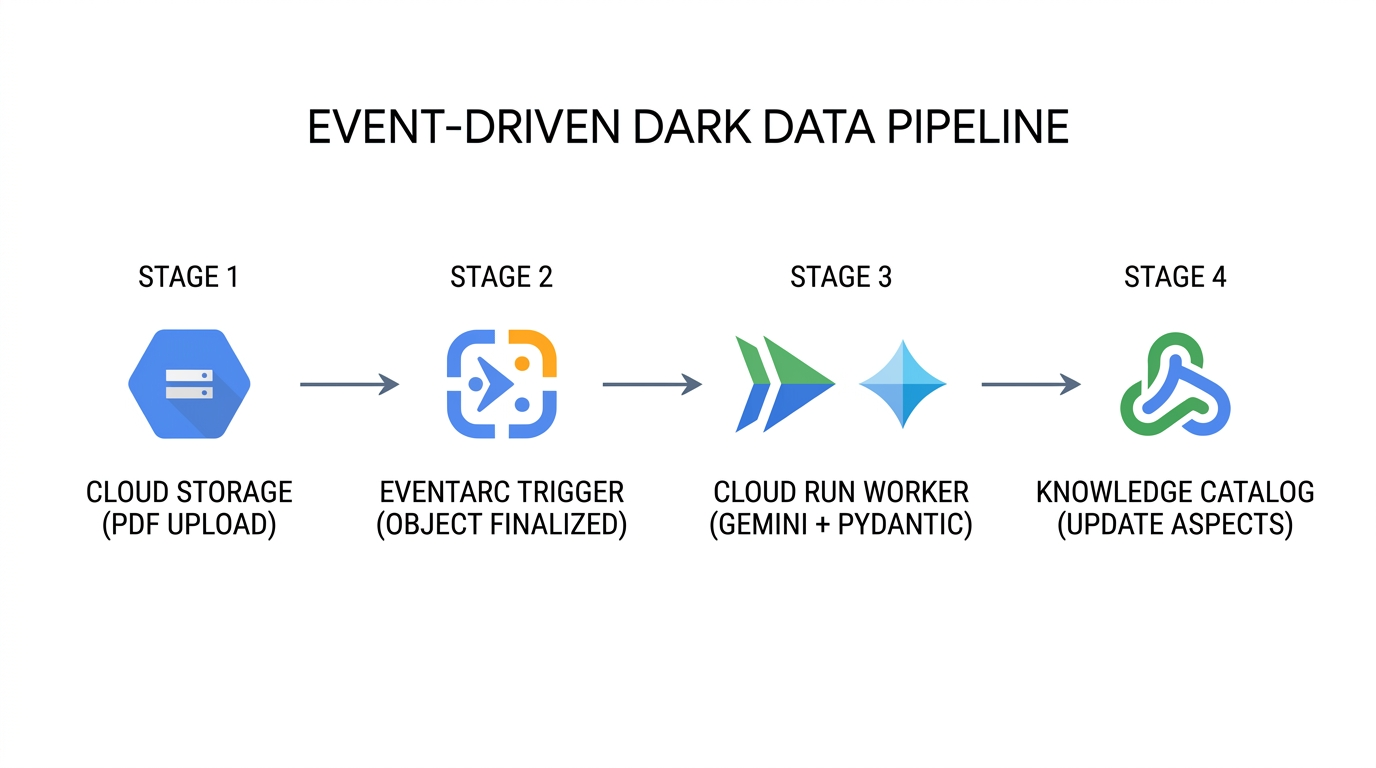
- Continuous Document Ingestion (
Cloud Storage→Eventarc): Whenever a new PDF manual is uploaded or a new revision overwrites an existing object in Cloud Storage, the bucket emits agoogle.cloud.storage.object.v1.finalizedCloudEvent containing the bucket identifier, object path, and object generation number. - Stateless Multimodal Extraction (
Eventarc→Cloud Run→Gemini Enterprise Agent Platform): Eventarc routes the CloudEvent to a serverless Cloud Run worker packagingschemas.py,step4_extract_metadata.py, andstep5_attach_aspects.py. The worker streams the PDF bytes to Gemini Enterprise Agent Platform withresponse_schemaenforced, guaranteeing that every extracted attribute conforms toDarkDataExtractedMetadataandDocumentGovernanceMetadata. - Surgical Control Plane Update (
Cloud Run→Knowledge Catalog): The worker resolves the parent FilesetEntryand executescatalog_client.update_entry()withupdate_mask={"paths": ["aspects"]}and explicitaspect_keys. Even if dozens of documents finish processing simultaneously, each mutation updates only its designated aspect keys. - Confidence-Gated Steward Quarantine: If a scanned legacy PDF yields an extraction
confidence_scorebelow your operational threshold (for example,< 0.85), the worker setsgovernance_status = "PENDING_STEWARD_REVIEW"on the attached aspect so data stewards can query Knowledge Catalog for low-confidence assets requiring human review.
How enterprises apply this pattern in production
Enterprise Use Case | How Metadata-as-Code Operates in Practice | Business & Operational Impact |
Automated Regulatory Audits & Recall Readiness | Compliance systems join unstructured PDF safety aspects ( | When a standard such as |
Grounded AI Agents & RAG Pre-Filtering | Before a retrieval-augmented generation (RAG) agent on Gemini Enterprise Agent Platform answers a field engineer's question, it filters Knowledge Catalog entries by | Prevents AI assistants from hallucinating or citing deprecated engineering drafts, expired SOPs, or unverified third-party manuals. |
Multi-Team Concurrent Enrichment | Multiple independent pipelines enrich the same Fileset | Because |
CI/CD Schema Evolution via GitOps | Platform teams store | Eliminates schema drift between application extraction code and the Knowledge Catalog control plane across |
11. Cleaning up your environment
In Knowledge Catalog, parent containers and schema templates cannot be deleted while child entries still reference them. cleanup.py deletes resources in strict reverse dependency order (Entry → EntryGroup → EntryType → AspectTypes → Cloud Storage bucket objects → temporary JSON files):
# 1. Delete Fileset Entry first
catalog_client.delete_entry(name=target_entry_path)

# 2. Delete EntryGroup container
del_eg_op = catalog_client.delete_entry_group(name=target_eg_path)
if hasattr(del_eg_op, "result"):
    del_eg_op.result()

# 3. Delete EntryType and Custom AspectTypes
del_et_op = catalog_client.delete_entry_type(name=target_et_path)
if hasattr(del_et_op, "result"):
    del_et_op.result()
for aspect_id_val in (EXTRACTED_ASPECT_TYPE_ID, GOVERNANCE_ASPECT_TYPE_ID):
    target_at_path = f"{active_parent}/aspectTypes/{aspect_id_val}"
    del_at_op = catalog_client.delete_aspect_type(name=target_at_path)
    if hasattr(del_at_op, "result"):
        del_at_op.result()
Run cleanup.py
python3 cleanup.py
Starting reverse-dependency resource cleanup in Knowledge Catalog...
Deleted Fileset Entry:
  projects/your-project-id/locations/us-central1/entryGroups/
  dark-data-fileset-group/entries/sop-manuals-fileset-lum8g8j
Deleted EntryGroup   :
  projects/your-project-id/locations/us-central1/entryGroups/
  dark-data-fileset-group
Deleted EntryType    :
  projects/your-project-id/locations/us-central1/entryTypes/
  unstructured-pdf-fileset
Deleted AspectType   :
  projects/your-project-id/locations/us-central1/aspectTypes/
  dark-data-extracted-metadata
Deleted AspectType   :
  projects/your-project-id/locations/us-central1/aspectTypes/
  document-governance-aspect
Deleted Cloud Storage object :
  gs://your-project-id-dark-data-manuals/sop-pdfs/LUM-LIG-DES-8G8J_manual.pdf
Deleted Cloud Storage bucket : gs://your-project-id-dark-data-manuals
Removed local temporary file : extracted_metadata.json
Removed local temporary file : governance_metadata.json
✓ Standalone teardown complete. Environment cleanly reset.
Remove the cloned repository directory
After cleanup.py finishes deleting the cloud resources, return to your home directory and remove the cloned devrel-demos repository folder from Cloud Shell:
cd ~
rm -rf ~/devrel-demos
12. Congratulations!
You have built and verified an end-to-end Metadata-as-Code governance pipeline that turns unstructured PDFs in Cloud Storage into discoverable, schema-enforced Knowledge Catalog assets using Gemini Enterprise Agent Platform.
What's next?
- Automate with Terraform: Manage
google_dataplex_aspect_typeandgoogle_dataplex_entry_groupresources declaratively in CI/CD pipelines. - Deploy Eventarc + Cloud Run Workers: Containerize
step4_extract_metadata.pyandstep5_attach_aspects.pyinto an event-driven Cloud Run service. - Downstream Inventory Joins in BigQuery: Export the extracted governance metadata (
lakehouse_cross_ref_table) to join unstructured document compliance attributes with structured SKU inventory tables.