

1. 소개
엔터프라이즈 데이터의 80% 이상이 비정형 형식(Cloud Storage에 저장된 PDF 엔지니어링 매뉴얼, 표준 운영 절차(SOP), 규정 준수 인증서, 장비 도면)으로 되어 있습니다. 기존 카탈로그는 관계형 테이블 스키마만 색인화하므로 이러한 문서는 엔터프라이즈 검색에 표시되지 않고, 구조화된 인벤토리 테이블과 연결되지 않으며, 규정 준수 여부가 확인되지 않는 '다크 데이터'로 남아 있습니다.
감사자 또는 AI 에이전트가 '어떤 하드웨어 SKU에 UL-153 안전 인증이 필요하고 열 위험 수준은 무엇인가요?'라고 질문하면 SQL 테이블만 색인을 생성하는 카탈로그는 대답할 수 없습니다. 사실은 Cloud Storage의 비정형 PDF 내에 잠겨 있습니다.
아키텍처 솔루션: 멀티모달 메타데이터-코드
이 Codelab에서는 Google Cloud에서 Cloud Storage의 구조화되지 않은 PDF 매뉴얼을 Gemini Enterprise Agent Platform (Google 생성형 AI SDK, google-genai)을 사용하여 스키마가 적용된 Knowledge Catalog 애셋으로 변환하는 엔드 투 엔드 Metadata-as-Code 파이프라인을 빌드합니다.
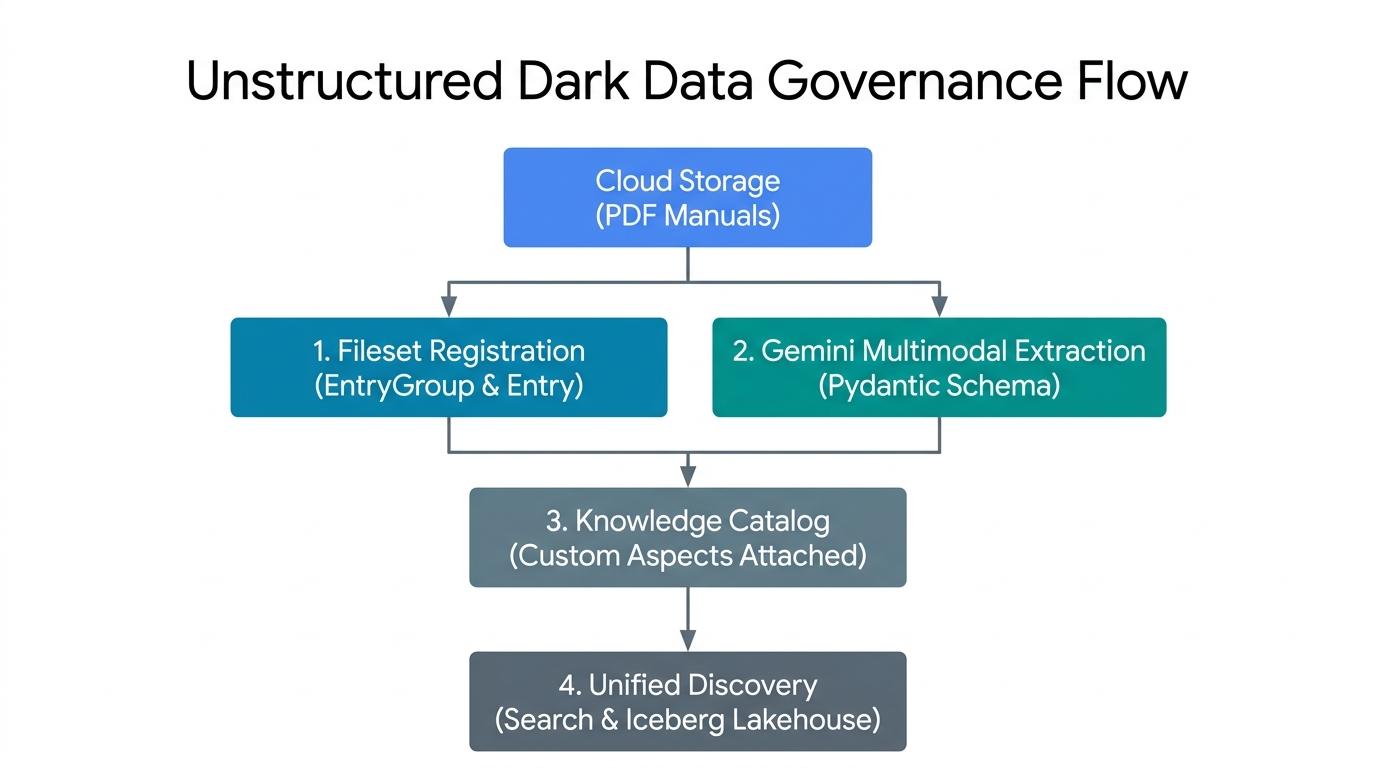
- 파일 세트 등록 (
EntryGroup및Entry): Cloud Storage의 비구조적 PDF를 Knowledge Catalog의 관리되는 논리적 파일 세트 항목으로 그룹화합니다. - Gemini 멀티모달 추출 (Pydantic 스키마): 결정적인
response_schema검증을 사용하여 원시 PDF 바이트에서 Gemini Enterprise Agent Platform을 호출합니다. - 제어 평면 측면 바인딩: 검증된 운영 및 규정 준수 JSON 페이로드를 카탈로그 항목에 강력한 유형의
Aspect인스턴스로 연결합니다. - 통합 카탈로그 검색: 구조화되지 않은 PDF 파일 세트와 추출된 메타데이터를
SearchEntriesRequest를 통해 검색할 수 있도록 합니다.
주요 개념: Knowledge Catalog 컨트롤 플레인 기본 요소
팀에서 수백 개의 PDF 제품 매뉴얼을 Cloud Storage에 저장한다고 가정해 보겠습니다. Knowledge Catalog에서 파일을 쉽게 찾고 확인할 수 있도록 5가지 구성요소를 사무실 서류 캐비닛에 종이 설명서를 정리하는 것과 같이 생각해 보세요.
EntryGroup(한 팀을 위한 잠긴 캐비닛): 잠금 장치가 있는 캐비닛입니다. 권한 (roles/dataplex.entryCreator)이 있는 팀원만 폴더를 넣을 수 있습니다. 캐비닛 자체를 삭제하려면 먼저 캐비닛의 모든 폴더를 비워야 합니다.EntryType(폴더 카테고리 라벨): 폴더가 나타내는 애셋의 종류를 사용자에게 알려주는 라벨입니다. 예를 들어 '데이터베이스 표' 대신 'PDF 매뉴얼 모음'을 사용합니다.Entry(저장소 링크가 있는 파일 폴더): PDF 매뉴얼의 카탈로그 폴더입니다. 무거운 종이 사본을 보관하는 대신 폴더에는 실제 PDF 파일이 있는 정확한 Cloud Storage 버킷 (gs://...)을 가리키는 위치 카드가 있습니다.AspectType(빈 체크리스트 양식): 미리 인쇄된 체크박스가 있는 재사용 가능한 빈 양식입니다 (예:operational_hazard_level을 텍스트로,confidence_score을0.0~1.0의 숫자로 묻는 '안전 체크리스트'). 이 빈 양식을 한 번 만들면 수천 개의 폴더에서 재사용할 수 있습니다.Aspect(폴더에 첨부된 체크리스트 작성 완료): Gemini Enterprise Agent Platform에서 PDF 매뉴얼을 읽고 빈칸을 채우면 작성된 체크리스트가Entry폴더에 클립됩니다. 각 체크리스트에는 자체 키 (aspect_keys)가 있으므로 엔지니어링팀과 법무팀은 서로의 작업을 덮어쓰지 않고 동일한 폴더에 자체 체크리스트를 첨부할 수 있습니다.
5개의 리전 리소스는 모두 projects/{project}/locations/{location}/에 있습니다.
원시 및 상대 경로 | Knowledge Catalog의 역할 | 삭제 및 IAM 규칙 |
| 항목을 그룹화하고 팀 액세스를 제어하는 논리적 컨테이너입니다 ( | 삭제하기 전에 하위 |
| 애셋 클래스의 카테고리 정의입니다 ( | 이 유형을 사용하는 모든 항목이 삭제된 후에만 삭제하세요. |
| 물리적 Cloud Storage URI ( |
|
| 유형이 지정된 | 리전당 한 번 생성되며 항목 간에 공유됩니다. |
|
|
|
빌드할 항목
codelabs/metadata-as-code-lab의 동반 스크립트를 사용하여 7단계 파이프라인을 실행하고 검사합니다.
schemas.py- Knowledge CatalogAspectType템플릿과 1:1로 페어링된 이중 PydanticBaseModel스키마 (DarkDataExtractedMetadata및DocumentGovernanceMetadata)step2_provision.py- 맞춤EntryGroup,EntryType,AspectType청사진의 동일한 프로비저닝step3_register_fileset.py-LUM-LIG-DES-8G8J_manual.pdf을 Cloud Storage에 업로드하고 관리 FilesetEntry로 등록합니다.step4_extract_metadata.py-google-genai을 사용한 동적 플래그십 Gemini 모델 검색 및 멀티모달 PDF 추출step5_attach_aspects.py,step6_search_catalog.py,step7_verify_assertions.py: 수술적 측면 첨부, 지수 백오프 카탈로그 검색, 엔드 투 엔드 컨트롤 플레인 어설션
기본 요건 및 필요한 항목
- 결제가 사용 설정된 Google Cloud 프로젝트와 Google Cloud Shell (
gcloud,git,python3,pip이 사전 설치됨) - Knowledge Catalog 리소스 (
roles/dataplex.admin)를 관리하고, Cloud Storage 버킷 및 객체 (roles/storage.admin)를 프로비저닝하고, Gemini Enterprise Agent Platform (roles/aiplatform.user)을 호출하는 IAM 권한 - 웹브라우저(예: Chrome)
2. 설정 및 요건
Cloud Shell에서 컴패니언 저장소 클론
Google Cloud 콘솔을 열고 Cloud Shell을 실행한 후 샘플 PDF 엔지니어링 매뉴얼 (LUM-LIG-DES-8G8J_manual.pdf)과 모든 Python 스크립트가 포함된 codelabs/metadata-as-code-lab의 스파스 체크아웃을 실행합니다.
git clone --branch main --depth 1 --filter=blob:none --sparse \
  https://github.com/GoogleCloudPlatform/devrel-demos.git
cd devrel-demos
git sparse-checkout set codelabs/metadata-as-code-lab
cd codelabs/metadata-as-code-lab
ls -la
환경 변수 구성
Cloud Shell에서 프로젝트 ID, 리전 컨트롤 플레인 위치, 타겟 Cloud Storage 버킷을 설정합니다.
export PROJECT_ID="${PROJECT_ID:-$(gcloud config get-value project)}"
gcloud config set project $PROJECT_ID

export REGION="us-central1"
export BUCKET_NAME="${PROJECT_ID}-dark-data-manuals"
export GEMINI_LOCATION="global"

echo "Configured Project ID        : $PROJECT_ID"
echo "Knowledge Catalog Region     : $REGION"
echo "Gemini Endpoint Location     : $GEMINI_LOCATION"
echo "Target Cloud Storage Bucket  : $BUCKET_NAME"
API 사용 설정 및 종속 항목 설치
필요한 Google Cloud API를 사용 설정하고 requirements.txt에서 Python 종속 항목 (google-genai, google-cloud-dataplex, pydantic, pandas)을 설치합니다.
gcloud services enable \
  dataplex.googleapis.com \
  storage.googleapis.com \
  aiplatform.googleapis.com \
  --quiet
python3 -m pip install --upgrade --quiet --user --break-system-packages -r requirements.txt
3. Pydantic 스키마 및 관점 템플릿 정의
schemas.py는 클라이언트 측 Pydantic 유효성 검사와 서버 측 Knowledge Catalog AspectType 템플릿을 페어링하는 두 가지 보완 계약을 정의합니다.
DarkDataExtractedMetadata: PDF에서 추출한 운영 속성 (문서 제목, 도메인 온톨로지, 안전 위험 수준, 작성/버전 출처, 요약, 추출 신뢰도 점수)입니다.DocumentGovernanceMetadata: 규정 준수 코드 (UL-153, FCC 파트 15, CE-LVD, RoHS), 관리 소유자, 보관 정책, PDF 매뉴얼을 다운스트림 인벤토리 표에 연결하기 위한 참조 표 식별자 문자열 (lakehouse_cross_ref_table)입니다.
schemas.py 검사
먼저 DarkDataExtractedMetadata는 Pydantic Field 제약 조건 (confidence_score에서 ge=0.0, le=1.0, 즉 크거나 작거나 같음)을 사용하여 Gemini Enterprise Agent Platform의 JSON 출력을 제한합니다.
class DarkDataExtractedMetadata(BaseModel):
    document_title: str = Field(
        description="Official document title or product model name extracted from the PDF manual."
    )
    # ... domain_ontology, operational_hazard_level, author_provenance ...
    version_provenance: str = Field(
        description="Document version, revision code, or publication standard identifier."
    )
    # ... document_summary ...
    confidence_score: float = Field(
        ge=0.0,
        le=1.0,
        description="AI extraction confidence metric between 0.0 and 1.0.",
    )
둘째, extracted_aspect_template는 이러한 정확한 필드 이름을 미러링하고 Python의 str 및 float 유형을 Knowledge Catalog의 string 및 double record_fields에 매핑합니다. AspectType.MetadataTemplate protobuf 계약에서는 record_fields의 모든 필드가 고유한 엄격한 양수 1 기반 정수 index (1~7)를 선언해야 합니다. index를 생략하거나 중복하면 create_aspect_type가 400 INVALID_ARGUMENT와 함께 실패합니다.
extracted_aspect_template = {
    "name": "DarkDataExtractedMetadata",
    "type": "record",
    "record_fields": [
        {
            "name": "document_title",
            "type": "string",
            "index": 1,
            "annotations": {"description": "Official document title or product model name."},
        },
        # ... fields 2 through 6 (string) ...
        {
            "name": "confidence_score",
            "type": "double",
            "index": 7,
            # ... annotations ...
        },
    ],
}
스키마 모듈 검증
schemas.py를 실행하여 환경 구성을 확인하고 두 스키마를 모두 컴파일합니다.
python3 schemas.py
Configured Project ID         : your-project-id
Knowledge Catalog Region      : us-central1
Gemini Endpoint Location      : global
Governed Fileset Storage URI  :
  gs://your-project-id-dark-data-manuals/sop-pdfs/LUM-LIG-DES-8G8J_manual.pdf
Target Fileset Entry ID       : sop-manuals-fileset-lum8g8j
✓ Defined DarkDataExtractedMetadata and DocumentGovernanceMetadata
  Pydantic schemas.
✓ Prepared Knowledge Catalog AspectType metadata templates.
4. 네임스페이스 및 맞춤 관점 유형 프로비저닝
파일 세트 항목을 등록하거나 메타데이터를 연결하기 전에 step2_provision.py는 Knowledge Catalog에 세 개의 컨트롤 플레인 리소스를 프로비저닝합니다.
EntryGroup:dark-data-fileset-groupEntryType:unstructured-pdf-filesetAspectType청사진:dark-data-extracted-metadata및document-governance-aspect
step2_provision.py의 멱등성 프로비저닝
step2_provision.py의 각 생성 호출은 장기 실행 작업 (op.result())을 try / except AlreadyExists 블록으로 래핑하므로 스크립트를 기존 리소스에서 실패하지 않고 안전하게 다시 실행할 수 있습니다.
# Provision AspectType 1: dark-data-extracted-metadata
try:
    at1_op = catalog_client.create_aspect_type(
        parent=parent_location,
        aspect_type_id=EXTRACTED_ASPECT_TYPE_ID,
        aspect_type=AspectType(
            name=extracted_aspect_type_name,
            display_name="Dark Data Multimodal Extracted Metadata",
            # ... description ...
            metadata_template=extracted_aspect_template,
        ),
    )
    if hasattr(at1_op, "result"):
        at1_op.result()
    print(f"Created AspectType: {extracted_aspect_type_name}")
except AlreadyExists:
    print(f"AspectType already exists; retrieving live resource: {extracted_aspect_type_name}")

live_extracted_aspect_type = catalog_client.get_aspect_type(name=extracted_aspect_type_name)
metadata_template=extracted_aspect_template가 등록되면 Knowledge Catalog는 API 경계에서 스키마를 적용합니다. 문자열을 confidence_score (double)에 전달하는 후속 update_entry() 호출은 거부됩니다.
step2_provision.py 실행
프로비저닝 스크립트를 실행하고 맞춤 측면 유형이 리전에 등록되었는지 확인합니다.
python3 step2_provision.py
gcloud dataplex aspect-types list --location=$REGION
Created EntryGroup:
  projects/your-project-id/locations/us-central1/entryGroups/
  dark-data-fileset-group
Created EntryType :
  projects/your-project-id/locations/us-central1/entryTypes/
  unstructured-pdf-fileset
Created AspectType:
  projects/your-project-id/locations/us-central1/aspectTypes/
  dark-data-extracted-metadata
Created AspectType:
  projects/your-project-id/locations/us-central1/aspectTypes/
  document-governance-aspect
✓ All Knowledge Catalog namespaces and AspectType blueprints are active.
5. 구조화되지 않은 파일 세트 항목 등록
수백만 개의 고립된 파일 포인터로 카탈로그를 어지럽히는 대신 Knowledge Catalog는 자동 검색 스캔 (DataScanServiceClient) 또는 직접 프로그래매틱 등록 (CatalogServiceClient.create_entry)을 통해 Cloud Storage (gs://YOUR_BUCKET/sop-pdfs/*.pdf)의 관련 문서를 논리적 파일 세트 항목으로 그룹화합니다.
step3_register_fileset.py에서 스토리지를 카탈로그에 매핑하는 방법
step3_register_fileset.py는 LUM-LIG-DES-8G8J_manual.pdf을 gs://${BUCKET_NAME}/sop-pdfs/LUM-LIG-DES-8G8J_manual.pdf에 업로드하고 관리되는 Entry를 등록합니다.
fully_qualified_fileset_uri = f"gcs:{BUCKET_NAME}"
fileset_entry_spec = Entry(
    name=fileset_entry_name,
    entry_type=entry_type_resource_name,
    fully_qualified_name=fully_qualified_fileset_uri,
    entry_source=EntrySource(
        resource=VIRTUAL_STORAGE_URI,
        system="Cloud Storage",
        platform="Google Cloud",
        display_name="LUM-LIG-DES-8G8J Unstructured SOP & Technical Manual Fileset",
        # ... description ...
        location=REGION,
    ),
)

create_entry_op = catalog_client.create_entry(
    parent=entry_group_resource_name,
    entry_id=FILESET_ENTRY_ID,
    entry=fileset_entry_spec,
)
Entry의 두 URI 필드의 역할이 서로 다릅니다.
fully_qualified_name=fully_qualified_fileset_uri(f"gcs:{BUCKET_NAME}"): Knowledge Catalog에 필요한 표준gcs:{bucket_name}FQN 스키마를 사용하여 논리적 카탈로그 항목을 기본 Cloud Storage 버킷과 상호 연관시킵니다.entry_source.resource=VIRTUAL_STORAGE_URI: 다운스트림 추출 작업자가 검사한 실제gs://객체 URI를 저장합니다.
step3_register_fileset.py 실행
python3 step3_register_fileset.py
Created Cloud Storage bucket:
  gs://your-project-id-dark-data-manuals in us-central1
Uploaded unstructured PDF manual to:
  gs://your-project-id-dark-data-manuals/sop-pdfs/LUM-LIG-DES-8G8J_manual.pdf
Registered governed Fileset Entry:
  projects/your-project-id/locations/us-central1/entryGroups/
  dark-data-fileset-group/entries/sop-manuals-fileset-lum8g8j
  -> Fully Qualified Name : gcs:your-project-id-dark-data-manuals
  -> Physical Resource URI:
  gs://your-project-id-dark-data-manuals/sop-pdfs/LUM-LIG-DES-8G8J_manual.pdf
  -> Source System        : Cloud Storage
6. Gemini로 문서 메타데이터 추출하기
step4_extract_metadata.py는 원시 PDF 바이트를 읽고 두 가지 주요 패턴을 사용하여 Gemini Enterprise Agent Platform (genai_client.models.generate_content)을 호출합니다.
1. 동적 플래그십 모델 검색
취약한 모델 버전 문자열을 하드코딩하는 대신 스크립트가 genai_client.models.list()를 쿼리하고 (is_ga_channel, semantic_version_tuple)로 활성 후보를 정렬하여 최신 정식 버전 (GA) flash 모델을 선택합니다.
genai_client = genai.Client(
    vertexai=True,
    project=PROJECT_ID,
    location=GEMINI_LOCATION,
)

for model_obj in genai_client.models.list():
    raw_id = (model_obj.name or "").split("/")[-1]
    # Filter to flagship Gemini Flash models (version >= 3.0) and prioritize GA over preview
    ...
    discovered_candidates.append((is_ga_channel, ver_tuple, raw_id))

discovered_candidates.sort(key=lambda item: (item[0], item[1]), reverse=True)
2. 스키마 제한 멀티모달 추출 (Part.from_bytes + response_schema)
response_mime_type="application/json" 및 response_schema=DarkDataExtractedMetadata (다음에 DocumentGovernanceMetadata)를 전달하면 토큰 디코딩이 Pydantic JSON 스키마로 직접 제한됩니다.
with open(LOCAL_PDF_PATH, "rb") as pdf_file:
    raw_pdf_bytes = pdf_file.read()

extraction_response = genai_client.models.generate_content(
    model=candidate_model,
    contents=[
        types.Part.from_bytes(data=raw_pdf_bytes, mime_type="application/pdf"),
        extraction_prompt,
    ],
    config=types.GenerateContentConfig(
        response_mime_type="application/json",
        response_schema=DarkDataExtractedMetadata,
        temperature=0.1,
    ),
)

extracted_dark_data = json.loads(extraction_response.text)
validated_extraction = DarkDataExtractedMetadata(**extracted_dark_data)
step4_extract_metadata.py 실행
python3 step4_extract_metadata.py
Dynamically discovered active GA model currency :
  gemini-3.8-flash (version (3, 8))
Loaded unstructured PDF manual at: LUM-LIG-DES-8G8J_manual.pdf
Read unstructured PDF document (1184 bytes).
  Executing multimodal extraction with gemini-3.8-flash...
✓ Multimodal extraction completed using model: gemini-3.8-flash
✓ Governance classification completed using model: gemini-3.8-flash

--- Extracted Multimodal Operational Metadata ---
Extracted Attribute    Multimodal Value
document_title    LUM-LIG-DES-8G8J Contemporary Linen Desk Lamp
domain_ontology    Electrical Hardware & Lighting Systems
operational_hazard_level    MEDIUM
author_provenance    Global Hardware Safety & Lighting Systems Engin
version_provenance    Rev 4.2
document_summary    This document outlines standard operating proce
confidence_score    0.99

--- Extracted Governance & Inventory Cross-Reference Metadata ---
Governance Attribute    Classification Value
compliance_classifications    UL-153 Portable Luminaires, FCC Part 15, CE-LVD
stewardship_owner    Global Hardware Safety & Lighting Systems Engin
retention_policy    10-Year Active Product Lifecycle Archival
lakehouse_cross_ref_table    lakehouse.your-project-id.retail_hardware
governance_status    VERIFIED_PRODUCTION
7. 검증된 관점을 카탈로그 항목에 연결
step5_attach_aspects.py는 catalog_client.update_entry()를 통해 검증된 JSON 페이로드 (extracted_metadata.json 및 governance_metadata.json)를 sop-manuals-fileset-lum8g8j 항목에 바인딩합니다.
step5_attach_aspects.py의 정교한 측면 변형
extracted_aspect_key = f"{PROJECT_ID}.{REGION}.{EXTRACTED_ASPECT_TYPE_ID}"
governance_aspect_key = f"{PROJECT_ID}.{REGION}.{GOVERNANCE_ASPECT_TYPE_ID}"

updated_entry_payload = Entry(
    name=fileset_entry_name,
    entry_type=entry_type_resource_name,
    fully_qualified_name=fully_qualified_fileset_uri,
    aspects={
        extracted_aspect_key: Aspect(
            aspect_type=extracted_aspect_type_name,
            data=extracted_data,
        ),
        governance_aspect_key: Aspect(
            aspect_type=governance_aspect_type_name,
            data=governance_data,
        ),
    },
)

update_op = catalog_client.update_entry(
    request=dataplex_v1.UpdateEntryRequest(
        entry=updated_entry_payload,
        update_mask={"paths": ["aspects"]},
        aspect_keys=[extracted_aspect_key, governance_aspect_key],
    )
)
update_mask={"paths": ["aspects"]} 및 aspect_keys=[extracted_aspect_key, governance_aspect_key] 두 가지 범위를 모두 전달하면 변경사항이 이 두 관점 키로만 엄격하게 범위가 지정되어 entry_source 및 다른 팀이 소유한 관점은 그대로 유지됩니다.
step5_attach_aspects.py 실행
python3 step5_attach_aspects.py
Successfully bound 2 Aspect(s) to Entry:
  projects/your-project-id/locations/us-central1/entryGroups/
  dark-data-fileset-group/entries/sop-manuals-fileset-lum8g8j

=== Live Attached Aspect: document-governance-aspect ===
Catalog Field    Authoritative Stored Value
compliance_classifications    UL-153 Portable Luminaires, FCC Part 15, CE-LVD
stewardship_owner    Global Hardware Safety & Lighting Systems Engin
retention_policy    10-Year Active Product Lifecycle Archival
lakehouse_cross_ref_table    lakehouse.your-project-id.retail_hardware
governance_status    VERIFIED_PRODUCTION

=== Live Attached Aspect: dark-data-extracted-metadata ===
Catalog Field    Authoritative Stored Value
document_title    LUM-LIG-DES-8G8J Contemporary Linen Desk Lamp
domain_ontology    Electrical Hardware & Lighting Systems
operational_hazard_level    MEDIUM
author_provenance    Global Hardware Safety & Lighting Systems Engin
version_provenance    Rev 4.2
document_summary    This document outlines standard operating proce
confidence_score    0.99
이중 트랙 인증
- 트랙 1 (CLI 확인):
gcloud를 통해 연결된 모든 측면이 포함된 항목을 검사합니다.gcloud dataplex entries describe sop-manuals-fileset-lum8g8j \ --entry-group=dark-data-fileset-group \ --location=$REGION \ --view=ALL - 트랙 2 (콘솔 UI 검사):
- Knowledge Catalog Search Console을 열고 LUM-LIG-DES-8G8J Unstructured SOP & Technical Manual Fileset (
sop-manuals-fileset-lum8g8j)을 검색한 후 결과에서 일치하는 항목을 선택합니다. - 선택적 태그 및 관점에서 다크 데이터 멀티모달 추출 메타데이터와 문서 거버넌스 및 인벤토리 교차 참조 관점에 추출된 위험 수준 (
MEDIUM), 규정 준수 코드 (UL-153, FCC Part 15, CE-LVD, RoHS), 교차 참조 표 문자열 (lakehouse_cross_ref_table)이 모두 표시되는지 확인합니다.
- Knowledge Catalog Search Console을 열고 LUM-LIG-DES-8G8J Unstructured SOP & Technical Manual Fileset (
8. 카탈로그에서 관리되는 다크 데이터 쿼리
맞춤 측면이 연결되면 Cloud Storage의 비구조화된 PDF 매뉴얼을 Knowledge Catalog 검색 (catalog_client.search_entries())을 통해 검색할 수 있습니다.
step6_search_catalog.py에서 search_entries() 설문조사
step6_search_catalog.py는 지수 백오프로 search_entries()를 폴링하고 .endswith()를 통해 정규화된 측면 키를 읽습니다.
search_query = f"entrygroup={entry_group_resource_name} name:{FILESET_ENTRY_ID}"

while elapsed_seconds < max_wait_seconds:
    catalog_search_results = list(
        catalog_client.search_entries(
            request=dataplex_v1.SearchEntriesRequest(
                name=parent_location,
                query=search_query,
            )
        )
    )
    if catalog_search_results:
        break
    backoff_seconds = min(5 * (2 ** attempt), 30)
    time.sleep(backoff_seconds)
    ...

for k, asp in detailed_entry.aspects.items():
    if k.endswith(f".{REGION}.{EXTRACTED_ASPECT_TYPE_ID}"):
        print(f"    Domain Ontology     : {asp.data.get('domain_ontology')}")
        print(f"    Hazard Level        : {asp.data.get('operational_hazard_level')}")
    elif k.endswith(f".{REGION}.{GOVERNANCE_ASPECT_TYPE_ID}"):
        print(f"    Compliance Codes    : {asp.data.get('compliance_classifications')}")
        print(f"    Lakehouse Join Table: {asp.data.get('lakehouse_cross_ref_table')}")
step6_search_catalog.py 실행
python3 step6_search_catalog.py
Executing Knowledge Catalog search query:
  'entrygroup=projects/your-project-id/locations/us-central1/entryGroups/
  dark-data-fileset-group name:sop-manuals-fileset-lum8g8j'...

✓ Discovered 1 governed asset(s) in Knowledge Catalog:

[1] Entry Resource Name :
    projects/your-project-id/locations/us-central1/entryGroups/
    dark-data-fileset-group/entries/sop-manuals-fileset-lum8g8j
    Fully Qualified Name: gcs:your-project-id-dark-data-manuals
    Entry Type :
    projects/your-project-id/locations/us-central1/entryTypes/
    unstructured-pdf-fileset
    Physical Storage URI:
    gs://your-project-id-dark-data-manuals/sop-pdfs/LUM-LIG-DES-8G8J_manual.pdf
    Domain Ontology     : Electrical Hardware & Lighting Systems
    Hazard Level        : MEDIUM
    Compliance Codes    : UL-153 Portable Luminaires, FCC Part 15, CE-LVD, RoHS
    Lakehouse Join Table:
    lakehouse.your-project-id.retail_hardware.luminaire_sku_inventory_iceberg
이중 트랙 인증
- 트랙 1 (CLI 검색):
gcloud를 통해 검색 색인을 직접 쿼리합니다.gcloud dataplex entries search "name:sop-manuals-fileset-lum8g8j" --project=$PROJECT_ID - 트랙 2 (콘솔 UI 자연어 검색):
- Knowledge Catalog Search Console을 열고
LUM-LIG-DES-8G8J또는UL-153를 검색합니다. - Knowledge Catalog에서 관리되는 Cloud Storage PDF 파일 세트 항목과 연결된 메타데이터 관점을 표시하는 방법을 확인합니다.
- Knowledge Catalog Search Console을 열고
9. 엔드 투 엔드 거버넌스 어설션 확인
step7_verify_assertions.py는 라이브 Knowledge Catalog 컨트롤 플레인 응답에 대해 결정적 어설션을 실행하여 EntryGroup, EntryType, 맞춤 AspectType 블루프린트, 바인딩된 EntryView.ALL 측면 페이로드 (confidence_score 바운드 및 lakehouse_cross_ref_table 문자열), 검색 색인 검색이 모두 성공하는지 확인합니다.
verify_eg = catalog_client.get_entry_group(name=entry_group_resource_name)
assert verify_eg.name == entry_group_resource_name, "EntryGroup resource name mismatch."

verify_entry = catalog_client.get_entry(
    request=dataplex_v1.GetEntryRequest(
        name=fileset_entry_name,
        view=dataplex_v1.EntryView.ALL,
    )
)
bound_extracted = next(
    (
        asp for k, asp in verify_entry.aspects.items()
        if k.endswith(f".{REGION}.{EXTRACTED_ASPECT_TYPE_ID}")
    ),
    None,
)
bound_governance = next(
    (
        asp for k, asp in verify_entry.aspects.items()
        if k.endswith(f".{REGION}.{GOVERNANCE_ASPECT_TYPE_ID}")
    ),
    None,
)

assert bound_extracted is not None, f"Aspect '{EXTRACTED_ASPECT_TYPE_ID}' not found on live Entry."
assert bound_governance is not None, (
    f"Aspect '{GOVERNANCE_ASPECT_TYPE_ID}' not found on live Entry."
)
assert (
    bound_extracted.data.get("document_title") == expected_extraction["document_title"]
), "Extracted title mismatch."
assert (
    0.0 <= float(bound_extracted.data.get("confidence_score", -1.0)) <= 1.0
), "Invalid confidence score in catalog."
assert (
    "lakehouse" in str(bound_governance.data.get("lakehouse_cross_ref_table", "")).lower()
), "Missing Lakehouse cross-reference."
...
assert len(search_results) >= 1, "Expected at least 1 search result in Knowledge Catalog."
step7_verify_assertions.py 실행
python3 step7_verify_assertions.py && echo "Verification exit code: $?"
Running substantive end-to-end verification assertions...
✓ All 5 substantive verification assertions passed
  against live Google Cloud control plane state!
Verification exit code: 0
10. 이벤트 기반 파이프라인 설계
Cloud Shell에서 Python 스크립트를 대화형으로 실행하는 것은 거버넌스 계약을 빌드하고 테스트하는 데 적합하지만 엔터프라이즈 환경에서는 ERP, 제품 수명 주기 관리 (PLM), 공급업체 포털에서 매일 수천 개의 신규 또는 수정된 PDF 엔지니어링 매뉴얼, 공급업체 규정 준수 인증서, SOP 문서를 수신합니다. 일괄 스크립트를 수동으로 실행하면 문서 업로드와 카탈로그 색인 생성 사이에 거버넌스 사각지대가 빠르게 생성됩니다.
프로덕션에서 플랫폼 팀은 4단계와 5단계에서 실행한 정확한 코드를 제로터치 이벤트 기반 파이프라인으로 운영합니다.
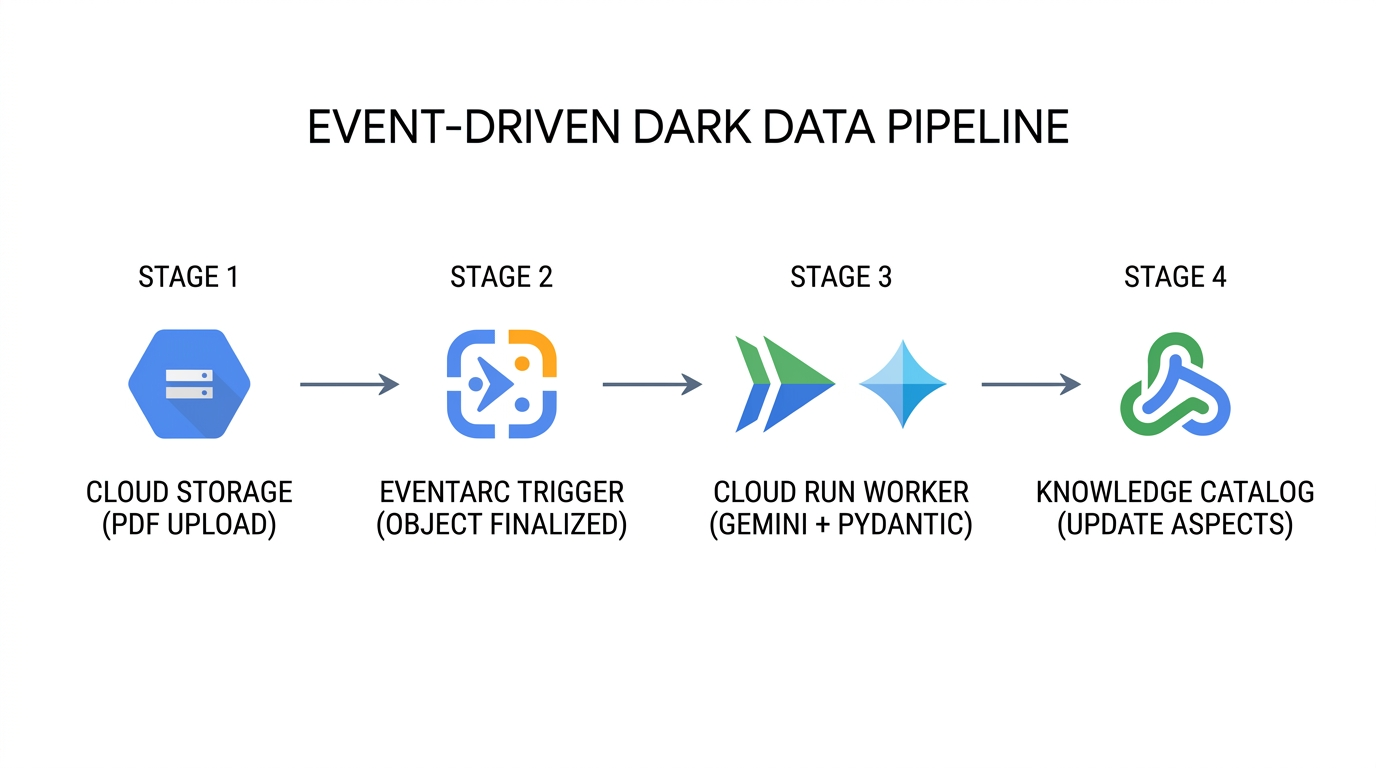
- 연속 문서 수집 (
Cloud Storage→Eventarc): 새 PDF 매뉴얼이 업로드되거나 새 버전이 Cloud Storage의 기존 객체를 덮어쓸 때마다 버킷은 버킷 식별자, 객체 경로, 객체 세대 번호가 포함된google.cloud.storage.object.v1.finalizedCloudEvent를 내보냅니다. - 상태 비저장 멀티모달 추출 (
Eventarc→Cloud Run→Gemini Enterprise Agent Platform): Eventarc는schemas.py,step4_extract_metadata.py,step5_attach_aspects.py을 패키징하는 서버리스 Cloud Run 작업자에 CloudEvent를 라우팅합니다. 작업자는response_schema가 적용된 PDF 바이트를 Gemini Enterprise Agent Platform으로 스트리밍하여 추출된 모든 속성이DarkDataExtractedMetadata및DocumentGovernanceMetadata를 준수하도록 보장합니다. - 정밀한 제어 영역 업데이트 (
Cloud Run→Knowledge Catalog): 작업자가 상위 FilesetEntry를 확인하고update_mask={"paths": ["aspects"]}및 명시적aspect_keys로catalog_client.update_entry()를 실행합니다. 수십 개의 문서가 동시에 처리를 완료하더라도 각 변경사항은 지정된 애스펙트 키만 업데이트합니다. - 신뢰도 기반 관리자 격리: 스캔된 기존 PDF에서 운영 기준점 (예:
< 0.85) 미만의 추출confidence_score이 생성되면 작업자는 첨부된 측면에governance_status = "PENDING_STEWARD_REVIEW"을 설정하여 데이터 관리자가 인적 검토가 필요한 신뢰도가 낮은 애셋에 대해 Knowledge Catalog를 쿼리할 수 있습니다.
엔터프라이즈에서 프로덕션에 이 패턴을 적용하는 방법
엔터프라이즈 사용 사례 | 실제 메타데이터-코드 작동 방식 | 비즈니스 및 운영에 미치는 영향 |
자동 규제 감사 및 리콜 준비 | 규정 준수 시스템은 비구조화된 PDF 안전 측면 ( |
|
그라운딩된 AI 에이전트 및 RAG 사전 필터링 | Gemini Enterprise Agent Platform의 검색 증강 생성 (RAG) 에이전트는 현장 엔지니어의 질문에 답하기 전에 | AI 어시스턴트가 환각을 일으키거나 지원 중단된 엔지니어링 초안, 만료된 SOP 또는 검증되지 않은 서드 파티 매뉴얼을 인용하는 것을 방지합니다. |
여러 팀의 동시 보강 | 여러 독립 파이프라인이 동일한 Fileset |
|
GitOps를 통한 CI/CD 스키마 발전 | 플랫폼팀은 Git에 Terraform |
|
11. 환경 정리
Knowledge Catalog에서 하위 항목이 계속 참조하는 동안에는 상위 컨테이너와 스키마 템플릿을 삭제할 수 없습니다. cleanup.py는 엄격한 역 종속성 순서 (Entry → EntryGroup → EntryType → AspectTypes → Cloud Storage 버킷 객체 → 임시 JSON 파일)로 리소스를 삭제합니다.
# 1. Delete Fileset Entry first
catalog_client.delete_entry(name=target_entry_path)

# 2. Delete EntryGroup container
del_eg_op = catalog_client.delete_entry_group(name=target_eg_path)
if hasattr(del_eg_op, "result"):
    del_eg_op.result()

# 3. Delete EntryType and Custom AspectTypes
del_et_op = catalog_client.delete_entry_type(name=target_et_path)
if hasattr(del_et_op, "result"):
    del_et_op.result()
for aspect_id_val in (EXTRACTED_ASPECT_TYPE_ID, GOVERNANCE_ASPECT_TYPE_ID):
    target_at_path = f"{active_parent}/aspectTypes/{aspect_id_val}"
    del_at_op = catalog_client.delete_aspect_type(name=target_at_path)
    if hasattr(del_at_op, "result"):
        del_at_op.result()
cleanup.py 실행
python3 cleanup.py
Starting reverse-dependency resource cleanup in Knowledge Catalog...
Deleted Fileset Entry:
  projects/your-project-id/locations/us-central1/entryGroups/
  dark-data-fileset-group/entries/sop-manuals-fileset-lum8g8j
Deleted EntryGroup   :
  projects/your-project-id/locations/us-central1/entryGroups/
  dark-data-fileset-group
Deleted EntryType    :
  projects/your-project-id/locations/us-central1/entryTypes/
  unstructured-pdf-fileset
Deleted AspectType   :
  projects/your-project-id/locations/us-central1/aspectTypes/
  dark-data-extracted-metadata
Deleted AspectType   :
  projects/your-project-id/locations/us-central1/aspectTypes/
  document-governance-aspect
Deleted Cloud Storage object :
  gs://your-project-id-dark-data-manuals/sop-pdfs/LUM-LIG-DES-8G8J_manual.pdf
Deleted Cloud Storage bucket : gs://your-project-id-dark-data-manuals
Removed local temporary file : extracted_metadata.json
Removed local temporary file : governance_metadata.json
✓ Standalone teardown complete. Environment cleanly reset.
클론된 저장소 디렉터리 삭제
cleanup.py가 클라우드 리소스 삭제를 완료하면 홈 디렉터리로 돌아가 Cloud Shell에서 클론된 devrel-demos 저장소 폴더를 삭제합니다.
cd ~
rm -rf ~/devrel-demos
12. 수고하셨습니다
Gemini Enterprise Agent Platform을 사용하여 Cloud Storage의 비정형 PDF를 검색 가능하고 스키마가 적용된 Knowledge Catalog 애셋으로 변환하는 엔드 투 엔드 Metadata-as-Code 거버넌스 파이프라인을 빌드하고 검증했습니다.
다음 단계
- Terraform으로 자동화: CI/CD 파이프라인에서 선언적으로
google_dataplex_aspect_type및google_dataplex_entry_group리소스를 관리합니다. - Eventarc + Cloud Run 작업자 배포:
step4_extract_metadata.py및step5_attach_aspects.py을 이벤트 기반 Cloud Run 서비스로 컨테이너화합니다. - BigQuery의 다운스트림 인벤토리 조인: 추출된 거버넌스 메타데이터 (
lakehouse_cross_ref_table)를 내보내 비정형 문서 규정 준수 속성을 정형 SKU 인벤토리 테이블과 조인합니다.