

1. 简介
超过 80% 的企业数据以非结构化格式存储在 Cloud Storage 中,包括 PDF 工程手册、标准操作规程 (SOP)、合规性证书和设备示意图。由于传统目录仅为关系表架构编制索引,因此这些文档仍属于“暗数据”:企业搜索无法找到它们,它们与结构化资产清单表断开连接,并且未经过监管合规性验证。
当审计者或 AI 智能体提出“哪些硬件 SKU 需要 UL-153 安全认证,它们的散热危险等级是多少?”这样的问题时,仅对 SQL 表编制索引的目录无法回答。事实信息锁定在 Cloud Storage 中的非结构化 PDF 中。
架构解决方案:多模态元数据即代码
在此 Codelab 中,您将在 Google Cloud 中构建一个端到端的元数据即代码流水线,该流水线使用 Gemini Enterprise Agent Platform(Google GenAI SDK,google-genai)将 Cloud Storage 中的非结构化 PDF 手册转换为强制执行架构的Knowledge Catalog资产:
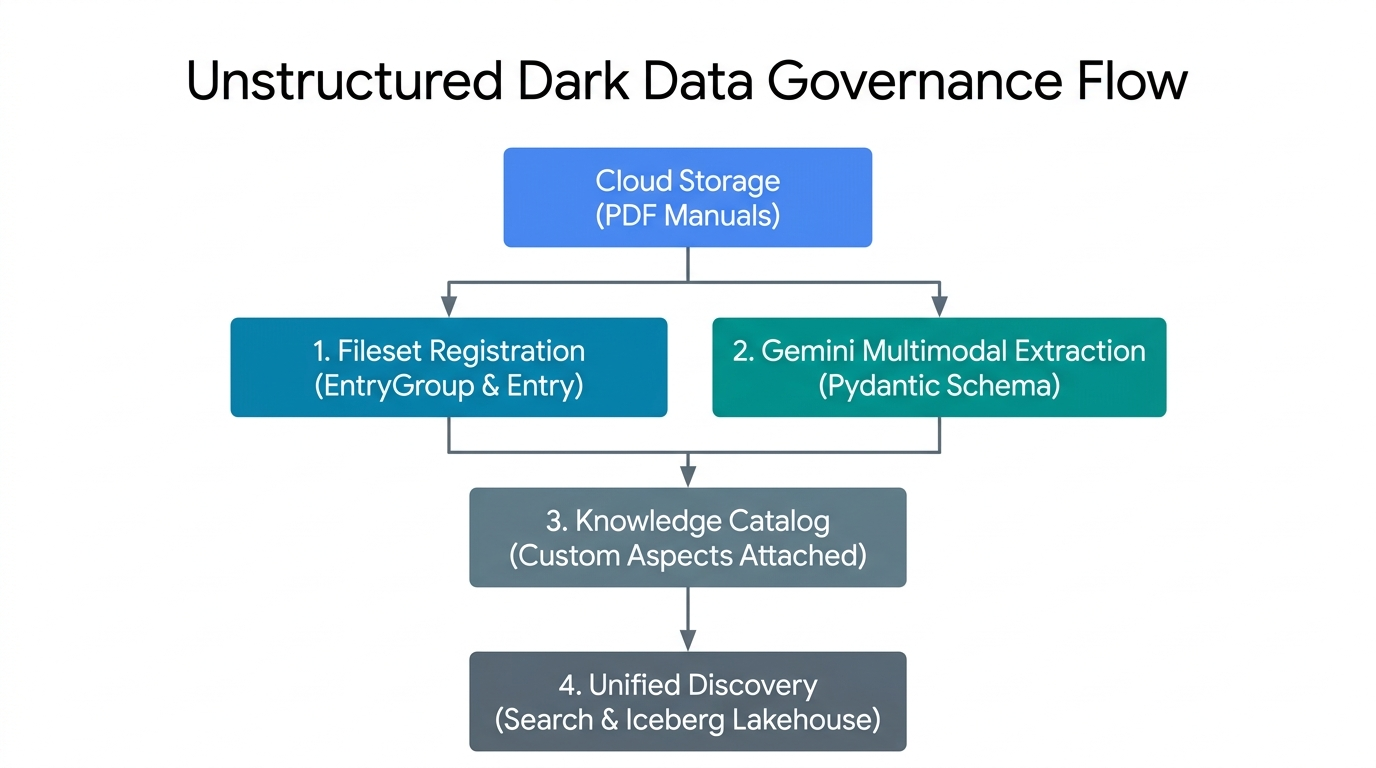
- 文件集注册 (
EntryGroup和Entry):将 Cloud Storage 中的非结构化 PDF 分组为 Knowledge Catalog 中受监管的逻辑文件集条目。 - Gemini 多模态提取 (Pydantic 架构):针对原始 PDF 字节调用 Gemini Enterprise Agent Platform,并进行确定性
response_schema验证。 - 控制平面方面绑定:将经过验证的运营和合规性 JSON 载荷作为强类型
Aspect实例附加到目录条目。 - 统一目录发现:使非结构化 PDF 文件集及其提取的元数据可通过
SearchEntriesRequest发现。
主要概念:Knowledge Catalog 控制平面原语
假设您的团队在 Cloud Storage 中存储了数百份 PDF 产品手册。为了方便在 Knowledge Catalog 中查找和检查这些文件,您可以将这五个组成要素视为在办公室文件柜中整理纸质手册:
EntryGroup(一个团队的带锁柜子):带锁的柜子。只有具有相应权限 (roles/dataplex.entryCreator) 的团队成员才能在其中放置文件夹。您必须先清空柜子中的所有文件夹,然后才能移除柜子本身。EntryType(文件夹类别标签):用于告知用户文件夹代表哪种类型的资源,例如“PDF 手册合集”而不是“数据库表”。Entry(包含存储链接的文件文件夹):PDF 手册的目录文件夹。该文件夹没有存放厚重的纸质副本,而是存放一张位置卡,指向实际 PDF 文件所在的 Cloud Storage 存储桶 (gs://...)。AspectType(空白清单表单):一种可重复使用的空白表单,其中包含预先打印的方框(例如,“安全检查清单”,要求以文本形式提供operational_hazard_level,以数字形式提供confidence_score,范围为0.0到1.0)。您只需创建一次此空白表单,即可在数千个文件夹中重复使用。Aspect(附加到文件夹的已填写完毕的清单):在 Gemini Enterprise Agent Platform 读取 PDF 手册并填写空白后,该已填写完毕的清单会夹在Entry文件夹上。由于每个清单都有自己的键 (aspect_keys),因此工程团队和法务团队可以各自将自己的清单附加到同一文件夹,而不会覆盖彼此的工作。
所有 5 个区域资源都位于 projects/{project}/locations/{location}/ 下:
Primitive 和相对路径 | Knowledge Catalog 中的角色 | 删除和 IAM 规则 |
| 用于对条目进行分组并控制团队访问权限的逻辑容器 ( | 在删除之前,必须包含零个子 |
| 一类资产(例如非结构化 PDF 文件集)的类别定义 ( | 仅在移除使用此类型的所有条目后才能删除。 |
| 将实际 Cloud Storage URI ( | 位于 |
| 可重用的架构模板,用于定义类型化的 | 每个区域创建一次,并在条目之间共享。 |
| 与 | 使用 |
构建内容
使用 codelabs/metadata-as-code-lab 中的配套脚本,您将运行并检查一个 7 阶段流水线:
schemas.py- 双 PydanticBaseModel架构(DarkDataExtractedMetadata和DocumentGovernanceMetadata)与 Knowledge CatalogAspectType模板以 1:1 的比例配对。step2_provision.py- 幂等地预配自定义EntryGroup、EntryType和AspectType蓝图。step3_register_fileset.py- 将LUM-LIG-DES-8G8J_manual.pdf上传到 Cloud Storage 并注册为受监管的文件集Entry。step4_extract_metadata.py- 使用google-genai进行动态旗舰版 Gemini 模型发现和多模态 PDF 提取。step5_attach_aspects.py、step6_search_catalog.py和step7_verify_assertions.py- 手术方面附件、指数退避目录搜索和端到端控制平面断言。
前提条件和所需条件
- 已启用结算功能的 Google Cloud 项目和 Google Cloud Shell(预安装了
gcloud、git、python3和pip)。 - 用于管理 Knowledge Catalog 资源 (
roles/dataplex.admin)、预配 Cloud Storage 存储桶和对象 (roles/storage.admin) 以及调用 Gemini Enterprise Agent Platform (roles/aiplatform.user) 的 IAM 权限。 - 网络浏览器,例如 Google Chrome。
2. 设置和要求
在 Cloud Shell 中克隆配套代码库
打开 Google Cloud 控制台,启动 Cloud Shell,然后对 codelabs/metadata-as-code-lab 执行稀疏签出,其中包括示例 PDF 工程手册 (LUM-LIG-DES-8G8J_manual.pdf) 和所有 Python 脚本:
git clone --branch main --depth 1 --filter=blob:none --sparse \
  https://github.com/GoogleCloudPlatform/devrel-demos.git
cd devrel-demos
git sparse-checkout set codelabs/metadata-as-code-lab
cd codelabs/metadata-as-code-lab
ls -la
配置环境变量
在 Cloud Shell 中设置项目 ID、区域控制平面位置和目标 Cloud Storage 存储桶:
export PROJECT_ID="${PROJECT_ID:-$(gcloud config get-value project)}"
gcloud config set project $PROJECT_ID

export REGION="us-central1"
export BUCKET_NAME="${PROJECT_ID}-dark-data-manuals"
export GEMINI_LOCATION="global"

echo "Configured Project ID        : $PROJECT_ID"
echo "Knowledge Catalog Region     : $REGION"
echo "Gemini Endpoint Location     : $GEMINI_LOCATION"
echo "Target Cloud Storage Bucket  : $BUCKET_NAME"
启用 API 并安装依赖项
启用所需的 Google Cloud API,并从 requirements.txt 安装 Python 依赖项(google-genai、google-cloud-dataplex、pydantic 和 pandas):
gcloud services enable \
  dataplex.googleapis.com \
  storage.googleapis.com \
  aiplatform.googleapis.com \
  --quiet
python3 -m pip install --upgrade --quiet --user --break-system-packages -r requirements.txt
3. 定义 Pydantic 架构和方面模板
schemas.py 定义了两个互补的合同,将客户端 Pydantic 验证与服务器端 Knowledge Catalog AspectType 模板配对:
DarkDataExtractedMetadata:从 PDF 中提取的操作属性(文档标题、网域本体、安全危害级别、创作/版本来源、执行摘要和提取置信度得分)。DocumentGovernanceMetadata:监管合规代码(UL-153、FCC 第 15 部分、CE-LVD、RoHS)、管理所有者、保留政策,以及用于将 PDF 手册关联到下游库存表的参考表标识符字符串 (lakehouse_cross_ref_table)。
检查 schemas.py
首先,DarkDataExtractedMetadata 使用 Pydantic Field 限制(ge=0.0, le=1.0 表示大于/小于或等于,适用于 confidence_score)来限制 Gemini Enterprise Agent Platform 的 JSON 输出:
class DarkDataExtractedMetadata(BaseModel):
    document_title: str = Field(
        description="Official document title or product model name extracted from the PDF manual."
    )
    # ... domain_ontology, operational_hazard_level, author_provenance ...
    version_provenance: str = Field(
        description="Document version, revision code, or publication standard identifier."
    )
    # ... document_summary ...
    confidence_score: float = Field(
        ge=0.0,
        le=1.0,
        description="AI extraction confidence metric between 0.0 and 1.0.",
    )
其次,extracted_aspect_template 会镜像这些确切的字段名称,并将 Python 的 str 和 float 类型映射到 Knowledge Catalog 的 string 和 double record_fields。请注意,AspectType.MetadataTemplate protobuf 合约要求 record_fields 中的每个字段都声明一个唯一的、严格正的从 1 开始的整数 index(1 到 7)- 省略或重复 index 会导致 create_aspect_type 失败并显示 400 INVALID_ARGUMENT:
extracted_aspect_template = {
    "name": "DarkDataExtractedMetadata",
    "type": "record",
    "record_fields": [
        {
            "name": "document_title",
            "type": "string",
            "index": 1,
            "annotations": {"description": "Official document title or product model name."},
        },
        # ... fields 2 through 6 (string) ...
        {
            "name": "confidence_score",
            "type": "double",
            "index": 7,
            # ... annotations ...
        },
    ],
}
验证架构模块
运行 schemas.py 以验证环境配置并编译这两个架构:
python3 schemas.py
Configured Project ID         : your-project-id
Knowledge Catalog Region      : us-central1
Gemini Endpoint Location      : global
Governed Fileset Storage URI  :
  gs://your-project-id-dark-data-manuals/sop-pdfs/LUM-LIG-DES-8G8J_manual.pdf
Target Fileset Entry ID       : sop-manuals-fileset-lum8g8j
✓ Defined DarkDataExtractedMetadata and DocumentGovernanceMetadata
  Pydantic schemas.
✓ Prepared Knowledge Catalog AspectType metadata templates.
4. 配置命名空间和自定义切面类型
在注册文件集条目或附加元数据之前,step2_provision.py 会在 Knowledge Catalog 中预配三个控制平面资源:
EntryGroup:dark-data-fileset-groupEntryType:unstructured-pdf-filesetAspectType蓝图:dark-data-extracted-metadata和document-governance-aspect
step2_provision.py 中的幂等配置
step2_provision.py 中的每个创建调用都将长时间运行的操作 (op.result()) 封装在 try / except AlreadyExists 块中,以便脚本可以安全地重新运行,而不会因现有资源而失败:
# Provision AspectType 1: dark-data-extracted-metadata
try:
    at1_op = catalog_client.create_aspect_type(
        parent=parent_location,
        aspect_type_id=EXTRACTED_ASPECT_TYPE_ID,
        aspect_type=AspectType(
            name=extracted_aspect_type_name,
            display_name="Dark Data Multimodal Extracted Metadata",
            # ... description ...
            metadata_template=extracted_aspect_template,
        ),
    )
    if hasattr(at1_op, "result"):
        at1_op.result()
    print(f"Created AspectType: {extracted_aspect_type_name}")
except AlreadyExists:
    print(f"AspectType already exists; retrieving live resource: {extracted_aspect_type_name}")

live_extracted_aspect_type = catalog_client.get_aspect_type(name=extracted_aspect_type_name)
注册 metadata_template=extracted_aspect_template 后,Knowledge Catalog 会在 API 边界强制执行架构,任何后续向 confidence_score (double) 传递字符串的 update_entry() 调用都会被拒绝。
运行:step2_provision.py
执行配置脚本,并确认自定义方面类型已在您的区域中注册:
python3 step2_provision.py
gcloud dataplex aspect-types list --location=$REGION
Created EntryGroup:
  projects/your-project-id/locations/us-central1/entryGroups/
  dark-data-fileset-group
Created EntryType :
  projects/your-project-id/locations/us-central1/entryTypes/
  unstructured-pdf-fileset
Created AspectType:
  projects/your-project-id/locations/us-central1/aspectTypes/
  dark-data-extracted-metadata
Created AspectType:
  projects/your-project-id/locations/us-central1/aspectTypes/
  document-governance-aspect
✓ All Knowledge Catalog namespaces and AspectType blueprints are active.
5. 注册非结构化文件集条目
Knowledge Catalog 不会用数百万个孤立的文件指针来杂乱地填充目录,而是通过自动发现扫描 (DataScanServiceClient) 或直接以程序化方式注册 (CatalogServiceClient.create_entry) 的方式,将 Cloud Storage (gs://YOUR_BUCKET/sop-pdfs/*.pdf) 中的相关文档分组为逻辑文件集条目。
step3_register_fileset.py 如何将存储空间映射到目录
step3_register_fileset.py 将 LUM-LIG-DES-8G8J_manual.pdf 上传到 gs://${BUCKET_NAME}/sop-pdfs/LUM-LIG-DES-8G8J_manual.pdf 并注册受监管的 Entry:
fully_qualified_fileset_uri = f"gcs:{BUCKET_NAME}"
fileset_entry_spec = Entry(
    name=fileset_entry_name,
    entry_type=entry_type_resource_name,
    fully_qualified_name=fully_qualified_fileset_uri,
    entry_source=EntrySource(
        resource=VIRTUAL_STORAGE_URI,
        system="Cloud Storage",
        platform="Google Cloud",
        display_name="LUM-LIG-DES-8G8J Unstructured SOP & Technical Manual Fileset",
        # ... description ...
        location=REGION,
    ),
)

create_entry_op = catalog_client.create_entry(
    parent=entry_group_resource_name,
    entry_id=FILESET_ENTRY_ID,
    entry=fileset_entry_spec,
)
请注意 Entry 上两个 URI 字段的不同角色:
fully_qualified_name=fully_qualified_fileset_uri(f"gcs:{BUCKET_NAME}"):使用 Knowledge Catalog 所需的规范gcs:{bucket_name}FQN 方案,将逻辑目录条目与底层 Cloud Storage 存储桶相关联。entry_source.resource=VIRTUAL_STORAGE_URI:存储由下游提取 worker 检查的物理gs://对象 URI。
运行:step3_register_fileset.py
python3 step3_register_fileset.py
Created Cloud Storage bucket:
  gs://your-project-id-dark-data-manuals in us-central1
Uploaded unstructured PDF manual to:
  gs://your-project-id-dark-data-manuals/sop-pdfs/LUM-LIG-DES-8G8J_manual.pdf
Registered governed Fileset Entry:
  projects/your-project-id/locations/us-central1/entryGroups/
  dark-data-fileset-group/entries/sop-manuals-fileset-lum8g8j
  -> Fully Qualified Name : gcs:your-project-id-dark-data-manuals
  -> Physical Resource URI:
  gs://your-project-id-dark-data-manuals/sop-pdfs/LUM-LIG-DES-8G8J_manual.pdf
  -> Source System        : Cloud Storage
6. 使用 Gemini 提取文档元数据
step4_extract_metadata.py 读取原始 PDF 字节,并使用以下两种关键模式调用 Gemini Enterprise Agent Platform (genai_client.models.generate_content):
1. 动态旗舰版型号发现
该脚本不会对不稳定的模型版本字符串进行硬编码,而是查询 genai_client.models.list() 并按 (is_ga_channel, semantic_version_tuple) 对有效候选版本进行排序,以选择最新的正式版 (GA) flash 模型:
genai_client = genai.Client(
    vertexai=True,
    project=PROJECT_ID,
    location=GEMINI_LOCATION,
)

for model_obj in genai_client.models.list():
    raw_id = (model_obj.name or "").split("/")[-1]
    # Filter to flagship Gemini Flash models (version >= 3.0) and prioritize GA over preview
    ...
    discovered_candidates.append((is_ga_channel, ver_tuple, raw_id))

discovered_candidates.sort(key=lambda item: (item[0], item[1]), reverse=True)
2. 架构受限的多模态提取 (Part.from_bytes + response_schema)
传递 response_mime_type="application/json" 和 response_schema=DarkDataExtractedMetadata(后跟 DocumentGovernanceMetadata)可将令牌解码直接限制为 Pydantic JSON 架构:
with open(LOCAL_PDF_PATH, "rb") as pdf_file:
    raw_pdf_bytes = pdf_file.read()

extraction_response = genai_client.models.generate_content(
    model=candidate_model,
    contents=[
        types.Part.from_bytes(data=raw_pdf_bytes, mime_type="application/pdf"),
        extraction_prompt,
    ],
    config=types.GenerateContentConfig(
        response_mime_type="application/json",
        response_schema=DarkDataExtractedMetadata,
        temperature=0.1,
    ),
)

extracted_dark_data = json.loads(extraction_response.text)
validated_extraction = DarkDataExtractedMetadata(**extracted_dark_data)
运行:step4_extract_metadata.py
python3 step4_extract_metadata.py
Dynamically discovered active GA model currency :
  gemini-3.8-flash (version (3, 8))
Loaded unstructured PDF manual at: LUM-LIG-DES-8G8J_manual.pdf
Read unstructured PDF document (1184 bytes).
  Executing multimodal extraction with gemini-3.8-flash...
✓ Multimodal extraction completed using model: gemini-3.8-flash
✓ Governance classification completed using model: gemini-3.8-flash

--- Extracted Multimodal Operational Metadata ---
Extracted Attribute    Multimodal Value
document_title    LUM-LIG-DES-8G8J Contemporary Linen Desk Lamp
domain_ontology    Electrical Hardware & Lighting Systems
operational_hazard_level    MEDIUM
author_provenance    Global Hardware Safety & Lighting Systems Engin
version_provenance    Rev 4.2
document_summary    This document outlines standard operating proce
confidence_score    0.99

--- Extracted Governance & Inventory Cross-Reference Metadata ---
Governance Attribute    Classification Value
compliance_classifications    UL-153 Portable Luminaires, FCC Part 15, CE-LVD
stewardship_owner    Global Hardware Safety & Lighting Systems Engin
retention_policy    10-Year Active Product Lifecycle Archival
lakehouse_cross_ref_table    lakehouse.your-project-id.retail_hardware
governance_status    VERIFIED_PRODUCTION
7. 将经过验证的方面附加到目录条目
step5_attach_aspects.py 通过 catalog_client.update_entry() 将经过验证的 JSON 载荷(extracted_metadata.json 和 governance_metadata.json)绑定到 sop-manuals-fileset-lum8g8j 条目。
step5_attach_aspects.py 中的外科手术方面突变
extracted_aspect_key = f"{PROJECT_ID}.{REGION}.{EXTRACTED_ASPECT_TYPE_ID}"
governance_aspect_key = f"{PROJECT_ID}.{REGION}.{GOVERNANCE_ASPECT_TYPE_ID}"

updated_entry_payload = Entry(
    name=fileset_entry_name,
    entry_type=entry_type_resource_name,
    fully_qualified_name=fully_qualified_fileset_uri,
    aspects={
        extracted_aspect_key: Aspect(
            aspect_type=extracted_aspect_type_name,
            data=extracted_data,
        ),
        governance_aspect_key: Aspect(
            aspect_type=governance_aspect_type_name,
            data=governance_data,
        ),
    },
)

update_op = catalog_client.update_entry(
    request=dataplex_v1.UpdateEntryRequest(
        entry=updated_entry_payload,
        update_mask={"paths": ["aspects"]},
        aspect_keys=[extracted_aspect_key, governance_aspect_key],
    )
)
同时传递 update_mask={"paths": ["aspects"]} 和 aspect_keys=[extracted_aspect_key, governance_aspect_key] 可将突变严格限定为这两个方面键,而不会触及 entry_source 和其他团队拥有的任何方面。
运行:step5_attach_aspects.py
python3 step5_attach_aspects.py
Successfully bound 2 Aspect(s) to Entry:
  projects/your-project-id/locations/us-central1/entryGroups/
  dark-data-fileset-group/entries/sop-manuals-fileset-lum8g8j

=== Live Attached Aspect: document-governance-aspect ===
Catalog Field    Authoritative Stored Value
compliance_classifications    UL-153 Portable Luminaires, FCC Part 15, CE-LVD
stewardship_owner    Global Hardware Safety & Lighting Systems Engin
retention_policy    10-Year Active Product Lifecycle Archival
lakehouse_cross_ref_table    lakehouse.your-project-id.retail_hardware
governance_status    VERIFIED_PRODUCTION

=== Live Attached Aspect: dark-data-extracted-metadata ===
Catalog Field    Authoritative Stored Value
document_title    LUM-LIG-DES-8G8J Contemporary Linen Desk Lamp
domain_ontology    Electrical Hardware & Lighting Systems
operational_hazard_level    MEDIUM
author_provenance    Global Hardware Safety & Lighting Systems Engin
version_provenance    Rev 4.2
document_summary    This document outlines standard operating proce
confidence_score    0.99
双轨道验证
- 轨道 1(CLI 验证):通过
gcloud检查包含所有附加方面的条目:gcloud dataplex entries describe sop-manuals-fileset-lum8g8j \ --entry-group=dark-data-fileset-group \ --location=$REGION \ --view=ALL - 轨道 2(管理中心界面检查):
- 打开Knowledge Catalog Search Console,搜索 LUM-LIG-DES-8G8J Unstructured SOP & Technical Manual Fileset (
sop-manuals-fileset-lum8g8j),然后从结果中选择匹配的条目。 - 在可选标记和切面下,验证非结构化数据多模态提取的元数据和文档治理和清单交叉引用切面是否显示提取的危险等级 (
MEDIUM)、合规性代码 (UL-153, FCC Part 15, CE-LVD, RoHS) 和交叉引用表字符串 (lakehouse_cross_ref_table)。
- 打开Knowledge Catalog Search Console,搜索 LUM-LIG-DES-8G8J Unstructured SOP & Technical Manual Fileset (
8. 在目录中查询受治理的暗数据
附加自定义方面后,Cloud Storage 中的非结构化 PDF 手册可通过 Knowledge Catalog 搜索功能 (catalog_client.search_entries()) 进行发现。
正在进行 search_entries() 投票,还剩 step6_search_catalog.py
step6_search_catalog.py 使用指数退避算法轮询 search_entries(),并通过 .endswith() 读取规范化的方面键:
search_query = f"entrygroup={entry_group_resource_name} name:{FILESET_ENTRY_ID}"

while elapsed_seconds < max_wait_seconds:
    catalog_search_results = list(
        catalog_client.search_entries(
            request=dataplex_v1.SearchEntriesRequest(
                name=parent_location,
                query=search_query,
            )
        )
    )
    if catalog_search_results:
        break
    backoff_seconds = min(5 * (2 ** attempt), 30)
    time.sleep(backoff_seconds)
    ...

for k, asp in detailed_entry.aspects.items():
    if k.endswith(f".{REGION}.{EXTRACTED_ASPECT_TYPE_ID}"):
        print(f"    Domain Ontology     : {asp.data.get('domain_ontology')}")
        print(f"    Hazard Level        : {asp.data.get('operational_hazard_level')}")
    elif k.endswith(f".{REGION}.{GOVERNANCE_ASPECT_TYPE_ID}"):
        print(f"    Compliance Codes    : {asp.data.get('compliance_classifications')}")
        print(f"    Lakehouse Join Table: {asp.data.get('lakehouse_cross_ref_table')}")
运行:step6_search_catalog.py
python3 step6_search_catalog.py
Executing Knowledge Catalog search query:
  'entrygroup=projects/your-project-id/locations/us-central1/entryGroups/
  dark-data-fileset-group name:sop-manuals-fileset-lum8g8j'...

✓ Discovered 1 governed asset(s) in Knowledge Catalog:

[1] Entry Resource Name :
    projects/your-project-id/locations/us-central1/entryGroups/
    dark-data-fileset-group/entries/sop-manuals-fileset-lum8g8j
    Fully Qualified Name: gcs:your-project-id-dark-data-manuals
    Entry Type :
    projects/your-project-id/locations/us-central1/entryTypes/
    unstructured-pdf-fileset
    Physical Storage URI:
    gs://your-project-id-dark-data-manuals/sop-pdfs/LUM-LIG-DES-8G8J_manual.pdf
    Domain Ontology     : Electrical Hardware & Lighting Systems
    Hazard Level        : MEDIUM
    Compliance Codes    : UL-153 Portable Luminaires, FCC Part 15, CE-LVD, RoHS
    Lakehouse Join Table:
    lakehouse.your-project-id.retail_hardware.luminaire_sku_inventory_iceberg
双轨道验证
- 轨道 1(CLI 搜索):直接通过
gcloud查询搜索索引:gcloud dataplex entries search "name:sop-manuals-fileset-lum8g8j" --project=$PROJECT_ID - 轨道 2(控制台界面自然语言搜索):
- 打开 Knowledge Catalog Search Console,然后搜索
LUM-LIG-DES-8G8J或UL-153。 - 观察 Knowledge Catalog 如何显示受监管的 Cloud Storage PDF 文件集条目及其附加的元数据切面。
- 打开 Knowledge Catalog Search Console,然后搜索
9. 验证端到端治理断言
step7_verify_assertions.py 针对实时 Knowledge Catalog 控制平面响应运行确定性断言,以验证 EntryGroup、EntryType、自定义 AspectType 蓝图、绑定的 EntryView.ALL 方面载荷(confidence_score 界限和 lakehouse_cross_ref_table 字符串)以及搜索索引发现是否全部成功:
verify_eg = catalog_client.get_entry_group(name=entry_group_resource_name)
assert verify_eg.name == entry_group_resource_name, "EntryGroup resource name mismatch."

verify_entry = catalog_client.get_entry(
    request=dataplex_v1.GetEntryRequest(
        name=fileset_entry_name,
        view=dataplex_v1.EntryView.ALL,
    )
)
bound_extracted = next(
    (
        asp for k, asp in verify_entry.aspects.items()
        if k.endswith(f".{REGION}.{EXTRACTED_ASPECT_TYPE_ID}")
    ),
    None,
)
bound_governance = next(
    (
        asp for k, asp in verify_entry.aspects.items()
        if k.endswith(f".{REGION}.{GOVERNANCE_ASPECT_TYPE_ID}")
    ),
    None,
)

assert bound_extracted is not None, f"Aspect '{EXTRACTED_ASPECT_TYPE_ID}' not found on live Entry."
assert bound_governance is not None, (
    f"Aspect '{GOVERNANCE_ASPECT_TYPE_ID}' not found on live Entry."
)
assert (
    bound_extracted.data.get("document_title") == expected_extraction["document_title"]
), "Extracted title mismatch."
assert (
    0.0 <= float(bound_extracted.data.get("confidence_score", -1.0)) <= 1.0
), "Invalid confidence score in catalog."
assert (
    "lakehouse" in str(bound_governance.data.get("lakehouse_cross_ref_table", "")).lower()
), "Missing Lakehouse cross-reference."
...
assert len(search_results) >= 1, "Expected at least 1 search result in Knowledge Catalog."
运行:step7_verify_assertions.py
python3 step7_verify_assertions.py && echo "Verification exit code: $?"
Running substantive end-to-end verification assertions...
✓ All 5 substantive verification assertions passed
  against live Google Cloud control plane state!
Verification exit code: 0
10. 设计事件驱动型流水线
虽然在 Cloud Shell 中以交互方式运行 Python 脚本非常适合构建和测试治理合同,但企业环境每天都会从 ERP、产品生命周期管理 (PLM) 和供应商门户网站收到数千份新的或修订后的 PDF 工程手册、供应商合规性证书和 SOP 文档。手动运行批处理脚本会在文档上传和目录索引之间快速产生治理盲点。
在生产环境中,平台团队将您在第 4 步和第 5 步中运行的确切代码作为零接触、事件驱动的流水线进行运营:
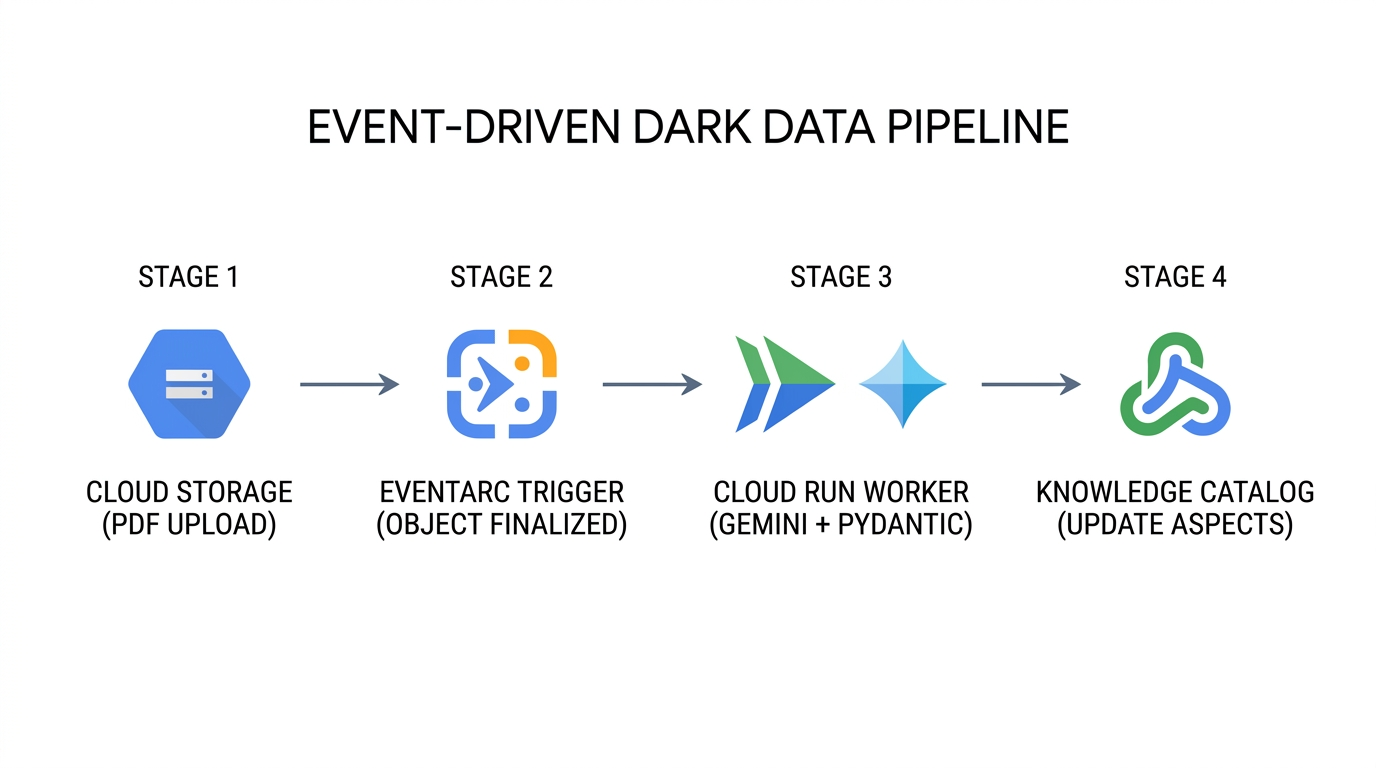
- 持续文档注入 (
Cloud Storage→Eventarc):每当有新的 PDF 手册上传或新修订版本覆盖 Cloud Storage 中的现有对象时,相应存储桶都会发出一个google.cloud.storage.object.v1.finalizedCloudEvent,其中包含存储桶标识符、对象路径和对象世代编号。 - 无状态多模态提取 (
Eventarc→Cloud Run→Gemini Enterprise Agent Platform):Eventarc 将 CloudEvent 路由到封装了schemas.py、step4_extract_metadata.py和step5_attach_aspects.py的无服务器 Cloud Run 工作器。工作器将 PDF 字节流式传输到 Gemini Enterprise Agent Platform,并强制执行response_schema,从而保证提取的每个属性都符合DarkDataExtractedMetadata和DocumentGovernanceMetadata。 - 精细控制的控制平面更新 (
Cloud Run→Knowledge Catalog):工作器解析父 FilesetEntry,并使用update_mask={"paths": ["aspects"]}和显式aspect_keys执行catalog_client.update_entry()。即使有数十个文档同时完成处理,每次变更也只会更新其指定的方面键。 - 基于置信度的管理员隔离:如果扫描的旧版 PDF 生成的提取结果
confidence_score低于您的操作阈值(例如< 0.85),工作器会在附加方面设置governance_status = "PENDING_STEWARD_REVIEW",以便数据管理员可以查询 Knowledge Catalog 中需要人工审核的低置信度资产。
企业如何在生产环境中应用此模式
企业用例 | 元数据即代码的实际运作方式 | 业务和运营影响 |
自动执行监管审核和召回准备 | 合规性系统在 BigQuery 和 Lakehouse for Apache Iceberg 中将非结构化 PDF 安全性方面 ( | 当 |
接地 AI 智能体和 RAG 预过滤 | Gemini Enterprise Agent Platform 上的检索增强生成 (RAG) 智能体在回答现场工程师的问题之前,会按 Knowledge Catalog条目中的 | 防止 AI 助理产生幻觉或引用已弃用的工程草稿、已过期的 SOP 或未经验证的第三方手册。 |
多团队并发扩充 | 多个独立流水线可丰富同一 Fileset | 由于 |
通过 GitOps 实现 CI/CD 架构演变 | 平台团队将 | 消除了 |
11. 清理环境
在 Knowledge Catalog 中,如果子条目仍引用父容器和架构模板,则无法删除这些父容器和架构模板。cleanup.py 会按严格的反向依赖顺序删除资源(Entry → EntryGroup → EntryType → AspectTypes → Cloud Storage 存储桶对象 → 临时 JSON 文件):
# 1. Delete Fileset Entry first
catalog_client.delete_entry(name=target_entry_path)

# 2. Delete EntryGroup container
del_eg_op = catalog_client.delete_entry_group(name=target_eg_path)
if hasattr(del_eg_op, "result"):
    del_eg_op.result()

# 3. Delete EntryType and Custom AspectTypes
del_et_op = catalog_client.delete_entry_type(name=target_et_path)
if hasattr(del_et_op, "result"):
    del_et_op.result()
for aspect_id_val in (EXTRACTED_ASPECT_TYPE_ID, GOVERNANCE_ASPECT_TYPE_ID):
    target_at_path = f"{active_parent}/aspectTypes/{aspect_id_val}"
    del_at_op = catalog_client.delete_aspect_type(name=target_at_path)
    if hasattr(del_at_op, "result"):
        del_at_op.result()
运行:cleanup.py
python3 cleanup.py
Starting reverse-dependency resource cleanup in Knowledge Catalog...
Deleted Fileset Entry:
  projects/your-project-id/locations/us-central1/entryGroups/
  dark-data-fileset-group/entries/sop-manuals-fileset-lum8g8j
Deleted EntryGroup   :
  projects/your-project-id/locations/us-central1/entryGroups/
  dark-data-fileset-group
Deleted EntryType    :
  projects/your-project-id/locations/us-central1/entryTypes/
  unstructured-pdf-fileset
Deleted AspectType   :
  projects/your-project-id/locations/us-central1/aspectTypes/
  dark-data-extracted-metadata
Deleted AspectType   :
  projects/your-project-id/locations/us-central1/aspectTypes/
  document-governance-aspect
Deleted Cloud Storage object :
  gs://your-project-id-dark-data-manuals/sop-pdfs/LUM-LIG-DES-8G8J_manual.pdf
Deleted Cloud Storage bucket : gs://your-project-id-dark-data-manuals
Removed local temporary file : extracted_metadata.json
Removed local temporary file : governance_metadata.json
✓ Standalone teardown complete. Environment cleanly reset.
移除克隆的代码库目录
在 cleanup.py 完成云资源的删除后,返回到您的主目录,然后从 Cloud Shell 中移除克隆的 devrel-demos 代码库文件夹:
cd ~
rm -rf ~/devrel-demos
12. 恭喜!
您已构建并验证了一个端到端的元数据即代码治理流水线,该流水线使用 Gemini Enterprise Agent Platform 将 Cloud Storage 中的非结构化 PDF 转换为可发现的、强制执行架构的 Knowledge Catalog 资产。
接下来怎么做?
- 使用 Terraform 实现自动化:在 CI/CD 流水线中以声明方式管理
google_dataplex_aspect_type和google_dataplex_entry_group资源。 - 部署 Eventarc + Cloud Run Worker:将
step4_extract_metadata.py和step5_attach_aspects.py容器化为事件驱动型 Cloud Run 服务。 - BigQuery 中的下游资产清单联接:导出提取的治理元数据 (
lakehouse_cross_ref_table),以将非结构化文档合规性属性与结构化 SKU 资产清单表联接。