

1. 簡介
超過 80% 的企業資料都是非結構化格式,例如儲存在 Cloud Storage 中的 PDF 工程手冊、標準作業程序 (SOP)、法規遵循認證和設備示意圖。由於傳統目錄只會為關聯式資料表結構定義建立索引,這些文件仍屬於「暗資料」:企業搜尋無法找到,與結構化目錄資料表沒有關聯,且未經過法規遵循驗證。
當稽核人員或 AI 代理程式詢問「哪些硬體 SKU 需要 UL-153 安全認證,以及這些 SKU 的熱危害等級為何?」時,只會為 SQL 表格建立索引的目錄就無法回答。事實資訊鎖在 Cloud Storage 中的非結構化 PDF 檔案內。
架構解決方案:多模態中繼資料即程式碼
在本程式碼研究室中,您將在 Google Cloud 中建構端對端「Metadata-as-Code」管道,將 Cloud Storage 中的非結構化 PDF 手冊,透過 Gemini Enterprise Agent Platform (Google GenAI SDK,google-genai) 轉換為符合結構定義的 Knowledge Catalog 資產:
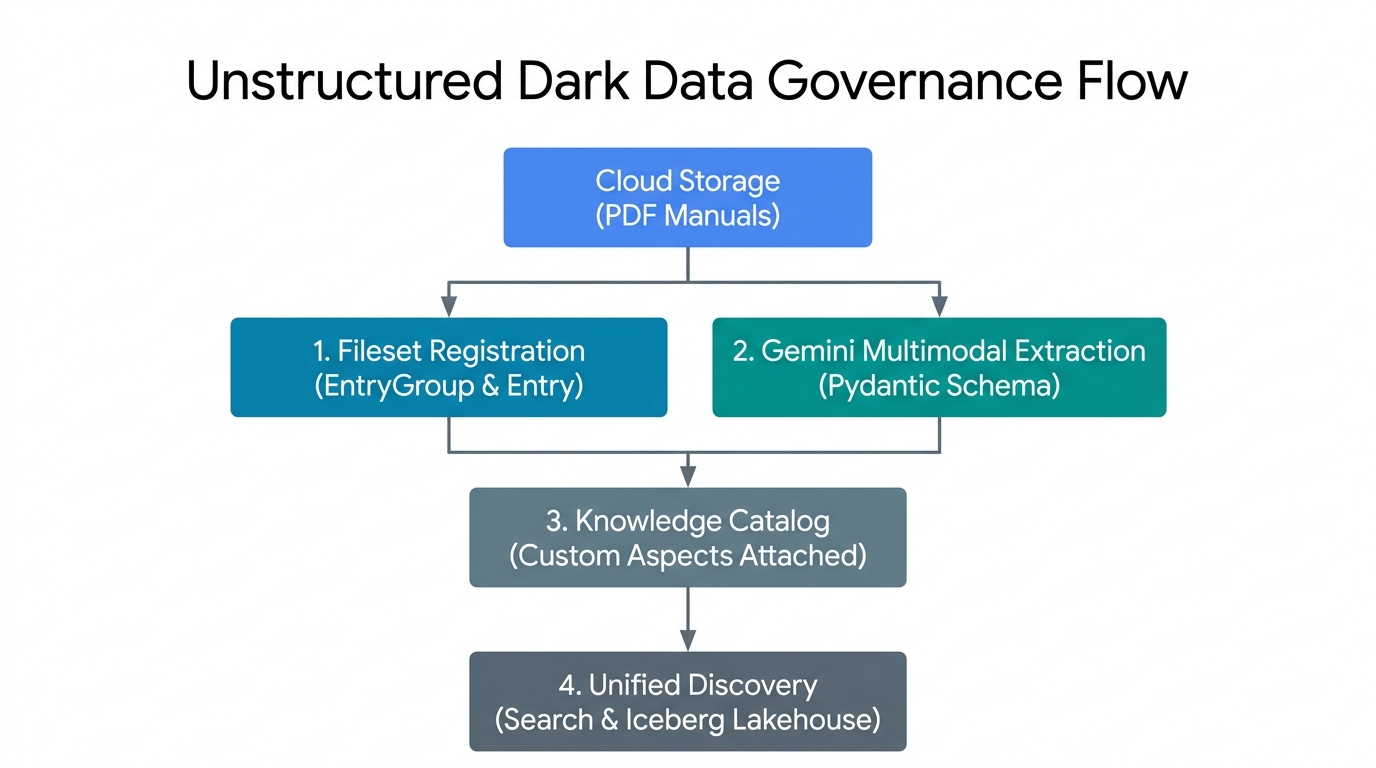
- 檔案集註冊 (
EntryGroup和Entry):將 Cloud Storage 中的非結構化 PDF 分組,成為 Knowledge Catalog 中受管理的邏輯檔案集項目。 - Gemini 多模態擷取 (Pydantic 架構):在原始 PDF 位元組上叫用 Gemini Enterprise Agent Platform,並進行確定性
response_schema驗證。 - 控制平面層面繫結:將經過驗證的作業和法規遵循 JSON 酬載,以強型別
Aspect例項的形式附加至目錄項目。 - 統一目錄探索:透過
SearchEntriesRequest探索非結構化 PDF 檔案集及其擷取的中繼資料。
重要概念:Knowledge Catalog 控制層基本類型
假設您的團隊在 Cloud Storage 中儲存了數百份 PDF 產品手冊。為了方便在知識目錄中尋找及查看這些檔案,請將五個建構區塊視為辦公室檔案櫃中的紙本手冊:
EntryGroup(一個團隊專用的上鎖櫃子):上鎖的櫃子。只有具備權限的隊友 (roles/dataplex.entryCreator) 才能在資料夾中放置檔案。你必須先清空櫃子中的所有資料夾,才能移除櫃子。EntryType(資料夾類別標籤):標籤,可讓使用者瞭解資料夾代表的資產類型,例如「PDF 手冊集」而非「資料庫表格」。Entry(含有儲存空間連結的檔案資料夾):PDF 手冊的目錄資料夾。這個資料夾不會存放大量紙本副本,而是存放指向實際 PDF 檔案所在 Cloud Storage bucket (gs://...) 的位置資訊卡。AspectType(空白檢查清單表單):可重複使用的空白表單,內含預先列印的方塊 (例如「安全檢查清單」,要求以文字形式輸入operational_hazard_level,並以數字形式輸入confidence_score(範圍為0.0至1.0))。您只要建立一次空白表單,就能在數千個資料夾中重複使用。Aspect(已填寫的核對清單附加至資料夾):Gemini Enterprise Agent Platform 讀取 PDF 手冊並填寫空白處後,完成的核對清單會夾在Entry資料夾上。由於每個核對清單都有自己的鍵 (aspect_keys),工程團隊和法律團隊可以各自將核對清單附加至同一個資料夾,而不會覆寫彼此的工作。
所有五個區域資源都位於 projects/{project}/locations/{location}/ 下方:
原始路徑和相對路徑 | Knowledge Catalog 中的角色 | 刪除和 IAM 規則 |
| 邏輯容器,可將項目分組並控管團隊存取權 ( | 刪除前必須不含任何子項 |
| 資產類別的類別定義 ( | 請先移除使用這類型的所有項目,再刪除類型。 |
| 目錄記錄,將實體 Cloud Storage URI ( | 位於 |
| 可重複使用的結構定義範本,定義型別 | 每個區域建立一次,並在所有項目中共用。 |
| 與 | 使用 |
建構項目
使用 codelabs/metadata-as-code-lab 中的隨附指令碼,執行並檢查 7 階段的管道:
schemas.py- 雙 PydanticBaseModel結構定義 (DarkDataExtractedMetadata和DocumentGovernanceMetadata) 會與 Knowledge CatalogAspectType範本 1:1 配對。step2_provision.py- 冪等佈建自訂EntryGroup、EntryType和AspectType藍圖。step3_register_fileset.py- 將LUM-LIG-DES-8G8J_manual.pdf上傳至 Cloud Storage,並註冊為受管理檔案集Entry。step4_extract_metadata.py- 使用google-genai動態探索旗艦 Gemini 模型,並擷取多模態 PDF 檔案。step5_attach_aspects.py、step6_search_catalog.py和step7_verify_assertions.py:手術層面附件、指數退避目錄搜尋,以及端對端控制層斷言。
必要條件和所需項目
- 已啟用帳單的 Google Cloud 專案,以及 Google Cloud Shell (預先安裝
gcloud、git、python3和pip)。 - 管理 Knowledge Catalog 資源 (
roles/dataplex.admin)、佈建 Cloud Storage bucket 和物件 (roles/storage.admin),以及叫用 Gemini Enterprise Agent Platform (roles/aiplatform.user) 的 IAM 權限。 - 網路瀏覽器,例如 Google Chrome。
2. 設定和需求條件
在 Cloud Shell 中複製隨附存放區
開啟 Google Cloud 控制台,啟動 Cloud Shell,然後對 codelabs/metadata-as-code-lab 執行稀疏結帳,其中包含範例 PDF 工程手冊 (LUM-LIG-DES-8G8J_manual.pdf) 和所有 Python 指令碼:
git clone --branch main --depth 1 --filter=blob:none --sparse \
  https://github.com/GoogleCloudPlatform/devrel-demos.git
cd devrel-demos
git sparse-checkout set codelabs/metadata-as-code-lab
cd codelabs/metadata-as-code-lab
ls -la
設定環境變數
在 Cloud Shell 中設定專案 ID、區域控制層位置和目標 Cloud Storage bucket:
export PROJECT_ID="${PROJECT_ID:-$(gcloud config get-value project)}"
gcloud config set project $PROJECT_ID

export REGION="us-central1"
export BUCKET_NAME="${PROJECT_ID}-dark-data-manuals"
export GEMINI_LOCATION="global"

echo "Configured Project ID        : $PROJECT_ID"
echo "Knowledge Catalog Region     : $REGION"
echo "Gemini Endpoint Location     : $GEMINI_LOCATION"
echo "Target Cloud Storage Bucket  : $BUCKET_NAME"
啟用 API 並安裝依附元件
啟用必要的 Google Cloud API,並從 requirements.txt 安裝 Python 依附元件 (google-genai、google-cloud-dataplex、pydantic 和 pandas):
gcloud services enable \
  dataplex.googleapis.com \
  storage.googleapis.com \
  aiplatform.googleapis.com \
  --quiet
python3 -m pip install --upgrade --quiet --user --break-system-packages -r requirements.txt
3. 定義 Pydantic 結構定義和面向範本
schemas.py 定義了兩個互補的合約,可將用戶端 Pydantic 驗證與伺服器端 Knowledge Catalog AspectType 範本配對:
DarkDataExtractedMetadata:從 PDF 擷取的作業屬性 (文件標題、網域本體、安全危害程度、撰寫/版本出處、執行摘要和擷取信賴分數)。DocumentGovernanceMetadata:法規遵循代碼 (UL-153、FCC 第 15 條、CE-LVD、RoHS)、管理員、保留政策,以及用於將 PDF 手冊連結至下游目錄表的參考表 ID 字串 (lakehouse_cross_ref_table)。
檢查 schemas.py
首先,DarkDataExtractedMetadata 會使用 Pydantic Field 限制 (ge=0.0, le=1.0,表示大於/小於或等於,位於 confidence_score) 來限制 Gemini Enterprise Agent Platform 的 JSON 輸出內容:
class DarkDataExtractedMetadata(BaseModel):
    document_title: str = Field(
        description="Official document title or product model name extracted from the PDF manual."
    )
    # ... domain_ontology, operational_hazard_level, author_provenance ...
    version_provenance: str = Field(
        description="Document version, revision code, or publication standard identifier."
    )
    # ... document_summary ...
    confidence_score: float = Field(
        ge=0.0,
        le=1.0,
        description="AI extraction confidence metric between 0.0 and 1.0.",
    )
其次,extracted_aspect_template 會反映這些確切的欄位名稱,並將 Python 的 str 和 float 型別對應至Knowledge Catalog的 string 和 double record_fields。請注意,AspectType.MetadataTemplate protobuf 合約要求 record_fields 中的每個欄位都必須宣告專屬的嚴格正整數 (以 1 為基底) index (1 至 7),如果省略或重複 index,create_aspect_type 就會失敗並顯示 400 INVALID_ARGUMENT:
extracted_aspect_template = {
    "name": "DarkDataExtractedMetadata",
    "type": "record",
    "record_fields": [
        {
            "name": "document_title",
            "type": "string",
            "index": 1,
            "annotations": {"description": "Official document title or product model name."},
        },
        # ... fields 2 through 6 (string) ...
        {
            "name": "confidence_score",
            "type": "double",
            "index": 7,
            # ... annotations ...
        },
    ],
}
驗證結構定義模組
執行 schemas.py,驗證環境設定並編譯兩個結構定義:
python3 schemas.py
Configured Project ID         : your-project-id
Knowledge Catalog Region      : us-central1
Gemini Endpoint Location      : global
Governed Fileset Storage URI  :
  gs://your-project-id-dark-data-manuals/sop-pdfs/LUM-LIG-DES-8G8J_manual.pdf
Target Fileset Entry ID       : sop-manuals-fileset-lum8g8j
✓ Defined DarkDataExtractedMetadata and DocumentGovernanceMetadata
  Pydantic schemas.
✓ Prepared Knowledge Catalog AspectType metadata templates.
4. 佈建命名空間和自訂切面類型
註冊檔案集項目或附加中繼資料前,step2_provision.py 會在 Knowledge Catalog 中佈建三個控制層資源:
EntryGroup:dark-data-fileset-groupEntryType:unstructured-pdf-filesetAspectType藍圖:dark-data-extracted-metadata和document-governance-aspect
step2_provision.py 中的等冪佈建
step2_provision.py 中的每個建立呼叫都會將長時間執行的作業 (op.result()) 包裝在 try / except AlreadyExists 區塊中,因此指令碼可以安全地重新執行,不會因現有資源而失敗:
# Provision AspectType 1: dark-data-extracted-metadata
try:
    at1_op = catalog_client.create_aspect_type(
        parent=parent_location,
        aspect_type_id=EXTRACTED_ASPECT_TYPE_ID,
        aspect_type=AspectType(
            name=extracted_aspect_type_name,
            display_name="Dark Data Multimodal Extracted Metadata",
            # ... description ...
            metadata_template=extracted_aspect_template,
        ),
    )
    if hasattr(at1_op, "result"):
        at1_op.result()
    print(f"Created AspectType: {extracted_aspect_type_name}")
except AlreadyExists:
    print(f"AspectType already exists; retrieving live resource: {extracted_aspect_type_name}")

live_extracted_aspect_type = catalog_client.get_aspect_type(name=extracted_aspect_type_name)
註冊 metadata_template=extracted_aspect_template 後,Knowledge Catalog 會在 API 邊界強制執行結構定義,後續任何將字串傳遞至 confidence_score (double) 的 update_entry() 呼叫都會遭到拒絕。
執行「step2_provision.py」
執行佈建指令碼,並確認自訂切面類型已在您所在區域註冊:
python3 step2_provision.py
gcloud dataplex aspect-types list --location=$REGION
Created EntryGroup:
  projects/your-project-id/locations/us-central1/entryGroups/
  dark-data-fileset-group
Created EntryType :
  projects/your-project-id/locations/us-central1/entryTypes/
  unstructured-pdf-fileset
Created AspectType:
  projects/your-project-id/locations/us-central1/aspectTypes/
  dark-data-extracted-metadata
Created AspectType:
  projects/your-project-id/locations/us-central1/aspectTypes/
  document-governance-aspect
✓ All Knowledge Catalog namespaces and AspectType blueprints are active.
5. 註冊非結構化檔案集項目
Knowledge Catalog 會將 Cloud Storage (gs://YOUR_BUCKET/sop-pdfs/*.pdf) 中相關的文件分組為邏輯 Fileset Entries,而不是在目錄中塞滿數百萬個獨立的檔案指標,可透過自動探索掃描 (DataScanServiceClient) 或直接以程式輔助方式註冊 (CatalogServiceClient.create_entry) 達成。
step3_register_fileset.py 如何將儲存空間對應至目錄
step3_register_fileset.py 上傳 LUM-LIG-DES-8G8J_manual.pdf至 gs://${BUCKET_NAME}/sop-pdfs/LUM-LIG-DES-8G8J_manual.pdf,並註冊受管理 Entry:
fully_qualified_fileset_uri = f"gcs:{BUCKET_NAME}"
fileset_entry_spec = Entry(
    name=fileset_entry_name,
    entry_type=entry_type_resource_name,
    fully_qualified_name=fully_qualified_fileset_uri,
    entry_source=EntrySource(
        resource=VIRTUAL_STORAGE_URI,
        system="Cloud Storage",
        platform="Google Cloud",
        display_name="LUM-LIG-DES-8G8J Unstructured SOP & Technical Manual Fileset",
        # ... description ...
        location=REGION,
    ),
)

create_entry_op = catalog_client.create_entry(
    parent=entry_group_resource_name,
    entry_id=FILESET_ENTRY_ID,
    entry=fileset_entry_spec,
)
請注意 Entry 上兩個 URI 欄位的不同角色:
fully_qualified_name=fully_qualified_fileset_uri(f"gcs:{BUCKET_NAME}"):使用 Knowledge Catalog 要求的標準gcs:{bucket_name}FQN 結構,將邏輯目錄項目與基礎 Cloud Storage bucket 建立關聯。entry_source.resource=VIRTUAL_STORAGE_URI:儲存下游擷取工作人員檢查的實體gs://物件 URI。
執行「step3_register_fileset.py」
python3 step3_register_fileset.py
Created Cloud Storage bucket:
  gs://your-project-id-dark-data-manuals in us-central1
Uploaded unstructured PDF manual to:
  gs://your-project-id-dark-data-manuals/sop-pdfs/LUM-LIG-DES-8G8J_manual.pdf
Registered governed Fileset Entry:
  projects/your-project-id/locations/us-central1/entryGroups/
  dark-data-fileset-group/entries/sop-manuals-fileset-lum8g8j
  -> Fully Qualified Name : gcs:your-project-id-dark-data-manuals
  -> Physical Resource URI:
  gs://your-project-id-dark-data-manuals/sop-pdfs/LUM-LIG-DES-8G8J_manual.pdf
  -> Source System        : Cloud Storage
6. 使用 Gemini 擷取文件元資料
step4_extract_metadata.py 會讀取原始 PDF 位元組,並使用兩種主要模式叫用 Gemini Enterprise Agent Platform (genai_client.models.generate_content):
1. 動態探索旗艦機型
指令碼會查詢 genai_client.models.list() 並依 (is_ga_channel, semantic_version_tuple) 排序候選版本,選取最新的正式發布 (GA) flash 模型,而不是對脆弱的模型版本字串進行硬式編碼:
genai_client = genai.Client(
    vertexai=True,
    project=PROJECT_ID,
    location=GEMINI_LOCATION,
)

for model_obj in genai_client.models.list():
    raw_id = (model_obj.name or "").split("/")[-1]
    # Filter to flagship Gemini Flash models (version >= 3.0) and prioritize GA over preview
    ...
    discovered_candidates.append((is_ga_channel, ver_tuple, raw_id))

discovered_candidates.sort(key=lambda item: (item[0], item[1]), reverse=True)
2. 受結構定義限制的多模態擷取 (Part.from_bytes + response_schema)
傳遞 response_mime_type="application/json" 和 response_schema=DarkDataExtractedMetadata (後接 DocumentGovernanceMetadata) 會直接將權杖解碼限制為 Pydantic JSON 結構定義:
with open(LOCAL_PDF_PATH, "rb") as pdf_file:
    raw_pdf_bytes = pdf_file.read()

extraction_response = genai_client.models.generate_content(
    model=candidate_model,
    contents=[
        types.Part.from_bytes(data=raw_pdf_bytes, mime_type="application/pdf"),
        extraction_prompt,
    ],
    config=types.GenerateContentConfig(
        response_mime_type="application/json",
        response_schema=DarkDataExtractedMetadata,
        temperature=0.1,
    ),
)

extracted_dark_data = json.loads(extraction_response.text)
validated_extraction = DarkDataExtractedMetadata(**extracted_dark_data)
執行「step4_extract_metadata.py」
python3 step4_extract_metadata.py
Dynamically discovered active GA model currency :
  gemini-3.8-flash (version (3, 8))
Loaded unstructured PDF manual at: LUM-LIG-DES-8G8J_manual.pdf
Read unstructured PDF document (1184 bytes).
  Executing multimodal extraction with gemini-3.8-flash...
✓ Multimodal extraction completed using model: gemini-3.8-flash
✓ Governance classification completed using model: gemini-3.8-flash

--- Extracted Multimodal Operational Metadata ---
Extracted Attribute    Multimodal Value
document_title    LUM-LIG-DES-8G8J Contemporary Linen Desk Lamp
domain_ontology    Electrical Hardware & Lighting Systems
operational_hazard_level    MEDIUM
author_provenance    Global Hardware Safety & Lighting Systems Engin
version_provenance    Rev 4.2
document_summary    This document outlines standard operating proce
confidence_score    0.99

--- Extracted Governance & Inventory Cross-Reference Metadata ---
Governance Attribute    Classification Value
compliance_classifications    UL-153 Portable Luminaires, FCC Part 15, CE-LVD
stewardship_owner    Global Hardware Safety & Lighting Systems Engin
retention_policy    10-Year Active Product Lifecycle Archival
lakehouse_cross_ref_table    lakehouse.your-project-id.retail_hardware
governance_status    VERIFIED_PRODUCTION
7. 將驗證過的切面附加至目錄項目
step5_attach_aspects.py 會透過 catalog_client.update_entry() 將經過驗證的 JSON 酬載 (extracted_metadata.json 和 governance_metadata.json) 繫結至 sop-manuals-fileset-lum8g8j 項目。
step5_attach_aspects.py 中的手術式變異
extracted_aspect_key = f"{PROJECT_ID}.{REGION}.{EXTRACTED_ASPECT_TYPE_ID}"
governance_aspect_key = f"{PROJECT_ID}.{REGION}.{GOVERNANCE_ASPECT_TYPE_ID}"

updated_entry_payload = Entry(
    name=fileset_entry_name,
    entry_type=entry_type_resource_name,
    fully_qualified_name=fully_qualified_fileset_uri,
    aspects={
        extracted_aspect_key: Aspect(
            aspect_type=extracted_aspect_type_name,
            data=extracted_data,
        ),
        governance_aspect_key: Aspect(
            aspect_type=governance_aspect_type_name,
            data=governance_data,
        ),
    },
)

update_op = catalog_client.update_entry(
    request=dataplex_v1.UpdateEntryRequest(
        entry=updated_entry_payload,
        update_mask={"paths": ["aspects"]},
        aspect_keys=[extracted_aspect_key, governance_aspect_key],
    )
)
同時傳遞 和 update_mask={"paths": ["aspects"]}aspect_keys=[extracted_aspect_key, governance_aspect_key] 範圍,可將變動嚴格限制在這兩個切面鍵上,讓 entry_source 和其他團隊擁有的任何切面保持不變。
執行「step5_attach_aspects.py」
python3 step5_attach_aspects.py
Successfully bound 2 Aspect(s) to Entry:
  projects/your-project-id/locations/us-central1/entryGroups/
  dark-data-fileset-group/entries/sop-manuals-fileset-lum8g8j

=== Live Attached Aspect: document-governance-aspect ===
Catalog Field    Authoritative Stored Value
compliance_classifications    UL-153 Portable Luminaires, FCC Part 15, CE-LVD
stewardship_owner    Global Hardware Safety & Lighting Systems Engin
retention_policy    10-Year Active Product Lifecycle Archival
lakehouse_cross_ref_table    lakehouse.your-project-id.retail_hardware
governance_status    VERIFIED_PRODUCTION

=== Live Attached Aspect: dark-data-extracted-metadata ===
Catalog Field    Authoritative Stored Value
document_title    LUM-LIG-DES-8G8J Contemporary Linen Desk Lamp
domain_ontology    Electrical Hardware & Lighting Systems
operational_hazard_level    MEDIUM
author_provenance    Global Hardware Safety & Lighting Systems Engin
version_provenance    Rev 4.2
document_summary    This document outlines standard operating proce
confidence_score    0.99
雙軌驗證
- 第 1 軌 (CLI 驗證):透過
gcloud檢查所有附加層面的項目:gcloud dataplex entries describe sop-manuals-fileset-lum8g8j \ --entry-group=dark-data-fileset-group \ --location=$REGION \ --view=ALL - 軌跡 2 (控制台 UI 檢查):
- 開啟 Knowledge Catalog Search Console,搜尋 LUM-LIG-DES-8G8J Unstructured SOP & Technical Manual Fileset (
sop-manuals-fileset-lum8g8j),然後從結果中選取相符項目。 - 在「Optional tags and aspects」(選用標記和切面) 下方,確認「Dark Data Multimodal Extracted Metadata」(暗資料多模態擷取中繼資料) 和「Document Governance & Inventory Cross-Reference Aspect」(文件管理和清查交叉參照切面) 都顯示擷取的危害程度 (
MEDIUM)、法規遵循代碼 (UL-153, FCC Part 15, CE-LVD, RoHS) 和交叉比對表字串 (lakehouse_cross_ref_table)。
- 開啟 Knowledge Catalog Search Console,搜尋 LUM-LIG-DES-8G8J Unstructured SOP & Technical Manual Fileset (
8. 在目錄中查詢受管理的不公開資料
附加自訂面向後,即可透過 Knowledge Catalog 搜尋 (catalog_client.search_entries()) 探索 Cloud Storage 中的非結構化 PDF 手冊。
意見調查 search_entries() (step6_search_catalog.py)
step6_search_catalog.py 輪詢 search_entries(),並透過 .endswith() 讀取標準化層面鍵:
search_query = f"entrygroup={entry_group_resource_name} name:{FILESET_ENTRY_ID}"

while elapsed_seconds < max_wait_seconds:
    catalog_search_results = list(
        catalog_client.search_entries(
            request=dataplex_v1.SearchEntriesRequest(
                name=parent_location,
                query=search_query,
            )
        )
    )
    if catalog_search_results:
        break
    backoff_seconds = min(5 * (2 ** attempt), 30)
    time.sleep(backoff_seconds)
    ...

for k, asp in detailed_entry.aspects.items():
    if k.endswith(f".{REGION}.{EXTRACTED_ASPECT_TYPE_ID}"):
        print(f"    Domain Ontology     : {asp.data.get('domain_ontology')}")
        print(f"    Hazard Level        : {asp.data.get('operational_hazard_level')}")
    elif k.endswith(f".{REGION}.{GOVERNANCE_ASPECT_TYPE_ID}"):
        print(f"    Compliance Codes    : {asp.data.get('compliance_classifications')}")
        print(f"    Lakehouse Join Table: {asp.data.get('lakehouse_cross_ref_table')}")
執行「step6_search_catalog.py」
python3 step6_search_catalog.py
Executing Knowledge Catalog search query:
  'entrygroup=projects/your-project-id/locations/us-central1/entryGroups/
  dark-data-fileset-group name:sop-manuals-fileset-lum8g8j'...

✓ Discovered 1 governed asset(s) in Knowledge Catalog:

[1] Entry Resource Name :
    projects/your-project-id/locations/us-central1/entryGroups/
    dark-data-fileset-group/entries/sop-manuals-fileset-lum8g8j
    Fully Qualified Name: gcs:your-project-id-dark-data-manuals
    Entry Type :
    projects/your-project-id/locations/us-central1/entryTypes/
    unstructured-pdf-fileset
    Physical Storage URI:
    gs://your-project-id-dark-data-manuals/sop-pdfs/LUM-LIG-DES-8G8J_manual.pdf
    Domain Ontology     : Electrical Hardware & Lighting Systems
    Hazard Level        : MEDIUM
    Compliance Codes    : UL-153 Portable Luminaires, FCC Part 15, CE-LVD, RoHS
    Lakehouse Join Table:
    lakehouse.your-project-id.retail_hardware.luminaire_sku_inventory_iceberg
雙軌驗證
- 第 1 階段 (CLI 搜尋):透過
gcloud直接查詢搜尋索引:gcloud dataplex entries search "name:sop-manuals-fileset-lum8g8j" --project=$PROJECT_ID - 第 2 軌 (控制台 UI 自然語言搜尋):
- 開啟 Knowledge Catalog Search Console,然後搜尋
LUM-LIG-DES-8G8J或UL-153。 - 觀察Knowledge Catalog如何顯示受管理 Cloud Storage PDF 檔案集項目及其附加的中繼資料切面。
- 開啟 Knowledge Catalog Search Console,然後搜尋
9. 驗證端對端控管聲明
step7_verify_assertions.py 會針對即時 Knowledge Catalog 控制層回應執行確定性斷言,以驗證 EntryGroup、EntryType、自訂 AspectType 藍圖、繫結 EntryView.ALL 構面有效負載 (confidence_score 範圍和 lakehouse_cross_ref_table 字串) 和搜尋索引探索是否都成功:
verify_eg = catalog_client.get_entry_group(name=entry_group_resource_name)
assert verify_eg.name == entry_group_resource_name, "EntryGroup resource name mismatch."

verify_entry = catalog_client.get_entry(
    request=dataplex_v1.GetEntryRequest(
        name=fileset_entry_name,
        view=dataplex_v1.EntryView.ALL,
    )
)
bound_extracted = next(
    (
        asp for k, asp in verify_entry.aspects.items()
        if k.endswith(f".{REGION}.{EXTRACTED_ASPECT_TYPE_ID}")
    ),
    None,
)
bound_governance = next(
    (
        asp for k, asp in verify_entry.aspects.items()
        if k.endswith(f".{REGION}.{GOVERNANCE_ASPECT_TYPE_ID}")
    ),
    None,
)

assert bound_extracted is not None, f"Aspect '{EXTRACTED_ASPECT_TYPE_ID}' not found on live Entry."
assert bound_governance is not None, (
    f"Aspect '{GOVERNANCE_ASPECT_TYPE_ID}' not found on live Entry."
)
assert (
    bound_extracted.data.get("document_title") == expected_extraction["document_title"]
), "Extracted title mismatch."
assert (
    0.0 <= float(bound_extracted.data.get("confidence_score", -1.0)) <= 1.0
), "Invalid confidence score in catalog."
assert (
    "lakehouse" in str(bound_governance.data.get("lakehouse_cross_ref_table", "")).lower()
), "Missing Lakehouse cross-reference."
...
assert len(search_results) >= 1, "Expected at least 1 search result in Knowledge Catalog."
執行「step7_verify_assertions.py」
python3 step7_verify_assertions.py && echo "Verification exit code: $?"
Running substantive end-to-end verification assertions...
✓ All 5 substantive verification assertions passed
  against live Google Cloud control plane state!
Verification exit code: 0
10. 設計事件導向管道
在 Cloud Shell 中以互動方式執行 Python 指令碼,是建構及測試控管合約的理想做法,但企業環境每天會從 ERP、產品生命週期管理 (PLM) 和供應商入口網站收到數千份新的或修訂的 PDF 工程手冊、供應商法規遵循認證和 SOP 文件。手動執行批次指令碼,會快速在文件上傳和目錄索引之間,產生治理盲點。
在實際運作中,平台團隊會將您在步驟 4 和 5 中執行的確切程式碼,做為零接觸的事件驅動管道:
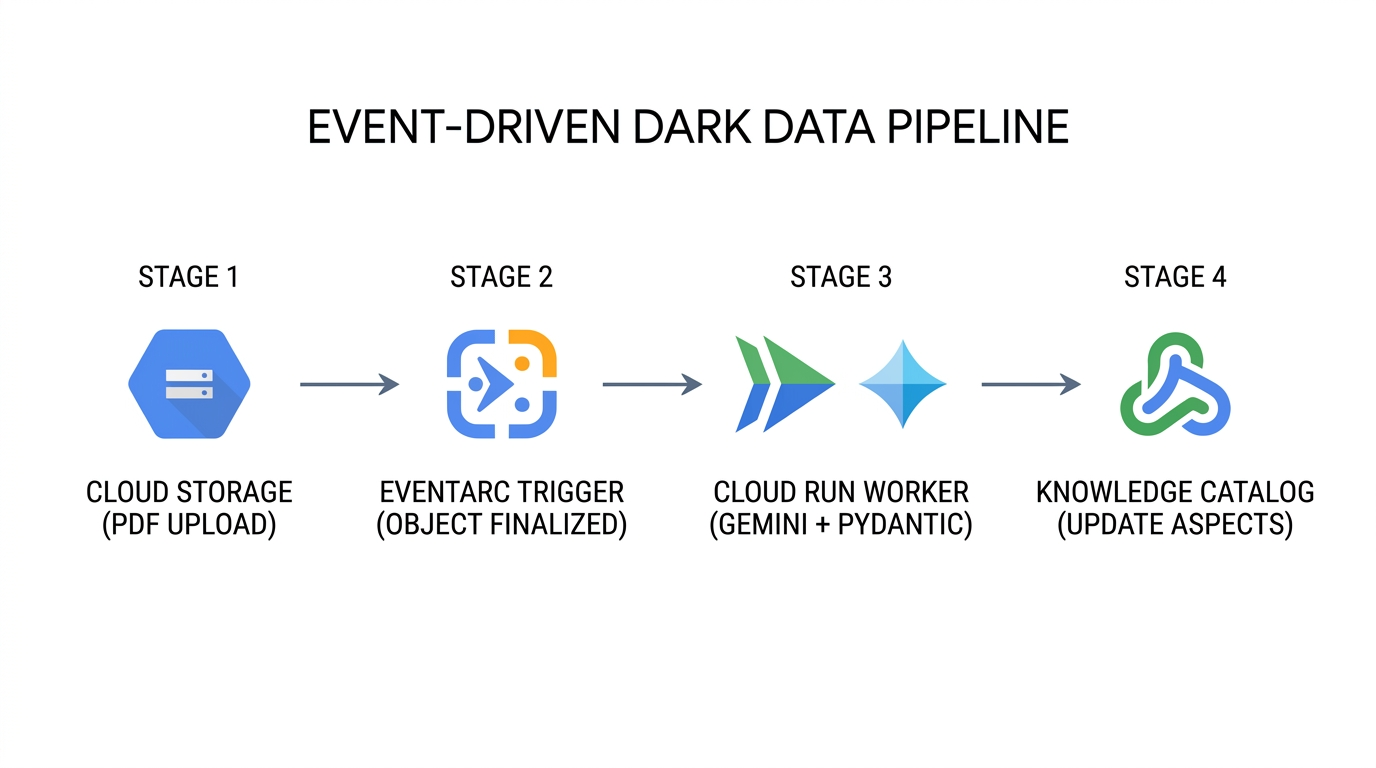
- 持續擷取文件 (
Cloud Storage→Eventarc):每當上傳新的 PDF 手冊,或新修訂版本覆寫 Cloud Storage 中的現有物件時,儲存空間會發出google.cloud.storage.object.v1.finalizedCloudEvent,其中包含儲存空間 ID、物件路徑和物件版本編號。 - 無狀態多模態擷取 (
Eventarc→Cloud Run→Gemini Enterprise Agent Platform):Eventarc 會將 CloudEvent 路由至無伺服器 Cloud Run 工作站,封裝schemas.py、step4_extract_metadata.py和step5_attach_aspects.py。工作人員會將 PDF 位元組串流至 Gemini Enterprise Agent Platform,並強制執行response_schema,確保每個擷取的屬性都符合DarkDataExtractedMetadata和DocumentGovernanceMetadata。 - 手術控制層更新 (
Cloud Run→Knowledge Catalog):工作人員會解析父項 FilesetEntry,並執行catalog_client.update_entry()(含update_mask={"paths": ["aspects"]}和明確的aspect_keys)。即使有數十份文件同時完成處理,每項修改作業也只會更新指定方面的鍵。 - 信心度設限管理員隔離:如果掃描舊版 PDF 產生的擷取結果
confidence_score低於作業門檻 (例如< 0.85),工作人員會在附加的層面設定governance_status = "PENDING_STEWARD_REVIEW",讓資料管理員查詢 Knowledge Catalog 中信心度較低的資產,並進行人工審查。
企業如何在正式環境中套用這個模式
企業用途 | 中繼資料即程式碼的實際運作方式 | 業務和營運影響 |
自動化法規稽核與召回準備 | 法規遵循系統會將非結構化 PDF 安全性層面 ( | 當 |
以事實為依據的 AI 代理和 RAG 前置篩選 | Gemini Enterprise Agent Platform 的檢索增強生成 (RAG) 代理程式會先依據 | 防止 AI 助理產生幻覺,或引用已淘汰的工程草案、過期的標準作業程序,或未經驗證的第三方手冊。 |
多團隊並行擴充 | 多個獨立管道會擴充同一個檔案集 | 由於 |
透過 GitOps 進行 CI/CD 架構演變 | 平台團隊會在 Git 中儲存 | 消除應用程式擷取程式碼與 Knowledge Catalog 控制層之間的結構定義差異,適用於 |
11. 清理環境
在 Knowledge Catalog 中,如果子項項目仍參照父項容器和結構定義範本,就無法刪除這些項目。cleanup.py 會以嚴格的反向依附元件順序刪除資源 (Entry → EntryGroup → EntryType → AspectTypes → Cloud Storage bucket 物件 → 暫時 JSON 檔案):
# 1. Delete Fileset Entry first
catalog_client.delete_entry(name=target_entry_path)

# 2. Delete EntryGroup container
del_eg_op = catalog_client.delete_entry_group(name=target_eg_path)
if hasattr(del_eg_op, "result"):
    del_eg_op.result()

# 3. Delete EntryType and Custom AspectTypes
del_et_op = catalog_client.delete_entry_type(name=target_et_path)
if hasattr(del_et_op, "result"):
    del_et_op.result()
for aspect_id_val in (EXTRACTED_ASPECT_TYPE_ID, GOVERNANCE_ASPECT_TYPE_ID):
    target_at_path = f"{active_parent}/aspectTypes/{aspect_id_val}"
    del_at_op = catalog_client.delete_aspect_type(name=target_at_path)
    if hasattr(del_at_op, "result"):
        del_at_op.result()
執行「cleanup.py」
python3 cleanup.py
Starting reverse-dependency resource cleanup in Knowledge Catalog...
Deleted Fileset Entry:
  projects/your-project-id/locations/us-central1/entryGroups/
  dark-data-fileset-group/entries/sop-manuals-fileset-lum8g8j
Deleted EntryGroup   :
  projects/your-project-id/locations/us-central1/entryGroups/
  dark-data-fileset-group
Deleted EntryType    :
  projects/your-project-id/locations/us-central1/entryTypes/
  unstructured-pdf-fileset
Deleted AspectType   :
  projects/your-project-id/locations/us-central1/aspectTypes/
  dark-data-extracted-metadata
Deleted AspectType   :
  projects/your-project-id/locations/us-central1/aspectTypes/
  document-governance-aspect
Deleted Cloud Storage object :
  gs://your-project-id-dark-data-manuals/sop-pdfs/LUM-LIG-DES-8G8J_manual.pdf
Deleted Cloud Storage bucket : gs://your-project-id-dark-data-manuals
Removed local temporary file : extracted_metadata.json
Removed local temporary file : governance_metadata.json
✓ Standalone teardown complete. Environment cleanly reset.
移除複製的存放區目錄
cleanup.py 刪除雲端資源後,請返回主目錄,然後從 Cloud Shell 移除複製的 devrel-demos 存放區資料夾:
cd ~
rm -rf ~/devrel-demos
12. 恭喜!
您已建構並驗證端對端中繼資料即程式碼治理管道,可使用 Gemini Enterprise Agent Platform,將 Cloud Storage 中的非結構化 PDF 轉換為可探索且強制執行結構定義的 Knowledge Catalog 資產。
後續步驟
- 透過 Terraform 自動化管理:在 CI/CD 管道中,以宣告方式管理
google_dataplex_aspect_type和google_dataplex_entry_group資源。 - 部署 Eventarc + Cloud Run Worker:將
step4_extract_metadata.py和step5_attach_aspects.py容器化,成為事件驅動的 Cloud Run 服務。 - 在 BigQuery 中進行下游項目清單聯結:匯出擷取的治理中繼資料 (
lakehouse_cross_ref_table),將非結構化文件法規遵循屬性與結構化 SKU 項目清單資料表聯結。