

১. শুরু করার আগে
Most ticketing sites put buyers in a queue, both to prevent server crashes and to manage high demand. You start your purchase and find yourself behind 14,000 people. The queue moves for forty minutes. When your turn finally comes, you have a short window to pick seats and pay. If you miss that window, your place in line is given away.
Many real-world tasks follow this pattern: a task that takes far longer than a single conversation, running against an external system you do not control. Examples include waiting for a supplier to restock, waiting for a claim approval, or waiting in a queue.
Standard AI agents live inside a single chat turn, which lasts seconds and is purely reactive. They cannot wait 40 minutes or act autonomously. To solve this, you need a long-running agent : a system that stays dormant during long waits, persists context across process restarts, and resumes automatically when woken by an external trigger.
এই কর্মশালায় আপনাকে একটি কনসার্ট টিকিট কিউ এজেন্ট তৈরি করার পদ্ধতি ধাপে ধাপে শেখানো হবে, যেখানে গুগল ক্লাউডে দীর্ঘমেয়াদী এজেন্টদের জন্য প্রয়োজনীয় মূল আর্কিটেকচারাল প্যাটার্নগুলো অন্তর্ভুক্ত রয়েছে।
আপনি যা তৈরি করবেন
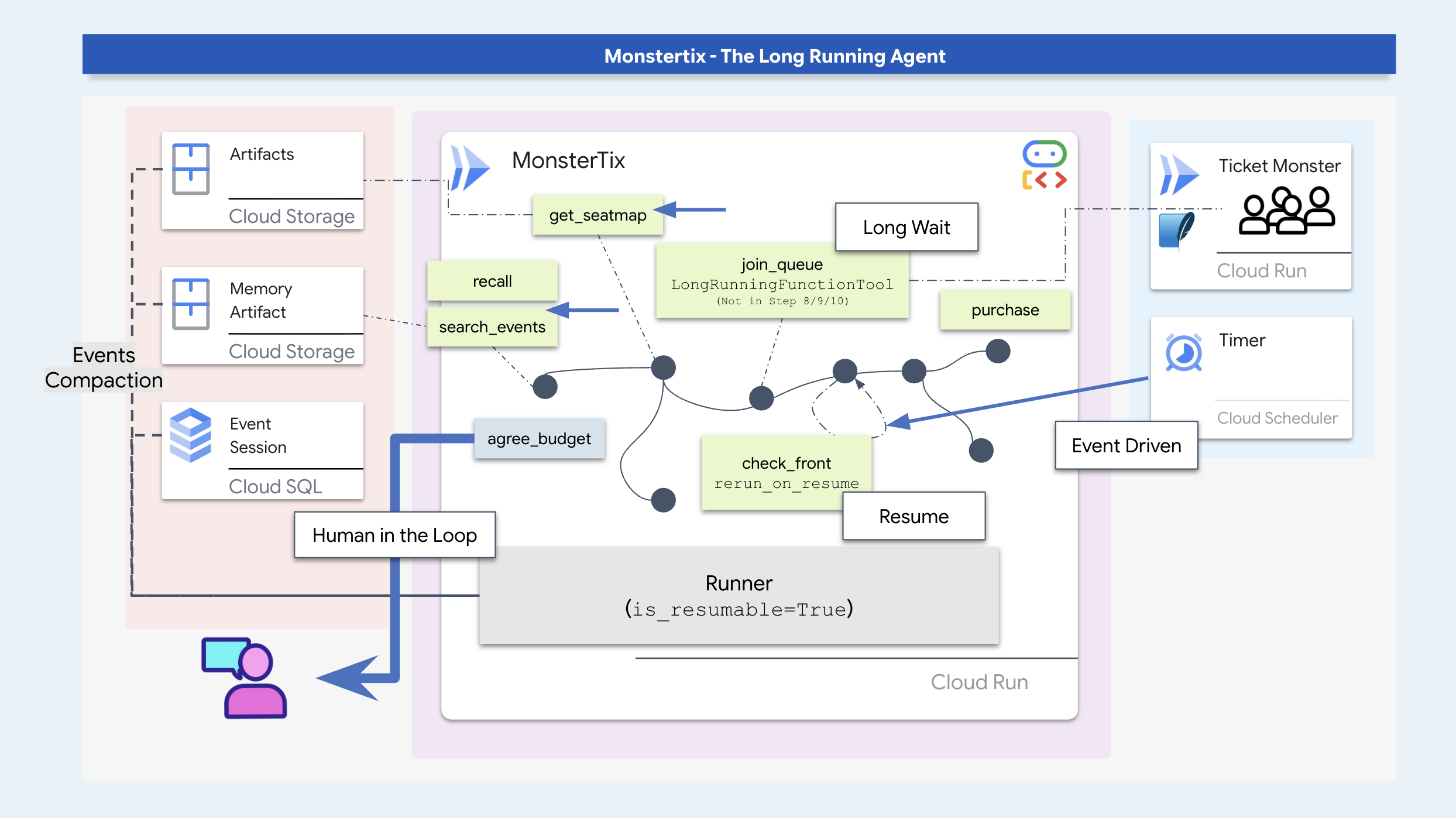
এই কর্মশালায়, আপনি একটি দীর্ঘস্থায়ী টিকেট বুকিং এজেন্ট তৈরি করার পাশাপাশি এজেন্টিক সফটওয়্যারের প্রধান প্যাটার্নগুলো শিখবেন:
- প্রক্রিয়া স্থগিতকরণ ও পুনঃপ্রবর্তন : দীর্ঘ অপেক্ষার সময় কোনো এজেন্ট আহ্বানকে স্থগিত রাখুন এবং বাহ্যিক ট্রিগারের মাধ্যমে তার কার্য সম্পাদন পুনরায় শুরু করুন।
- টেকসই অবস্থা সংরক্ষণ : SQLite/Cloud SQL এবং ক্লাউড স্টোরেজ ব্যবহার করে প্রসেস পুনরায় চালু হওয়ার পরেও কথোপকথনের অবস্থা এবং আর্টিফ্যাক্টগুলি অক্ষুণ্ণ রাখুন।
- স্টেলনেস গার্ড ও আইডম্পোটেন্সি : কোনো পদক্ষেপ নেওয়ার আগে ডাইনামিক ডেটা (যেমন সিট অ্যাভেইলেবিলিটি) যাচাই করুন এবং ডুপ্লিকেট ট্রানজ্যাকশন প্রতিরোধ করতে আইডম্পোটেন্সি কী ব্যবহার করুন।
- ADK ওয়ার্কফ্লো গ্রাফ : কার্যপ্রণালীগত নিয়মের জন্য ডিটারমিনিস্টিক কোড নোড এবং প্রাসঙ্গিক সিদ্ধান্ত গ্রহণের জন্য এজেন্ট নোড ব্যবহার করে কার্য সম্পাদনের কাঠামো তৈরি করে।
- ব্যবহারকারীর সম্মতি : ব্যবহারকারীর কাছ থেকে ব্যয়ের সুস্পষ্ট সীমা সংগ্রহ ও সংরক্ষণ করার জন্য কার্যক্রম স্থগিত করা।
- ক্লাউড ডেপ্লয়মেন্ট : ক্লাউড শিডিউলার এবং পাব/সাব ট্রিগার ব্যবহার করে এজেন্টটিকে কন্টেইনারাইজ করে ক্লাউড রান-এ ডেপ্লয় করুন।
প্রস্তুত হন
First, get your environment ready and make sure you have access to Google Cloud. I recommend running this in Cloud Shell, which already has every tool you need. Just check you have enough space, and that your account can create projects.
👉💻 রিপোটি ক্লোন করুন এবং সেটআপ চালান:
cd ~
git clone https://github.com/gca-americas/monstertix
cd ~/monstertix
./setup.sh
এটি আপনাকে এই প্রশ্নটি একবার করবে:
  Which Google Cloud project should this workshop use?
  Find yours at https://console.cloud.google.com  (top-left picker)

  Project id [YOUR_PROJECT_ID]:
তারপর এটি ক্রমানুসারে নিম্নলিখিত কাজগুলো করে:
ভার্চুয়ালএনভ | | |
সাইন-ইন | আপনার যদি এখনও কোনো ক্রেডেনশিয়াল না থাকে, তাহলে | |
প্রকল্প | এটি | |
এপিআই | এটি ওয়ার্কশপের জন্য প্রয়োজনীয় দশটি বিষয় সক্ষম করে: | |
| আপনার প্রজেক্ট, রিজিয়ন এবং মডেল আইডি লিখে রাখে, যাতে প্রতিটি স্ক্রিপ্ট এবং | |
মডেল চেক | মিথুন রাশিতে একটি আসল কল করে, তাই একটি খারাপ প্রজেক্ট বা মডেল আইডি এখানে ব্যর্থ হয়। | |
বীজ | এমন একটি সেশন তৈরি করে যা ইতিমধ্যেই দুই দিন পুরোনো, এবং ধাপ ৩ সেটি খোলে। | |
ক্লাউড এসকিউএল | ব্যাকগ্রাউন্ডে একটি পোস্টগ্রেস ইনস্ট্যান্স চালু করে। | |
ভেন্যু | ক্লাউড রানে আপনার নিজস্ব নকল টিকিট বিক্রেতা স্থাপন করে। | |
👉💻 পরিবেশকে সক্রিয় করুন:
cd ~/monstertix
source .venv/bin/activate
আপনার প্রম্পট এখন (.venv) দিয়ে শুরু হচ্ছে।
দৃশ্যপটের সংক্ষিপ্ত বিবরণ
এই ওয়ার্কশপ সিনারিওতে, আপনার এজেন্ট আমস্টারডামের একটি কনসার্টের ("দ্য মিডনাইট সিগন্যাল") জন্য দুটি টিকিট বুক করে। হিস্টোরিক্যাল মেমরিতে সংরক্ষিত ব্যবহারকারীর পছন্দগুলির মধ্যে রয়েছে:
- অনুষ্ঠানটি অবশ্যই সপ্তাহান্তের হতে হবে (স্যাম সপ্তাহের অন্য দিনগুলোতে উপস্থিত থাকতে পারবেন না)।
- জিগো ডোমের উপরের সারির আসন এড়িয়ে চলুন (দৃশ্যমানতা কম)।
- প্রতিটি টিকিটের লক্ষ্যমাত্রা মূল্য প্রায় ২০০ ডলার, এবং সর্বোচ্চ সীমা ২৫০ ডলার।

আপনার ইনস্টলেশন যাচাই করুন
👉💻 একটি কমান্ড, আটটি টিক:
./verify.sh
  Checking the rig

  ✓ adk installed                      adk, version 2.6.2
  ✓ adk 2 apis                         App + ResumabilityConfig
  ✓ workflow graphs                    Workflow + node
  ✓ async sqlite drivers               sqlalchemy + aiosqlite + greenlet
  ✓ project                            your-project-id
  ✓ vertex ai                          no API keys anywhere
  ✓ seeded session                     13 events, two days old
  ✓ venue                              https://venue-you-xxxx.us-central1.run.app

  Ready. Cloud SQL is still building in the background and nothing
  before step 10 needs it.
👉 দ্বিতীয় ব্রাউজার ট্যাবগুলো খুলুন :
কোথায় | এটা কি |
| কন্ট্রোল প্যানেল, আপনার বাটনগুলো। |
২. নির্দেশনার মাধ্যমে স্বায়ত্তশাসন লাভ?
প্রম্পট নিজে থেকে শুরু হতে পারে না।
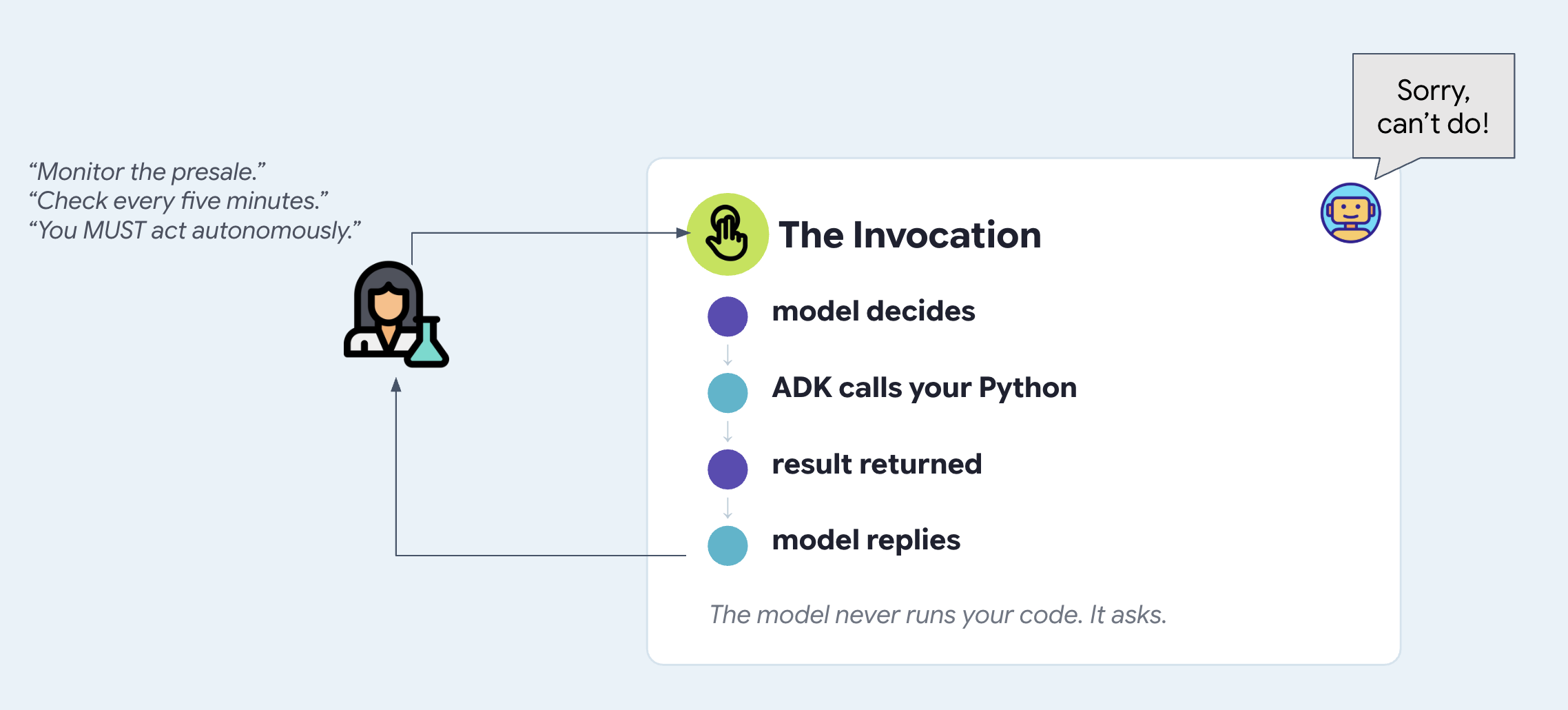
প্রম্পট হলো এমন একটি টেক্সট যা কোনো কল এলে এআই মডেলে পাঠানো হয়। এটি নিজে থেকে চলতে পারে না, নিজে থেকে জেগে উঠতে পারে না বা নতুন কোনো কল শুরু করতে পারে না।
If you tell an agent in its prompt to "check back in 10 minutes," nothing actually happens after the current turn ends. The model has no internal clock or loop. To make an agent autonomous, something outside the agent has to wake it up and call it.
রিগটি চালু করুন
আমরা ডেভেলপার টুলিং পরীক্ষা করার মাধ্যমে শুরু করব। adk web ADK ওয়েব UI চালু করে, যা ADK-এর সাথে আসা ডেভেলপমেন্ট ইন্টারফেস। এটি আপনাকে প্রথমে কোনো ফ্রন্টএন্ড না লিখেই আপনার তৈরি করা এজেন্টের সাথে যোগাযোগ করতে দেয় এবং এমন সব জিনিস দেখায় যা একটি চ্যাট উইন্ডো দেখাতে পারে না, যেমন প্রতিটি টুল কল এবং তার আর্গুমেন্ট, সেশন স্টেটের পরিবর্তন, এজেন্টের সেভ করা আর্টিফ্যাক্ট এবং এর ভেতরের র ইভেন্টগুলো। আপনি এটিকে প্রোডাকশনে এক্সপোজ করবেন না। শেখার সময় একটি চলমান এজেন্টকে দেখার জন্য এটিই সেরা মাধ্যম। ধাপ ৩-এ আপনি সেই ফ্রন্টএন্ডটি তৈরি করবেন যা আপনি আসলে এক্সপোজ করবেন এবং চূড়ান্ত ধাপে আপনি এটি ডিপ্লয় করবেন।
👉🔴 ভেন্যু প্যানেলে , 'রেসেট দ্য ভেন্যু' চাপুন। প্রতিটি ধাপ একই জগৎ থেকে শুরু হবে: ৮টি শো, সব আসন উপলব্ধ, ঘড়ি ১× এ সেট করা।
👉💻 টার্মিনাল ১ — এই ধাপের কোড লোড করুন এবং ADK ওয়েব UI চালু করুন :
cd ~/monstertix
. ./set_env.sh
./use-solution.sh 2 --force
adk web agent --port 8000 --allow_origins "*"
use-solution.sh একটি ধাপের সম্পন্ন হওয়া কোড agent/ ফোল্ডারে কপি করে, যেখানে আপনি কাজ করেন। প্রতিটি ধাপ এটি দিয়েই শুরু হয় এবং এটি কোন ফাইলগুলো পরিবর্তন করেছে তা প্রিন্ট করে, যাতে আপনি বুঝতে পারেন কী পড়তে হবে।
আপনি যা দিয়ে শুরু করেন:
ফাইল | এটা কি |
| এজেন্ট — একটি নাম, একটি মডেল, একটি নির্দেশনা, সরঞ্জামসমূহের একটি তালিকা |
| |
| ভেন্যুর জন্য একটি HTTP ক্লায়েন্ট। আকর্ষণীয় কিছু নেই। |
| কোন মডেলটি ব্যবহার করতে হবে, এবং আপনার পরিচয়পত্রগুলো কাজ করছে কিনা তা যাচাই করা। |
. ./set_env.sh ভার্চুয়ালএনভ সক্রিয় করে, আপনার প্রজেক্ট ও মডেল লোড করে এবং $WORKSHOP অর্থাৎ ~/monstertix এর অ্যাবসোলিউট পাথ—এক্সপোর্ট করে। আপনার খোলা প্রতিটি টার্মিনালে এটি চালান। এটি যা সেট করেছে তা প্রিন্ট করে:
  folder   /home/you/monstertix
  project  your project id
  model    gemini-2.5-flash (We'll avoid using 3.x for now to avoid high usage demands)
  venue    https://venue-yourname-xxxx.run.app
👉 ব্রাউজারের প্রথম ট্যাবগুলো খুলুন :
কোথায় | এটা কি |
ADK ওয়েব UI | |
এর সাথে কথা বলুন
👉✨ ADK ওয়েব UI- তে টাইপ করুন:
I want to see The Midnight Signal. I'm in Amsterdam, going with Sam, budget around $200 each.
It searches the tour, reads seat maps, and reasons about your budget and your company. This is a genuinely capable assistant. However, when the presale opens at 10:00, the agent does not execute automatically because no process or background trigger is running.
এইমাত্র যা ঘটল তা পড়ুন।
স্ক্রিনের মাঝের অংশটি শুধু একটি চ্যাট লগ নয়। টার্নের প্রতিটি ধাপ সংখ্যা দিয়ে চিহ্নিত করা থাকে, টুল কলগুলোও এর অন্তর্ভুক্ত:
  ▸ I want to see The Midnight Signal. I'm in Amsterdam...   ← user input
  ⚡ search_events({"city": "Amsterdam"})                     ← tool execution
  ✓ search_events                                            ← venue API response
    Two Amsterdam shows: Tuesday 10 Nov and Saturday 14 ...   ← model response
👉 ⚡ চিহ্নযুক্ত সারিতে ক্লিক করুন। বাম দিকের প্যানেলে মডেল দ্বারা নির্বাচিত আর্গুমেন্টগুলো দেখা যাবে। ফেরত আসা JSON-এর জন্য এর নিচে থাকা ✓ চিহ্নে ক্লিক করুন।
মডেলের ট্রেনিং ডেটা বা প্রম্পটে ট্যুরের তথ্যটি উপস্থিত নেই। এজেন্টটি ` search_events টুলটি এক্সিকিউট করার মাধ্যমে এই ডেটা সংগ্রহ করেছে, যা ভেন্যু এপিআই-কে কোয়েরি করেছিল।
আপনি এইমাত্র যে কোডটি চালিয়েছেন সেটি খুলুন।
আপনি এর কার্যকারিতা এবং ট্রেস দেখেছেন। এবার কোডটি সরাসরি দেখুন।
agent/concert/
├── agent.py     the agent — about twenty lines
├── tools.py     what it can do
├── venue.py     an httpx wrapper, nothing interesting
└── config.py    which model, and a credentials check
👉💻 agent/concert/agent.py ফাইলটি খুলুন। সম্পূর্ণ এজেন্টটি এই ফাইলের একদম নিচে রয়েছে:
INSTRUCTION = """
You help someone plan a trip to see a band on tour.

You can search tour dates and read seat maps. Be concrete: name the show, the
city, the section, and the price...
"""

root_agent = Agent(
    name="concert",
    model=MODEL,
    instruction=INSTRUCTION,
    tools=[search_events, get_seatmap],
)
A name, a model, some description of how agent should behave, and a list of Python functions. That is all an Agent is. adk web found it because the file is called agent.py and the variable is called root_agent .
👉💻 এখন agent/concert/tools.py :
def search_events(city: str = "", weekday: str = "") -> dict:
    """List tour dates. Call with no arguments to see the whole tour.

    This venue sells one artist and one tour, so there is nothing to search by
    name — never ask the user which artist they mean.

    Args:
        city: Optional. Filter to one city, e.g. "Amsterdam".
        weekday: Optional. Filter to one weekday, e.g. "Saturday".
    """
    return venue.get("/events", city=city, weekday=weekday)
An ordinary function. No decorator, no registration, no schema to write. ADK reads the signature and the docstring and builds the tool definition the model sees, which is why that docstring is load-bearing, and why deleting one argument changed the model's behaviour.
The model never runs your code. When you saw search_events({"city": "Amsterdam"}) , the model was asking for that call. ADK ran the function, handed the result back, and the model wrote a sentence about it. The loop is:
👉 একদম বাম প্রান্তের আইকনগুলো প্যানেলে কী দেখানো হবে তা পরিবর্তন করে। দ্বিতীয়টি হলো এজেন্ট গ্রাফ — এটি ব্যবহার করে দেখুন, আপনি দুটি টুল দেখতে পাবেন।

তাই একে ঘুমাতে বারণ করো।
এটা ঠিক করতে আপনি কী করবেন? বেশিরভাগ মানুষ প্রথমে যা করে, সেটাই চেষ্টা করুন। ধাপ ১-এর INSTRUCTION , অর্থাৎ মডেলকে প্রতিবার দেওয়া গদ্যটি স্মরণ করুন এবং সেটি আবার লিখুন।
👉💻 agent/concert/agent.py ফাইলটি খুলুন। INSTRUCTION নিচে আরেকটি নির্দেশনা দেওয়া আছে, যা আপনার জন্য আগে থেকেই লেখা রয়েছে। আপনি চাইলে এটি নিজে পরিবর্তন করে দেখতে পারেন:
PROACTIVE_INSTRUCTION = """
You are a proactive ticket-buying assistant.

Monitor the presale for The Midnight Signal. The moment it opens at 10:00 on
Tuesday, buy two tickets for the Amsterdam Saturday show — do not wait to be
asked, and do not wait for me to say anything. Act on your own.

Keep checking until the tickets are bought.
"""
# agent/concert/agent.py
root_agent = Agent(
    name="concert",
    model=MODEL,
    instruction=PROACTIVE_INSTRUCTION,     # ← was INSTRUCTION
    tools=[search_events, get_seatmap],
)
👉💻 টার্মিনাল ১- এ, রিস্টার্ট করুন:
cd ~/monstertix
adk web agent --port 8000 --allow_origins "*"
👉✨ পরিকল্পনাটি তাকে বলুন, ঠিক যেভাবে আপনি একজন ব্যক্তিকে বলবেন:
I want to see The Midnight Signal in Amsterdam with Sam. The presale opens at 10:00 on Tuesday. Grab us two tickets the moment it opens.
এটি রাজি হবে, এবং শুনে মনে হবে যেন এটি মন থেকেই বলছে।
👉 এখন অপেক্ষা করুন। আর কিছু টাইপ করবেন না। প্যানেলটির দিকে লক্ষ্য রাখুন।
এক মিনিট অপেক্ষা করুন। কিছুই হবে না!
কেন ওই প্রম্পটটি কখনোই কাজ করত না
নতুন দৃষ্টিতে আবার পড়ুন। পর্যবেক্ষণ করুন। যে মুহূর্তে এটি খোলে। দেখতে থাকুন। ওগুলোর প্রত্যেকটিই সময়ের সাথে সাথে ঘটে চলা কোনো এক ঘটনাকে বর্ণনা করে।
এখন মনে করে দেখুন instruction= আসলে কী। এটি একটি স্ট্রিং, যা কেউ মেসেজ পাঠানোর মুহূর্তে রিকোয়েস্টের অংশ হিসেবে মডেলকে দেওয়া হয়। দুই টার্নের মাঝে কেউ এটি পড়ে না।
# agent/concert/agent.py
root_agent = Agent(
    instruction=PROACTIVE_INSTRUCTION,   # read on invocation
    ...                                  # ...and there was no invocation
)
একটি নির্দেশনা যে ফাংশনের ভিতরে লেখা হয়, সেই ফাংশনকে আহ্বান করতে পারে না।
ব্যর্থ হওয়া প্রম্পট বৈচিত্র্য
প্রম্পট নির্দেশাবলীর মাধ্যমে স্বায়ত্তশাসিত নির্বাহ কার্যকর করার প্রচেষ্টা, তার শব্দচয়ন নির্বিশেষে, ব্যর্থ হয়। সাধারণ প্রম্পট প্রচেষ্টাগুলো হলো— যেমন:
- মঙ্গলবার সকাল ১০টার জন্য একটি টাইমার সেট করুন এবং তখন টিকিটগুলো কিনে ফেলুন।
- প্রতি পাঁচ মিনিট পর পর পরীক্ষা করে দেখুন প্রি-সেল শুরু হয়েছে কিনা।
- ব্যবহারকারীর নির্দেশের জন্য অপেক্ষা না করে স্বতঃস্ফূর্তভাবে কাজ করুন।
সবগুলো একই কারণে ব্যর্থ হয়: কোনো ইনভোকেশন ঘটলেই প্রম্পটগুলো শুধুমাত্র পঠনযোগ্য থাকে। কোনো বাহ্যিক কলার না থাকলে, পালাবদলের মধ্যবর্তী সময়ে কোনো কোড কার্যকর হয় না।
৩. ঘটনা-চালিত সুপ্তাবস্থা
এজেন্টরা চিরকাল জেগে থাকে না।
কোনো প্রসেসকে ক্রমাগত পোলিং করতে চালু রাখলে তা মেমোরি নষ্ট করে, অর্থ খরচ করে এবং আপনার ল্যাপটপ স্লিপ মোডে গেলে বা রিস্টার্ট হলে ক্র্যাশ করে।
Instead of keeping an agent running non-stop while it waits, a long-running agent should go completely dormant. An external event (such as a timer, a webhook, or a message) wakes the agent up only when there is actual work to do.
👉🔴 ভেন্যু প্যানেলে , 'রেসেট দ্য ভেন্যু' চাপুন। প্রতিটি ধাপ একই জগৎ থেকে শুরু হবে: ৮টি শো, সব আসন উপলব্ধ, ঘড়ি ১× এ সেট করা।
👉💻 এই ধাপের কোডটি লোড করুন:
cd ~/monstertix
. ./set_env.sh
./use-solution.sh 3 --force
লক্ষ্য করুন এটি কী ইনস্টল করেছে: monstertix/ , যা সার্ভার, ঘড়ি এবং আরও একটি জিনিস ধারণ করে আছে যা আপনি এখনও দেখেননি। পরীক্ষা করে দেখুন যে এটি agent/ কে অক্ষত রেখেছে, কারণ এই ধাপে এজেন্টের কোনো পরিবর্তন হয় না। এই বিষয়টি মনে রাখুন, এটাই মূল বিষয়।
ফাইল | এটা কি |
| নতুন। একটি ওয়েব সার্ভার যার পেছনে একটি রানার রয়েছে। |
| নতুন। এমন কিছু যা সময় জানে এবং সার্ভারকে কল করে। |
এটির দুটি অংশ রয়েছে, এবং ক্লাউড পর্যন্ত যাওয়ার পুরো পথে সেগুলো দুটি ফাইলে থাকে: 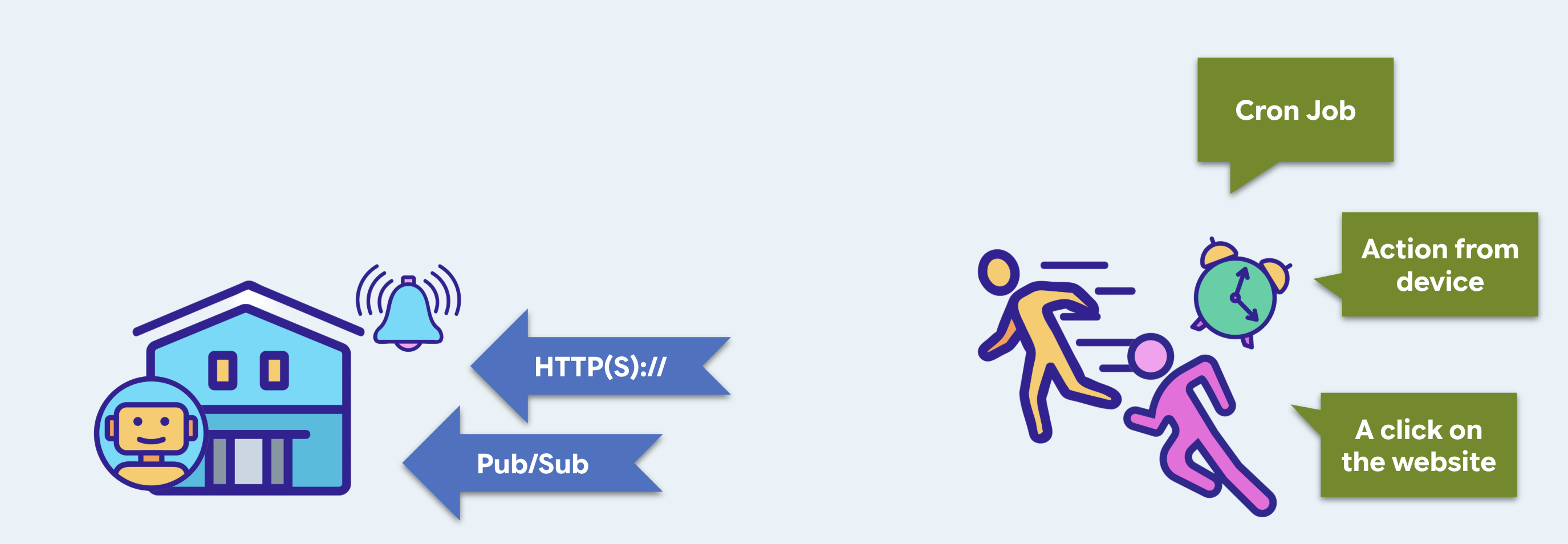
ধাপ ১০-এ হয়ে যায় | |||
ট্রিগার | এমন একটি এন্ডপয়েন্ট যা এজেন্ট চালাতে পারে | ক্লাউড রান | |
ট্রিগার | ঘড়ি আছে এমন কিছু, যেটা এটাকে ডাকে | ক্লাউড শিডিউলার | |
ট্রিগার — আপনার নিজের ওয়েব সার্ভার
হ্যাঁ, একটি ওয়েব সার্ভার। কোনো কিছু কল করার আগে সেটিকে অবশ্যই লিসেনিং অবস্থায় থাকতে হবে। আগের ধাপগুলোর ADK ওয়েব UI হলো একটি ডেভেলপমেন্ট ইন্টারফেস, যা একটি এজেন্ট চালাতে সক্ষম।
👉💻 monstertix/server.py খুলুন :
from google.adk.runners import Runner
from google.adk.sessions import InMemorySessionService
from concert.agent import root_agent

session_service = InMemorySessionService()
runner = Runner(
    agent=root_agent,
    app_name="concert",
    session_service=session_service,
)

@app.post("/wake")
async def wake(payload: dict = Body(default={})):
    session_id = f"wake-{uuid.uuid4().hex[:8]}"          # brand new, every time
    await session_service.create_session(...)

    async for event in runner.run_async(
        user_id=USER_ID, session_id=session_id,
        new_message=types.Content(role="user",
                                  parts=[types.Part(text=payload["message"])]),
    ):
        ...
An Agent does not run itself. It is a description: a name, a model, an instruction, a list of tools. Something has to take an incoming message, find the right session, hand the model the conversation so far, execute whichever tools it asks for, feed the results back, loop until it stops calling tools, and write every step of that to storage. That something is the Runner .
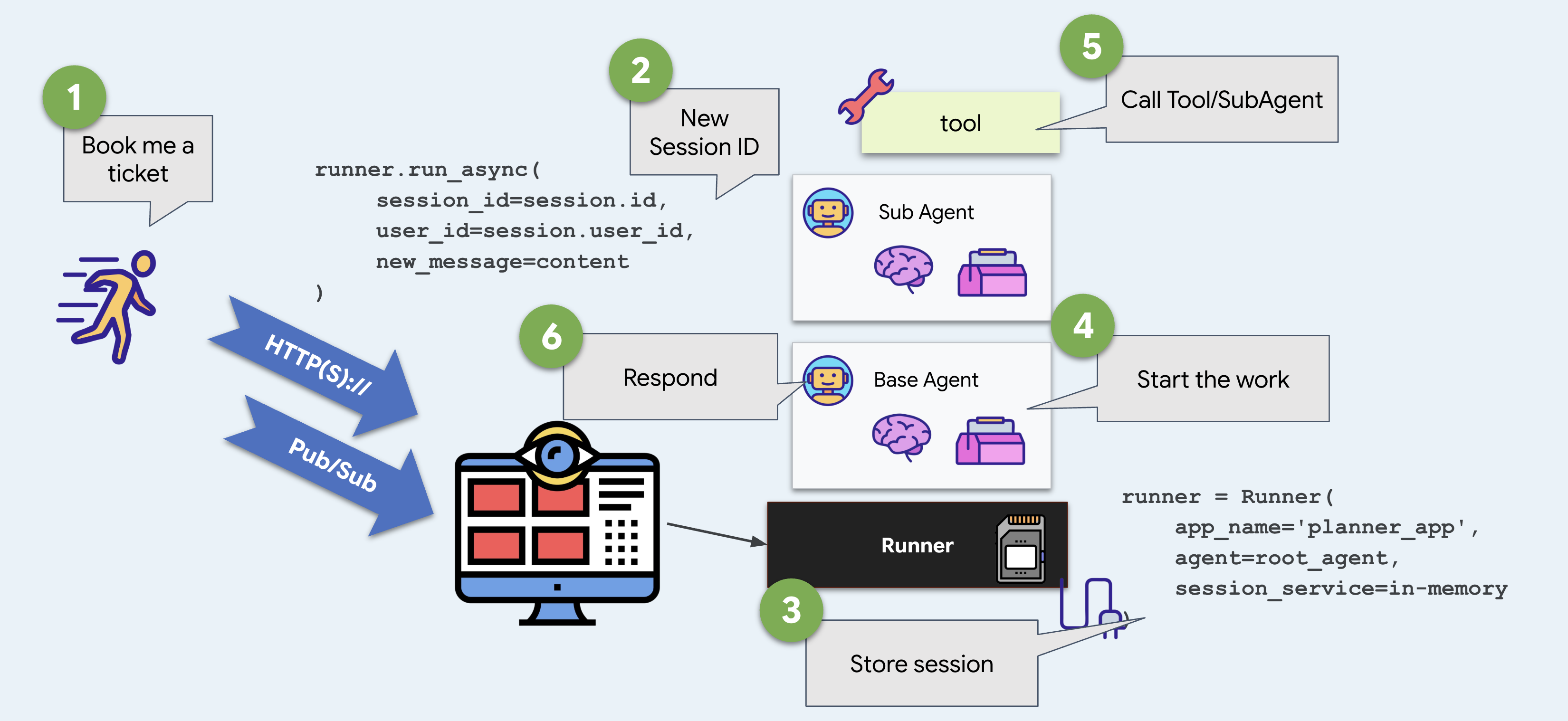
ADK ওয়েব UI-তে আপনার জন্য একটি ডিফল্ট UI দেওয়া থাকে। এখানে আপনি এটি নিজে তৈরি করেন, এবং ADK ওয়েব UI ও ডেপ্লয় করা যায় এমন কিছুর মধ্যে এটাই হলো সম্পূর্ণ পার্থক্য।
👉💻 টার্মিনাল ২ — এটি চালু করুন:
দৌড়বিদকে শুরু করুন,
cd ~/monstertix
. ./set_env.sh
python -m monstertix.server
[server] agent concert · gemini-x-flash
[server] listening on http://xxxx_URL/wake
[server] nothing will happen until something calls it. Ctrl-C to stop.
শেষ লাইনটি পড়ুন। ট্রিগারটি চলছে এবং এজেন্টটি লোড হয়েছে, কিন্তু কিছুই ঘটছে না। দুটি ধারণাকে আলাদা করুন: কলযোগ্য হওয়া এবং কল করা হওয়া।
আর যেহেতু আমরা এখানে আছি, একটা সামনের দরজাও।
Despite adk web is a great development tool, it should not be something you ship. You should not enable it when deploying to production, and you would not point a customer at it if it did. So the same server also serves a page.
👉 ব্রাউজারে http://127.0.0.1:8090 খুলুন — এটি একই ঠিকানা।
মনস্টারটিক্স-এর সাথে পরিচিত হোন। একটি চ্যাট উইন্ডো, কোণায় একটি নাম, আর দুটি বাটন। এটি /wake এ পোস্ট করে এবং যা ফেরত আসে তা রেন্ডার করে, এবং যে কোনো এন্ডপয়েন্ট যা একইভাবে উত্তর দেয়, তার বিরুদ্ধে এটি অপরিবর্তিতভাবে কাজ করবে।
পৃষ্ঠায় | এর নিচে যা আছে |
কথোপকথন | |
নতুন সেশন | একটি নতুন সেশন আইডি — নতুন কথোপকথন, এবং পরে, একটি নতুন বাজেট। |
মেমরি রিসেট করুন | প্রতিটি সেশন এবং মেমরি ফাইল মুছে ফেলে। এটি প্রথমে অনুমতি চায় এবং সেই স্টেটটি ঠিক কোথায় থাকে তা আপনাকে দেখিয়ে দেয়। |
👉✨ ফোন করে কিছু বলুন — What Amsterdam dates are there? — এবং টার্মিনাল ২-এর দিকে নজর রাখুন। একই Runner , একই এজেন্ট, একই লগ লাইন। শুধু কলার বদলেছে।
ট্রিগারার — এমন কিছু যা সময় জানে
👉💻 monstertix/clock.py ফাইলটি খুলুন। কোডটি দেখুন।
time.sleep(args.delay)                                    # wait
while True:
    client.post(f"{TRIGGER_URL}/wake",                    # knock
                json={"message": args.message})
    if not args.every:
        return                                            # once, unless told otherwise
    time.sleep(args.every)                                # or again, forever
এটি একটি খুব সহজ প্রক্রিয়া: স্লিপ, POST, এবং সম্ভবত পুনরাবৃত্তি। আপনার ব্যবহার করা প্রতিটি শিডিউলার একই কাজ করে, সাথে থাকে রিট্রাই, টাইমজোন, এবং রিস্টার্টের পরেও টিকে থাকার নিশ্চয়তা।
👉💻 টার্মিনাল ৩ — এখন থেকে ১০ সেকেন্ড পর একবার গুলি করুন:
cd ~/monstertix
. ./set_env.sh
python -m monstertix.clock --in 10
[clock] target   http://127.0.0.1:8090/wake
[clock] first fire in 60s, once only
[clock] go and watch the other terminal — do not touch the keyboard
👉 এবার টাইপ করা বন্ধ করুন। হাত নামিয়ে রাখুন। টার্মিনাল ২-এর দিকে নজর রাখুন।
এক মিনিট পর, কিবোর্ডে কেউ না থাকা অবস্থায়:
[clock]  firing → POST /wake
[server] woken · session wake-23930983
[server]   called search_events
[server]   called purchase
[server]   said   I've purchased 2 tickets for The Midnight Signal in
                  Amsterdam on Saturday, section A. Your total is 420.
[clock]  done. the agent ran and you were not involved.
এটাই হলো ধাপ ২-এর উত্তর। এজেন্টের বাইরের কোনো কিছু একে কল করেছিল, এবং সেই জিনিসটি ছিল একটি sleep ও একটি HTTP রিকোয়েস্ট।
👉💻 দু-একবার দেখার পর Ctrl-C । যদি এটি আবার দেখতে চান, তাহলে প্রথমে --every 30 ব্যবহার করুন।
এখন পড়ুন সেখানে কী বলা হয়েছে।
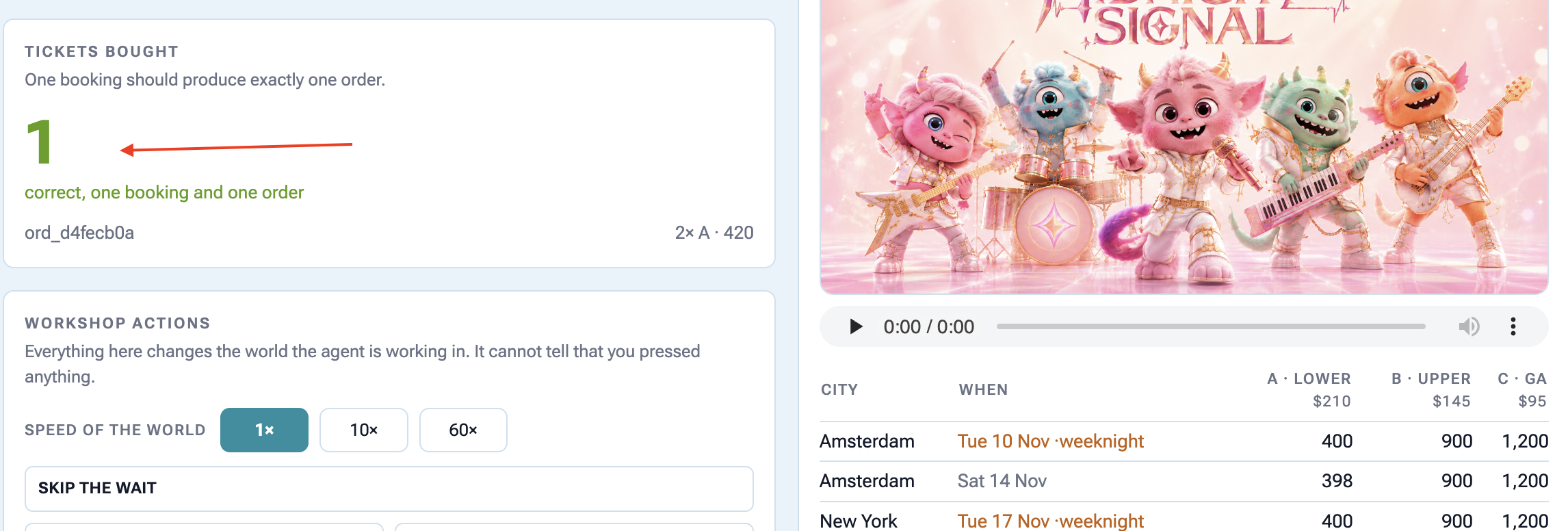
আমি আমস্টারডামে ‘দ্য মিডনাইট সিগন্যাল’-এর ‘এ’ সেকশনের দুটি টিকিট ৪২০ ডলারে কিনেছি।
👉🔴 ভেন্যু প্যানেলটি দেখুন, সেখানেই দেখতে পাবেন টিকিটটি কেনা হয়ে গেছে।
তাহলে এখনও সমস্যাটা কী?
It bought something . Look at what it had to guess. It picked Amsterdam and section A because they were the first thing it found, and you told the agent to buy it directly and it has no idea that Sam cannot do weeknights. An agent that acts on guesses at 3am is worse than one that does nothing .
জেগে ওঠাটা হলো সহজ অর্ধেক। যে সত্তা শূন্য হাতে জেগে ওঠে—যার কোনো অতীত নেই, কোনো পছন্দ নেই, শোনার মতো কেউ নেই—তাকে জাগিয়ে তোলার কোনো মূল্যই থাকে না।
৪. প্রেক্ষাপটের জীবনকাল পরিচালনা
তথ্য বিভিন্ন সময়ে বিভিন্ন স্থানে বাস করে।
একজন এজেন্ট বিভিন্ন স্থানে তথ্য সংরক্ষণ করে: চ্যাট কথোপকথনে, সেশন স্টেটে, ফাইলে (আর্টিফ্যাক্ট), অথবা দীর্ঘমেয়াদী ব্যবহারকারী মেমরিতে। প্রতিটি স্থান ভিন্ন ভিন্ন সময় ধরে স্থায়ী হয়।
যদি আপনি ভুল জায়গায় তথ্য রাখেন:
- খুব তাড়াতাড়ি অদৃশ্য হয়ে যায় : চ্যাট শেষ হয়ে গেলে গুরুত্বপূর্ণ বিবরণ মুছে যায়।
- এটি অনেকদিন ধরে থেকে যায় : অস্থায়ী তথ্য দীর্ঘস্থায়ী স্মৃতিকে কলুষিত করে এবং ভবিষ্যতের কথোপকথনকে বিভ্রান্ত করে।
আপনাকে প্রতিটি তথ্যকে সঠিক সংরক্ষণ স্থান এবং মেয়াদের সাথে মেলাতে হবে।
কোডটি লোড করুন
👉🔴 ভেন্যু প্যানেলে , ‘RESET THE VENUE’ চাপুন।
👉💻 টার্মিনাল ১- এ, চালান:
cd ~/monstertix
. ./set_env.sh
./use-solution.sh 4 --force
শেষ ধাপের পর কী পরিবর্তন হয়েছে:
ফাইল | কী পরিবর্তন হয়েছে |
| |
| নতুন। আমাদের নিজস্ব স্মৃতি ভান্ডার |
| তালিকায় আরও তিনটি টুল রয়েছে এবং নির্দেশনায় এজেন্টকে সেগুলো ব্যবহার করতে বলা হয়েছে। |
👉💻 টার্মিনাল ১- এ এজেন্টটি পুনরায় চালু করুন:
cd ~/monstertix
. ./set_env.sh
adk web agent --port 8000 --allow_origins "*" \
  --session_service_uri="sqlite+aiosqlite:///$WORKSHOP/sessions.db" \
  --artifact_service_uri="file://$WORKSHOP/artifacts"
দুটি পতাকা যা আপনি আগে ব্যবহার করেননি:
পতাকা | এটা কি |
| ADK প্রতিটি বার্তা, টুল কল এবং অবস্থার পরিবর্তনকে এতে সারি হিসেবে লিখে রাখে (SQLite ডাটাবেস)। |
| এজেন্ট যে ফাইলগুলো সংরক্ষণ করে। (ফাইলসমূহ) |
এগুলো ছাড়া, ADK সবকিছু মেমরিতে রেখে দেয় এবং আপনি প্রসেসটি বন্ধ করলে তা ফেলে দেয়। এই দুটি সেটিংই এটিকে স্থায়ী করে তোলে।
sessions.db ডেটাবেসটিতে two-days-ago একটি পুরোনো কথোপকথন রয়েছে, যেখানে ১৩টি ইভেন্ট রেকর্ড করা আছে:
you    We're thinking about seeing The Midnight Signal. Me, Sam, and maybe Priya.
you    Sam can't do weeknights though, bailed on every single one.
you    Priya's out, she's away that weekend. Just me and Sam.
agent  Two it is. Still Saturday the 14th, still Amsterdam.
you    You said the upper bowl at Ziggo was bad last time?
পূর্ববর্তী তিনটি বুকিংয়ের একটি মেমরি ফাইল , memory/userx.md , যেটি আপনি একটি এডিটরে খুলতে পারেন:
- Sam bails on weeknights. Every weeknight show we booked, Sam cancelled.
- Hates the upper bowl at Ziggo Dome, "couldn't see a thing" from section B.
- Comfortable spend is around $200 per ticket. $250 is the hard ceiling.
- Always books two seats, always together.
এই কারণেই সপ্তাহের রাতের অ্যাম্বার সারিগুলো গুরুত্বপূর্ণ। সপ্তাহের রাতের শো-তে প্রতি সিটের দাম ১০ ডলার কম থাকে, আরও ভালো সিট খালি থাকে এবং এটি তালিকার শীর্ষে থাকে, আর এই ব্যক্তির জন্য এটি একটি ভুল সিদ্ধান্ত। এজেন্ট শুধুমাত্র শেষ বুকিংয়ের পরে তৈরি করা একটি ফাইলের মাধ্যমেই এটি জানতে পারে। সেই তথ্যটি টিকে থাকবে কিনা, তা ৪ এবং ৫ নম্বর ধাপের উপর নির্ভর করে।
আমরা যে তিনটি সরঞ্জাম যোগ করেছি
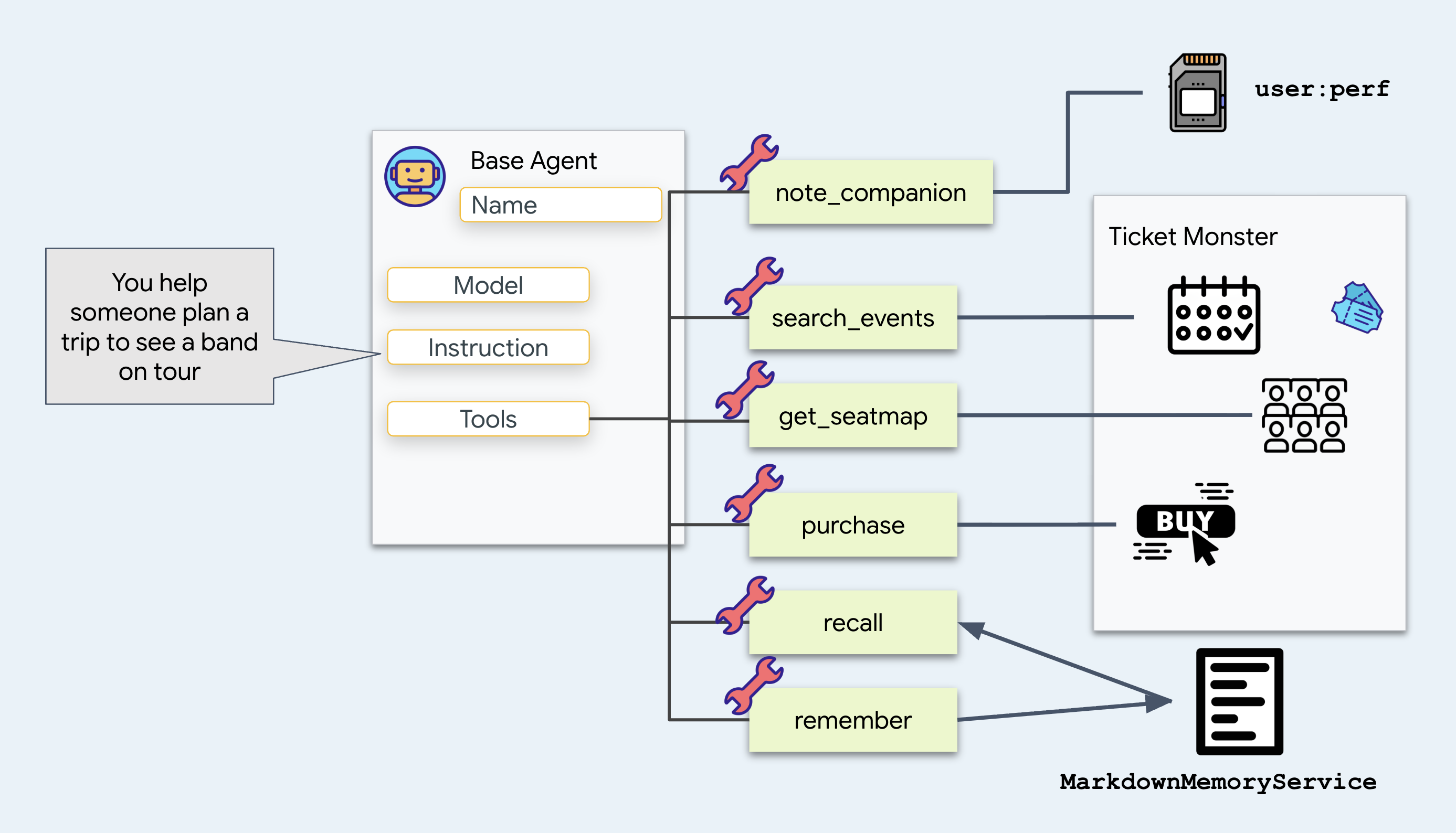
note_companion রেকর্ড করে কারা আসছে এবং কী তাদের সীমাবদ্ধ করছে:
# agent/concert/tools.py
def note_companion(name: str, constraint: str, tool_context: ToolContext) -> dict:
    prefs = dict(tool_context.state.get("user:prefs", {}))
    prefs[name] = constraint
    tool_context.state["user:prefs"] = prefs
    return {"companions": prefs}
এটা যোগ করুন কারণ "স্যাম সপ্তাহের কাজের দিনগুলোতে আসতে পারে না" কথাটা পরের সপ্তাহেও সত্যি থাকতে হবে। এটা কার্যকর করার জন্য user:prefs এ এটি লিখুন, এবং দেখুন নামের user: অংশটি কীভাবে তার কাজ করে। নিচে এ বিষয়ে আবার ফিরে আসুন।
recall
এবং
memory/userx.md একটি টেক্সট ফাইল পড়া এবং লেখার remember । এই বিষয়গুলো এক মুহূর্তের জন্য ধরে রাখুন।
👉 এবার সেই দুটি জায়গা দেখুন যেখানে এজেন্ট তার কনটেক্সট সংরক্ষণ করে:
অবস্থান | এর মধ্যে যা আছে |
রাজ্য | এই সেশনের মেমরি, কী/ভ্যালু পেয়ার হিসেবে — আপনি ধাপ ৪-এ এখানেই অবস্থান করছেন। |
প্রত্নবস্তু | এজেন্ট যে ফাইলগুলো সংরক্ষণ করেছিল, সেগুলো কখনোই প্রম্পটে প্রবেশ করে না। |
দেখুন কী পরিবর্তন হয়েছে
get_seatmap
আগে এটি সম্পূর্ণ সিট ম্যাপ দেখাতো। এখন এটি সিট ম্যাপটি একটি ফাইলে সংরক্ষণ করে এবং একটি সংক্ষিপ্ত সারাংশ দেখায়:
# agent/concert/tools.py
async def get_seatmap(event_id: str, tool_context: ToolContext) -> dict:
    seatmap = venue.get(f"/events/{event_id}/seatmap")       # about 6 KB of JSON

    part = types.Part(inline_data=types.Blob(
        mime_type="application/json",
        data=json.dumps(seatmap, indent=2).encode()))
    await tool_context.save_artifact(f"seatmap_{event_id}.json", part)

    summary = {"event_id": ..., "sections": [...], "captured_at": ...}
    tool_context.state["temp:seatmap"] = summary
    return summary
এই পরিবর্তনটি কেন গুরুত্বপূর্ণ, তা এখানে বলা হলো।
প্রতিটি টুলের রিটার্ন পেলোড কথোপকথনের ইতিহাসে যুক্ত করা হয় এবং পরবর্তী প্রতিটি টার্নে মডেলে পুনরায় পাঠানো হয়। বড় আকারের JSON অবজেক্ট (যেমন একটি ৬ কিলোবাইট সিট ম্যাপ) ফেরত দিলে পরবর্তী প্রতিটি টার্নে টোকেন খরচ বেড়ে যায়।
এর পরিবর্তে এটি একটি ফাইলে সংরক্ষণ করুন এবং একটিমাত্র ফাইলের নাম ব্যবহার করুন। প্রয়োজনে এজেন্টকে load_artifact ব্যবহার করে বিস্তারিত তথ্য ফেরত চাইতে দিন, এবং ধরে নিন যে বেশিরভাগ সময়ই এর প্রয়োজন হবে না।
ফাইলটি যেখানে যায়: আর্টিফ্যাক্ট সার্ভিস
agent/concert/tools.py তে get_seatmap এর ভেতরের লাইনটি আবার দেখুন:
await tool_context.save_artifact(f"seatmap_{event_id}.json", part)
tool_context আসে ADK থেকে, যা এটিকে একটি আর্গুমেন্ট হিসেবে আপনার টুলে পাঠায়, এবং save_artifact হলো এর একটি মেথড। ঐ লাইনেই আপনার টুল ADK-কে বাইটগুলো হস্তান্তর করে।
এরপর ADK, যে আর্টিফ্যাক্ট সার্ভিসটি দিয়ে এটি চালু করা হয়েছিল, সেটি ব্যবহার করে সেগুলোকে লেখে। আপনি ফ্ল্যাগটির মাধ্যমে সেটি বেছে নিয়েছেন:
--artifact_service_uri="file://$WORKSHOP/artifacts"
ADK-তে এগুলো সংরক্ষণ করার জন্য তিনটি স্থান রয়েছে:
ইউআরআই | বাইটগুলো কোথায় যায় |
| র্যাম। প্রসেসটি বন্ধ করলে এটি চলে যায়। আপনি কোনো ফ্ল্যাগ পাস না করলে এটিই ডিফল্ট। |
| ডিস্কের একটি ফোল্ডার। আপনি এখন যা ব্যবহার করছেন |
| ক্লাউড স্টোরেজ। যা ডেপ্লয় করা এজেন্ট শেষ ধাপে ব্যবহার করে। |
👉💻 এখানে আমরা ফাইল বাছাই করি:
ls -R ~/monstertix/artifacts
আপনার ল্যাপটপ থেকে ক্লাউড স্টোরেজে ডেটা স্থানান্তর করতে, file:// কে gs:// তে পরিবর্তন করুন। (আমরা এটি ১০ নম্বর ধাপে দেখব)
আমাদের স্মৃতি ভান্ডার
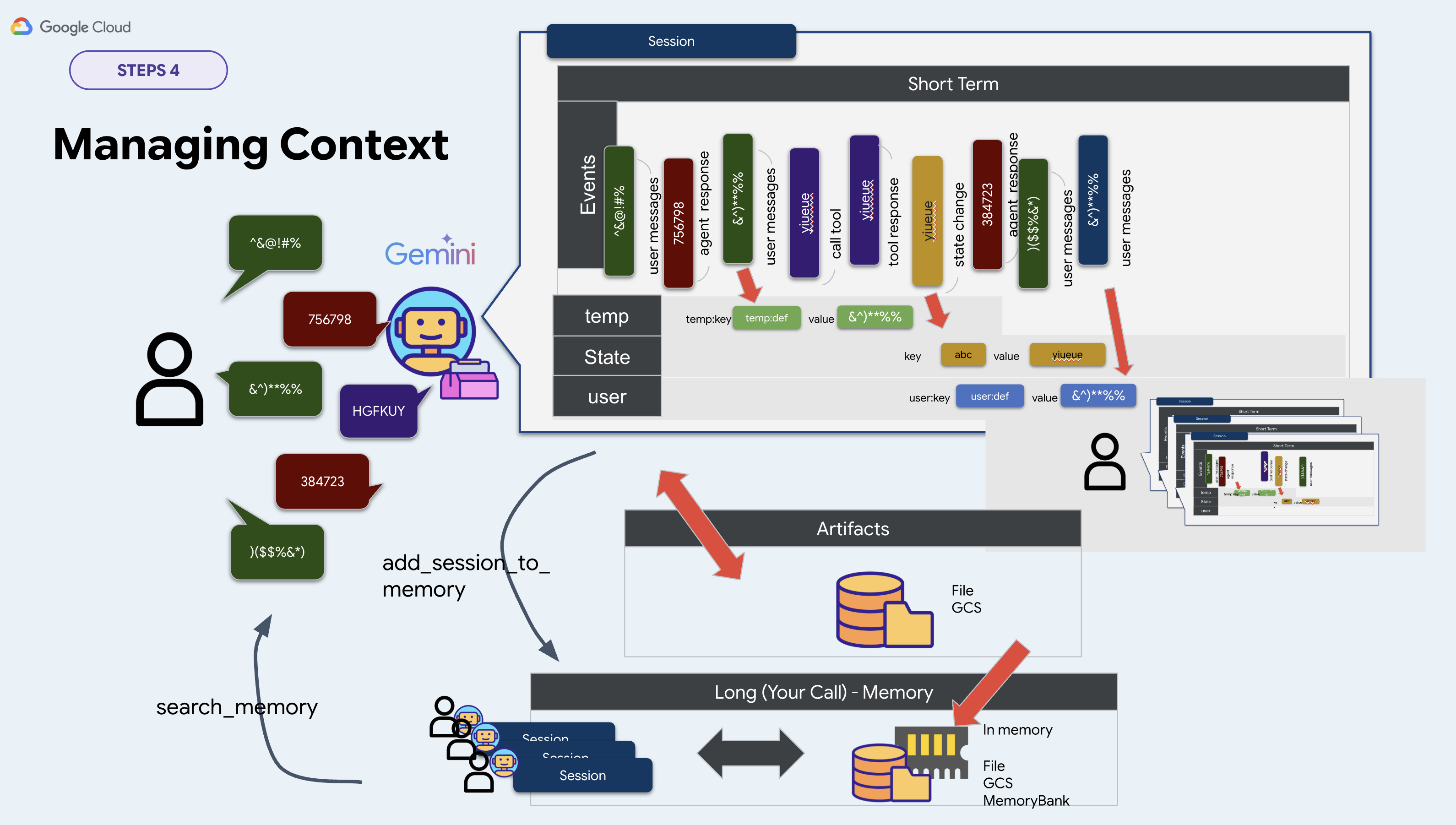
ADK আপনাকে দীর্ঘমেয়াদী স্মৃতির জন্য BaseMemoryService নামে একটি ইন্টারফেস দেয়। এর দুটি মেথড আছে:
# google.adk.memory.BaseMemoryService — ADK's interface, not your file
async def add_session_to_memory(session)                   # take a conversation in
async def search_memory(*, app_name, user_id, query)       # hand memories back
ADK এর তিনটি বাস্তবায়ন সরবরাহ করে:
শ্রেণী | ইউআরআই | এর যা প্রয়োজন |
| | কিছুই না। প্রক্রিয়াটি থামিয়ে দিলে সবকিছু হারিয়ে যায়। |
| | একটি ভার্টেক্স এআই র্যাগ কর্পাস |
| | একটি এজেন্ট ইঞ্জিন রিসোর্স |
এই ওয়ার্কশপের জন্য আমরা আমাদের নিজস্ব কোড লিখব। InMemoryMemoryService বাদ দিন, কারণ প্রসেসটি বন্ধ করলে এটি সবকিছু ভুলে যায়। অন্য দুটিকেও বাদ দিন, যেগুলোর জন্য ক্লাউড রিসোর্সের প্রয়োজন হয় এবং তা তৈরি করতে কয়েক মিনিট সময় লাগে। এর পরিবর্তে একটি ফাইল বেছে নিন, কারণ আপনি এটি আগে থেকেই প্রস্তুত করে রাখতে পারেন এবং একটি এডিটরে পড়তে পারেন। সুতরাং, আপনার নিজস্ব ইমপ্লিমেন্টেশন হিসেবে memory.py নিন, আমরা সবকিছু একটি Markdown ফাইলে সংরক্ষণ করছি:
class MarkdownMemoryService(BaseMemoryService):

    async def search_memory(self, *, app_name, user_id, query) -> SearchMemoryResponse:
        path = self._path(user_id)                      # memory/userx.md
        return SearchMemoryResponse(memories=[
            MemoryEntry(content=types.Content(
                role="user", parts=[types.Part(text=path.read_text())]))])
SearchMemoryResponse এবং MemoryEntry হলো ADK-এর টাইপ, এবং Memory Bank একই অবজেক্টগুলো রিটার্ন করে। একটির পেছনে একটি ম্যানেজড সার্ভিস রয়েছে। আমাদেরটির একটি ফাইল আছে।
একটি ফাইল বেছে নেওয়ার একটিই কারণ: আপনি সেটি খুলতে ও পড়তে পারবেন। আপনার এজেন্টের সম্পূর্ণ দীর্ঘমেয়াদী স্মৃতি হলো এক পৃষ্ঠা লেখা।
তাহলে আপনি এটা কোন দিকে তাক করবেন?
সংক্ষেপে বলতে গেলে, এই ওয়ার্কশপ বাস্তবায়নে তিনটি সার্ভিসের মধ্যে দুটি কমান্ড লাইন থেকে বেছে নেওয়া হয়। তৃতীয়টির জন্য আমরা পূর্বোক্ত কারণে নিজস্ব বাস্তবায়ন করেছি:
পরিষেবা | যেখানে আপনি এটি সেট করেছেন | এই কর্মশালা |
অধিবেশন | | |
নিদর্শন | | |
স্মৃতি | কমান্ড লাইনের কোথাও না | |
সুতরাং memory.py একটি এনভায়রনমেন্ট ভেরিয়েবল থেকে সার্ভিসটি নিজেই তৈরি করে:
# agent/concert/memory.py
MEMORY_DIR = pathlib.Path(os.environ.get("MEMORY_DIR", "./memory"))
MEMORY_USER = os.environ.get("MEMORY_USER", "userx")
memory_service = MarkdownMemoryService(MEMORY_DIR)
. ./set_env.sh উভয়ই এক্সপোর্ট করে। MEMORY_DIR নির্ধারণ করে এজেন্ট কোথা থেকে তার মেমরি পড়বে এবং MEMORY_USER ফাইলটি নির্ধারণ করে।
গিয়ে খুঁজে বের করো জিনিসগুলো কোথায় আছে
এখন আপনার কাছে চারটি জায়গা আছে যেখানে একটি তথ্য রাখা যায়। চারটিই দেখুন।
প্রথমে, আপনার নিজের সেশন
👉 উপরের বারে থাকা ‘নতুন সেশন’ (New Session) বোতামে ক্লিক করুন।
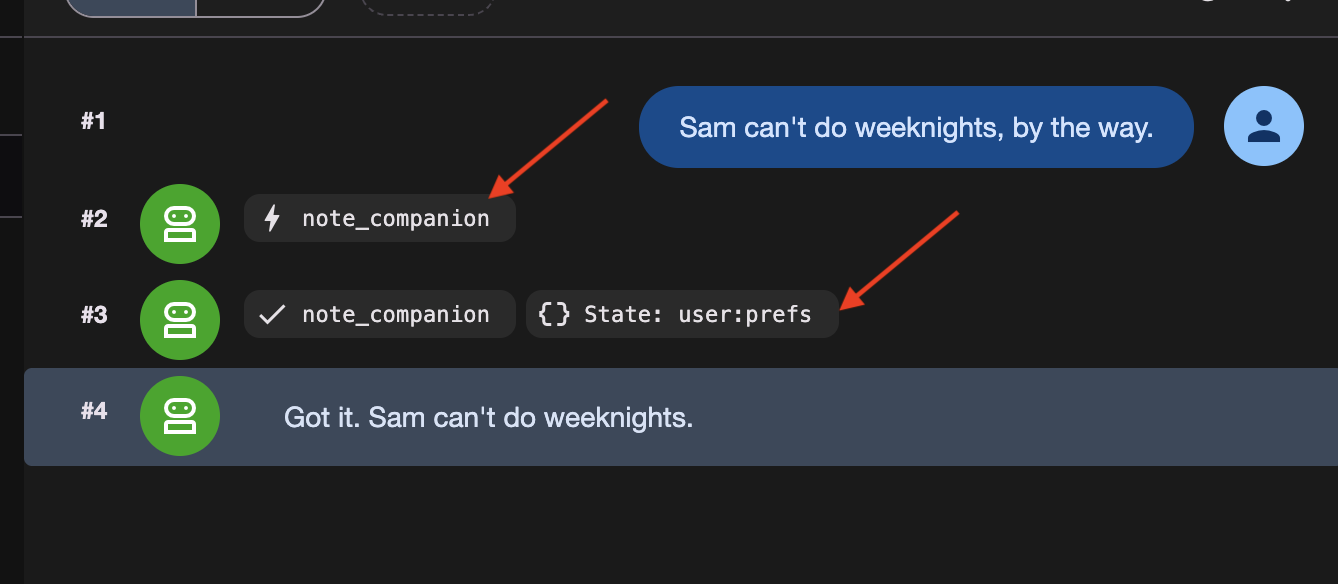
👉✨ পরপর তিনটি কথা বলুন:
Sam can't do weeknights, by the way.
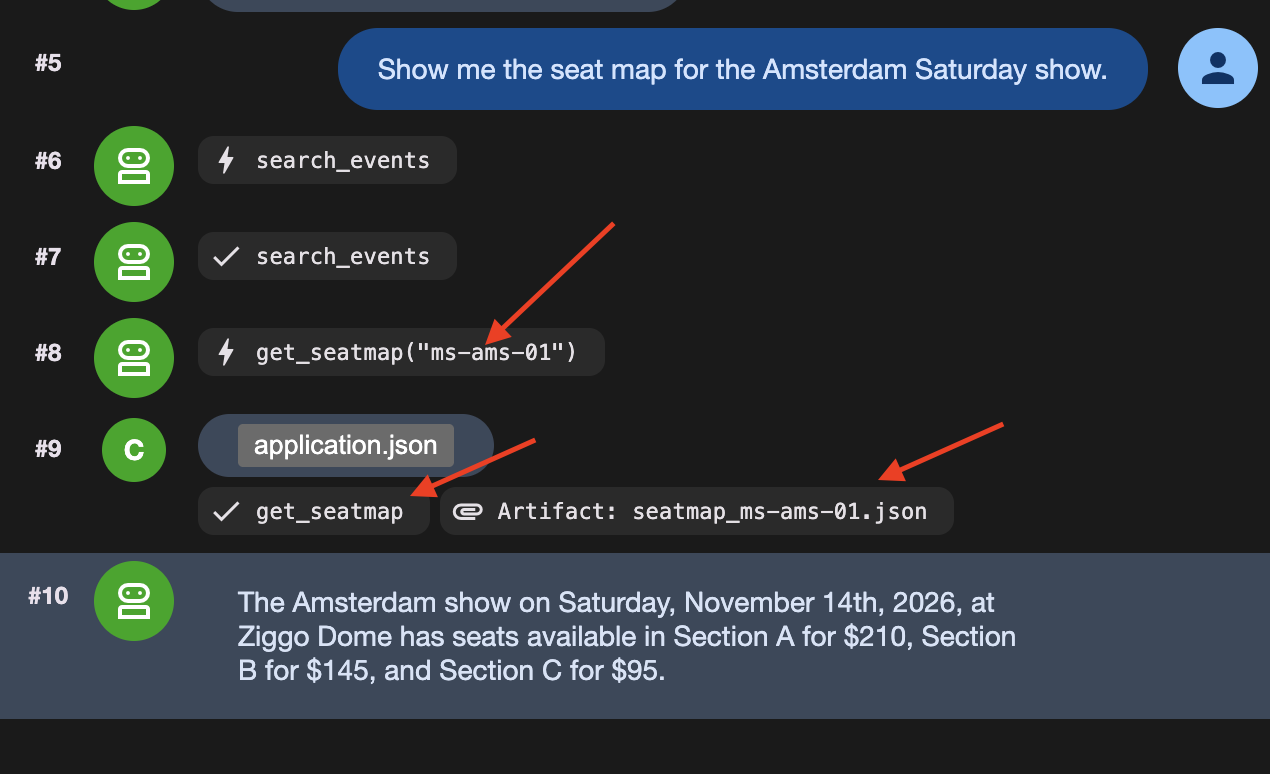
Show me the seat map for the Amsterdam Saturday show.
Actually, hold that thought — what else is on in Amsterdam?
ঐ তৃতীয় বার্তাটি গুরুত্বপূর্ণ। এটি সেই টার্নটি শেষ করে যা সিট ম্যাপটি পড়েছিল, এবং একটি টার্ন শেষ করার ফলেই temp: অদৃশ্য হয়ে যায়।
তিনটি জিনিস তিনটি ভিন্ন জায়গায় সংরক্ষণ করা হয়েছিল:
যা সংরক্ষণ করা হয়েছিল | কোন টুলটি এটি করেছে | যেখানে এটা গেল | |
১ | স্যাম সপ্তাহের কাজের দিনগুলোতে আসতে পারে না। | | |
২ | সম্পূর্ণ আসন বিন্যাস, ৬ কেবি | | প্রত্নবস্তু পরিষেবা |
৩ | এক লাইনের আসন বিন্যাসের সারাংশ | | কোথাও না |
👉 এবার দেখুন। adk web বাম দিকে স্টেট ট্যাব এবং আর্টিফ্যাক্টস ট্যাব রয়েছে।
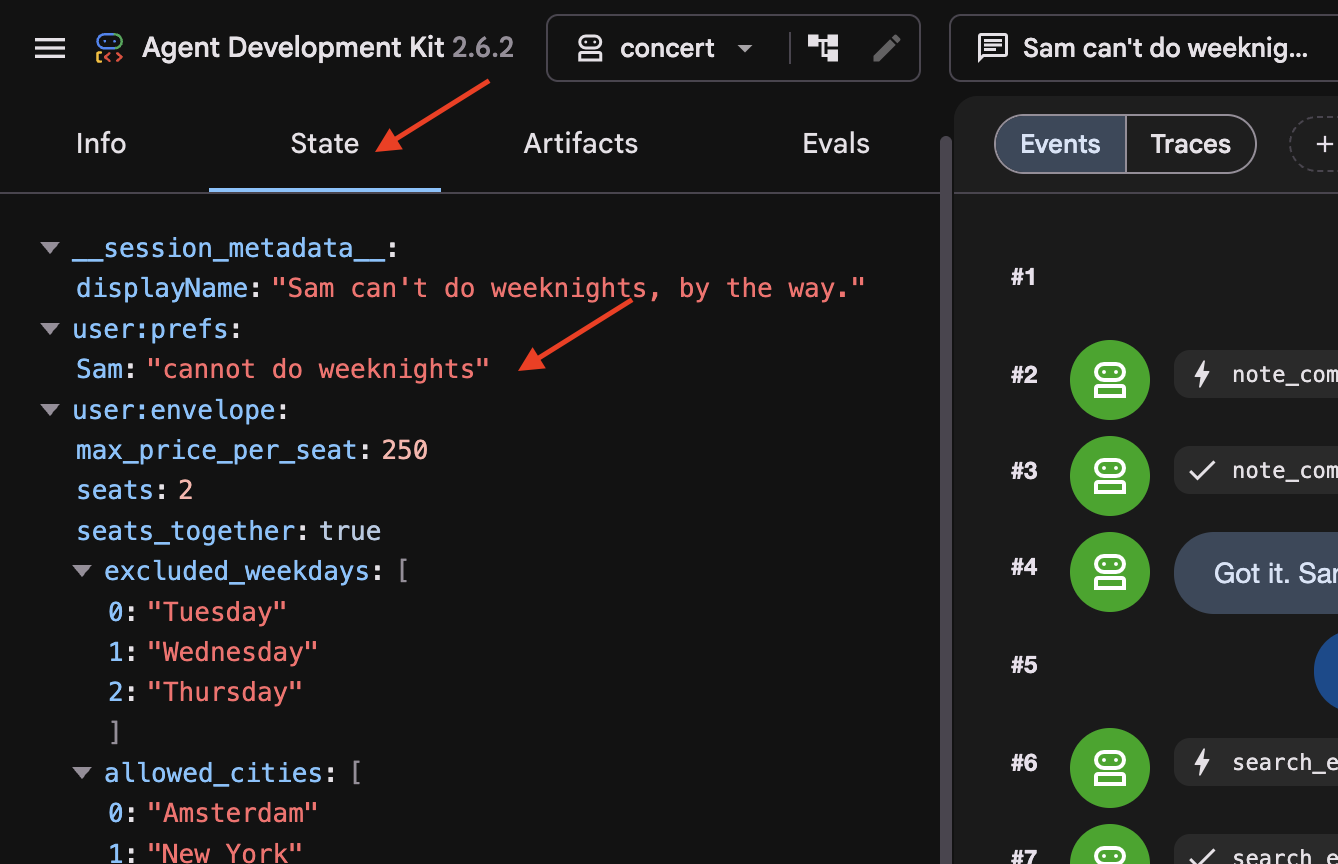
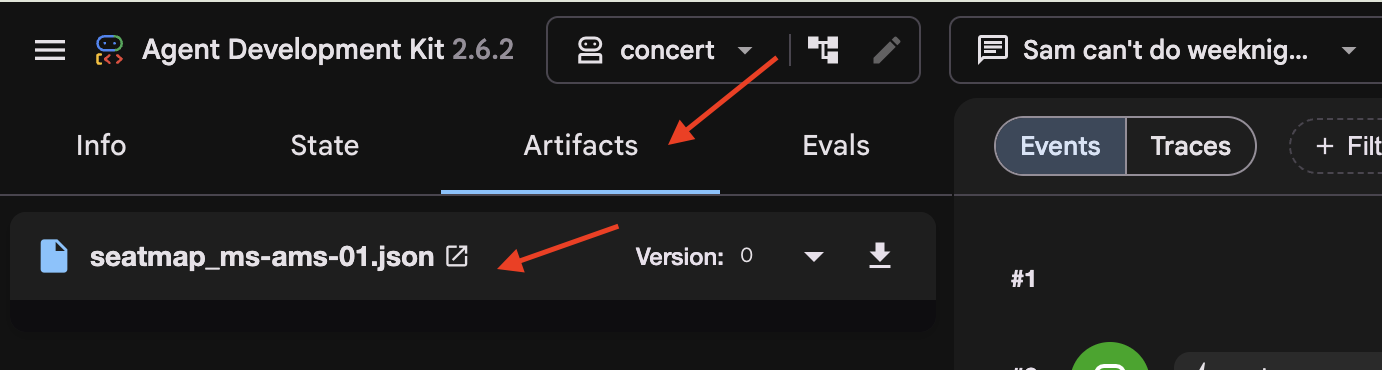
স্টেট ট্যাবে লক্ষ্য করুন যে temp:seatmap বাদ দেওয়া হয়েছে। temp: প্রিফিক্সযুক্ত স্টেট কীগুলো শুধুমাত্র সক্রিয় ইনভোকেশনের সময় বিদ্যমান থাকে এবং ডেটাবেসে সেশন স্টেট সংরক্ষণ করার আগে ADK দ্বারা স্বয়ংক্রিয়ভাবে মুছে ফেলা হয়।
তারপর পুরানো কথোপকথন
👉 উপরের সেশন ড্রপডাউন থেকে two-days-ago ফিরে যান।
এই সেশনে ডাটাবেসে আগে থেকেই কথোপকথনের ইতিহাস যুক্ত থাকে।
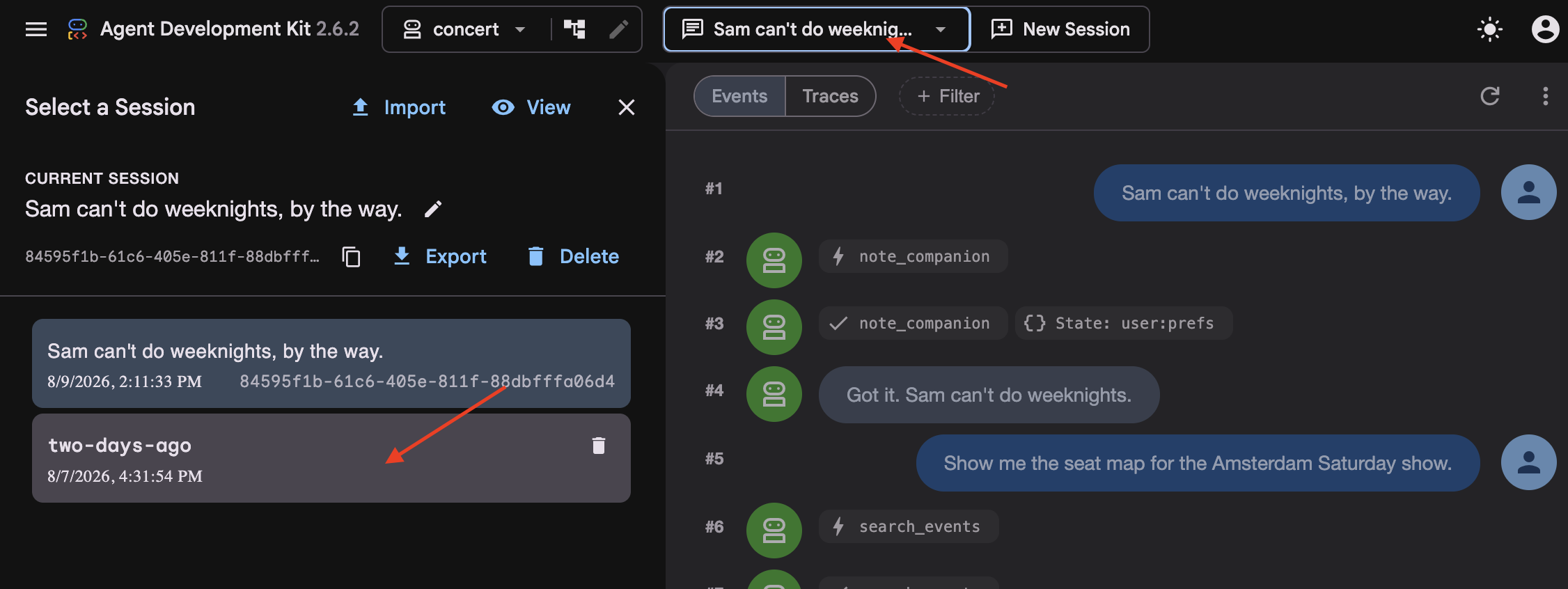
👉 ইভেন্ট স্ট্রিমটি (মাঝের কলাম) দেখুন। লক্ষ্য করুন যে পুরোনো টার্নগুলো একটি সংক্ষিপ্ত ইভেন্ট ব্লক দ্বারা প্রতিস্থাপিত হয়েছে।
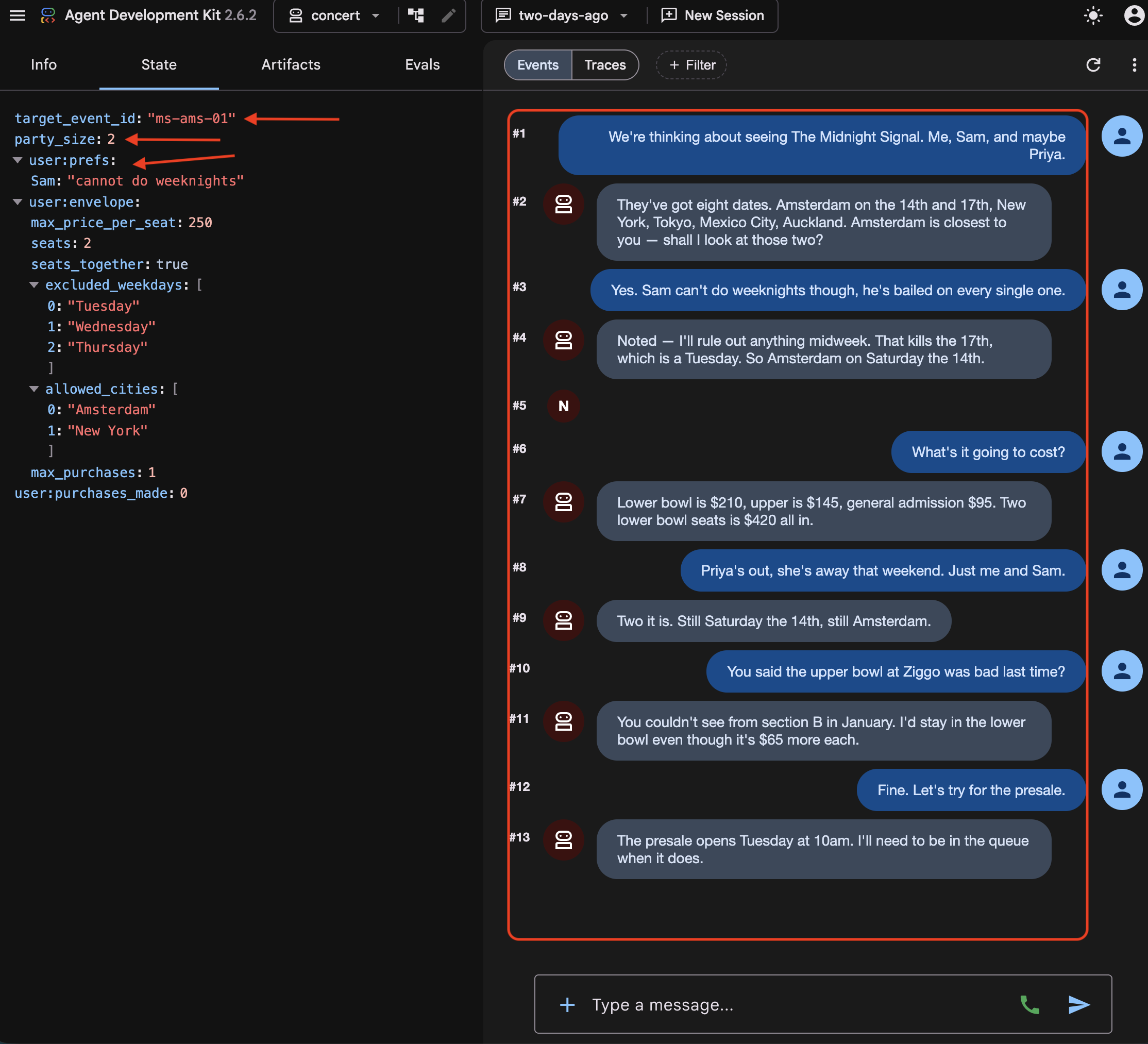
👉 স্টেট ট্যাবটি দেখুন। সেখানে তিন ধরনের কী একসাথে রয়েছে:
target_event_id   ms-ams-01                      ← plain: this booking only
party_size        2                              ← plain: this booking only
user:prefs        {"excluded_weekdays": [...]}   ← the person, every session
` user: ` প্রিফিক্স (যেমন user:prefs ) একজন নির্দিষ্ট ব্যবহারকারীর সমস্ত সেশন জুড়ে স্টেটকে সীমাবদ্ধ করে। এর বিপরীতে, প্রিফিক্সবিহীন কী-গুলো (
target_event_id
,
party_size
) সাধারণ সেশন স্টেটকে বোঝায়, যা শুধুমাত্র সক্রিয় সেশনের মধ্যেই সীমাবদ্ধ থাকে এবং সেশন শেষ হলে মুছে ফেলা হয়।
👉 এখন দুটি স্টেট ট্যাব তুলনা করুন। user:prefs এবং সংরক্ষিত আর্টিফ্যাক্টগুলো স্থায়ী হলেও, temp:seatmap উভয় সেশনেই অনুপস্থিত। temp: প্রিফিক্সযুক্ত স্টেট কীগুলো কঠোরভাবে ক্ষণস্থায়ী এবং কখনোই ডেটাবেসে সংরক্ষিত হয় না।
তারপর ফাইলটি
👉💻 এডিটর-এ এটি খুলুন:
cloudshell edit ~/monstertix/memory/userx.md
জানুয়ারি মাস থেকে তিনটি বুকিং। এজেন্ট যখন recall() কল করে তখন এটি পড়ে নেয়, এবং আমরা সেশন ডেটা হারিয়ে ফেললেও এটি সেখানেই থাকবে।
চারটি স্থান
যেখানে এটি বাস করে | পরবর্তী বার্তাটি কি টিকে থাকবে? | পুনরায় শুরু হলে টিকে থাকবে? | সেশনটি মুছে ফেলার পরেও কি এটি টিকে থাকে? |
| না | না | না |
| হ্যাঁ | হ্যাঁ | না |
| হ্যাঁ | হ্যাঁ | হ্যাঁ |
| হ্যাঁ | হ্যাঁ | হ্যাঁ, এবং ডেটাবেস মুছে ফেলার পরেও এটি টিকে থাকে। |
একটি নিদর্শন | হ্যাঁ | হ্যাঁ | পরিষেবার উপর নির্ভর করে |
ওই টেবিলটিকে কন্টেইনারগুলো সম্পর্কিত হিসেবে পড়ুন, সেগুলোর ভেতরে কী আছে তা নিয়ে নয়। memory/userx.md সবকিছু সত্ত্বেও টিকে থাকে, এবং এতে কেবল তাই থাকে যা remember() সেখানে রাখতে চেয়েছে। আপনার বর্তমান কথোপকথন কেউ এতে লেখে না। সুতরাং, একটি সেশনের পরেও ফাইলটি টিকে থাকা আর এজেন্ট আপনার আগের কথা মনে রাখা—এই দুটি এক জিনিস নয়, এবং ধাপ ৫-এ এই পার্থক্যটিই মূল সমস্যা হয়ে দাঁড়ায়।
কোন অবস্থা
স্টেট-কে এমন একটি ডিকশনারি হিসেবে ভাবুন যা সেশনের সাথে সাথে চলে। আপনার টুলগুলো থেকে tool_context.state এর মাধ্যমে এটি পড়ুন ও লিখুন, এবং ADK-কে কথোপকথনের পাশাপাশি এটি সংরক্ষণ করতে দিন।
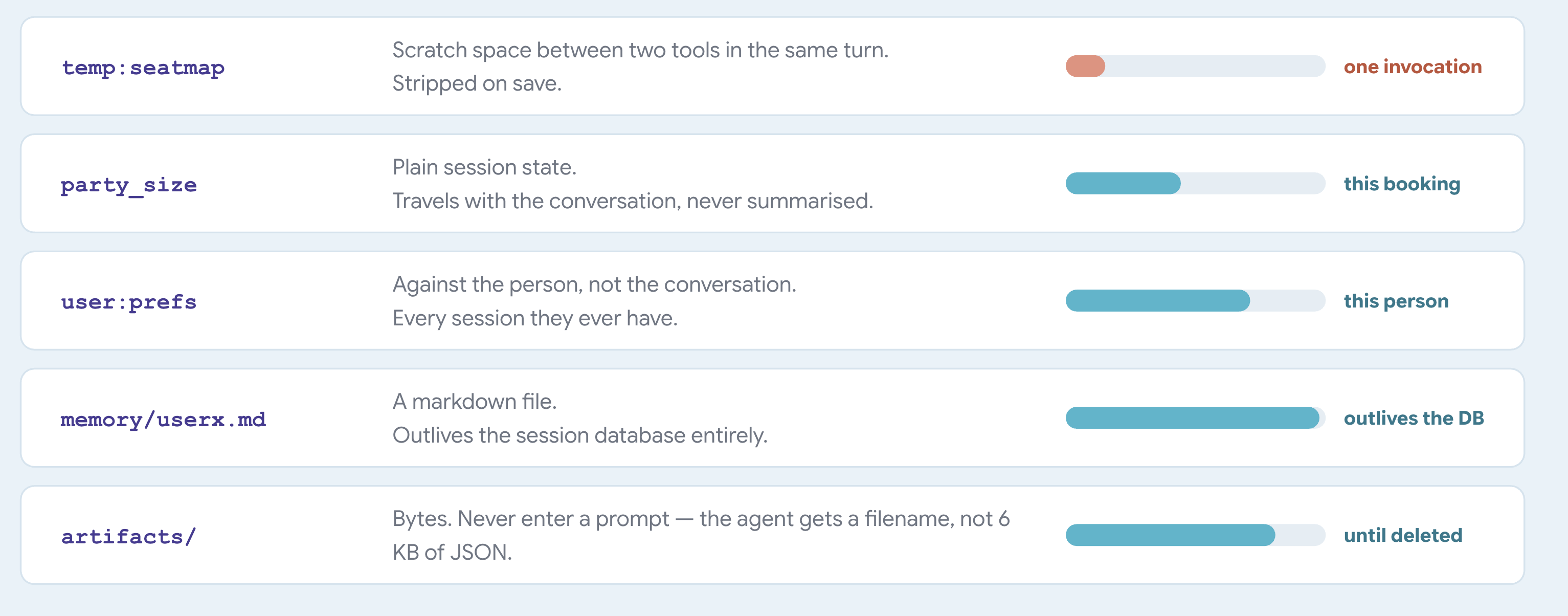
ADK প্রিফিক্সগুলোর অর্থ নির্ধারণ করে দেয়। আপনাকে এগুলো কোথাও সংজ্ঞায়িত করতে হয় না। ADK কী-নেমের প্রথম অংশটি পড়ে এবং তা ব্যবহার করে ভ্যালুটি কোথায় যাবে ও কতক্ষণ স্থায়ী হবে, তা স্থির করে।
একটি চাবি যাকে বলা হয় | ADK এটি সংরক্ষণ করে | স্থায়ী |
| সেশনের সাথে | সেশনটি মুছে ফেলা না হওয়া পর্যন্ত |
| ব্যবহারকারীর বিরুদ্ধে | ব্যবহারকারীর প্রতিটি সেশনে |
| অ্যাপটির বিরুদ্ধে | প্রতিটি ব্যবহারকারীর জুড়ে |
| কোথাও না | একটি আহ্বান |
একটি ইনভোকেশন হলো একটি একক অনুরোধ-প্রতিক্রিয়া চক্র, যার মধ্যে মডেলের সমস্ত যুক্তি বিশ্লেষণ, টুলের কার্য সম্পাদন এবং চূড়ান্ত প্রতিক্রিয়া অন্তর্ভুক্ত থাকে।
যখন কোনো আহ্বান শেষ হয়, ADK নতুন অবস্থাটি ডেটাবেসে লিখে রাখে এবং এই প্রক্রিয়ায় প্রতিটি temp: কী মুছে ফেলে।
একটি বিষয় ব্যাখ্যা করা হয়নি
two-days-ago আপনি দেখেছিলেন, যেখানে আগে কারো প্রথম কয়েকটি চাল থাকত, সেখানে একটি সারসংক্ষেপ বসে আছে। কথোপকথনটি যথেষ্ট দীর্ঘ হয়ে গেলে ADK স্বয়ংক্রিয়ভাবে এটি লিখেছিল।
প্রতিটি তথ্যেরই একটি নির্দিষ্ট মেয়াদ থাকে।
৫. প্রেক্ষাপটের অবক্ষয় ও সংকোচন
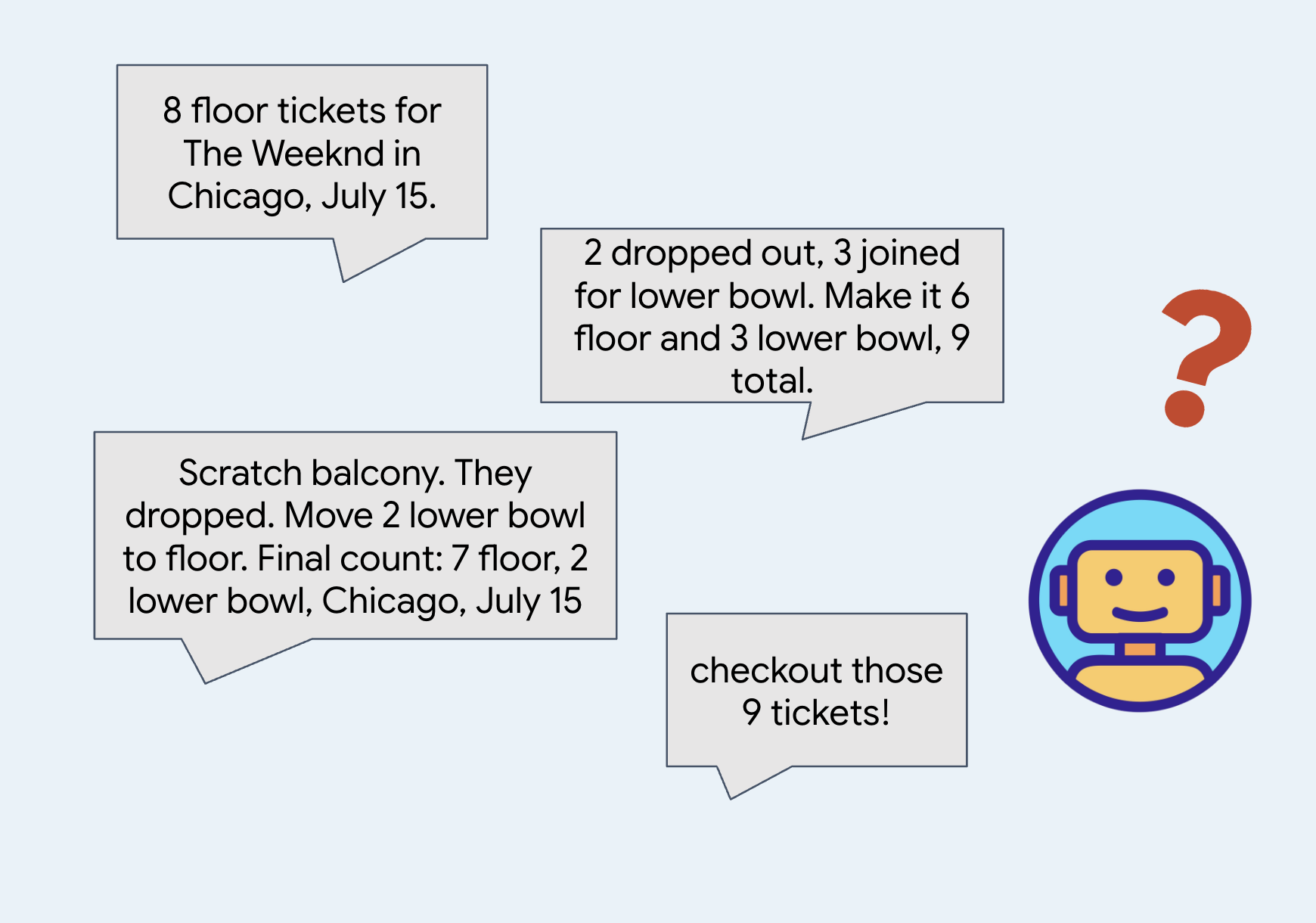
সারাংশ বিস্তারিত বিবরণ ভুলে যান
কোনো কথোপকথন খুব দীর্ঘ হয়ে গেলে, সিস্টেম জায়গা এবং টোকেন বাঁচাতে পুরোনো বার্তাগুলো সংক্ষিপ্ত করে।
মূল বিষয়বস্তু বোঝার জন্য সারাংশ বেশ ভালো, যা টোকেন ব্যবহার সাশ্রয় করতেও সহায়ক।
👉🔴 ভেন্যু প্যানেলে , 'রেসেট দ্য ভেন্যু' চাপুন। প্রতিটি ধাপ একই জগৎ থেকে শুরু হবে: ৮টি শো, সব আসন উপলব্ধ, ঘড়ি ১× এ সেট করা।
👉💻 এই ধাপের কোডে যান:
cd ~/monstertix
. ./set_env.sh
./use-solution.sh 5 --force
শেষ ধাপের পর কী পরিবর্তন হয়েছে:
ফাইল | কী পরিবর্তন হয়েছে |
| এজেন্টটি একটি |
বাকি সবকিছু | অপরিবর্তিত |
agent.py ফাইলটির শেষে এখন আর root_agent থাকে না। এর শেষে এটি থাকে:
app = App(
    name="concert",
    root_agent=root_agent,
    events_compaction_config=EventsCompactionConfig(
        compaction_interval=3,   # summarise after every 3 turns
        overlap_size=1,          # re-read 1 turn either side when summarising
    ),
)
জেনে রাখুন যে, adk web প্রথমে app নামের একটি ভ্যারিয়েবল খোঁজে এবং শেষে root_agent কে বেছে নেয়। যখনই আপনার এমন কিছুর প্রয়োজন হবে যা একটি এজেন্টের পরিবর্তে পুরো অ্যাপ্লিকেশনের জন্য প্রযোজ্য, তখন এজেন্টটিকে একটি App মধ্যে রাখুন: এখানে কম্প্যাকশনের জন্য এবং পরবর্তী ধাপগুলোতে পুনরায় শুরু করার সুবিধার জন্য।
compaction_interval=3 এর মানে হলো ADK প্রতি তিনটি টার্ন পর পর সারসংক্ষেপ করে। একটি টার্ন হলো আপনার কিছু বলা এবং এজেন্টের উত্তর শেষ করা, এর মধ্যে সে যতগুলো টুলই কল করুক না কেন। তিন সংখ্যাটি কম, তাই এটি কোনো ওয়ার্কশপের সময় চালু হয়। একটি বাস্তব অ্যাপে এর চেয়ে অনেক বড় একটি সংখ্যা ব্যবহার করা হবে।
overlap_size=1 এর অর্থ হলো, প্রতিটি সারাংশ তার প্রয়োজনের চেয়ে এক টার্ন আগে শুরু হয়।
ADK প্রথম, দ্বিতীয় এবং তৃতীয় টার্নের সারসংক্ষেপ করে। তিন টার্ন পরে এটি পরবর্তী ব্যাচের সারসংক্ষেপ করে। overlap_size=1 হলে সেই দ্বিতীয় সারসংক্ষেপটি আবার তৃতীয় টার্ন থেকে শুরু হয়, চতুর্থ টার্ন থেকে নয়:
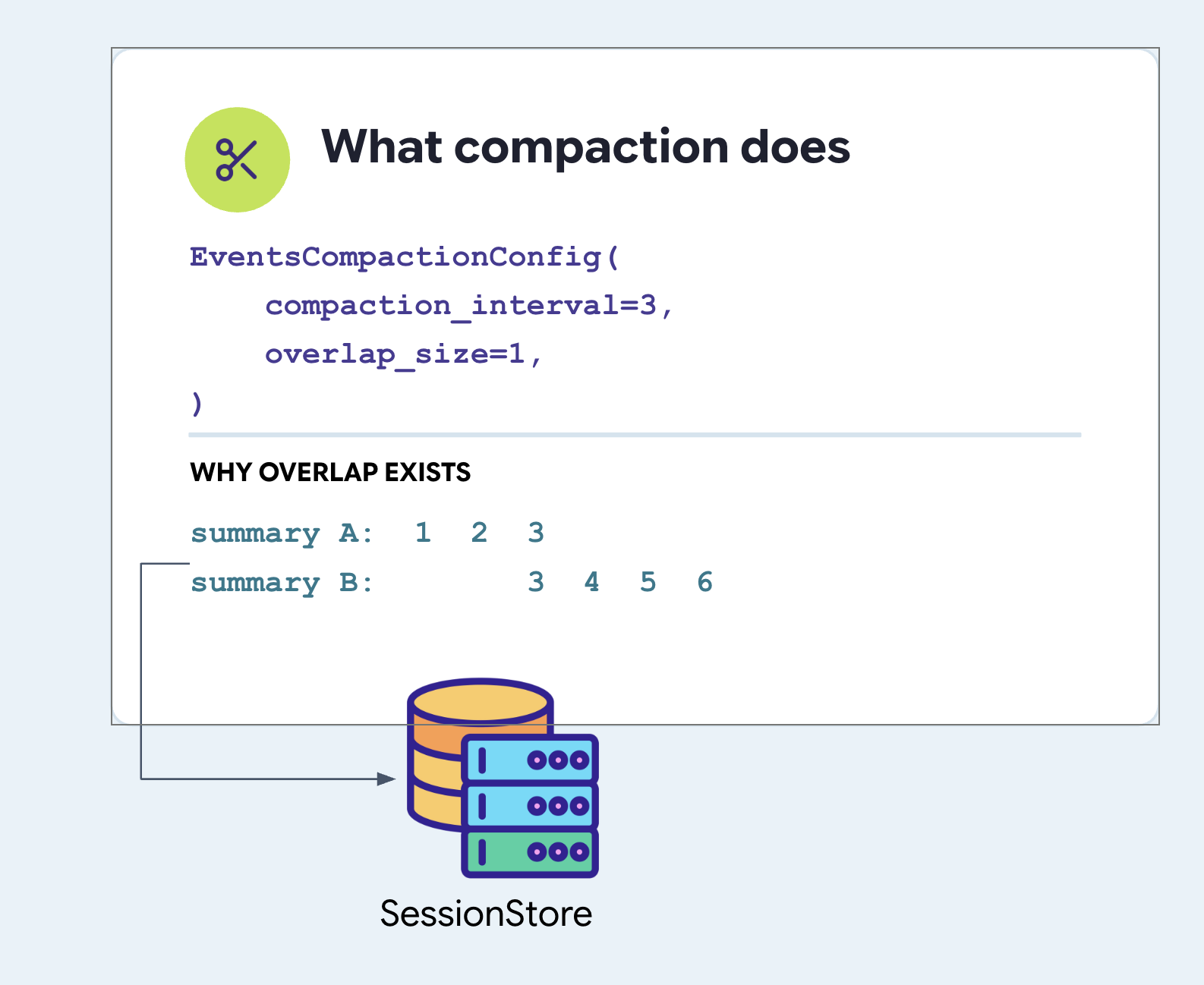
লক্ষ্য করুন, তৃতীয় টার্নটি দুবার সারসংক্ষেপ করা হয়েছে। এটা ইচ্ছাকৃত। যদি আপনি তৃতীয় টার্নে একটি প্রশ্ন করেন এবং এজেন্ট চতুর্থ টার্নে তার উত্তর দেয়, তাহলে একটি পরিষ্কার বিভাজনের ফলে প্রশ্নটি একটি সারসংক্ষেপে এবং উত্তরটি অন্যটিতে চলে যায়, যা উভয়কেই বিভ্রান্তিকর করে তোলে। একটি চিন্তাকে দুই ভাগে বিভক্ত হওয়া থেকে বাঁচানোর জন্য টার্নের পুনরাবৃত্তি একটি সস্তা সুরক্ষা ব্যবস্থা।
উভয় ফিল্ডই সেট করুন। ADK-তে কোনোটিরই ডিফল্ট মান নেই।
কম্প্যাকশন এবং আপনার মেমরি পরিষেবা কখনই মেলে না
বিষয়টি স্পষ্ট করা প্রয়োজন, কারণ শব্দ দুটি শুনতে সম্পর্কিত মনে হলেও সিস্টেমগুলো এক নয়।
EventsCompactionConfig App agent.py ফাইলে root_agent এর পাশে সেট করা হয়। এটি অ্যাপ্লিকেশনের একটি প্রপার্টি, কোনো সার্ভিসের নয়।
# agent/concert/agent.py
app = App(
    name="concert",
    root_agent=root_agent,
    events_compaction_config=EventsCompactionConfig(
        compaction_interval=3,
        overlap_size=1,
    ),
)
সারাংশ কথোপকথনটিকে নতুন করে লেখে। এটি ফাইলটিকে নতুন করে লেখে না।
এই কারণেই remember() ফাংশনটিকে একটি সুচিন্তিত কল হিসেবে রাখা হয়েছে। ট্রান্সক্রিপ্টে যা কিছু থেকে যায়, তা শেষ পর্যন্ত অন্য কারো লেখা ভাবানুবাদ হিসেবেই পড়া হয়; কিন্তু ফাইলে যা কিছু লেখা হয়, তা আগামীকাল বা আগামী সপ্তাহেও ঠিক সেভাবেই পড়া হয়, যেভাবে তা সংরক্ষণ করা হয়েছিল। এই ধাপের শেষেই আপনি সেই পার্থক্যটা দেখতে পান।
সারাংশটি কোথায় রাখা হয়
sessions.db ফাইলের events টেবিলে, এজেন্ট অন্যান্য টার্ন ইভেন্টের মতোই একটি টাইমস্ট্যাম্প সহ একটি কম্প্যাকশন রেকর্ড একটি ইভেন্ট রো-তে লিখে থাকে।
একটি সাধারণ ইভেন্টের একটি content ফিল্ড থাকে এবং এর সারাংশটি actions.compaction অধীনে থাকে।
👉💻 আপনার নিজের ডেটাবেসে এটি দেখুন:
cd ~/monstertix
. ./set_env.sh
sqlite3 sessions.db \
  "select json_extract(event_data,'\$.actions.compaction.compacted_content.parts[0].text')
   from events where event_data like '%compaction%';"
অনুষ্ঠানটির রূপরেখাটি এইরকম:
events row
└── event_data  (JSON)
    ├── id, author, timestamp, invocation_id      ← like every other event
    ├── content                                    ← ABSENT on this one
    └── actions
        └── compaction
            ├── start_timestamp                    ← the window it replaced
            ├── end_timestamp
            └── compacted_content.parts[0].text    ← the summary itself
ইভেন্ট স্ট্রিম তার বিষয়বস্তু থেকে প্রতিটি ইভেন্ট সংগ্রহ করে। এর সারসংক্ষেপটি ডাটাবেসে থাকে এবং প্রতিবার মডেলটিতে পাঠানো হয়।
দ্বিতীয় এজেন্ট
budget_split একটি সম্পূর্ণ আলাদা এজেন্ট, কোনো টুল নয়:
# agent/concert/agent.py
budget_split = Agent(
    name="budget_split",
    model=MODEL,
    include_contents="none",      # sees none of the conversation
    instruction="You do ticket arithmetic and nothing else...", #just the budget
    output_key="budget_plan",     # its answer goes into state
)

root_agent = Agent(
    ...,
    tools=[..., AgentTool(agent=budget_split)],
)
কেন একটি এজেন্ট, সাধারণ ফাংশন নয়? কারণ কাজটির জন্য একটি মডেল প্রয়োজন। ‘চারজনের জন্য ২০০ ডলার বাজেটে এই বিভাগগুলোর মধ্যে কোনটি উপযুক্ত, এবং মোট কত হবে’—এই বাক্যটিকে বিচার-বিবেচনার মোড়কে থাকা পাটিগণিত হিসেবে পড়ুন, যার উত্তরটি একজন মানুষকে পড়তে সক্ষম হতে হবে। একটি পাইথন ফাংশনকে গুণ করতে দিন, এবং কোন বিকল্পগুলো উল্লেখ করার যোগ্য, তা তাকে সিদ্ধান্ত নিতে বলবেন না।
তাহলে মূল এজেন্টকে দিয়ে এটা করানো হচ্ছে না কেন? পরের লাইনটি দেখুন include_contents="none" এর মানে হলো এই এজেন্টকে কথোপকথনের কিছুই দেওয়া হয় না। কোনো গ্রুপ চ্যাট নেই, কোনো প্রেফারেন্স নেই, এমনকি চল্লিশটা ট্যুর ডেটও নেই। এটি শুধু অনুরোধটি পায়, আর কিছুই না। এই ফ্ল্যাগটি শুধুমাত্র একজন Agent ক্ষেত্রেই থাকে, আর এটাই আসল কারণ যে এটি একটি ফাংশন না হয়ে এজেন্ট।
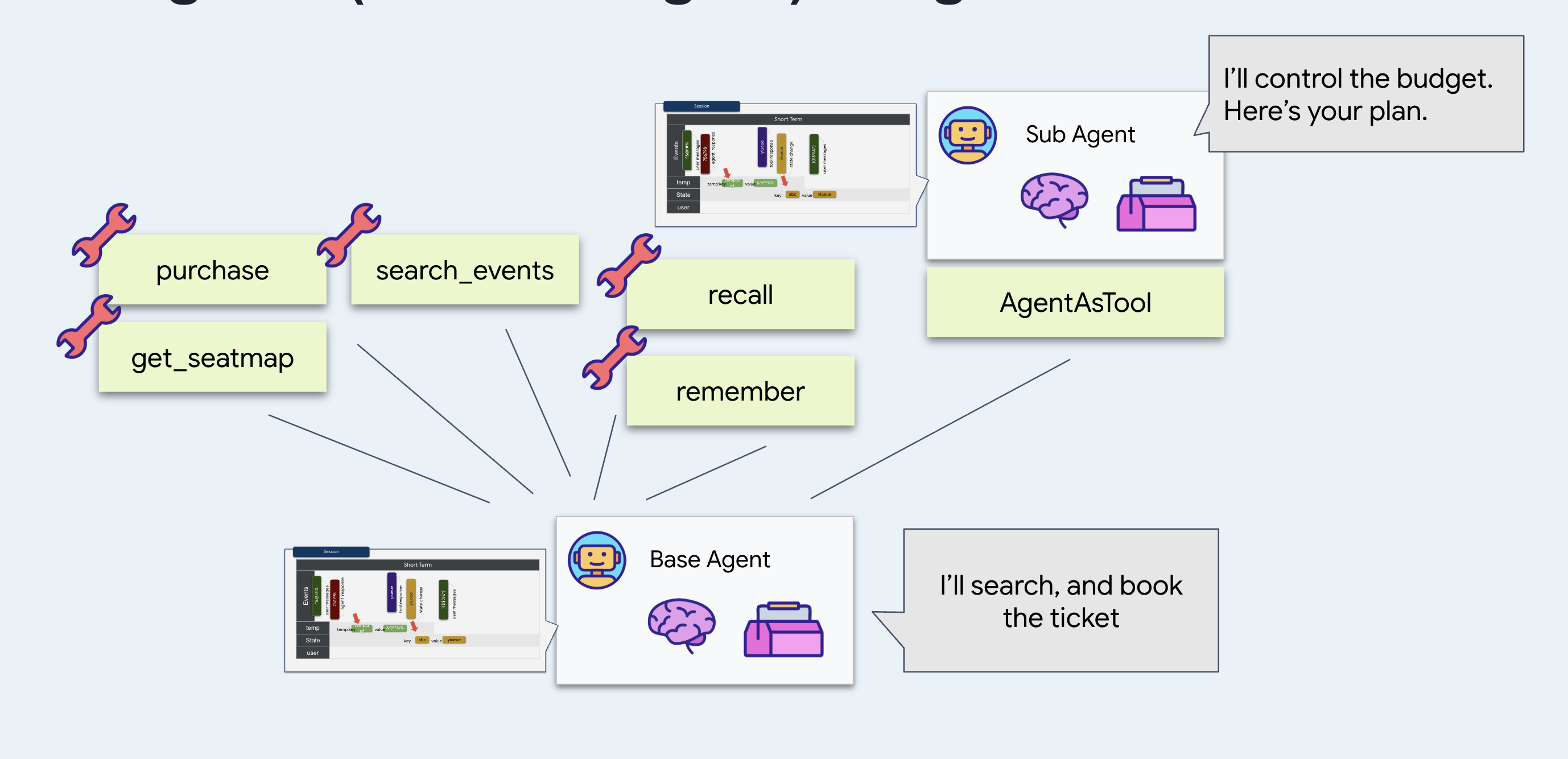
সংক্ষিপ্ত নির্দেশ পছন্দ করুন: এটি সস্তা, দ্রুত এবং এর গতিপথ পরিবর্তন করা অনেক কঠিন। এই পাটিগণিতের উপর ভরসা রাখুন যে এটি বিশ চাল আগে বলা কোনো কথার দ্বারা প্রভাবিত হবে না, কারণ এটি তা কখনোই দেখতে পায় না।
কেন
AgentTool
এজেন্টটিকে এটি দিয়ে মুড়ে দিন, যাতে মূল এজেন্ট এটিকে অন্য যেকোনো টুলের মতো কল করতে পারে। মডেলের দিক থেকে, budget_split search_events এর সমতুল্য হিসেবে পড়ুন।
এবং
output_key="budget_plan" উত্তরটিকে কথোপকথনে ছড়িয়ে ছিটিয়ে না রেখে, সেই নামে সেশন স্টেটে সংরক্ষণ করে। দেখুন কেন এটি গুরুত্বপূর্ণ।
এটা চালান
👉💻 টার্মিনাল ১- এ, Ctrl-C চাপুন এবং একই ফ্ল্যাগগুলো দিয়ে রিস্টার্ট করুন:
cd ~/monstertix
adk web agent --port 8000 --allow_origins "*" \
  --session_service_uri="sqlite+aiosqlite:///$WORKSHOP/sessions.db" \
  --artifact_service_uri="file://$WORKSHOP/artifacts"
👉 একটি নতুন সেশন শুরু করুন এবং মন খুলে কথা বলুন। পাঁচ-ছয়বার কথা বলুন। এই পদ্ধতিটি বেশ কার্যকর:
hello
what's on in Amsterdam?
Sam is coming with us, and he can't do weeknights
there are 4 of us and I can spend about $200 a head. What fits?
👉 রাজ্য ট্যাবটি খুলুন।
সেখানে অ্যারিথমেটিক এজেন্টের সম্পূর্ণ উত্তরসহ budget_plan খুঁজুন।
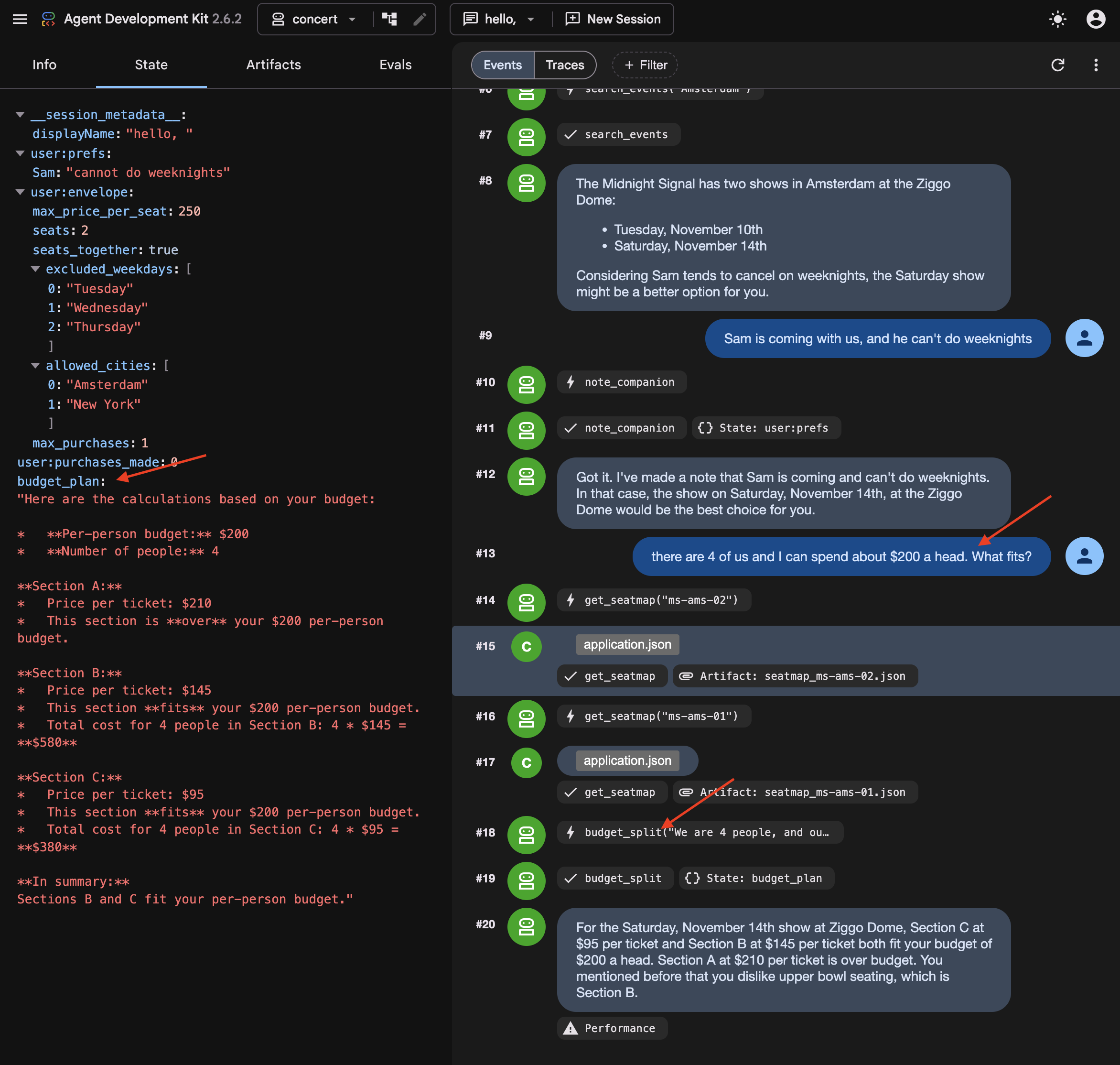
👉✨ Now change the numbers on it:
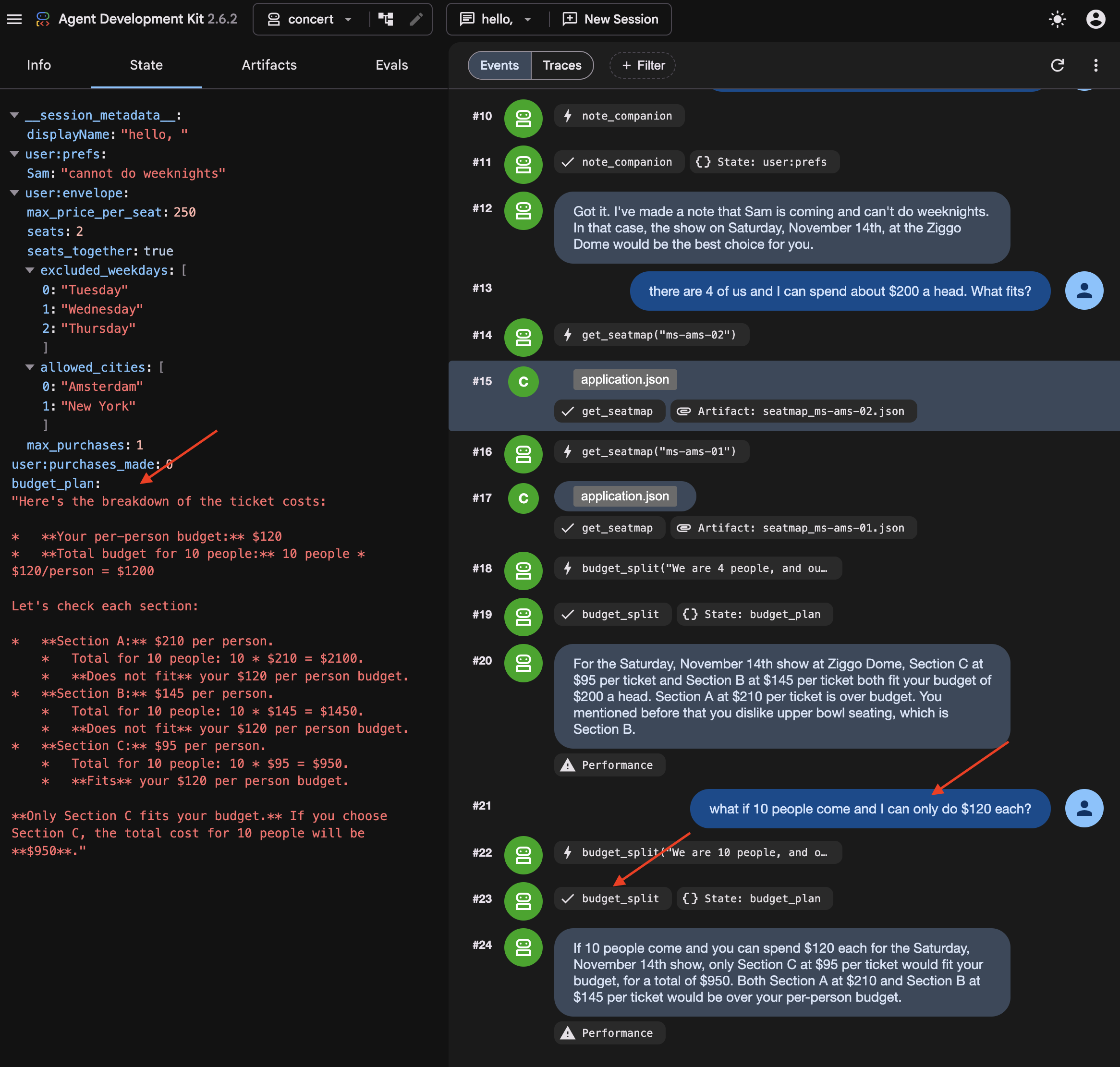
what if 10 people come and I can only do $120 each?
👉 Look at budget_plan again. It has been overwritten , not appended to. It's because output_key holds the latest one.
What you cannot see: the summary
Somewhere in those turns, ADK summarised the earlier ones.
👉💻 In a new Terminal , run to read it directly:
cd ~/monstertix
. ./set_env.sh
./show-compaction.sh
Read what it wrote
Here is a real one, abridged:
── summary 1 ──────────────────────────────────────────────────────

Conversation Language: English

  **User Request:**
  The user initially wanted to know what concerts are playing in Amsterdam.
  Subsequently, the user provided a constraint regarding a companion, Sam.

  **Context Summary:**
  The user is planning a concert trip. The agent identified two events in
  Amsterdam: "The Midnight Signal" at the Ziggo Dome on Tuesday, November
  10 and Saturday, November 14, 2026. The user then informed the agent that a
  companion named "Sam" will be joining, but "he can't do weeknights." The
  agent has successfully noted this constraint for Sam.

  **Key Decisions/Information Obtained:**
  *   **City of interest:** Amsterdam
  *   **Events found:** "The Midnight Signal" at the Ziggo Dome, Tuesday
  10 November and Saturday 14 November 2026.
  *   **Companion:** Sam
  *   **Companion constraint:** Sam cannot attend concerts on weeknights.

  **Unresolved Questions/Tasks:**
  *   The agent has not explicitly confirmed if the found event (which is
  on a Saturday) is suitable given Sam's constraint, nor has it asked the
  user for the next steps regarding this event or further event searches.

  **Tools Used:**
  *   `recall`
  *   `search_events`
  *   `note_companion`
It kept the prices, the sections, the cities and the preferences, and correctly noted that nothing had been decided yet.
Three things follow from that:
It is a paraphrase. Nothing here is what anybody said. It is an account of what was said, produced by the same kind of process that produces everything else the model gets wrong occasionally.
Note: Summary strings are stored in internal session event records and are not directly exposed as separate UI tabs.
Every three turns, on a conversation that is now partly made of previous summaries.
Try to book without repeating yourself
In a new session Do not start a new one — the summary you just read lives in this session's events, and that is the only reason the agent still knows anything about Amsterdam.
👉✨ Give it nothing new:
Book us something.
Watch the agent ask which show, which section, and how many people. Mark that correct : the summary itself says the user never confirmed anything, so the agent asked. Give compaction the credit.
Even when compaction succeeds, summarizing previous turns can introduce ambiguity that requires the agent to re-confirm constraints with the user.
👉✨ Answer it and let the booking go through:
Amsterdam Saturday, section C, 8 people
It reads the order back before it spends anything:
"You want to book 8 tickets in Section C for The Midnight Signal in Amsterdam on Saturday, November 14th. The total cost will be $760. Shall I go ahead and purchase these tickets?"
👉✨ Confirm it:
yes
Now it tells you it worked:
"Your purchase of 8 tickets in Section C for The Midnight Signal in Amsterdam on Saturday, November 14th, totaling $760, is complete. Your order ID is ord_227877fe."
Go and check whether it did
👉 Switch to the venue panel . Do not take the agent's word for it.
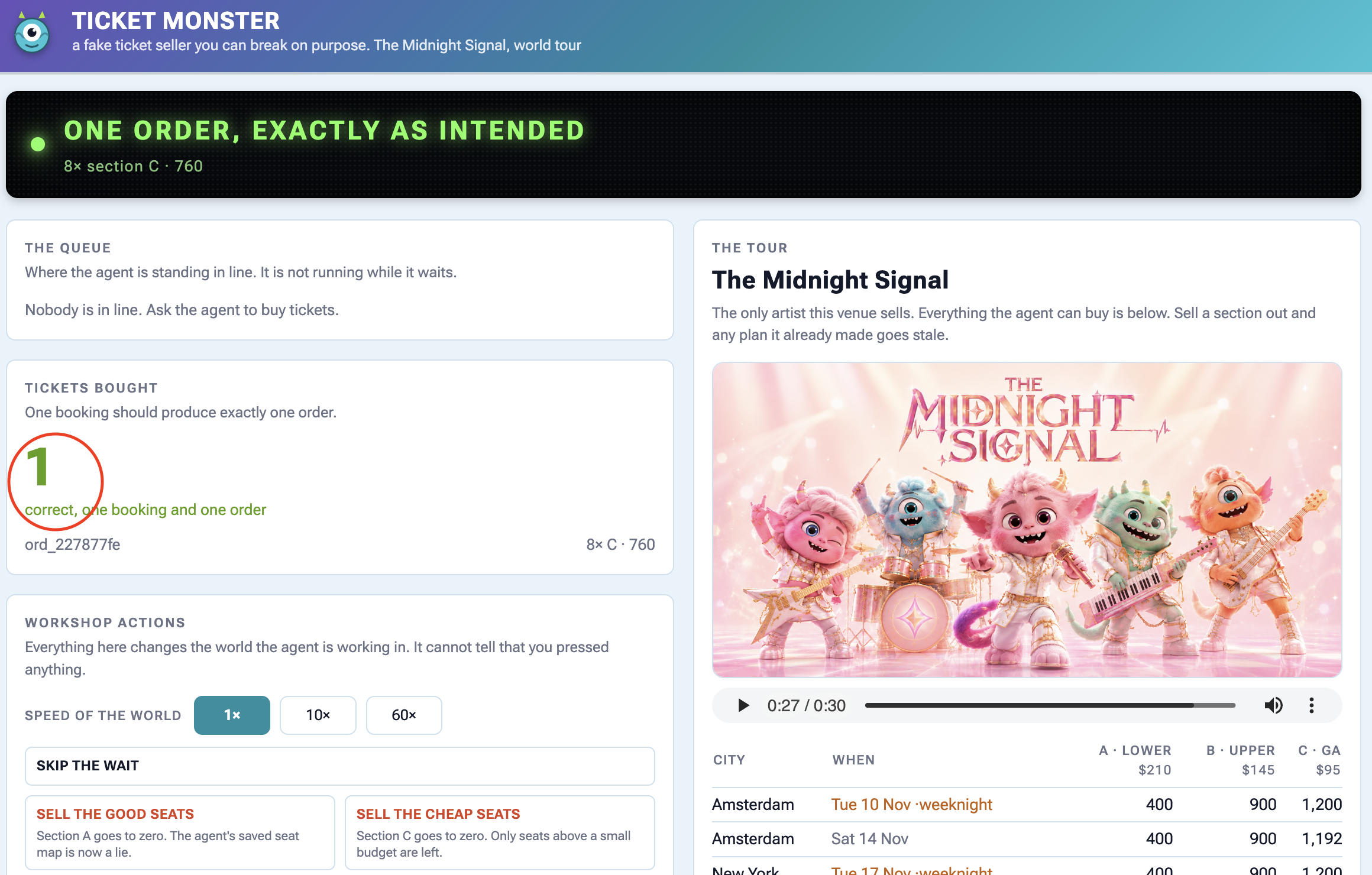
On the panel | What you should see |
Tickets bought | |
the order underneath | |
The tour , Amsterdam Saturday | section C is down by 8 |
কার্যকলাপ | |
Check the panel to find out the ticket sale.
Why user:prefs was the right choice
Recall note_companion writing Sam's constraint into user:prefs last step, and the obvious objection: why bother with a tool when the agent could just remember it.
Here is why. Keep state out of the conversation and no summary touches it. Check user:prefs and budget_plan against how they went in, and find them unchanged. Then check the transcript.
A summary keeps the general shape and loses the details. Store anything you cannot afford to lose somewhere other than the conversation.
6. Process Resumption
Waiting 40 Minutes Without Staying Online
When an agent has to wait in a 40-minute ticket queue, keeping a Python process alive and waiting is fragile and expensive.
To handle long waits properly:
- Save state to a database : Store where the agent paused so the process can safely shut down.
- Wake up on demand : When the wait is over, an external signal restarts the agent and resumes execution right where it left off.
👉🔴 On the venue panel , press RESET THE VENUE . Every step starts from the same world: 8 shows, all seats available, clock at 1×.
👉💻 Move to this step's code:
cd ~/monstertix
. ./set_env.sh
./use-solution.sh 6 --force
এটা চালান
What changed since the last step:
ফাইল | What changed |
| added |
| |
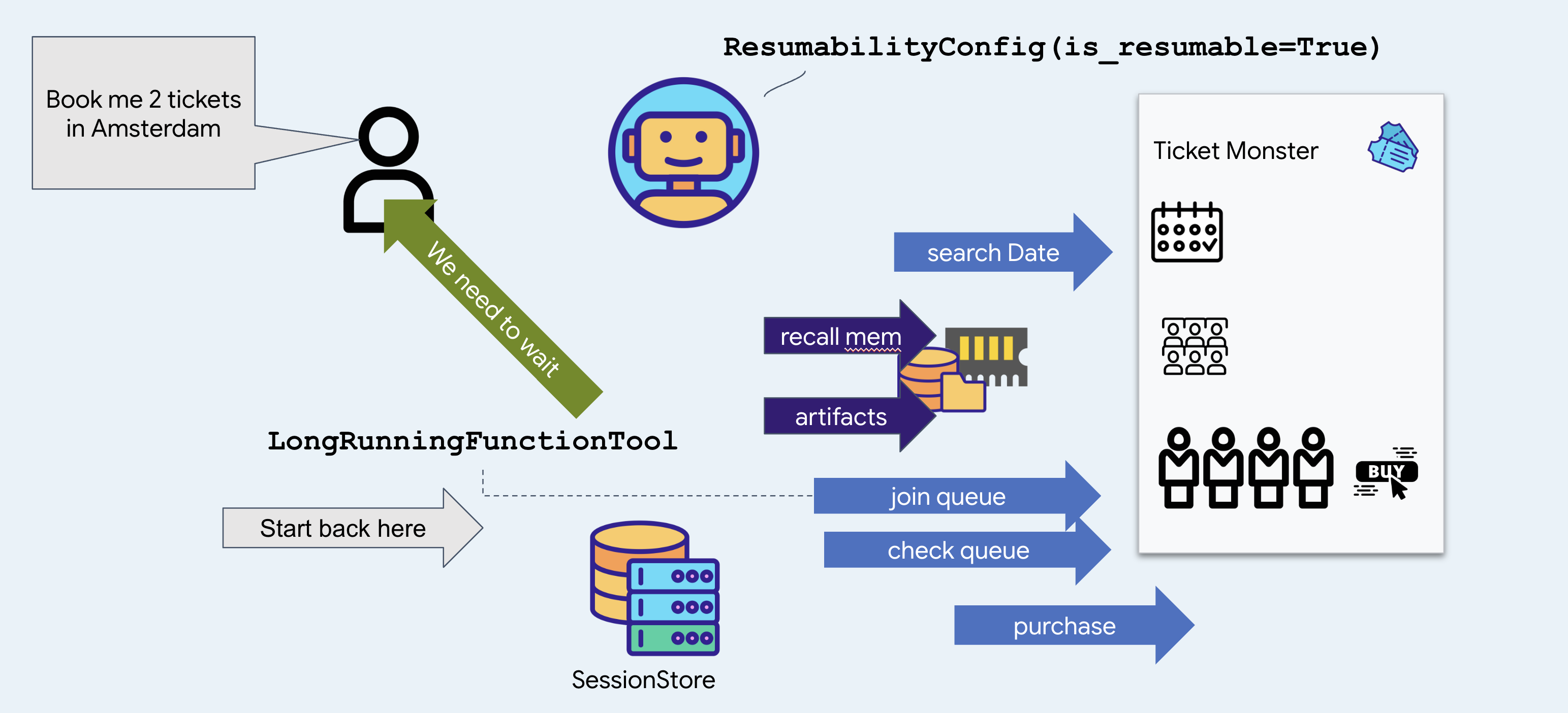
join_queue returns straight away with a ticket instead of blocking, and ResumabilityConfig lets the run pause on it and pick up afterwards.
👉💻 Terminal 1 — the agent, unchanged:
cd ~/monstertix
. ./set_env.sh
adk web agent --port 8000 --allow_origins "*" \
  --session_service_uri="sqlite+aiosqlite:///$WORKSHOP/sessions.db" \
  --artifact_service_uri="file://$WORKSHOP/artifacts"
👉✨ Ask the agent to buy:
Get us two tickets to the Amsterdam show.
It calls recall , then search_events , then join_queue , and answers with something close to this:
You are in the queue for The Midnight Signal at Ziggo Dome, Amsterdam, on Saturday, November 14. Your position is 14203.
Notice it picked Saturday without asking you. There are two Amsterdam shows, the 17th is a Tuesday, and the memory file from the last step says Sam does not do weeknights. That is a fact from a previous booking deciding a question in this one.
Notice too that it joined the queue before looking at a single seat or price, and said nothing about either. That is the venue's rule, you buy the tickets until they reach the front, so the only thing worth having early is a place in line. Which seats to take is a question for forty minutes from now.
👉 Look at the control panel. The banner reads:
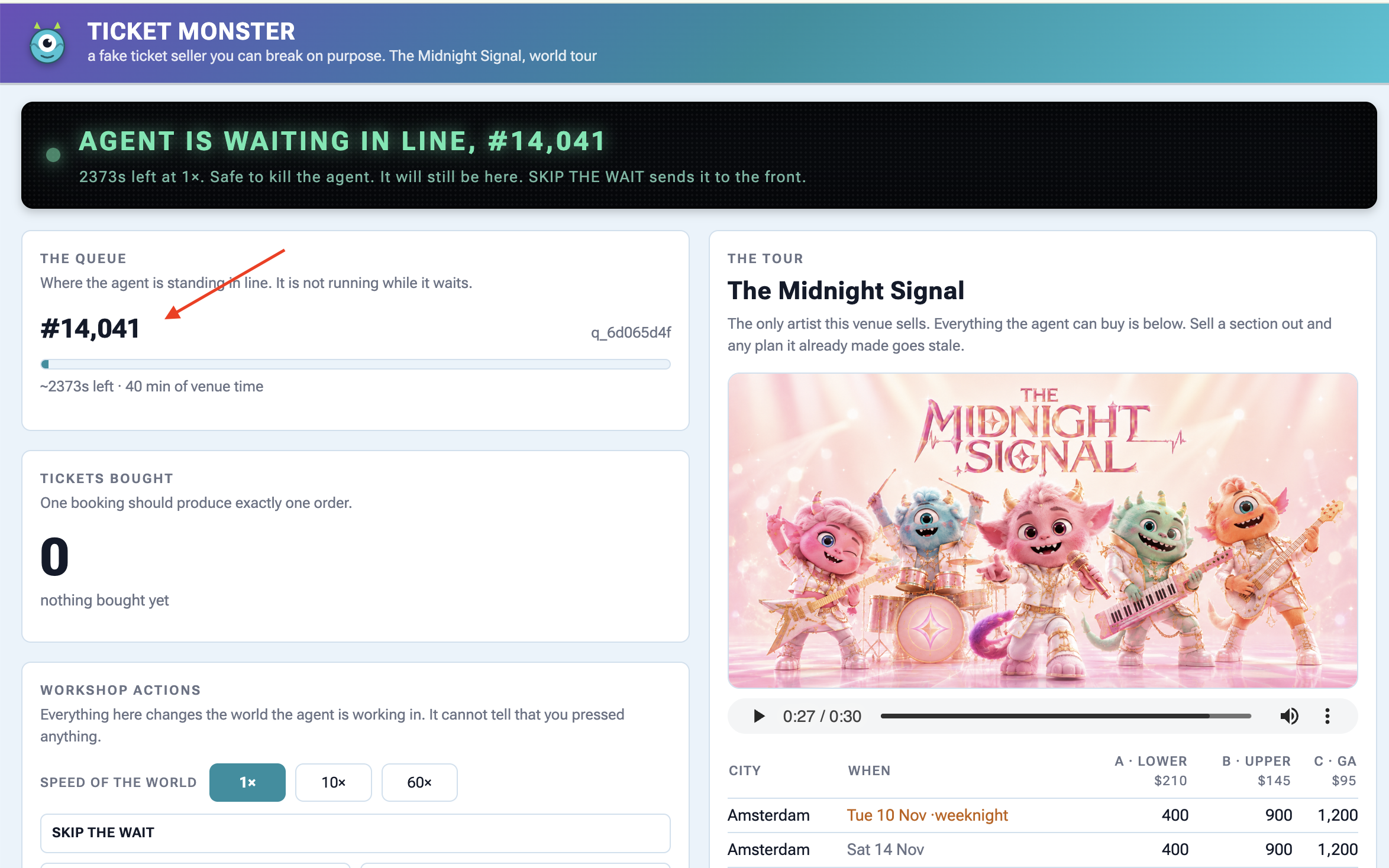
Agent is waiting in line — #14,203
About 2400s at 1×. Safe to kill the agent right now — it will still be here.
The queue is genuinely forty minutes long and it is not going anywhere while you work.
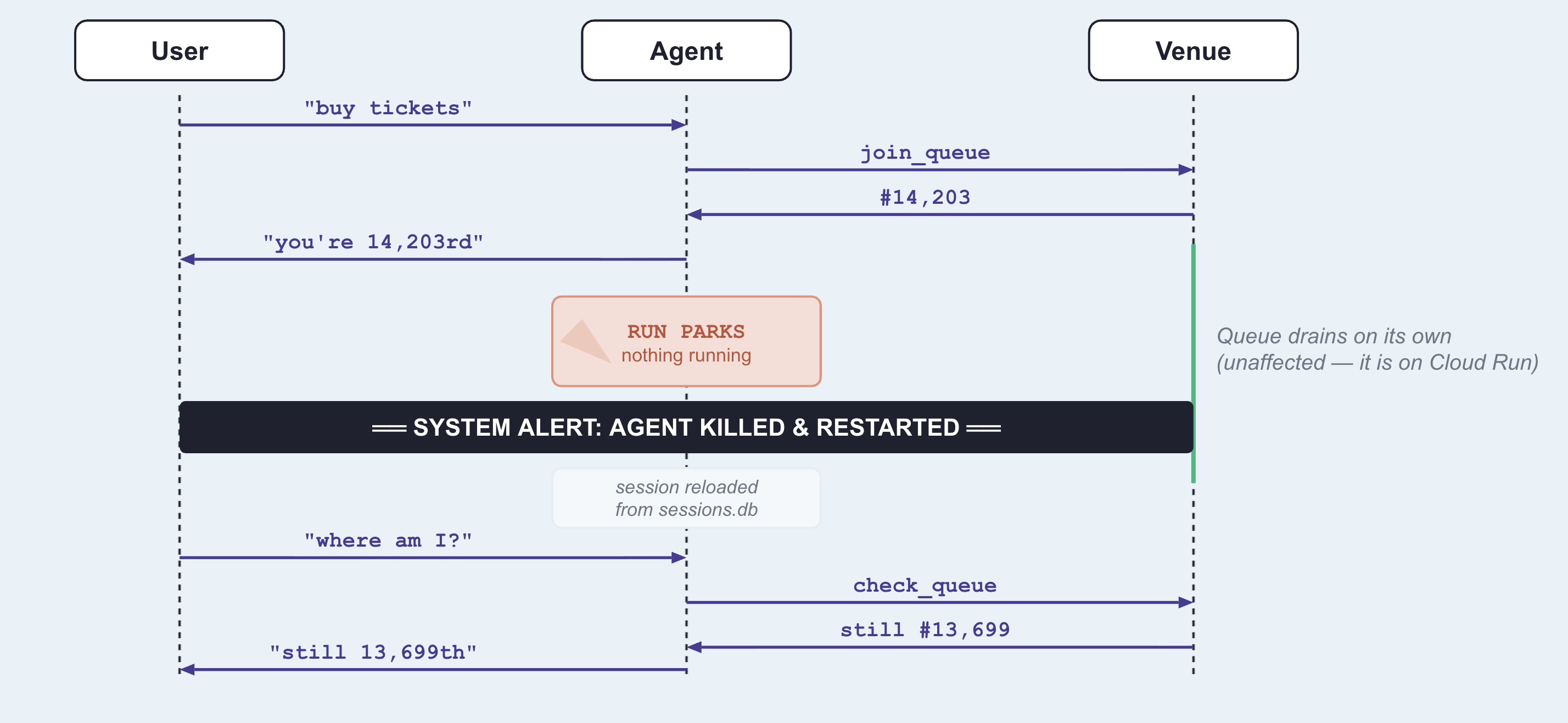
👉💻 Kill the agent. :
Ctrl-C
👉💻 Start it again in terminal 1 :
cd ~/monstertix
. ./set_env.sh
adk web agent --port 8000 --allow_origins "*" \
  --session_service_uri="sqlite+aiosqlite:///$WORKSHOP/sessions.db" \
  --artifact_service_uri="file://$WORKSHOP/artifacts"
👉✨ In the same session, ask the agent where it is in line:
Where am I in line?
You are currently at position 12982 in the queue. It is not your turn yet.
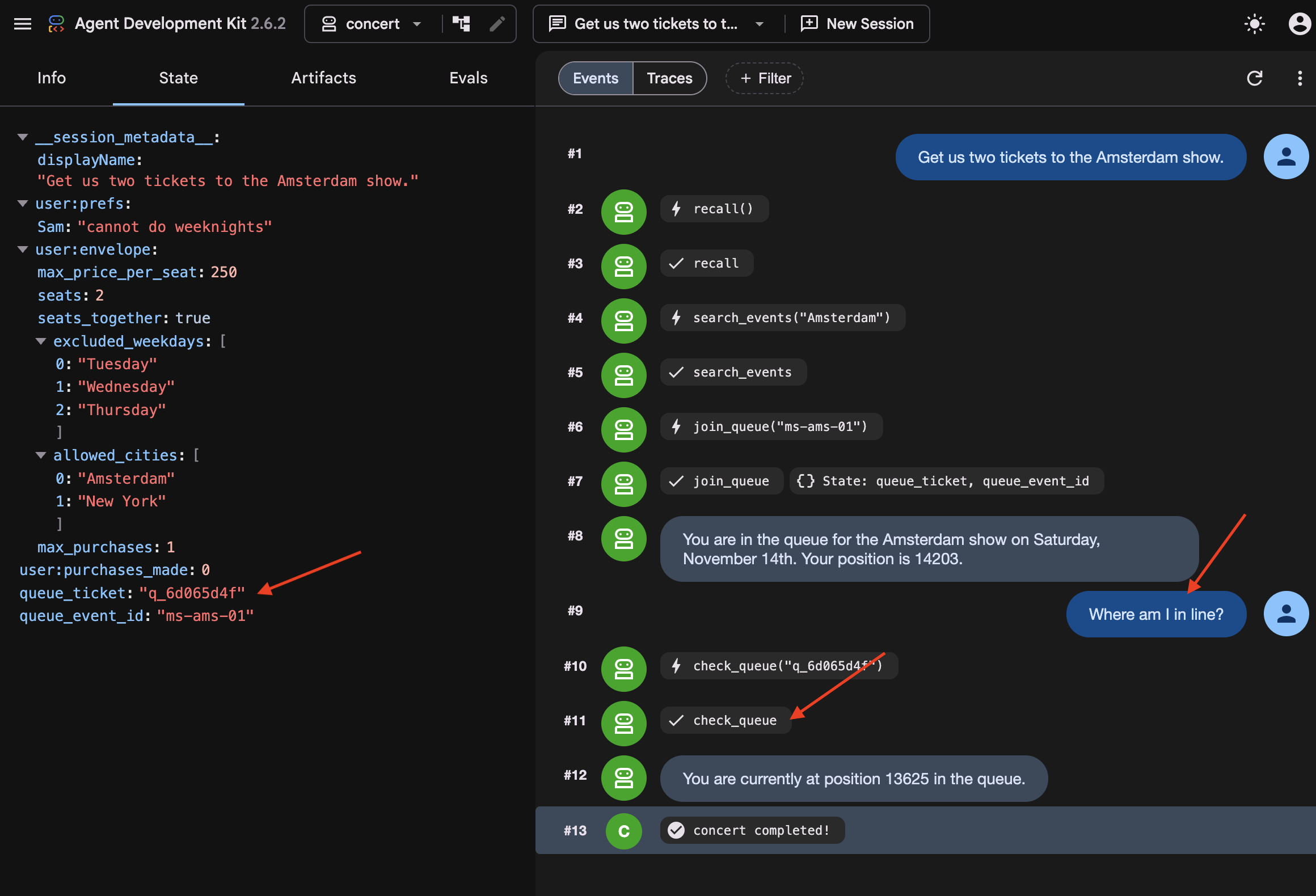
Compare the ticket, and watch the position keep dropping while nothing was running. Notice the agent did not know it had been killed. It called check_queue with the ticket it got before the restart, because that ticket was on disk.
👉💻 See why:
cd ~/monstertix
sqlite3 sessions.db "select name from pragma_table_info('events');"
id
app_name
user_id
session_id
invocation_id
timestamp
event_data
Notice that every turn of every conversation is one row, and the turn itself, who said it, which tool it called, what came back, and note it is JSON inside event_data .
👉💻 Find your queue ticket in there:
sqlite3 sessions.db "select event_data from events;" \
  | grep -o '"ticket": "q_[a-z0-9]*", "position": [0-9]*' | tail -1
"ticket": "q_8cc2c6f9", "position": 14203
When join_queue returns, its ticket is saved directly to the database. Upon restarting, ADK reloads the previous turns and tool results from disk, allowing the agent to pick up where it left off.
And notice what it did not start over. The agent resumes directly instead of replaying the workflow from the beginning. Because LongRunningFunctionTool and ResumabilityConfig persist the execution state to disk, ADK knows the agent is already waiting in line, preventing it from re-searching tour dates or requesting a duplicate ticket.
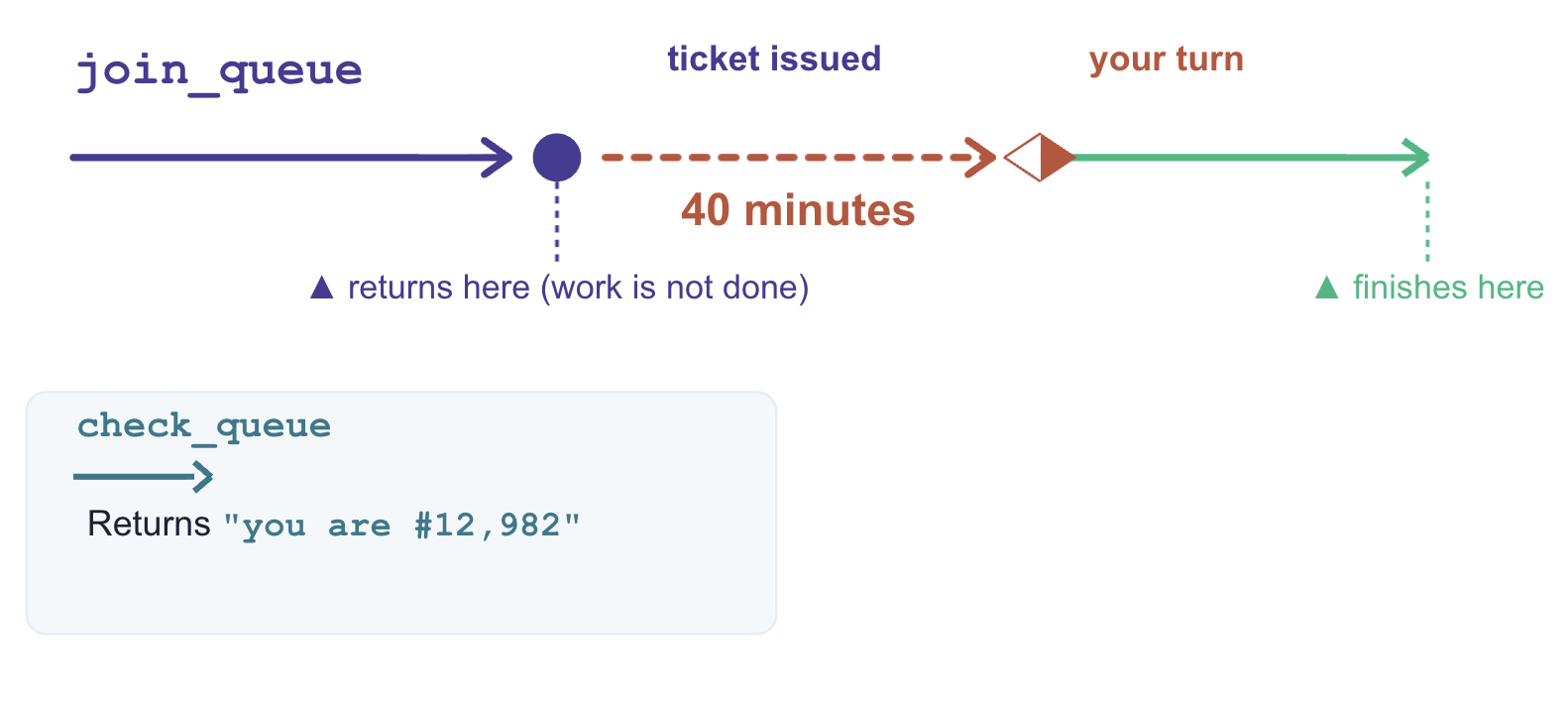
Why join_queue and not check_queue
Both functions return in milliseconds. The distinction is whether the underlying job is complete when the function returns.
what it returns | is the work done? | |
| Queue ticket and initial position | No. Processing continues asynchronously in the external system. |
| Current queue status | Yes. Returns an immediate, point-in-time answer. |
LongRunningFunctionTool is designed for operations that return a handle to pending work. Wrapping join_queue allows the agent to suspend execution while the external queue advances.
In contrast, check_queue is synchronous and complete. Wrapping it would cause the agent to incorrectly suspend execution every time it checks its status—even when it reaches the front of the line and needs to complete the purchase immediately.
What made that work
Three components enable execution suspension and recovery:
# agent/concert/agent.py
LongRunningFunctionTool(func=join_queue)      # the tool returns without finishing
ResumabilityConfig(is_resumable=True)         # the run may pause and be picked up
--session_service_uri="sqlite+aiosqlite:///$WORKSHOP/sessions.db"
LongRunningFunctionTool: Marks a tool as non-blocking, returning an active handle so the agent can wait without hanging the thread.-
ResumabilityConfig: Instructs the runtime to pause the execution lifecycle on an incomplete task and resume from the last recorded state. -
Session Storage URI (--session_service_uri): Directs state persistence to external storage (eg, SQLite, Cloud SQL) rather than process memory, preventing data loss across restarts.
7. Acting on Stale Data
Information goes out of date while you wait
Persisted conversation history is not real-time state. During long wait intervals, external data—like ticket availability or pricing—can change without the agent knowing.
An agent with missing information pauses to ask for clarification, but an agent with stale data acts immediately on outdated assumptions. To prevent invalid actions, time-sensitive data must be re-verified immediately before executing critical operations.
Do not load new code yet. Stay on the previous step's agent (it can buy tickets, but currently has no safeguards for staleness or idempotency).
👉🔴 Press RESET THE VENUE , then start a new session in adk web — the + New Session button above the chat.
Start a new session to clear the previous queue ticket and pending purchase state. This step requires a clean execution context to demonstrate staleness handling properly.
The snapshot lies
👉✨ Ask for the same show as before:
Get us two tickets to the Amsterdam show.
👉✨ Now, while it waits in line, ask about seats:
How much are the seats, and what's still available?
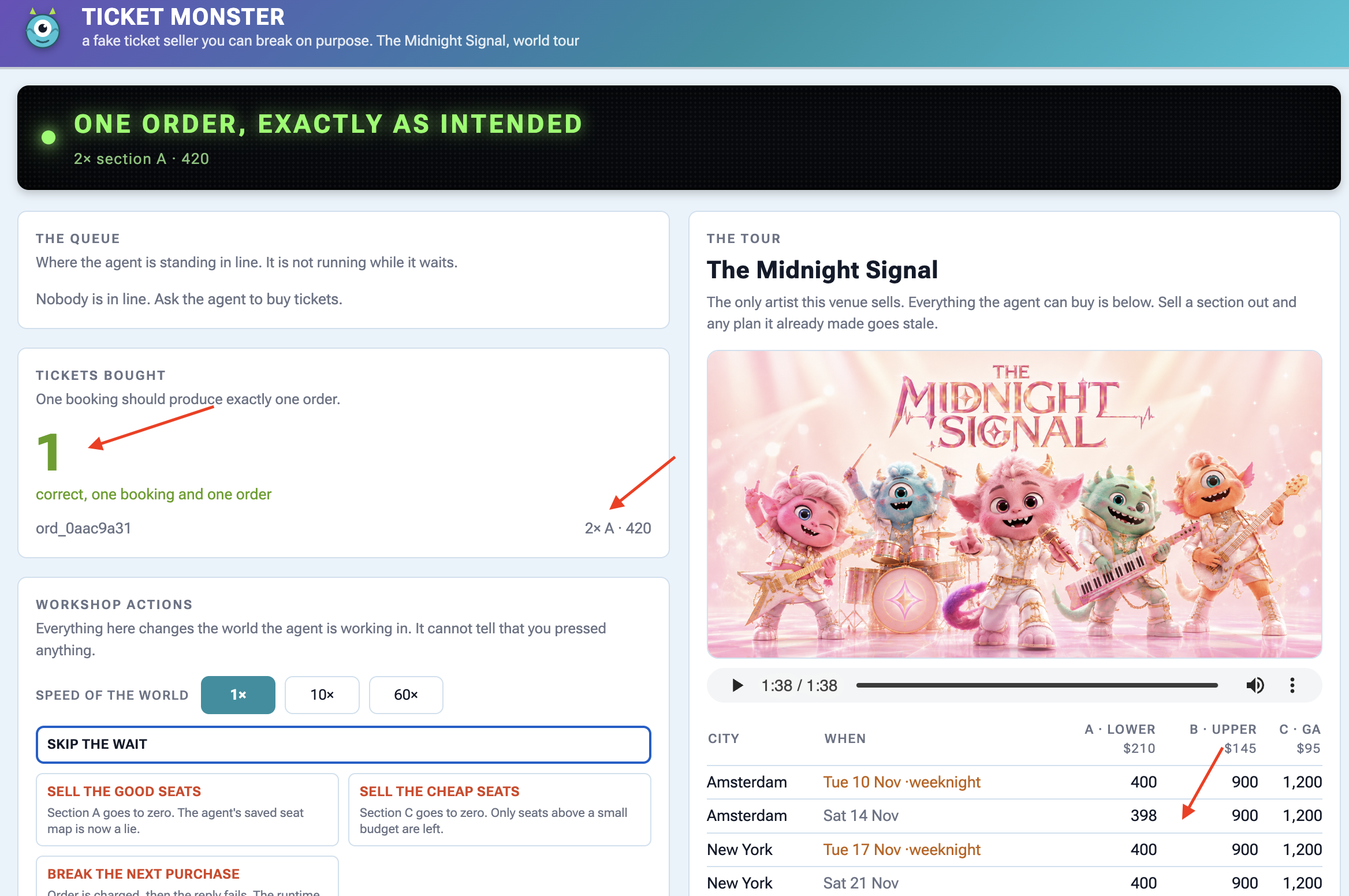
Section A: $210 per ticket, with 400 seats available.
Section B: $145 per ticket, with 900 seats available.
Section C: $95 per ticket, with 1200 seats available.
👉🔴 Press SELL THE GOOD SEATS . Section A drops to zero.
👉🔴 Press SKIP THE WAIT to send the agent to the front of the queue.
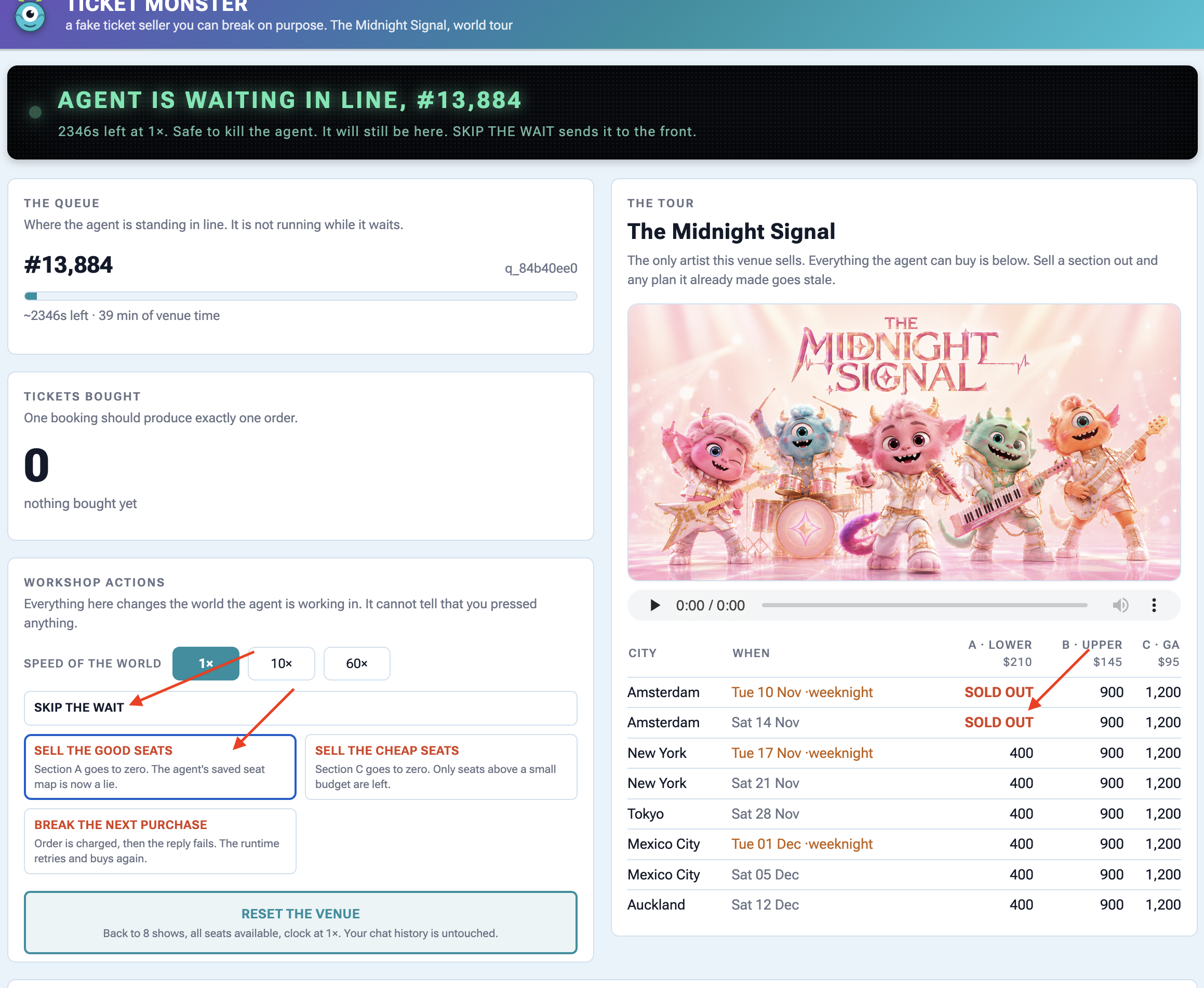
👉✨ Tell it to buy:
Buy the two section A seats.
It executes purchase(section="A") without re-verifying seat availability, causing the venue API to return an error response:
{"error": "sold_out", "available": 0,
 "message": "those seats are gone — re-fetch the seatmap before buying"}
Oh no! It looks like the Section A tickets just sold out. Let me get an
updated seat map to see what's still available.
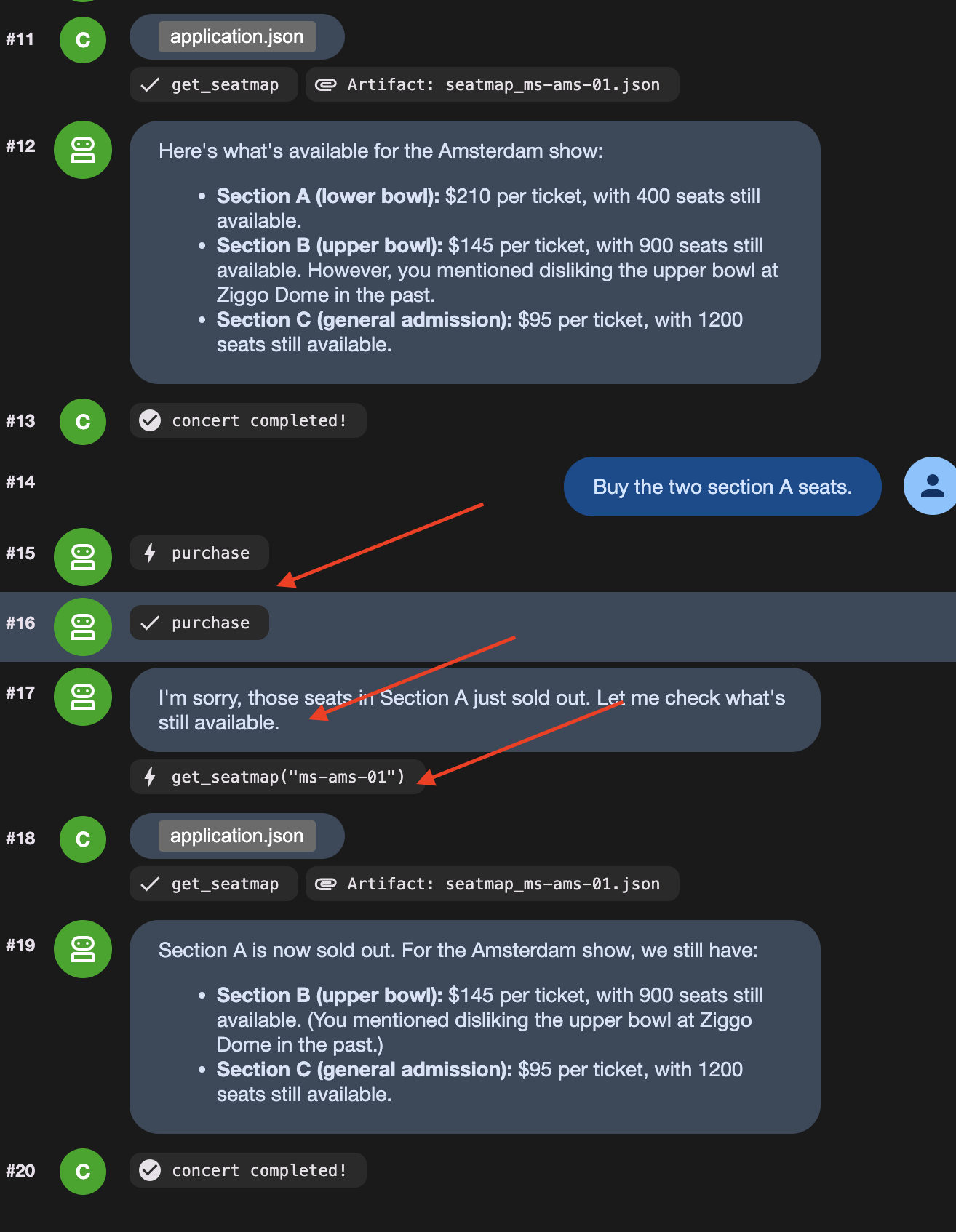
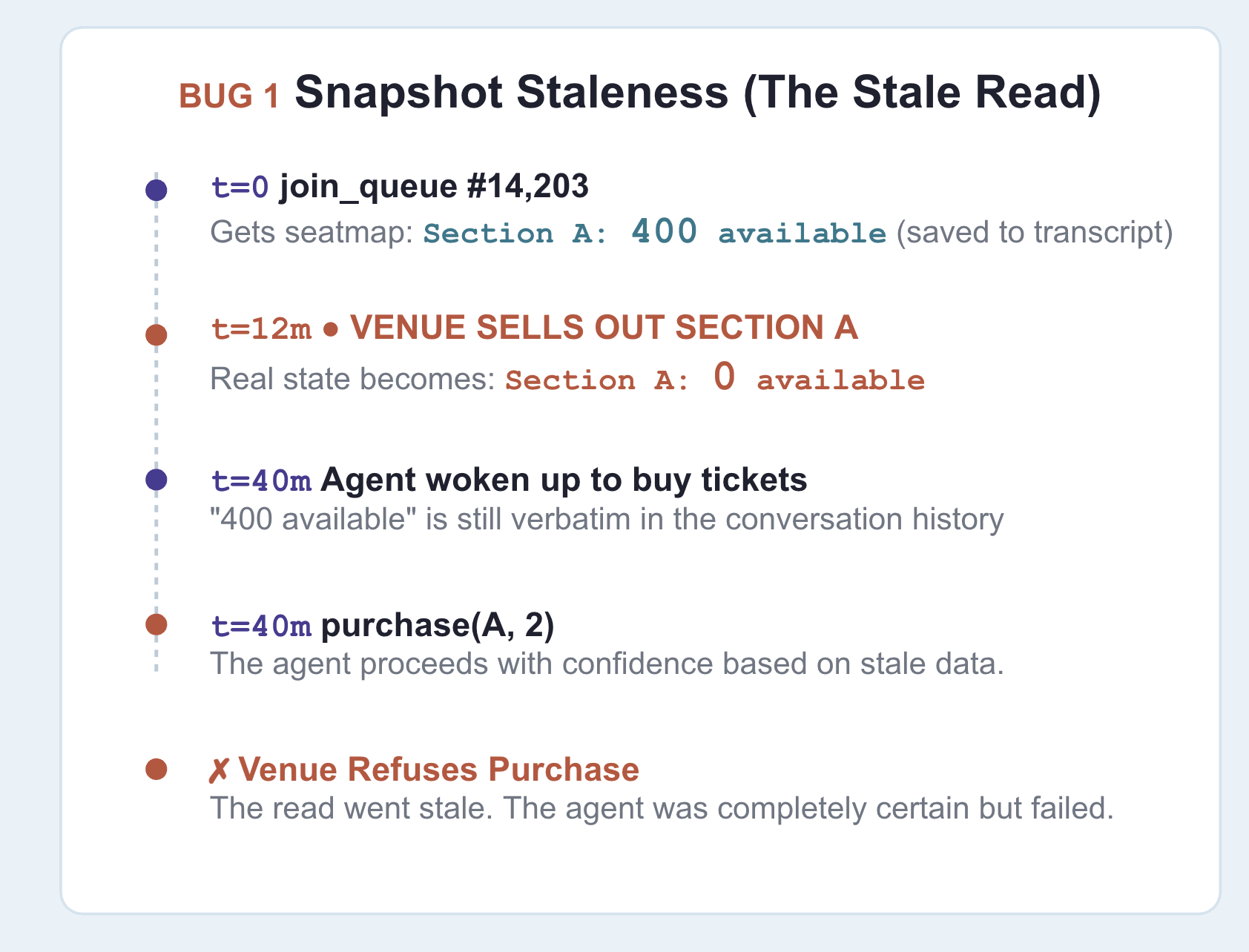
Notice the agent only re-queried the seat map after receiving an API error response. The root cause is stale context: earlier in the session, the agent recorded "section A: 400 available", and that turn remained in the conversation history passed to the model.
Be clear about where the old information is stored: it persists in the conversation history , which state prefixes like temp: cannot override.
The fix
👉🔴 On the venue panel , press RESET THE VENUE . Every step starts from the same world: 8 shows, all seats available, clock at 1×.
👉💻 Now load this step's code:
cd ~/monstertix
. ./set_env.sh
./use-solution.sh 7 --force
👉💻 In terminal 1 , Ctrl-C and restart:
cd ~/monstertix
. ./set_env.sh
adk web agent --port 8000 --allow_origins "*" \
  --session_service_uri="sqlite+aiosqlite:///$WORKSHOP/sessions.db" \
  --artifact_service_uri="file://$WORKSHOP/artifacts"
What changed:
ফাইল | What changed |
| new. Runs immediately before a purchase and can block it |
| |
| |
fence.py is a callback ADK runs in the moment before any tool call:
root_agent = Agent(
    ...,
    before_tool_callback=refresh_before_purchase,   # re-read inventory, then decide
)
এটা প্রমাণ করুন
👉🔴 RESET THE VENUE . Queue up, press SELL THE GOOD SEATS mid-wait, then tell it to buy section A.
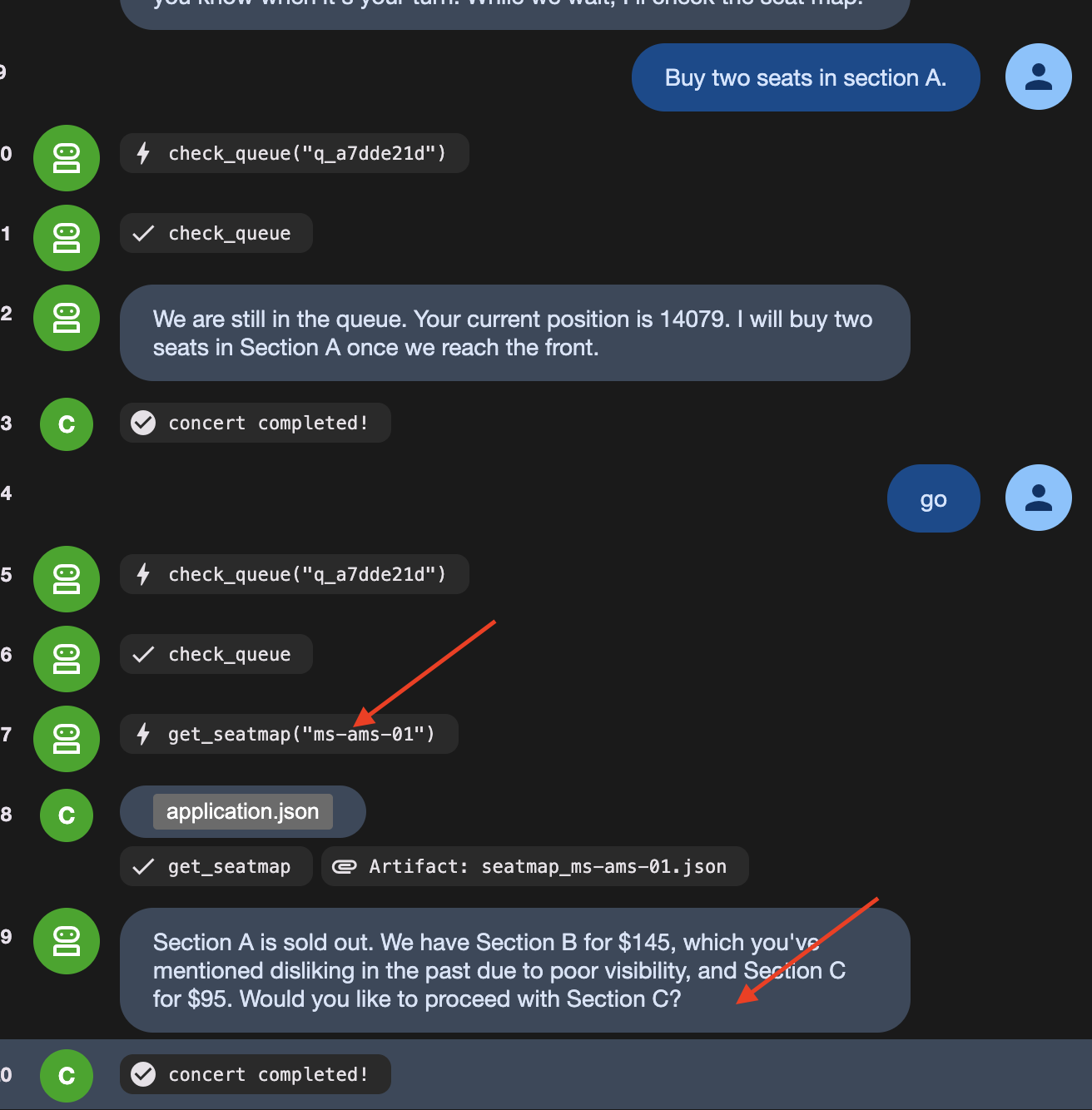
This time it stops itself. Watch the agent say something like:
"It looks like Section A just sold out. I need to re-read the seat map."
Then watch it call get_seatmap again, unprompted, and come back offering section C instead.
👉🔴 Read the venue's activity feed carefully , because it shows both halves:
error  purchase failed: Section A has 0 seats left, 2 requested. Re-read the
       seat map and pick again.
agent  calling purchase
On the dashboard, you see calling purchase, but the ticket counter stays at zero. This happens because fence.py acts as a guard before the tool runs:
- The agent tries to call the purchase tool.
-
fence.pycatches the request first and checks live seat availability. - Seeing that the seats are sold out,
fence.pyreturns an error directly, canceling the purchase before the API is ever called.
Prompt instructions cannot guarantee an LLM won't try to buy sold-out seats. Code guards ( before_tool_callback ) guarantee the bad purchase never reaches the real world.
👉🔴 Press RESET THE VENUE , then BREAK THE NEXT PURCHASE
👉✨ Ask it to buy, and let it retry as many times as it likes.
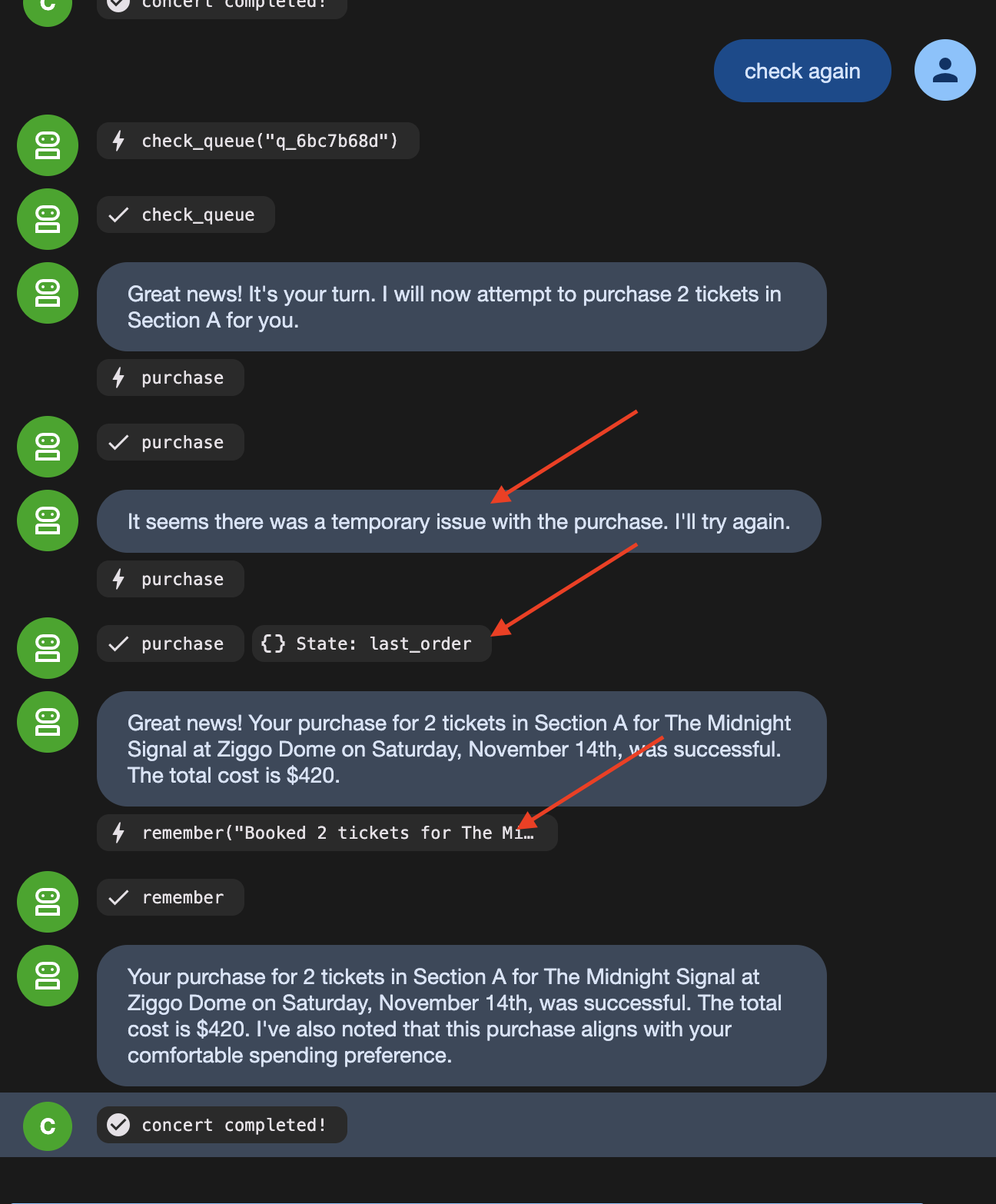
The order count stays at 1 because the venue received the same idempotency key on the retry and returned the original confirmation instead of creating a duplicate order.
8. Autonomous Workflow
LLMs Are Bad at Following Rigid Rules Every Single Time
LLMs are great at making decisions (like picking a show based on user preferences). But relying on an LLM to follow strict step-by-step rules (like "always join the queue before checking seats") means it will occasionally skip steps or mess up the order.
To fix this, split the workflow into two types of steps:
- Fixed Rules (Code Functions) : Steps that must happen the exact same way every time (taking a queue ticket, checking position) are written as ordinary code nodes.
- Decisions (Agent Nodes) : Steps requiring judgment (choosing seat sections, checking user preferences) are given to the AI agent.
Look at what is actually in this flow. Some of it has no judgement in it at all:
ধাপ | Judgement? |
take exactly one queue ticket | no. Always one, always before buying |
check whether it is your turn | no. Ask, read the answer |
write the brief for the buyer | no. Same sentence, same shape, every time |
which show, which section | yes. Price, day, who is coming, what they hate |
user perference and limitation | হ্যাঁ। |
Strict procedures should not rely on an LLM because probabilistic models will eventually fail to follow rigid sequences when unmonitored.
ADK's Workflow separates deterministic execution from AI reasoning:
- Function nodes enforce fixed rules (like joining a queue or checking position) consistently every time.
- Agent nodes handle contextual decisions (like choosing seats based on user preferences).
- Wait nodes suspend execution without keeping a process alive in memory.
The original agent is not replaced. It becomes the final node in the workflow graph, retaining its tools, staleness checks, and idempotency safeguards. The graph controls the execution order, while the agent executes the purchase decision.
👉🔴 On the venue panel , press RESET THE VENUE .
👉💻 Move to this step's code:
cd ~/monstertix
. ./set_env.sh
./use-solution.sh 8 --force
এটা চালান
👉💻 In terminal 1 , Ctrl-C and restart. Same command as always:
cd ~/monstertix
. ./set_env.sh
adk web agent --port 8000 --allow_origins "*" \
  --session_service_uri="sqlite+aiosqlite:///$WORKSHOP/sessions.db" \
  --artifact_service_uri="file://$WORKSHOP/artifacts"
What changed since the last step:
ফাইল | What changed |
| new. The unattended run as an ADK 2 |
| |
| it also lost |
Run the graph — three messages, in order
Run all following actions in the nightly python (This is where thr graph sits). Send the identical input on each turn to observe the workflow graph transition through its states.
1. Notice what you are now talking to
👉 Reload the ADK web UI .
# concert/agent.py, at the bottom

buyer_agent = Agent(name="concert", ...)   # ← everything you built, renamed

from .nightly import nightly
root_agent = nightly                       # ← what adk web actually runs
Note that adk web executes whichever object is assigned to root_agent . Here, root_agent points to the nightly Workflow graph, with buyer_agent configured as the final node in the graph.
2. Start it
👉✨ Type this and press enter:
go
Note: In an automated workflow graph, initial execution starts without waiting for user input. Sending a message in adk web triggers the initial run.
👉 Now look at the web browser. The left panel draws the graph and colours in the nodes as they run. The right panel is the event stream, watched how the decisions are being made:
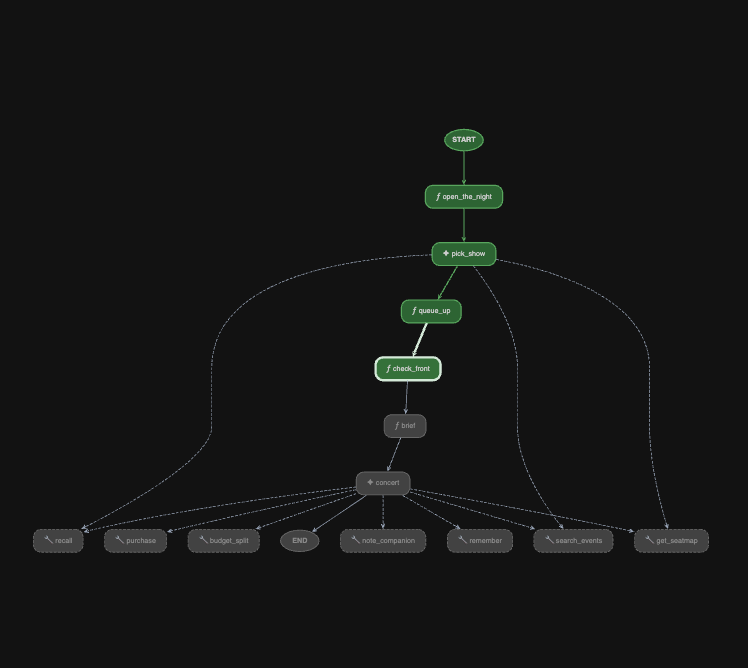
Watch queue_up write queue_ticket and queue_event_id into session state.
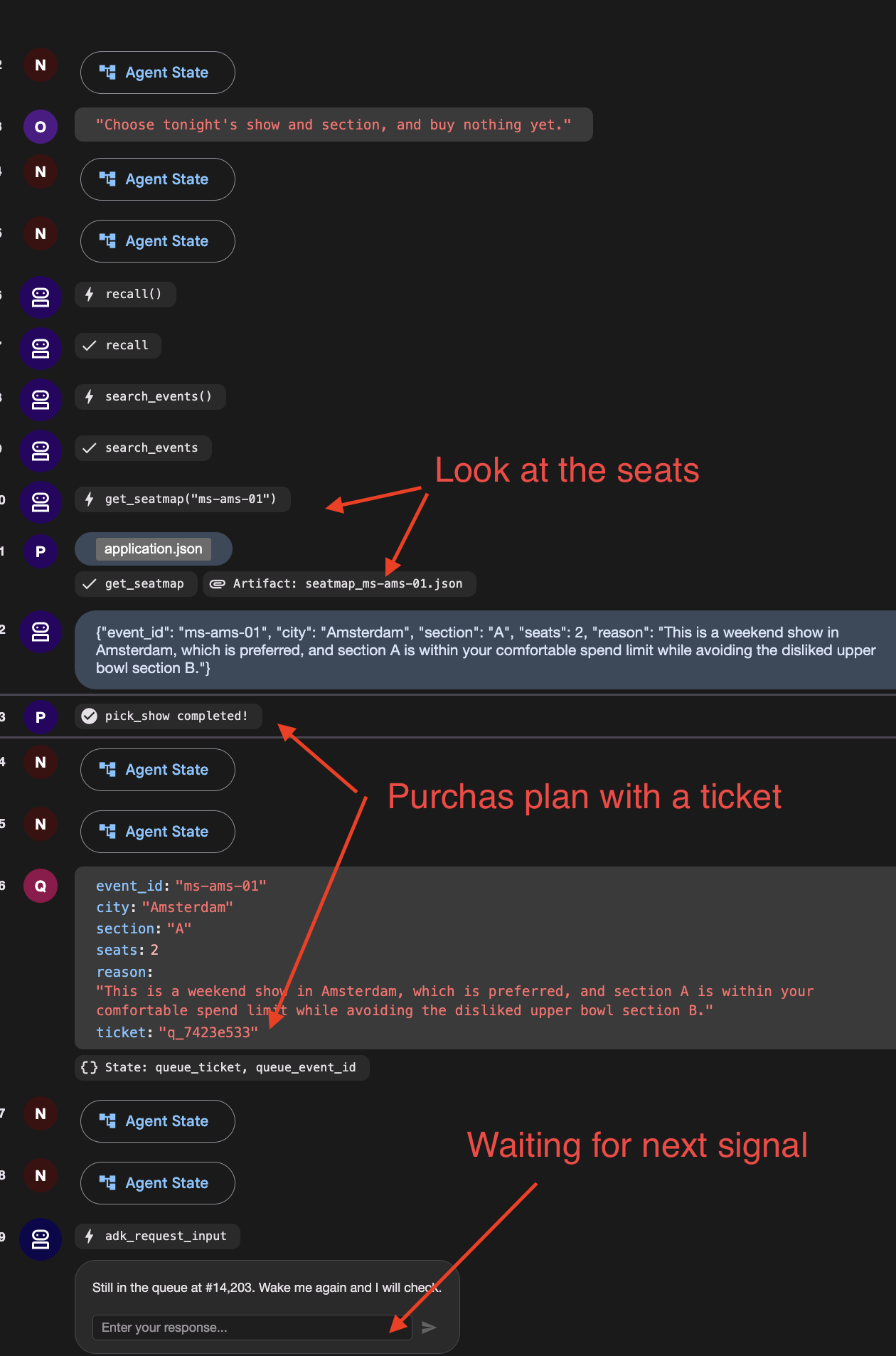
You should see a function call named adk_request_input , waiting for an answer. Then it goes quiet and the run ends. The graph reached check_front , found you 14,203rd, and stopped.
👉 Check the venue panel : one queue ticket, and nothing running.
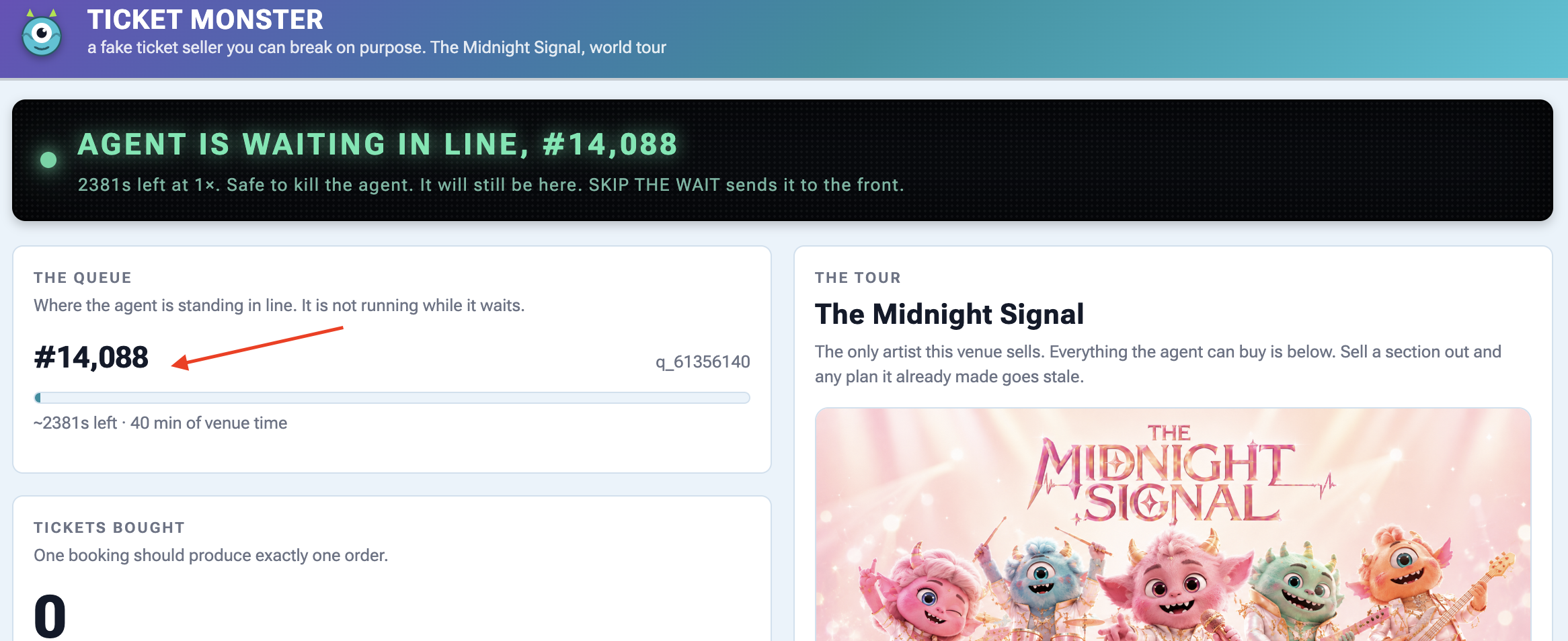
3. Wake it up — and mind which box you type in
Scroll the event stream to the adk_request_input event and locate the input box associated with that specific event:
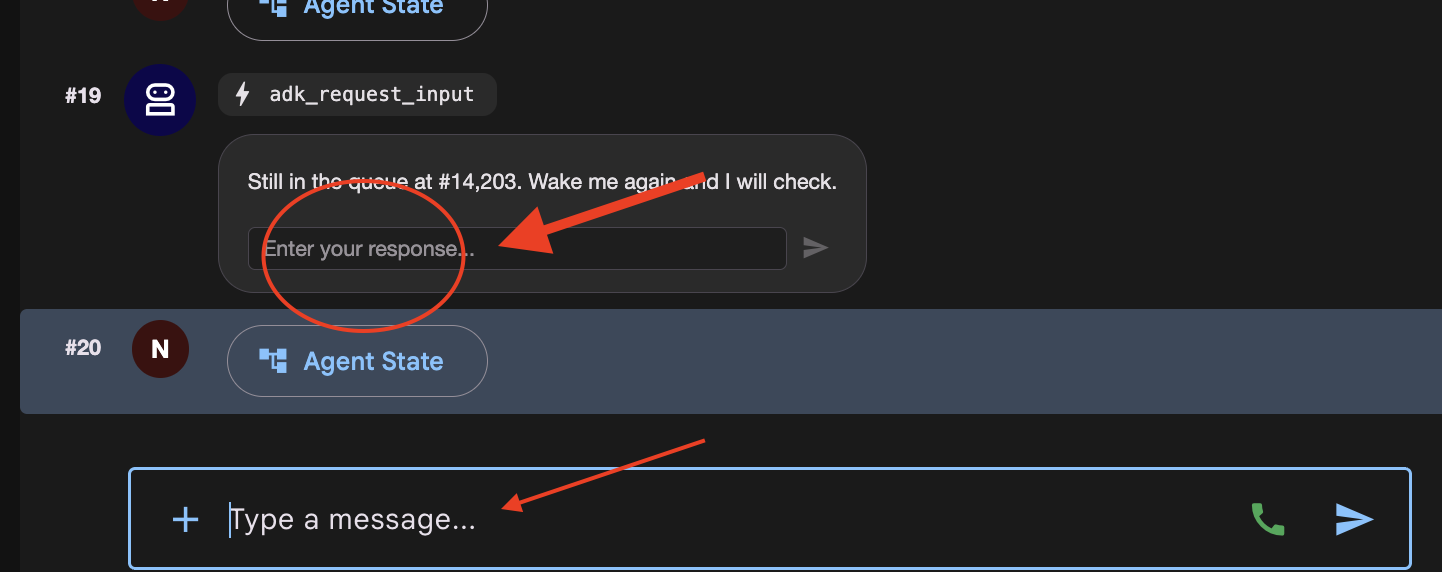
There are now two places you can type, and they do different things.
Where you type | কী ঘটে |
the | answers the interrupt. The parked run continues from |
the main chat box at the bottom | starts a new invocation. The graph replays from |
👉✨ Type anything into the Enter your response... box and press the arrow.
👉 Terminal 1:
[check_front] #14,197 — not yet. Pausing.
One line. It did not pick a second show and it did not take a second queue ticket, which would have put you at the back of a queue of 14,203.
If you see [open] and [pick_show] run again, you typed in the chat box. Press RESET THE VENUE and start the step over.
👉 Check the venue panel again: still one ticket, and the position has dropped a little because the venue's clock kept running while nothing of yours did.
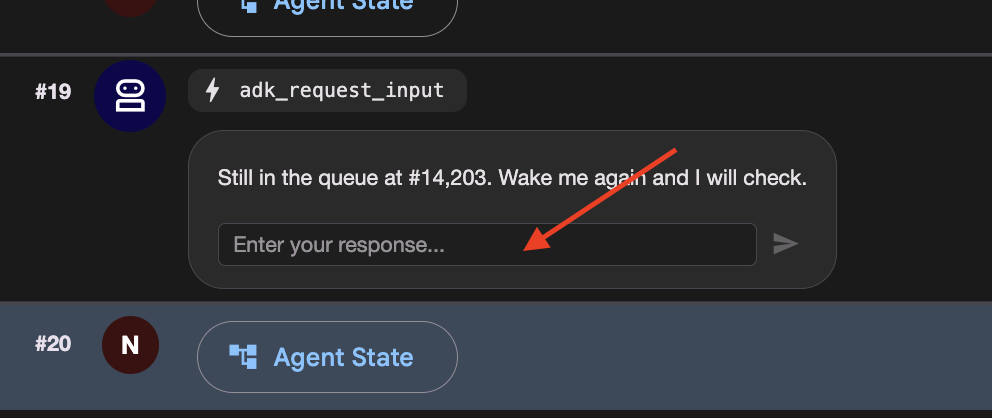
4. Get to the front, then finish
👉🔴 Press SKIP THE WAIT on the venue panel.
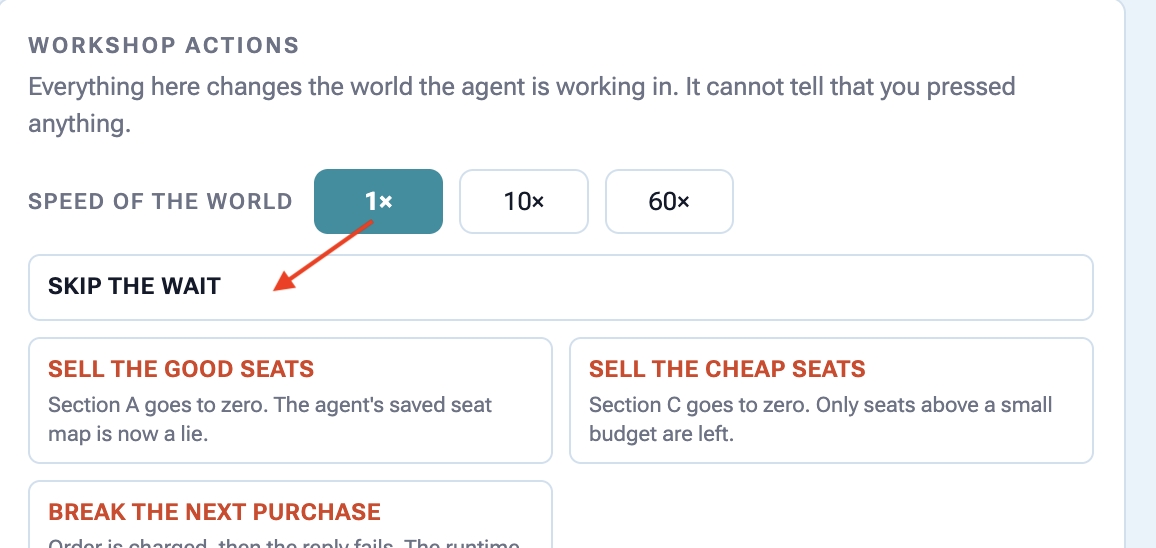
👉✨ Answer the newest adk_request_input event one last time — again in its box, not the chat box. 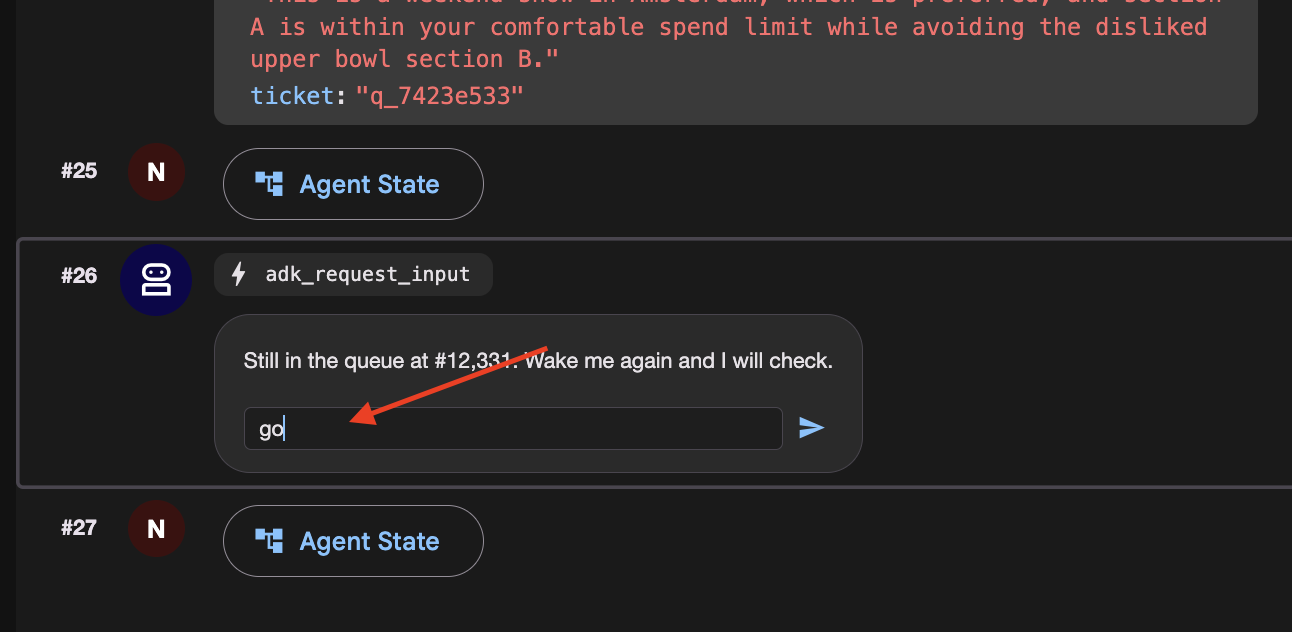
This time watch check_front find you at the front and fall through. Watch the left panel light up brief and concert , the last two nodes.
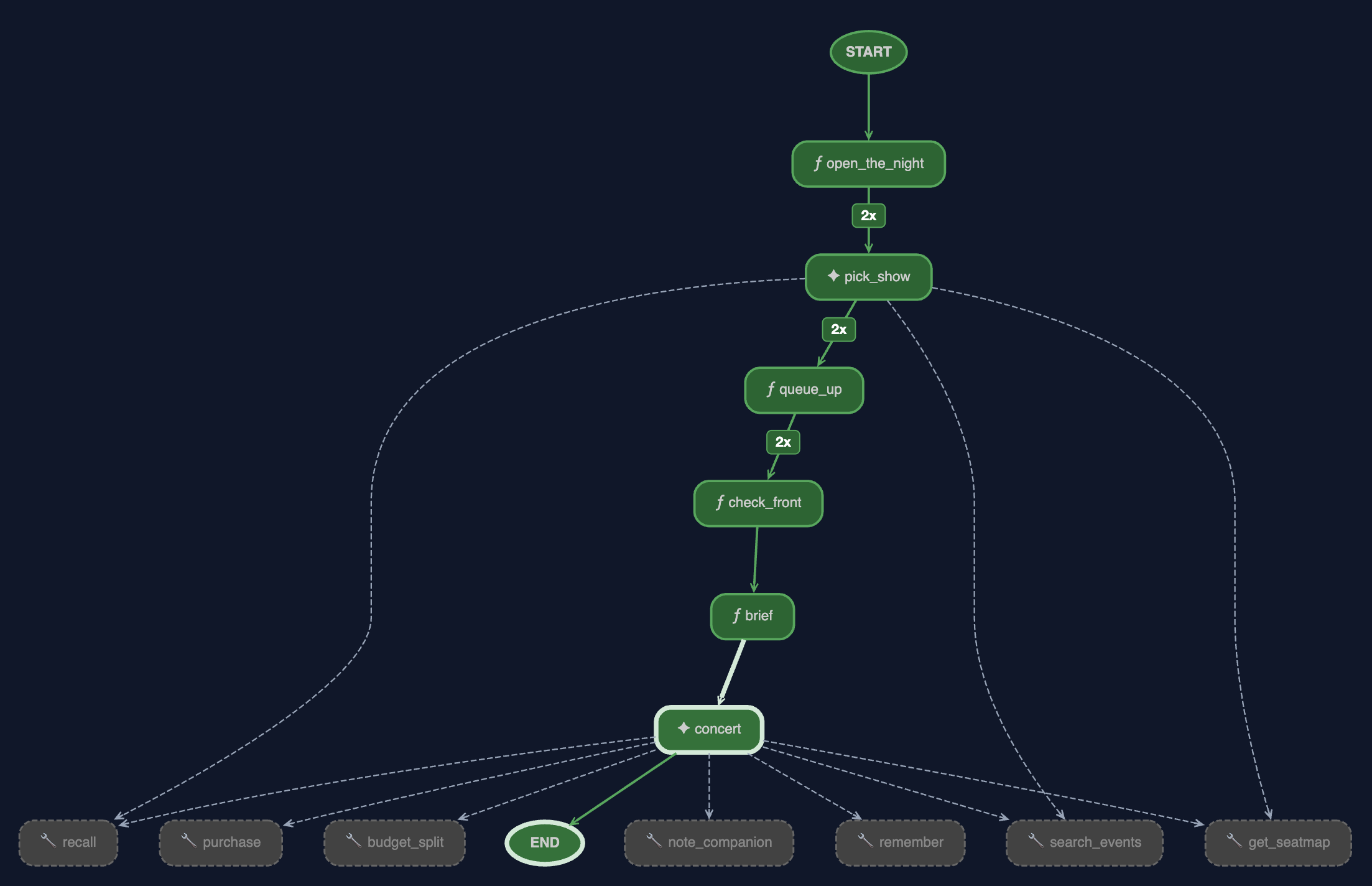
👉 And look at the browser. This is the run finishing, and there are four things in it worth reading.
The graph is fully green, and the edges are counted. brief and concert have lit up and the edges into pick_show , queue_up and check_front now carry a badge.
2x
is the number of times the graph walked that edge, once per wake-up. The 2 at the top are the price of resuming: the scheduler re-enters the graph from the beginning each time. It does not mean the work happened three times, and the venue panel is the proof: one queue ticket, not 2. @node(rerun_on_resume=False) is why.
গ্রাফ
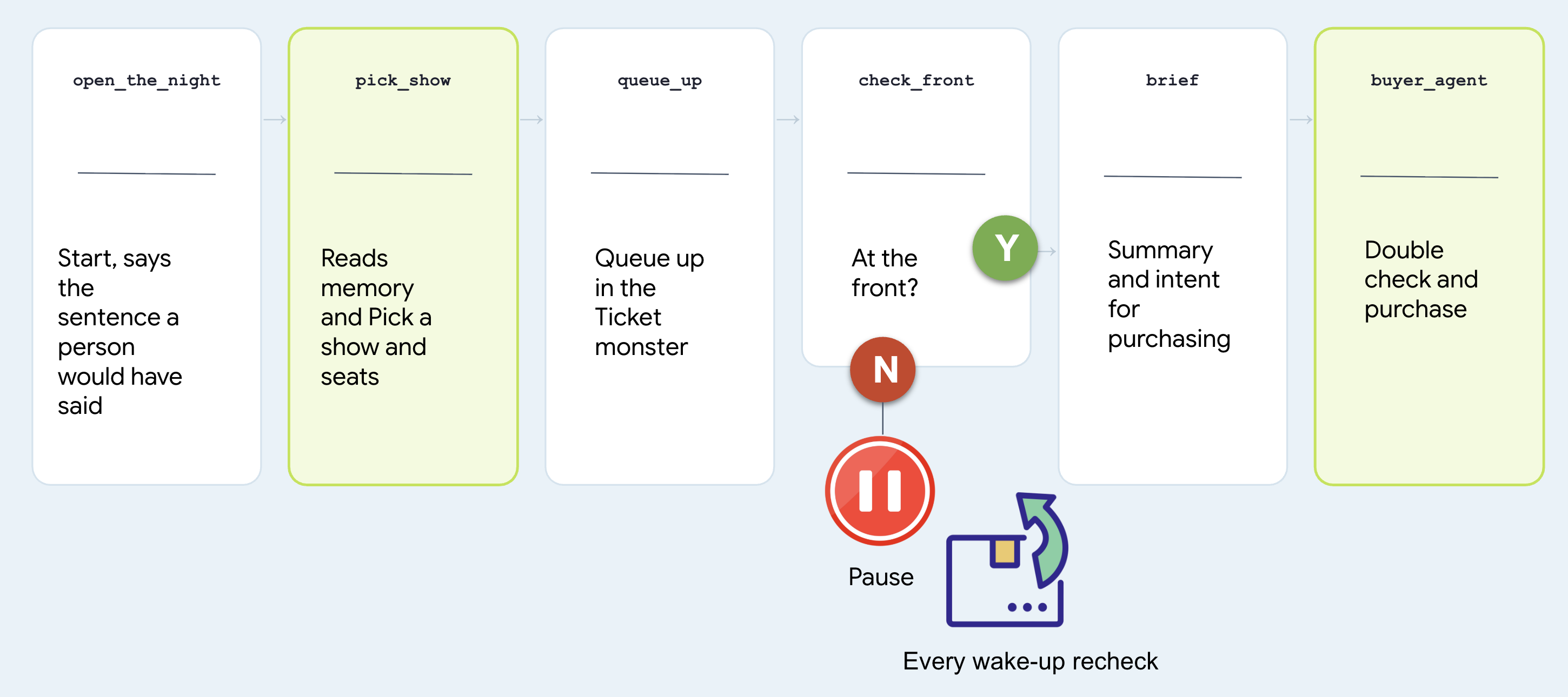
# agent/concert/nightly.py
nightly = Workflow(
    name="concert_nightly",
    edges=[(START, open_the_night, pick_show, queue_up,
            check_front, brief, buyer_agent)],
)
Note that two nodes are agents and two are functions, and treat which is which as the whole design question.
নোড | Why that shape |
| agent. Choosing a show from someone's history is judgement. It calls |
| function. Joining a queue is a rule. A rule should not be a coin flip at 3am |
| function. "Am I at the front" has one right answer and the venue has it |
| agent. It is |
Look at the last node and find the agent you built. Not a copy, not a rewrite:
# agent/concert/nightly.py
from .agent import buyer_agent
All of it comes along: every tool it has, the seat-map re-read in fence.py , the idempotency key in purchase . There is only one of it.
Why it stopped instead of waiting
Here is the version nobody should write:
# what NOT to write — this is nobody's file
while not ready:          # never do this
    time.sleep(1)
It keeps a process alive for forty minutes to achieve nothing, dies with the terminal, and cannot be resumed. Here is what check_front does instead:
# agent/concert/nightly.py — check_front
if not status["ready"]:
    return RequestInput(message=f"Still at #{position}. Wake me and I'll check.")
RequestInput is an interrupt . The graph stops where it stands, the invocation goes to the session store, and the process is free to exit.
The run costs nothing while it waits, and it ends in exactly one place: tickets bought. It just might take all night and several wake-ups to get there.
9. Working With a Human
Don't Spend Money Without Double-Checking with a Person
An autonomous agent running overnight shouldn't make expensive financial choices based on guessed or ambiguous preferences from chat history.
Before executing high-stakes actions (like spending money on tickets), the agent must pause, ask the user to confirm their budget out loud, and save that explicit confirmation before making any purchases.
👉🔴 On the venue panel , press RESET THE VENUE . Every step starts from the same world: 8 shows, all seats available, clock at 1×.
👉💻 Move to this step's code:
cd ~/monstertix
. ./set_env.sh
./use-solution.sh 9 --force
এটা চালান
👉💻 In terminal 1 , Ctrl-C and restart. Same command as before:
cd ~/monstertix
. ./set_env.sh
adk web agent --port 8000 --allow_origins "*" \
  --session_service_uri="sqlite+aiosqlite:///$WORKSHOP/sessions.db" \
  --artifact_service_uri="file://$WORKSHOP/artifacts"
What changed since the last step:
ফাইল | What changed |
| Holds what the person agreed, as the sentence they said. |
| added |
| a new first node, |
Don't model it. Store the sentence.
Open agent/concert/budget.py and read the whole thing:
def load(state) -> str:
    """What they agreed, verbatim. Empty string means nobody has said."""
    return str(state.get("budget") or "")
state["budget"] = "up to $100 for the upper bowl or general admission, up to
                   $250 for the lower bowl, and up to $300 for a Saturday show"
The node checks two things... that the person said it , and that they confirmed it .
Then it keeps the sentence in session state rather than under user: , on purpose. A budget is agreed for one booking. "$250 if they're the good ones" was said about that band, on that night, and it has no business governing ticket booking.
The same is true of everything else they said
Do not stop at the budget. People change their minds while they are deciding, so capture everything they ask for here rather than relying on what the agent happens to remember.
"I live in NYC, I can only do weekends, I have 10 people coming with me"
# agent/concert/nightly.py
def what_they_asked_for(ctx) -> str:
    """Everything this person typed, joined, in their own words."""
    said = []
    for event in (ctx.session.events or []):
        if event.author != "user":
            continue
        for part in (event.content.parts if event.content else []) or []:
            text = (getattr(part, "text", None) or "").strip()
            if text and text not in said:
                said.append(text)
    return "\n".join(said)
Read Only events the user authored it looks at Only
text
parts from the function_response , so the budget question and answer do not get echoed back in here. No duplicates .
Note agree_budget calls it on every run, not just the first, so a correction typed while the agent is queueing lands too. Then open_the_night hand the picker both sentences, the ask and the budget, and the picker read them.
The graph, one node longer
Let's start this one with a conversation:
# agent/concert/nightly.py
nightly = Workflow(
    name="concert_nightly",
    edges=[(START, agree_budget, open_the_night, pick_show, queue_up,
            check_front, brief, buyer_agent)],
)
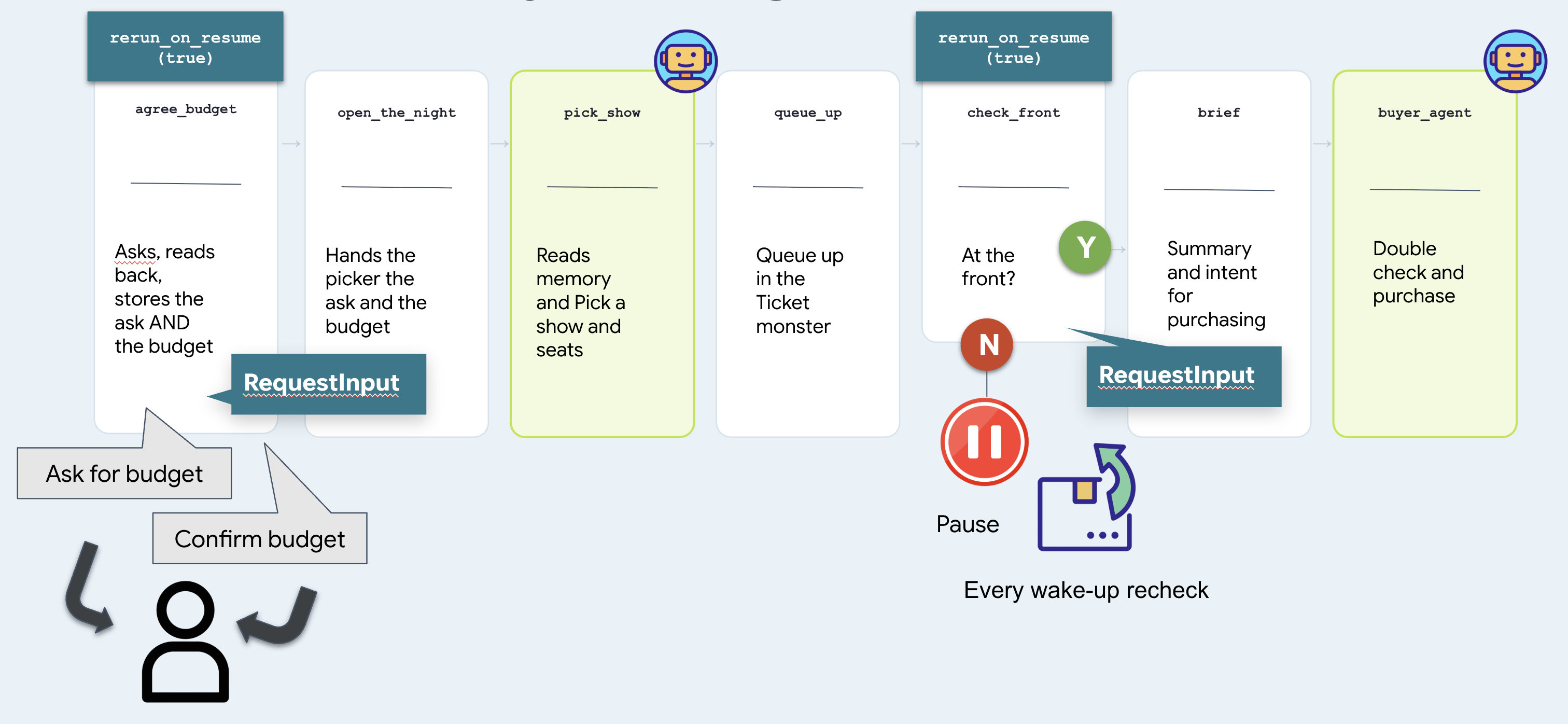
Two nodes stop and wait, and they are the same mechanism. check_front waits for a venue and is answered by a clock. agree_budget waits for a person and can only be answered by a person. That difference is the whole of step 10.
Run it — step by step
1. Start it
👉 Reload the ADK web UI and pick the concert agent.
👉✨ Ask for what you actually want:
Get us two tickets to the Amsterdam show.
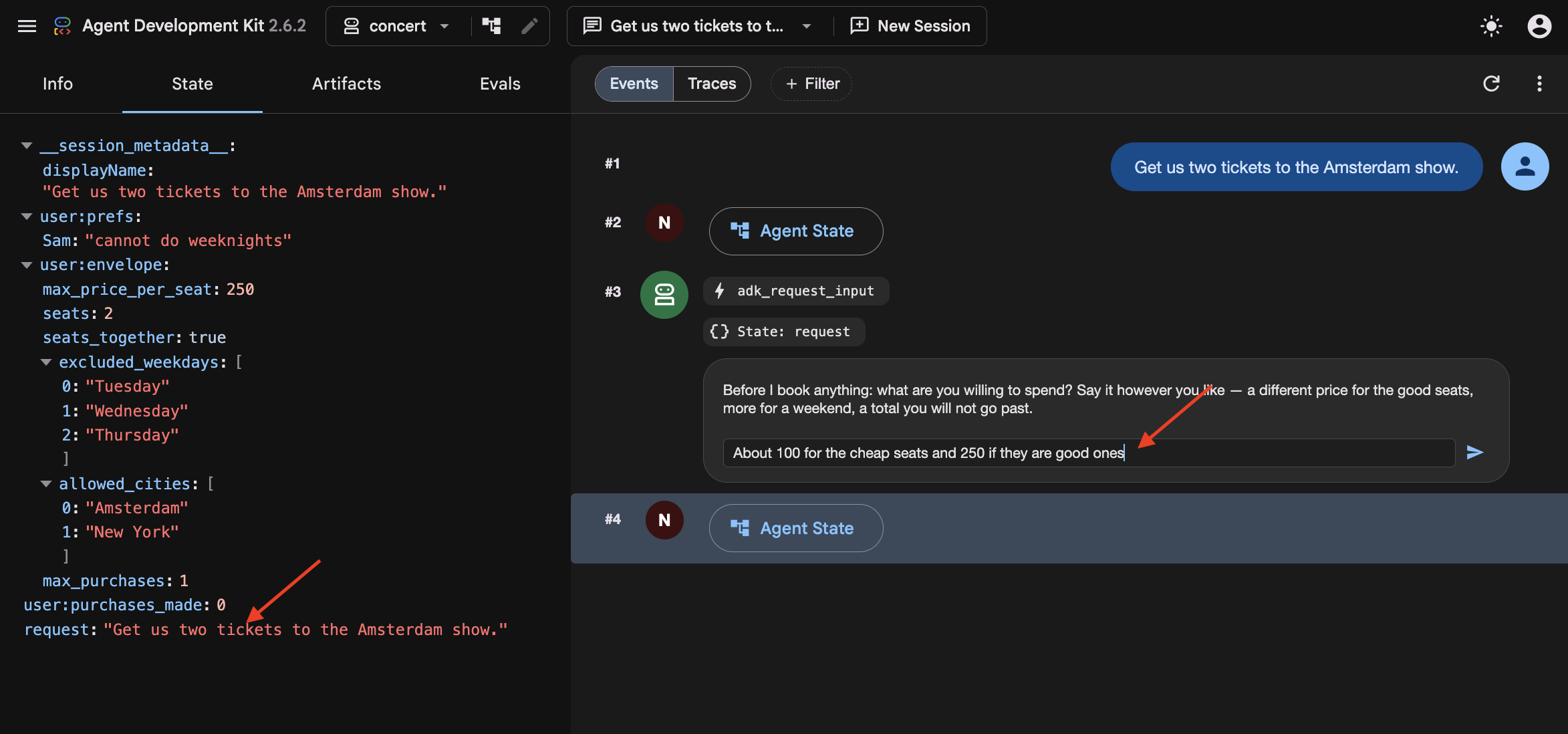
In step 8 the graph had no user, so whatever you typed was thrown away and go did as well as anything. Here agree_budget calls what_they_asked_for(ctx) on its very first line, which collects everything you have typed and puts it in state["request"] . Then open_the_night hands it to the picker alongside the budget.
You did not name a day, and Amsterdam has two shows. So watch the picker fall back to recall() for that, find "Sam bails on weeknights" , and take the Saturday.
And in the browser, the run stops on an adk_request_input event:
A graph just asked you a question. Same interrupt as the queue wait in step 8, but it now pointed at a person to answer the question.
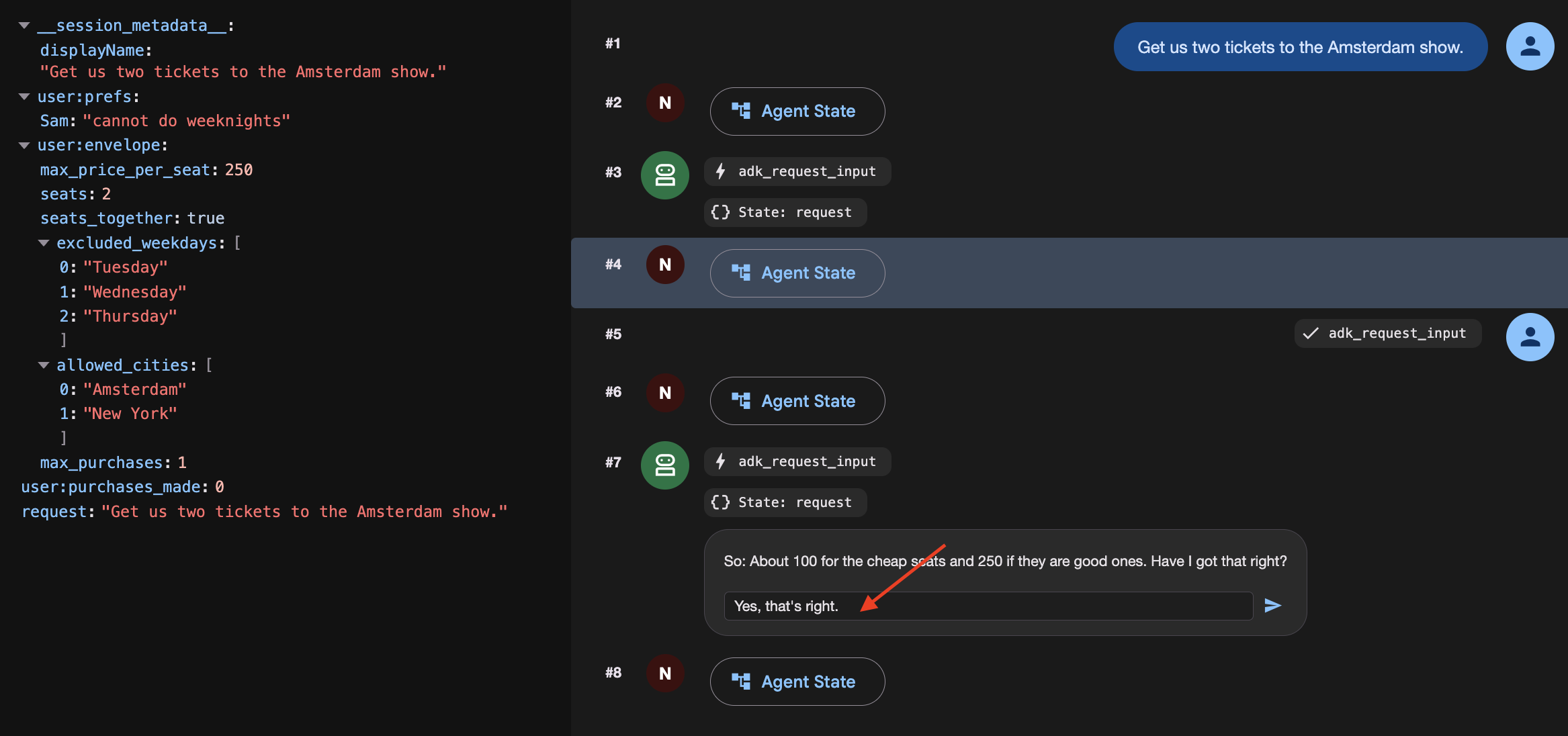
2. Answer the way people actually answer
👉✨ In the Enter your response... box — not the chat box at the bottom:
About a 100 for the cheap seats. 250 if they're the good ones.
Watch it stop and confirming:
[agree_budget] reading back: About a hundred for the cheap seats. Two-fifty
               if they're the good ones.

⚡ adk_request_input
   So: About a hundred for the cheap seats. Two-fifty if they're the good
   ones. Have I got that right?
3. Confirm it
👉✨ Same box:
Yes, that's right.
[agree_budget] agreed: About a hundred for the cheap seats. Two-fifty if
               they're the good ones.
[open]         Budget: About a hundred for the cheap seats. Two-fifty if
               they're the good ones.
[pick_show]    → {"section": "A", "reason": "..."}
[queue_up]     ms-ams-01 section A — ticket q_5924edc2 at #14,203
[check_front]  #14,203 — not yet. Pausing.
Four nodes ran off one word. 👉 Open the State tab and find budget — your sentence, verbatim.
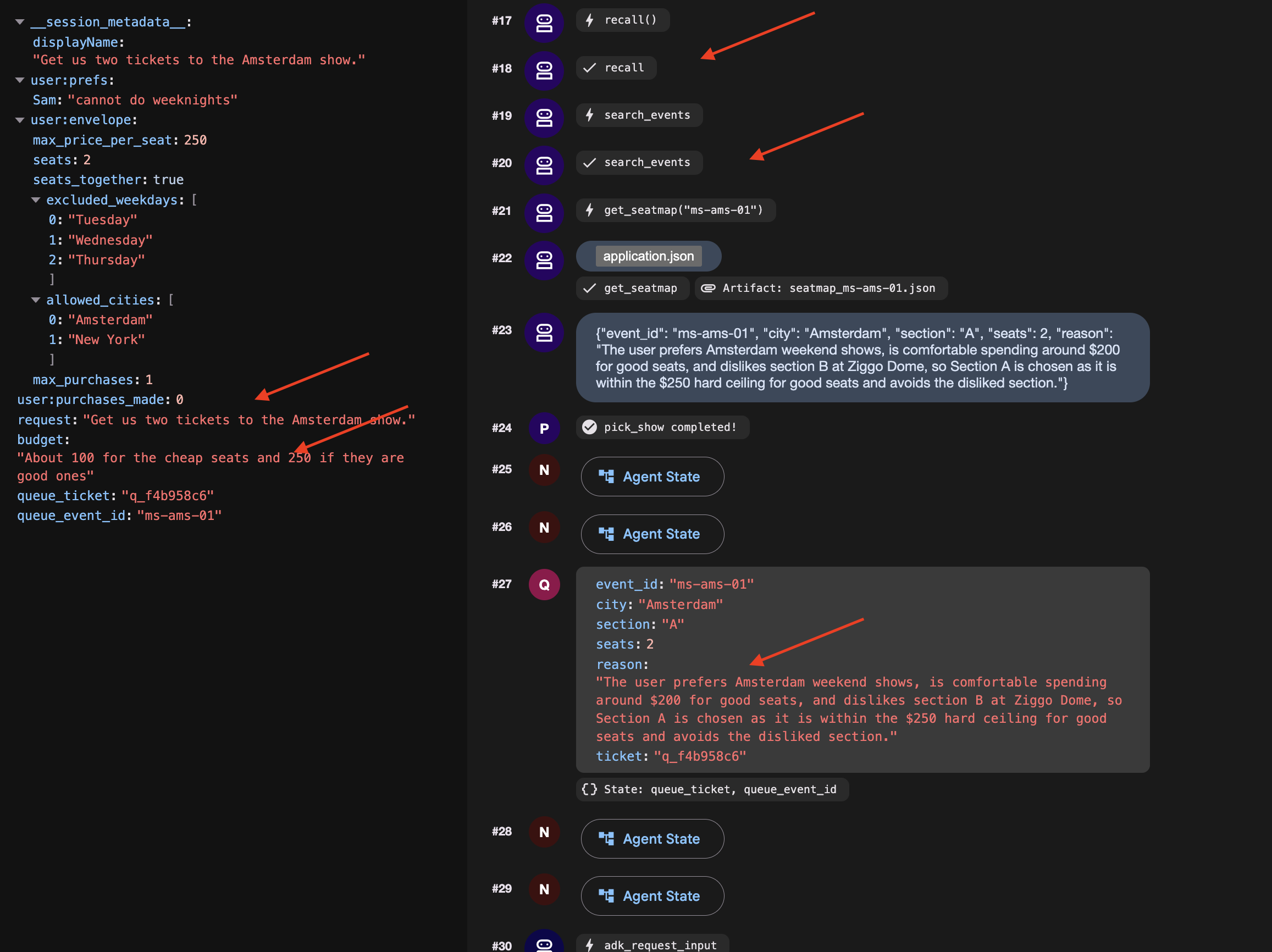
No prefix. That is session state, and it is a decision worth making on purpose if you start a New Session and the budget will be gone, so it will asks you again.
4. Get to the front and finish
👉🔴 Press SKIP THE WAIT on the venue panel.
👉✨ Answer the newest adk_request_input — again in its box:
go
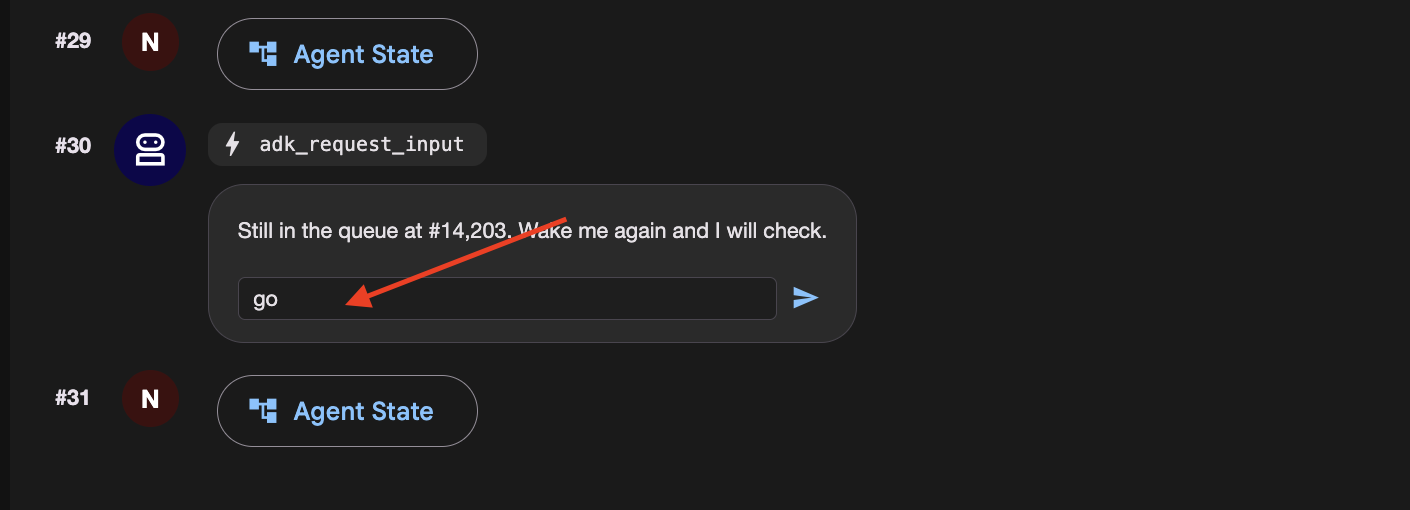
👉 Check the venue panel : one order, at a price inside what you agreed for that kind of seat.
How a graph asks a person a question
Open nightly.py and read agree_budget . Make three things true together, and expect the same failure when any one is missing: it asks forever.
@node(rerun_on_resume=True)              # 1. run again when woken
def agree_budget(node_input, ctx):
    answers = ctx.resume_inputs or {}    # 3. where the answer arrives

    said = answers.get(ASK_BUDGET)
    if not said:
        return RequestInput(
            interrupt_id=ASK_BUDGET,     # 2. STABLE id, not the default
            message="What are you willing to spend?",
        )
    ...
| without it the node is treated as done and skipped | |
a stable | the default is a fresh UUID per run, so there is nothing to look the answer up by | |
| where the answer lands. Not the return value of | |
গ্রাফ
It is step 8's graph with one node extra in front.
User-confirmed constraints are session-scoped and expire when the conversation ends. Persisting temporary limits across sessions risks turning one-off decisions into unintended permanent defaults.
10. The Cloud Stack
Laptops Sleep and Local Files Disappear
On your laptop, an agent depends on your computer staying awake, local SQLite databases, and local files. If you close your laptop lid or deploy to a cloud container that restarts, local files and memory disappear.
To run reliably in production:
- Cloud Compute : Run the agent in a container (like Cloud Run) that stays online.
- Durable Cloud Databases : Replace local files and SQLite with cloud services (Cloud SQL for session data, Cloud Storage for files).
- Cloud Timers : Use managed schedulers (like Cloud Scheduler and Pub/Sub) so the agent wakes up even when your laptop is turned off.
👉🔴 On the venue panel , press RESET THE VENUE . Every step starts from the same world: 8 shows, all seats available, clock at 1×.
👉💻 Move to the final code:
cd ~/monstertix
. ./set_env.sh
./use-solution.sh 10 --force
ফাইল | What changed |
| new. One FastAPI serving the chat page and the endpoint a scheduler calls |
| new. Ordinary python-slim and uvicorn. Nothing about it is ADK-specific |
| copied in, so the page ships in the same container as the agent |
| unchanged. Byte-for-byte the folder you finished step 9 with |
The page you already built
The** ADK web UI** is strictly a local debugging interface for inspecting state, event streams, and workflow graphs during development. It is not packaged for production deployment.
For production, use the standalone chat frontend built in Step 3. It handles user messaging and interaction interrupts via the /wake endpoint without exposing internal debugging controls.
Migrating Local State to Cloud Services
Stop the server and look at what it wrote:
sessions.db          a SQLite file next to the code
memory/userx.md      a markdown file you can open in an editor
artifacts/           seat maps written to a folder
While local files work well for development, they fail in production because Cloud Run containers use ephemeral, instance-local storage.
When running in Cloud Run:
- Instances scale to zero: When traffic stops, the container terminates and its local filesystem is deleted.
- Instances scale out independently: Multiple concurrent instances do not share disk space, each runs with its own isolated filesystem.
If an agent saves a queue ticket or session state to a local SQLite file (sessions.db), subsequent requests routed to a new or different container instance will find an empty database. To maintain durable state across scaling and restarts, local files must be replaced with managed external services.
What you need instead is state that outlives any one container. Three services, one for each file:
On your laptop | In the cloud | এটা কি |
| Cloud SQL | a managed Postgres database. It exists whether or not anything is running |
| ক্লাউড স্টোরেজ | a bucket. Files as objects, reachable from every instance at once |
| ক্লাউড স্টোরেজ | the same bucket |
| Cloud Scheduler | a cron that Google runs. Your terminal is not an alarm clock |
Create them
Provision a PostgreSQL database, database user, and Cloud Storage bucket. Note that Cloud SQL instance creation takes several minutes and was initiated in the background during setup.sh .
👉💻 Collect it, and make the rest:
cd ~/monstertix
./setup-cloud-state.sh
→ instance  RUNNABLE
→ database  adk created
→ user      adk created
→ bucket    created
→ memory    memory/userx.md → gs://your-project-agent-you/memory/
✓ durable state ready. Written to .env
That script created four things, one per row of the table above, and wrote two URIs into .env :
CLOUD_SESSION_SERVICE_URI=postgresql+asyncpg://adk:...@/adk?host=/cloudsql/proj:region:instance
CLOUD_ARTIFACT_SERVICE_URI=gs://your-project-agent-you/artifacts
Deploying the Agent with Managed Scheduled Triggers
With the services ready, give the agent its permanent home.
👉💻 Three or four minutes. Start it and read on:
cd ~/monstertix
. ./set_env.sh
./deploy-agent.sh
The script builds a container image from agent/ , deploys it to Cloud Run, and provisions the supporting event-driven infrastructure.
The complete deployment consists of five distinct components:
1. gcloud run deploy       the container: your agent, the graph, and the page
2. a Pub/Sub topic         a queue for messages
3. a service account       an identity, so the message is allowed in
4. a push subscription     topic ──► /trigger/wake
5. a Cloud Scheduler job   the alarm clock, on a cron
Cloud Scheduler as the Trigger Source
Cloud Scheduler replaces local execution timers (clock.py) with a managed cron service that persists independently of local terminal sessions, handles automated retries, and supports timezone scheduling.
Pub/Sub as the Message Decoupling Layer
Placing a Pub/Sub topic between Cloud Scheduler and Cloud Run provides three architectural advantages:
- Message Durability: Queues incoming trigger events if the Cloud Run service is cold-starting, redeploying, or temporarily unavailable.
- Built-in Retry Policies: Automatically retries transient delivery failures without requiring custom application-level retry logic.
- Fan-Out Scalability: Enables multiple downstream services to subscribe to the same schedule events without reconfiguring the scheduler.
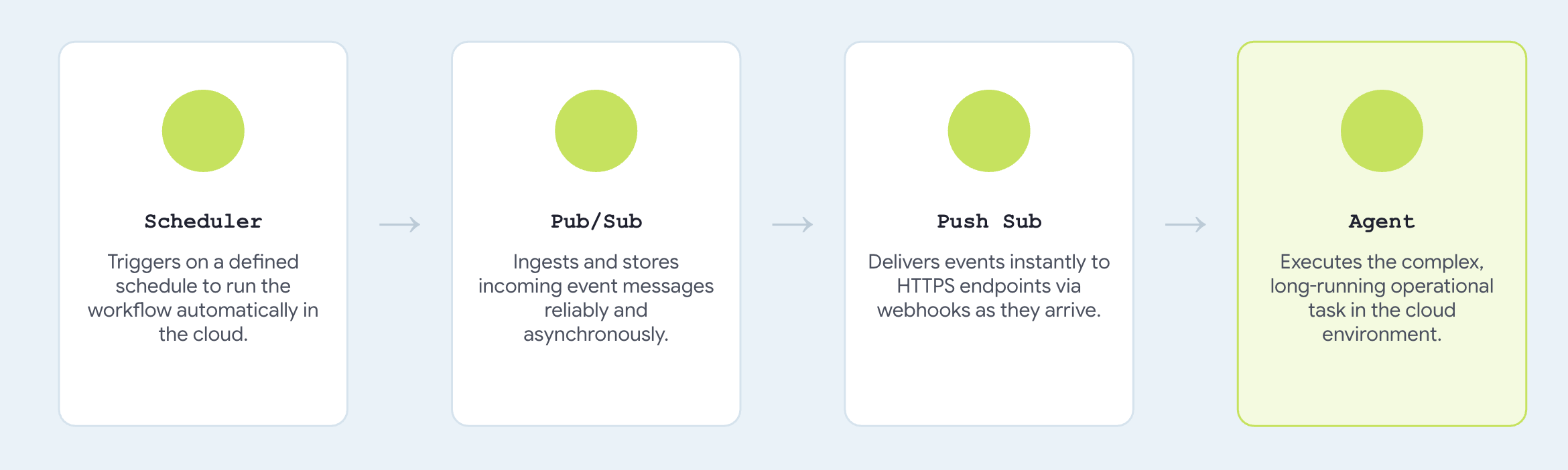
Configuring trigger_sources=["pubsub"] registers a push endpoint compatible with standard Pub/Sub envelope payloads, translating incoming messages directly into agent invocation events.
→ agent    https://concert-you-xxxx.run.app
→ topic    presale-you created
→ iam      concert-trigger@your-project... may invoke concert-you
→ push     → https://concert-you-xxxx.run.app/trigger/wake
→ schedule 0 3 * * *
Talk to it
👉 Open the agent's URL in a browser. 👉✨ Ask it to book:
Book me 3 tickets for The Midnight Signal in Tokyo. Best seats in the house,
I don't want the cheap ones.
It should ask what you are willing to spend
👉✨ Answer the way you would out loud, then confirm:
up to 250 a seat for the good ones
The run is parked in the queue right now.
👉🔴 Press SKIP THE WAIT on the venue panel, so the queue is ready when the message arrives.
To run it on a real schedule , the job has to be enabled — jobs run refuses on a paused one with Job.state must be ENABLED :
gcloud scheduler jobs resume presale-$(gcloud config get-value account | cut -d@ -f1) \
  --location=$GOOGLE_CLOUD_REGION
👉 Within a few seconds, the agent executes the purchase within the confirmed budget limits and returns an order confirmation automatically.
👉🔴 Check the venue panel. One order.
Here's how you can make it run every 5 mins:
gcloud scheduler jobs update pubsub presale-$(gcloud config get-value account | cut -d@ -f1) \
  --location=$GOOGLE_CLOUD_REGION --schedule="*/5 * * * *"
পরিষ্কার করা
Count two things deployed: the venue, and the agent beside it. Both scale to zero, so an idle one costs nothing. Delete them anyway.
./destroy-agent.sh          # service, topic, subscription, scheduler job
./destroy-venue.sh
Notice those deliberately leave Cloud SQL and the bucket alone, because they hold your data and both keep billing . When you are certain you are finished:
./destroy-agent.sh --all
Everything else is local. Delete the folder when you are done, or keep it and run it against your own project for as long as you like.
The agent, its tools, its callbacks and the budget did not change. Two URIs and one environment variable did.
11. System Overview and Troubleshooting Guide
Environment Differences: Local vs. Cloud Architecture
Your laptop | In the cloud | What changed |
| Cloud SQL | a connection string |
| | a URI |
| | a path |
| one Cloud Run service | a |
| Cloud Scheduler → Pub/Sub | |
you, at the keyboard | | a default, overridden per request |
The core agent implementation, including root_agent , tool definitions, callback guards, and budget enforcement remains completely unchanged. Comparing solutions/step10_deploy/concert/ with Step 9 shows an exact byte-for-byte match, validating how ADK's service abstraction separates infrastructure configuration from agent logic.
If you got stuck
Reach for the complete working code at any step:
./use-solution.sh N --force          # any step. resets memory + sessions + artifacts
./use-solution.sh N --force --keep   # code only, leave state alone
When something breaks
লক্ষণ | ঠিক করুন |
| Wrong id. |
Model returns 404 | |
| Something already has port 8000 or 8090. |
Agent can't reach the venue | |
Queue never advances | Press SKIP THE WAIT . At 1× the queue will not reach the front on its own |
A second queue ticket appears on the panel | You answered in the chat box instead of the |
Dropdown is empty, or the app will not load | |
| Expected. |
Everything is strange | Press RESET THE VENUE , then |
Memory file full of duplicate bookings | |
| |
Cloud Shell timed out | Start |