
1. Before you begin
Most ticketing sites put buyers in a queue, both to prevent server crashes and to manage high demand. You start your purchase and find yourself behind 14,000 people. The queue moves for forty minutes. When your turn finally comes, you have a short window to pick seats and pay. If you miss that window, your place in line is given away.
Many real-world tasks follow this pattern: a task that takes far longer than a single conversation, running against an external system you do not control. Examples include waiting for a supplier to restock, waiting for a claim approval, or waiting in a queue.
Standard AI agents live inside a single chat turn, which lasts seconds and is purely reactive. They cannot wait 40 minutes or act autonomously. To solve this, you need a long-running agent: a system that stays dormant during long waits, persists context across process restarts, and resumes automatically when woken by an external trigger.
This workshop walks you through building a concert ticket queue agent, covering the core architectural patterns required for long-running agents on Google Cloud.
What you'll build
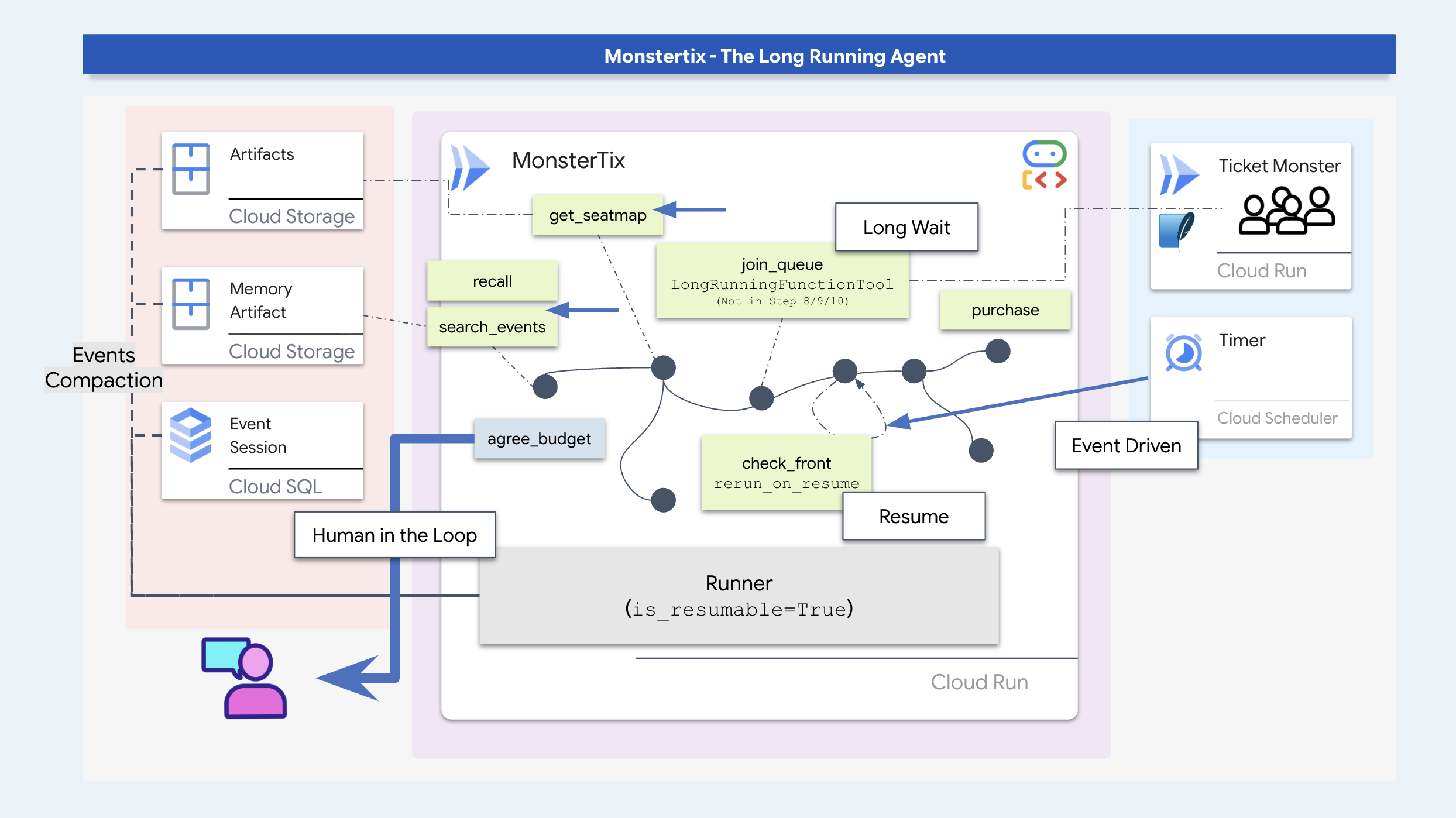
In this workshop, you will build a long-running ticket booking agent while learning key agentic software patterns:
- Process Suspension & Resumption: Park an agent invocation during long wait periods and resume execution via external triggers.
- Durable State Storage: Persist conversation state and artifacts across process restarts using SQLite/Cloud SQL and Cloud Storage.
- Staleness Guards & Idempotency: Verify dynamic data (like seat availability) before acting and use idempotency keys to prevent duplicate transactions.
- ADK Workflow Graphs: Structure execution using deterministic code nodes for procedural rules and agent nodes for contextual decision-making.
- Human-in-the-Loop Approval: Pause execution to collect and persist explicit spending limits from the user.
- Cloud Deployment: Containerize and deploy the agent to Cloud Run with Cloud Scheduler and Pub/Sub triggers.
Get set up
First, get your environment ready and make sure you have access to Google Cloud. I recommend running this in Cloud Shell, which already has every tool you need. Just check you have enough space, and that your account can create projects.
👉💻 Clone the repo and run setup:
cd ~
git clone https://github.com/gca-americas/monstertix
cd ~/monstertix
./setup.sh
It will ask you this once:
  Which Google Cloud project should this workshop use?
  Find yours at https://console.cloud.google.com  (top-left picker)

  Project id [YOUR_PROJECT_ID]:
Then it does the following, in order:
virtualenv | creates | |
sign-in |
| |
project | points | |
APIs | enables the ten the workshop needs. | |
| writes your project, region and model id, so every script and | |
model check | makes one real call to Gemini, so a bad project or model id fails here | |
seed | builds a session that is already two days old, which step 3 opens | |
Cloud SQL | starts a Postgres instance in the background | |
venue | deploys your own mock ticket seller to Cloud Run | |
👉💻 Activate the environment:
cd ~/monstertix
source .venv/bin/activate
Your prompt now starts with (.venv).
Scenario Overview
In this workshop scenario, your agent books two tickets for a concert ("The Midnight Signal" in Amsterdam). The user's preferences stored in historical memory include:
- Must be a weekend show (Sam cannot attend weeknights).
- Avoid upper bowl seating at Ziggo Dome (poor visibility).
- Target price is approximately $200 per ticket, with a $250 max limit.

Verify your installation
👉💻 One command, eight ticks:
./verify.sh
  Checking the rig

  ✓ adk installed                      adk, version 2.6.2
  ✓ adk 2 apis                         App + ResumabilityConfig
  ✓ workflow graphs                    Workflow + node
  ✓ async sqlite drivers               sqlalchemy + aiosqlite + greenlet
  ✓ project                            your-project-id
  ✓ vertex ai                          no API keys anywhere
  ✓ seeded session                     13 events, two days old
  ✓ venue                              https://venue-you-xxxx.us-central1.run.app

  Ready. Cloud SQL is still building in the background and nothing
  before step 10 needs it.
👉 Open second browser tabs:
Where | What it is |
| The control panel, your buttons. |
2. Prompt your way to autonomy?
Prompts Can't Start Themselves
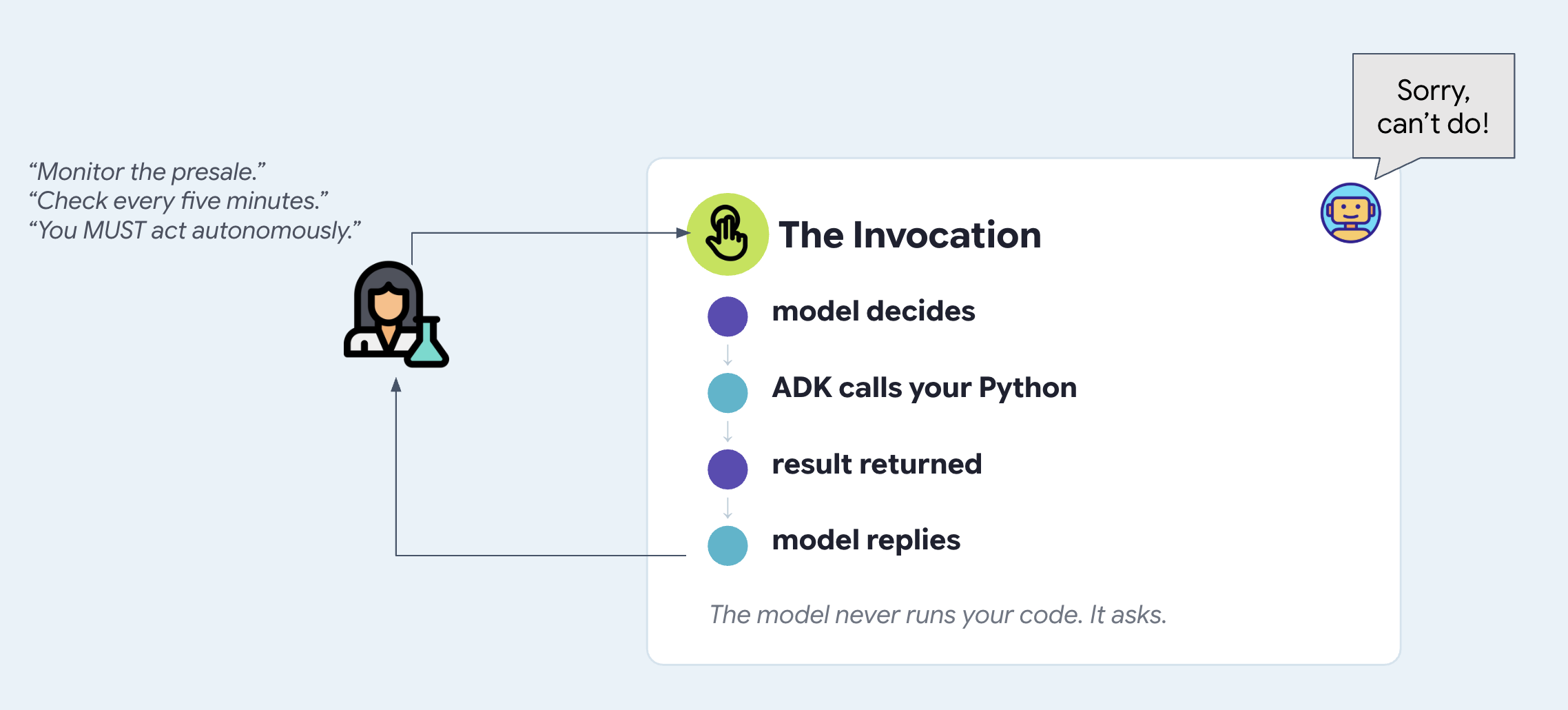
A prompt is just text passed to an AI model when a call happens. It can't run on its own, wake itself up, or start a new call.
If you tell an agent in its prompt to "check back in 10 minutes," nothing actually happens after the current turn ends. The model has no internal clock or loop. To make an agent autonomous, something outside the agent has to wake it up and call it.
Start the rig
We'll start by testing the developer tooling. adk web starts the ADK web UI, the development interface that ships with ADK. It lets you talk to the agent you are building without writing a frontend first, and it shows you what a chat window cannot show, such as every tool call and its arguments, the session state as it changes, the artifacts the agent saved, and the raw events underneath. You would not expose it in production. It is the best window into a running agent while you are learning. In step 3 you build the frontend you would actually expose, and in the final step you deploy it.
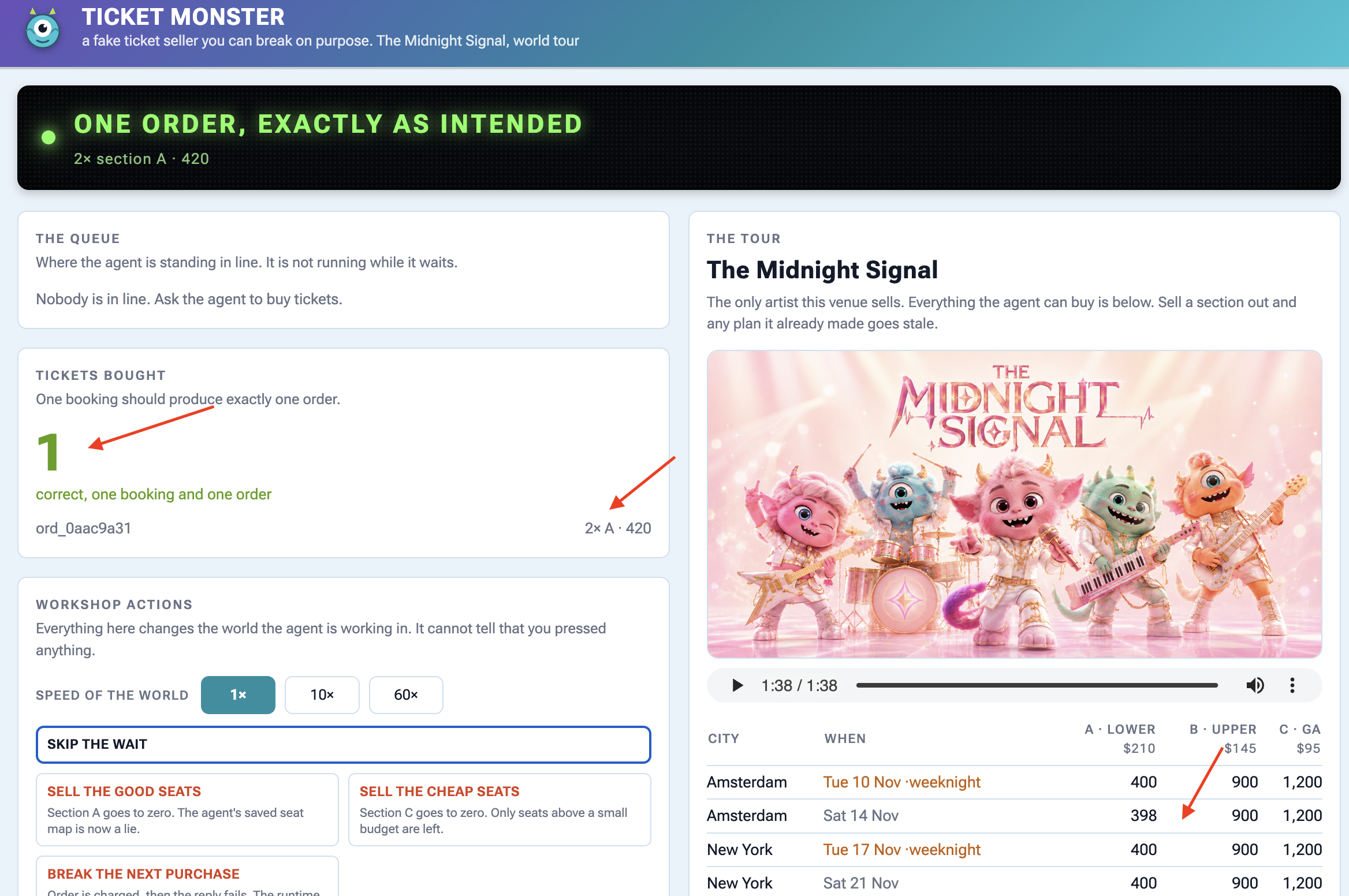
👉🔴 On the venue panel, press RESET THE VENUE. Every step starts from the same world: 8 shows, all seats available, clock at 1×.
👉💻 Terminal 1 — load this step's code and start the ADK web UI:
cd ~/monstertix
. ./set_env.sh
./use-solution.sh 2 --force
adk web agent --port 8000 --allow_origins "*"
use-solution.sh copies a step's finished code into agent/, which is where you work. Every step starts with it and it prints which files it changed so you know what to read.
What you start with:
File | What it is |
| the agent — a name, a model, an instruction, a list of tools |
|
|
| an HTTP client for the venue. Nothing interesting |
| which model to use, and a check that your credentials work |
. ./set_env.sh activates the virtualenv, loads your project and model, and exports $WORKSHOP — the absolute path to ~/monstertix. Run it in every terminal you open. It prints what it set:
  folder   /home/you/monstertix
  project  your project id
  model    gemini-2.5-flash (We'll avoid using 3.x for now to avoid high usage demands)
  venue    https://venue-yourname-xxxx.run.app
👉 Open first browser tabs:
Where | What it is |
ADK web UI |
|
Talk to it
👉✨ In the ADK web UI, type:
I want to see The Midnight Signal. I'm in Amsterdam, going with Sam, budget around $200 each.
It searches the tour, reads seat maps, and reasons about your budget and your company. This is a genuinely capable assistant. However, when the presale opens at 10:00, the agent does not execute automatically because no process or background trigger is running.
Read what just happened
The middle of the screen is not only a chat log. Every step of the turn is numbered, tool calls included:
  ▸ I want to see The Midnight Signal. I'm in Amsterdam...   ← user input
  ⚡ search_events({"city": "Amsterdam"})                     ← tool execution
  ✓ search_events                                            ← venue API response
    Two Amsterdam shows: Tuesday 10 Nov and Saturday 14 ...   ← model response
👉 Click a ⚡ row. The left panel shows the arguments the model picked. Click the ✓ underneath it for the JSON that came back.
The tour information is not present in the model's training data or prompt. The agent retrieved this data by executing the search_events tool, which queried the venue API.
Open the code you just ran
You have seen it work and seen the trace. Now look at the code itself.
agent/concert/
├── agent.py     the agent — about twenty lines
├── tools.py     what it can do
├── venue.py     an httpx wrapper, nothing interesting
└── config.py    which model, and a credentials check
👉💻 Open agent/concert/agent.py. The whole agent is the bottom of the file:
INSTRUCTION = """
You help someone plan a trip to see a band on tour.

You can search tour dates and read seat maps. Be concrete: name the show, the
city, the section, and the price...
"""

root_agent = Agent(
    name="concert",
    model=MODEL,
    instruction=INSTRUCTION,
    tools=[search_events, get_seatmap],
)
A name, a model, some description of how agent should behave, and a list of Python functions. That is all an Agent is. adk web found it because the file is called agent.py and the variable is called root_agent.
👉💻 Now agent/concert/tools.py:
def search_events(city: str = "", weekday: str = "") -> dict:
    """List tour dates. Call with no arguments to see the whole tour.

    This venue sells one artist and one tour, so there is nothing to search by
    name — never ask the user which artist they mean.

    Args:
        city: Optional. Filter to one city, e.g. "Amsterdam".
        weekday: Optional. Filter to one weekday, e.g. "Saturday".
    """
    return venue.get("/events", city=city, weekday=weekday)
An ordinary function. No decorator, no registration, no schema to write. ADK reads the signature and the docstring and builds the tool definition the model sees, which is why that docstring is load-bearing, and why deleting one argument changed the model's behaviour.
The model never runs your code. When you saw search_events({"city": "Amsterdam"}), the model was asking for that call. ADK ran the function, handed the result back, and the model wrote a sentence about it. The loop is:
👉 The icons down the far-left edge switch what the panel shows. The second one is the agent graph — try it and you should see two tools.:

So tell it not to sleep
What would you do to fix it? Try the thing most people reach for first. Recall INSTRUCTION from step 1, the prose handed to the model on every turn, and rewrite it.
👉💻 Open agent/concert/agent.py. Below INSTRUCTION there is a second one, already written for you. Try changing it yourself if you like:
PROACTIVE_INSTRUCTION = """
You are a proactive ticket-buying assistant.

Monitor the presale for The Midnight Signal. The moment it opens at 10:00 on
Tuesday, buy two tickets for the Amsterdam Saturday show — do not wait to be
asked, and do not wait for me to say anything. Act on your own.

Keep checking until the tickets are bought.
"""
# agent/concert/agent.py
root_agent = Agent(
    name="concert",
    model=MODEL,
    instruction=PROACTIVE_INSTRUCTION,     # ← was INSTRUCTION
    tools=[search_events, get_seatmap],
)
👉💻 In terminal 1, restart:
cd ~/monstertix
adk web agent --port 8000 --allow_origins "*"
👉✨ Tell it the plan, exactly as you would tell a person:
I want to see The Midnight Signal in Amsterdam with Sam. The presale opens at 10:00 on Tuesday. Grab us two tickets the moment it opens.
It will agree, and it will sound like it means it.
👉 Now wait. Do not type anything else. Watch the panel.
Give it a minute. NOTHING HAPPENS!
Why that prompt was never going to work
Read it again with fresh eyes. Monitor. The moment it opens. Keep checking. Every one of those describes something happening over time.
Now recall what instruction= actually is. It is a string, handed to the model as part of the request, at the moment somebody sends a message. Nothing reads it in between turns.
# agent/concert/agent.py
root_agent = Agent(
    instruction=PROACTIVE_INSTRUCTION,   # read on invocation
    ...                                  # ...and there was no invocation
)
An instruction cannot invoke the function it is written inside.
Prompt Variations That Fail
Attempting to enforce autonomous execution via prompt instructions fails regardless of wording. Common prompt attempts—such as:
- "Set a timer for 10:00 Tuesday and buy the tickets then."
- "Check every five minutes whether the presale has opened."
- "Act autonomously without waiting for user input."
All fail for the same reason: prompts are read only when an invocation occurs. Without an external caller, no code is executed between turns.
3. Event-Driven Dormancy
Agents Don't Stay Awake Forever
Leaving a process running polling continuously wastes memory, burns money, and crashes if your laptop sleeps or restarts.
Instead of keeping an agent running non-stop while it waits, a long-running agent should go completely dormant. An external event (such as a timer, a webhook, or a message) wakes the agent up only when there is actual work to do.
👉🔴 On the venue panel, press RESET THE VENUE. Every step starts from the same world: 8 shows, all seats available, clock at 1×.
👉💻 Load this step's code:
cd ~/monstertix
. ./set_env.sh
./use-solution.sh 3 --force
Notice what that installed: monstertix/, holding the server, the clock, and one more thing you have not seen yet. Check that it left agent/ alone, because nothing about the agent changes in this step. Hold onto that, it is the point.
File | What it is |
| new. A web server with a Runner behind it |
| new. Something that knows the time and calls the server |
It has two halves, and they stay in two files all the way to the cloud: 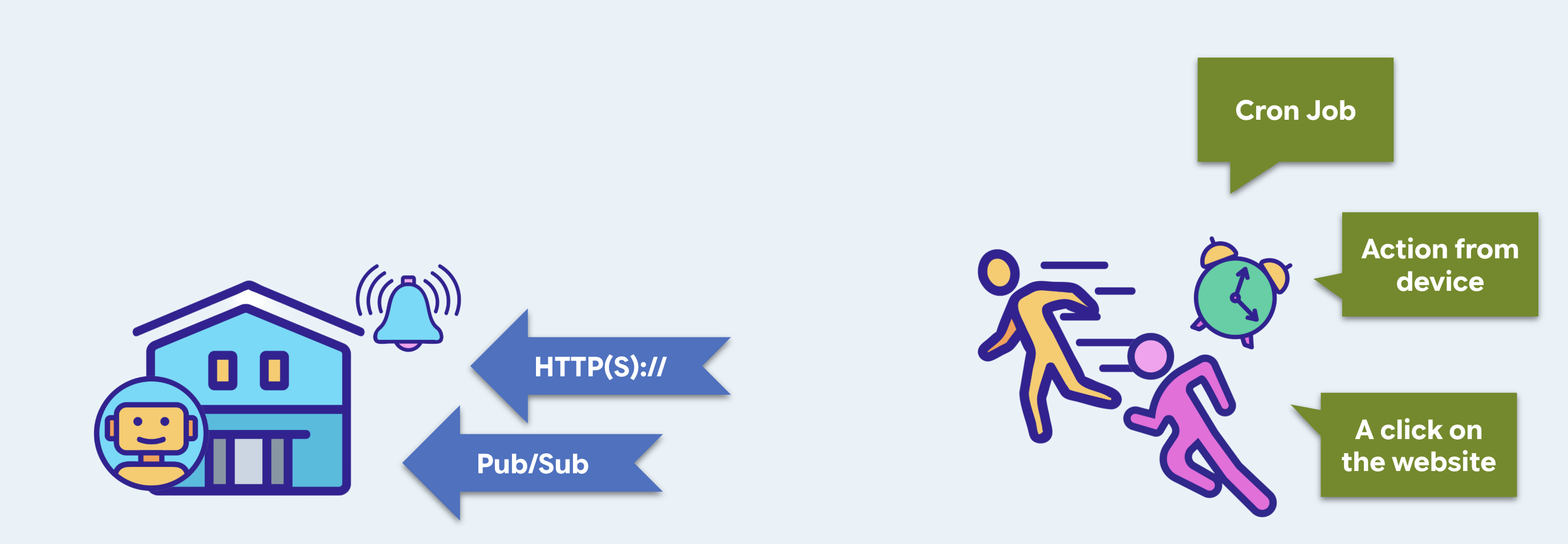
becomes, in step 10 | |||
the trigger | an endpoint that can run the agent | Cloud Run | |
the triggerer | something with a clock, that calls it | Cloud Scheduler | |
The trigger — your own web server
Yes, a web server. Something has to be listening before anything can call it. The ADK web UI from the previous steps is a development interface that happens to be able to run an agent.
👉💻 Open monstertix/server.py:
from google.adk.runners import Runner
from google.adk.sessions import InMemorySessionService
from concert.agent import root_agent

session_service = InMemorySessionService()
runner = Runner(
    agent=root_agent,
    app_name="concert",
    session_service=session_service,
)

@app.post("/wake")
async def wake(payload: dict = Body(default={})):
    session_id = f"wake-{uuid.uuid4().hex[:8]}"          # brand new, every time
    await session_service.create_session(...)

    async for event in runner.run_async(
        user_id=USER_ID, session_id=session_id,
        new_message=types.Content(role="user",
                                  parts=[types.Part(text=payload["message"])]),
    ):
        ...
An Agent does not run itself. It is a description: a name, a model, an instruction, a list of tools. Something has to take an incoming message, find the right session, hand the model the conversation so far, execute whichever tools it asks for, feed the results back, loop until it stops calling tools, and write every step of that to storage. That something is the Runner.
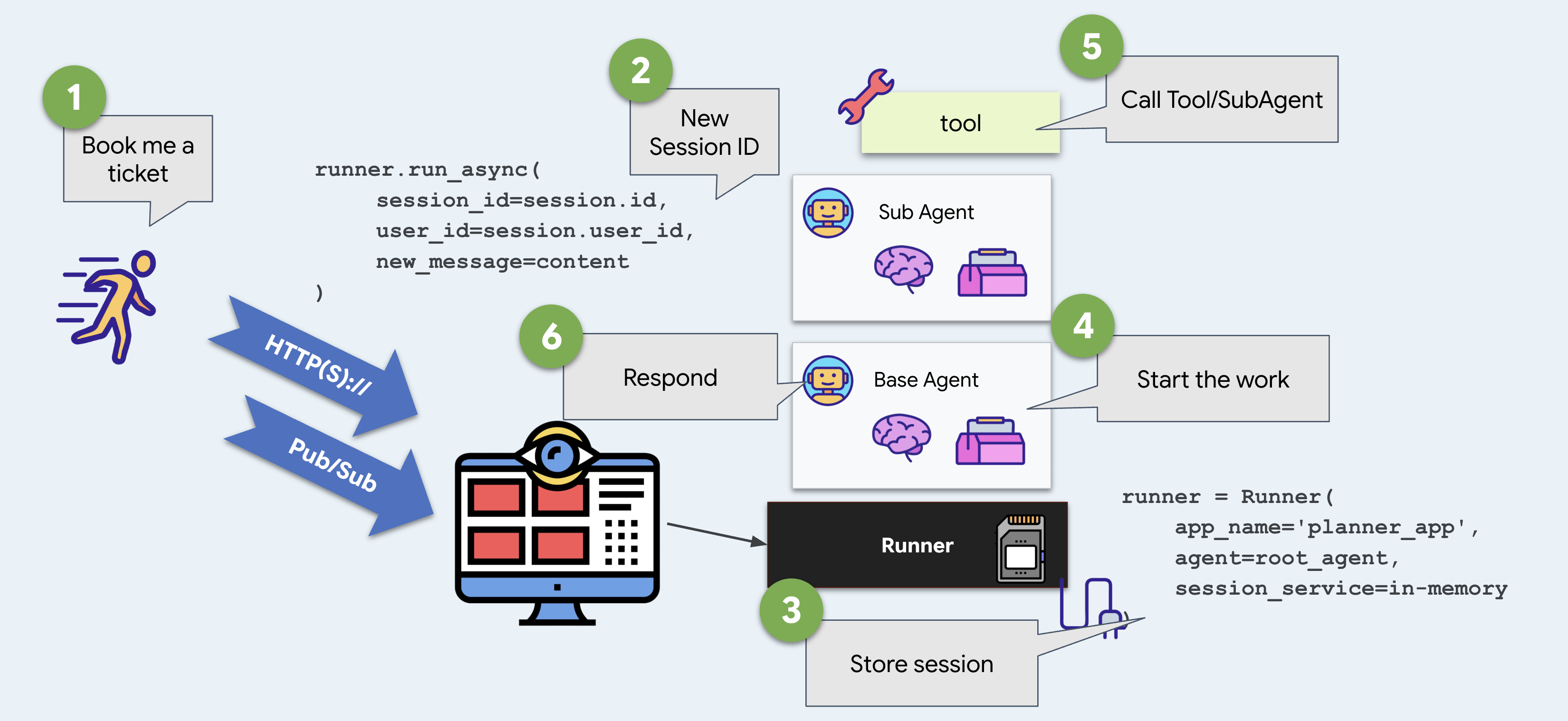
The ADK web UI has a default one for you. Here you build it yourself, and that is the entire difference between the ADK web UI and something you can deploy.
👉💻 Terminal 2 — start it:
Start the Runner,
cd ~/monstertix
. ./set_env.sh
python -m monstertix.server
[server] agent concert · gemini-x-flash
[server] listening on http://xxxx_URL/wake
[server] nothing will happen until something calls it. Ctrl-C to stop.
Read that last line. The trigger is running and the agent is loaded, and nothing is happening. Separate the two ideas: being callable and being called.
And a front door, while we are here
Despite adk web is a great development tool, it should not be something you ship. You should not enable it when deploying to production, and you would not point a customer at it if it did. So the same server also serves a page.
👉 Open http://127.0.0.1:8090 in a browser — the same address.
Meet MonsterTix. A chat window, a name in the corner, two buttons. It posts to /wake and renders what comes back, and it would work unchanged against any endpoint that answers the same way.
On the page | What it is underneath |
the conversation |
|
+ New session | a fresh session id — new conversation, and later, a new budget |
Reset memory | deletes every session and the memory file. It asks first, and shows you exactly where that state lives |
👉✨ Say something to it — What Amsterdam dates are there? — and watch terminal 2. Same Runner, same agent, same log lines. Only the caller changed.
The triggerer — something that knows the time
👉💻 Open monstertix/clock.py. Look at the code.
time.sleep(args.delay)                                    # wait
while True:
    client.post(f"{TRIGGER_URL}/wake",                    # knock
                json={"message": args.message})
    if not args.every:
        return                                            # once, unless told otherwise
    time.sleep(args.every)                                # or again, forever
It is a very simple mechanism: sleep, POST, maybe repeat. Every scheduler you have used does the same, plus retries, timezones, and a guarantee that it survives a restart.
👉💻 Terminal 3 — fire once, 10 seconds from now:
cd ~/monstertix
. ./set_env.sh
python -m monstertix.clock --in 10
[clock] target   http://127.0.0.1:8090/wake
[clock] first fire in 60s, once only
[clock] go and watch the other terminal — do not touch the keyboard
👉 Now stop typing. Hands down. Watch terminal 2.
A minute later, with nobody at the keyboard:
[clock]  firing → POST /wake
[server] woken · session wake-23930983
[server]   called search_events
[server]   called purchase
[server]   said   I've purchased 2 tickets for The Midnight Signal in
                  Amsterdam on Saturday, section A. Your total is 420.
[clock]  done. the agent ran and you were not involved.
That is the answer to step 2. Something outside the agent called it, and that something was a sleep and an HTTP request.
👉💻 Ctrl-C both when you have watched it a couple of times. Use --every 30 first if you want to see it repeat.
Now read what it said
"I've bought two tickets for The Midnight Signal in Amsterdam, section A, $420."
👉🔴 Check the venue panel and you should see the ticket's been bought.
So what is still wrong
It bought something. Look at what it had to guess. It picked Amsterdam and section A because they were the first thing it found, and you told the agent to buy it directly and it has no idea that Sam cannot do weeknights. An agent that acts on guesses at 3am is worse than one that does nothing.
Waking up is the easy half. An agent that wakes with nothing — no history, no preferences, nobody listening — is not yet worth waking.
4. Managing Context Lifetime
Information Lives in Different Places for Different Times
An agent stores facts in several places: in the chat conversation, in session state, in files (artifacts), or in long-term user memory. Each place lasts for a different amount of time.
If you put information in the wrong place:
- It disappears too soon: Important details get wiped out when the chat ends.
- It sticks around too long: Temporary facts contaminate long-term memory and confuse future conversations.
You need to match each piece of information to the right storage place and lifetime.
Load the code
👉🔴 On the venue panel, press RESET THE VENUE.
👉💻 In the terminal 1, run:
cd ~/monstertix
. ./set_env.sh
./use-solution.sh 4 --force
What changed since the last step:
File | What changed |
| added |
| new. Our own memory store |
| three more tools in the list, and the instruction tells the agent to use them |
👉💻 Restart the agent in terminal 1:
cd ~/monstertix
. ./set_env.sh
adk web agent --port 8000 --allow_origins "*" \
  --session_service_uri="sqlite+aiosqlite:///$WORKSHOP/sessions.db" \
  --artifact_service_uri="file://$WORKSHOP/artifacts"
Two flags you have not used before:
Flag | What it is |
| ADK writes every message, tool call and state change into it as rows (SQLite database.) |
| Files the agent saves to.(Files) |
Without them, ADK keeps everything in memory and throws it away when you stop the process. These two settings are what make it persist.
The database sessions.db contains a seeded past conversation (two-days-ago) with 13 recorded events:
you    We're thinking about seeing The Midnight Signal. Me, Sam, and maybe Priya.
you    Sam can't do weeknights though, bailed on every single one.
you    Priya's out, she's away that weekend. Just me and Sam.
agent  Two it is. Still Saturday the 14th, still Amsterdam.
you    You said the upper bowl at Ziggo was bad last time?
A memory file from three past bookings, memory/userx.md, which you can open in an editor:
- Sam bails on weeknights. Every weeknight show we booked, Sam cancelled.
- Hates the upper bowl at Ziggo Dome, "couldn't see a thing" from section B.
- Comfortable spend is around $200 per ticket. $250 is the hard ceiling.
- Always books two seats, always together.
That is why the amber weeknight rows matter. A weeknight show is $10 a seat cheaper, has better seats left, and sits at the top of the list, and it is the wrong answer for this person. The only reason the agent can know that is a file it wrote after the last booking. Whether that fact survives is steps 4 and 5.
The three tools we added
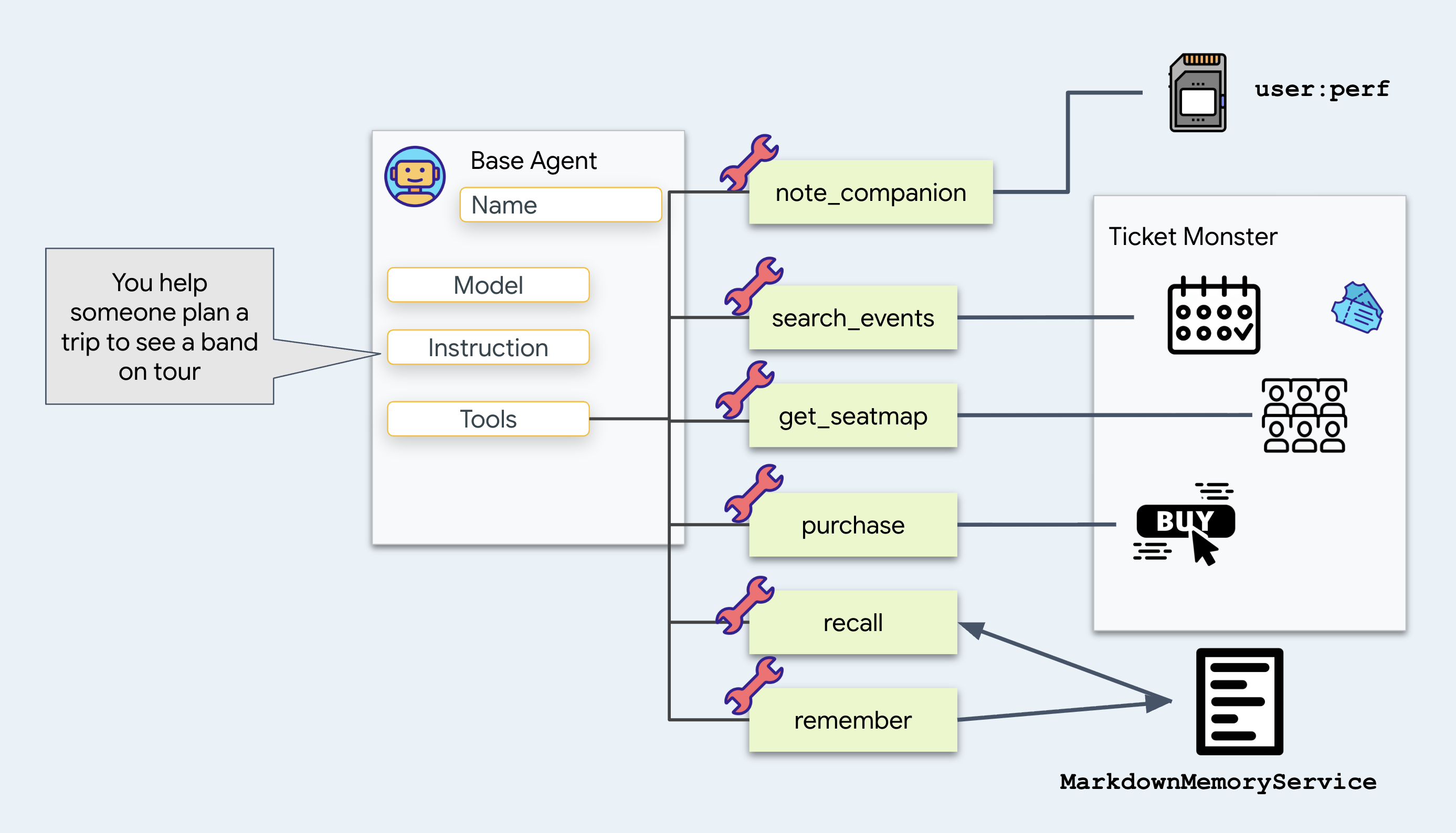
note_companion records who is coming and what limits them:
# agent/concert/tools.py
def note_companion(name: str, constraint: str, tool_context: ToolContext) -> dict:
    prefs = dict(tool_context.state.get("user:prefs", {}))
    prefs[name] = constraint
    tool_context.state["user:prefs"] = prefs
    return {"companions": prefs}
Add it because "Sam can't do weeknights" has to still be true next week. Write it into user:prefs to make that happen, and watch the user: part of the name do the work. Come back to that below.
recall
and
remember read and write a text file, memory/userx.md. Hold those for a moment.
👉 Now look at the two places agent store it's context:
location | What it holds |
State | this session's memory, as key/value pairs — you live here in step 4 |
Artifacts | files the agent saved, which never enter the prompt |
Look at what changed in
get_seatmap
. It used to return the whole seat map. Now it saves the seat map to a file and returns a short summary:
# agent/concert/tools.py
async def get_seatmap(event_id: str, tool_context: ToolContext) -> dict:
    seatmap = venue.get(f"/events/{event_id}/seatmap")       # about 6 KB of JSON

    part = types.Part(inline_data=types.Blob(
        mime_type="application/json",
        data=json.dumps(seatmap, indent=2).encode()))
    await tool_context.save_artifact(f"seatmap_{event_id}.json", part)

    summary = {"event_id": ..., "sections": [...], "captured_at": ...}
    tool_context.state["temp:seatmap"] = summary
    return summary
Here is why that change matters.
Every tool return payload is appended to the conversation history and re-sent to the model on all subsequent turns. Returning large JSON objects (such as a 6 KB seat map) increases token consumption on every subsequent turn.
Save it to a file instead and pay one filename. Let the agent ask for the detail back with load_artifact if it needs it, and expect that most of the time it never will.
Where the file goes: the artifact service
Look at the line in get_seatmap again, in agent/concert/tools.py:
await tool_context.save_artifact(f"seatmap_{event_id}.json", part)
tool_context comes from ADK, which passes it into your tool as an argument, and save_artifact is a method on it. That line is where your tool hands the bytes to ADK.
ADK then writes them, using whichever artifact service it was started with. You picked that with the flag:
--artifact_service_uri="file://$WORKSHOP/artifacts"
ADK has three locations to store them:
URI | Where the bytes go |
| RAM. Gone when you stop the process. This is the default if you pass no flag |
| a folder on disk. What you are using now |
| Cloud Storage. What the deployed agent uses in the last step |
👉💻 Here we chooise files:
ls -R ~/monstertix/artifacts
To move from your laptop to Cloud Storage, change file:// to gs://. (We'll see this in Step 10)
Our memory store
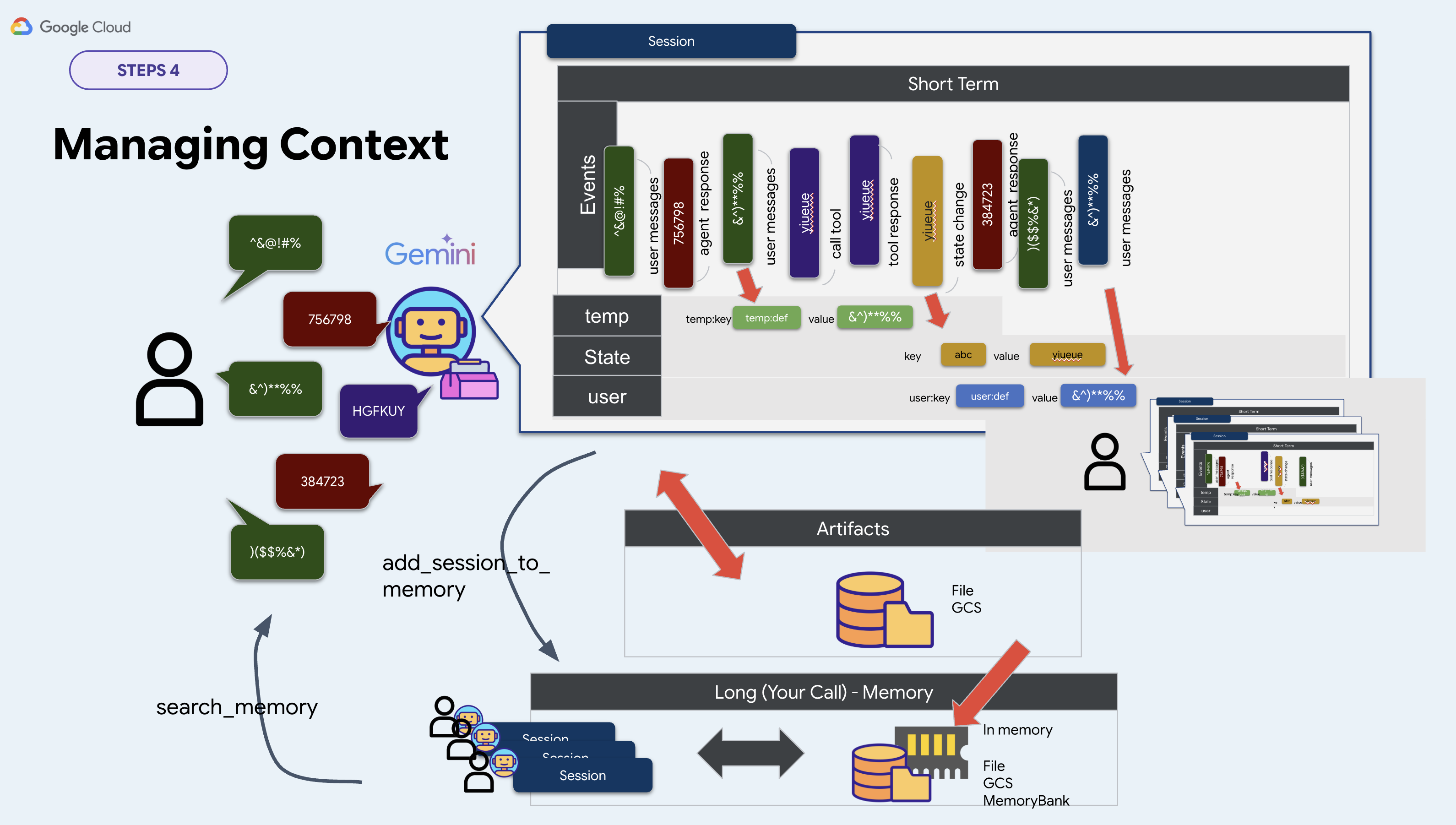
ADK gives you an interface for long-term memory called BaseMemoryService. It has two methods:
# google.adk.memory.BaseMemoryService — ADK's interface, not your file
async def add_session_to_memory(session)                   # take a conversation in
async def search_memory(*, app_name, user_id, query)       # hand memories back
ADK ships three implementations of it:
Class | URI | What it needs |
|
| nothing. Loses everything when you stop the process |
|
| a Vertex AI RAG corpus |
|
| an Agent Engine resource |
We write our own for this workshop. Rule out InMemoryMemoryService, which forgets everything when you stop the process, and rule out the other two, which need cloud resources that take minutes to create. Pick a file instead, because you can seed it in advance and read it in an editor. So take memory.py as your own implementation, we're storing everything in a Markdown file:
class MarkdownMemoryService(BaseMemoryService):

    async def search_memory(self, *, app_name, user_id, query) -> SearchMemoryResponse:
        path = self._path(user_id)                      # memory/userx.md
        return SearchMemoryResponse(memories=[
            MemoryEntry(content=types.Content(
                role="user", parts=[types.Part(text=path.read_text())]))])
SearchMemoryResponse and MemoryEntry are ADK's types, and Memory Bank returns the same objects. One has a managed service behind it. Ours has a file.
Choose a file for one reason: you can open it and read it. Your agent's entire long-term memory is a page of text.
So where do you point it?
To recap in this workshop implemention, two of the three services are chosen on the command line. The third we did our own implementation for the reason above:
Service | Where you set it | This workshop |
session |
|
|
artifact |
|
|
memory | nowhere on the command line |
|
So memory.py constructs the service itself, from an env var:
# agent/concert/memory.py
MEMORY_DIR = pathlib.Path(os.environ.get("MEMORY_DIR", "./memory"))
MEMORY_USER = os.environ.get("MEMORY_USER", "userx")
memory_service = MarkdownMemoryService(MEMORY_DIR)
. ./set_env.sh exports both. Get MEMORY_DIR sets where the agent reads it's memeory from and MEMORY_USER determines the file.
Go and find where things are
You now have four places that can hold a fact. Look at all four.
First, your own session
👉 Click New Session in the top bar.
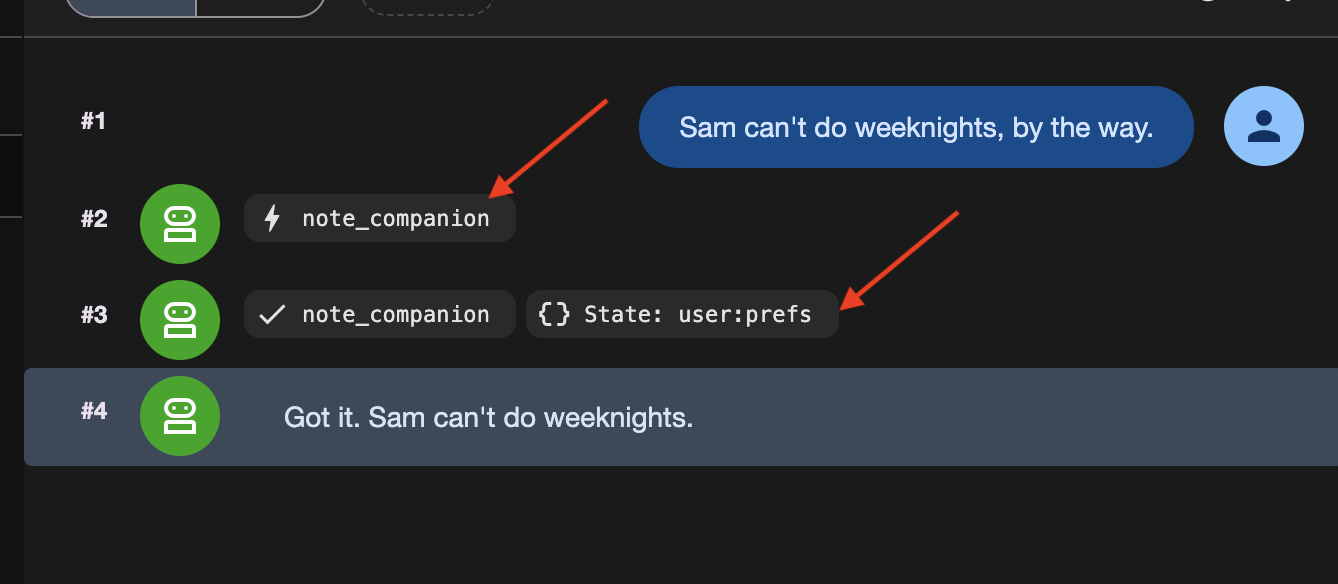
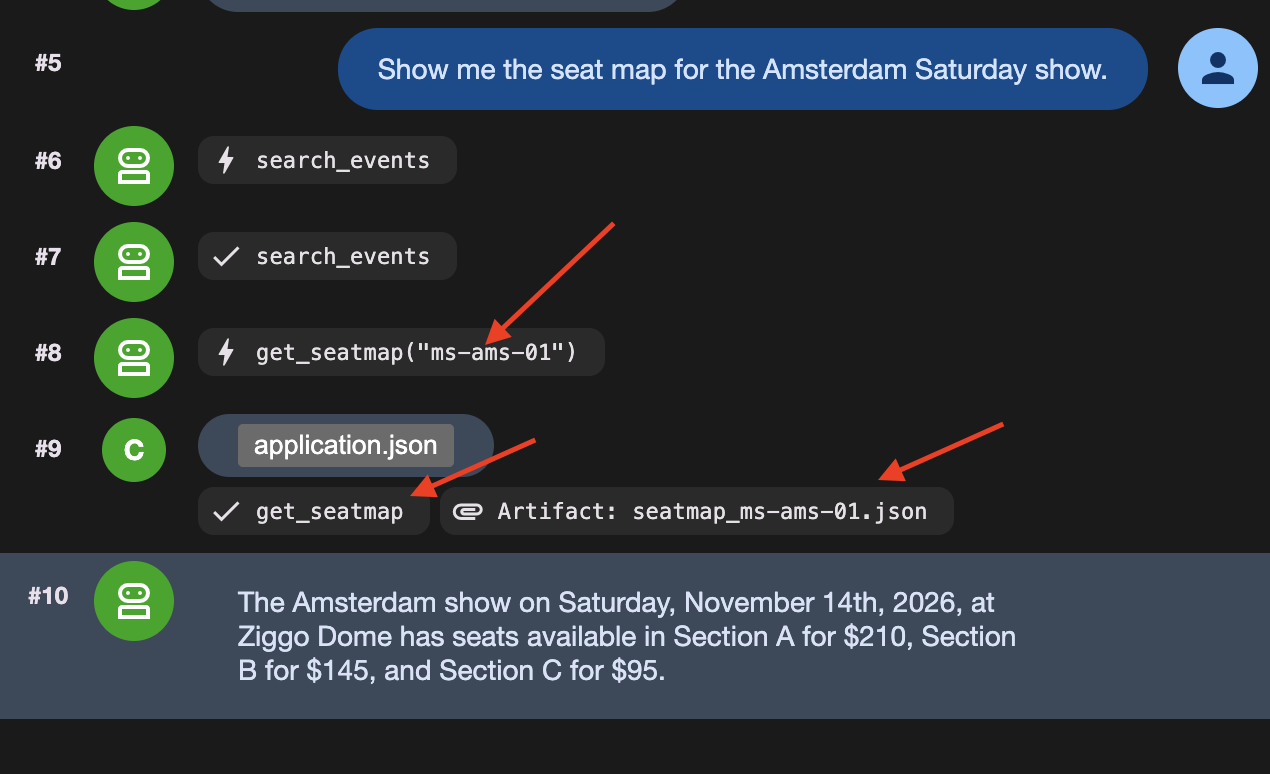
👉✨ Say three things, one after the other:
Sam can't do weeknights, by the way.
Show me the seat map for the Amsterdam Saturday show.
Actually, hold that thought — what else is on in Amsterdam?
That third message matters. It ends the turn that read the seat map, and ending a turn is what makes temp: disappear.
Three things went into storage, in three different places:
What was stored | Which tool did it | Where it went | |
1 | Sam can't do weeknights |
|
|
2 | the full seat map, 6 KB |
| the artifact service |
3 | a one-line seat map summary |
| nowhere |
👉 Now check. The State tab and the Artifacts tab are on the left of adk web.
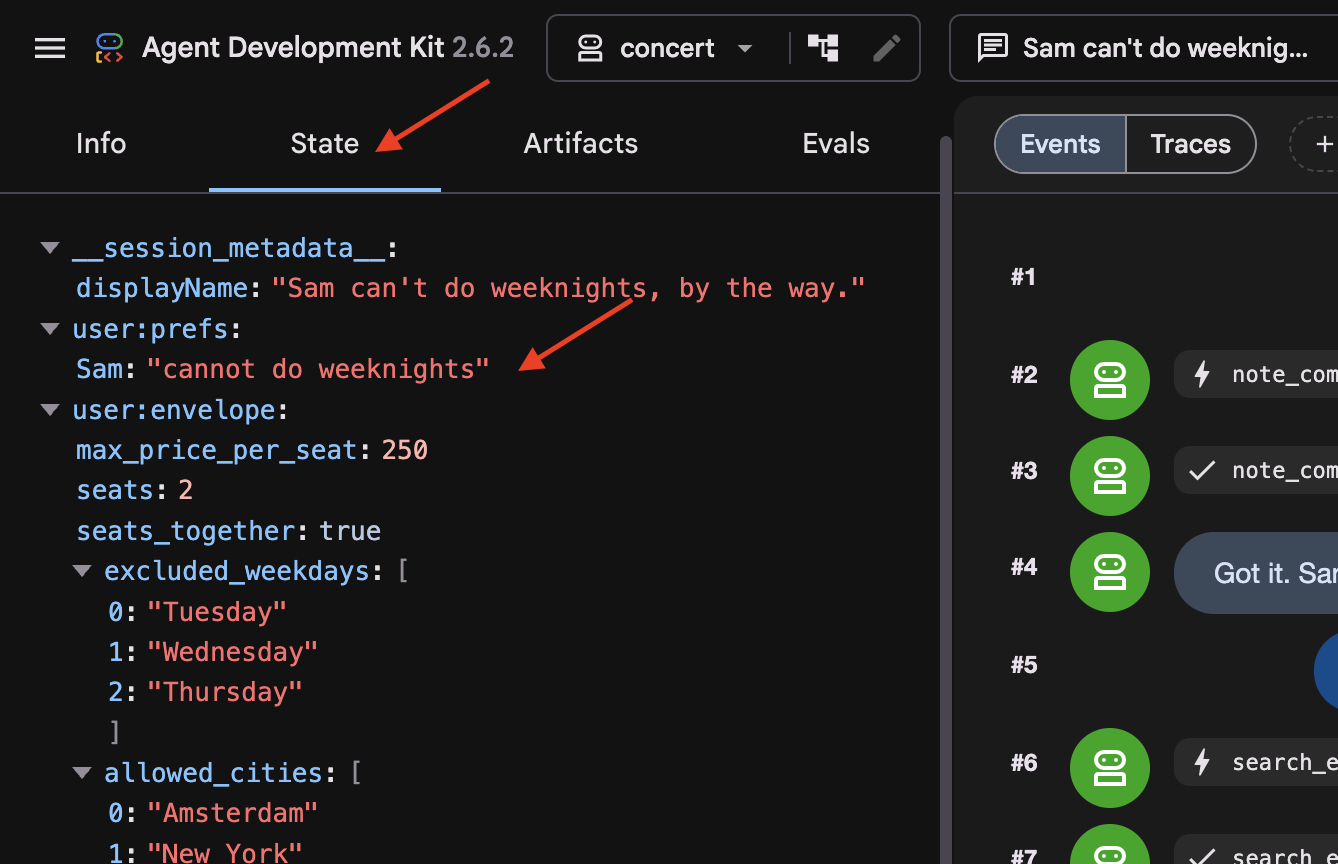
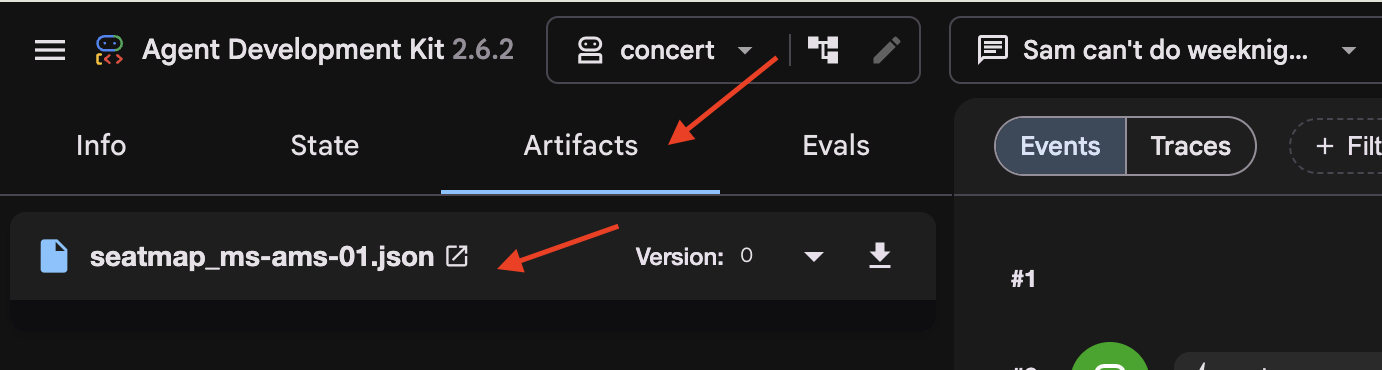
In the State tab, notice that temp:seatmap is omitted. State keys with a temp: prefix exist only during the active invocation and are automatically stripped by ADK before persisting session state to the database.
Then the older conversation
👉 Switch to two-days-ago in the session dropdown at the top.
This session contains pre-populated conversation history in the database.
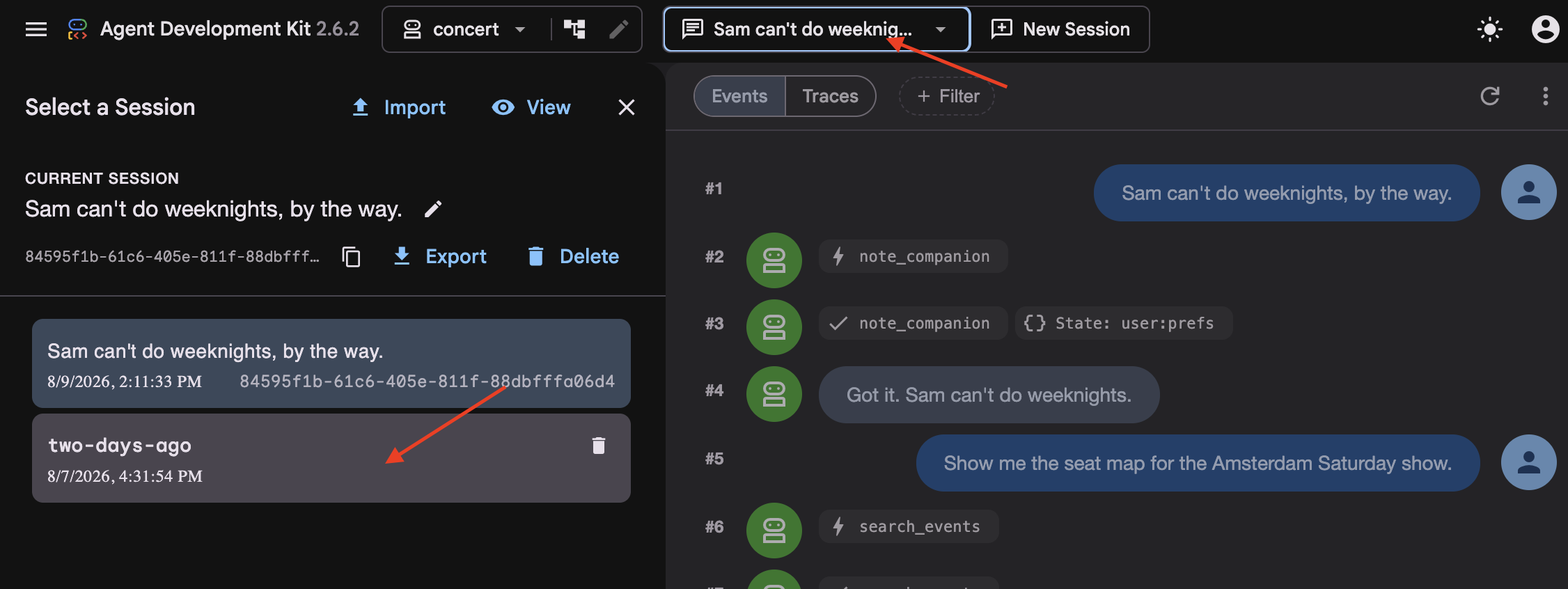
👉 Look at the event stream (the middle column). Notice that older turns have been replaced by a summarized event block.
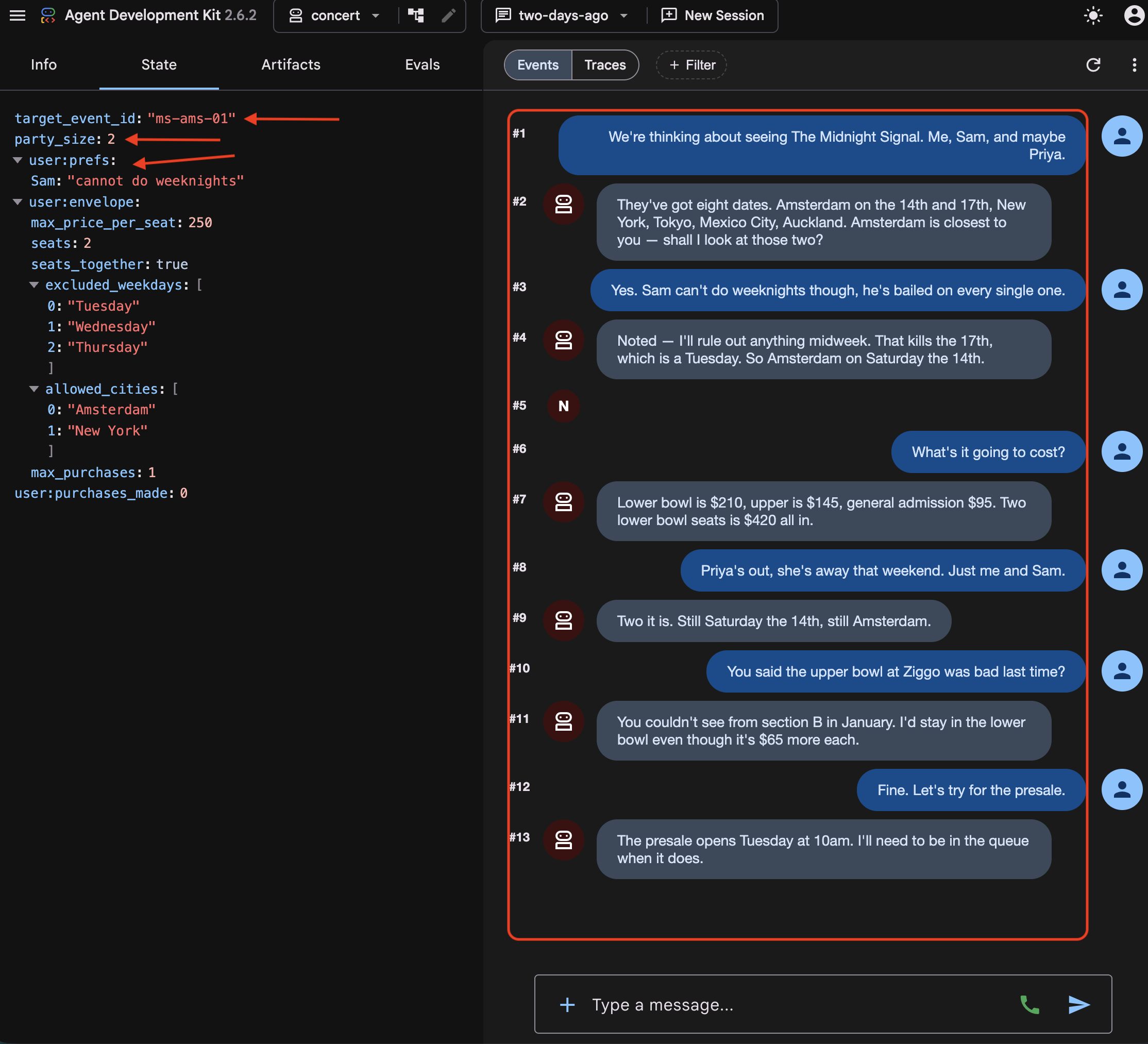
👉 Look at the State tab. Three kinds of key are sitting there together:
target_event_id   ms-ams-01                      ← plain: this booking only
party_size        2                              ← plain: this booking only
user:prefs        {"excluded_weekdays": [...]}   ← the person, every session
The user: prefix (e.g. user:prefs) scopes state across all sessions for a given user. In contrast, unprefixed keys (
target_event_id
,
party_size
) represent plain session state, which is scoped strictly to the active session and is deleted when the session ends.
👉 Now compare the two State tabs. While user:prefs and stored artifacts persist, temp:seatmap is absent from both sessions. State keys with a temp: prefix are strictly ephemeral and are never persisted to the database.
Then the file
👉💻 Open it in the editor:
cloudshell edit ~/monstertix/memory/userx.md
Three bookings, going back to January. The agent reads it when it calls recall(), and it will still be there even if we lost the session data.
The four places
Where it lives | Survives the next message? | Survives a restart? | Survives deleting the session? |
| no | no | no |
| yes | yes | no |
| yes | yes | yes |
| yes | yes | yes, and survives deleting the database |
an artifact | yes | yes | depends on the service |
Read that table as being about the containers, not about what is in them.memory/userx.md survives everything, and it only ever contains what remember()chose to put there. Nothing writes your current conversation into it. So the file outliving a session is not the same as the agent remembering what you were just talking about, and step 5 is where that distinction bites.
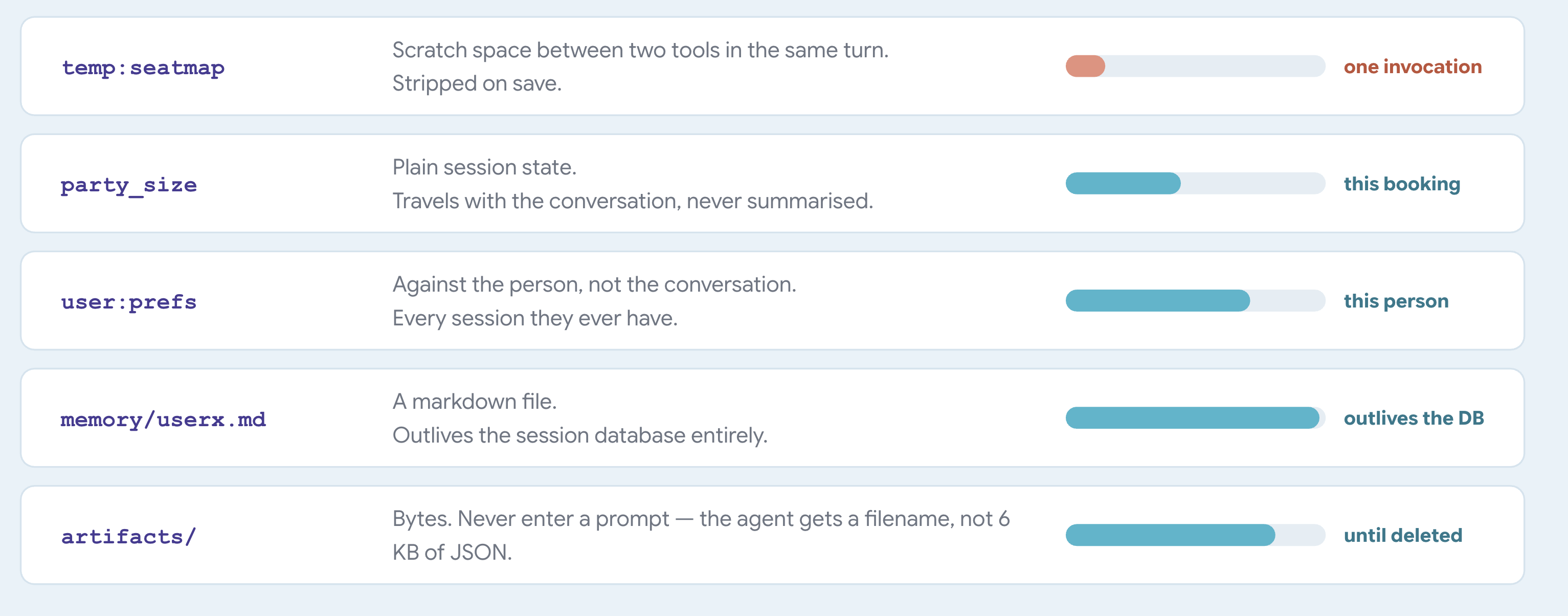
What state is
Think of state as a dictionary that travels with the session. Read and write it from your tools through tool_context.state, and let ADK save it alongside the conversation.
ADK assigns the meaning of the prefixes. You do not define them anywhere. ADK reads the first part of the key name and uses it to decide where the value goes and how long it lasts:
A key called | ADK stores it | Lasts |
| with the session | until the session is deleted |
| against the user | across every session that user has |
| against the app | across every user |
| nowhere | one invocation |
An invocation is a single request-response cycle, including all model reasoning, tool execution, and the final response.
When an invocation ends, ADK writes the new state to the database and strips every temp: key on the way.
One thing left unexplained
In two-days-ago you saw a summary sitting where somebody's first few turns used to be. ADK wrote it automatically once the conversation got long enough.
Every fact has a shelf life
5. Context Degradation & Compaction
Summaries Forget the Details
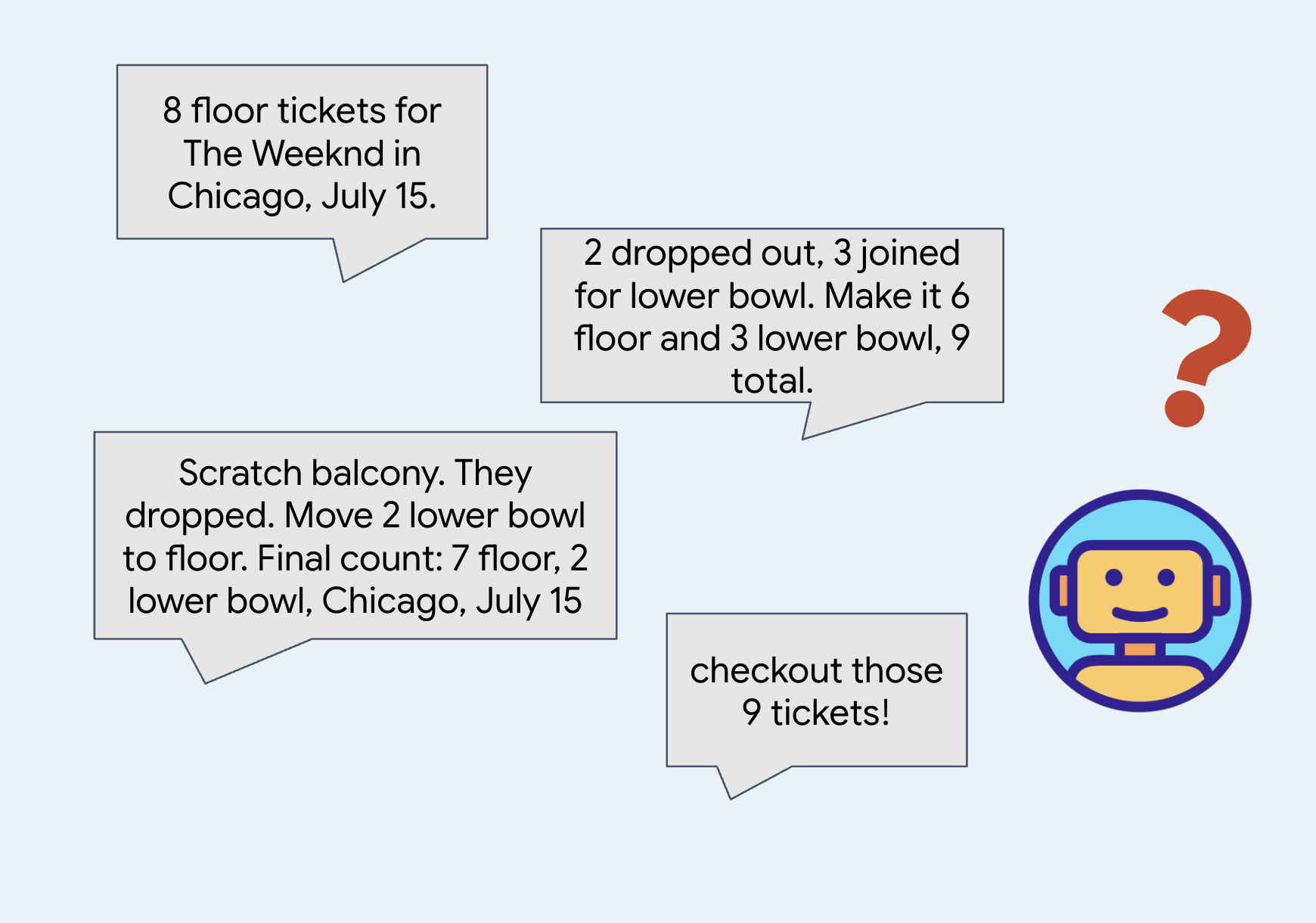
When a conversation gets too long, the system summarizes older messages to save space and tokens.
Summaries are good for catching the general gist, that are good to save some token usage.
👉🔴 On the venue panel, press RESET THE VENUE. Every step starts from the same world: 8 shows, all seats available, clock at 1×.
👉💻 Move to this step's code:
cd ~/monstertix
. ./set_env.sh
./use-solution.sh 5 --force
What changed since the last step:
File | What changed |
| the agent is wrapped in an |
everything else | unchanged |
agent.py no longer ends with root_agent. It ends with this:
app = App(
    name="concert",
    root_agent=root_agent,
    events_compaction_config=EventsCompactionConfig(
        compaction_interval=3,   # summarise after every 3 turns
        overlap_size=1,          # re-read 1 turn either side when summarising
    ),
)
Know that adk web looks for a variable called app first and falls back to root_agent. Wrap the agent in an App whenever you need something that applies to the whole application rather than to one agent: compaction here, and resumability later in the upcoming steps.
compaction_interval=3 means ADK summarises after every three turns. One turn is you saying something and the agent finishing its reply, however many tools it called along the way. Three is small so it fires during a workshop. A real app would use a much larger number.
overlap_size=1 means each summary starts one turn earlier than it strictly needs to.
ADK summarises turns 1, 2 and 3. Three turns later it summarises the next batch. With overlap_size=1 that second summary starts at turn 3 again, not turn 4:
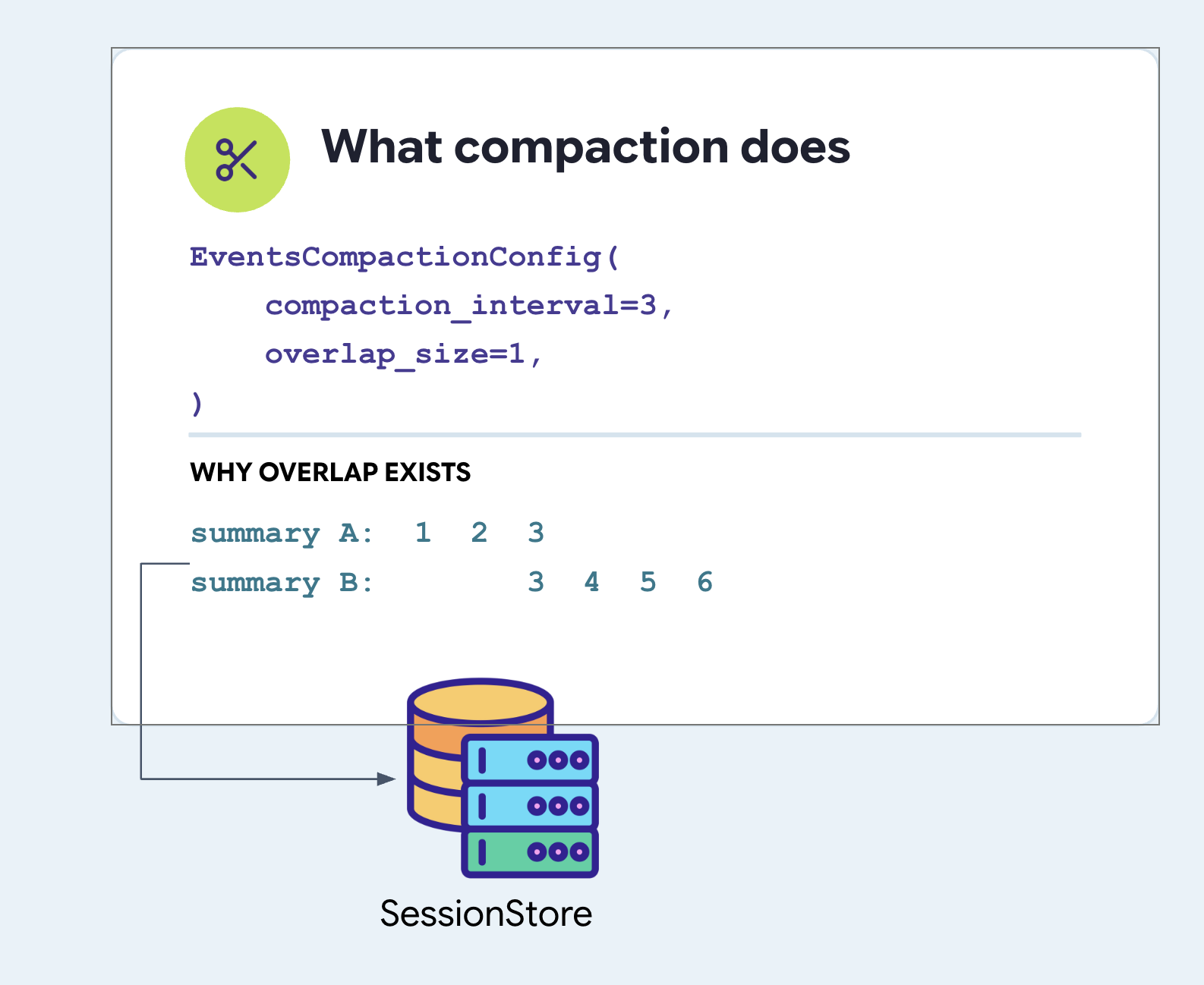
Notice turn 3 gets summarised twice. That is deliberate. If you asked a question in turn 3 and the agent answered in turn 4, a clean split puts the question in one summary and the answer in the other, and leaves both confusing. Repeating a turn is cheap insurance against cutting a thought in half.
Set both fields. ADK has no default for either.
Compaction and your memory service never meet
Worth being explicit, because the two words sound related and the systems are not.
EventsCompactionConfig is set on the App in agent.py, next to root_agent. It is a property of the application, not of any service:
# agent/concert/agent.py
app = App(
    name="concert",
    root_agent=root_agent,
    events_compaction_config=EventsCompactionConfig(
        compaction_interval=3,
        overlap_size=1,
    ),
)
A summary rewrites the conversation. It does not rewrite the file.
That is the whole reason remember() exists as a deliberate call. Anything left in the transcript is eventually read as a paraphrase somebody else wrote; anything written to the file is read exactly as it was stored, tomorrow and next week. The end of this step is where you watch that difference land.
Where is the summary kept
In sessions.db, in the events table, a compaction record is writtern to a event row by the agent, with a timestamp like any other turn events.
An ordinary event carries a content field and the summary lives under actions.compaction.
👉💻 Look at it in your own database:
cd ~/monstertix
. ./set_env.sh
sqlite3 sessions.db \
  "select json_extract(event_data,'\$.actions.compaction.compacted_content.parts[0].text')
   from events where event_data like '%compaction%';"
This is what the shape of the event looks like:
events row
└── event_data  (JSON)
    ├── id, author, timestamp, invocation_id      ← like every other event
    ├── content                                    ← ABSENT on this one
    └── actions
        └── compaction
            ├── start_timestamp                    ← the window it replaced
            ├── end_timestamp
            └── compacted_content.parts[0].text    ← the summary itself
The event stream draws each event from its content. The summary in the database and being sent to the model on every turn.
The second agent
budget_split is a whole separate agent, not a tool:
# agent/concert/agent.py
budget_split = Agent(
    name="budget_split",
    model=MODEL,
    include_contents="none",      # sees none of the conversation
    instruction="You do ticket arithmetic and nothing else...", #just the budget
    output_key="budget_plan",     # its answer goes into state
)

root_agent = Agent(
    ...,
    tools=[..., AgentTool(agent=budget_split)],
)
Why an agent and not a plain function? Because the work needs a model. Read "which of these sections fit a $200 budget for four people, and what is the total" as arithmetic wrapped in judgement, with an answer a person has to be able to read. Let a Python function multiply, and do not ask it to decide which options are worth mentioning.
Then why not let the main agent do it? Look at the next line include_contents="none" means this agent is handed none of the conversation. No group chat, no preferences, no forty tour dates. It gets the request and nothing else. That flag only exists on an Agent, which is the real reason this is an agent rather than a function.
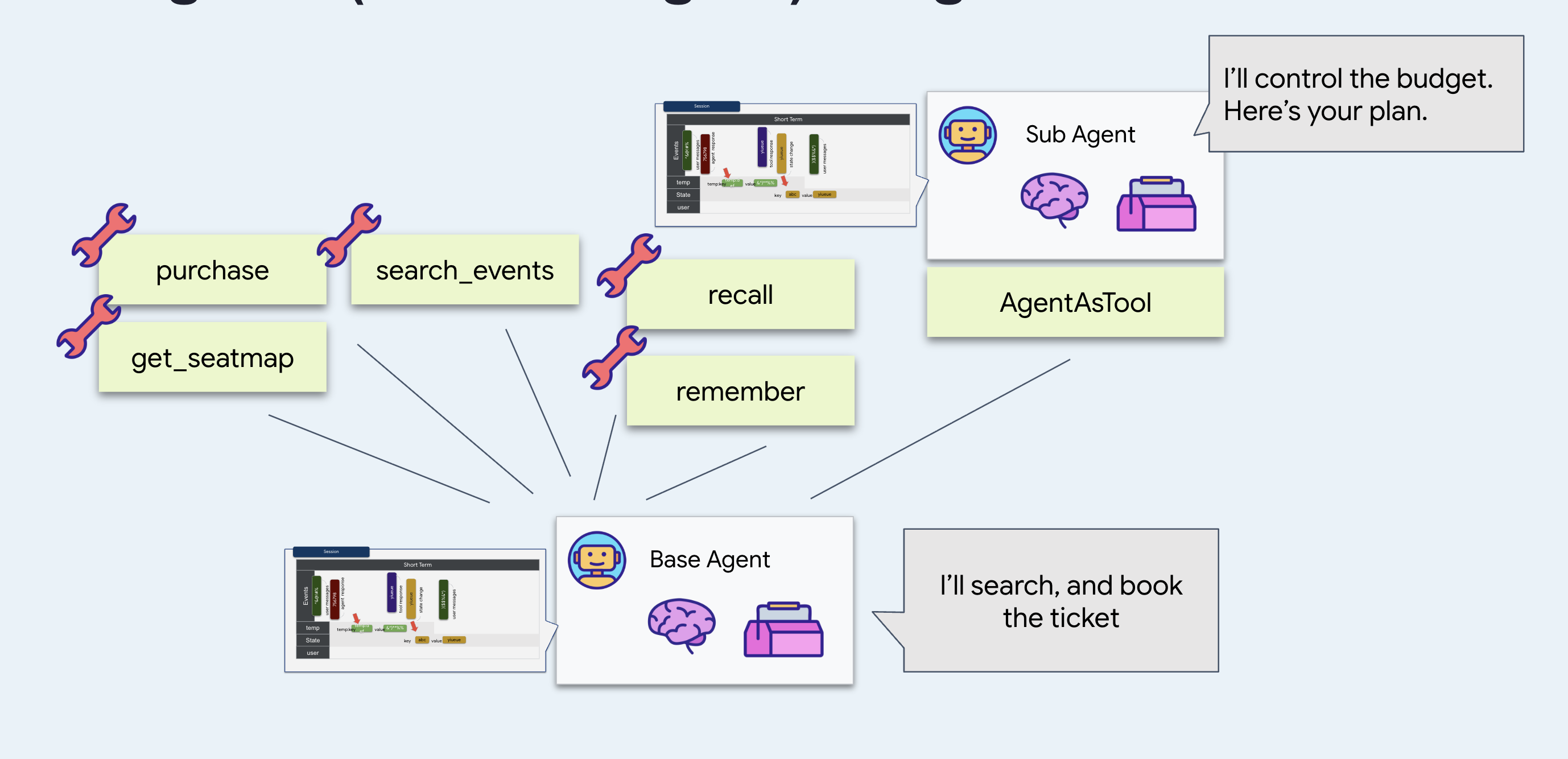
Prefer the short prompt: cheaper, faster, and much harder to derail. Rely on the arithmetic being immune to something said twenty turns ago, because it never sees it.
Why
AgentTool
? Wrap the agent with it so the main agent can call it like any other tool. From the model's side, read budget_split as identical to search_events.
And
output_key="budget_plan" puts the answer into session state under that name instead of leaving it loose in the conversation. Watch why that matters.
Run it
👉💻 In terminal 1, Ctrl-C and restart with the same flags:
cd ~/monstertix
adk web agent --port 8000 --allow_origins "*" \
  --session_service_uri="sqlite+aiosqlite:///$WORKSHOP/sessions.db" \
  --artifact_service_uri="file://$WORKSHOP/artifacts"
👉 Start a New Session and have a real conversation. Five or six turns. This one works:
hello
what's on in Amsterdam?
Sam is coming with us, and he can't do weeknights
there are 4 of us and I can spend about $200 a head. What fits?
👉 Open the State tab.
Find budget_plan there, holding the arithmetic agent's full answer.
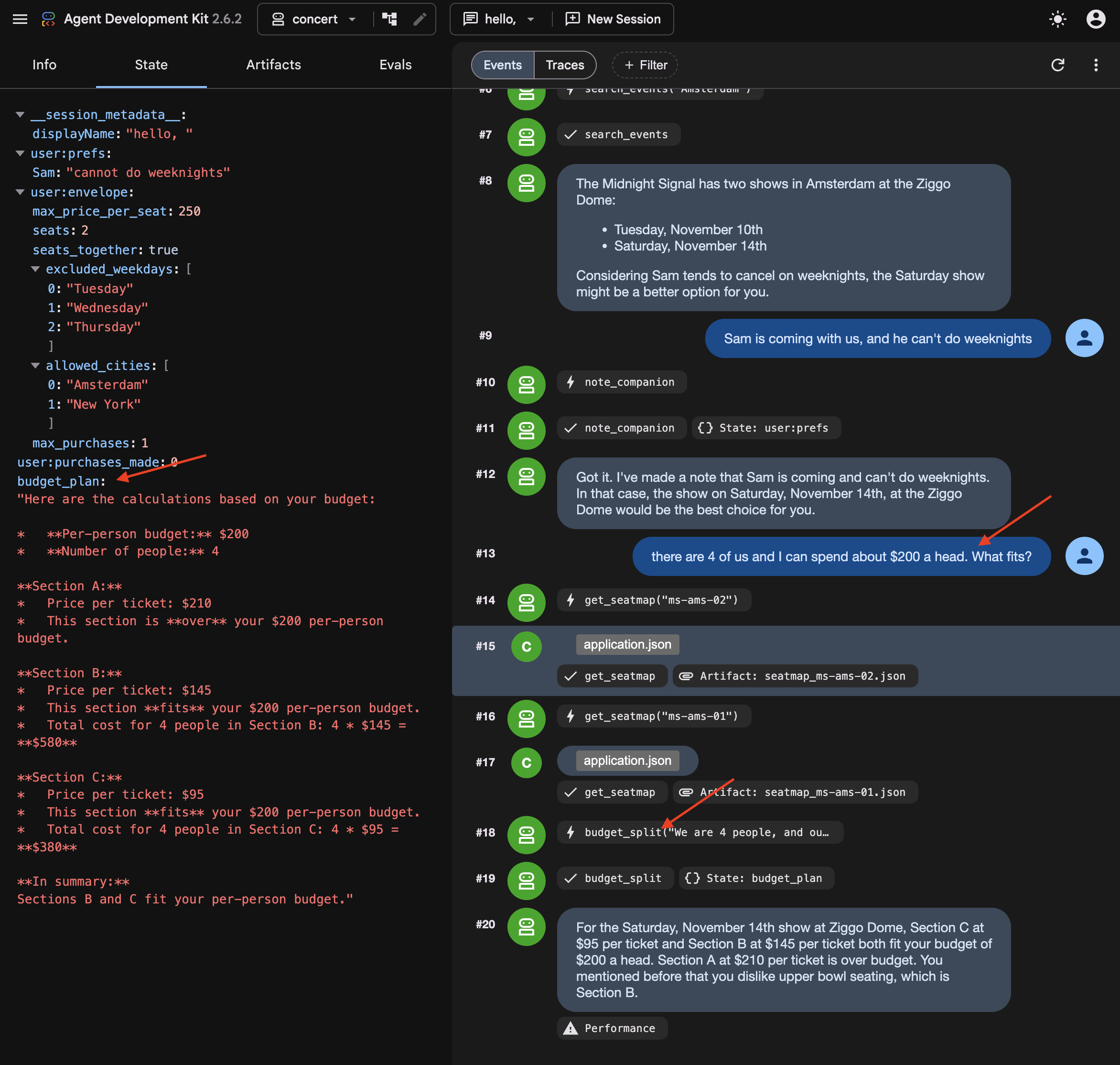
👉✨ Now change the numbers on it:
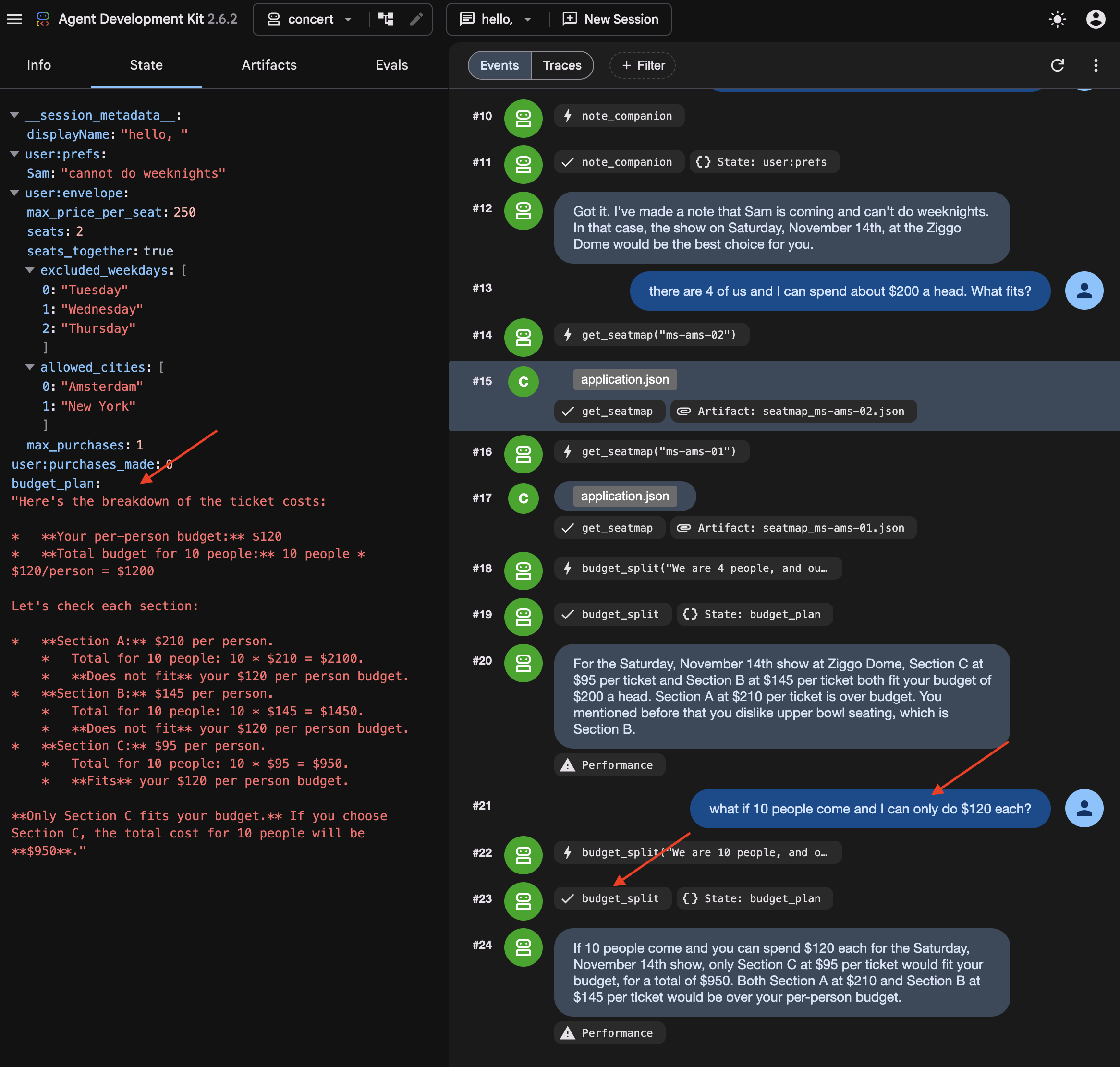
what if 10 people come and I can only do $120 each?
👉 Look at budget_plan again. It has been overwritten, not appended to. It's because output_key holds the latest one.
What you cannot see: the summary
Somewhere in those turns, ADK summarised the earlier ones.
👉💻 In a new Terminal, run to read it directly:
cd ~/monstertix
. ./set_env.sh
./show-compaction.sh
Read what it wrote
Here is a real one, abridged:
── summary 1 ──────────────────────────────────────────────────────

Conversation Language: English

  **User Request:**
  The user initially wanted to know what concerts are playing in Amsterdam.
  Subsequently, the user provided a constraint regarding a companion, Sam.

  **Context Summary:**
  The user is planning a concert trip. The agent identified two events in
  Amsterdam: "The Midnight Signal" at the Ziggo Dome on Tuesday, November
  10 and Saturday, November 14, 2026. The user then informed the agent that a
  companion named "Sam" will be joining, but "he can't do weeknights." The
  agent has successfully noted this constraint for Sam.

  **Key Decisions/Information Obtained:**
  *   **City of interest:** Amsterdam
  *   **Events found:** "The Midnight Signal" at the Ziggo Dome, Tuesday
  10 November and Saturday 14 November 2026.
  *   **Companion:** Sam
  *   **Companion constraint:** Sam cannot attend concerts on weeknights.

  **Unresolved Questions/Tasks:**
  *   The agent has not explicitly confirmed if the found event (which is
  on a Saturday) is suitable given Sam's constraint, nor has it asked the
  user for the next steps regarding this event or further event searches.

  **Tools Used:**
  *   `recall`
  *   `search_events`
  *   `note_companion`
It kept the prices, the sections, the cities and the preferences, and correctly noted that nothing had been decided yet.
Three things follow from that:
It is a paraphrase. Nothing here is what anybody said. It is an account of what was said, produced by the same kind of process that produces everything else the model gets wrong occasionally.
Note: Summary strings are stored in internal session event records and are not directly exposed as separate UI tabs.
Every three turns, on a conversation that is now partly made of previous summaries.
Try to book without repeating yourself
In a new session Do not start a new one — the summary you just read lives in this session's events, and that is the only reason the agent still knows anything about Amsterdam.
👉✨ Give it nothing new:
Book us something.
Watch the agent ask which show, which section, and how many people. Mark that correct: the summary itself says the user never confirmed anything, so the agent asked. Give compaction the credit.
Even when compaction succeeds, summarizing previous turns can introduce ambiguity that requires the agent to re-confirm constraints with the user.
👉✨ Answer it and let the booking go through:
Amsterdam Saturday, section C, 8 people
It reads the order back before it spends anything:
"You want to book 8 tickets in Section C for The Midnight Signal in Amsterdam on Saturday, November 14th. The total cost will be $760. Shall I go ahead and purchase these tickets?"
👉✨ Confirm it:
yes
Now it tells you it worked:
"Your purchase of 8 tickets in Section C for The Midnight Signal in Amsterdam on Saturday, November 14th, totaling $760, is complete. Your order ID is ord_227877fe."
Go and check whether it did
👉 Switch to the venue panel. Do not take the agent's word for it.
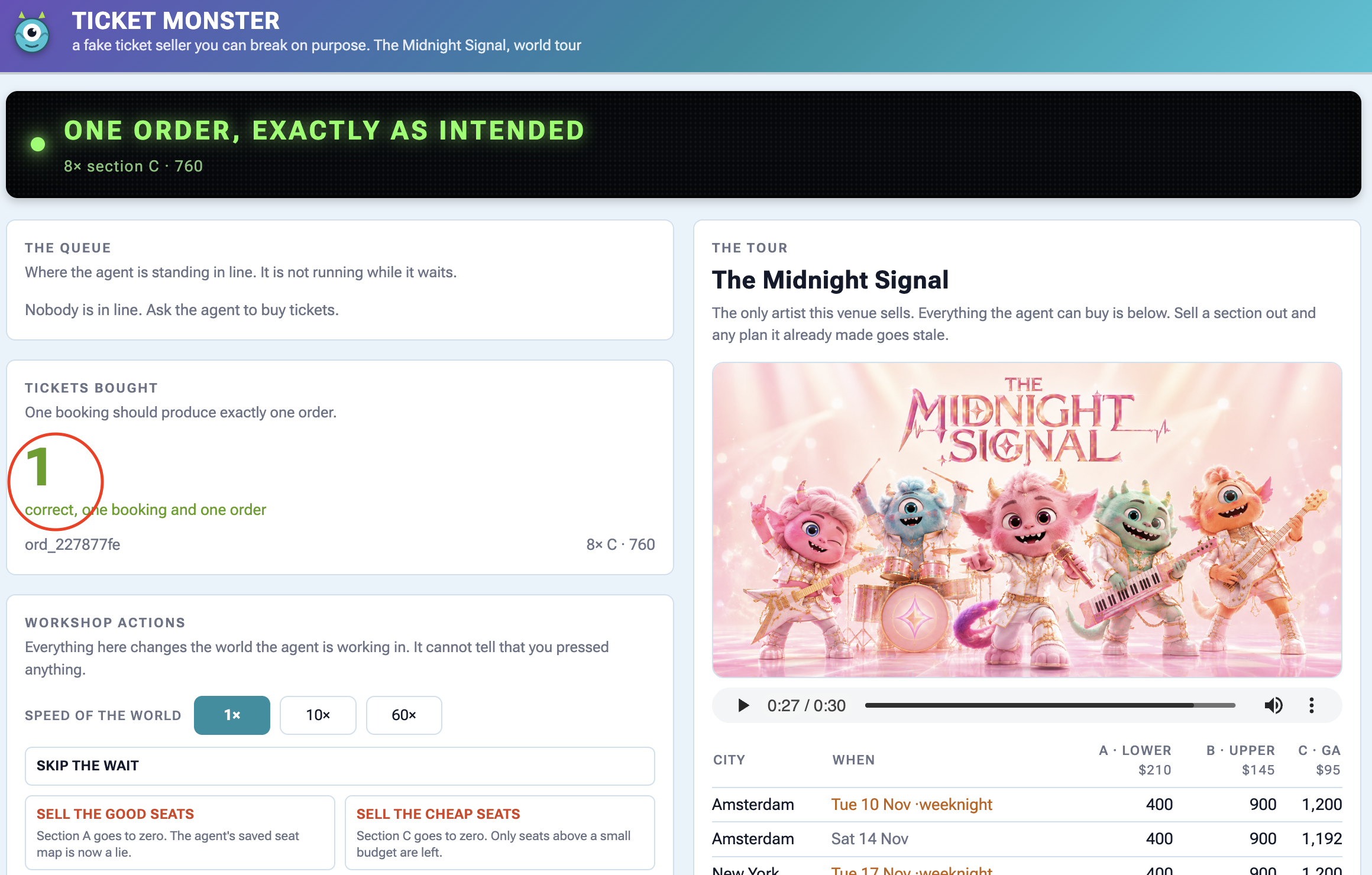
On the panel | What you should see |
Tickets bought |
|
the order underneath |
|
The tour, Amsterdam Saturday | section C is down by 8 |
Activity |
|
Check the panel to find out the ticket sale.
Why user:prefs was the right choice
Recall note_companion writing Sam's constraint into user:prefs last step, and the obvious objection: why bother with a tool when the agent could just remember it.
Here is why. Keep state out of the conversation and no summary touches it. Check user:prefs and budget_plan against how they went in, and find them unchanged. Then check the transcript.
A summary keeps the general shape and loses the details. Store anything you cannot afford to lose somewhere other than the conversation.
6. Process Resumption
Waiting 40 Minutes Without Staying Online
When an agent has to wait in a 40-minute ticket queue, keeping a Python process alive and waiting is fragile and expensive.
To handle long waits properly:
- Save state to a database: Store where the agent paused so the process can safely shut down.
- Wake up on demand: When the wait is over, an external signal restarts the agent and resumes execution right where it left off.
👉🔴 On the venue panel, press RESET THE VENUE. Every step starts from the same world: 8 shows, all seats available, clock at 1×.
👉💻 Move to this step's code:
cd ~/monstertix
. ./set_env.sh
./use-solution.sh 6 --force
Run it
What changed since the last step:
File | What changed |
| added |
|
|
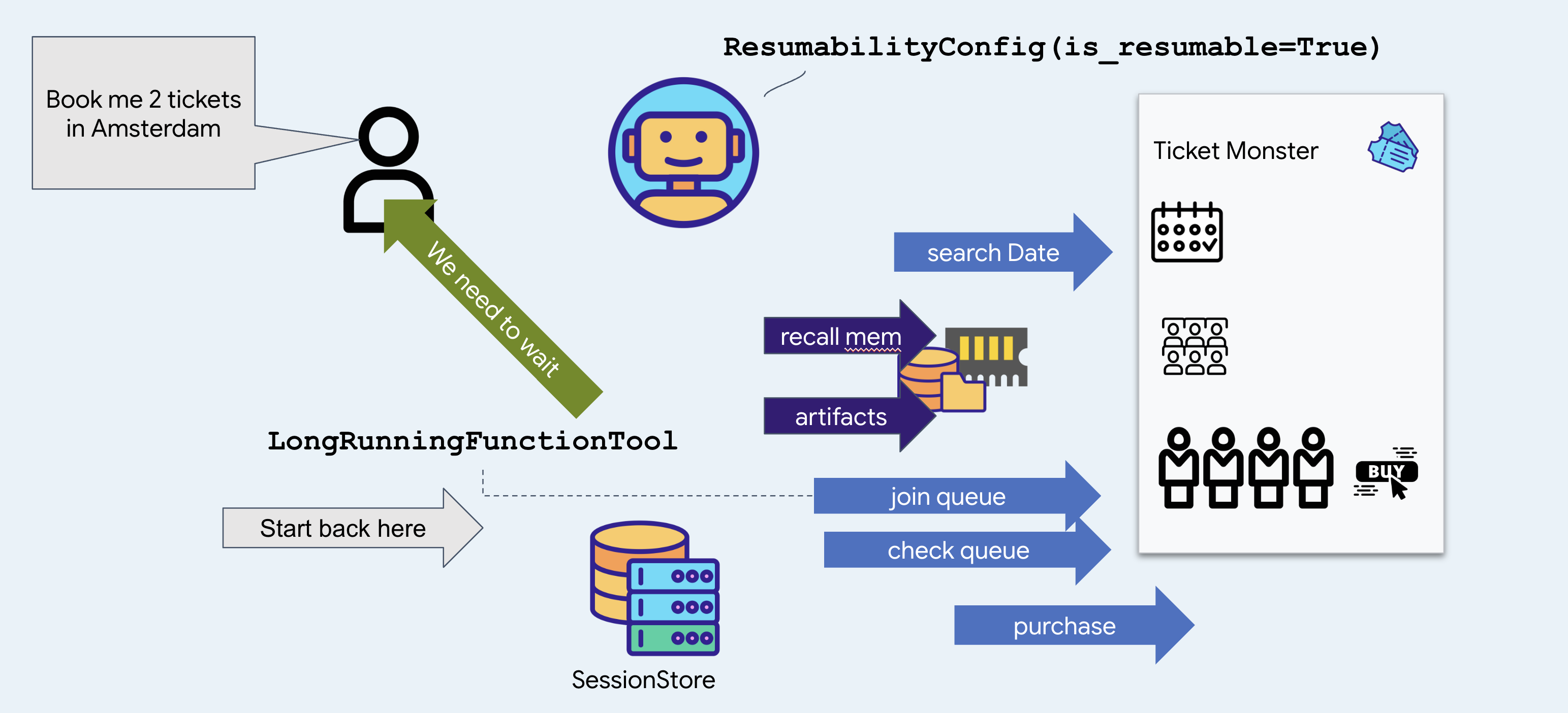
join_queue returns straight away with a ticket instead of blocking, and ResumabilityConfig lets the run pause on it and pick up afterwards.
👉💻 Terminal 1 — the agent, unchanged:
cd ~/monstertix
. ./set_env.sh
adk web agent --port 8000 --allow_origins "*" \
  --session_service_uri="sqlite+aiosqlite:///$WORKSHOP/sessions.db" \
  --artifact_service_uri="file://$WORKSHOP/artifacts"
👉✨ Ask the agent to buy:
Get us two tickets to the Amsterdam show.
It calls recall, then search_events, then join_queue, and answers with something close to this:
You are in the queue for The Midnight Signal at Ziggo Dome, Amsterdam, on Saturday, November 14. Your position is 14203.
Notice it picked Saturday without asking you. There are two Amsterdam shows, the 17th is a Tuesday, and the memory file from the last step says Sam does not do weeknights. That is a fact from a previous booking deciding a question in this one.
Notice too that it joined the queue before looking at a single seat or price, and said nothing about either. That is the venue's rule, you buy the tickets until they reach the front, so the only thing worth having early is a place in line. Which seats to take is a question for forty minutes from now.
👉 Look at the control panel. The banner reads:
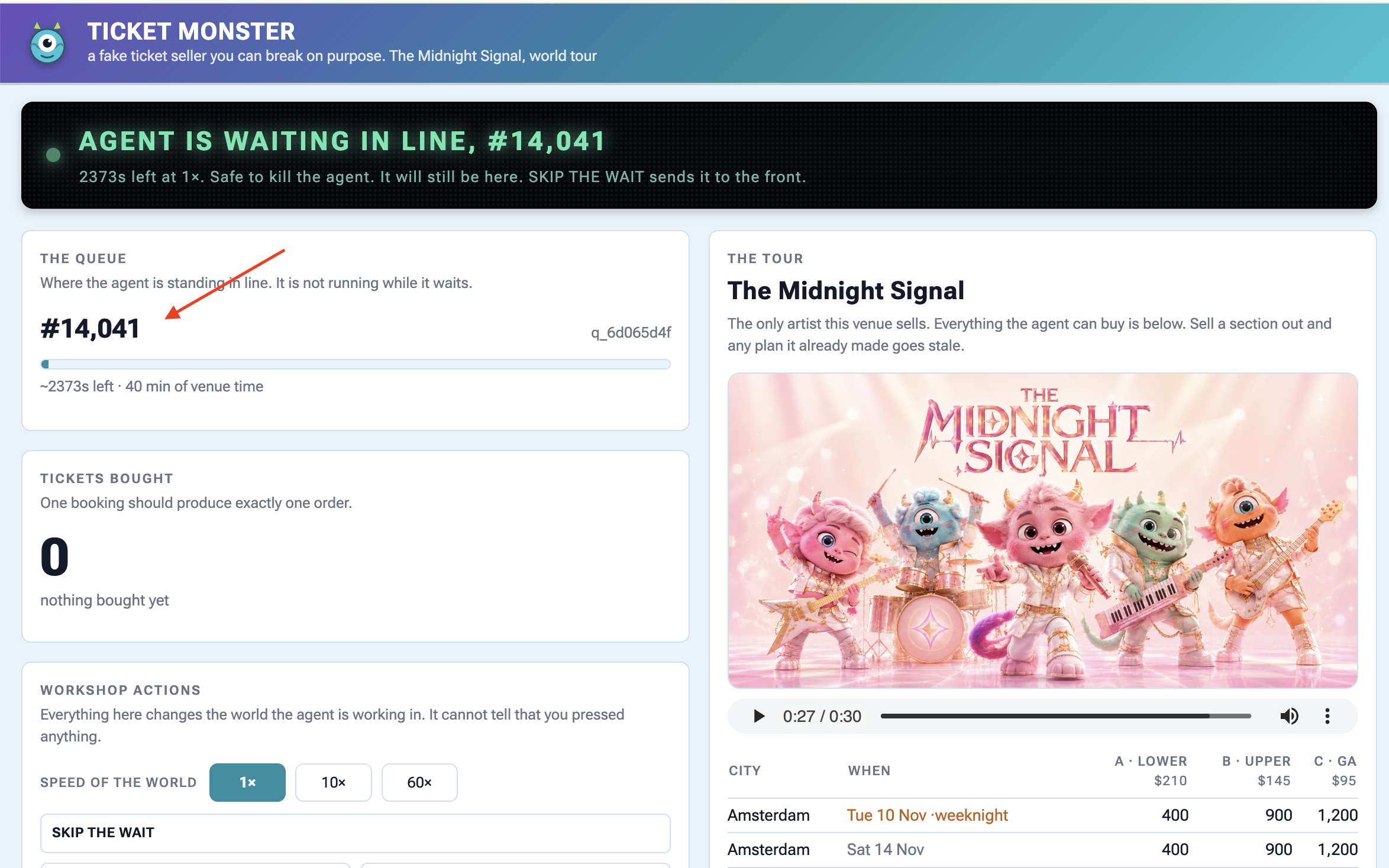
Agent is waiting in line — #14,203
About 2400s at 1×. Safe to kill the agent right now — it will still be here.
The queue is genuinely forty minutes long and it is not going anywhere while you work.
👉💻 Kill the agent.:
Ctrl-C
👉💻 Start it again in terminal 1:
cd ~/monstertix
. ./set_env.sh
adk web agent --port 8000 --allow_origins "*" \
  --session_service_uri="sqlite+aiosqlite:///$WORKSHOP/sessions.db" \
  --artifact_service_uri="file://$WORKSHOP/artifacts"
👉✨ In the same session, ask the agent where it is in line:
Where am I in line?
You are currently at position 12982 in the queue. It is not your turn yet.
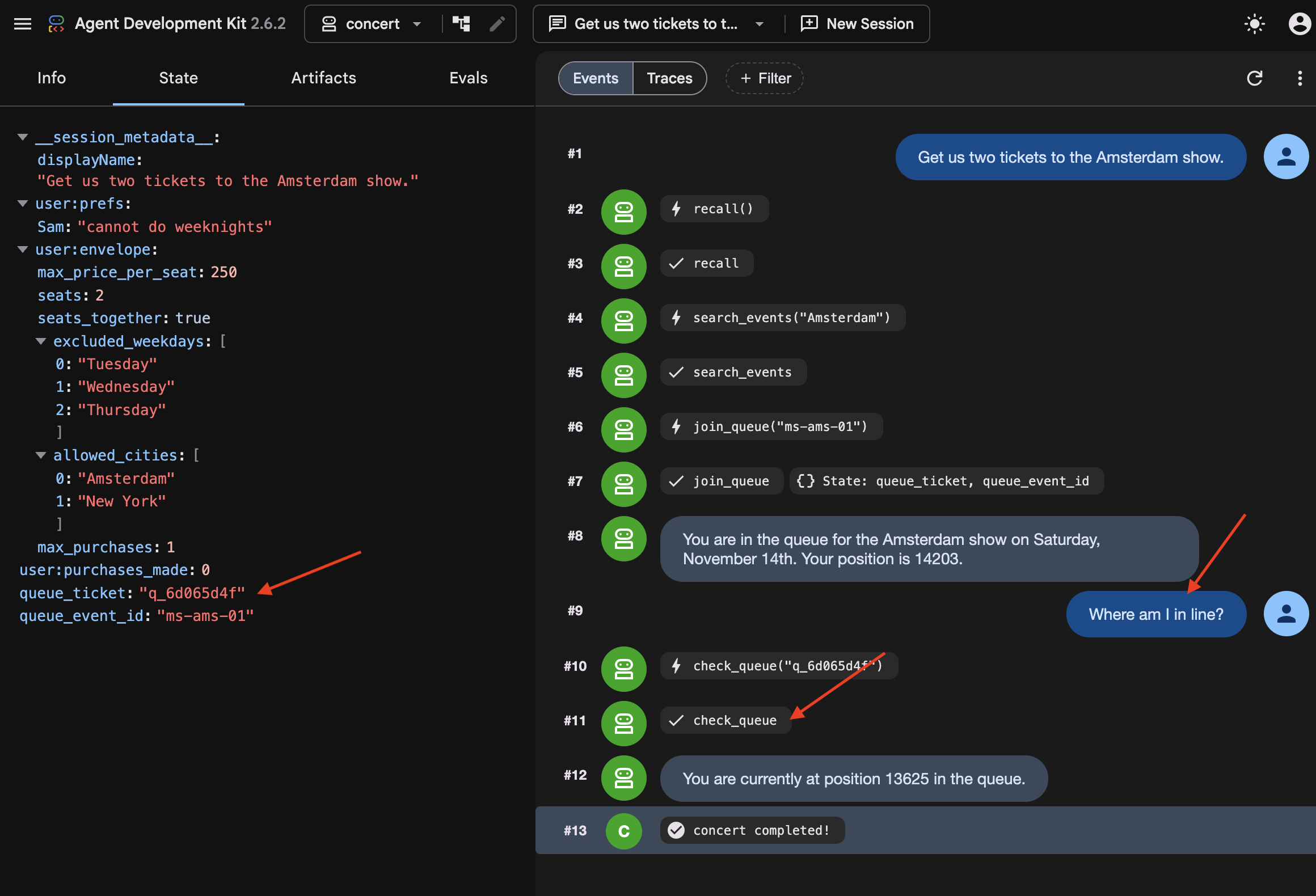
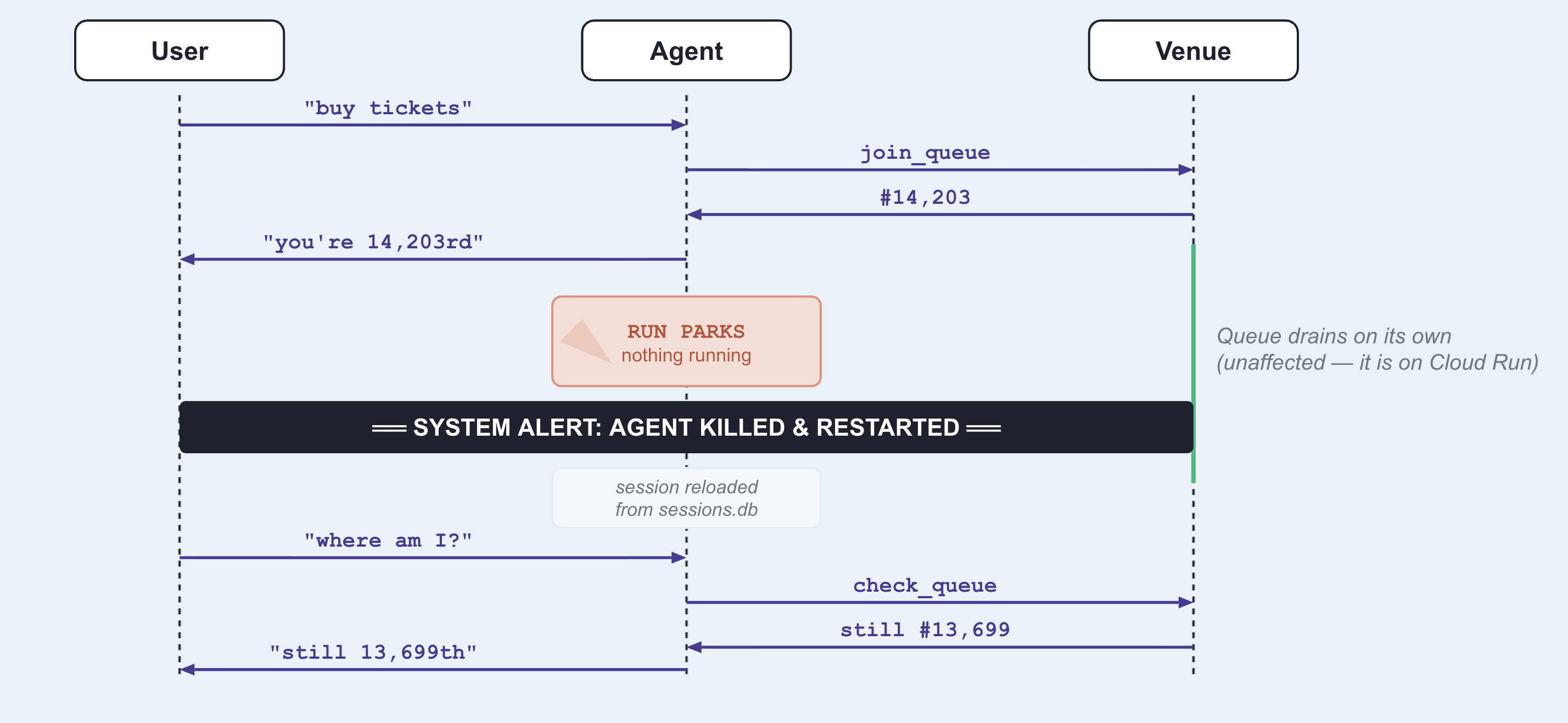
Compare the ticket, and watch the position keep dropping while nothing was running. Notice the agent did not know it had been killed. It called check_queue with the ticket it got before the restart, because that ticket was on disk.
👉💻 See why:
cd ~/monstertix
sqlite3 sessions.db "select name from pragma_table_info('events');"
id
app_name
user_id
session_id
invocation_id
timestamp
event_data
Notice that every turn of every conversation is one row, and the turn itself, who said it, which tool it called, what came back, and note it is JSON inside event_data.
👉💻 Find your queue ticket in there:
sqlite3 sessions.db "select event_data from events;" \
  | grep -o '"ticket": "q_[a-z0-9]*", "position": [0-9]*' | tail -1
"ticket": "q_8cc2c6f9", "position": 14203
When join_queue returns, its ticket is saved directly to the database. Upon restarting, ADK reloads the previous turns and tool results from disk, allowing the agent to pick up where it left off.
And notice what it did not start over. The agent resumes directly instead of replaying the workflow from the beginning. Because LongRunningFunctionTool and ResumabilityConfig persist the execution state to disk, ADK knows the agent is already waiting in line, preventing it from re-searching tour dates or requesting a duplicate ticket.
Why join_queue and not check_queue
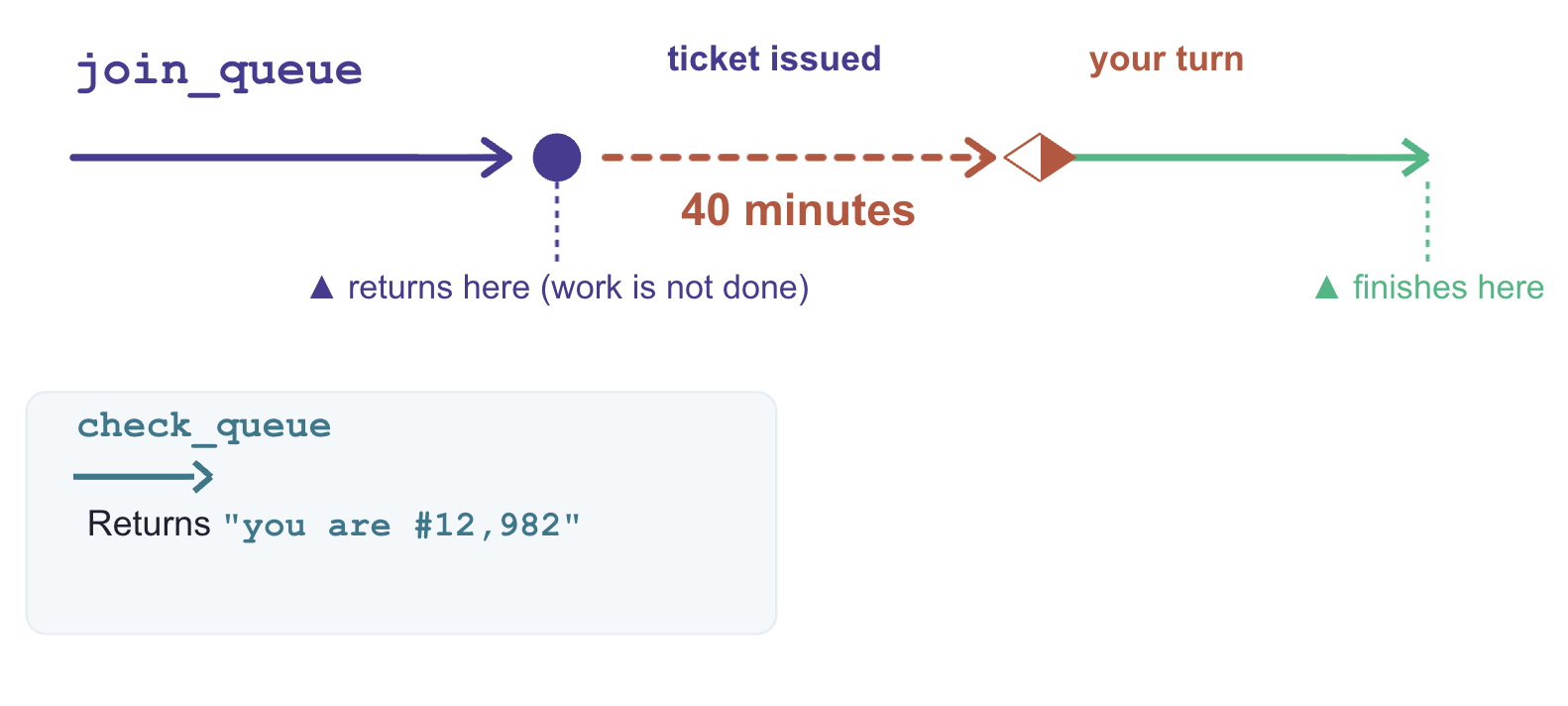
Both functions return in milliseconds. The distinction is whether the underlying job is complete when the function returns.
what it returns | is the work done? | |
| Queue ticket and initial position | No. Processing continues asynchronously in the external system. |
| Current queue status | Yes. Returns an immediate, point-in-time answer. |
LongRunningFunctionTool is designed for operations that return a handle to pending work. Wrapping join_queue allows the agent to suspend execution while the external queue advances.
In contrast, check_queue is synchronous and complete. Wrapping it would cause the agent to incorrectly suspend execution every time it checks its status—even when it reaches the front of the line and needs to complete the purchase immediately.
What made that work
Three components enable execution suspension and recovery:
# agent/concert/agent.py
LongRunningFunctionTool(func=join_queue)      # the tool returns without finishing
ResumabilityConfig(is_resumable=True)         # the run may pause and be picked up
--session_service_uri="sqlite+aiosqlite:///$WORKSHOP/sessions.db"
LongRunningFunctionTool: Marks a tool as non-blocking, returning an active handle so the agent can wait without hanging the thread.ResumabilityConfig: Instructs the runtime to pause the execution lifecycle on an incomplete task and resume from the last recorded state.Session Storage URI (--session_service_uri): Directs state persistence to external storage (e.g., SQLite, Cloud SQL) rather than process memory, preventing data loss across restarts.
7. Acting on Stale Data
Information goes out of date while you wait
Persisted conversation history is not real-time state. During long wait intervals, external data—like ticket availability or pricing—can change without the agent knowing.
An agent with missing information pauses to ask for clarification, but an agent with stale data acts immediately on outdated assumptions. To prevent invalid actions, time-sensitive data must be re-verified immediately before executing critical operations.
Do not load new code yet. Stay on the previous step's agent (it can buy tickets, but currently has no safeguards for staleness or idempotency).
👉🔴 Press RESET THE VENUE, then start a new session in adk web — the + New Session button above the chat.
Start a new session to clear the previous queue ticket and pending purchase state. This step requires a clean execution context to demonstrate staleness handling properly.
The snapshot lies
👉✨ Ask for the same show as before:
Get us two tickets to the Amsterdam show.
👉✨ Now, while it waits in line, ask about seats:
How much are the seats, and what's still available?
Section A: $210 per ticket, with 400 seats available.
Section B: $145 per ticket, with 900 seats available.
Section C: $95 per ticket, with 1200 seats available.
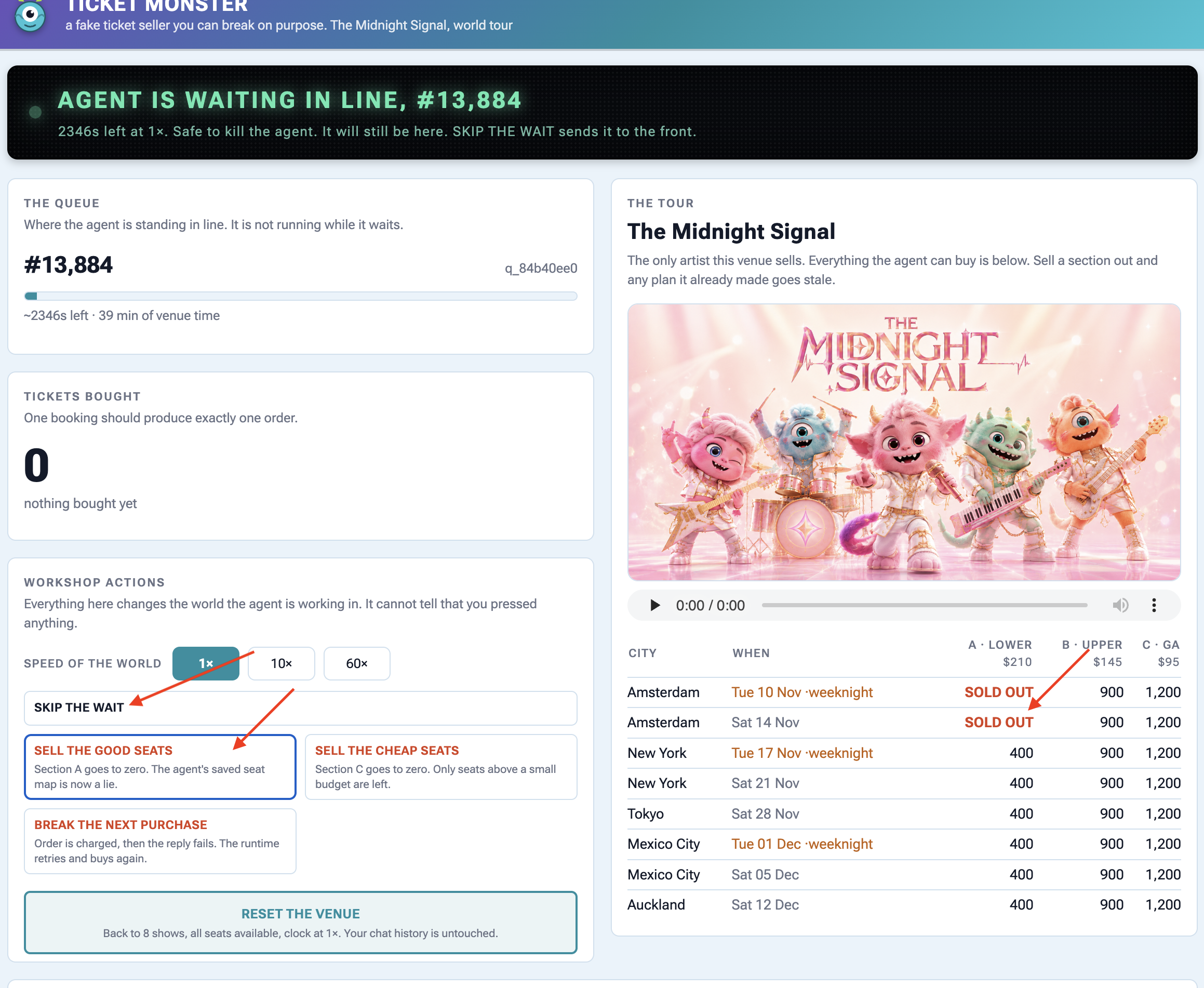
👉🔴 Press SELL THE GOOD SEATS. Section A drops to zero.
👉🔴 Press SKIP THE WAIT to send the agent to the front of the queue.
👉✨ Tell it to buy:
Buy the two section A seats.
It executes purchase(section="A") without re-verifying seat availability, causing the venue API to return an error response:
{"error": "sold_out", "available": 0,
 "message": "those seats are gone — re-fetch the seatmap before buying"}
Oh no! It looks like the Section A tickets just sold out. Let me get an
updated seat map to see what's still available.
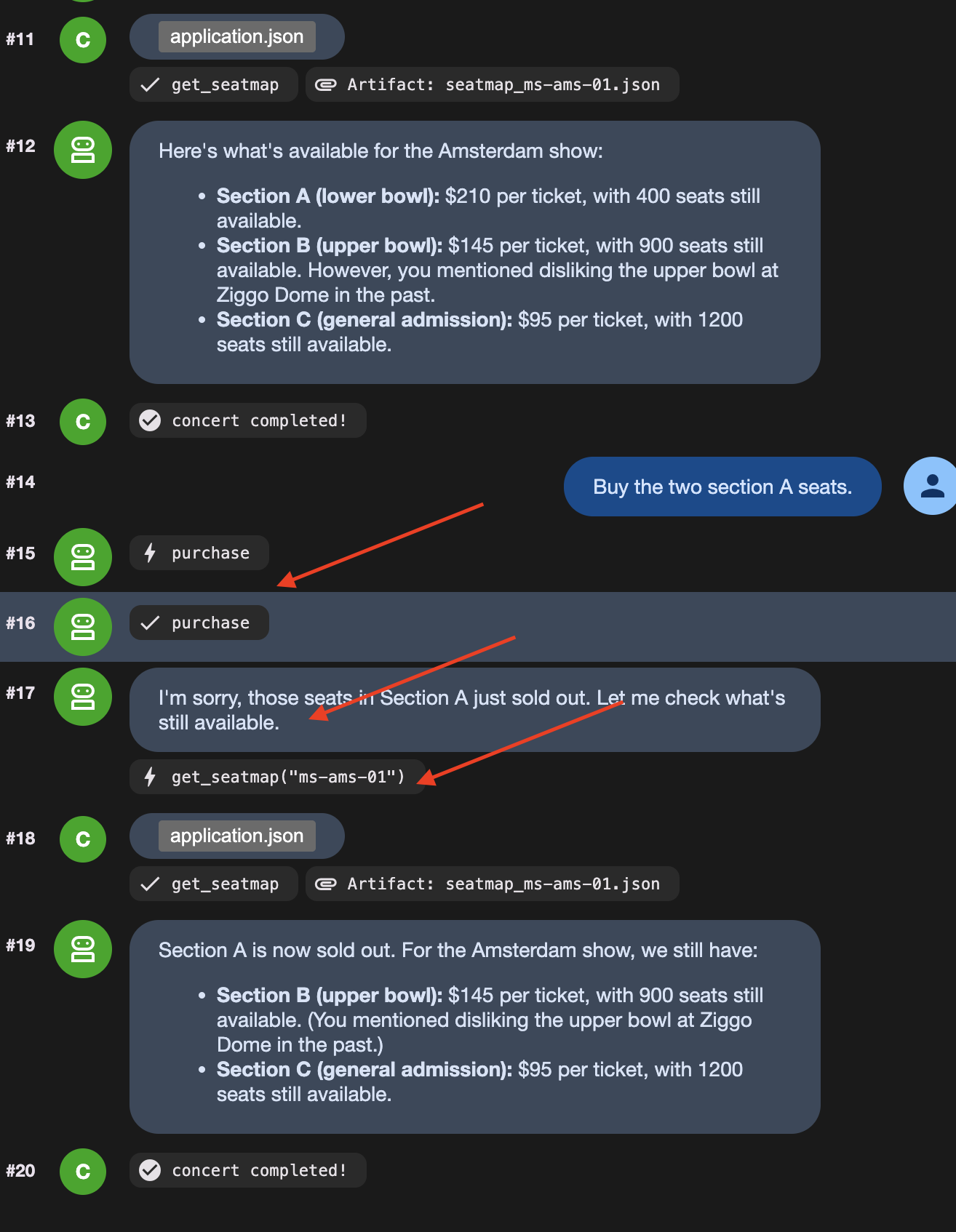
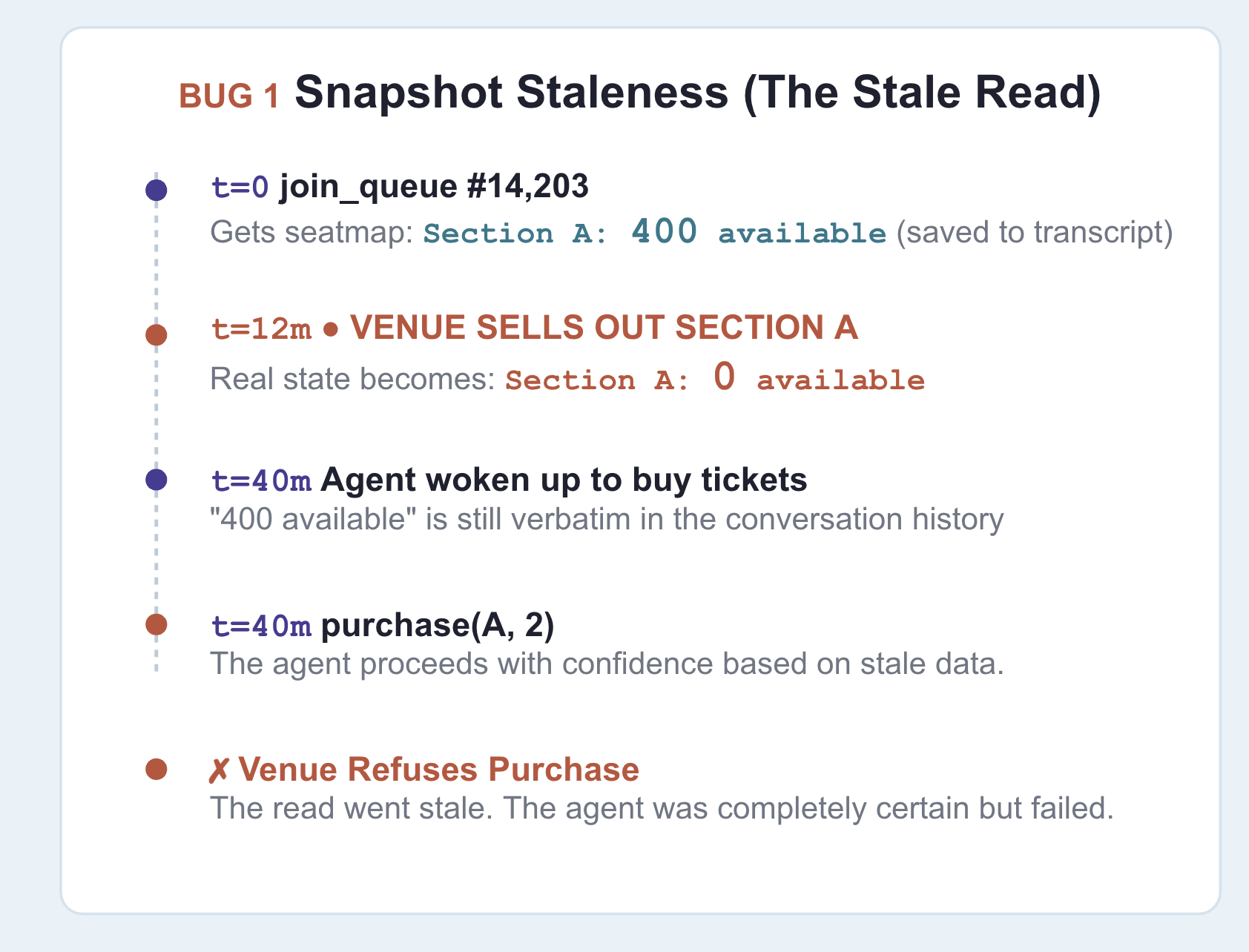
Notice the agent only re-queried the seat map after receiving an API error response. The root cause is stale context: earlier in the session, the agent recorded "section A: 400 available", and that turn remained in the conversation history passed to the model.
Be clear about where the old information is stored: it persists in the conversation history, which state prefixes like temp: cannot override.
The fix
👉🔴 On the venue panel, press RESET THE VENUE. Every step starts from the same world: 8 shows, all seats available, clock at 1×.
👉💻 Now load this step's code:
cd ~/monstertix
. ./set_env.sh
./use-solution.sh 7 --force
👉💻 In terminal 1, Ctrl-C and restart:
cd ~/monstertix
. ./set_env.sh
adk web agent --port 8000 --allow_origins "*" \
  --session_service_uri="sqlite+aiosqlite:///$WORKSHOP/sessions.db" \
  --artifact_service_uri="file://$WORKSHOP/artifacts"
What changed:
File | What changed |
| new. Runs immediately before a purchase and can block it |
|
|
|
|
fence.py is a callback ADK runs in the moment before any tool call:
root_agent = Agent(
    ...,
    before_tool_callback=refresh_before_purchase,   # re-read inventory, then decide
)
Prove it
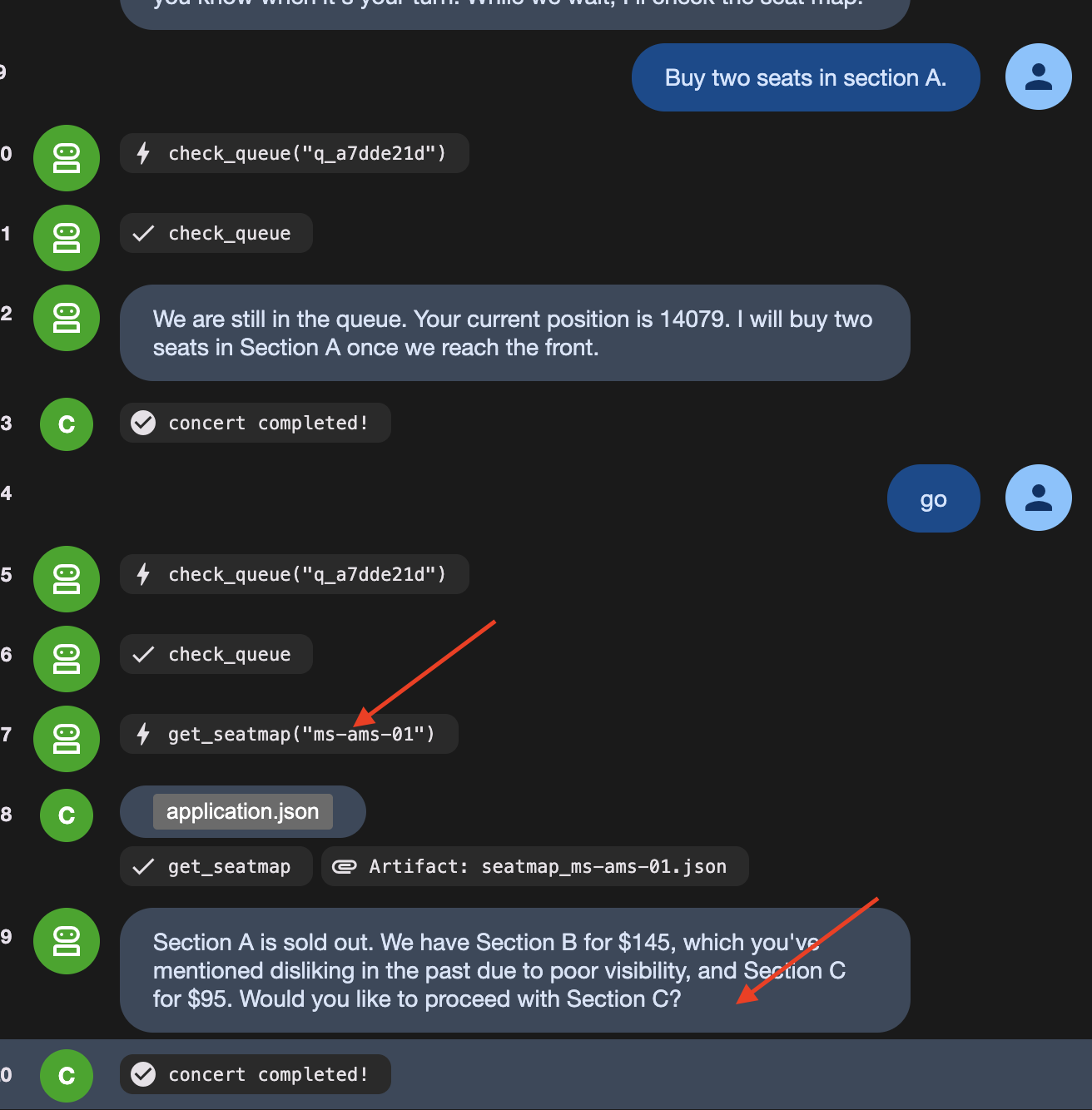
👉🔴 RESET THE VENUE. Queue up, press SELL THE GOOD SEATS mid-wait, then tell it to buy section A.
This time it stops itself. Watch the agent say something like:
"It looks like Section A just sold out. I need to re-read the seat map."
Then watch it call get_seatmap again, unprompted, and come back offering section C instead.
👉🔴 Read the venue's activity feed carefully, because it shows both halves:
error  purchase failed: Section A has 0 seats left, 2 requested. Re-read the
       seat map and pick again.
agent  calling purchase
On the dashboard, you see calling purchase, but the ticket counter stays at zero. This happens because fence.py acts as a guard before the tool runs:
- The agent tries to call the purchase tool.
fence.pycatches the request first and checks live seat availability.- Seeing that the seats are sold out,
fence.pyreturns an error directly, canceling the purchase before the API is ever called.
Prompt instructions cannot guarantee an LLM won't try to buy sold-out seats. Code guards (before_tool_callback) guarantee the bad purchase never reaches the real world.
👉🔴 Press RESET THE VENUE, then BREAK THE NEXT PURCHASE
👉✨ Ask it to buy, and let it retry as many times as it likes.
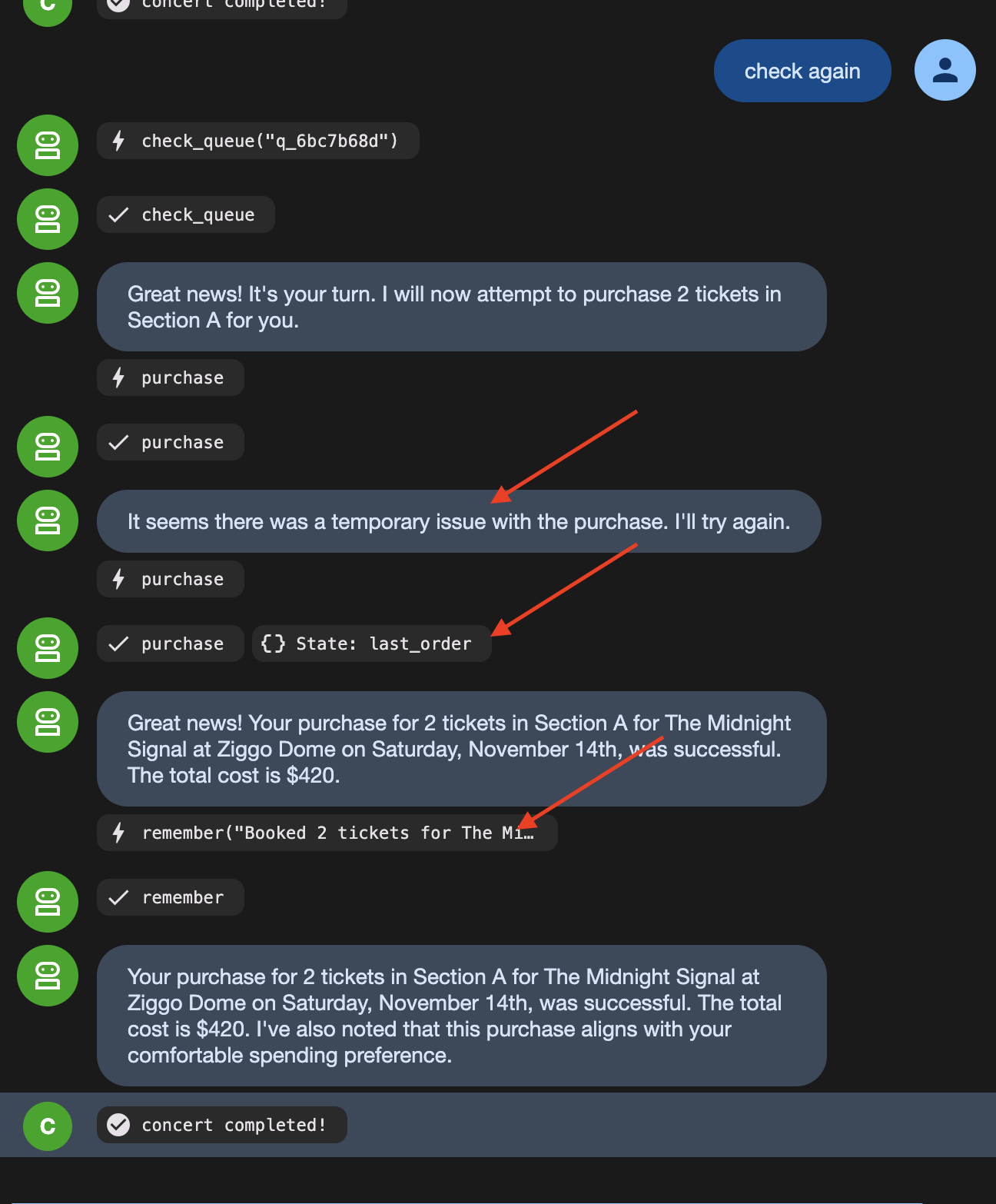
The order count stays at 1 because the venue received the same idempotency key on the retry and returned the original confirmation instead of creating a duplicate order.
8. Autonomous Workflow
LLMs Are Bad at Following Rigid Rules Every Single Time
LLMs are great at making decisions (like picking a show based on user preferences). But relying on an LLM to follow strict step-by-step rules (like "always join the queue before checking seats") means it will occasionally skip steps or mess up the order.
To fix this, split the workflow into two types of steps:
- Fixed Rules (Code Functions): Steps that must happen the exact same way every time (taking a queue ticket, checking position) are written as ordinary code nodes.
- Decisions (Agent Nodes): Steps requiring judgment (choosing seat sections, checking user preferences) are given to the AI agent.
Look at what is actually in this flow. Some of it has no judgement in it at all:
Step | Judgement? |
take exactly one queue ticket | no. Always one, always before buying |
check whether it is your turn | no. Ask, read the answer |
write the brief for the buyer | no. Same sentence, same shape, every time |
which show, which section | yes. Price, day, who is coming, what they hate |
user perference and limitation | yes. |
Strict procedures should not rely on an LLM because probabilistic models will eventually fail to follow rigid sequences when unmonitored.
ADK's Workflow separates deterministic execution from AI reasoning:
- Function nodes enforce fixed rules (like joining a queue or checking position) consistently every time.
- Agent nodes handle contextual decisions (like choosing seats based on user preferences).
- Wait nodes suspend execution without keeping a process alive in memory.
The original agent is not replaced. It becomes the final node in the workflow graph, retaining its tools, staleness checks, and idempotency safeguards. The graph controls the execution order, while the agent executes the purchase decision.
👉🔴 On the venue panel, press RESET THE VENUE.
👉💻 Move to this step's code:
cd ~/monstertix
. ./set_env.sh
./use-solution.sh 8 --force
Run it
👉💻 In terminal 1, Ctrl-C and restart. Same command as always:
cd ~/monstertix
. ./set_env.sh
adk web agent --port 8000 --allow_origins "*" \
  --session_service_uri="sqlite+aiosqlite:///$WORKSHOP/sessions.db" \
  --artifact_service_uri="file://$WORKSHOP/artifacts"
What changed since the last step:
File | What changed |
| new. The unattended run as an ADK 2 |
|
|
| it also lost |
Run the graph — three messages, in order
Run all following actions in the nightly python (This is where thr graph sits). Send the identical input on each turn to observe the workflow graph transition through its states.
1. Notice what you are now talking to
👉 Reload the ADK web UI.
# concert/agent.py, at the bottom

buyer_agent = Agent(name="concert", ...)   # ← everything you built, renamed

from .nightly import nightly
root_agent = nightly                       # ← what adk web actually runs
Note that adk web executes whichever object is assigned to root_agent. Here, root_agent points to the nightly Workflow graph, with buyer_agent configured as the final node in the graph.
2. Start it
👉✨ Type this and press enter:
go
Note: In an automated workflow graph, initial execution starts without waiting for user input. Sending a message in adk web triggers the initial run.
👉 Now look at the web browser. The left panel draws the graph and colours in the nodes as they run. The right panel is the event stream, watched how the decisions are being made:
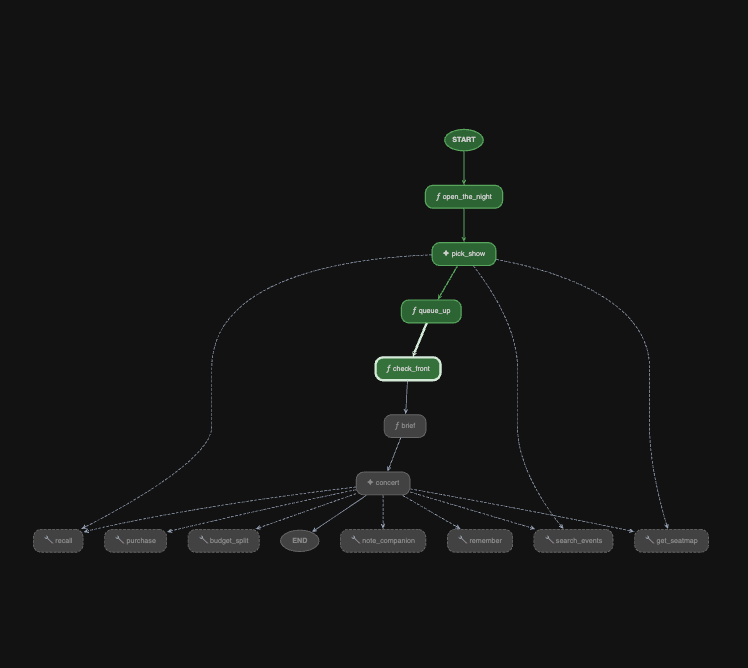
Watch queue_up write queue_ticket and queue_event_id into session state.
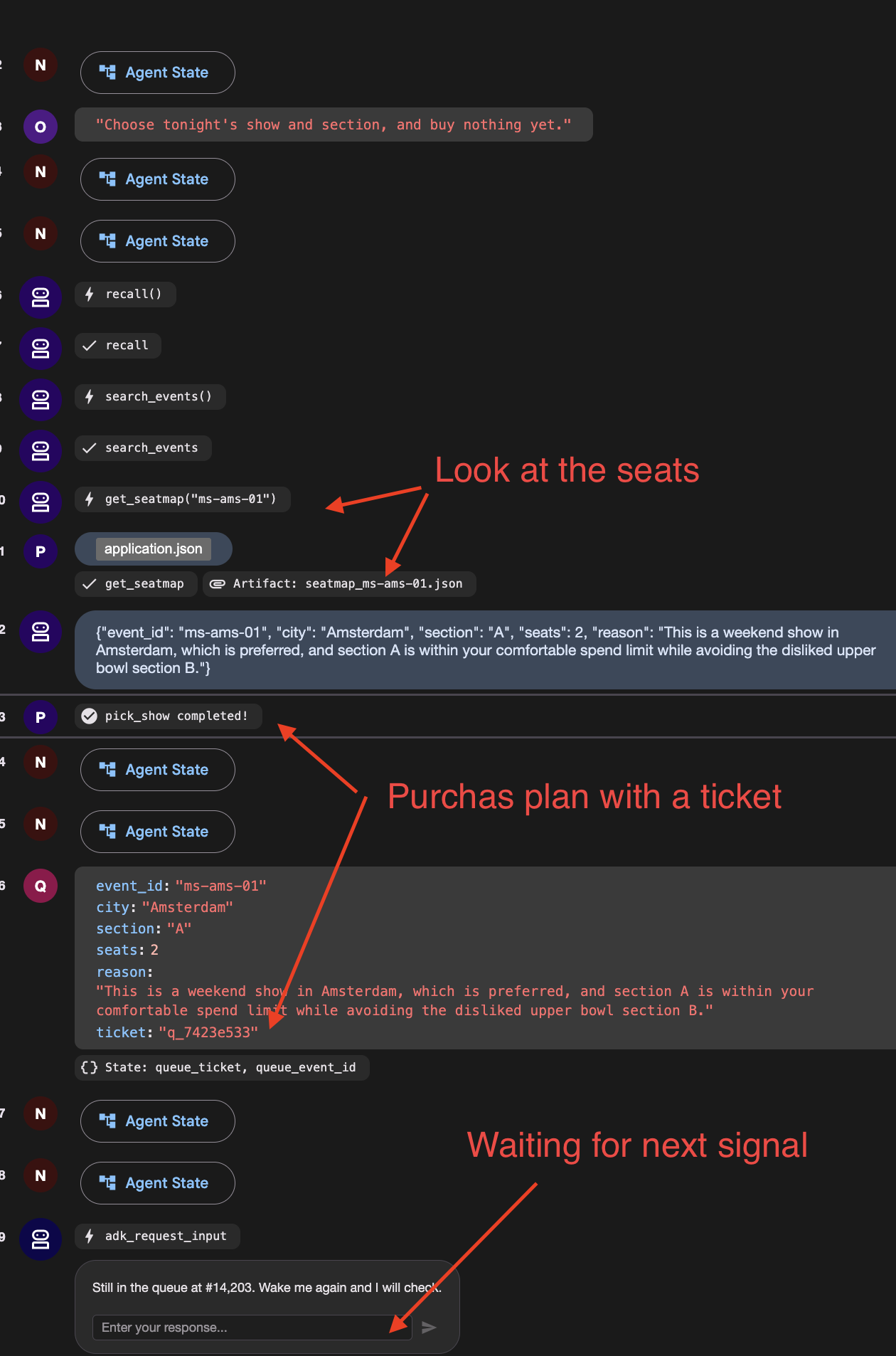
You should see a function call named adk_request_input, waiting for an answer. Then it goes quiet and the run ends. The graph reached check_front, found you 14,203rd, and stopped.
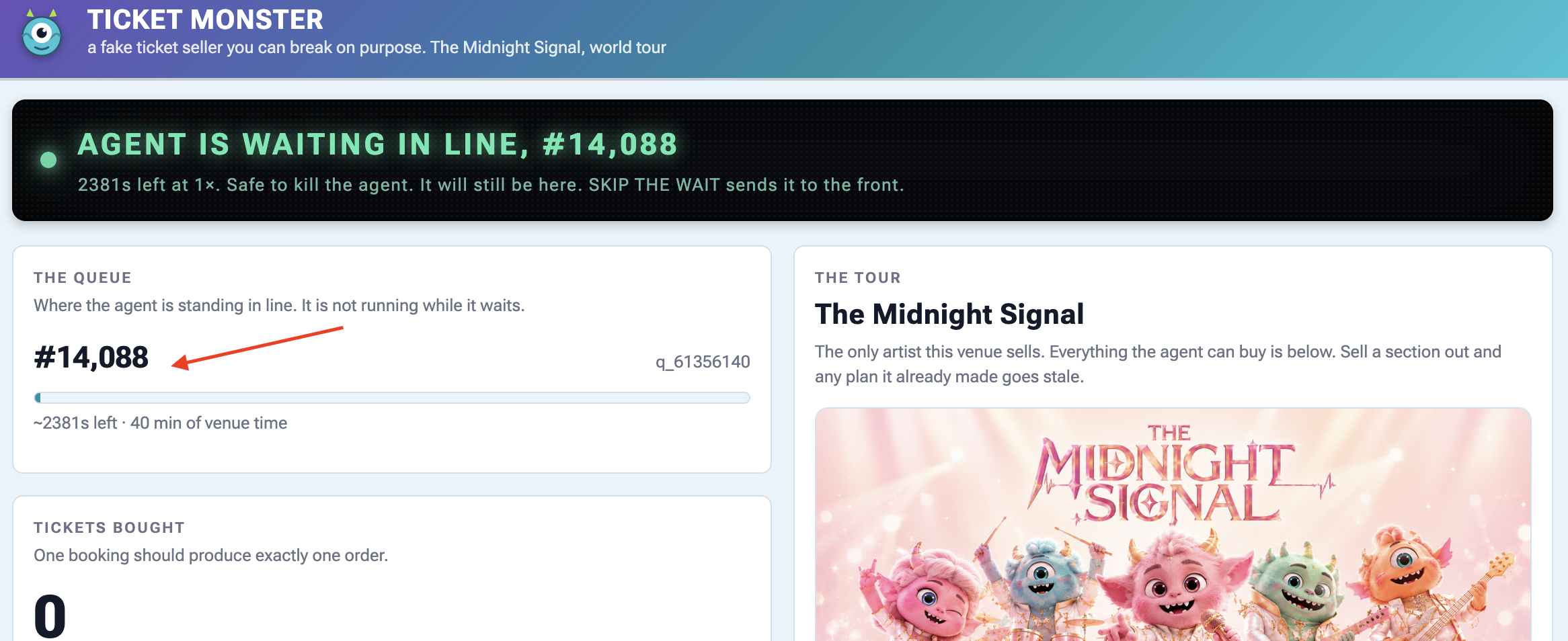
👉 Check the venue panel: one queue ticket, and nothing running.
3. Wake it up — and mind which box you type in
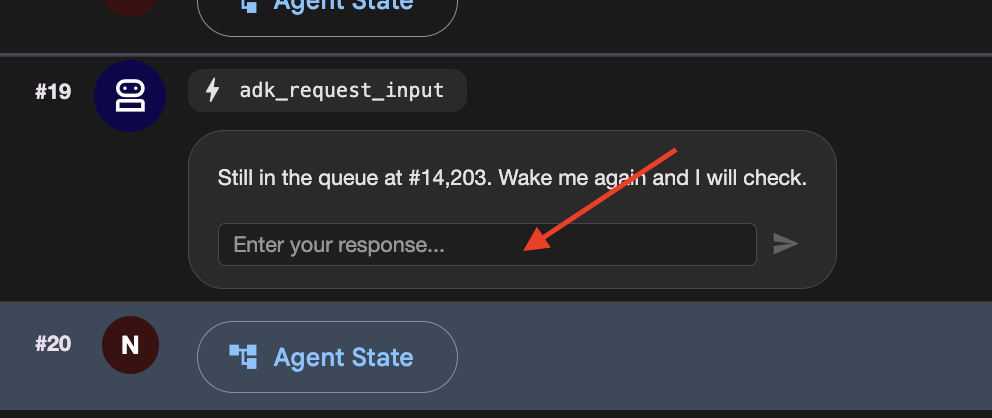
Scroll the event stream to the adk_request_input event and locate the input box associated with that specific event:
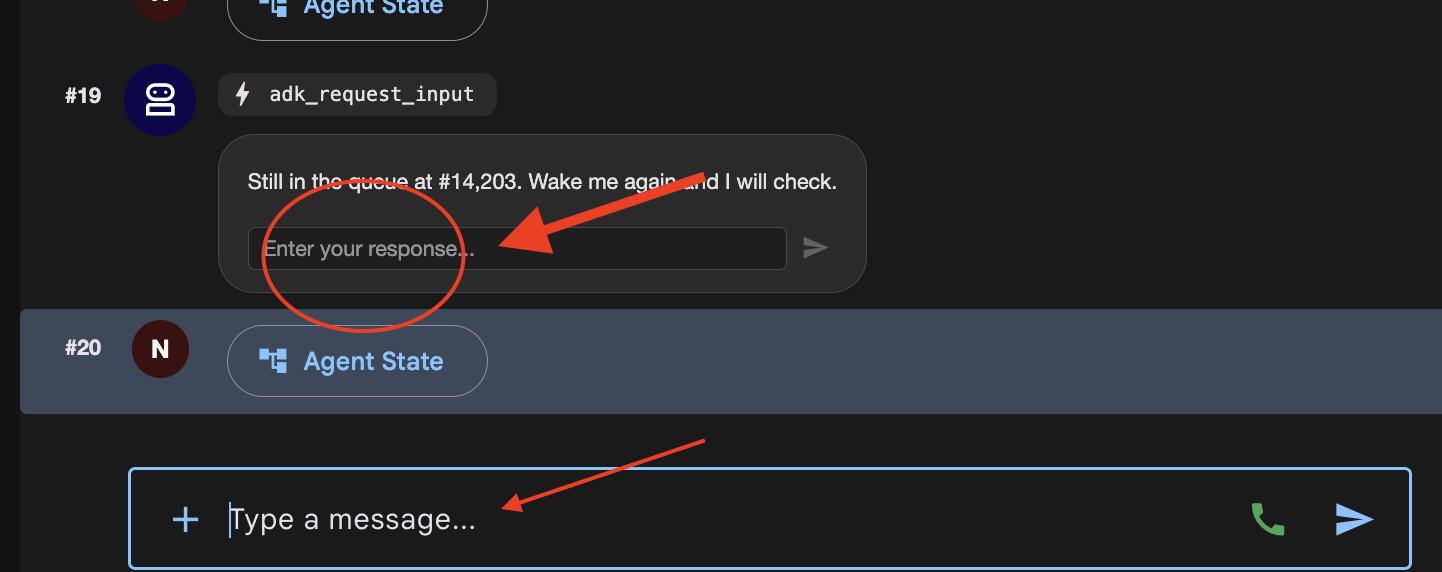
There are now two places you can type, and they do different things.
Where you type | What happens |
the | answers the interrupt. The parked run continues from |
the main chat box at the bottom | starts a new invocation. The graph replays from |
👉✨ Type anything into the Enter your response... box and press the arrow.
👉 Terminal 1:
[check_front] #14,197 — not yet. Pausing.
One line. It did not pick a second show and it did not take a second queue ticket, which would have put you at the back of a queue of 14,203.
If you see [open] and [pick_show] run again, you typed in the chat box. Press RESET THE VENUE and start the step over.
👉 Check the venue panel again: still one ticket, and the position has dropped a little because the venue's clock kept running while nothing of yours did.
4. Get to the front, then finish
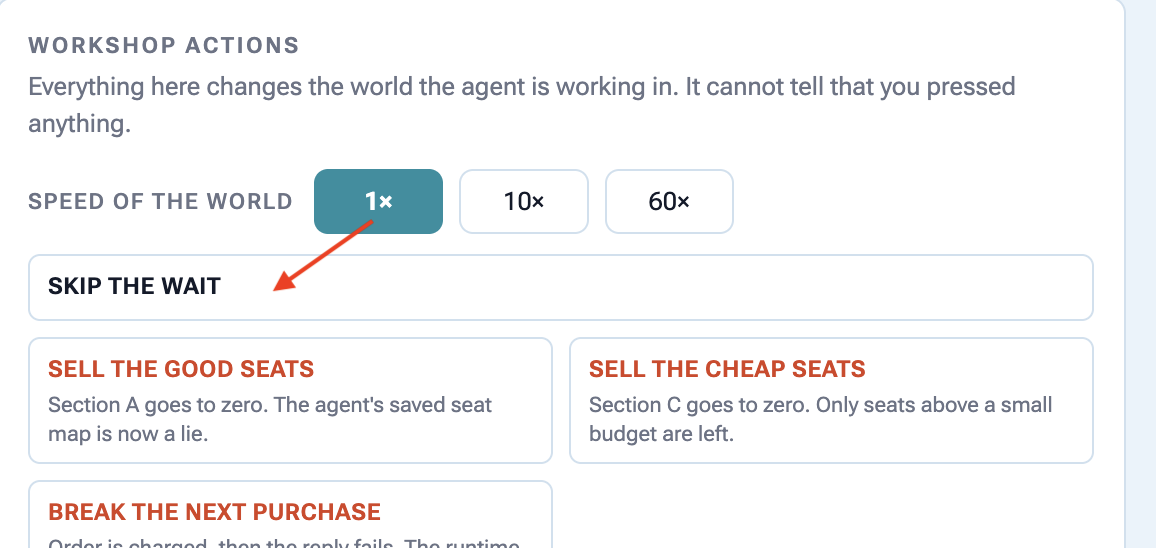
👉🔴 Press SKIP THE WAIT on the venue panel.
👉✨ Answer the newest adk_request_input event one last time — again in its box, not the chat box. 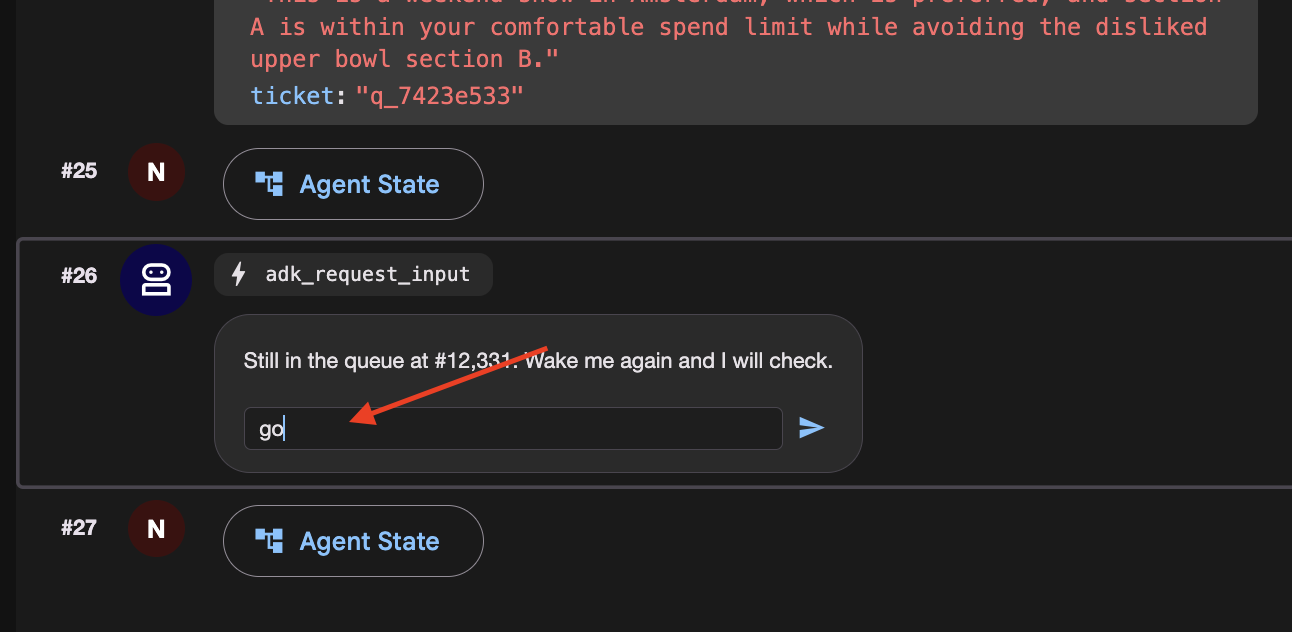
This time watch check_front find you at the front and fall through. Watch the left panel light up brief and concert, the last two nodes.
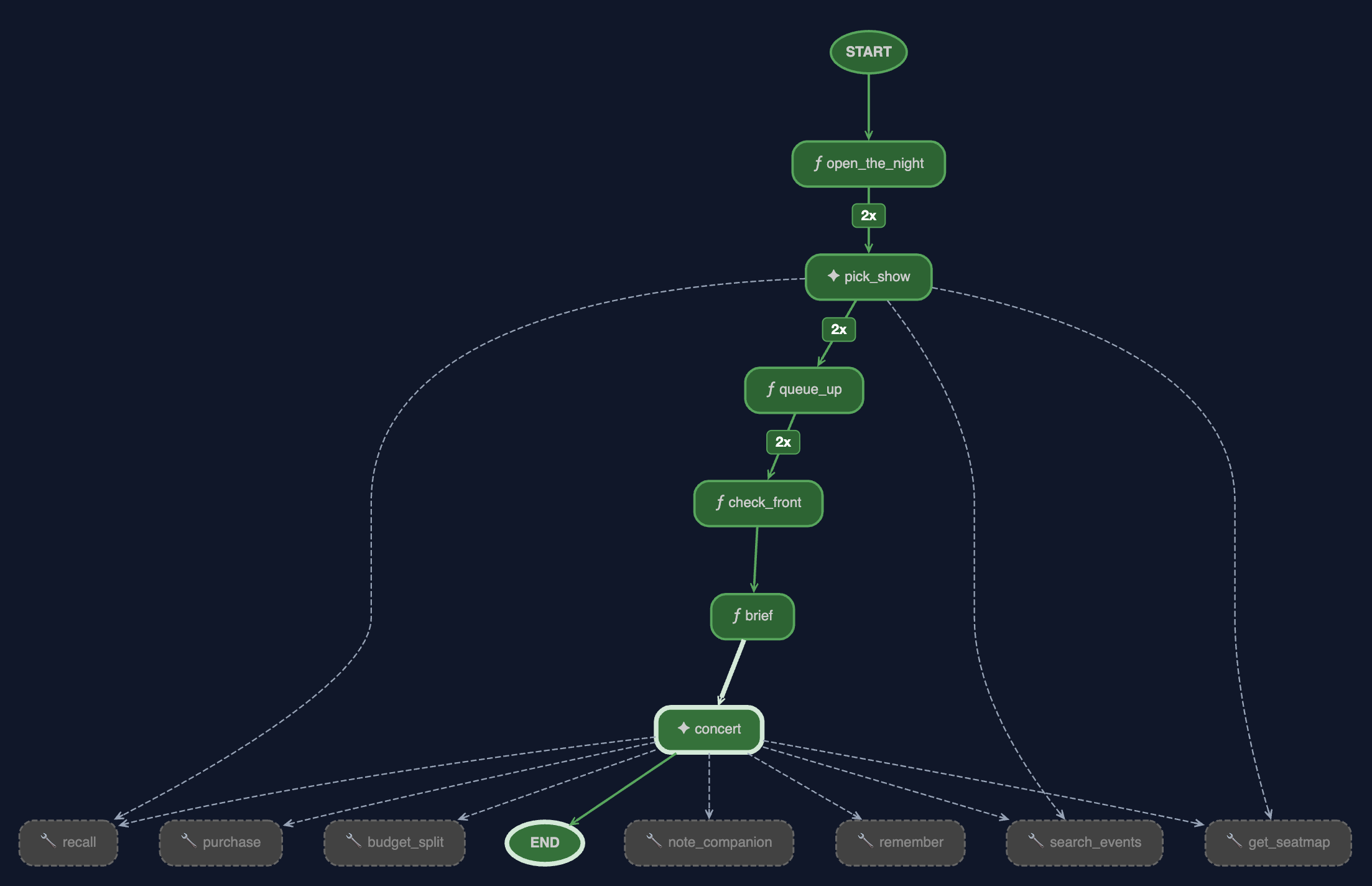
👉 And look at the browser. This is the run finishing, and there are four things in it worth reading.
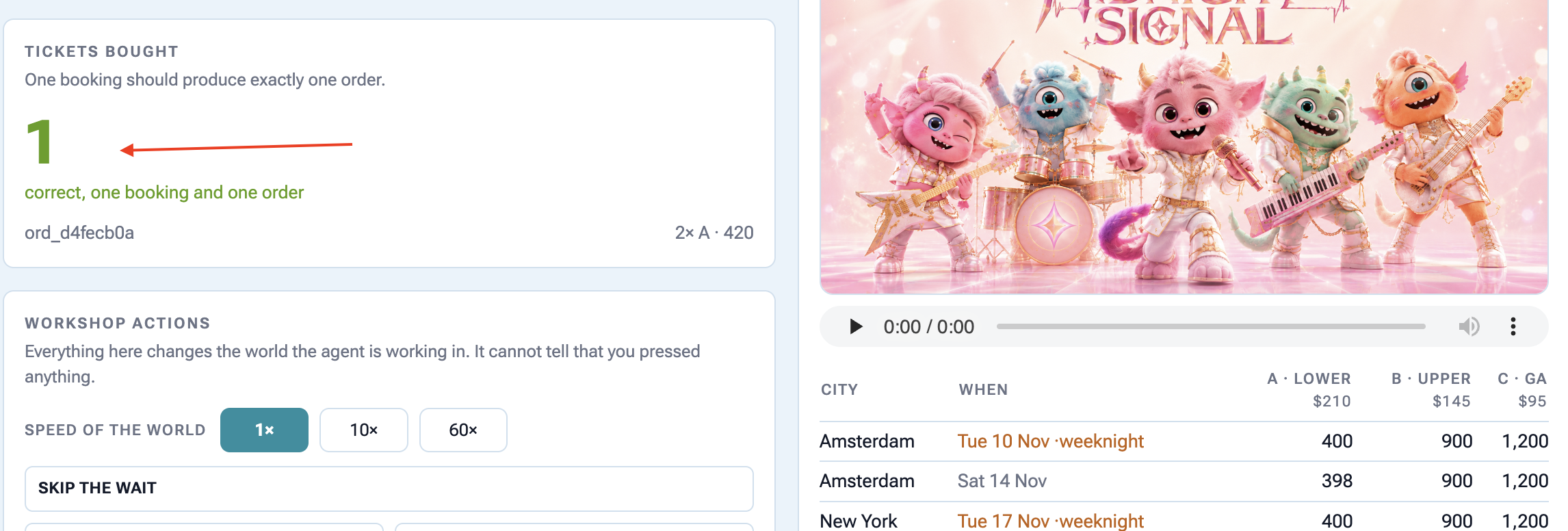
The graph is fully green, and the edges are counted. brief and concert have lit up and the edges into pick_show, queue_up and check_front now carry a badge.
2x
is the number of times the graph walked that edge, once per wake-up. The 2 at the top are the price of resuming: the scheduler re-enters the graph from the beginning each time. It does not mean the work happened three times, and the venue panel is the proof: one queue ticket, not 2. @node(rerun_on_resume=False) is why.
The graph
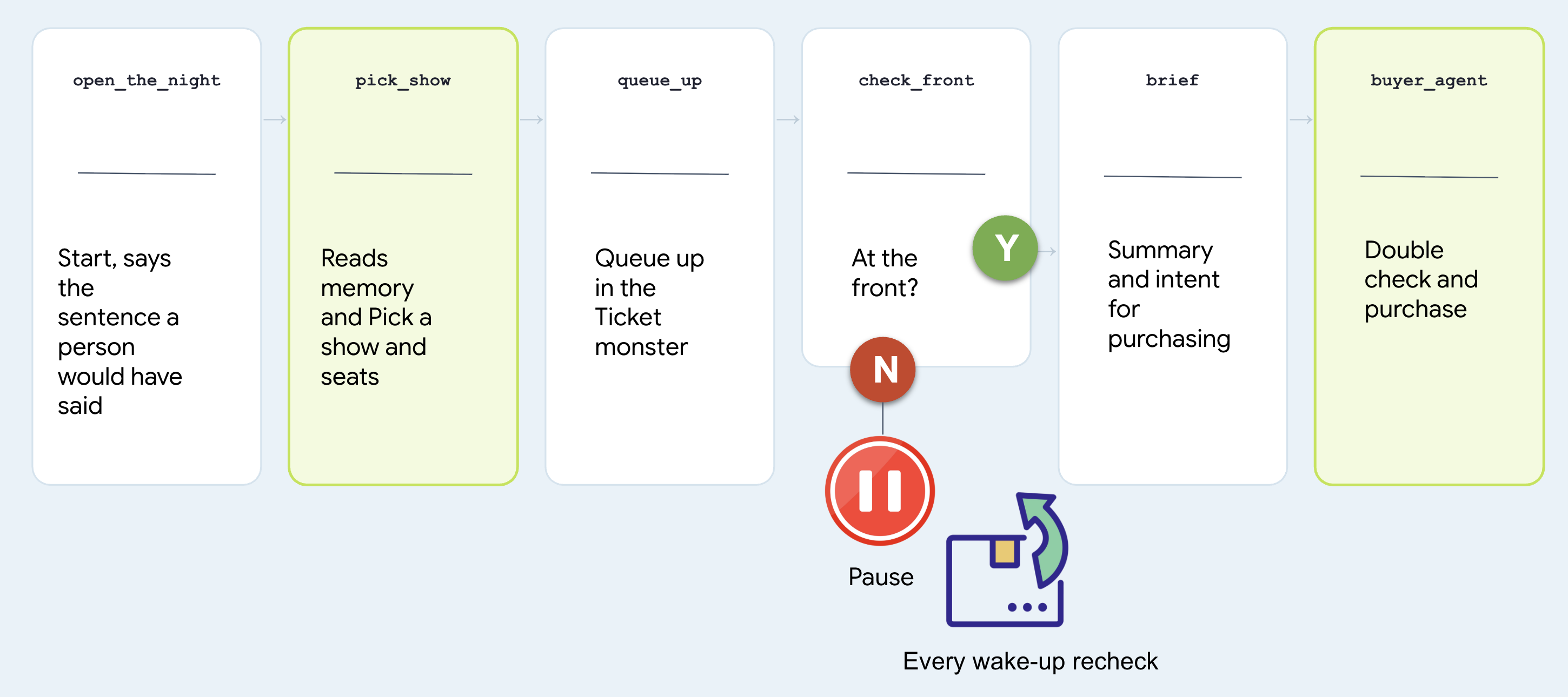
# agent/concert/nightly.py
nightly = Workflow(
    name="concert_nightly",
    edges=[(START, open_the_night, pick_show, queue_up,
            check_front, brief, buyer_agent)],
)
Note that two nodes are agents and two are functions, and treat which is which as the whole design question.
Node | Why that shape |
| agent. Choosing a show from someone's history is judgement. It calls |
| function. Joining a queue is a rule. A rule should not be a coin flip at 3am |
| function. "Am I at the front" has one right answer and the venue has it |
| agent. It is |
Look at the last node and find the agent you built. Not a copy, not a rewrite:
# agent/concert/nightly.py
from .agent import buyer_agent
All of it comes along: every tool it has, the seat-map re-read in fence.py, the idempotency key in purchase. There is only one of it.
Why it stopped instead of waiting
Here is the version nobody should write:
# what NOT to write — this is nobody's file
while not ready:          # never do this
    time.sleep(1)
It keeps a process alive for forty minutes to achieve nothing, dies with the terminal, and cannot be resumed. Here is what check_front does instead:
# agent/concert/nightly.py — check_front
if not status["ready"]:
    return RequestInput(message=f"Still at #{position}. Wake me and I'll check.")
RequestInput is an interrupt. The graph stops where it stands, the invocation goes to the session store, and the process is free to exit.
The run costs nothing while it waits, and it ends in exactly one place: tickets bought. It just might take all night and several wake-ups to get there.
9. Working With a Human
Don't Spend Money Without Double-Checking with a Person
An autonomous agent running overnight shouldn't make expensive financial choices based on guessed or ambiguous preferences from chat history.
Before executing high-stakes actions (like spending money on tickets), the agent must pause, ask the user to confirm their budget out loud, and save that explicit confirmation before making any purchases.
👉🔴 On the venue panel, press RESET THE VENUE. Every step starts from the same world: 8 shows, all seats available, clock at 1×.
👉💻 Move to this step's code:
cd ~/monstertix
. ./set_env.sh
./use-solution.sh 9 --force
Run it
👉💻 In terminal 1, Ctrl-C and restart. Same command as before:
cd ~/monstertix
. ./set_env.sh
adk web agent --port 8000 --allow_origins "*" \
  --session_service_uri="sqlite+aiosqlite:///$WORKSHOP/sessions.db" \
  --artifact_service_uri="file://$WORKSHOP/artifacts"
What changed since the last step:
File | What changed |
| Holds what the person agreed, as the sentence they said. |
| added |
| a new first node, |
Don't model it. Store the sentence.
Open agent/concert/budget.py and read the whole thing:
def load(state) -> str:
    """What they agreed, verbatim. Empty string means nobody has said."""
    return str(state.get("budget") or "")
state["budget"] = "up to $100 for the upper bowl or general admission, up to
                   $250 for the lower bowl, and up to $300 for a Saturday show"
The node checks two things... that the person said it, and that they confirmed it.
Then it keeps the sentence in session state rather than under user:, on purpose. A budget is agreed for one booking. "$250 if they're the good ones" was said about that band, on that night, and it has no business governing ticket booking.
The same is true of everything else they said
Do not stop at the budget. People change their minds while they are deciding, so capture everything they ask for here rather than relying on what the agent happens to remember.
"I live in NYC, I can only do weekends, I have 10 people coming with me"
# agent/concert/nightly.py
def what_they_asked_for(ctx) -> str:
    """Everything this person typed, joined, in their own words."""
    said = []
    for event in (ctx.session.events or []):
        if event.author != "user":
            continue
        for part in (event.content.parts if event.content else []) or []:
            text = (getattr(part, "text", None) or "").strip()
            if text and text not in said:
                said.append(text)
    return "\n".join(said)
Read Only events the user authored it looks at Only
text
parts from the function_response, so the budget question and answer do not get echoed back in here. No duplicates.
Note agree_budget calls it on every run, not just the first, so a correction typed while the agent is queueing lands too. Then open_the_night hand the picker both sentences, the ask and the budget, and the picker read them.
The graph, one node longer
Let's start this one with a conversation:
# agent/concert/nightly.py
nightly = Workflow(
    name="concert_nightly",
    edges=[(START, agree_budget, open_the_night, pick_show, queue_up,
            check_front, brief, buyer_agent)],
)
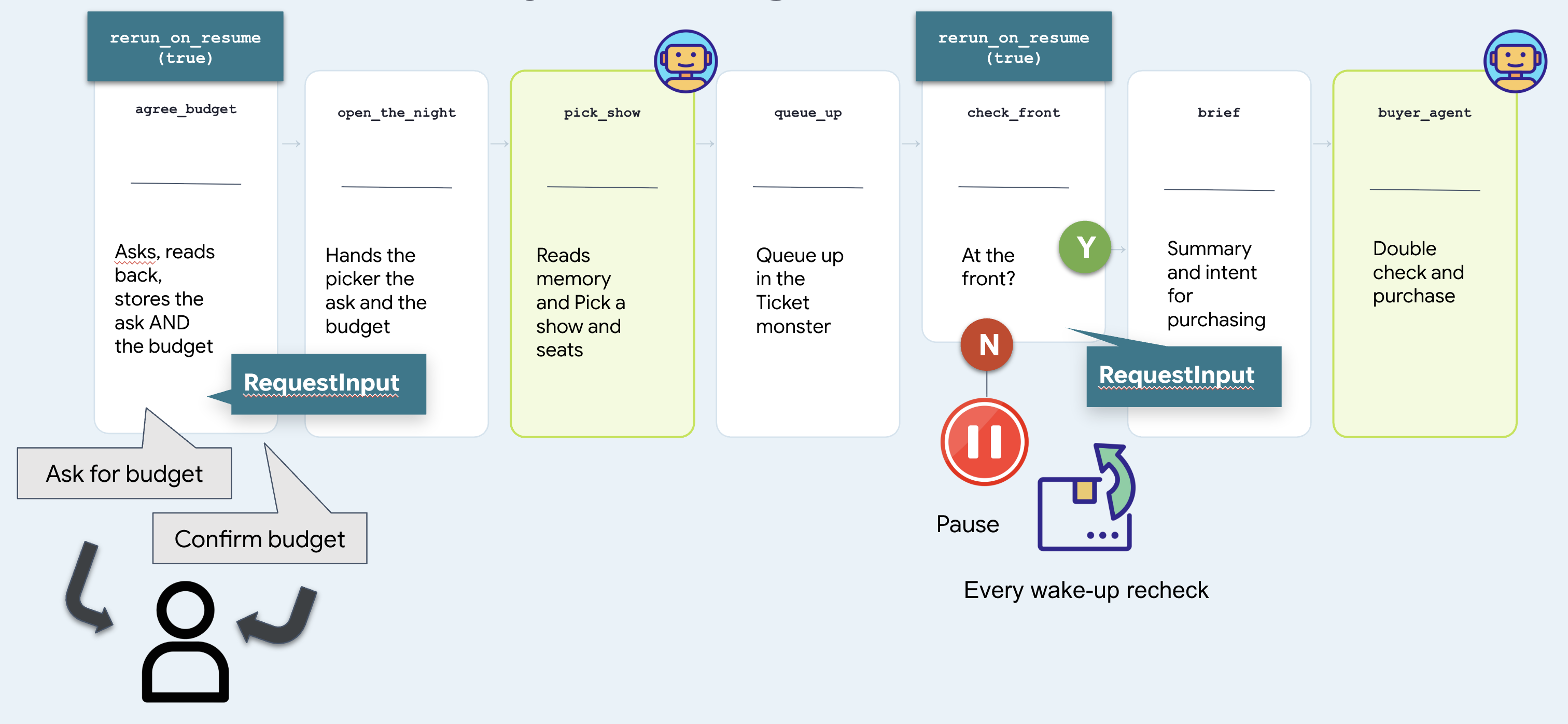
Two nodes stop and wait, and they are the same mechanism. check_front waits for a venue and is answered by a clock. agree_budget waits for a person and can only be answered by a person. That difference is the whole of step 10.
Run it — step by step
1. Start it
👉 Reload the ADK web UI and pick the concert agent.
👉✨ Ask for what you actually want:
Get us two tickets to the Amsterdam show.
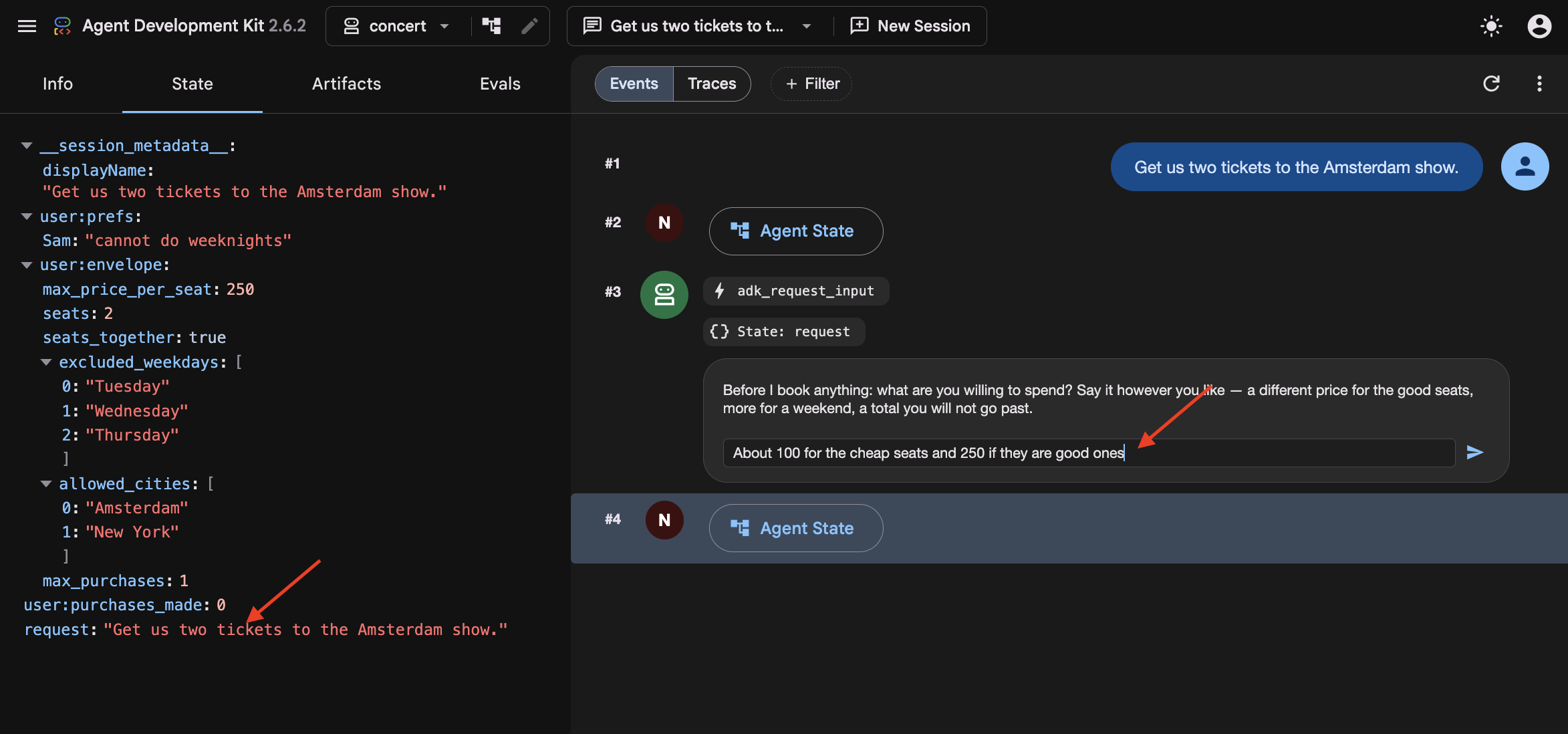
In step 8 the graph had no user, so whatever you typed was thrown away and go did as well as anything. Here agree_budget calls what_they_asked_for(ctx) on its very first line, which collects everything you have typed and puts it in state["request"]. Then open_the_night hands it to the picker alongside the budget.
You did not name a day, and Amsterdam has two shows. So watch the picker fall back to recall() for that, find "Sam bails on weeknights", and take the Saturday.
And in the browser, the run stops on an adk_request_input event:
A graph just asked you a question. Same interrupt as the queue wait in step 8, but it now pointed at a person to answer the question.
2. Answer the way people actually answer
👉✨ In the Enter your response... box — not the chat box at the bottom:
About a 100 for the cheap seats. 250 if they're the good ones.
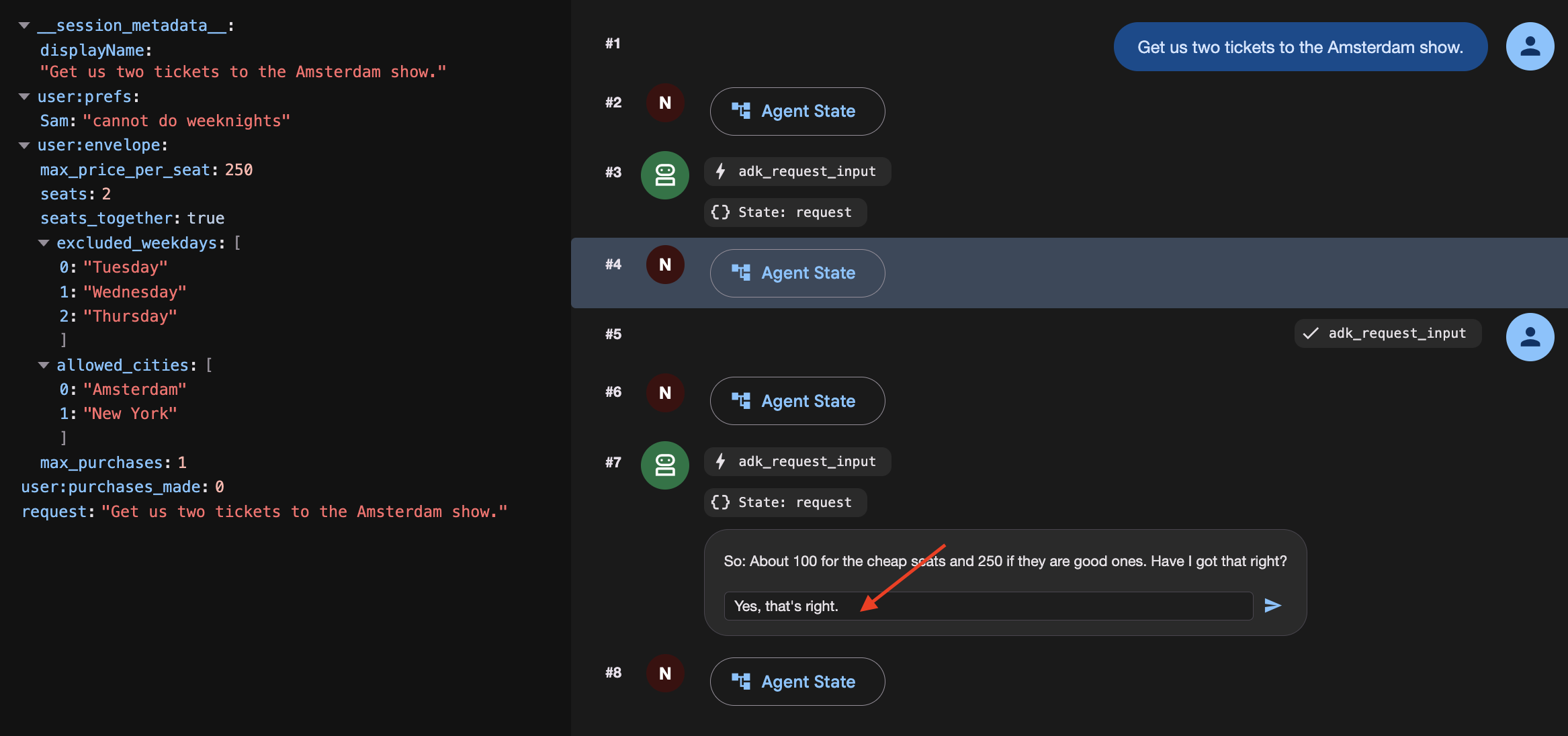
Watch it stop and confirming:
[agree_budget] reading back: About a hundred for the cheap seats. Two-fifty
               if they're the good ones.

⚡ adk_request_input
   So: About a hundred for the cheap seats. Two-fifty if they're the good
   ones. Have I got that right?
3. Confirm it
👉✨ Same box:
Yes, that's right.
[agree_budget] agreed: About a hundred for the cheap seats. Two-fifty if
               they're the good ones.
[open]         Budget: About a hundred for the cheap seats. Two-fifty if
               they're the good ones.
[pick_show]    → {"section": "A", "reason": "..."}
[queue_up]     ms-ams-01 section A — ticket q_5924edc2 at #14,203
[check_front]  #14,203 — not yet. Pausing.
Four nodes ran off one word. 👉 Open the State tab and find budget — your sentence, verbatim.
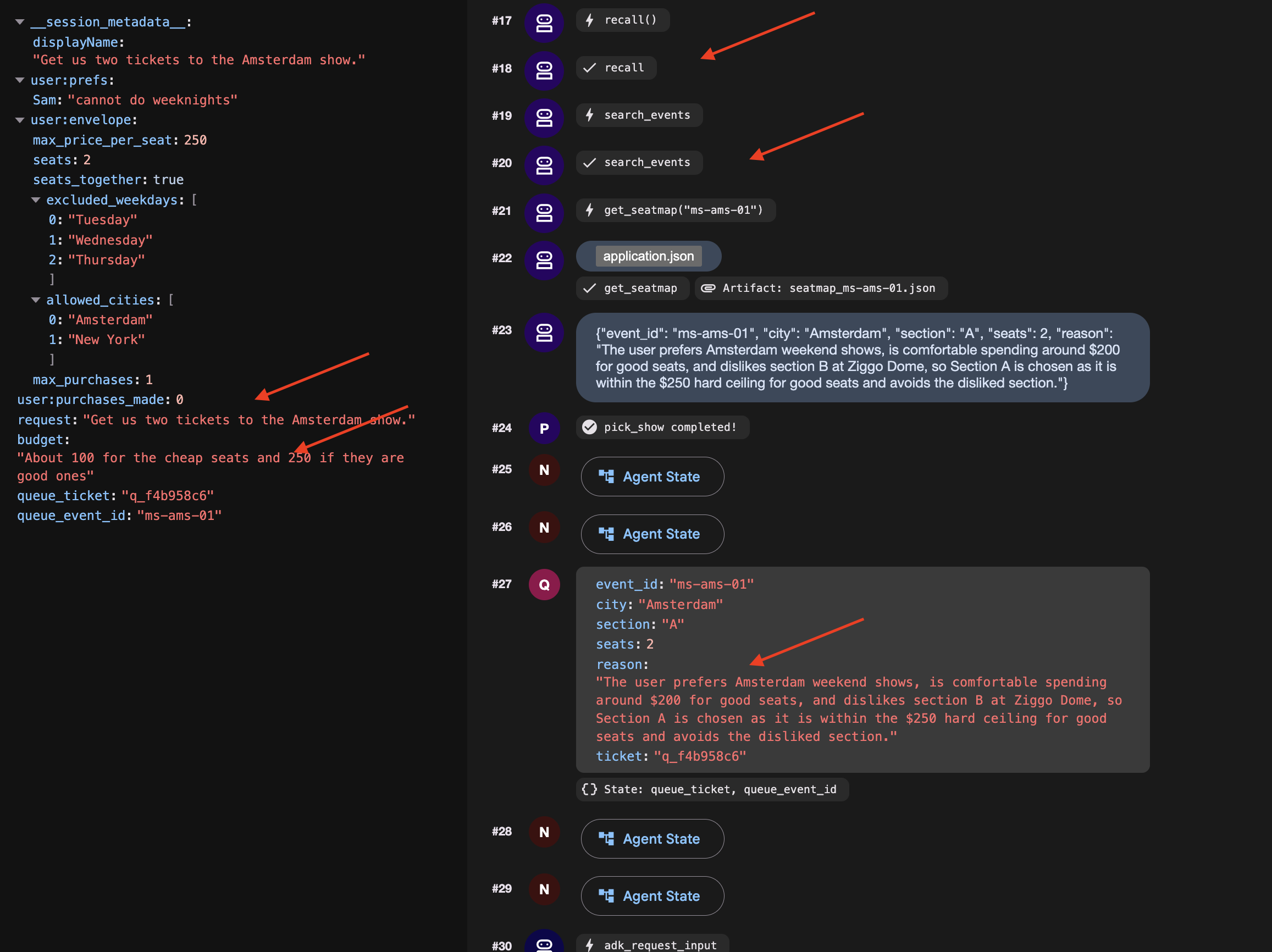
No prefix. That is session state, and it is a decision worth making on purpose if you start a New Session and the budget will be gone, so it will asks you again.
4. Get to the front and finish
👉🔴 Press SKIP THE WAIT on the venue panel.
👉✨ Answer the newest adk_request_input — again in its box:
go
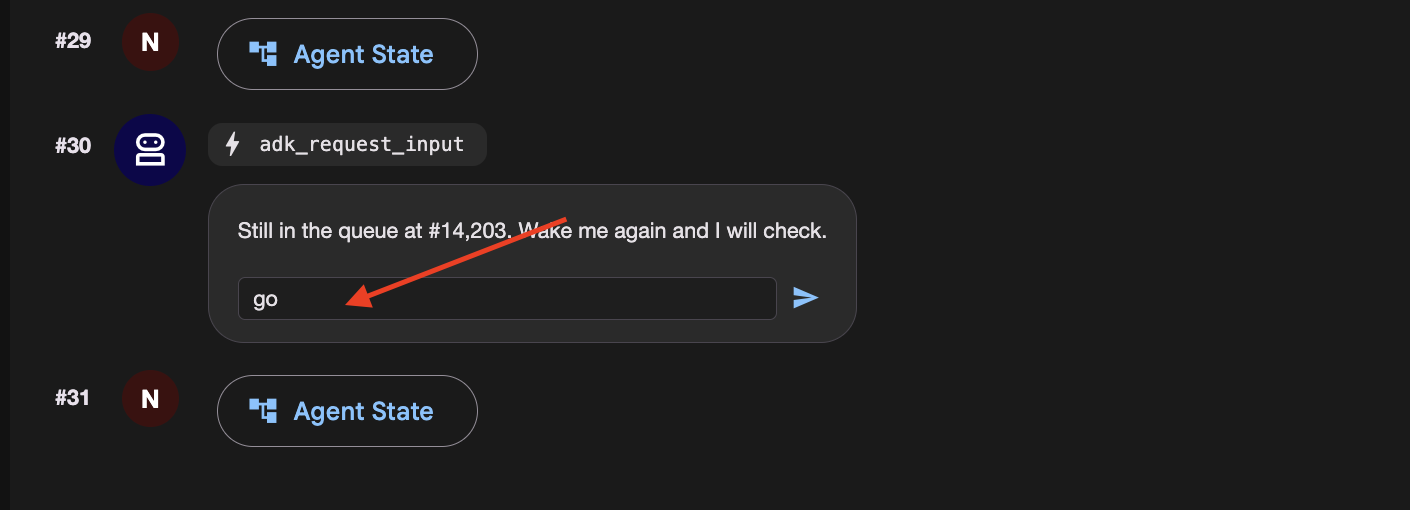
👉 Check the venue panel: one order, at a price inside what you agreed for that kind of seat.
How a graph asks a person a question
Open nightly.py and read agree_budget. Make three things true together, and expect the same failure when any one is missing: it asks forever.
@node(rerun_on_resume=True)              # 1. run again when woken
def agree_budget(node_input, ctx):
    answers = ctx.resume_inputs or {}    # 3. where the answer arrives

    said = answers.get(ASK_BUDGET)
    if not said:
        return RequestInput(
            interrupt_id=ASK_BUDGET,     # 2. STABLE id, not the default
            message="What are you willing to spend?",
        )
    ...
| without it the node is treated as done and skipped | |
a stable | the default is a fresh UUID per run, so there is nothing to look the answer up by | |
| where the answer lands. Not the return value of | |
The graph
It is step 8's graph with one node extra in front.
User-confirmed constraints are session-scoped and expire when the conversation ends. Persisting temporary limits across sessions risks turning one-off decisions into unintended permanent defaults.
10. The Cloud Stack
Laptops Sleep and Local Files Disappear
On your laptop, an agent depends on your computer staying awake, local SQLite databases, and local files. If you close your laptop lid or deploy to a cloud container that restarts, local files and memory disappear.
To run reliably in production:
- Cloud Compute: Run the agent in a container (like Cloud Run) that stays online.
- Durable Cloud Databases: Replace local files and SQLite with cloud services (Cloud SQL for session data, Cloud Storage for files).
- Cloud Timers: Use managed schedulers (like Cloud Scheduler and Pub/Sub) so the agent wakes up even when your laptop is turned off.
👉🔴 On the venue panel, press RESET THE VENUE. Every step starts from the same world: 8 shows, all seats available, clock at 1×.
👉💻 Move to the final code:
cd ~/monstertix
. ./set_env.sh
./use-solution.sh 10 --force
File | What changed |
| new. One FastAPI serving the chat page and the endpoint a scheduler calls |
| new. Ordinary python-slim and uvicorn. Nothing about it is ADK-specific |
| copied in, so the page ships in the same container as the agent |
| unchanged. Byte-for-byte the folder you finished step 9 with |
The page you already built
The** ADK web UI** is strictly a local debugging interface for inspecting state, event streams, and workflow graphs during development. It is not packaged for production deployment.
For production, use the standalone chat frontend built in Step 3. It handles user messaging and interaction interrupts via the /wake endpoint without exposing internal debugging controls.
Migrating Local State to Cloud Services
Stop the server and look at what it wrote:
sessions.db          a SQLite file next to the code
memory/userx.md      a markdown file you can open in an editor
artifacts/           seat maps written to a folder
While local files work well for development, they fail in production because Cloud Run containers use ephemeral, instance-local storage.
When running in Cloud Run:
- Instances scale to zero: When traffic stops, the container terminates and its local filesystem is deleted.
- Instances scale out independently: Multiple concurrent instances do not share disk space, each runs with its own isolated filesystem.
If an agent saves a queue ticket or session state to a local SQLite file (sessions.db), subsequent requests routed to a new or different container instance will find an empty database. To maintain durable state across scaling and restarts, local files must be replaced with managed external services.
What you need instead is state that outlives any one container. Three services, one for each file:
On your laptop | In the cloud | What it is |
| Cloud SQL | a managed Postgres database. It exists whether or not anything is running |
| Cloud Storage | a bucket. Files as objects, reachable from every instance at once |
| Cloud Storage | the same bucket |
| Cloud Scheduler | a cron that Google runs. Your terminal is not an alarm clock |
Create them
Provision a PostgreSQL database, database user, and Cloud Storage bucket. Note that Cloud SQL instance creation takes several minutes and was initiated in the background during setup.sh.
👉💻 Collect it, and make the rest:
cd ~/monstertix
./setup-cloud-state.sh
→ instance  RUNNABLE
→ database  adk created
→ user      adk created
→ bucket    created
→ memory    memory/userx.md → gs://your-project-agent-you/memory/
✓ durable state ready. Written to .env
That script created four things, one per row of the table above, and wrote two URIs into .env:
CLOUD_SESSION_SERVICE_URI=postgresql+asyncpg://adk:...@/adk?host=/cloudsql/proj:region:instance
CLOUD_ARTIFACT_SERVICE_URI=gs://your-project-agent-you/artifacts
Deploying the Agent with Managed Scheduled Triggers
With the services ready, give the agent its permanent home.
👉💻 Three or four minutes. Start it and read on:
cd ~/monstertix
. ./set_env.sh
./deploy-agent.sh
The script builds a container image from agent/, deploys it to Cloud Run, and provisions the supporting event-driven infrastructure.
The complete deployment consists of five distinct components:
1. gcloud run deploy       the container: your agent, the graph, and the page
2. a Pub/Sub topic         a queue for messages
3. a service account       an identity, so the message is allowed in
4. a push subscription     topic ──► /trigger/wake
5. a Cloud Scheduler job   the alarm clock, on a cron
Cloud Scheduler as the Trigger Source
Cloud Scheduler replaces local execution timers (clock.py) with a managed cron service that persists independently of local terminal sessions, handles automated retries, and supports timezone scheduling.
Pub/Sub as the Message Decoupling Layer
Placing a Pub/Sub topic between Cloud Scheduler and Cloud Run provides three architectural advantages:
- Message Durability: Queues incoming trigger events if the Cloud Run service is cold-starting, redeploying, or temporarily unavailable.
- Built-in Retry Policies: Automatically retries transient delivery failures without requiring custom application-level retry logic.
- Fan-Out Scalability: Enables multiple downstream services to subscribe to the same schedule events without reconfiguring the scheduler.
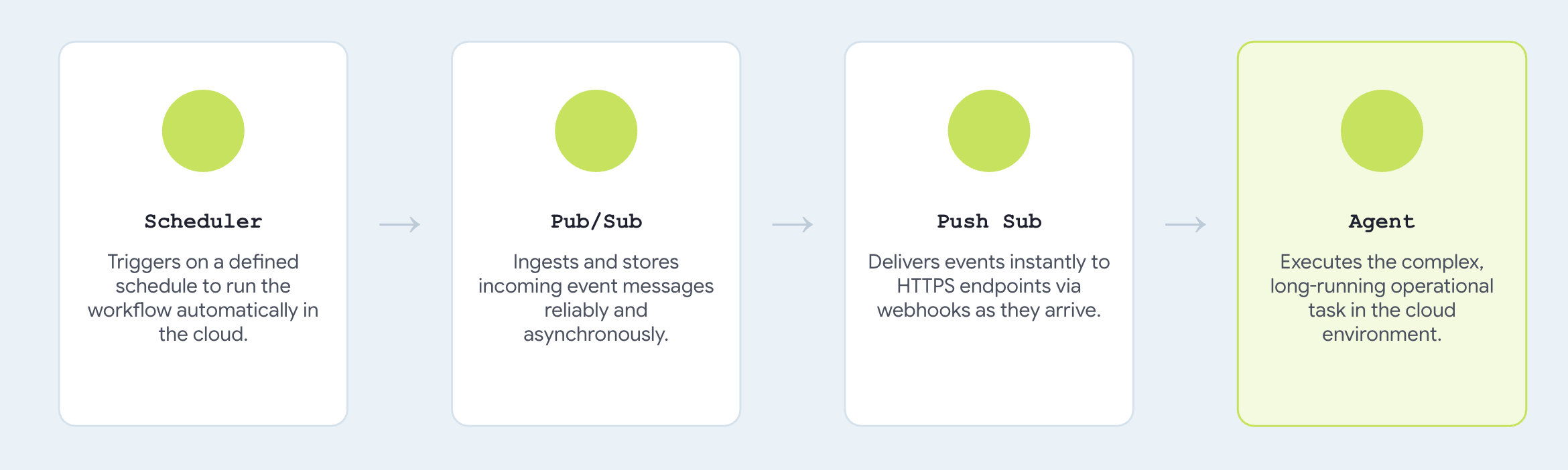
Configuring trigger_sources=["pubsub"] registers a push endpoint compatible with standard Pub/Sub envelope payloads, translating incoming messages directly into agent invocation events.
→ agent    https://concert-you-xxxx.run.app
→ topic    presale-you created
→ iam      concert-trigger@your-project... may invoke concert-you
→ push     → https://concert-you-xxxx.run.app/trigger/wake
→ schedule 0 3 * * *
Talk to it
👉 Open the agent's URL in a browser. 👉✨ Ask it to book:
Book me 3 tickets for The Midnight Signal in Tokyo. Best seats in the house,
I don't want the cheap ones.
It should ask what you are willing to spend
👉✨ Answer the way you would out loud, then confirm:
up to 250 a seat for the good ones
The run is parked in the queue right now.
👉🔴 Press SKIP THE WAIT on the venue panel, so the queue is ready when the message arrives.
To run it on a real schedule, the job has to be enabled — jobs run refuses on a paused one with Job.state must be ENABLED:
gcloud scheduler jobs resume presale-$(gcloud config get-value account | cut -d@ -f1) \
  --location=$GOOGLE_CLOUD_REGION
👉 Within a few seconds, the agent executes the purchase within the confirmed budget limits and returns an order confirmation automatically.
👉🔴 Check the venue panel. One order.
Here's how you can make it run every 5 mins:
gcloud scheduler jobs update pubsub presale-$(gcloud config get-value account | cut -d@ -f1) \
  --location=$GOOGLE_CLOUD_REGION --schedule="*/5 * * * *"
Clean up
Count two things deployed: the venue, and the agent beside it. Both scale to zero, so an idle one costs nothing. Delete them anyway.
./destroy-agent.sh          # service, topic, subscription, scheduler job
./destroy-venue.sh
Notice those deliberately leave Cloud SQL and the bucket alone, because they hold your data and both keep billing. When you are certain you are finished:
./destroy-agent.sh --all
Everything else is local. Delete the folder when you are done, or keep it and run it against your own project for as long as you like.
The agent, its tools, its callbacks and the budget did not change. Two URIs and one environment variable did.
11. System Overview and Troubleshooting Guide
Environment Differences: Local vs. Cloud Architecture
Your laptop | In the cloud | What changed |
| Cloud SQL | a connection string |
|
| a URI |
|
| a path |
| one Cloud Run service | a |
| Cloud Scheduler → Pub/Sub |
|
you, at the keyboard |
| a default, overridden per request |
The core agent implementation, including root_agent, tool definitions, callback guards, and budget enforcement remains completely unchanged. Comparing solutions/step10_deploy/concert/ with Step 9 shows an exact byte-for-byte match, validating how ADK's service abstraction separates infrastructure configuration from agent logic.
If you got stuck
Reach for the complete working code at any step:
./use-solution.sh N --force          # any step. resets memory + sessions + artifacts
./use-solution.sh N --force --keep   # code only, leave state alone
When something breaks
Symptom | Fix |
| Wrong id. |
Model returns 404 |
|
| Something already has port 8000 or 8090. |
Agent can't reach the venue |
|
Queue never advances | Press SKIP THE WAIT. At 1× the queue will not reach the front on its own |
A second queue ticket appears on the panel | You answered in the chat box instead of the |
Dropdown is empty, or the app will not load |
|
| Expected. |
Everything is strange | Press RESET THE VENUE, then |
Memory file full of duplicate bookings |
|
|
|
Cloud Shell timed out | Start |