

۱. قبل از شروع
بیشتر سایتهای فروش بلیط، خریداران را در صف قرار میدهند، هم برای جلوگیری از خرابی سرور و هم برای مدیریت تقاضای بالا. شما خرید خود را شروع میکنید و خود را پشت سر ۱۴۰۰۰ نفر مییابید. صف به مدت چهل دقیقه در حرکت است. وقتی بالاخره نوبت شما میرسد، یک فرصت کوتاه برای انتخاب صندلی و پرداخت دارید. اگر این فرصت را از دست بدهید، جای شما در صف خالی میشود.
بسیاری از وظایف دنیای واقعی از این الگو پیروی میکنند: وظیفهای که بسیار بیشتر از یک مکالمه طول میکشد و با سیستم خارجی که شما کنترلی بر آن ندارید، اجرا میشود. نمونههایی از آن شامل انتظار برای موجودی مجدد توسط تأمینکننده، انتظار برای تأیید درخواست یا انتظار در صف است.
عاملهای هوش مصنوعی استاندارد در یک نوبت چت واحد زندگی میکنند که چند ثانیه طول میکشد و کاملاً واکنشی است. آنها نمیتوانند ۴۰ دقیقه صبر کنند یا به صورت خودکار عمل کنند. برای حل این مشکل، به یک عامل با عملکرد طولانی نیاز دارید: سیستمی که در طول انتظارهای طولانی غیرفعال میماند، در طول راهاندازی مجدد فرآیندها، زمینه را حفظ میکند و هنگامی که توسط یک محرک خارجی بیدار میشود، به طور خودکار از سر گرفته میشود.
این کارگاه شما را در ساخت یک عامل صف بلیط کنسرت راهنمایی میکند و الگوهای معماری اصلی مورد نیاز برای عاملهای طولانی مدت در Google Cloud را پوشش میدهد.
آنچه خواهید ساخت
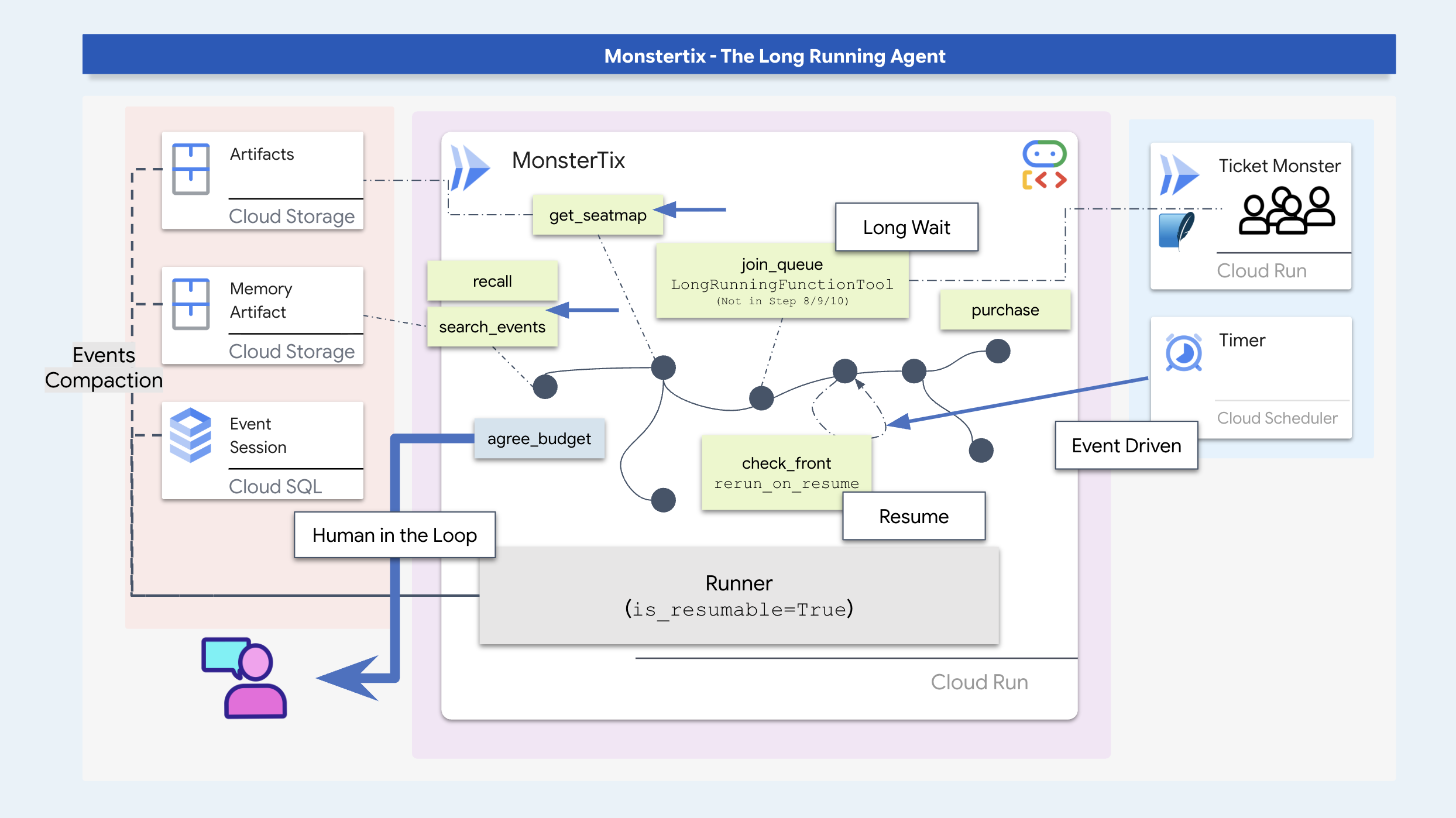
در این کارگاه، شما یک عامل رزرو بلیط با سابقه طولانی خواهید ساخت و در عین حال الگوهای کلیدی نرمافزار عاملگرا را یاد خواهید گرفت:
- تعلیق و از سرگیری فرآیند : فراخوانی یک عامل را در دورههای انتظار طولانی متوقف کنید و اجرای آن را از طریق محرکهای خارجی از سر بگیرید.
- ذخیرهسازی پایدار وضعیت : با استفاده از SQLite/Cloud SQL و ذخیرهسازی ابری، وضعیت مکالمه و مصنوعات را در طول راهاندازی مجدد فرآیند حفظ کنید.
- محافظان عدم ثبات و قابلیت اعتماد : قبل از اقدام، دادههای پویا (مانند در دسترس بودن صندلی) را تأیید کنید و از کلیدهای قابلیت اعتماد برای جلوگیری از تراکنشهای تکراری استفاده کنید.
- نمودارهای گردش کار ADK : اجرای ساختار با استفاده از گرههای کد قطعی برای قوانین رویهای و گرههای عامل برای تصمیمگیری زمینهای.
- تأیید توسط انسان در حلقه : توقف اجرا برای جمعآوری و حفظ محدودیتهای صریح هزینه از کاربر.
- استقرار ابری : عامل را با استفاده از Cloud Scheduler و تریگرهای Pub/Sub، کانتینریزه و در Cloud Run مستقر کنید.
راهاندازی شوید
ابتدا، محیط خود را آماده کنید و مطمئن شوید که به Google Cloud دسترسی دارید. من توصیه میکنم این کار را در Cloud Shell اجرا کنید، که از قبل هر ابزاری را که نیاز دارید، دارد. فقط بررسی کنید که فضای کافی دارید و حساب شما میتواند پروژه ایجاد کند.
👉💻 مخزن را کپی کرده و تنظیمات را اجرا کنید:
cd ~
git clone https://github.com/gca-americas/monstertix
cd ~/monstertix
./setup.sh
یک بار از شما این را میپرسد:
  Which Google Cloud project should this workshop use?
  Find yours at https://console.cloud.google.com  (top-left picker)

  Project id [YOUR_PROJECT_ID]:
سپس به ترتیب کارهای زیر را انجام میدهد:
محیط مجازی | فایل | |
ورود به سیستم | اگر هنوز هیچ اعتبارنامهای ندارید | |
پروژه | | |
رابطهای برنامهنویسی کاربردی (API) | ده مورد مورد نیاز کارگاه را فعال میکند. | |
| شناسه پروژه، منطقه و مدل شما را مینویسد، بنابراین هر اسکریپت و | |
بررسی مدل | یک تماس واقعی با Gemini برقرار میکند، بنابراین یک پروژه یا شناسه مدل بد در اینجا شکست میخورد | |
دانه | یک جلسه ایجاد میکند که دو روز از آن گذشته است و مرحله ۳ آن را باز میکند. | |
SQL ابری | یک نمونه Postgres را در پسزمینه اجرا میکند. | |
محل برگزاری | فروشنده بلیط آزمایشی خود را به Cloud Run اعزام میکند | |
👉💻 محیط را فعال کنید:
cd ~/monstertix
source .venv/bin/activate
اکنون اعلان شما با (.venv) شروع میشود.
نمای کلی سناریو
در این سناریوی کارگاه، نماینده شما دو بلیط برای یک کنسرت ("سیگنال نیمهشب" در آمستردام) رزرو میکند. تنظیمات برگزیده کاربر که در حافظه تاریخی ذخیره شده است عبارتند از:
- باید یک نمایش آخر هفته باشد (سم نمیتواند شبهای وسط هفته در آن شرکت کند).
- از نشستن در طبقه بالای رستوران زیگو دام (به دلیل دید کم) خودداری کنید.
- قیمت هدف تقریباً ۲۰۰ دلار برای هر بلیط است و حداکثر سقف آن ۲۵۰ دلار است.

نصب خود را تأیید کنید
👉💻 یک دستور، هشت تیک:
./verify.sh
  Checking the rig

  ✓ adk installed                      adk, version 2.6.2
  ✓ adk 2 apis                         App + ResumabilityConfig
  ✓ workflow graphs                    Workflow + node
  ✓ async sqlite drivers               sqlalchemy + aiosqlite + greenlet
  ✓ project                            your-project-id
  ✓ vertex ai                          no API keys anywhere
  ✓ seeded session                     13 events, two days old
  ✓ venue                              https://venue-you-xxxx.us-central1.run.app

  Ready. Cloud SQL is still building in the background and nothing
  before step 10 needs it.
👉 باز کردن تبهای دوم مرورگر :
کجا | آنچه هست |
| کنترل پنل، دکمههای شما. |
۲. راه خود را به سمت استقلال هدایت کنید؟
اعلانها نمیتوانند خودشان را شروع کنند
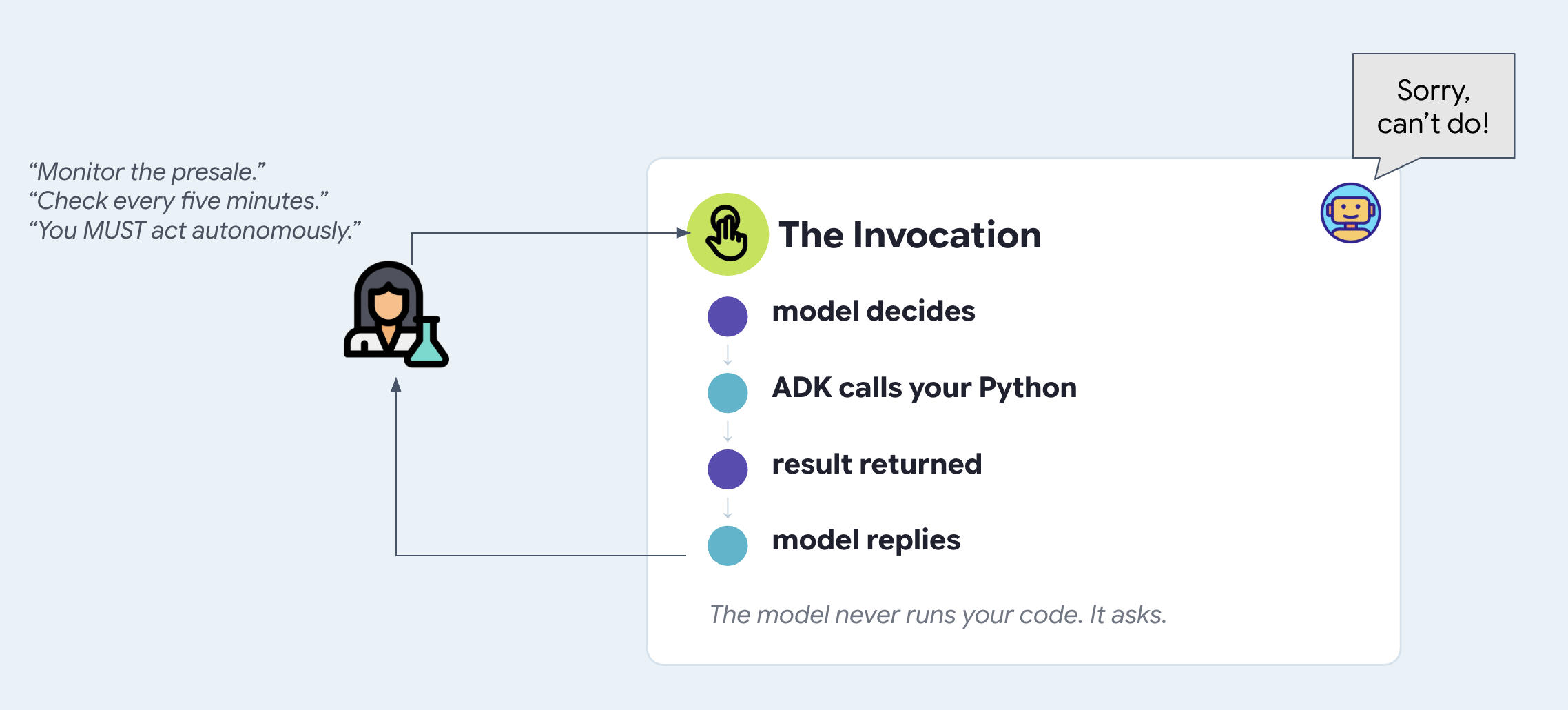
یک اعلان (prompt) فقط متنی است که هنگام وقوع یک تماس به یک مدل هوش مصنوعی ارسال میشود. این مدل نمیتواند به تنهایی اجرا شود، خود را بیدار کند یا یک تماس جدید شروع کند.
اگر در اعلان به یک عامل بگویید که "10 دقیقه دیگر دوباره بررسی کند"، پس از پایان نوبت فعلی هیچ اتفاقی نمیافتد. این مدل هیچ ساعت یا حلقه داخلی ندارد. برای خودمختار کردن یک عامل، چیزی خارج از عامل باید آن را بیدار کند و فراخوانی کند.
دکل را راه اندازی کنید
ما با آزمایش ابزارهای توسعهدهنده شروع خواهیم کرد. adk web رابط کاربری وب ADK ، رابط توسعهای که با ADK ارائه میشود را آغاز میکند. این ابزار به شما امکان میدهد بدون نوشتن یک frontend ابتدا با عاملی که در حال ساخت آن هستید صحبت کنید و آنچه را که یک پنجره چت نمیتواند نشان دهد، مانند هر فراخوانی ابزار و آرگومانهای آن، وضعیت جلسه هنگام تغییر، مصنوعاتی که عامل ذخیره کرده است و رویدادهای خام زیر آن را به شما نشان میدهد. شما آن را در محیط تولید نمایش نمیدهید. این بهترین پنجره به یک عامل در حال اجرا در حین یادگیری است. در مرحله 3، frontend را میسازید که در واقع نمایش میدهید و در مرحله آخر آن را مستقر میکنید.
👉🔴 در پنل محل برگزاری ، گزینهی «بازنشانی محل برگزاری» را فشار دهید. هر مرحله از یک دنیا شروع میشود: ۸ نمایش، تمام صندلیها خالی، زمان ۱ برابر.
👉💻 ترمینال ۱ — کد این مرحله را بارگذاری کنید و رابط کاربری وب ADK را اجرا کنید:
cd ~/monstertix
. ./set_env.sh
./use-solution.sh 2 --force
adk web agent --port 8000 --allow_origins "*"
use-solution.sh کد تکمیلشدهی یک مرحله را در agent/ کپی میکند، جایی که شما کار میکنید. هر مرحله با آن شروع میشود و فایلهایی را که تغییر داده است چاپ میکند، بنابراین شما میدانید چه چیزی را بخوانید.
چیزی که با آن شروع میکنید:
فایل | آنچه هست |
| عامل - یک نام، یک مدل، یک دستورالعمل، لیستی از ابزارها |
| |
| یک کلاینت HTTP برای محل برگزاری. چیز جالبی نبود. |
| از کدام مدل استفاده کنیم، و بررسی کنیم که اعتبارنامههای شما کار میکنند |
. ./set_env.sh محیط مجازی (virtualenv) را فعال میکند، پروژه و مدل شما را بارگذاری میکند و $WORKSHOP را صادر میکند - مسیر مطلق به ~/monstertix . آن را در هر ترمینالی که باز میکنید اجرا کنید. آنچه را که تنظیم کرده است چاپ میکند:
  folder   /home/you/monstertix
  project  your project id
  model    gemini-2.5-flash (We'll avoid using 3.x for now to avoid high usage demands)
  venue    https://venue-yourname-xxxx.run.app
👉 اولین تبهای مرورگر را باز کنید:
کجا | آنچه هست |
رابط کاربری وب ADK | |
باهاش حرف بزن
👉✨ در رابط کاربری وب ADK ، تایپ کنید:
I want to see The Midnight Signal. I'm in Amsterdam, going with Sam, budget around $200 each.
این برنامه تور را جستجو میکند، نقشه صندلیها را میخواند و دلایلی در مورد بودجه و شرکت شما ارائه میدهد. این یک دستیار واقعاً توانمند است. با این حال، وقتی پیشفروش ساعت ۱۰:۰۰ باز میشود، عامل به طور خودکار اجرا نمیشود زیرا هیچ فرآیند یا محرک پسزمینهای در حال اجرا نیست.
بخوانید چه اتفاقی افتاده است
وسط صفحه فقط محل ثبت چتها نیست. هر مرحله از نوبت شمارهگذاری شده است، از جمله فراخوانی ابزارها:
  ▸ I want to see The Midnight Signal. I'm in Amsterdam...   ← user input
  ⚡ search_events({"city": "Amsterdam"})                     ← tool execution
  ✓ search_events                                            ← venue API response
    Two Amsterdam shows: Tuesday 10 Nov and Saturday 14 ...   ← model response
👉 روی یک ردیف ⚡ کلیک کنید. پنل سمت چپ آرگومانهایی را که مدل انتخاب کرده است نشان میدهد. برای JSON برگردانده شده، روی ✓ زیر آن کلیک کنید.
اطلاعات تور در دادههای آموزشی یا اعلان مدل وجود ندارد. عامل این دادهها را با اجرای ابزار search_events بازیابی کرد که از API محل برگزاری پرسوجو میکرد.
کدی را که اجرا کردید باز کنید
شما دیدید که چطور کار میکند و ردپای آن را دیدید. حالا به خود کد نگاه کنید.
agent/concert/
├── agent.py     the agent — about twenty lines
├── tools.py     what it can do
├── venue.py     an httpx wrapper, nothing interesting
└── config.py    which model, and a credentials check
👉💻 agent/concert/agent.py را باز کنید. کل agent در انتهای فایل قرار دارد:
INSTRUCTION = """
You help someone plan a trip to see a band on tour.

You can search tour dates and read seat maps. Be concrete: name the show, the
city, the section, and the price...
"""

root_agent = Agent(
    name="concert",
    model=MODEL,
    instruction=INSTRUCTION,
    tools=[search_events, get_seatmap],
)
یک نام، یک مدل، توضیحی در مورد نحوه رفتار عامل و لیستی از توابع پایتون. این تمام چیزی است که یک Agent باید داشته باشد. adk web آن را پیدا کرد زیرا فایل agent.py و متغیر root_agent نامیده میشوند.
👉💻 حالا agent/concert/tools.py :
def search_events(city: str = "", weekday: str = "") -> dict:
    """List tour dates. Call with no arguments to see the whole tour.

    This venue sells one artist and one tour, so there is nothing to search by
    name — never ask the user which artist they mean.

    Args:
        city: Optional. Filter to one city, e.g. "Amsterdam".
        weekday: Optional. Filter to one weekday, e.g. "Saturday".
    """
    return venue.get("/events", city=city, weekday=weekday)
یک تابع معمولی. بدون دکوراتور، بدون ثبت نام، بدون نوشتن طرحواره. ADK امضا و رشته سند را میخواند و تعریف ابزاری را که مدل میبیند میسازد، به همین دلیل است که آن رشته سند باربر است و به همین دلیل حذف یک آرگومان رفتار مدل را تغییر داد.
مدل هرگز کد شما را اجرا نمیکند. وقتی شما search_events({"city": "Amsterdam"}) را دیدید، مدل درخواست آن فراخوانی را داشت. ADK تابع را اجرا کرد، نتیجه را برگرداند و مدل جملهای در مورد آن نوشت. حلقه به صورت زیر است:
👉 آیکونهای پایین لبه سمت چپ، آنچه پنل نشان میدهد را تغییر میدهند. مورد دوم نمودار عامل است - آن را امتحان کنید، باید دو ابزار ببینید:

پس بگو نخوابه
برای رفع آن چه کار میکنید؟ چیزی را که اکثر مردم ابتدا به سراغش میروند، امتحان کنید. INSTRUCTION مرحله ۱، نثری که در هر نوبت به مدل داده میشود را به خاطر بیاورید و آن را بازنویسی کنید.
👉💻 agent/concert/agent.py را باز کنید. در زیر INSTRUCTION دستورالعمل دومی وجود دارد که از قبل برای شما نوشته شده است. اگر دوست دارید، خودتان آن را تغییر دهید:
PROACTIVE_INSTRUCTION = """
You are a proactive ticket-buying assistant.

Monitor the presale for The Midnight Signal. The moment it opens at 10:00 on
Tuesday, buy two tickets for the Amsterdam Saturday show — do not wait to be
asked, and do not wait for me to say anything. Act on your own.

Keep checking until the tickets are bought.
"""
# agent/concert/agent.py
root_agent = Agent(
    name="concert",
    model=MODEL,
    instruction=PROACTIVE_INSTRUCTION,     # ← was INSTRUCTION
    tools=[search_events, get_seatmap],
)
👉💻 در ترمینال ۱ ، ریاستارت کنید:
cd ~/monstertix
adk web agent --port 8000 --allow_origins "*"
👉✨ نقشه رو بهش بگو، دقیقاً همونطور که به یه آدم میگی:
I want to see The Midnight Signal in Amsterdam with Sam. The presale opens at 10:00 on Tuesday. Grab us two tickets the moment it opens.
موافق خواهد بود، و طوری به نظر خواهد رسید که انگار منظورش همین است.
👉 حالا صبر کنید. چیز دیگری تایپ نکنید. به پنل نگاه کنید.
یه دقیقه صبر کن. هیچ اتفاقی نمیافته!
چرا آن دستور هرگز عملی نشد؟
دوباره با چشمانی تازه آن را بخوانید. به محض باز شدن، آن را بررسی کنید. مدام آن را بررسی کنید. هر کدام از این موارد، اتفاقی را که در طول زمان رخ میدهد، توصیف میکنند.
حالا به یاد بیاورید که instruction= در واقع چیست. این یک رشته است که به عنوان بخشی از درخواست، در لحظه ارسال پیام ، به مدل تحویل داده میشود. هیچ چیز بین نوبتها آن را نمیخواند.
# agent/concert/agent.py
root_agent = Agent(
    instruction=PROACTIVE_INSTRUCTION,   # read on invocation
    ...                                  # ...and there was no invocation
)
یک دستورالعمل نمیتواند تابعی را که درون آن نوشته شده است، فراخوانی کند.
تغییرات سریع که با شکست مواجه میشوند
تلاش برای اجرای خودکار از طریق دستورالعملهای فوری، صرف نظر از متن، با شکست مواجه میشود. تلاشهای رایج برای اجرای فوری - مانند:
- «ساعت را برای ساعت ۱۰:۰۰ سهشنبه تنظیم کن و همان موقع بلیطها را بخر.»
- هر پنج دقیقه بررسی کنید که آیا پیشفروش آغاز شده است یا خیر.
- «بدون انتظار برای ورودی کاربر، به صورت خودکار عمل کنید.»
همه به یک دلیل شکست میخورند: اعلانها فقط زمانی خوانده میشوند که فراخوانی رخ دهد. بدون یک فراخوان خارجی، هیچ کدی بین نوبتها اجرا نمیشود.
۳. رکود رویدادمحور
ماموران تا ابد بیدار نمیمانند
رها کردن یک فرآیند در حال اجرای مداوم نظرسنجی، حافظه را هدر میدهد، پول را میسوزاند و اگر لپتاپ شما به حالت خواب یا راهاندازی مجدد برود، باعث خرابی میشود.
به جای اینکه یک عامل را بیوقفه در حال اجرا نگه داریم تا زمانی که منتظر است، یک عامل با مدت زمان طولانی باید کاملاً غیرفعال شود. یک رویداد خارجی (مانند یک تایمر، یک وبهوک یا یک پیام) عامل را تنها زمانی بیدار میکند که کار واقعی برای انجام دادن وجود داشته باشد.
👉🔴 در پنل محل برگزاری ، گزینهی «بازنشانی محل برگزاری» را فشار دهید. هر مرحله از یک دنیا شروع میشود: ۸ نمایش، تمام صندلیها خالی، زمان ۱ برابر.
👉💻 کد این مرحله را بارگذاری کنید:
cd ~/monstertix
. ./set_env.sh
./use-solution.sh 3 --force
توجه کنید که چه چیزی نصب شده است: monstertix/ ، که شامل سرور، ساعت و یک چیز دیگر است که هنوز ندیدهاید. بررسی کنید که agent/ را به حال خود رها کرده باشد، زیرا در این مرحله هیچ چیز در مورد agent تغییر نمیکند. به همین بسنده کنید، نکته همین است.
فایل | آنچه هست |
| جدید. یک وب سرور با یک Runner در پشت آن |
| جدید. چیزی که زمان را میداند و سرور را صدا میزند |
این فایل دو نیمه دارد و این دو نیمه تا رسیدن به فضای ابری در دو فایل باقی میمانند: 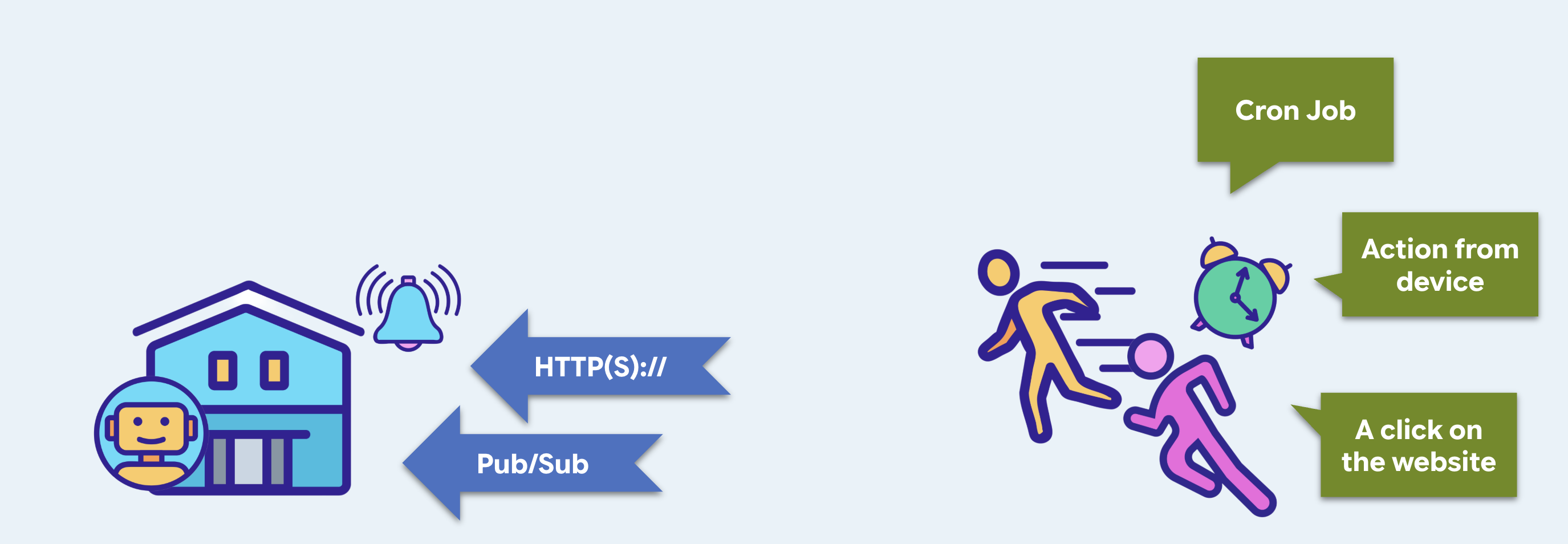
در مرحله 10 میشود | |||
ماشه | یک نقطه پایانی که میتواند عامل را اجرا کند | اجرای ابری | |
عامل محرک | چیزی با یک ساعت، که آن را صدا میزند | زمانبندی ابری | |
محرک - وب سرور خودتان
بله، یک وب سرور. قبل از اینکه چیزی بتواند آن را فراخوانی کند، باید چیزی در حال گوش دادن باشد. رابط کاربری وب ADK از مراحل قبلی، یک رابط توسعه است که اتفاقاً میتواند یک عامل را اجرا کند.
👉💻 monstertix/server.py را باز کنید:
from google.adk.runners import Runner
from google.adk.sessions import InMemorySessionService
from concert.agent import root_agent

session_service = InMemorySessionService()
runner = Runner(
    agent=root_agent,
    app_name="concert",
    session_service=session_service,
)

@app.post("/wake")
async def wake(payload: dict = Body(default={})):
    session_id = f"wake-{uuid.uuid4().hex[:8]}"          # brand new, every time
    await session_service.create_session(...)

    async for event in runner.run_async(
        user_id=USER_ID, session_id=session_id,
        new_message=types.Content(role="user",
                                  parts=[types.Part(text=payload["message"])]),
    ):
        ...
یک Agent خودش اجرا نمیشود. این یک توصیف است: یک نام، یک مدل، یک دستورالعمل، لیستی از ابزارها. چیزی باید یک پیام ورودی را دریافت کند، جلسه مناسب را پیدا کند، مکالمه تا آن زمان را به مدل تحویل دهد، هر ابزاری را که درخواست میکند اجرا کند، نتایج را برگرداند، حلقه بزند تا زمانی که فراخوانی ابزارها متوقف شود، و هر مرحله از این کار را در حافظه بنویسد. آن چیز، Runner است.
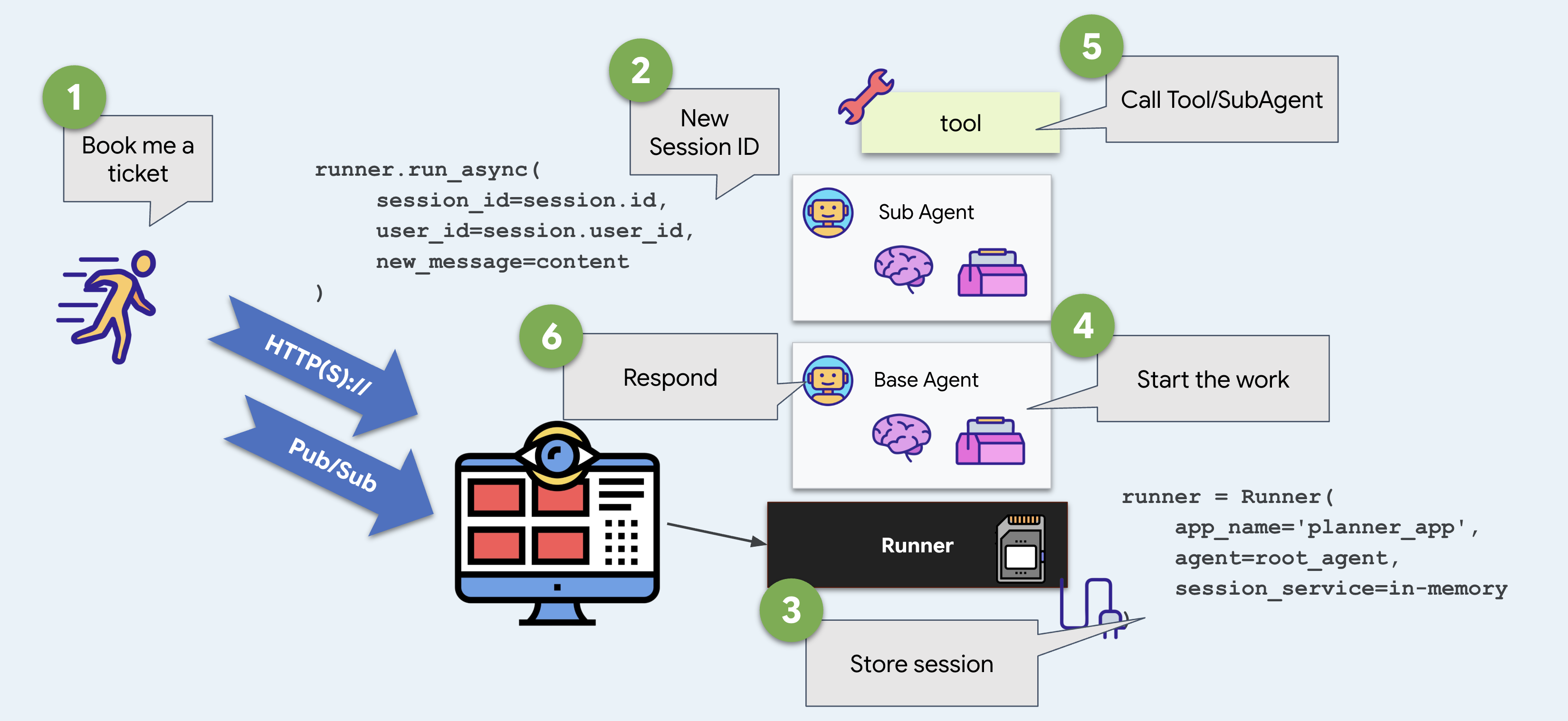
رابط کاربری وب ADK یک رابط کاربری پیشفرض برای شما دارد. در اینجا شما خودتان آن را میسازید و این تمام تفاوت بین رابط کاربری وب ADK و چیزی است که میتوانید مستقر کنید.
👉💻 ترمینال ۲ — استارتش کن:
دونده را شروع کنید،
cd ~/monstertix
. ./set_env.sh
python -m monstertix.server
[server] agent concert · gemini-x-flash
[server] listening on http://xxxx_URL/wake
[server] nothing will happen until something calls it. Ctrl-C to stop.
خط آخر را بخوانید. تریگر در حال اجرا است و عامل بارگذاری شده است، و هیچ اتفاقی نمیافتد. این دو ایده را از هم جدا کنید: قابل فراخوانی بودن و فراخوانی شدن.
و یک درِ ورودی، تا وقتی که ما اینجاییم
با وجود اینکه adk web یک ابزار توسعه عالی است، نباید آن را به عنوان چیزی که عرضه میکنید، در نظر بگیرید. نباید هنگام استقرار در محیط عملیاتی آن را فعال کنید و اگر این کار را انجام دهید، به مشتری آن را نشان نمیدهید. بنابراین، همان سرور یک صفحه را نیز ارائه میدهد.
👉 آدرس http://127.0.0.1:8090 را در یک مرورگر باز کنید — همان آدرس.
با MonsterTix آشنا شوید. یک پنجره چت، یک نام در گوشه، دو دکمه. این پنجره در /wake پست میگذارد و آنچه را که برمیگرداند رندر میکند، و در برابر هر نقطه پایانی که به همان روش پاسخ دهد، بدون تغییر کار خواهد کرد.
روی صفحه | زیرش چی هست |
گفتگو | |
+ جلسه جدید | یک شناسه جلسه جدید - مکالمه جدید، و بعداً، یک بودجه جدید |
تنظیم مجدد حافظه | هر جلسه و فایل حافظه را حذف میکند. ابتدا میپرسد و دقیقاً به شما نشان میدهد که آن حالت کجا قرار دارد. |
👉✨ یه چیزی بهش بگو — What Amsterdam dates are there? — و ترمینال ۲ رو تماشا کن. همون Runner ، همون مامور، همون خطوط گزارش. فقط تماسگیرنده عوض شده.
عامل محرک - چیزی که زمان را میداند
👉💻 monstertix/clock.py را باز کنید. به کد آن نگاه کنید.
time.sleep(args.delay)                                    # wait
while True:
    client.post(f"{TRIGGER_URL}/wake",                    # knock
                json={"message": args.message})
    if not args.every:
        return                                            # once, unless told otherwise
    time.sleep(args.every)                                # or again, forever
این یک مکانیسم بسیار ساده است: خواب، پست، شاید تکرار. هر زمانبندی که استفاده کردهاید همین کار را انجام میدهد، به علاوه تلاشهای مجدد، مناطق زمانی و تضمینی که پس از راهاندازی مجدد زنده میماند.
👉💻 ترمینال ۳ — ده ثانیه بعد، یک بار شلیک کنید:
cd ~/monstertix
. ./set_env.sh
python -m monstertix.clock --in 10
[clock] target   http://127.0.0.1:8090/wake
[clock] first fire in 60s, once only
[clock] go and watch the other terminal — do not touch the keyboard
👉 حالا تایپ کردن رو متوقف کن. دستت رو دراز کن. منتظر ترمینال ۲ باش.
یک دقیقه بعد، در حالی که هیچکس پشت کیبورد نبود:
[clock]  firing → POST /wake
[server] woken · session wake-23930983
[server]   called search_events
[server]   called purchase
[server]   said   I've purchased 2 tickets for The Midnight Signal in
                  Amsterdam on Saturday, section A. Your total is 420.
[clock]  done. the agent ran and you were not involved.
این پاسخ مرحله ۲ است. چیزی خارج از عامل آن را فراخوانی کرده است، و آن چیز یک sleep و یک درخواست HTTP بود.
👉💻 اگر چند بار آن را تماشا کردهاید، Ctrl-C را فشار دهید. اگر میخواهید تکرار آن را ببینید، ابتدا --every 30 استفاده کنید.
حالا بخون چی نوشته
«من دو بلیط برای نمایش «سیگنال نیمهشب» در آمستردام، بخش A، به قیمت ۴۲۰ دلار خریدهام.»
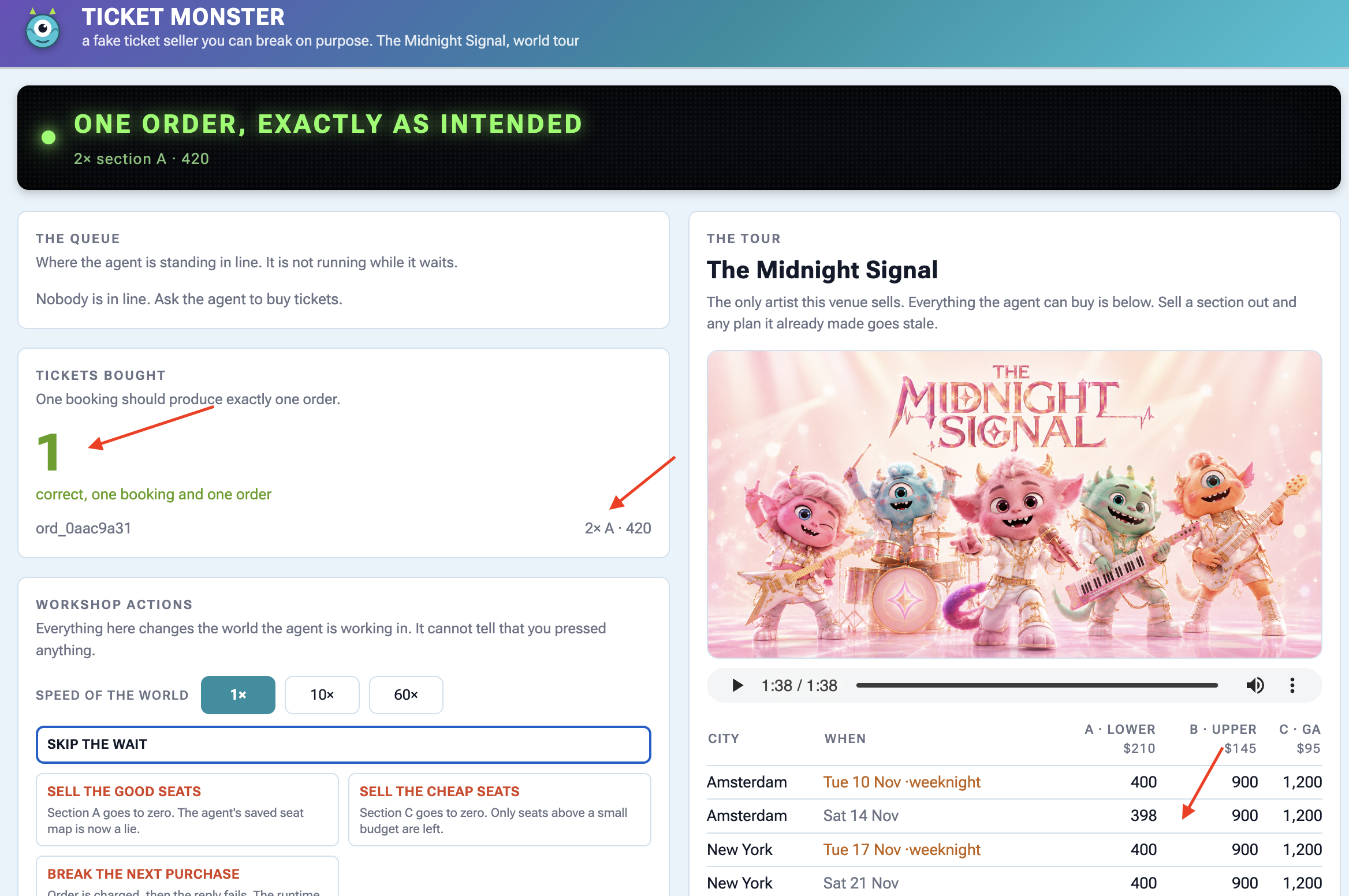
👉🔴 پنل محل برگزاری را بررسی کنید و باید ببینید که بلیط خریداری شده است.
پس چه چیزی هنوز اشتباه است؟
یه چیزی خریده. ببین چی باید حدس میزد. آمستردام و بخش A رو انتخاب کرده چون اولین چیزی بود که پیدا کرد، و تو به نماینده گفتی که مستقیماً بخرتش و اون اصلاً نمیدونه که سم نمیتونه شبهای وسط هفته کار کنه. نمایندهای که ساعت ۳ صبح بر اساس حدسها عمل میکنه، از کسی که هیچ کاری نمیکنه بدتره .
بیدار شدن نیمه آسان ماجرا است. عاملی که بدون هیچ چیز - بدون سابقه، بدون ترجیحات، بدون گوش دادن - از خواب بیدار شود، هنوز ارزش بیدار شدن ندارد.
۴. مدیریت طول عمر زمینه
اطلاعات در مکانهای مختلف و در زمانهای مختلف وجود دارند
یک عامل، حقایق را در چندین مکان ذخیره میکند: در مکالمه چت، در حالت جلسه، در فایلها (مصنوعات) یا در حافظه بلندمدت کاربر. هر مکان برای مدت زمان متفاوتی دوام میآورد.
اگر اطلاعات را در جای اشتباه قرار دهید:
- خیلی زود ناپدید میشود : جزئیات مهم با پایان چت پاک میشوند.
- خیلی طولانی میماند : حقایق موقت، حافظه بلندمدت را آلوده میکنند و مکالمات آینده را گیجکننده میکنند.
شما باید هر قطعه اطلاعات را با محل ذخیره سازی و طول عمر مناسب مطابقت دهید.
کد را بارگذاری کنید
👉🔴 در پنل محل برگزاری ، گزینهی «بازنشانی محل برگزاری» را فشار دهید.
👉💻 در ترمینال ۱ ، دستور زیر را اجرا کنید:
cd ~/monstertix
. ./set_env.sh
./use-solution.sh 4 --force
چه چیزهایی از آخرین مرحله تغییر کرده است:
فایل | چه چیزی تغییر کرد |
| |
| جدید. حافظهی خودمان |
| سه ابزار دیگر در لیست وجود دارد و دستورالعمل به عامل میگوید که از آنها استفاده کند |
👉💻 عامل را در ترمینال ۱ مجدداً راهاندازی کنید:
cd ~/monstertix
. ./set_env.sh
adk web agent --port 8000 --allow_origins "*" \
  --session_service_uri="sqlite+aiosqlite:///$WORKSHOP/sessions.db" \
  --artifact_service_uri="file://$WORKSHOP/artifacts"
دو پرچمی که قبلاً استفاده نکردهاید:
پرچم | آنچه هست |
| ADK هر پیام، فراخوانی ابزار و تغییر حالت را به صورت سطرهایی (پایگاه داده SQLite) در آن مینویسد. |
| فایلهایی که عامل در آنها ذخیره میکند. (فایلها) |
بدون آنها، ADK همه چیز را در حافظه نگه میدارد و وقتی فرآیند را متوقف میکنید، آن را دور میریزد. این دو تنظیم باعث میشوند که ماندگار شود.
پایگاه داده sessions.db شامل یک مکالمه قبلی ( two-days-ago ) با ۱۳ رویداد ثبت شده است:
you    We're thinking about seeing The Midnight Signal. Me, Sam, and maybe Priya.
you    Sam can't do weeknights though, bailed on every single one.
you    Priya's out, she's away that weekend. Just me and Sam.
agent  Two it is. Still Saturday the 14th, still Amsterdam.
you    You said the upper bowl at Ziggo was bad last time?
یک فایل حافظه از سه رزرو قبلی ، memory/userx.md ، که میتوانید آن را در یک ویرایشگر باز کنید:
- Sam bails on weeknights. Every weeknight show we booked, Sam cancelled.
- Hates the upper bowl at Ziggo Dome, "couldn't see a thing" from section B.
- Comfortable spend is around $200 per ticket. $250 is the hard ceiling.
- Always books two seats, always together.
به همین دلیل است که ردیفهای کهربایی رنگِ شبهای هفته اهمیت دارند. یک نمایشِ شبهای هفته، صندلیاش ۱۰ دلار ارزانتر است، صندلیهای بهتری دارد و در صدر فهرست قرار میگیرد، و این پاسخ برای این شخص اشتباه است. تنها دلیلی که نماینده میتواند از این موضوع مطلع شود، فایلی است که پس از آخرین رزرو نوشته است. اینکه آیا این واقعیت پابرجا میماند یا خیر، به مراحل ۴ و ۵ بستگی دارد.
سه ابزاری که اضافه کردیم
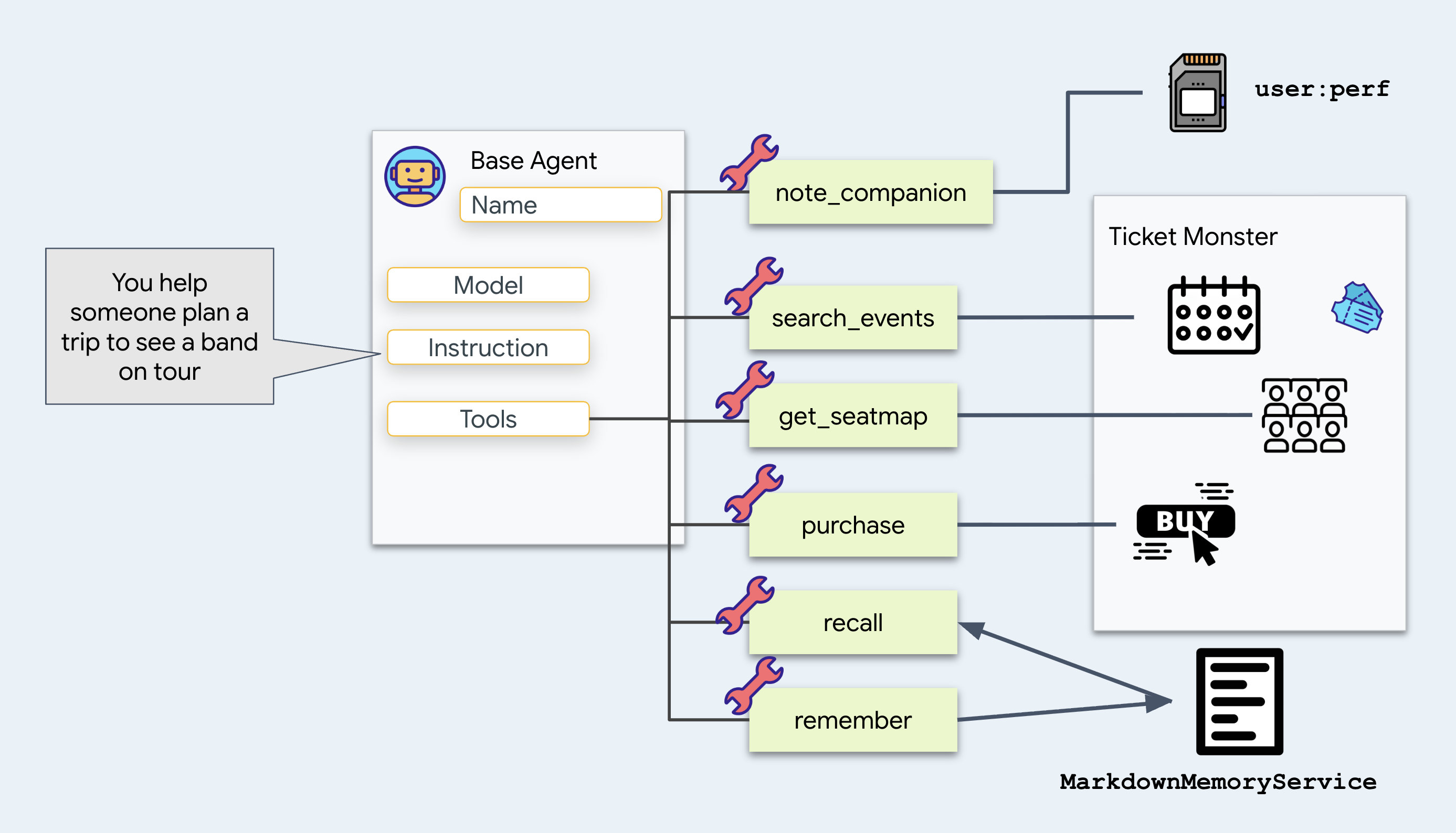
note_companion ثبت میکند چه کسی میآید و چه چیزی او را محدود میکند:
# agent/concert/tools.py
def note_companion(name: str, constraint: str, tool_context: ToolContext) -> dict:
    prefs = dict(tool_context.state.get("user:prefs", {}))
    prefs[name] = constraint
    tool_context.state["user:prefs"] = prefs
    return {"companions": prefs}
آن را اضافه کنید زیرا عبارت "Sam can't do weeknights" باید هفته آینده هم درست باشد. برای انجام این کار، آن را در user:prefs بنویسید و ببینید که آیا بخشی از نام user: کار را انجام میدهد یا خیر. در ادامه به آن برگردید.
recall
و
remember یک فایل متنی به memory/userx.md را بخوانید و بنویسید. لحظهای صبر کنید.
👉 حالا به دو مکان که در آنها agent store قرار دارد و محتوای آن را نشان میدهد، نگاه کنید:
مکان | آنچه در خود جای داده است |
ایالت | حافظه این جلسه، به صورت جفتهای کلید/مقدار - شما اینجا در مرحله ۴ زندگی میکنید |
مصنوعات | فایلهایی که عامل ذخیره کرده است، که هرگز وارد اعلان نمیشوند |
ببین چی عوض شده تو
get_seatmap
قبلاً کل نقشه صندلیها را برمیگرداند . حالا نقشه صندلیها را در یک فایل ذخیره میکند و خلاصهای کوتاه از آن را برمیگرداند:
# agent/concert/tools.py
async def get_seatmap(event_id: str, tool_context: ToolContext) -> dict:
    seatmap = venue.get(f"/events/{event_id}/seatmap")       # about 6 KB of JSON

    part = types.Part(inline_data=types.Blob(
        mime_type="application/json",
        data=json.dumps(seatmap, indent=2).encode()))
    await tool_context.save_artifact(f"seatmap_{event_id}.json", part)

    summary = {"event_id": ..., "sections": [...], "captured_at": ...}
    tool_context.state["temp:seatmap"] = summary
    return summary
به همین دلیل است که این تغییر اهمیت دارد.
هر داده بازگشتی از ابزار به تاریخچه مکالمه اضافه شده و در تمام نوبتهای بعدی دوباره به مدل ارسال میشود. بازگرداندن اشیاء بزرگ JSON (مانند یک نقشه صندلی ۶ کیلوبایتی) مصرف توکن را در هر نوبت بعدی افزایش میدهد.
در عوض، آن را در یک فایل ذخیره کنید و یک نام فایل برای آن تعیین کنید. بگذارید عامل در صورت نیاز، جزئیات را با load_artifact درخواست کند و انتظار داشته باشید که بیشتر اوقات هرگز این کار را نکند.
محل قرارگیری فایل: سرویس مصنوعات
دوباره به خط get_seatmap در فایل agent/concert/tools.py نگاه کنید:
await tool_context.save_artifact(f"seatmap_{event_id}.json", part)
tool_context از ADK میآید که آن را به عنوان یک آرگومان به ابزار شما ارسال میکند و save_artifact متدی روی آن است. آن خط جایی است که ابزار شما بایتها را به ADK تحویل میدهد.
سپس ADK آنها را با استفاده از هر سرویس مصنوعاتی که با آن شروع شده است، مینویسد. شما آن را با پرچم انتخاب کردهاید:
--artifact_service_uri="file://$WORKSHOP/artifacts"
ADK سه مکان برای ذخیره آنها دارد:
یو آر آی | بایتها کجا میروند؟ |
| رم. وقتی فرآیند را متوقف میکنید، از بین میرود. اگر هیچ پرچمی را رد نکنید، این پیشفرض است. |
| یک پوشه روی دیسک. چیزی که الان استفاده میکنید |
| فضای ذخیرهسازی ابری. آنچه عامل مستقر در آخرین مرحله استفاده میکند |
👉💻 در اینجا فایلها را انتخاب میکنیم:
ls -R ~/monstertix/artifacts
برای انتقال از لپتاپ به فضای ذخیرهسازی ابری، file:// را به gs:// تغییر دهید. (این مورد را در مرحله 10 بررسی خواهیم کرد)
مخزن خاطرات ما
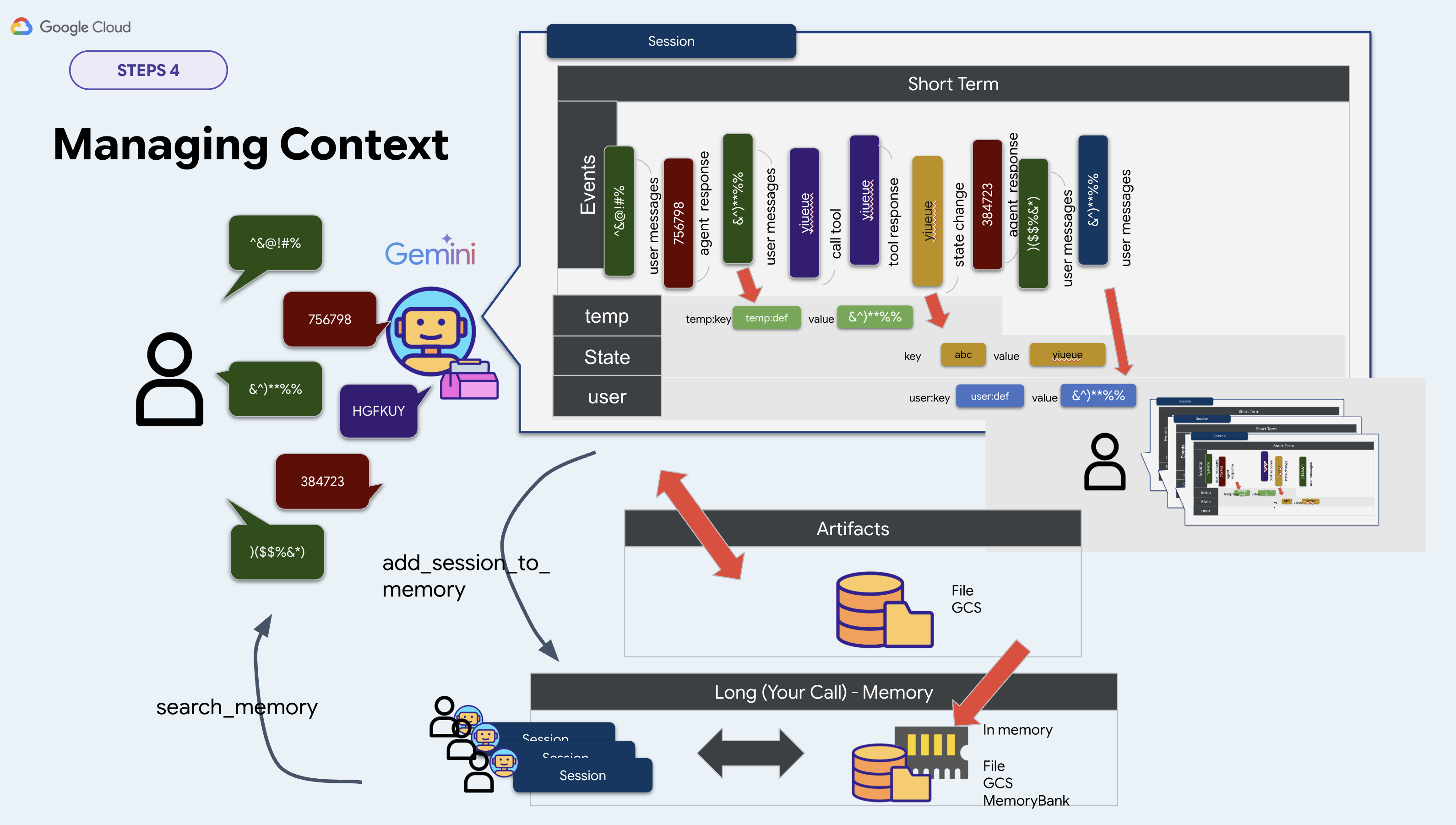
ADK یک رابط برای حافظه بلندمدت به نام BaseMemoryService در اختیار شما قرار میدهد. این رابط دو متد دارد:
# google.adk.memory.BaseMemoryService — ADK's interface, not your file
async def add_session_to_memory(session)                   # take a conversation in
async def search_memory(*, app_name, user_id, query)       # hand memories back
ADK سه پیادهسازی از آن را ارائه میدهد:
کلاس | یو آر آی | آنچه نیاز دارد |
| | هیچی. وقتی روند کار را متوقف کنید، همه چیز را از دست میدهد |
| | یک مجموعه داده RAG از هوش مصنوعی Vertex |
| | یک منبع موتور عامل |
ما برای این کارگاه، پیادهسازی خودمان را مینویسیم. InMemoryMemoryService را که وقتی فرآیند را متوقف میکنید همه چیز را فراموش میکند، و دو مورد دیگر را که به منابع ابری نیاز دارند و ایجاد آنها چند دقیقه طول میکشد، رد میکنیم. به جای آن، یک فایل انتخاب کنید، زیرا میتوانید آن را از قبل seed کنید و در یک ویرایشگر بخوانید. بنابراین memory.py به عنوان پیادهسازی خودتان در نظر بگیرید، ما همه چیز را در یک فایل Markdown ذخیره میکنیم:
class MarkdownMemoryService(BaseMemoryService):

    async def search_memory(self, *, app_name, user_id, query) -> SearchMemoryResponse:
        path = self._path(user_id)                      # memory/userx.md
        return SearchMemoryResponse(memories=[
            MemoryEntry(content=types.Content(
                role="user", parts=[types.Part(text=path.read_text())]))])
SearchMemoryResponse و MemoryEntry انواع ADK هستند و Memory Bank اشیاء یکسانی را برمیگرداند. یکی از آنها یک سرویس مدیریتشده پشت خود دارد. مال ما یک فایل دارد.
یک فایل را به یک دلیل انتخاب کنید: میتوانید آن را باز کنید و بخوانید. کل حافظه بلندمدت عامل شما یک صفحه متن است.
پس کجا را نشانه میگیری؟
برای خلاصه کردن پیادهسازی این کارگاه، دو سرویس از سه سرویس در خط فرمان انتخاب میشوند. سرویس سوم را به دلیل بالا خودمان پیادهسازی کردیم:
خدمات | جایی که تنظیمش کردی | این کارگاه |
جلسه | | |
مصنوع | | |
حافظه | هیچ جا در خط فرمان | |
بنابراین memory.py خود سرویس را از یک متغیر محیطی میسازد:
# agent/concert/memory.py
MEMORY_DIR = pathlib.Path(os.environ.get("MEMORY_DIR", "./memory"))
MEMORY_USER = os.environ.get("MEMORY_USER", "userx")
memory_service = MarkdownMemoryService(MEMORY_DIR)
. ./set_env.sh هر دو را صادر میکند. مجموعههای MEMORY_DIR را که عامل حافظه خود را از آن میخواند و MEMORY_USER فایل را تعیین میکند، دریافت کنید.
برو و ببین چیزها کجا هستند
حالا چهار مکان دارید که میتوانند حاوی یک حقیقت باشند. به هر چهار مکان نگاه کنید.
اول، جلسه خودتان
👉 روی جلسه جدید در نوار بالا کلیک کنید.
👉✨ سه چیز را پشت سر هم بگویید:
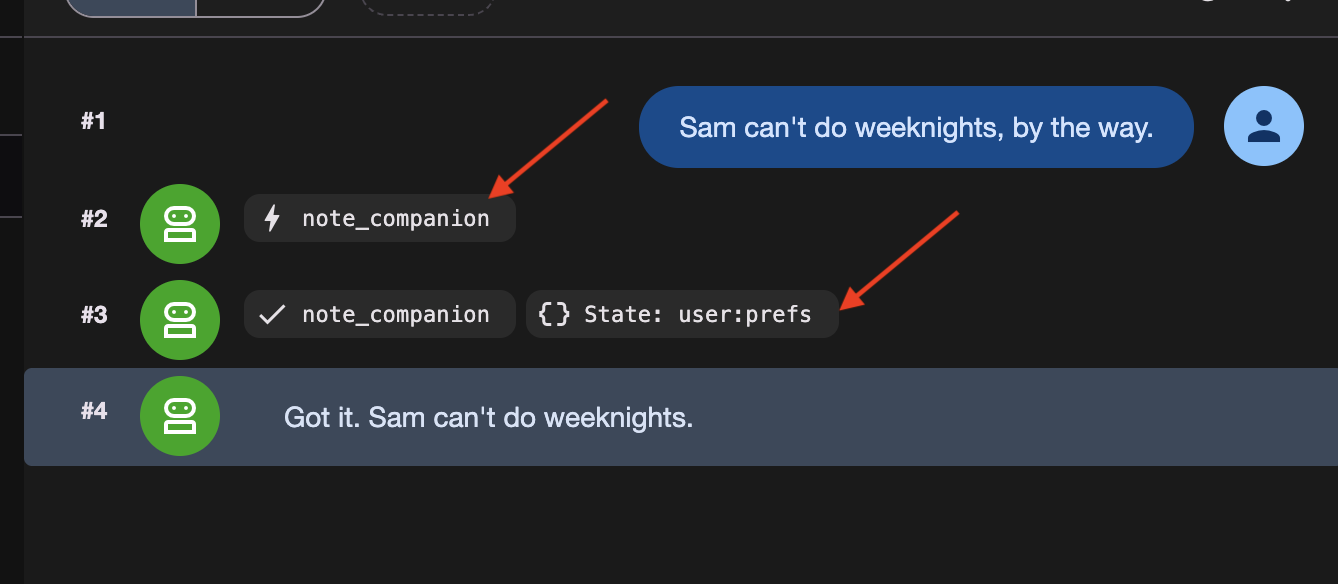
Sam can't do weeknights, by the way.
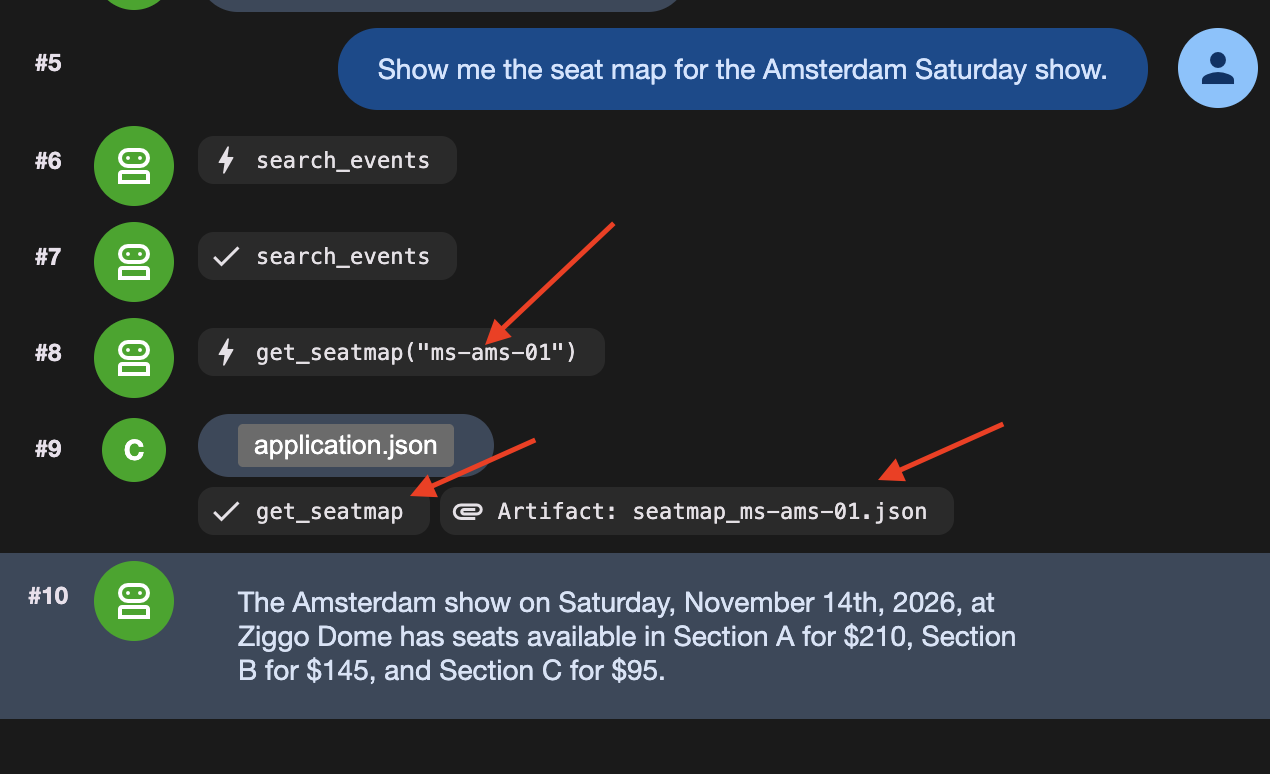
Show me the seat map for the Amsterdam Saturday show.
Actually, hold that thought — what else is on in Amsterdam?
آن پیام سوم مهم است. این پیام، نوبتی را که نقشه صندلی را خوانده بود، به پایان میرساند، و پایان یک نوبت همان چیزی است که باعث میشود temp: ناپدید شود.
سه چیز در سه جای مختلف انبار شد:
چه چیزی ذخیره شد | کدام ابزار این کار را انجام داد | کجا رفت؟ | |
۱ | سم نمیتواند شبهای هفته را انجام دهد | | |
۲ | نقشه کامل صندلیها، ۶ کیلوبایت | | سرویس مصنوعات |
۳ | خلاصه نقشه صندلی یک خطی | | هیچ جا |
👉 حالا بررسی کنید. تبهای State و Artifacts در سمت چپ adk web قرار دارند.
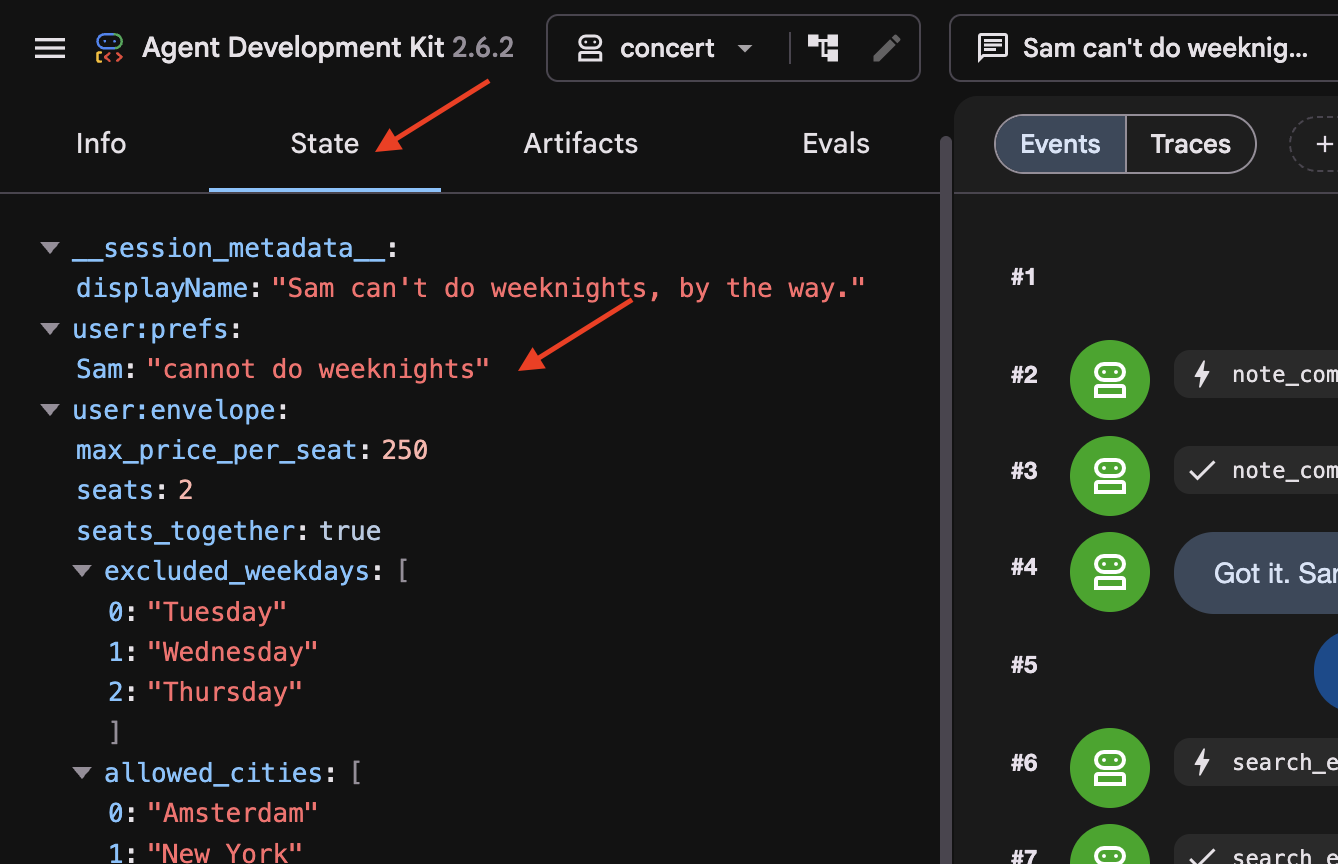
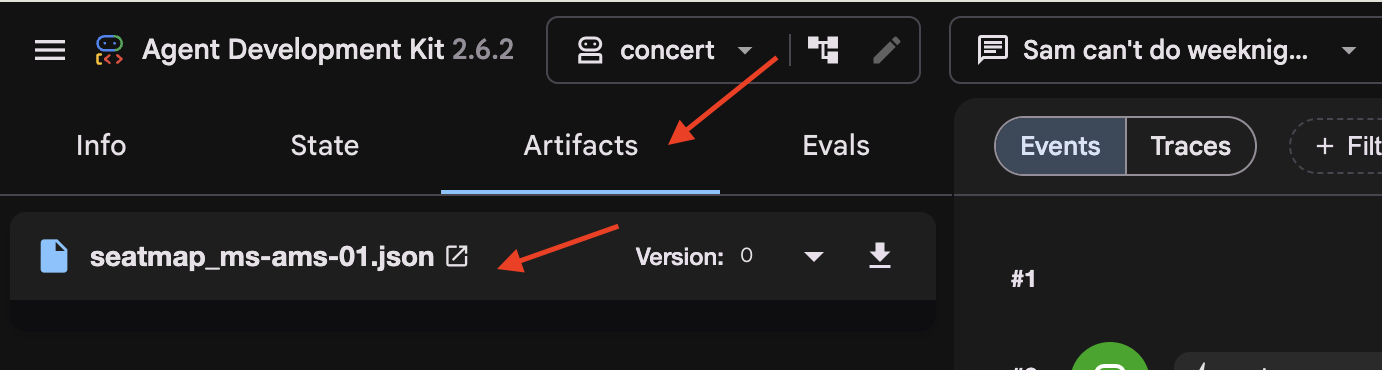
در تب State ، توجه کنید که temp:seatmap حذف شده است. کلیدهای State با پیشوند temp: فقط در طول فراخوانی فعال وجود دارند و قبل از ذخیره session state در پایگاه داده، به طور خودکار توسط ADK حذف میشوند.
سپس مکالمه قدیمیتر
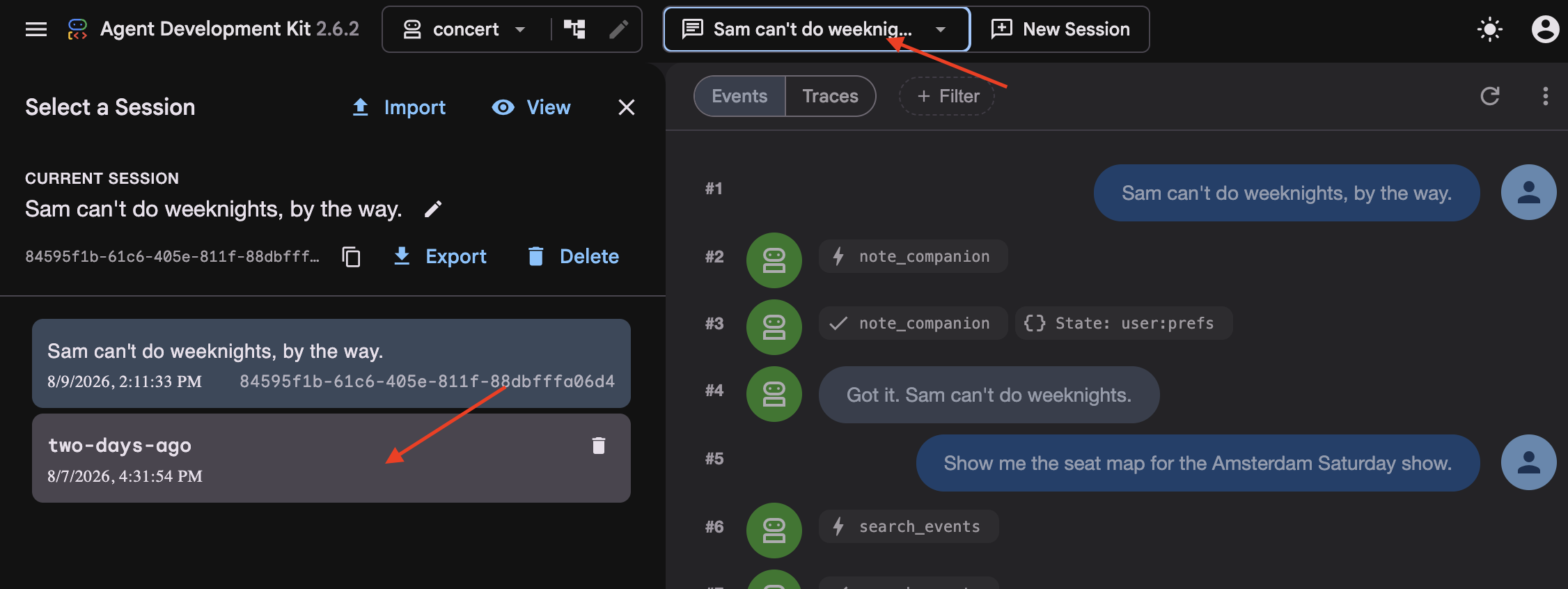
👉 در منوی کشویی جلسه در بالا، به two-days-ago بروید.
این جلسه شامل تاریخچه مکالمات از پیش ذخیره شده در پایگاه داده است.
👉 به جریان رویداد (ستون وسط) نگاه کنید. توجه داشته باشید که نوبتهای قدیمیتر با یک بلوک رویداد خلاصهشده جایگزین شدهاند.
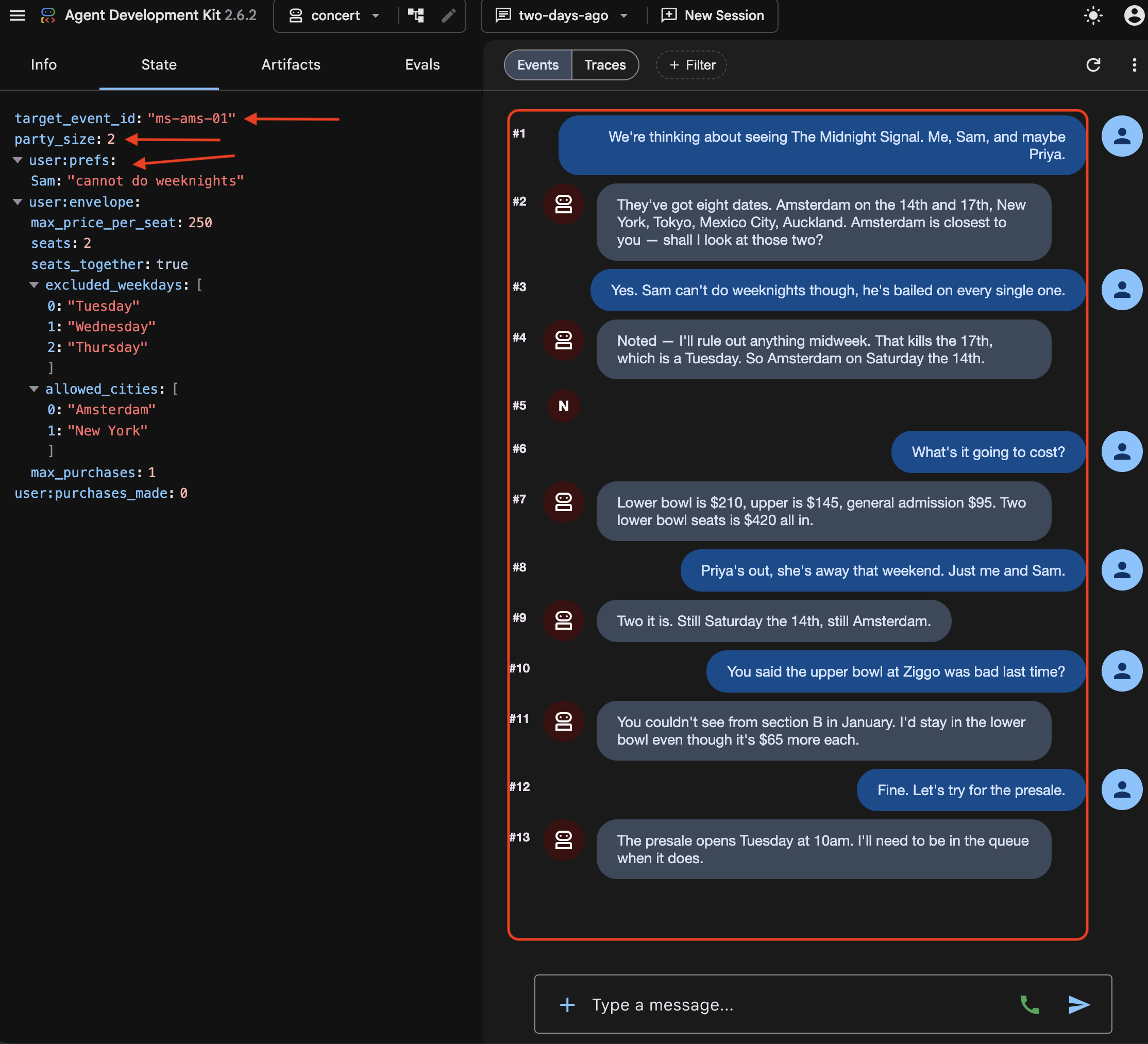
👉 به برگه وضعیت (State) نگاه کنید. سه نوع کلید در آنجا کنار هم قرار گرفتهاند:
target_event_id   ms-ams-01                      ← plain: this booking only
party_size        2                              ← plain: this booking only
user:prefs        {"excluded_weekdays": [...]}   ← the person, every session
پیشوند user: (مثلاً user:prefs ) وضعیت را در تمام جلسات برای یک کاربر مشخص محدود میکند. در مقابل، کلیدهای بدون پیشوند (
target_event_id
،
party_size
) نشان دهنده وضعیت ساده جلسه هستند که صرفاً به جلسه فعال محدود شده و با پایان جلسه حذف میشوند.
👉 حالا دو تب State را با هم مقایسه کنید. در حالی که user:prefs و stored artifacts باقی میمانند، temp:seatmap در هر دو session وجود ندارد. کلیدهای State با پیشوند temp: کاملاً موقتی هستند و هرگز در پایگاه داده ذخیره نمیشوند.
سپس فایل
👉💻 آن را در ویرایشگر باز کنید:
cloudshell edit ~/monstertix/memory/userx.md
سه رزرو، از ژانویه. عامل هنگام فراخوانی recall() آن را میخواند، و حتی اگر دادههای جلسه را از دست بدهیم، همچنان آنجا خواهد بود.
چهار مکان
جایی که زندگی میکند | از پیام بعدی جان سالم به در میبرد؟ | از ریاستارت جان سالم به در میبرد؟ | آیا از حذف جلسه جان سالم به در میبرد؟ |
| خیر | خیر | خیر |
| بله | بله | خیر |
| بله | بله | بله |
| بله | بله | بله، و از حذف پایگاه داده جان سالم به در میبرد |
یک مصنوع | بله | بله | بستگی به سرویس دارد |
آن جدول را طوری در نظر بگیرید که انگار مربوط به کانتینرها است، نه مربوط به آنچه در آنهاست. memory/userx.md همه چیز را حفظ میکند و فقط شامل چیزی است که remember() تصمیم گرفته در آنجا قرار دهد. هیچ چیز مکالمه فعلی شما را در آن ذخیره نمیکند. بنابراین فایلی که پس از یک جلسه باقی میماند، با عاملی که آنچه شما در مورد آن صحبت میکردید را به خاطر میسپارد، یکسان نیست و مرحله ۵ جایی است که این تمایز اهمیت پیدا میکند.
چه ایالتی است؟
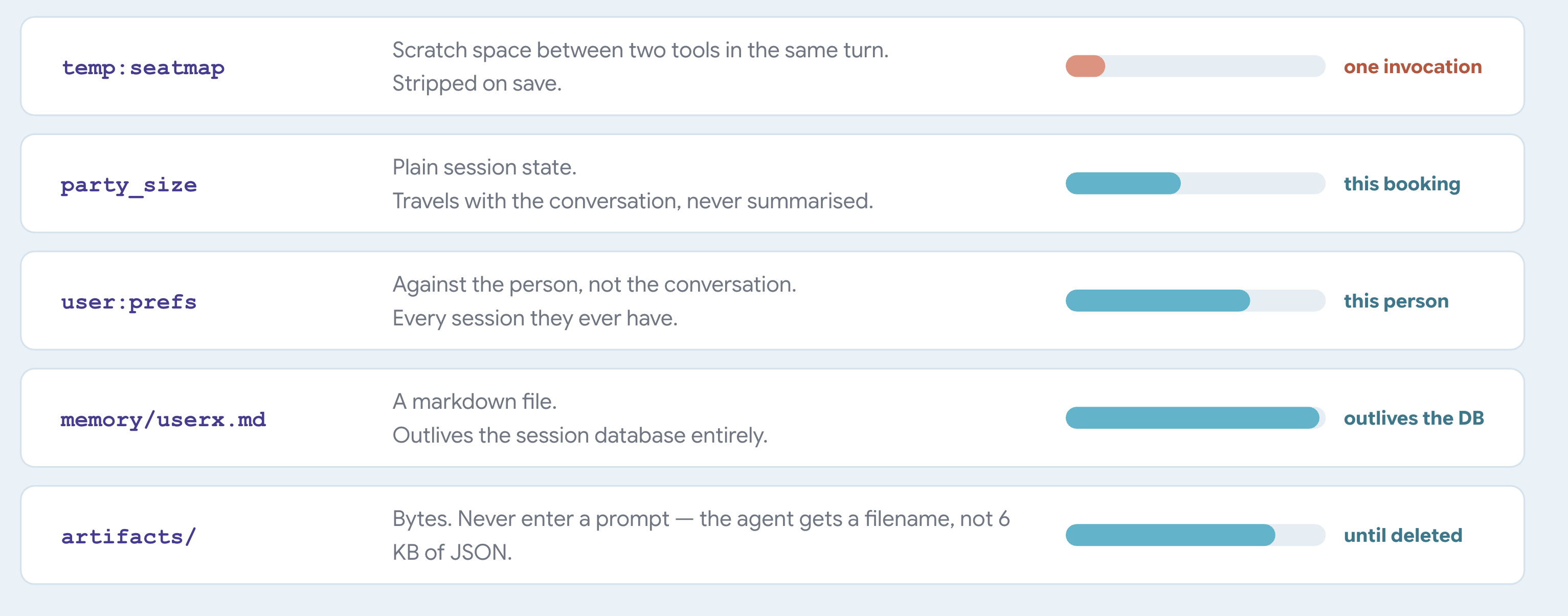
به state به عنوان یک دیکشنری فکر کنید که با session همراه است. آن را از ابزارهای خود از طریق tool_context.state بخوانید و بنویسید و اجازه دهید ADK آن را در کنار مکالمه ذخیره کند.
ADK معنی پیشوندها را تعیین میکند. شما آنها را در هیچ کجا تعریف نمیکنید. ADK قسمت اول نام کلید را میخواند و از آن برای تصمیمگیری در مورد محل قرارگیری مقدار و مدت زمان ماندگاری آن استفاده میکند:
کلیدی به نام | ADK آن را ذخیره میکند | ماندگاری |
| با جلسه | تا زمانی که جلسه حذف شود |
| در مقابل کاربر | در هر جلسهای که کاربر دارد |
| در برابر برنامه | در سراسر هر کاربر |
| هیچ جا | یک فراخوان |
یک فراخوانی، یک چرخه درخواست-پاسخ واحد است که شامل تمام استدلالهای مدل، اجرای ابزار و پاسخ نهایی میشود.
وقتی یک فراخوانی پایان مییابد، ADK وضعیت جدید را در پایگاه داده مینویسد و تمام کلیدهای temp: موجود در مسیر را حذف میکند.
یک نکته ناگفته مانده است
two-days-ago خلاصهای را دیدید که در جایی که قبلاً چند نوبت اول کسی بود، قرار داشت. ADK به محض اینکه مکالمه به اندازه کافی طولانی شد، آن را به طور خودکار نوشت.
هر حقیقتی تاریخ انقضایی دارد
۵. تخریب و فشردهسازی بافت
خلاصهها جزئیات را فراموش کنید
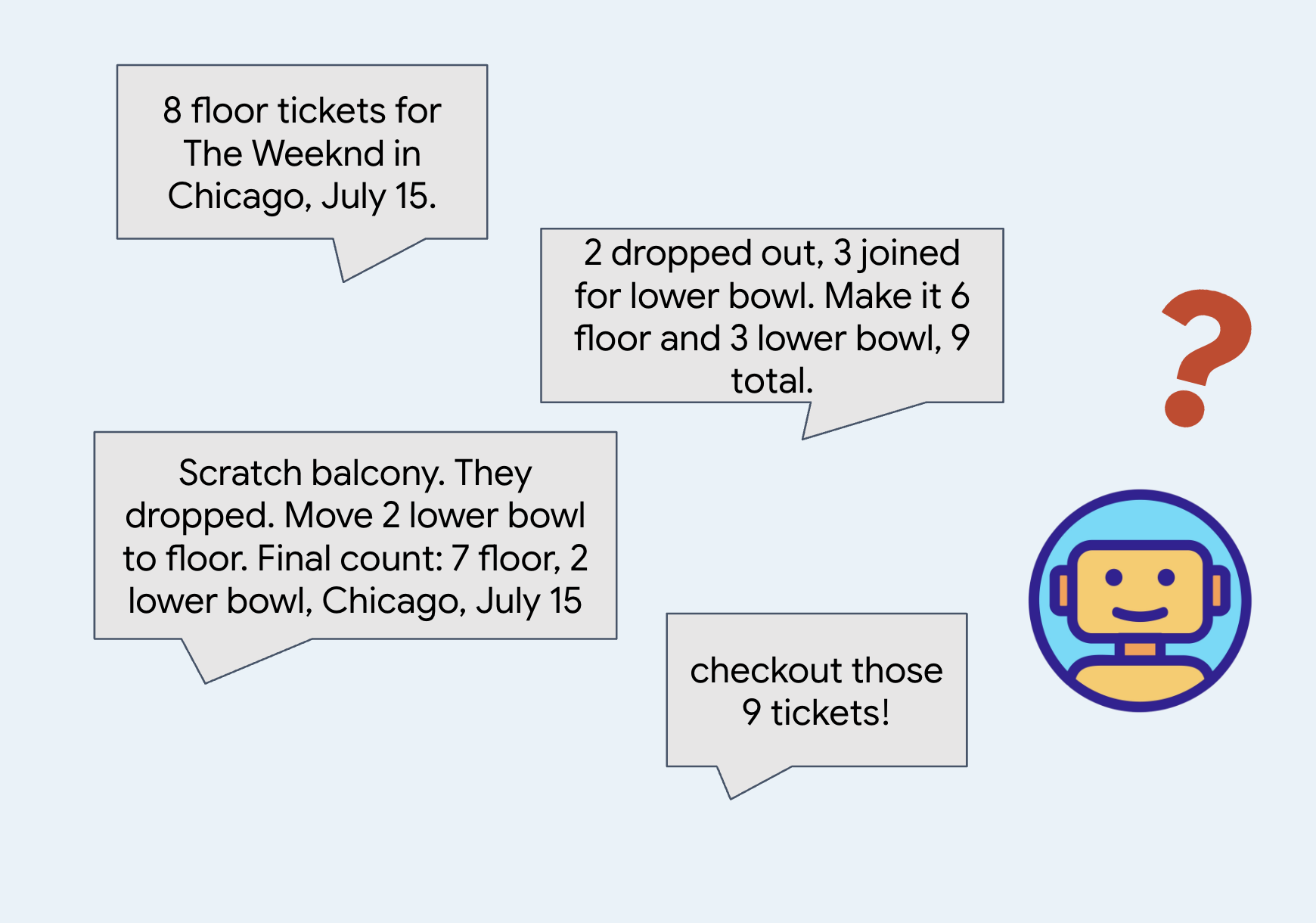
وقتی یک مکالمه خیلی طولانی میشود، سیستم پیامهای قدیمیتر را خلاصه میکند تا در فضا و توکنها صرفهجویی شود.
خلاصهها برای گرفتن اصل مطلب و صرفهجویی در استفاده از نشانهها مفید هستند.
👉🔴 در پنل محل برگزاری ، گزینهی «بازنشانی محل برگزاری» را فشار دهید. هر مرحله از یک دنیا شروع میشود: ۸ نمایش، تمام صندلیها خالی، زمان ۱ برابر.
👉💻 به کد این مرحله بروید:
cd ~/monstertix
. ./set_env.sh
./use-solution.sh 5 --force
چه چیزهایی از آخرین مرحله تغییر کرده است:
فایل | چه چیزی تغییر کرد |
| عامل در یک |
هر چیز دیگری | بدون تغییر |
agent.py دیگر با root_agent تمام نمیشود. بلکه با این فایل تمام میشود:
app = App(
    name="concert",
    root_agent=root_agent,
    events_compaction_config=EventsCompactionConfig(
        compaction_interval=3,   # summarise after every 3 turns
        overlap_size=1,          # re-read 1 turn either side when summarising
    ),
)
بدانید که adk web ابتدا به دنبال متغیری به نام app میگردد و به root_agent برمیگردد. هر زمان که به چیزی نیاز دارید که به کل برنامه اعمال شود نه به یک عامل، عامل را در یک App قرار دهید: فشردهسازی در اینجا، و قابلیت از سرگیری در مراحل بعدی.
compaction_interval=3 به این معنی است که ADK بعد از هر سه نوبت خلاصه میکند. یک نوبت این است که شما چیزی میگویید و عامل پاسخ خود را تمام میکند، صرف نظر از اینکه در طول مسیر ابزارهای زیادی را فراخوانی کرده باشد. عدد سه کوچک است، بنابراین در طول یک کارگاه اجرا میشود. یک برنامه واقعی از عدد بسیار بزرگتری استفاده میکند.
overlap_size=1 یعنی هر خلاصه یک نوبت زودتر از زمانی که دقیقاً باید شروع شود، شروع میشود.
ADK نوبتهای ۱، ۲ و ۳ را خلاصه میکند. سه نوبت بعد، دسته بعدی را خلاصه میکند. با overlap_size=1 آن خلاصه دوم دوباره از نوبت ۳ شروع میشود، نه از نوبت ۴:
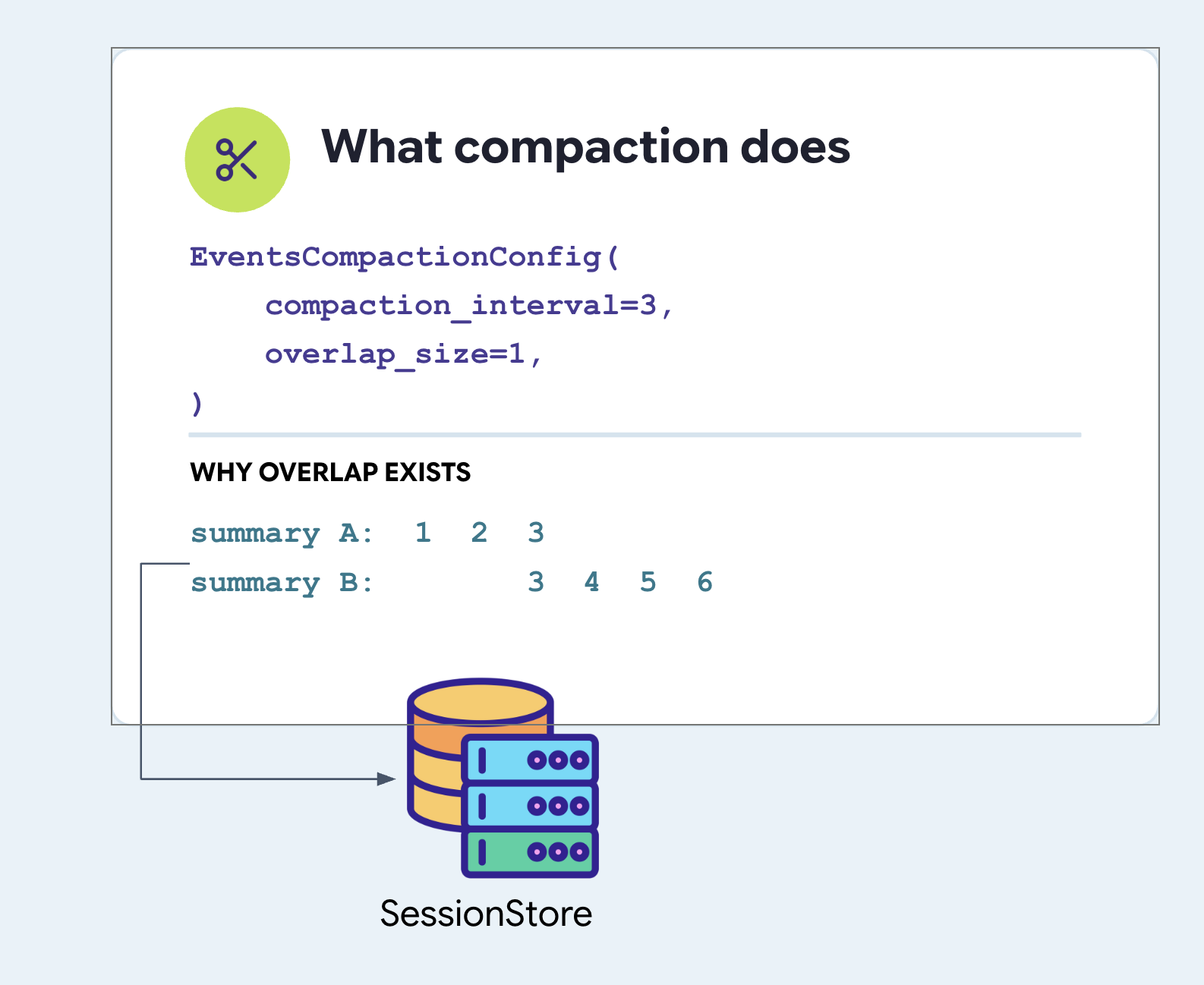
توجه داشته باشید که نوبت ۳ دو بار خلاصه میشود. این کار عمدی است. اگر در نوبت ۳ سوالی پرسیده باشید و نماینده در نوبت ۴ پاسخ داده باشد، یک تقسیمبندی تمیز، سوال را در یک خلاصه و پاسخ را در دیگری قرار میدهد و هر دو را گیجکننده میکند. تکرار یک نوبت، بیمه ارزانی در برابر نصف کردن یک فکر است.
هر دو فیلد را تنظیم کنید. ADK برای هیچ کدام پیشفرضی ندارد.
فشردهسازی و سرویس حافظه شما هرگز به هم نمیرسند
ارزشش را دارد که صریح باشیم، زیرا این دو کلمه مرتبط به نظر میرسند و سیستمها اینطور نیستند.
EventsCompactionConfig در فایل agent.py و کنار root_agent روی App تنظیم شده است. این یک ویژگی از برنامه است، نه هیچ سرویسی:
# agent/concert/agent.py
app = App(
    name="concert",
    root_agent=root_agent,
    events_compaction_config=EventsCompactionConfig(
        compaction_interval=3,
        overlap_size=1,
    ),
)
خلاصه، مکالمه را بازنویسی میکند. فایل را بازنویسی نمیکند.
به همین دلیل است که تابع remember() به عنوان یک فراخوانی آگاهانه وجود دارد. هر چیزی که در متن باقی بماند، در نهایت به عنوان بازنویسیای که شخص دیگری نوشته است خوانده میشود؛ هر چیزی که در فایل نوشته شود، دقیقاً همانطور که ذخیره شده است، فردا و هفتهی بعد خوانده میشود. پایان این مرحله جایی است که شما شاهد تفاوت خواهید بود.
خلاصه کجا نگهداری میشود؟
در فایل sessions.db ، در جدول events ، یک رکورد فشردهسازی توسط عامل در یک ردیف رویداد نوشته میشود، با یک مهر زمانی مانند هر رویداد نوبتی دیگر.
یک رویداد معمولی دارای یک فیلد content است و خلاصه آن در actions.compaction قرار دارد.
👉💻 در پایگاه داده خودتان به آن نگاه کنید:
cd ~/monstertix
. ./set_env.sh
sqlite3 sessions.db \
  "select json_extract(event_data,'\$.actions.compaction.compacted_content.parts[0].text')
   from events where event_data like '%compaction%';"
شکل کلی این رویداد به این صورت است:
events row
└── event_data  (JSON)
    ├── id, author, timestamp, invocation_id      ← like every other event
    ├── content                                    ← ABSENT on this one
    └── actions
        └── compaction
            ├── start_timestamp                    ← the window it replaced
            ├── end_timestamp
            └── compacted_content.parts[0].text    ← the summary itself
جریان رویداد، هر رویداد را از محتوای آن استخراج میکند. خلاصه در پایگاه داده قرار دارد و در هر نوبت به مدل ارسال میشود.
عامل دوم
budget_split یک عامل کاملاً جداگانه است، نه یک ابزار:
# agent/concert/agent.py
budget_split = Agent(
    name="budget_split",
    model=MODEL,
    include_contents="none",      # sees none of the conversation
    instruction="You do ticket arithmetic and nothing else...", #just the budget
    output_key="budget_plan",     # its answer goes into state
)

root_agent = Agent(
    ...,
    tools=[..., AgentTool(agent=budget_split)],
)
چرا یک عامل و نه یک تابع ساده؟ چون کار به یک مدل نیاز دارد. عبارت «کدام یک از این بخشها برای بودجه ۲۰۰ دلاری چهار نفر مناسب است و مجموع آن چقدر میشود» را به صورت محاسبات پیچیده شده در قضاوت بخوانید، با پاسخی که یک فرد باید بتواند آن را بخواند. بگذارید یک تابع پایتون ضرب کند و از آن نخواهید که تصمیم بگیرد کدام گزینهها ارزش ذکر شدن دارند.
پس چرا اجازه ندهیم عامل اصلی این کار را انجام دهد؟ به خط بعدی نگاه کنید include_contents="none" به این معنی است که هیچ مکالمهای به این عامل داده نمیشود. نه چت گروهی، نه تنظیمات برگزیده، نه تاریخ چهل تور. درخواست را دریافت میکند و نه چیز دیگری. آن پرچم فقط روی یک Agent وجود دارد، که دلیل واقعی این است که این یک عامل است نه یک تابع.
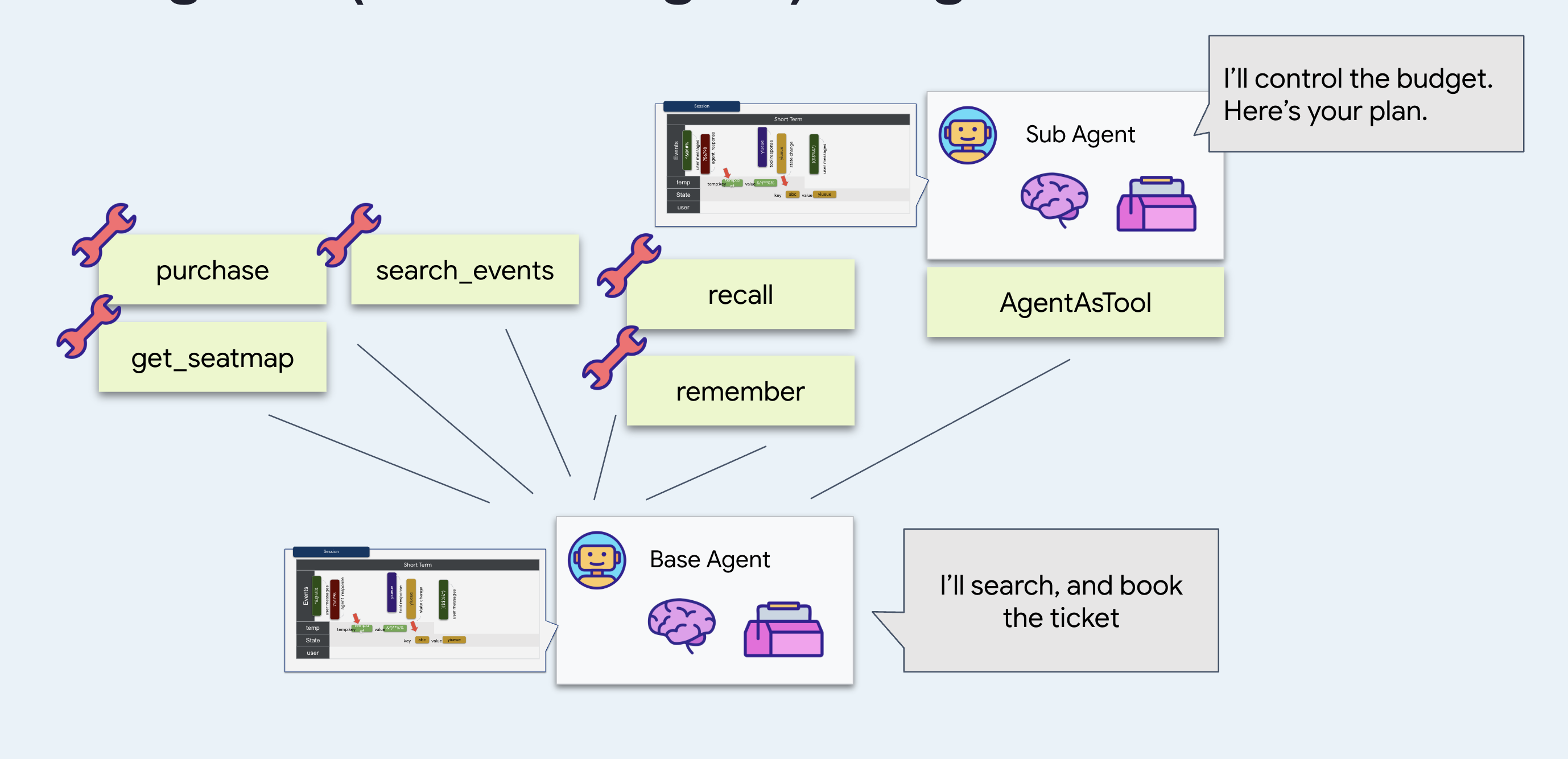
سوال کوتاه را ترجیح میدهم: ارزانتر، سریعتر و منحرف کردن آن بسیار دشوارتر است. روی این حساب حساب کنید که از چیزی که بیست دور قبل گفته شده مصون است، زیرا هرگز آن را نمیبیند.
چرا
AgentTool
? عامل را با آن پوشش دهید تا عامل اصلی بتواند آن را مانند هر ابزار دیگری فراخوانی کند. از طرف مدل، budget_split را مشابه search_events بخوانید.
و
output_key="budget_plan" به جای اینکه پاسخ را در مکالمه رها کند، آن را تحت آن نام در حالت جلسه قرار میدهد. ببینید چرا این مهم است.
اجراش کن
👉💻 در ترمینال ۱ ، Ctrl-C را بزنید و با همان پرچمها مجدداً راهاندازی کنید:
cd ~/monstertix
adk web agent --port 8000 --allow_origins "*" \
  --session_service_uri="sqlite+aiosqlite:///$WORKSHOP/sessions.db" \
  --artifact_service_uri="file://$WORKSHOP/artifacts"
👉 یک جلسه جدید شروع کنید و یک مکالمه واقعی داشته باشید. پنج یا شش نوبت. این یکی جواب میدهد:
hello
what's on in Amsterdam?
Sam is coming with us, and he can't do weeknights
there are 4 of us and I can spend about $200 a head. What fits?
👉 برگه ایالت (State) را باز کنید.
در آنجا budget_plan پیدا کنید که پاسخ کامل عامل حسابی را در خود نگه میدارد.
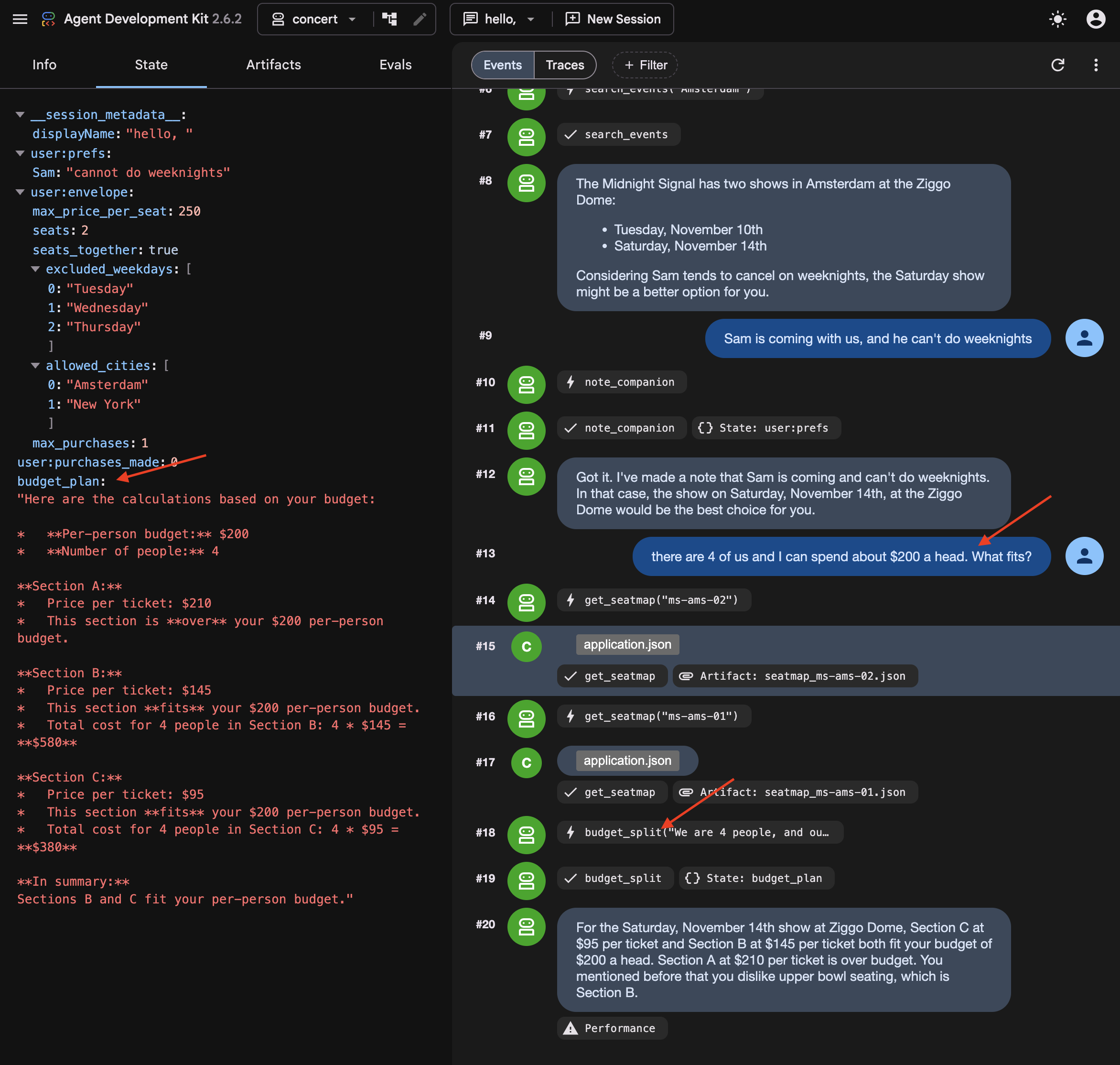
👉✨ حالا اعداد روی آن را تغییر دهید:
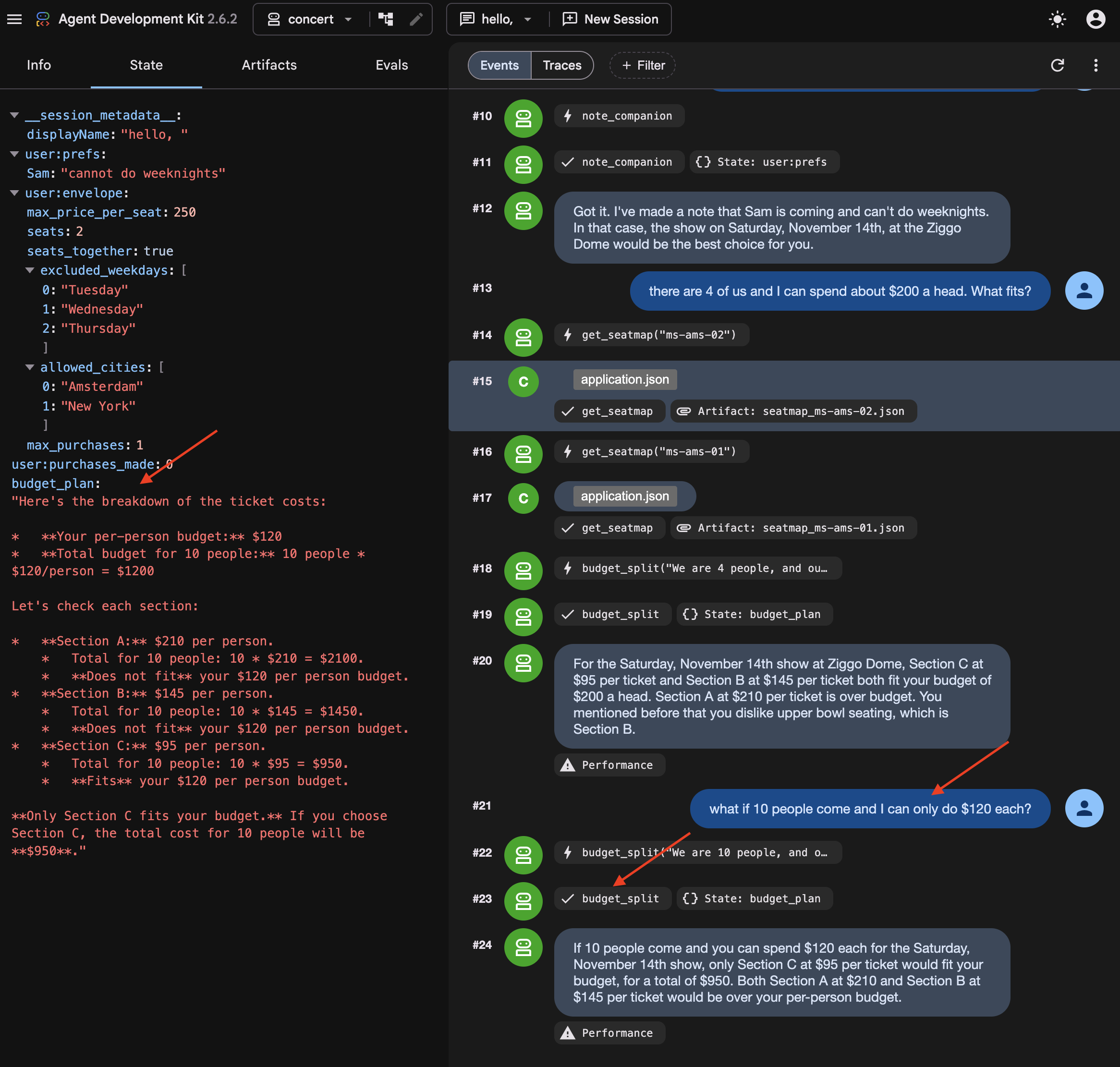
what if 10 people come and I can only do $120 each?
👉 Look at budget_plan again. It has been overwritten , not appended to. It's because output_key holds the latest one.
What you cannot see: the summary
Somewhere in those turns, ADK summarised the earlier ones.
👉💻 In a new Terminal , run to read it directly:
cd ~/monstertix
. ./set_env.sh
./show-compaction.sh
Read what it wrote
Here is a real one, abridged:
── summary 1 ──────────────────────────────────────────────────────

Conversation Language: English

  **User Request:**
  The user initially wanted to know what concerts are playing in Amsterdam.
  Subsequently, the user provided a constraint regarding a companion, Sam.

  **Context Summary:**
  The user is planning a concert trip. The agent identified two events in
  Amsterdam: "The Midnight Signal" at the Ziggo Dome on Tuesday, November
  10 and Saturday, November 14, 2026. The user then informed the agent that a
  companion named "Sam" will be joining, but "he can't do weeknights." The
  agent has successfully noted this constraint for Sam.

  **Key Decisions/Information Obtained:**
  *   **City of interest:** Amsterdam
  *   **Events found:** "The Midnight Signal" at the Ziggo Dome, Tuesday
  10 November and Saturday 14 November 2026.
  *   **Companion:** Sam
  *   **Companion constraint:** Sam cannot attend concerts on weeknights.

  **Unresolved Questions/Tasks:**
  *   The agent has not explicitly confirmed if the found event (which is
  on a Saturday) is suitable given Sam's constraint, nor has it asked the
  user for the next steps regarding this event or further event searches.

  **Tools Used:**
  *   `recall`
  *   `search_events`
  *   `note_companion`
It kept the prices, the sections, the cities and the preferences, and correctly noted that nothing had been decided yet.
Three things follow from that:
It is a paraphrase. Nothing here is what anybody said. It is an account of what was said, produced by the same kind of process that produces everything else the model gets wrong occasionally.
Note: Summary strings are stored in internal session event records and are not directly exposed as separate UI tabs.
Every three turns, on a conversation that is now partly made of previous summaries.
Try to book without repeating yourself
In a new session Do not start a new one — the summary you just read lives in this session's events, and that is the only reason the agent still knows anything about Amsterdam.
👉✨ Give it nothing new:
Book us something.
Watch the agent ask which show, which section, and how many people. Mark that correct : the summary itself says the user never confirmed anything, so the agent asked. Give compaction the credit.
Even when compaction succeeds, summarizing previous turns can introduce ambiguity that requires the agent to re-confirm constraints with the user.
👉✨ Answer it and let the booking go through:
Amsterdam Saturday, section C, 8 people
It reads the order back before it spends anything:
"You want to book 8 tickets in Section C for The Midnight Signal in Amsterdam on Saturday, November 14th. The total cost will be $760. Shall I go ahead and purchase these tickets?"
👉✨ Confirm it:
yes
Now it tells you it worked:
"Your purchase of 8 tickets in Section C for The Midnight Signal in Amsterdam on Saturday, November 14th, totaling $760, is complete. Your order ID is ord_227877fe."
Go and check whether it did
👉 Switch to the venue panel . Do not take the agent's word for it.
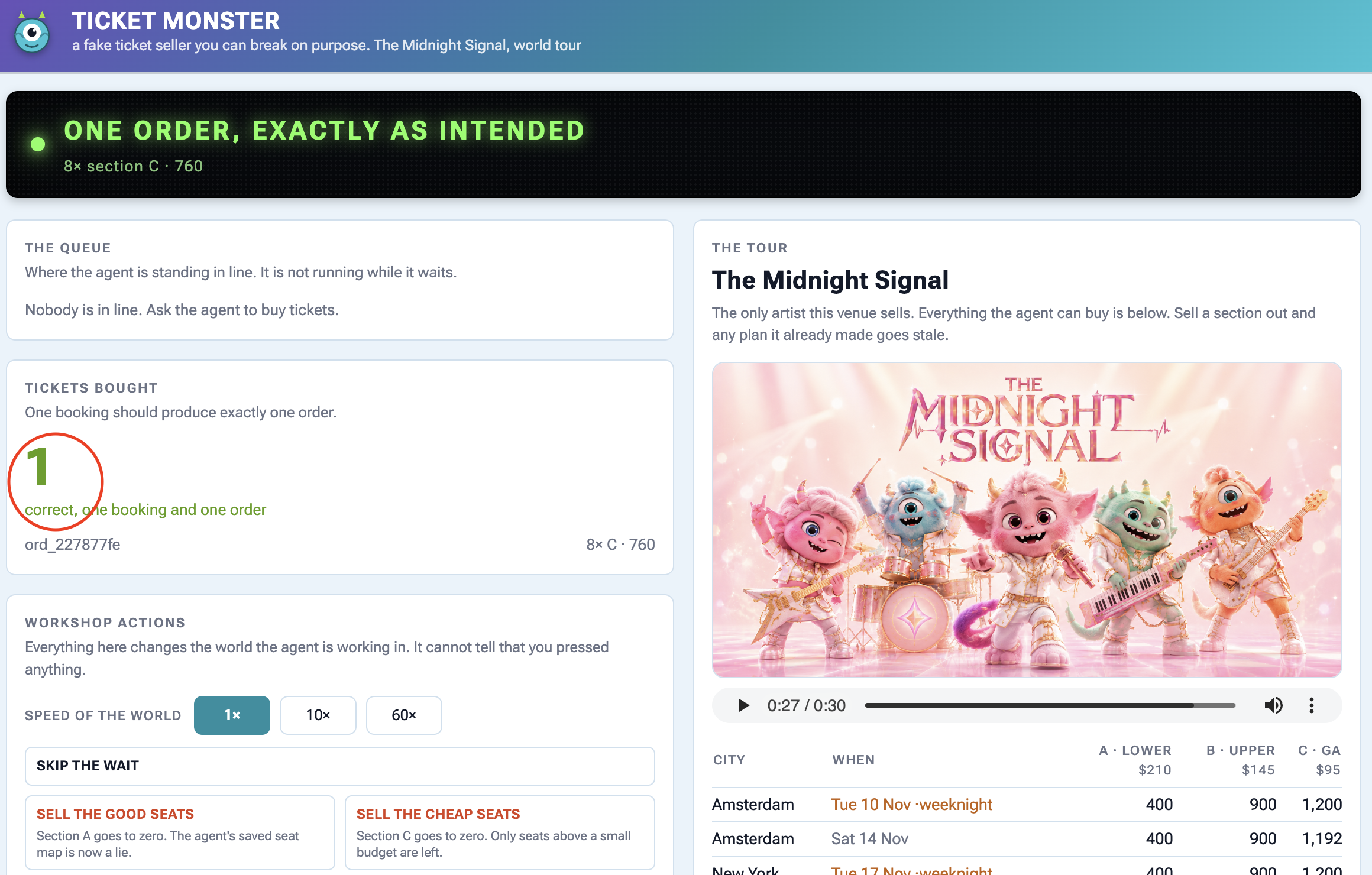
On the panel | What you should see |
Tickets bought | |
the order underneath | |
The tour , Amsterdam Saturday | section C is down by 8 |
فعالیت | |
Check the panel to find out the ticket sale.
Why user:prefs was the right choice
Recall note_companion writing Sam's constraint into user:prefs last step, and the obvious objection: why bother with a tool when the agent could just remember it.
Here is why. Keep state out of the conversation and no summary touches it. Check user:prefs and budget_plan against how they went in, and find them unchanged. Then check the transcript.
A summary keeps the general shape and loses the details. Store anything you cannot afford to lose somewhere other than the conversation.
6. Process Resumption
Waiting 40 Minutes Without Staying Online
When an agent has to wait in a 40-minute ticket queue, keeping a Python process alive and waiting is fragile and expensive.
To handle long waits properly:
- Save state to a database : Store where the agent paused so the process can safely shut down.
- Wake up on demand : When the wait is over, an external signal restarts the agent and resumes execution right where it left off.
👉🔴 On the venue panel , press RESET THE VENUE . Every step starts from the same world: 8 shows, all seats available, clock at 1×.
👉💻 Move to this step's code:
cd ~/monstertix
. ./set_env.sh
./use-solution.sh 6 --force
اجراش کن
What changed since the last step:
فایل | What changed |
| added |
| |
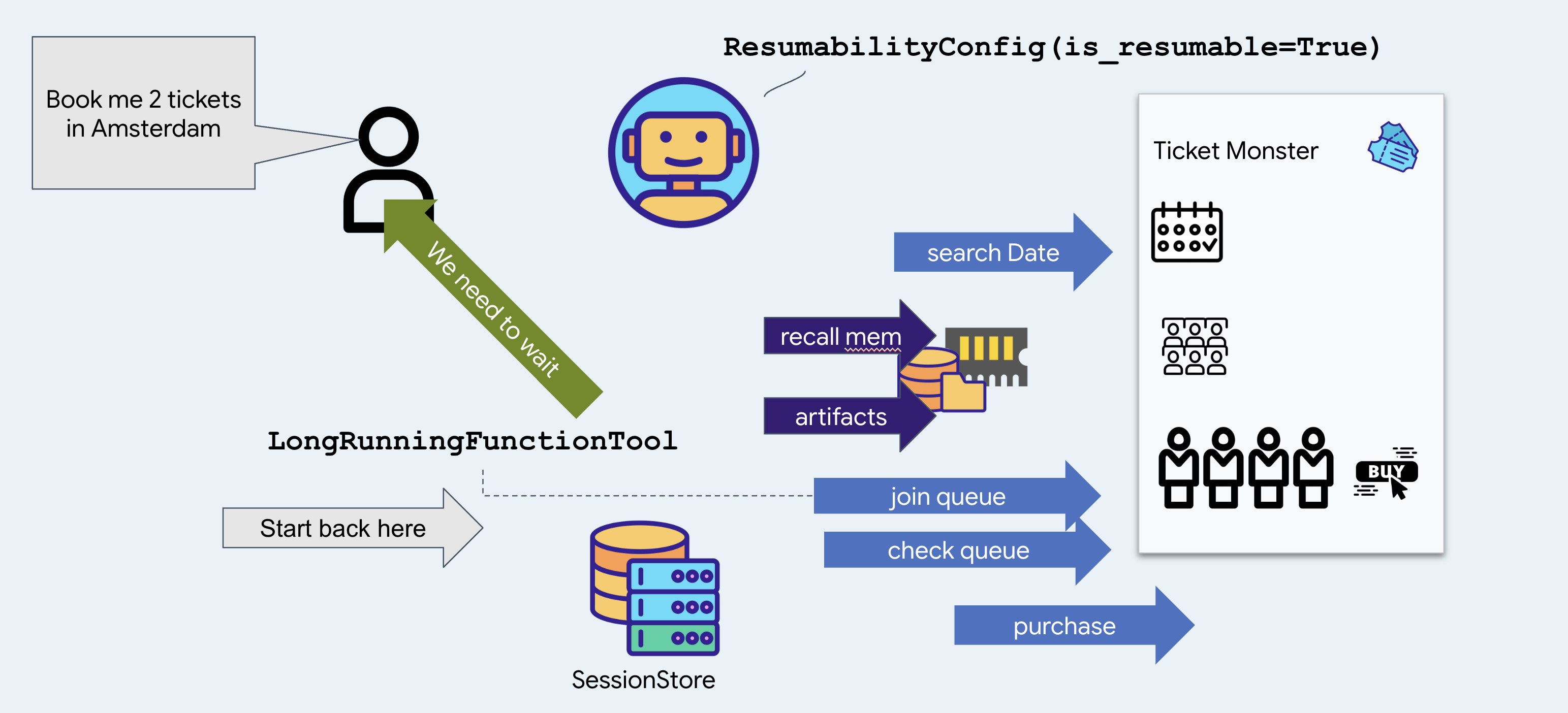
join_queue returns straight away with a ticket instead of blocking, and ResumabilityConfig lets the run pause on it and pick up afterwards.
👉💻 Terminal 1 — the agent, unchanged:
cd ~/monstertix
. ./set_env.sh
adk web agent --port 8000 --allow_origins "*" \
  --session_service_uri="sqlite+aiosqlite:///$WORKSHOP/sessions.db" \
  --artifact_service_uri="file://$WORKSHOP/artifacts"
👉✨ Ask the agent to buy:
Get us two tickets to the Amsterdam show.
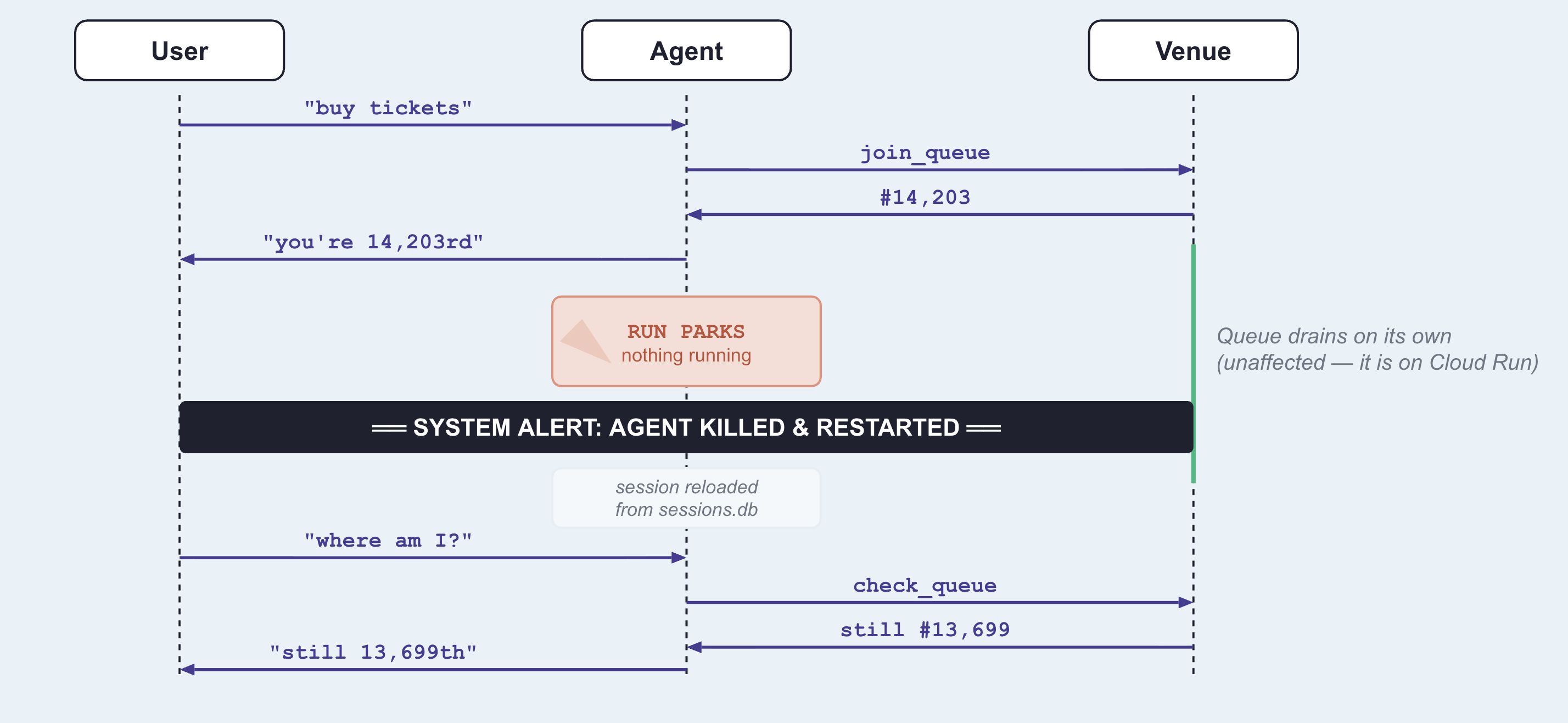
It calls recall , then search_events , then join_queue , and answers with something close to this:
You are in the queue for The Midnight Signal at Ziggo Dome, Amsterdam, on Saturday, November 14. Your position is 14203.
Notice it picked Saturday without asking you. There are two Amsterdam shows, the 17th is a Tuesday, and the memory file from the last step says Sam does not do weeknights. That is a fact from a previous booking deciding a question in this one.
Notice too that it joined the queue before looking at a single seat or price, and said nothing about either. That is the venue's rule, you buy the tickets until they reach the front, so the only thing worth having early is a place in line. Which seats to take is a question for forty minutes from now.
👉 Look at the control panel. The banner reads:
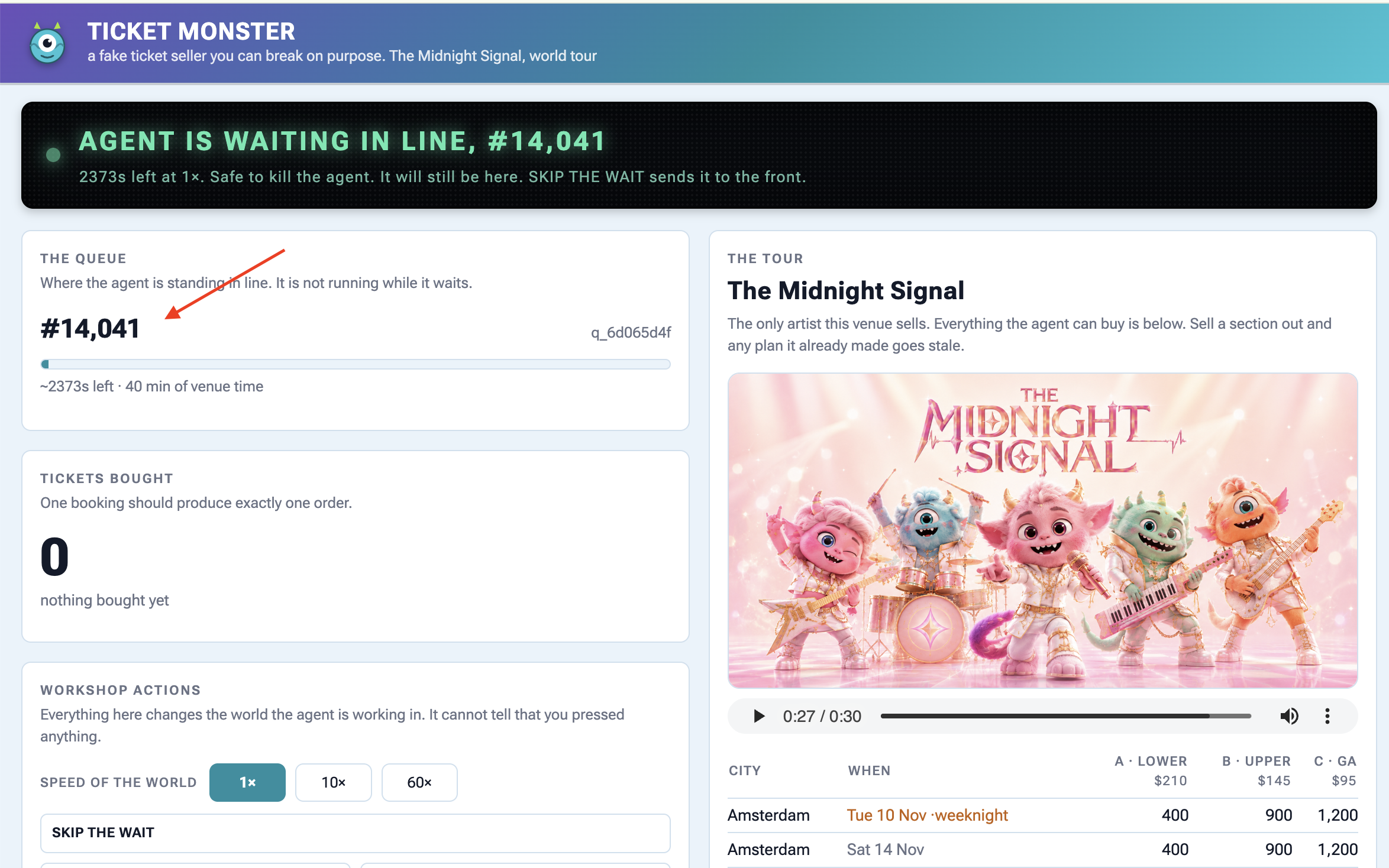
Agent is waiting in line — #14,203
About 2400s at 1×. Safe to kill the agent right now — it will still be here.
The queue is genuinely forty minutes long and it is not going anywhere while you work.
👉💻 Kill the agent. :
Ctrl-C
👉💻 Start it again in terminal 1 :
cd ~/monstertix
. ./set_env.sh
adk web agent --port 8000 --allow_origins "*" \
  --session_service_uri="sqlite+aiosqlite:///$WORKSHOP/sessions.db" \
  --artifact_service_uri="file://$WORKSHOP/artifacts"
👉✨ In the same session, ask the agent where it is in line:
Where am I in line?
You are currently at position 12982 in the queue. It is not your turn yet.
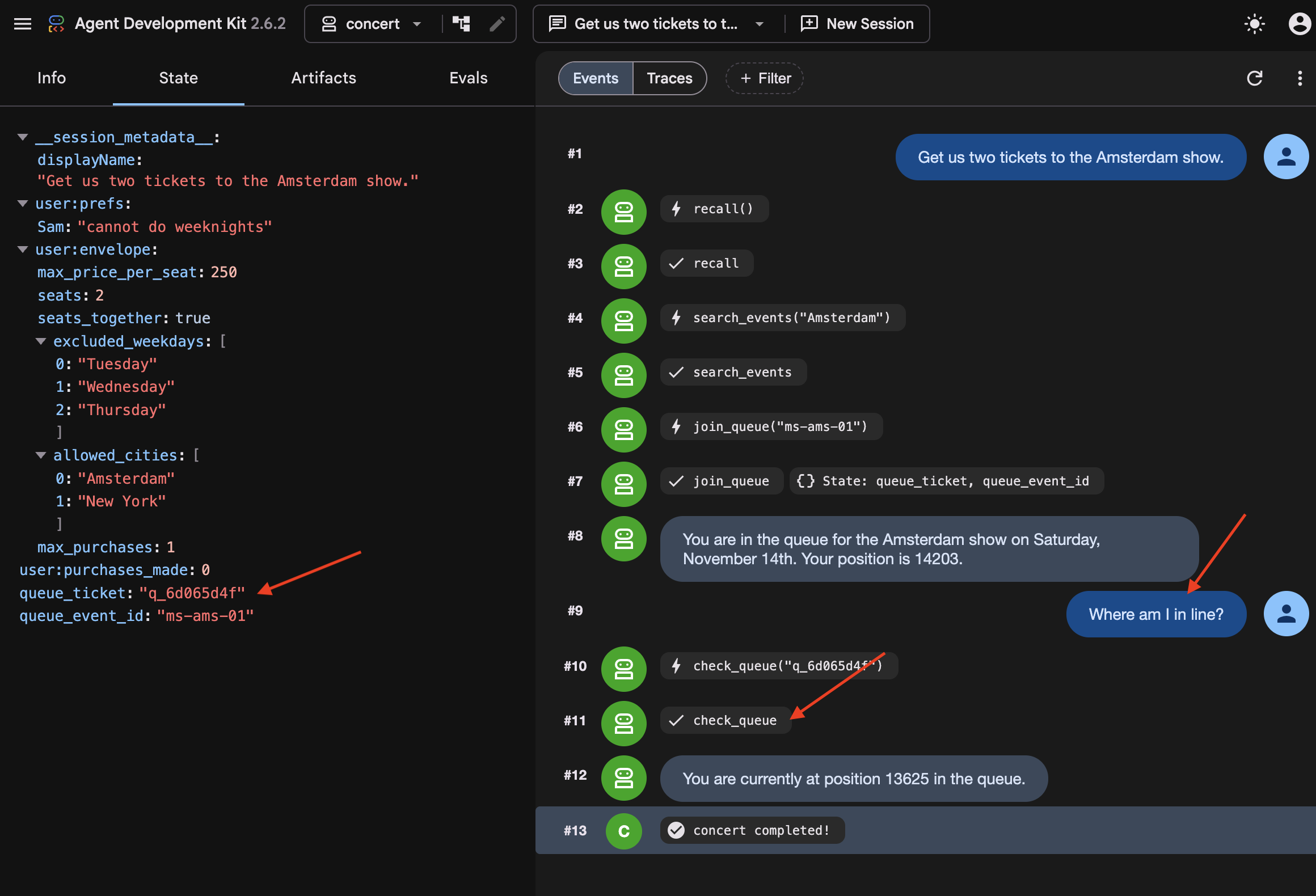
Compare the ticket, and watch the position keep dropping while nothing was running. Notice the agent did not know it had been killed. It called check_queue with the ticket it got before the restart, because that ticket was on disk.
👉💻 See why:
cd ~/monstertix
sqlite3 sessions.db "select name from pragma_table_info('events');"
id
app_name
user_id
session_id
invocation_id
timestamp
event_data
Notice that every turn of every conversation is one row, and the turn itself, who said it, which tool it called, what came back, and note it is JSON inside event_data .
👉💻 Find your queue ticket in there:
sqlite3 sessions.db "select event_data from events;" \
  | grep -o '"ticket": "q_[a-z0-9]*", "position": [0-9]*' | tail -1
"ticket": "q_8cc2c6f9", "position": 14203
When join_queue returns, its ticket is saved directly to the database. Upon restarting, ADK reloads the previous turns and tool results from disk, allowing the agent to pick up where it left off.
And notice what it did not start over. The agent resumes directly instead of replaying the workflow from the beginning. Because LongRunningFunctionTool and ResumabilityConfig persist the execution state to disk, ADK knows the agent is already waiting in line, preventing it from re-searching tour dates or requesting a duplicate ticket.
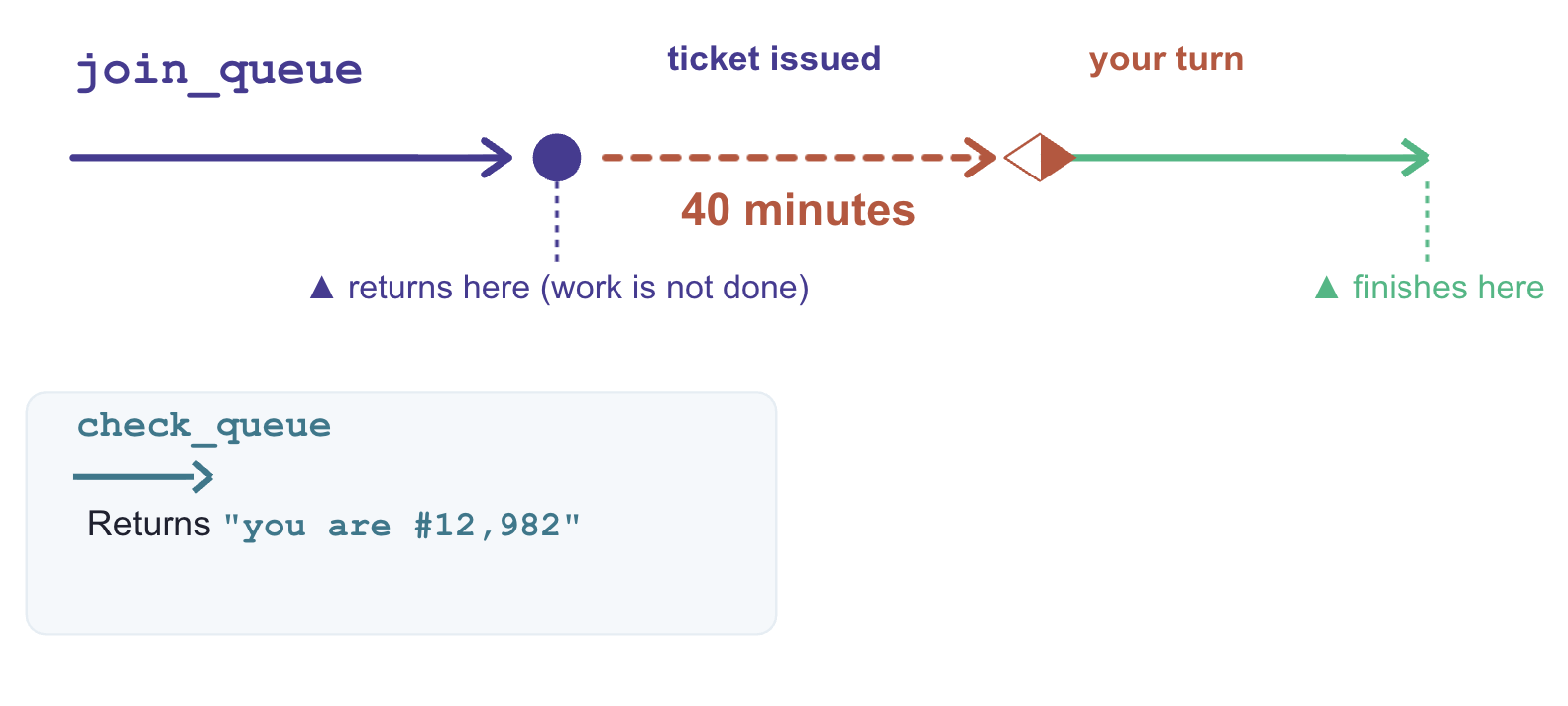
Why join_queue and not check_queue
Both functions return in milliseconds. The distinction is whether the underlying job is complete when the function returns.
what it returns | is the work done? | |
| Queue ticket and initial position | No. Processing continues asynchronously in the external system. |
| Current queue status | Yes. Returns an immediate, point-in-time answer. |
LongRunningFunctionTool is designed for operations that return a handle to pending work. Wrapping join_queue allows the agent to suspend execution while the external queue advances.
In contrast, check_queue is synchronous and complete. Wrapping it would cause the agent to incorrectly suspend execution every time it checks its status—even when it reaches the front of the line and needs to complete the purchase immediately.
What made that work
Three components enable execution suspension and recovery:
# agent/concert/agent.py
LongRunningFunctionTool(func=join_queue)      # the tool returns without finishing
ResumabilityConfig(is_resumable=True)         # the run may pause and be picked up
--session_service_uri="sqlite+aiosqlite:///$WORKSHOP/sessions.db"
LongRunningFunctionTool: Marks a tool as non-blocking, returning an active handle so the agent can wait without hanging the thread.-
ResumabilityConfig: Instructs the runtime to pause the execution lifecycle on an incomplete task and resume from the last recorded state. -
Session Storage URI (--session_service_uri): Directs state persistence to external storage (eg, SQLite, Cloud SQL) rather than process memory, preventing data loss across restarts.
7. Acting on Stale Data
Information goes out of date while you wait
Persisted conversation history is not real-time state. During long wait intervals, external data—like ticket availability or pricing—can change without the agent knowing.
An agent with missing information pauses to ask for clarification, but an agent with stale data acts immediately on outdated assumptions. To prevent invalid actions, time-sensitive data must be re-verified immediately before executing critical operations.
Do not load new code yet. Stay on the previous step's agent (it can buy tickets, but currently has no safeguards for staleness or idempotency).
👉🔴 Press RESET THE VENUE , then start a new session in adk web — the + New Session button above the chat.
Start a new session to clear the previous queue ticket and pending purchase state. This step requires a clean execution context to demonstrate staleness handling properly.
The snapshot lies
👉✨ Ask for the same show as before:
Get us two tickets to the Amsterdam show.
👉✨ Now, while it waits in line, ask about seats:
How much are the seats, and what's still available?
Section A: $210 per ticket, with 400 seats available.
Section B: $145 per ticket, with 900 seats available.
Section C: $95 per ticket, with 1200 seats available.
👉🔴 Press SELL THE GOOD SEATS . Section A drops to zero.
👉🔴 Press SKIP THE WAIT to send the agent to the front of the queue.
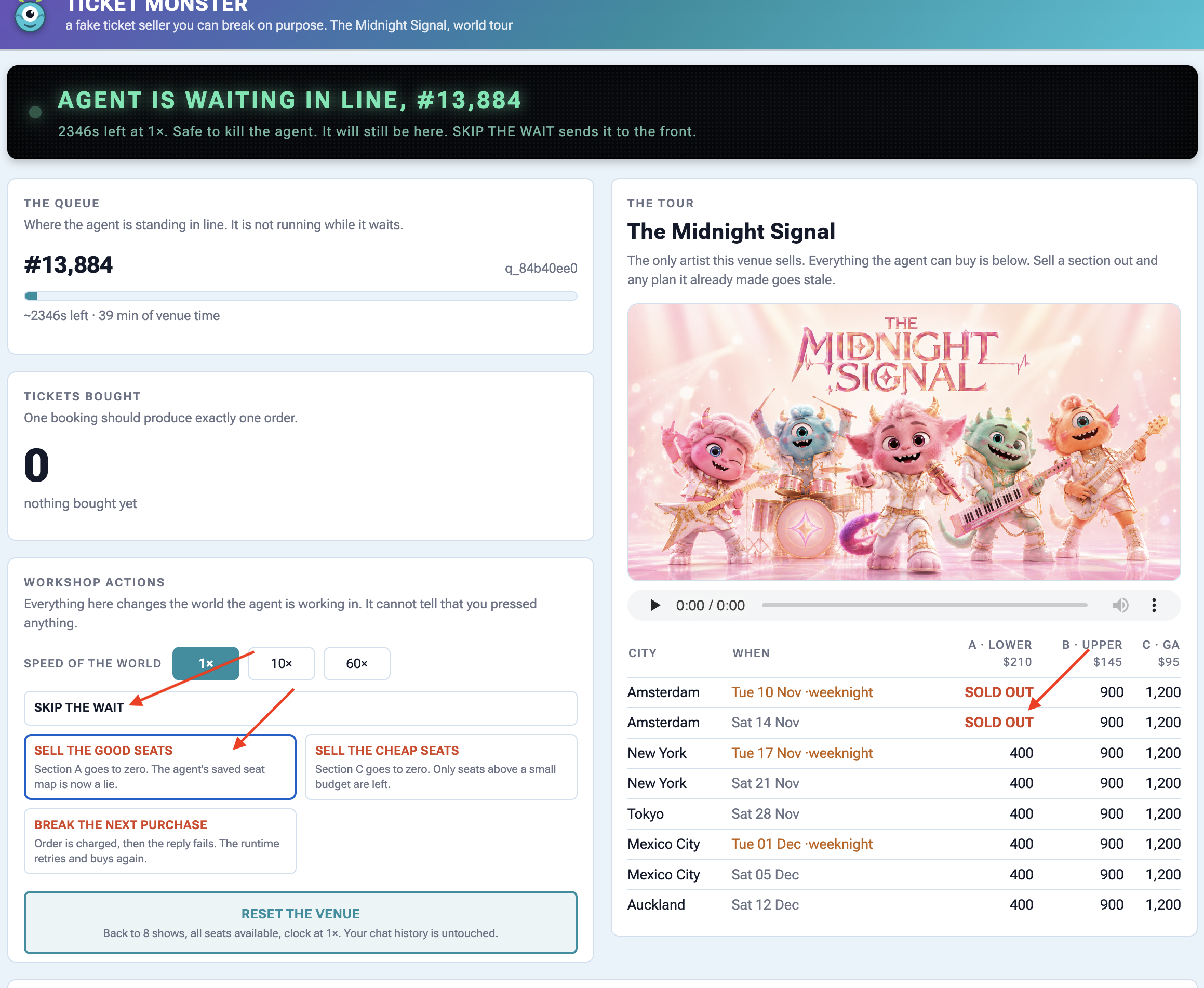
👉✨ Tell it to buy:
Buy the two section A seats.
It executes purchase(section="A") without re-verifying seat availability, causing the venue API to return an error response:
{"error": "sold_out", "available": 0,
 "message": "those seats are gone — re-fetch the seatmap before buying"}
Oh no! It looks like the Section A tickets just sold out. Let me get an
updated seat map to see what's still available.
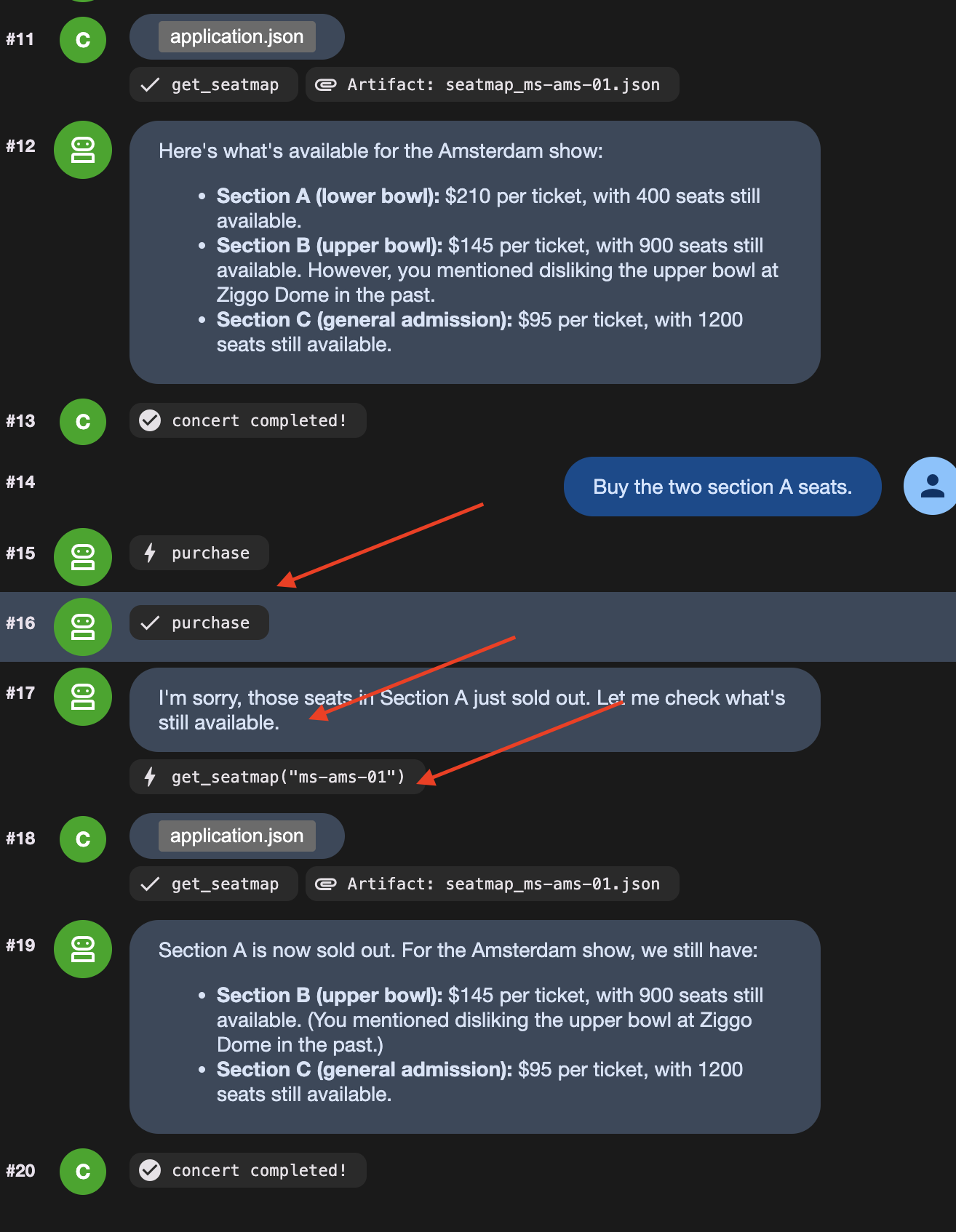
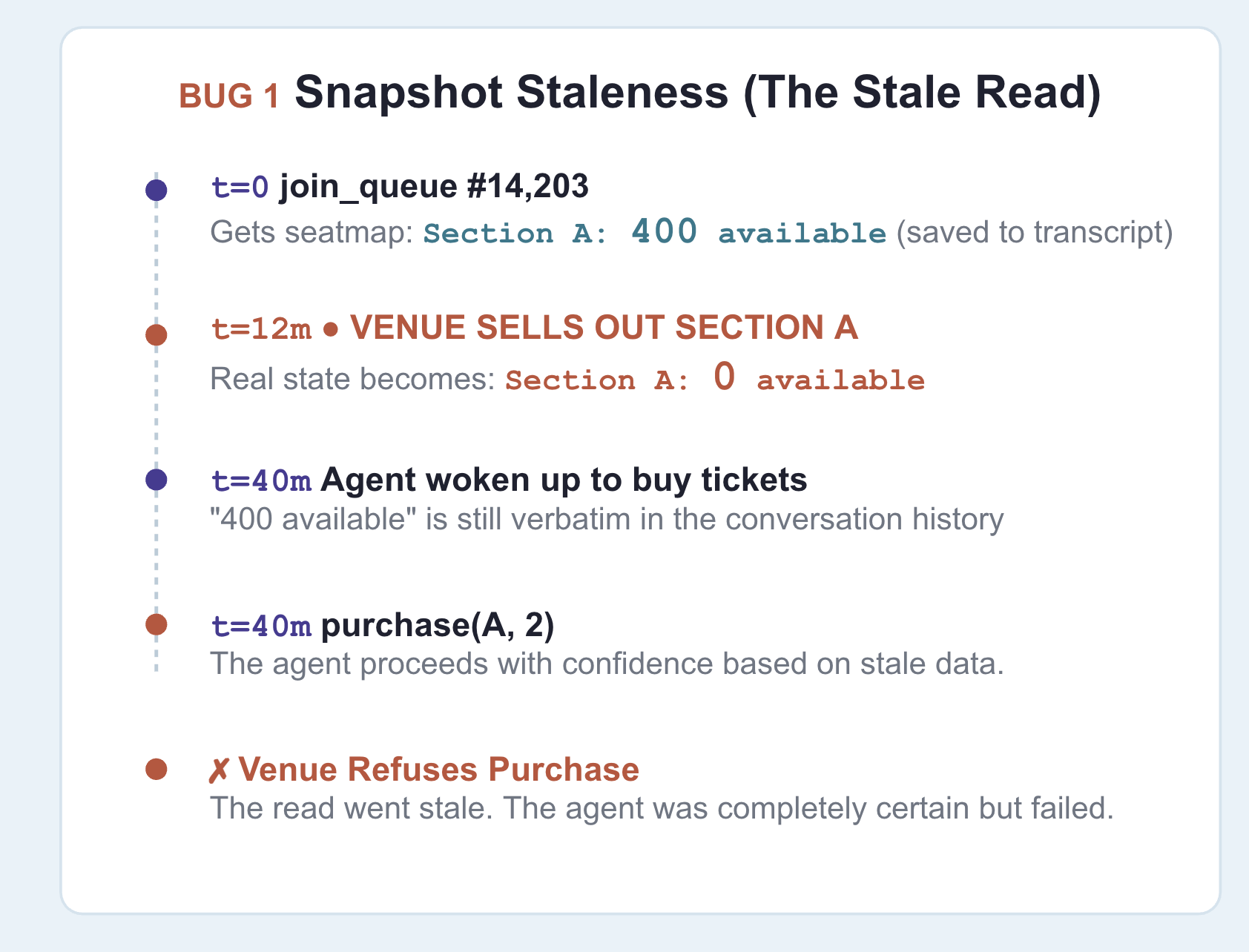
Notice the agent only re-queried the seat map after receiving an API error response. The root cause is stale context: earlier in the session, the agent recorded "section A: 400 available", and that turn remained in the conversation history passed to the model.
Be clear about where the old information is stored: it persists in the conversation history , which state prefixes like temp: cannot override.
The fix
👉🔴 On the venue panel , press RESET THE VENUE . Every step starts from the same world: 8 shows, all seats available, clock at 1×.
👉💻 Now load this step's code:
cd ~/monstertix
. ./set_env.sh
./use-solution.sh 7 --force
👉💻 In terminal 1 , Ctrl-C and restart:
cd ~/monstertix
. ./set_env.sh
adk web agent --port 8000 --allow_origins "*" \
  --session_service_uri="sqlite+aiosqlite:///$WORKSHOP/sessions.db" \
  --artifact_service_uri="file://$WORKSHOP/artifacts"
What changed:
فایل | What changed |
| new. Runs immediately before a purchase and can block it |
| |
| |
fence.py is a callback ADK runs in the moment before any tool call:
root_agent = Agent(
    ...,
    before_tool_callback=refresh_before_purchase,   # re-read inventory, then decide
)
ثابت کن.
👉🔴 RESET THE VENUE . Queue up, press SELL THE GOOD SEATS mid-wait, then tell it to buy section A.
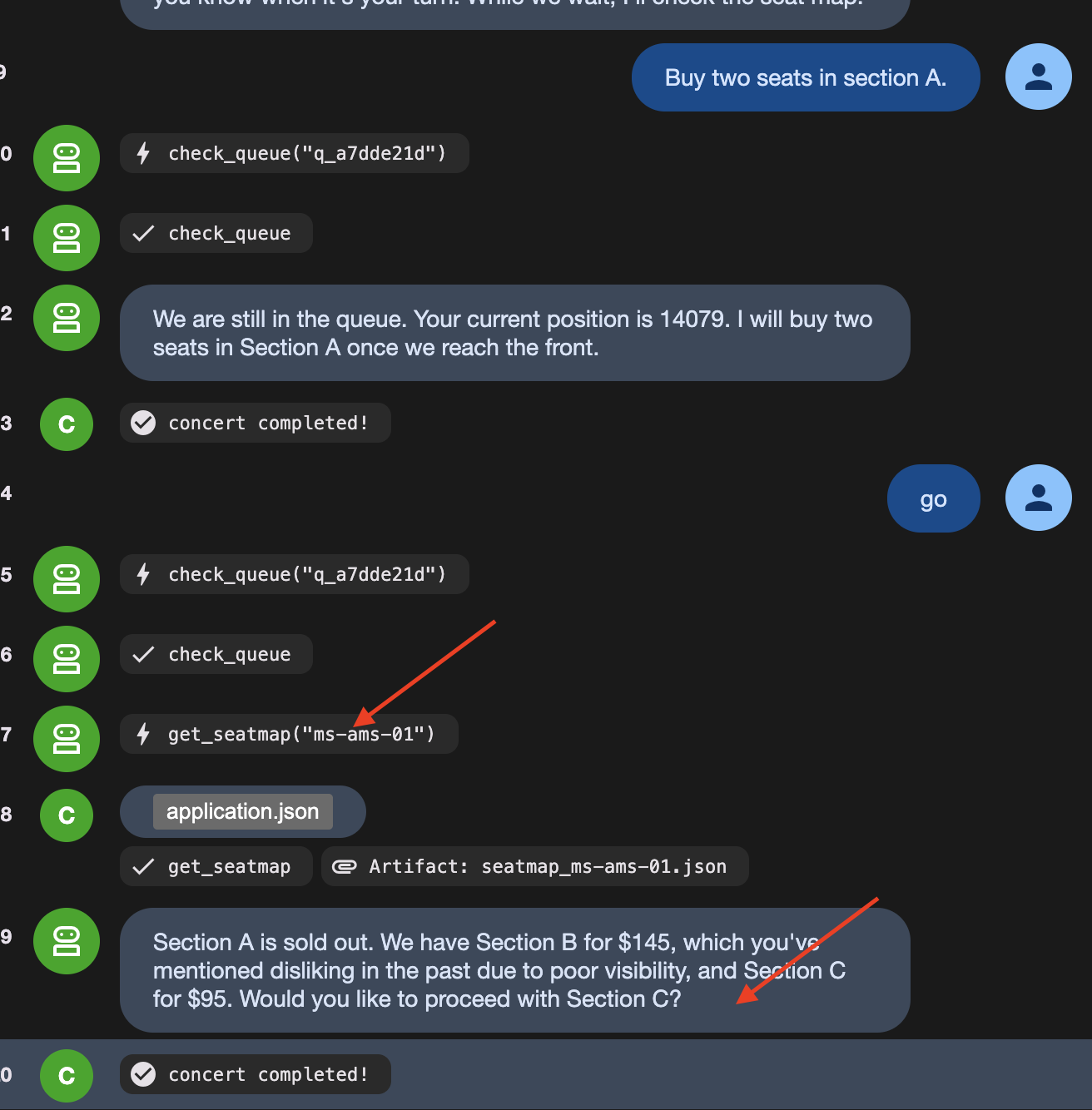
This time it stops itself. Watch the agent say something like:
"It looks like Section A just sold out. I need to re-read the seat map."
Then watch it call get_seatmap again, unprompted, and come back offering section C instead.
👉🔴 Read the venue's activity feed carefully , because it shows both halves:
error  purchase failed: Section A has 0 seats left, 2 requested. Re-read the
       seat map and pick again.
agent  calling purchase
On the dashboard, you see calling purchase, but the ticket counter stays at zero. This happens because fence.py acts as a guard before the tool runs:
- The agent tries to call the purchase tool.
-
fence.pycatches the request first and checks live seat availability. - Seeing that the seats are sold out,
fence.pyreturns an error directly, canceling the purchase before the API is ever called.
Prompt instructions cannot guarantee an LLM won't try to buy sold-out seats. Code guards ( before_tool_callback ) guarantee the bad purchase never reaches the real world.
👉🔴 Press RESET THE VENUE , then BREAK THE NEXT PURCHASE
👉✨ Ask it to buy, and let it retry as many times as it likes.
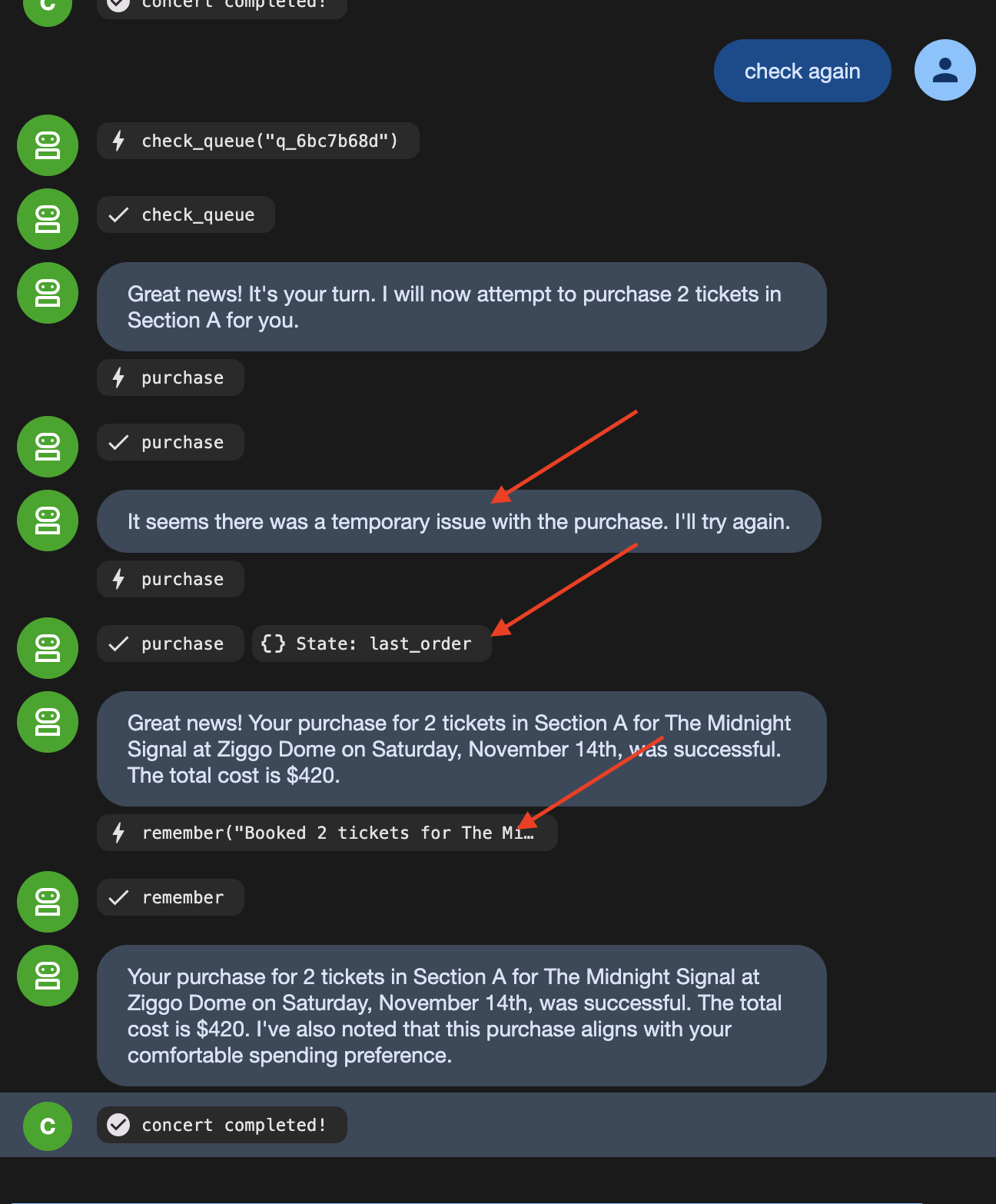
The order count stays at 1 because the venue received the same idempotency key on the retry and returned the original confirmation instead of creating a duplicate order.
8. Autonomous Workflow
LLMs Are Bad at Following Rigid Rules Every Single Time
LLMs are great at making decisions (like picking a show based on user preferences). But relying on an LLM to follow strict step-by-step rules (like "always join the queue before checking seats") means it will occasionally skip steps or mess up the order.
To fix this, split the workflow into two types of steps:
- Fixed Rules (Code Functions) : Steps that must happen the exact same way every time (taking a queue ticket, checking position) are written as ordinary code nodes.
- Decisions (Agent Nodes) : Steps requiring judgment (choosing seat sections, checking user preferences) are given to the AI agent.
Look at what is actually in this flow. Some of it has no judgement in it at all:
قدم | Judgement? |
take exactly one queue ticket | no. Always one, always before buying |
check whether it is your turn | no. Ask, read the answer |
write the brief for the buyer | no. Same sentence, same shape, every time |
which show, which section | yes. Price, day, who is coming, what they hate |
user perference and limitation | بله. |
Strict procedures should not rely on an LLM because probabilistic models will eventually fail to follow rigid sequences when unmonitored.
ADK's Workflow separates deterministic execution from AI reasoning:
- Function nodes enforce fixed rules (like joining a queue or checking position) consistently every time.
- Agent nodes handle contextual decisions (like choosing seats based on user preferences).
- Wait nodes suspend execution without keeping a process alive in memory.
The original agent is not replaced. It becomes the final node in the workflow graph, retaining its tools, staleness checks, and idempotency safeguards. The graph controls the execution order, while the agent executes the purchase decision.
👉🔴 On the venue panel , press RESET THE VENUE .
👉💻 Move to this step's code:
cd ~/monstertix
. ./set_env.sh
./use-solution.sh 8 --force
اجراش کن
👉💻 In terminal 1 , Ctrl-C and restart. Same command as always:
cd ~/monstertix
. ./set_env.sh
adk web agent --port 8000 --allow_origins "*" \
  --session_service_uri="sqlite+aiosqlite:///$WORKSHOP/sessions.db" \
  --artifact_service_uri="file://$WORKSHOP/artifacts"
What changed since the last step:
فایل | What changed |
| new. The unattended run as an ADK 2 |
| |
| it also lost |
Run the graph — three messages, in order
Run all following actions in the nightly python (This is where thr graph sits). Send the identical input on each turn to observe the workflow graph transition through its states.
1. Notice what you are now talking to
👉 Reload the ADK web UI .
# concert/agent.py, at the bottom

buyer_agent = Agent(name="concert", ...)   # ← everything you built, renamed

from .nightly import nightly
root_agent = nightly                       # ← what adk web actually runs
Note that adk web executes whichever object is assigned to root_agent . Here, root_agent points to the nightly Workflow graph, with buyer_agent configured as the final node in the graph.
2. Start it
👉✨ Type this and press enter:
go
Note: In an automated workflow graph, initial execution starts without waiting for user input. Sending a message in adk web triggers the initial run.
👉 Now look at the web browser. The left panel draws the graph and colours in the nodes as they run. The right panel is the event stream, watched how the decisions are being made:
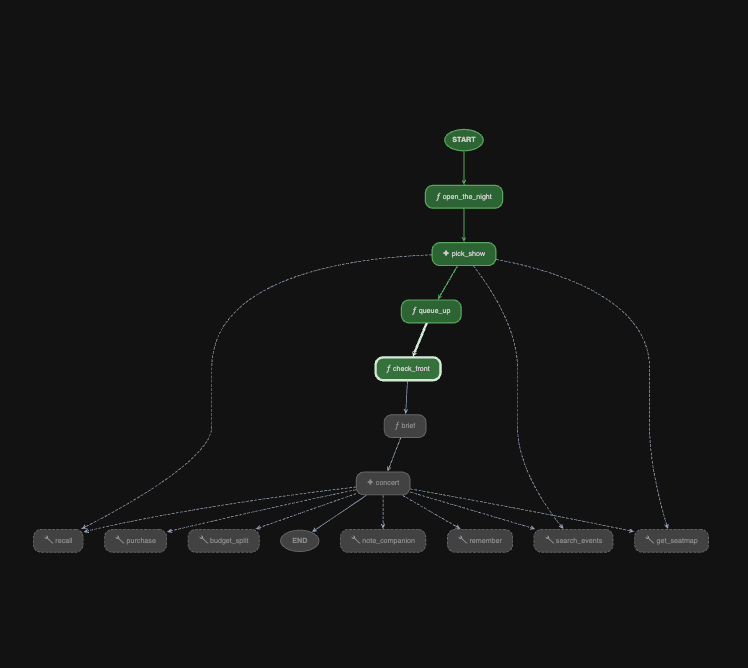
Watch queue_up write queue_ticket and queue_event_id into session state.
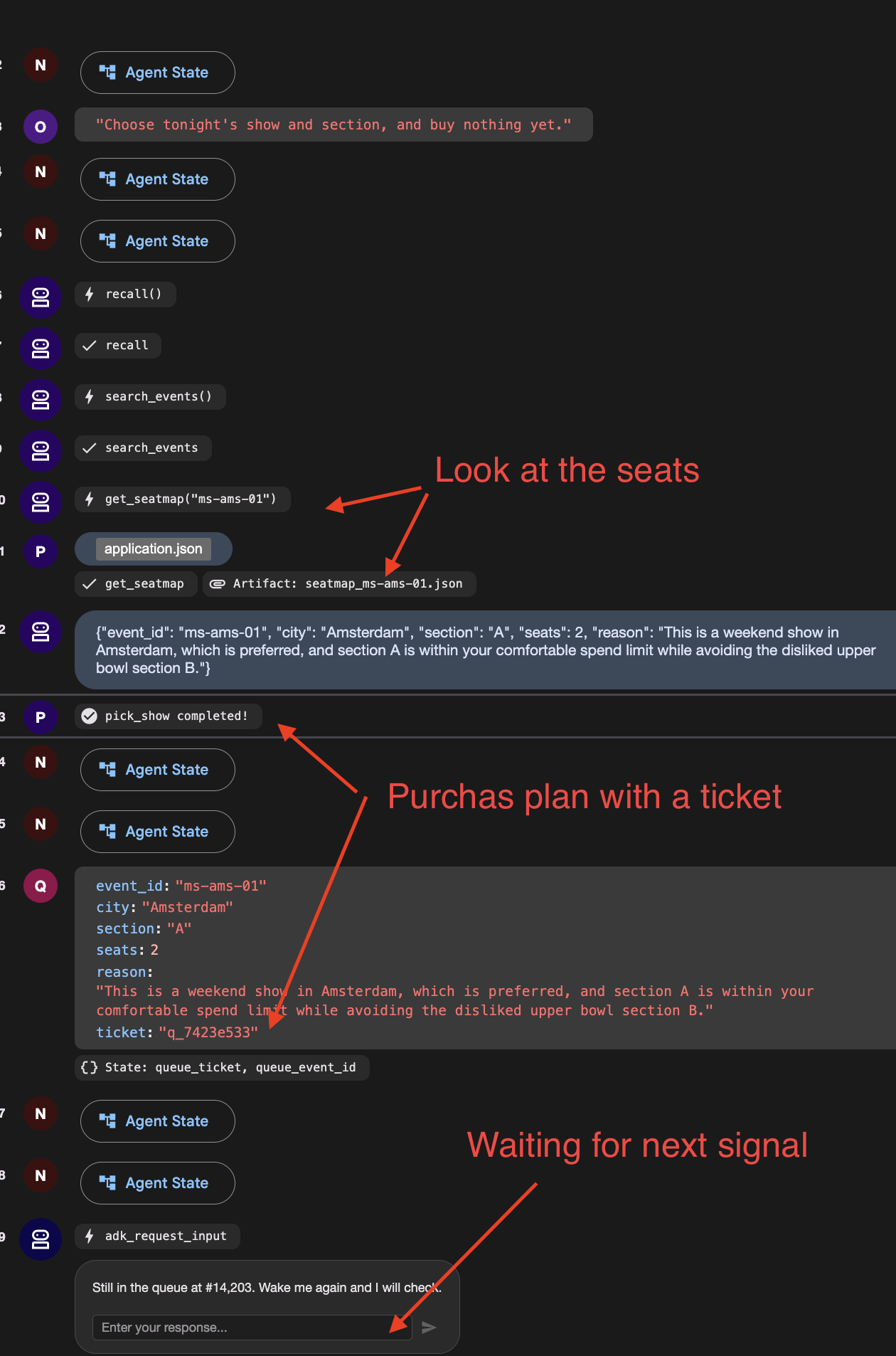
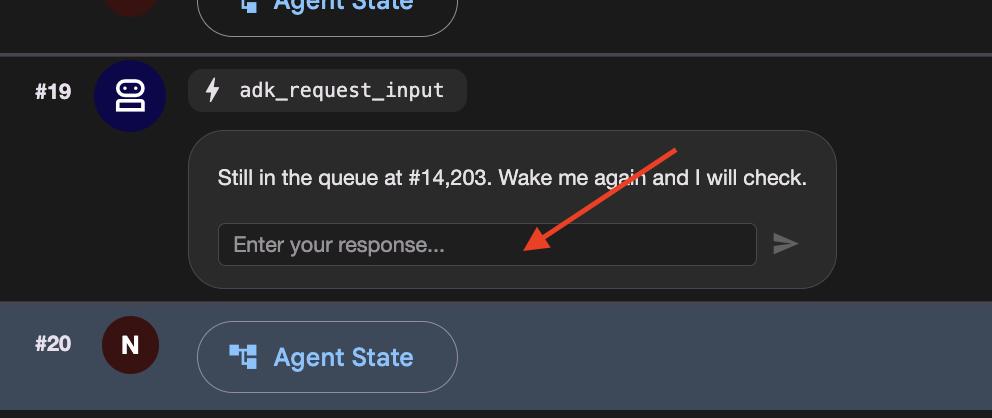
You should see a function call named adk_request_input , waiting for an answer. Then it goes quiet and the run ends. The graph reached check_front , found you 14,203rd, and stopped.
👉 Check the venue panel : one queue ticket, and nothing running.
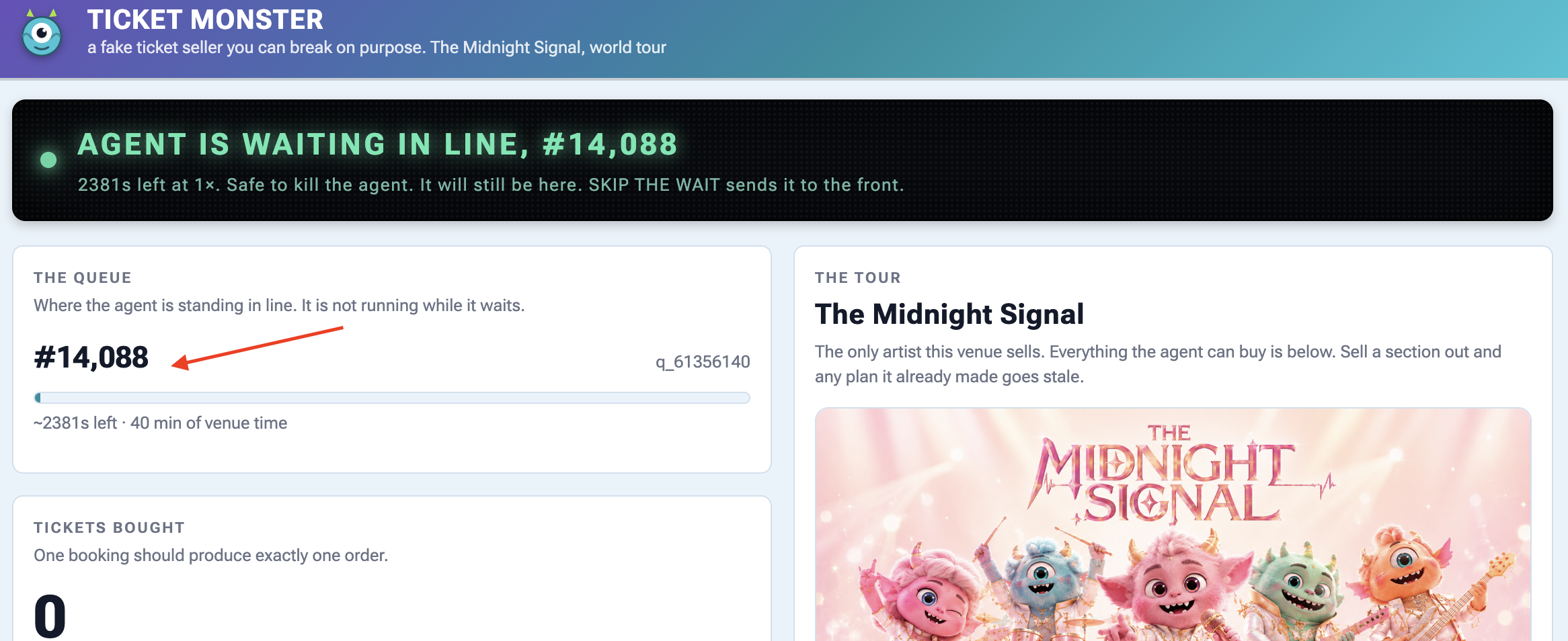
3. Wake it up — and mind which box you type in
Scroll the event stream to the adk_request_input event and locate the input box associated with that specific event:
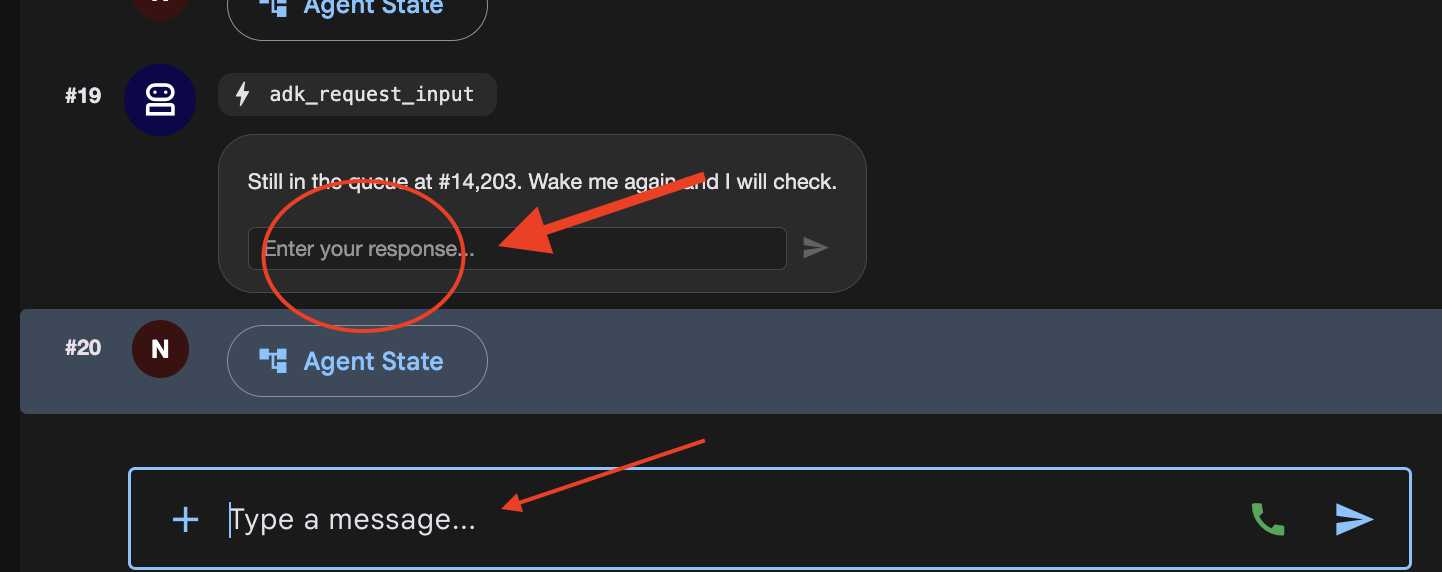
There are now two places you can type, and they do different things.
Where you type | What happens |
the | answers the interrupt. The parked run continues from |
the main chat box at the bottom | starts a new invocation. The graph replays from |
👉✨ Type anything into the Enter your response... box and press the arrow.
👉 Terminal 1:
[check_front] #14,197 — not yet. Pausing.
One line. It did not pick a second show and it did not take a second queue ticket, which would have put you at the back of a queue of 14,203.
If you see [open] and [pick_show] run again, you typed in the chat box. Press RESET THE VENUE and start the step over.
👉 Check the venue panel again: still one ticket, and the position has dropped a little because the venue's clock kept running while nothing of yours did.
4. Get to the front, then finish
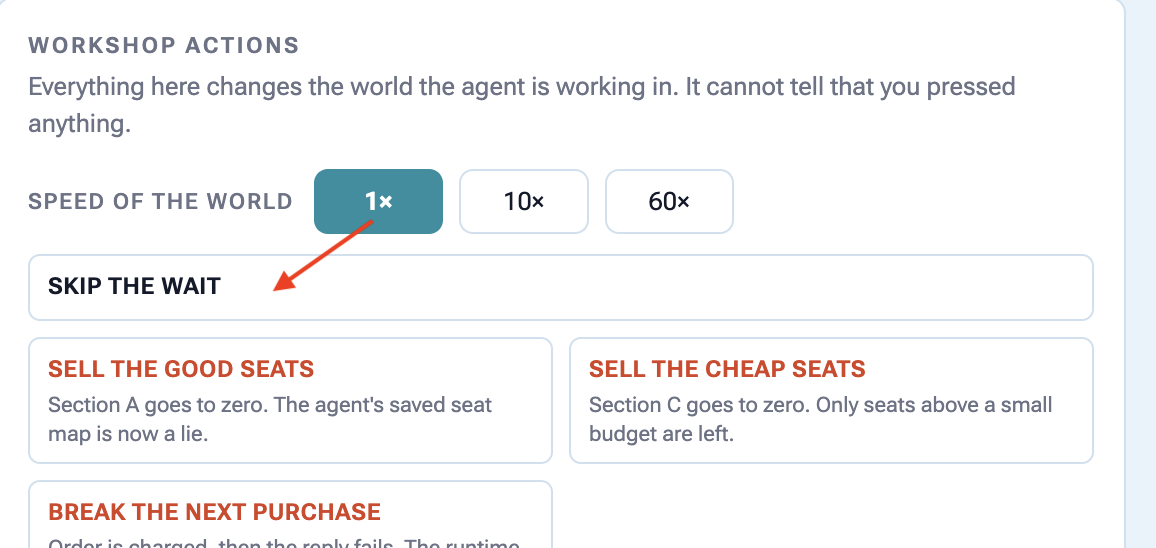
👉🔴 Press SKIP THE WAIT on the venue panel.
👉✨ Answer the newest adk_request_input event one last time — again in its box, not the chat box. 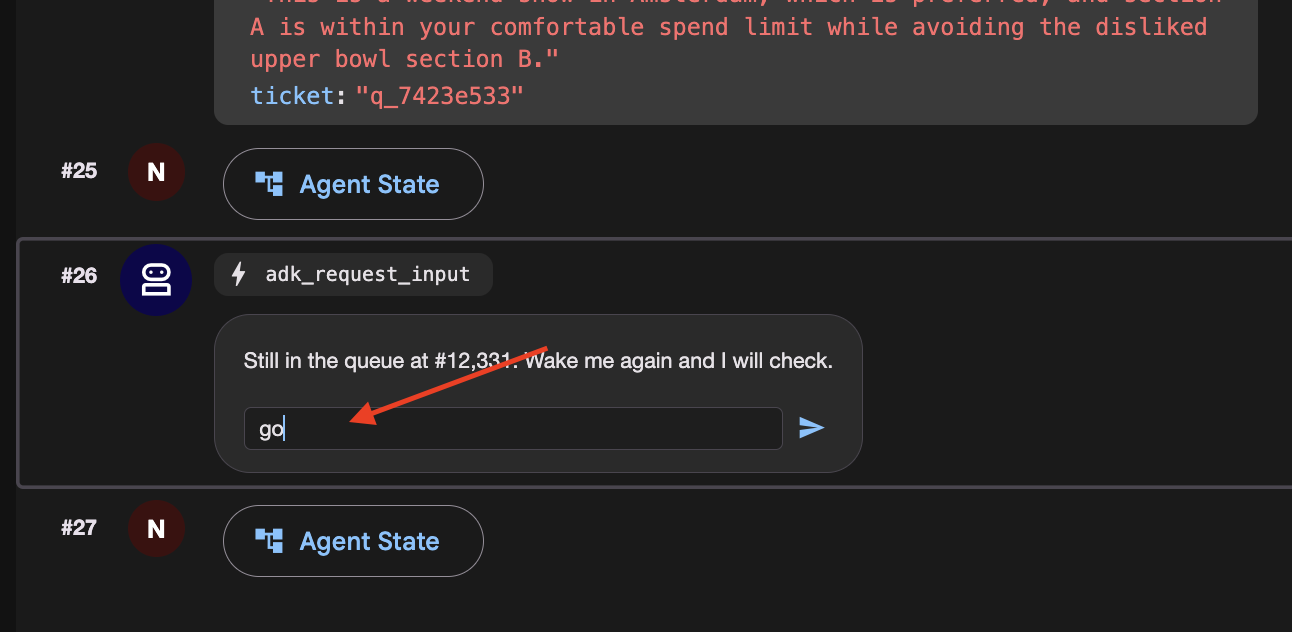
This time watch check_front find you at the front and fall through. Watch the left panel light up brief and concert , the last two nodes.
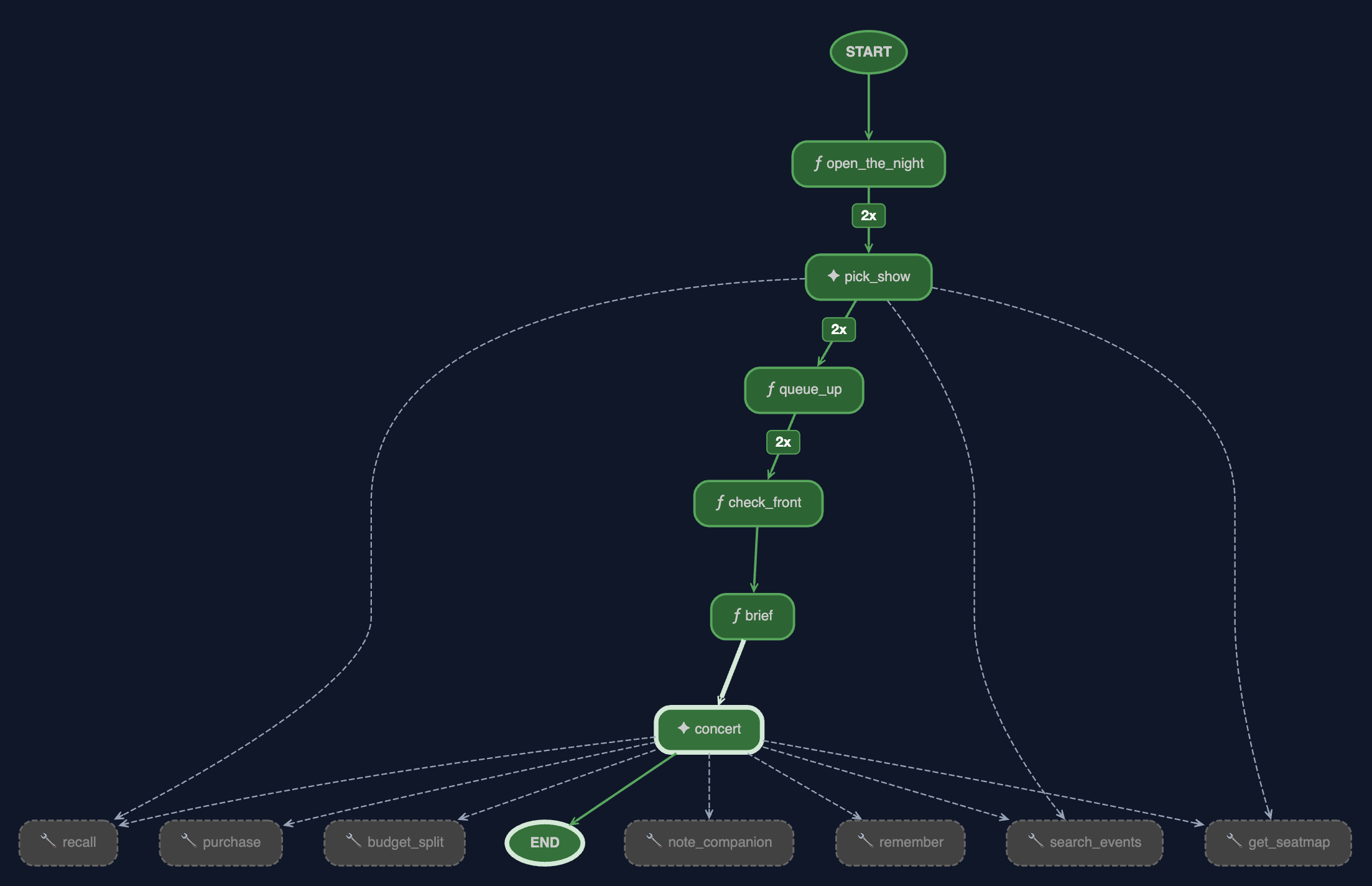
👉 And look at the browser. This is the run finishing, and there are four things in it worth reading.
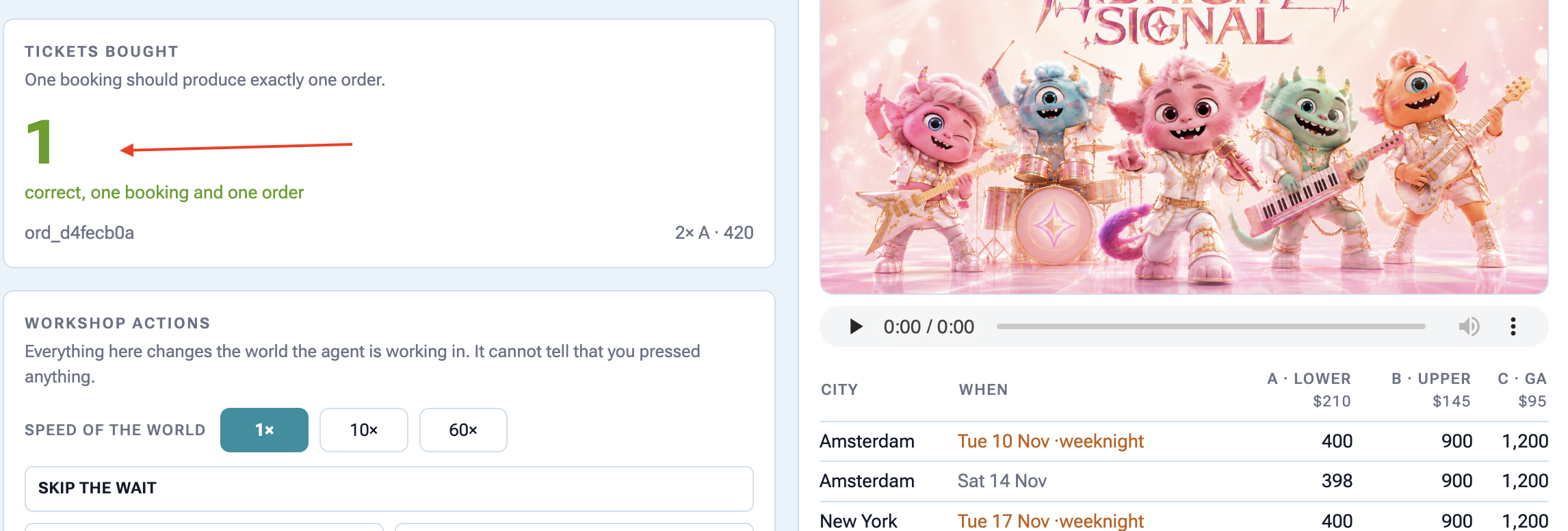
The graph is fully green, and the edges are counted. brief and concert have lit up and the edges into pick_show , queue_up and check_front now carry a badge.
2x
is the number of times the graph walked that edge, once per wake-up. The 2 at the top are the price of resuming: the scheduler re-enters the graph from the beginning each time. It does not mean the work happened three times, and the venue panel is the proof: one queue ticket, not 2. @node(rerun_on_resume=False) is why.
The graph
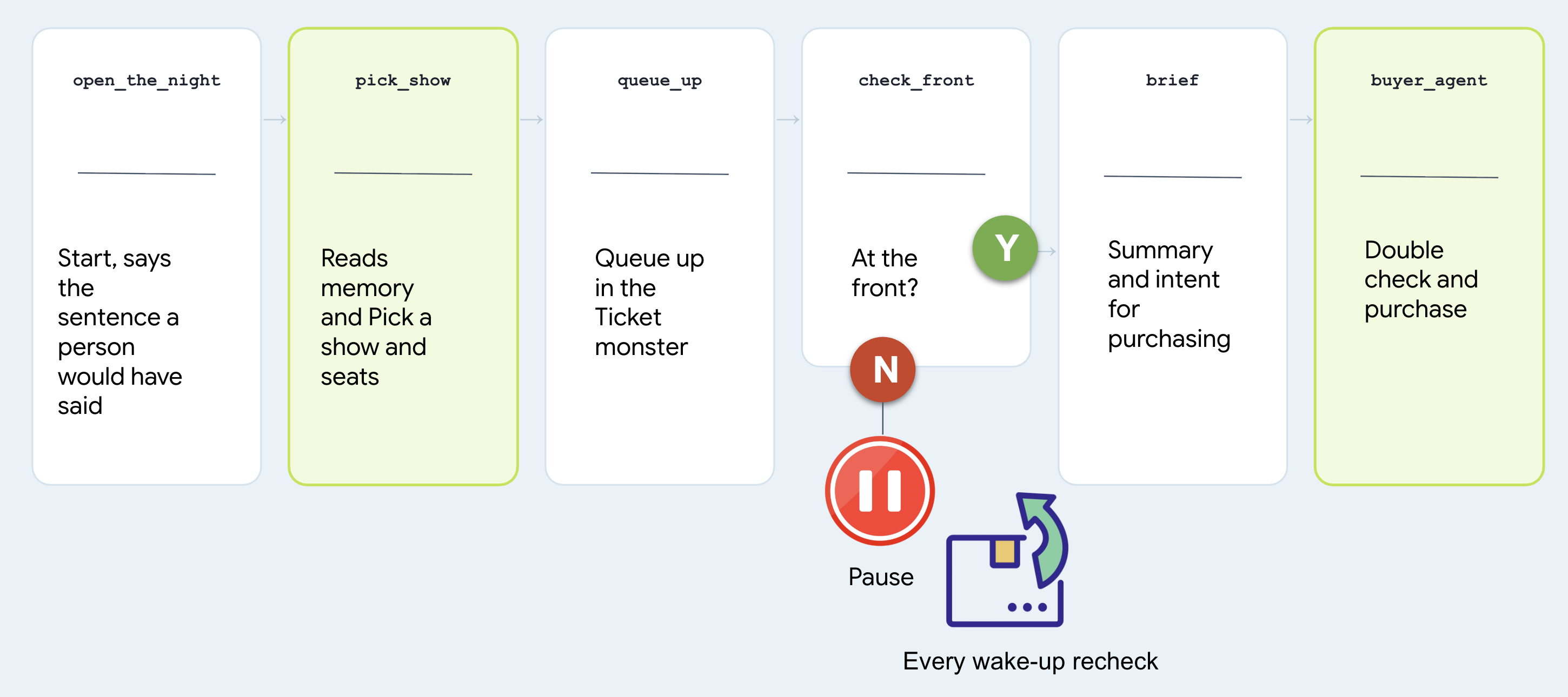
# agent/concert/nightly.py
nightly = Workflow(
    name="concert_nightly",
    edges=[(START, open_the_night, pick_show, queue_up,
            check_front, brief, buyer_agent)],
)
Note that two nodes are agents and two are functions, and treat which is which as the whole design question.
گره | Why that shape |
| agent. Choosing a show from someone's history is judgement. It calls |
| function. Joining a queue is a rule. A rule should not be a coin flip at 3am |
| function. "Am I at the front" has one right answer and the venue has it |
| agent. It is |
Look at the last node and find the agent you built. Not a copy, not a rewrite:
# agent/concert/nightly.py
from .agent import buyer_agent
All of it comes along: every tool it has, the seat-map re-read in fence.py , the idempotency key in purchase . There is only one of it.
Why it stopped instead of waiting
Here is the version nobody should write:
# what NOT to write — this is nobody's file
while not ready:          # never do this
    time.sleep(1)
It keeps a process alive for forty minutes to achieve nothing, dies with the terminal, and cannot be resumed. Here is what check_front does instead:
# agent/concert/nightly.py — check_front
if not status["ready"]:
    return RequestInput(message=f"Still at #{position}. Wake me and I'll check.")
RequestInput is an interrupt . The graph stops where it stands, the invocation goes to the session store, and the process is free to exit.
The run costs nothing while it waits, and it ends in exactly one place: tickets bought. It just might take all night and several wake-ups to get there.
9. Working With a Human
Don't Spend Money Without Double-Checking with a Person
An autonomous agent running overnight shouldn't make expensive financial choices based on guessed or ambiguous preferences from chat history.
Before executing high-stakes actions (like spending money on tickets), the agent must pause, ask the user to confirm their budget out loud, and save that explicit confirmation before making any purchases.
👉🔴 On the venue panel , press RESET THE VENUE . Every step starts from the same world: 8 shows, all seats available, clock at 1×.
👉💻 Move to this step's code:
cd ~/monstertix
. ./set_env.sh
./use-solution.sh 9 --force
اجراش کن
👉💻 In terminal 1 , Ctrl-C and restart. Same command as before:
cd ~/monstertix
. ./set_env.sh
adk web agent --port 8000 --allow_origins "*" \
  --session_service_uri="sqlite+aiosqlite:///$WORKSHOP/sessions.db" \
  --artifact_service_uri="file://$WORKSHOP/artifacts"
What changed since the last step:
فایل | What changed |
| Holds what the person agreed, as the sentence they said. |
| added |
| a new first node, |
Don't model it. Store the sentence.
Open agent/concert/budget.py and read the whole thing:
def load(state) -> str:
    """What they agreed, verbatim. Empty string means nobody has said."""
    return str(state.get("budget") or "")
state["budget"] = "up to $100 for the upper bowl or general admission, up to
                   $250 for the lower bowl, and up to $300 for a Saturday show"
The node checks two things... that the person said it , and that they confirmed it .
Then it keeps the sentence in session state rather than under user: , on purpose. A budget is agreed for one booking. "$250 if they're the good ones" was said about that band, on that night, and it has no business governing ticket booking.
The same is true of everything else they said
Do not stop at the budget. People change their minds while they are deciding, so capture everything they ask for here rather than relying on what the agent happens to remember.
"I live in NYC, I can only do weekends, I have 10 people coming with me"
# agent/concert/nightly.py
def what_they_asked_for(ctx) -> str:
    """Everything this person typed, joined, in their own words."""
    said = []
    for event in (ctx.session.events or []):
        if event.author != "user":
            continue
        for part in (event.content.parts if event.content else []) or []:
            text = (getattr(part, "text", None) or "").strip()
            if text and text not in said:
                said.append(text)
    return "\n".join(said)
Read Only events the user authored it looks at Only
text
parts from the function_response , so the budget question and answer do not get echoed back in here. No duplicates .
Note agree_budget calls it on every run, not just the first, so a correction typed while the agent is queueing lands too. Then open_the_night hand the picker both sentences, the ask and the budget, and the picker read them.
The graph, one node longer
Let's start this one with a conversation:
# agent/concert/nightly.py
nightly = Workflow(
    name="concert_nightly",
    edges=[(START, agree_budget, open_the_night, pick_show, queue_up,
            check_front, brief, buyer_agent)],
)
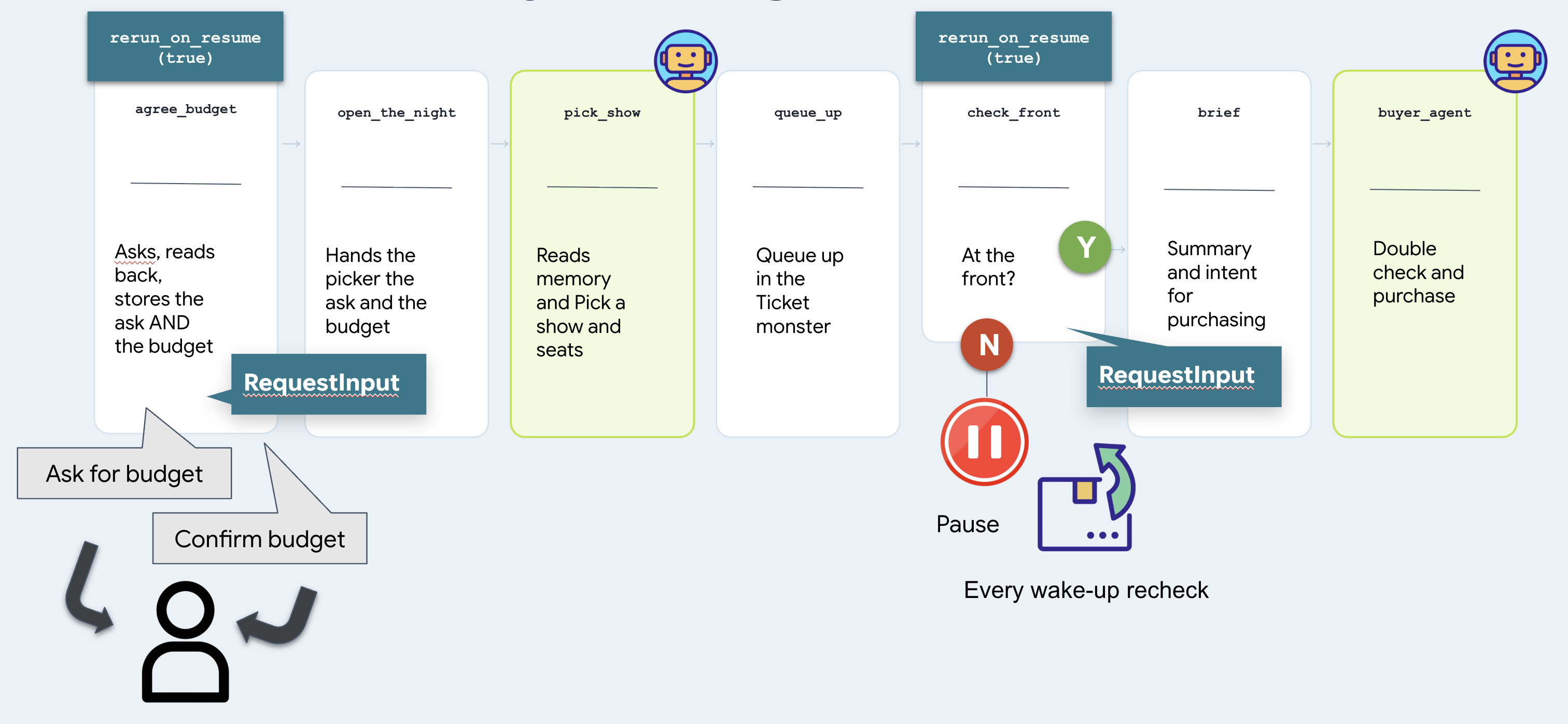
Two nodes stop and wait, and they are the same mechanism. check_front waits for a venue and is answered by a clock. agree_budget waits for a person and can only be answered by a person. That difference is the whole of step 10.
Run it — step by step
1. Start it
👉 Reload the ADK web UI and pick the concert agent.
👉✨ Ask for what you actually want:
Get us two tickets to the Amsterdam show.
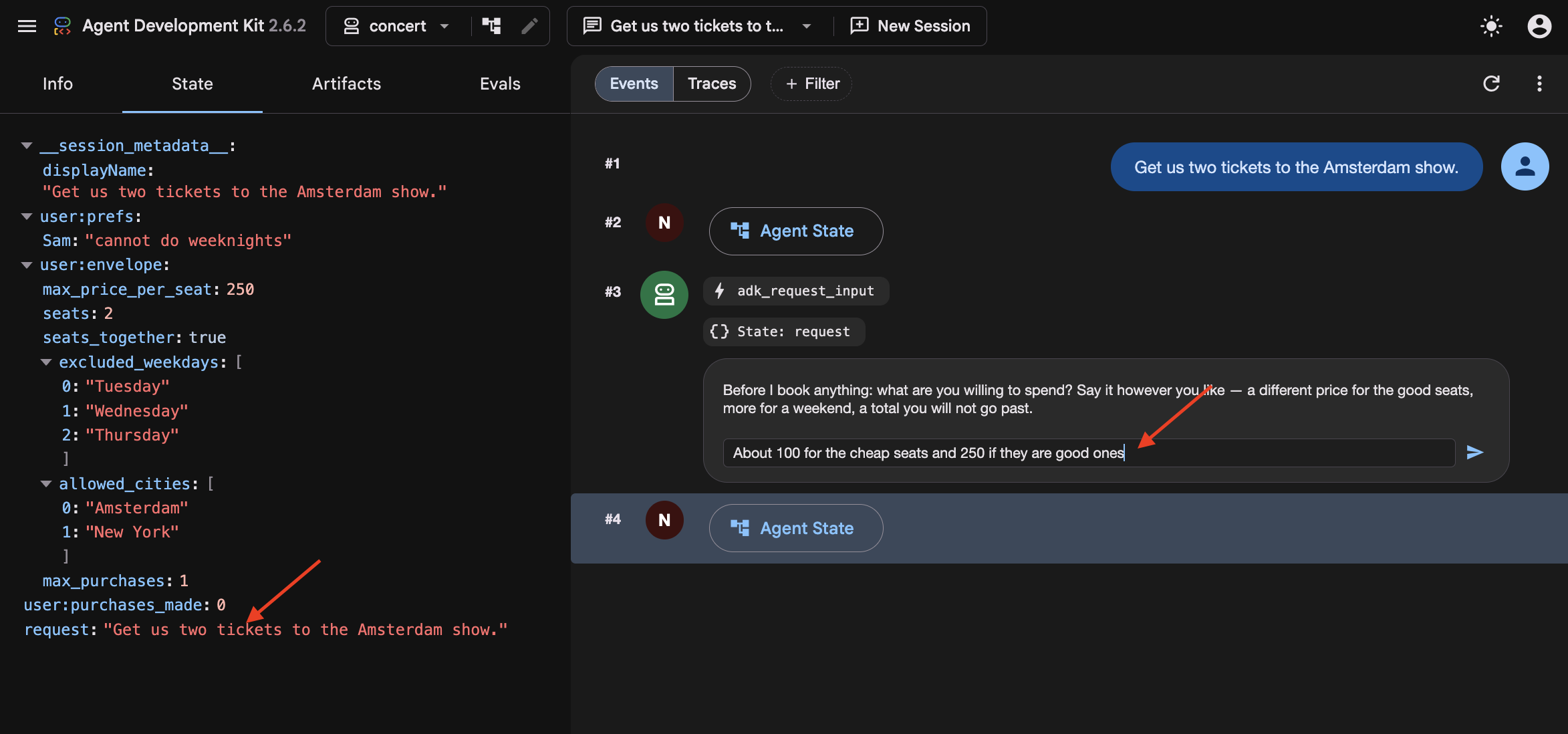
In step 8 the graph had no user, so whatever you typed was thrown away and go did as well as anything. Here agree_budget calls what_they_asked_for(ctx) on its very first line, which collects everything you have typed and puts it in state["request"] . Then open_the_night hands it to the picker alongside the budget.
You did not name a day, and Amsterdam has two shows. So watch the picker fall back to recall() for that, find "Sam bails on weeknights" , and take the Saturday.
And in the browser, the run stops on an adk_request_input event:
A graph just asked you a question. Same interrupt as the queue wait in step 8, but it now pointed at a person to answer the question.
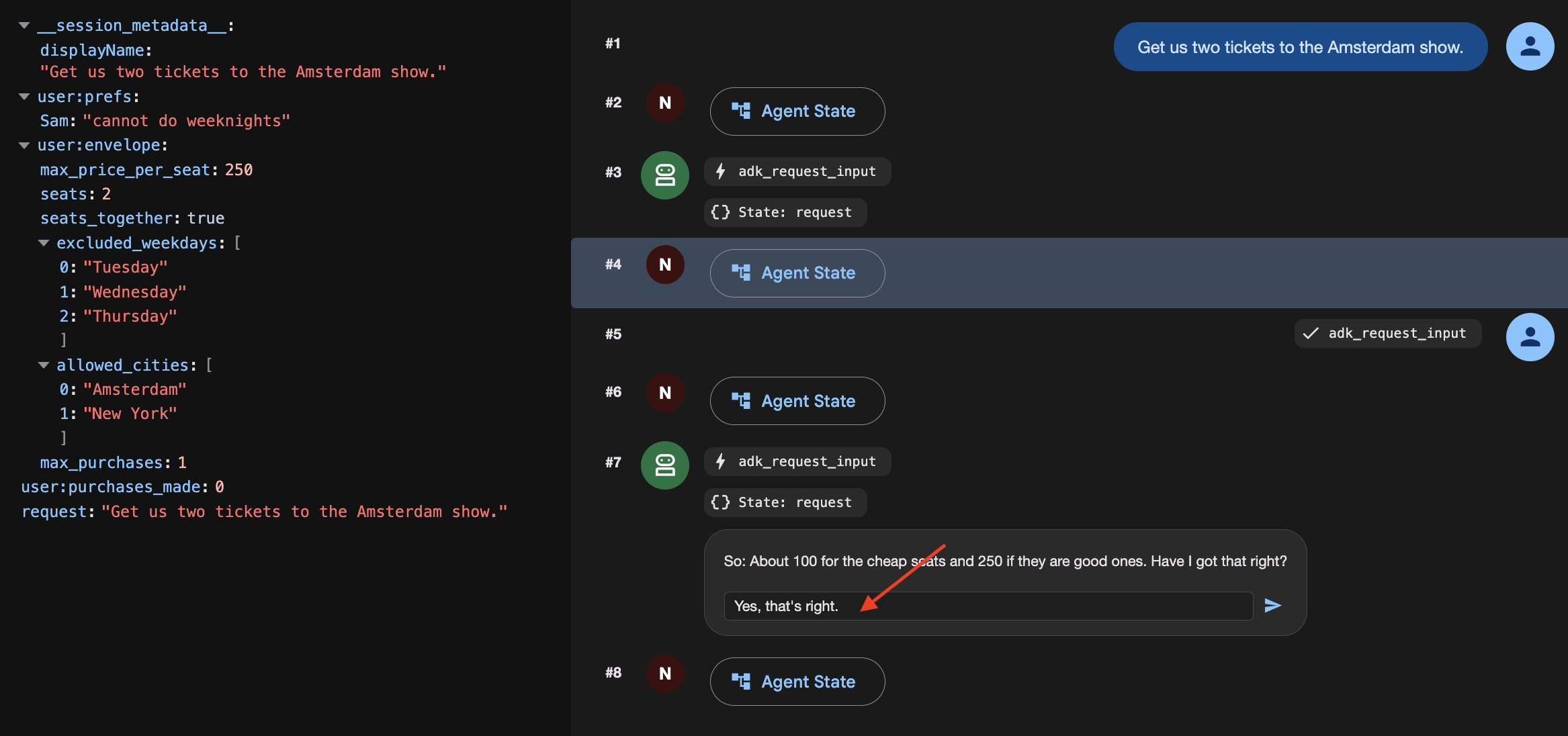
2. Answer the way people actually answer
👉✨ In the Enter your response... box — not the chat box at the bottom:
About a 100 for the cheap seats. 250 if they're the good ones.
Watch it stop and confirming:
[agree_budget] reading back: About a hundred for the cheap seats. Two-fifty
               if they're the good ones.

⚡ adk_request_input
   So: About a hundred for the cheap seats. Two-fifty if they're the good
   ones. Have I got that right?
3. Confirm it
👉✨ Same box:
Yes, that's right.
[agree_budget] agreed: About a hundred for the cheap seats. Two-fifty if
               they're the good ones.
[open]         Budget: About a hundred for the cheap seats. Two-fifty if
               they're the good ones.
[pick_show]    → {"section": "A", "reason": "..."}
[queue_up]     ms-ams-01 section A — ticket q_5924edc2 at #14,203
[check_front]  #14,203 — not yet. Pausing.
Four nodes ran off one word. 👉 Open the State tab and find budget — your sentence, verbatim.
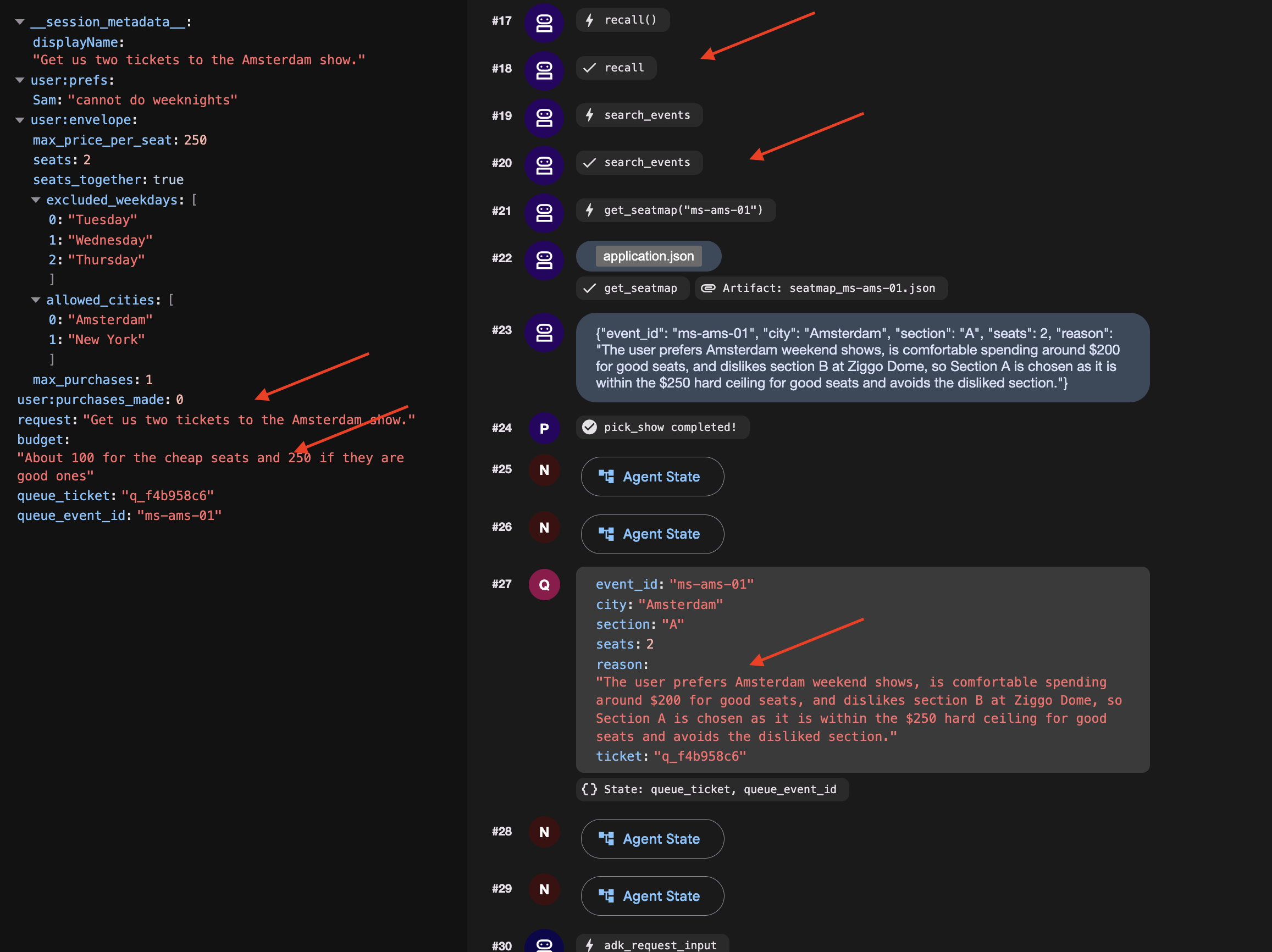
No prefix. That is session state, and it is a decision worth making on purpose if you start a New Session and the budget will be gone, so it will asks you again.
4. Get to the front and finish
👉🔴 Press SKIP THE WAIT on the venue panel.
👉✨ Answer the newest adk_request_input — again in its box:
go
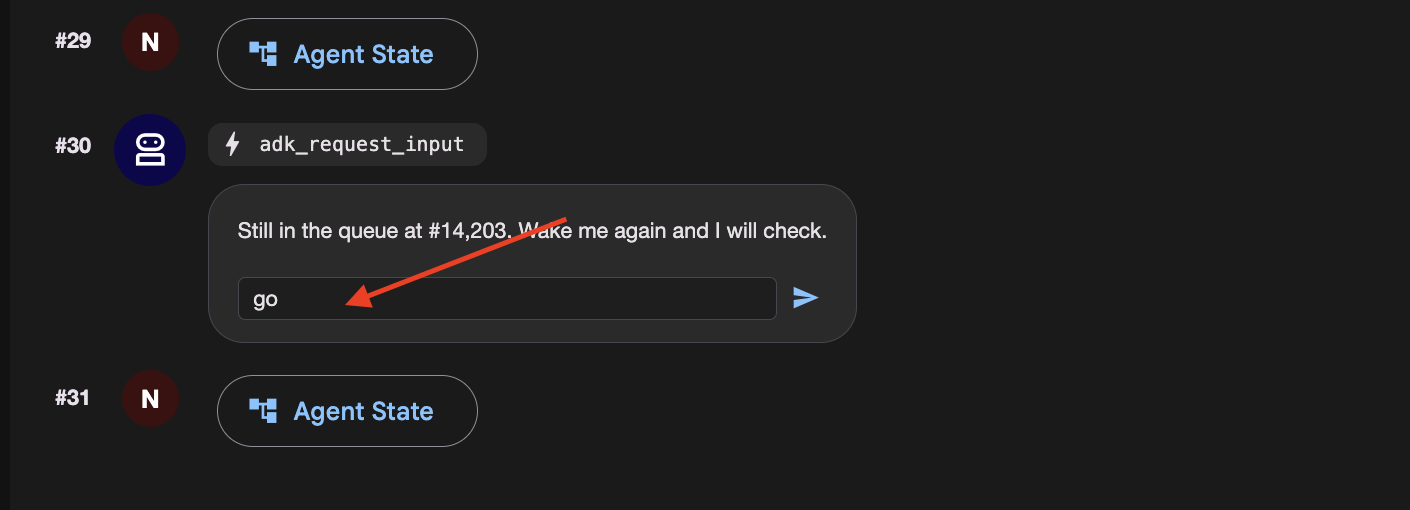
👉 Check the venue panel : one order, at a price inside what you agreed for that kind of seat.
How a graph asks a person a question
Open nightly.py and read agree_budget . Make three things true together, and expect the same failure when any one is missing: it asks forever.
@node(rerun_on_resume=True)              # 1. run again when woken
def agree_budget(node_input, ctx):
    answers = ctx.resume_inputs or {}    # 3. where the answer arrives

    said = answers.get(ASK_BUDGET)
    if not said:
        return RequestInput(
            interrupt_id=ASK_BUDGET,     # 2. STABLE id, not the default
            message="What are you willing to spend?",
        )
    ...
| without it the node is treated as done and skipped | |
a stable | the default is a fresh UUID per run, so there is nothing to look the answer up by | |
| where the answer lands. Not the return value of | |
The graph
It is step 8's graph with one node extra in front.
User-confirmed constraints are session-scoped and expire when the conversation ends. Persisting temporary limits across sessions risks turning one-off decisions into unintended permanent defaults.
10. The Cloud Stack
Laptops Sleep and Local Files Disappear
On your laptop, an agent depends on your computer staying awake, local SQLite databases, and local files. If you close your laptop lid or deploy to a cloud container that restarts, local files and memory disappear.
To run reliably in production:
- Cloud Compute : Run the agent in a container (like Cloud Run) that stays online.
- Durable Cloud Databases : Replace local files and SQLite with cloud services (Cloud SQL for session data, Cloud Storage for files).
- Cloud Timers : Use managed schedulers (like Cloud Scheduler and Pub/Sub) so the agent wakes up even when your laptop is turned off.
👉🔴 On the venue panel , press RESET THE VENUE . Every step starts from the same world: 8 shows, all seats available, clock at 1×.
👉💻 Move to the final code:
cd ~/monstertix
. ./set_env.sh
./use-solution.sh 10 --force
فایل | What changed |
| new. One FastAPI serving the chat page and the endpoint a scheduler calls |
| new. Ordinary python-slim and uvicorn. Nothing about it is ADK-specific |
| copied in, so the page ships in the same container as the agent |
| unchanged. Byte-for-byte the folder you finished step 9 with |
The page you already built
The** ADK web UI** is strictly a local debugging interface for inspecting state, event streams, and workflow graphs during development. It is not packaged for production deployment.
For production, use the standalone chat frontend built in Step 3. It handles user messaging and interaction interrupts via the /wake endpoint without exposing internal debugging controls.
مهاجرت وضعیت محلی به سرویسهای ابری
Stop the server and look at what it wrote:
sessions.db          a SQLite file next to the code
memory/userx.md      a markdown file you can open in an editor
artifacts/           seat maps written to a folder
While local files work well for development, they fail in production because Cloud Run containers use ephemeral, instance-local storage.
When running in Cloud Run:
- Instances scale to zero: When traffic stops, the container terminates and its local filesystem is deleted.
- Instances scale out independently: Multiple concurrent instances do not share disk space, each runs with its own isolated filesystem.
If an agent saves a queue ticket or session state to a local SQLite file (sessions.db), subsequent requests routed to a new or different container instance will find an empty database. To maintain durable state across scaling and restarts, local files must be replaced with managed external services.
What you need instead is state that outlives any one container. Three services, one for each file:
On your laptop | In the cloud | آنچه هست |
| SQL ابری | a managed Postgres database. It exists whether or not anything is running |
| فضای ذخیرهسازی ابری | a bucket. Files as objects, reachable from every instance at once |
| فضای ذخیرهسازی ابری | the same bucket |
| Cloud Scheduler | a cron that Google runs. Your terminal is not an alarm clock |
Create them
Provision a PostgreSQL database, database user, and Cloud Storage bucket. Note that Cloud SQL instance creation takes several minutes and was initiated in the background during setup.sh .
👉💻 Collect it, and make the rest:
cd ~/monstertix
./setup-cloud-state.sh
→ instance  RUNNABLE
→ database  adk created
→ user      adk created
→ bucket    created
→ memory    memory/userx.md → gs://your-project-agent-you/memory/
✓ durable state ready. Written to .env
That script created four things, one per row of the table above, and wrote two URIs into .env :
CLOUD_SESSION_SERVICE_URI=postgresql+asyncpg://adk:...@/adk?host=/cloudsql/proj:region:instance
CLOUD_ARTIFACT_SERVICE_URI=gs://your-project-agent-you/artifacts
استقرار عامل با تریگرهای زمانبندیشدهی مدیریتشده
With the services ready, give the agent its permanent home.
👉💻 Three or four minutes. Start it and read on:
cd ~/monstertix
. ./set_env.sh
./deploy-agent.sh
The script builds a container image from agent/ , deploys it to Cloud Run, and provisions the supporting event-driven infrastructure.
The complete deployment consists of five distinct components:
1. gcloud run deploy       the container: your agent, the graph, and the page
2. a Pub/Sub topic         a queue for messages
3. a service account       an identity, so the message is allowed in
4. a push subscription     topic ──► /trigger/wake
5. a Cloud Scheduler job   the alarm clock, on a cron
Cloud Scheduler as the Trigger Source
Cloud Scheduler replaces local execution timers (clock.py) with a managed cron service that persists independently of local terminal sessions, handles automated retries, and supports timezone scheduling.
Pub/Sub as the Message Decoupling Layer
Placing a Pub/Sub topic between Cloud Scheduler and Cloud Run provides three architectural advantages:
- Message Durability: Queues incoming trigger events if the Cloud Run service is cold-starting, redeploying, or temporarily unavailable.
- Built-in Retry Policies: Automatically retries transient delivery failures without requiring custom application-level retry logic.
- Fan-Out Scalability: Enables multiple downstream services to subscribe to the same schedule events without reconfiguring the scheduler.
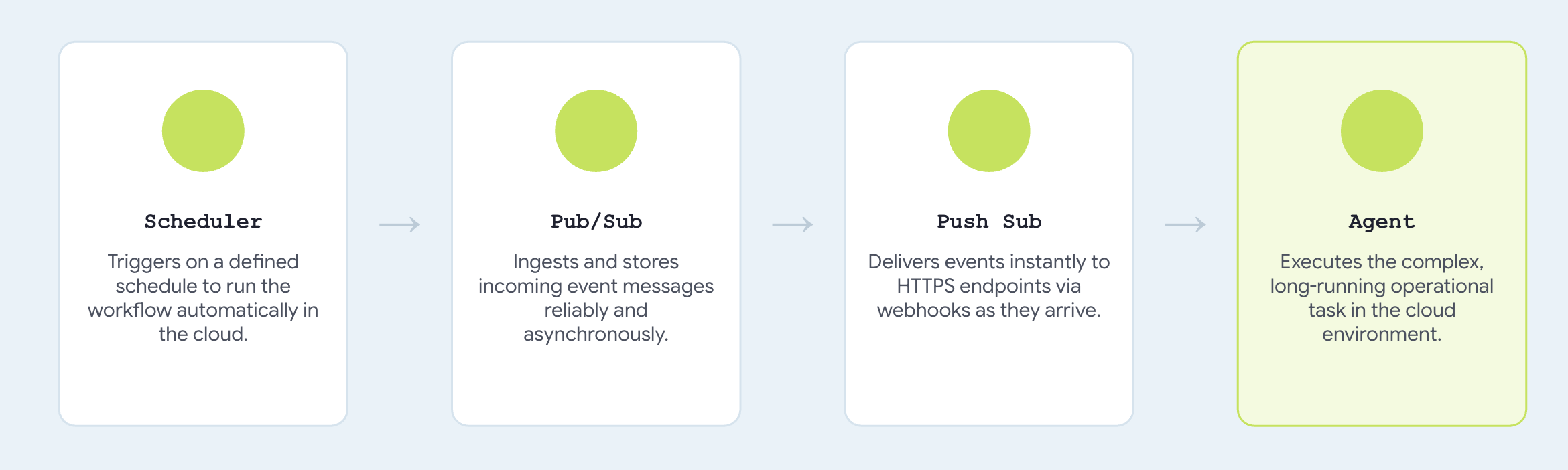
Configuring trigger_sources=["pubsub"] registers a push endpoint compatible with standard Pub/Sub envelope payloads, translating incoming messages directly into agent invocation events.
→ agent    https://concert-you-xxxx.run.app
→ topic    presale-you created
→ iam      concert-trigger@your-project... may invoke concert-you
→ push     → https://concert-you-xxxx.run.app/trigger/wake
→ schedule 0 3 * * *
Talk to it
👉 Open the agent's URL in a browser. 👉✨ Ask it to book:
Book me 3 tickets for The Midnight Signal in Tokyo. Best seats in the house,
I don't want the cheap ones.
It should ask what you are willing to spend
👉✨ Answer the way you would out loud, then confirm:
up to 250 a seat for the good ones
The run is parked in the queue right now.
👉🔴 Press SKIP THE WAIT on the venue panel, so the queue is ready when the message arrives.
To run it on a real schedule , the job has to be enabled — jobs run refuses on a paused one with Job.state must be ENABLED :
gcloud scheduler jobs resume presale-$(gcloud config get-value account | cut -d@ -f1) \
  --location=$GOOGLE_CLOUD_REGION
👉 Within a few seconds, the agent executes the purchase within the confirmed budget limits and returns an order confirmation automatically.
👉🔴 Check the venue panel. One order.
Here's how you can make it run every 5 mins:
gcloud scheduler jobs update pubsub presale-$(gcloud config get-value account | cut -d@ -f1) \
  --location=$GOOGLE_CLOUD_REGION --schedule="*/5 * * * *"
تمیز کردن
Count two things deployed: the venue, and the agent beside it. Both scale to zero, so an idle one costs nothing. Delete them anyway.
./destroy-agent.sh          # service, topic, subscription, scheduler job
./destroy-venue.sh
Notice those deliberately leave Cloud SQL and the bucket alone, because they hold your data and both keep billing . When you are certain you are finished:
./destroy-agent.sh --all
Everything else is local. Delete the folder when you are done, or keep it and run it against your own project for as long as you like.
The agent, its tools, its callbacks and the budget did not change. Two URIs and one environment variable did.
11. System Overview and Troubleshooting Guide
Environment Differences: Local vs. Cloud Architecture
Your laptop | In the cloud | What changed |
| SQL ابری | a connection string |
| | a URI |
| | a path |
| one Cloud Run service | a |
| Cloud Scheduler → Pub/Sub | |
you, at the keyboard | | a default, overridden per request |
The core agent implementation, including root_agent , tool definitions, callback guards, and budget enforcement remains completely unchanged. Comparing solutions/step10_deploy/concert/ with Step 9 shows an exact byte-for-byte match, validating how ADK's service abstraction separates infrastructure configuration from agent logic.
If you got stuck
Reach for the complete working code at any step:
./use-solution.sh N --force          # any step. resets memory + sessions + artifacts
./use-solution.sh N --force --keep   # code only, leave state alone
When something breaks
علامت | رفع |
| Wrong id. |
Model returns 404 | |
| Something already has port 8000 or 8090. |
Agent can't reach the venue | |
Queue never advances | Press SKIP THE WAIT . At 1× the queue will not reach the front on its own |
A second queue ticket appears on the panel | You answered in the chat box instead of the |
Dropdown is empty, or the app will not load | |
| Expected. |
Everything is strange | Press RESET THE VENUE , then |
Memory file full of duplicate bookings | |
| |
Cloud Shell timed out | Start |