

1. Прежде чем начать
Большинство сайтов по продаже билетов ставят покупателей в очередь, чтобы предотвратить сбои серверов и справиться с высоким спросом. Вы начинаете покупку и оказываетесь в очереди из 14 000 человек. Очередь движется сорок минут. Когда наконец подходит ваша очередь, у вас есть короткий промежуток времени, чтобы выбрать места и оплатить билет. Если вы пропустите этот промежуток, ваше место в очереди будет передано другому человеку.
Многие задачи в реальной жизни следуют этой схеме: задача, которая занимает гораздо больше времени, чем один разговор, и выполняется во внешней системе, которую вы не контролируете. Примеры включают ожидание пополнения запасов у поставщика, ожидание одобрения заявки или ожидание в очереди.
Стандартные агенты ИИ работают в рамках одного диалога в чате, который длится несколько секунд и носит исключительно реактивный характер. Они не могут ждать 40 минут или действовать автономно. Для решения этой проблемы необходим долго работающий агент : система, которая остается в спящем режиме во время длительного ожидания, сохраняет контекст при перезапуске процесса и автоматически возобновляет работу при активации внешним триггером.
Этот мастер-класс шаг за шагом покажет вам, как создать агент для организации очереди на покупку билетов на концерт, охватывая основные архитектурные шаблоны, необходимые для долгосрочно работающих агентов в Google Cloud.
Что вы построите
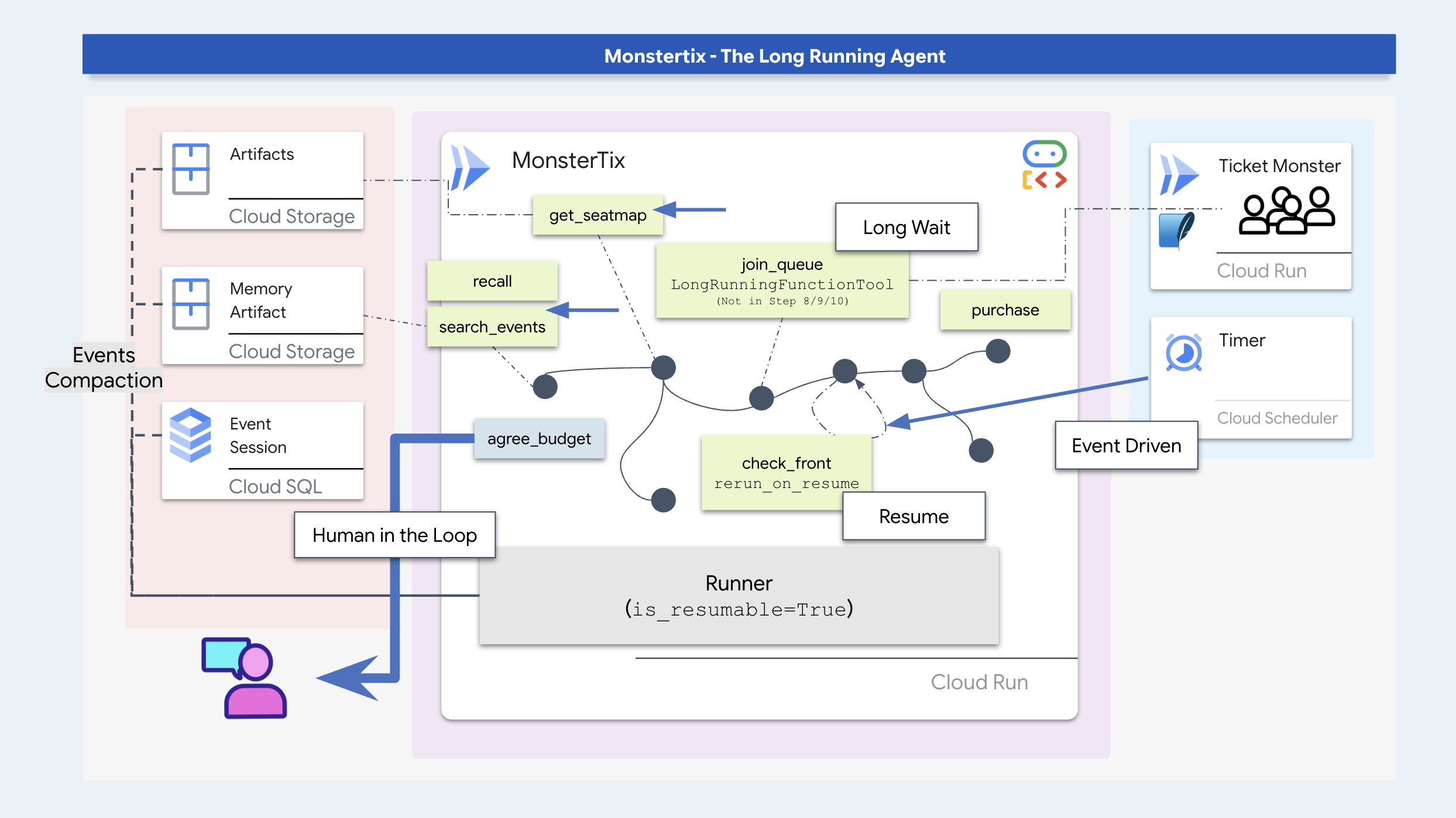
На этом семинаре вы создадите долго работающую систему бронирования билетов и изучите ключевые шаблоны программного обеспечения для агентской деятельности:
- Приостановка и возобновление процесса : Приостановите выполнение агента на время длительных периодов ожидания и возобновите его с помощью внешних триггеров.
- Надежное хранение состояния : сохранение состояния и артефактов диалогов при перезапуске процессов с помощью SQLite/Cloud SQL и Cloud Storage.
- Защита от устаревания и идемпотентность : проверяйте динамические данные (например, наличие мест) перед выполнением действий и используйте ключи идемпотентности для предотвращения дублирования транзакций.
- Графы рабочих процессов ADK : структурирование выполнения с использованием детерминированных узлов кода для процедурных правил и узлов агентов для принятия решений в контексте.
- Подтверждение с участием человека : Приостановка выполнения для сбора и сохранения явных лимитов расходов от пользователя.
- Развертывание в облаке : контейнеризируйте и разверните агента в Cloud Run с помощью Cloud Scheduler и триггеров Pub/Sub.
Настройте
Для начала подготовьте свою среду и убедитесь, что у вас есть доступ к Google Cloud. Я рекомендую запускать это в Cloud Shell, в котором уже есть все необходимые инструменты. Просто проверьте, достаточно ли у вас места и может ли ваша учетная запись создавать проекты.
👉💻 Клонируйте репозиторий и запустите команду setup:
cd ~
git clone https://github.com/gca-americas/monstertix
cd ~/monstertix
./setup.sh
Этот вопрос вам зададут один раз:
  Which Google Cloud project should this workshop use?
  Find yours at https://console.cloud.google.com  (top-left picker)

  Project id [YOUR_PROJECT_ID]:
Затем выполняются следующие действия в указанном порядке:
виртуальное окружение | Создаёт виртуальное окружение | |
войти | | |
проект | | |
API | включает в себя десять необходимых для семинара компонентов: | |
| Записывает идентификаторы вашего проекта, региона и модели, чтобы каждый скрипт и | |
проверка модели | Это приводит к одному реальному звонку в Gemini, поэтому некорректный идентификатор проекта или модели здесь приводит к ошибке. | |
семя | Создается сессия, которой уже два дня, и на шаге 3 она открывается. | |
Облачный SQL | запускает экземпляр PostgreSQL в фоновом режиме. | |
место проведения | Развертывает собственный фиктивный сервис продажи билетов в Cloud Run. | |
👉💻 Активируйте окружающую среду:
cd ~/monstertix
source .venv/bin/activate
Теперь ваша командная строка начинается с (.venv) .
Обзор сценария
В этом сценарии семинара ваш агент бронирует два билета на концерт («Полуночный сигнал» в Амстердаме). В памяти пользователя хранятся следующие предпочтения:
- Это должно быть выступление в выходные дни (Сэм не может присутствовать в будние вечера).
- Избегайте мест на верхних ярусах стадиона Ziggo Dome (плохая видимость).
- Целевая цена составляет приблизительно 200 долларов за билет, с максимальным лимитом в 250 долларов.

Проверьте установку.
👉💻 Одна команда, восемь тиков:
./verify.sh
  Checking the rig

  ✓ adk installed                      adk, version 2.6.2
  ✓ adk 2 apis                         App + ResumabilityConfig
  ✓ workflow graphs                    Workflow + node
  ✓ async sqlite drivers               sqlalchemy + aiosqlite + greenlet
  ✓ project                            your-project-id
  ✓ vertex ai                          no API keys anywhere
  ✓ seeded session                     13 events, two days old
  ✓ venue                              https://venue-you-xxxx.us-central1.run.app

  Ready. Cloud SQL is still building in the background and nothing
  before step 10 needs it.
👉 Откройте вторую вкладку браузера :
Где | Что это такое |
| Панель управления, ваши кнопки. |
2. Достичь автономии с помощью подсказок?
Подсказки не могут запуститься сами по себе.
Подсказка — это просто текст, передаваемый модели ИИ при возникновении звонка. Она не может работать самостоятельно, активироваться или начинать новый звонок.
Если в подсказке агенту указать «обратитесь через 10 минут», то после окончания текущего хода ничего не произойдет. У модели нет внутренних часов или цикла. Чтобы сделать агента автономным, что-то вне его должно его разбудить и вызвать.
Запустите буровую установку
Начнём с тестирования инструментов разработчика. adk web запускает веб-интерфейс ADK , интерфейс разработки, поставляемый с ADK. Он позволяет взаимодействовать с создаваемым агентом без предварительного написания фронтенда и показывает то, что не может отобразить окно чата, например, каждый вызов инструмента и его аргументы, состояние сессии по мере его изменения, сохранённые агентом артефакты и необработанные события. В продакшене вы бы его не стали показывать. Это лучший способ ознакомиться с работающим агентом во время обучения. На шаге 3 вы создаёте фронтенд, который вы действительно будете показывать, а на заключительном шаге развёртываете его.
👉🔴 На панели управления залом нажмите «СБРОСИТЬ ЗАЛ» . Каждый шаг начинается с одного и того же места: 8 представлений, все места свободны, часы показывают 1×.
👉💻 Терминал 1 — загрузите код этого шага и запустите веб-интерфейс ADK :
cd ~/monstertix
. ./set_env.sh
./use-solution.sh 2 --force
adk web agent --port 8000 --allow_origins "*"
use-solution.sh копирует завершенный код шага в папку agent/ , где вы работаете. Каждый шаг начинается с этого кода и выводит, какие файлы были изменены, чтобы вы знали, что читать дальше.
С чего вы начинаете:
Файл | Что это такое |
| Агент — имя, модель, инструкция, список инструментов. |
| |
| HTTP-клиент для заведения. Ничего интересного. |
| Какую модель использовать, и проверка работоспособности ваших учетных данных. |
. ./set_env.sh активирует виртуальное окружение, загружает ваш проект и модель, а также экспортирует $WORKSHOP — абсолютный путь к ~/monstertix . Запустите его в каждом открытом терминале. Он выведет на экран то, что было установлено:
  folder   /home/you/monstertix
  project  your project id
  model    gemini-2.5-flash (We'll avoid using 3.x for now to avoid high usage demands)
  venue    https://venue-yourname-xxxx.run.app
👉 Откройте первую вкладку браузера :
Где | Что это такое |
Веб-интерфейс ADK | |
Поговори с ним
👉✨ В веб-интерфейсе ADK введите:
I want to see The Midnight Signal. I'm in Amsterdam, going with Sam, budget around $200 each.
Он выполняет поиск по туру, анализирует схемы рассадки и учитывает ваш бюджет и компанию. Это действительно компетентный помощник. Однако, когда в 10:00 начинается предварительная продажа, агент не срабатывает автоматически, поскольку не запущен ни один процесс или фоновый триггер.
Прочитайте, что только что произошло.
В центре экрана отображается не только журнал чата. Каждый шаг хода пронумерован, включая вызовы инструментов:
  ▸ I want to see The Midnight Signal. I'm in Amsterdam...   ← user input
  ⚡ search_events({"city": "Amsterdam"})                     ← tool execution
  ✓ search_events                                            ← venue API response
    Two Amsterdam shows: Tuesday 10 Nov and Saturday 14 ...   ← model response
👉 Щелкните по строке ⚡ . На левой панели отобразятся аргументы, выбранные моделью. Щелкните по ✓ под ними, чтобы увидеть полученный JSON-ответ.
Информация о туре отсутствует в обучающих данных модели или в подсказке. Агент получил эти данные, выполнив инструмент search_events , который обратился к API площадки.
Откройте код, который вы только что запустили.
Вы уже видели, как это работает, и видели трассировку. Теперь посмотрите на сам код.
agent/concert/
├── agent.py     the agent — about twenty lines
├── tools.py     what it can do
├── venue.py     an httpx wrapper, nothing interesting
└── config.py    which model, and a credentials check
👉💻 Откройте файл agent/concert/agent.py . Весь код агента находится в самом низу файла:
INSTRUCTION = """
You help someone plan a trip to see a band on tour.

You can search tour dates and read seat maps. Be concrete: name the show, the
city, the section, and the price...
"""

root_agent = Agent(
    name="concert",
    model=MODEL,
    instruction=INSTRUCTION,
    tools=[search_events, get_seatmap],
)
Имя, модель, описание того, как должен вести себя агент, и список функций Python. Вот и всё, что представляет собой Agent . adk web обнаружил это, потому что файл называется agent.py , а переменная — root_agent .
👉💻 Теперь agent/concert/tools.py :
def search_events(city: str = "", weekday: str = "") -> dict:
    """List tour dates. Call with no arguments to see the whole tour.

    This venue sells one artist and one tour, so there is nothing to search by
    name — never ask the user which artist they mean.

    Args:
        city: Optional. Filter to one city, e.g. "Amsterdam".
        weekday: Optional. Filter to one weekday, e.g. "Saturday".
    """
    return venue.get("/events", city=city, weekday=weekday)
Обычная функция. Нет декоратора, нет регистрации, нет схемы для написания. ADK считывает сигнатуру и строку документации и создает определение инструмента, которое видит модель, поэтому эта строка документации является несущей, и поэтому удаление одного аргумента изменило поведение модели.
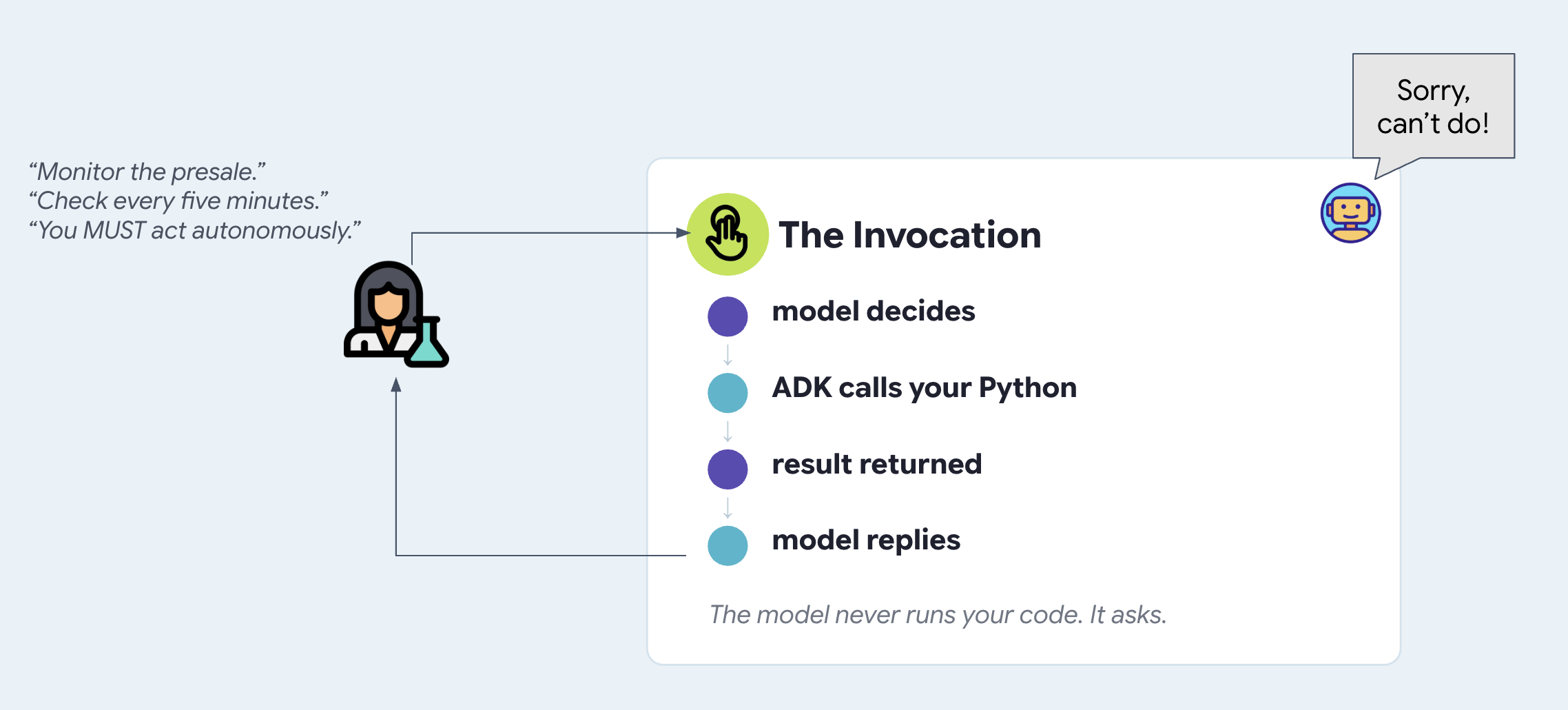
Модель никогда не выполняет ваш код. Когда вы увидели search_events({"city": "Amsterdam"}) , модель запрашивала именно этот вызов. ADK выполнил функцию, вернул результат, и модель написала об этом предложение. Цикл выглядит так:
👉 Значки в левом нижнем углу переключают отображаемый на панели контент. Второй значок — это график агентов — попробуйте, и вы увидите два инструмента:

Так скажи ему, чтобы не спал.
Что бы вы сделали, чтобы это исправить? Попробуйте то, с чего большинство людей начинают. Вспомните INSTRUCTION из шага 1, текст, который передаётся модели на каждом этапе, и перепишите её.
👉💻 Откройте agent/concert/agent.py . Ниже INSTRUCTION находится второй файл, уже написанный для вас. Можете попробовать изменить его самостоятельно, если хотите:
PROACTIVE_INSTRUCTION = """
You are a proactive ticket-buying assistant.

Monitor the presale for The Midnight Signal. The moment it opens at 10:00 on
Tuesday, buy two tickets for the Amsterdam Saturday show — do not wait to be
asked, and do not wait for me to say anything. Act on your own.

Keep checking until the tickets are bought.
"""
# agent/concert/agent.py
root_agent = Agent(
    name="concert",
    model=MODEL,
    instruction=PROACTIVE_INSTRUCTION,     # ← was INSTRUCTION
    tools=[search_events, get_seatmap],
)
👉💻 В терминале 1 перезапустите:
cd ~/monstertix
adk web agent --port 8000 --allow_origins "*"
👉✨ Расскажите ему план точно так же, как вы бы рассказали его человеку:
I want to see The Midnight Signal in Amsterdam with Sam. The presale opens at 10:00 on Tuesday. Grab us two tickets the moment it opens.
Оно согласится, и это будет звучать так, будто оно действительно так считает.
👉 Теперь подождите. Ничего больше не печатайте. Следите за панелью.
Подождите минутку. Ничего не происходит!
Почему этот вариант ответа изначально был невозможен
Прочитайте это еще раз свежим взглядом. Следите. С момента открытия. Продолжайте проверять. Каждый из этих пунктов описывает события, происходящие с течением времени .
Теперь вспомним, что такое instruction= . Это строка, передаваемая модели в составе запроса в момент отправки сообщения . Между ходами её никто не считывает.
# agent/concert/agent.py
root_agent = Agent(
    instruction=PROACTIVE_INSTRUCTION,   # read on invocation
    ...                                  # ...and there was no invocation
)
Инструкция не может вызывать функцию, в которой она написана.
Варианты быстрого реагирования, которые не увенчались успехом
Попытки принудительного автономного выполнения с помощью командных инструкций терпят неудачу независимо от формулировки. Типичные примеры командных инструкций:
- «Установите таймер на 10:00 вторника и купите билеты тогда».
- «Проверяйте каждые пять минут, открылась ли предварительная продажа».
- «Действовать автономно, не дожидаясь ввода пользователя».
Все попытки терпят неудачу по одной и той же причине: подсказки считываются только при вызове функции. Без внешнего вызывающего объекта код между ходами не выполняется.
3. Период покоя, управляемый событиями
Агенты не бодрствуют вечно
Постоянно работающий процесс, осуществляющий непрерывный опрос, расходует память, потребляет ресурсы и приводит к сбоям при переходе ноутбука в спящий режим или перезагрузке.
Вместо того чтобы заставлять агента работать непрерывно в ожидании, долго работающий агент должен полностью перейти в спящий режим. Внешнее событие (например, таймер, веб-хук или сообщение) пробуждает агента только тогда, когда есть реальная работа.
👉🔴 На панели управления залом нажмите «СБРОСИТЬ ЗАЛ» . Каждый шаг начинается с одного и того же места: 8 представлений, все места свободны, часы показывают 1×.
👉💻 Загрузите код этого шага:
cd ~/monstertix
. ./set_env.sh
./use-solution.sh 3 --force
Обратите внимание, что было установлено: monstertix/ , содержащий сервер, часы и ещё одну вещь, которую вы ещё не видели. Убедитесь, что agent/ остался без изменений, потому что на этом этапе ничего в агенте не меняется. Запомните это, в этом и суть.
Файл | Что это такое |
| Новый веб-сервер с базой данных Runner. |
| Новый. Что-то, что знает время и обращается к серверу. |
Оно состоит из двух частей, и они хранятся в двух файлах на всем пути до облака: 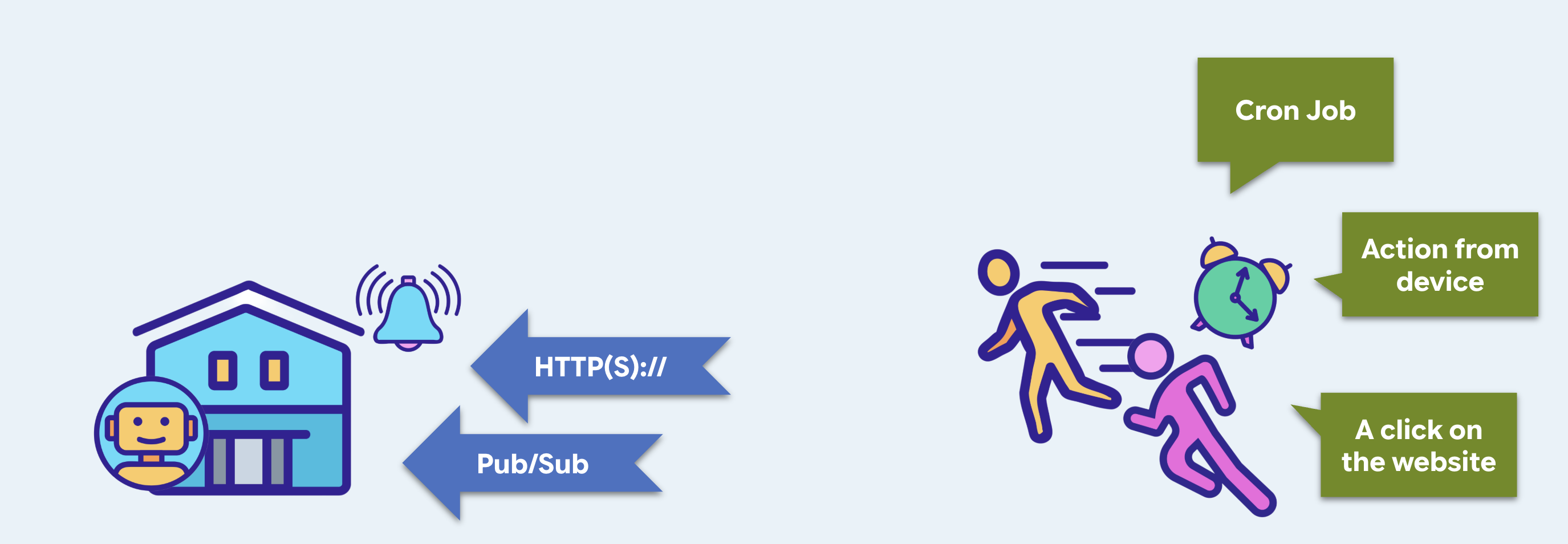
становится на шаге 10 | |||
спусковой крючок | конечная точка, с которой можно запустить агента | Cloud Run | |
триггер | что-то с часами, которое это называет | Планировщик облачных задач | |
Триггер — ваш собственный веб-сервер
Да, веб-сервер. Прежде чем кто-либо сможет на него позвонить, что-то должно быть запущено и прослушивать соединение . Веб-интерфейс ADK из предыдущих шагов — это интерфейс разработки, который, по стечению обстоятельств, позволяет запускать агент.
👉💻 Откройте monstertix/server.py :
from google.adk.runners import Runner
from google.adk.sessions import InMemorySessionService
from concert.agent import root_agent

session_service = InMemorySessionService()
runner = Runner(
    agent=root_agent,
    app_name="concert",
    session_service=session_service,
)

@app.post("/wake")
async def wake(payload: dict = Body(default={})):
    session_id = f"wake-{uuid.uuid4().hex[:8]}"          # brand new, every time
    await session_service.create_session(...)

    async for event in runner.run_async(
        user_id=USER_ID, session_id=session_id,
        new_message=types.Content(role="user",
                                  parts=[types.Part(text=payload["message"])]),
    ):
        ...
Agent не работает сам по себе. Это описание: имя, модель, инструкция, список инструментов. Что-то должно принимать входящее сообщение, находить нужную сессию, передавать модели информацию о текущем разговоре, выполнять запрошенные инструменты, передавать результаты обратно, циклически повторять действия до тех пор, пока не прекратится вызов инструментов, и записывать каждый шаг в хранилище. Это что-то и есть Runner ).
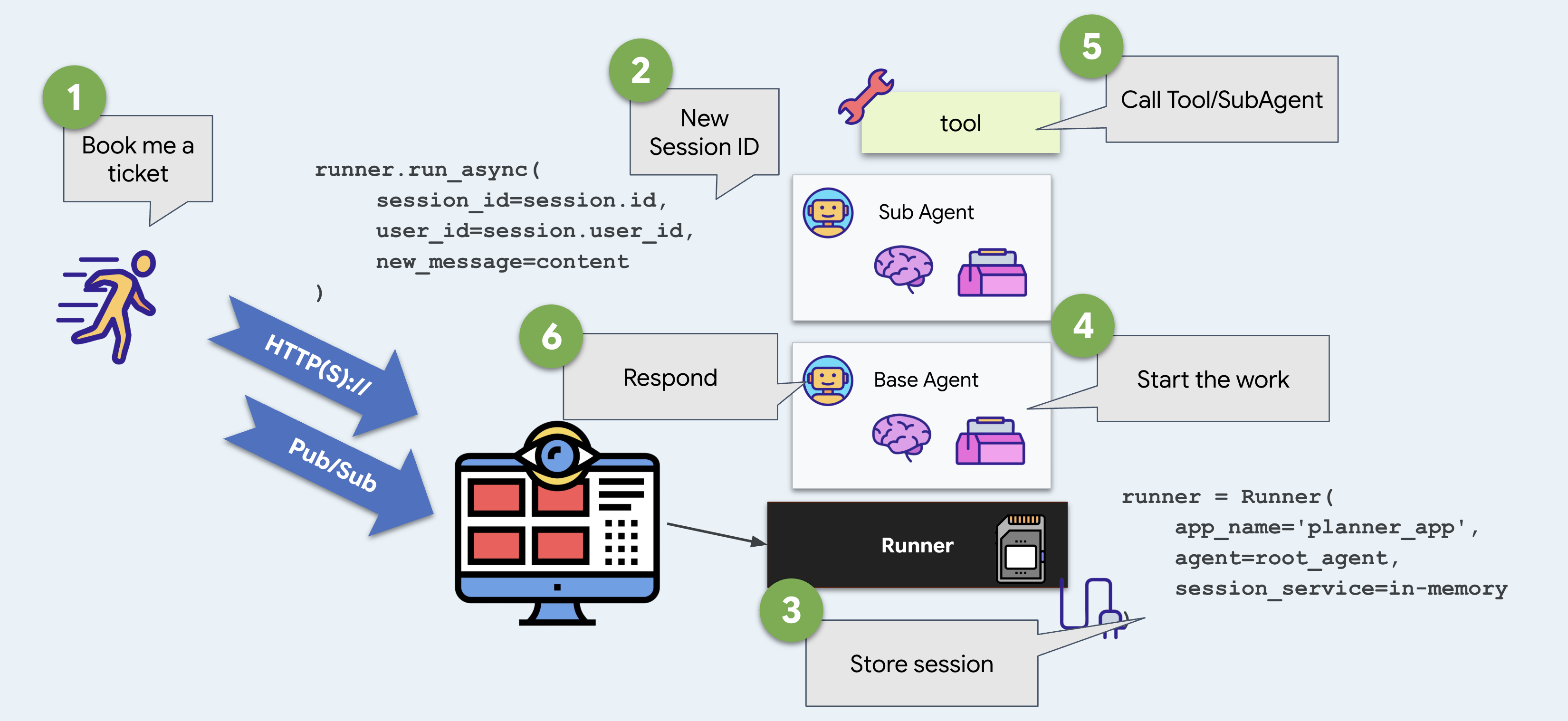
В веб-интерфейсе ADK есть готовый шаблон по умолчанию. Здесь же вы создаете его самостоятельно, и в этом вся разница между веб-интерфейсом ADK и тем, что вы можете развернуть самостоятельно.
👉💻 Терминал 2 — запустите его:
Старт бегуна,
cd ~/monstertix
. ./set_env.sh
python -m monstertix.server
[server] agent concert · gemini-x-flash
[server] listening on http://xxxx_URL/wake
[server] nothing will happen until something calls it. Ctrl-C to stop.
Прочитайте последнюю строку. Триггер запущен, агент загружен, но ничего не происходит. Разделите эти две идеи: возможность вызова и сам вызов.
И, раз уж мы здесь, входную дверь.
Несмотря на то, что adk web — отличный инструмент разработки, его не следует включать в состав готового продукта. Не стоит активировать его при развертывании в продакшене, и вы бы не стали рекомендовать его клиентам, если бы он это делал. Таким образом, один и тот же сервер также обслуживает страницу.
👉 Откройте http://127.0.0.1:8090 в браузере — тот же адрес.
Представляем MonsterTix. Окно чата, имя в углу, две кнопки. Он отправляет сообщения на /wake и отображает полученный ответ, и будет работать без изменений с любым конечным пунктом, отвечающим таким же образом.
На странице | Что находится под ним |
разговор | |
+ Новая сессия | Новый идентификатор сессии — новый разговор, а позже — новый бюджет. |
Сброс памяти | Удаляет все сессии и файл памяти. Сначала запрашивает подтверждение и показывает точное местоположение этого состояния. |
👉✨ Скажите что-нибудь — What Amsterdam dates are there? — и посмотрите «Терминал 2» . Тот же Runner , тот же агент, те же фразы. Изменился только звонивший.
Запусковой механизм — это нечто, знающее время.
👉💻 Откройте monstertix/clock.py . Посмотрите код.
time.sleep(args.delay)                                    # wait
while True:
    client.post(f"{TRIGGER_URL}/wake",                    # knock
                json={"message": args.message})
    if not args.every:
        return                                            # once, unless told otherwise
    time.sleep(args.every)                                # or again, forever
Это очень простой механизм: сон, POST, возможно, повтор. Каждый планировщик, который вы использовали, делает то же самое, плюс повторные попытки, учет часовых поясов и гарантия того, что он сохранится после перезапуска.
👉💻 Терминал 3 — выстрелите один раз через 10 секунд:
cd ~/monstertix
. ./set_env.sh
python -m monstertix.clock --in 10
[clock] target   http://127.0.0.1:8090/wake
[clock] first fire in 60s, once only
[clock] go and watch the other terminal — do not touch the keyboard
👉 А теперь прекратите печатать. Без сомнения. Смотрите «Терминал 2».
Минуту спустя, когда за клавиатурой никого не оказалось:
[clock]  firing → POST /wake
[server] woken · session wake-23930983
[server]   called search_events
[server]   called purchase
[server]   said   I've purchased 2 tickets for The Midnight Signal in
                  Amsterdam on Saturday, section A. Your total is 420.
[clock]  done. the agent ran and you were not involved.
Это ответ на шаг 2. Что-то вне агента вызвало это, и этим чем-то были sleep и HTTP-запрос.
👉💻 Ctrl-C оба раза, когда посмотрите видео несколько раз. Для повторного просмотра используйте --every 30 .
Теперь прочитайте, что там было написано.
«Я купил два билета на концерт The Midnight Signal в Амстердаме, секция А, за 420 долларов».
👉🔴 Проверьте панель управления местом проведения мероприятия , и вы увидите, что билет куплен.
Так что же всё ещё не так?
Оно что-то купило. Посмотрите, что ему пришлось гадать. Оно выбрало Амстердам и секцию А, потому что это было первое, что оно нашло, а вы сказали агенту купить это напрямую, и оно понятия не имеет, что Сэм не может работать по вечерам в будние дни. Агент, который действует на основе догадок в 3 часа ночи, хуже того, кто ничего не делает .
Проснуться — это проще простого. Агент, который просыпается ни с чем — без истории, без предпочтений, без того, чтобы его слушали, — еще не стоит того, чтобы его просыпаться.
4. Управление жизненным циклом контекста
Информация хранится в разных местах и в разное время.
Агент хранит информацию в нескольких местах: в диалоге чата, в состоянии сессии, в файлах (артефактах) или в долговременной памяти пользователя. Время хранения в каждом месте различно.
Если вы разместили информацию не в том месте:
- Оно исчезает слишком быстро : важные детали стираются после завершения чата.
- Временные факты задерживаются слишком долго : они загрязняют долговременную память и вносят путаницу в будущие разговоры.
Необходимо сопоставить каждый фрагмент информации с подходящим местом хранения и сроком службы.
Загрузите код
👉🔴 На панели управления залом нажмите «СБРОСИТЬ ЗАЛ» .
👉💻 В терминале 1 выполните:
cd ~/monstertix
. ./set_env.sh
./use-solution.sh 4 --force
Что изменилось со времени последнего шага:
Файл | Что изменилось |
| Добавлена |
| Новое. Наше собственное хранилище воспоминаний. |
| В списке есть еще три инструмента, и инструкция предписывает агенту использовать их. |
👉💻 Перезапустите агент в терминале 1 :
cd ~/monstertix
. ./set_env.sh
adk web agent --port 8000 --allow_origins "*" \
  --session_service_uri="sqlite+aiosqlite:///$WORKSHOP/sessions.db" \
  --artifact_service_uri="file://$WORKSHOP/artifacts"
Два флага, которые вы раньше не использовали:
Флаг | Что это такое |
| ADK записывает каждое сообщение, вызов инструмента и изменение состояния в виде строк (база данных SQLite). |
| Файлы, в которые агент сохраняет данные. (Файлы) |
Без них ADK хранит все данные в памяти и удаляет их при остановке процесса. Именно эти две настройки обеспечивают сохранение данных в памяти.
В базе данных sessions.db содержится предварительно созданная запись предыдущего разговора ( two-days-ago ) с 13 записанными событиями:
you    We're thinking about seeing The Midnight Signal. Me, Sam, and maybe Priya.
you    Sam can't do weeknights though, bailed on every single one.
you    Priya's out, she's away that weekend. Just me and Sam.
agent  Two it is. Still Saturday the 14th, still Amsterdam.
you    You said the upper bowl at Ziggo was bad last time?
Файл памяти, содержащий информацию о трех предыдущих бронированиях , memory/userx.md , который можно открыть в текстовом редакторе:
- Sam bails on weeknights. Every weeknight show we booked, Sam cancelled.
- Hates the upper bowl at Ziggo Dome, "couldn't see a thing" from section B.
- Comfortable spend is around $200 per ticket. $250 is the hard ceiling.
- Always books two seats, always together.
Вот почему важны янтарные ряды с билетами на будние вечера. Билет на вечернее представление на 10 долларов дешевле, на нем еще остались лучшие места, он находится в верхней части списка, и это неправильный вариант для этого человека. Агент может знать это только по файлу, созданному после последнего бронирования. Сохранится ли этот факт — это шаги 4 и 5.
Три добавленных нами инструмента
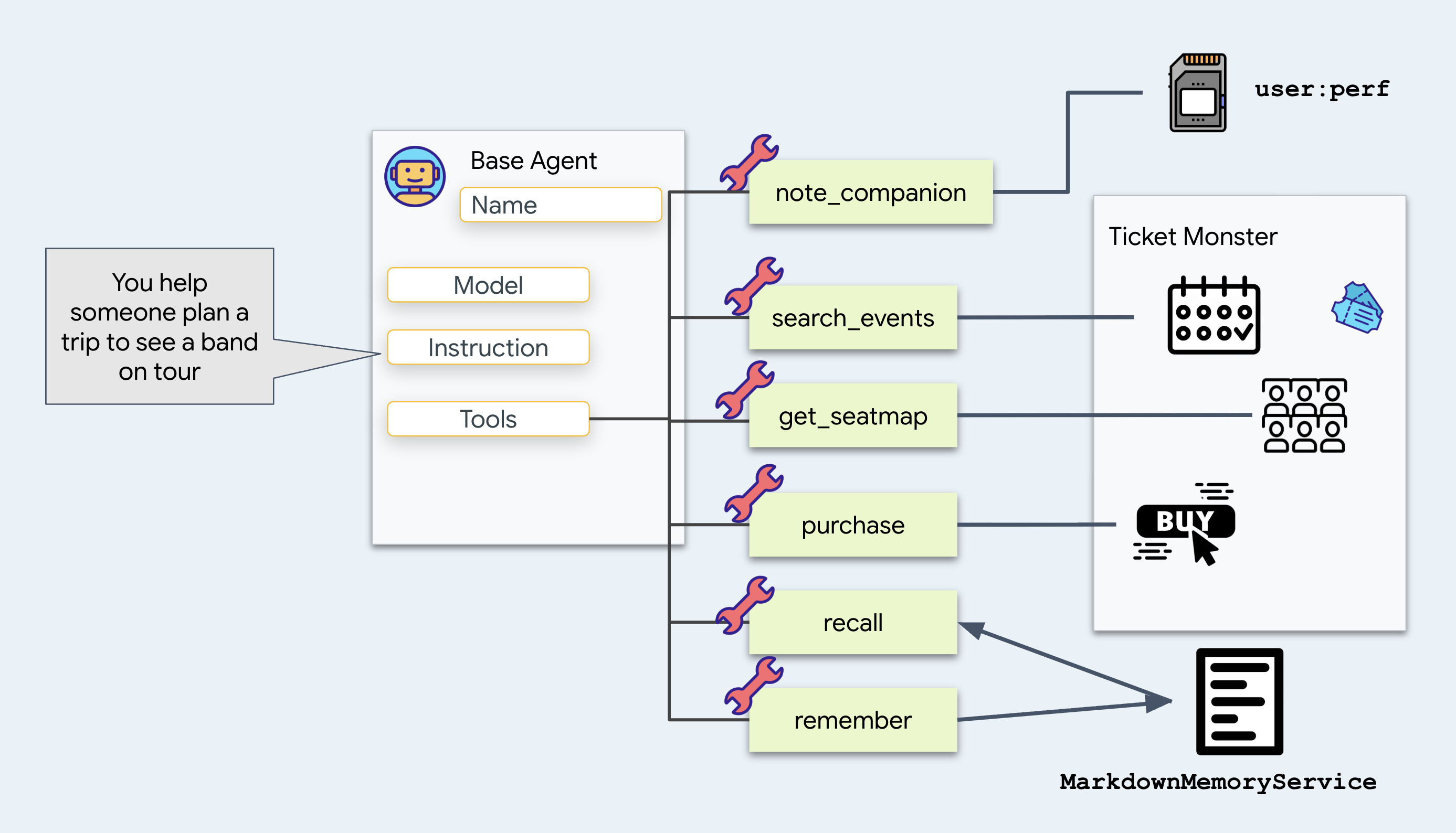
note_companion записывает, кто приходит и какие у них ограничения:
# agent/concert/tools.py
def note_companion(name: str, constraint: str, tool_context: ToolContext) -> dict:
    prefs = dict(tool_context.state.get("user:prefs", {}))
    prefs[name] = constraint
    tool_context.state["user:prefs"] = prefs
    return {"companions": prefs}
Добавьте это, потому что утверждение "Сэм не может работать по вечерам в будние дни" должно оставаться верным и на следующей неделе. Впишите это в user:prefs , чтобы это произошло, и наблюдайте, как часть имени user: сделает свою работу. Вернитесь к этому ниже.
recall
и
remember нужно прочитать и записать текстовый файл memory/userx.md . Задержите эти данные на мгновение.
👉 Теперь посмотрите на контекст двух мест, где находится магазин агента:
расположение | Что в нём содержится |
Состояние | Память этой сессии представлена в виде пар ключ/значение — вы находитесь здесь на шаге 4. |
Артефакты | файлы, сохраненные агентом, которые никогда не попадают в командную строку |
Посмотрите, что изменилось в
get_seatmap
Раньше программа возвращала полную схему рассадки. Теперь же она сохраняет схему в файл и возвращает краткое описание:
# agent/concert/tools.py
async def get_seatmap(event_id: str, tool_context: ToolContext) -> dict:
    seatmap = venue.get(f"/events/{event_id}/seatmap")       # about 6 KB of JSON

    part = types.Part(inline_data=types.Blob(
        mime_type="application/json",
        data=json.dumps(seatmap, indent=2).encode()))
    await tool_context.save_artifact(f"seatmap_{event_id}.json", part)

    summary = {"event_id": ..., "sections": [...], "captured_at": ...}
    tool_context.state["temp:seatmap"] = summary
    return summary
Вот почему эти изменения важны.
Каждый возвращаемый инструментом полезный груз добавляется в историю разговора и повторно отправляется модели при каждом последующем ходе. Возврат больших объектов JSON (например, схемы рассадки размером 6 КБ) увеличивает потребление токенов при каждом последующем ходе.
Сохраните это в файл и используйте одно имя файла. Пусть агент запросит подробную информацию с помощью load_artifact , если это потребуется, и ожидайте, что в большинстве случаев она ему никогда не понадобится.
Куда помещается файл: в службу артефактов.
Внимательно изучите строку в функции get_seatmap в файле agent/concert/tools.py :
await tool_context.save_artifact(f"seatmap_{event_id}.json", part)
tool_context поступает из ADK, который передает его вашему инструменту в качестве аргумента, а save_artifact — это метод этого параметра. Именно в этой строке ваш инструмент передает байты в ADK.
Затем ADK записывает их, используя ту службу артефактов, с которой он был запущен. Вы выбрали её с помощью флага:
--artifact_service_uri="file://$WORKSHOP/artifacts"
Компания ADK располагает тремя местами для их хранения:
URI | Куда попадают байты |
| Оперативная память. Исчезает при остановке процесса. Это значение по умолчанию, если не указан флаг. |
| Папка на диске. То, что вы используете сейчас. |
| Облачное хранилище. То, что используется развернутым агентом на последнем шаге. |
👉💻 Здесь мы выбираем файлы:
ls -R ~/monstertix/artifacts
Чтобы перенести данные с ноутбука в облачное хранилище, измените file:// на gs:// . (Мы увидим это на шаге 10).
Наше хранилище памяти
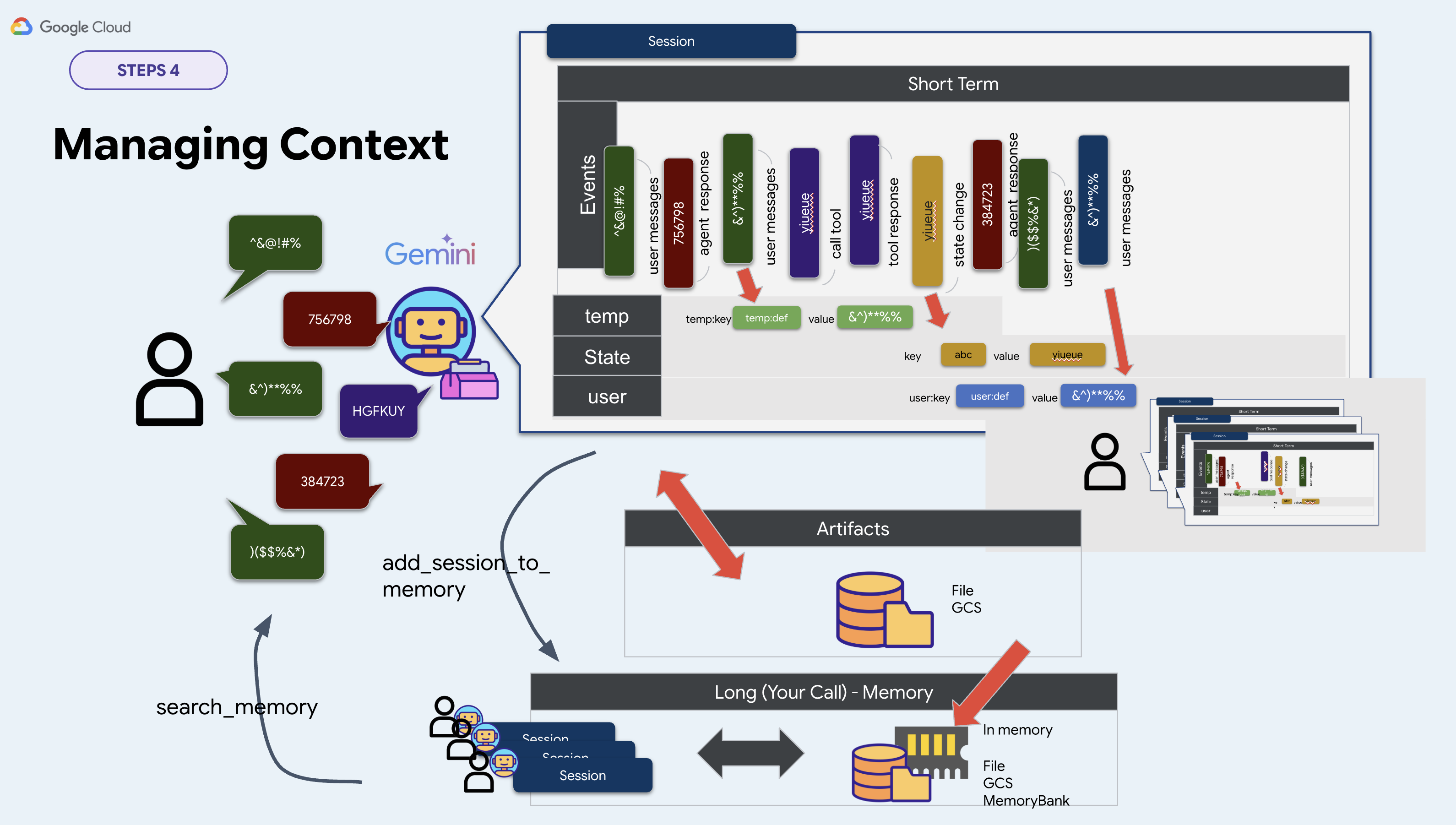
ADK предоставляет интерфейс для работы с долговременной памятью, называемый BaseMemoryService . Он имеет два метода:
# google.adk.memory.BaseMemoryService — ADK's interface, not your file
async def add_session_to_memory(session)                   # take a conversation in
async def search_memory(*, app_name, user_id, query)       # hand memories back
В ADK поставляются три его реализации:
Сорт | URI | Что ему нужно |
| | Ничего. Всё теряется, когда процесс останавливается. |
| | Корпус Vertex AI RAG |
| | ресурс Agent Engine |
Для этого семинара мы напишем свой собственный код. Исключим InMemoryMemoryService , который забывает всё при остановке процесса, и два других варианта, требующих облачных ресурсов, создание которых занимает минуты. Вместо этого выберем файл, поскольку его можно предварительно заполнить и прочитать в редакторе. Так что возьмите memory.py в качестве собственной реализации, а мы будем хранить всё в файле Markdown:
class MarkdownMemoryService(BaseMemoryService):

    async def search_memory(self, *, app_name, user_id, query) -> SearchMemoryResponse:
        path = self._path(user_id)                      # memory/userx.md
        return SearchMemoryResponse(memories=[
            MemoryEntry(content=types.Content(
                role="user", parts=[types.Part(text=path.read_text())]))])
SearchMemoryResponse и MemoryEntry — это типы данных ADK, а Memory Bank возвращает те же объекты. За одним из них стоит управляемый сервис. За нашим — файл.
Выберите файл по одной причине: вы можете открыть его и прочитать. Вся долговременная память вашего агента — это страница текста.
Так куда же его направить?
Подводя итог, в рамках этого семинара два из трех сервисов выбираются из командной строки. Третий сервис мы реализовали самостоятельно по вышеуказанной причине:
Услуга | Где вы это установите | Этот мастер-класс |
сессия | | |
артефакт | | |
память | нигде в командной строке | |
Таким образом, memory.py создает сам сервис на основе переменной окружения:
# agent/concert/memory.py
MEMORY_DIR = pathlib.Path(os.environ.get("MEMORY_DIR", "./memory"))
MEMORY_USER = os.environ.get("MEMORY_USER", "userx")
memory_service = MarkdownMemoryService(MEMORY_DIR)
. ./set_env.sh экспортирует оба параметра. Параметр MEMORY_DIR задает, откуда агент считывает память, а MEMORY_USER определяет файл.
Пойдите и найдите, где что находится.
Теперь у вас есть четыре места, где может содержаться факт. Посмотрите на все четыре.
Во-первых, ваша собственная сессия
👉 Нажмите «Новая сессия» в верхней панели.
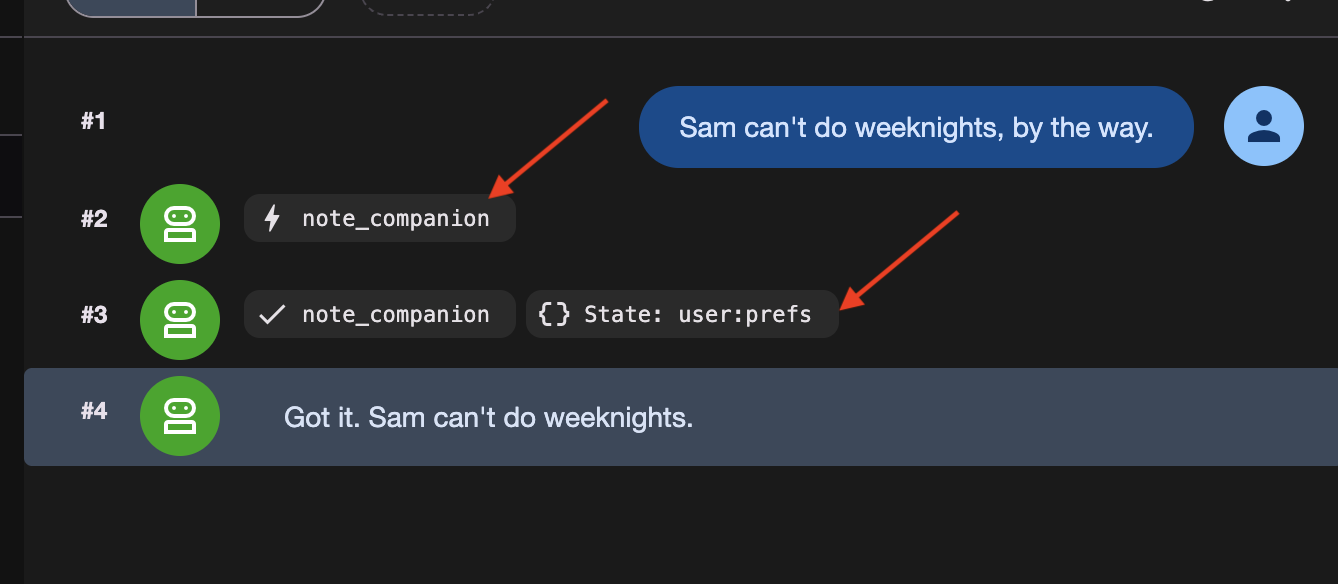
👉✨ Скажите три вещи одну за другой:
Sam can't do weeknights, by the way.
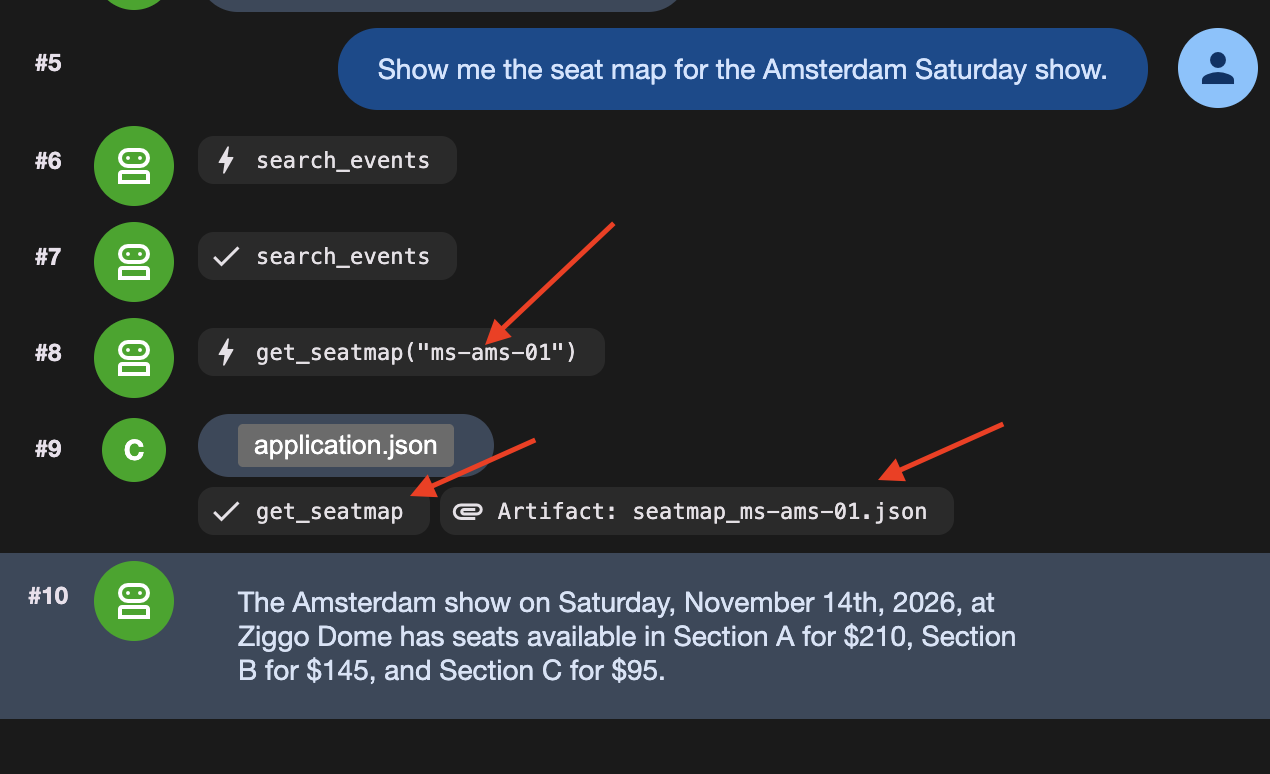
Show me the seat map for the Amsterdam Saturday show.
Actually, hold that thought — what else is on in Amsterdam?
Третье сообщение имеет значение. Оно завершает поворот, в ходе которого читалась схема рассадки, а завершение поворота приводит к исчезновению temp: :.
Три вещи были отправлены на хранение в три разных места:
Что хранилось | Какой инструмент это сделал? | Куда оно делось | |
1 | Сэм не может работать по вечерам в будние дни. | | |
2 | Полная схема рассадки, 6 КБ | | служба артефактов |
3 | Схема рассадки в одну строку | | нигде |
👉 Теперь проверьте. Вкладки «Состояние» и « Артефакты» находятся слева в adk web .
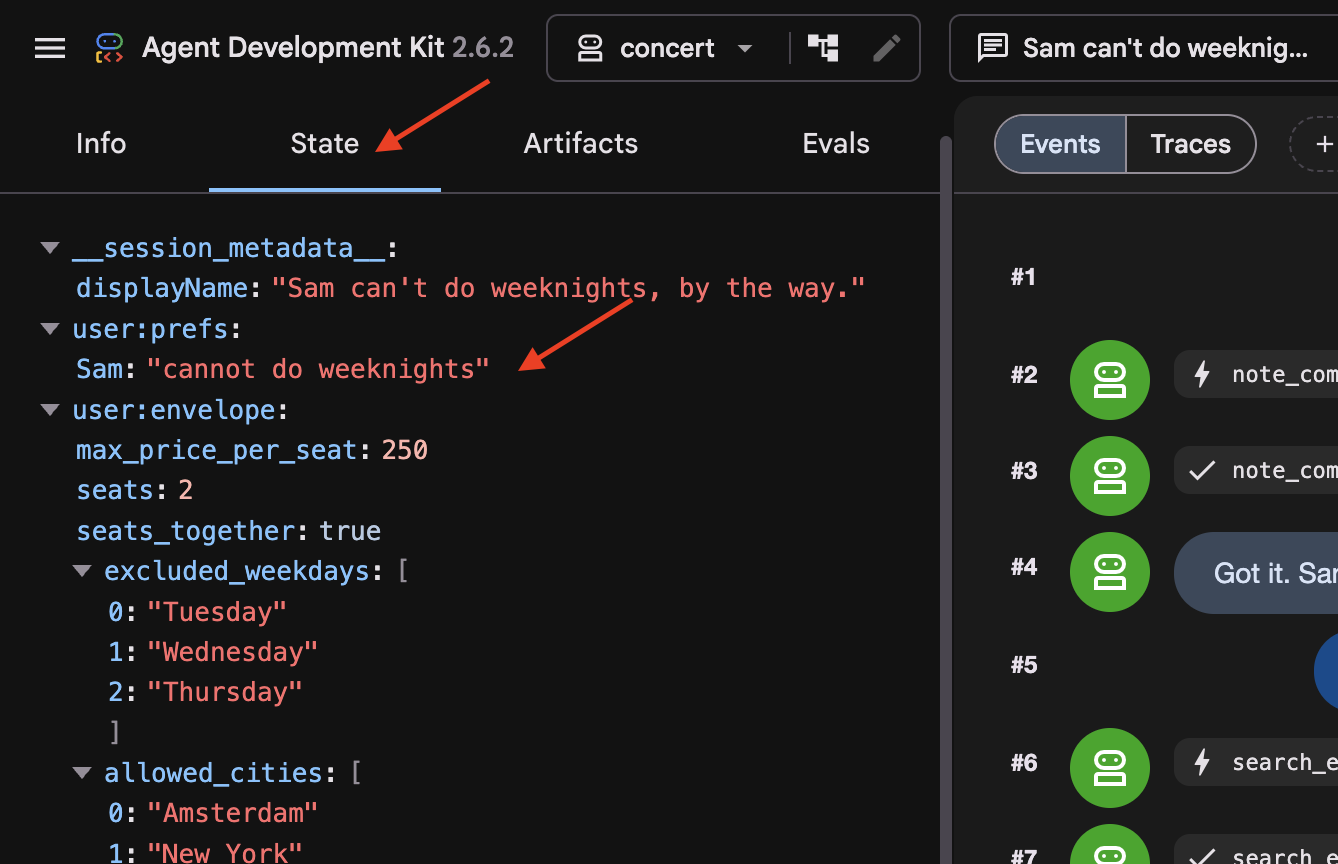
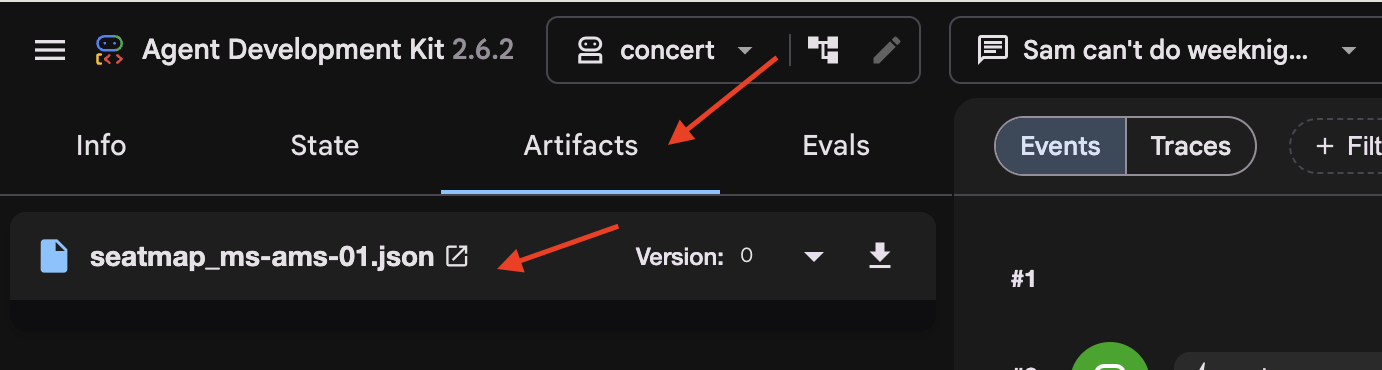
На вкладке «Состояние» обратите внимание, что temp:seatmap опущен. Ключи состояния с префиксом temp: существуют только во время активного вызова и автоматически удаляются ADK перед сохранением состояния сессии в базу данных.
Затем последовал более старый разговор
👉 В выпадающем меню вверху выберите two-days-ago .
В этой сессии содержится предварительно заполненная история переписки в базе данных.
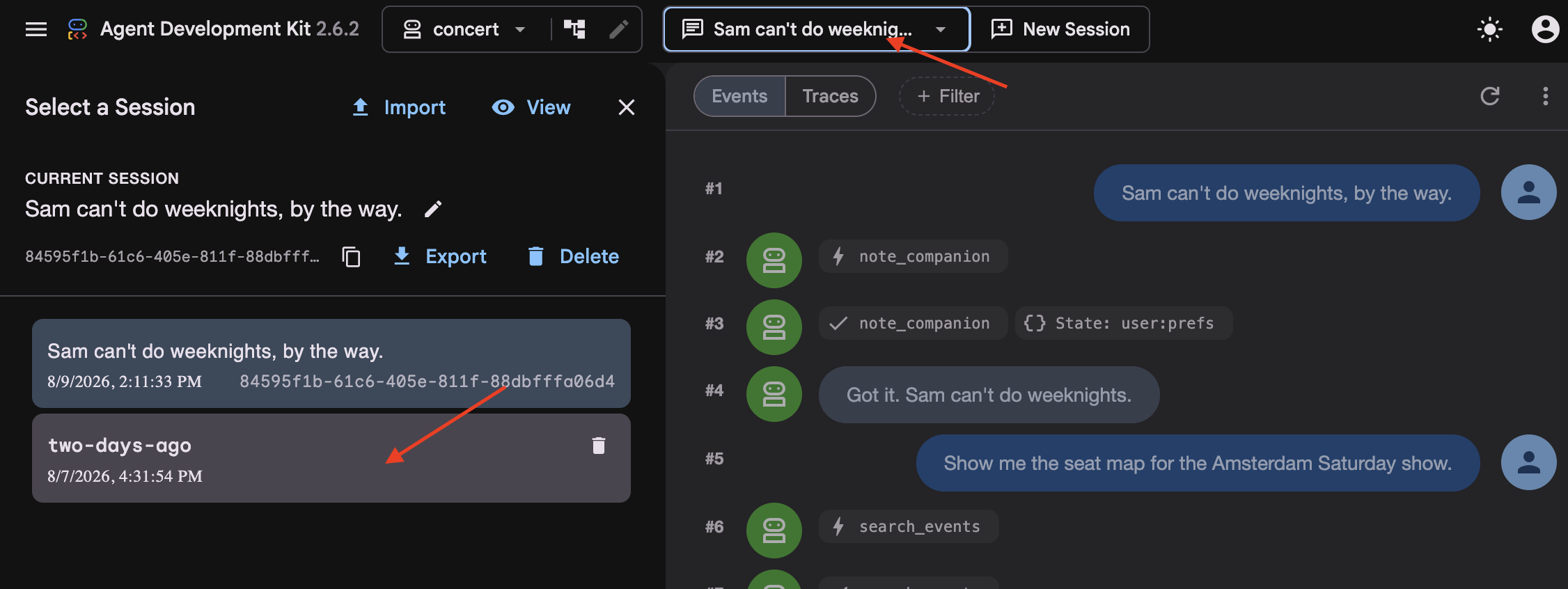
👉 Посмотрите на ленту событий (средний столбец). Обратите внимание, что более старые ходы заменены сводным блоком событий.
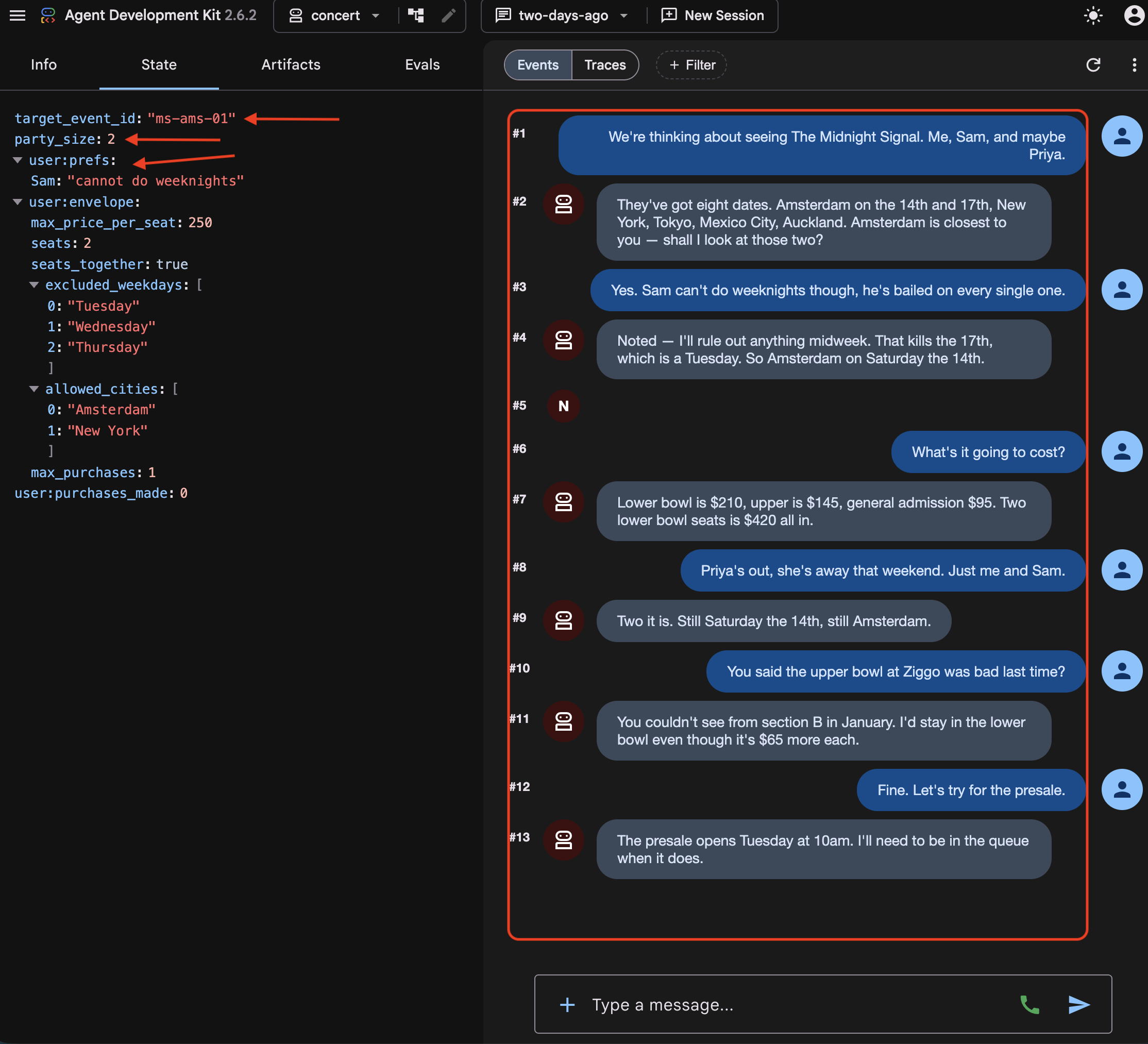
👉 Посмотрите вкладку «Состояние» . Там одновременно находятся три типа ключей:
target_event_id   ms-ams-01                      ← plain: this booking only
party_size        2                              ← plain: this booking only
user:prefs        {"excluded_weekdays": [...]}   ← the person, every session
Префикс user: (например user:prefs ) определяет область действия состояния для данного пользователя на протяжении всех сессий. В отличие от этого, ключи без префикса (
target_event_id
,
party_size
) представляют собой обычное состояние сессии, которое строго ограничено активной сессией и удаляется по её завершении.
👉 Теперь сравним две вкладки «Состояние». В то время как user:prefs и сохраненные артефакты сохраняются, temp:seatmap отсутствует в обеих сессиях. Ключи состояния с префиксом temp: являются строго временными и никогда не сохраняются в базе данных.
Затем файл
👉💻 Откройте в редакторе:
cloudshell edit ~/monstertix/memory/userx.md
Три бронирования, начиная с января. Агент считывает их при вызове функции recall() , и они останутся доступными, даже если мы потеряем данные сессии.
Четыре места
Где оно живет | Сохранится ли следующее сообщение? | Выдерживает перезагрузку? | Сохраняется ли сессия после удаления? |
| нет | нет | нет |
| да | да | нет |
| да | да | да |
| да | да | Да, и сохраняется после удаления базы данных. |
артефакт | да | да | зависит от предоставляемой услуги |
Читайте эту таблицу как описание контейнеров, а не того, что в них находится. Файл memory/userx.md сохраняется после завершения сессии, и он всегда содержит только то, что remember() решила туда поместить. В него ничего не записывается из вашего текущего разговора. Таким образом, файл, переживший сессию, — это не то же самое, что агент, помнящий, о чём вы только что говорили, и именно на шаге 5 это различие становится очевидным.
Какой штат?
Представьте себе состояние как словарь, который перемещается вместе с сессией. Читайте и записывайте его из своих инструментов через tool_context.state , а ADK сохранит его вместе с диалогом.
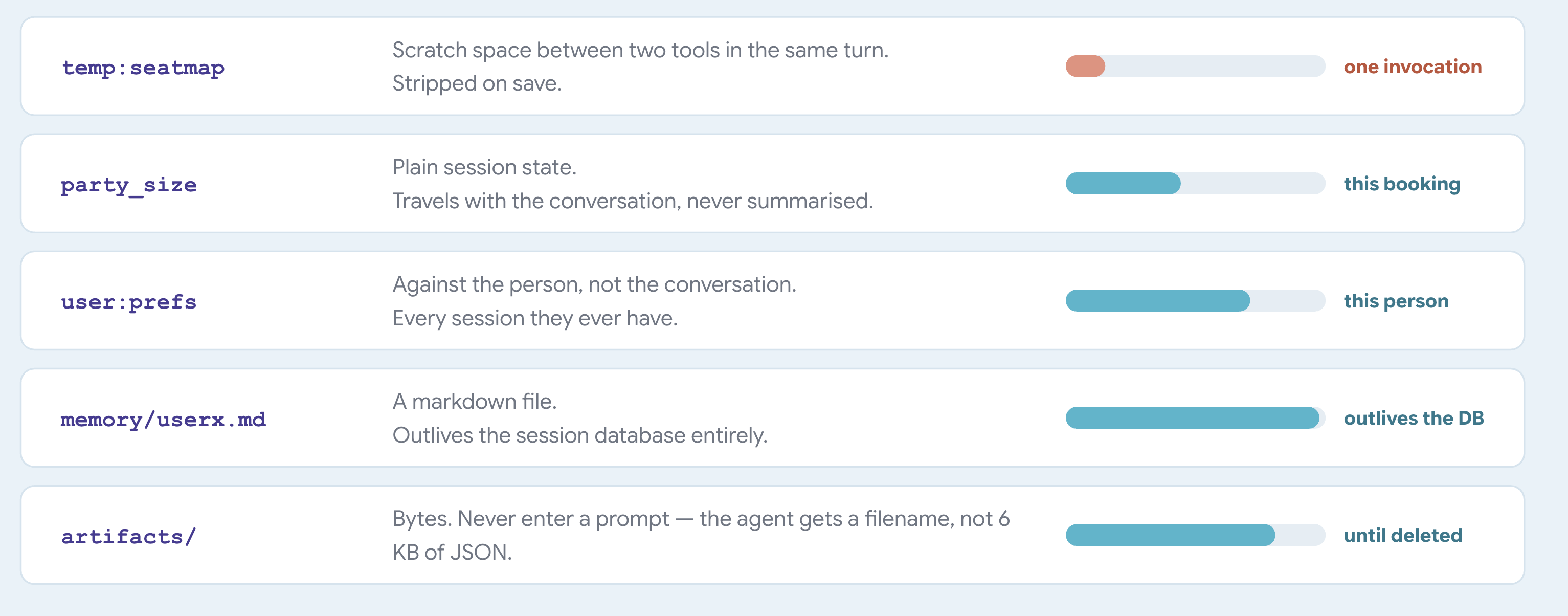
ADK задаёт значение префиксов. Вы нигде их не определяете. ADK считывает первую часть имени ключа и использует её для определения того, куда будет помещено значение и как долго оно будет существовать:
Ключ называется | ADK хранит это | Длится |
| с сессией | до удаления сессии |
| против пользователя | в рамках каждой сессии, которую имеет этот пользователь. |
| против приложения | для каждого пользователя |
| нигде | одно заклинание |
Вызов представляет собой единый цикл «запрос-ответ», включающий в себя все рассуждения модели, выполнение инструмента и окончательный ответ.
Когда выполнение вызова завершается, ADK записывает новое состояние в базу данных и удаляет все ключи типа temp: на этом пути.
Одна вещь осталась необъясненной.
two-days-ago вы видели краткое изложение, которое отображалось там, где раньше были первые несколько реплик. ADK автоматически создавал его, как только разговор становился достаточно длинным.
У каждого факта есть срок годности.
5. Деградация и уплотнение контекста
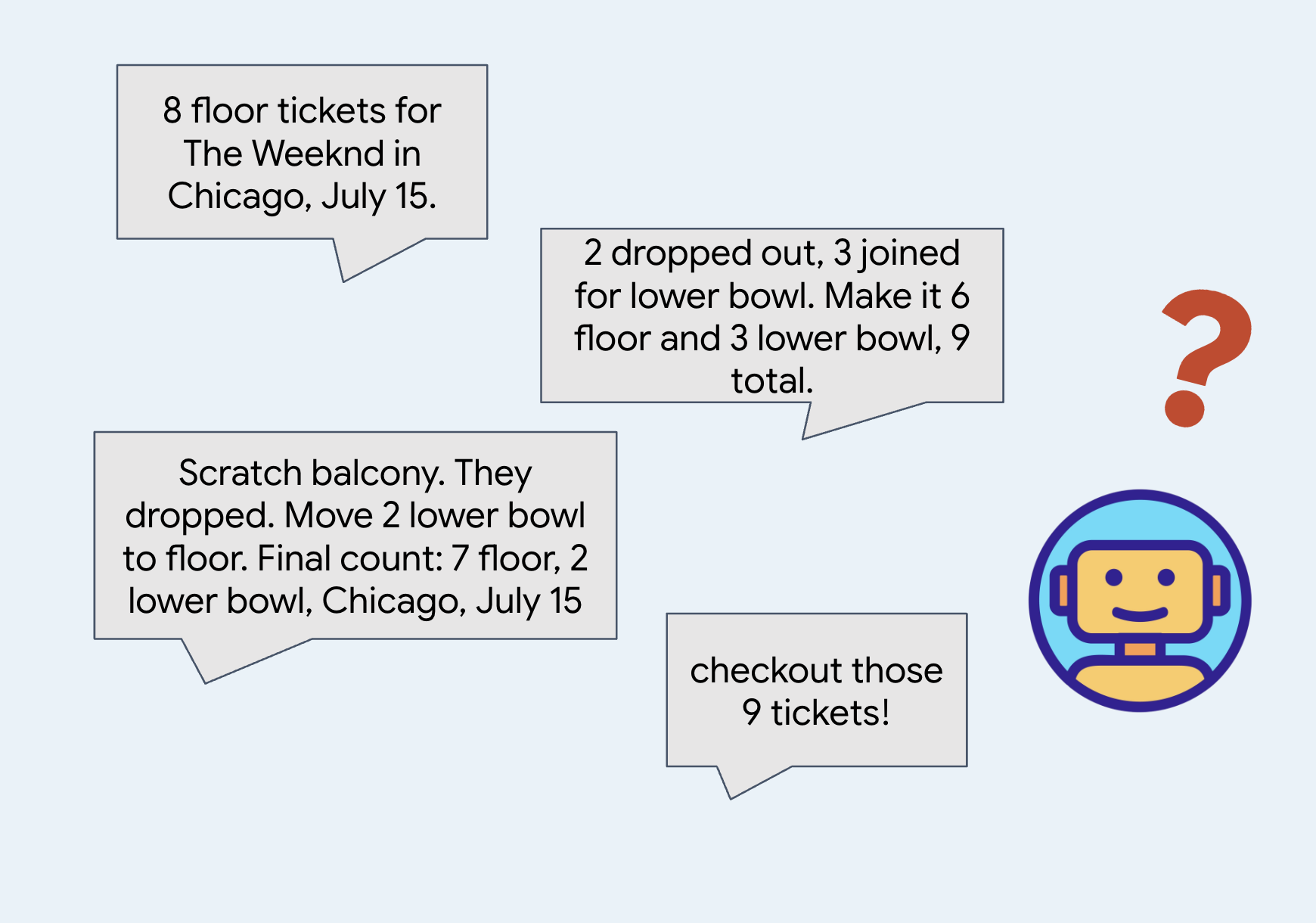
Краткие обзоры. Забудьте о деталях.
Когда разговор становится слишком длинным, система суммирует старые сообщения, чтобы сэкономить место и токены.
Краткие обзоры помогают уловить общую суть и экономят ресурсы, необходимые для обработки информации.
👉🔴 На панели управления залом нажмите «СБРОСИТЬ ЗАЛ» . Каждый шаг начинается с одного и того же места: 8 представлений, все места свободны, часы показывают 1×.
👉💻 Перейдите к коду этого шага:
cd ~/monstertix
. ./set_env.sh
./use-solution.sh 5 --force
Что изменилось со времени последнего шага:
Файл | Что изменилось |
| Агент заключен в |
всё остальное | без изменений |
agent.py больше не заканчивается на root_agent . Он заканчивается вот этим:
app = App(
    name="concert",
    root_agent=root_agent,
    events_compaction_config=EventsCompactionConfig(
        compaction_interval=3,   # summarise after every 3 turns
        overlap_size=1,          # re-read 1 turn either side when summarising
    ),
)
Помните, что adk web сначала ищет переменную с именем app , а затем возвращается к root_agent . Оберните агент в App всякий раз, когда вам нужно что-то, что применяется ко всему приложению, а не только к одному агенту: здесь это касается сжатия, а возможность возобновления работы будет рассмотрена позже на следующих этапах.
compaction_interval=3 означает, что ADK суммирует данные каждые три хода. Один ход — это когда вы что-то говорите, а агент заканчивает свой ответ, независимо от того, сколько инструментов он вызвал по пути. Три — это небольшое значение, поэтому оно срабатывает во время семинара. В реальном приложении использовалось бы гораздо большее число.
overlap_size=1 означает, что каждая сводка начинается на один ход раньше, чем это строго необходимо.
ADK суммирует ходы 1, 2 и 3. Три хода спустя он суммирует следующую партию. При overlap_size=1 вторая сводка начинается снова с хода 3, а не с хода 4:
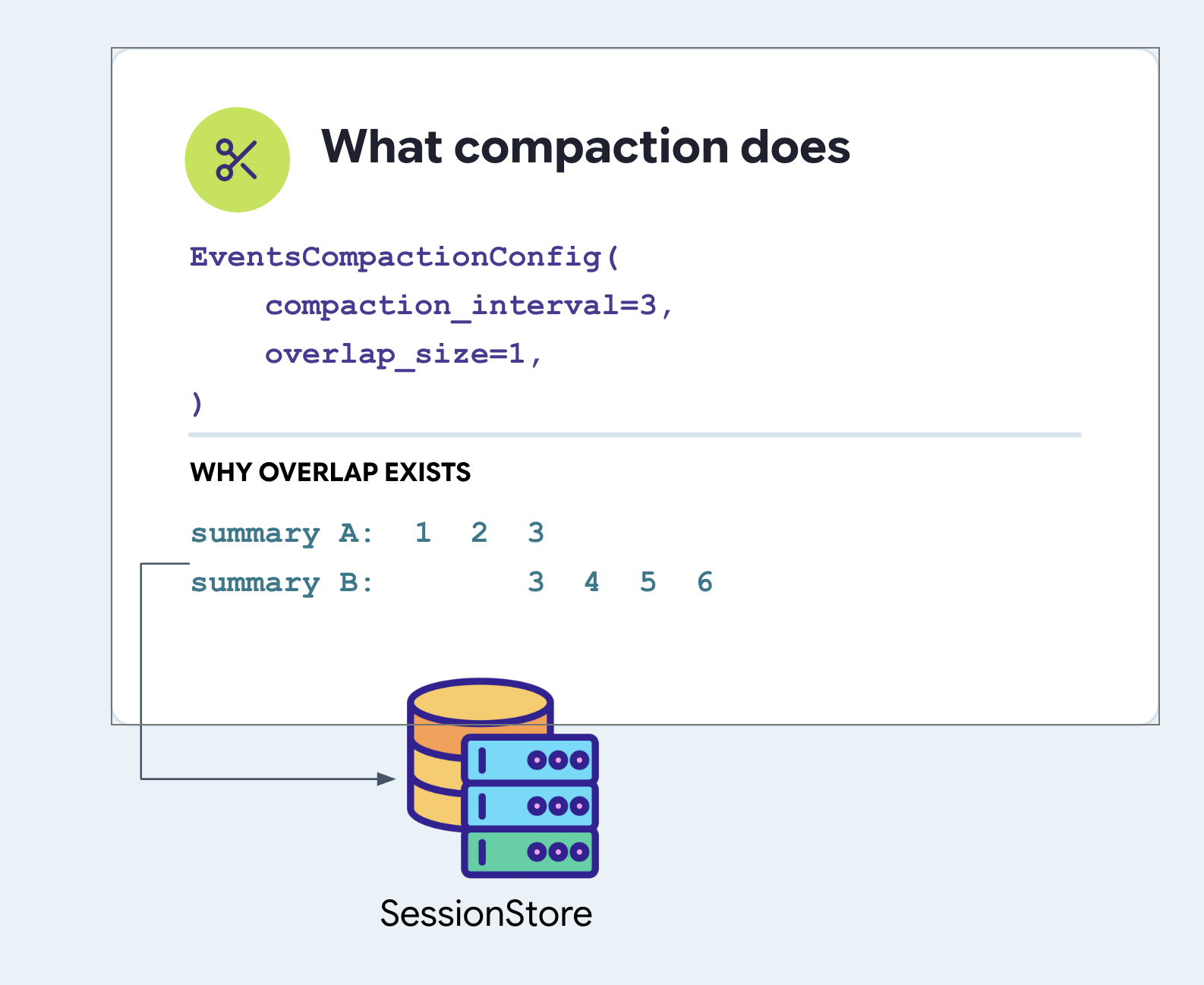
Обратите внимание, что третий ход кратко изложен дважды. Это сделано намеренно. Если вы задали вопрос в третьем ходу, а агент ответил в четвертом, то четкое разделение поместит вопрос в одно краткое изложение, а ответ — в другое, что приведет к путанице в обоих случаях. Повторение хода — это дешевая страховка от разделения мысли на две части.
Задайте значения для обоих полей. В ADK нет значений по умолчанию ни для одного из них.
Сжатие и ваша служба памяти никогда не встречаются.
Стоит уточнить, потому что эти два слова звучат похоже, а системы — нет.
EventsCompactionConfig задается в файле agent.py App , рядом с root_agent . Это свойство приложения, а не какого-либо сервиса:
# agent/concert/agent.py
app = App(
    name="concert",
    root_agent=root_agent,
    events_compaction_config=EventsCompactionConfig(
        compaction_interval=3,
        overlap_size=1,
    ),
)
Краткое описание переписывает переписку. Оно не перезаписывает файл.
Именно поэтому функция remember() существует как целенаправленный вызов. Все, что остается в стенограмме, в конечном итоге читается как перефразированный текст, написанный кем-то другим; все, что записывается в файл, читается точно так же, как и было сохранено, завтра и на следующей неделе. В конце этого шага вы увидите, как проявляется эта разница.
Где хранится сводная информация?
В файле sessions.db , в таблице events , агент записывает в строку события запись о сжатии данных с меткой времени, как и для любых других событий, связанных с ходом.
Обычное событие содержит поле content , а краткое описание находится в файле actions.compaction .
👉💻 Посмотрите это в своей базе данных:
cd ~/monstertix
. ./set_env.sh
sqlite3 sessions.db \
  "select json_extract(event_data,'\$.actions.compaction.compacted_content.parts[0].text')
   from events where event_data like '%compaction%';"
Вот как выглядит формат мероприятия:
events row
└── event_data  (JSON)
    ├── id, author, timestamp, invocation_id      ← like every other event
    ├── content                                    ← ABSENT on this one
    └── actions
        └── compaction
            ├── start_timestamp                    ← the window it replaced
            ├── end_timestamp
            └── compacted_content.parts[0].text    ← the summary itself
Поток событий извлекает каждое событие из его содержимого. Сводка хранится в базе данных и отправляется в модель на каждом этапе.
второй агент
budget_split — это совершенно отдельный агент, а не инструмент:
# agent/concert/agent.py
budget_split = Agent(
    name="budget_split",
    model=MODEL,
    include_contents="none",      # sees none of the conversation
    instruction="You do ticket arithmetic and nothing else...", #just the budget
    output_key="budget_plan",     # its answer goes into state
)

root_agent = Agent(
    ...,
    tools=[..., AgentTool(agent=budget_split)],
)
Почему агент, а не простая функция? Потому что для работы нужна модель. Вопрос «какие из этих разделов подходят под бюджет в 200 долларов для четырех человек, и какова общая сумма?» следует понимать как арифметику, облеченную в форму оценки, с ответом, который человек должен уметь прочитать. Пусть функция Python выполняет умножение, а не решает, какие варианты заслуживают упоминания.
Тогда почему бы не позволить это сделать главному агенту? Посмотрите на следующую строку include_contents="none" означает, что этому агенту не передается никакой информации из разговора. Ни группового чата, ни предпочтений, ни сорока дат тура. Он получает запрос и ничего больше. Этот флаг существует только у Agent , и это настоящая причина, по которой это агент, а не функция.
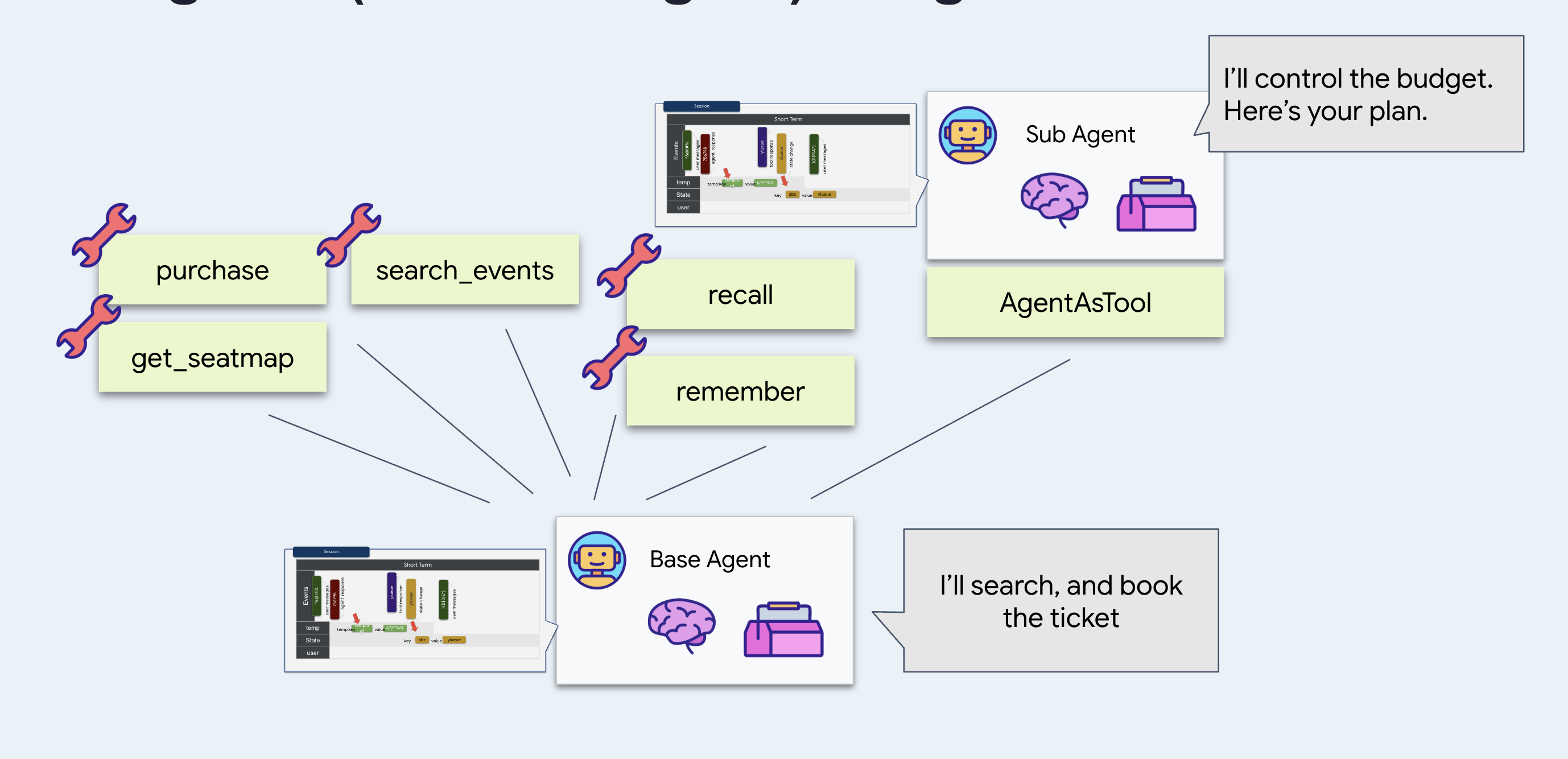
Предпочитайте короткую подсказку: это дешевле, быстрее и гораздо сложнее сорвать. Полагайтесь на то, что арифметика невосприимчива к тому, что было сказано двадцать ходов назад, потому что она этого никогда не увидит.
Почему
AgentTool
? Оберните этим компонентом агента, чтобы основной агент мог вызывать его как любой другой инструмент. Со стороны модели, budget_split следует рассматривать как аналог search_events .
И
output_key="budget_plan" помещает ответ в состояние сессии под этим именем, вместо того чтобы оставлять его в свободном доступе в ходе обсуждения. Посмотрите, почему это важно.
Запустите его
👉💻 В терминале 1 нажмите Ctrl-C и перезапустите систему с теми же флагами:
cd ~/monstertix
adk web agent --port 8000 --allow_origins "*" \
  --session_service_uri="sqlite+aiosqlite:///$WORKSHOP/sessions.db" \
  --artifact_service_uri="file://$WORKSHOP/artifacts"
👉 Начните новую сессию и начните настоящий разговор. Пять-шесть ходов. Этот способ работает:
hello
what's on in Amsterdam?
Sam is coming with us, and he can't do weeknights
there are 4 of us and I can spend about $200 a head. What fits?
👉 Откройте вкладку «Штат» .
Найдите там budget_plan , содержащий полный ответ арифметического агента.
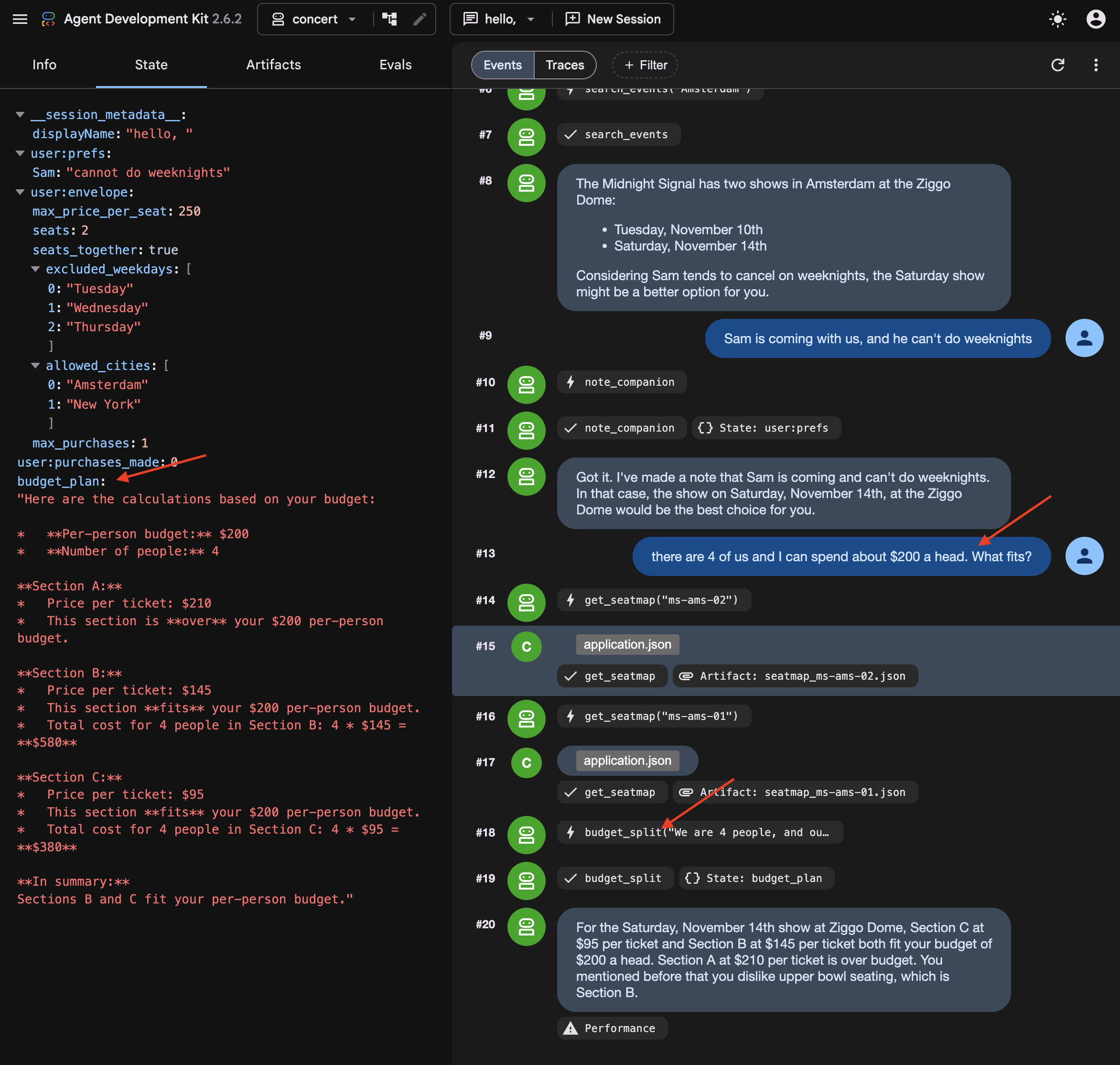
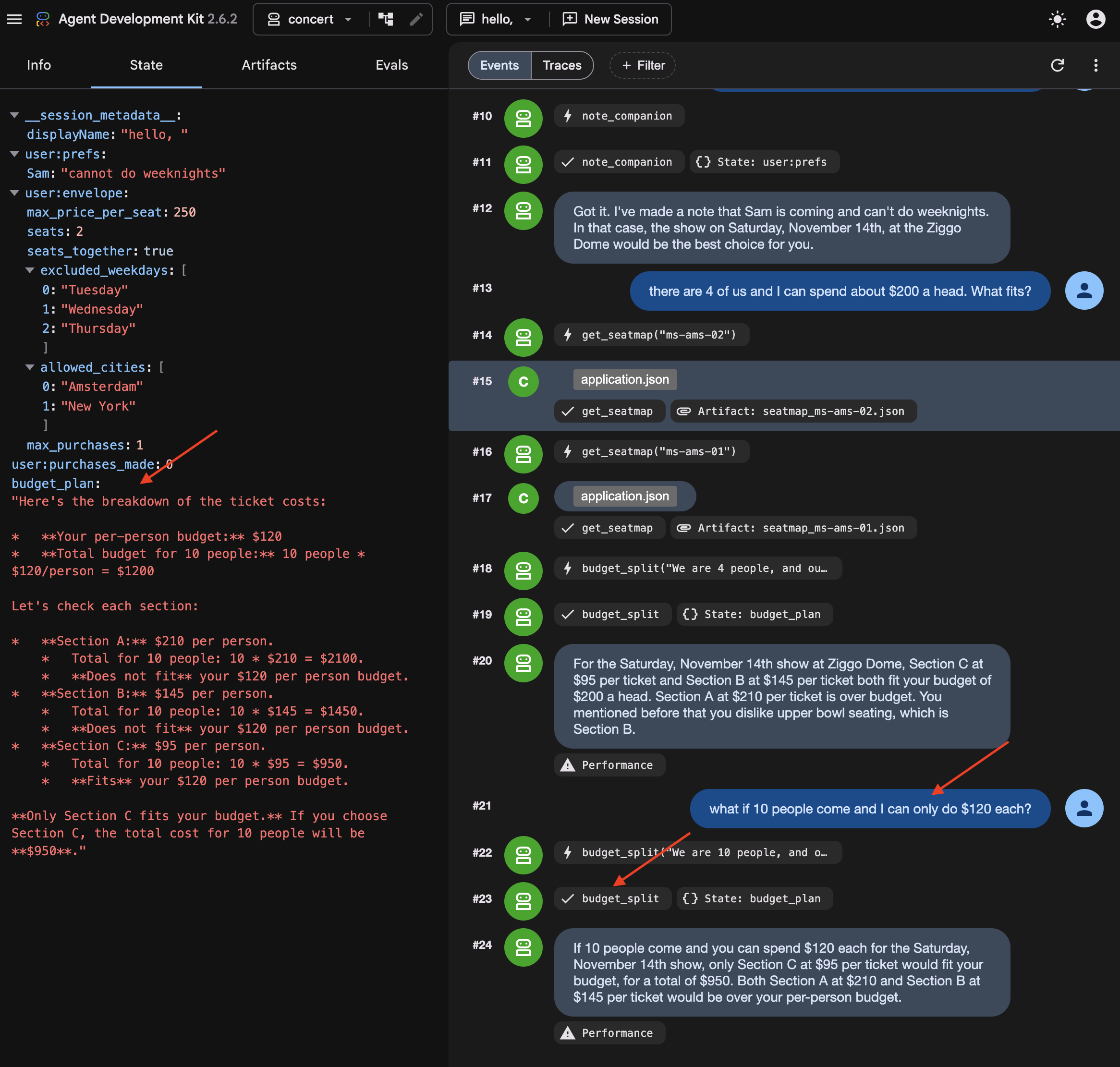
👉✨ Теперь измените цифры на нем:
what if 10 people come and I can only do $120 each?
👉 Look at budget_plan again. It has been overwritten , not appended to. It's because output_key holds the latest one.
What you cannot see: the summary
Somewhere in those turns, ADK summarised the earlier ones.
👉💻 In a new Terminal , run to read it directly:
cd ~/monstertix
. ./set_env.sh
./show-compaction.sh
Read what it wrote
Here is a real one, abridged:
── summary 1 ──────────────────────────────────────────────────────

Conversation Language: English

  **User Request:**
  The user initially wanted to know what concerts are playing in Amsterdam.
  Subsequently, the user provided a constraint regarding a companion, Sam.

  **Context Summary:**
  The user is planning a concert trip. The agent identified two events in
  Amsterdam: "The Midnight Signal" at the Ziggo Dome on Tuesday, November
  10 and Saturday, November 14, 2026. The user then informed the agent that a
  companion named "Sam" will be joining, but "he can't do weeknights." The
  agent has successfully noted this constraint for Sam.

  **Key Decisions/Information Obtained:**
  *   **City of interest:** Amsterdam
  *   **Events found:** "The Midnight Signal" at the Ziggo Dome, Tuesday
  10 November and Saturday 14 November 2026.
  *   **Companion:** Sam
  *   **Companion constraint:** Sam cannot attend concerts on weeknights.

  **Unresolved Questions/Tasks:**
  *   The agent has not explicitly confirmed if the found event (which is
  on a Saturday) is suitable given Sam's constraint, nor has it asked the
  user for the next steps regarding this event or further event searches.

  **Tools Used:**
  *   `recall`
  *   `search_events`
  *   `note_companion`
It kept the prices, the sections, the cities and the preferences, and correctly noted that nothing had been decided yet.
Three things follow from that:
It is a paraphrase. Nothing here is what anybody said. It is an account of what was said, produced by the same kind of process that produces everything else the model gets wrong occasionally.
Note: Summary strings are stored in internal session event records and are not directly exposed as separate UI tabs.
Every three turns, on a conversation that is now partly made of previous summaries.
Try to book without repeating yourself
In a new session Do not start a new one — the summary you just read lives in this session's events, and that is the only reason the agent still knows anything about Amsterdam.
👉✨ Give it nothing new:
Book us something.
Watch the agent ask which show, which section, and how many people. Mark that correct : the summary itself says the user never confirmed anything, so the agent asked. Give compaction the credit.
Even when compaction succeeds, summarizing previous turns can introduce ambiguity that requires the agent to re-confirm constraints with the user.
👉✨ Answer it and let the booking go through:
Amsterdam Saturday, section C, 8 people
It reads the order back before it spends anything:
"You want to book 8 tickets in Section C for The Midnight Signal in Amsterdam on Saturday, November 14th. The total cost will be $760. Shall I go ahead and purchase these tickets?"
👉✨ Confirm it:
yes
Now it tells you it worked:
"Your purchase of 8 tickets in Section C for The Midnight Signal in Amsterdam on Saturday, November 14th, totaling $760, is complete. Your order ID is ord_227877fe."
Go and check whether it did
👉 Switch to the venue panel . Do not take the agent's word for it.
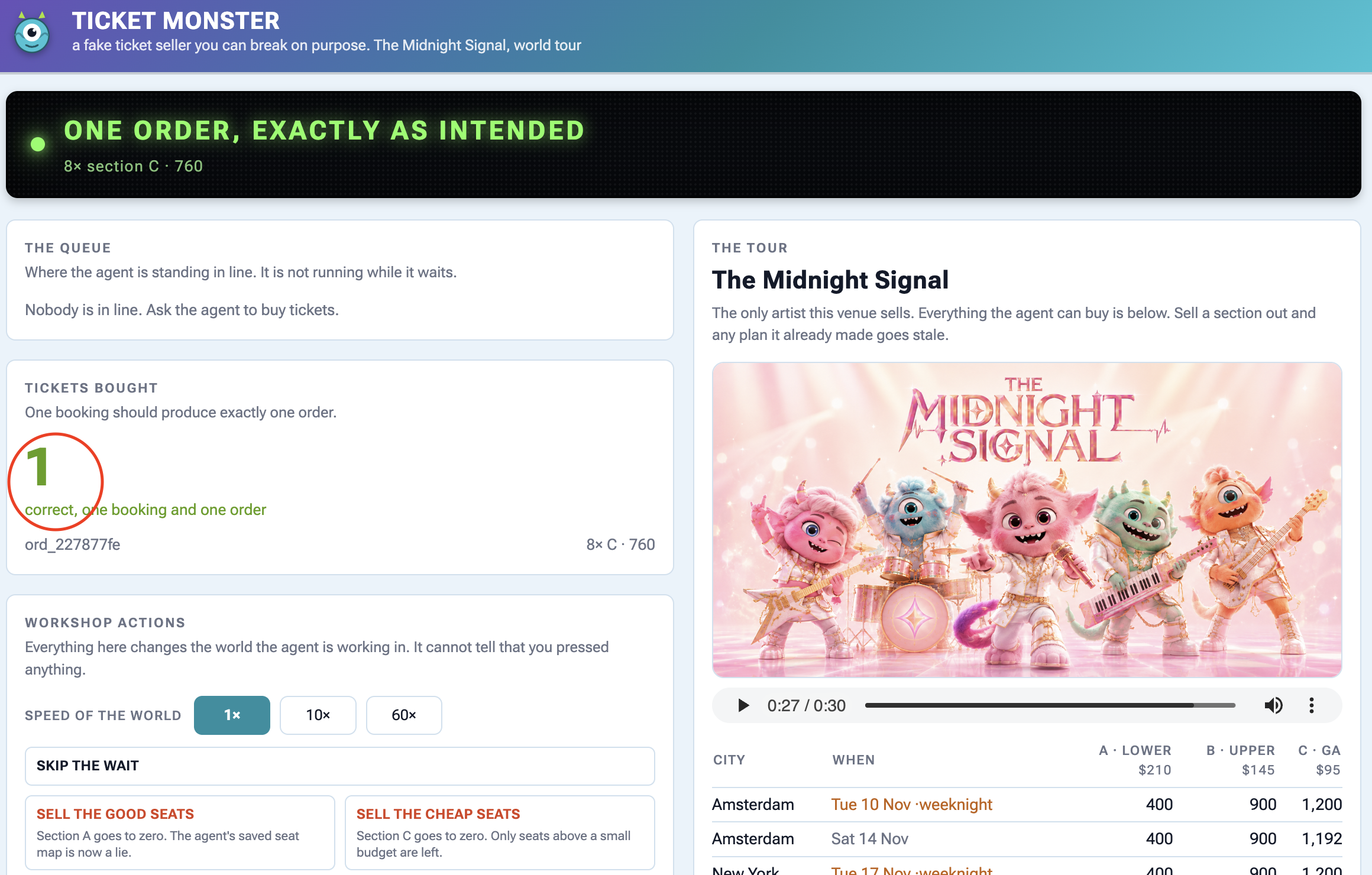
On the panel | What you should see |
Tickets bought | |
the order underneath | |
The tour , Amsterdam Saturday | section C is down by 8 |
Активность | |
Check the panel to find out the ticket sale.
Why user:prefs was the right choice
Recall note_companion writing Sam's constraint into user:prefs last step, and the obvious objection: why bother with a tool when the agent could just remember it.
Here is why. Keep state out of the conversation and no summary touches it. Check user:prefs and budget_plan against how they went in, and find them unchanged. Then check the transcript.
A summary keeps the general shape and loses the details. Store anything you cannot afford to lose somewhere other than the conversation.
6. Process Resumption
Waiting 40 Minutes Without Staying Online
When an agent has to wait in a 40-minute ticket queue, keeping a Python process alive and waiting is fragile and expensive.
To handle long waits properly:
- Save state to a database : Store where the agent paused so the process can safely shut down.
- Wake up on demand : When the wait is over, an external signal restarts the agent and resumes execution right where it left off.
👉🔴 On the venue panel , press RESET THE VENUE . Every step starts from the same world: 8 shows, all seats available, clock at 1×.
👉💻 Move to this step's code:
cd ~/monstertix
. ./set_env.sh
./use-solution.sh 6 --force
Запустите его
What changed since the last step:
Файл | Что изменилось |
| added |
| |
join_queue returns straight away with a ticket instead of blocking, and ResumabilityConfig lets the run pause on it and pick up afterwards.
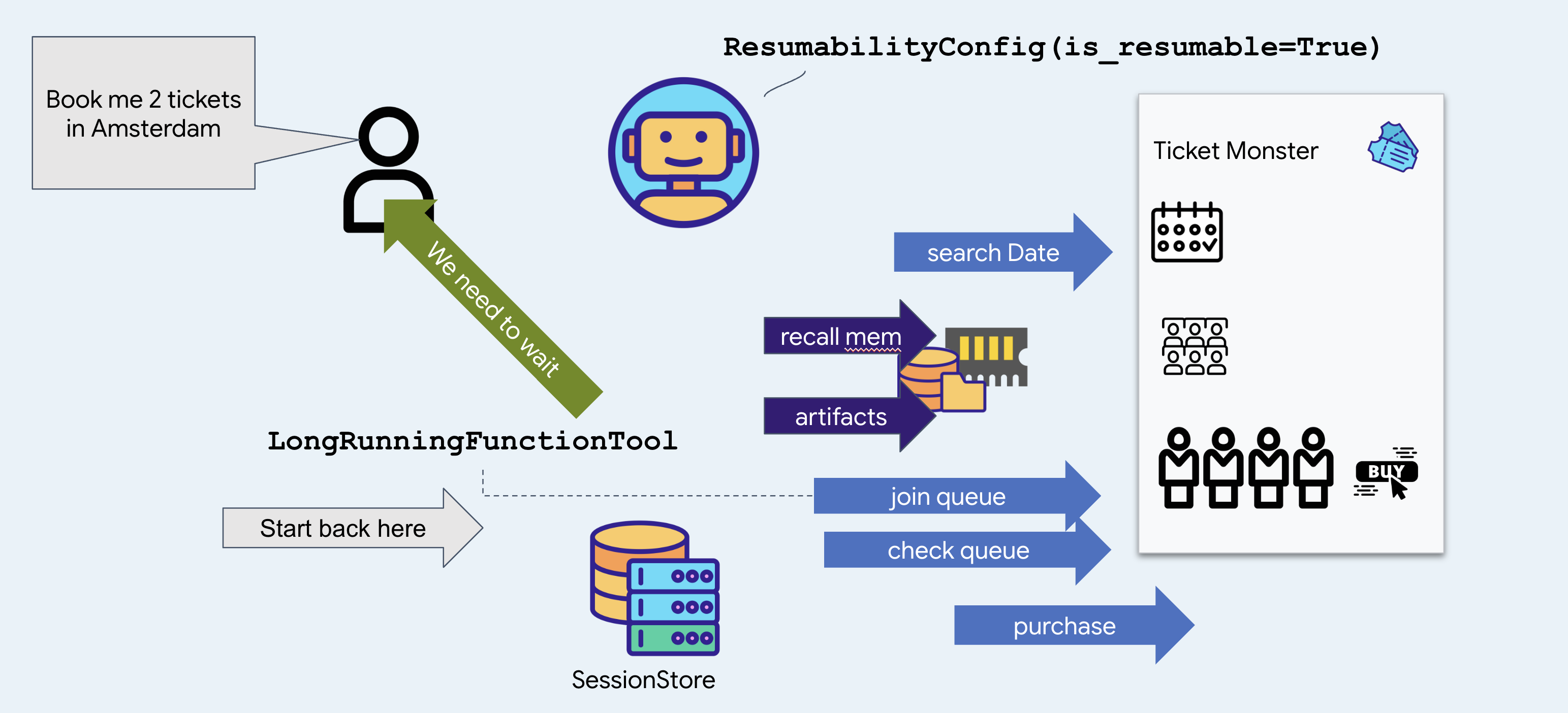
👉💻 Terminal 1 — the agent, unchanged:
cd ~/monstertix
. ./set_env.sh
adk web agent --port 8000 --allow_origins "*" \
  --session_service_uri="sqlite+aiosqlite:///$WORKSHOP/sessions.db" \
  --artifact_service_uri="file://$WORKSHOP/artifacts"
👉✨ Ask the agent to buy:
Get us two tickets to the Amsterdam show.
It calls recall , then search_events , then join_queue , and answers with something close to this:
You are in the queue for The Midnight Signal at Ziggo Dome, Amsterdam, on Saturday, November 14. Your position is 14203.
Notice it picked Saturday without asking you. There are two Amsterdam shows, the 17th is a Tuesday, and the memory file from the last step says Sam does not do weeknights. That is a fact from a previous booking deciding a question in this one.
Notice too that it joined the queue before looking at a single seat or price, and said nothing about either. That is the venue's rule, you buy the tickets until they reach the front, so the only thing worth having early is a place in line. Which seats to take is a question for forty minutes from now.
👉 Look at the control panel. The banner reads:
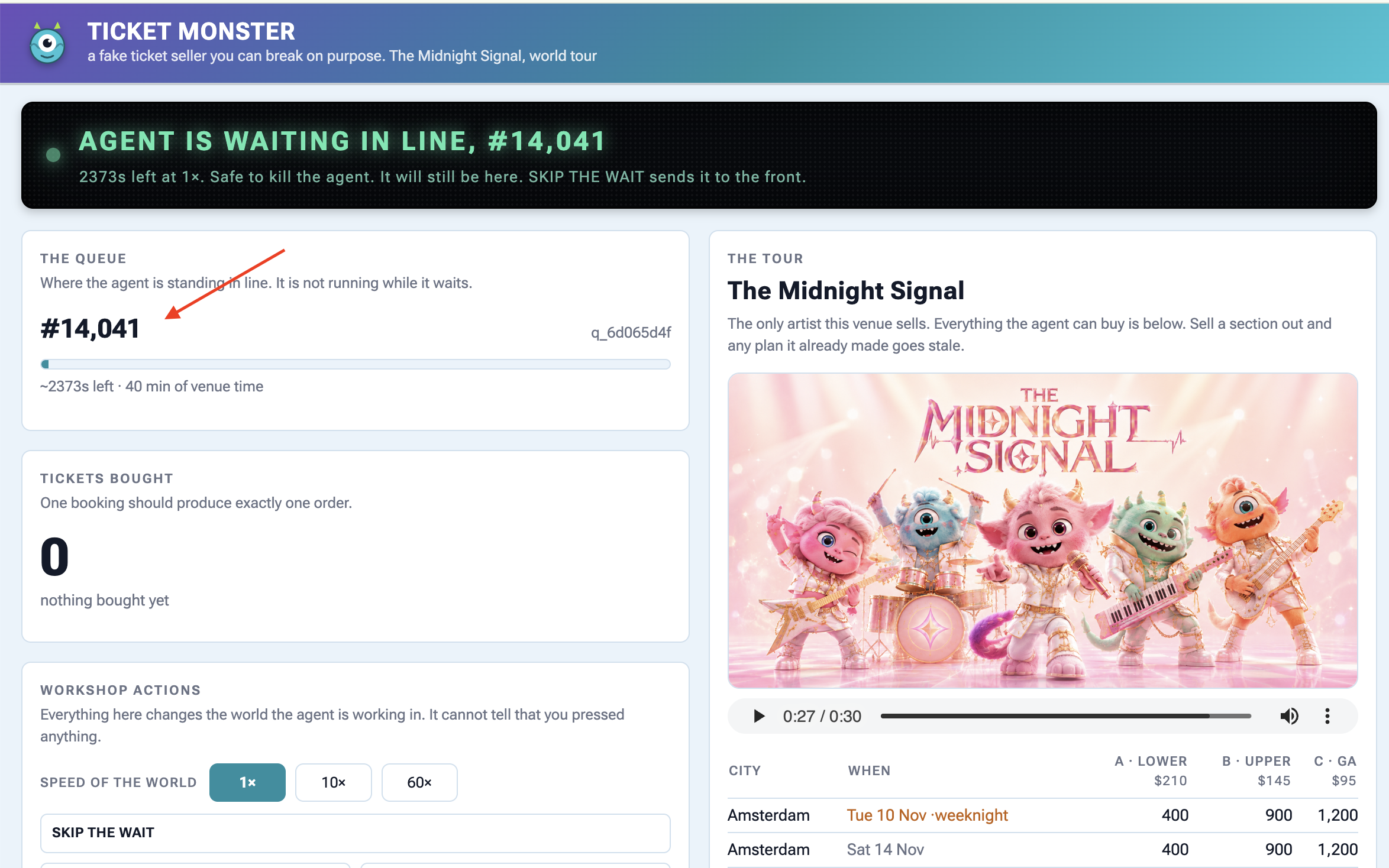
Agent is waiting in line — #14,203
About 2400s at 1×. Safe to kill the agent right now — it will still be here.
The queue is genuinely forty minutes long and it is not going anywhere while you work.
👉💻 Kill the agent. :
Ctrl-C
👉💻 Start it again in terminal 1 :
cd ~/monstertix
. ./set_env.sh
adk web agent --port 8000 --allow_origins "*" \
  --session_service_uri="sqlite+aiosqlite:///$WORKSHOP/sessions.db" \
  --artifact_service_uri="file://$WORKSHOP/artifacts"
👉✨ In the same session, ask the agent where it is in line:
Where am I in line?
You are currently at position 12982 in the queue. It is not your turn yet.
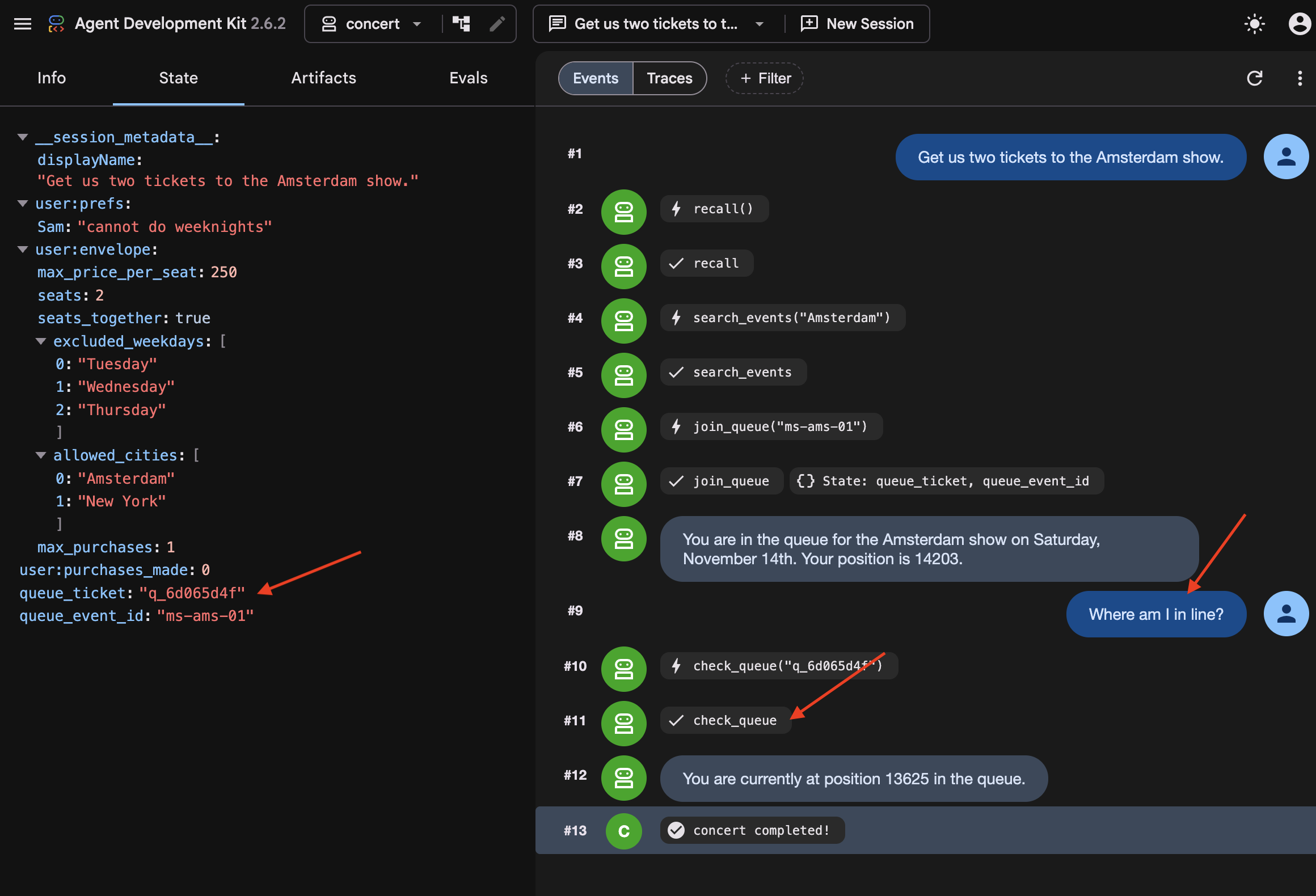
Compare the ticket, and watch the position keep dropping while nothing was running. Notice the agent did not know it had been killed. It called check_queue with the ticket it got before the restart, because that ticket was on disk.
👉💻 See why:
cd ~/monstertix
sqlite3 sessions.db "select name from pragma_table_info('events');"
id
app_name
user_id
session_id
invocation_id
timestamp
event_data
Notice that every turn of every conversation is one row, and the turn itself, who said it, which tool it called, what came back, and note it is JSON inside event_data .
👉💻 Find your queue ticket in there:
sqlite3 sessions.db "select event_data from events;" \
  | grep -o '"ticket": "q_[a-z0-9]*", "position": [0-9]*' | tail -1
"ticket": "q_8cc2c6f9", "position": 14203
When join_queue returns, its ticket is saved directly to the database. Upon restarting, ADK reloads the previous turns and tool results from disk, allowing the agent to pick up where it left off.
And notice what it did not start over. The agent resumes directly instead of replaying the workflow from the beginning. Because LongRunningFunctionTool and ResumabilityConfig persist the execution state to disk, ADK knows the agent is already waiting in line, preventing it from re-searching tour dates or requesting a duplicate ticket.
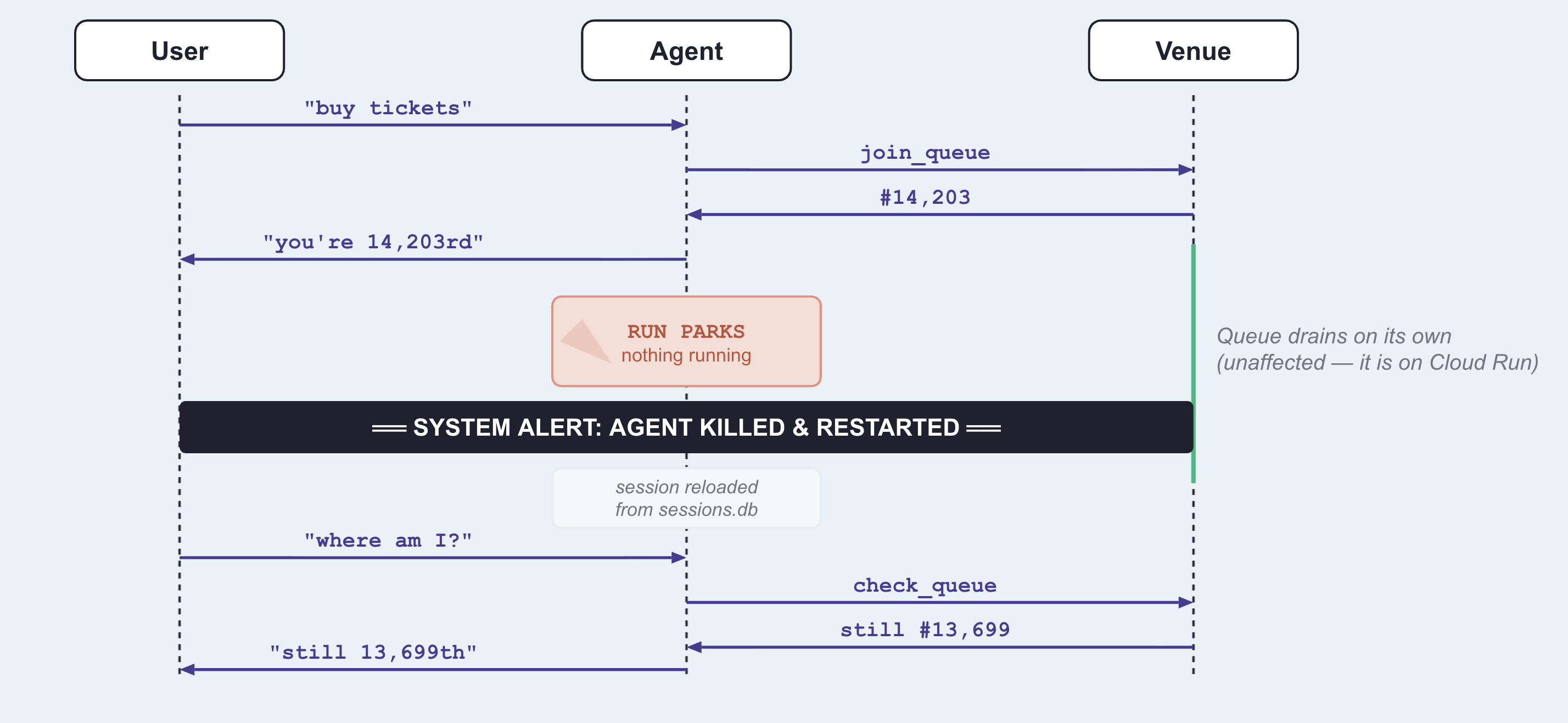
Why join_queue and not check_queue
Both functions return in milliseconds. The distinction is whether the underlying job is complete when the function returns.
what it returns | is the work done? | |
| Queue ticket and initial position | No. Processing continues asynchronously in the external system. |
| Current queue status | Yes. Returns an immediate, point-in-time answer. |
LongRunningFunctionTool is designed for operations that return a handle to pending work. Wrapping join_queue allows the agent to suspend execution while the external queue advances.
In contrast, check_queue is synchronous and complete. Wrapping it would cause the agent to incorrectly suspend execution every time it checks its status—even when it reaches the front of the line and needs to complete the purchase immediately.
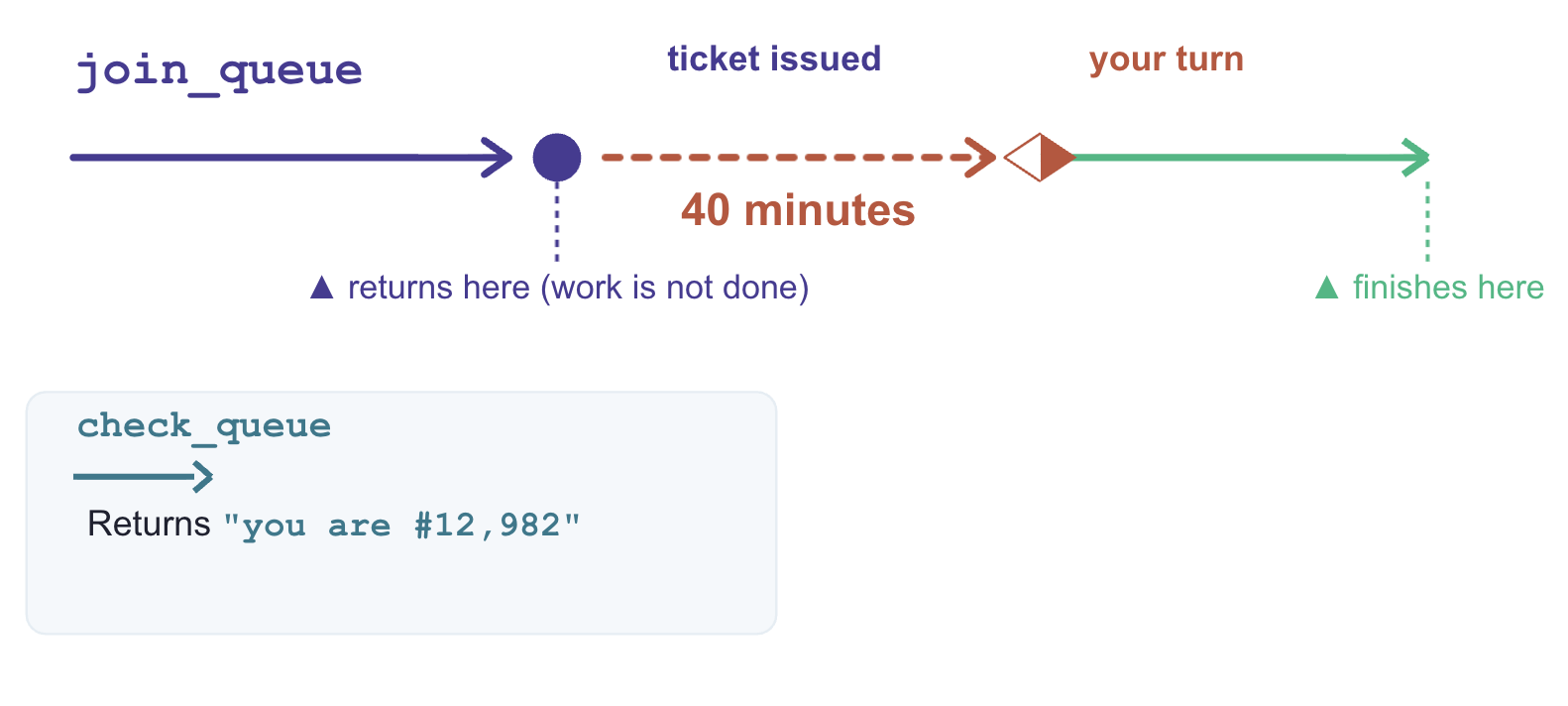
What made that work
Three components enable execution suspension and recovery:
# agent/concert/agent.py
LongRunningFunctionTool(func=join_queue)      # the tool returns without finishing
ResumabilityConfig(is_resumable=True)         # the run may pause and be picked up
--session_service_uri="sqlite+aiosqlite:///$WORKSHOP/sessions.db"
LongRunningFunctionTool: Marks a tool as non-blocking, returning an active handle so the agent can wait without hanging the thread.-
ResumabilityConfig: Instructs the runtime to pause the execution lifecycle on an incomplete task and resume from the last recorded state. -
Session Storage URI (--session_service_uri): Directs state persistence to external storage (eg, SQLite, Cloud SQL) rather than process memory, preventing data loss across restarts.
7. Acting on Stale Data
Information goes out of date while you wait
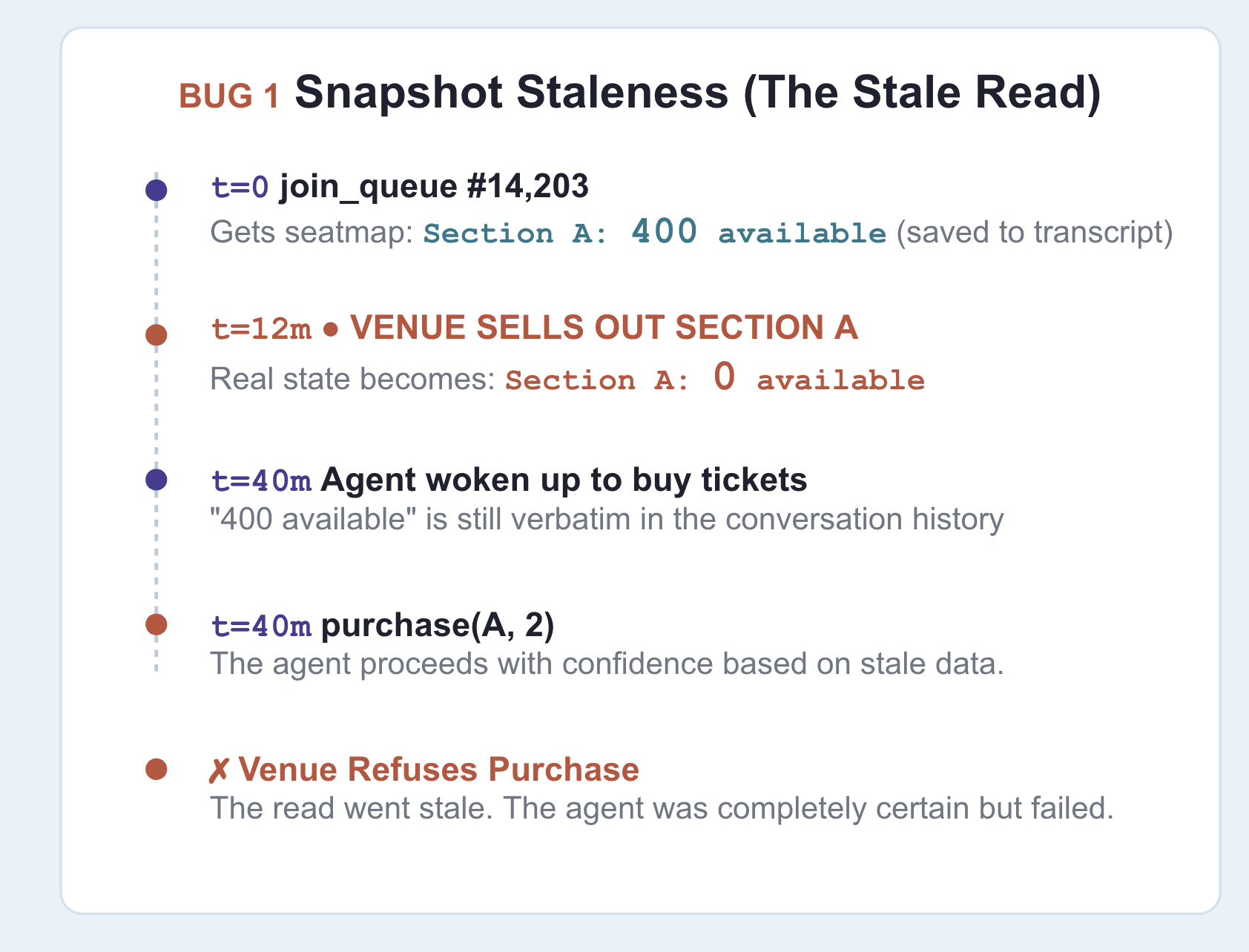
Persisted conversation history is not real-time state. During long wait intervals, external data—like ticket availability or pricing—can change without the agent knowing.
An agent with missing information pauses to ask for clarification, but an agent with stale data acts immediately on outdated assumptions. To prevent invalid actions, time-sensitive data must be re-verified immediately before executing critical operations.
Do not load new code yet. Stay on the previous step's agent (it can buy tickets, but currently has no safeguards for staleness or idempotency).
👉🔴 Press RESET THE VENUE , then start a new session in adk web — the + New Session button above the chat.
Start a new session to clear the previous queue ticket and pending purchase state. This step requires a clean execution context to demonstrate staleness handling properly.
The snapshot lies
👉✨ Ask for the same show as before:
Get us two tickets to the Amsterdam show.
👉✨ Now, while it waits in line, ask about seats:
How much are the seats, and what's still available?
Section A: $210 per ticket, with 400 seats available.
Section B: $145 per ticket, with 900 seats available.
Section C: $95 per ticket, with 1200 seats available.
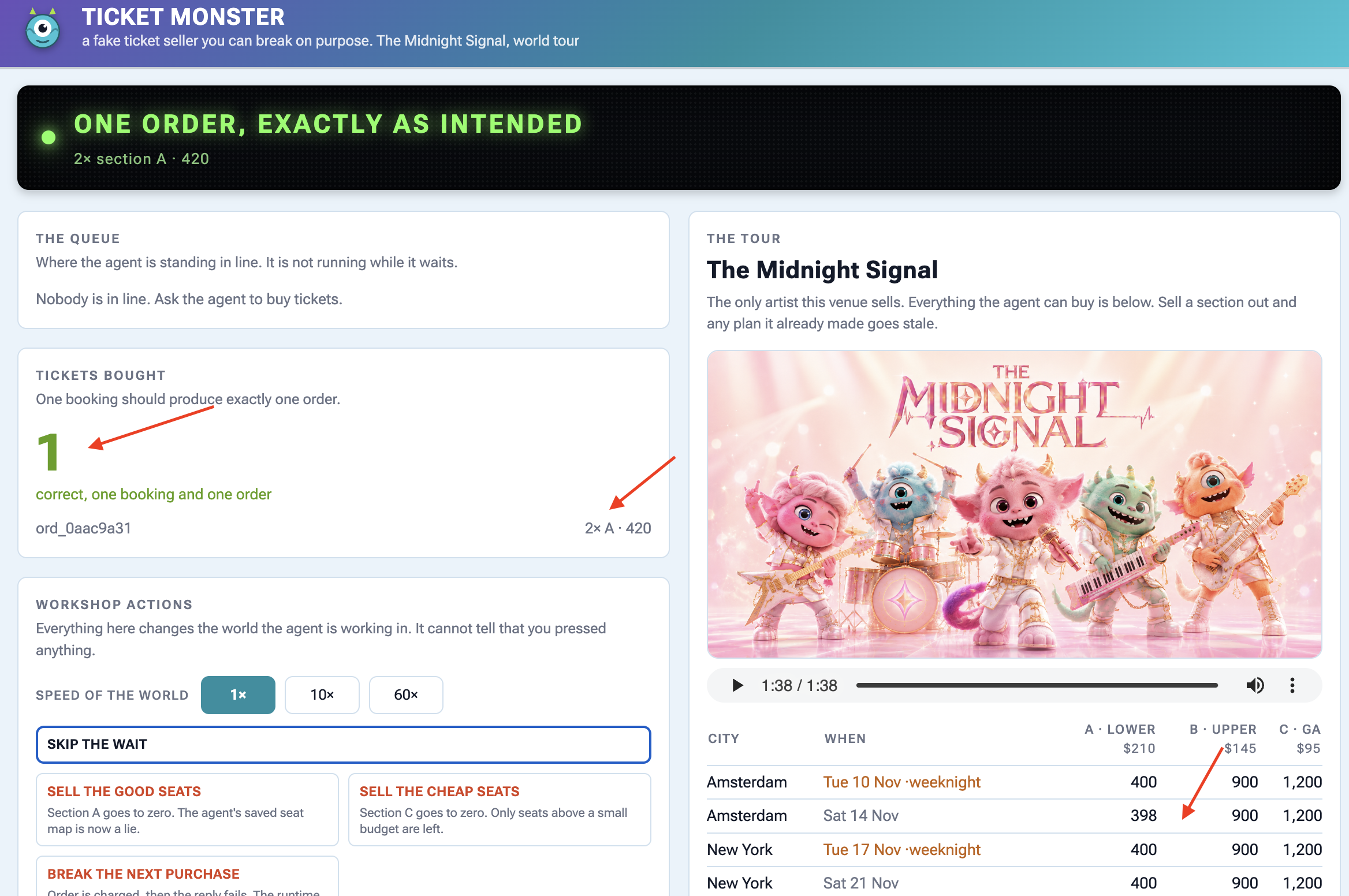
👉🔴 Press SELL THE GOOD SEATS . Section A drops to zero.
👉🔴 Press SKIP THE WAIT to send the agent to the front of the queue.
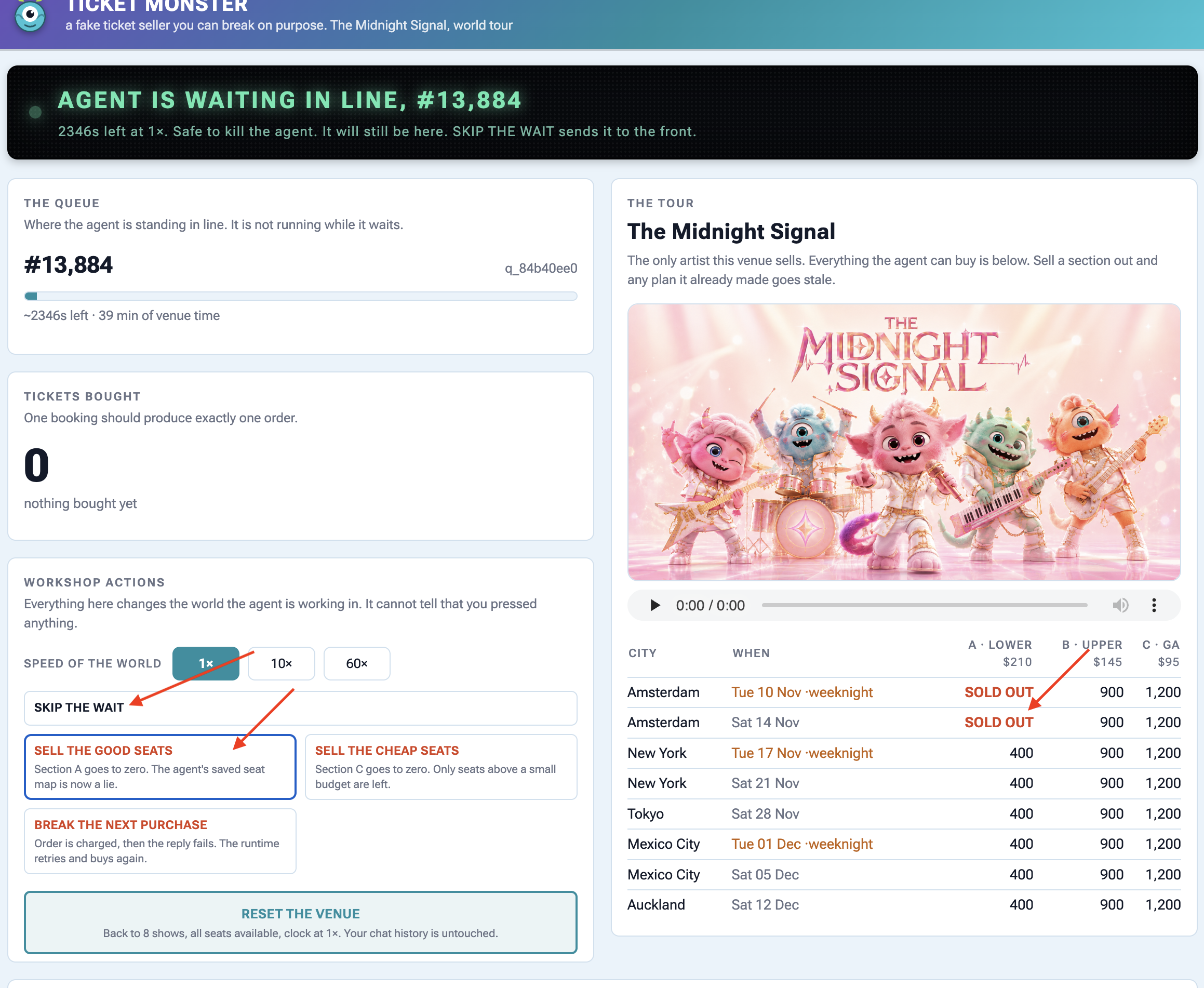
👉✨ Tell it to buy:
Buy the two section A seats.
It executes purchase(section="A") without re-verifying seat availability, causing the venue API to return an error response:
{"error": "sold_out", "available": 0,
 "message": "those seats are gone — re-fetch the seatmap before buying"}
Oh no! It looks like the Section A tickets just sold out. Let me get an
updated seat map to see what's still available.
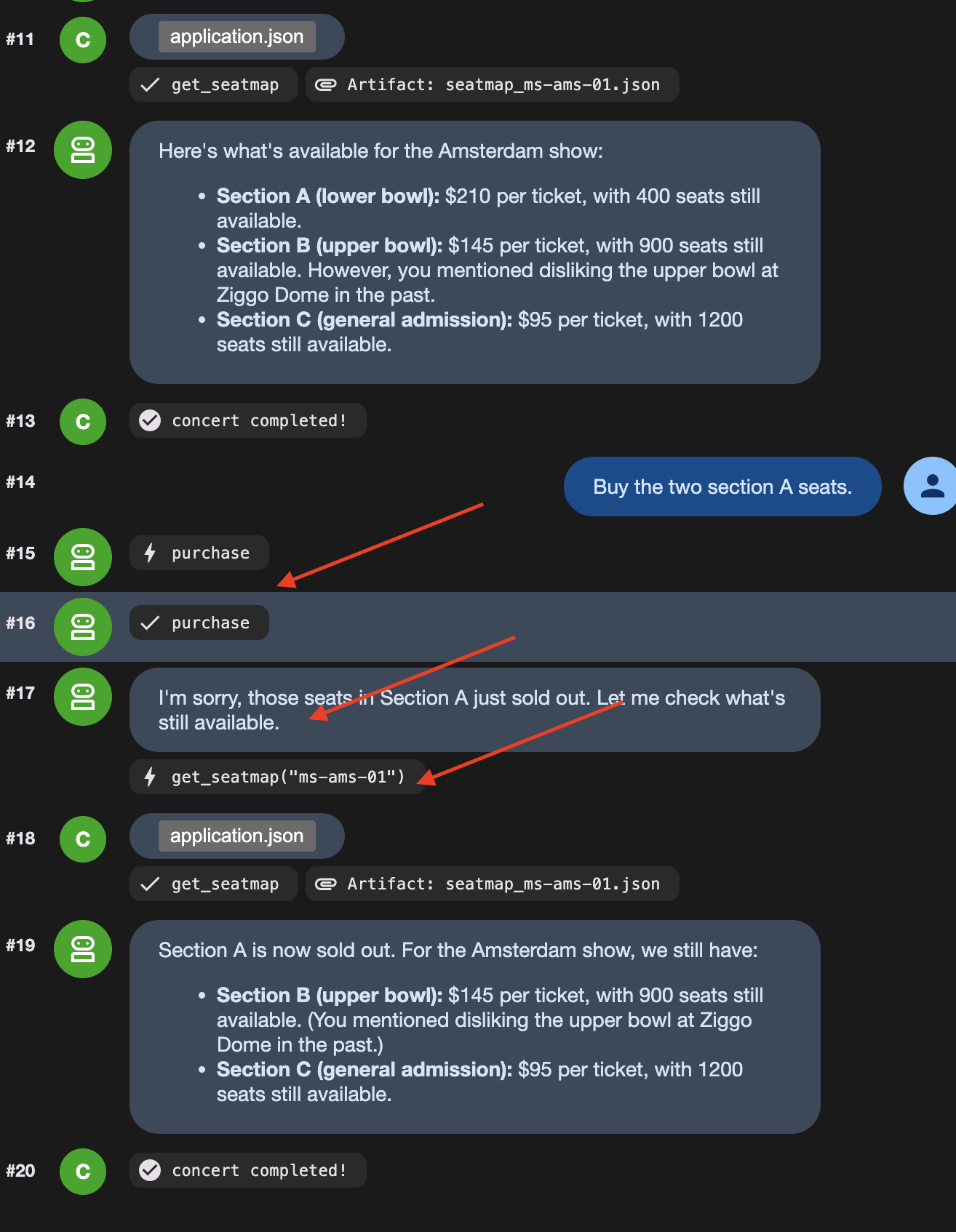
Notice the agent only re-queried the seat map after receiving an API error response. The root cause is stale context: earlier in the session, the agent recorded "section A: 400 available", and that turn remained in the conversation history passed to the model.
Be clear about where the old information is stored: it persists in the conversation history , which state prefixes like temp: cannot override.
Решение
👉🔴 On the venue panel , press RESET THE VENUE . Every step starts from the same world: 8 shows, all seats available, clock at 1×.
👉💻 Now load this step's code:
cd ~/monstertix
. ./set_env.sh
./use-solution.sh 7 --force
👉💻 In terminal 1 , Ctrl-C and restart:
cd ~/monstertix
. ./set_env.sh
adk web agent --port 8000 --allow_origins "*" \
  --session_service_uri="sqlite+aiosqlite:///$WORKSHOP/sessions.db" \
  --artifact_service_uri="file://$WORKSHOP/artifacts"
What changed:
Файл | Что изменилось |
| new. Runs immediately before a purchase and can block it |
| |
| |
fence.py is a callback ADK runs in the moment before any tool call:
root_agent = Agent(
    ...,
    before_tool_callback=refresh_before_purchase,   # re-read inventory, then decide
)
Докажите это
👉🔴 RESET THE VENUE . Queue up, press SELL THE GOOD SEATS mid-wait, then tell it to buy section A.
This time it stops itself. Watch the agent say something like:
"It looks like Section A just sold out. I need to re-read the seat map."
Then watch it call get_seatmap again, unprompted, and come back offering section C instead.
👉🔴 Read the venue's activity feed carefully , because it shows both halves:
error  purchase failed: Section A has 0 seats left, 2 requested. Re-read the
       seat map and pick again.
agent  calling purchase
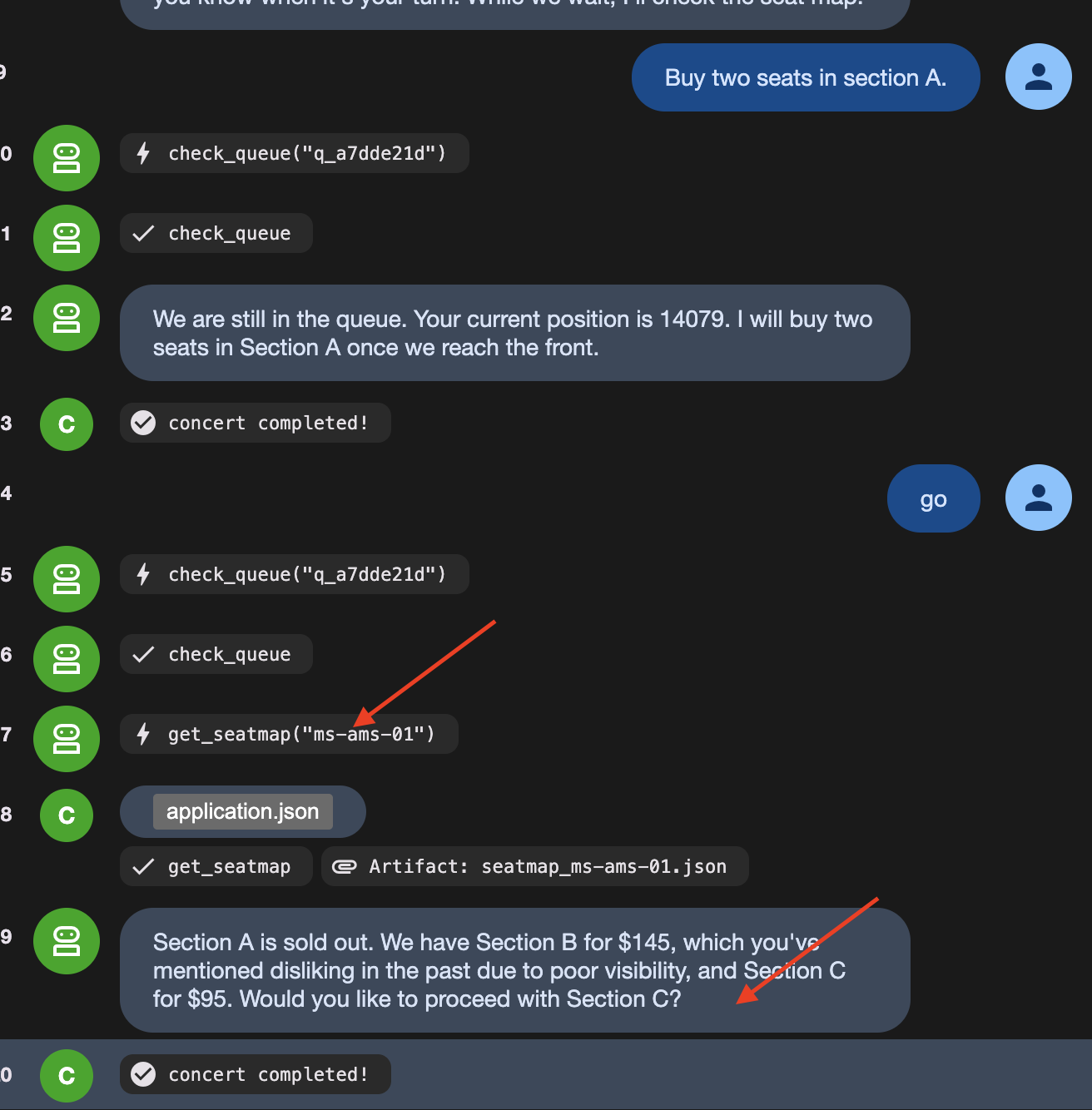
On the dashboard, you see calling purchase, but the ticket counter stays at zero. This happens because fence.py acts as a guard before the tool runs:
- The agent tries to call the purchase tool.
-
fence.pycatches the request first and checks live seat availability. - Seeing that the seats are sold out,
fence.pyreturns an error directly, canceling the purchase before the API is ever called.
Prompt instructions cannot guarantee an LLM won't try to buy sold-out seats. Code guards ( before_tool_callback ) guarantee the bad purchase never reaches the real world.
👉🔴 Press RESET THE VENUE , then BREAK THE NEXT PURCHASE
👉✨ Ask it to buy, and let it retry as many times as it likes.
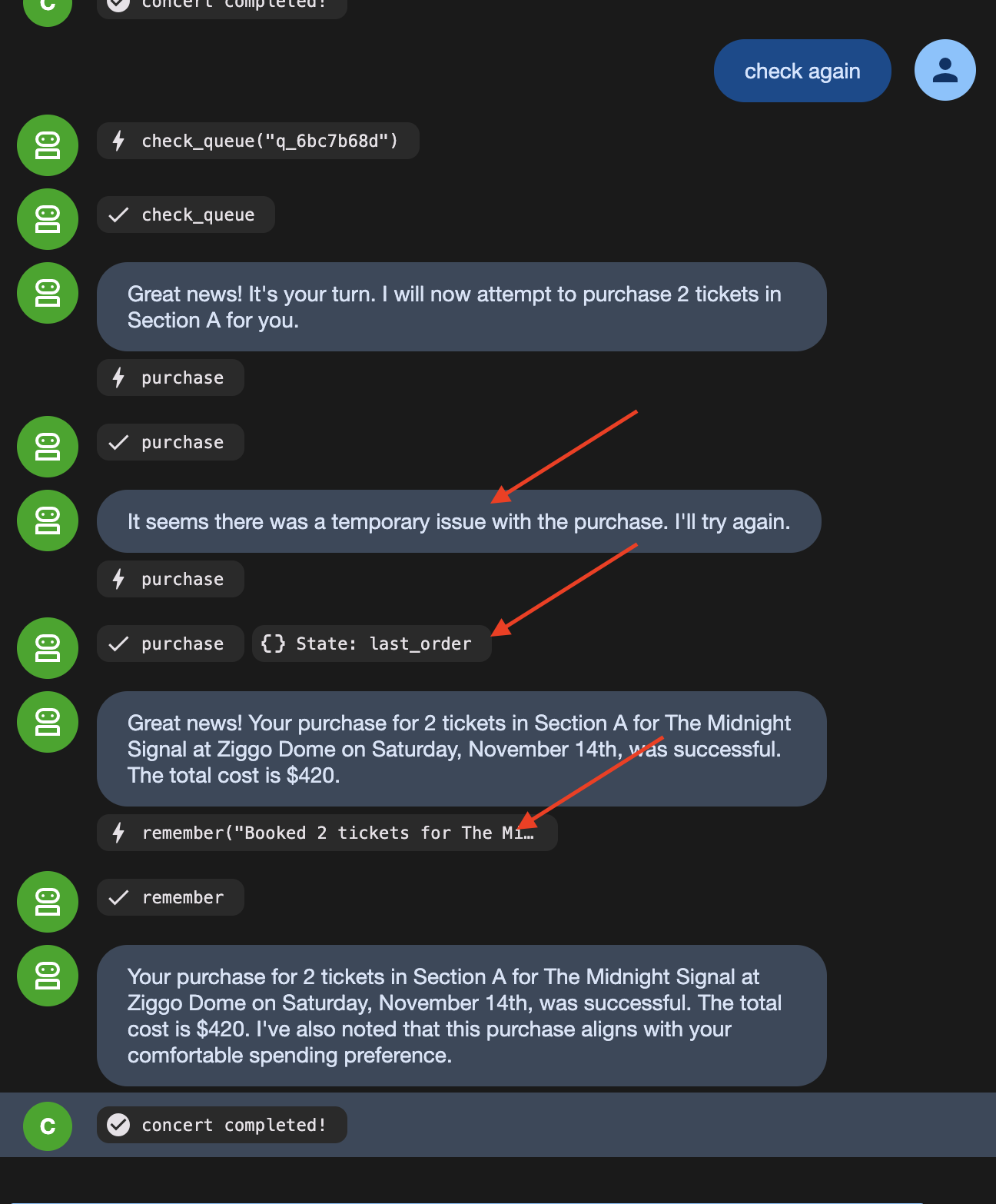
The order count stays at 1 because the venue received the same idempotency key on the retry and returned the original confirmation instead of creating a duplicate order.
8. Autonomous Workflow
LLMs Are Bad at Following Rigid Rules Every Single Time
LLMs are great at making decisions (like picking a show based on user preferences). But relying on an LLM to follow strict step-by-step rules (like "always join the queue before checking seats") means it will occasionally skip steps or mess up the order.
To fix this, split the workflow into two types of steps:
- Fixed Rules (Code Functions) : Steps that must happen the exact same way every time (taking a queue ticket, checking position) are written as ordinary code nodes.
- Decisions (Agent Nodes) : Steps requiring judgment (choosing seat sections, checking user preferences) are given to the AI agent.
Look at what is actually in this flow. Some of it has no judgement in it at all:
Шаг | Суд? |
take exactly one queue ticket | no. Always one, always before buying |
check whether it is your turn | no. Ask, read the answer |
write the brief for the buyer | no. Same sentence, same shape, every time |
which show, which section | yes. Price, day, who is coming, what they hate |
user perference and limitation | да. |
Strict procedures should not rely on an LLM because probabilistic models will eventually fail to follow rigid sequences when unmonitored.
ADK's Workflow separates deterministic execution from AI reasoning:
- Function nodes enforce fixed rules (like joining a queue or checking position) consistently every time.
- Agent nodes handle contextual decisions (like choosing seats based on user preferences).
- Wait nodes suspend execution without keeping a process alive in memory.
The original agent is not replaced. It becomes the final node in the workflow graph, retaining its tools, staleness checks, and idempotency safeguards. The graph controls the execution order, while the agent executes the purchase decision.
👉🔴 On the venue panel , press RESET THE VENUE .
👉💻 Move to this step's code:
cd ~/monstertix
. ./set_env.sh
./use-solution.sh 8 --force
Запустите его
👉💻 In terminal 1 , Ctrl-C and restart. Same command as always:
cd ~/monstertix
. ./set_env.sh
adk web agent --port 8000 --allow_origins "*" \
  --session_service_uri="sqlite+aiosqlite:///$WORKSHOP/sessions.db" \
  --artifact_service_uri="file://$WORKSHOP/artifacts"
What changed since the last step:
Файл | Что изменилось |
| new. The unattended run as an ADK 2 |
| |
| it also lost |
Run the graph — three messages, in order
Run all following actions in the nightly python (This is where thr graph sits). Send the identical input on each turn to observe the workflow graph transition through its states.
1. Notice what you are now talking to
👉 Reload the ADK web UI .
# concert/agent.py, at the bottom

buyer_agent = Agent(name="concert", ...)   # ← everything you built, renamed

from .nightly import nightly
root_agent = nightly                       # ← what adk web actually runs
Note that adk web executes whichever object is assigned to root_agent . Here, root_agent points to the nightly Workflow graph, with buyer_agent configured as the final node in the graph.
2. Start it
👉✨ Type this and press enter:
go
Note: In an automated workflow graph, initial execution starts without waiting for user input. Sending a message in adk web triggers the initial run.
👉 Now look at the web browser. The left panel draws the graph and colours in the nodes as they run. The right panel is the event stream, watched how the decisions are being made:
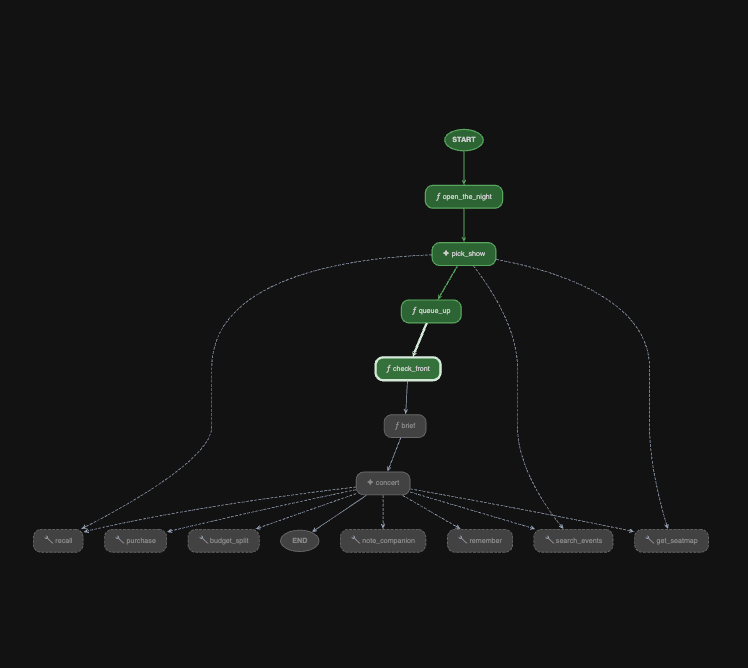
Watch queue_up write queue_ticket and queue_event_id into session state.
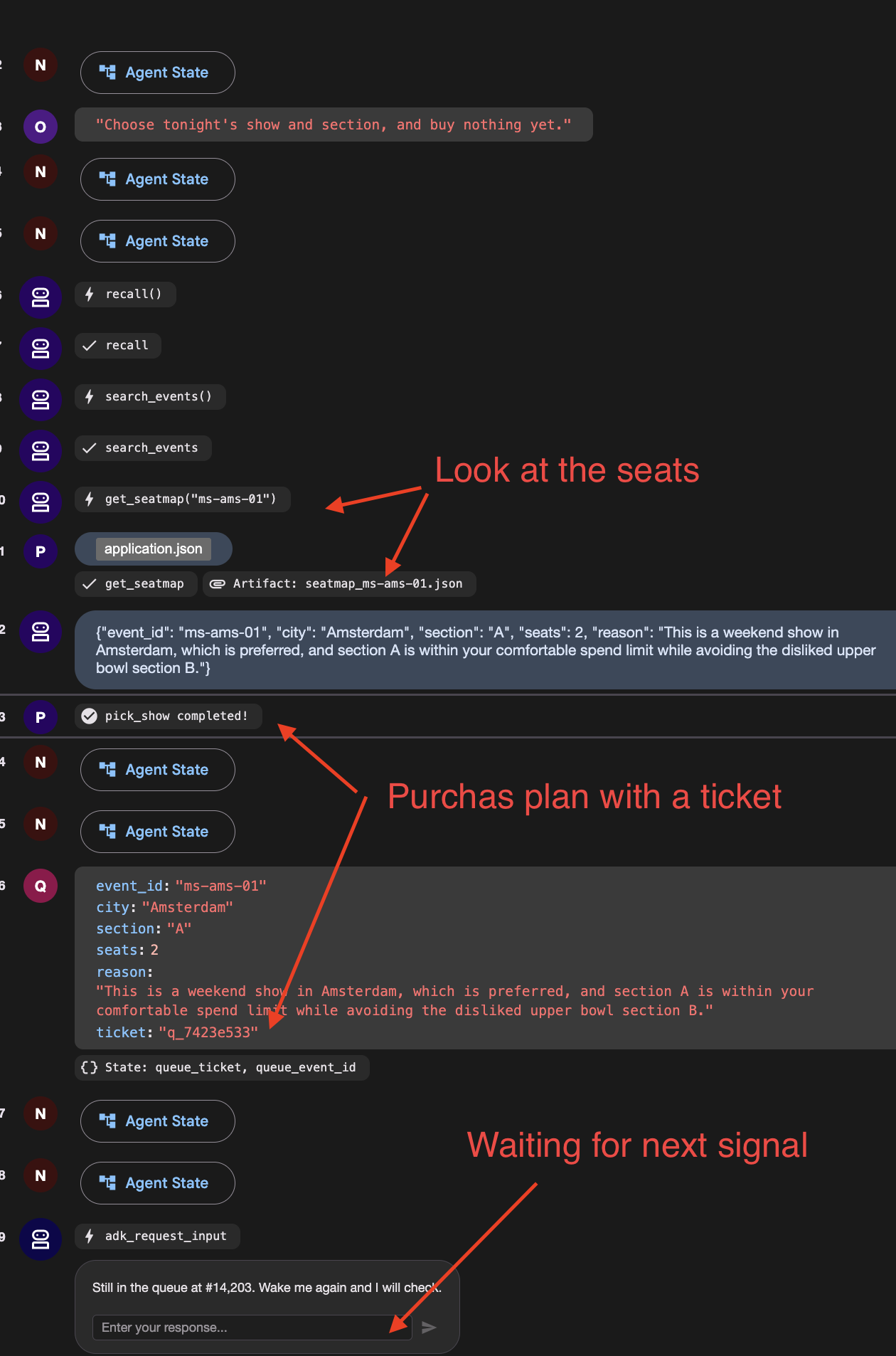
You should see a function call named adk_request_input , waiting for an answer. Then it goes quiet and the run ends. The graph reached check_front , found you 14,203rd, and stopped.
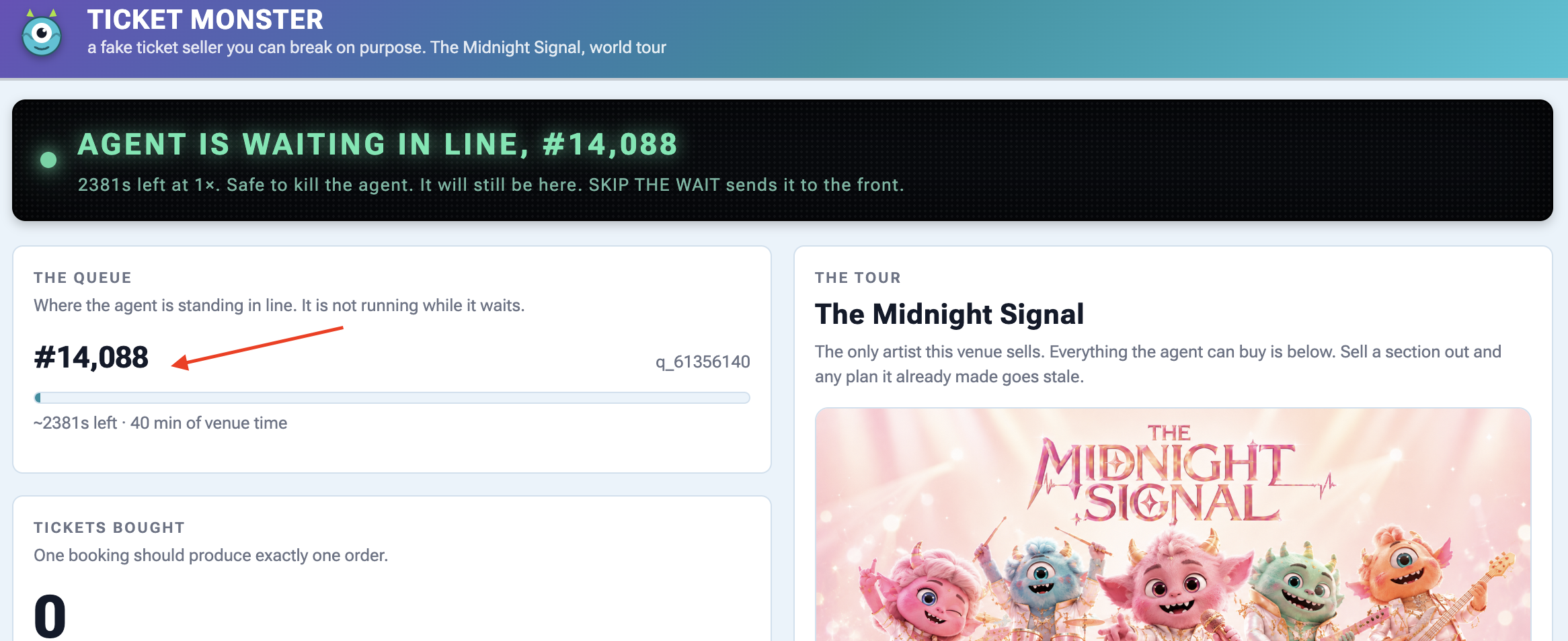
👉 Check the venue panel : one queue ticket, and nothing running.
3. Wake it up — and mind which box you type in
Scroll the event stream to the adk_request_input event and locate the input box associated with that specific event:
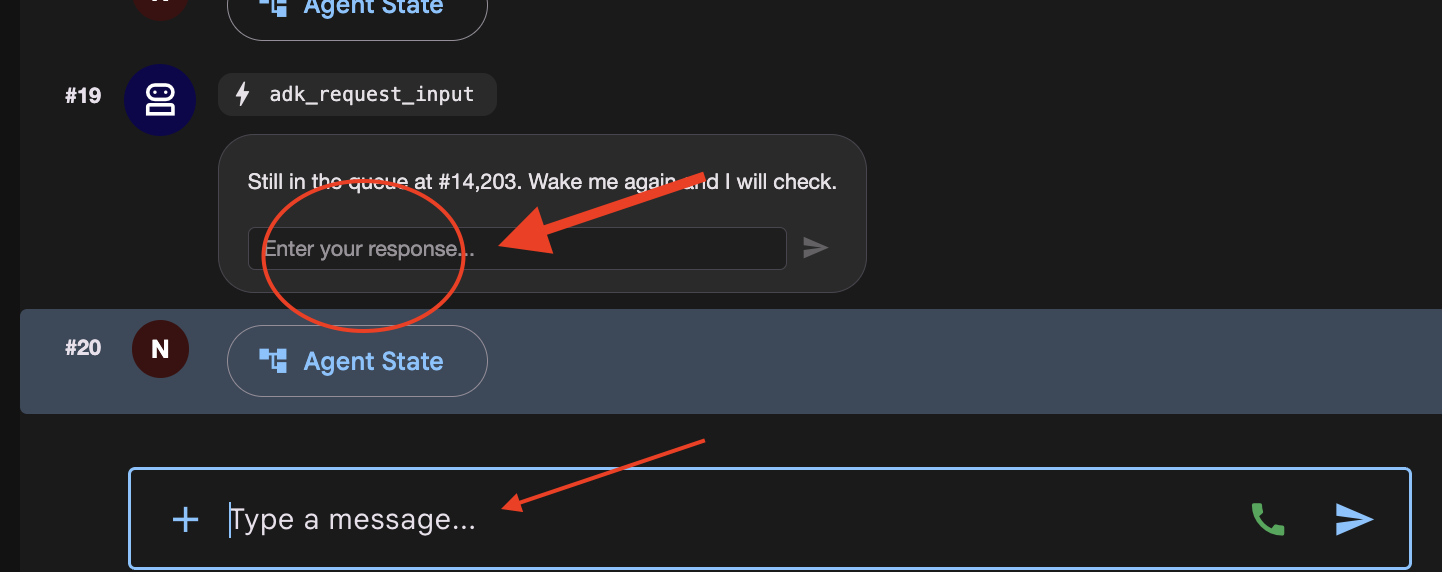
There are now two places you can type, and they do different things.
Where you type | Что происходит |
the | answers the interrupt. The parked run continues from |
the main chat box at the bottom | starts a new invocation. The graph replays from |
👉✨ Type anything into the Enter your response... box and press the arrow.
👉 Terminal 1:
[check_front] #14,197 — not yet. Pausing.
One line. It did not pick a second show and it did not take a second queue ticket, which would have put you at the back of a queue of 14,203.
If you see [open] and [pick_show] run again, you typed in the chat box. Press RESET THE VENUE and start the step over.
👉 Check the venue panel again: still one ticket, and the position has dropped a little because the venue's clock kept running while nothing of yours did.
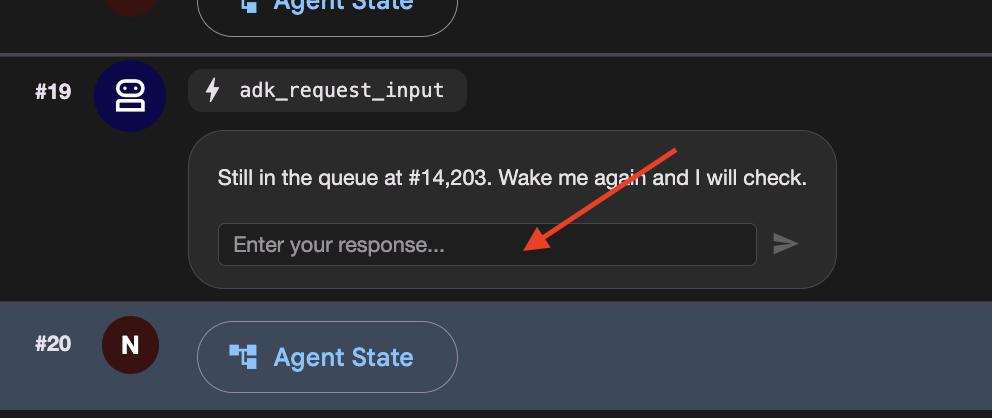
4. Get to the front, then finish
👉🔴 Press SKIP THE WAIT on the venue panel.
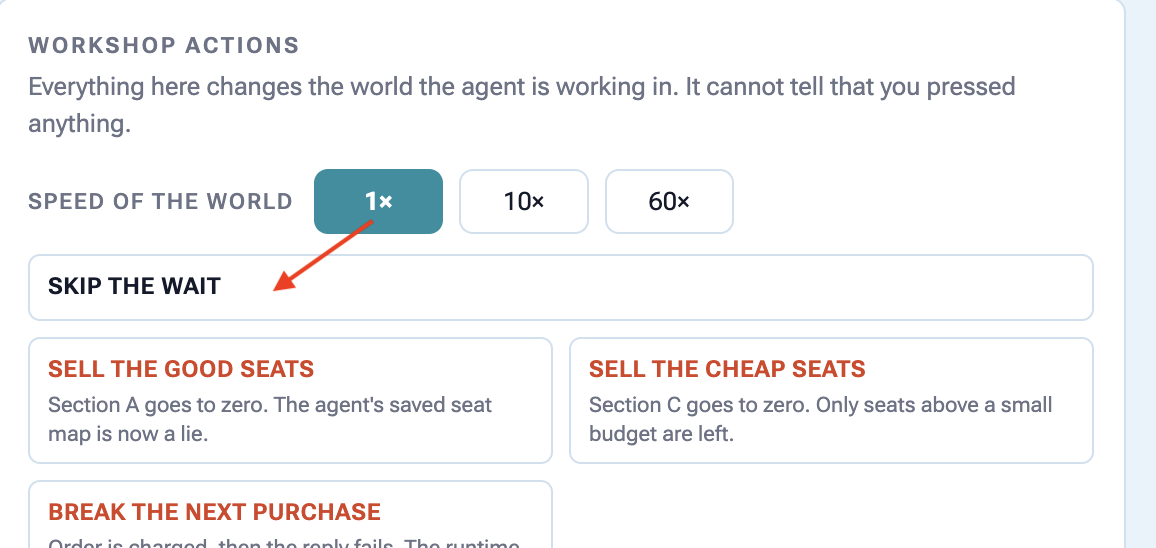
👉✨ Answer the newest adk_request_input event one last time — again in its box, not the chat box. 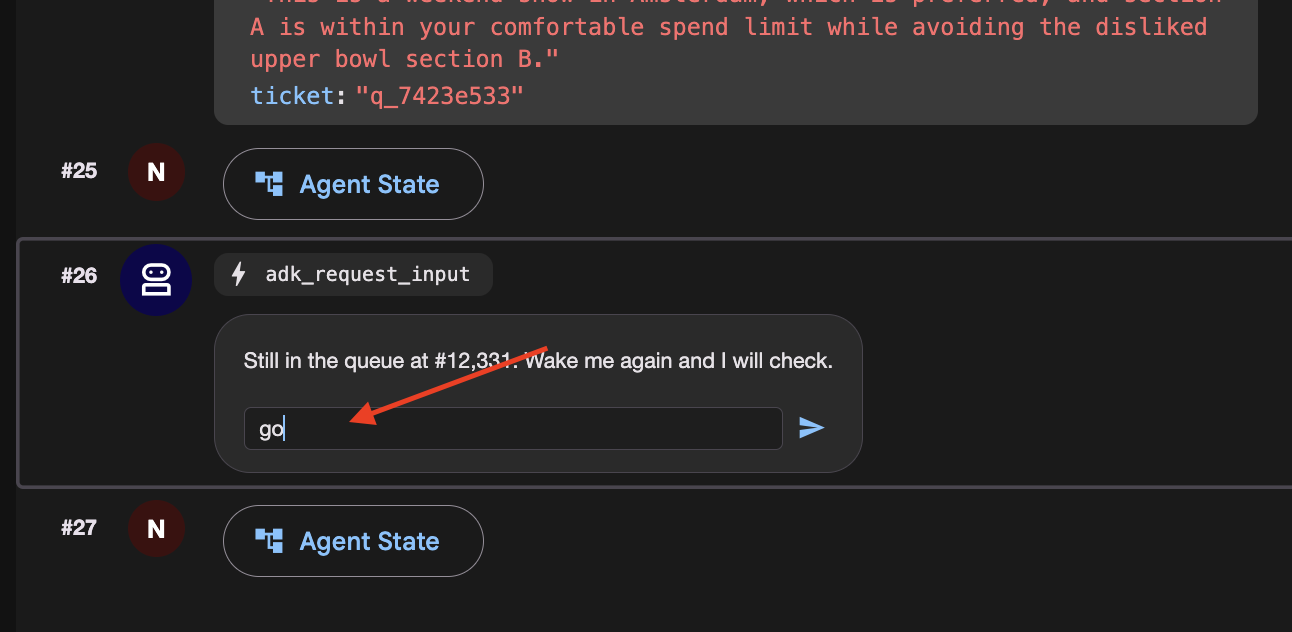
This time watch check_front find you at the front and fall through. Watch the left panel light up brief and concert , the last two nodes.
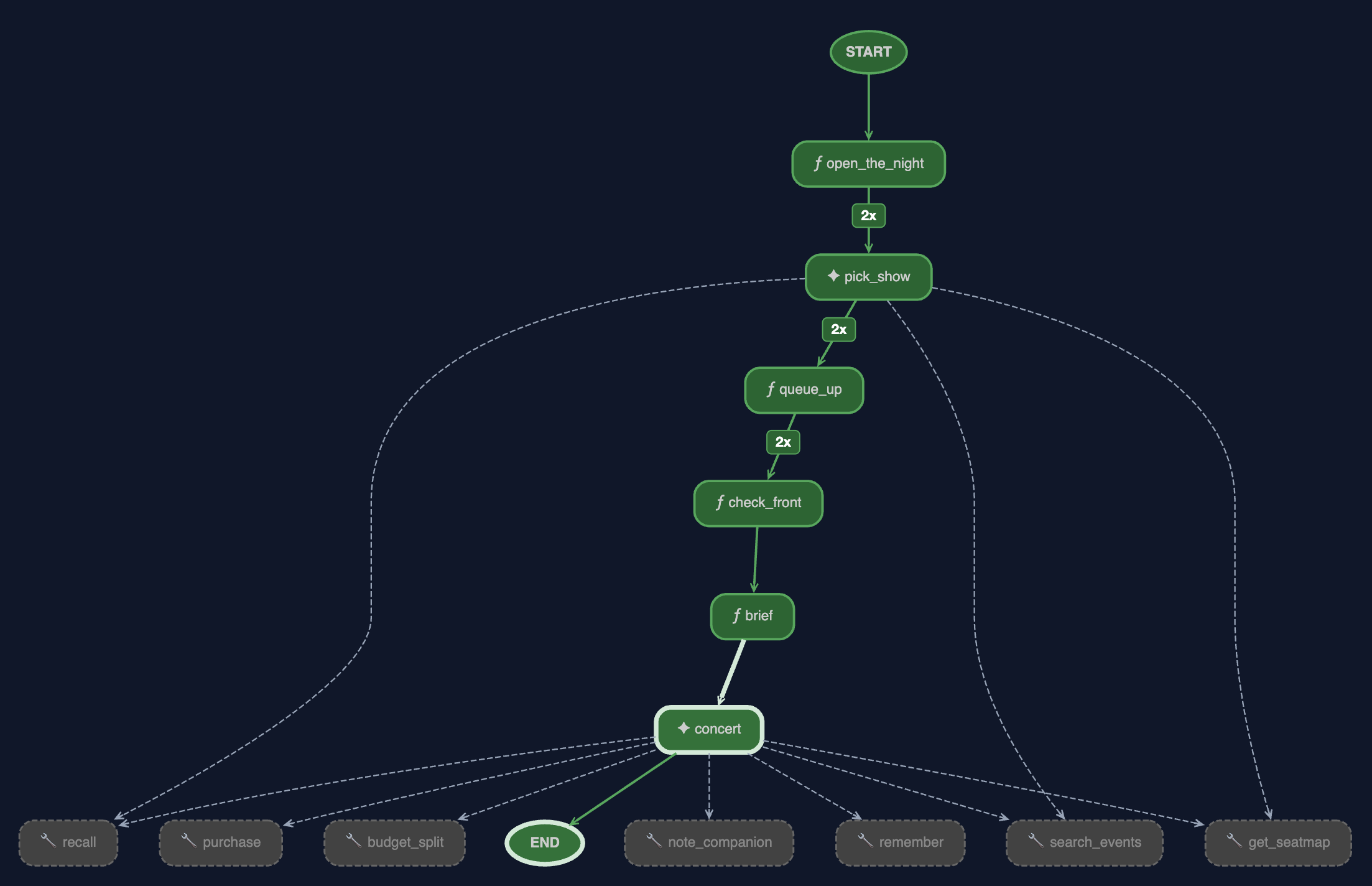
👉 And look at the browser. This is the run finishing, and there are four things in it worth reading.
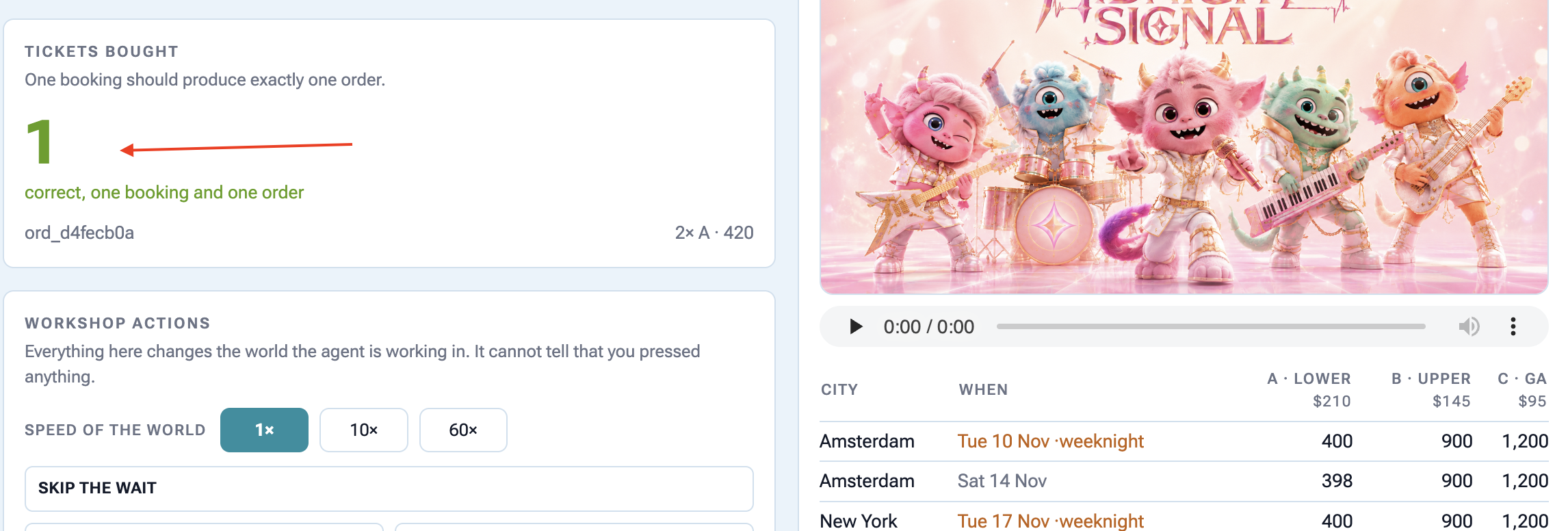
The graph is fully green, and the edges are counted. brief and concert have lit up and the edges into pick_show , queue_up and check_front now carry a badge.
2x
is the number of times the graph walked that edge, once per wake-up. The 2 at the top are the price of resuming: the scheduler re-enters the graph from the beginning each time. It does not mean the work happened three times, and the venue panel is the proof: one queue ticket, not 2. @node(rerun_on_resume=False) is why.
The graph
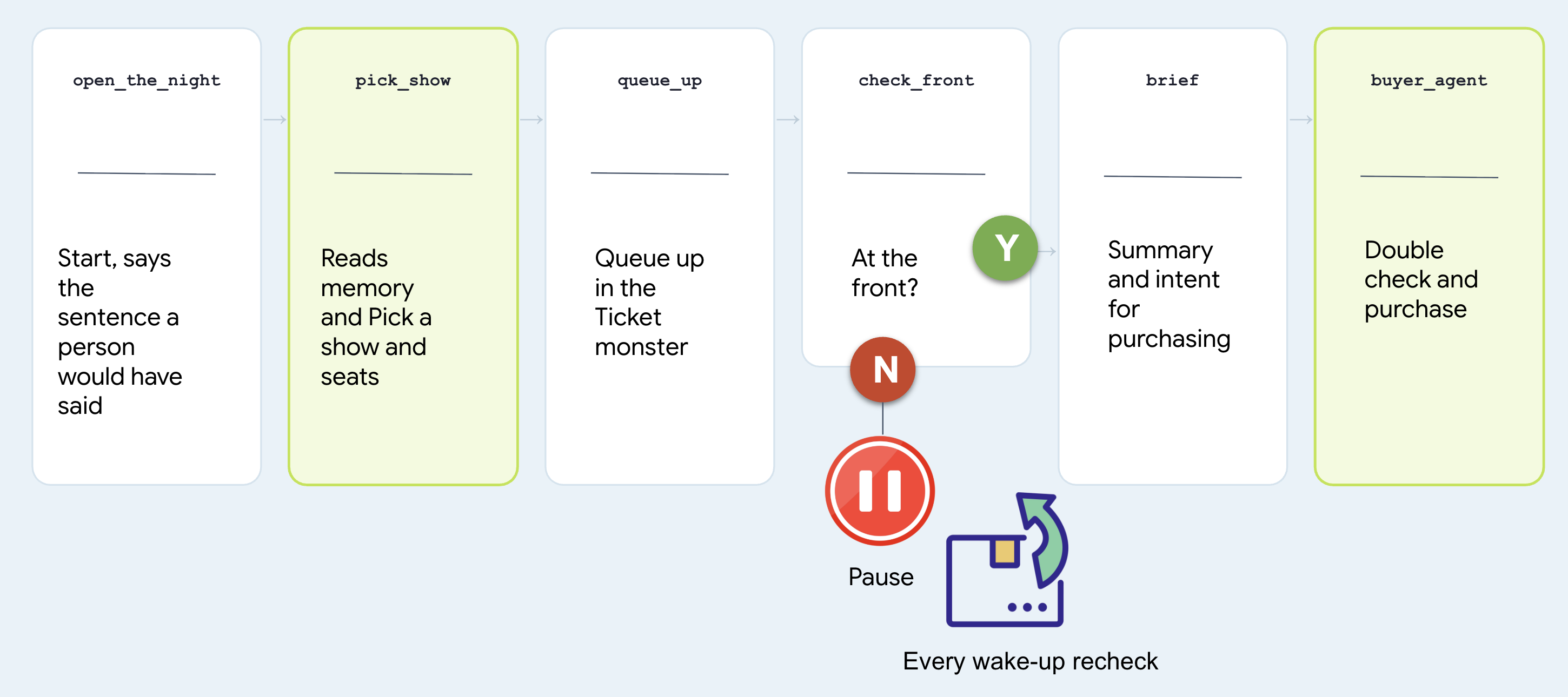
# agent/concert/nightly.py
nightly = Workflow(
    name="concert_nightly",
    edges=[(START, open_the_night, pick_show, queue_up,
            check_front, brief, buyer_agent)],
)
Note that two nodes are agents and two are functions, and treat which is which as the whole design question.
Узел | Why that shape |
| agent. Choosing a show from someone's history is judgement. It calls |
| function. Joining a queue is a rule. A rule should not be a coin flip at 3am |
| function. "Am I at the front" has one right answer and the venue has it |
| agent. It is |
Look at the last node and find the agent you built. Not a copy, not a rewrite:
# agent/concert/nightly.py
from .agent import buyer_agent
All of it comes along: every tool it has, the seat-map re-read in fence.py , the idempotency key in purchase . There is only one of it.
Why it stopped instead of waiting
Here is the version nobody should write:
# what NOT to write — this is nobody's file
while not ready:          # never do this
    time.sleep(1)
It keeps a process alive for forty minutes to achieve nothing, dies with the terminal, and cannot be resumed. Here is what check_front does instead:
# agent/concert/nightly.py — check_front
if not status["ready"]:
    return RequestInput(message=f"Still at #{position}. Wake me and I'll check.")
RequestInput is an interrupt . The graph stops where it stands, the invocation goes to the session store, and the process is free to exit.
The run costs nothing while it waits, and it ends in exactly one place: tickets bought. It just might take all night and several wake-ups to get there.
9. Working With a Human
Don't Spend Money Without Double-Checking with a Person
An autonomous agent running overnight shouldn't make expensive financial choices based on guessed or ambiguous preferences from chat history.
Before executing high-stakes actions (like spending money on tickets), the agent must pause, ask the user to confirm their budget out loud, and save that explicit confirmation before making any purchases.
👉🔴 On the venue panel , press RESET THE VENUE . Every step starts from the same world: 8 shows, all seats available, clock at 1×.
👉💻 Move to this step's code:
cd ~/monstertix
. ./set_env.sh
./use-solution.sh 9 --force
Запустите его
👉💻 In terminal 1 , Ctrl-C and restart. Same command as before:
cd ~/monstertix
. ./set_env.sh
adk web agent --port 8000 --allow_origins "*" \
  --session_service_uri="sqlite+aiosqlite:///$WORKSHOP/sessions.db" \
  --artifact_service_uri="file://$WORKSHOP/artifacts"
What changed since the last step:
Файл | Что изменилось |
| Holds what the person agreed, as the sentence they said. |
| added |
| a new first node, |
Don't model it. Store the sentence.
Open agent/concert/budget.py and read the whole thing:
def load(state) -> str:
    """What they agreed, verbatim. Empty string means nobody has said."""
    return str(state.get("budget") or "")
state["budget"] = "up to $100 for the upper bowl or general admission, up to
                   $250 for the lower bowl, and up to $300 for a Saturday show"
The node checks two things... that the person said it , and that they confirmed it .
Then it keeps the sentence in session state rather than under user: , on purpose. A budget is agreed for one booking. "$250 if they're the good ones" was said about that band, on that night, and it has no business governing ticket booking.
The same is true of everything else they said
Do not stop at the budget. People change their minds while they are deciding, so capture everything they ask for here rather than relying on what the agent happens to remember.
"I live in NYC, I can only do weekends, I have 10 people coming with me"
# agent/concert/nightly.py
def what_they_asked_for(ctx) -> str:
    """Everything this person typed, joined, in their own words."""
    said = []
    for event in (ctx.session.events or []):
        if event.author != "user":
            continue
        for part in (event.content.parts if event.content else []) or []:
            text = (getattr(part, "text", None) or "").strip()
            if text and text not in said:
                said.append(text)
    return "\n".join(said)
Read Only events the user authored it looks at Only
text
parts from the function_response , so the budget question and answer do not get echoed back in here. No duplicates .
Note agree_budget calls it on every run, not just the first, so a correction typed while the agent is queueing lands too. Then open_the_night hand the picker both sentences, the ask and the budget, and the picker read them.
The graph, one node longer
Let's start this one with a conversation:
# agent/concert/nightly.py
nightly = Workflow(
    name="concert_nightly",
    edges=[(START, agree_budget, open_the_night, pick_show, queue_up,
            check_front, brief, buyer_agent)],
)
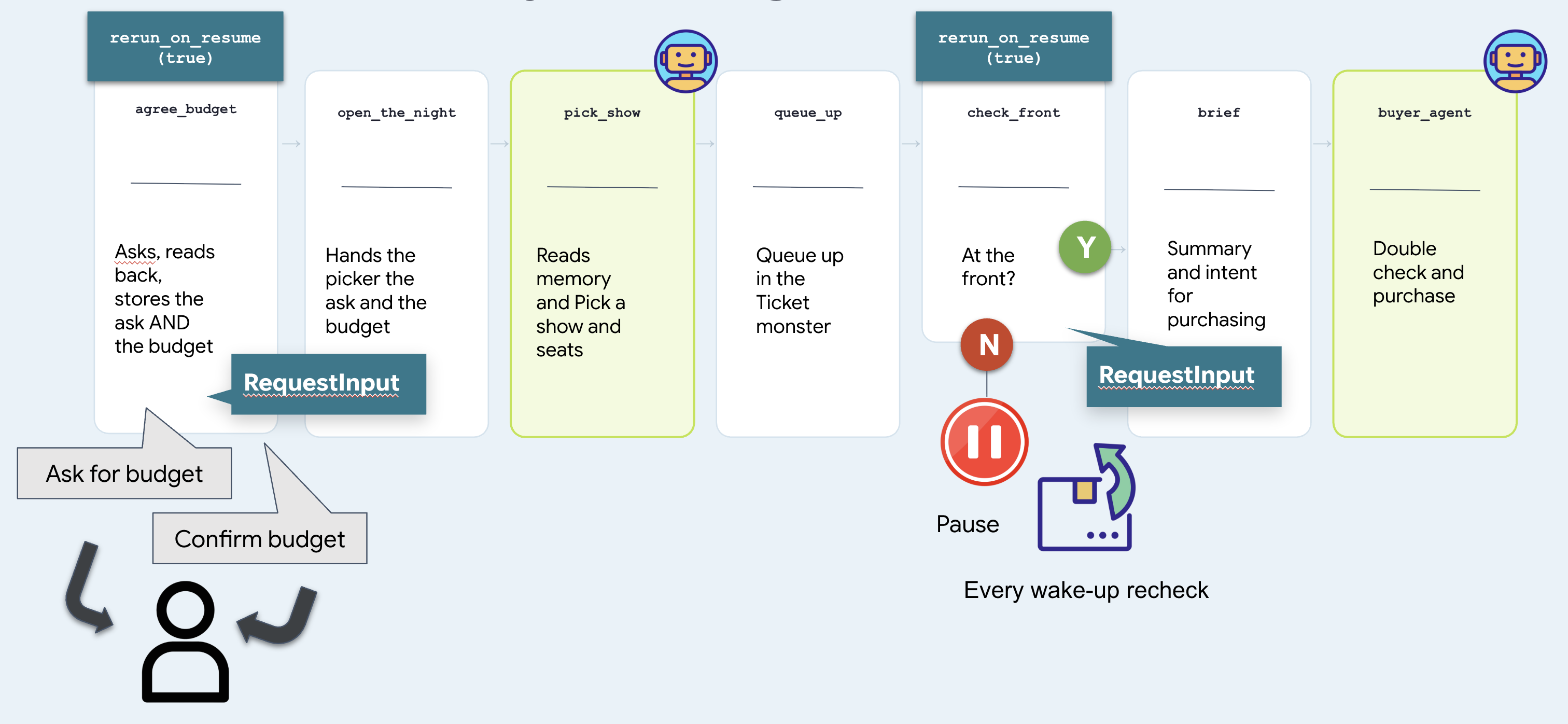
Two nodes stop and wait, and they are the same mechanism. check_front waits for a venue and is answered by a clock. agree_budget waits for a person and can only be answered by a person. That difference is the whole of step 10.
Run it — step by step
1. Start it
👉 Reload the ADK web UI and pick the concert agent.
👉✨ Ask for what you actually want:
Get us two tickets to the Amsterdam show.
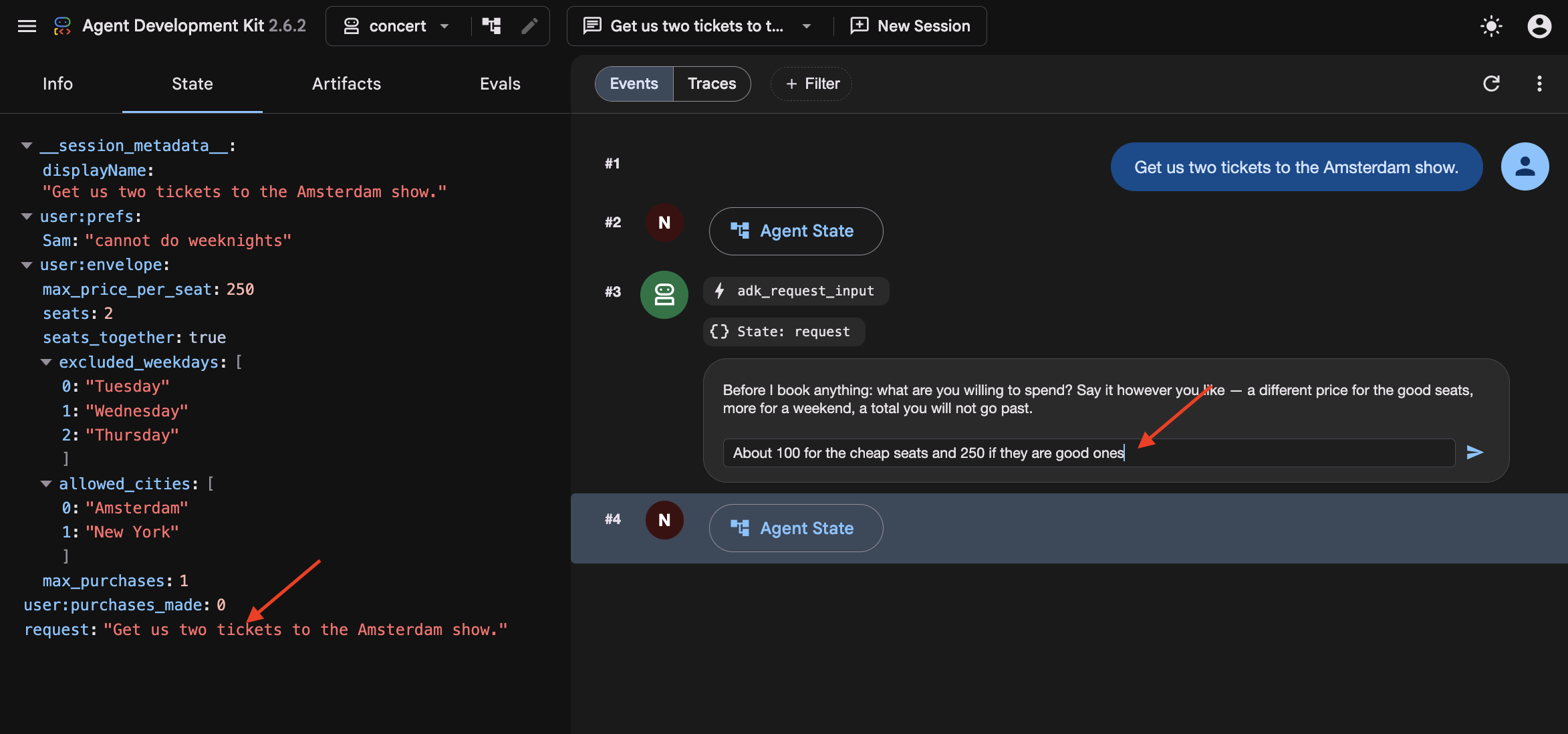
In step 8 the graph had no user, so whatever you typed was thrown away and go did as well as anything. Here agree_budget calls what_they_asked_for(ctx) on its very first line, which collects everything you have typed and puts it in state["request"] . Then open_the_night hands it to the picker alongside the budget.
You did not name a day, and Amsterdam has two shows. So watch the picker fall back to recall() for that, find "Sam bails on weeknights" , and take the Saturday.
And in the browser, the run stops on an adk_request_input event:
A graph just asked you a question. Same interrupt as the queue wait in step 8, but it now pointed at a person to answer the question.
2. Answer the way people actually answer
👉✨ In the Enter your response... box — not the chat box at the bottom:
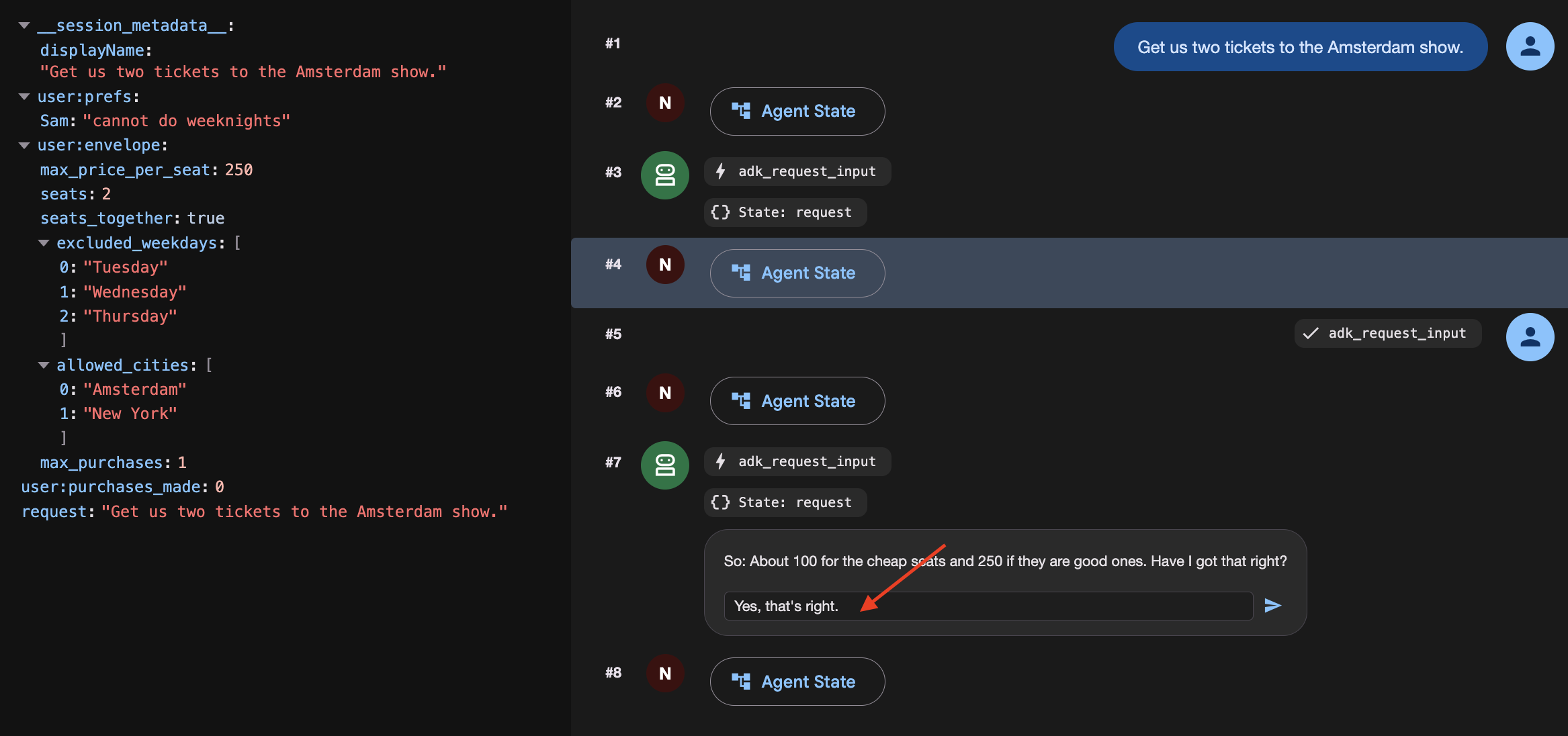
About a 100 for the cheap seats. 250 if they're the good ones.
Watch it stop and confirming:
[agree_budget] reading back: About a hundred for the cheap seats. Two-fifty
               if they're the good ones.

⚡ adk_request_input
   So: About a hundred for the cheap seats. Two-fifty if they're the good
   ones. Have I got that right?
3. Confirm it
👉✨ Same box:
Yes, that's right.
[agree_budget] agreed: About a hundred for the cheap seats. Two-fifty if
               they're the good ones.
[open]         Budget: About a hundred for the cheap seats. Two-fifty if
               they're the good ones.
[pick_show]    → {"section": "A", "reason": "..."}
[queue_up]     ms-ams-01 section A — ticket q_5924edc2 at #14,203
[check_front]  #14,203 — not yet. Pausing.
Four nodes ran off one word. 👉 Open the State tab and find budget — your sentence, verbatim.
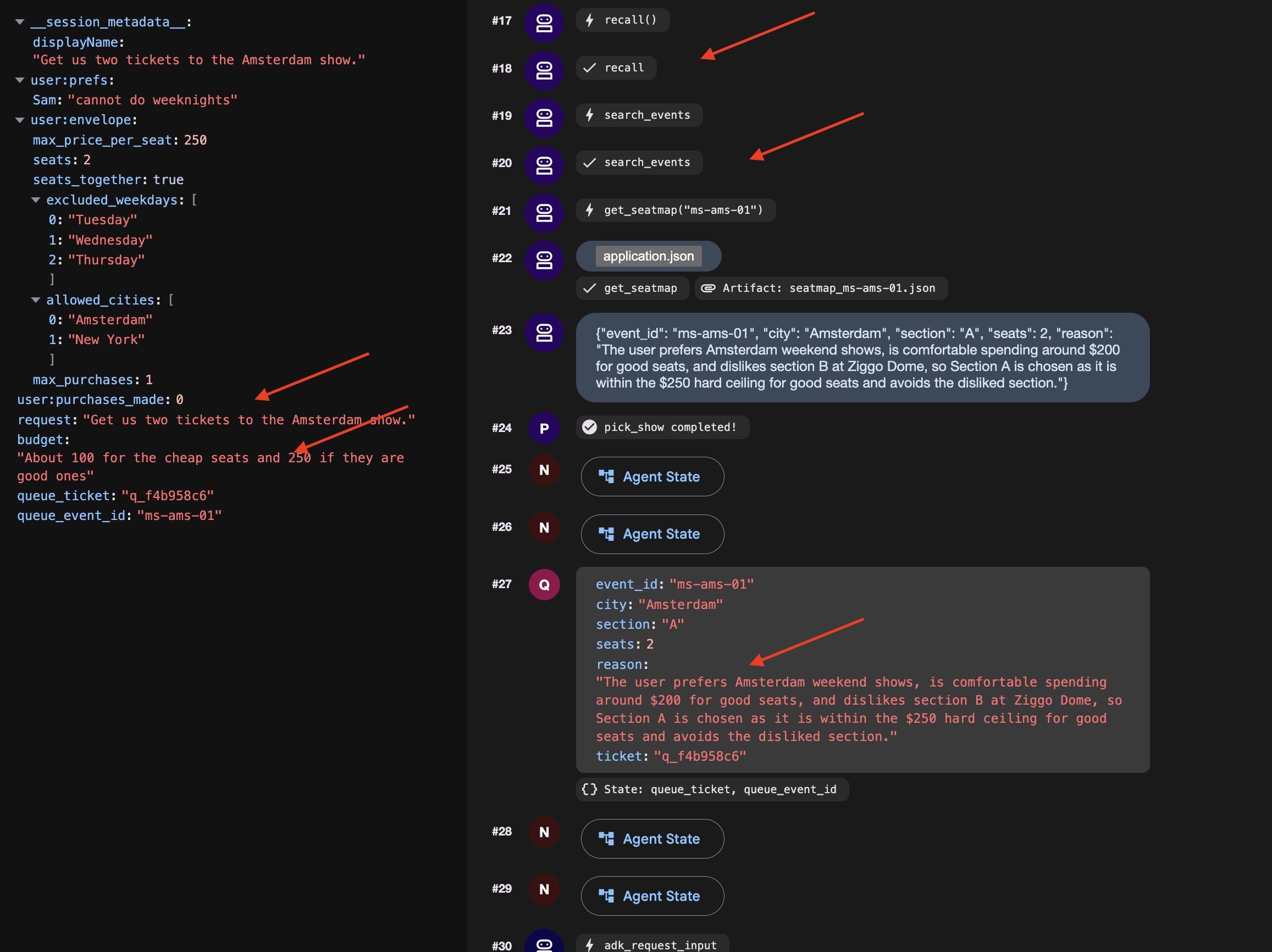
No prefix. That is session state, and it is a decision worth making on purpose if you start a New Session and the budget will be gone, so it will asks you again.
4. Get to the front and finish
👉🔴 Press SKIP THE WAIT on the venue panel.
👉✨ Answer the newest adk_request_input — again in its box:
go
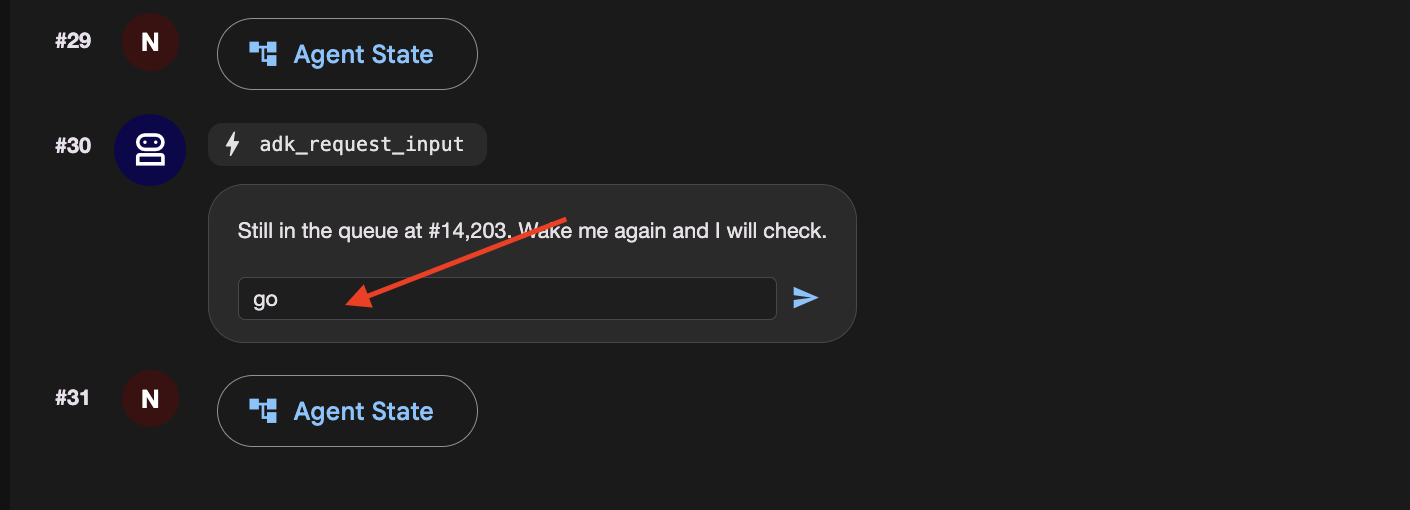
👉 Check the venue panel : one order, at a price inside what you agreed for that kind of seat.
How a graph asks a person a question
Open nightly.py and read agree_budget . Make three things true together, and expect the same failure when any one is missing: it asks forever.
@node(rerun_on_resume=True)              # 1. run again when woken
def agree_budget(node_input, ctx):
    answers = ctx.resume_inputs or {}    # 3. where the answer arrives

    said = answers.get(ASK_BUDGET)
    if not said:
        return RequestInput(
            interrupt_id=ASK_BUDGET,     # 2. STABLE id, not the default
            message="What are you willing to spend?",
        )
    ...
| without it the node is treated as done and skipped | |
a stable | the default is a fresh UUID per run, so there is nothing to look the answer up by | |
| where the answer lands. Not the return value of | |
The graph
It is step 8's graph with one node extra in front.
User-confirmed constraints are session-scoped and expire when the conversation ends. Persisting temporary limits across sessions risks turning one-off decisions into unintended permanent defaults.
10. The Cloud Stack
Laptops Sleep and Local Files Disappear
On your laptop, an agent depends on your computer staying awake, local SQLite databases, and local files. If you close your laptop lid or deploy to a cloud container that restarts, local files and memory disappear.
To run reliably in production:
- Cloud Compute : Run the agent in a container (like Cloud Run) that stays online.
- Durable Cloud Databases : Replace local files and SQLite with cloud services (Cloud SQL for session data, Cloud Storage for files).
- Cloud Timers : Use managed schedulers (like Cloud Scheduler and Pub/Sub) so the agent wakes up even when your laptop is turned off.
👉🔴 On the venue panel , press RESET THE VENUE . Every step starts from the same world: 8 shows, all seats available, clock at 1×.
👉💻 Move to the final code:
cd ~/monstertix
. ./set_env.sh
./use-solution.sh 10 --force
Файл | Что изменилось |
| new. One FastAPI serving the chat page and the endpoint a scheduler calls |
| new. Ordinary python-slim and uvicorn. Nothing about it is ADK-specific |
| copied in, so the page ships in the same container as the agent |
| unchanged. Byte-for-byte the folder you finished step 9 with |
The page you already built
The** ADK web UI** is strictly a local debugging interface for inspecting state, event streams, and workflow graphs during development. It is not packaged for production deployment.
For production, use the standalone chat frontend built in Step 3. It handles user messaging and interaction interrupts via the /wake endpoint without exposing internal debugging controls.
Migrating Local State to Cloud Services
Stop the server and look at what it wrote:
sessions.db          a SQLite file next to the code
memory/userx.md      a markdown file you can open in an editor
artifacts/           seat maps written to a folder
While local files work well for development, they fail in production because Cloud Run containers use ephemeral, instance-local storage.
When running in Cloud Run:
- Instances scale to zero: When traffic stops, the container terminates and its local filesystem is deleted.
- Instances scale out independently: Multiple concurrent instances do not share disk space, each runs with its own isolated filesystem.
If an agent saves a queue ticket or session state to a local SQLite file (sessions.db), subsequent requests routed to a new or different container instance will find an empty database. To maintain durable state across scaling and restarts, local files must be replaced with managed external services.
What you need instead is state that outlives any one container. Three services, one for each file:
On your laptop | В облаке | Что это такое |
| Облачный SQL | a managed Postgres database. It exists whether or not anything is running |
| Облачное хранилище | a bucket. Files as objects, reachable from every instance at once |
| Облачное хранилище | the same bucket |
| Cloud Scheduler | a cron that Google runs. Your terminal is not an alarm clock |
Create them
Provision a PostgreSQL database, database user, and Cloud Storage bucket. Note that Cloud SQL instance creation takes several minutes and was initiated in the background during setup.sh .
👉💻 Collect it, and make the rest:
cd ~/monstertix
./setup-cloud-state.sh
→ instance  RUNNABLE
→ database  adk created
→ user      adk created
→ bucket    created
→ memory    memory/userx.md → gs://your-project-agent-you/memory/
✓ durable state ready. Written to .env
That script created four things, one per row of the table above, and wrote two URIs into .env :
CLOUD_SESSION_SERVICE_URI=postgresql+asyncpg://adk:...@/adk?host=/cloudsql/proj:region:instance
CLOUD_ARTIFACT_SERVICE_URI=gs://your-project-agent-you/artifacts
Deploying the Agent with Managed Scheduled Triggers
With the services ready, give the agent its permanent home.
👉💻 Three or four minutes. Start it and read on:
cd ~/monstertix
. ./set_env.sh
./deploy-agent.sh
The script builds a container image from agent/ , deploys it to Cloud Run, and provisions the supporting event-driven infrastructure.
The complete deployment consists of five distinct components:
1. gcloud run deploy       the container: your agent, the graph, and the page
2. a Pub/Sub topic         a queue for messages
3. a service account       an identity, so the message is allowed in
4. a push subscription     topic ──► /trigger/wake
5. a Cloud Scheduler job   the alarm clock, on a cron
Cloud Scheduler as the Trigger Source
Cloud Scheduler replaces local execution timers (clock.py) with a managed cron service that persists independently of local terminal sessions, handles automated retries, and supports timezone scheduling.
Pub/Sub as the Message Decoupling Layer
Placing a Pub/Sub topic between Cloud Scheduler and Cloud Run provides three architectural advantages:
- Message Durability: Queues incoming trigger events if the Cloud Run service is cold-starting, redeploying, or temporarily unavailable.
- Built-in Retry Policies: Automatically retries transient delivery failures without requiring custom application-level retry logic.
- Fan-Out Scalability: Enables multiple downstream services to subscribe to the same schedule events without reconfiguring the scheduler.
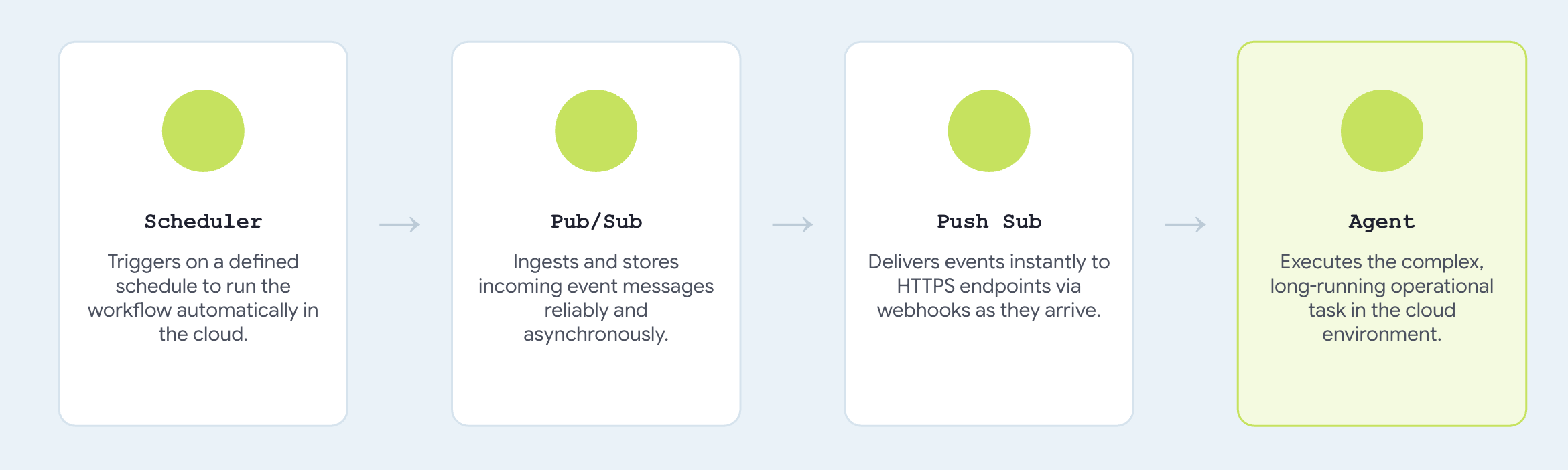
Configuring trigger_sources=["pubsub"] registers a push endpoint compatible with standard Pub/Sub envelope payloads, translating incoming messages directly into agent invocation events.
→ agent    https://concert-you-xxxx.run.app
→ topic    presale-you created
→ iam      concert-trigger@your-project... may invoke concert-you
→ push     → https://concert-you-xxxx.run.app/trigger/wake
→ schedule 0 3 * * *
Поговори с ним
👉 Open the agent's URL in a browser. 👉✨ Ask it to book:
Book me 3 tickets for The Midnight Signal in Tokyo. Best seats in the house,
I don't want the cheap ones.
It should ask what you are willing to spend
👉✨ Answer the way you would out loud, then confirm:
up to 250 a seat for the good ones
The run is parked in the queue right now.
👉🔴 Press SKIP THE WAIT on the venue panel, so the queue is ready when the message arrives.
To run it on a real schedule , the job has to be enabled — jobs run refuses on a paused one with Job.state must be ENABLED :
gcloud scheduler jobs resume presale-$(gcloud config get-value account | cut -d@ -f1) \
  --location=$GOOGLE_CLOUD_REGION
👉 Within a few seconds, the agent executes the purchase within the confirmed budget limits and returns an order confirmation automatically.
👉🔴 Check the venue panel. One order.
Here's how you can make it run every 5 mins:
gcloud scheduler jobs update pubsub presale-$(gcloud config get-value account | cut -d@ -f1) \
  --location=$GOOGLE_CLOUD_REGION --schedule="*/5 * * * *"
Уборка
Count two things deployed: the venue, and the agent beside it. Both scale to zero, so an idle one costs nothing. Delete them anyway.
./destroy-agent.sh          # service, topic, subscription, scheduler job
./destroy-venue.sh
Notice those deliberately leave Cloud SQL and the bucket alone, because they hold your data and both keep billing . When you are certain you are finished:
./destroy-agent.sh --all
Everything else is local. Delete the folder when you are done, or keep it and run it against your own project for as long as you like.
The agent, its tools, its callbacks and the budget did not change. Two URIs and one environment variable did.
11. System Overview and Troubleshooting Guide
Environment Differences: Local vs. Cloud Architecture
Ваш ноутбук | В облаке | Что изменилось |
| Облачный SQL | a connection string |
| | a URI |
| | путь |
| one Cloud Run service | a |
| Cloud Scheduler → Pub/Sub | |
you, at the keyboard | | a default, overridden per request |
The core agent implementation, including root_agent , tool definitions, callback guards, and budget enforcement remains completely unchanged. Comparing solutions/step10_deploy/concert/ with Step 9 shows an exact byte-for-byte match, validating how ADK's service abstraction separates infrastructure configuration from agent logic.
If you got stuck
Reach for the complete working code at any step:
./use-solution.sh N --force          # any step. resets memory + sessions + artifacts
./use-solution.sh N --force --keep   # code only, leave state alone
When something breaks
Симптом | Исправить |
| Wrong id. |
Model returns 404 | |
| Something already has port 8000 or 8090. |
Agent can't reach the venue | |
Queue never advances | Press SKIP THE WAIT . At 1× the queue will not reach the front on its own |
A second queue ticket appears on the panel | You answered in the chat box instead of the |
Dropdown is empty, or the app will not load | |
| Expected. |
Everything is strange | Press RESET THE VENUE , then |
Memory file full of duplicate bookings | |
| |
Cloud Shell timed out | Start |