

1. はじめに
概要
このラボでは、Network Connectivity Center(NCC)を使用して、VPC スポークと動的ルート交換のサポートを通じて、オンプレミス接続を大規模に確立する方法を説明します。VPC を VPC スポークとして定義すると、NCC ハブを介して複数の VPC ネットワークに接続できるようになります。ユーザーのオンプレミス ネットワークとのネットワーク接続を確立するには、ルーター アプライアンスの仮想 NIC、HA VPN トンネル、または Interconnect VLAN アタッチメントを、NCC VPC スポークと同じ NCC ハブにアタッチします。
ハブリソースは、スポークを相互接続するための一元化された接続管理モデルを提供します。
作成するアプリの概要
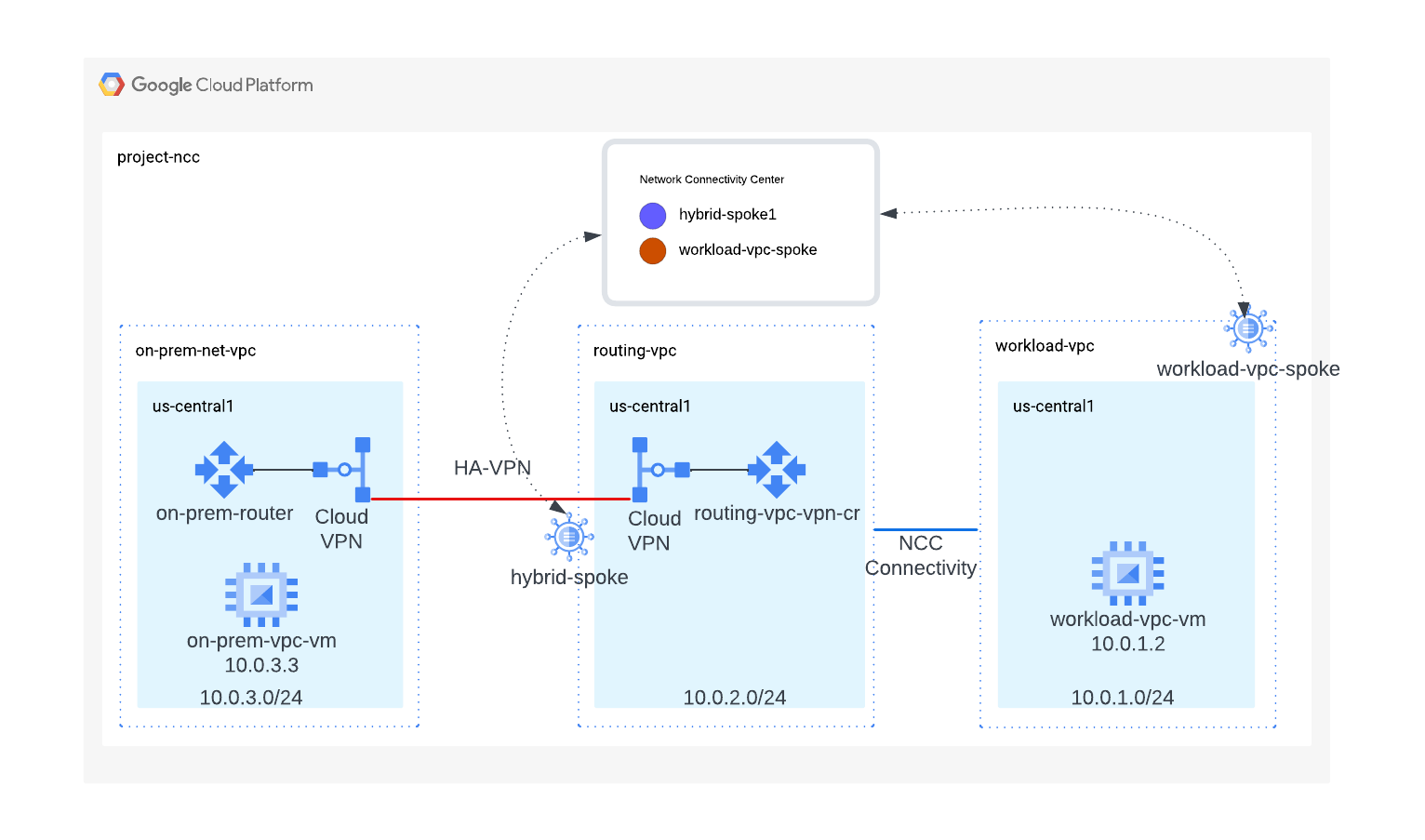
この Codelab では、NCC ハブを使用して論理的なハブアンドスポーク トポロジを構築します。このトポロジは、オンプレミス ネットワークとワークロード VPC 間のハイブリッド接続を実装します。
学習内容
- ワークロード VPC とルーティング VPC の違い
- VPC スポークとハイブリッド スポークの NCC 統合
必要なもの
- GCP VPC ネットワークの知識
- Cloud Router と BGP ルーティングの知識
- Google Cloud プロジェクト
- [割り当て: ネットワーク] を確認し、[追加のネットワークをリクエスト] します(以下のスクリーンショットを参照)。

目標
- GCP 環境を設定する
- VPC をスポークとして使用して Network Connectivity Center を構成する
- HA-VPN トンネルをハイブリッド スポークとして使用して Network Connectivity Center を構成する
- データパスを検証する
- NCC のサービス機能を確認する
- 使用したリソースをクリーンアップする
始める前に
Google Cloud コンソールと Cloud Shell
GCP を操作するには、このラボ全体で Google Cloud コンソールと Cloud Shell の両方を使用します。
NCC ハブ プロジェクト Google Cloud コンソール
Cloud Console には、 https://console.cloud.google.com からアクセスできます。
Google Cloud で次の項目を設定すると、Network Connectivity Center を簡単に構成できます。
Google Cloud コンソール の [プロジェクト セレクタ] ページで、Google Cloud プロジェクトを選択または作成します。
Cloud Shell を起動します。この Codelab では、$variables を使用して、Cloud Shell での gcloud 構成の実装を支援します。
gcloud auth list
gcloud config list project
gcloud config set project [YOUR-PROJECT-NAME]
projectname=[YOUR-PROJECT-NAME]
echo $projectname
region="us-central1"
zone="us-central1-a"
IAM ロール
NCC では、特定の API にアクセスするために IAM ロールが必要です。必要に応じて、NCC IAM ロールを使用してユーザーを構成してください。
ロール/説明 | 権限 |
| networkconnectivity.hubs.networkconnectivity.spokes.networkconnectivity.gatewaynetworkconnectivity.locations. |
| networkconnectivity.gatewayAdvertisedRoutes.networkconnectivity.groups. networkconnectivity.hubRouteTables.networkconnectivity.hubRoutes.networkconnectivity.hubs. networkconnectivity.locations. networkconnectivity.operations.* networkconnectivity.spokes.*resourcemanager.projects.getresourcemanager.projects.list |
| networkconnectivity.gatewayAdvertisedRoutes.getnetworkconnectivity.gatewayAdvertisedRoutes.listnetworkconnectivity.groups.getnetworkconnectivity.groups.getIamPolicynetworkconnectivity.groups.listnetworkconnectivity.hubRouteTables.getnetworkconnectivity.hubRouteTables.getIamPolicynetworkconnectivity.hubRouteTables.listnetworkconnectivity.hubRoutes.getnetworkconnectivity.hubRoutes.getIamPolicynetworkconnectivity.hubRoutes.listnetworkconnectivity.hubs.getnetworkconnectivity.hubs.getIamPolicynetworkconnectivity.hubs.listnetworkconnectivity.hubs.listSpokesnetworkconnectivity.hubs.queryStatus networkconnectivity.locations.*networkconnectivity.spokes.getnetworkconnectivity.spokes.getIamPolicynetworkconnectivity.spokes.listresourcemanager.projects.getresourcemanager.projects.list |
2. ネットワーク環境を設定する
概要
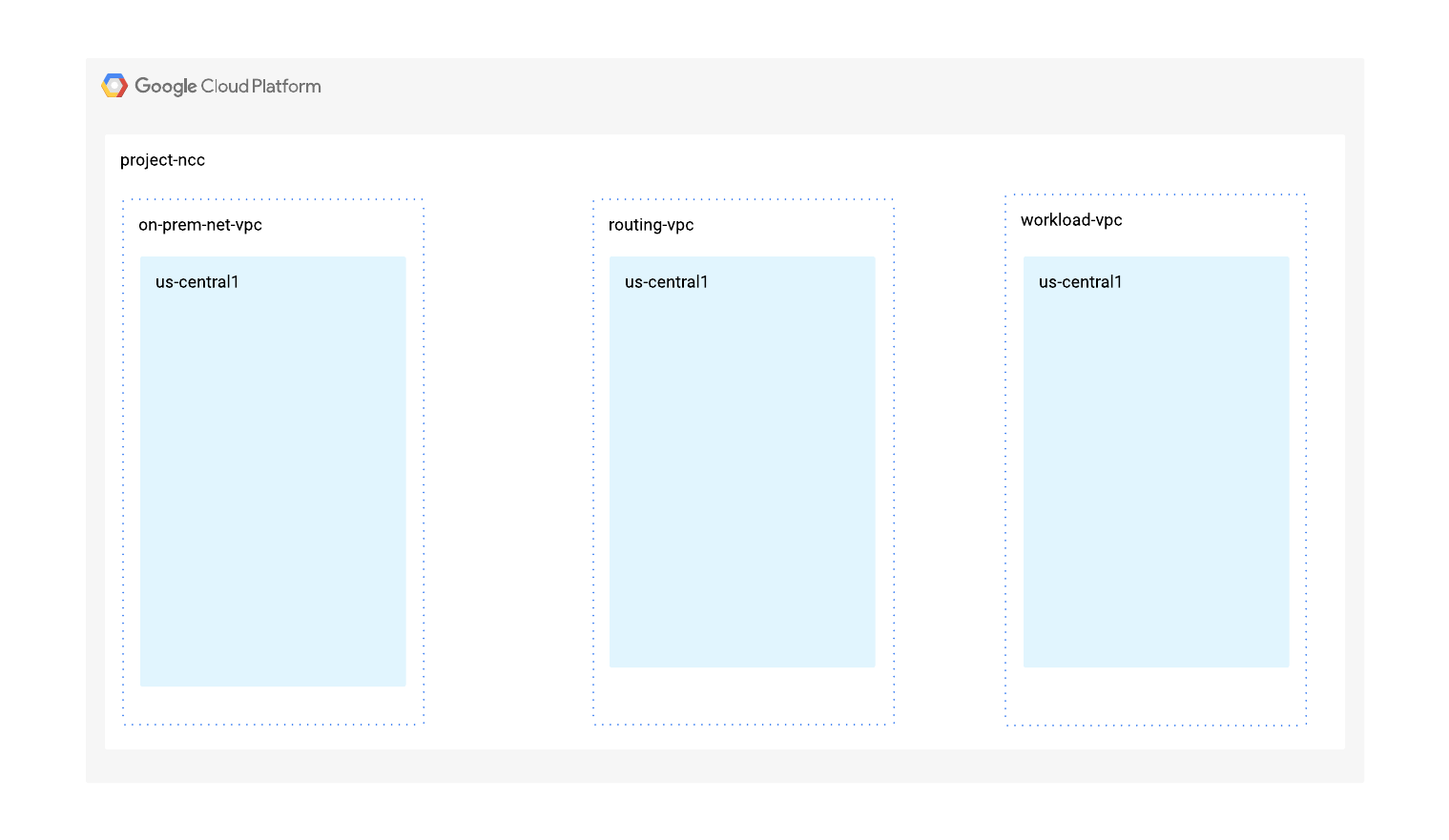
このセクションでは、1 つのプロジェクトに 3 つの VPC ネットワークとファイアウォール ルールをデプロイします。論理図は、このステップで設定するネットワーク環境を示しています。この Codelab では、オンプレミス ネットワークをシミュレートするために VPC を使用します。
主なコンセプト 1
Google Cloud グローバル VPC は、44 以上の GCP リージョン間のデータパス接続を提供します。Cloud Router はリージョン サービスであり、ルーターが構成されているリージョンまたは VPC ネットワーク全体でサブネットを動的にアドバタイズし、学習済みルートを伝播します。Cloud Router がルートをリージョンまたはグローバルに伝播するかどうかは、ユーザーが定義する動的ルーティング モード(リージョンまたはグローバル)によって決まります。
このセクションでは、まず各 VPC をリージョン ルーティング モードで構成します。この Codelab の残りの部分では、次のようになります。
- 「ルーティング VPC」は、NCC VPC スポークとして構成されていない VPC を識別します。
- 「ワークロード VPC」は、NCC スポークとして構成された VPC を示します。
ワークロード VPC とサブネットを作成する
VPC ネットワークには、データパスの検証用に GCE VM をインストールするサブネットが含まれています。
vpc_spoke_network_name="workload-vpc"
vpc_spoke_subnet_name="workload-subnet"
vpc_spoke_subnet_ip_range="10.0.1.0/24"
vpc_spoke_name="workload-vpc-spoke"
region="us-central1"
zone="us-central1-a"

gcloud compute networks create "${vpc_spoke_network_name}" \
--subnet-mode=custom

gcloud compute networks subnets create "${vpc_spoke_subnet_name}" \
--network="${vpc_spoke_network_name}" \
--range="${vpc_spoke_subnet_ip_range}" \
--region="${region}"
ルーティング VPC とサブネットを作成する
NCC は、プライベートで使用されるパブリック IP アドレスを除く、有効なすべての IPv4 サブネット範囲をサポートしています。
routing_vpc_network_name="routing-vpc"
routing_vpc_subnet_name="routing-vpc-subnet"
routing_vpc_subnet_range="10.0.2.0/24"

gcloud compute networks create "${routing_vpc_network_name}" \
--subnet-mode=custom

gcloud compute networks subnets create "${routing_vpc_subnet_name}" \
--region="${region}" \
--network="${routing_vpc_network_name}" \
--range="${routing_vpc_subnet_range}"
オンプレミス VPC とサブネットを作成する
NCC は、プライベートで使用されるパブリック IP アドレスを除く、有効なすべての IPv4 サブネット範囲をサポートしています。
on_prem_network_name="on-prem-net-vpc"
on_prem_subnet_name="on-prem-subnet"
on_prem_subnet_range="10.0.3.0/24"

gcloud compute networks create "${on_prem_network_name}" \
--subnet-mode=custom

gcloud compute networks subnets create "${on_prem_subnet_name}" \
--region="${region}" \
--network="${on_prem_network_name}" \
--range="${on_prem_subnet_range}"
ワークロード VPC ファイアウォール ルールを構成する
workload_vpc_firewall_name="workload-protocol-fw-vpc"
workload_port_firewall_name="workload-port-firewall-vpc"

gcloud compute firewall-rules create "${workload_vpc_firewall_name}" \
--network=${vpc_spoke_network_name} \
--allow="tcp,udp,icmp"

gcloud compute firewall-rules create "${workload_port_firewall_name}" \
--network=${vpc_spoke_network_name} \
--allow="tcp:22,tcp:3389,tcp:11180,icmp"
ルーティング VPC と VPC ファイアウォール ルールを構成する
routing_vpc_fw_name="routing-vpc-protocol-fw"
routing_vpc_port_fw_name="routing-vpc--port-fw"

gcloud compute firewall-rules create "${routing_vpc_fw_name}" \
--network=${routing_vpc_network_name} \
--allow="tcp,udp,icmp"

gcloud compute firewall-rules create "${routing_vpc_port_fw_name}" \
--network=${routing_vpc_network_name} \
--allow="tcp:22,tcp:3389,tcp:11180,icmp"
オンプレミス VPC と VPC ファイアウォール ルールを構成する
prem_protocol_fw_name="onprem-vpc-protocol-firewall"
prem_port_firewall_name="onprem-vpc-port-firewall-prem"

gcloud compute firewall-rules create "${prem_protocol_fw_name}" \
--network=${on_prem_network_name} \
--allow="tcp,udp,icmp"

gcloud compute firewall-rules create "${prem_port_firewall_name}" \
--network=${on_prem_network_name} \
--allow="tcp:22,tcp:3389,tcp:11180,icmp"
各 VPC に GCE VM を構成する
「vm1-vpc1-ncc」にパッケージをインストールするには、一時的なインターネット アクセスが必要です。
3 つの仮想マシンを作成します。各 VM は、以前に作成した VPC のいずれかに割り当てられます。
gcloud compute instances create vm1-vpc-workload \
--zone us-central1-a \
--subnet="${vpc_spoke_subnet_name}" \
--metadata=startup-script='#!/bin/bash
  apt-get update
  apt-get install apache2 -y
  apt-get install tcpdump -y
  service apache2 restart
  echo "
<h3>Web Server: www-vm1</h3>" | tee /var/www/html/index.html'


gcloud compute instances create vm2-vpc-routing \
--zone us-central1-a \
--subnet="${routing_vpc_subnet_name}" \
--no-address

gcloud compute instances create vm3-onprem \
--zone us-central1-a \
--subnet="${on_prem_subnet_name}" \
--no-address
3. ハイブリッド接続を設定する
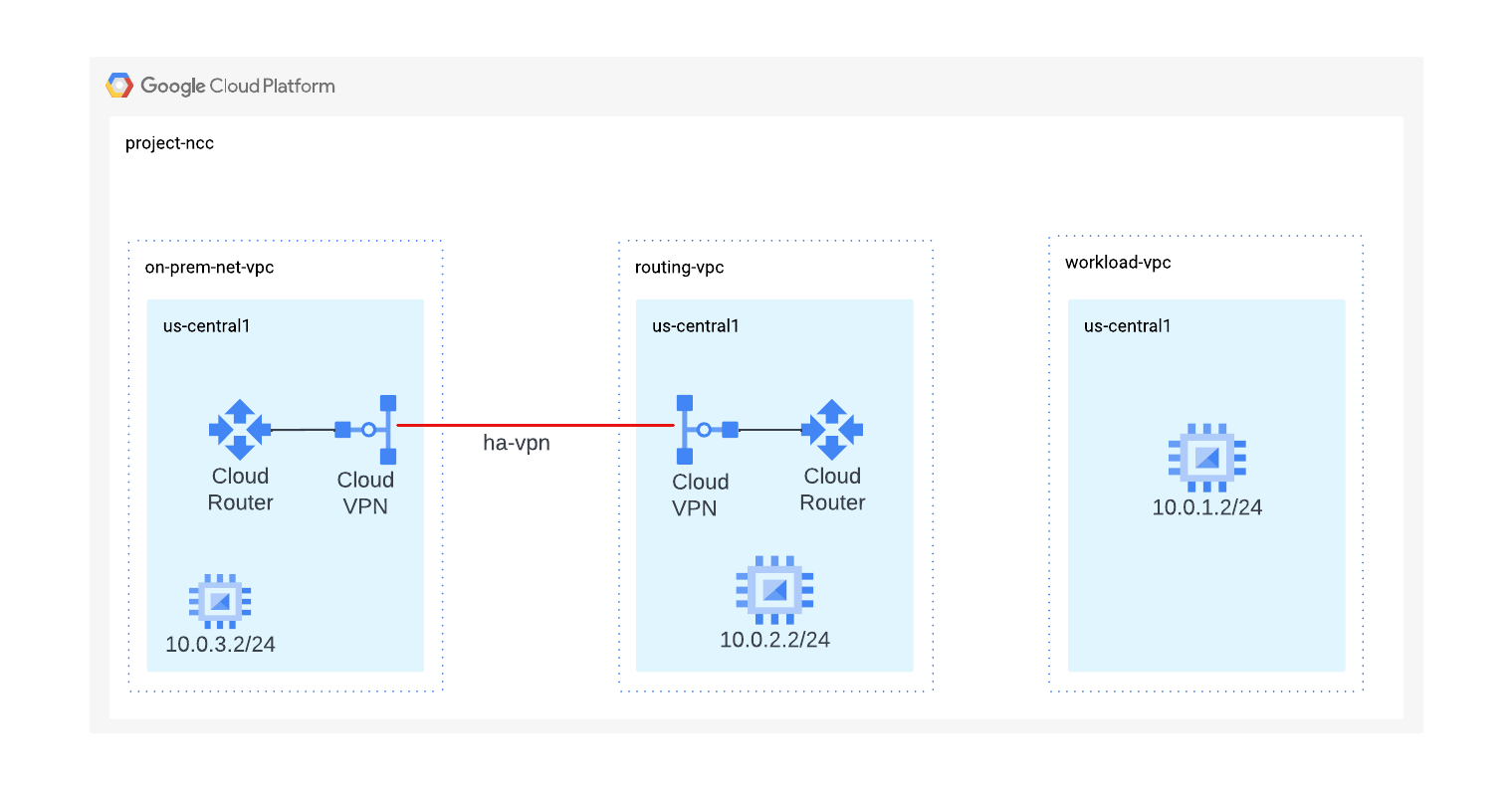
このセクションでは、オンプレミスとルーティング VPC ネットワークを接続する HA VPN トンネルを構成します。
ルーティング VPC で BGP を使用する Cloud Router を構成する
routing_vpc_router_name="routing-vpc-cr"
routing_vpc_router_asn=64525

gcloud compute routers create "${routing_vpc_router_name}" \
--region="${region}" \
--network="${routing_vpc_network_name}" \
--asn="${routing_vpc_router_asn}"
オンプレミス VPC で BGP を使用して Cloud Router を構成する
on_prem_router_name="on-prem-router"
on_prem_router_asn=64526

gcloud compute routers create "${on_prem_router_name}" \
--region="${region}" \
--network="${on_prem_network_name}" \
--asn="${on_prem_router_asn}"
ルーティング VPC で VPN ゲートウェイを構成する
routing_vpn_gateway_name="routing-vpc-vpn-gateway"

gcloud compute vpn-gateways create "${routing_vpn_gateway_name}" \
--region="${region}" \
--network="${routing_vpc_network_name}"
オンプレミス VPC で VPN ゲートウェイを構成する
on_prem_gateway_name="on-prem-vpn-gateway"

gcloud compute vpn-gateways create "${on_prem_gateway_name}" \
--region="${region}" \
--network="${on_prem_network_name}"
ルーティング VPC とオンプレミス VPC で VPN トンネルを構成する
secret_key=$(openssl rand -base64 24)
routing_vpc_tunnel_name="routing-vpc-tunnel"
on_prem_tunnel_name="on-prem-tunnel"

gcloud compute vpn-tunnels create "${routing_vpc_tunnel_name}" \
--vpn-gateway="${routing_vpn_gateway_name}" \
--peer-gcp-gateway="${on_prem_gateway_name}" \
--router="${routing_vpc_router_name}" \
--region="${region}" \
--interface=0 \
--shared-secret="${secret_key}"

gcloud compute vpn-tunnels create "${on_prem_tunnel_name}" \
--vpn-gateway="${on_prem_gateway_name}" \
--peer-gcp-gateway="${routing_vpn_gateway_name}" \
--router="${on_prem_router_name}" \
--region="${region}" \
--interface=0 \
--shared-secret="${secret_key}"
ルーティング VPC とオンプレミス クラウド ルーターを BGP ピアリングする BGP セッションを作成する
interface_hub_name="if-hub-to-prem"
hub_router_ip="169.254.1.1"

gcloud compute routers add-interface "${routing_vpc_router_name}" \
--interface-name="${interface_hub_name}" \
--ip-address="${hub_router_ip}" \
--mask-length=30 \
--vpn-tunnel="${routing_vpc_tunnel_name}" \
--region="${region}"

bgp_hub_name="bgp-hub-to-prem"
prem_router_ip="169.254.1.2"
gcloud compute routers add-bgp-peer "${routing_vpc_router_name}" \
--peer-name="${bgp_hub_name}" \
--peer-ip-address="${prem_router_ip}" \
--interface="${interface_hub_name}" \
--peer-asn="${on_prem_router_asn}" \
--region="${region}"

interface_prem_name="if-prem-to-hub"
gcloud compute routers add-interface "${on_prem_router_name}" \
--interface-name="${interface_prem_name}" \
--ip-address="${prem_router_ip}" \
--mask-length=30 \
--vpn-tunnel="${on_prem_tunnel_name}" \
--region="${region}"

bgp_prem_name="bgp-prem-to-hub"
gcloud compute routers add-bgp-peer "${on_prem_router_name}" \
--peer-name="${bgp_prem_name}" \
--peer-ip-address="${hub_router_ip}" \
--interface="${interface_prem_name}" \
--peer-asn="${routing_vpc_router_asn}" \
--region="${region}"
デフォルトでは、NCC ハブのサブネットはハイブリッド スポークにアナウンスされません。次のステップでは、NCC サブネット ルートをオンプレミス ネットワークに通知するようにクラウド ルーターを構成します。
VPC スポーク サブネットをオンプレミス Cloud Router にアドバタイズする
gcloud compute routers update "${routing_vpc_router_name}" \
--advertisement-mode custom \
--set-advertisement-groups=all_subnets \
--set-advertisement-ranges="${vpc_spoke_subnet_ip_range}" \
--region="${region}"
オンプレミス サブネットをルーティング VPC Cloud Router にアドバタイズする
gcloud compute routers update "${on_prem_router_name}" \
--advertisement-mode custom \
--set-advertisement-groups=all_subnets \
--region="${region}"
オンプレミス Cloud Router の BGP ピアリング構成を更新して、MED 値が「111」のプレフィックスを通知します。後のセクションでは、BGP Med 値を使用した NCC の動作を確認します。
on_prem_router_name="on-prem-router"
bgp_prem_name="bgp-prem-to-hub"

gcloud compute routers update-bgp-peer "${on_prem_router_name}" \
--peer-name="${bgp_prem_name}" \
--advertised-route-priority="111" \
--region="${region}"
ルーティング VPC トンネルのステータスを確認する
gcloud compute vpn-tunnels describe routing-vpc-tunnel \
--region=us-central1 \
--format='flattened(status,detailedStatus)'
ルーティング VPC Cloud Router のステータスを確認する
gcloud コマンドを使用して、ルーティング VPC Cloud Router の BGP 学習ルートを一覧表示します。
gcloud compute routers get-status routing-vpc-cr \
--region=us-central1
4. Network Connectivity Center ハブ
概要
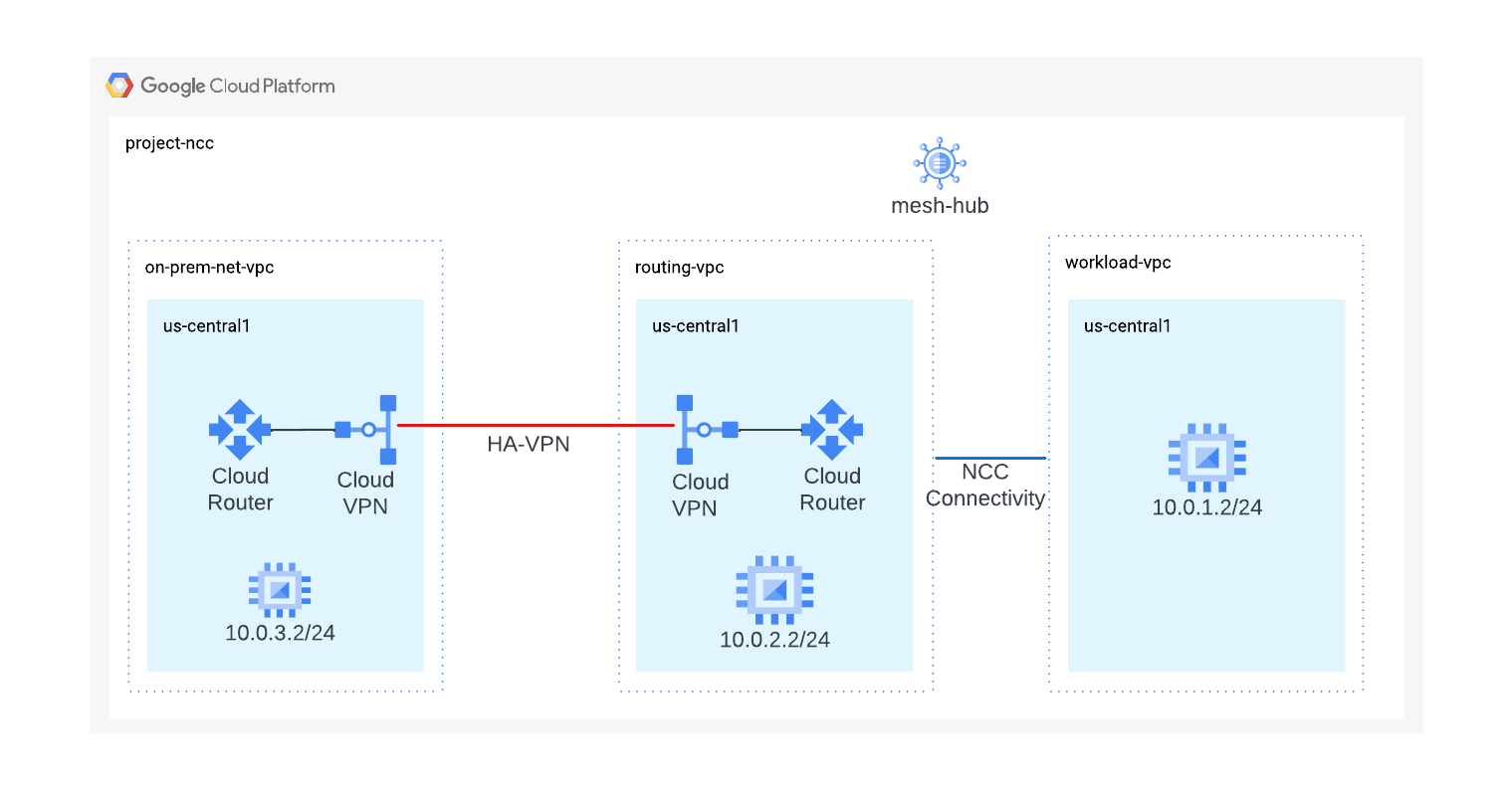
このセクションでは、gcloud コマンドを使用して NCC ハブを構成します。NCC ハブは、各 VPC スポーク間のルーティング構成の構築を担当するコントロール プレーンとして機能します。
API サービスを有効にする
ネットワーク接続 API がまだ有効になっていない場合は、有効にします。
gcloud services enable networkconnectivity.googleapis.com
NCC ハブを作成する
gCloud コマンドを使用して NCC ハブを作成します。
hub_name="mesh-hub"
gcloud network-connectivity hubs create "${hub_name}"
出力例
Create request issued for: [mesh-hub]
Waiting for operation [projects/ncc/locations/global/operations/operation-1719930559145-61c448a0426e4-2d18c8dd-7107edbe] to complete...done.
Created hub [mesh-hub].
新しく作成した NCC ハブについて説明します。名前と関連するパスをメモします。
gcloud network-connectivity hubs describe mesh-hub
createTime: '2024-07-02T14:29:19.260054897Z'
exportPsc: false
name: projects/ncc/locations/global/hubs/mesh-hub
policyMode: PRESET
presetTopology: MESH
routeTables:
- projects/ncc/locations/global/hubs/mesh-hub/routeTables/default
state: ACTIVE
uniqueId: 08f9ae88-f76f-432b-92b2-357a85fc83aa
updateTime: '2024-07-02T14:29:32.583206925Z'
NCC ハブには、データ接続を作成するためのコントロール プレーンを定義するルーティング テーブルが導入されています。NCC ハブのルーティング テーブルの名前を確認します。
gcloud network-connectivity hubs route-tables list --hub=mesh-hub
NAME     HUB       DESCRIPTION
default  mesh-hub
NCC のデフォルトのルートテーブルの URI を見つけます。
gcloud network-connectivity hubs route-tables describe default --hub=mesh-hub
createTime: '2024-07-02T14:29:22.340190411Z'
name: projects/ncc/locations/global/hubs/mesh-hub/routeTables/default
state: ACTIVE
uid: fa2af78b-d416-41aa-b442-b8ebdf84f799
NCC ハブのデフォルトのルーティング テーブルの内容を一覧表示します。注* NCC ハイブリッド スポークまたは VPC スポークが定義されるまで、NCC ハブのルートテーブルは空になります。
gcloud network-connectivity hubs route-tables routes list --hub=mesh-hub --route_table=default
NCC ハブのルートテーブルは空である必要があります。
5. ハイブリッド スポークと VPC スポークを使用した NCC
概要
このセクションでは、gCloud コマンドを使用して 2 つの NCC スポークを構成します。 1 つのスポークは VPC スポーク、もう 1 つはハイブリッド(VPN)スポークになります。
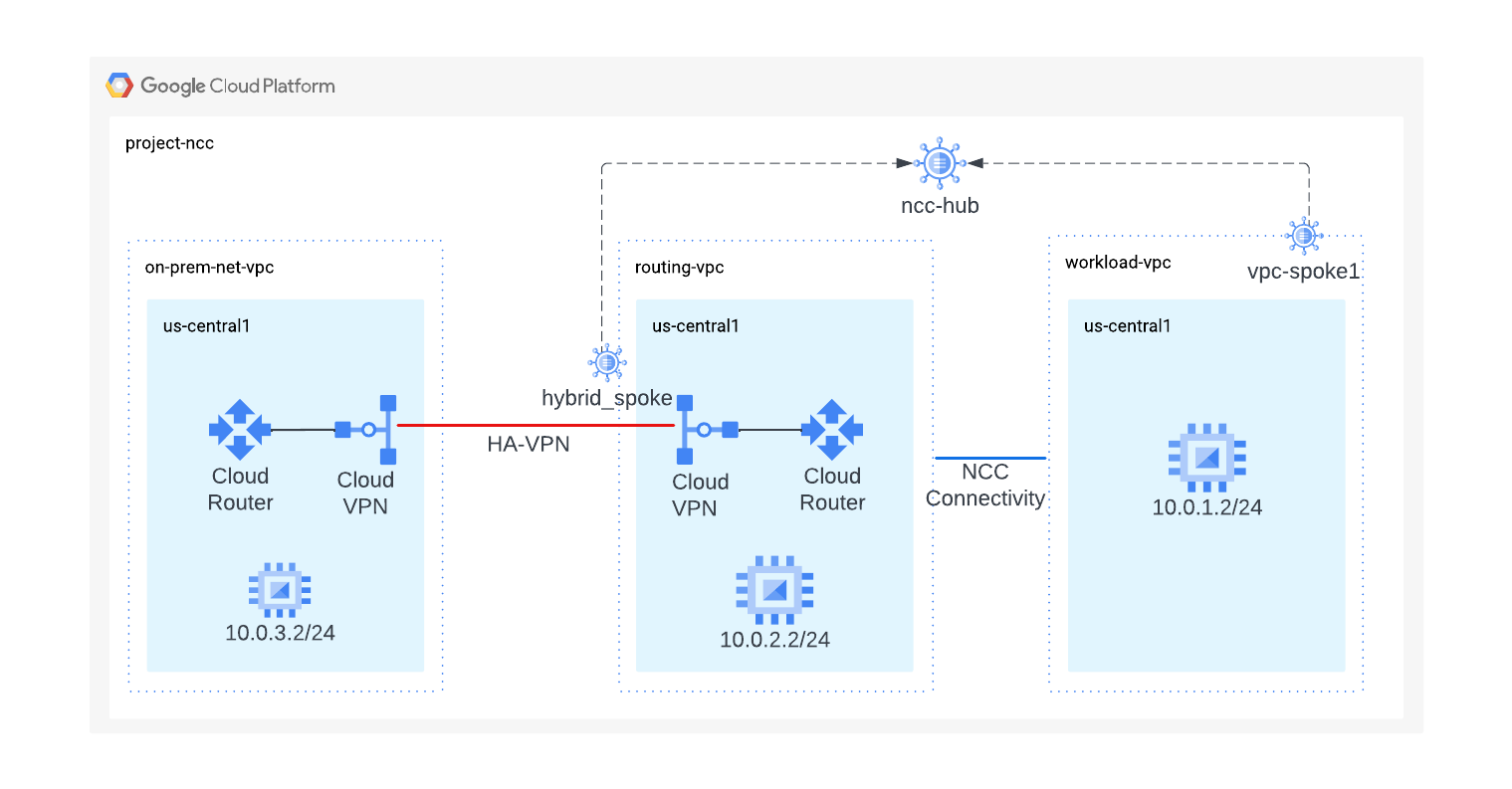
ワークロード VPC を NCC スポークとして構成する
ワークロード VPC を NCC スポークとして構成し、以前に作成した NCC ハブに割り当てます。NCC スポーク API 呼び出しでは、ロケーションを指定する必要があります。「–global」フラグを使用すると、ユーザーは新しい NCC スポークを構成するときに完全な URI パスを指定する必要がなくなります。
vpc_spoke_name="workload-vpc-spoke"
vpc_spoke_network_name="workload-vpc"

gcloud network-connectivity spokes linked-vpc-network create "${vpc_spoke_name}" \
--hub="${hub_name}" \
--vpc-network="${vpc_spoke_network_name}" \
--global
Create request issued for: [workload-vpc-spoke]
Waiting for operation [projects/ncc/locations/global/operations/operation-1719931097138-61c44aa15463f-90de22c7-40c10e6b] to complete...done.
Created spoke [workload-vpc-spoke].
createTime: '2024-07-02T14:38:17.315200822Z'
group: projects/ncc/locations/global/hubs/mesh-hub/groups/default
hub: projects/ncc/locations/global/hubs/mesh-hub
linkedVpcNetwork:
  uri: https://www.googleapis.com/compute/v1/projects/ncc/global/networks/workload-vpc
name: projects/ncc/locations/global/spokes/workload-vpc-spoke
spokeType: VPC_NETWORK
state: ACTIVE
uniqueId: 33e50612-9b62-4ec7-be6c-962077fd47dc
updateTime: '2024-07-02T14:38:44.196850231Z'
ルーティング VPC の VPN トンネルをハイブリッド スポークとして構成する
この gcloud コマンドを使用して、VPN トンネルをハイブリッド スポークとして構成し、メッシュハブに参加させます。
vpn_spoke_name="hybrid-spoke"
routing_vpc_tunnel_name="routing-vpc-tunnel"
region="us-central1"
hub_name="mesh-hub"

gcloud network-connectivity spokes linked-vpn-tunnels create "${vpn_spoke_name}" \
--region="${region}" \
--hub="${hub_name}" \
--vpn-tunnels="${routing_vpc_tunnel_name}"
出力例:
Create request issued for: [hybrid-spoke]
Waiting for operation [projects/ncc/locations/us-central1/operations/operation-1719932916561-61c45168774be-0a06ae03-88192175] to complete...done.
Created spoke [hybrid-spoke].
NCC ハブはすべての VPC サブネット ルートを学習しますが、デフォルトでは、NCC はこれらのプレフィックスをハイブリッド スポークに通知しません。NCC ハブに VPC ワークロード サブネットをオンプレミスでアドバタイズさせるには、ネットワーク管理者は「include-import-ranges」フラグを使用して、ハブからハイブリッド スポークに IPv4 範囲をインポートする必要があります。
コマンドを使用して、NCC ハイブリッド スポークを更新し、すべての NCC ハブ ルートテーブル プレフィックスをオンプレミス ネットワークにアドバタイズします。
vpn_spoke_name="hybrid-spoke"
routing_vpc_tunnel_name="routing-vpc-tunnel"
region="us-central1"
hub_name="mesh-hub"

gcloud network-connectivity spokes linked-vpn-tunnels update "${vpn_spoke_name}" \
--region="${region}" \
--include-import-ranges=ALL_IPV4_RANGES
メッシュハブのスポーク構成を確認する
gcloud コマンドを使用して、NCC ハブのデフォルトのルーティング テーブルの内容を一覧表示します。
gcloud network-connectivity hubs list-spokes mesh-hub
メッシュハブのデフォルトのルーティング テーブルを分析する
gcloud コマンドを使用して、NCC ハブのデフォルトのルーティング テーブルの内容を一覧表示します。
gcloud network-connectivity hubs route-tables routes list --hub=mesh-hub \
--route_table=default
NCC ハイブリッド スポークで動的ルート交換を使用すると、BGP MED 値を持つ Cloud Router で学習したプレフィックスが NCC スポーク全体に伝播されます。
gcloud コマンドを使用して、「111」の優先度の値を表示します。
gcloud network-connectivity hubs route-tables routes list \
--hub=mesh-hub \
--route_table=default \
--effective-location=us-central1 \
--filter=10.0.3.0/24
オンプレミス Cloud Router に切り替える
gcloud コマンドを使用して、オンプレミス ネットワークから学習したルートを確認します。
gcloud compute routers get-status on-prem-router \
--region=us-central1\
--format="yaml(result.bgpPeerStatus)"
6. NCC ハイブリッド スポーク フィルタ
このセクションでは、オンプレミスと VPC ワークロードにそれぞれ 1 つずつ、2 つの新しいサブネットを作成し、NCC ハイブリッド スポーク フィルタの動作を確認します。
コマンドを使用して、オンプレミス VPC に新しいサブネットを作成します。
on_prem_network_name="on-prem-net-vpc"
on_prem_subnet_name="on-prem-subnet30"
on_prem_subnet_range="10.30.30.0/24"
region="us-central1"

gcloud compute networks subnets create "${on_prem_subnet_name}" \
--region="${region}" \
--network="${on_prem_network_name}" \
--range="${on_prem_subnet_range}"
コマンドを使用して、ワークロード VPC に新しいサブネットを作成します。
vpc_spoke_network_name="workload-vpc"
vpc_spoke_subnet_name="workload-subnet10"
vpc_spoke_subnet_ip_range="10.10.10.0/24"
vpc_spoke_name="workload-vpc-spoke"
region="us-central1"

gcloud compute networks subnets create "${vpc_spoke_subnet_name}" \
--network="${vpc_spoke_network_name}" \
--range="${vpc_spoke_subnet_ip_range}" \
--region="${region}"
管理者は、「–exclude-export-ranges」フラグを使用して、NCC ハブ ルートテーブルにエクスポートされる IP プレフィックスをフィルタできます。これにより、管理者は NCC ハブ ルートテーブルのサイズを制御できます。デフォルトでは、すべての IPv4 プレフィックスがオンプレミスから学習され、NCC ハブ ルートテーブルに許可されます。
コマンドを使用して、NCC ハイブリッド スポークを更新し、10.30.30.0/24 プレフィックスが NCC ハブ ルートテーブルに挿入されないようにフィルタします。
vpn_spoke_name="hybrid-spoke"
routing_vpc_tunnel_name="routing-vpc-tunnel"
region="us-central1"
hub_name="mesh-hub"

gcloud network-connectivity spokes linked-vpn-tunnels update "${vpn_spoke_name}" \
--region="${region}" \
--exclude-export-ranges=10.30.30.0/24
gcloud コマンドを使用して、10.30.30.0/24 プレフィックスが NCC ハブ ルートテーブルにないことを確認します。
gcloud network-connectivity hubs route-tables routes list \
--hub=mesh-hub \
--route_table=default \
--effective-location=us-central1 \
--filter=10.30.30.0/24
オンプレミス ルーターに切り替え、gcloud コマンドを使用して、ワークロード VPC の 10.10.10.0/24 サブネットを学習したことを確認します。
gcloud compute routers get-status on-prem-router \
--region=us-central1\
--format="yaml(result.bgpPeerStatus)"
次のコマンドでは、「–exclude-import-ranges」フラグを使用して、特定の 10.10.10.0/24 プレフィックスがオンプレミス ルーターにアドバタイズされないようにフィルタします。
vpn_spoke_name="hybrid-spoke"
routing_vpc_tunnel_name="routing-vpc-tunnel"
region="us-central1"
hub_name="mesh-hub"

gcloud network-connectivity spokes linked-vpn-tunnels update "${vpn_spoke_name}" \
--region="${region}" \
--exclude-import-ranges=10.10.10.0/24
オンプレミス ルーターに切り替え、gcloud コマンドを使用してルーティング テーブルを確認します。プレフィックス 10.10.10.0/24 が存在しないことを確認します。
gcloud compute routers get-status on-prem-router \
--region=us-central1\
--format="yaml(result.bgpPeerStatus)"
7. データパスを確認する
このステップでは、NCC ハイブリッド スポークと VPC スポーク間のデータパスを検証します。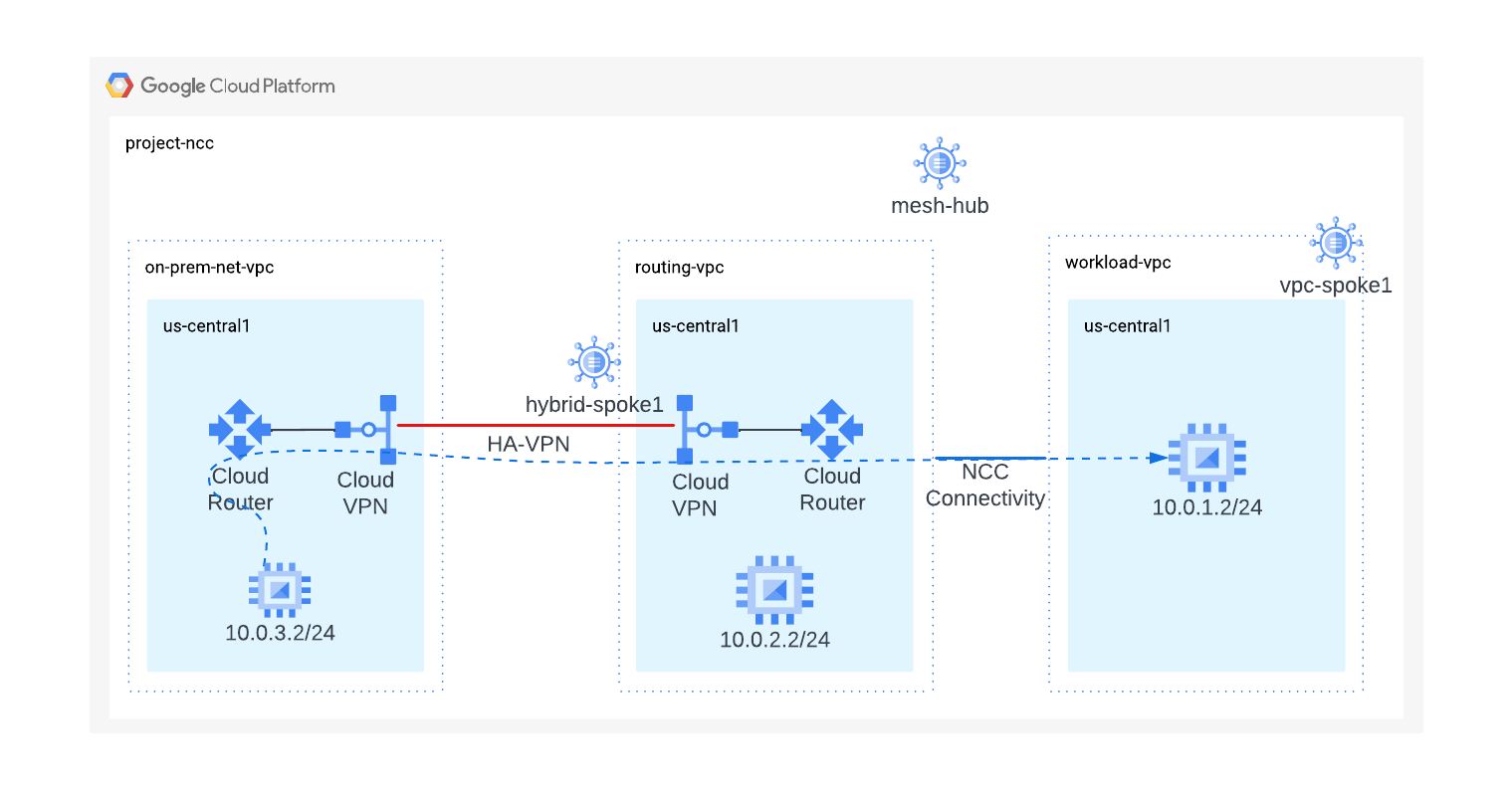
これらの gcloud コマンドの出力を利用して、オンプレミス VM にログオンします。
gcloud compute instances list --filter="name=vm3-onprem"
オンプレミス ネットワークに存在する VM インスタンスにログオンします。
gcloud compute ssh vm3-onprem --zone=us-central1-a
vm3-onprem のターミナルで、curl コマンドを使用して、workload-vpc でホストされている VM へのウェブセッションを確立します。
curl 10.0.1.2 -v
*   Trying 10.0.1.2:80...
* Connected to 10.0.1.2 (10.0.1.2) port 80 (#0)
> GET / HTTP/1.1
> Host: 10.0.1.2
> User-Agent: curl/7.74.0
> Accept: */*
>
* Mark bundle as not supporting multiuse
< HTTP/1.1 200 OK
< Date: Wed, 03 Jul 2024 15:41:34 GMT
< Server: Apache/2.4.59 (Debian)
< Last-Modified: Mon, 01 Jul 2024 20:36:16 GMT
< ETag: "1e-61c358c8272ba"
< Accept-Ranges: bytes
< Content-Length: 30
< Content-Type: text/html
<

<h3>Web Server: www-vm1</h3>
* Connection #0 to host 10.0.1.2 left intact
8. クリーンアップ
Cloud Shell にログインして、GCP リソースを削除します。
NCC スポークを削除する
gcloud network-connectivity spokes delete workload-vpc-spoke --global \
--quiet

gcloud network-connectivity spokes delete hybrid-spoke \
--quiet \
--region us-central1
NCC ハブを削除する
gcloud network-connectivity hubs delete mesh-hub --quiet
ファイアウォール ルールを削除する
gcloud compute firewall-rules delete onprem-vpc-port-firewall-prem onprem-vpc-protocol-firewall routing-vpc--port-fw routing-vpc-protocol-fw workload-port-firewall-vpc workload-protocol-fw-vpc --quiet
HA-VPN トンネルを削除する
gcloud compute vpn-tunnels delete on-prem-tunnel \
--region=us-central1 \
--quiet

gcloud compute vpn-tunnels delete routing-vpc-tunnel \
--region=us-central1 \
--quiet
VPN ゲートウェイを削除する
gcloud compute vpn-gateways delete on-prem-vpn-gateway \
--region=us-central1 --quiet

gcloud compute vpn-gateways delete routing-vpc-vpn-gateway \
--region us-central1 --quiet
Cloud Router を削除する
gcloud compute routers delete routing-vpc-cr --region us-central1 --quiet

gcloud compute routers delete on-prem-router --region us-central1 --quiet
GCE インスタンスを削除する
gcloud compute instances delete vm1-vpc-workload \
--zone=us-central1-a \
--quiet


gcloud compute instances delete vm2-vpc-routing \
--zone=us-central1-a \
--quiet

gcloud compute instances delete vm3-onprem \
--zone=us-central1-a \
--quiet
VPC サブネットを削除する
gcloud compute networks subnets delete workload-subnet --region us-central1 --quiet

gcloud compute networks subnets delete on-prem-subnet --region us-central1 --quiet

gcloud compute networks subnets delete routing-vpc-subnet --region us-central1 --quiet
VPC を削除する
gcloud compute networks delete on-prem-net-vpcworkload-vpc routing-vpc
--quiet
9. 完了
動的ルート交換 Network Connectivity Center ラボが完了しました。
学習した内容
- Network Connectivity Center を使用した動的ルート交換
次のステップ
©Google, LLC or its affiliates. All rights reserved. Do not distribute.