
1. Overview
In this codelab, you'll build a sophisticated multi-agent investment research system that combines the power of Google's Agent Development Kit (ADK), Neo4j Graph Database, and the Model Context Protocol (MCP) Toolbox. This hands-on tutorial demonstrates how to create intelligent agents that understand data context through graph relationships and deliver highly accurate query responses.
Why GraphRAG + Multi-Agent Systems?
GraphRAG (Graph-based Retrieval-Augmented Generation) enhances traditional RAG approaches by leveraging the rich relationship structure of knowledge graphs. Instead of just searching for similar documents, GraphRAG agents can:
- Traverse complex relationships between entities
- Understand context through graph structure
- Provide explainable results based on connected data
- Execute multi-hop reasoning across the knowledge graph
Multi-Agent Systems allow you to:
- Decompose complex problems into specialized sub-tasks
- Build modular, maintainable AI applications
- Enable parallel processing and efficient resource utilization
- Create hierarchical reasoning patterns with orchestration
What you'll build
You'll create a complete investment research system featuring:
- Graph Database Agent: Executes Cypher queries and understands the Neo4j schema
- Investor Research Agent: Discovers investor relationships and investment portfolios
- Investment Research Agent: Accesses comprehensive knowledge graphs through MCP tools
- Root Agent: Orchestrates all sub-agents intelligently
The system will answer complex questions like:
- "Who are the main competitors of YouTube?"
- "What companies are mentioned with positive sentiment in January 2023?"
- "Who invested in ByteDance and where else have they invested?"
Architecture Overview
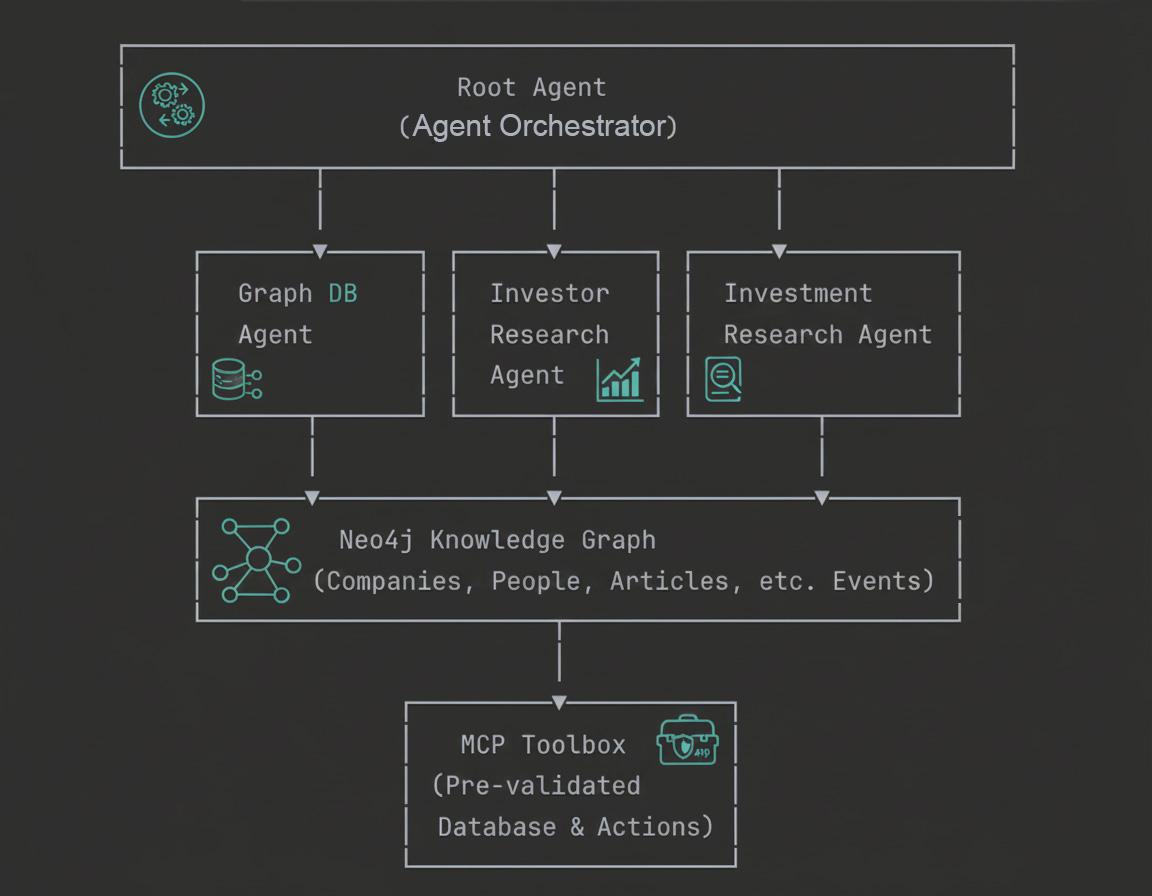
Through this codelab, you'll learn both the conceptual foundations and practical implementation of building enterprise-grade GraphRAG agents.
What you'll learn
- How to build multi-agent systems using Google's Agent Development Kit (ADK)
- How to integrate Neo4j graph database with ADK for GraphRAG applications
- How to implement Model Context Protocol (MCP) Toolbox for pre-validated database queries
- How to create custom tools and functions for intelligent agents
- How to design agent hierarchies and orchestration patterns
- How to structure agent instructions for optimal performance
- How to debug multi-agent interactions effectively
What you'll need
- Chrome web browser
- A Gmail account
- A Google Cloud Project with billing enabled
- Basic familiarity with terminal commands and Python (helpful but not required)
This codelab, designed for developers of all levels (including beginners), uses Python and Neo4j in its sample application. While basic familiarity with Python and graph databases can be helpful, no prior experience is required to understand the concepts or follow along.
2. Understanding GraphRAG and Multi-Agent Systems
Before diving into implementation, let's understand the key concepts that power this system.
Neo4j is a leading native graph database that stores data as a network of nodes (entities) and relationships (connections between entities), making it ideal for use cases where understanding connections is key — such as recommendations, fraud detection, knowledge graphs, and more. Unlike relational or document-based databases that rely on rigid tables or hierarchical structures, Neo4j's flexible graph model allows for intuitive and efficient representation of complex, interconnected data.
Instead of organizing data in rows and tables like relational databases, Neo4j uses a graph model, where information is represented as nodes (entities) and relationships (connections between those entities). This model makes it exceptionally intuitive for working with data that's inherently linked — such as people, places, products, or, in our case, movies, actors, and genres.
For example, in a movie dataset:
- A node can represent a
Movie,Actor, orDirector - A relationship could be
ACTED_INorDIRECTED
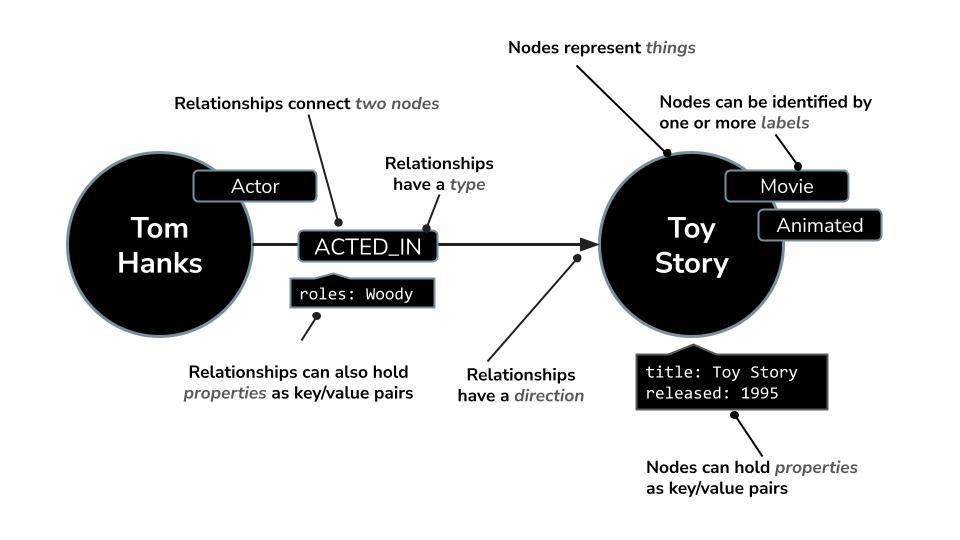
This structure enables you to easily ask questions like:
- Which movies has this actor appeared in?
- Who has worked with Christopher Nolan?
- What are similar movies based on shared actors or genres?
What is GraphRAG?
Retrieval-Augmented Generation (RAG) enhances LLM responses by retrieving relevant information from external sources. Traditional RAG typically:
- Embeds documents into vectors
- Searches for similar vectors
- Passes retrieved documents to the LLM
GraphRAG extends this by using knowledge graphs:
- Embeds entities and relationships
- Traverses graph connections
- Retrieves multi-hop contextual information
- Provides structured, explainable results
Why Graphs for AI Agents?
Consider this question: "Who are the competitors of YouTube, and which investors have funded both YouTube and its competitors?"
What happens in a Traditional RAG approach:
- Searches for documents about YouTube competitors
- Searches separately for investor information
- Struggles to connect these two pieces of information
- May miss implicit relationships
What happens in a GraphRAG approach:
MATCH (org:Organization {name: "OpenAI"})-[:HAS_COMPETITOR]-(competitor:Organization)
MATCH (org)-[:HAS_INVESTOR]->(investor:Person)
MATCH (competitor)-[:HAS_INVESTOR]->(investor)
RETURN org, competitor, investor
The graph naturally represents relationships, making multi-hop queries straightforward and efficient.
Multi-Agent Systems in ADK
Agent Development Kit (ADK) is Google's open-source framework for building and deploying production-grade AI agents. It provides intuitive primitives for multi-agent orchestration, tool integration, and workflow management, making it easy to compose specialized agents into sophisticated systems. ADK works seamlessly with Gemini and supports deployment to Cloud Run, Kubernetes, or any infrastructure.
Agent Development Kit (ADK) provides primitives for building multi-agent systems:
- Agent Hierarchy:
# Root agent coordinates specialized agents
root_agent = LlmAgent(
    name="RootAgent",
    sub_agents=[
        graph_db_agent,
        investor_agent,
        investment_agent
    ]
)
- Specialized Agents: Each agent has
- Specific tools: Functions it can call
- Clear instructions: Its role and capabilities
- Domain expertise: Knowledge of its area
- Orchestration Patterns:
- Sequential: Execute agents in order
- Parallel: Run multiple agents simultaneously
- Conditional: Route based on query type
MCP Toolbox for Databases
Model Context Protocol (MCP) is an open standard for connecting AI systems to external data sources and tools. MCP Toolbox for Databases is Google's implementation that enables declarative database query management, allowing you to define pre-validated, expert-authored queries as reusable tools. Instead of letting LLMs generate potentially unsafe queries, MCP Toolbox serves pre-approved queries with parameter validation, ensuring security, performance, and reliability while maintaining flexibility for AI agents.
Traditional Approach:
# LLM generates query (may be incorrect/unsafe)
query = llm.generate("SELECT * FROM users WHERE...")
db.execute(query)  # Risk of errors/SQL injection
MCP Approach:
# Pre-validated query definition
- name: get_industries
  description: Fetch all industries from database
  query: |
    MATCH (i:Industry)
    RETURN i.name, i.id
Benefits:
- Pre-validated by experts
- Safe from injection attacks
- Performance optimized
- Centrally managed
- Reusable across agents
Putting It All Together
The combination of GraphRAG + Multi-Agent Framework by ADK + MCP creates a powerful system:
- Root Agent receives user query
- Routes to specialized agent based on query type
- Agent uses MCP tools to fetch data safely
- Graph structure provides rich context
- LLM generates grounded, explainable response
Now that we understand the architecture, let's start building!
3. Setup Google Cloud Project
Create a project
- In the Google Cloud Console, on the project selector page, select or create a Google Cloud project.
- Make sure that billing is enabled for your Cloud project. Learn how to check if billing is enabled on a project .
- You'll use Cloud Shell, a command-line environment running in Google Cloud. Click Activate Cloud Shell at the top of the Google Cloud console. You can toggle between Cloud Shell Terminal (for running cloud commands) and Editor (for building projects) by clicking on the corresponding button from Cloud Shell.

- Once connected to Cloud Shell, you check that you're already authenticated and that the project is set to your project ID using the following command:
gcloud auth list
- Run the following command in Cloud Shell to confirm that the gcloud command knows about your project.
gcloud config list project
- If your project is not set, use the following command to set it:
gcloud config set project <YOUR_PROJECT_ID>
Refer documentation for gcloud commands and usage.
Great ! We're now ready to move on to the next step — understanding the dataset.
4. Understanding the Companies dataset
For this codelab, we're using a read-only Neo4j database pre-populated with investment and company data from Diffbot's Knowledge Graph.
The dataset contains:
- 237,358 nodes representing:
- Organizations (companies)
- People (executives, employees)
- Articles (news and mentions)
- Industries
- Technologies
- Investors
- Relationships including:
HAS_INVESTOR- Investment connectionsHAS_COMPETITOR- Competitive relationshipsMENTIONS- Article referencesHAS_CEO- Employment relationshipsHAS_CATEGORY- Industry classifications
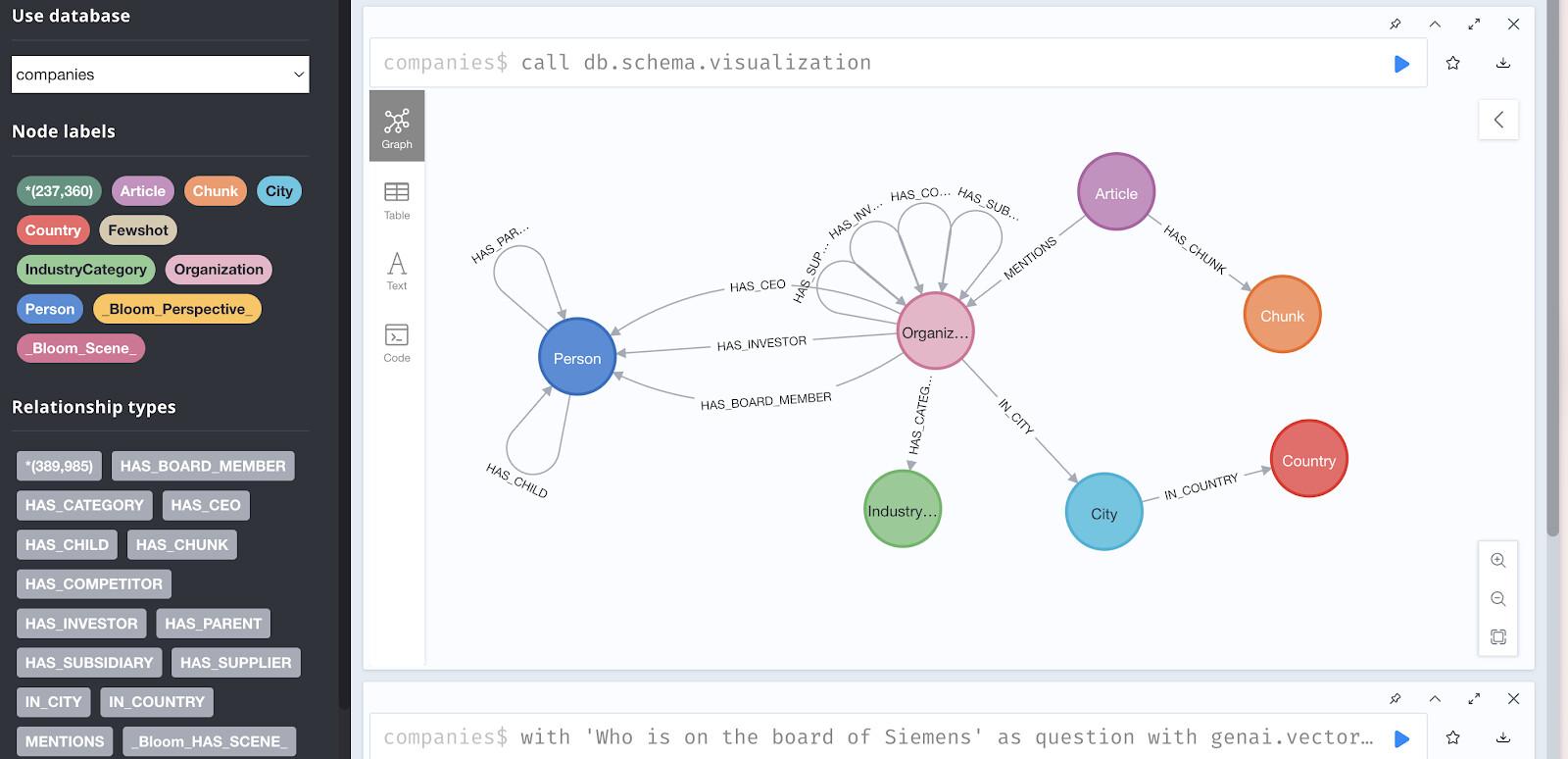
Access the Demo Database
For this codelab, we'll use a hosted demo instance. Add these credentials to your notes:
URI: neo4j+s://demo.neo4jlabs.com
Username: companies
Password: companies
Database: companies
Browser Access:
You can explore the data visually at: https://demo.neo4jlabs.com:7473
Login with the same credentials and try running:
// Sample query to explore the graph
MATCH (c:Organization)-[:HAS_COMPETITOR]-(competitor:Organization)
RETURN c.name, competitor.name
LIMIT 10
Visualizing the Graph Structure
Try this query in Neo4j Browser to see relationship patterns:
// Find investors and their portfolio companies
MATCH (company:Organization)-[:HAS_INVESTOR]->(investor:Person)
WITH investor, collect(company.name) as portfolio
RETURN investor.name, size(portfolio) as num_investments, portfolio
ORDER BY num_investments DESC
LIMIT 5
This query returns the top 5 most active investors and their portfolios.
Why This Database for GraphRAG?
This dataset is perfect for demonstrating GraphRAG because:
- Rich Relationships: Complex connections between entities
- Real-World Data: Actual companies, people, and news articles
- Multi-hop Queries: Requires traversing multiple relationship types
- Temporal Data: Articles with timestamps for time-based analysis
- Sentiment Analysis: Pre-computed sentiment scores for articles
Now that you understand the data structure, let's set up your development environment!
5. Clone Repository and Configure Environment
Clone the Repository
In your Cloud Shell terminal, run:
# Clone the repository
git clone https://github.com/sidagarwal04/neo4j-adk-multiagents.git

# Navigate into the directory
cd neo4j-adk-multiagents
Explore the Repository Structure
Take a moment to understand the project layout:
neo4j-adk-multiagents/
├── investment_agent/       # Main agent code
│   ├── agent.py           # Agent definitions
│   ├── tools.py           # Custom tool functions
│   └── .adk/              # ADK configuration
│       └── tools.yaml     # MCP tool definitions
├── main.py                # Application entry point
├── setup_tools_yaml.py    # Configuration generator
├── requirements.txt       # Python dependencies
├── example.env           # Environment template
└── README.md             # Project documentation
Set Up Virtual Environment
Create and activate a Python virtual environment using uv:
# Install uv if not already installed
pip install uv

# Create virtual environment
uv venv

# Activate the environment
source .venv/bin/activate  # On macOS/Linux
# or
.venv\Scripts\activate  # On Windows
You should see (.venv) prepended to your terminal prompt.
Install Dependencies
Install all required packages:
uv pip install -r requirements.txt
Key dependencies include:
txtgoogle-adk>=1.21.0          # Agent Development Kit
neo4j>=6.0.3               # Neo4j Python driver
python-dotenv>=1.0.0       # Environment variables
google-cloud-aiplatform>=1.30.0  # Vertex AI
Configure Environment Variables
- Create your **
.env** file:
cp example.env .env
- Edit the **
.env** file:
If using Cloud Shell, click Open Editor in the toolbar, then navigate to .env and update:
To reveal the hidden .env file:
Click on View > Toggle Hidden files in the Google Cloud Shell Editor.
# Neo4j Configuration (Demo Database)
NEO4J_URI=neo4j+s://demo.neo4jlabs.com
NEO4J_USERNAME=companies
NEO4J_PASSWORD=companies
NEO4J_DATABASE=companies

# Google AI Configuration
# Choose ONE of the following options:

# Option 1: Google AI API (Recommended)
GOOGLE_GENAI_USE_VERTEXAI=0
GOOGLE_API_KEY=your_api_key_here  # Get from https://aistudio.google.com/app/apikey

# Option 2: Vertex AI (If using GCP)
# GOOGLE_GENAI_USE_VERTEXAI=1
# GOOGLE_CLOUD_PROJECT=your-project-id
# GOOGLE_CLOUD_LOCATION=us-central1

# ADK Configuration
GOOGLE_ADK_MODEL=gemini-3.1-flash-lite-preview # or gemini-3-flash-preview

# MCP Toolbox Configuration
MCP_TOOLBOX_URL=https://toolbox-990868019953.us-central1.run.app/mcp/sse
- Generate MCP Toolbox Configuration:
Run the setup script to create the tools.yaml file from your environment variables:
python setup_tools_yaml.py
This generates investment_agent/.adk/tools.yaml with your Neo4j credentials properly configured for MCP tools.
Verify Configuration
Check that everything is set up correctly:
# Verify .env file exists
ls -la .env

# Verify tools.yaml was generated
ls -la investment_agent/.adk/tools.yaml

# Test Python environment
python -c "import google.adk; print('ADK installed successfully')"

# Test Neo4j connection
python -c "from neo4j import GraphDatabase; print('Neo4j driver installed')"
Your development environment is now fully configured! Next, we'll dive into multi-agent architecture.
6. Understanding the Multi-Agent Architecture
The Four-Agent System
Our investment research system uses a hierarchical multi-agent architecture with four specialized agents working together to answer complex queries about companies, investors, and market intelligence.
                ┌──────────────┐
                │  Root Agent  │ ◄── User Query
                └──────┬───────┘
                       │
      ┌────────────────┼────────────────┐
      │                │                │
┌─────▼─────┐    ┌────▼─────┐    ┌────▼──────────┐
│ Graph DB  │    │ Investor │    │  Investment   │
│  Agent    │    │ Research │    │  Research     │
└───────────┘    │  Agent   │    │  Agent        │
                 └──────────┘    └───────────────┘
- Root Agent (Orchestrator):
The Root Agent serves as the intelligent coordinator of the entire system. It receives user queries, analyzes the intent, and routes requests to the most appropriate specialized agent. Think of it as a project manager that understands which team member is best suited for each task. It also handles response aggregation, formatting results as tables or charts when requested, and maintaining conversational context across multiple queries. The Root Agent always prefers specialized agents over the general database agent, ensuring queries are handled by the most expert component available.
- Graph Database Agent:
The Graph Database Agent is your direct connection to Neo4j's powerful graph capabilities. It understands the database schema, generates Cypher queries from natural language, and executes complex graph traversals. This agent specializes in structural questions, aggregations, and multi-hop reasoning across the knowledge graph. It's the fallback expert when queries require custom logic that pre-defined tools can't handle, making it essential for exploratory analysis and complex analytical queries that weren't anticipated in the system design.
- Investor Research Agent:
The Investor Research Agent focuses exclusively on investment relationships and portfolio analysis. It can discover who invested in specific companies using exact name matching, retrieve complete investor portfolios showing all their investments, and analyze investment patterns across industries. This specialization makes it extremely efficient at answering questions like "Who invested in ByteDance?" or "What else did Sequoia Capital invest in?" The agent uses custom Python functions that directly query the Neo4j database for investor-related relationships.
- Investment Research Agent:
The Investment Research Agent leverages the Model Context Protocol (MCP) Toolbox to access pre-validated, expert-authored queries. It can fetch all available industries, retrieve companies within specific industries, find articles with sentiment analysis, discover organization mentions in news, and get information about people working at companies. Unlike the Graph Database Agent that generates queries dynamically, this agent uses safe, optimized, pre-defined queries that are centrally managed and validated. This makes it both secure and performant for common research workflows.
7. Running and Testing the Multi-Agent System
Launch the Application
Now that you understand the architecture, let's run the complete system and interact with it.
Start the ADK web interface:
# Make sure you're in the project directory with activated virtual environment
cd ~/neo4j-adk-multiagents
source .venv/bin/activate  # If not already activated
# Launch the application
uv run adk web
You should see output similar to:
INFO:     Started server process [2542]
INFO:     Waiting for application startup.

+----------------------------------------------------------------+
| ADK Web Server started                                         |
|                                                                |
| For local testing, access at http://127.0.0.1:8000.            |
+----------------------------------------------------------------+

INFO:     Application startup complete.
INFO:     Uvicorn running on http://127.0.0.1:8000 (Press CTRL+C to quit)
Test Queries and Expected Behavior
Let's explore the system's capabilities with progressively complex queries:
Basic Queries (Single Agent)
Query 1: Discover Industries
What industries are available in the database?
Expected Behavior:
- Root Agent routes to Investment Research Agent
- Uses MCP tool:
get_industries() - Returns a formatted list of all industries
What to Observe:
In the ADK UI, expand the execution details to see:
- Agent selection decision
- Tool call:
get_industries() - Raw results from Neo4j
- Formatted response
Query 2: Find Investors
Who invested in ByteDance?
Expected Behavior:
- Root Agent identifies this as investor-related query
- Routes to Investor Research Agent
- Uses tool:
find_investor_by_name("ByteDance") - Returns investors with their types (Person/Organization)
Expected Response:
I found 2 investors in ByteDance:

1. Rong Yue (Person)
2. Wendi Murdoch (Person)

Would you like to know more about their investment portfolios?
Query 3: Companies by Industry**
I found 2 investors in ByteDance:

1. Rong Yue (Person)
2. Wendi Murdoch (Person)

Would you like to know more about their investment portfolios?
"Show me companies in the Artificial Intelligence industry"
Expected Behavior:
- Root Agent routes to Investment Research Agent
- Uses MCP tool:
get_companies_in_industry("Artificial Intelligence") - Returns list of AI companies with IDs and founding dates
What to Observe:
- Note how the agent uses exact industry name matching
- Results are limited to prevent overwhelming output
- Data is formatted clearly for readability
Intermediate Queries (Multi-Step within One Agent)
Query 4: Sentiment Analysis
Find articles with positive sentiment from January 2023
Expected Behavior:
- Routes to Investment Research Agent
- Uses MCP tool:
get_articles_with_sentiment(0.7, 2023, 1) - Returns articles with titles, sentiment scores, and publication dates
Debugging Tip:
Look at the tool invocation parameters:
min_sentiment: 0.7 (agent interprets "positive" as >= 0.7)year: 2023month: 1
Query 5: Complex Database Query
How many companies are in the database?
Expected Behavior:
- Root Agent routes to Graph Database Agent
- Agent calls
get_neo4j_schema()first to understand structure - Generates Cypher:
MATCH (c:Company) RETURN count(c) - Executes query and returns count
Expected Response:
There are 8,064 companies in the database.
Advanced Queries (Multi-Agent Coordination)
Query 6: Portfolio Analysis
Who invested in ByteDance and what else have they invested in?
Expected Behavior:
This is a two-part query requiring agent coordination:
- Step 1: Root Agent → Investor Research Agent
- Calls
find_investor_by_name("ByteDance") - Gets investor list: [Rong Yue, Wendi Murdoch]
- Step 2: For each investor → Investor Research Agent
- Calls
find_investor_by_id(investor_id) - Retrieves complete portfolio
- Step 3: Root Agent aggregates and formats
Expected Response:
I found 2 investors in ByteDance. Here are their portfolios:

1. Rong Yue (Person)
   - ByteDance
   - Inspur

2. Wendi Murdoch (Person)
   - ByteDance
   - (No other investments in database)
What to Observe:
- Multiple tool calls in sequence
- Context maintained between steps
- Results aggregated intelligently
Query 7: Multi-Domain Research
What are 5 AI companies mentioned in positive articles, and who are their CEOs?
Expected Behavior:
This complex query requires multiple agents and tools:
- Step 1: Investment Research Agent
get_companies_in_industry("Artificial Intelligence")- Returns list of AI companies
- Step 2: Investment Research Agent
get_articles_with_sentiment(0.8)- Returns positive articles
- Step 3: Root Agent filters
- Identifies which AI companies appear in positive articles
- Selects top 5
- Step 4: Investment Research Agent
get_people_in_organizations([company_names], "CEO")- Returns CEO information
- Step 5: Root Agent formats as table
Expected Response:
Here are 5 AI companies with positive news and their CEOs:

| Company | Industry | CEO | Avg Sentiment |
|---------|----------|-----|---------------|
| OpenAI | Artificial Intelligence | Sam Altman | 0.92 |
| Anthropic | Artificial Intelligence | Dario Amodei | 0.89 |
| ... | ... | ... | ... |
What to Observe:
- Multiple tool calls across different agents
- Data filtering and combination logic
- Professional table formatting
Query 8: Competitive Analysis
Who are YouTube's main competitors?
Expected Behavior:
- Root Agent routes to Graph Database Agent (relationship query)
- Agent generates GraphRAG-enhanced Cypher:
MATCH (c:Company {name: "YouTube"})-[:COMPETES_WITH]->(competitor)
RETURN competitor.name as competitor_name
- Returns list of competing companies
Expected Response:
YouTube's main competitors are:

- TikTok (ByteDance)
- Dailymotion
- Twitter
- BuzzFeed
- Mixer
- OpenAI (for video content)
Context-Aware Follow-Up Queries
Query 9: Follow-up Question (After Query 8)
Which investors funded both YouTube and its competitors?
Expected Behavior:
- Root Agent remembers previous context (YouTube and its competitors)
- Routes to Investor Research Agent
- For YouTube and each competitor, finds investors
- Identifies investors appearing in multiple companies
Expected Response:
Based on our previous analysis of YouTube's competitors, I found these
investors who funded multiple companies in this competitive landscape:

Sequoia Capital invested in:
- YouTube
- TikTok (ByteDance)
- Twitter

Accel Partners invested in:
- YouTube
- BuzzFeed

This suggests these investors have strategic positions across the video content platform ecosystem.
Query 10: Research Summary
Summarize our research findings so far
Expected Behavior:
- Root Agent reviews conversation history
- Synthesizes key findings from previous queries
- Provides coherent summary
Expected Response:
Here's a summary of our investment research session:

1. Industry Overview: We explored the Artificial Intelligence industry
   with 150+ companies in the database.

2. ByteDance Analysis:
   - Investors: Rong Yue, Wendi Murdoch
   - Rong Yue also invested in Inspur

3. Market Sentiment: We analyzed articles from January 2023, finding
   strong positive sentiment (avg 0.85) for tech companies.

4. Competitive Landscape: YouTube faces competition from TikTok,
   Dailymotion, and others, with some investors (Sequoia, Accel) holding
   positions across competing platforms.

5. Key Players: Identified CEOs of major AI companies with positive media coverage.
Understanding Agent Interactions in the Debug View
The ADK web interface provides detailed execution visibility. Here's what to look for:
- Event Timeline
Shows chronological flow:
[USER] Query received
[ROOT_AGENT] Analyzing query intent
[ROOT_AGENT] Routing to investment_research_agent
[INVESTMENT_RESEARCH_AGENT] Tool call: get_companies_in_industry
[TOOL] Executing with params: {"industry_name": "Artificial Intelligence"}
[TOOL] Returned 47 results
[INVESTMENT_RESEARCH_AGENT] Formatting response
[ROOT_AGENT] Presenting to user
- Tool Invocation Details
Click any tool call to see:
- Function name
- Input parameters
- Return value
- Execution time
- Any errors
- Agent Decision Making
Observe the LLM's reasoning:
- Why it chose a specific agent
- How it interpreted the query
- What tools it considered
- Why it formatted results a certain way
Common Observations and Insights
- Query Routing Patterns:
- Keywords like "investor," "invested" → Investor Research Agent
- Keywords like "industry," "companies," "articles" → Investment Research Agent
- Aggregations, counts, complex logic → Graph Database Agent
- Performance Notes:
- MCP tools are typically faster (pre-optimized queries)
- Complex Cypher generation takes longer (LLM thinking time)
- Multiple tool calls add latency but provide richer results
- Error Handling:
- If a query fails:
- Agent explains what went wrong
- Suggests corrections (e.g., "Company name not found, check spelling")
- May try alternative approaches
Tips for Effective Testing
- Start Simple: Test each agent's core functionality before complex queries
- Use Follow-ups: Test context retention with follow-up questions
- Observe Routing: Watch which agent handles each query to understand the logic
- Check Tool Calls: Verify parameters are extracted correctly from natural language
- Test Edge Cases: Try ambiguous queries, misspellings, or unusual requests
You now have a fully functional multi-agent GraphRAG system! Experiment with your own questions to explore its capabilities.
8. Clean up
To avoid incurring charges to your Google Cloud account for the resources used in this post, follow these steps:
- In the Google Cloud console, go to the Manage resources page.
- In the project list, select the project that you want to delete, and then click Delete.
- In the dialog, type the project ID, and then click Shut down to delete the project.
9. Congratulations
🎉 Congratulations! You've successfully built a production-quality multi-agent GraphRAG system using Google's Agent Development Kit, Neo4j, and MCP Toolbox!
By combining the intelligent orchestration capabilities of ADK with the relationship-rich data model of Neo4j and the safety of pre-validated MCP queries, you've created a sophisticated system that goes beyond simple database queries — it understands context, reasons across complex relationships, and coordinates specialized agents to deliver comprehensive, accurate insights.
In this codelab, you accomplished the following:
✅ Built a multi-agent system using Google's Agent Development Kit (ADK) with hierarchical orchestration
✅ Integrated Neo4j graph database to leverage relationship-aware queries and multi-hop reasoning
✅ Implemented MCP Toolbox for secure, pre-validated database queries as reusable tools
✅ Created specialized agents for investor research, investment analysis, and graph database operations
✅ Designed intelligent routing that automatically delegates queries to the most appropriate expert agent
✅ Handled complex data types with proper Neo4j type serialization for seamless Python integration
✅ Applied production best practices for agent design, error handling, and system debugging
What's Next?
This multi-agent GraphRAG architecture is not limited to investment research — it can be extended to:
- Financial services: Portfolio optimization, risk assessment, fraud detection
- Healthcare: Patient care coordination, drug interaction analysis, clinical research
- E-commerce: Personalized recommendations, supply chain optimization, customer insights
- Legal and compliance: Contract analysis, regulatory monitoring, case law research
- Academic research: Literature review, collaboration discovery, citation analysis
- Enterprise intelligence: Competitive analysis, market research, organizational knowledge graphs
Anywhere you have complex interconnected data + domain expertise + natural language interfaces, this combination of ADK multi-agent systems + Neo4j knowledge graphs + MCP-validated queries can power the next generation of intelligent enterprise applications.
As Google's Agent Development Kit and Gemini models continue to evolve, you'll be able to incorporate even more sophisticated reasoning patterns, real-time data integration, and multi-modal capabilities to build truly intelligent, context-aware systems.
Keep exploring, keep building and take your intelligent agent applications to the next level!
Explore more hands-on knowledge graph tutorials at Neo4j GraphAcademy and discover additional agent patterns in the ADK Samples Repository.
🚀 Ready to build your next intelligent agent system?