
1. Overview
In this codelab, you will run an ADK agent that books movie tickets across multiple theater merchants using two open-source commerce protocols:
- UCP (Universal Commerce Protocol): A standard for agents to discover merchants, search catalogs, and manage checkout flows.
- AP2 (Agent Payments Protocol): A protocol for secure, verifiable payment authorization using cryptographically signed mandates.
The demo app, CineAgent, connects to two mock theater merchants with different capabilities (seat selection, specialized formats, and payment methods) and orchestrates the full booking flow from search to payment.
What you'll learn
- How UCP merchant discovery works via
/.well-known/ucpprofiles - How an ADK agent uses UCP to search catalogs and create checkouts
- How AP2 mandates (CheckoutMandate, PaymentMandate) secure transactions
- How end-to-end UCP and AP2 protocols work to secure agentic e-commerce
What you'll need
- A Google Cloud project with billing enabled
- A web browser such as Chrome
- Python 3.11+ and uv, if you run the code on your own machine instead of Cloud Shell
This codelab is for intermediate developers who have some familiarity with Python and Google Cloud. This codelab takes approximately 30 minutes to complete.
The resources created in this codelab should cost less than $5.
2. Understanding UCP and AP2 Protocols
Before we dive into building the agent, let's understand the two protocols that make this secure agentic commerce possible.
This codelab uses UCP version 2026-08-25 with the UCP Python SDK, and AP2 v0.2 with the AP2 Python SDK.
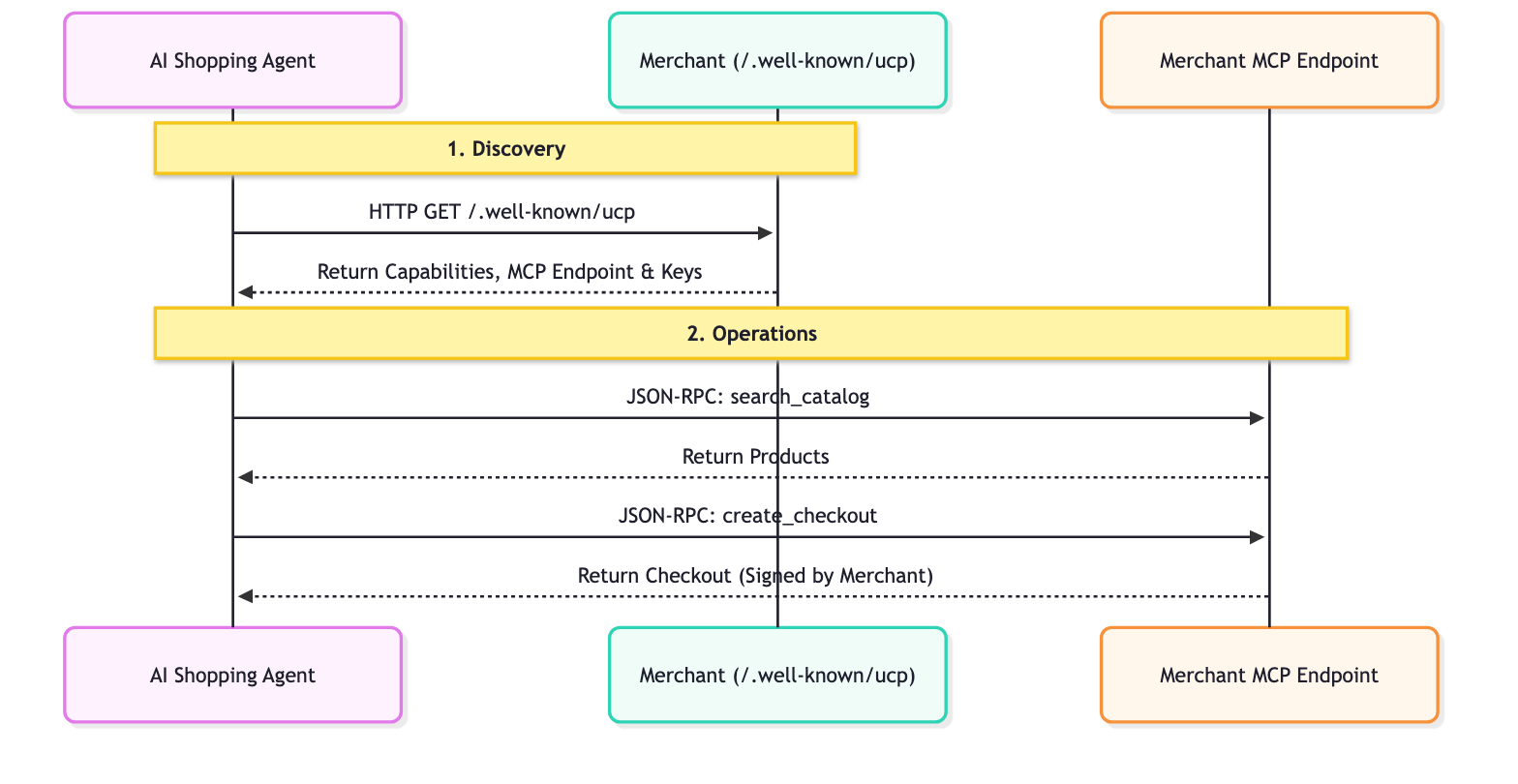
Universal Commerce Protocol (UCP)
UCP standardizes how AI agents interact with merchants. It solves the problem of agents having to learn custom APIs for every single store by introducing a standardized resource model.
How it works:
- Discovery: Every UCP-compliant merchant exposes a profile at a standard location:
/.well-known/ucp. Example: Everlane's UCP endpoint.When an agent reads this profile, it looks for:- Capabilities: The standalone core features that a business supports, like catalog search or checkout.
- Services: The lower-level communication layers used to exchange data. Examples: REST API, MCP (Model Context Protocol), A2A (Agent2Agent Protocol).
- Extensions: If a merchant needs specialized behavior, they can define custom Extensions in this profile.
- Keys: The merchant's public signing keys, which agents use to check the merchant's signatures.
- Operations: Once discovered, the agent uses the provided service endpoint to perform operations. In this codelab, we use the Model Context Protocol (MCP) as the service transport. The agent makes JSON-RPC 2.0 calls to this endpoint to invoke the discovered capabilities: searching products, creating checkouts, and completing purchases.
Agent Payments Protocol (AP2)
AP2 standardizes how payments are authorized by agents on behalf of users. It solves the security problem of agents handling sensitive payment credentials.
How it works:
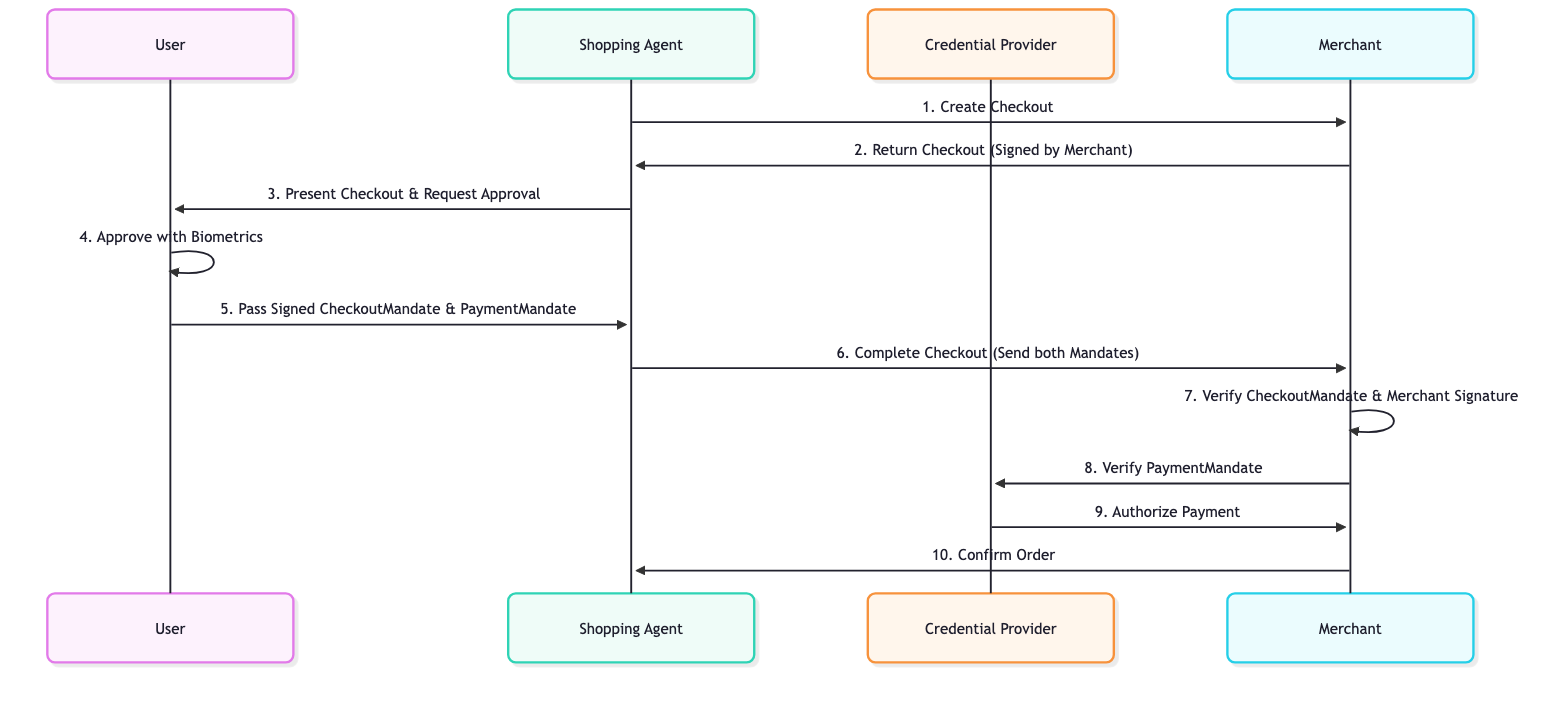
- Merchant Signature: When an agent creates a checkout using the UCP Protocol, the merchant signs the checkout (line items and totals) and returns the signature in
ap2.merchant_authorization. It acts as a price lock guarantee. If the merchant changes the price after signing, the signature no longer matches. - Checkout Mandate and Payment Mandate: After verifying the contents of the checkout, the user (or the agent on the user's behalf) signs two mandates. The
CheckoutMandatecontains the merchant-signed checkout and tells the merchant that the user approved it. ThePaymentMandateauthorizes the payment amount for that checkout. Both reference a hash of the signed checkout and carry the user's cryptographic signature. - Signature Verification: The merchant receives both mandates. It verifies the user's signature on the
CheckoutMandateand checks that the checkout inside it carries the merchant's own signature. ThePaymentMandategoes to the payment side (a credential provider or payment processor), which verifies it before it moves any money. If everything is valid, the transaction proceeds.
This "double lock" system ensures that merchants can't overcharge and agents can't spend without authorization. Mandates are SD-JWT (Selective Disclosure JWT) credentials, which protect user privacy by revealing only the fields each party needs. In AP2 v0.2, the CheckoutMandate replaces the CartMandate from AP2 v0.1.
3. Set up your environment
Google Cloud Project Setup
Create a Google Cloud Project
- In the Google Cloud Console, on the project selector page, select or create a Google Cloud project.
- Make sure that billing is enabled for your Cloud project. Learn how to check if billing is enabled on a project.
Start Cloud Shell
Cloud Shell is a command-line environment running in Google Cloud that comes preloaded with necessary tools.
- Click Activate Cloud Shell at the top of the Google Cloud console.
- Once connected to Cloud Shell, verify your authentication:
gcloud auth list - Confirm your project is configured:
gcloud config get project - If your project is not set as expected, set it:
export PROJECT_ID=<YOUR_PROJECT_ID>
gcloud config set project $PROJECT_ID
Enable APIs
Run the following command to enable the required APIs:
gcloud services enable aiplatform.googleapis.com
Setup Directory Structure
Copy-paste the following commands to create a folder for this codelab, with an agent_payments folder inside it for the agent code:
mkdir -p ~/adk-agent-commerce/agent_payments
cd ~/adk-agent-commerce
Access Gemini models
Copy-paste the following command to create agent_payments/.env with your project and location, and to have ADK call Gemini through your Google Cloud project. The Cine Agent uses Gemini to decide which tools to call. ADK loads this file automatically, so the settings also work in new terminals.
cat > ~/adk-agent-commerce/agent_payments/.env <<EOF
GOOGLE_CLOUD_PROJECT=$(gcloud config get project)
GOOGLE_CLOUD_LOCATION=global
GOOGLE_GENAI_USE_ENTERPRISE=True
EOF
Install Dependencies
Google Cloud Shell comes pre-installed with uv to manage the environment and dependencies.
- Create a
pyproject.tomlfile at the root of youradk-agent-commercefolder and add the following content to it. This file defines the project metadata and dependencies.
[project]
name = "agent-payments-demo"
version = "0.1.0"
description = "CineAgent booking agent using UCP and AP2"
requires-python = ">=3.11"
dependencies = [
    "google-adk",
    "fastapi",
    "uvicorn",
    "httpx",
    "ucp-sdk",
    "ap2 @ git+https://github.com/google-agentic-commerce/AP2.git@main",
]
The AP2 SDK installs from its GitHub repository because it isn't published on PyPI yet. (The ap2 package on PyPI is an unrelated project.)
- Run the following command to create the virtual environment and install all dependencies:
uv sync
uv creates an isolated Python environment for this codelab, so you don't need to activate anything. Prefix Python commands with uv run.
4. Define the agent
Before writing any tool logic, let's define the agent itself in a file called agent.py. This agent will act as the orchestrator for the movie booking flow.
Create agent_payments/agent.py:
"""CineAgent — movie ticket booking agent using UCP and AP2."""

from google.adk.agents import Agent
from google.adk.models import Gemini
from google.genai import types
from google.adk.tools import FunctionTool
from agent_payments.tools import (
    discover_theaters,
    search_movies,
    get_movie_detail,
    create_checkout,
    complete_purchase,
)

root_agent = Agent(
    model=Gemini(
        model="gemini-3.8-flash",
        retry_options=types.HttpRetryOptions(attempts=5),
    ),
    name="cineagent",
    description="Movie ticket booking agent using UCP and AP2.",
    instruction="""You are CineAgent, a movie ticket booking assistant.

You help users find and book movie tickets across multiple theaters
using UCP (Universal Commerce Protocol) and AP2 (Agent Payments).

**Your tools:**
- discover_theaters: Find theaters and what they support
- search_movies: Search movies across all theaters
- get_movie_detail: Get showtimes at a specific theater
- create_checkout: Start a checkout session
- complete_purchase: Finalize with AP2 mandate signing

**Rules:**
- Always call discover_theaters first if you haven't yet
- Keep responses concise — summarize and suggest next steps
- Prices from tools are in cents (1500 = $15.00)
- Never invent data — only state what tools return
""",
    tools=[
        discover_theaters,
        search_movies,
        get_movie_detail,
        create_checkout,
        FunctionTool(complete_purchase, require_confirmation=True),
    ],
)
Code Explanation
Let's break down what is happening in this agent definition:
model=Gemini(...): We are using Gemini 3.8 Flash for reasoning and tool use.instruction: This is the prompt that guides the agent's behavior. It explicitly tells the agent to use UCP and AP2, lists the tools available, and sets critical rules like "Never invent data" and "Prices are in cents".tools: This is a list of Python functions (which we will build next) that the agent can choose to call based on the user's requests.require_confirmation: You can wrap any tool withFunctionTool(my_function,require_confirmation=True). When triggered, the agent pauses and waits for a simple "yes" or "no" approval before executing the tool. Here, before executing thecomplete_purchasetool, the agent pauses for a human confirmation.
The Tool List
The agent definition declares what we need to build. Each tool maps to a specific operation in the UCP or AP2 protocol:
Tool | What it does | Protocol Action |
| Find merchants and their capabilities | Queries |
| Search catalogs across merchants | JSON-RPC to MCP endpoint |
| Get showtimes at a specific merchant | JSON-RPC to MCP endpoint |
| Start a checkout session | JSON-RPC to MCP endpoint |
| Authorize payment and complete order | Signs AP2 Mandates & sends to MCP |
The Gemini model will decide when to call each tool based on the conversation. Our job next is to implement what each tool does in tools.py.
5. Build the agent tools: Discovery & Browsing
Now let's implement the tools that the agent will use to browse and discover movies. Each tool wraps a UCP operation.
Create a new file called agent_payments/tools.py and copy-paste the following code:
"""Agent tools — each one wraps a UCP or AP2 operation."""

import json

from .ucp_client import UCPClient
from .ap2_handler import AP2Handler

# Initialize clients directly
_merchant_urls = ["http://localhost:8081", "http://localhost:8082"]
_ap2 = AP2Handler()
_ucp = UCPClient(platform_keys=[_ap2.public_key])
Understanding the Setup
To keep this codelab focused on building the agent, we are using two helper classes, UCPClient and AP2Handler, which we will look at in a later step.
- What are they?: They are small helper classes we wrote for this codelab to talk to the mock merchants. The official SDKs provide the protocol pieces: the UCP SDK has data models for every UCP schema, and the AP2 SDK creates and verifies signed mandates. Neither SDK includes a client for calling merchants, so these helpers handle that part.
- For now, treat them as helper objects:
_ucp.discover(url): Fetches and validates a merchant's profile._ucp.mcp_call(url, method, params): Sends a JSON-RPC 2.0 request to the merchant's MCP endpoint.
Discover Theatres
This tool is the first step in the UCP flow. It finds what merchants exist and what they support.
Add to tools.py:
async def discover_theaters() -> str:
    """Discover available theater merchants and their capabilities via UCP."""
    theaters = []
    for url in _merchant_urls:
        info = await _ucp.discover(url)
        theaters.append(
            {
                "url": url,
                "name": info["name"],
                "capabilities": info["capabilities"],
                "payment_handlers": info["payment_handlers"],
            }
        )
    return json.dumps(theaters, indent=2)
What this does:
- It iterates over a list of merchant URLs provided by the server. In this codelab, we will setup two mock merchants in the later section.
- For each URL, it calls
_ucp.discover(url), which hits the/.well-known/ucpendpoint. - It collects the name, capabilities, and payment handlers into a summary list.
- It returns the list as a JSON string for the agent to read.
Search Movies
This tool searches across all discovered merchants and merges the results. This is crucial because the same movie might be playing at multiple theaters with different formats (IMAX, Dolby) and different prices.
Add to tools.py:
async def search_movies(query: str = "") -> str:
    """Search for movies across all theaters. Use '' to browse all."""
    all_movies = {}
    for url, merchant in _ucp.merchants.items():
        result = await _ucp.mcp_call(
            url, "search_catalog", {"catalog": {"query": query}}
        )
        for product in result.get("products", []):
            mid = product["id"]
            if mid not in all_movies:
                all_movies[mid] = {
                    "id": mid,
                    "title": product["title"],
                    "categories": [
                        c["value"] for c in product.get("categories", [])
                    ],
                    "theaters": {},
                }
            showtimes = []
            for v in product.get("variants", []):
                opts = {o["name"]: o["label"] for o in v.get("options", [])}
                showtimes.append(
                    {
                        "id": v["id"],
                        "format": opts.get("format", "Standard"),
                        "time": opts.get("time", ""),
                        "price": v.get("price", {}),
                        "seats": v.get("metadata", {}).get(
                            "seats_available", 0
                        ),
                    }
                )
            all_movies[mid]["theaters"][url] = {
                "name": merchant["name"],
                "showtimes": showtimes,
            }
    return json.dumps(list(all_movies.values()), indent=2)
What this does:
- It loops through all theaters that were discovered.
- It sends a search catalog JSON-RPC request (
_ucp.mcp_call(url, "search_catalog", {"catalog": {"query": query}})) to the merchant's MCP endpoint. - Then it does a bit of cleanup to parse the results to find movies and their "variants" (which represent specific showtimes and formats). Groups the movies by ID so the user doesn't see duplicate movie entries.
Get Movie Detail
This tool gets the full catalog details for a specific movie at a specific theater.
Add to tools.py:
async def get_movie_detail(movie_id: str, merchant_url: str) -> str:
    """Get detailed showtimes for a movie at a specific theater."""
    result = await _ucp.mcp_call(
        merchant_url, "lookup_catalog", {"catalog": {"ids": [movie_id]}}
    )
    return json.dumps(result, indent=2)
What this does:
- It calls the
lookup_catalogmethod on the merchant's MCP endpoint, passing the specificmovie_idincatalog.ids. This returns detailed information like showtimes and seat availability for that specific theater.
6. Build the agent tools: Checkout & Payment
These tools handle the checkout and purchase flow. This is where the AP2 protocol comes into play to ensure secure transactions.
Create Checkout
This tool starts a checkout session at a specific theater for a specific showtime.
Add to tools.py:
async def create_checkout(
    merchant_url: str, showtime_id: str, quantity: int = 1
) -> str:
    """Create a checkout session for tickets at a theater."""
    result = await _ucp.mcp_call(merchant_url, "create_checkout", {
        "checkout": {
            "line_items": [
                {"item": {"id": showtime_id}, "quantity": quantity}
            ],
            "context": {"address_country": "US", "currency": "USD"},
        }
    })
    return json.dumps(result, indent=2)
What this does:
- It calls the
create_checkoutmethod on the merchant's MCP endpoint. - It passes the
showtime_idandquantityrequested by the user. - The merchant returns a checkout signed with the merchant's key.
Note: If you examine the response data, the ap2.merchant_authorization field contains the merchant's cryptographic signature over the checkout, locking the quoted price. They cannot change it later!
Complete Purchase
Three things happen in this tool:
- We get the checkout and verify the merchant's signature on it.
- Create and sign the CheckoutMandate and PaymentMandate with the AP2 SDK.
- Send both mandates to the merchant to complete the purchase.
Add to tools.py:
async def complete_purchase(checkout_id: str, merchant_url: str) -> str:
    """Complete purchase with AP2 payment authorization."""
    merchant = _ucp.merchants[merchant_url]

    # 1. Get the checkout and verify the merchant's signature on it
    checkout = await _ucp.mcp_call(
        merchant_url, "get_checkout", {"id": checkout_id}
    )
    checkout_jwt = _ap2.verify_merchant_authorization(checkout, merchant["keys"])
    if not checkout_jwt:
        return json.dumps({"error": "Merchant signature is missing or invalid"})

    # 2. Create and sign the CheckoutMandate and PaymentMandate
    # In production, this step asks the user to approve on a trusted device
    # (biometric or device auth). In this demo, the agent signs with a local key.
    checkout_mandate, payment_mandate = _ap2.create_mandates(
        checkout, checkout_jwt, merchant["name"]
    )

    # 3. Send both mandates to the merchant to complete the purchase
    result = await _ucp.mcp_call(merchant_url, "complete_checkout", {
        "id": checkout_id,
        "checkout": {
            "payment": {
                "instruments": [{
                    "id": "instr_1",
                    "handler_id": merchant["payment_handlers"][0],
                    "type": "card",
                    "selected": True,
                    "credential": {
                        "type": "ap2_payment_mandate",
                        "token": payment_mandate,
                    },
                }],
            },
            "ap2": {"checkout_mandate": checkout_mandate},
        },
    })
    return json.dumps(result, indent=2)
Why two mandates? The CheckoutMandate proves to the merchant that the user approved this exact checkout, at the price the merchant signed. The PaymentMandate proves to the payment side that the user authorized this charge. The flow is:
Merchant signs checkout -> User signs mandates -> Merchant and payment side verify -> Order completes.
Checkpoint: Full tools.py
Your complete tools.py should now have 5 tool functions and module-level initialization for UCP and AP2 clients. Verify it looks like this:
"""Agent tools — each one wraps a UCP or AP2 operation."""

import json

from .ucp_client import UCPClient
from .ap2_handler import AP2Handler

# Initialize clients directly
_merchant_urls = ["http://localhost:8081", "http://localhost:8082"]
_ap2 = AP2Handler()
_ucp = UCPClient(platform_keys=[_ap2.public_key])


async def discover_theaters() -> str:
    """Discover available theater merchants and their capabilities via UCP."""
    theaters = []
    for url in _merchant_urls:
        info = await _ucp.discover(url)
        theaters.append(
            {
                "url": url,
                "name": info["name"],
                "capabilities": info["capabilities"],
                "payment_handlers": info["payment_handlers"],
            }
        )
    return json.dumps(theaters, indent=2)


async def search_movies(query: str = "") -> str:
    """Search for movies across all theaters. Use '' to browse all."""
    all_movies = {}
    for url, merchant in _ucp.merchants.items():
        result = await _ucp.mcp_call(
            url, "search_catalog", {"catalog": {"query": query}}
        )
        for product in result.get("products", []):
            mid = product["id"]
            if mid not in all_movies:
                all_movies[mid] = {
                    "id": mid,
                    "title": product["title"],
                    "categories": [
                        c["value"] for c in product.get("categories", [])
                    ],
                    "theaters": {},
                }
            showtimes = []
            for v in product.get("variants", []):
                opts = {o["name"]: o["label"] for o in v.get("options", [])}
                showtimes.append(
                    {
                        "id": v["id"],
                        "format": opts.get("format", "Standard"),
                        "time": opts.get("time", ""),
                        "price": v.get("price", {}),
                        "seats": v.get("metadata", {}).get(
                            "seats_available", 0
                        ),
                    }
                )
            all_movies[mid]["theaters"][url] = {
                "name": merchant["name"],
                "showtimes": showtimes,
            }
    return json.dumps(list(all_movies.values()), indent=2)


async def get_movie_detail(movie_id: str, merchant_url: str) -> str:
    """Get detailed showtimes for a movie at a specific theater."""
    result = await _ucp.mcp_call(
        merchant_url, "lookup_catalog", {"catalog": {"ids": [movie_id]}}
    )
    return json.dumps(result, indent=2)


async def create_checkout(
    merchant_url: str, showtime_id: str, quantity: int = 1
) -> str:
    """Create a checkout session for tickets at a theater."""
    result = await _ucp.mcp_call(merchant_url, "create_checkout", {
        "checkout": {
            "line_items": [
                {"item": {"id": showtime_id}, "quantity": quantity}
            ],
            "context": {"address_country": "US", "currency": "USD"},
        }
    })
    return json.dumps(result, indent=2)


async def complete_purchase(checkout_id: str, merchant_url: str) -> str:
    """Complete purchase with AP2 payment authorization."""
    merchant = _ucp.merchants[merchant_url]

    # 1. Get the checkout and verify the merchant's signature on it
    checkout = await _ucp.mcp_call(
        merchant_url, "get_checkout", {"id": checkout_id}
    )
    checkout_jwt = _ap2.verify_merchant_authorization(checkout, merchant["keys"])
    if not checkout_jwt:
        return json.dumps({"error": "Merchant signature is missing or invalid"})

    # 2. Create and sign the CheckoutMandate and PaymentMandate
    # In production, this step asks the user to approve on a trusted device
    # (biometric or device auth). In this demo, the agent signs with a local key.
    checkout_mandate, payment_mandate = _ap2.create_mandates(
        checkout, checkout_jwt, merchant["name"]
    )

    # 3. Send both mandates to the merchant to complete the purchase
    result = await _ucp.mcp_call(merchant_url, "complete_checkout", {
        "id": checkout_id,
        "checkout": {
            "payment": {
                "instruments": [{
                    "id": "instr_1",
                    "handler_id": merchant["payment_handlers"][0],
                    "type": "card",
                    "selected": True,
                    "credential": {
                        "type": "ap2_payment_mandate",
                        "token": payment_mandate,
                    },
                }],
            },
            "ap2": {"checkout_mandate": checkout_mandate},
        },
    })
    return json.dumps(result, indent=2)
7. Make it runnable
With real UCP merchants, you'd point the agent at their URLs and be done. For this codelab, we need two things to test locally:
- Mock merchants: local servers that simulate UCP endpoints so you have something to test against
- Protocol helpers: thin wrappers that call the merchants over HTTP and use the UCP and AP2 SDKs for the protocol data and signatures
Note: You don't need to read this code carefully. These files simulate real merchants and a user's wallet. Copy them as-is.
Protocol helpers
The UCP SDK provides data models, and the AP2 SDK signs and verifies mandates, but neither includes a client for talking to merchants. These two files fill that gap. They're named ucp_client.py and ap2_handler.py so they don't shadow the ap2 package.
Create agent_payments/ucp_client.py:
"""UCP client: discovers merchants and calls their MCP tools."""

import uuid
import httpx
from ucp_sdk.models.schemas.profile import BusinessSchema

# The platform (this agent) identifies itself with a UCP profile URL
PLATFORM_PROFILE = "https://cineagent.example/.well-known/ucp"


class UCPClient:
    def __init__(self, platform_keys: list[dict]):
        self.client = httpx.AsyncClient(timeout=30)
        self.platform_keys = platform_keys
        self.merchants = {}  # url -> merchant info dict

    async def discover(self, merchant_url: str) -> dict:
        """Fetch and validate a merchant's UCP profile from /.well-known/ucp."""
        resp = await self.client.get(f"{merchant_url}/.well-known/ucp")
        resp.raise_for_status()
        profile = BusinessSchema.model_validate(resp.json())
        ucp = profile.ucp
        info = {
            "name": merchant_url.split("//")[-1],
            "mcp_endpoint": str(ucp.services["dev.ucp.shopping"][0].endpoint),
            "capabilities": list(ucp.capabilities or {}),
            "payment_handlers": [
                h.id for handlers in ucp.payment_handlers.values() for h in handlers
            ],
            "keys": [k.model_dump(exclude_none=True) for k in profile.keys or []],
        }
        self.merchants[merchant_url] = info
        return info

    async def mcp_call(
        self, merchant_url: str, tool_name: str, arguments: dict
    ) -> dict:
        """Call a merchant's MCP tool via JSON-RPC 2.0."""
        merchant = self.merchants[merchant_url]
        meta = {
            "ucp-agent": {
                "profile": PLATFORM_PROFILE,
                # Mock shortcut: a real merchant reads the platform's public
                # keys from the profile URL above instead
                "keys": self.platform_keys,
            },
            "idempotency-key": str(uuid.uuid4()),
        }
        resp = await self.client.post(
            merchant["mcp_endpoint"],
            json={
                "jsonrpc": "2.0",
                "id": uuid.uuid4().hex,
                "method": "tools/call",
                "params": {
                    "name": tool_name,
                    "arguments": {"meta": meta, **arguments},
                },
            },
        )
        resp.raise_for_status()
        data = resp.json()
        if "error" in data:
            raise Exception(f"MCP error: {data['error']}")
        return data["result"]["structuredContent"]

    async def close(self):
        await self.client.aclose()
Create agent_payments/ap2_handler.py:
"""AP2 mandate handler: verifies the merchant's signature and signs mandates."""

import json
import time

from jwcrypto.jwk import JWK
from jwcrypto.jws import JWS
from ap2.sdk.mandate import MandateClient
from ap2.sdk.utils import b64url_decode, b64url_encode, compute_sha256_b64url
from ap2.sdk.generated.checkout_mandate import CheckoutMandate
from ap2.sdk.generated.payment_mandate import PaymentMandate
from ap2.sdk.generated.types.amount import Amount
from ap2.sdk.generated.types.merchant import Merchant
from ap2.sdk.generated.types.payment_instrument import PaymentInstrument


class AP2Handler:
    def __init__(self):
        # The user's signing key. In production, this key stays in a wallet or
        # on a trusted device, and the user approves each signature.
        self.key = JWK.generate(kty="EC", crv="P-256", kid="cineagent-user-key")
        self.public_key = json.loads(self.key.export_public())
        self.mandates = MandateClient()

    def verify_merchant_authorization(
        self, checkout: dict, merchant_keys: list[dict]
    ) -> str | None:
        """Check the merchant's signature on a checkout.

        The signature is the merchant's price guarantee: if anything in the
        checkout changes, the signature no longer matches. Returns the signed
        checkout as a JWT, or None if the signature is missing or invalid.
        """
        signature = checkout.get("ap2", {}).get("merchant_authorization")
        if not signature:
            return None
        header, _, sig = signature.split(".")  # detached JWS: header..signature
        payload = {k: v for k, v in checkout.items() if k != "ap2"}
        canonical = json.dumps(
            payload, sort_keys=True, separators=(",", ":"), ensure_ascii=False
        )
        checkout_jwt = f"{header}.{b64url_encode(canonical.encode())}.{sig}"

        kid = json.loads(b64url_decode(header))["kid"]
        key = next((k for k in merchant_keys if k["kid"] == kid), None)
        if not key:
            return None
        try:
            jws = JWS()
            jws.deserialize(checkout_jwt)
            jws.verify(JWK(**key))
        except Exception:
            return None
        return checkout_jwt

    def create_mandates(
        self, checkout: dict, checkout_jwt: str, merchant_name: str
    ) -> tuple[str, str]:
        """Create and sign a CheckoutMandate and a PaymentMandate.

        Both mandates reference the hash of the merchant-signed checkout, so
        the user's approval is bound to exactly this cart and price.
        """
        checkout_hash = compute_sha256_b64url(checkout_jwt)
        total = next(t["amount"] for t in checkout["totals"] if t["type"] == "total")
        now = int(time.time())

        checkout_mandate = CheckoutMandate(
            checkout_jwt=checkout_jwt,
            checkout_hash=checkout_hash,
            iat=now,
            exp=now + 600,
        )
        payment_mandate = PaymentMandate(
            transaction_id=checkout_hash,
            payee=Merchant(id=merchant_name, name=merchant_name),
            payment_amount=Amount(amount=total, currency=checkout["currency"]),
            payment_instrument=PaymentInstrument(
                id="instr_1", type="card", description="Demo card"
            ),
            iat=now,
            exp=now + 600,
        )
        # Sign each mandate as an SD-JWT with the user's key
        return (
            self.mandates.create(payloads=[checkout_mandate], issuer_key=self.key),
            self.mandates.create(payloads=[payment_mandate], issuer_key=self.key),
        )
Mock merchants
Create agent_payments/merchants.py:
"""Mock UCP merchant servers: two theaters with different capabilities."""

import json
import time
import uuid
import multiprocessing
from datetime import datetime, timezone, timedelta

import uvicorn
from fastapi import FastAPI
from jwcrypto.jwk import JWK
from jwcrypto.jws import JWS
from ap2.sdk.mandate import MandateClient
from ap2.sdk.utils import compute_sha256_b64url
from ap2.sdk.generated.checkout_mandate import CheckoutMandate
from ap2.sdk.generated.payment_mandate import PaymentMandate
from ucp_sdk.models.schemas.common.payment_ap2_mandate import Checkout
from ucp_sdk.models.schemas.profile import BusinessSchema
from ucp_sdk.models.schemas.shopping.catalog_lookup import LookupResponse
from ucp_sdk.models.schemas.shopping.catalog_search import SearchResponse

UCP_VERSION = "2026-08-25"
UCP_SPEC = f"https://ucp.dev/{UCP_VERSION}"

# ── Theater data ────────────────────────────────────────────

THEATERS = {
    8081: {
        "name": "Meridian Cinemas",
        "movies": [
            {
                "id": "opp",
                "title": "Oppenheimer",
                "categories": ["Drama", "History"],
                "showtimes": [
                    {"id": "st_opp_7pm_imax", "format": "IMAX", "time": "7:00 PM", "price": 2200, "seats": 45},
                    {"id": "st_opp_930pm", "format": "Standard", "time": "9:30 PM", "price": 1500, "seats": 80},
                ],
            },
            {
                "id": "dune3",
                "title": "Dune: Part Three",
                "categories": ["Sci-Fi", "Action"],
                "showtimes": [
                    {"id": "st_dune_8pm_imax", "format": "IMAX", "time": "8:00 PM", "price": 2200, "seats": 30},
                ],
            },
        ],
    },
    8082: {
        "name": "StarLight Theaters",
        "movies": [
            {
                "id": "opp",
                "title": "Oppenheimer",
                "categories": ["Drama", "History"],
                "showtimes": [
                    {"id": "st_opp_6pm_atmos", "format": "Dolby Atmos", "time": "6:00 PM", "price": 1800, "seats": 60},
                ],
            },
            {
                "id": "spider",
                "title": "Spider-Verse",
                "categories": ["Animation", "Action"],
                "showtimes": [
                    {"id": "st_spider_4pm", "format": "Standard", "time": "4:00 PM", "price": 1200, "seats": 100},
                ],
            },
        ],
    },
}


def create_app(port):
    theater = THEATERS[port]
    app = FastAPI()
    sessions = {}
    checkout_jwts = {}  # checkout id -> merchant-signed checkout JWT
    # The merchant's signing key. Its public half is published in the profile.
    key = JWK.generate(kty="EC", crv="P-256", kid=f"merchant-{port}")

    def _capability(name, path, schema, **extra):
        return {name: [{
            "version": UCP_VERSION,
            "spec": f"{UCP_SPEC}/specification/{path}",
            "schema": f"{UCP_SPEC}/schemas/{schema}",
            **extra,
        }]}

    payment_handlers = {
        "com.example.card": [
            {"id": f"card_{port}", "version": UCP_VERSION,
             "available_instruments": [{"type": "card"}], "config": {}}
        ]
    }

    # ── UCP Discovery endpoint ──────────────────────────────
    @app.get("/.well-known/ucp")
    def discovery():
        profile = {
            "ucp": {
                "version": UCP_VERSION,
                "services": {
                    "dev.ucp.shopping": [
                        {"version": UCP_VERSION,
                         "spec": f"{UCP_SPEC}/specification/overview",
                         "transport": "mcp",
                         "schema": f"{UCP_SPEC}/services/shopping/mcp.openrpc.json",
                         "endpoint": f"http://localhost:{port}/mcp"}
                    ]
                },
                "capabilities": {
                    **_capability("dev.ucp.shopping.catalog.search",
                                  "shopping/catalog/search", "shopping/catalog_search.json"),
                    **_capability("dev.ucp.shopping.catalog.lookup",
                                  "shopping/catalog/lookup", "shopping/catalog_lookup.json"),
                    **_capability("dev.ucp.shopping.checkout",
                                  "shopping/checkout", "shopping/checkout.json"),
                    **_capability("dev.ucp.common.payment.ap2_mandate",
                                  "payment/extensions/ap2-mandates",
                                  "common/payment_ap2_mandate.json",
                                  extends="dev.ucp.shopping.checkout",
                                  config={"vp_formats_supported": {"dc+sd-jwt": {}}}),
                },
                "payment_handlers": payment_handlers,
            },
            "keys": [json.loads(key.export_public())],
        }
        # Check the profile against the UCP SDK models before returning it
        BusinessSchema.model_validate(profile)
        return profile

    # ── MCP JSON-RPC endpoint ───────────────────────────────
    @app.post("/mcp")
    def mcp(body: dict):
        tool = body["params"]["name"]
        args = body["params"].get("arguments", {})
        rid = body.get("id", "1")

        if tool == "search_catalog":
            q = args.get("catalog", {}).get("query", "").lower()
            hits = [m for m in theater["movies"]
                    if not q or q in m["title"].lower()
                    or any(q in c.lower() for c in m["categories"])]
            result = {"ucp": _ucp_meta("dev.ucp.shopping.catalog.search"),
                      "products": [_product(m) for m in hits]}
            return _ok(rid, SearchResponse, result)

        if tool == "lookup_catalog":
            ids = args.get("catalog", {}).get("ids", [])
            movies = [m for m in theater["movies"] if m["id"] in ids]
            if not movies:
                return _err(rid, "Not found")
            result = {"ucp": _ucp_meta("dev.ucp.shopping.catalog.lookup"),
                      "products": [_product(m, lookup=True) for m in movies]}
            return _ok(rid, LookupResponse, result)

        if tool == "create_checkout":
            co = args.get("checkout", {})
            sid = f"chk_{uuid.uuid4().hex[:12]}"
            items, subtotal = [], 0
            for li in co.get("line_items", []):
                st = _find_showtime(li["item"]["id"])
                if not st:
                    continue
                mv = _find_movie(li["item"]["id"])
                qty = li.get("quantity", 1)
                amt = st["price"] * qty
                subtotal += amt
                items.append({
                    "id": f"li_{uuid.uuid4().hex[:8]}",
                    "item": {
                        "id": st["id"],
                        "title": f"{mv['title']} ({st['format']}, {st['time']})",
                        "price": st["price"],
                    },
                    "quantity": qty,
                    "totals": [{"type": "subtotal", "amount": amt},
                               {"type": "total", "amount": amt}],
                })
            if not items:
                return _err(rid, "No valid showtimes in checkout")
            tax = int(subtotal * 0.08)
            total = subtotal + tax
            session = {
                "ucp": {
                    **_ucp_meta("dev.ucp.shopping.checkout",
                                "dev.ucp.common.payment.ap2_mandate"),
                    "payment_handlers": payment_handlers,
                },
                "id": sid,
                "status": "ready_for_complete",
                "currency": "USD",
                "line_items": items,
                "totals": [
                    {"type": "subtotal", "display_text": "Subtotal", "amount": subtotal},
                    {"type": "tax", "display_text": "Tax", "amount": tax},
                    {"type": "total", "display_text": "Total", "amount": total},
                ],
                "links": [{"type": "terms_of_service",
                           "url": f"http://localhost:{port}/terms"}],
                "expires_at": (
                    datetime.now(timezone.utc) + timedelta(minutes=10)
                ).isoformat(),
            }
            _sign(session)
            sessions[sid] = session
            return _ok(rid, Checkout, session)

        if tool == "get_checkout":
            session = sessions.get(args.get("id"))
            if not session:
                return _err(rid, "Not found")
            return _ok(rid, Checkout, session)

        if tool == "complete_checkout":
            sid = args.get("id")
            session = sessions.get(sid)
            if not session:
                return _err(rid, "Not found")
            co = args.get("checkout", {})
            checkout_mandate = co.get("ap2", {}).get("checkout_mandate")
            instruments = co.get("payment", {}).get("instruments", [])
            if not checkout_mandate or not instruments:
                return _err(rid, "mandate_required")
            payment_mandate = instruments[0]["credential"]["token"]

            # Mock shortcut: a real merchant fetches the platform's keys
            # from its profile URL (meta["ucp-agent"]["profile"])
            platform_key = JWK(**args["meta"]["ucp-agent"]["keys"][0])
            try:
                cm = MandateClient().verify(
                    checkout_mandate, platform_key, payload_type=CheckoutMandate
                ).mandate_payload
                pm = MandateClient().verify(
                    payment_mandate, platform_key, payload_type=PaymentMandate
                ).mandate_payload
            except Exception as e:
                return _err(rid, f"mandate_invalid_signature: {e}")

            # The mandates must point at the exact checkout this merchant signed
            expected_hash = compute_sha256_b64url(checkout_jwts[sid])
            total = next(t["amount"] for t in session["totals"] if t["type"] == "total")
            if (cm.checkout_jwt != checkout_jwts[sid]
                    or cm.checkout_hash != expected_hash
                    or pm.transaction_id != expected_hash
                    or pm.payment_amount.amount != total):
                return _err(rid, "mandate_scope_mismatch")

            order_id = f"ord_{uuid.uuid4().hex[:8]}"
            session["status"] = "completed"
            session["order"] = {
                "id": order_id,
                "label": theater["name"],
                "permalink_url": f"http://localhost:{port}/orders/{order_id}",
                "tickets": [
                    {
                        "movie": li["item"]["title"],
                        "quantity": li["quantity"],
                        "ticket_code": uuid.uuid4().hex[:8].upper(),
                    }
                    for li in session["line_items"]
                ],
            }
            _sign(session)
            return _ok(rid, Checkout, session)

        return _err(rid, f"Unknown tool: {tool}")

    def _sign(session):
        """Add the merchant's signature (a detached JWS) to the checkout."""
        payload = {k: v for k, v in session.items() if k != "ap2"}
        canonical = json.dumps(
            payload, sort_keys=True, separators=(",", ":"), ensure_ascii=False
        )
        jws = JWS(canonical.encode())
        jws.add_signature(key, alg="ES256",
                          protected=json.dumps({"alg": "ES256", "kid": key.kid}))
        checkout_jwt = jws.serialize(compact=True)
        header, _, sig = checkout_jwt.split(".")
        session["ap2"] = {"merchant_authorization": f"{header}..{sig}"}
        checkout_jwts[session["id"]] = checkout_jwt

    def _ucp_meta(*capabilities):
        return {"version": UCP_VERSION,
                "capabilities": {c: [{"version": UCP_VERSION}] for c in capabilities}}

    def _ok(rid, model, result):
        # Check the response against the UCP SDK models before returning it
        model.model_validate(result)
        return {"jsonrpc": "2.0", "id": rid, "result": {
            "structuredContent": result,
            "content": [{"type": "text", "text": json.dumps(result)}],
        }}

    def _err(rid, msg):
        return {"jsonrpc": "2.0", "id": rid, "error": {"code": -32000, "message": msg}}

    def _product(movie, lookup=False):
        prices = [st["price"] for st in movie["showtimes"]]
        return {
            "id": movie["id"],
            "title": movie["title"],
            "description": {"plain": f"{movie['title']} at {theater['name']}"},
            "categories": [{"value": c, "taxonomy": "merchant"} for c in movie["categories"]],
            "price_range": {
                "min": {"amount": min(prices), "currency": "USD"},
                "max": {"amount": max(prices), "currency": "USD"},
            },
            "variants": [
                {
                    "id": st["id"],
                    "title": f"{st['format']} {st['time']}",
                    "description": {"plain": f"{st['format']} showing at {st['time']}"},
                    "options": [
                        {"name": "format", "label": st["format"]},
                        {"name": "time", "label": st["time"]},
                    ],
                    "price": {"amount": st["price"], "currency": "USD"},
                    "availability": {"available": st["seats"] > 0},
                    "metadata": {"seats_available": st["seats"]},
                    **({"inputs": [{"id": movie["id"], "match": "featured"}]} if lookup else {}),
                }
                for st in movie["showtimes"]
            ],
        }

    def _find_showtime(sid):
        return next(
            (st for m in theater["movies"] for st in m["showtimes"] if st["id"] == sid),
            None,
        )

    def _find_movie(sid):
        return next(
            (m for m in theater["movies"] for st in m["showtimes"] if st["id"] == sid),
            None,
        )

    return app


def _run(port):
    uvicorn.run(create_app(port), host="0.0.0.0", port=port, log_level="warning")


if __name__ == "__main__":
    for port in THEATERS:
        multiprocessing.Process(target=_run, args=(port,), daemon=True).start()
    print("Merchants running: Meridian (:8081), StarLight (:8082)")
    print("Press Ctrl+C to stop")
    try:
        while True:
            time.sleep(1)
    except KeyboardInterrupt:
        pass
This creates two FastAPI servers, each with two endpoints:
GET /.well-known/ucp: UCP discovery. Returns the merchant's capabilities, MCP endpoint URL, accepted payment methods, and public signing key.POST /mcp: MCP (Model Context Protocol) operations. Handles JSON-RPC 2.0 calls for catalog search, checkout, and payment.
Each merchant signs its checkouts with its own key, verifies the AP2 mandates before it completes an order, and checks every response against the UCP SDK models.
Start the merchants in a new terminal (they need to stay running):
cd ~/adk-agent-commerce
uv run python agent_payments/merchants.py
You should see:
Merchants running: Meridian (:8081), StarLight (:8082)
Back in your first terminal, verify UCP discovery:
curl -s http://localhost:8081/.well-known/ucp | uv run python -m json.tool
You should see the merchant's capabilities, MCP endpoint URL, payment handlers, and public key.
8. Run the Agent with ADK Web
Let's use the ADK CLI's built-in Web UI! This provides a chat interface in the browser and automatically handles tool confirmation prompts.
Your project should now look like this:
adk-agent-commerce/
├── pyproject.toml
└── agent_payments/
    ├── .env              # Project settings
    ├── merchants.py      # Mock UCP merchants
    ├── ucp_client.py     # UCP client helper
    ├── ap2_handler.py    # AP2 mandate handler
    ├── tools.py          # Agent tools
    └── agent.py          # Agent definition
Try it
In your first terminal, go to the adk-agent-commerce folder (one folder above agent_payments) and start the ADK Web UI:
cd ~/adk-agent-commerce
uv run adk web --port 8080 --allow_origins '*'
You should see output indicating that the server is running at http://127.0.0.1:8080.
Talk to the agent
- Open the ADK Web UI by Ctrl or Cmd clicking on the URL, or by clicking the Web Preview button and selecting Preview on port 8080.
- Select
agent_paymentsfrom the drop-down menu if it isn't already selected. You will see a chat interface. - Try asking: "What movies are playing?"
- The agent will discover theaters and search catalogs behind the scenes, aggregating results from both merchants via UCP.
- Ask to book tickets: "Book 2 tickets for Oppenheimer for 7 PM".
- When the agent tries to call
complete_purchase, notice how the ADK Web UI shows a confirmation card with the purchase details! - To authorize the transaction, select the Confirmed checkbox on the card and click Submit.
- The agent will complete the purchase and return your order confirmation with ticket codes!
Here's what happened behind the scenes:
create_checkout→ merchant returned a checkout signed with its key (ap2.merchant_authorization, the price lock)complete_purchase→ verified the merchant's signature, created a CheckoutMandate and a PaymentMandate, signed both as SD-JWTs, and sent them to the merchant- Merchant verified both mandates and checked that they point at the checkout it signed → issued tickets (in the mock)
9. Clean up
To avoid leaving local servers running, clean up the resources:
- In the terminal running
adk web, press Ctrl+C to stop the agent server. - In the terminal running
merchants.py, press Ctrl+C to stop the mock merchants. - (Optional) If you created a new Google Cloud project for this codelab and want to delete it, run the following command, replacing
gcloud projects delete <YOUR_PROJECT_ID>
10. Congratulations! 🎉
You built an ADK agent that discovers merchants, browses catalogs, and completes purchases using UCP and AP2.
What you learned
In this codelab, you built an ADK agent that handles secure commerce flows. Here is a summary of what you built and the key concepts you applied:
What you built:
- 5 agent tools wrapping UCP and AP2 operations: discovery, catalog search, checkout, payment.
- AP2 mandate signing: merchant-signed checkout (price lock) + CheckoutMandate and PaymentMandate (user authorization).
- Multi-merchant search: one agent querying multiple theaters, merging results.
Key Concepts:
Protocol | What it does | How it works |
UCP Discovery | Agent finds merchants and their capabilities |
|
UCP MCP | Agent browses catalogs, creates checkouts | JSON-RPC 2.0 calls to merchant's MCP endpoint |
Merchant authorization | Merchant locks the quoted price | Signed by merchant, covers line items + totals |
AP2 CheckoutMandate | User approves the exact checkout | Signed by user, contains the merchant-signed checkout |
AP2 PaymentMandate | User authorizes the charge | Signed by user, references the checkout hash |
What's different in production?
This codelab uses mocks. In production:
- UCP discovery resolves against a registry, not hardcoded localhost URLs
- MCP endpoints are hosted by real merchants: same JSON-RPC 2.0 protocol, real inventory
- AP2 mandates are signed on the user's trusted device or by a trusted platform, not with a key that the agent generates at startup
- Signing keys come from each party's UCP profile (the mock merchants receive the agent's public key in each request instead)
- Payment authorization goes through a credential provider that verifies the PaymentMandate and asks for the user's consent
- Frontend renders tool results as rich UI (product grids, checkout summaries, confirmation cards)
Next steps
- Explore the AP2 protocol specification and build your own payment-enabled agent
- Implement UCP for your merchant to enable agentic commerce
- Connect AP2 with A2A for multi-agent commerce workflows
- Learn about the AP2 x402 extension for cryptocurrency payments