
1. Overview
In this codelab, you will run an ADK agent that books movie tickets across multiple theater merchants using two open-source commerce protocols:
- UCP (Universal Commerce Protocol): A standard for agents to discover merchants, search catalogs, and manage checkout flows.
- AP2 (Agent Payments Protocol): A protocol for secure, verifiable payment authorization using cryptographically signed mandates.
The demo app, CineAgent, connects to two mock theater merchants with different capabilities (seat selection, specialized formats, and payment methods) and orchestrates the full booking flow from search to payment.
What you'll learn
- How UCP merchant discovery works via
/.well-known/ucpprofiles - How an ADK agent uses UCP to search catalogs and create checkouts
- How AP2 mandates (CartMandate, PaymentMandate) secure transactions
- How end-to-end UCP and AP2 protocols work to secure agentic e-commerce
What you'll need
- A Google Cloud project with billing enabled
- A web browser such as Chrome
- Python 3.11+
This codelab is for intermediate developers who have some familiarity with Python and Google Cloud. This codelab takes approximately 15 minutes to complete.
The resources created in this codelab should cost less than $5.
2. Understanding UCP and AP2 Protocols
Before we dive into building the agent, let's understand the two protocols that make this secure agentic commerce possible.
Universal Commerce Protocol (UCP)
UCP standardizes how AI agents interact with merchants. It solves the problem of agents having to learn custom APIs for every single store by introducing a standardized resource model.
How it works:
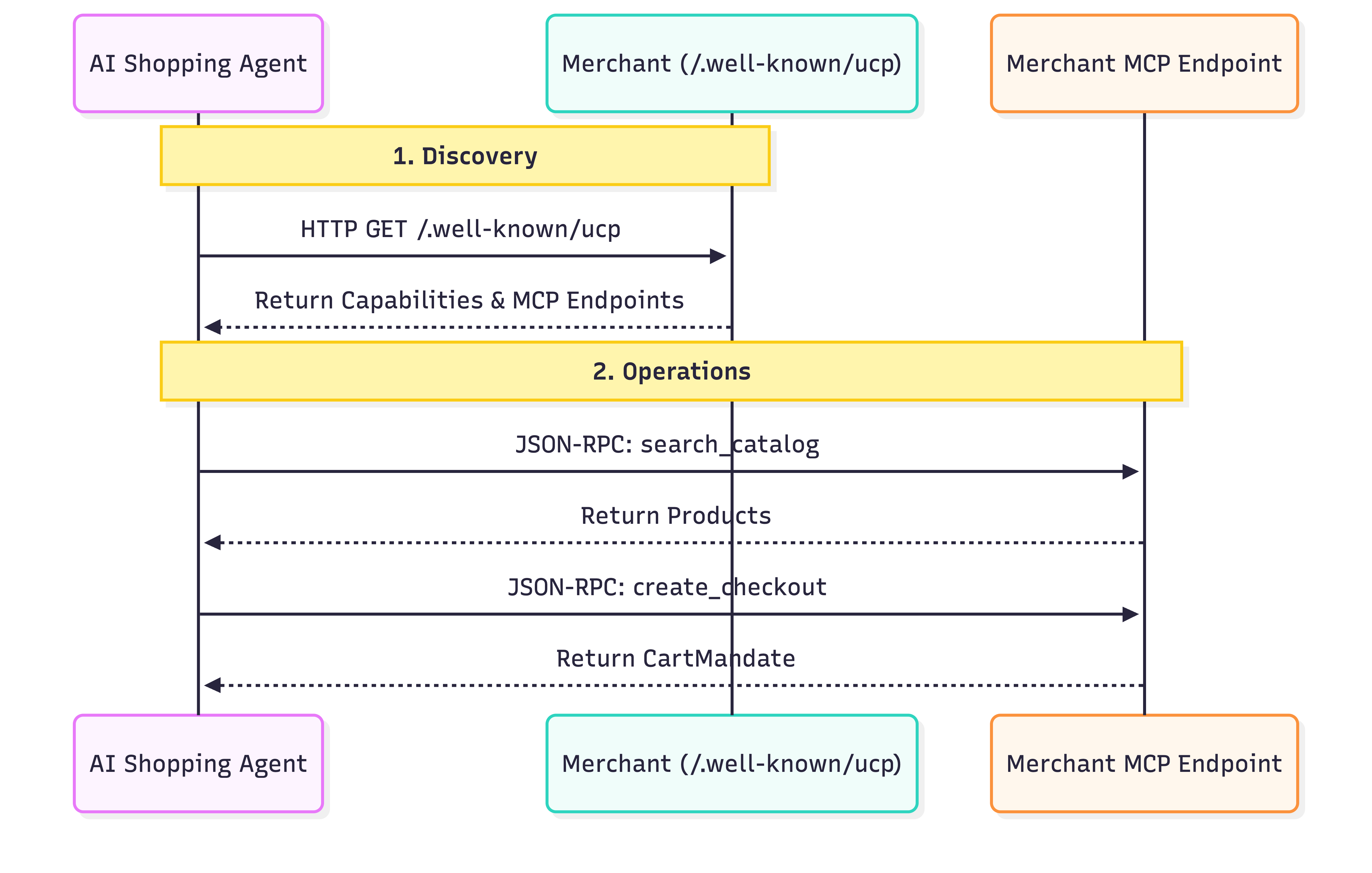
- Discovery: Every UCP-compliant merchant exposes a profile at a standard location:
/.well-known/ucp. Example: Everlane's UCP endpoint.When an agent reads this profile, it looks for:- Capabilities: The standalone core features that a business supports, like catalog search or checkout.
- Services: The lower-level communication layers used to exchange data. Examples: REST API, MCP (Model Context Protocol), A2A (Agent2Agent Protocol).
- Extensions: If a merchant needs specialized behavior, they can define custom Extensions in this profile.
- Operations: Once discovered, the agent uses the provided service endpoint to perform operations. In this codelab, we use the Model Context Protocol (MCP) as the service transport. The agent makes JSON-RPC 2.0 calls to this endpoint to invoke the discovered capabilities: searching products, creating checkouts, and completing purchases.
Agent Payments Protocol (AP2)
AP2 standardizes how payments are authorized by agents on behalf of users. It solves the security problem of agents handling sensitive payment credentials.
How it works:
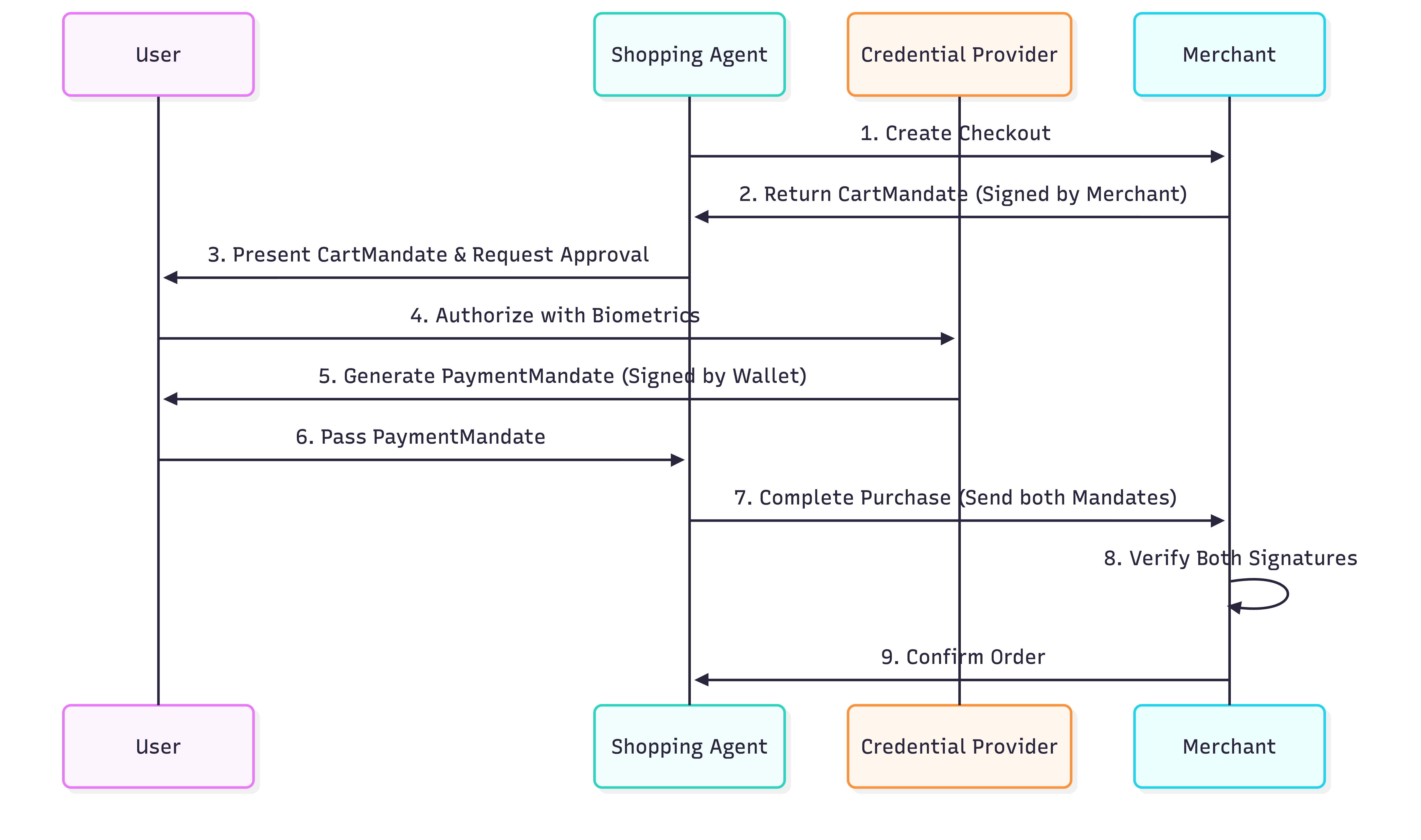
- Cart Mandate: When an agent creates a checkout using the UCP Protocol, the merchant returns a
CartMandate. This is a JSON object containing the cart details and a cryptographic signature from the merchant. It acts as a price lock guarantee. The merchant cannot change the price after issuing this mandate. - Payment Mandate: After verifying the contents of the cart, the user (or the agent on the user's behalf) creates a
PaymentMandateto authorize the payment. ThisPaymentMandatereferences theCartMandateand includes the user's cryptographic signature (or authorization token). - Double Signature Verification: The merchant receives both mandates. They verify their own signature on the
CartMandateand the user's signature on thePaymentMandate. If both are valid, the transaction proceeds.
This "double lock" system ensures that merchants can't overcharge and agents can't spend without authorization. In production, these mandates use SD-JWT (Selective Disclosure JWT) to protect user privacy.
3. Set up your environment
Google Cloud Project Setup
Create a Google Cloud Project
- In the Google Cloud Console, on the project selector page, select or create a Google Cloud project.
- Make sure that billing is enabled for your Cloud project. Learn how to check if billing is enabled on a project.
Start Cloud Shell
Cloud Shell is a command-line environment running in Google Cloud that comes preloaded with necessary tools.
- Click Activate Cloud Shell at the top of the Google Cloud console.
- Once connected to Cloud Shell, verify your authentication:
gcloud auth list - Confirm your project is configured:
gcloud config get project - If your project is not set as expected, set it:
export PROJECT_ID=<YOUR_PROJECT_ID>
gcloud config set project $PROJECT_ID
Access Gemini models
In your Cloud Shell environment, copy-paste the following commands. This will enable access to the Gemini models that the Cine Agent will use.
export GOOGLE_CLOUD_PROJECT=$PROJECT_ID
export GOOGLE_CLOUD_LOCATION=global
export GOOGLE_GENAI_USE_VERTEXAI=True
Setup Directory Structure
Copy-paste the following commands to create a new directory for the agent:
mkdir -p agent_payments
cd agent_payments
Install Dependencies
Google Cloud Shell comes pre-installed with uv to manage the environment and dependencies.
- Create a
pyproject.tomlfile at the root of youragent_paymentsfolder and add the following content to it. This file defines the project metadata and dependencies.
[project]
name = "agent-payments-demo"
version = "0.1.0"
description = "CineAgent booking agent using UCP and AP2"
requires-python = ">=3.11"
dependencies = [
    "google-adk>=1.29.0",
    "google-genai>=1.27.0",
    "fastapi>=0.115.0",
    "uvicorn>=0.34.0",
    "httpx>=0.28.0",
    "ap2 @ git+https://github.com/google-agentic-commerce/AP2.git@main",
    "ucp-sdk @ git+https://github.com/Universal-Commerce-Protocol/python-sdk.git@main",
]
- Run the following command to create the virtual environment and install all dependencies:
uv sync
- Activate the virtual environment created by
uv:
source .venv/bin/activate
4. Define the agent
Before writing any tool logic, let's define the agent itself in a file called agent.py. This agent will act as the orchestrator for the movie booking flow.
Create agent.py:
"""CineAgent — movie ticket booking agent using UCP and AP2."""

from google.adk.agents import Agent
from google.adk.tools import FunctionTool
from agent_payments.tools import (
    discover_theaters,
    search_movies,
    get_movie_detail,
    create_checkout,
    complete_purchase,
)

root_agent = Agent(
    model="gemini-3.1-pro-preview",
    name="cineagent",
    description="Movie ticket booking agent using UCP and AP2.",
    instruction="""You are CineAgent, a movie ticket booking assistant.

You help users find and book movie tickets across multiple theaters
using UCP (Universal Commerce Protocol) and AP2 (Agent Payments).

**Your tools:**
- discover_theaters: Find theaters and what they support
- search_movies: Search movies across all theaters
- get_movie_detail: Get showtimes at a specific theater
- create_checkout: Start a checkout session
- complete_purchase: Finalize with AP2 mandate signing

**Rules:**
- Always call discover_theaters first if you haven't yet
- Keep responses concise — summarize and suggest next steps
- Prices from tools are in cents (1500 = $15.00)
- Never invent data — only state what tools return
""",
    tools=[
        discover_theaters,
        search_movies,
        get_movie_detail,
        create_checkout,
        FunctionTool(complete_purchase, require_confirmation=True),
    ],
)
Code Explanation
Let's break down what is happening in this agent definition:
model="gemini-3.1-pro-preview": We are using the latest Gemini Pro preview model for complex reasoning and tool use.instruction: This is the prompt that guides the agent's behavior. It explicitly tells the agent to use UCP and AP2, lists the tools available, and sets critical rules like "Never invent data" and "Prices are in cents".tools: This is a list of Python functions (which we will build next) that the agent can choose to call based on the user's requests.require_confirmation: You can wrap any tool withFunctionTool(my_function,require_confirmation=True). When triggered, the agent pauses and waits for a simple "yes" or "no" approval before executing the tool. Here, before executing thecomplete_purchasetool, the agent pauses for a human confirmation.
The Tool List
The agent definition declares what we need to build. Each tool maps to a specific operation in the UCP or AP2 protocol:
Tool | What it does | Protocol Action |
| Find merchants and their capabilities | Queries |
| Search catalogs across merchants | JSON-RPC to MCP endpoint |
| Get showtimes at a specific merchant | JSON-RPC to MCP endpoint |
| Start a checkout session | JSON-RPC to MCP endpoint |
| Authorize payment and complete order | Signs AP2 Mandate & sends to MCP |
The Gemini model will decide when to call each tool based on the conversation. Our job next is to implement what each tool does in tools.py.
5. Build the agent tools: Discovery & Browsing
Now let's implement the tools that the agent will use to browse and discover movies. Each tool wraps a UCP operation.
Create a new file called tools.py and copy-paste the following code:
"""Agent tools — each one wraps a UCP or AP2 operation."""

import asyncio
import json

from .ucp import UCPClient
from .ap2 import AP2Handler

# Initialize clients directly
_merchant_urls = ["http://localhost:8081", "http://localhost:8082"]
_ucp = UCPClient()
_ap2 = AP2Handler()
Understanding the Setup
To keep this codelab focused on building the agent, we are using two helper classes, UCPClient and AP2Handler, which we will look at in a later step.
- What are they?: They are hand-written helper classes we created for this codelab to simulate interaction with the mock merchants. Since official UCP and AP2 SDKs are not yet available, we are using these helpers to bridge the gap. In a production environment, you would use the official SDKs once they become available.
- For now, treat them as helper objects:
_ucp.discover(url): Fetches a merchant's profile._ucp.mcp_call(url, method, params): Sends a JSON-RPC 2.0 request to the merchant's MCP endpoint.
Discover Theatres
This tool is the first step in the UCP flow. It finds what merchants exist and what they support.
Add to tools.py:
async def discover_theaters() -> str:
    """Discover available theater merchants and their capabilities via UCP."""
    theaters = []
    for url in _merchant_urls:
        info = await _ucp.discover(url)
        theaters.append(
            {
                "url": url,
                "name": info["name"],
                "capabilities": info["capabilities"],
                "payment_handlers": info["payment_handlers"],
            }
        )
    return json.dumps(theaters, indent=2)
What this does:
- It iterates over a list of merchant URLs provided by the server. In this codelab, we will setup two mock merchants in the later section.
- For each URL, it calls
_ucp.discover(url), which hits the/.well-known/ucpendpoint. - It collects the name, capabilities, and payment handlers into a summary list.
- It returns the list as a JSON string for the agent to read.
Search Movies
This tool searches across all discovered merchants and merges the results. This is crucial because the same movie might be playing at multiple theaters with different formats (IMAX, Dolby) and different prices.
Add to tools.py:
async def search_movies(query: str = "") -> str:
    """Search for movies across all theaters. Use '' to browse all."""
    all_movies = {}
    for url, merchant in _ucp.merchants.items():
        result = await _ucp.mcp_call(url, "search_catalog", {"query": query})
        for product in result.get("products", []):
            mid = product["id"]
            if mid not in all_movies:
                all_movies[mid] = {
                    "id": mid,
                    "title": product["title"],
                    "categories": product.get("categories", []),
                    "theaters": {},
                }
            showtimes = []
            for v in product.get("variants", []):
                opts = {
                    o["name"]: o["value"]
                    for o in v.get("selected_options", [])
                }
                showtimes.append(
                    {
                        "id": v["id"],
                        "format": opts.get("format", "Standard"),
                        "time": opts.get("time", ""),
                        "price": v.get("price", {}),
                        "seats": v.get("availability", {}).get(
                            "seats_available", 0
                        ),
                    }
                )
            all_movies[mid]["theaters"][url] = {
                "name": merchant["name"],
                "showtimes": showtimes,
            }
    return json.dumps(list(all_movies.values()), indent=2)
What this does:
- It loops through all theaters that were discovered.
- It sends a search catalog JSON-RPC request (
_ucp.mcp_call(url, "search_catalog", {"query": query})) to the merchant's MCP endpoint. - Then it does a bit of cleanup to parse the results to find movies and their "variants" (which represent specific showtimes and formats). Groups the movies by ID so the user doesn't see duplicate movie entries.
Get Movie Detail
This tool gets the full catalog details for a specific movie at a specific theater.
Add to tools.py:
async def get_movie_detail(movie_id: str, merchant_url: str) -> str:
    """Get detailed showtimes for a movie at a specific theater."""
    result = await _ucp.mcp_call(
        merchant_url, "lookup_catalog", {"product_id": movie_id}
    )
    return json.dumps(result, indent=2)
What this does:
- It calls the
lookup_catalogmethod on the merchant's MCP endpoint, passing the specificmovie_id. This returns detailed information like showtimes and seat availability for that specific theater.
6. Build the agent tools: Checkout & Payment
These tools handle the checkout and purchase flow. This is where the AP2 protocol comes into play to ensure secure transactions.
Create Checkout
This tool starts a checkout session at a specific theater for a specific showtime.
Add to tools.py:
async def create_checkout(
    merchant_url: str, showtime_id: str, quantity: int = 1
) -> str:
    """Create a checkout session for tickets at a theater."""
    result = await _ucp.mcp_call(merchant_url, "create_checkout", {
        "checkout": {
            "line_items": [
                {"item": {"id": showtime_id}, "quantity": quantity}
            ],
            "context": {"country": "US", "currency": "USD"},
        }
    })
    return json.dumps(result, indent=2)
What this does:
- It calls the
create_checkoutmethod on the merchant's MCP endpoint. - It passes the
showtime_idandquantityrequested by the user. - The merchant returns a JSON object containing an AP2 CartMandate.
Note: If you examine the response data, the ap2.cart_mandate contains a merchant_authorization field. This is the merchant's cryptographic signature locking the quoted price. They cannot change it later!
Complete Purchase
Three things happen in this tool:
- We get the CartMandate from the checkout and verify it (mock).
- Create and sign the PaymentMandate (mock).
- Send the signed Mandate to the Merchant to complete the purchase.
Add to tools.py:
async def complete_purchase(
    checkout_id: str, merchant_url: str, payment_method: str = "card"
) -> str:
    """Complete purchase with AP2 payment authorization."""
    # 1. Get the CartMandate from the checkout
    checkout = await _ucp.mcp_call(
        merchant_url, "get_checkout", {"checkout": {"id": checkout_id}}
    )
    cart_mandate = _ap2.process_cart_mandate(checkout)
    if not cart_mandate:
        return {"error": "No cart mandate — checkout may have expired"}

    # 2-3. Create and sign the PaymentMandate
    # In production, this call would trigger a user prompt (biometric or device auth)
    # via the AP2 Wallet SDK. In this demo, it just computes a mock SHA-256 hash.
    payment_mandate = _ap2.create_payment_mandate(cart_mandate, payment_method)

    # 4. Send both mandates to complete the purchase
    result = await _ucp.mcp_call(merchant_url, "complete_checkout", {
        "checkout": {
            "id": checkout_id,
            "payment": {
                "instruments": [{
                    "handler_id": f"card_{merchant_url.split(':')[-1]}",
                    "type": "card",
                }],
            },
            "ap2": {"payment_mandate": payment_mandate},
        }
    })
    return json.dumps(result, indent=2)
Why two mandates? The CartMandate ensures the merchant cannot change the price after quoting it. The PaymentMandate ensures the agent cannot charge the user without consent. The flow is:
Merchant locks price -> User authorizes charge -> Merchant verifies both -> Order completes.
Checkpoint: Full tools.py
Your complete tools.py should now have 5 tool functions and module-level initialization for UCP and AP2 clients. Verify it looks like this:
"""Agent tools — each one wraps a UCP or AP2 operation."""

import asyncio
import json

from ucp import UCPClient
from ap2 import AP2Handler

# Initialize clients directly
_merchant_urls = ["http://localhost:8081", "http://localhost:8082"]
_ucp = UCPClient()
_ap2 = AP2Handler()


async def discover_theaters() -> str:
    """Discover available theater merchants and their capabilities via UCP."""
    theaters = []
    for url in _merchant_urls:
        info = await _ucp.discover(url)
        theaters.append(
            {
                "url": url,
                "name": info["name"],
                "capabilities": info["capabilities"],
                "payment_handlers": info["payment_handlers"],
            }
        )
    return json.dumps(theaters, indent=2)


async def search_movies(query: str = "") -> str:
    """Search for movies across all theaters. Use '' to browse all."""
    all_movies = {}
    for url, merchant in _ucp.merchants.items():
        result = await _ucp.mcp_call(url, "search_catalog", {"query": query})
        for product in result.get("products", []):
            mid = product["id"]
            if mid not in all_movies:
                all_movies[mid] = {
                    "id": mid,
                    "title": product["title"],
                    "categories": product.get("categories", []),
                    "theaters": {},
                }
            showtimes = []
            for v in product.get("variants", []):
                opts = {
                    o["name"]: o["value"]
                    for o in v.get("selected_options", [])
                }
                showtimes.append(
                    {
                        "id": v["id"],
                        "format": opts.get("format", "Standard"),
                        "time": opts.get("time", ""),
                        "price": v.get("price", {}),
                        "seats": v.get("availability", {}).get(
                            "seats_available", 0
                        ),
                    }
                )
            all_movies[mid]["theaters"][url] = {
                "name": merchant["name"],
                "showtimes": showtimes,
            }
    return json.dumps(list(all_movies.values()), indent=2)


async def get_movie_detail(movie_id: str, merchant_url: str) -> str:
    """Get detailed showtimes for a movie at a specific theater."""
    result = await _ucp.mcp_call(
        merchant_url, "lookup_catalog", {"product_id": movie_id}
    )
    return json.dumps(result, indent=2)


async def create_checkout(
    merchant_url: str, showtime_id: str, quantity: int = 1
) -> str:
    """Create a checkout session for tickets at a theater."""
    result = await _ucp.mcp_call(merchant_url, "create_checkout", {
        "checkout": {
            "line_items": [
                {"item": {"id": showtime_id}, "quantity": quantity}
            ],
            "context": {"country": "US", "currency": "USD"},
        }
    })
    return json.dumps(result, indent=2)


async def complete_purchase(
    checkout_id: str, merchant_url: str, payment_method: str = "card"
) -> str:
    """Complete purchase with AP2 payment authorization."""
    # 1. Get the CartMandate from the checkout
    checkout = await _ucp.mcp_call(
        merchant_url, "get_checkout", {"checkout": {"id": checkout_id}}
    )
    cart_mandate = _ap2.process_cart_mandate(checkout)
    if not cart_mandate:
        return {"error": "No cart mandate — checkout may have expired"}

    # 2-3. Create and sign the PaymentMandate
    # In production, this call would trigger a user prompt (biometric or device auth)
    # via the AP2 Wallet SDK. In this demo, it just computes a mock SHA-256 hash.
    payment_mandate = _ap2.create_payment_mandate(cart_mandate, payment_method)

    # 4. Send both mandates to complete the purchase
    result = await _ucp.mcp_call(merchant_url, "complete_checkout", {
        "checkout": {
            "id": checkout_id,
            "payment": {
                "instruments": [{
                    "handler_id": f"card_{merchant_url.split(':')[-1]}",
                    "type": "card",
                }],
            },
            "ap2": {"payment_mandate": payment_mandate},
        }
    })
    return json.dumps(result, indent=2)
7. Make it runnable
With real UCP merchants, you'd point the agent at their URLs and be done. For this codelab, we need two things to test locally:
- Mock merchants — local servers that simulate UCP endpoints so you have something to test against
- Protocol helpers — thin HTTP wrappers for UCP and AP2 (in production, official SDKs replace these)
Note: You don't need to read this code carefully. These files simulate what real infrastructure and SDKs would provide. Copy them as-is.
Protocol helpers
UCP and AP2 don't have client SDKs yet — these two files handle the HTTP plumbing.
Create ucp.py:
"""UCP client — discovers merchants and calls their MCP tools."""

import uuid
import httpx


class UCPClient:
    def __init__(self):
        self.client = httpx.AsyncClient(timeout=30)
        self.merchants = {}  # url -> merchant info dict

    async def discover(self, merchant_url: str) -> dict:
        """Fetch a merchant's UCP profile from /.well-known/ucp."""
        resp = await self.client.get(f"{merchant_url}/.well-known/ucp")
        resp.raise_for_status()
        profile = resp.json()
        ucp = profile["ucp"]
        info = {
            "name": merchant_url.split("//")[-1],
            "mcp_endpoint": ucp["services"]["dev.ucp.shopping"][0]["endpoint"],
            "capabilities": list(ucp.get("capabilities", {}).keys()),
            "payment_handlers": list(ucp.get("payment_handlers", {}).keys()),
        }
        self.merchants[merchant_url] = info
        return info

    async def mcp_call(
        self, merchant_url: str, tool_name: str, arguments: dict
    ) -> dict:
        """Call a merchant's MCP tool via JSON-RPC 2.0."""
        merchant = self.merchants[merchant_url]
        resp = await self.client.post(
            merchant["mcp_endpoint"],
            json={
                "jsonrpc": "2.0",
                "id": uuid.uuid4().hex,
                "method": "tools/call",
                "params": {"name": tool_name, "arguments": arguments},
            },
        )
        resp.raise_for_status()
        data = resp.json()
        if "error" in data:
            raise Exception(f"MCP error: {data['error']}")
        return data.get("result", {})

    async def close(self):
        await self.client.aclose()
Create ap2.py:
"""AP2 mandate handler — creates and signs payment mandates."""

import uuid
import hashlib


class AP2Handler:
    def process_cart_mandate(self, checkout_response: dict) -> dict | None:
        """Extract the merchant-signed CartMandate from a checkout response.

        The CartMandate is the merchant's cryptographic price guarantee —
        it locks the total so it can't change between checkout and payment.
        """
        return checkout_response.get("ap2", {}).get("cart_mandate")

    def create_payment_mandate(
        self, cart_mandate: dict, payment_method: str = "card"
    ) -> dict:
        """Create and sign a PaymentMandate authorizing payment.

        References the merchant's CartMandate and adds user authorization.
        Together they form a two-party agreement: merchant guarantees price,
        user authorizes charge.
        """
        contents = cart_mandate["contents"]
        mandate_id = uuid.uuid4().hex

        return {
            "mandate_id": mandate_id,
            "cart_reference": contents["id"],
            "merchant": contents["merchant_name"],
            "total": contents["total"],
            "payment_method": payment_method,
            "user_authorization": self._sign(mandate_id, contents["id"]),
        }

    def _sign(self, mandate_id: str, checkout_id: str) -> str:
        """Sign the mandate. Production uses real crypto (sd-jwt-vc)."""
        payload = f"{mandate_id}:{checkout_id}"
        return hashlib.sha256(payload.encode()).hexdigest()
Mock merchants
Create merchants.py:
"""Mock UCP merchant servers — two theaters with different capabilities."""

import uuid
import time
import multiprocessing
from datetime import datetime, timezone, timedelta

import uvicorn
from fastapi import FastAPI

# ── Theater data ────────────────────────────────────────────

THEATERS = {
    8081: {
        "name": "Meridian Cinemas",
        "movies": [
            {
                "id": "opp",
                "title": "Oppenheimer",
                "categories": ["Drama", "History"],
                "showtimes": [
                    {"id": "st_opp_7pm_imax", "format": "IMAX", "time": "7:00 PM", "price": 2200, "seats": 45},
                    {"id": "st_opp_930pm", "format": "Standard", "time": "9:30 PM", "price": 1500, "seats": 80},
                ],
            },
            {
                "id": "dune3",
                "title": "Dune: Part Three",
                "categories": ["Sci-Fi", "Action"],
                "showtimes": [
                    {"id": "st_dune_8pm_imax", "format": "IMAX", "time": "8:00 PM", "price": 2200, "seats": 30},
                ],
            },
        ],
        "discounts": {},
    },
    8082: {
        "name": "StarLight Theaters",
        "movies": [
            {
                "id": "opp",
                "title": "Oppenheimer",
                "categories": ["Drama", "History"],
                "showtimes": [
                    {"id": "st_opp_6pm_atmos", "format": "Dolby Atmos", "time": "6:00 PM", "price": 1800, "seats": 60},
                ],
            },
            {
                "id": "spider",
                "title": "Spider-Verse",
                "categories": ["Animation", "Action"],
                "showtimes": [
                    {"id": "st_spider_4pm", "format": "Standard", "time": "4:00 PM", "price": 1200, "seats": 100},
                ],
            },
        ],
        "discounts": {},
    },
}


def create_app(port):
    theater = THEATERS[port]
    app = FastAPI()
    sessions = {}

    # ── UCP Discovery endpoint ──────────────────────────────
    @app.get("/.well-known/ucp")
    def discovery():
        caps = {
            "dev.ucp.shopping.catalog.search": [{"version": "2026-01-15"}],
            "dev.ucp.shopping.catalog.lookup": [{"version": "2026-01-15"}],
            "dev.ucp.shopping.checkout": [{"version": "2026-01-15"}],
            "dev.ucp.shopping.ap2_mandate": [{"version": "2026-01-15"}],
        }

        return {
            "ucp": {
                "version": "2026-01-15",
                "services": {
                    "dev.ucp.shopping": [
                        {"version": "2026-01-15", "transport": "mcp",
                         "endpoint": f"http://localhost:{port}/mcp"}
                    ]
                },
                "capabilities": caps,
                "payment_handlers": {
                    "com.example.card": [
                        {"id": f"card_{port}", "version": "2026-01-15",
                         "available_instruments": [{"type": "card"}], "config": {}}
                    ]
                },
            }
        }

    # ── MCP JSON-RPC endpoint ───────────────────────────────
    @app.post("/mcp")
    def mcp(body: dict):
        tool = body["params"]["name"]
        args = body["params"].get("arguments", {})
        rid = body.get("id", "1")

        if tool == "search_catalog":
            q = args.get("query", "").lower()
            hits = [m for m in theater["movies"]
                    if not q or q in m["title"].lower()
                    or any(q in c.lower() for c in m["categories"])]
            return _ok(rid, {"products": [_product(m) for m in hits]})

        if tool == "lookup_catalog":
            mid = args.get("product_id") or (args.get("ids", [None])[0])
            movie = next((m for m in theater["movies"] if m["id"] == mid), None)
            if not movie:
                return _err(rid, "Not found")
            return _ok(rid, {"products": [_product(movie)]})

        if tool == "create_checkout":
            co = args.get("checkout", {})
            sid = f"chk_{uuid.uuid4().hex[:12]}"
            items, subtotal = [], 0
            for li in co.get("line_items", []):
                st = _find_showtime(li["item"]["id"])
                if not st:
                    continue
                mv = _find_movie(li["item"]["id"])
                qty = li.get("quantity", 1)
                amt = st["price"] * qty
                subtotal += amt
                items.append({
                    "id": f"li_{uuid.uuid4().hex[:8]}",
                    "item": {
                        "id": st["id"],
                        "title": f"{mv['title']} — {st['format']} {st['time']}",
                        "price": st["price"],
                    },
                    "quantity": qty,
                    "totals": [{"type": "subtotal", "amount": amt}],
                })
            tax = int(subtotal * 0.08)
            total = subtotal + tax
            session = {
                "id": sid,
                "status": "ready_for_complete",
                "currency": "USD",
                "line_items": items,
                "totals": [
                    {"type": "subtotal", "display_text": "Subtotal", "amount": subtotal},
                    {"type": "tax", "display_text": "Tax", "amount": tax},
                    {"type": "total", "display_text": "Total", "amount": total},
                ],
                "metadata": {"theater_name": theater["name"]},
                "ap2": {
                    "cart_mandate": {
                        "contents": {
                            "id": sid,
                            "merchant_name": theater["name"],
                            "total": {
                                "label": "Total",
                                "amount": {"currency": "USD", "value": total / 100},
                            },
                            "cart_expiry": (
                                datetime.now(timezone.utc) + timedelta(minutes=10)
                            ).isoformat(),
                        },
                        "merchant_authorization": f"mock_merchant_sig_{sid}",
                    }
                },
            }
            sessions[sid] = session
            return _ok(rid, session)

        if tool == "get_checkout":
            sid = args.get("checkout", {}).get("id") or args.get("id")
            return _ok(rid, sessions.get(sid, {"error": "not_found"}))


        if tool == "complete_checkout":
            co = args.get("checkout", {})
            sid = co.get("id")
            session = sessions.get(sid)
            if not session:
                return _err(rid, "Not found")
            session["status"] = "completed"
            session["order"] = {
                "id": f"ord_{uuid.uuid4().hex[:8]}",
                "created_at": datetime.now(timezone.utc).isoformat(),
                "tickets": [
                    {
                        "movie": li["item"]["title"],
                        "quantity": li["quantity"],
                        "ticket_code": uuid.uuid4().hex[:8].upper(),
                    }
                    for li in session["line_items"]
                ],
            }
            session["ap2"]["payment_mandate_verified"] = True
            return _ok(rid, session)

        return _err(rid, f"Unknown tool: {tool}")

    def _ok(rid, result):
        return {"jsonrpc": "2.0", "id": rid, "result": result}

    def _err(rid, msg):
        return {"jsonrpc": "2.0", "id": rid, "error": {"code": -32000, "message": msg}}

    def _product(movie):
        return {
            "id": movie["id"],
            "title": movie["title"],
            "categories": movie["categories"],
            "variants": [
                {
                    "id": st["id"],
                    "selected_options": [
                        {"name": "format", "value": st["format"]},
                        {"name": "time", "value": st["time"]},
                    ],
                    "price": {"amount": st["price"], "currency": "USD"},
                    "availability": {"available": True, "seats_available": st["seats"]},
                }
                for st in movie["showtimes"]
            ],
        }

    def _find_showtime(sid):
        return next(
            (st for m in theater["movies"] for st in m["showtimes"] if st["id"] == sid),
            None,
        )

    def _find_movie(sid):
        return next(
            (m for m in theater["movies"] for st in m["showtimes"] if st["id"] == sid),
            None,
        )

    return app


def _run(port):
    uvicorn.run(create_app(port), host="0.0.0.0", port=port, log_level="warning")


if __name__ == "__main__":
    for port in THEATERS:
        multiprocessing.Process(target=_run, args=(port,), daemon=True).start()
    print("Merchants running: Meridian (:8081), StarLight (:8082)")
    print("Press Ctrl+C to stop")
    try:
        while True:
            time.sleep(1)
    except KeyboardInterrupt:
        pass
This creates two FastAPI servers, each with two endpoints:
GET /.well-known/ucp— UCP discovery. Returns the merchant's capabilities, MCP endpoint URL, and accepted payment methods.POST /mcp— MCP (Model Context Protocol) operations. Handles JSON-RPC 2.0 calls for catalog search, checkout, discounts, and payment.
Start the merchants in a new terminal — they need to stay running:
cd agent_payments
source .venv/bin/activate
python merchants.py
You should see:
Merchants running: Meridian (:8081), StarLight (:8082)
Back in your first terminal, verify UCP discovery:
curl -s http://localhost:8081/.well-known/ucp | python -m json.tool
You should see the merchant's capabilities, MCP endpoint URL, and payment handlers.
8. Run the Agent with ADK Web
Let's use the ADK CLI's built-in Web UI! This provides a chat interface in the browser and automatically handles tool confirmation prompts.
Your project should now look like this:
agent_payments/
├── merchants.py      # Mock UCP merchants
├── ucp.py            # UCP client helper
├── ap2.py            # AP2 mandate handler
├── tools.py          # Agent tools
├── agent.py          # Agent definition
└── pyproject.toml
Try it
In the current terminal, navigate to the parent directory (one folder above agent_payments) and start the ADK Web UI:
cd ../
adk web --allow_origins '*'
You should see output indicating that the server is running, and it will give you a URL (usually http://localhost:8000 or similar).
Talk to the agent
- Open the URL provided by
adk webin your browser. - You will see a chat interface.
- Try asking: "What movies are playing?"
- The agent will discover theaters and search catalogs behind the scenes, aggregating results from both merchants via UCP.
- Ask to book tickets: "Book 2 tickets for Oppenheimer for 7 PM".
- When the agent tries to call
complete_purchase, notice how the ADK Web UI pops up a confirmation dialog or card! - To authorize the transaction, reply in the chat with this exact JSON string:
{"confirmed": true}. - The agent will complete the purchase and return your order confirmation with ticket codes!
Here's what happened behind the scenes:
create_checkout→ merchant returned an AP2 CartMandate (signed price lock)complete_purchase→ created a PaymentMandate, signed it (mock SHA-256), sent both mandates to the merchant- Merchant verified both signatures → issued tickets (in the mock)
9. Clean up
To avoid leaving local servers running, clean up the resources:
- In the terminal running
adk web, press Ctrl+C to stop the agent server. - In the terminal running
python merchants.py, press Ctrl+C to stop the mock merchants. - Deactivate the virtual environment in both terminals by running:
deactivate
- (Optional) If you created a new Google Cloud project for this codelab and want to delete it, run:
gcloud projects delete $GOOGLE_CLOUD_PROJECT
10. Congratulations! 🎉
You built an ADK agent that discovers merchants, browses catalogs, and completes purchases using UCP and AP2.
What you learned
In this codelab, you built an ADK agent that handles secure commerce flows. Here is a summary of what you built and the key concepts you applied:
What you built:
- 5 agent tools wrapping UCP and AP2 operations — discovery, catalog search, checkout, payment.
- AP2 mandate signing — CartMandate (merchant price lock) + PaymentMandate (user authorization).
- Multi-merchant search — one agent querying multiple theaters, merging results.
Key Concepts:
Protocol | What it does | How it works |
UCP Discovery | Agent finds merchants and their capabilities |
|
UCP MCP | Agent browses catalogs, creates checkouts | JSON-RPC 2.0 calls to merchant's MCP endpoint |
AP2 CartMandate | Merchant locks the quoted price | Signed by merchant, includes total + expiry |
AP2 PaymentMandate | User authorizes the charge | Signed by user, references CartMandate |
What's different in production?
This codelab uses mocks. In production:
- UCP discovery resolves against a registry, not hardcoded localhost URLs
- MCP endpoints are hosted by real merchants — same JSON-RPC 2.0 protocol, real inventory
- AP2 mandates are signed with sd-jwt-vc, not SHA-256 hashes
- Payment authorization uses an AP2 Wallet SDK with user consent prompts
- Frontend renders tool results as rich UI (product grids, checkout summaries, confirmation cards)
Next steps
- Explore the AP2 protocol specification and build your own payment-enabled agent
- Implement UCP for your merchant to enable agentic commerce
- Connect AP2 with A2A for multi-agent commerce workflows
- Learn about the AP2 x402 extension for cryptocurrency payments