

1. खास जानकारी
इस कोडलैब में, आपको एक ADK एजेंट चलाना होगा. यह एजेंट, दो ओपन-सोर्स कॉमर्स प्रोटोकॉल का इस्तेमाल करके, अलग-अलग थिएटर में फ़िल्मों के टिकट बुक करता है:
- यूसीपी (यूनिवर्सल कॉमर्स प्रोटोकॉल): यह एजेंट के लिए एक स्टैंडर्ड है. इससे एजेंट, कारोबारियों या कंपनियों को ढूंढ सकते हैं, कैटलॉग खोज सकते हैं, और चेकआउट फ़्लो मैनेज कर सकते हैं.
- AP2 (Agent Payments Protocol): यह एक प्रोटोकॉल है. इसका इस्तेमाल, क्रिप्टोग्राफ़िक तरीके से साइन किए गए निर्देशों का इस्तेमाल करके, सुरक्षित और पुष्टि किए जा सकने वाले पेमेंट को अनुमति देने के लिए किया जाता है.
डेमो ऐप्लिकेशन, CineAgent, दो मॉक थिएटर कारोबारियों से कनेक्ट होता है. इनमें अलग-अलग सुविधाएं होती हैं. जैसे, सीट चुनने की सुविधा, खास फ़ॉर्मैट, और पेमेंट के तरीके. यह ऐप्लिकेशन, खोज से लेकर पेमेंट तक बुकिंग की पूरी प्रोसेस को मैनेज करता है.
आपको क्या सीखने को मिलेगा
/.well-known/ucpप्रोफ़ाइलों के ज़रिए, कारोबारी या कंपनी की यूसीपी प्रोफ़ाइल कैसे दिखती है- ADK एजेंट, कैटलॉग खोजने और चेकआउट बनाने के लिए यूसीपी का इस्तेमाल कैसे करता है
- AP2 के ज़रूरी निर्देशों (CartMandate, PaymentMandate) से लेन-देन को सुरक्षित कैसे बनाया जाता है
- एजेंटिक ई-कॉमर्स को सुरक्षित रखने के लिए, यूसीपी और AP2 प्रोटोकॉल कैसे काम करते हैं
आपको किन चीज़ों की ज़रूरत होगी
- बिलिंग की सुविधा वाला Google Cloud प्रोजेक्ट
- कोई वेब ब्राउज़र, जैसे कि Chrome
- Python 3.11+
यह कोडलैब, उन डेवलपर के लिए है जिन्हें Python और Google Cloud के बारे में कुछ जानकारी है. इस कोडलैब को पूरा करने में करीब 15 मिनट लगेंगे.
इस कोडलैब में बनाए गए संसाधनों की लागत 5 डॉलर से कम होनी चाहिए.
2. यूसीपी और AP2 प्रोटोकॉल के बारे में जानकारी
एजेंट बनाना शुरू करने से पहले, आइए उन दो प्रोटोकॉल के बारे में जानते हैं जिनकी वजह से, सुरक्षित एजेंटिक कॉमर्स मुमकिन हो पाता है.
यूनिवर्सल कॉमर्स प्रोटोकॉल (UCP)
यूसीपी, एआई एजेंट के कारोबारियों या कंपनियों के साथ इंटरैक्ट करने के तरीके को स्टैंडर्ड बनाता है. यह एक स्टैंडर्ड रिसोर्स मॉडल उपलब्ध कराता है. इससे एजेंट को हर स्टोर के लिए कस्टम एपीआई सीखने की ज़रूरत नहीं पड़ती.
यह कैसे काम करता है:
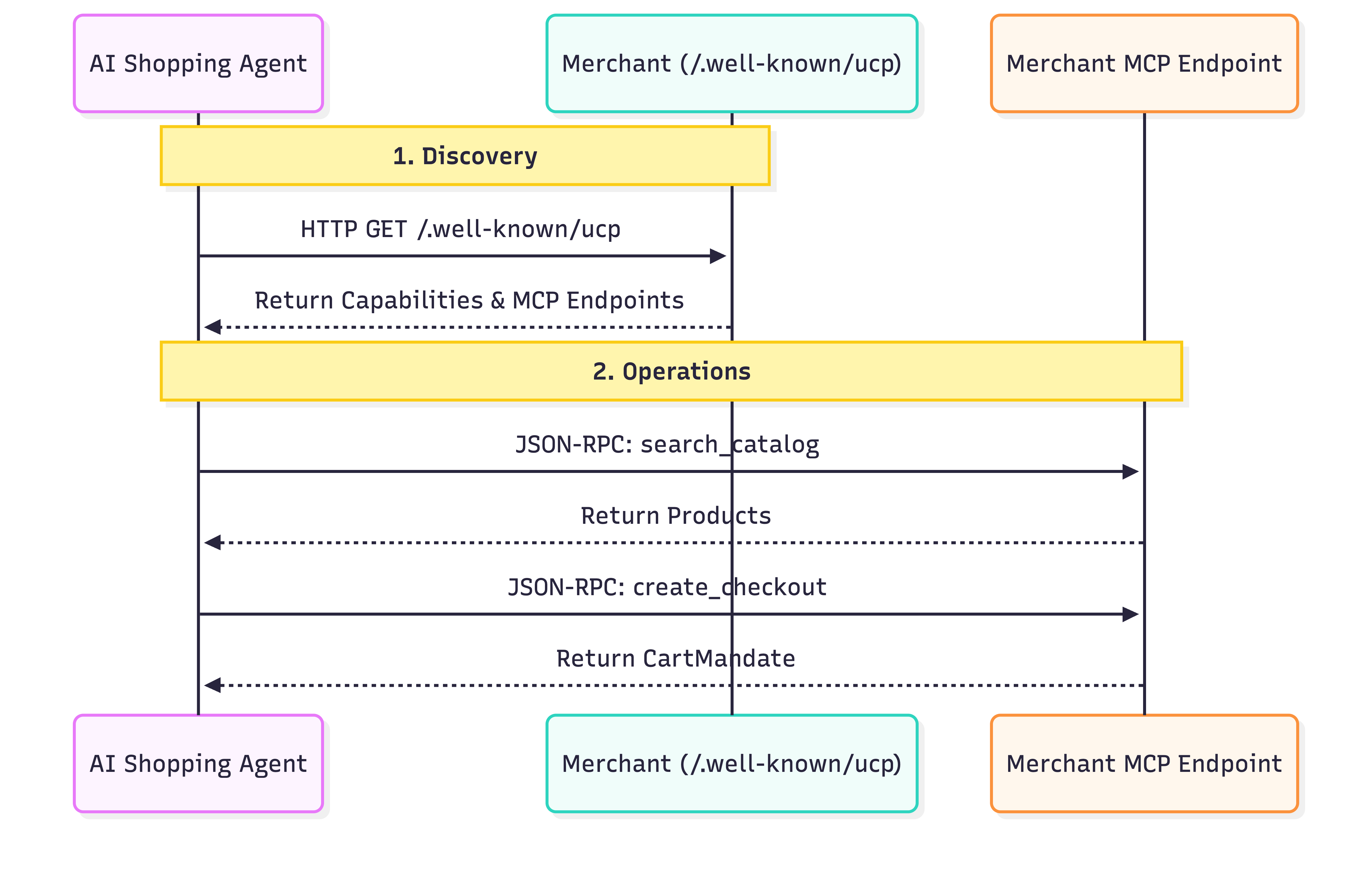
- डिस्कवरी: यूसीपी के मानकों का पालन करने वाला हर कारोबारी या कंपनी, एक स्टैंडर्ड जगह पर प्रोफ़ाइल दिखाता है:
/.well-known/ucp. उदाहरण: Everlane का यूसीपी एंडपॉइंट.जब कोई एजेंट इस प्रोफ़ाइल को पढ़ता है, तो वह इन चीज़ों को ढूंढता है:- सुविधाएं: ये ऐसी मुख्य सुविधाएं होती हैं जो कारोबार के लिए उपलब्ध होती हैं. जैसे, कैटलॉग में खोज करने की सुविधा या चेकआउट करने की सुविधा.
- सेवाएं: ये कम्यूनिकेशन की लोअर-लेवल लेयर होती हैं. इनका इस्तेमाल डेटा को शेयर करने के लिए किया जाता है. उदाहरण: REST API, एमसीपी (मॉडल कॉन्टेक्स्ट प्रोटोकॉल), A2A (Agent2Agent प्रोटोकॉल).
- एक्सटेंशन: अगर किसी कारोबारी या कंपनी को खास व्यवहार की ज़रूरत है, तो वह इस प्रोफ़ाइल में कस्टम एक्सटेंशन तय कर सकती है.
- कार्रवाइयां: सेवा के बारे में पता चलने के बाद, एजेंट, सेवा के लिए दिए गए एंडपॉइंट का इस्तेमाल करके कार्रवाइयां करता है. इस कोडलैब में, हम मॉडल कॉन्टेक्स्ट प्रोटोकॉल (एमसीपी) का इस्तेमाल, सर्विस ट्रांसपोर्ट के तौर पर करते हैं. एजेंट, इस एंडपॉइंट पर JSON-RPC 2.0 कॉल करता है, ताकि खोजी गई क्षमताओं को लागू किया जा सके. जैसे, प्रॉडक्ट खोजना, चेकआउट बनाना, और खरीदारी पूरी करना.
Agent Payments Protocol (AP2)
AP2, इस बात को स्टैंडर्ड बनाता है कि एजेंट, उपयोगकर्ताओं की ओर से पेमेंट को कैसे अनुमति देते हैं. इससे एजेंट के ज़रिए पेमेंट के संवेदनशील क्रेडेंशियल मैनेज करने से जुड़ी सुरक्षा की समस्या हल हो जाती है.
यह कैसे काम करता है:
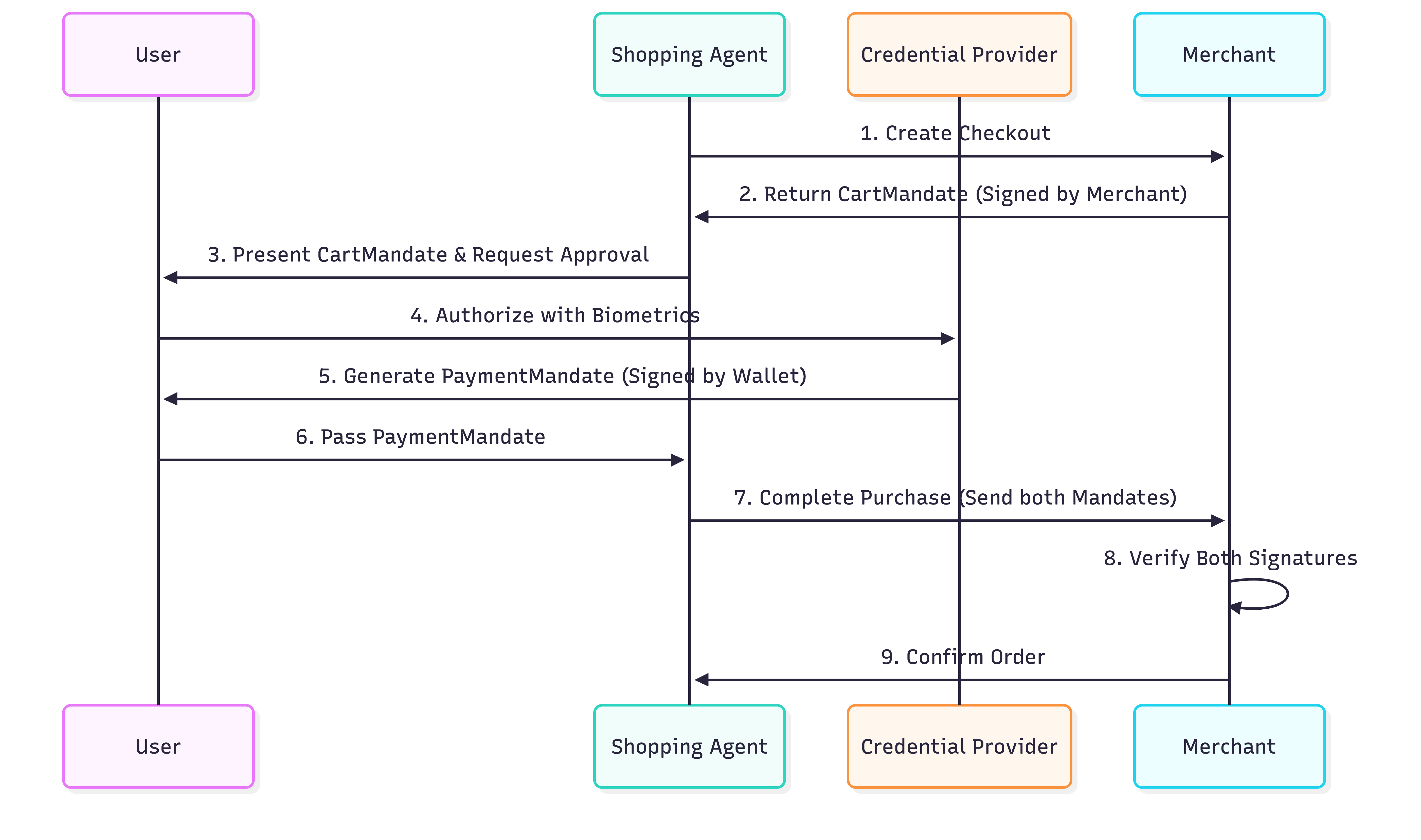
- कार्ट मैंडेट: जब कोई एजेंट, यूसीपी प्रोटोकॉल का इस्तेमाल करके चेकआउट बनाता है, तो कारोबारी या कंपनी
CartMandateदिखाती है. यह एक JSON ऑब्जेक्ट है. इसमें कार्ट की जानकारी और कारोबारी या कंपनी का क्रिप्टोग्राफ़िक हस्ताक्षर शामिल होता है. यह किराये को लॉक करने की गारंटी के तौर पर काम करता है. इस मैंडेट को जारी करने के बाद, कारोबारी या कंपनी कीमत में बदलाव नहीं कर सकती. - पेमेंट मैंडेट: कार्ट में मौजूद सामान की पुष्टि करने के बाद, उपयोगकर्ता (या उपयोगकर्ता की ओर से एजेंट) पेमेंट को मंज़ूरी देने के लिए
PaymentMandateबनाता है. यहPaymentMandate,CartMandateका रेफ़रंस देता है. इसमें उपयोगकर्ता का क्रिप्टोग्राफ़िक हस्ताक्षर (या अनुमति देने वाला टोकन) शामिल होता है. - दो बार हस्ताक्षर की पुष्टि: कारोबारी या कंपनी को दोनों निर्देश मिलते हैं. ये
CartMandateपर अपने हस्ताक्षर औरPaymentMandateपर उपयोगकर्ता के हस्ताक्षर की पुष्टि करते हैं. अगर दोनों मान्य हैं, तो लेन-देन आगे बढ़ता है.
"डबल लॉक" सिस्टम यह पक्का करता है कि कारोबारी या कंपनियां, खरीदारों से ज़्यादा शुल्क न लें. साथ ही, एजेंट बिना अनुमति के पैसे खर्च न कर पाएं. प्रोडक्शन में, ये ज़रूरी शर्तें उपयोगकर्ता की निजता की सुरक्षा के लिए SD-JWT (चुनिंदा जानकारी ज़ाहिर करने वाला JWT) का इस्तेमाल करती हैं.
3. अपना एनवायरमेंट सेट अप करने का तरीका
Google Cloud प्रोजेक्ट का सेटअप
Google Cloud प्रोजेक्ट बनाना
- Google Cloud Console में, प्रोजेक्ट चुनने वाले पेज पर, Google Cloud प्रोजेक्ट चुनें या बनाएं.
- पक्का करें कि आपके Cloud प्रोजेक्ट के लिए बिलिंग की सुविधा चालू हो. किसी प्रोजेक्ट के लिए बिलिंग चालू है या नहीं, यह देखने का तरीका जानें.
Cloud Shell शुरू करना
Cloud Shell, Google Cloud में चलने वाला एक कमांड-लाइन एनवायरमेंट है. इसमें ज़रूरी टूल पहले से लोड होते हैं.
- Google Cloud कंसोल में सबसे ऊपर मौजूद, Cloud Shell चालू करें पर क्लिक करें.
- Cloud Shell से कनेक्ट होने के बाद, अपने क्रेडेंशियल की पुष्टि करें:
gcloud auth list - पुष्टि करें कि आपका प्रोजेक्ट कॉन्फ़िगर किया गया है:
gcloud config get project - अगर आपका प्रोजेक्ट उम्मीद के मुताबिक सेट नहीं है, तो इसे सेट करें:
export PROJECT_ID=<YOUR_PROJECT_ID>
gcloud config set project $PROJECT_ID
Gemini के मॉडल ऐक्सेस करना
अपने Cloud Shell एनवायरमेंट में, यहां दिए गए निर्देशों को कॉपी करके चिपकाएं. इससे Gemini के उन मॉडल का ऐक्सेस चालू हो जाएगा जिनका इस्तेमाल Cine Agent करेगा.
export GOOGLE_CLOUD_PROJECT=$PROJECT_ID
export GOOGLE_CLOUD_LOCATION=global
export GOOGLE_GENAI_USE_VERTEXAI=True
डायरेक्ट्री स्ट्रक्चर सेट अप करना
एजेंट के लिए नई डायरेक्ट्री बनाने के लिए, यहां दिए गए निर्देशों को कॉपी करके चिपकाएं:
mkdir -p agent_payments
cd agent_payments
डिपेंडेंसी इंस्टॉल करना
Google Cloud Shell में, एनवायरमेंट और डिपेंडेंसी मैनेज करने के लिए uv पहले से इंस्टॉल होता है.
- अपने
agent_paymentsफ़ोल्डर के रूट मेंpyproject.tomlफ़ाइल बनाएं और उसमें यह कॉन्टेंट जोड़ें. इस फ़ाइल में प्रोजेक्ट का मेटाडेटा और डिपेंडेंसी के बारे में जानकारी होती है.
[project]
name = "agent-payments-demo"
version = "0.1.0"
description = "CineAgent booking agent using UCP and AP2"
requires-python = ">=3.11"
dependencies = [
    "google-adk>=1.29.0",
    "google-genai>=1.27.0",
    "fastapi>=0.115.0",
    "uvicorn>=0.34.0",
    "httpx>=0.28.0",
    "ap2 @ git+https://github.com/google-agentic-commerce/AP2.git@main",
    "ucp-sdk @ git+https://github.com/Universal-Commerce-Protocol/python-sdk.git@main",
]
- वर्चुअल एनवायरमेंट बनाने और सभी ज़रूरी सॉफ़्टवेयर इंस्टॉल करने के लिए, यह कमांड चलाएं:
uv sync
uvने जो वर्चुअल एनवायरमेंट बनाया है उसे चालू करें:
source .venv/bin/activate
4. एजेंट को तय करना
टूल का लॉजिक लिखने से पहले, आइए हम एजेंट को agent.py नाम की फ़ाइल में तय करें. यह एजेंट, फ़िल्म की बुकिंग के फ़्लो के लिए ऑर्केस्ट्रेटर के तौर पर काम करेगा.
agent.py बनाना:
"""CineAgent — movie ticket booking agent using UCP and AP2."""

from google.adk.agents import Agent
from google.adk.tools import FunctionTool
from agent_payments.tools import (
    discover_theaters,
    search_movies,
    get_movie_detail,
    create_checkout,
    complete_purchase,
)

root_agent = Agent(
    model="gemini-3.1-pro-preview",
    name="cineagent",
    description="Movie ticket booking agent using UCP and AP2.",
    instruction="""You are CineAgent, a movie ticket booking assistant.

You help users find and book movie tickets across multiple theaters
using UCP (Universal Commerce Protocol) and AP2 (Agent Payments).

**Your tools:**
- discover_theaters: Find theaters and what they support
- search_movies: Search movies across all theaters
- get_movie_detail: Get showtimes at a specific theater
- create_checkout: Start a checkout session
- complete_purchase: Finalize with AP2 mandate signing

**Rules:**
- Always call discover_theaters first if you haven't yet
- Keep responses concise — summarize and suggest next steps
- Prices from tools are in cents (1500 = $15.00)
- Never invent data — only state what tools return
""",
    tools=[
        discover_theaters,
        search_movies,
        get_movie_detail,
        create_checkout,
        FunctionTool(complete_purchase, require_confirmation=True),
    ],
)
कोड के बारे में जानकारी
आइए, इस एजेंट की परिभाषा में होने वाली प्रोसेस को समझते हैं:
model="gemini-3.1-pro-preview": हम मुश्किल सवालों के जवाब देने और टूल इस्तेमाल करने के लिए, Gemini Pro के सबसे नए मॉडल का इस्तेमाल कर रहे हैं.instruction: यह वह प्रॉम्प्ट है जो एजेंट के व्यवहार को तय करता है. इसमें एजेंट को साफ़ तौर पर यूसीपी और AP2 का इस्तेमाल करने के लिए कहा गया है. साथ ही, इसमें उपलब्ध टूल की सूची दी गई है. इसमें "कभी भी डेटा न बनाएं" और "कीमतें सेंट में हैं" जैसे ज़रूरी नियम सेट किए गए हैं.tools: यह Python फ़ंक्शन की सूची है. इसे हम अगले चरण में बनाएंगे. एजेंट, उपयोगकर्ता के अनुरोधों के आधार पर इनमें से किसी फ़ंक्शन को कॉल कर सकता है.require_confirmation: किसी भी टूल कोFunctionTool(my_function,require_confirmation=True)के साथ रैप किया जा सकता है. ट्रिगर होने पर, एजेंट रुक जाता है और टूल को लागू करने से पहले, "हाँ" या "नहीं" के जवाब का इंतज़ार करता है. यहां,complete_purchaseटूल को लागू करने से पहले, एजेंट को मैन्युअल तौर पर पुष्टि करने की ज़रूरत होती है.
टूल की सूची
एजेंट की परिभाषा से पता चलता है कि हमें क्या बनाना है. हर टूल, UCP या AP2 प्रोटोकॉल में किसी खास ऑपरेशन से मैप होता है:
टूल | यह क्या करता है | प्रोटोकॉल ऐक्शन |
| कारोबारी या कंपनियों और उनकी क्षमताओं के बारे में जानकारी | क्वेरी |
| कारोबारियों या कंपनियों के कैटलॉग खोजना | एमसीपी एंडपॉइंट को JSON-RPC |
| किसी कारोबारी या कंपनी के शो का समय देखना | एमसीपी एंडपॉइंट को JSON-RPC |
| चेकआउट सेशन शुरू करना | एमसीपी एंडपॉइंट को JSON-RPC |
| पेमेंट की अनुमति दें और ऑर्डर पूरा करें | AP2 मैंडेट पर हस्ताक्षर करता है और उसे एमसीपी को भेजता है |
Gemini मॉडल, बातचीत के आधार पर यह तय करेगा कि किस टूल को कब कॉल करना है. इसके बाद, हमारा काम यह है कि हम tools.py में हर टूल के फ़ंक्शन को लागू करें.
5. एजेंट टूल बनाना: डिस्कवरी और ब्राउज़िंग
अब उन टूल को लागू करते हैं जिनका इस्तेमाल एजेंट, फ़िल्में ब्राउज़ करने और खोजने के लिए करेगा. हर टूल, यूसीपी ऑपरेशन को रैप करता है.
tools.py नाम की एक नई फ़ाइल बनाएं और इस कोड को कॉपी करके चिपकाएं:
"""Agent tools — each one wraps a UCP or AP2 operation."""

import asyncio
import json

from .ucp import UCPClient
from .ap2 import AP2Handler

# Initialize clients directly
_merchant_urls = ["http://localhost:8081", "http://localhost:8082"]
_ucp = UCPClient()
_ap2 = AP2Handler()
सेटअप के बारे में जानकारी
इस कोडलैब में, एजेंट बनाने पर फ़ोकस किया गया है. इसलिए, हम दो हेल्पर क्लास, UCPClient और AP2Handler का इस्तेमाल कर रहे हैं. इनके बारे में हम बाद में जानेंगे.
- ये क्या हैं?: ये हाथ से लिखी गई हेल्पर क्लास हैं. हमने इस कोडलैब के लिए इन्हें बनाया है, ताकि नकली कारोबारियों के साथ इंटरैक्शन को सिम्युलेट किया जा सके. आधिकारिक यूसीपी और AP2 एसडीके टूल अभी उपलब्ध नहीं हैं. इसलिए, हम इस अंतर को कम करने के लिए इन हेल्पर का इस्तेमाल कर रहे हैं. प्रोडक्शन एनवायरमेंट में, आधिकारिक एसडीके उपलब्ध होने के बाद उनका इस्तेमाल किया जाएगा.
- फ़िलहाल, इन्हें हेल्पर ऑब्जेक्ट के तौर पर इस्तेमाल करें:
_ucp.discover(url): कारोबारी या कंपनी की प्रोफ़ाइल फ़ेच करता है._ucp.mcp_call(url, method, params): यह कारोबारी या कंपनी के एमसीपी एंडपॉइंट को JSON-RPC 2.0 अनुरोध भेजता है.
थिएटर खोजें
यह टूल, यूसीपी फ़्लो का पहला चरण है. इससे यह पता चलता है कि कौनसे कारोबारी या कंपनियां मौजूद हैं और वे कौनसी सुविधाएं देती हैं.
tools.py में जोड़ें:
async def discover_theaters() -> str:
    """Discover available theater merchants and their capabilities via UCP."""
    theaters = []
    for url in _merchant_urls:
        info = await _ucp.discover(url)
        theaters.append(
            {
                "url": url,
                "name": info["name"],
                "capabilities": info["capabilities"],
                "payment_handlers": info["payment_handlers"],
            }
        )
    return json.dumps(theaters, indent=2)
इससे क्या होता है:
- यह सर्वर से मिले कारोबारी या कंपनी के यूआरएल की सूची पर काम करता है. इस कोडलैब में, हम बाद के सेक्शन में दो नकली कारोबारियों या कंपनियों को सेटअप करेंगे.
- यह हर यूआरएल के लिए
_ucp.discover(url)को कॉल करता है. इससे/.well-known/ucpएंडपॉइंट पर असर पड़ता है. - यह नाम, क्षमताओं, और पेमेंट हैंडलर को एक खास जानकारी वाली सूची में इकट्ठा करता है.
- यह सूची को JSON स्ट्रिंग के तौर पर दिखाता है, ताकि एजेंट इसे पढ़ सके.
मूवी खोजें
यह टूल, खोजे गए सभी कारोबारियों या कंपनियों के प्रॉडक्ट खोजता है और नतीजों को मर्ज करता है. यह ज़रूरी है, क्योंकि एक ही फ़िल्म अलग-अलग थिएटर में अलग-अलग फ़ॉर्मैट (आईमैक्स, डॉल्बी) और अलग-अलग कीमतों पर दिखाई जा सकती है.
tools.py में जोड़ें:
async def search_movies(query: str = "") -> str:
    """Search for movies across all theaters. Use '' to browse all."""
    all_movies = {}
    for url, merchant in _ucp.merchants.items():
        result = await _ucp.mcp_call(url, "search_catalog", {"query": query})
        for product in result.get("products", []):
            mid = product["id"]
            if mid not in all_movies:
                all_movies[mid] = {
                    "id": mid,
                    "title": product["title"],
                    "categories": product.get("categories", []),
                    "theaters": {},
                }
            showtimes = []
            for v in product.get("variants", []):
                opts = {
                    o["name"]: o["value"]
                    for o in v.get("selected_options", [])
                }
                showtimes.append(
                    {
                        "id": v["id"],
                        "format": opts.get("format", "Standard"),
                        "time": opts.get("time", ""),
                        "price": v.get("price", {}),
                        "seats": v.get("availability", {}).get(
                            "seats_available", 0
                        ),
                    }
                )
            all_movies[mid]["theaters"][url] = {
                "name": merchant["name"],
                "showtimes": showtimes,
            }
    return json.dumps(list(all_movies.values()), indent=2)
इससे क्या होता है:
- यह उन सभी थियेटर के लिए लूप करता है जिनके बारे में पता चला है.
- यह कारोबारी या कंपनी के एमसीपी एंडपॉइंट को, खोज कैटलॉग JSON-RPC अनुरोध (
_ucp.mcp_call(url, "search_catalog", {"query": query})) भेजता है. - इसके बाद, यह नतीजों को पार्स करने के लिए कुछ समय लेता है, ताकि फ़िल्में और उनके "वैरिएंट" (जो शो के खास समय और फ़ॉर्मैट को दिखाते हैं) मिल सकें. यह कुकी, फ़िल्मों को आईडी के हिसाब से ग्रुप करती है, ताकि उपयोगकर्ता को फ़िल्मों की डुप्लीकेट एंट्री न दिखें.
फ़िल्म की जानकारी पाना
यह टूल, किसी खास थिएटर में दिखाई जा रही किसी फ़िल्म के कैटलॉग की पूरी जानकारी देता है.
tools.py में जोड़ें:
async def get_movie_detail(movie_id: str, merchant_url: str) -> str:
    """Get detailed showtimes for a movie at a specific theater."""
    result = await _ucp.mcp_call(
        merchant_url, "lookup_catalog", {"product_id": movie_id}
    )
    return json.dumps(result, indent=2)
इससे क्या होता है:
- यह कारोबारी या कंपनी के एमसीपी एंडपॉइंट पर
lookup_catalogतरीके को कॉल करता है. साथ ही, खासmovie_idको पास करता है. इससे आपको उस थिएटर के बारे में ज़्यादा जानकारी मिलती है. जैसे, शो का समय और सीट की उपलब्धता.
6. एजेंट टूल बनाना: चेकआउट और पेमेंट
ये टूल, चेकआउट और खरीदारी के फ़्लो को मैनेज करते हैं. सुरक्षित लेन-देन के लिए, AP2 प्रोटोकॉल का इस्तेमाल किया जाता है.
चेकआउट पेज बनाना
यह टूल, किसी खास थिएटर में किसी खास शो के लिए चेकआउट सेशन शुरू करता है.
tools.py में जोड़ें:
async def create_checkout(
    merchant_url: str, showtime_id: str, quantity: int = 1
) -> str:
    """Create a checkout session for tickets at a theater."""
    result = await _ucp.mcp_call(merchant_url, "create_checkout", {
        "checkout": {
            "line_items": [
                {"item": {"id": showtime_id}, "quantity": quantity}
            ],
            "context": {"country": "US", "currency": "USD"},
        }
    })
    return json.dumps(result, indent=2)
इससे क्या होता है:
- यह कारोबारी या कंपनी के एमसीपी एंडपॉइंट पर
create_checkoutतरीके को कॉल करता है. - यह उपयोगकर्ता के अनुरोध किए गए
showtime_idऔरquantityको पास करता है. - कारोबारी या कंपनी, AP2 CartMandate वाला JSON ऑब्जेक्ट दिखाती है.
ध्यान दें: रिस्पॉन्स डेटा की जांच करने पर पता चलता है कि ap2.cart_mandate में merchant_authorization फ़ील्ड मौजूद है. यह कारोबारी या कंपनी का क्रिप्टोग्राफ़िक हस्ताक्षर है. इससे बताई गई कीमत लॉक हो जाती है. इसे बाद में बदला नहीं जा सकता!
खरीदारी पूरी करें
इस टूल में तीन काम होते हैं:
- हमें चेकआउट से CartMandate मिलता है और हम इसकी पुष्टि करते हैं (मॉक).
- PaymentMandate (मॉक) बनाएं और उस पर हस्ताक्षर करें.
- खरीदारी पूरी करने के लिए, हस्ताक्षर किया गया मैंडेट कारोबारी या कंपनी को भेजें.
tools.py में जोड़ें:
async def complete_purchase(
    checkout_id: str, merchant_url: str, payment_method: str = "card"
) -> str:
    """Complete purchase with AP2 payment authorization."""
    # 1. Get the CartMandate from the checkout
    checkout = await _ucp.mcp_call(
        merchant_url, "get_checkout", {"checkout": {"id": checkout_id}}
    )
    cart_mandate = _ap2.process_cart_mandate(checkout)
    if not cart_mandate:
        return {"error": "No cart mandate — checkout may have expired"}

    # 2-3. Create and sign the PaymentMandate
    # In production, this call would trigger a user prompt (biometric or device auth)
    # via the AP2 Wallet SDK. In this demo, it just computes a mock SHA-256 hash.
    payment_mandate = _ap2.create_payment_mandate(cart_mandate, payment_method)

    # 4. Send both mandates to complete the purchase
    result = await _ucp.mcp_call(merchant_url, "complete_checkout", {
        "checkout": {
            "id": checkout_id,
            "payment": {
                "instruments": [{
                    "handler_id": f"card_{merchant_url.split(':')[-1]}",
                    "type": "card",
                }],
            },
            "ap2": {"payment_mandate": payment_mandate},
        }
    })
    return json.dumps(result, indent=2)
दो मैंडेट क्यों? CartMandate से यह पक्का होता है कि कारोबारी या कंपनी, कीमत बताने के बाद उसे बदल नहीं सकती. PaymentMandate से यह पक्का होता है कि एजेंट, उपयोगकर्ता की सहमति के बिना उससे शुल्क नहीं ले सकता. फ़्लो यह है:
Merchant locks price -> User authorizes charge -> Merchant verifies both -> Order completes.
चेकपॉइंट: पूरा tools.py
आपके पूरे tools.py में अब पांच टूल फ़ंक्शन होने चाहिए. साथ ही, UCP और AP2 क्लाइंट के लिए मॉड्यूल-लेवल का इनिशियलाइज़ेशन होना चाहिए. पुष्टि करें कि यह इस तरह दिखता है:
"""Agent tools — each one wraps a UCP or AP2 operation."""

import asyncio
import json

from ucp import UCPClient
from ap2 import AP2Handler

# Initialize clients directly
_merchant_urls = ["http://localhost:8081", "http://localhost:8082"]
_ucp = UCPClient()
_ap2 = AP2Handler()


async def discover_theaters() -> str:
    """Discover available theater merchants and their capabilities via UCP."""
    theaters = []
    for url in _merchant_urls:
        info = await _ucp.discover(url)
        theaters.append(
            {
                "url": url,
                "name": info["name"],
                "capabilities": info["capabilities"],
                "payment_handlers": info["payment_handlers"],
            }
        )
    return json.dumps(theaters, indent=2)


async def search_movies(query: str = "") -> str:
    """Search for movies across all theaters. Use '' to browse all."""
    all_movies = {}
    for url, merchant in _ucp.merchants.items():
        result = await _ucp.mcp_call(url, "search_catalog", {"query": query})
        for product in result.get("products", []):
            mid = product["id"]
            if mid not in all_movies:
                all_movies[mid] = {
                    "id": mid,
                    "title": product["title"],
                    "categories": product.get("categories", []),
                    "theaters": {},
                }
            showtimes = []
            for v in product.get("variants", []):
                opts = {
                    o["name"]: o["value"]
                    for o in v.get("selected_options", [])
                }
                showtimes.append(
                    {
                        "id": v["id"],
                        "format": opts.get("format", "Standard"),
                        "time": opts.get("time", ""),
                        "price": v.get("price", {}),
                        "seats": v.get("availability", {}).get(
                            "seats_available", 0
                        ),
                    }
                )
            all_movies[mid]["theaters"][url] = {
                "name": merchant["name"],
                "showtimes": showtimes,
            }
    return json.dumps(list(all_movies.values()), indent=2)


async def get_movie_detail(movie_id: str, merchant_url: str) -> str:
    """Get detailed showtimes for a movie at a specific theater."""
    result = await _ucp.mcp_call(
        merchant_url, "lookup_catalog", {"product_id": movie_id}
    )
    return json.dumps(result, indent=2)


async def create_checkout(
    merchant_url: str, showtime_id: str, quantity: int = 1
) -> str:
    """Create a checkout session for tickets at a theater."""
    result = await _ucp.mcp_call(merchant_url, "create_checkout", {
        "checkout": {
            "line_items": [
                {"item": {"id": showtime_id}, "quantity": quantity}
            ],
            "context": {"country": "US", "currency": "USD"},
        }
    })
    return json.dumps(result, indent=2)


async def complete_purchase(
    checkout_id: str, merchant_url: str, payment_method: str = "card"
) -> str:
    """Complete purchase with AP2 payment authorization."""
    # 1. Get the CartMandate from the checkout
    checkout = await _ucp.mcp_call(
        merchant_url, "get_checkout", {"checkout": {"id": checkout_id}}
    )
    cart_mandate = _ap2.process_cart_mandate(checkout)
    if not cart_mandate:
        return {"error": "No cart mandate — checkout may have expired"}

    # 2-3. Create and sign the PaymentMandate
    # In production, this call would trigger a user prompt (biometric or device auth)
    # via the AP2 Wallet SDK. In this demo, it just computes a mock SHA-256 hash.
    payment_mandate = _ap2.create_payment_mandate(cart_mandate, payment_method)

    # 4. Send both mandates to complete the purchase
    result = await _ucp.mcp_call(merchant_url, "complete_checkout", {
        "checkout": {
            "id": checkout_id,
            "payment": {
                "instruments": [{
                    "handler_id": f"card_{merchant_url.split(':')[-1]}",
                    "type": "card",
                }],
            },
            "ap2": {"payment_mandate": payment_mandate},
        }
    })
    return json.dumps(result, indent=2)
7. इसे चलाने लायक बनाएं
यूसीपी का इस्तेमाल करने वाले असली कारोबारियों या कंपनियों के लिए, एजेंट को उनके यूआरएल पर रीडायरेक्ट किया जाता है. इस कोडलैब के लिए, हमें स्थानीय तौर पर जांच करने के लिए दो चीज़ों की ज़रूरत है:
- नकली कारोबारी या कंपनियां — ये ऐसे लोकल सर्वर होते हैं जो यूसीपी एंडपॉइंट की तरह काम करते हैं, ताकि आपके पास टेस्ट करने के लिए कुछ हो
- प्रोटोकॉल हेल्पर — यूसीपी और AP2 के लिए थिन एचटीटीपी रैपर (प्रोडक्शन में, आधिकारिक एसडीके इन्हें बदल देते हैं)
ध्यान दें: आपको इस कोड को ध्यान से पढ़ने की ज़रूरत नहीं है. ये फ़ाइलें, असली इन्फ़्रास्ट्रक्चर और SDK टूल की तरह काम करती हैं. उन्हें उसी तरह कॉपी करें.
प्रोटोकॉल हेल्पर
UCP और AP2 के पास अब तक क्लाइंट SDK नहीं हैं. ये दोनों फ़ाइलें, एचटीटीपी प्लंबिंग को मैनेज करती हैं.
ucp.py बनाना:
"""UCP client — discovers merchants and calls their MCP tools."""

import uuid
import httpx


class UCPClient:
    def __init__(self):
        self.client = httpx.AsyncClient(timeout=30)
        self.merchants = {}  # url -> merchant info dict

    async def discover(self, merchant_url: str) -> dict:
        """Fetch a merchant's UCP profile from /.well-known/ucp."""
        resp = await self.client.get(f"{merchant_url}/.well-known/ucp")
        resp.raise_for_status()
        profile = resp.json()
        ucp = profile["ucp"]
        info = {
            "name": merchant_url.split("//")[-1],
            "mcp_endpoint": ucp["services"]["dev.ucp.shopping"][0]["endpoint"],
            "capabilities": list(ucp.get("capabilities", {}).keys()),
            "payment_handlers": list(ucp.get("payment_handlers", {}).keys()),
        }
        self.merchants[merchant_url] = info
        return info

    async def mcp_call(
        self, merchant_url: str, tool_name: str, arguments: dict
    ) -> dict:
        """Call a merchant's MCP tool via JSON-RPC 2.0."""
        merchant = self.merchants[merchant_url]
        resp = await self.client.post(
            merchant["mcp_endpoint"],
            json={
                "jsonrpc": "2.0",
                "id": uuid.uuid4().hex,
                "method": "tools/call",
                "params": {"name": tool_name, "arguments": arguments},
            },
        )
        resp.raise_for_status()
        data = resp.json()
        if "error" in data:
            raise Exception(f"MCP error: {data['error']}")
        return data.get("result", {})

    async def close(self):
        await self.client.aclose()
ap2.py बनाना:
"""AP2 mandate handler — creates and signs payment mandates."""

import uuid
import hashlib


class AP2Handler:
    def process_cart_mandate(self, checkout_response: dict) -> dict | None:
        """Extract the merchant-signed CartMandate from a checkout response.

        The CartMandate is the merchant's cryptographic price guarantee —
        it locks the total so it can't change between checkout and payment.
        """
        return checkout_response.get("ap2", {}).get("cart_mandate")

    def create_payment_mandate(
        self, cart_mandate: dict, payment_method: str = "card"
    ) -> dict:
        """Create and sign a PaymentMandate authorizing payment.

        References the merchant's CartMandate and adds user authorization.
        Together they form a two-party agreement: merchant guarantees price,
        user authorizes charge.
        """
        contents = cart_mandate["contents"]
        mandate_id = uuid.uuid4().hex

        return {
            "mandate_id": mandate_id,
            "cart_reference": contents["id"],
            "merchant": contents["merchant_name"],
            "total": contents["total"],
            "payment_method": payment_method,
            "user_authorization": self._sign(mandate_id, contents["id"]),
        }

    def _sign(self, mandate_id: str, checkout_id: str) -> str:
        """Sign the mandate. Production uses real crypto (sd-jwt-vc)."""
        payload = f"{mandate_id}:{checkout_id}"
        return hashlib.sha256(payload.encode()).hexdigest()
मॉक कारोबारी या कंपनियां
merchants.py बनाना:
"""Mock UCP merchant servers — two theaters with different capabilities."""

import uuid
import time
import multiprocessing
from datetime import datetime, timezone, timedelta

import uvicorn
from fastapi import FastAPI

# ── Theater data ────────────────────────────────────────────

THEATERS = {
    8081: {
        "name": "Meridian Cinemas",
        "movies": [
            {
                "id": "opp",
                "title": "Oppenheimer",
                "categories": ["Drama", "History"],
                "showtimes": [
                    {"id": "st_opp_7pm_imax", "format": "IMAX", "time": "7:00 PM", "price": 2200, "seats": 45},
                    {"id": "st_opp_930pm", "format": "Standard", "time": "9:30 PM", "price": 1500, "seats": 80},
                ],
            },
            {
                "id": "dune3",
                "title": "Dune: Part Three",
                "categories": ["Sci-Fi", "Action"],
                "showtimes": [
                    {"id": "st_dune_8pm_imax", "format": "IMAX", "time": "8:00 PM", "price": 2200, "seats": 30},
                ],
            },
        ],
        "discounts": {},
    },
    8082: {
        "name": "StarLight Theaters",
        "movies": [
            {
                "id": "opp",
                "title": "Oppenheimer",
                "categories": ["Drama", "History"],
                "showtimes": [
                    {"id": "st_opp_6pm_atmos", "format": "Dolby Atmos", "time": "6:00 PM", "price": 1800, "seats": 60},
                ],
            },
            {
                "id": "spider",
                "title": "Spider-Verse",
                "categories": ["Animation", "Action"],
                "showtimes": [
                    {"id": "st_spider_4pm", "format": "Standard", "time": "4:00 PM", "price": 1200, "seats": 100},
                ],
            },
        ],
        "discounts": {},
    },
}


def create_app(port):
    theater = THEATERS[port]
    app = FastAPI()
    sessions = {}

    # ── UCP Discovery endpoint ──────────────────────────────
    @app.get("/.well-known/ucp")
    def discovery():
        caps = {
            "dev.ucp.shopping.catalog.search": [{"version": "2026-01-15"}],
            "dev.ucp.shopping.catalog.lookup": [{"version": "2026-01-15"}],
            "dev.ucp.shopping.checkout": [{"version": "2026-01-15"}],
            "dev.ucp.shopping.ap2_mandate": [{"version": "2026-01-15"}],
        }

        return {
            "ucp": {
                "version": "2026-01-15",
                "services": {
                    "dev.ucp.shopping": [
                        {"version": "2026-01-15", "transport": "mcp",
                         "endpoint": f"http://localhost:{port}/mcp"}
                    ]
                },
                "capabilities": caps,
                "payment_handlers": {
                    "com.example.card": [
                        {"id": f"card_{port}", "version": "2026-01-15",
                         "available_instruments": [{"type": "card"}], "config": {}}
                    ]
                },
            }
        }

    # ── MCP JSON-RPC endpoint ───────────────────────────────
    @app.post("/mcp")
    def mcp(body: dict):
        tool = body["params"]["name"]
        args = body["params"].get("arguments", {})
        rid = body.get("id", "1")

        if tool == "search_catalog":
            q = args.get("query", "").lower()
            hits = [m for m in theater["movies"]
                    if not q or q in m["title"].lower()
                    or any(q in c.lower() for c in m["categories"])]
            return _ok(rid, {"products": [_product(m) for m in hits]})

        if tool == "lookup_catalog":
            mid = args.get("product_id") or (args.get("ids", [None])[0])
            movie = next((m for m in theater["movies"] if m["id"] == mid), None)
            if not movie:
                return _err(rid, "Not found")
            return _ok(rid, {"products": [_product(movie)]})

        if tool == "create_checkout":
            co = args.get("checkout", {})
            sid = f"chk_{uuid.uuid4().hex[:12]}"
            items, subtotal = [], 0
            for li in co.get("line_items", []):
                st = _find_showtime(li["item"]["id"])
                if not st:
                    continue
                mv = _find_movie(li["item"]["id"])
                qty = li.get("quantity", 1)
                amt = st["price"] * qty
                subtotal += amt
                items.append({
                    "id": f"li_{uuid.uuid4().hex[:8]}",
                    "item": {
                        "id": st["id"],
                        "title": f"{mv['title']} — {st['format']} {st['time']}",
                        "price": st["price"],
                    },
                    "quantity": qty,
                    "totals": [{"type": "subtotal", "amount": amt}],
                })
            tax = int(subtotal * 0.08)
            total = subtotal + tax
            session = {
                "id": sid,
                "status": "ready_for_complete",
                "currency": "USD",
                "line_items": items,
                "totals": [
                    {"type": "subtotal", "display_text": "Subtotal", "amount": subtotal},
                    {"type": "tax", "display_text": "Tax", "amount": tax},
                    {"type": "total", "display_text": "Total", "amount": total},
                ],
                "metadata": {"theater_name": theater["name"]},
                "ap2": {
                    "cart_mandate": {
                        "contents": {
                            "id": sid,
                            "merchant_name": theater["name"],
                            "total": {
                                "label": "Total",
                                "amount": {"currency": "USD", "value": total / 100},
                            },
                            "cart_expiry": (
                                datetime.now(timezone.utc) + timedelta(minutes=10)
                            ).isoformat(),
                        },
                        "merchant_authorization": f"mock_merchant_sig_{sid}",
                    }
                },
            }
            sessions[sid] = session
            return _ok(rid, session)

        if tool == "get_checkout":
            sid = args.get("checkout", {}).get("id") or args.get("id")
            return _ok(rid, sessions.get(sid, {"error": "not_found"}))


        if tool == "complete_checkout":
            co = args.get("checkout", {})
            sid = co.get("id")
            session = sessions.get(sid)
            if not session:
                return _err(rid, "Not found")
            session["status"] = "completed"
            session["order"] = {
                "id": f"ord_{uuid.uuid4().hex[:8]}",
                "created_at": datetime.now(timezone.utc).isoformat(),
                "tickets": [
                    {
                        "movie": li["item"]["title"],
                        "quantity": li["quantity"],
                        "ticket_code": uuid.uuid4().hex[:8].upper(),
                    }
                    for li in session["line_items"]
                ],
            }
            session["ap2"]["payment_mandate_verified"] = True
            return _ok(rid, session)

        return _err(rid, f"Unknown tool: {tool}")

    def _ok(rid, result):
        return {"jsonrpc": "2.0", "id": rid, "result": result}

    def _err(rid, msg):
        return {"jsonrpc": "2.0", "id": rid, "error": {"code": -32000, "message": msg}}

    def _product(movie):
        return {
            "id": movie["id"],
            "title": movie["title"],
            "categories": movie["categories"],
            "variants": [
                {
                    "id": st["id"],
                    "selected_options": [
                        {"name": "format", "value": st["format"]},
                        {"name": "time", "value": st["time"]},
                    ],
                    "price": {"amount": st["price"], "currency": "USD"},
                    "availability": {"available": True, "seats_available": st["seats"]},
                }
                for st in movie["showtimes"]
            ],
        }

    def _find_showtime(sid):
        return next(
            (st for m in theater["movies"] for st in m["showtimes"] if st["id"] == sid),
            None,
        )

    def _find_movie(sid):
        return next(
            (m for m in theater["movies"] for st in m["showtimes"] if st["id"] == sid),
            None,
        )

    return app


def _run(port):
    uvicorn.run(create_app(port), host="0.0.0.0", port=port, log_level="warning")


if __name__ == "__main__":
    for port in THEATERS:
        multiprocessing.Process(target=_run, args=(port,), daemon=True).start()
    print("Merchants running: Meridian (:8081), StarLight (:8082)")
    print("Press Ctrl+C to stop")
    try:
        while True:
            time.sleep(1)
    except KeyboardInterrupt:
        pass
इससे दो FastAPI सर्वर बनते हैं. हर सर्वर में दो एंडपॉइंट होते हैं:
GET /.well-known/ucp— यूसीपी डिस्कवरी. इससे कारोबारी या कंपनी की क्षमताओं, एमसीपी एंडपॉइंट यूआरएल, और पेमेंट के स्वीकार किए गए तरीकों की जानकारी मिलती है.POST /mcp— एमसीपी (मॉडल कॉन्टेक्स्ट प्रोटोकॉल) कार्रवाइयां. यह कुकी, कैटलॉग खोजने, चेकआउट करने, छूट पाने, और पेमेंट करने के लिए JSON-RPC 2.0 कॉल को मैनेज करती है.
कारोबारियों या कंपनियों को नए टर्मिनल में शुरू करें. इन्हें चालू रखना ज़रूरी है:
cd agent_payments
source .venv/bin/activate
python merchants.py
आपको यह दिखना चाहिए:
Merchants running: Meridian (:8081), StarLight (:8082)
पहले टर्मिनल पर वापस जाएं और यूसीपी डिस्कवरी की पुष्टि करें:
curl -s http://localhost:8081/.well-known/ucp | python -m json.tool
आपको कारोबारी या कंपनी की सुविधाएं, एमसीपी एंडपॉइंट यूआरएल, और पेमेंट हैंडलर दिखने चाहिए.
8. ADK Web की मदद से एजेंट को चलाना
आइए, ADK CLI में पहले से मौजूद वेब यूज़र इंटरफ़ेस का इस्तेमाल करें! इससे ब्राउज़र में चैट इंटरफ़ेस मिलता है. साथ ही, यह टूल की पुष्टि करने वाले प्रॉम्प्ट को अपने-आप मैनेज करता है.
अब आपका प्रोजेक्ट ऐसा दिखना चाहिए:
agent_payments/
├── merchants.py      # Mock UCP merchants
├── ucp.py            # UCP client helper
├── ap2.py            # AP2 mandate handler
├── tools.py          # Agent tools
├── agent.py          # Agent definition
└── pyproject.toml
इसे आज़माएं
मौजूदा टर्मिनल में, पैरंट डायरेक्ट्री (agent_payments से एक फ़ोल्डर ऊपर) पर जाएं और ADK वेब यूज़र इंटरफ़ेस (यूआई) शुरू करें:
cd ../
adk web --allow_origins '*'
आपको ऐसा आउटपुट दिखेगा जिससे पता चलेगा कि सर्वर चल रहा है. साथ ही, आपको एक यूआरएल मिलेगा. आम तौर पर, यह http://localhost:8000 या इससे मिलता-जुलता होता है.
एजेंट से बात करें
- अपने ब्राउज़र में,
adk webसे मिला यूआरएल खोलें. - आपको चैट इंटरफ़ेस दिखेगा.
- "कौनसी फ़िल्में सिनेमा हॉल में लगी हुई हैं?" पूछकर देखें
- एजेंट, पर्दे के पीछे थिएटरों का पता लगाएगा और कैटलॉग खोजेगा. साथ ही, यूसीपी के ज़रिए दोनों कारोबारियों या कंपनियों से नतीजे इकट्ठा करेगा.
- टिकट बुक करने के लिए कहें: "ओपनहाइमर के लिए शाम 7 बजे के दो टिकट बुक करो".
- जब एजेंट
complete_purchaseको कॉल करने की कोशिश करता है, तब देखें कि ADK Web UI, पुष्टि करने वाला डायलॉग बॉक्स या कार्ड कैसे दिखाता है! - लेन-देन को अनुमति देने के लिए, चैट में इस JSON स्ट्रिंग का इस्तेमाल करके जवाब दें:
{"confirmed": true}. - एजेंट खरीदारी पूरी करेगा और आपको टिकट कोड के साथ, ऑर्डर की पुष्टि करने वाला ईमेल भेजेगा!
यहां बताया गया है कि पर्दे के पीछे क्या हुआ:
create_checkout→ कारोबारी या कंपनी ने AP2 CartMandate (हस्ताक्षर किया गया प्राइस लॉक) वापस कर दियाcomplete_purchase→ PaymentMandate बनाया, उस पर हस्ताक्षर किया (मॉक SHA-256), और दोनों पेमेंट मैंडेट कारोबारी या कंपनी को भेजे- कारोबारी या कंपनी ने दोनों हस्ताक्षर की पुष्टि की → टिकट जारी किए गए (मॉक में)
9. व्यवस्थित करें
लोकल सर्वर को चालू रखने से बचने के लिए, संसाधनों को बंद करें:
adk webचलाने वाले टर्मिनल में, एजेंट सर्वर को रोकने के लिए Ctrl+C दबाएं.python merchants.pyचलाने वाले टर्मिनल में, नकली कारोबारियों को रोकने के लिए Ctrl+C दबाएं.- दोनों टर्मिनल में वर्चुअल एनवायरमेंट बंद करने के लिए, यह कमांड चलाएं:
deactivate
- (ज़रूरी नहीं) अगर आपने इस कोडलैब के लिए नया Google Cloud प्रोजेक्ट बनाया है और आपको इसे मिटाना है, तो यह कमांड चलाएं:
gcloud projects delete $GOOGLE_CLOUD_PROJECT
10. बधाई हो! 🎉
आपने एक ऐसा ADK एजेंट बनाया है जो कारोबारियों या कंपनियों का पता लगाता है, कैटलॉग ब्राउज़ करता है, और यूसीपी और AP2 का इस्तेमाल करके खरीदारी पूरी करता है.
आपने क्या सीखा
इस कोडलैब में, आपने एक ऐसा ADK एजेंट बनाया है जो सुरक्षित कॉमर्स फ़्लो को मैनेज करता है. यहां आपको इस बात की खास जानकारी मिलेगी कि आपने क्या बनाया है और किन मुख्य सिद्धांतों का इस्तेमाल किया है:
आपने क्या बनाया:
- यूसीपी और AP2 की कार्रवाइयों के लिए, पांच एजेंट टूल उपलब्ध हैं. जैसे, खोज, कैटलॉग खोजना, चेकआउट, और पेमेंट.
- AP2 मैंडेट पर हस्ताक्षर करना — CartMandate (कारोबारी या कंपनी के लिए कीमत लॉक करने की सुविधा) + PaymentMandate (उपयोगकर्ता की अनुमति).
- एक से ज़्यादा कारोबारियों या कंपनियों के प्रॉडक्ट खोजना — एक एजेंट, कई थिएटर से क्वेरी करता है और नतीजों को मर्ज करता है.
मुख्य सिद्धांत:
प्रोटोकॉल | यह क्या करता है | यह कैसे काम करता है |
UCP डिस्कवरी | एजेंट, कारोबारियों या कंपनियों और उनकी क्षमताओं के बारे में जानकारी ढूंढता है |
|
यूसीपी एमसीपी | एजेंट, कैटलॉग ब्राउज़ करता है और चेकआउट बनाता है | कारोबारी या कंपनी के एमसीपी एंडपॉइंट पर JSON-RPC 2.0 कॉल |
AP2 CartMandate | कारोबारी या कंपनी, बताए गए किराये को लॉक कर देती है | कारोबारी या कंपनी ने साइन किया है. इसमें कुल + समयसीमा शामिल है |
AP2 PaymentMandate | उपयोगकर्ता शुल्क चुकाने की अनुमति देता है | इस कुकी पर उपयोगकर्ता के हस्ताक्षर होते हैं. यह CartMandate को रेफ़रंस देती है |
प्रोडक्शन में क्या अलग है?
इस कोडलैब में मॉक का इस्तेमाल किया जाता है. प्रोडक्शन में:
- यूसीपी डिस्कवरी, हार्डकोड किए गए लोकल होस्ट यूआरएल के बजाय किसी रजिस्ट्री के ख़िलाफ़ काम करती है
- एमसीपी एंडपॉइंट को असल कारोबारी या कंपनियां होस्ट करती हैं. इनमें JSON-RPC 2.0 प्रोटोकॉल और असल इन्वेंट्री का इस्तेमाल किया जाता है
- AP2 के ज़रूरी दस्तावेज़ों पर sd-jwt-vc से हस्ताक्षर किए जाते हैं, न कि SHA-256 हैश से
- पेमेंट की अनुमति के लिए, AP2 Wallet SDK का इस्तेमाल किया जाता है. इसमें उपयोगकर्ता की सहमति के लिए प्रॉम्प्ट दिखाए जाते हैं
- फ़्रंटएंड, टूल के नतीजों को रिच यूज़र इंटरफ़ेस (यूआई) के तौर पर दिखाता है. जैसे, प्रॉडक्ट ग्रिड, चेकआउट की खास जानकारी, पुष्टि करने वाले कार्ड
अगले चरण
- AP2 प्रोटोकॉल स्पेसिफ़िकेशन के बारे में जानें और पेमेंट की सुविधा वाला अपना एजेंट बनाएं
- एजेंटिक कॉमर्स की सुविधा चालू करने के लिए, कारोबारी या कंपनी के लिए यूसीपी लागू करें
- मल्टी-एजेंट कॉमर्स वर्कफ़्लो के लिए, AP2 को A2A से कनेक्ट करना
- क्रिप्टो करंसी से पेमेंट के लिए, AP2 x402 एक्सटेंशन के बारे में जानें