

1. Panoramica
In questo codelab, eseguirai un agente ADK che prenota biglietti del cinema presso più commercianti di cinema utilizzando due protocolli di commercio open source:
- UCP (Universal Commerce Protocol): uno standard per consentire agli agenti di scoprire i commercianti, cercare cataloghi e gestire i flussi di pagamento.
- AP2 (Agent Payments Protocol): un protocollo per l'autorizzazione di pagamento sicura e verificabile tramite mandati firmati crittograficamente.
L'app demo CineAgent si connette a due commercianti di cinema simulati con diverse funzionalità (selezione del posto, formati specializzati e metodi di pagamento) e orchestra l'intero flusso di prenotazione dalla ricerca al pagamento.
Obiettivi didattici
- Come funziona il rilevamento dei commercianti UCP tramite i profili
/.well-known/ucp - In che modo un agente ADK utilizza UCP per cercare cataloghi e creare acquisti
- In che modo i mandati AP2 (CheckoutMandate, PaymentMandate) proteggono le transazioni
- Come funzionano i protocolli UCP ed AP2 end-to-end per proteggere l'e-commerce agentico
Che cosa ti serve
- Un progetto cloud Google Cloud con la fatturazione abilitata
- Un browser web come Chrome
- Python 3.11+ e uv, se esegui il codice sulla tua macchina anziché su Cloud Shell
Questo codelab è destinato a sviluppatori di livello intermedio che hanno una certa familiarità con Python e Google Cloud. Il completamento di questo codelab richiede circa 30 minuti.
Le risorse create in questo codelab dovrebbero costare meno di 5 $.
2. Informazioni sui protocolli UCP e AP2
Prima di iniziare a creare l'agente, vediamo i due protocolli che rendono possibile questo e-commerce agentico sicuro.
Questo codelab utilizza UCP versione 2026-08-25 con l'SDK Python UCP e AP2 v0.2 con l'SDK Python AP2.
Universal Commerce Protocol (UCP)
UCP standardizza il modo in cui gli agenti AI interagiscono con i commercianti. Risolve il problema degli agenti che devono apprendere API personalizzate per ogni singolo negozio introducendo un modello di risorse standardizzato.
Come funziona:
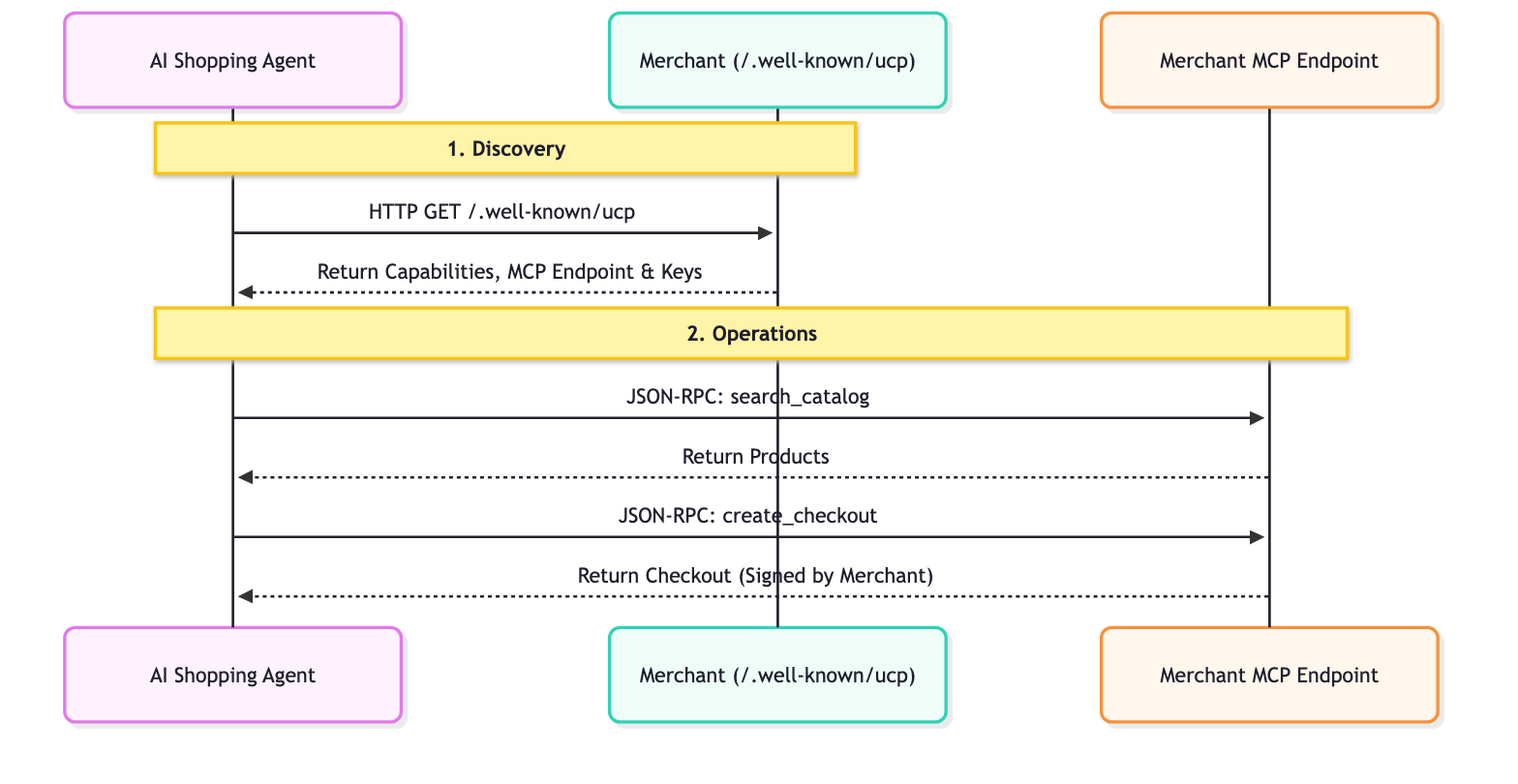
- Rilevamento: ogni commerciante conforme a UCP espone un profilo in una posizione standard:
/.well-known/ucp. Esempio: endpoint UCP di Everlane.Quando un agente legge questo profilo, cerca:- Funzionalità: le funzionalità di base autonome supportate da un'attività, come la ricerca nel catalogo o il pagamento.
- Servizi: i livelli di comunicazione di livello inferiore utilizzati per lo scambio di dati. Esempi: API REST, MCP (Model Context Protocol), A2A (Agent2Agent Protocol).
- Estensioni: se un commerciante ha bisogno di un comportamento specializzato, può definire Estensioni personalizzate in questo profilo.
- Chiavi: le chiavi di firma pubbliche del commerciante, che gli agenti utilizzano per controllare le firme del commerciante.
- Operazioni: una volta scoperto, l'agente utilizza l'endpoint di servizio fornito per eseguire le operazioni. In questo codelab, utilizziamo il Model Context Protocol (MCP) come trasporto del servizio. L'agente effettua chiamate JSON-RPC 2.0 a questo endpoint per richiamare le funzionalità rilevate: ricerca di prodotti, creazione di pagamenti e completamento degli acquisti.
Agent Payments Protocol (AP2)
AP2 standardizza la modalità di autorizzazione dei pagamenti da parte degli agenti per conto degli utenti. Risolve il problema di sicurezza degli agenti che gestiscono credenziali di pagamento sensibili.
Come funziona:
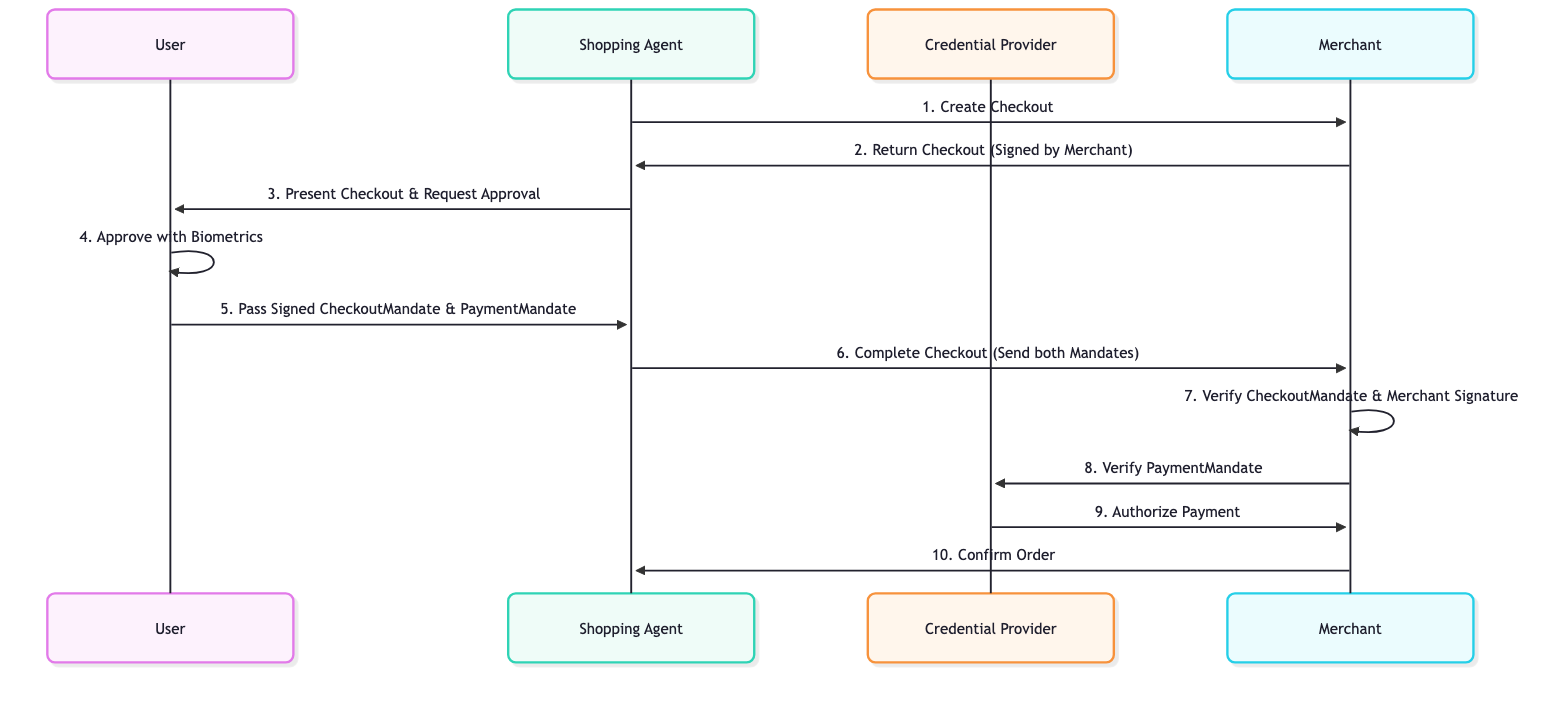
- Firma del commerciante: quando un agente crea un checkout utilizzando il protocollo UCP, il commerciante firma il checkout (elementi pubblicitari e totali) e restituisce la firma in
ap2.merchant_authorization. Funge da garanzia di blocco del prezzo. Se il commerciante modifica il prezzo dopo la firma, la firma non corrisponde più. - Mandato di pagamento e mandato di addebito: dopo aver verificato i contenuti del pagamento, l'utente (o l'agente per suo conto) firma due mandati. Il
CheckoutMandatecontiene il pagamento firmato dal commerciante e indica al commerciante che l'utente lo ha approvato.PaymentMandateautorizza l'importo del pagamento per il checkout. Entrambi fanno riferimento a un hash del pagamento firmato e contengono la firma crittografica dell'utente. - Verifica della firma: il commerciante riceve entrambi i mandati. Verifica la firma dell'utente sul
CheckoutMandatee controlla che il pagamento al suo interno riporti la firma del commerciante. IlPaymentMandateviene inviato al lato del pagamento (un fornitore di credenziali o un elaboratore di pagamenti), che lo verifica prima di trasferire denaro. Se tutto è valido, la transazione procede.
Questo sistema di "doppia chiusura" garantisce che i commercianti non possano addebitare importi eccessivi e che gli agenti non possano spendere senza autorizzazione. I mandati sono credenziali SD-JWT (Selective Disclosure JWT), che proteggono la privacy dell'utente rivelando solo i campi necessari a ciascuna parte. Nella versione 0.2 dell'API AP2, CheckoutMandate sostituisce CartMandate della versione 0.1.
3. Configura l'ambiente
Configurazione del progetto Google Cloud
Crea un progetto Google Cloud
- Nella console Google Cloud, nella pagina di selezione del progetto, seleziona o crea un progetto Google Cloud.
- Verifica che la fatturazione sia attivata per il tuo progetto Cloud. Scopri come verificare se la fatturazione è abilitata per un progetto.
Avvia Cloud Shell
Cloud Shell è un ambiente a riga di comando in esecuzione in Google Cloud che viene precaricato con gli strumenti necessari.
- Fai clic su Attiva Cloud Shell nella parte superiore della console Google Cloud.
- Una volta connesso a Cloud Shell, verifica l'autenticazione:
gcloud auth list - Verifica che il progetto sia configurato:
gcloud config get project - Se il progetto non è impostato come previsto, impostalo:
export PROJECT_ID=<YOUR_PROJECT_ID>
gcloud config set project $PROJECT_ID
Abilita API
Esegui questo comando per abilitare le API richieste:
gcloud services enable aiplatform.googleapis.com
Configurare la struttura delle directory
Copia e incolla i seguenti comandi per creare una cartella per questo codelab, con una cartella agent_payments al suo interno per il codice dell'agente:
mkdir -p ~/adk-agent-commerce/agent_payments
cd ~/adk-agent-commerce
Accedere ai modelli Gemini
Copia e incolla il seguente comando per creare agent_payments/.env con il tuo progetto cloud e la tua posizione e per fare in modo che ADK chiami Gemini tramite il tuo progetto Google Cloud. L'agente cinematografico utilizza Gemini per decidere quali strumenti chiamare. ADK carica automaticamente questo file, quindi le impostazioni funzionano anche nei nuovi terminali.
cat > ~/adk-agent-commerce/agent_payments/.env <<EOF
GOOGLE_CLOUD_PROJECT=$(gcloud config get project)
GOOGLE_CLOUD_LOCATION=global
GOOGLE_GENAI_USE_ENTERPRISE=True
EOF
Installa le dipendenze
Google Cloud Shell è preinstallato con uv per gestire l'ambiente e le dipendenze.
- Crea un file
pyproject.tomlnella directory radice della cartellaadk-agent-commercee aggiungi il seguente contenuto. Questo file definisce i metadati e le dipendenze del progetto.
[project]
name = "agent-payments-demo"
version = "0.1.0"
description = "CineAgent booking agent using UCP and AP2"
requires-python = ">=3.11"
dependencies = [
    "google-adk",
    "fastapi",
    "uvicorn",
    "httpx",
    "ucp-sdk",
    "ap2 @ git+https://github.com/google-agentic-commerce/AP2.git@main",
]
L'SDK AP2 viene installato dal suo repository GitHub perché non è ancora stato pubblicato su PyPI. (Il pacchetto ap2 su PyPI è un progetto non correlato.)
- Esegui questo comando per creare l'ambiente virtuale e installare tutte le dipendenze:
uv sync
uv crea un ambiente Python isolato per questo codelab, quindi non devi attivare nulla. Aggiungi il prefisso uv run ai comandi Python.
4. Definisci l'agente
Prima di scrivere la logica di qualsiasi strumento, definiamo l'agente stesso in un file chiamato agent.py. Questo agente fungerà da orchestratore per il flusso di prenotazione del film.
Crea agent_payments/agent.py:
"""CineAgent — movie ticket booking agent using UCP and AP2."""

from google.adk.agents import Agent
from google.adk.models import Gemini
from google.genai import types
from google.adk.tools import FunctionTool
from agent_payments.tools import (
    discover_theaters,
    search_movies,
    get_movie_detail,
    create_checkout,
    complete_purchase,
)

root_agent = Agent(
    model=Gemini(
        model="gemini-3.8-flash",
        retry_options=types.HttpRetryOptions(attempts=5),
    ),
    name="cineagent",
    description="Movie ticket booking agent using UCP and AP2.",
    instruction="""You are CineAgent, a movie ticket booking assistant.

You help users find and book movie tickets across multiple theaters
using UCP (Universal Commerce Protocol) and AP2 (Agent Payments).

**Your tools:**
- discover_theaters: Find theaters and what they support
- search_movies: Search movies across all theaters
- get_movie_detail: Get showtimes at a specific theater
- create_checkout: Start a checkout session
- complete_purchase: Finalize with AP2 mandate signing

**Rules:**
- Always call discover_theaters first if you haven't yet
- Keep responses concise — summarize and suggest next steps
- Prices from tools are in cents (1500 = $15.00)
- Never invent data — only state what tools return
""",
    tools=[
        discover_theaters,
        search_movies,
        get_movie_detail,
        create_checkout,
        FunctionTool(complete_purchase, require_confirmation=True),
    ],
)
Spiegazione del codice
Analizziamo cosa succede in questa definizione di agente:
model=Gemini(...): utilizziamo Gemini 3.8 Flash per il ragionamento e l'utilizzo degli strumenti.instruction: questo è il prompt che guida il comportamento dell'agente. Indica esplicitamente all'agente di utilizzare UCP e AP2, elenca gli strumenti disponibili e imposta regole fondamentali come "Non inventare mai dati" e "I prezzi sono in centesimi".tools: questo è un elenco di funzioni Python (che creeremo in seguito) che l'agente può scegliere di chiamare in base alle richieste dell'utente.require_confirmation: puoi racchiudere qualsiasi strumento conFunctionTool(my_function,require_confirmation=True). Quando viene attivato, l'agente si mette in pausa e attende una semplice approvazione "sì" o "no" prima di eseguire lo strumento. Qui, prima di eseguire lo strumentocomplete_purchase, l'agente si mette in pausa per una conferma umana.
Elenco degli strumenti
La definizione dell'agente dichiara ciò che dobbiamo creare. Ogni strumento corrisponde a un'operazione specifica nel protocollo UCP o AP2:
Strumento | Descrizione | Azione del protocollo |
| Trovare i commercianti e le loro funzionalità | Query |
| Cercare cataloghi tra i vari commercianti | Endpoint JSON-RPC a MCP |
| Visualizzare gli orari di programmazione presso un commerciante specifico | Endpoint JSON-RPC a MCP |
| Avviare una sessione di pagamento | Endpoint JSON-RPC a MCP |
| Autorizza il pagamento e completa l'ordine | Signs AP2 Mandates & sends to MCP |
Il modello Gemini deciderà quando chiamare ogni strumento in base alla conversazione. Il nostro compito successivo è implementare le funzionalità di ogni strumento in tools.py.
5. Crea gli strumenti dell'agente: scoperta e navigazione
Ora implementiamo gli strumenti che l'agente utilizzerà per navigare e scoprire film. Ogni strumento esegue un'operazione UCP.
Crea un nuovo file denominato agent_payments/tools.py e copia-incolla il seguente codice:
"""Agent tools — each one wraps a UCP or AP2 operation."""

import json

from .ucp_client import UCPClient
from .ap2_handler import AP2Handler

# Initialize clients directly
_merchant_urls = ["http://localhost:8081", "http://localhost:8082"]
_ap2 = AP2Handler()
_ucp = UCPClient(platform_keys=[_ap2.public_key])
Comprendere la configurazione
Per mantenere questo codelab incentrato sulla creazione dell'agente, utilizziamo due classi helper, UCPClient e AP2Handler, che esamineremo in un passaggio successivo.
- Che cosa sono?: Sono piccole classi helper che abbiamo scritto per questo codelab per comunicare con i commercianti simulati. Gli SDK ufficiali forniscono i componenti del protocollo: l'SDK UCP ha modelli di dati per ogni schema UCP e l'SDK AP2 crea e verifica i mandati firmati. Nessuno dei due SDK include un client per chiamare i commercianti, quindi questi helper gestiscono questa parte.
- Per il momento, trattali come oggetti helper:
_ucp.discover(url): recupera e convalida il profilo di un commerciante._ucp.mcp_call(url, method, params): invia una richiesta JSON-RPC 2.0 all'endpoint MCP del commerciante.
Scopri i cinema
Questo strumento è il primo passaggio del flusso UCP. Trova i commercianti esistenti e ciò che supportano.
Aggiungi a tools.py:
async def discover_theaters() -> str:
    """Discover available theater merchants and their capabilities via UCP."""
    theaters = []
    for url in _merchant_urls:
        info = await _ucp.discover(url)
        theaters.append(
            {
                "url": url,
                "name": info["name"],
                "capabilities": info["capabilities"],
                "payment_handlers": info["payment_handlers"],
            }
        )
    return json.dumps(theaters, indent=2)
Cosa fa:
- Esegue l'iterazione su un elenco di URL del commerciante forniti dal server. In questo codelab, configureremo due commercianti simulati nella sezione successiva.
- Per ogni URL, chiama
_ucp.discover(url), che raggiunge l'endpoint/.well-known/ucp. - Raccoglie il nome, le funzionalità e i gestori dei pagamenti in un elenco riepilogativo.
- Restituisce l'elenco come stringa JSON che l'agente può leggere.
Cerca film
Questo strumento esegue ricerche in tutti i commercianti rilevati e unisce i risultati. Questo è fondamentale perché lo stesso film potrebbe essere proiettato in più cinema con formati diversi (IMAX, Dolby) e prezzi diversi.
Aggiungi a tools.py:
async def search_movies(query: str = "") -> str:
    """Search for movies across all theaters. Use '' to browse all."""
    all_movies = {}
    for url, merchant in _ucp.merchants.items():
        result = await _ucp.mcp_call(
            url, "search_catalog", {"catalog": {"query": query}}
        )
        for product in result.get("products", []):
            mid = product["id"]
            if mid not in all_movies:
                all_movies[mid] = {
                    "id": mid,
                    "title": product["title"],
                    "categories": [
                        c["value"] for c in product.get("categories", [])
                    ],
                    "theaters": {},
                }
            showtimes = []
            for v in product.get("variants", []):
                opts = {o["name"]: o["label"] for o in v.get("options", [])}
                showtimes.append(
                    {
                        "id": v["id"],
                        "format": opts.get("format", "Standard"),
                        "time": opts.get("time", ""),
                        "price": v.get("price", {}),
                        "seats": v.get("metadata", {}).get(
                            "seats_available", 0
                        ),
                    }
                )
            all_movies[mid]["theaters"][url] = {
                "name": merchant["name"],
                "showtimes": showtimes,
            }
    return json.dumps(list(all_movies.values()), indent=2)
Cosa fa:
- Esegue un ciclo su tutte le sale cinematografiche rilevate.
- Invia una richiesta JSON-RPC del catalogo di ricerca (
_ucp.mcp_call(url, "search_catalog", {"catalog": {"query": query}})) all'endpoint MCP del commerciante. - Poi esegue una pulizia per analizzare i risultati e trovare i film e le relative "varianti" (che rappresentano orari e formati specifici). Raggruppa i film per ID in modo che l'utente non veda voci duplicate.
Get Movie Detail
Questo strumento recupera i dettagli completi del catalogo per un film specifico in un cinema specifico.
Aggiungi a tools.py:
async def get_movie_detail(movie_id: str, merchant_url: str) -> str:
    """Get detailed showtimes for a movie at a specific theater."""
    result = await _ucp.mcp_call(
        merchant_url, "lookup_catalog", {"catalog": {"ids": [movie_id]}}
    )
    return json.dumps(result, indent=2)
Cosa fa:
- Chiama il metodo
lookup_catalogsull'endpoint MCP del commerciante, passando lo specificomovie_idincatalog.ids. Vengono restituite informazioni dettagliate come gli orari degli spettacoli e la disponibilità dei posti per quel cinema specifico.
6. Crea gli strumenti dell'agente: pagamento e checkout
Questi strumenti gestiscono il flusso di pagamento e acquisto. È qui che entra in gioco il protocollo AP2 per garantire transazioni sicure.
Crea Acquisto rapido
Questo strumento avvia una sessione di pagamento in un cinema specifico per un orario di proiezione specifico.
Aggiungi a tools.py:
async def create_checkout(
    merchant_url: str, showtime_id: str, quantity: int = 1
) -> str:
    """Create a checkout session for tickets at a theater."""
    result = await _ucp.mcp_call(merchant_url, "create_checkout", {
        "checkout": {
            "line_items": [
                {"item": {"id": showtime_id}, "quantity": quantity}
            ],
            "context": {"address_country": "US", "currency": "USD"},
        }
    })
    return json.dumps(result, indent=2)
Cosa fa:
- Chiama il metodo
create_checkoutsull'endpoint MCP del commerciante. - Trasmette
showtime_idequantityrichiesti dall'utente. - Il commerciante restituisce un pagamento firmato con la sua chiave.
Nota: se esamini i dati della risposta, il campo ap2.merchant_authorization contiene la firma crittografica del commerciante al momento del pagamento, bloccando il prezzo indicato. Non potrà modificarlo in un secondo momento.
Completa l'acquisto
In questo strumento si verificano tre cose:
- Riceviamo il pagamento e verifichiamo la firma del commerciante.
- Crea e firma CheckoutMandate e PaymentMandate con l'SDK AP2.
- Invia entrambi i mandati al commerciante per completare l'acquisto.
Aggiungi a tools.py:
async def complete_purchase(checkout_id: str, merchant_url: str) -> str:
    """Complete purchase with AP2 payment authorization."""
    merchant = _ucp.merchants[merchant_url]

    # 1. Get the checkout and verify the merchant's signature on it
    checkout = await _ucp.mcp_call(
        merchant_url, "get_checkout", {"id": checkout_id}
    )
    checkout_jwt = _ap2.verify_merchant_authorization(checkout, merchant["keys"])
    if not checkout_jwt:
        return json.dumps({"error": "Merchant signature is missing or invalid"})

    # 2. Create and sign the CheckoutMandate and PaymentMandate
    # In production, this step asks the user to approve on a trusted device
    # (biometric or device auth). In this demo, the agent signs with a local key.
    checkout_mandate, payment_mandate = _ap2.create_mandates(
        checkout, checkout_jwt, merchant["name"]
    )

    # 3. Send both mandates to the merchant to complete the purchase
    result = await _ucp.mcp_call(merchant_url, "complete_checkout", {
        "id": checkout_id,
        "checkout": {
            "payment": {
                "instruments": [{
                    "id": "instr_1",
                    "handler_id": merchant["payment_handlers"][0],
                    "type": "card",
                    "selected": True,
                    "credential": {
                        "type": "ap2_payment_mandate",
                        "token": payment_mandate,
                    },
                }],
            },
            "ap2": {"checkout_mandate": checkout_mandate},
        },
    })
    return json.dumps(result, indent=2)
Perché due mandati? Il CheckoutMandate dimostra al commerciante che l'utente ha approvato questo esatto checkout, al prezzo firmato dal commerciante. Il mandato di pagamento dimostra alla parte pagante che l'utente ha autorizzato questo addebito. Il flusso è:
Merchant signs checkout -> User signs mandates -> Merchant and payment side verify -> Order completes.
Checkpoint: Full tools.py
Il tuo tools.py completo ora dovrebbe avere 5 funzioni di strumenti e l'inizializzazione a livello di modulo per i client UCP e AP2. Verifica che abbia il seguente aspetto:
"""Agent tools — each one wraps a UCP or AP2 operation."""

import json

from .ucp_client import UCPClient
from .ap2_handler import AP2Handler

# Initialize clients directly
_merchant_urls = ["http://localhost:8081", "http://localhost:8082"]
_ap2 = AP2Handler()
_ucp = UCPClient(platform_keys=[_ap2.public_key])


async def discover_theaters() -> str:
    """Discover available theater merchants and their capabilities via UCP."""
    theaters = []
    for url in _merchant_urls:
        info = await _ucp.discover(url)
        theaters.append(
            {
                "url": url,
                "name": info["name"],
                "capabilities": info["capabilities"],
                "payment_handlers": info["payment_handlers"],
            }
        )
    return json.dumps(theaters, indent=2)


async def search_movies(query: str = "") -> str:
    """Search for movies across all theaters. Use '' to browse all."""
    all_movies = {}
    for url, merchant in _ucp.merchants.items():
        result = await _ucp.mcp_call(
            url, "search_catalog", {"catalog": {"query": query}}
        )
        for product in result.get("products", []):
            mid = product["id"]
            if mid not in all_movies:
                all_movies[mid] = {
                    "id": mid,
                    "title": product["title"],
                    "categories": [
                        c["value"] for c in product.get("categories", [])
                    ],
                    "theaters": {},
                }
            showtimes = []
            for v in product.get("variants", []):
                opts = {o["name"]: o["label"] for o in v.get("options", [])}
                showtimes.append(
                    {
                        "id": v["id"],
                        "format": opts.get("format", "Standard"),
                        "time": opts.get("time", ""),
                        "price": v.get("price", {}),
                        "seats": v.get("metadata", {}).get(
                            "seats_available", 0
                        ),
                    }
                )
            all_movies[mid]["theaters"][url] = {
                "name": merchant["name"],
                "showtimes": showtimes,
            }
    return json.dumps(list(all_movies.values()), indent=2)


async def get_movie_detail(movie_id: str, merchant_url: str) -> str:
    """Get detailed showtimes for a movie at a specific theater."""
    result = await _ucp.mcp_call(
        merchant_url, "lookup_catalog", {"catalog": {"ids": [movie_id]}}
    )
    return json.dumps(result, indent=2)


async def create_checkout(
    merchant_url: str, showtime_id: str, quantity: int = 1
) -> str:
    """Create a checkout session for tickets at a theater."""
    result = await _ucp.mcp_call(merchant_url, "create_checkout", {
        "checkout": {
            "line_items": [
                {"item": {"id": showtime_id}, "quantity": quantity}
            ],
            "context": {"address_country": "US", "currency": "USD"},
        }
    })
    return json.dumps(result, indent=2)


async def complete_purchase(checkout_id: str, merchant_url: str) -> str:
    """Complete purchase with AP2 payment authorization."""
    merchant = _ucp.merchants[merchant_url]

    # 1. Get the checkout and verify the merchant's signature on it
    checkout = await _ucp.mcp_call(
        merchant_url, "get_checkout", {"id": checkout_id}
    )
    checkout_jwt = _ap2.verify_merchant_authorization(checkout, merchant["keys"])
    if not checkout_jwt:
        return json.dumps({"error": "Merchant signature is missing or invalid"})

    # 2. Create and sign the CheckoutMandate and PaymentMandate
    # In production, this step asks the user to approve on a trusted device
    # (biometric or device auth). In this demo, the agent signs with a local key.
    checkout_mandate, payment_mandate = _ap2.create_mandates(
        checkout, checkout_jwt, merchant["name"]
    )

    # 3. Send both mandates to the merchant to complete the purchase
    result = await _ucp.mcp_call(merchant_url, "complete_checkout", {
        "id": checkout_id,
        "checkout": {
            "payment": {
                "instruments": [{
                    "id": "instr_1",
                    "handler_id": merchant["payment_handlers"][0],
                    "type": "card",
                    "selected": True,
                    "credential": {
                        "type": "ap2_payment_mandate",
                        "token": payment_mandate,
                    },
                }],
            },
            "ap2": {"checkout_mandate": checkout_mandate},
        },
    })
    return json.dumps(result, indent=2)
7. Rendere eseguibile
Con i commercianti UCP reali, indirizzeresti l'agente ai loro URL e il gioco è fatto. Per questo codelab, abbiamo bisogno di due cose da testare localmente:
- Commercianti simulati: server locali che simulano gli endpoint UCP in modo da avere qualcosa su cui eseguire i test
- Helper di protocollo: wrapper sottili che chiamano i commercianti tramite HTTP e utilizzano gli SDK UCP e AP2 per i dati e le firme del protocollo
Nota: non è necessario leggere attentamente questo codice. Questi file simulano commercianti reali e il portafoglio di un utente. Copiali così come sono.
Helper di protocollo
L'SDK UCP fornisce modelli di dati e l'SDK AP2 firma e verifica i mandati, ma nessuno dei due include un client per comunicare con i commercianti. Questi due file colmano questa lacuna. Sono denominati ucp_client.py e ap2_handler.py per non oscurare il pacchetto ap2.
Crea agent_payments/ucp_client.py:
"""UCP client: discovers merchants and calls their MCP tools."""

import uuid
import httpx
from ucp_sdk.models.schemas.profile import BusinessSchema

# The platform (this agent) identifies itself with a UCP profile URL
PLATFORM_PROFILE = "https://cineagent.example/.well-known/ucp"


class UCPClient:
    def __init__(self, platform_keys: list[dict]):
        self.client = httpx.AsyncClient(timeout=30)
        self.platform_keys = platform_keys
        self.merchants = {}  # url -> merchant info dict

    async def discover(self, merchant_url: str) -> dict:
        """Fetch and validate a merchant's UCP profile from /.well-known/ucp."""
        resp = await self.client.get(f"{merchant_url}/.well-known/ucp")
        resp.raise_for_status()
        profile = BusinessSchema.model_validate(resp.json())
        ucp = profile.ucp
        info = {
            "name": merchant_url.split("//")[-1],
            "mcp_endpoint": str(ucp.services["dev.ucp.shopping"][0].endpoint),
            "capabilities": list(ucp.capabilities or {}),
            "payment_handlers": [
                h.id for handlers in ucp.payment_handlers.values() for h in handlers
            ],
            "keys": [k.model_dump(exclude_none=True) for k in profile.keys or []],
        }
        self.merchants[merchant_url] = info
        return info

    async def mcp_call(
        self, merchant_url: str, tool_name: str, arguments: dict
    ) -> dict:
        """Call a merchant's MCP tool via JSON-RPC 2.0."""
        merchant = self.merchants[merchant_url]
        meta = {
            "ucp-agent": {
                "profile": PLATFORM_PROFILE,
                # Mock shortcut: a real merchant reads the platform's public
                # keys from the profile URL above instead
                "keys": self.platform_keys,
            },
            "idempotency-key": str(uuid.uuid4()),
        }
        resp = await self.client.post(
            merchant["mcp_endpoint"],
            json={
                "jsonrpc": "2.0",
                "id": uuid.uuid4().hex,
                "method": "tools/call",
                "params": {
                    "name": tool_name,
                    "arguments": {"meta": meta, **arguments},
                },
            },
        )
        resp.raise_for_status()
        data = resp.json()
        if "error" in data:
            raise Exception(f"MCP error: {data['error']}")
        return data["result"]["structuredContent"]

    async def close(self):
        await self.client.aclose()
Crea agent_payments/ap2_handler.py:
"""AP2 mandate handler: verifies the merchant's signature and signs mandates."""

import json
import time

from jwcrypto.jwk import JWK
from jwcrypto.jws import JWS
from ap2.sdk.mandate import MandateClient
from ap2.sdk.utils import b64url_decode, b64url_encode, compute_sha256_b64url
from ap2.sdk.generated.checkout_mandate import CheckoutMandate
from ap2.sdk.generated.payment_mandate import PaymentMandate
from ap2.sdk.generated.types.amount import Amount
from ap2.sdk.generated.types.merchant import Merchant
from ap2.sdk.generated.types.payment_instrument import PaymentInstrument


class AP2Handler:
    def __init__(self):
        # The user's signing key. In production, this key stays in a wallet or
        # on a trusted device, and the user approves each signature.
        self.key = JWK.generate(kty="EC", crv="P-256", kid="cineagent-user-key")
        self.public_key = json.loads(self.key.export_public())
        self.mandates = MandateClient()

    def verify_merchant_authorization(
        self, checkout: dict, merchant_keys: list[dict]
    ) -> str | None:
        """Check the merchant's signature on a checkout.

        The signature is the merchant's price guarantee: if anything in the
        checkout changes, the signature no longer matches. Returns the signed
        checkout as a JWT, or None if the signature is missing or invalid.
        """
        signature = checkout.get("ap2", {}).get("merchant_authorization")
        if not signature:
            return None
        header, _, sig = signature.split(".")  # detached JWS: header..signature
        payload = {k: v for k, v in checkout.items() if k != "ap2"}
        canonical = json.dumps(
            payload, sort_keys=True, separators=(",", ":"), ensure_ascii=False
        )
        checkout_jwt = f"{header}.{b64url_encode(canonical.encode())}.{sig}"

        kid = json.loads(b64url_decode(header))["kid"]
        key = next((k for k in merchant_keys if k["kid"] == kid), None)
        if not key:
            return None
        try:
            jws = JWS()
            jws.deserialize(checkout_jwt)
            jws.verify(JWK(**key))
        except Exception:
            return None
        return checkout_jwt

    def create_mandates(
        self, checkout: dict, checkout_jwt: str, merchant_name: str
    ) -> tuple[str, str]:
        """Create and sign a CheckoutMandate and a PaymentMandate.

        Both mandates reference the hash of the merchant-signed checkout, so
        the user's approval is bound to exactly this cart and price.
        """
        checkout_hash = compute_sha256_b64url(checkout_jwt)
        total = next(t["amount"] for t in checkout["totals"] if t["type"] == "total")
        now = int(time.time())

        checkout_mandate = CheckoutMandate(
            checkout_jwt=checkout_jwt,
            checkout_hash=checkout_hash,
            iat=now,
            exp=now + 600,
        )
        payment_mandate = PaymentMandate(
            transaction_id=checkout_hash,
            payee=Merchant(id=merchant_name, name=merchant_name),
            payment_amount=Amount(amount=total, currency=checkout["currency"]),
            payment_instrument=PaymentInstrument(
                id="instr_1", type="card", description="Demo card"
            ),
            iat=now,
            exp=now + 600,
        )
        # Sign each mandate as an SD-JWT with the user's key
        return (
            self.mandates.create(payloads=[checkout_mandate], issuer_key=self.key),
            self.mandates.create(payloads=[payment_mandate], issuer_key=self.key),
        )
Commercianti simulati
Crea agent_payments/merchants.py:
"""Mock UCP merchant servers: two theaters with different capabilities."""

import json
import time
import uuid
import multiprocessing
from datetime import datetime, timezone, timedelta

import uvicorn
from fastapi import FastAPI
from jwcrypto.jwk import JWK
from jwcrypto.jws import JWS
from ap2.sdk.mandate import MandateClient
from ap2.sdk.utils import compute_sha256_b64url
from ap2.sdk.generated.checkout_mandate import CheckoutMandate
from ap2.sdk.generated.payment_mandate import PaymentMandate
from ucp_sdk.models.schemas.common.payment_ap2_mandate import Checkout
from ucp_sdk.models.schemas.profile import BusinessSchema
from ucp_sdk.models.schemas.shopping.catalog_lookup import LookupResponse
from ucp_sdk.models.schemas.shopping.catalog_search import SearchResponse

UCP_VERSION = "2026-08-25"
UCP_SPEC = f"https://ucp.dev/{UCP_VERSION}"

# ── Theater data ────────────────────────────────────────────

THEATERS = {
    8081: {
        "name": "Meridian Cinemas",
        "movies": [
            {
                "id": "opp",
                "title": "Oppenheimer",
                "categories": ["Drama", "History"],
                "showtimes": [
                    {"id": "st_opp_7pm_imax", "format": "IMAX", "time": "7:00 PM", "price": 2200, "seats": 45},
                    {"id": "st_opp_930pm", "format": "Standard", "time": "9:30 PM", "price": 1500, "seats": 80},
                ],
            },
            {
                "id": "dune3",
                "title": "Dune: Part Three",
                "categories": ["Sci-Fi", "Action"],
                "showtimes": [
                    {"id": "st_dune_8pm_imax", "format": "IMAX", "time": "8:00 PM", "price": 2200, "seats": 30},
                ],
            },
        ],
    },
    8082: {
        "name": "StarLight Theaters",
        "movies": [
            {
                "id": "opp",
                "title": "Oppenheimer",
                "categories": ["Drama", "History"],
                "showtimes": [
                    {"id": "st_opp_6pm_atmos", "format": "Dolby Atmos", "time": "6:00 PM", "price": 1800, "seats": 60},
                ],
            },
            {
                "id": "spider",
                "title": "Spider-Verse",
                "categories": ["Animation", "Action"],
                "showtimes": [
                    {"id": "st_spider_4pm", "format": "Standard", "time": "4:00 PM", "price": 1200, "seats": 100},
                ],
            },
        ],
    },
}


def create_app(port):
    theater = THEATERS[port]
    app = FastAPI()
    sessions = {}
    checkout_jwts = {}  # checkout id -> merchant-signed checkout JWT
    # The merchant's signing key. Its public half is published in the profile.
    key = JWK.generate(kty="EC", crv="P-256", kid=f"merchant-{port}")

    def _capability(name, path, schema, **extra):
        return {name: [{
            "version": UCP_VERSION,
            "spec": f"{UCP_SPEC}/specification/{path}",
            "schema": f"{UCP_SPEC}/schemas/{schema}",
            **extra,
        }]}

    payment_handlers = {
        "com.example.card": [
            {"id": f"card_{port}", "version": UCP_VERSION,
             "available_instruments": [{"type": "card"}], "config": {}}
        ]
    }

    # ── UCP Discovery endpoint ──────────────────────────────
    @app.get("/.well-known/ucp")
    def discovery():
        profile = {
            "ucp": {
                "version": UCP_VERSION,
                "services": {
                    "dev.ucp.shopping": [
                        {"version": UCP_VERSION,
                         "spec": f"{UCP_SPEC}/specification/overview",
                         "transport": "mcp",
                         "schema": f"{UCP_SPEC}/services/shopping/mcp.openrpc.json",
                         "endpoint": f"http://localhost:{port}/mcp"}
                    ]
                },
                "capabilities": {
                    **_capability("dev.ucp.shopping.catalog.search",
                                  "shopping/catalog/search", "shopping/catalog_search.json"),
                    **_capability("dev.ucp.shopping.catalog.lookup",
                                  "shopping/catalog/lookup", "shopping/catalog_lookup.json"),
                    **_capability("dev.ucp.shopping.checkout",
                                  "shopping/checkout", "shopping/checkout.json"),
                    **_capability("dev.ucp.common.payment.ap2_mandate",
                                  "payment/extensions/ap2-mandates",
                                  "common/payment_ap2_mandate.json",
                                  extends="dev.ucp.shopping.checkout",
                                  config={"vp_formats_supported": {"dc+sd-jwt": {}}}),
                },
                "payment_handlers": payment_handlers,
            },
            "keys": [json.loads(key.export_public())],
        }
        # Check the profile against the UCP SDK models before returning it
        BusinessSchema.model_validate(profile)
        return profile

    # ── MCP JSON-RPC endpoint ───────────────────────────────
    @app.post("/mcp")
    def mcp(body: dict):
        tool = body["params"]["name"]
        args = body["params"].get("arguments", {})
        rid = body.get("id", "1")

        if tool == "search_catalog":
            q = args.get("catalog", {}).get("query", "").lower()
            hits = [m for m in theater["movies"]
                    if not q or q in m["title"].lower()
                    or any(q in c.lower() for c in m["categories"])]
            result = {"ucp": _ucp_meta("dev.ucp.shopping.catalog.search"),
                      "products": [_product(m) for m in hits]}
            return _ok(rid, SearchResponse, result)

        if tool == "lookup_catalog":
            ids = args.get("catalog", {}).get("ids", [])
            movies = [m for m in theater["movies"] if m["id"] in ids]
            if not movies:
                return _err(rid, "Not found")
            result = {"ucp": _ucp_meta("dev.ucp.shopping.catalog.lookup"),
                      "products": [_product(m, lookup=True) for m in movies]}
            return _ok(rid, LookupResponse, result)

        if tool == "create_checkout":
            co = args.get("checkout", {})
            sid = f"chk_{uuid.uuid4().hex[:12]}"
            items, subtotal = [], 0
            for li in co.get("line_items", []):
                st = _find_showtime(li["item"]["id"])
                if not st:
                    continue
                mv = _find_movie(li["item"]["id"])
                qty = li.get("quantity", 1)
                amt = st["price"] * qty
                subtotal += amt
                items.append({
                    "id": f"li_{uuid.uuid4().hex[:8]}",
                    "item": {
                        "id": st["id"],
                        "title": f"{mv['title']} ({st['format']}, {st['time']})",
                        "price": st["price"],
                    },
                    "quantity": qty,
                    "totals": [{"type": "subtotal", "amount": amt},
                               {"type": "total", "amount": amt}],
                })
            if not items:
                return _err(rid, "No valid showtimes in checkout")
            tax = int(subtotal * 0.08)
            total = subtotal + tax
            session = {
                "ucp": {
                    **_ucp_meta("dev.ucp.shopping.checkout",
                                "dev.ucp.common.payment.ap2_mandate"),
                    "payment_handlers": payment_handlers,
                },
                "id": sid,
                "status": "ready_for_complete",
                "currency": "USD",
                "line_items": items,
                "totals": [
                    {"type": "subtotal", "display_text": "Subtotal", "amount": subtotal},
                    {"type": "tax", "display_text": "Tax", "amount": tax},
                    {"type": "total", "display_text": "Total", "amount": total},
                ],
                "links": [{"type": "terms_of_service",
                           "url": f"http://localhost:{port}/terms"}],
                "expires_at": (
                    datetime.now(timezone.utc) + timedelta(minutes=10)
                ).isoformat(),
            }
            _sign(session)
            sessions[sid] = session
            return _ok(rid, Checkout, session)

        if tool == "get_checkout":
            session = sessions.get(args.get("id"))
            if not session:
                return _err(rid, "Not found")
            return _ok(rid, Checkout, session)

        if tool == "complete_checkout":
            sid = args.get("id")
            session = sessions.get(sid)
            if not session:
                return _err(rid, "Not found")
            co = args.get("checkout", {})
            checkout_mandate = co.get("ap2", {}).get("checkout_mandate")
            instruments = co.get("payment", {}).get("instruments", [])
            if not checkout_mandate or not instruments:
                return _err(rid, "mandate_required")
            payment_mandate = instruments[0]["credential"]["token"]

            # Mock shortcut: a real merchant fetches the platform's keys
            # from its profile URL (meta["ucp-agent"]["profile"])
            platform_key = JWK(**args["meta"]["ucp-agent"]["keys"][0])
            try:
                cm = MandateClient().verify(
                    checkout_mandate, platform_key, payload_type=CheckoutMandate
                ).mandate_payload
                pm = MandateClient().verify(
                    payment_mandate, platform_key, payload_type=PaymentMandate
                ).mandate_payload
            except Exception as e:
                return _err(rid, f"mandate_invalid_signature: {e}")

            # The mandates must point at the exact checkout this merchant signed
            expected_hash = compute_sha256_b64url(checkout_jwts[sid])
            total = next(t["amount"] for t in session["totals"] if t["type"] == "total")
            if (cm.checkout_jwt != checkout_jwts[sid]
                    or cm.checkout_hash != expected_hash
                    or pm.transaction_id != expected_hash
                    or pm.payment_amount.amount != total):
                return _err(rid, "mandate_scope_mismatch")

            order_id = f"ord_{uuid.uuid4().hex[:8]}"
            session["status"] = "completed"
            session["order"] = {
                "id": order_id,
                "label": theater["name"],
                "permalink_url": f"http://localhost:{port}/orders/{order_id}",
                "tickets": [
                    {
                        "movie": li["item"]["title"],
                        "quantity": li["quantity"],
                        "ticket_code": uuid.uuid4().hex[:8].upper(),
                    }
                    for li in session["line_items"]
                ],
            }
            _sign(session)
            return _ok(rid, Checkout, session)

        return _err(rid, f"Unknown tool: {tool}")

    def _sign(session):
        """Add the merchant's signature (a detached JWS) to the checkout."""
        payload = {k: v for k, v in session.items() if k != "ap2"}
        canonical = json.dumps(
            payload, sort_keys=True, separators=(",", ":"), ensure_ascii=False
        )
        jws = JWS(canonical.encode())
        jws.add_signature(key, alg="ES256",
                          protected=json.dumps({"alg": "ES256", "kid": key.kid}))
        checkout_jwt = jws.serialize(compact=True)
        header, _, sig = checkout_jwt.split(".")
        session["ap2"] = {"merchant_authorization": f"{header}..{sig}"}
        checkout_jwts[session["id"]] = checkout_jwt

    def _ucp_meta(*capabilities):
        return {"version": UCP_VERSION,
                "capabilities": {c: [{"version": UCP_VERSION}] for c in capabilities}}

    def _ok(rid, model, result):
        # Check the response against the UCP SDK models before returning it
        model.model_validate(result)
        return {"jsonrpc": "2.0", "id": rid, "result": {
            "structuredContent": result,
            "content": [{"type": "text", "text": json.dumps(result)}],
        }}

    def _err(rid, msg):
        return {"jsonrpc": "2.0", "id": rid, "error": {"code": -32000, "message": msg}}

    def _product(movie, lookup=False):
        prices = [st["price"] for st in movie["showtimes"]]
        return {
            "id": movie["id"],
            "title": movie["title"],
            "description": {"plain": f"{movie['title']} at {theater['name']}"},
            "categories": [{"value": c, "taxonomy": "merchant"} for c in movie["categories"]],
            "price_range": {
                "min": {"amount": min(prices), "currency": "USD"},
                "max": {"amount": max(prices), "currency": "USD"},
            },
            "variants": [
                {
                    "id": st["id"],
                    "title": f"{st['format']} {st['time']}",
                    "description": {"plain": f"{st['format']} showing at {st['time']}"},
                    "options": [
                        {"name": "format", "label": st["format"]},
                        {"name": "time", "label": st["time"]},
                    ],
                    "price": {"amount": st["price"], "currency": "USD"},
                    "availability": {"available": st["seats"] > 0},
                    "metadata": {"seats_available": st["seats"]},
                    **({"inputs": [{"id": movie["id"], "match": "featured"}]} if lookup else {}),
                }
                for st in movie["showtimes"]
            ],
        }

    def _find_showtime(sid):
        return next(
            (st for m in theater["movies"] for st in m["showtimes"] if st["id"] == sid),
            None,
        )

    def _find_movie(sid):
        return next(
            (m for m in theater["movies"] for st in m["showtimes"] if st["id"] == sid),
            None,
        )

    return app


def _run(port):
    uvicorn.run(create_app(port), host="0.0.0.0", port=port, log_level="warning")


if __name__ == "__main__":
    for port in THEATERS:
        multiprocessing.Process(target=_run, args=(port,), daemon=True).start()
    print("Merchants running: Meridian (:8081), StarLight (:8082)")
    print("Press Ctrl+C to stop")
    try:
        while True:
            time.sleep(1)
    except KeyboardInterrupt:
        pass
Vengono creati due server FastAPI, ciascuno con due endpoint:
GET /.well-known/ucp: rilevamento UCP. Restituisce le funzionalità del commerciante, l'URL dell'endpoint MCP, i metodi di pagamento accettati e la chiave di firma pubblica.POST /mcp: operazioni MCP (Model Context Protocol). Gestisce le chiamate JSON-RPC 2.0 per la ricerca nel catalogo, il pagamento e il completamento dell'ordine.
Ogni commerciante firma i propri pagamenti con la propria chiave, verifica i mandati AP2 prima di completare un ordine e controlla ogni risposta rispetto ai modelli dell'SDK UCP.
Avvia i commercianti in un nuovo terminale (devono rimanere in esecuzione):
cd ~/adk-agent-commerce
uv run python agent_payments/merchants.py
Dovresti vedere:
Merchants running: Meridian (:8081), StarLight (:8082)
Torna al primo terminale e verifica l'individuazione di UCP:
curl -s http://localhost:8081/.well-known/ucp | uv run python -m json.tool
Dovresti visualizzare le funzionalità del commerciante, l'URL dell'endpoint MCP, i gestori di pagamento e la chiave pubblica.
8. Esegui l'agente con ADK Web
Utilizziamo la UI web integrata nella CLI dell'ADK. In questo modo, viene fornita un'interfaccia di chat nel browser e vengono gestite automaticamente le richieste di conferma degli strumenti.
Il tuo progetto dovrebbe ora essere simile a questo:
adk-agent-commerce/
├── pyproject.toml
└── agent_payments/
    ├── .env              # Project settings
    ├── merchants.py      # Mock UCP merchants
    ├── ucp_client.py     # UCP client helper
    ├── ap2_handler.py    # AP2 mandate handler
    ├── tools.py          # Agent tools
    └── agent.py          # Agent definition
Prova
Nel primo terminale, vai alla cartella adk-agent-commerce (una cartella sopra agent_payments) e avvia la GUI web dell'ADK:
cd ~/adk-agent-commerce
uv run adk web --port 8080 --allow_origins '*'
Dovresti vedere un output che indica che il server è in esecuzione all'indirizzo http://127.0.0.1:8080.
Parla con l'agente
- Apri la GUI web dell'ADK facendo clic con Ctrl o Cmd sull'URL oppure facendo clic sul pulsante Anteprima web e selezionando Anteprima sulla porta 8080.
- Se non è già selezionato, seleziona
agent_paymentsdal menu a discesa. Vedrai un'interfaccia di chat. - Prova a chiedere: "Che film ci sono in programmazione?"
- L'agente scoprirà i cinema e cercherà i cataloghi dietro le quinte, aggregando i risultati di entrambi i commercianti tramite UCP.
- Chiedi di prenotare i biglietti: "Prenota due biglietti per Oppenheimer per le 19:00".
- Quando l'agente tenta di chiamare
complete_purchase, nota come la GUI web dell'ADK mostra una scheda di conferma con i dettagli dell'acquisto. - Per autorizzare la transazione, seleziona la casella di controllo Confermata sulla carta e fai clic su Invia.
- L'agente completerà l'acquisto e ti invierà la conferma dell'ordine con i codici dei biglietti.
Ecco cosa è successo dietro le quinte:
create_checkout→ il commerciante ha restituito un pagamento firmato con la sua chiave (ap2.merchant_authorization, il blocco del prezzo)complete_purchase→ ha verificato la firma del commerciante, ha creato un CheckoutMandate e un PaymentMandate, li ha firmati entrambi come SD-JWT e li ha inviati al commerciante- Il commerciante ha verificato entrambi i mandati e controllato che puntino al pagamento che ha firmato → ha emesso i biglietti (nel mock)
9. Esegui la pulizia
Per evitare che i server locali rimangano in esecuzione, libera spazio dalle risorse:
- Nel terminale in cui è in esecuzione
adk web, premi Ctrl+C per arrestare il server dell'agente. - Nel terminale in cui è in esecuzione
merchants.py, premi Ctrl+C per arrestare i commercianti simulati. - (Facoltativo) Se hai creato un nuovo progetto Google Cloud per questo codelab e vuoi eliminarlo, esegui il seguente comando, sostituendo
gcloud projects delete <YOUR_PROJECT_ID>
10. Complimenti! 🎉
Hai creato un agente ADK che scopre i commercianti, sfoglia i cataloghi e completa gli acquisti utilizzando UCP e AP2.
Che cosa hai imparato
In questo codelab hai creato un agente ADK che gestisce flussi di e-commerce sicuri. Ecco un riepilogo di ciò che hai creato e dei concetti chiave che hai applicato:
Cosa hai creato:
- 5 strumenti per gli agenti che racchiudono le operazioni UCP e AP2: discovery, ricerca nel catalogo, checkout, pagamento.
- Firma del mandato AP2: pagamento con firma del commerciante (blocco del prezzo) + CheckoutMandate e PaymentMandate (autorizzazione dell'utente).
- Ricerca multinegozio: un agente che esegue query su più cinema, unendo i risultati.
Concetti fondamentali:
Protocollo | Descrizione | Come funziona |
UCP Discovery | L'agente trova i commercianti e le loro funzionalità |
|
UCP MCP | L'agente sfoglia i cataloghi e crea i pagamenti | Chiamate JSON-RPC 2.0 all'endpoint MCP del commerciante |
Autorizzazione del commerciante | Il commerciante blocca il prezzo indicato | Firmato dal commerciante, copre gli elementi pubblicitari e i totali |
AP2 CheckoutMandate | L'utente approva il pagamento esatto | Firmato dall'utente, contiene il pagamento firmato dal commerciante |
AP2 PaymentMandate | L'utente autorizza l'addebito | Firmato dall'utente, fa riferimento all'hash del pagamento |
Che cosa cambia nella produzione?
Questo codelab utilizza simulazioni. In produzione:
- Rilevamento UCP viene risolto in base a un registro, non a URL localhost hardcoded
- Gli endpoint MCP sono ospitati da commercianti reali: stesso protocollo JSON-RPC 2.0, inventario reale
- I mandati AP2 vengono firmati sul dispositivo attendibile dell'utente o da una piattaforma attendibile, non con una chiave generata dall'agente all'avvio
- Le chiavi di firma provengono dal profilo UCP di ciascuna parte (i commercianti simulati ricevono invece la chiave pubblica dell'agente in ogni richiesta)
- L'autorizzazione di pagamento passa attraverso un fornitore di credenziali che verifica il mandato di pagamento e chiede il consenso dell'utente
- Il frontend esegue il rendering dei risultati dello strumento come UI avanzata (griglie di prodotti, riepiloghi del pagamento, schede di conferma)
Passaggi successivi
- Esplora la specifica del protocollo AP2 e crea il tuo agente abilitato ai pagamenti
- Implementa l'UCP per il tuo commerciante per attivare l'e-commerce agentico
- Connetti AP2 ad A2A per workflow di commercio multi-agente
- Scopri di più sull'estensione AP2 x402 per i pagamenti in criptovaluta