

1. 概要
この Codelab では、次の 2 つのオープンソースの商取引プロトコルを使用して、複数の映画館のチケットを予約する ADK エージェントを実行します。
- UCP(Universal Commerce Protocol): エージェントが販売者を検出し、カタログを検索し、購入手続きフローを管理するための標準。
- AP2(Agent Payments Protocol): 暗号署名付きの委任を使用して、安全で検証可能な支払い承認を行うためのプロトコル。
デモアプリの CineAgent は、異なる機能(座席選択、特殊な形式、支払い方法)を持つ 2 つの架空の映画館販売者に接続し、検索から支払いまでの予約フロー全体をオーケストレートします。
学習内容
/.well-known/ucpプロファイルによる UCP 販売者の検出の仕組み- ADK エージェントが UCP を使用してカタログを検索し、チェックアウトを作成する方法
- AP2 の必須項目(CartMandate、PaymentMandate)が取引を保護する仕組み
- エンドツーエンドの UCP プロトコルと AP2 プロトコルがエージェント e コマースを保護する仕組み
必要なもの
- 課金を有効にした Google Cloud プロジェクト
- ウェブブラウザ(Chrome など)
- Python 3.11 以降
この Codelab は、Python と Google Cloud にある程度精通している中級レベルのデベロッパーを対象としています。この Codelab の所要時間はおよそ 15 分です。
この Codelab で作成するリソースの費用は 5 ドル未満です。
2. UCP プロトコルと AP2 プロトコルについて
エージェントの構築に入る前に、この安全なエージェント型コマースを可能にする 2 つのプロトコルについて説明します。
Universal Commerce Protocol(UCP)
UCP は、AI エージェントが販売者とやり取りする方法を標準化します。標準化されたリソースモデルを導入することで、エージェントがすべてのストアのカスタム API を学習する必要があるという問題を解決します。
仕組み:
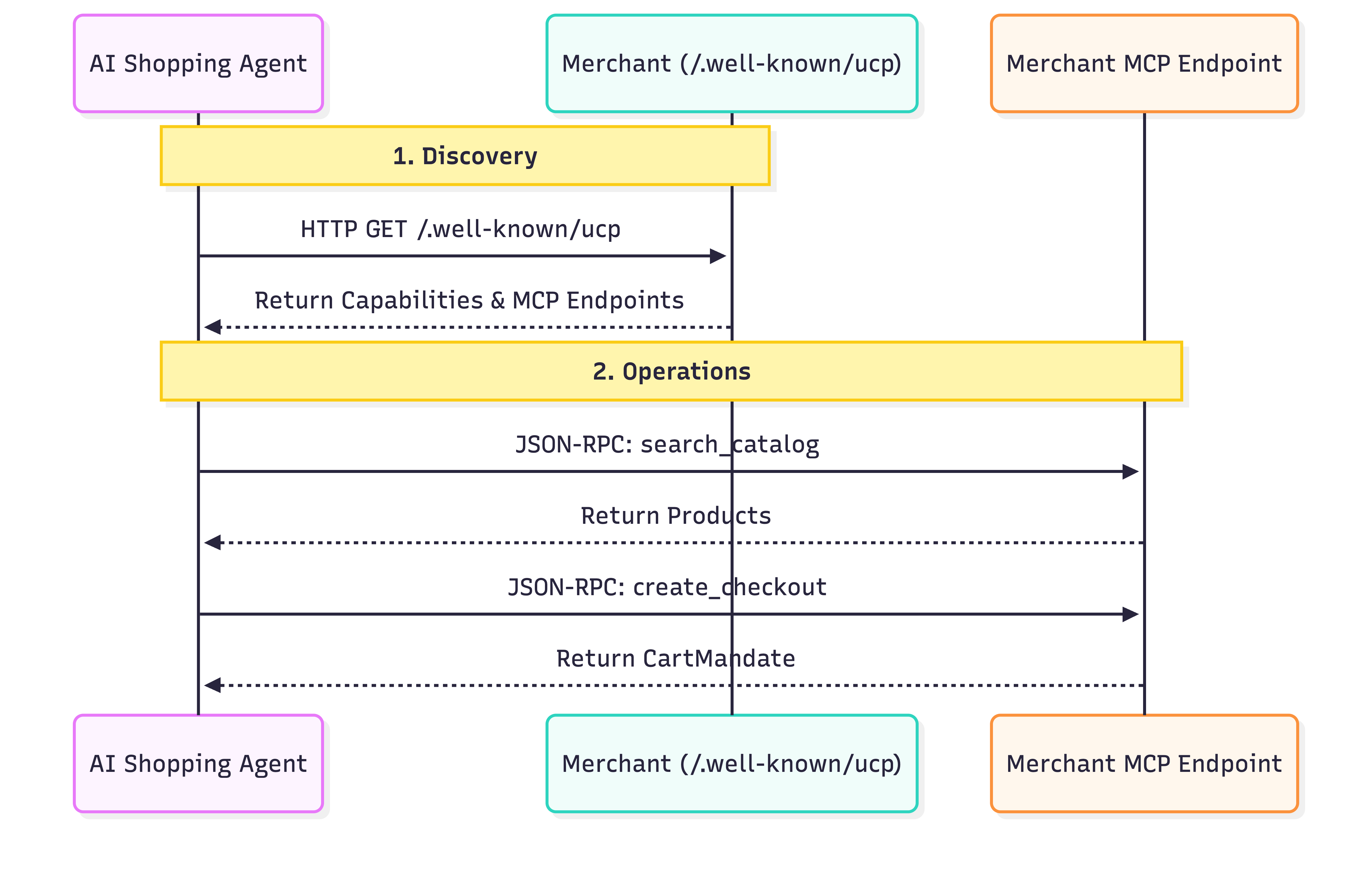
- 検出: UCP に準拠しているすべての販売者は、標準の場所(
/.well-known/ucp)でプロフィールを公開します。例: Everlane の UCP エンドポイント。エージェントがこのプロファイルを読み取ると、次のものが検索されます。- 機能: カタログ検索や購入手続きなど、ビジネスがサポートするスタンドアロンのコア機能。
- サービス: データの交換に使用される下位レベルの通信レイヤ。例: REST API、MCP(Model Context Protocol)、A2A(Agent2Agent Protocol)。
- 拡張機能: 専門的な動作が必要な場合は、このプロファイルでカスタムの拡張機能を定義できます。
- オペレーション: 検出されると、エージェントは提供されたサービス エンドポイントを使用してオペレーションを実行します。この Codelab では、サービス トランスポートとして Model Context Protocol(MCP)を使用します。エージェントは、このエンドポイントに JSON-RPC 2.0 呼び出しを行い、検出された機能(商品の検索、チェックアウトの作成、購入の完了)を呼び出します。
Agent Payments Protocol(AP2)
AP2 は、エージェントがユーザーに代わって支払いを承認する方法を標準化します。エージェントが機密性の高い支払い認証情報を処理するセキュリティの問題を解決します。
仕組み:
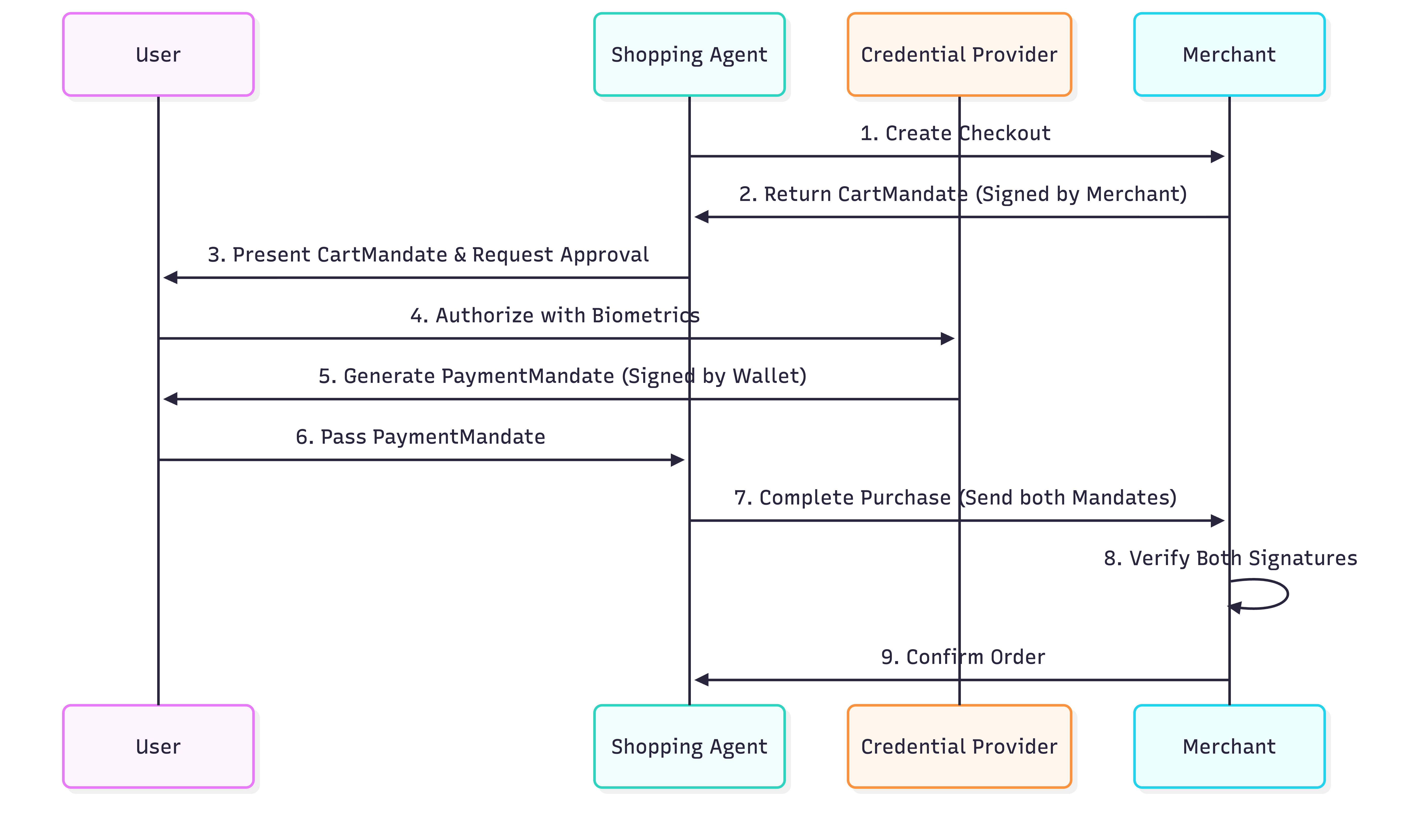
- カートの委任: エージェントが UCP プロトコルを使用して購入手続きを作成すると、販売者は
CartMandateを返します。これは、カートの詳細と販売者の暗号署名を含む JSON オブジェクトです。これは価格ロック保証として機能します。販売者は、この委任状の発行後に価格を変更することはできません。 - 支払いの委任: カートの内容を確認した後、ユーザー(またはユーザーに代わってエージェント)が
PaymentMandateを作成して支払いを承認します。このPaymentMandateはCartMandateを参照し、ユーザーの暗号署名(または認可トークン)を含みます。 - 二重署名による確認: 販売者は両方の委任状を受け取ります。
CartMandateで自身の署名を検証し、PaymentMandateでユーザーの署名を検証します。両方が有効な場合、トランザクションは続行されます。
この「二重ロック」システムにより、販売者が過剰な請求を行うことや、エージェントが承認なしで費用を支出することを防ぎます。本番環境では、これらの委任は SD-JWT(Selective Disclosure JWT)を使用してユーザーのプライバシーを保護します。
3. 環境を設定する
Google Cloud プロジェクトのセットアップ
Google Cloud プロジェクトの作成
- Google Cloud コンソールのプロジェクト セレクタ ページで、Google Cloud プロジェクトを選択または作成します。
- Cloud プロジェクトに対して課金が有効になっていることを確認します。プロジェクトで課金が有効になっているかどうかを確認する方法をご覧ください。
Cloud Shell の起動
Cloud Shell は、必要なツールがプリロードされた Google Cloud で動作するコマンドライン環境です。
- Google Cloud コンソールの上部にある [Cloud Shell をアクティブにする] をクリックします。
- Cloud Shell に接続したら、認証を確認します。
gcloud auth list - プロジェクトが構成されていることを確認します。
gcloud config get project - プロジェクトが想定どおりに設定されていない場合は、設定します。
export PROJECT_ID=<YOUR_PROJECT_ID>
gcloud config set project $PROJECT_ID
Gemini モデルにアクセスする
Cloud Shell 環境で、次のコマンドをコピーして貼り付けます。これにより、Cine Agent が使用する Gemini モデルにアクセスできるようになります。
export GOOGLE_CLOUD_PROJECT=$PROJECT_ID
export GOOGLE_CLOUD_LOCATION=global
export GOOGLE_GENAI_USE_VERTEXAI=True
ディレクトリ構造の設定
次のコマンドをコピーして貼り付け、エージェント用の新しいディレクトリを作成します。
mkdir -p agent_payments
cd agent_payments
依存関係のインストール
Google Cloud Shell には、環境と依存関係を管理するための uv がプリインストールされています。
agent_paymentsフォルダのルートにpyproject.tomlファイルを作成し、次の内容を追加します。このファイルには、プロジェクトのメタデータと依存関係が定義されています。
[project]
name = "agent-payments-demo"
version = "0.1.0"
description = "CineAgent booking agent using UCP and AP2"
requires-python = ">=3.11"
dependencies = [
    "google-adk>=1.29.0",
    "google-genai>=1.27.0",
    "fastapi>=0.115.0",
    "uvicorn>=0.34.0",
    "httpx>=0.28.0",
    "ap2 @ git+https://github.com/google-agentic-commerce/AP2.git@main",
    "ucp-sdk @ git+https://github.com/Universal-Commerce-Protocol/python-sdk.git@main",
]
- 次のコマンドを実行して、仮想環境を作成し、すべての依存関係をインストールします。
uv sync
uvで作成した仮想環境を有効にします。
source .venv/bin/activate
4. エージェントを定義する
ツールロジックを記述する前に、agent.py というファイルでエージェント自体を定義しましょう。このエージェントは、映画の予約フローのオーケストレーターとして機能します。
agent.py を作成します。
"""CineAgent — movie ticket booking agent using UCP and AP2."""

from google.adk.agents import Agent
from google.adk.tools import FunctionTool
from agent_payments.tools import (
    discover_theaters,
    search_movies,
    get_movie_detail,
    create_checkout,
    complete_purchase,
)

root_agent = Agent(
    model="gemini-3.1-pro-preview",
    name="cineagent",
    description="Movie ticket booking agent using UCP and AP2.",
    instruction="""You are CineAgent, a movie ticket booking assistant.

You help users find and book movie tickets across multiple theaters
using UCP (Universal Commerce Protocol) and AP2 (Agent Payments).

**Your tools:**
- discover_theaters: Find theaters and what they support
- search_movies: Search movies across all theaters
- get_movie_detail: Get showtimes at a specific theater
- create_checkout: Start a checkout session
- complete_purchase: Finalize with AP2 mandate signing

**Rules:**
- Always call discover_theaters first if you haven't yet
- Keep responses concise — summarize and suggest next steps
- Prices from tools are in cents (1500 = $15.00)
- Never invent data — only state what tools return
""",
    tools=[
        discover_theaters,
        search_movies,
        get_movie_detail,
        create_checkout,
        FunctionTool(complete_purchase, require_confirmation=True),
    ],
)
コードの説明
このエージェント定義で何が行われているかを詳しく見てみましょう。
model="gemini-3.1-pro-preview": 複雑な推論とツールの使用には、最新の Gemini Pro プレビュー版モデルを使用しています。instruction: エージェントの動作をガイドするプロンプト。UCP と AP2 を使用するようエージェントに明示的に指示し、使用可能なツールをリストし、「データを捏造しない」、「価格はセント単位」などの重要なルールを設定します。tools: これは、ユーザーのリクエストに基づいてエージェントが呼び出すことができる Python 関数のリストです(これは次に作成します)。require_confirmation: 任意のツールをFunctionTool(my_function,require_confirmation=True)でラップできます。トリガーされると、エージェントは一時停止し、ツールを実行する前に簡単な「はい」または「いいえ」の承認を待ちます。ここでは、エージェントはcomplete_purchaseツールを実行する前に、人間による確認を待ちます。
ツールリスト
エージェント定義では、構築する必要があるものを宣言します。各ツールは、UCP または AP2 プロトコルの特定のオペレーションにマッピングされます。
ツール | 機能 | Protocol Action |
| 販売者とその機能を確認する | クエリ |
| 複数の販売者のカタログを検索する | JSON-RPC から MCP エンドポイント |
| 特定の販売店の映画の上映時間を取得する | JSON-RPC から MCP エンドポイント |
| 購入手続きセッションを開始する | JSON-RPC から MCP エンドポイント |
| 支払いを承認して注文を完了する | AP2 委任状に署名して MCP に送信する |
Gemini モデルは、会話に基づいて各ツールを呼び出すタイミングを決定します。次のステップは、各ツールの機能を tools.py に実装することです。
5. エージェント ツールを構築する: 検出とブラウジング
次に、エージェントが映画のブラウジングと検索に使用するツールを実装します。各ツールは UCP オペレーションをラップします。
tools.py という名前の新しいファイルを作成し、次のコードをコピーして貼り付けます。
"""Agent tools — each one wraps a UCP or AP2 operation."""

import asyncio
import json

from .ucp import UCPClient
from .ap2 import AP2Handler

# Initialize clients directly
_merchant_urls = ["http://localhost:8081", "http://localhost:8082"]
_ucp = UCPClient()
_ap2 = AP2Handler()
設定について
この Codelab では、エージェントの構築に焦点を当てるため、2 つのヘルパークラス UCPClient と AP2Handler を使用します。これについては、後のステップで説明します。
- 概要: これらは、この Codelab でモック販売者とのやり取りをシミュレートするために作成した手書きのヘルパークラスです。公式の UCP SDK と AP2 SDK はまだ利用できないため、これらのヘルパーを使用してギャップを埋めています。本番環境では、公式 SDK が利用可能になったら、それを使用します。
- 今のところは、ヘルパー オブジェクトとして扱ってください:
_ucp.discover(url): 販売者のプロフィールを取得します。_ucp.mcp_call(url, method, params): 販売者の MCP エンドポイントに JSON-RPC 2.0 リクエストを送信します。
劇場を探す
このツールは、UCP フローの最初のステップです。存在する販売者と、その販売者がサポートしている内容を検出します。
tools.py に追加します。
async def discover_theaters() -> str:
    """Discover available theater merchants and their capabilities via UCP."""
    theaters = []
    for url in _merchant_urls:
        info = await _ucp.discover(url)
        theaters.append(
            {
                "url": url,
                "name": info["name"],
                "capabilities": info["capabilities"],
                "payment_handlers": info["payment_handlers"],
            }
        )
    return json.dumps(theaters, indent=2)
この機能の用途:
- サーバーから提供された販売者 URL のリストを反復処理します。この Codelab では、後半のセクションで 2 つのモック販売者を設定します。
- URL ごとに
_ucp.discover(url)を呼び出し、/.well-known/ucpエンドポイントにアクセスします。 - 名前、機能、支払いハンドラを収集して、概要リストにまとめます。
- エージェントが読み取れるように、リストを JSON 文字列として返します。
映画を検索
このツールは、検出されたすべての販売者を検索し、結果を統合します。同じ映画が複数の映画館で異なる形式(IMAX、Dolby)と異なる料金で上映されている可能性があるため、これは重要です。
tools.py に追加します。
async def search_movies(query: str = "") -> str:
    """Search for movies across all theaters. Use '' to browse all."""
    all_movies = {}
    for url, merchant in _ucp.merchants.items():
        result = await _ucp.mcp_call(url, "search_catalog", {"query": query})
        for product in result.get("products", []):
            mid = product["id"]
            if mid not in all_movies:
                all_movies[mid] = {
                    "id": mid,
                    "title": product["title"],
                    "categories": product.get("categories", []),
                    "theaters": {},
                }
            showtimes = []
            for v in product.get("variants", []):
                opts = {
                    o["name"]: o["value"]
                    for o in v.get("selected_options", [])
                }
                showtimes.append(
                    {
                        "id": v["id"],
                        "format": opts.get("format", "Standard"),
                        "time": opts.get("time", ""),
                        "price": v.get("price", {}),
                        "seats": v.get("availability", {}).get(
                            "seats_available", 0
                        ),
                    }
                )
            all_movies[mid]["theaters"][url] = {
                "name": merchant["name"],
                "showtimes": showtimes,
            }
    return json.dumps(list(all_movies.values()), indent=2)
この機能の用途:
- 検出されたすべての映画館をループ処理します。
- 検索カタログの JSON-RPC リクエスト(
_ucp.mcp_call(url, "search_catalog", {"query": query}))を販売者の MCP エンドポイントに送信します。 - 次に、結果を解析して映画とその「バリエーション」(特定の上映時間と形式を表す)を見つけるために、少しクリーンアップを行います。映画を ID でグループ化して、ユーザーに重複する映画のエントリが表示されないようにします。
映画の詳細を取得する
このツールは、特定の映画館で上映されている特定の映画のカタログの詳細情報を取得します。
tools.py に追加します。
async def get_movie_detail(movie_id: str, merchant_url: str) -> str:
    """Get detailed showtimes for a movie at a specific theater."""
    result = await _ucp.mcp_call(
        merchant_url, "lookup_catalog", {"product_id": movie_id}
    )
    return json.dumps(result, indent=2)
この機能の用途:
- 販売者の MCP エンドポイントで
lookup_catalogメソッドを呼び出し、特定のmovie_idを渡します。これにより、その映画館の上映時間や座席の空き状況などの詳細情報が返されます。
6. エージェント ツールを構築する: チェックアウトと支払い
これらのツールは、購入手続きと購入フローを処理します。ここで、AP2 プロトコルが安全なトランザクションを保証する役割を果たします。
購入手続きページの作成
このツールは、特定の映画館の特定の映画の上映時間でチェックアウト セッションを開始します。
tools.py に追加します。
async def create_checkout(
    merchant_url: str, showtime_id: str, quantity: int = 1
) -> str:
    """Create a checkout session for tickets at a theater."""
    result = await _ucp.mcp_call(merchant_url, "create_checkout", {
        "checkout": {
            "line_items": [
                {"item": {"id": showtime_id}, "quantity": quantity}
            ],
            "context": {"country": "US", "currency": "USD"},
        }
    })
    return json.dumps(result, indent=2)
この機能の用途:
- 販売者の MCP エンドポイントで
create_checkoutメソッドを呼び出します。 - ユーザーがリクエストした
showtime_idとquantityを渡します。 - 販売者は AP2 CartMandate を含む JSON オブジェクトを返します。
注: レスポンス データを調べると、ap2.cart_mandate に merchant_authorization フィールドが含まれています。これは、見積もり価格をロックする販売者の暗号署名です。後で変更することはできません。
購入を完了
このツールでは次の 3 つの処理が行われます。
- 購入手続きから CartMandate を取得し、(モック)で検証します。
- PaymentMandate (モック)を作成して署名します。
- 署名済みの Mandate を販売者に送信して、購入手続きを完了します。
tools.py に追加します。
async def complete_purchase(
    checkout_id: str, merchant_url: str, payment_method: str = "card"
) -> str:
    """Complete purchase with AP2 payment authorization."""
    # 1. Get the CartMandate from the checkout
    checkout = await _ucp.mcp_call(
        merchant_url, "get_checkout", {"checkout": {"id": checkout_id}}
    )
    cart_mandate = _ap2.process_cart_mandate(checkout)
    if not cart_mandate:
        return {"error": "No cart mandate — checkout may have expired"}

    # 2-3. Create and sign the PaymentMandate
    # In production, this call would trigger a user prompt (biometric or device auth)
    # via the AP2 Wallet SDK. In this demo, it just computes a mock SHA-256 hash.
    payment_mandate = _ap2.create_payment_mandate(cart_mandate, payment_method)

    # 4. Send both mandates to complete the purchase
    result = await _ucp.mcp_call(merchant_url, "complete_checkout", {
        "checkout": {
            "id": checkout_id,
            "payment": {
                "instruments": [{
                    "handler_id": f"card_{merchant_url.split(':')[-1]}",
                    "type": "card",
                }],
            },
            "ap2": {"payment_mandate": payment_mandate},
        }
    })
    return json.dumps(result, indent=2)
2 つの権限が必要なのはなぜですか?CartMandate により、販売者は見積もり後に価格を変更できなくなります。PaymentMandate により、エージェントはユーザーの同意なしに請求を行うことができなくなります。フローは次のとおりです。
Merchant locks price -> User authorizes charge -> Merchant verifies both -> Order completes。
チェックポイント: フル tools.py
これで、完全な tools.py には、UCP クライアントと AP2 クライアント用の 5 つのツール関数とモジュール レベルの初期化が含まれます。次のようになっていることを確認します。
"""Agent tools — each one wraps a UCP or AP2 operation."""

import asyncio
import json

from ucp import UCPClient
from ap2 import AP2Handler

# Initialize clients directly
_merchant_urls = ["http://localhost:8081", "http://localhost:8082"]
_ucp = UCPClient()
_ap2 = AP2Handler()


async def discover_theaters() -> str:
    """Discover available theater merchants and their capabilities via UCP."""
    theaters = []
    for url in _merchant_urls:
        info = await _ucp.discover(url)
        theaters.append(
            {
                "url": url,
                "name": info["name"],
                "capabilities": info["capabilities"],
                "payment_handlers": info["payment_handlers"],
            }
        )
    return json.dumps(theaters, indent=2)


async def search_movies(query: str = "") -> str:
    """Search for movies across all theaters. Use '' to browse all."""
    all_movies = {}
    for url, merchant in _ucp.merchants.items():
        result = await _ucp.mcp_call(url, "search_catalog", {"query": query})
        for product in result.get("products", []):
            mid = product["id"]
            if mid not in all_movies:
                all_movies[mid] = {
                    "id": mid,
                    "title": product["title"],
                    "categories": product.get("categories", []),
                    "theaters": {},
                }
            showtimes = []
            for v in product.get("variants", []):
                opts = {
                    o["name"]: o["value"]
                    for o in v.get("selected_options", [])
                }
                showtimes.append(
                    {
                        "id": v["id"],
                        "format": opts.get("format", "Standard"),
                        "time": opts.get("time", ""),
                        "price": v.get("price", {}),
                        "seats": v.get("availability", {}).get(
                            "seats_available", 0
                        ),
                    }
                )
            all_movies[mid]["theaters"][url] = {
                "name": merchant["name"],
                "showtimes": showtimes,
            }
    return json.dumps(list(all_movies.values()), indent=2)


async def get_movie_detail(movie_id: str, merchant_url: str) -> str:
    """Get detailed showtimes for a movie at a specific theater."""
    result = await _ucp.mcp_call(
        merchant_url, "lookup_catalog", {"product_id": movie_id}
    )
    return json.dumps(result, indent=2)


async def create_checkout(
    merchant_url: str, showtime_id: str, quantity: int = 1
) -> str:
    """Create a checkout session for tickets at a theater."""
    result = await _ucp.mcp_call(merchant_url, "create_checkout", {
        "checkout": {
            "line_items": [
                {"item": {"id": showtime_id}, "quantity": quantity}
            ],
            "context": {"country": "US", "currency": "USD"},
        }
    })
    return json.dumps(result, indent=2)


async def complete_purchase(
    checkout_id: str, merchant_url: str, payment_method: str = "card"
) -> str:
    """Complete purchase with AP2 payment authorization."""
    # 1. Get the CartMandate from the checkout
    checkout = await _ucp.mcp_call(
        merchant_url, "get_checkout", {"checkout": {"id": checkout_id}}
    )
    cart_mandate = _ap2.process_cart_mandate(checkout)
    if not cart_mandate:
        return {"error": "No cart mandate — checkout may have expired"}

    # 2-3. Create and sign the PaymentMandate
    # In production, this call would trigger a user prompt (biometric or device auth)
    # via the AP2 Wallet SDK. In this demo, it just computes a mock SHA-256 hash.
    payment_mandate = _ap2.create_payment_mandate(cart_mandate, payment_method)

    # 4. Send both mandates to complete the purchase
    result = await _ucp.mcp_call(merchant_url, "complete_checkout", {
        "checkout": {
            "id": checkout_id,
            "payment": {
                "instruments": [{
                    "handler_id": f"card_{merchant_url.split(':')[-1]}",
                    "type": "card",
                }],
            },
            "ap2": {"payment_mandate": payment_mandate},
        }
    })
    return json.dumps(result, indent=2)
7. 実行可能にする
実際の UCP 販売者の場合は、エージェントに URL を指定すれば完了です。この Codelab では、ローカルでテストするために次の 2 つが必要です。
- モック販売者 - UCP エンドポイントをシミュレートするローカル サーバー。テスト対象となるものを提供します。
- プロトコル ヘルパー - UCP と AP2 のシン HTTP ラッパー(本番環境では、公式 SDK がこれらに置き換わります)
注: このコードを注意深く読む必要はありません。これらのファイルは、実際のインフラストラクチャと SDK が提供するものをシミュレートします。そのままコピーします。
プロトコル ヘルパー
UCP と AP2 にはまだクライアント SDK がありません。これらの 2 つのファイルは HTTP の配管を処理します。
ucp.py を作成します。
"""UCP client — discovers merchants and calls their MCP tools."""

import uuid
import httpx


class UCPClient:
    def __init__(self):
        self.client = httpx.AsyncClient(timeout=30)
        self.merchants = {}  # url -> merchant info dict

    async def discover(self, merchant_url: str) -> dict:
        """Fetch a merchant's UCP profile from /.well-known/ucp."""
        resp = await self.client.get(f"{merchant_url}/.well-known/ucp")
        resp.raise_for_status()
        profile = resp.json()
        ucp = profile["ucp"]
        info = {
            "name": merchant_url.split("//")[-1],
            "mcp_endpoint": ucp["services"]["dev.ucp.shopping"][0]["endpoint"],
            "capabilities": list(ucp.get("capabilities", {}).keys()),
            "payment_handlers": list(ucp.get("payment_handlers", {}).keys()),
        }
        self.merchants[merchant_url] = info
        return info

    async def mcp_call(
        self, merchant_url: str, tool_name: str, arguments: dict
    ) -> dict:
        """Call a merchant's MCP tool via JSON-RPC 2.0."""
        merchant = self.merchants[merchant_url]
        resp = await self.client.post(
            merchant["mcp_endpoint"],
            json={
                "jsonrpc": "2.0",
                "id": uuid.uuid4().hex,
                "method": "tools/call",
                "params": {"name": tool_name, "arguments": arguments},
            },
        )
        resp.raise_for_status()
        data = resp.json()
        if "error" in data:
            raise Exception(f"MCP error: {data['error']}")
        return data.get("result", {})

    async def close(self):
        await self.client.aclose()
ap2.py を作成します。
"""AP2 mandate handler — creates and signs payment mandates."""

import uuid
import hashlib


class AP2Handler:
    def process_cart_mandate(self, checkout_response: dict) -> dict | None:
        """Extract the merchant-signed CartMandate from a checkout response.

        The CartMandate is the merchant's cryptographic price guarantee —
        it locks the total so it can't change between checkout and payment.
        """
        return checkout_response.get("ap2", {}).get("cart_mandate")

    def create_payment_mandate(
        self, cart_mandate: dict, payment_method: str = "card"
    ) -> dict:
        """Create and sign a PaymentMandate authorizing payment.

        References the merchant's CartMandate and adds user authorization.
        Together they form a two-party agreement: merchant guarantees price,
        user authorizes charge.
        """
        contents = cart_mandate["contents"]
        mandate_id = uuid.uuid4().hex

        return {
            "mandate_id": mandate_id,
            "cart_reference": contents["id"],
            "merchant": contents["merchant_name"],
            "total": contents["total"],
            "payment_method": payment_method,
            "user_authorization": self._sign(mandate_id, contents["id"]),
        }

    def _sign(self, mandate_id: str, checkout_id: str) -> str:
        """Sign the mandate. Production uses real crypto (sd-jwt-vc)."""
        payload = f"{mandate_id}:{checkout_id}"
        return hashlib.sha256(payload.encode()).hexdigest()
モック販売者
merchants.py を作成します。
"""Mock UCP merchant servers — two theaters with different capabilities."""

import uuid
import time
import multiprocessing
from datetime import datetime, timezone, timedelta

import uvicorn
from fastapi import FastAPI

# ── Theater data ────────────────────────────────────────────

THEATERS = {
    8081: {
        "name": "Meridian Cinemas",
        "movies": [
            {
                "id": "opp",
                "title": "Oppenheimer",
                "categories": ["Drama", "History"],
                "showtimes": [
                    {"id": "st_opp_7pm_imax", "format": "IMAX", "time": "7:00 PM", "price": 2200, "seats": 45},
                    {"id": "st_opp_930pm", "format": "Standard", "time": "9:30 PM", "price": 1500, "seats": 80},
                ],
            },
            {
                "id": "dune3",
                "title": "Dune: Part Three",
                "categories": ["Sci-Fi", "Action"],
                "showtimes": [
                    {"id": "st_dune_8pm_imax", "format": "IMAX", "time": "8:00 PM", "price": 2200, "seats": 30},
                ],
            },
        ],
        "discounts": {},
    },
    8082: {
        "name": "StarLight Theaters",
        "movies": [
            {
                "id": "opp",
                "title": "Oppenheimer",
                "categories": ["Drama", "History"],
                "showtimes": [
                    {"id": "st_opp_6pm_atmos", "format": "Dolby Atmos", "time": "6:00 PM", "price": 1800, "seats": 60},
                ],
            },
            {
                "id": "spider",
                "title": "Spider-Verse",
                "categories": ["Animation", "Action"],
                "showtimes": [
                    {"id": "st_spider_4pm", "format": "Standard", "time": "4:00 PM", "price": 1200, "seats": 100},
                ],
            },
        ],
        "discounts": {},
    },
}


def create_app(port):
    theater = THEATERS[port]
    app = FastAPI()
    sessions = {}

    # ── UCP Discovery endpoint ──────────────────────────────
    @app.get("/.well-known/ucp")
    def discovery():
        caps = {
            "dev.ucp.shopping.catalog.search": [{"version": "2026-01-15"}],
            "dev.ucp.shopping.catalog.lookup": [{"version": "2026-01-15"}],
            "dev.ucp.shopping.checkout": [{"version": "2026-01-15"}],
            "dev.ucp.shopping.ap2_mandate": [{"version": "2026-01-15"}],
        }

        return {
            "ucp": {
                "version": "2026-01-15",
                "services": {
                    "dev.ucp.shopping": [
                        {"version": "2026-01-15", "transport": "mcp",
                         "endpoint": f"http://localhost:{port}/mcp"}
                    ]
                },
                "capabilities": caps,
                "payment_handlers": {
                    "com.example.card": [
                        {"id": f"card_{port}", "version": "2026-01-15",
                         "available_instruments": [{"type": "card"}], "config": {}}
                    ]
                },
            }
        }

    # ── MCP JSON-RPC endpoint ───────────────────────────────
    @app.post("/mcp")
    def mcp(body: dict):
        tool = body["params"]["name"]
        args = body["params"].get("arguments", {})
        rid = body.get("id", "1")

        if tool == "search_catalog":
            q = args.get("query", "").lower()
            hits = [m for m in theater["movies"]
                    if not q or q in m["title"].lower()
                    or any(q in c.lower() for c in m["categories"])]
            return _ok(rid, {"products": [_product(m) for m in hits]})

        if tool == "lookup_catalog":
            mid = args.get("product_id") or (args.get("ids", [None])[0])
            movie = next((m for m in theater["movies"] if m["id"] == mid), None)
            if not movie:
                return _err(rid, "Not found")
            return _ok(rid, {"products": [_product(movie)]})

        if tool == "create_checkout":
            co = args.get("checkout", {})
            sid = f"chk_{uuid.uuid4().hex[:12]}"
            items, subtotal = [], 0
            for li in co.get("line_items", []):
                st = _find_showtime(li["item"]["id"])
                if not st:
                    continue
                mv = _find_movie(li["item"]["id"])
                qty = li.get("quantity", 1)
                amt = st["price"] * qty
                subtotal += amt
                items.append({
                    "id": f"li_{uuid.uuid4().hex[:8]}",
                    "item": {
                        "id": st["id"],
                        "title": f"{mv['title']} — {st['format']} {st['time']}",
                        "price": st["price"],
                    },
                    "quantity": qty,
                    "totals": [{"type": "subtotal", "amount": amt}],
                })
            tax = int(subtotal * 0.08)
            total = subtotal + tax
            session = {
                "id": sid,
                "status": "ready_for_complete",
                "currency": "USD",
                "line_items": items,
                "totals": [
                    {"type": "subtotal", "display_text": "Subtotal", "amount": subtotal},
                    {"type": "tax", "display_text": "Tax", "amount": tax},
                    {"type": "total", "display_text": "Total", "amount": total},
                ],
                "metadata": {"theater_name": theater["name"]},
                "ap2": {
                    "cart_mandate": {
                        "contents": {
                            "id": sid,
                            "merchant_name": theater["name"],
                            "total": {
                                "label": "Total",
                                "amount": {"currency": "USD", "value": total / 100},
                            },
                            "cart_expiry": (
                                datetime.now(timezone.utc) + timedelta(minutes=10)
                            ).isoformat(),
                        },
                        "merchant_authorization": f"mock_merchant_sig_{sid}",
                    }
                },
            }
            sessions[sid] = session
            return _ok(rid, session)

        if tool == "get_checkout":
            sid = args.get("checkout", {}).get("id") or args.get("id")
            return _ok(rid, sessions.get(sid, {"error": "not_found"}))


        if tool == "complete_checkout":
            co = args.get("checkout", {})
            sid = co.get("id")
            session = sessions.get(sid)
            if not session:
                return _err(rid, "Not found")
            session["status"] = "completed"
            session["order"] = {
                "id": f"ord_{uuid.uuid4().hex[:8]}",
                "created_at": datetime.now(timezone.utc).isoformat(),
                "tickets": [
                    {
                        "movie": li["item"]["title"],
                        "quantity": li["quantity"],
                        "ticket_code": uuid.uuid4().hex[:8].upper(),
                    }
                    for li in session["line_items"]
                ],
            }
            session["ap2"]["payment_mandate_verified"] = True
            return _ok(rid, session)

        return _err(rid, f"Unknown tool: {tool}")

    def _ok(rid, result):
        return {"jsonrpc": "2.0", "id": rid, "result": result}

    def _err(rid, msg):
        return {"jsonrpc": "2.0", "id": rid, "error": {"code": -32000, "message": msg}}

    def _product(movie):
        return {
            "id": movie["id"],
            "title": movie["title"],
            "categories": movie["categories"],
            "variants": [
                {
                    "id": st["id"],
                    "selected_options": [
                        {"name": "format", "value": st["format"]},
                        {"name": "time", "value": st["time"]},
                    ],
                    "price": {"amount": st["price"], "currency": "USD"},
                    "availability": {"available": True, "seats_available": st["seats"]},
                }
                for st in movie["showtimes"]
            ],
        }

    def _find_showtime(sid):
        return next(
            (st for m in theater["movies"] for st in m["showtimes"] if st["id"] == sid),
            None,
        )

    def _find_movie(sid):
        return next(
            (m for m in theater["movies"] for st in m["showtimes"] if st["id"] == sid),
            None,
        )

    return app


def _run(port):
    uvicorn.run(create_app(port), host="0.0.0.0", port=port, log_level="warning")


if __name__ == "__main__":
    for port in THEATERS:
        multiprocessing.Process(target=_run, args=(port,), daemon=True).start()
    print("Merchants running: Meridian (:8081), StarLight (:8082)")
    print("Press Ctrl+C to stop")
    try:
        while True:
            time.sleep(1)
    except KeyboardInterrupt:
        pass
これにより、それぞれに 2 つのエンドポイントを持つ 2 つの FastAPI サーバーが作成されます。
GET /.well-known/ucp- UCP ディスカバリ。販売者の機能、MCP エンドポイント URL、承認済みのお支払い方法を返します。POST /mcp- MCP(Model Context Protocol)オペレーション。カタログ検索、購入手続き、割引、支払いの JSON-RPC 2.0 呼び出しを処理します。
新しいターミナルでマーチャントを起動します。マーチャントは実行状態を維持する必要があります。
cd agent_payments
source .venv/bin/activate
python merchants.py
以下のように表示されます。
Merchants running: Meridian (:8081), StarLight (:8082)
最初のターミナルに戻り、UCP 検出を確認します。
curl -s http://localhost:8081/.well-known/ucp | python -m json.tool
販売者の機能、MCP エンドポイント URL、支払いハンドラが表示されます。
8. ADK Web でエージェントを実行する
ADK CLI の組み込みの Web UI を使用しましょう。これにより、ブラウザにチャット インターフェースが表示され、ツール確認プロンプトが自動的に処理されます。
プロジェクトは次のようになります。
agent_payments/
├── merchants.py      # Mock UCP merchants
├── ucp.py            # UCP client helper
├── ap2.py            # AP2 mandate handler
├── tools.py          # Agent tools
├── agent.py          # Agent definition
└── pyproject.toml
試してみる
現在のターミナルで、親ディレクトリ(agent_payments の 1 つ上のフォルダ)に移動し、ADK ウェブ UI を起動します。
cd ../
adk web --allow_origins '*'
サーバーが実行中であることを示す出力が表示され、URL(通常は http://localhost:8000 など)が返されます。
エージェントと話す
adk webから提供された URL をブラウザで開きます。- チャット インターフェースが表示されます。
- 「今上映している映画は?」と尋ねてみてください。
- エージェントは、舞台裏で劇場を検出し、カタログを検索し、UCP を介して両方の販売者の結果を集約します。
- チケットの予約を依頼する: 「午後 7 時のオッペンハイマーのチケットを 2 枚予約して」。
- エージェントが
complete_purchaseを呼び出そうとすると、ADK Web UI に確認ダイアログまたはカードがポップアップ表示されます。 - トランザクションを承認するには、チャットで
{"confirmed": true}という JSON 文字列を返信します。 - エージェントが購入手続きを完了し、チケットコードが記載された注文確認書をお送りします。
舞台裏で発生している状況の詳細は以下の通りです。
create_checkout→ 販売者が AP2 CartMandate(署名済みの価格ロック)を返したcomplete_purchase→ PaymentMandate を作成し、署名(SHA-256 をモック)して、両方の委任状を販売者に送信- 販売者が両方の署名を確認 → チケットを発行(モックアップ)
9. クリーンアップ
ローカル サーバーが実行されたままにならないように、リソースをクリーンアップします。
adk webを実行しているターミナルで、Ctrl+C キーを押してエージェント サーバーを停止します。python merchants.pyを実行しているターミナルで、Ctrl+C キーを押して、モック販売者を停止します。- 両方のターミナルで、次のコマンドを実行して仮想環境を無効にします。
deactivate
- (省略可)この Codelab 用に新しい Google Cloud プロジェクトを作成して削除する場合は、次のコマンドを実行します。
gcloud projects delete $GOOGLE_CLOUD_PROJECT
10. おめでとうございます!🎉
UCP と AP2 を使用して、販売者を検出し、カタログを閲覧して、購入を完了する ADK エージェントを構築しました。
学習した内容
この Codelab では、安全な商取引フローを処理する ADK エージェントを作成しました。作成した内容と適用した主なコンセプトの概要は次のとおりです。
作成した内容:
- UCP と AP2 のオペレーション(検出、カタログ検索、購入手続き、支払い)をラップする 5 つのエージェント ツール。
- AP2 委任状の署名 - CartMandate(販売者の価格ロック)+ PaymentMandate(ユーザーの承認)。
- マルチマーチャント検索 - 1 つのエージェントが複数の映画館にクエリを実行し、結果を統合します。
主なコンセプト:
プロトコル | 機能 | 仕組み |
UCP Discovery | エージェントが販売者とその機能を見つける |
|
UCP MCP | エージェントがカタログを参照し、チェックアウトを作成する | 販売者の MCP エンドポイントへの JSON-RPC 2.0 呼び出し |
AP2 CartMandate | 販売者が提示価格をロックする | 販売者が署名し、合計額と有効期限を含む |
AP2 PaymentMandate | ユーザーが請求を承認する | ユーザーによって署名され、CartMandate を参照します |
本番環境での違い
この Codelab ではモックを使用します。本番環境:
- UCP 検出は、ハードコードされた localhost URL ではなく、レジストリに対して解決されます
- MCP エンドポイントは実際の販売者によってホストされます。同じ JSON-RPC 2.0 プロトコル、実際の在庫
- AP2 の義務は SHA-256 ハッシュではなく sd-jwt-vc で署名される
- 支払い承認では、ユーザーの同意を求めるプロンプトを含む AP2 Wallet SDK が使用されます
- フロントエンド: ツールの結果をリッチ UI(商品グリッド、購入手続きの概要、確認カード)としてレンダリングします。
次のステップ
- AP2 プロトコル仕様を確認し、支払い対応のエージェントを構築する
- エージェント型コマースを有効にするために販売者向けに UCP を実装する
- マルチエージェント コマース ワークフロー用に AP2 を A2A と接続する
- 暗号通貨による支払いの AP2 x402 拡張機能について