

1. 개요
이 Codelab에서는 다음 두 가지 오픈소스 상거래 프로토콜을 사용하여 여러 극장 판매자에서 영화 티켓을 예약하는 ADK 에이전트를 실행합니다.
- UCP (범용 커머스 프로토콜): 에이전트가 판매자를 검색하고, 카탈로그를 검색하고, 결제 절차를 관리하는 표준입니다.
- AP2 (에이전트 결제 프로토콜): 암호화 방식으로 서명된 위임을 사용하여 안전하고 검증 가능한 결제 승인을 위한 프로토콜입니다.
데모 앱인 CineAgent는 기능 (좌석 선택, 전문 형식, 결제 수단)이 서로 다른 두 개의 모의 극장 판매자에 연결되어 검색부터 결제까지 전체 예약 흐름을 오케스트레이션합니다.
학습할 내용
/.well-known/ucp프로필을 통한 UCP 판매자 탐색 작동 방식- ADK 에이전트가 UCP를 사용하여 카탈로그를 검색하고 결제를 만드는 방법
- AP2에서 안전한 거래를 요구하는 방법 (CartMandate, PaymentMandate)
- 엔드 투 엔드 UCP 및 AP2 프로토콜이 에이전트형 이커머스를 안전하게 보호하는 방식
필요한 항목
- 결제가 사용 설정된 Google Cloud 프로젝트
- 웹브라우저(예: Chrome)
- Python 3.11 이상
이 Codelab은 Python 및 Google Cloud에 익숙한 중급 개발자를 대상으로 합니다. 이 Codelab을 완료하는 데 약 15분이 소요됩니다.
이 Codelab에서 만든 리소스의 비용은 5달러 미만이어야 합니다.
2. UCP 및 AP2 프로토콜 이해
에이전트 빌드를 시작하기 전에 안전한 에이전트형 커머스를 가능하게 하는 두 가지 프로토콜을 살펴보겠습니다.
범용 커머스 프로토콜 (UCP)
UCP는 AI 에이전트가 판매자와 상호작용하는 방식을 표준화합니다. 표준화된 리소스 모델을 도입하여 에이전트가 모든 스토어의 맞춤 API를 학습해야 하는 문제를 해결합니다.
작동 방식:
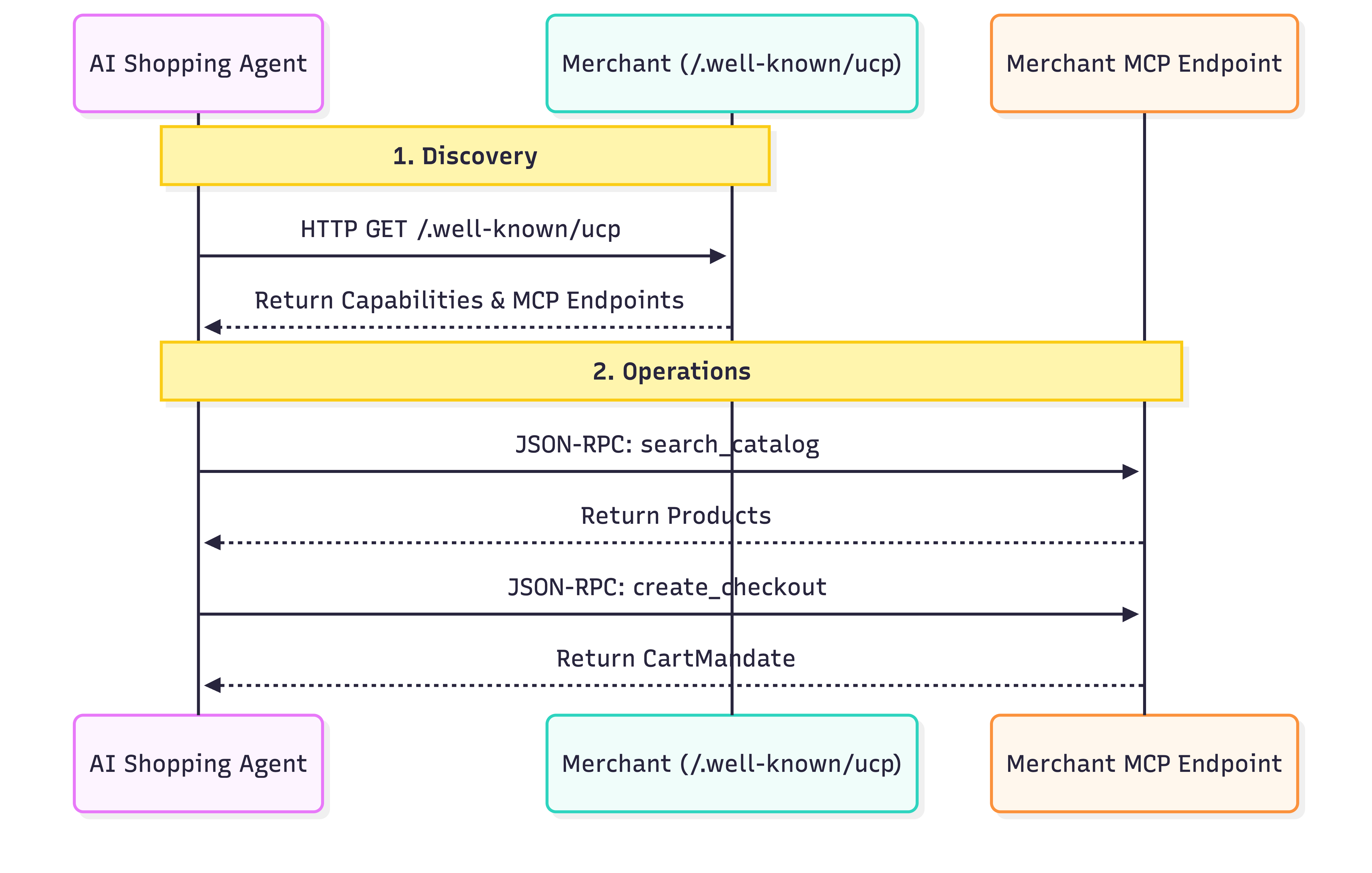
- 검색: 모든 UCP 호환 판매자는 표준 위치(
/.well-known/ucp)에 프로필을 노출합니다. 예: Everlane의 UCP 엔드포인트. 상담사가 이 프로필을 읽으면 다음을 찾습니다.- 기능: 비즈니스에서 지원하는 독립형 핵심 기능(예: 카탈로그 검색 또는 결제)입니다.
- 서비스: 데이터를 교환하는 데 사용되는 하위 수준 통신 레이어입니다. 예: REST API, MCP (모델 컨텍스트 프로토콜), A2A (Agent2Agent 프로토콜)
- 확장 프로그램: 판매자에게 전문적인 동작이 필요한 경우 이 프로필에서 맞춤 확장 프로그램을 정의할 수 있습니다.
- 작업: 검색되면 에이전트는 제공된 서비스 엔드포인트를 사용하여 작업을 실행합니다. 이 Codelab에서는 모델 컨텍스트 프로토콜 (MCP)을 서비스 전송으로 사용합니다. 에이전트는 이 엔드포인트에 JSON-RPC 2.0 호출을 실행하여 검색된 기능(제품 검색, 결제 생성, 구매 완료)을 호출합니다.
에이전트 결제 프로토콜 (AP2)
AP2는 상담사가 사용자를 대신하여 결제를 승인하는 방식을 표준화합니다. 민감한 결제 사용자 인증 정보를 처리하는 상담사의 보안 문제를 해결합니다.
작동 방식:
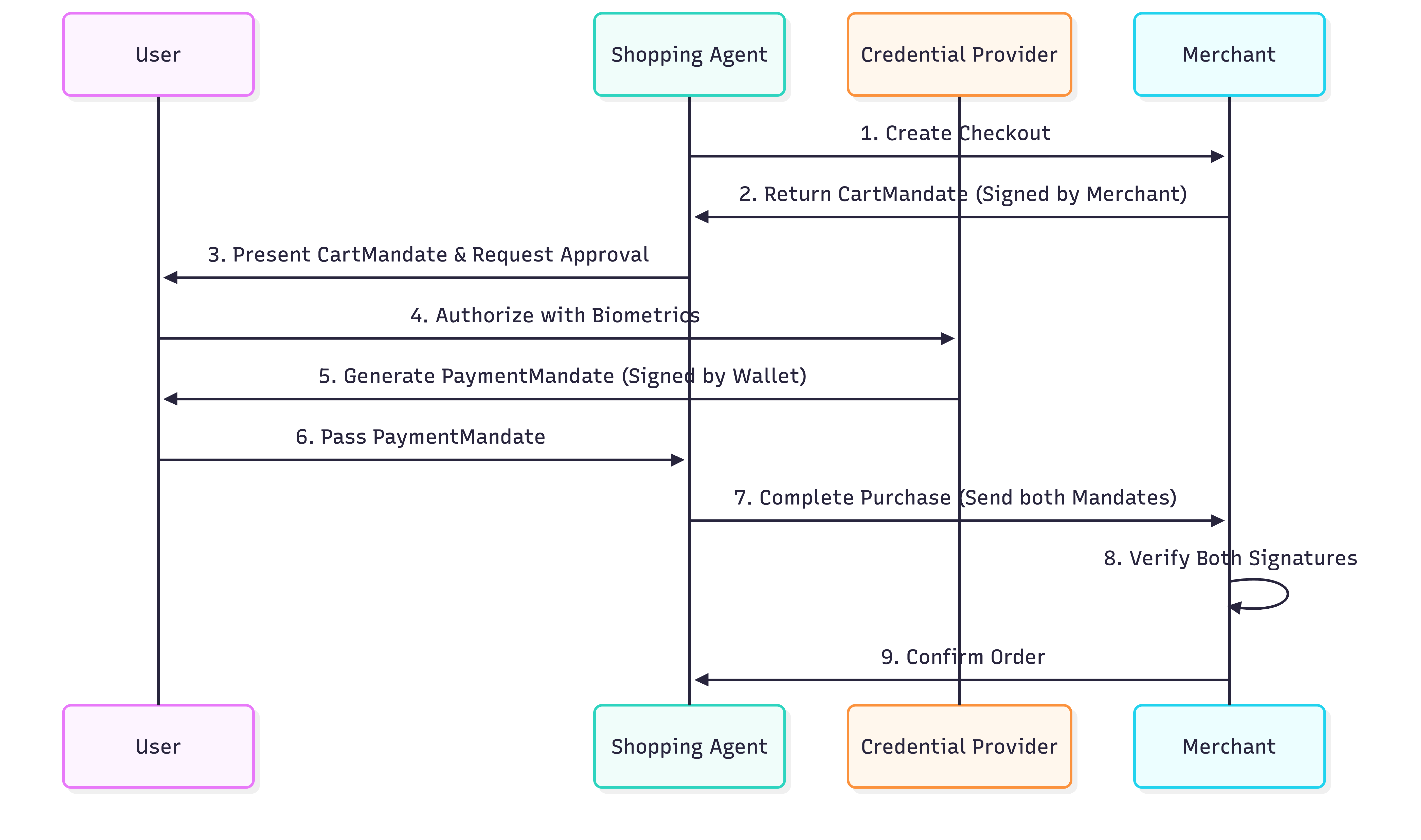
- 장바구니 명령: 에이전트가 UCP 프로토콜을 사용하여 결제를 생성하면 판매자가
CartMandate를 반환합니다. 장바구니 세부정보와 판매자의 암호화 서명이 포함된 JSON 객체입니다. 가격 고정 보장 역할을 합니다. 판매자는 이 명령을 내린 후 가격을 변경할 수 없습니다. - 결제 위임장: 장바구니의 내용을 확인한 후 사용자 (또는 사용자를 대신하는 상담사)가 결제를 승인하는
PaymentMandate를 만듭니다. 이PaymentMandate는CartMandate를 참조하며 사용자의 암호화 서명 (또는 승인 토큰)을 포함합니다. - 이중 서명 확인: 판매자가 두 위임장을 모두 수신합니다.
CartMandate의 자체 서명과PaymentMandate의 사용자 서명을 확인합니다. 두 가지 모두 유효하면 거래가 진행됩니다.
이 '이중 잠금' 시스템을 통해 판매자는 과도한 청구를 할 수 없고 상담사는 승인 없이 지출할 수 없습니다. 프로덕션에서 이러한 요구사항은 SD-JWT (선택적 공개 JWT)를 사용하여 사용자 개인 정보를 보호합니다.
3. 환경 설정
Google Cloud 프로젝트 설정
Google Cloud 프로젝트 만들기
- Google Cloud 콘솔의 프로젝트 선택기 페이지에서 Google Cloud 프로젝트를 선택하거나 만듭니다.
- Cloud 프로젝트에 결제가 사용 설정되어 있는지 확인합니다. 프로젝트에 결제가 사용 설정되어 있는지 확인하는 방법을 알아보세요.
Cloud Shell 시작
Cloud Shell은 Google Cloud에서 실행되는 명령줄 환경으로, 필요한 도구가 미리 로드되어 제공됩니다.
- Google Cloud 콘솔 상단에서 Cloud Shell 활성화를 클릭합니다.
- Cloud Shell에 연결되면 인증을 확인합니다.
gcloud auth list - 프로젝트가 구성되어 있는지 확인합니다.
gcloud config get project - 프로젝트가 예상대로 설정되지 않은 경우 설정합니다.
export PROJECT_ID=<YOUR_PROJECT_ID>
gcloud config set project $PROJECT_ID
Gemini 모델 액세스
Cloud Shell 환경에서 다음 명령어를 복사하여 붙여넣습니다. 이렇게 하면 Cine Agent가 사용할 Gemini 모델에 액세스할 수 있습니다.
export GOOGLE_CLOUD_PROJECT=$PROJECT_ID
export GOOGLE_CLOUD_LOCATION=global
export GOOGLE_GENAI_USE_VERTEXAI=True
디렉터리 구조 설정
다음 명령어를 복사하여 붙여넣어 에이전트의 새 디렉터리를 만듭니다.
mkdir -p agent_payments
cd agent_payments
종속 항목 설치
Google Cloud Shell에는 환경과 종속 항목을 관리하는 uv가 사전 설치되어 있습니다.
agent_payments폴더의 루트에pyproject.toml파일을 만들고 다음 콘텐츠를 추가합니다. 이 파일은 프로젝트 메타데이터와 종속 항목을 정의합니다.
[project]
name = "agent-payments-demo"
version = "0.1.0"
description = "CineAgent booking agent using UCP and AP2"
requires-python = ">=3.11"
dependencies = [
    "google-adk>=1.29.0",
    "google-genai>=1.27.0",
    "fastapi>=0.115.0",
    "uvicorn>=0.34.0",
    "httpx>=0.28.0",
    "ap2 @ git+https://github.com/google-agentic-commerce/AP2.git@main",
    "ucp-sdk @ git+https://github.com/Universal-Commerce-Protocol/python-sdk.git@main",
]
- 다음 명령어를 실행하여 가상 환경을 만들고 모든 종속 항목을 설치합니다.
uv sync
uv로 만든 가상 환경을 활성화합니다.
source .venv/bin/activate
4. 에이전트 정의
도구 로직을 작성하기 전에 agent.py이라는 파일에서 에이전트를 정의해 보겠습니다. 이 에이전트는 영화 예약 흐름의 오케스트레이터 역할을 합니다.
agent.py 만들기:
"""CineAgent — movie ticket booking agent using UCP and AP2."""

from google.adk.agents import Agent
from google.adk.tools import FunctionTool
from agent_payments.tools import (
    discover_theaters,
    search_movies,
    get_movie_detail,
    create_checkout,
    complete_purchase,
)

root_agent = Agent(
    model="gemini-3.1-pro-preview",
    name="cineagent",
    description="Movie ticket booking agent using UCP and AP2.",
    instruction="""You are CineAgent, a movie ticket booking assistant.

You help users find and book movie tickets across multiple theaters
using UCP (Universal Commerce Protocol) and AP2 (Agent Payments).

**Your tools:**
- discover_theaters: Find theaters and what they support
- search_movies: Search movies across all theaters
- get_movie_detail: Get showtimes at a specific theater
- create_checkout: Start a checkout session
- complete_purchase: Finalize with AP2 mandate signing

**Rules:**
- Always call discover_theaters first if you haven't yet
- Keep responses concise — summarize and suggest next steps
- Prices from tools are in cents (1500 = $15.00)
- Never invent data — only state what tools return
""",
    tools=[
        discover_theaters,
        search_movies,
        get_movie_detail,
        create_checkout,
        FunctionTool(complete_purchase, require_confirmation=True),
    ],
)
코드 설명
이 에이전트 정의에서 어떤 일이 일어나는지 살펴보겠습니다.
model="gemini-3.1-pro-preview": 복잡한 추론과 도구 사용을 위해 최신 Gemini Pro 프리뷰 모델을 사용하고 있습니다.instruction: 에이전트의 동작을 안내하는 프롬프트입니다. UCP와 AP2를 사용하도록 에이전트에게 명시적으로 지시하고, 사용 가능한 도구를 나열하고, '데이터를 절대 발명하지 마세요' 및 '가격은 센트 단위입니다'와 같은 중요한 규칙을 설정합니다.tools: 에이전트가 사용자의 요청에 따라 호출할 수 있는 Python 함수 목록입니다 (다음 단계에서 빌드).require_confirmation:FunctionTool(my_function,require_confirmation=True)로 도구를 래핑할 수 있습니다. 트리거되면 에이전트는 도구를 실행하기 전에 일시중지하고 간단한 '예' 또는 '아니요' 승인을 기다립니다. 여기에서 에이전트는complete_purchase도구를 실행하기 전에 사람의 확인을 위해 일시중지됩니다.
도구 목록
에이전트 정의는 빌드해야 하는 항목을 선언합니다. 각 도구는 UCP 또는 AP2 프로토콜의 특정 작업에 매핑됩니다.
도구 | 기능 | 프로토콜 작업 |
| 판매자 및 기능 찾기 | 쿼리 |
| 판매자 간 카탈로그 검색 | JSON-RPC에서 MCP 엔드포인트로 |
| 특정 판매자의 상영 시간 가져오기 | JSON-RPC에서 MCP 엔드포인트로 |
| 결제 세션 시작 | JSON-RPC에서 MCP 엔드포인트로 |
| 결제를 승인하고 주문을 완료합니다. | AP2 위임에 서명하고 MCP에 전송 |
Gemini 모델은 대화를 기반으로 각 도구를 호출할 시기를 결정합니다. 다음 단계는 각 도구가 tools.py에서 하는 작업을 구현하는 것입니다.
5. 에이전트 도구 빌드: 검색 및 탐색
이제 에이전트가 영화를 탐색하고 검색하는 데 사용할 도구를 구현해 보겠습니다. 각 도구는 UCP 작업을 래핑합니다.
tools.py이라는 새 파일을 만들고 다음 코드를 복사하여 붙여넣습니다.
"""Agent tools — each one wraps a UCP or AP2 operation."""

import asyncio
import json

from .ucp import UCPClient
from .ap2 import AP2Handler

# Initialize clients directly
_merchant_urls = ["http://localhost:8081", "http://localhost:8082"]
_ucp = UCPClient()
_ap2 = AP2Handler()
설정 이해하기
이 Codelab에서는 에이전트 빌드에 집중하기 위해 두 개의 도우미 클래스인 UCPClient와 AP2Handler를 사용합니다. 이 클래스는 나중에 살펴볼 것입니다.
- 정의: 모의 판매자와의 상호작용을 시뮬레이션하기 위해 이 Codelab에서 만든 손으로 작성된 도우미 클래스입니다. 공식 UCP 및 AP2 SDK가 아직 제공되지 않으므로 이러한 도우미를 사용하여 격차를 해소합니다. 프로덕션 환경에서는 공식 SDK가 제공되면 이를 사용합니다.
- 지금은 도우미 객체로 취급하세요.
_ucp.discover(url): 판매자의 프로필을 가져옵니다._ucp.mcp_call(url, method, params): JSON-RPC 2.0 요청을 판매자의 MCP 엔드포인트로 전송합니다.
극장 살펴보기
이 도구는 UCP 흐름의 첫 번째 단계입니다. 존재하는 판매자와 지원되는 사항을 찾습니다.
tools.py에 추가합니다.
async def discover_theaters() -> str:
    """Discover available theater merchants and their capabilities via UCP."""
    theaters = []
    for url in _merchant_urls:
        info = await _ucp.discover(url)
        theaters.append(
            {
                "url": url,
                "name": info["name"],
                "capabilities": info["capabilities"],
                "payment_handlers": info["payment_handlers"],
            }
        )
    return json.dumps(theaters, indent=2)
기능:
- 서버에서 제공한 판매자 URL 목록을 반복합니다. 이 Codelab에서는 나중에 두 개의 모의 판매자를 설정합니다.
- 각 URL에 대해
_ucp.discover(url)을 호출하여/.well-known/ucp엔드포인트를 적중합니다. - 이 함수는 이름, 기능, 결제 핸들러를 요약 목록으로 수집합니다.
- 목록을 에이전트가 읽을 수 있는 JSON 문자열로 반환합니다.
영화 검색
이 도구는 검색된 모든 판매자를 검색하고 결과를 병합합니다. 동일한 영화가 여러 극장에서 다양한 형식 (IMAX, Dolby)과 가격으로 상영될 수 있으므로 이 정보는 매우 중요합니다.
tools.py에 추가합니다.
async def search_movies(query: str = "") -> str:
    """Search for movies across all theaters. Use '' to browse all."""
    all_movies = {}
    for url, merchant in _ucp.merchants.items():
        result = await _ucp.mcp_call(url, "search_catalog", {"query": query})
        for product in result.get("products", []):
            mid = product["id"]
            if mid not in all_movies:
                all_movies[mid] = {
                    "id": mid,
                    "title": product["title"],
                    "categories": product.get("categories", []),
                    "theaters": {},
                }
            showtimes = []
            for v in product.get("variants", []):
                opts = {
                    o["name"]: o["value"]
                    for o in v.get("selected_options", [])
                }
                showtimes.append(
                    {
                        "id": v["id"],
                        "format": opts.get("format", "Standard"),
                        "time": opts.get("time", ""),
                        "price": v.get("price", {}),
                        "seats": v.get("availability", {}).get(
                            "seats_available", 0
                        ),
                    }
                )
            all_movies[mid]["theaters"][url] = {
                "name": merchant["name"],
                "showtimes": showtimes,
            }
    return json.dumps(list(all_movies.values()), indent=2)
기능:
- 발견된 모든 극장을 통해 루프됩니다.
- 검색 카탈로그 JSON-RPC 요청 (
_ucp.mcp_call(url, "search_catalog", {"query": query}))을 판매자의 MCP 엔드포인트로 전송합니다. - 그런 다음 결과를 파싱하여 영화와 '변형' (특정 상영 시간과 형식을 나타냄)을 찾기 위해 약간의 정리 작업을 실행합니다. 사용자에게 중복 영화 항목이 표시되지 않도록 ID별로 영화를 그룹화합니다.
영화 세부정보 가져오기
이 도구는 특정 영화관의 특정 영화에 대한 전체 카탈로그 세부정보를 가져옵니다.
tools.py에 추가합니다.
async def get_movie_detail(movie_id: str, merchant_url: str) -> str:
    """Get detailed showtimes for a movie at a specific theater."""
    result = await _ucp.mcp_call(
        merchant_url, "lookup_catalog", {"product_id": movie_id}
    )
    return json.dumps(result, indent=2)
기능:
- 판매자의 MCP 엔드포인트에서
lookup_catalog메서드를 호출하여 특정movie_id를 전달합니다. 그러면 해당 극장의 상영 시간 및 좌석 가용성과 같은 세부정보가 반환됩니다.
6. 에이전트 도구 빌드: 결제 및 결제
이러한 도구는 결제 및 구매 흐름을 처리합니다. 이때 AP2 프로토콜이 안전한 거래를 보장하는 역할을 합니다.
결제 생성
이 도구는 특정 영화관에서 특정 상영 시간의 결제 세션을 시작합니다.
tools.py에 추가합니다.
async def create_checkout(
    merchant_url: str, showtime_id: str, quantity: int = 1
) -> str:
    """Create a checkout session for tickets at a theater."""
    result = await _ucp.mcp_call(merchant_url, "create_checkout", {
        "checkout": {
            "line_items": [
                {"item": {"id": showtime_id}, "quantity": quantity}
            ],
            "context": {"country": "US", "currency": "USD"},
        }
    })
    return json.dumps(result, indent=2)
기능:
- 판매자의 MCP 엔드포인트에서
create_checkout메서드를 호출합니다. - 사용자가 요청한
showtime_id및quantity를 전달합니다. - 판매자는 AP2 CartMandate가 포함된 JSON 객체를 반환합니다.
참고: 응답 데이터를 살펴보면 ap2.cart_mandate에 merchant_authorization 필드가 포함되어 있습니다. 인용된 가격을 고정하는 판매자의 암호화 서명입니다. 나중에 변경할 수 없습니다.
구매 완료
이 도구에서는 세 가지 작업이 실행됩니다.
- 결제에서 CartMandate를 가져와 (모의)로 확인합니다.
- PaymentMandate (모의)를 만들고 서명합니다.
- 서명된 위임장을 판매자에게 보내 구매를 완료합니다.
tools.py에 추가합니다.
async def complete_purchase(
    checkout_id: str, merchant_url: str, payment_method: str = "card"
) -> str:
    """Complete purchase with AP2 payment authorization."""
    # 1. Get the CartMandate from the checkout
    checkout = await _ucp.mcp_call(
        merchant_url, "get_checkout", {"checkout": {"id": checkout_id}}
    )
    cart_mandate = _ap2.process_cart_mandate(checkout)
    if not cart_mandate:
        return {"error": "No cart mandate — checkout may have expired"}

    # 2-3. Create and sign the PaymentMandate
    # In production, this call would trigger a user prompt (biometric or device auth)
    # via the AP2 Wallet SDK. In this demo, it just computes a mock SHA-256 hash.
    payment_mandate = _ap2.create_payment_mandate(cart_mandate, payment_method)

    # 4. Send both mandates to complete the purchase
    result = await _ucp.mcp_call(merchant_url, "complete_checkout", {
        "checkout": {
            "id": checkout_id,
            "payment": {
                "instruments": [{
                    "handler_id": f"card_{merchant_url.split(':')[-1]}",
                    "type": "card",
                }],
            },
            "ap2": {"payment_mandate": payment_mandate},
        }
    })
    return json.dumps(result, indent=2)
두 가지 위임이 필요한 이유는 무엇인가요? CartMandate는 판매자가 가격을 견적한 후 가격을 변경할 수 없도록 합니다. PaymentMandate를 사용하면 상담사가 동의 없이 사용자에게 청구할 수 없습니다. 흐름은 다음과 같습니다.
Merchant locks price -> User authorizes charge -> Merchant verifies both -> Order completes.
체크포인트: 전체 tools.py
이제 완전한 tools.py에는 5개의 도구 함수와 UCP 및 AP2 클라이언트를 위한 모듈 수준 초기화가 있습니다. 다음과 같이 표시되는지 확인합니다.
"""Agent tools — each one wraps a UCP or AP2 operation."""

import asyncio
import json

from ucp import UCPClient
from ap2 import AP2Handler

# Initialize clients directly
_merchant_urls = ["http://localhost:8081", "http://localhost:8082"]
_ucp = UCPClient()
_ap2 = AP2Handler()


async def discover_theaters() -> str:
    """Discover available theater merchants and their capabilities via UCP."""
    theaters = []
    for url in _merchant_urls:
        info = await _ucp.discover(url)
        theaters.append(
            {
                "url": url,
                "name": info["name"],
                "capabilities": info["capabilities"],
                "payment_handlers": info["payment_handlers"],
            }
        )
    return json.dumps(theaters, indent=2)


async def search_movies(query: str = "") -> str:
    """Search for movies across all theaters. Use '' to browse all."""
    all_movies = {}
    for url, merchant in _ucp.merchants.items():
        result = await _ucp.mcp_call(url, "search_catalog", {"query": query})
        for product in result.get("products", []):
            mid = product["id"]
            if mid not in all_movies:
                all_movies[mid] = {
                    "id": mid,
                    "title": product["title"],
                    "categories": product.get("categories", []),
                    "theaters": {},
                }
            showtimes = []
            for v in product.get("variants", []):
                opts = {
                    o["name"]: o["value"]
                    for o in v.get("selected_options", [])
                }
                showtimes.append(
                    {
                        "id": v["id"],
                        "format": opts.get("format", "Standard"),
                        "time": opts.get("time", ""),
                        "price": v.get("price", {}),
                        "seats": v.get("availability", {}).get(
                            "seats_available", 0
                        ),
                    }
                )
            all_movies[mid]["theaters"][url] = {
                "name": merchant["name"],
                "showtimes": showtimes,
            }
    return json.dumps(list(all_movies.values()), indent=2)


async def get_movie_detail(movie_id: str, merchant_url: str) -> str:
    """Get detailed showtimes for a movie at a specific theater."""
    result = await _ucp.mcp_call(
        merchant_url, "lookup_catalog", {"product_id": movie_id}
    )
    return json.dumps(result, indent=2)


async def create_checkout(
    merchant_url: str, showtime_id: str, quantity: int = 1
) -> str:
    """Create a checkout session for tickets at a theater."""
    result = await _ucp.mcp_call(merchant_url, "create_checkout", {
        "checkout": {
            "line_items": [
                {"item": {"id": showtime_id}, "quantity": quantity}
            ],
            "context": {"country": "US", "currency": "USD"},
        }
    })
    return json.dumps(result, indent=2)


async def complete_purchase(
    checkout_id: str, merchant_url: str, payment_method: str = "card"
) -> str:
    """Complete purchase with AP2 payment authorization."""
    # 1. Get the CartMandate from the checkout
    checkout = await _ucp.mcp_call(
        merchant_url, "get_checkout", {"checkout": {"id": checkout_id}}
    )
    cart_mandate = _ap2.process_cart_mandate(checkout)
    if not cart_mandate:
        return {"error": "No cart mandate — checkout may have expired"}

    # 2-3. Create and sign the PaymentMandate
    # In production, this call would trigger a user prompt (biometric or device auth)
    # via the AP2 Wallet SDK. In this demo, it just computes a mock SHA-256 hash.
    payment_mandate = _ap2.create_payment_mandate(cart_mandate, payment_method)

    # 4. Send both mandates to complete the purchase
    result = await _ucp.mcp_call(merchant_url, "complete_checkout", {
        "checkout": {
            "id": checkout_id,
            "payment": {
                "instruments": [{
                    "handler_id": f"card_{merchant_url.split(':')[-1]}",
                    "type": "card",
                }],
            },
            "ap2": {"payment_mandate": payment_mandate},
        }
    })
    return json.dumps(result, indent=2)
7. 실행 가능하게 만들기
실제 UCP 판매자의 경우 에이전트가 URL을 가리키면 됩니다. 이 Codelab에서는 로컬에서 테스트하기 위해 다음 두 가지가 필요합니다.
- 모의 판매자: 테스트할 항목이 있도록 UCP 엔드포인트를 시뮬레이션하는 로컬 서버
- 프로토콜 도우미 - UCP 및 AP2용 얇은 HTTP 래퍼 (프로덕션에서는 공식 SDK가 이를 대체함)
참고: 이 코드를 자세히 읽을 필요는 없습니다. 이러한 파일은 실제 인프라와 SDK가 제공하는 것을 시뮬레이션합니다. 있는 그대로 복사합니다.
프로토콜 도우미
UCP와 AP2에는 아직 클라이언트 SDK가 없습니다. 이 두 파일은 HTTP 연결을 처리합니다.
ucp.py 만들기:
"""UCP client — discovers merchants and calls their MCP tools."""

import uuid
import httpx


class UCPClient:
    def __init__(self):
        self.client = httpx.AsyncClient(timeout=30)
        self.merchants = {}  # url -> merchant info dict

    async def discover(self, merchant_url: str) -> dict:
        """Fetch a merchant's UCP profile from /.well-known/ucp."""
        resp = await self.client.get(f"{merchant_url}/.well-known/ucp")
        resp.raise_for_status()
        profile = resp.json()
        ucp = profile["ucp"]
        info = {
            "name": merchant_url.split("//")[-1],
            "mcp_endpoint": ucp["services"]["dev.ucp.shopping"][0]["endpoint"],
            "capabilities": list(ucp.get("capabilities", {}).keys()),
            "payment_handlers": list(ucp.get("payment_handlers", {}).keys()),
        }
        self.merchants[merchant_url] = info
        return info

    async def mcp_call(
        self, merchant_url: str, tool_name: str, arguments: dict
    ) -> dict:
        """Call a merchant's MCP tool via JSON-RPC 2.0."""
        merchant = self.merchants[merchant_url]
        resp = await self.client.post(
            merchant["mcp_endpoint"],
            json={
                "jsonrpc": "2.0",
                "id": uuid.uuid4().hex,
                "method": "tools/call",
                "params": {"name": tool_name, "arguments": arguments},
            },
        )
        resp.raise_for_status()
        data = resp.json()
        if "error" in data:
            raise Exception(f"MCP error: {data['error']}")
        return data.get("result", {})

    async def close(self):
        await self.client.aclose()
ap2.py 만들기:
"""AP2 mandate handler — creates and signs payment mandates."""

import uuid
import hashlib


class AP2Handler:
    def process_cart_mandate(self, checkout_response: dict) -> dict | None:
        """Extract the merchant-signed CartMandate from a checkout response.

        The CartMandate is the merchant's cryptographic price guarantee —
        it locks the total so it can't change between checkout and payment.
        """
        return checkout_response.get("ap2", {}).get("cart_mandate")

    def create_payment_mandate(
        self, cart_mandate: dict, payment_method: str = "card"
    ) -> dict:
        """Create and sign a PaymentMandate authorizing payment.

        References the merchant's CartMandate and adds user authorization.
        Together they form a two-party agreement: merchant guarantees price,
        user authorizes charge.
        """
        contents = cart_mandate["contents"]
        mandate_id = uuid.uuid4().hex

        return {
            "mandate_id": mandate_id,
            "cart_reference": contents["id"],
            "merchant": contents["merchant_name"],
            "total": contents["total"],
            "payment_method": payment_method,
            "user_authorization": self._sign(mandate_id, contents["id"]),
        }

    def _sign(self, mandate_id: str, checkout_id: str) -> str:
        """Sign the mandate. Production uses real crypto (sd-jwt-vc)."""
        payload = f"{mandate_id}:{checkout_id}"
        return hashlib.sha256(payload.encode()).hexdigest()
모의 판매자
merchants.py 만들기:
"""Mock UCP merchant servers — two theaters with different capabilities."""

import uuid
import time
import multiprocessing
from datetime import datetime, timezone, timedelta

import uvicorn
from fastapi import FastAPI

# ── Theater data ────────────────────────────────────────────

THEATERS = {
    8081: {
        "name": "Meridian Cinemas",
        "movies": [
            {
                "id": "opp",
                "title": "Oppenheimer",
                "categories": ["Drama", "History"],
                "showtimes": [
                    {"id": "st_opp_7pm_imax", "format": "IMAX", "time": "7:00 PM", "price": 2200, "seats": 45},
                    {"id": "st_opp_930pm", "format": "Standard", "time": "9:30 PM", "price": 1500, "seats": 80},
                ],
            },
            {
                "id": "dune3",
                "title": "Dune: Part Three",
                "categories": ["Sci-Fi", "Action"],
                "showtimes": [
                    {"id": "st_dune_8pm_imax", "format": "IMAX", "time": "8:00 PM", "price": 2200, "seats": 30},
                ],
            },
        ],
        "discounts": {},
    },
    8082: {
        "name": "StarLight Theaters",
        "movies": [
            {
                "id": "opp",
                "title": "Oppenheimer",
                "categories": ["Drama", "History"],
                "showtimes": [
                    {"id": "st_opp_6pm_atmos", "format": "Dolby Atmos", "time": "6:00 PM", "price": 1800, "seats": 60},
                ],
            },
            {
                "id": "spider",
                "title": "Spider-Verse",
                "categories": ["Animation", "Action"],
                "showtimes": [
                    {"id": "st_spider_4pm", "format": "Standard", "time": "4:00 PM", "price": 1200, "seats": 100},
                ],
            },
        ],
        "discounts": {},
    },
}


def create_app(port):
    theater = THEATERS[port]
    app = FastAPI()
    sessions = {}

    # ── UCP Discovery endpoint ──────────────────────────────
    @app.get("/.well-known/ucp")
    def discovery():
        caps = {
            "dev.ucp.shopping.catalog.search": [{"version": "2026-01-15"}],
            "dev.ucp.shopping.catalog.lookup": [{"version": "2026-01-15"}],
            "dev.ucp.shopping.checkout": [{"version": "2026-01-15"}],
            "dev.ucp.shopping.ap2_mandate": [{"version": "2026-01-15"}],
        }

        return {
            "ucp": {
                "version": "2026-01-15",
                "services": {
                    "dev.ucp.shopping": [
                        {"version": "2026-01-15", "transport": "mcp",
                         "endpoint": f"http://localhost:{port}/mcp"}
                    ]
                },
                "capabilities": caps,
                "payment_handlers": {
                    "com.example.card": [
                        {"id": f"card_{port}", "version": "2026-01-15",
                         "available_instruments": [{"type": "card"}], "config": {}}
                    ]
                },
            }
        }

    # ── MCP JSON-RPC endpoint ───────────────────────────────
    @app.post("/mcp")
    def mcp(body: dict):
        tool = body["params"]["name"]
        args = body["params"].get("arguments", {})
        rid = body.get("id", "1")

        if tool == "search_catalog":
            q = args.get("query", "").lower()
            hits = [m for m in theater["movies"]
                    if not q or q in m["title"].lower()
                    or any(q in c.lower() for c in m["categories"])]
            return _ok(rid, {"products": [_product(m) for m in hits]})

        if tool == "lookup_catalog":
            mid = args.get("product_id") or (args.get("ids", [None])[0])
            movie = next((m for m in theater["movies"] if m["id"] == mid), None)
            if not movie:
                return _err(rid, "Not found")
            return _ok(rid, {"products": [_product(movie)]})

        if tool == "create_checkout":
            co = args.get("checkout", {})
            sid = f"chk_{uuid.uuid4().hex[:12]}"
            items, subtotal = [], 0
            for li in co.get("line_items", []):
                st = _find_showtime(li["item"]["id"])
                if not st:
                    continue
                mv = _find_movie(li["item"]["id"])
                qty = li.get("quantity", 1)
                amt = st["price"] * qty
                subtotal += amt
                items.append({
                    "id": f"li_{uuid.uuid4().hex[:8]}",
                    "item": {
                        "id": st["id"],
                        "title": f"{mv['title']} — {st['format']} {st['time']}",
                        "price": st["price"],
                    },
                    "quantity": qty,
                    "totals": [{"type": "subtotal", "amount": amt}],
                })
            tax = int(subtotal * 0.08)
            total = subtotal + tax
            session = {
                "id": sid,
                "status": "ready_for_complete",
                "currency": "USD",
                "line_items": items,
                "totals": [
                    {"type": "subtotal", "display_text": "Subtotal", "amount": subtotal},
                    {"type": "tax", "display_text": "Tax", "amount": tax},
                    {"type": "total", "display_text": "Total", "amount": total},
                ],
                "metadata": {"theater_name": theater["name"]},
                "ap2": {
                    "cart_mandate": {
                        "contents": {
                            "id": sid,
                            "merchant_name": theater["name"],
                            "total": {
                                "label": "Total",
                                "amount": {"currency": "USD", "value": total / 100},
                            },
                            "cart_expiry": (
                                datetime.now(timezone.utc) + timedelta(minutes=10)
                            ).isoformat(),
                        },
                        "merchant_authorization": f"mock_merchant_sig_{sid}",
                    }
                },
            }
            sessions[sid] = session
            return _ok(rid, session)

        if tool == "get_checkout":
            sid = args.get("checkout", {}).get("id") or args.get("id")
            return _ok(rid, sessions.get(sid, {"error": "not_found"}))


        if tool == "complete_checkout":
            co = args.get("checkout", {})
            sid = co.get("id")
            session = sessions.get(sid)
            if not session:
                return _err(rid, "Not found")
            session["status"] = "completed"
            session["order"] = {
                "id": f"ord_{uuid.uuid4().hex[:8]}",
                "created_at": datetime.now(timezone.utc).isoformat(),
                "tickets": [
                    {
                        "movie": li["item"]["title"],
                        "quantity": li["quantity"],
                        "ticket_code": uuid.uuid4().hex[:8].upper(),
                    }
                    for li in session["line_items"]
                ],
            }
            session["ap2"]["payment_mandate_verified"] = True
            return _ok(rid, session)

        return _err(rid, f"Unknown tool: {tool}")

    def _ok(rid, result):
        return {"jsonrpc": "2.0", "id": rid, "result": result}

    def _err(rid, msg):
        return {"jsonrpc": "2.0", "id": rid, "error": {"code": -32000, "message": msg}}

    def _product(movie):
        return {
            "id": movie["id"],
            "title": movie["title"],
            "categories": movie["categories"],
            "variants": [
                {
                    "id": st["id"],
                    "selected_options": [
                        {"name": "format", "value": st["format"]},
                        {"name": "time", "value": st["time"]},
                    ],
                    "price": {"amount": st["price"], "currency": "USD"},
                    "availability": {"available": True, "seats_available": st["seats"]},
                }
                for st in movie["showtimes"]
            ],
        }

    def _find_showtime(sid):
        return next(
            (st for m in theater["movies"] for st in m["showtimes"] if st["id"] == sid),
            None,
        )

    def _find_movie(sid):
        return next(
            (m for m in theater["movies"] for st in m["showtimes"] if st["id"] == sid),
            None,
        )

    return app


def _run(port):
    uvicorn.run(create_app(port), host="0.0.0.0", port=port, log_level="warning")


if __name__ == "__main__":
    for port in THEATERS:
        multiprocessing.Process(target=_run, args=(port,), daemon=True).start()
    print("Merchants running: Meridian (:8081), StarLight (:8082)")
    print("Press Ctrl+C to stop")
    try:
        while True:
            time.sleep(1)
    except KeyboardInterrupt:
        pass
이렇게 하면 각각 엔드포인트가 두 개인 FastAPI 서버 두 개가 생성됩니다.
GET /.well-known/ucp- UCP 검색 판매자의 기능, MCP 엔드포인트 URL, 허용된 결제 수단을 반환합니다.POST /mcp- MCP (모델 컨텍스트 프로토콜) 작업입니다. 카탈로그 검색, 결제, 할인, 결제에 대한 JSON-RPC 2.0 호출을 처리합니다.
새 터미널에서 판매자를 시작합니다. 판매자는 계속 실행되어야 합니다.
cd agent_payments
source .venv/bin/activate
python merchants.py
다음과 같이 표시됩니다.
Merchants running: Meridian (:8081), StarLight (:8082)
첫 번째 터미널로 돌아가서 UCP 검색을 확인합니다.
curl -s http://localhost:8081/.well-known/ucp | python -m json.tool
판매자의 기능, MCP 엔드포인트 URL, 결제 핸들러가 표시됩니다.
8. ADK 웹으로 에이전트 실행
ADK CLI의 내장 웹 UI를 사용해 보겠습니다. 이렇게 하면 브라우저에 채팅 인터페이스가 제공되고 도구 확인 메시지가 자동으로 처리됩니다.
이제 프로젝트가 다음과 같이 표시됩니다.
agent_payments/
├── merchants.py      # Mock UCP merchants
├── ucp.py            # UCP client helper
├── ap2.py            # AP2 mandate handler
├── tools.py          # Agent tools
├── agent.py          # Agent definition
└── pyproject.toml
직접 해 보기
현재 터미널에서 상위 디렉터리 (agent_payments 위 폴더)로 이동하여 ADK 웹 UI를 시작합니다.
cd ../
adk web --allow_origins '*'
서버가 실행 중임을 나타내는 출력이 표시되고 URL (일반적으로 http://localhost:8000 또는 유사)이 제공됩니다.
상담사와 상담하기
- 브라우저에서
adk web가 제공한 URL을 엽니다. - 채팅 인터페이스가 표시됩니다.
- '지금 상영 중인 영화가 뭐야?'라고 질문해 보세요.
- 에이전트는 백엔드에서 영화관을 검색하고 카탈로그를 검색하여 UCP를 통해 두 판매자의 결과를 집계합니다.
- 티켓 예약을 요청합니다. "오후 7시에 오펜하이머 티켓 2장 예약해 줘."
- 에이전트가
complete_purchase를 호출하려고 하면 ADK 웹 UI에 확인 대화상자 또는 카드가 표시됩니다. - 거래를 승인하려면 채팅에서
{"confirmed": true}이라는 정확한 JSON 문자열로 답장하세요. - 상담사가 구매를 완료하고 티켓 코드가 포함된 주문 확인을 반환합니다.
다음은 비하인드 스토리입니다.
create_checkout→ 판매자가 AP2 CartMandate (서명된 가격 고정)를 반환함complete_purchase→ PaymentMandate를 생성하고 서명 (모의 SHA-256)한 후 두 위임장을 판매자에게 전송- 판매자가 두 서명을 모두 확인함 → 티켓 발급 (모의)
9. 삭제
로컬 서버가 실행된 상태로 두지 않으려면 리소스를 정리하세요.
adk web를 실행하는 터미널에서 Ctrl+C를 눌러 에이전트 서버를 중지합니다.python merchants.py를 실행하는 터미널에서 Ctrl+C를 눌러 모의 판매자를 중지합니다.- 다음 명령어를 실행하여 두 터미널에서 가상 환경을 비활성화합니다.
deactivate
- (선택사항) 이 Codelab을 위해 새 Google Cloud 프로젝트를 만들었고 이를 삭제하려면 다음을 실행합니다.
gcloud projects delete $GOOGLE_CLOUD_PROJECT
10. 수고하셨습니다 🎉
UCP와 AP2를 사용하여 판매자를 검색하고, 카탈로그를 탐색하고, 구매를 완료하는 ADK 에이전트를 빌드했습니다.
학습한 내용
이 Codelab에서는 보안 상거래 흐름을 처리하는 ADK 에이전트를 빌드했습니다. 빌드한 항목과 적용한 주요 개념을 요약하면 다음과 같습니다.
빌드한 항목:
- UCP 및 AP2 작업을 래핑하는 5개의 에이전트 도구(검색, 카탈로그 검색, 결제, 지불)
- AP2 위임장 서명 - CartMandate (판매자 가격 고정) + PaymentMandate (사용자 승인)
- 다중 판매자 검색: 한 상담사가 여러 극장을 쿼리하여 결과를 병합합니다.
주요 개념:
프로토콜 | 기능 | 작동 방식 |
UCP 검색 | 에이전트가 판매자와 그 기능을 찾음 |
|
UCP MCP | 상담사가 카탈로그를 탐색하고 결제를 생성함 | 판매자의 MCP 엔드포인트에 대한 JSON-RPC 2.0 호출 |
AP2 CartMandate | 판매자가 견적 가격을 고정함 | 판매자가 서명했으며 총액과 만료일이 포함됩니다. |
AP2 PaymentMandate | 사용자가 청구를 승인함 | 사용자가 서명했으며 CartMandate를 참조합니다. |
프로덕션에서는 어떤 점이 다른가요?
이 Codelab에서는 모의 객체를 사용합니다. 프로덕션 단계:
- UCP 검색은 하드코딩된 localhost URL이 아닌 레지스트리에 대해 확인됩니다.
- MCP 엔드포인트는 실제 판매자가 호스팅합니다. 동일한 JSON-RPC 2.0 프로토콜, 실제 인벤토리
- AP2 필수사항은 SHA-256 해시가 아닌 sd-jwt-vc로 서명됩니다.
- 결제 승인은 사용자 동의 프롬프트가 있는 AP2 Wallet SDK를 사용합니다.
- 프런트엔드에서 도구 결과를 리치 UI (제품 그리드, 결제 요약, 확인 카드)로 렌더링합니다.
다음 단계
- AP2 프로토콜 사양을 살펴보고 결제 지원 에이전트를 직접 빌드하세요.
- 판매자를 위한 UCP를 구현하여 에이전트형 커머스 사용 설정
- 멀티 에이전트 커머스 워크플로를 위해 AP2를 A2A와 연결
- 암호화폐 결제를 위한 AP2 x402 확장 프로그램에 대해 알아보기