

1. ภาพรวม
ใน Codelab นี้ คุณจะเรียกใช้ Agent ADK ที่จองตั๋วภาพยนตร์จากผู้ขายโรงภาพยนตร์หลายรายโดยใช้โปรโตคอลการค้าแบบโอเพนซอร์ส 2 รายการ ได้แก่
- UCP (Universal Commerce Protocol): มาตรฐานสำหรับเอเจนต์ในการค้นหาผู้ขาย ค้นหาแคตตาล็อก และจัดการขั้นตอนการชำระเงิน
- AP2 (Agent Payments Protocol): โปรโตคอลสำหรับการให้สิทธิ์การชำระเงินที่ปลอดภัยและตรวจสอบได้โดยใช้คำสั่งที่ลงนามด้วยการเข้ารหัสลับ
แอปเดโม CineAgent เชื่อมต่อกับผู้ขายโรงภาพยนตร์จำลอง 2 รายที่มีความสามารถแตกต่างกัน (การเลือกที่นั่ง รูปแบบเฉพาะ และวิธีการชำระเงิน) และจัดระเบียบขั้นตอนการจองทั้งหมดตั้งแต่การค้นหาไปจนถึงการชำระเงิน
สิ่งที่คุณจะได้เรียนรู้
- วิธีการค้นพบผู้ขาย UCP ผ่าน
/.well-known/ucpโปรไฟล์ - วิธีที่เอเจนต์ ADK ใช้ UCP เพื่อค้นหาแคตตาล็อกและสร้างการชำระเงิน
- วิธีที่คำสั่ง AP2 (CartMandate, PaymentMandate) ช่วยให้ธุรกรรมปลอดภัย
- โปรโตคอล UCP และ AP2 แบบต้นทางถึงปลายทางทำงานอย่างไรเพื่อรักษาความปลอดภัยของอีคอมเมิร์ซที่ดำเนินการโดย Agentic AI
สิ่งที่คุณต้องมี
- โปรเจ็กต์ Google Cloud ที่เปิดใช้การเรียกเก็บเงิน
- เว็บเบราว์เซอร์ เช่น Chrome
- Python 3.11 ขึ้นไป
Codelab นี้เหมาะสำหรับนักพัฒนาซอฟต์แวร์ระดับกลางที่มีความคุ้นเคยกับ Python และ Google Cloud บ้าง Codelab นี้จะใช้เวลาประมาณ 15 นาที
ทรัพยากรที่สร้างในโค้ดแล็บนี้ควรมีค่าใช้จ่ายน้อยกว่า $5
2. ทำความเข้าใจโปรโตคอล UCP และ AP2
ก่อนที่จะเจาะลึกเรื่องการสร้างเอเจนต์ เรามาทำความเข้าใจ 2 โปรโตคอลที่ทำให้ระบบอีคอมเมิร์ซแบบเป็น Agent ที่ปลอดภัยนี้เป็นไปได้กันก่อน
Universal Commerce Protocol (UCP)
UCP จะกำหนดมาตรฐานวิธีที่เอเจนต์ AI โต้ตอบกับผู้ขาย โดยจะช่วยแก้ปัญหาที่เอเจนต์ต้องเรียนรู้ API ที่กำหนดเองสำหรับร้านค้าทุกร้านด้วยการเปิดตัวโมเดลทรัพยากรที่ได้มาตรฐาน
วิธีการทำงาน
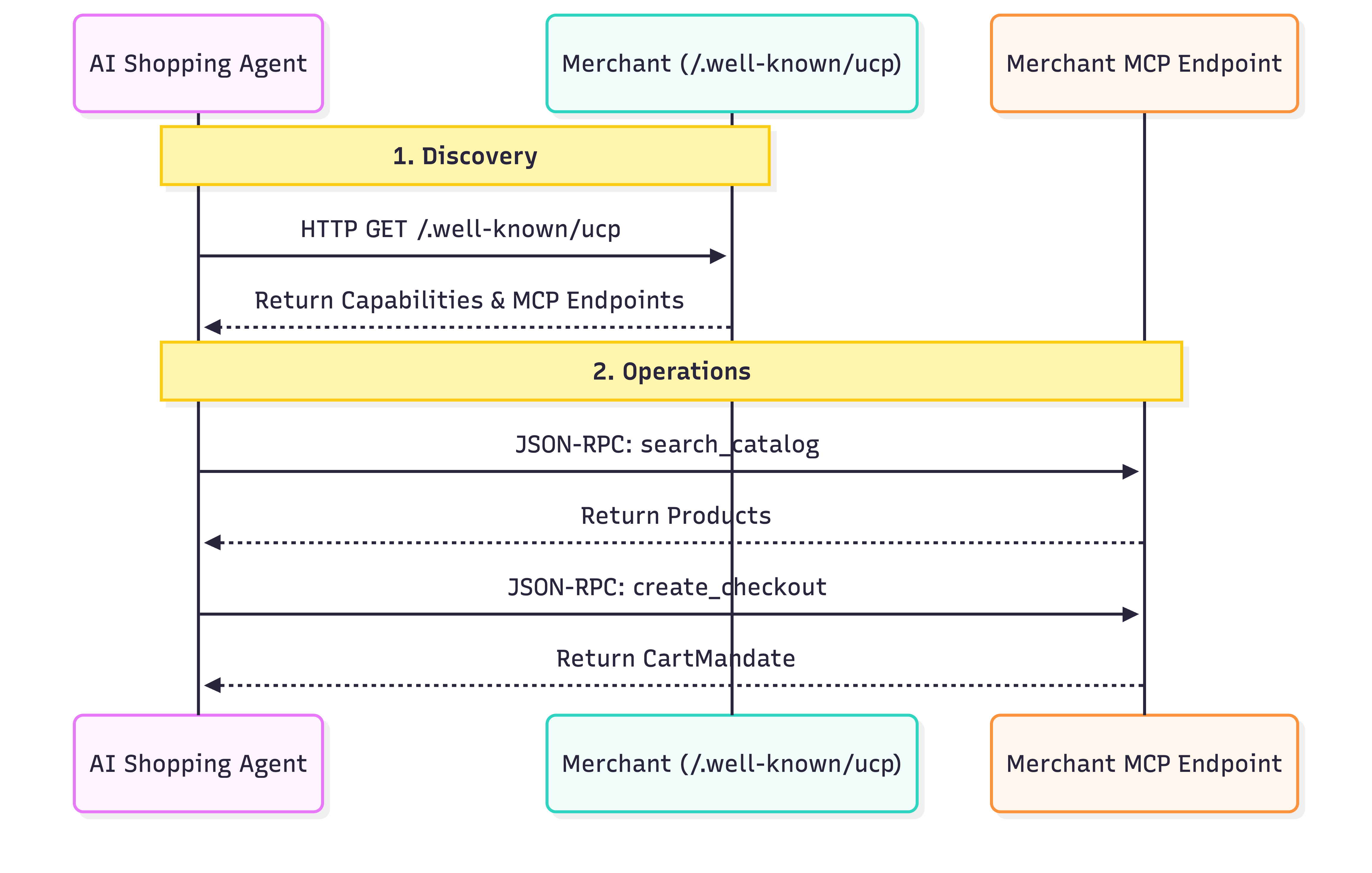
- การค้นพบ: ผู้ขายทุกรายที่ปฏิบัติตามข้อกำหนดของ UCP จะแสดงโปรไฟล์ในตำแหน่งมาตรฐาน
/.well-known/ucpตัวอย่าง: ปลายทาง UCP ของ Everlane เมื่อตัวแทนอ่านโปรไฟล์นี้ ระบบจะค้นหาข้อมูลต่อไปนี้- ความสามารถ: ฟีเจอร์หลักแบบสแตนด์อโลนที่ธุรกิจรองรับ เช่น การค้นหาแคตตาล็อกหรือการชำระเงิน
- บริการ: เลเยอร์การสื่อสารระดับล่างที่ใช้ในการแลกเปลี่ยนข้อมูล ตัวอย่างเช่น REST API, MCP (Model Context Protocol), A2A (Agent2Agent Protocol)
- ส่วนขยาย: หากผู้ขายต้องการลักษณะการทำงานเฉพาะ ก็สามารถกำหนดส่วนขยายที่กำหนดเองในโปรไฟล์นี้ได้
- การดำเนินการ: เมื่อค้นพบแล้ว เอเจนต์จะใช้ปลายทางบริการที่ระบุเพื่อดำเนินการ ใน Codelab นี้ เราจะใช้ Model Context Protocol (MCP) เป็นการรับส่งบริการ เอเจนต์จะเรียกใช้ JSON-RPC 2.0 ไปยังปลายทางนี้เพื่อเรียกใช้ความสามารถที่ค้นพบ ได้แก่ การค้นหาสินค้า การสร้างชำระเงิน และการซื้อให้เสร็จสมบูรณ์
Agent Payments Protocol (AP2)
AP2 ทำให้การให้สิทธิ์การชำระเงินโดยตัวแทนในนามของผู้ใช้เป็นมาตรฐาน ซึ่งช่วยแก้ปัญหาด้านความปลอดภัยของตัวแทนที่จัดการข้อมูลเข้าสู่ระบบการชำระเงินที่ละเอียดอ่อน
วิธีการทำงาน
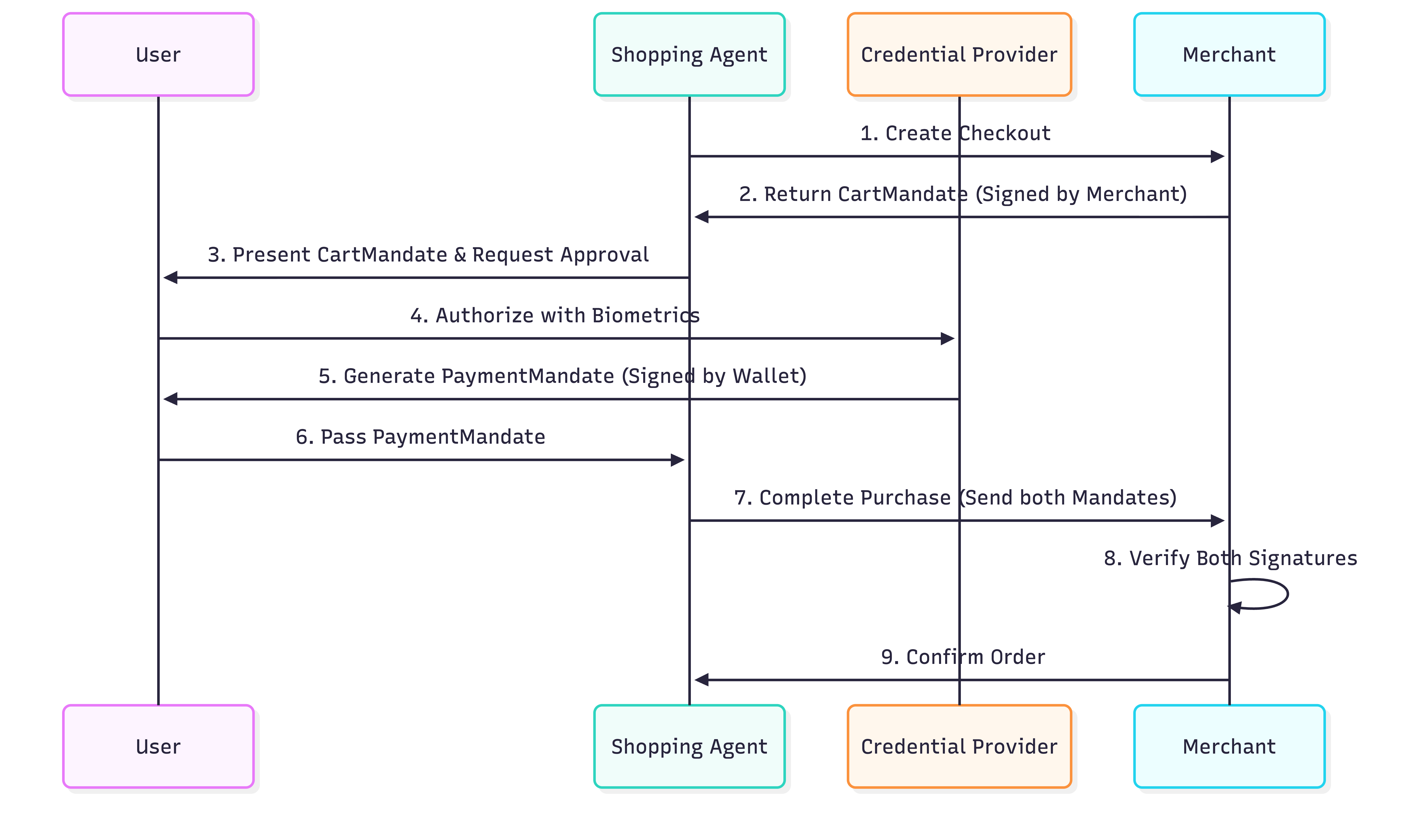
- คำสั่งรถเข็น: เมื่อ Agent สร้างการชำระเงินโดยใช้โปรโตคอล UCP ผู้ขายจะแสดง
CartMandateซึ่งเป็นออบเจ็กต์ JSON ที่มีรายละเอียดรถเข็นช็อปปิ้งและลายเซ็นเข้ารหัสจากผู้ขาย ซึ่งทำหน้าที่เป็นการรับประกันการล็อกราคา ผู้ขายจะเปลี่ยนราคาหลังจากออกคำสั่งนี้ไม่ได้ - หนังสือมอบอำนาจการชำระเงิน: หลังจากยืนยันเนื้อหาในรถเข็นแล้ว ผู้ใช้ (หรือตัวแทนในนามของผู้ใช้) จะสร้าง
PaymentMandateเพื่อให้สิทธิ์การชำระเงินPaymentMandateนี้อ้างอิงถึงCartMandateและรวมลายเซ็นเข้ารหัส (หรือโทเค็นการให้สิทธิ์) ของผู้ใช้ - การยืนยันลายเซ็น 2 ครั้ง: ผู้ขายจะได้รับทั้ง 2 คำสั่ง โดยจะยืนยันลายเซ็นของตนเองใน
CartMandateและลายเซ็นของผู้ใช้ในPaymentMandateหากทั้ง 2 อย่างถูกต้อง ธุรกรรมจะดำเนินการต่อ
ระบบ "ล็อก 2 ชั้น" นี้ช่วยให้มั่นใจได้ว่าผู้ขายจะเรียกเก็บเงินเกินไม่ได้ และตัวแทนจะใช้จ่ายโดยไม่ได้รับอนุญาตไม่ได้ ในเวอร์ชันที่ใช้งานจริง ข้อกำหนดเหล่านี้ใช้ SD-JWT (JWT การเปิดเผยข้อมูลแบบเลือก) เพื่อปกป้องความเป็นส่วนตัวของผู้ใช้
3. ตั้งค่าสภาพแวดล้อม
การตั้งค่าโปรเจ็กต์ Google Cloud
สร้างโปรเจ็กต์ Google Cloud
- ในคอนโซล Google Cloud ให้เลือกหรือสร้างโปรเจ็กต์ Google Cloud ในหน้าตัวเลือกโปรเจ็กต์
- ตรวจสอบว่าได้เปิดใช้การเรียกเก็บเงินสำหรับโปรเจ็กต์ Cloud แล้ว ดูวิธีตรวจสอบว่าได้เปิดใช้การเรียกเก็บเงินในโปรเจ็กต์แล้วหรือไม่
เริ่มต้น Cloud Shell
Cloud Shell คือสภาพแวดล้อมบรรทัดคำสั่งที่ทำงานใน Google Cloud ซึ่งโหลดเครื่องมือที่จำเป็นไว้ล่วงหน้า
- คลิกเปิดใช้งาน Cloud Shell ที่ด้านบนของคอนโซล Google Cloud
- เมื่อเชื่อมต่อกับ Cloud Shell แล้ว ให้ยืนยันการตรวจสอบสิทธิ์โดยทำดังนี้
gcloud auth list - ตรวจสอบว่าได้กำหนดค่าโปรเจ็กต์แล้ว
gcloud config get project - หากไม่ได้ตั้งค่าโปรเจ็กต์ตามที่คาดไว้ ให้ตั้งค่าดังนี้
export PROJECT_ID=<YOUR_PROJECT_ID>
gcloud config set project $PROJECT_ID
เข้าถึงโมเดล Gemini
ในสภาพแวดล้อม Cloud Shell ให้คัดลอกและวางคำสั่งต่อไปนี้ ซึ่งจะช่วยให้เข้าถึงโมเดล Gemini ที่ Cine Agent จะใช้ได้
export GOOGLE_CLOUD_PROJECT=$PROJECT_ID
export GOOGLE_CLOUD_LOCATION=global
export GOOGLE_GENAI_USE_VERTEXAI=True
ตั้งค่าโครงสร้างไดเรกทอรี
คัดลอกและวางคำสั่งต่อไปนี้เพื่อสร้างไดเรกทอรีใหม่สำหรับตัวแทน
mkdir -p agent_payments
cd agent_payments
ติดตั้งการอ้างอิง
Google Cloud Shell มาพร้อมกับ uv ที่ติดตั้งไว้ล่วงหน้าเพื่อจัดการสภาพแวดล้อมและทรัพยากร Dependency
- สร้างไฟล์
pyproject.tomlที่รูทของโฟลเดอร์agent_paymentsแล้วเพิ่มเนื้อหาต่อไปนี้ลงในไฟล์ ไฟล์นี้กำหนดข้อมูลเมตาและทรัพยากร Dependency ของโปรเจ็กต์
[project]
name = "agent-payments-demo"
version = "0.1.0"
description = "CineAgent booking agent using UCP and AP2"
requires-python = ">=3.11"
dependencies = [
    "google-adk>=1.29.0",
    "google-genai>=1.27.0",
    "fastapi>=0.115.0",
    "uvicorn>=0.34.0",
    "httpx>=0.28.0",
    "ap2 @ git+https://github.com/google-agentic-commerce/AP2.git@main",
    "ucp-sdk @ git+https://github.com/Universal-Commerce-Protocol/python-sdk.git@main",
]
- เรียกใช้คำสั่งต่อไปนี้เพื่อสร้างสภาพแวดล้อมเสมือนและติดตั้งทรัพยากร Dependency ทั้งหมด
uv sync
- เปิดใช้งานสภาพแวดล้อมเสมือนที่สร้างโดย
uvโดยใช้คำสั่งต่อไปนี้
source .venv/bin/activate
4. กำหนด Agent
ก่อนเขียนตรรกะของเครื่องมือใดๆ เรามากำหนดเอเจนต์ในไฟล์ที่ชื่อ agent.py กันก่อน เอเจนต์นี้จะทำหน้าที่เป็นผู้ประสานงานสำหรับขั้นตอนการจองภาพยนตร์
สร้าง agent.py:
"""CineAgent — movie ticket booking agent using UCP and AP2."""

from google.adk.agents import Agent
from google.adk.tools import FunctionTool
from agent_payments.tools import (
    discover_theaters,
    search_movies,
    get_movie_detail,
    create_checkout,
    complete_purchase,
)

root_agent = Agent(
    model="gemini-3.1-pro-preview",
    name="cineagent",
    description="Movie ticket booking agent using UCP and AP2.",
    instruction="""You are CineAgent, a movie ticket booking assistant.

You help users find and book movie tickets across multiple theaters
using UCP (Universal Commerce Protocol) and AP2 (Agent Payments).

**Your tools:**
- discover_theaters: Find theaters and what they support
- search_movies: Search movies across all theaters
- get_movie_detail: Get showtimes at a specific theater
- create_checkout: Start a checkout session
- complete_purchase: Finalize with AP2 mandate signing

**Rules:**
- Always call discover_theaters first if you haven't yet
- Keep responses concise — summarize and suggest next steps
- Prices from tools are in cents (1500 = $15.00)
- Never invent data — only state what tools return
""",
    tools=[
        discover_theaters,
        search_movies,
        get_movie_detail,
        create_checkout,
        FunctionTool(complete_purchase, require_confirmation=True),
    ],
)
คำอธิบายโค้ด
มาดูรายละเอียดสิ่งที่เกิดขึ้นในคำจำกัดความของ Agent นี้กัน
model="gemini-3.1-pro-preview": เราใช้โมเดลตัวอย่าง Gemini Pro ล่าสุดสำหรับการให้เหตุผลที่ซับซ้อนและการใช้เครื่องมือinstruction: นี่คือพรอมต์ที่กำหนดลักษณะการทำงานของเอเจนต์ โดยจะบอกเอเจนต์อย่างชัดเจนให้ใช้ UCP และ AP2 แสดงรายการเครื่องมือที่มี และกำหนดกฎที่สำคัญ เช่น "ห้ามสร้างข้อมูลขึ้นมา" และ "ราคาเป็นหน่วยเซ็นต์"tools: นี่คือรายการฟังก์ชัน Python (ซึ่งเราจะสร้างขึ้นในขั้นตอนถัดไป) ที่เอเจนต์สามารถเลือกเรียกใช้ตามคำขอของผู้ใช้require_confirmation: คุณสามารถห่อหุ้มเครื่องมือใดก็ได้ด้วยFunctionTool(my_function,require_confirmation=True)เมื่อทริกเกอร์ทำงาน เอเจนต์จะหยุดชั่วคราวและรอการอนุมัติแบบง่ายๆ ว่า "ใช่" หรือ "ไม่" ก่อนที่จะดำเนินการเครื่องมือ ในที่นี้ ก่อนที่จะเรียกใช้เครื่องมือcomplete_purchaseAgent จะหยุดชั่วคราวเพื่อรอการยืนยันจากเจ้าหน้าที่
รายการเครื่องมือ
คำจำกัดความของ Agent จะประกาศสิ่งที่เราต้องสร้าง เครื่องมือแต่ละอย่างจะเชื่อมโยงกับการดำเนินการที่เฉพาะเจาะจงในโปรโตคอล UCP หรือ AP2 ดังนี้
เครื่องมือ | การทำงาน | การดำเนินการของโปรโตคอล |
| ค้นหาผู้ขายและความสามารถของผู้ขาย | คำค้นหา |
| ค้นหาแคตตาล็อกของผู้ขาย | JSON-RPC ไปยังอุปกรณ์ปลายทาง MCP |
| ดูรอบฉายที่ผู้ขายรายหนึ่งๆ | JSON-RPC ไปยังอุปกรณ์ปลายทาง MCP |
| เริ่มเซสชันการชำระเงิน | JSON-RPC ไปยังอุปกรณ์ปลายทาง MCP |
| ให้สิทธิ์การชำระเงินและทำคำสั่งซื้อให้เสร็จสมบูรณ์ | Signs AP2 Mandate & sends to MCP |
โมเดล Gemini จะตัดสินใจว่าจะเรียกใช้เครื่องมือแต่ละอย่างเมื่อใดโดยอิงตามการสนทนา งานต่อไปของเราคือการนำสิ่งที่เครื่องมือแต่ละอย่างทำไปใช้ใน tools.py
5. สร้างเครื่องมือของเอเจนต์: การค้นหาและการเรียกดู
ตอนนี้เรามาใช้เครื่องมือที่เอเจนต์จะใช้เพื่อเรียกดูและค้นพบภาพยนตร์กัน เครื่องมือแต่ละอย่างจะครอบคลุมการดำเนินการ UCP
สร้างไฟล์ใหม่ชื่อ tools.py แล้วคัดลอกโค้ดต่อไปนี้ไปวาง
"""Agent tools — each one wraps a UCP or AP2 operation."""

import asyncio
import json

from .ucp import UCPClient
from .ap2 import AP2Handler

# Initialize clients directly
_merchant_urls = ["http://localhost:8081", "http://localhost:8082"]
_ucp = UCPClient()
_ap2 = AP2Handler()
ทำความเข้าใจการตั้งค่า
เราใช้คลาสตัวช่วย 2 คลาส ได้แก่ UCPClient และ AP2Handler เพื่อให้ Codelab นี้มุ่งเน้นที่การสร้างเอเจนต์ ซึ่งเราจะดูในขั้นตอนถัดไป
- การแจ้งเตือนคืออะไร ซึ่งเป็นคลาส Helper ที่เขียนด้วยมือที่เราสร้างขึ้นสำหรับ Codelab นี้เพื่อจำลองการโต้ตอบกับผู้ขายจำลอง เนื่องจาก SDK อย่างเป็นทางการของ UCP และ AP2 ยังไม่พร้อมใช้งาน เราจึงใช้ตัวช่วยเหล่านี้เพื่อเชื่อมช่องว่าง ในสภาพแวดล้อมฮาร์ดแวร์และซอฟต์แวร์ คุณจะใช้ SDK อย่างเป็นทางการเมื่อพร้อมให้บริการ
- ตอนนี้ให้ถือว่าออบเจ็กต์เหล่านี้เป็นออบเจ็กต์ตัวช่วย:
_ucp.discover(url): ดึงข้อมูลโปรไฟล์ของผู้ขาย_ucp.mcp_call(url, method, params): ส่งคำขอ JSON-RPC 2.0 ไปยังปลายทาง MCP ของผู้ขาย
ค้นหาโรงภาพยนตร์
เครื่องมือนี้เป็นขั้นตอนแรกในโฟลว์ UCP โดยจะค้นหาผู้ขายที่มีอยู่และสิ่งที่ผู้ขายรองรับ
เพิ่มไปยัง tools.py
async def discover_theaters() -> str:
    """Discover available theater merchants and their capabilities via UCP."""
    theaters = []
    for url in _merchant_urls:
        info = await _ucp.discover(url)
        theaters.append(
            {
                "url": url,
                "name": info["name"],
                "capabilities": info["capabilities"],
                "payment_handlers": info["payment_handlers"],
            }
        )
    return json.dumps(theaters, indent=2)
สิ่งที่ฟีเจอร์นี้ทำ
- โดยจะวนซ้ำในรายการ URL ของผู้ขายที่เซิร์ฟเวอร์ระบุ ใน Codelab นี้ เราจะตั้งค่าผู้ขายจำลอง 2 รายในส่วนถัดไป
- สำหรับแต่ละ URL ระบบจะเรียกใช้
_ucp.discover(url)ซึ่งจะส่งคำขอไปยังปลายทาง/.well-known/ucp - โดยจะรวบรวมชื่อ ความสามารถ และตัวแฮนเดิลการชำระเงินไว้ในรายการสรุป
- โดยจะแสดงผลรายการเป็นสตริง JSON เพื่อให้ตัวแทนอ่าน
ค้นหาภาพยนตร์
เครื่องมือนี้จะค้นหาผู้ขายทั้งหมดที่พบและผสานผลลัพธ์ ซึ่งเป็นสิ่งสำคัญเนื่องจากภาพยนตร์เรื่องเดียวกันอาจฉายในโรงภาพยนตร์หลายแห่งที่มีรูปแบบ (IMAX, Dolby) และราคาแตกต่างกัน
เพิ่มไปยัง tools.py
async def search_movies(query: str = "") -> str:
    """Search for movies across all theaters. Use '' to browse all."""
    all_movies = {}
    for url, merchant in _ucp.merchants.items():
        result = await _ucp.mcp_call(url, "search_catalog", {"query": query})
        for product in result.get("products", []):
            mid = product["id"]
            if mid not in all_movies:
                all_movies[mid] = {
                    "id": mid,
                    "title": product["title"],
                    "categories": product.get("categories", []),
                    "theaters": {},
                }
            showtimes = []
            for v in product.get("variants", []):
                opts = {
                    o["name"]: o["value"]
                    for o in v.get("selected_options", [])
                }
                showtimes.append(
                    {
                        "id": v["id"],
                        "format": opts.get("format", "Standard"),
                        "time": opts.get("time", ""),
                        "price": v.get("price", {}),
                        "seats": v.get("availability", {}).get(
                            "seats_available", 0
                        ),
                    }
                )
            all_movies[mid]["theaters"][url] = {
                "name": merchant["name"],
                "showtimes": showtimes,
            }
    return json.dumps(list(all_movies.values()), indent=2)
สิ่งที่ฟีเจอร์นี้ทำ
- โดยจะวนซ้ำโรงภาพยนตร์ทั้งหมดที่ค้นพบ
- โดยจะส่งคำขอ JSON-RPC แคตตาล็อกการค้นหา (
_ucp.mcp_call(url, "search_catalog", {"query": query})) ไปยังปลายทาง MCP ของผู้ขาย - จากนั้นระบบจะทำการล้างข้อมูลเล็กน้อยเพื่อแยกวิเคราะห์ผลการค้นหาเพื่อค้นหาภาพยนตร์และ "ตัวแปร" ของภาพยนตร์ (ซึ่งแสดงถึงเวลาฉายและรูปแบบที่เฉพาะเจาะจง) จัดกลุ่มภาพยนตร์ตามรหัสเพื่อให้ผู้ใช้ไม่เห็นรายการภาพยนตร์ที่ซ้ำกัน
รับรายละเอียดภาพยนตร์
เครื่องมือนี้จะดึงรายละเอียดแคตตาล็อกทั้งหมดสำหรับภาพยนตร์เรื่องหนึ่งๆ ในโรงภาพยนตร์ที่เฉพาะเจาะจง
เพิ่มไปยัง tools.py
async def get_movie_detail(movie_id: str, merchant_url: str) -> str:
    """Get detailed showtimes for a movie at a specific theater."""
    result = await _ucp.mcp_call(
        merchant_url, "lookup_catalog", {"product_id": movie_id}
    )
    return json.dumps(result, indent=2)
สิ่งที่ฟีเจอร์นี้ทำ
- โดยจะเรียกใช้เมธอด
lookup_catalogที่ปลายทาง MCP ของผู้ขาย พร้อมส่งmovie_idที่เฉพาะเจาะจง ซึ่งจะแสดงข้อมูลโดยละเอียด เช่น เวลาฉายและความพร้อมจำหน่ายที่นั่งสำหรับโรงภาพยนตร์นั้นๆ
6. สร้างเครื่องมือตัวแทน: ชำระเงิน
เครื่องมือเหล่านี้จะจัดการขั้นตอนการชำระเงินและการซื้อ ซึ่งเป็นจุดที่โปรโตคอล AP2 เข้ามามีบทบาทในการรับประกันธุรกรรมที่ปลอดภัย
สร้างการชำระเงิน
เครื่องมือนี้จะเริ่มเซสชันการชำระเงินที่โรงภาพยนตร์ที่เฉพาะเจาะจงสำหรับเวลาฉายที่เฉพาะเจาะจง
เพิ่มไปยัง tools.py
async def create_checkout(
    merchant_url: str, showtime_id: str, quantity: int = 1
) -> str:
    """Create a checkout session for tickets at a theater."""
    result = await _ucp.mcp_call(merchant_url, "create_checkout", {
        "checkout": {
            "line_items": [
                {"item": {"id": showtime_id}, "quantity": quantity}
            ],
            "context": {"country": "US", "currency": "USD"},
        }
    })
    return json.dumps(result, indent=2)
สิ่งที่ฟีเจอร์นี้ทำ
- โดยจะเรียกใช้เมธอด
create_checkoutที่ปลายทาง MCP ของผู้ขาย - โดยจะส่ง
showtime_idและquantityที่ผู้ใช้ขอ - ผู้ขายจะส่งคืนออบเจ็กต์ JSON ที่มี AP2 CartMandate
หมายเหตุ: หากตรวจสอบข้อมูลการตอบกลับ ap2.cart_mandate จะมีฟิลด์ merchant_authorization นี่คือลายเซ็นเข้ารหัสของผู้ขายที่ล็อกราคาที่เสนอ โดยผู้ใช้จะเปลี่ยนชื่อในภายหลังไม่ได้
ดำเนินการซื้อให้เสร็จสมบูรณ์
เครื่องมือนี้จะดำเนินการ 3 อย่าง ได้แก่
- เราจะรับ CartMandate จากการชำระเงินและยืนยัน (จำลอง)
- สร้างและลงนามในPaymentMandate (จำลอง)
- ส่งหนังสือมอบอำนาจที่ลงนามแล้วให้ผู้ขายเพื่อทำการซื้อให้เสร็จสมบูรณ์
เพิ่มไปยัง tools.py
async def complete_purchase(
    checkout_id: str, merchant_url: str, payment_method: str = "card"
) -> str:
    """Complete purchase with AP2 payment authorization."""
    # 1. Get the CartMandate from the checkout
    checkout = await _ucp.mcp_call(
        merchant_url, "get_checkout", {"checkout": {"id": checkout_id}}
    )
    cart_mandate = _ap2.process_cart_mandate(checkout)
    if not cart_mandate:
        return {"error": "No cart mandate — checkout may have expired"}

    # 2-3. Create and sign the PaymentMandate
    # In production, this call would trigger a user prompt (biometric or device auth)
    # via the AP2 Wallet SDK. In this demo, it just computes a mock SHA-256 hash.
    payment_mandate = _ap2.create_payment_mandate(cart_mandate, payment_method)

    # 4. Send both mandates to complete the purchase
    result = await _ucp.mcp_call(merchant_url, "complete_checkout", {
        "checkout": {
            "id": checkout_id,
            "payment": {
                "instruments": [{
                    "handler_id": f"card_{merchant_url.split(':')[-1]}",
                    "type": "card",
                }],
            },
            "ap2": {"payment_mandate": payment_mandate},
        }
    })
    return json.dumps(result, indent=2)
เหตุใดจึงต้องมี 2 คำสั่ง CartMandate ช่วยให้มั่นใจได้ว่าผู้ขายจะไม่สามารถเปลี่ยนแปลงราคาหลังจากเสนอราคาแล้ว PaymentMandate ช่วยให้มั่นใจได้ว่าตัวแทนจะไม่สามารถเรียกเก็บเงินจากผู้ใช้โดยไม่ได้รับความยินยอม ขั้นตอนมีดังนี้
Merchant locks price -> User authorizes charge -> Merchant verifies both -> Order completes
จุดตรวจ: เต็ม tools.py
ตอนนี้ tools.py ที่สมบูรณ์ของคุณควรมีฟังก์ชันเครื่องมือ 5 รายการและการเริ่มต้นระดับโมดูลสำหรับไคลเอ็นต์ UCP และ AP2 ตรวจสอบว่ามีลักษณะดังนี้
"""Agent tools — each one wraps a UCP or AP2 operation."""

import asyncio
import json

from ucp import UCPClient
from ap2 import AP2Handler

# Initialize clients directly
_merchant_urls = ["http://localhost:8081", "http://localhost:8082"]
_ucp = UCPClient()
_ap2 = AP2Handler()


async def discover_theaters() -> str:
    """Discover available theater merchants and their capabilities via UCP."""
    theaters = []
    for url in _merchant_urls:
        info = await _ucp.discover(url)
        theaters.append(
            {
                "url": url,
                "name": info["name"],
                "capabilities": info["capabilities"],
                "payment_handlers": info["payment_handlers"],
            }
        )
    return json.dumps(theaters, indent=2)


async def search_movies(query: str = "") -> str:
    """Search for movies across all theaters. Use '' to browse all."""
    all_movies = {}
    for url, merchant in _ucp.merchants.items():
        result = await _ucp.mcp_call(url, "search_catalog", {"query": query})
        for product in result.get("products", []):
            mid = product["id"]
            if mid not in all_movies:
                all_movies[mid] = {
                    "id": mid,
                    "title": product["title"],
                    "categories": product.get("categories", []),
                    "theaters": {},
                }
            showtimes = []
            for v in product.get("variants", []):
                opts = {
                    o["name"]: o["value"]
                    for o in v.get("selected_options", [])
                }
                showtimes.append(
                    {
                        "id": v["id"],
                        "format": opts.get("format", "Standard"),
                        "time": opts.get("time", ""),
                        "price": v.get("price", {}),
                        "seats": v.get("availability", {}).get(
                            "seats_available", 0
                        ),
                    }
                )
            all_movies[mid]["theaters"][url] = {
                "name": merchant["name"],
                "showtimes": showtimes,
            }
    return json.dumps(list(all_movies.values()), indent=2)


async def get_movie_detail(movie_id: str, merchant_url: str) -> str:
    """Get detailed showtimes for a movie at a specific theater."""
    result = await _ucp.mcp_call(
        merchant_url, "lookup_catalog", {"product_id": movie_id}
    )
    return json.dumps(result, indent=2)


async def create_checkout(
    merchant_url: str, showtime_id: str, quantity: int = 1
) -> str:
    """Create a checkout session for tickets at a theater."""
    result = await _ucp.mcp_call(merchant_url, "create_checkout", {
        "checkout": {
            "line_items": [
                {"item": {"id": showtime_id}, "quantity": quantity}
            ],
            "context": {"country": "US", "currency": "USD"},
        }
    })
    return json.dumps(result, indent=2)


async def complete_purchase(
    checkout_id: str, merchant_url: str, payment_method: str = "card"
) -> str:
    """Complete purchase with AP2 payment authorization."""
    # 1. Get the CartMandate from the checkout
    checkout = await _ucp.mcp_call(
        merchant_url, "get_checkout", {"checkout": {"id": checkout_id}}
    )
    cart_mandate = _ap2.process_cart_mandate(checkout)
    if not cart_mandate:
        return {"error": "No cart mandate — checkout may have expired"}

    # 2-3. Create and sign the PaymentMandate
    # In production, this call would trigger a user prompt (biometric or device auth)
    # via the AP2 Wallet SDK. In this demo, it just computes a mock SHA-256 hash.
    payment_mandate = _ap2.create_payment_mandate(cart_mandate, payment_method)

    # 4. Send both mandates to complete the purchase
    result = await _ucp.mcp_call(merchant_url, "complete_checkout", {
        "checkout": {
            "id": checkout_id,
            "payment": {
                "instruments": [{
                    "handler_id": f"card_{merchant_url.split(':')[-1]}",
                    "type": "card",
                }],
            },
            "ap2": {"payment_mandate": payment_mandate},
        }
    })
    return json.dumps(result, indent=2)
7. ทำให้เรียกใช้ได้
หากเป็นผู้ขาย UCP จริง คุณจะชี้ URL ของผู้ขายให้ตัวแทนดูและจบการสนทนา สำหรับ Codelab นี้ เราต้องมี 2 สิ่งเพื่อทดสอบในเครื่อง
- ผู้ขายจำลอง - เซิร์ฟเวอร์ในพื้นที่ที่จำลองปลายทาง UCP เพื่อให้คุณมีสิ่งที่ใช้ทดสอบ
- ตัวช่วยโปรโตคอล - ตัวห่อหุ้ม HTTP แบบบางสำหรับ UCP และ AP2 (ในเวอร์ชันที่ใช้งานจริง SDK อย่างเป็นทางการจะแทนที่ตัวช่วยเหล่านี้)
หมายเหตุ: คุณไม่จำเป็นต้องอ่านโค้ดนี้อย่างละเอียด ไฟล์เหล่านี้จำลองสิ่งที่โครงสร้างพื้นฐานและ SDK จริงจะให้ คัดลอกตามที่แสดง
ผู้ช่วยด้านโปรโตคอล
UCP และ AP2 ยังไม่มี SDK ของไคลเอ็นต์ โดยไฟล์ทั้ง 2 นี้จะจัดการการเชื่อมต่อ HTTP
สร้าง ucp.py:
"""UCP client — discovers merchants and calls their MCP tools."""

import uuid
import httpx


class UCPClient:
    def __init__(self):
        self.client = httpx.AsyncClient(timeout=30)
        self.merchants = {}  # url -> merchant info dict

    async def discover(self, merchant_url: str) -> dict:
        """Fetch a merchant's UCP profile from /.well-known/ucp."""
        resp = await self.client.get(f"{merchant_url}/.well-known/ucp")
        resp.raise_for_status()
        profile = resp.json()
        ucp = profile["ucp"]
        info = {
            "name": merchant_url.split("//")[-1],
            "mcp_endpoint": ucp["services"]["dev.ucp.shopping"][0]["endpoint"],
            "capabilities": list(ucp.get("capabilities", {}).keys()),
            "payment_handlers": list(ucp.get("payment_handlers", {}).keys()),
        }
        self.merchants[merchant_url] = info
        return info

    async def mcp_call(
        self, merchant_url: str, tool_name: str, arguments: dict
    ) -> dict:
        """Call a merchant's MCP tool via JSON-RPC 2.0."""
        merchant = self.merchants[merchant_url]
        resp = await self.client.post(
            merchant["mcp_endpoint"],
            json={
                "jsonrpc": "2.0",
                "id": uuid.uuid4().hex,
                "method": "tools/call",
                "params": {"name": tool_name, "arguments": arguments},
            },
        )
        resp.raise_for_status()
        data = resp.json()
        if "error" in data:
            raise Exception(f"MCP error: {data['error']}")
        return data.get("result", {})

    async def close(self):
        await self.client.aclose()
สร้าง ap2.py:
"""AP2 mandate handler — creates and signs payment mandates."""

import uuid
import hashlib


class AP2Handler:
    def process_cart_mandate(self, checkout_response: dict) -> dict | None:
        """Extract the merchant-signed CartMandate from a checkout response.

        The CartMandate is the merchant's cryptographic price guarantee —
        it locks the total so it can't change between checkout and payment.
        """
        return checkout_response.get("ap2", {}).get("cart_mandate")

    def create_payment_mandate(
        self, cart_mandate: dict, payment_method: str = "card"
    ) -> dict:
        """Create and sign a PaymentMandate authorizing payment.

        References the merchant's CartMandate and adds user authorization.
        Together they form a two-party agreement: merchant guarantees price,
        user authorizes charge.
        """
        contents = cart_mandate["contents"]
        mandate_id = uuid.uuid4().hex

        return {
            "mandate_id": mandate_id,
            "cart_reference": contents["id"],
            "merchant": contents["merchant_name"],
            "total": contents["total"],
            "payment_method": payment_method,
            "user_authorization": self._sign(mandate_id, contents["id"]),
        }

    def _sign(self, mandate_id: str, checkout_id: str) -> str:
        """Sign the mandate. Production uses real crypto (sd-jwt-vc)."""
        payload = f"{mandate_id}:{checkout_id}"
        return hashlib.sha256(payload.encode()).hexdigest()
ผู้ขายจำลอง
สร้าง merchants.py:
"""Mock UCP merchant servers — two theaters with different capabilities."""

import uuid
import time
import multiprocessing
from datetime import datetime, timezone, timedelta

import uvicorn
from fastapi import FastAPI

# ── Theater data ────────────────────────────────────────────

THEATERS = {
    8081: {
        "name": "Meridian Cinemas",
        "movies": [
            {
                "id": "opp",
                "title": "Oppenheimer",
                "categories": ["Drama", "History"],
                "showtimes": [
                    {"id": "st_opp_7pm_imax", "format": "IMAX", "time": "7:00 PM", "price": 2200, "seats": 45},
                    {"id": "st_opp_930pm", "format": "Standard", "time": "9:30 PM", "price": 1500, "seats": 80},
                ],
            },
            {
                "id": "dune3",
                "title": "Dune: Part Three",
                "categories": ["Sci-Fi", "Action"],
                "showtimes": [
                    {"id": "st_dune_8pm_imax", "format": "IMAX", "time": "8:00 PM", "price": 2200, "seats": 30},
                ],
            },
        ],
        "discounts": {},
    },
    8082: {
        "name": "StarLight Theaters",
        "movies": [
            {
                "id": "opp",
                "title": "Oppenheimer",
                "categories": ["Drama", "History"],
                "showtimes": [
                    {"id": "st_opp_6pm_atmos", "format": "Dolby Atmos", "time": "6:00 PM", "price": 1800, "seats": 60},
                ],
            },
            {
                "id": "spider",
                "title": "Spider-Verse",
                "categories": ["Animation", "Action"],
                "showtimes": [
                    {"id": "st_spider_4pm", "format": "Standard", "time": "4:00 PM", "price": 1200, "seats": 100},
                ],
            },
        ],
        "discounts": {},
    },
}


def create_app(port):
    theater = THEATERS[port]
    app = FastAPI()
    sessions = {}

    # ── UCP Discovery endpoint ──────────────────────────────
    @app.get("/.well-known/ucp")
    def discovery():
        caps = {
            "dev.ucp.shopping.catalog.search": [{"version": "2026-01-15"}],
            "dev.ucp.shopping.catalog.lookup": [{"version": "2026-01-15"}],
            "dev.ucp.shopping.checkout": [{"version": "2026-01-15"}],
            "dev.ucp.shopping.ap2_mandate": [{"version": "2026-01-15"}],
        }

        return {
            "ucp": {
                "version": "2026-01-15",
                "services": {
                    "dev.ucp.shopping": [
                        {"version": "2026-01-15", "transport": "mcp",
                         "endpoint": f"http://localhost:{port}/mcp"}
                    ]
                },
                "capabilities": caps,
                "payment_handlers": {
                    "com.example.card": [
                        {"id": f"card_{port}", "version": "2026-01-15",
                         "available_instruments": [{"type": "card"}], "config": {}}
                    ]
                },
            }
        }

    # ── MCP JSON-RPC endpoint ───────────────────────────────
    @app.post("/mcp")
    def mcp(body: dict):
        tool = body["params"]["name"]
        args = body["params"].get("arguments", {})
        rid = body.get("id", "1")

        if tool == "search_catalog":
            q = args.get("query", "").lower()
            hits = [m for m in theater["movies"]
                    if not q or q in m["title"].lower()
                    or any(q in c.lower() for c in m["categories"])]
            return _ok(rid, {"products": [_product(m) for m in hits]})

        if tool == "lookup_catalog":
            mid = args.get("product_id") or (args.get("ids", [None])[0])
            movie = next((m for m in theater["movies"] if m["id"] == mid), None)
            if not movie:
                return _err(rid, "Not found")
            return _ok(rid, {"products": [_product(movie)]})

        if tool == "create_checkout":
            co = args.get("checkout", {})
            sid = f"chk_{uuid.uuid4().hex[:12]}"
            items, subtotal = [], 0
            for li in co.get("line_items", []):
                st = _find_showtime(li["item"]["id"])
                if not st:
                    continue
                mv = _find_movie(li["item"]["id"])
                qty = li.get("quantity", 1)
                amt = st["price"] * qty
                subtotal += amt
                items.append({
                    "id": f"li_{uuid.uuid4().hex[:8]}",
                    "item": {
                        "id": st["id"],
                        "title": f"{mv['title']} — {st['format']} {st['time']}",
                        "price": st["price"],
                    },
                    "quantity": qty,
                    "totals": [{"type": "subtotal", "amount": amt}],
                })
            tax = int(subtotal * 0.08)
            total = subtotal + tax
            session = {
                "id": sid,
                "status": "ready_for_complete",
                "currency": "USD",
                "line_items": items,
                "totals": [
                    {"type": "subtotal", "display_text": "Subtotal", "amount": subtotal},
                    {"type": "tax", "display_text": "Tax", "amount": tax},
                    {"type": "total", "display_text": "Total", "amount": total},
                ],
                "metadata": {"theater_name": theater["name"]},
                "ap2": {
                    "cart_mandate": {
                        "contents": {
                            "id": sid,
                            "merchant_name": theater["name"],
                            "total": {
                                "label": "Total",
                                "amount": {"currency": "USD", "value": total / 100},
                            },
                            "cart_expiry": (
                                datetime.now(timezone.utc) + timedelta(minutes=10)
                            ).isoformat(),
                        },
                        "merchant_authorization": f"mock_merchant_sig_{sid}",
                    }
                },
            }
            sessions[sid] = session
            return _ok(rid, session)

        if tool == "get_checkout":
            sid = args.get("checkout", {}).get("id") or args.get("id")
            return _ok(rid, sessions.get(sid, {"error": "not_found"}))


        if tool == "complete_checkout":
            co = args.get("checkout", {})
            sid = co.get("id")
            session = sessions.get(sid)
            if not session:
                return _err(rid, "Not found")
            session["status"] = "completed"
            session["order"] = {
                "id": f"ord_{uuid.uuid4().hex[:8]}",
                "created_at": datetime.now(timezone.utc).isoformat(),
                "tickets": [
                    {
                        "movie": li["item"]["title"],
                        "quantity": li["quantity"],
                        "ticket_code": uuid.uuid4().hex[:8].upper(),
                    }
                    for li in session["line_items"]
                ],
            }
            session["ap2"]["payment_mandate_verified"] = True
            return _ok(rid, session)

        return _err(rid, f"Unknown tool: {tool}")

    def _ok(rid, result):
        return {"jsonrpc": "2.0", "id": rid, "result": result}

    def _err(rid, msg):
        return {"jsonrpc": "2.0", "id": rid, "error": {"code": -32000, "message": msg}}

    def _product(movie):
        return {
            "id": movie["id"],
            "title": movie["title"],
            "categories": movie["categories"],
            "variants": [
                {
                    "id": st["id"],
                    "selected_options": [
                        {"name": "format", "value": st["format"]},
                        {"name": "time", "value": st["time"]},
                    ],
                    "price": {"amount": st["price"], "currency": "USD"},
                    "availability": {"available": True, "seats_available": st["seats"]},
                }
                for st in movie["showtimes"]
            ],
        }

    def _find_showtime(sid):
        return next(
            (st for m in theater["movies"] for st in m["showtimes"] if st["id"] == sid),
            None,
        )

    def _find_movie(sid):
        return next(
            (m for m in theater["movies"] for st in m["showtimes"] if st["id"] == sid),
            None,
        )

    return app


def _run(port):
    uvicorn.run(create_app(port), host="0.0.0.0", port=port, log_level="warning")


if __name__ == "__main__":
    for port in THEATERS:
        multiprocessing.Process(target=_run, args=(port,), daemon=True).start()
    print("Merchants running: Meridian (:8081), StarLight (:8082)")
    print("Press Ctrl+C to stop")
    try:
        while True:
            time.sleep(1)
    except KeyboardInterrupt:
        pass
ซึ่งจะสร้างเซิร์ฟเวอร์ FastAPI 2 เครื่อง โดยแต่ละเครื่องจะมีปลายทาง 2 รายการ
GET /.well-known/ucp- การค้นพบ UCP แสดงความสามารถของผู้ขาย, URL ของอุปกรณ์ปลายทาง MCP และวิธีการชำระเงินที่ยอมรับPOST /mcp— การดำเนินการ MCP (Model Context Protocol) จัดการการเรียก JSON-RPC 2.0 สำหรับการค้นหาแคตตาล็อก การชำระเงิน ส่วนลด และการชำระเงิน
เริ่มผู้ขายในเทอร์มินัลใหม่ โดยผู้ขายต้องทำงานต่อไป
cd agent_payments
source .venv/bin/activate
python merchants.py
คุณควรเห็นข้อมูลต่อไปนี้
Merchants running: Meridian (:8081), StarLight (:8082)
กลับไปที่เทอร์มินัลแรก ให้ยืนยันการค้นพบ UCP ดังนี้
curl -s http://localhost:8081/.well-known/ucp | python -m json.tool
คุณควรเห็นความสามารถของผู้ขาย, URL ปลายทางของ MCP และตัวแฮนเดิลการชำระเงิน
8. เรียกใช้ Agent ด้วย ADK Web
มาใช้ Web UI ในตัวของ ADK CLI กัน ซึ่งจะแสดงอินเทอร์เฟซแชทในเบราว์เซอร์และจัดการข้อความแจ้งการยืนยันเครื่องมือโดยอัตโนมัติ
ตอนนี้โปรเจ็กต์ควรมีลักษณะดังนี้
agent_payments/
├── merchants.py      # Mock UCP merchants
├── ucp.py            # UCP client helper
├── ap2.py            # AP2 mandate handler
├── tools.py          # Agent tools
├── agent.py          # Agent definition
└── pyproject.toml
ลองใช้
ในเทอร์มินัลปัจจุบัน ให้ไปที่ไดเรกทอรีหลัก (โฟลเดอร์เหนือ agent_payments) แล้วเริ่ม ADK Web UI โดยทำดังนี้
cd ../
adk web --allow_origins '*'
คุณควรเห็นเอาต์พุตที่ระบุว่าเซิร์ฟเวอร์กำลังทำงาน และระบบจะให้ URL แก่คุณ (โดยปกติคือ http://localhost:8000 หรือคล้ายกัน)
พูดคุยกับตัวแทน
- เปิด URL ที่
adk webให้ไว้ในเบราว์เซอร์ - คุณจะเห็นอินเทอร์เฟซแชท
- ลองถามว่า "มีหนังเรื่องอะไรบ้าง"
- เอเจนต์จะค้นพบโรงภาพยนตร์และค้นหาแคตตาล็อกเบื้องหลัง โดยรวบรวมผลลัพธ์จากผู้ขายทั้ง 2 รายผ่าน UCP
- ขอจองตั๋ว: "จองตั๋ว Oppenheimer 2 ใบสำหรับรอบ 19:00 น."
- เมื่อตัวแทนพยายามโทรหา
complete_purchaseให้สังเกตว่า ADK Web UI จะแสดงกล่องโต้ตอบการยืนยันหรือการ์ดอย่างไร - หากต้องการให้สิทธิ์ทำธุรกรรม ให้ตอบกลับในแชทด้วยสตริง JSON นี้
{"confirmed": true} - ตัวแทนจะดำเนินการซื้อให้เสร็จสมบูรณ์และส่งการยืนยันคำสั่งซื้อพร้อมรหัสตั๋วให้คุณ
สิ่งที่จะเกิดขึ้นในเบื้องหลังมีดังนี้
create_checkout→ ผู้ขายส่งคืน CartMandate ของ AP2 (การล็อกราคาที่ลงนาม)complete_purchase→ สร้าง PaymentMandate ลงนาม (SHA-256 แบบจำลอง) และส่งทั้ง 2 คำสั่งไปยังผู้ขาย- ผู้ขายยืนยันลายเซ็นทั้ง 2 รายการ → ออกตั๋ว (ในการจำลอง)
9. ล้างข้อมูล
หากไม่ต้องการให้เซิร์ฟเวอร์ภายในทำงานต่อไป ให้ล้างข้อมูลทรัพยากรโดยทำดังนี้
- ในเทอร์มินัลที่เรียกใช้
adk webให้กด Ctrl+C เพื่อหยุดเซิร์ฟเวอร์ตัวแทน - ในเทอร์มินัลที่เรียกใช้
python merchants.pyให้กด Ctrl+C เพื่อหยุดผู้ขายจำลอง - ปิดใช้งานสภาพแวดล้อมเสมือนในทั้ง 2 เทอร์มินัลโดยเรียกใช้คำสั่งต่อไปนี้
deactivate
- (ไม่บังคับ) หากคุณสร้างโปรเจ็กต์ Google Cloud ใหม่สำหรับ Codelab นี้และต้องการลบ ให้เรียกใช้คำสั่งต่อไปนี้
gcloud projects delete $GOOGLE_CLOUD_PROJECT
10. ยินดีด้วย 🎉
คุณสร้าง ADK Agent ที่ค้นพบผู้ขาย เรียกดูแคตตาล็อก และทำการซื้อให้เสร็จสมบูรณ์โดยใช้ UCP และ AP2
สิ่งที่คุณได้เรียนรู้
ใน Codelab นี้ คุณได้สร้างเอเจนต์ ADK ที่จัดการโฟลว์อีคอมเมิร์ซที่ปลอดภัย สรุปสิ่งที่คุณสร้างและแนวคิดหลักที่คุณใช้มีดังนี้
สิ่งที่คุณสร้าง
- เครื่องมือสำหรับตัวแทน 5 รายการที่ครอบคลุมการดำเนินการ UCP และ AP2 ได้แก่ การค้นพบ การค้นหาแคตตาล็อก การชำระเงิน และการชำระเงิน
- การลงนามในหนังสือมอบอำนาจ AP2 - CartMandate (การล็อกราคาของผู้ขาย) + PaymentMandate (การให้สิทธิ์ของผู้ใช้)
- การค้นหาหลายผู้ขาย - ตัวแทนรายเดียวที่ค้นหาโรงภาพยนตร์หลายแห่งและผสานผลลัพธ์
แนวคิดหลัก:
โปรโตคอล | การทำงาน | วิธีการทำงาน |
การค้นพบ UCP | Agent ค้นหาผู้ขายและความสามารถของผู้ขาย |
|
UCP MCP | Agent จะเรียกดูแคตตาล็อกและสร้างการชำระเงิน | การเรียก JSON-RPC 2.0 ไปยังปลายทาง MCP ของผู้ขาย |
AP2 CartMandate | ผู้ขายล็อกราคาที่เสนอ | ผู้ขายลงนาม รวมถึงยอดรวม + วันหมดอายุ |
AP2 PaymentMandate | ผู้ใช้อนุญาตให้เรียกเก็บเงิน | ลงนามโดยผู้ใช้ อ้างอิงถึง CartMandate |
การผลิตแตกต่างกันอย่างไร
Codelab นี้ใช้การจำลอง ใช้งานจริง
- การค้นพบ UCP จะได้รับการแก้ไขกับรีจิสทรี ไม่ใช่ URL โลคัลโฮสต์ที่ฮาร์ดโค้ด
- ปลายทาง MCP โฮสต์โดยผู้ขายจริง ซึ่งใช้โปรโตคอล JSON-RPC 2.0 เดียวกันและมีสินค้าคงคลังจริง
- ข้อกำหนดของ AP2 ลงนามด้วย sd-jwt-vc ไม่ใช่แฮช SHA-256
- การให้สิทธิ์การชำระเงินใช้ AP2 Wallet SDK พร้อมข้อความแจ้งความยินยอมของผู้ใช้
- ฟรอนท์เอนด์แสดงผลลัพธ์ของเครื่องมือเป็น UI แบบริชมีเดีย (ตารางผลิตภัณฑ์ ข้อมูลสรุปการชำระเงิน การ์ดยืนยัน)
ขั้นตอนถัดไป
- สำรวจข้อกำหนดโปรโตคอล AP2 และสร้างเอเจนต์ที่เปิดใช้การชำระเงินของคุณเอง
- ใช้ UCP สำหรับผู้ขายเพื่อเปิดใช้ระบบอีคอมเมิร์ซแบบเป็น Agent
- เชื่อมต่อ AP2 กับ A2A สำหรับเวิร์กโฟลว์การค้าแบบหลายเอเจนต์
- ดูข้อมูลเกี่ยวกับส่วนขยาย AP2 x402 สำหรับการชำระเงินด้วยคริปโตเคอเรนซี