

1. 概览
在此 Codelab 中,您将运行一个 ADK 代理,该代理使用两种开源商务协议在多个影院商家处预订电影票:
- UCP(通用商务协议):一种标准,可让智能体发现商家、搜索目录和管理结账流程。
- AP2(Agent Payments Protocol,代理支付协议):一种使用加密签名授权书实现安全、可验证的支付授权的协议。
演示应用 CineAgent 可连接到两个具有不同功能的模拟影院商家(选座、特殊格式和付款方式),并编排从搜索到付款的完整预订流程。
学习内容
- UCP 如何通过
/.well-known/ucp资料发现商家 - ADK 代理如何使用 UCP 搜索目录和创建结账
- AP2 授权(CartMandate、PaymentMandate)如何保障交易安全
- 端到端 UCP 和 AP2 协议如何保障智能体电子商务的安全
所需条件
- 启用了结算功能的 Google Cloud 项目
- 网络浏览器,例如 Chrome
- Python 3.11+
此 Codelab 适用于对 Python 和 Google Cloud 有一定了解的中级开发者。完成本 Codelab 大约需要 15 分钟。
本 Codelab 中创建的资源费用应低于 5 美元。
2. 了解 UCP 和 AP2 协议
在深入了解如何构建智能体之前,我们先来了解一下使这种安全的智能体商务成为可能的两种协议。
通用商务协议 (UCP)
UCP 可标准化 AI 智能体与商家的互动方式。它通过引入标准化资源模型,解决了代理必须为每个商店学习自定义 API 的问题。
工作原理:
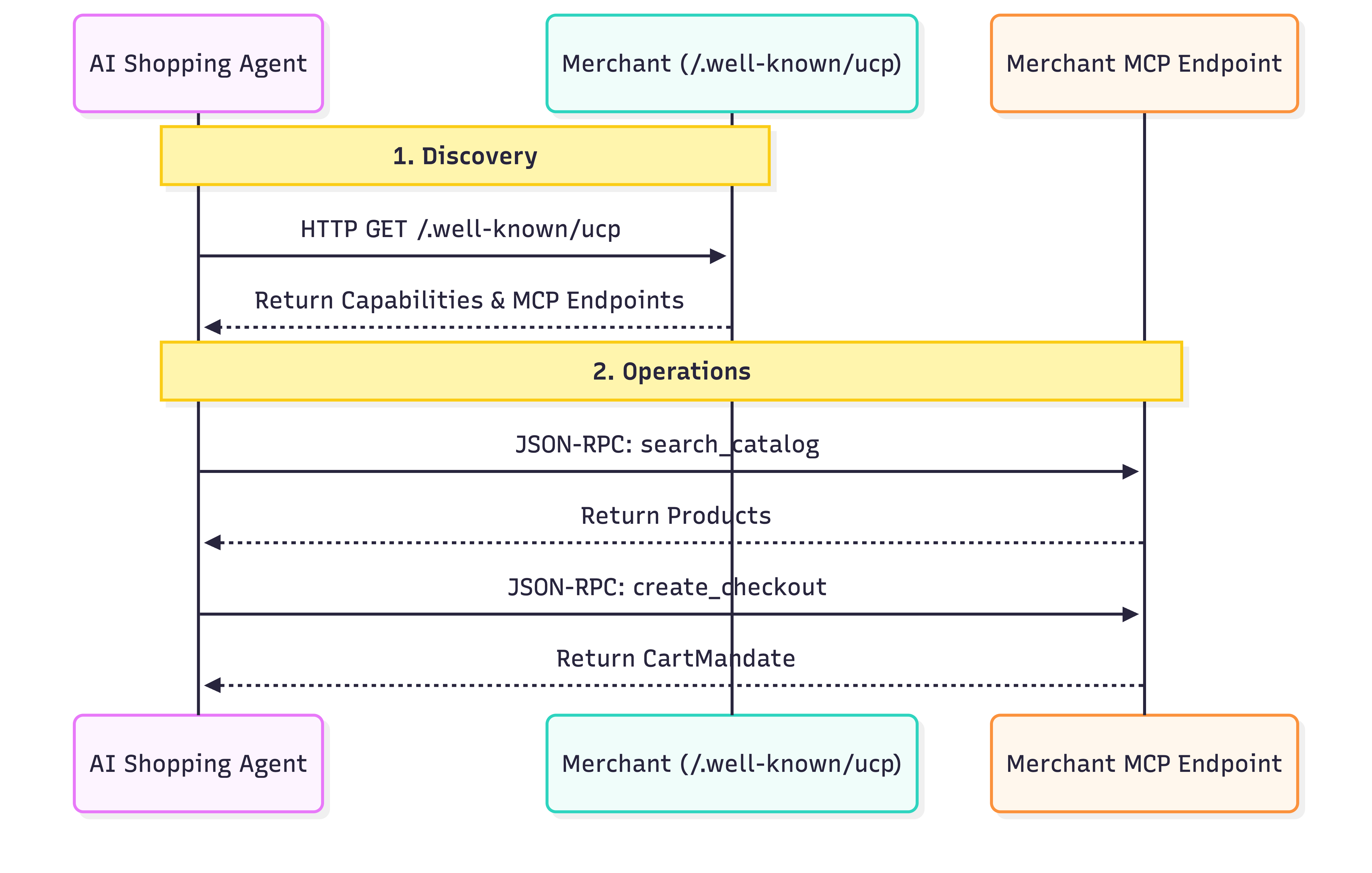
- 发现:每个符合 UCP 标准的商家都会在标准位置
/.well-known/ucp公开资料。示例:Everlane 的 UCP 端点。当代理读取此配置文件时,它会查找:- 功能:商家支持的独立核心功能,例如目录搜索或结账。
- 服务:用于交换数据的较低级别通信层。示例:REST API、MCP(Model Context Protocol)、A2A(Agent2Agent Protocol)。
- 扩展程序:如果商家需要特殊行为,可以在此配置文件中定义自定义扩展程序。
- 操作:发现服务后,代理会使用提供的服务端点来执行操作。在此 Codelab 中,我们将 Model Context Protocol (MCP) 用作服务传输。代理会向此端点发出 JSON-RPC 2.0 调用,以调用发现的功能:搜索商品、创建结账会话和完成购买交易。
Agent Payments Protocol (AP2)
AP2 标准化了代理代表用户授权付款的方式。它解决了代理处理敏感支付凭据的安全问题。
工作原理:
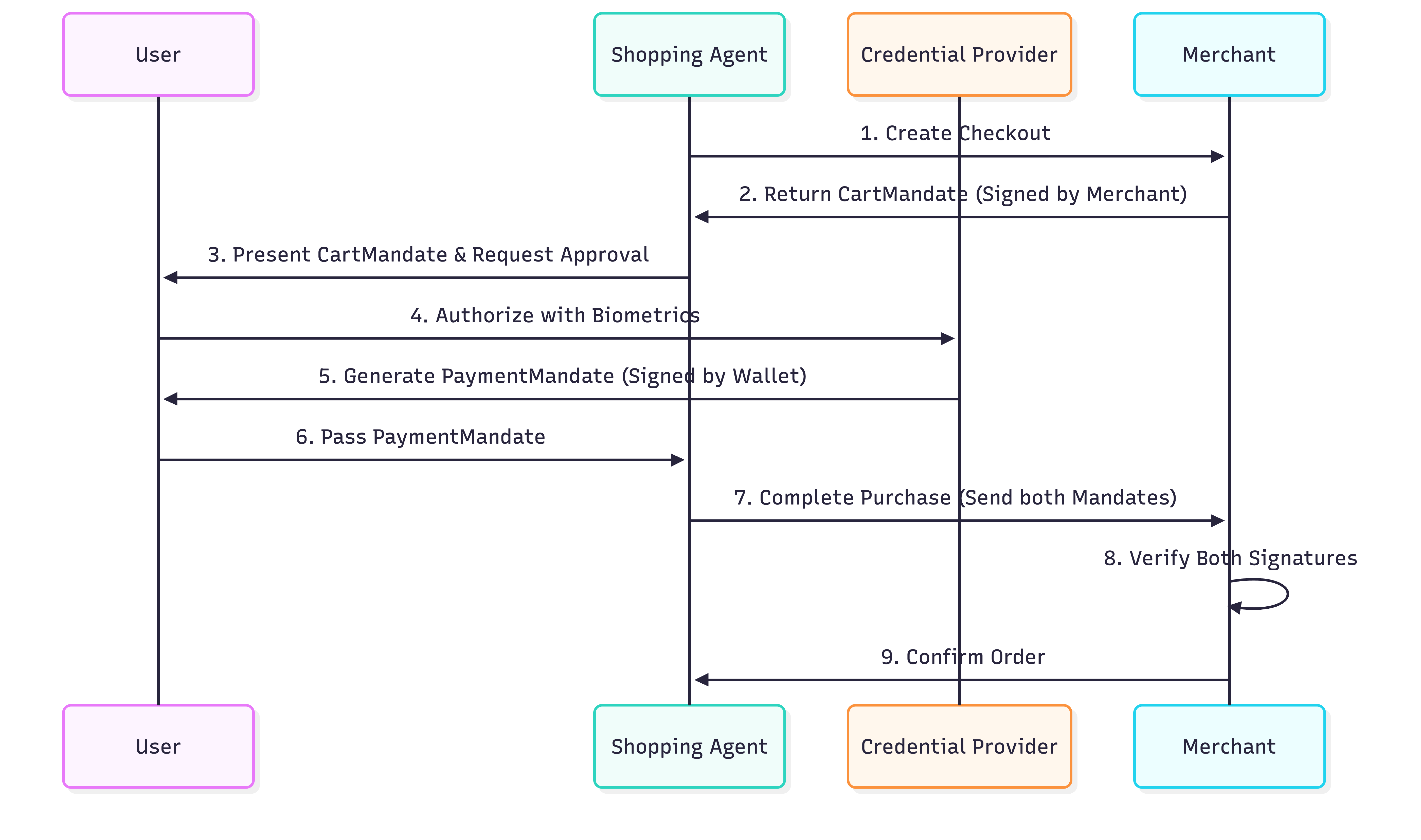
- 购物车强制:当智能体使用 UCP 协议创建结账时,商家会返回
CartMandate。这是一个 JSON 对象,其中包含购物车详细信息和商家的加密签名。它可作为价格锁定保证。商家在发布此授权后无法更改价格。 - 付款授权书:验证购物车的内容后,用户(或代表用户的代理)会创建
PaymentMandate以授权付款。此PaymentMandate引用了CartMandate,并包含用户的加密签名(或授权令牌)。 - 双重签名验证:商家会收到这两份授权书。它们会验证
CartMandate上的自有签名和PaymentMandate上的用户签名。如果两者均有效,则继续执行交易。
这种“双重锁定”系统可确保商家不会过度收费,代理商也不会在未经授权的情况下支出。在生产环境中,这些授权使用 SD-JWT(选择性披露 JWT)来保护用户隐私。
3. 设置您的环境
Google Cloud 项目设置
创建 Google Cloud 项目
- 在 Google Cloud 控制台的项目选择器页面上,选择或创建一个 Google Cloud 项目。
- 确保您的 Cloud 项目已启用结算功能。了解如何检查项目是否已启用结算功能。
启动 Cloud Shell
Cloud Shell 是在 Google Cloud 中运行的命令行环境,预加载了必要的工具。
- 点击 Google Cloud 控制台顶部的激活 Cloud Shell。
- 连接到 Cloud Shell 后,验证您的身份验证:
gcloud auth list - 确认您的项目已配置:
gcloud config get project - 如果项目未按预期设置,请进行设置:
export PROJECT_ID=<YOUR_PROJECT_ID>
gcloud config set project $PROJECT_ID
使用 Gemini 模型
在 Cloud Shell 环境中,复制并粘贴以下命令。这样一来,您就可以访问 Cine Agent 将使用的 Gemini 模型。
export GOOGLE_CLOUD_PROJECT=$PROJECT_ID
export GOOGLE_CLOUD_LOCATION=global
export GOOGLE_GENAI_USE_VERTEXAI=True
设置目录结构
复制并粘贴以下命令,为代理创建一个新目录:
mkdir -p agent_payments
cd agent_payments
安装依赖项
Google Cloud Shell 预先安装了 uv,用于管理环境和依赖项。
- 在
agent_payments文件夹的根目录下创建一个pyproject.toml文件,并向其中添加以下内容。此文件定义了项目元数据和依赖项。
[project]
name = "agent-payments-demo"
version = "0.1.0"
description = "CineAgent booking agent using UCP and AP2"
requires-python = ">=3.11"
dependencies = [
    "google-adk>=1.29.0",
    "google-genai>=1.27.0",
    "fastapi>=0.115.0",
    "uvicorn>=0.34.0",
    "httpx>=0.28.0",
    "ap2 @ git+https://github.com/google-agentic-commerce/AP2.git@main",
    "ucp-sdk @ git+https://github.com/Universal-Commerce-Protocol/python-sdk.git@main",
]
- 运行以下命令以创建虚拟环境并安装所有依赖项:
uv sync
- 激活由
uv创建的虚拟环境:
source .venv/bin/activate
4. 定义智能体
在编写任何工具逻辑之前,我们先在一个名为 agent.py 的文件中定义代理本身。此代理将充当电影预订流程的编排器。
创建 agent.py:
"""CineAgent — movie ticket booking agent using UCP and AP2."""

from google.adk.agents import Agent
from google.adk.tools import FunctionTool
from agent_payments.tools import (
    discover_theaters,
    search_movies,
    get_movie_detail,
    create_checkout,
    complete_purchase,
)

root_agent = Agent(
    model="gemini-3.1-pro-preview",
    name="cineagent",
    description="Movie ticket booking agent using UCP and AP2.",
    instruction="""You are CineAgent, a movie ticket booking assistant.

You help users find and book movie tickets across multiple theaters
using UCP (Universal Commerce Protocol) and AP2 (Agent Payments).

**Your tools:**
- discover_theaters: Find theaters and what they support
- search_movies: Search movies across all theaters
- get_movie_detail: Get showtimes at a specific theater
- create_checkout: Start a checkout session
- complete_purchase: Finalize with AP2 mandate signing

**Rules:**
- Always call discover_theaters first if you haven't yet
- Keep responses concise — summarize and suggest next steps
- Prices from tools are in cents (1500 = $15.00)
- Never invent data — only state what tools return
""",
    tools=[
        discover_theaters,
        search_movies,
        get_movie_detail,
        create_checkout,
        FunctionTool(complete_purchase, require_confirmation=True),
    ],
)
代码说明
我们来详细了解一下此代理定义中发生了哪些情况:
model="gemini-3.1-pro-preview":我们正在使用最新的 Gemini Pro 预览版模型,以进行复杂的推理和工具使用。instruction:用于指导代理行为的提示。它明确告知代理使用 UCP 和 AP2,列出了可用的工具,并设置了“绝不编造数据”和“价格以美分为单位”等关键规则。tools:这是一个 Python 函数列表(我们将在下一步中构建),智能体可以根据用户的请求选择调用这些函数。require_confirmation:您可以使用FunctionTool(my_function,require_confirmation=True)封装任何工具。触发后,智能体会暂停并等待用户简单地回答“是”或“否”以表示批准,然后才会执行工具。在此示例中,在执行complete_purchase工具之前,代理会暂停运行,等待人工确认。
工具列表
代理定义声明了我们需要构建的内容。每种工具都映射到 UCP 或 AP2 协议中的特定操作:
工具 | 作用 | 协议操作 |
| 查找商家及其支持情况 | 查询 |
| 搜索不同商家的目录 | JSON-RPC 到 MCP 端点 |
| 获取特定商家的放映时间 | JSON-RPC 到 MCP 端点 |
| 启动结账会话 | JSON-RPC 到 MCP 端点 |
| 授权付款并完成订单 | 签署 AP2 授权书并将其发送给 MCP |
Gemini 模型会根据对话决定何时调用每种工具。接下来,我们需要在 tools.py 中实现每种工具的功能。
5. 构建智能体工具:发现和浏览
现在,我们来实现智能体将用于浏览和发现电影的工具。每个工具都封装了一个 UCP 操作。
创建一个名为 tools.py 的新文件,然后复制并粘贴以下代码:
"""Agent tools — each one wraps a UCP or AP2 operation."""

import asyncio
import json

from .ucp import UCPClient
from .ap2 import AP2Handler

# Initialize clients directly
_merchant_urls = ["http://localhost:8081", "http://localhost:8082"]
_ucp = UCPClient()
_ap2 = AP2Handler()
了解设置
为了让此 Codelab 专注于构建代理,我们使用了两个辅助类 UCPClient 和 AP2Handler,我们将在后面的步骤中介绍这两个类。
- 什么是退出页横幅广告?:这些是我们为此 Codelab 手动编写的辅助类,用于模拟与模拟商家的互动。由于官方 UCP 和 AP2 SDK 尚未发布,我们使用这些辅助程序来弥合差距。在生产环境中,您可以使用正式版 SDK(一旦推出)。
- 目前,请将它们视为辅助对象:
_ucp.discover(url):提取商家的个人资料。_ucp.mcp_call(url, method, params):向商家的 MCP 端点发送 JSON-RPC 2.0 请求。
探索影院
此工具是 UCP 流程中的第一步。它会查找有哪些商家以及他们支持哪些功能。
添加到 tools.py:
async def discover_theaters() -> str:
    """Discover available theater merchants and their capabilities via UCP."""
    theaters = []
    for url in _merchant_urls:
        info = await _ucp.discover(url)
        theaters.append(
            {
                "url": url,
                "name": info["name"],
                "capabilities": info["capabilities"],
                "payment_handlers": info["payment_handlers"],
            }
        )
    return json.dumps(theaters, indent=2)
作用:
- 它会遍历服务器提供的商家网址列表。在此 Codelab 中,我们将在后面的部分中设置两个模拟商家。
- 对于每个网址,它都会调用
_ucp.discover(url),从而命中/.well-known/ucp端点。 - 它会将名称、功能和付款处理程序收集到摘要列表中。
- 它会以 JSON 字符串的形式返回该列表,供代理读取。
搜索电影
此工具会搜索所有已发现的商家,并合并搜索结果。这一点至关重要,因为同一部电影可能会在多个影院上映,但放映格式(IMAX、Dolby)和价格各不相同。
添加到 tools.py:
async def search_movies(query: str = "") -> str:
    """Search for movies across all theaters. Use '' to browse all."""
    all_movies = {}
    for url, merchant in _ucp.merchants.items():
        result = await _ucp.mcp_call(url, "search_catalog", {"query": query})
        for product in result.get("products", []):
            mid = product["id"]
            if mid not in all_movies:
                all_movies[mid] = {
                    "id": mid,
                    "title": product["title"],
                    "categories": product.get("categories", []),
                    "theaters": {},
                }
            showtimes = []
            for v in product.get("variants", []):
                opts = {
                    o["name"]: o["value"]
                    for o in v.get("selected_options", [])
                }
                showtimes.append(
                    {
                        "id": v["id"],
                        "format": opts.get("format", "Standard"),
                        "time": opts.get("time", ""),
                        "price": v.get("price", {}),
                        "seats": v.get("availability", {}).get(
                            "seats_available", 0
                        ),
                    }
                )
            all_movies[mid]["theaters"][url] = {
                "name": merchant["name"],
                "showtimes": showtimes,
            }
    return json.dumps(list(all_movies.values()), indent=2)
作用:
- 它会遍历所有已发现的影院。
- 它会向商家的 MCP 端点发送搜索目录 JSON-RPC 请求 (
_ucp.mcp_call(url, "search_catalog", {"query": query}))。 - 然后,它会进行一些清理工作,以解析结果,找到电影及其“变体”(表示具体的放映时间和格式)。按 ID 对电影进行分组,以便用户不会看到重复的电影条目。
获取电影详情
此工具可获取特定影院中特定电影的完整目录详细信息。
添加到 tools.py:
async def get_movie_detail(movie_id: str, merchant_url: str) -> str:
    """Get detailed showtimes for a movie at a specific theater."""
    result = await _ucp.mcp_call(
        merchant_url, "lookup_catalog", {"product_id": movie_id}
    )
    return json.dumps(result, indent=2)
作用:
- 它会针对商家的 MCP 端点调用
lookup_catalog方法,并传递特定的movie_id。这样一来,您就可以获得该影院的详细信息,例如放映时间和座位空闲情况。
6. 构建智能体工具:结账和付款
这些工具可处理结账和购买流程。这时,AP2 协议就会发挥作用,确保交易安全。
创建结账
此工具会在特定影院针对特定放映时间开始结账会话。
添加到 tools.py:
async def create_checkout(
    merchant_url: str, showtime_id: str, quantity: int = 1
) -> str:
    """Create a checkout session for tickets at a theater."""
    result = await _ucp.mcp_call(merchant_url, "create_checkout", {
        "checkout": {
            "line_items": [
                {"item": {"id": showtime_id}, "quantity": quantity}
            ],
            "context": {"country": "US", "currency": "USD"},
        }
    })
    return json.dumps(result, indent=2)
作用:
- 它会调用商家 MCP 端点上的
create_checkout方法。 - 它会传递用户请求的
showtime_id和quantity。 - 商家会返回包含 AP2 CartMandate 的 JSON 对象。
注意:如果您检查响应数据,会发现 ap2.cart_mandate 包含 merchant_authorization 字段。这是商家锁定报价的加密签名。他们以后无法更改!
完成购买
此工具会执行以下三项操作:
- 我们从结账流程中获取 CartMandate 并对其进行验证(模拟)。
- 创建并签署 PaymentMandate (模拟)。
- 将已签名的授权书发送给商家,以完成购买交易。
添加到 tools.py:
async def complete_purchase(
    checkout_id: str, merchant_url: str, payment_method: str = "card"
) -> str:
    """Complete purchase with AP2 payment authorization."""
    # 1. Get the CartMandate from the checkout
    checkout = await _ucp.mcp_call(
        merchant_url, "get_checkout", {"checkout": {"id": checkout_id}}
    )
    cart_mandate = _ap2.process_cart_mandate(checkout)
    if not cart_mandate:
        return {"error": "No cart mandate — checkout may have expired"}

    # 2-3. Create and sign the PaymentMandate
    # In production, this call would trigger a user prompt (biometric or device auth)
    # via the AP2 Wallet SDK. In this demo, it just computes a mock SHA-256 hash.
    payment_mandate = _ap2.create_payment_mandate(cart_mandate, payment_method)

    # 4. Send both mandates to complete the purchase
    result = await _ucp.mcp_call(merchant_url, "complete_checkout", {
        "checkout": {
            "id": checkout_id,
            "payment": {
                "instruments": [{
                    "handler_id": f"card_{merchant_url.split(':')[-1]}",
                    "type": "card",
                }],
            },
            "ap2": {"payment_mandate": payment_mandate},
        }
    })
    return json.dumps(result, indent=2)
为什么需要两个授权?CartMandate 可确保商家在报价后无法更改价格。PaymentMandate 可确保代理在未经用户同意的情况下无法向用户收费。流程如下:
Merchant locks price -> User authorizes charge -> Merchant verifies both -> Order completes。
检查点:完整 tools.py
完整的 tools.py 现在应包含 5 个工具函数,以及针对 UCP 和 AP2 客户端的模块级初始化。验证它是否如下所示:
"""Agent tools — each one wraps a UCP or AP2 operation."""

import asyncio
import json

from ucp import UCPClient
from ap2 import AP2Handler

# Initialize clients directly
_merchant_urls = ["http://localhost:8081", "http://localhost:8082"]
_ucp = UCPClient()
_ap2 = AP2Handler()


async def discover_theaters() -> str:
    """Discover available theater merchants and their capabilities via UCP."""
    theaters = []
    for url in _merchant_urls:
        info = await _ucp.discover(url)
        theaters.append(
            {
                "url": url,
                "name": info["name"],
                "capabilities": info["capabilities"],
                "payment_handlers": info["payment_handlers"],
            }
        )
    return json.dumps(theaters, indent=2)


async def search_movies(query: str = "") -> str:
    """Search for movies across all theaters. Use '' to browse all."""
    all_movies = {}
    for url, merchant in _ucp.merchants.items():
        result = await _ucp.mcp_call(url, "search_catalog", {"query": query})
        for product in result.get("products", []):
            mid = product["id"]
            if mid not in all_movies:
                all_movies[mid] = {
                    "id": mid,
                    "title": product["title"],
                    "categories": product.get("categories", []),
                    "theaters": {},
                }
            showtimes = []
            for v in product.get("variants", []):
                opts = {
                    o["name"]: o["value"]
                    for o in v.get("selected_options", [])
                }
                showtimes.append(
                    {
                        "id": v["id"],
                        "format": opts.get("format", "Standard"),
                        "time": opts.get("time", ""),
                        "price": v.get("price", {}),
                        "seats": v.get("availability", {}).get(
                            "seats_available", 0
                        ),
                    }
                )
            all_movies[mid]["theaters"][url] = {
                "name": merchant["name"],
                "showtimes": showtimes,
            }
    return json.dumps(list(all_movies.values()), indent=2)


async def get_movie_detail(movie_id: str, merchant_url: str) -> str:
    """Get detailed showtimes for a movie at a specific theater."""
    result = await _ucp.mcp_call(
        merchant_url, "lookup_catalog", {"product_id": movie_id}
    )
    return json.dumps(result, indent=2)


async def create_checkout(
    merchant_url: str, showtime_id: str, quantity: int = 1
) -> str:
    """Create a checkout session for tickets at a theater."""
    result = await _ucp.mcp_call(merchant_url, "create_checkout", {
        "checkout": {
            "line_items": [
                {"item": {"id": showtime_id}, "quantity": quantity}
            ],
            "context": {"country": "US", "currency": "USD"},
        }
    })
    return json.dumps(result, indent=2)


async def complete_purchase(
    checkout_id: str, merchant_url: str, payment_method: str = "card"
) -> str:
    """Complete purchase with AP2 payment authorization."""
    # 1. Get the CartMandate from the checkout
    checkout = await _ucp.mcp_call(
        merchant_url, "get_checkout", {"checkout": {"id": checkout_id}}
    )
    cart_mandate = _ap2.process_cart_mandate(checkout)
    if not cart_mandate:
        return {"error": "No cart mandate — checkout may have expired"}

    # 2-3. Create and sign the PaymentMandate
    # In production, this call would trigger a user prompt (biometric or device auth)
    # via the AP2 Wallet SDK. In this demo, it just computes a mock SHA-256 hash.
    payment_mandate = _ap2.create_payment_mandate(cart_mandate, payment_method)

    # 4. Send both mandates to complete the purchase
    result = await _ucp.mcp_call(merchant_url, "complete_checkout", {
        "checkout": {
            "id": checkout_id,
            "payment": {
                "instruments": [{
                    "handler_id": f"card_{merchant_url.split(':')[-1]}",
                    "type": "card",
                }],
            },
            "ap2": {"payment_mandate": payment_mandate},
        }
    })
    return json.dumps(result, indent=2)
7. 使其可运行
对于真实的 UCP 商家,您只需将智能体指向其网址即可。在此 Codelab 中,我们需要以下两项内容才能在本地进行测试:
- 模拟商家 - 模拟 UCP 端点的本地服务器,以便您进行测试
- 协议辅助程序 - UCP 和 AP2 的精简 HTTP 封装容器(在正式版中,官方 SDK 会替换这些辅助程序)
注意:您无需仔细阅读此代码。这些文件模拟了真实的基础设施和 SDK 将提供的功能。按原样复制。
协议帮助程序
UCP 和 AP2 尚无客户端 SDK,这两个文件负责处理 HTTP 管道。
创建 ucp.py:
"""UCP client — discovers merchants and calls their MCP tools."""

import uuid
import httpx


class UCPClient:
    def __init__(self):
        self.client = httpx.AsyncClient(timeout=30)
        self.merchants = {}  # url -> merchant info dict

    async def discover(self, merchant_url: str) -> dict:
        """Fetch a merchant's UCP profile from /.well-known/ucp."""
        resp = await self.client.get(f"{merchant_url}/.well-known/ucp")
        resp.raise_for_status()
        profile = resp.json()
        ucp = profile["ucp"]
        info = {
            "name": merchant_url.split("//")[-1],
            "mcp_endpoint": ucp["services"]["dev.ucp.shopping"][0]["endpoint"],
            "capabilities": list(ucp.get("capabilities", {}).keys()),
            "payment_handlers": list(ucp.get("payment_handlers", {}).keys()),
        }
        self.merchants[merchant_url] = info
        return info

    async def mcp_call(
        self, merchant_url: str, tool_name: str, arguments: dict
    ) -> dict:
        """Call a merchant's MCP tool via JSON-RPC 2.0."""
        merchant = self.merchants[merchant_url]
        resp = await self.client.post(
            merchant["mcp_endpoint"],
            json={
                "jsonrpc": "2.0",
                "id": uuid.uuid4().hex,
                "method": "tools/call",
                "params": {"name": tool_name, "arguments": arguments},
            },
        )
        resp.raise_for_status()
        data = resp.json()
        if "error" in data:
            raise Exception(f"MCP error: {data['error']}")
        return data.get("result", {})

    async def close(self):
        await self.client.aclose()
创建 ap2.py:
"""AP2 mandate handler — creates and signs payment mandates."""

import uuid
import hashlib


class AP2Handler:
    def process_cart_mandate(self, checkout_response: dict) -> dict | None:
        """Extract the merchant-signed CartMandate from a checkout response.

        The CartMandate is the merchant's cryptographic price guarantee —
        it locks the total so it can't change between checkout and payment.
        """
        return checkout_response.get("ap2", {}).get("cart_mandate")

    def create_payment_mandate(
        self, cart_mandate: dict, payment_method: str = "card"
    ) -> dict:
        """Create and sign a PaymentMandate authorizing payment.

        References the merchant's CartMandate and adds user authorization.
        Together they form a two-party agreement: merchant guarantees price,
        user authorizes charge.
        """
        contents = cart_mandate["contents"]
        mandate_id = uuid.uuid4().hex

        return {
            "mandate_id": mandate_id,
            "cart_reference": contents["id"],
            "merchant": contents["merchant_name"],
            "total": contents["total"],
            "payment_method": payment_method,
            "user_authorization": self._sign(mandate_id, contents["id"]),
        }

    def _sign(self, mandate_id: str, checkout_id: str) -> str:
        """Sign the mandate. Production uses real crypto (sd-jwt-vc)."""
        payload = f"{mandate_id}:{checkout_id}"
        return hashlib.sha256(payload.encode()).hexdigest()
模拟商家
创建 merchants.py:
"""Mock UCP merchant servers — two theaters with different capabilities."""

import uuid
import time
import multiprocessing
from datetime import datetime, timezone, timedelta

import uvicorn
from fastapi import FastAPI

# ── Theater data ────────────────────────────────────────────

THEATERS = {
    8081: {
        "name": "Meridian Cinemas",
        "movies": [
            {
                "id": "opp",
                "title": "Oppenheimer",
                "categories": ["Drama", "History"],
                "showtimes": [
                    {"id": "st_opp_7pm_imax", "format": "IMAX", "time": "7:00 PM", "price": 2200, "seats": 45},
                    {"id": "st_opp_930pm", "format": "Standard", "time": "9:30 PM", "price": 1500, "seats": 80},
                ],
            },
            {
                "id": "dune3",
                "title": "Dune: Part Three",
                "categories": ["Sci-Fi", "Action"],
                "showtimes": [
                    {"id": "st_dune_8pm_imax", "format": "IMAX", "time": "8:00 PM", "price": 2200, "seats": 30},
                ],
            },
        ],
        "discounts": {},
    },
    8082: {
        "name": "StarLight Theaters",
        "movies": [
            {
                "id": "opp",
                "title": "Oppenheimer",
                "categories": ["Drama", "History"],
                "showtimes": [
                    {"id": "st_opp_6pm_atmos", "format": "Dolby Atmos", "time": "6:00 PM", "price": 1800, "seats": 60},
                ],
            },
            {
                "id": "spider",
                "title": "Spider-Verse",
                "categories": ["Animation", "Action"],
                "showtimes": [
                    {"id": "st_spider_4pm", "format": "Standard", "time": "4:00 PM", "price": 1200, "seats": 100},
                ],
            },
        ],
        "discounts": {},
    },
}


def create_app(port):
    theater = THEATERS[port]
    app = FastAPI()
    sessions = {}

    # ── UCP Discovery endpoint ──────────────────────────────
    @app.get("/.well-known/ucp")
    def discovery():
        caps = {
            "dev.ucp.shopping.catalog.search": [{"version": "2026-01-15"}],
            "dev.ucp.shopping.catalog.lookup": [{"version": "2026-01-15"}],
            "dev.ucp.shopping.checkout": [{"version": "2026-01-15"}],
            "dev.ucp.shopping.ap2_mandate": [{"version": "2026-01-15"}],
        }

        return {
            "ucp": {
                "version": "2026-01-15",
                "services": {
                    "dev.ucp.shopping": [
                        {"version": "2026-01-15", "transport": "mcp",
                         "endpoint": f"http://localhost:{port}/mcp"}
                    ]
                },
                "capabilities": caps,
                "payment_handlers": {
                    "com.example.card": [
                        {"id": f"card_{port}", "version": "2026-01-15",
                         "available_instruments": [{"type": "card"}], "config": {}}
                    ]
                },
            }
        }

    # ── MCP JSON-RPC endpoint ───────────────────────────────
    @app.post("/mcp")
    def mcp(body: dict):
        tool = body["params"]["name"]
        args = body["params"].get("arguments", {})
        rid = body.get("id", "1")

        if tool == "search_catalog":
            q = args.get("query", "").lower()
            hits = [m for m in theater["movies"]
                    if not q or q in m["title"].lower()
                    or any(q in c.lower() for c in m["categories"])]
            return _ok(rid, {"products": [_product(m) for m in hits]})

        if tool == "lookup_catalog":
            mid = args.get("product_id") or (args.get("ids", [None])[0])
            movie = next((m for m in theater["movies"] if m["id"] == mid), None)
            if not movie:
                return _err(rid, "Not found")
            return _ok(rid, {"products": [_product(movie)]})

        if tool == "create_checkout":
            co = args.get("checkout", {})
            sid = f"chk_{uuid.uuid4().hex[:12]}"
            items, subtotal = [], 0
            for li in co.get("line_items", []):
                st = _find_showtime(li["item"]["id"])
                if not st:
                    continue
                mv = _find_movie(li["item"]["id"])
                qty = li.get("quantity", 1)
                amt = st["price"] * qty
                subtotal += amt
                items.append({
                    "id": f"li_{uuid.uuid4().hex[:8]}",
                    "item": {
                        "id": st["id"],
                        "title": f"{mv['title']} — {st['format']} {st['time']}",
                        "price": st["price"],
                    },
                    "quantity": qty,
                    "totals": [{"type": "subtotal", "amount": amt}],
                })
            tax = int(subtotal * 0.08)
            total = subtotal + tax
            session = {
                "id": sid,
                "status": "ready_for_complete",
                "currency": "USD",
                "line_items": items,
                "totals": [
                    {"type": "subtotal", "display_text": "Subtotal", "amount": subtotal},
                    {"type": "tax", "display_text": "Tax", "amount": tax},
                    {"type": "total", "display_text": "Total", "amount": total},
                ],
                "metadata": {"theater_name": theater["name"]},
                "ap2": {
                    "cart_mandate": {
                        "contents": {
                            "id": sid,
                            "merchant_name": theater["name"],
                            "total": {
                                "label": "Total",
                                "amount": {"currency": "USD", "value": total / 100},
                            },
                            "cart_expiry": (
                                datetime.now(timezone.utc) + timedelta(minutes=10)
                            ).isoformat(),
                        },
                        "merchant_authorization": f"mock_merchant_sig_{sid}",
                    }
                },
            }
            sessions[sid] = session
            return _ok(rid, session)

        if tool == "get_checkout":
            sid = args.get("checkout", {}).get("id") or args.get("id")
            return _ok(rid, sessions.get(sid, {"error": "not_found"}))


        if tool == "complete_checkout":
            co = args.get("checkout", {})
            sid = co.get("id")
            session = sessions.get(sid)
            if not session:
                return _err(rid, "Not found")
            session["status"] = "completed"
            session["order"] = {
                "id": f"ord_{uuid.uuid4().hex[:8]}",
                "created_at": datetime.now(timezone.utc).isoformat(),
                "tickets": [
                    {
                        "movie": li["item"]["title"],
                        "quantity": li["quantity"],
                        "ticket_code": uuid.uuid4().hex[:8].upper(),
                    }
                    for li in session["line_items"]
                ],
            }
            session["ap2"]["payment_mandate_verified"] = True
            return _ok(rid, session)

        return _err(rid, f"Unknown tool: {tool}")

    def _ok(rid, result):
        return {"jsonrpc": "2.0", "id": rid, "result": result}

    def _err(rid, msg):
        return {"jsonrpc": "2.0", "id": rid, "error": {"code": -32000, "message": msg}}

    def _product(movie):
        return {
            "id": movie["id"],
            "title": movie["title"],
            "categories": movie["categories"],
            "variants": [
                {
                    "id": st["id"],
                    "selected_options": [
                        {"name": "format", "value": st["format"]},
                        {"name": "time", "value": st["time"]},
                    ],
                    "price": {"amount": st["price"], "currency": "USD"},
                    "availability": {"available": True, "seats_available": st["seats"]},
                }
                for st in movie["showtimes"]
            ],
        }

    def _find_showtime(sid):
        return next(
            (st for m in theater["movies"] for st in m["showtimes"] if st["id"] == sid),
            None,
        )

    def _find_movie(sid):
        return next(
            (m for m in theater["movies"] for st in m["showtimes"] if st["id"] == sid),
            None,
        )

    return app


def _run(port):
    uvicorn.run(create_app(port), host="0.0.0.0", port=port, log_level="warning")


if __name__ == "__main__":
    for port in THEATERS:
        multiprocessing.Process(target=_run, args=(port,), daemon=True).start()
    print("Merchants running: Meridian (:8081), StarLight (:8082)")
    print("Press Ctrl+C to stop")
    try:
        while True:
            time.sleep(1)
    except KeyboardInterrupt:
        pass
这会创建两个 FastAPI 服务器,每个服务器都有两个端点:
GET /.well-known/ucp- UCP 发现。返回商家的功能、MCP 端点网址和可接受的付款方式。POST /mcp- MCP(Model Context Protocol)操作。处理目录搜索、结账、折扣和付款的 JSON-RPC 2.0 调用。
在新终端中启动商家,它们需要保持运行状态:
cd agent_payments
source .venv/bin/activate
python merchants.py
您应该会看到:
Merchants running: Meridian (:8081), StarLight (:8082)
返回第一个终端,验证 UCP 发现:
curl -s http://localhost:8081/.well-known/ucp | python -m json.tool
您应该会看到商家的功能、MCP 端点网址和付款处理程序。
8. 使用 ADK Web 运行智能体
我们来使用 ADK CLI 的内置 Web 界面!这会在浏览器中提供聊天界面,并自动处理工具确认提示。
您的项目现在应如下所示:
agent_payments/
├── merchants.py      # Mock UCP merchants
├── ucp.py            # UCP client helper
├── ap2.py            # AP2 mandate handler
├── tools.py          # Agent tools
├── agent.py          # Agent definition
└── pyproject.toml
试试看
在当前终端中,前往父级目录(agent_payments 上一级的文件夹),然后启动 ADK Web 界面:
cd ../
adk web --allow_origins '*'
您应该会看到输出,指示服务器正在运行,并提供一个网址(通常为 http://localhost:8000 或类似网址)。
与代理对话
- 在浏览器中打开
adk web提供的网址。 - 您将看到一个聊天界面。
- 不妨尝试问:“有哪些电影正在上映?”
- 代理会在后台发现影院并搜索目录,然后通过 UCP 汇总来自两个商家的结果。
- 要求预订电影票:“预订 2 张《奥本海默》的电影票,时间为晚上 7 点”。
- 当代理尝试调用
complete_purchase时,请注意 ADK Web 界面如何弹出确认对话框或卡片! - 如需授权交易,请在对话中回复以下 JSON 字符串:
{"confirmed": true}。 - 智能体将完成购买交易,并返回包含门票代码的订单确认信息!
幕后发生的情况如下:
create_checkout→ 商家返回了 AP2 CartMandate(已签名的价格锁定)complete_purchase→ 创建了 PaymentMandate,对其进行了签名(模拟 SHA-256),并将这两个授权发送给了商家- 商家验证了两个签名 → 已签发票证(在模拟中)
9. 清理
为避免本地服务器持续运行,请清理资源:
- 在运行
adk web的终端中,按 Ctrl+C 停止代理服务器。 - 在运行
python merchants.py的终端中,按 Ctrl+C 停止模拟商家。 - 在两个终端中运行以下命令,停用虚拟环境:
deactivate
- (可选)如果您为此 Codelab 创建了一个新的 Google Cloud 项目,并希望将其删除,请运行以下命令:
gcloud projects delete $GOOGLE_CLOUD_PROJECT
10. 恭喜!🎉
您构建了一个 ADK 代理,该代理使用 UCP 和 AP2 发现商家、浏览目录并完成购买交易。
要点回顾
在此 Codelab 中,您构建了一个可处理安全商务流程的 ADK 代理。下面总结了您构建的内容以及应用的关键概念:
您构建的内容:
- 5 个智能体工具,封装了 UCP 和 AP2 操作 - 发现、目录搜索、结账、付款。
- AP2 授权书签署 - CartMandate(商家价格锁定)+ PaymentMandate(用户授权)。
- 多商家搜索 - 一个代理查询多个影院,合并结果。
主要概念:
协议 | 作用 | 运作方式 |
UCP Discovery | 智能体查找商家及其功能 |
|
UCP MCP | 智能体浏览目录、创建结账 | 对商家的 MCP 端点的 JSON-RPC 2.0 调用 |
AP2 CartMandate | 商家锁定报价 | 由商家签名,包含总金额和到期日期 |
AP2 PaymentMandate | 用户授权扣款 | 由用户签名,引用了 CartMandate |
生产环境中有何不同之处?
此 Codelab 使用模拟对象。正式版:
- UCP 发现针对注册表进行解析,而不是针对硬编码的 localhost 网址进行解析
- MCP 端点由真实商家托管 - 采用相同的 JSON-RPC 2.0 协议,提供真实的商品目录
- AP2 强制性要求使用 sd-jwt-vc 进行签名,而不是使用 SHA-256 哈希值
- 付款授权使用 AP2 Wallet SDK,并显示用户同意提示
- 前端以丰富的界面(商品网格、结账摘要、确认卡片)呈现工具结果
后续步骤
- 探索 AP2 协议规范并构建自己的支持付款的智能体
- 为您的商家实现 UCP 以启用智能体商务
- 将 AP2 与 A2A 结合使用,实现多智能体商业工作流
- 了解加密货币付款的 AP2 x402 扩展功能