
1. Introduction
This Codelab explores Composite Health for Private Service Connect (PSC) for automatic regional failover. Composite Health for PSC is a networking feature that provides improved service resiliency and availability.
Composite Health allows service producers to define customized health policies (what state defines a healthy or unhealthy service) and automatically propagate these signals to service consumers connecting to the service with PSC backends. This feature is designed specifically to support automatic cross-region failover. If a regional producer service becomes unhealthy, the consumer load balancer automatically stops routing traffic to that region and directs traffic to a healthy service in another region.
Compared to previous methods for cross-region failover, like outlier detection, Composite Health offers a more accurate failover signal because it is based directly on the aggregated health of the producer service backends (VM instance groups or network endpoints). Producers can define their own health logic, ensuring the producer only receives traffic when the service truly meets the necessary health criteria.
What you learn
- Components of Composite Health and how they work together to determine the health state of a producer service
- Implementing Composite Health for PSC for a producer service using gcloud commands
- Configuration of a cross-region PSC consumer access load balancer to use the health signals from the producer Composite Health policy
- Testing service failure scenarios and validating automatic cross-region failover
What you need
- A Google Cloud project
- IAM permissions granted to the predefined
roles/compute.adminrole or a broad basic role likeroles/adminor legacyroles/owner - Familiarity with Google Cloud networking concepts and using Google Cloud CLI
2. Concepts
PSC networking
This Codelab network topology includes a consumer and producer VPC network in two active Google Cloud regions.
The consumer side has regional subnets with client VM instances used to access the producer service through a cross-regional internal Application Load Balancer with PSC network endpoint group (NEG) backends. There are two regional load balancer forwarding rules, with regional IP addresses, for global (cross-regional) client ingress. The backend service is a global resource that supports NEGs across different regions. In a failover scenario, a client connecting to either regional frontend forwarding rule can be directed to a healthy global backend.
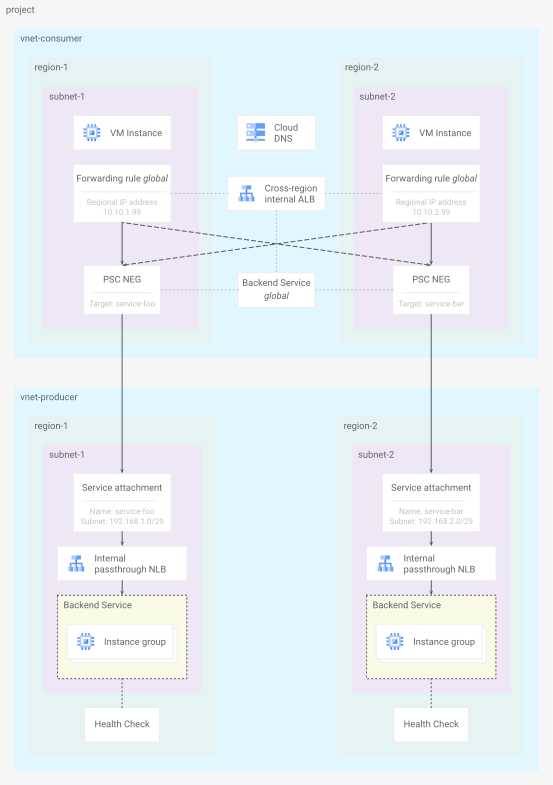
Fig 1. Codelab network topology
The producer side has regional subnets with regional internal passthrough Network Load Balancers exposing a service through a regional PSC service attachment resource. The backend services contain regional Managed Instance Groups (MIGs) and are health checked by probing http requests and validating 200 (OK) responses.
Refer to the latest documentation on Private Service Connect compatibility for Producer configuration to see which load balancers support Composite Health for PSC.
Service health
The producer backend service health check, configured during creation of the load balancer, serves as the originating signal for the Composite Health for PSC feature. The health source resource uses that signal along with additional constraints defined in the health aggregation policy resource to determine a health state for a single backend service.
By default, a service is considered healthy when both of these constraints are met:
- minimum of
xpercent of backends are healthy (default60) - minimum of
ynumber of backends are healthy (default1)
The composite health check references all the health sources for all the backend services to determine the overall health of the entire regional producer service. In the case of this lab, each regional producer service has only one backend service health source rolling up to the one composite health check.
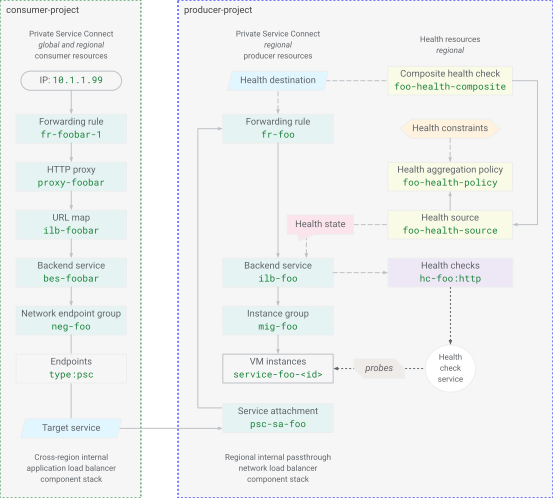
Fig 2. Composite Health for PSC resource model
The composite health check resource definition also refers to the forwarding rule of the producer service load balancer. The consumer access load balancer backend PSC NEG is logically connected to the producer PSC service attachment and the producer load balancer forwarding rule. This ties the consumer access load balancer to the producer service composite health check state. The overall service health for the regional producer service is then propagated to the consumer load balancer to make the appropriate backend selection.
3. Project setup
Access your project
This Codelab is written to use a single Google Cloud project. Configuration steps use gcloud and Linux shell commands.
NOTE: In a production deployment, PSC consumer resources and producer services are typically in different projects.
Start by accessing your Google Cloud project command line, using:
- Cloud Shell
http://shell.cloud.google.com/, or - A local terminal with
gcloudCLI installed
Set your Project ID
gcloud config set project YOUR_PROJECT_ID_HERE
Set shell environment variables
export PROJECT_ID=$(gcloud config list --format="value(core.project)")
export REGION_1="us-west1"
export ZONE_1="us-west1-c"
export REGION_2="us-east1"
export ZONE_2="us-east1-c"
echo ${PROJECT_ID}
echo ${REGION_1}
echo ${ZONE_1}
echo ${REGION_2}
echo ${ZONE_2}
Enable API services
gcloud services enable compute.googleapis.com
gcloud services enable dns.googleapis.com
4. Producer service
Create shared resources
Create network
gcloud compute networks create vnet-producer --subnet-mode=custom
Create subnets
# create subnet for service workload in region 1
gcloud compute networks subnets create subnet-foo \
  --network=vnet-producer \
  --region=${REGION_1} \
  --range=172.16.1.0/24 \
  --enable-private-ip-google-access

# create subnet for psc nat in region 1
gcloud compute networks subnets create subnet-foo-pscnat \
  --network=vnet-producer \
  --region=${REGION_1} \
  --range=192.168.1.0/29 \
  --purpose=PRIVATE_SERVICE_CONNECT
# create subnet for service workload in region 2
gcloud compute networks subnets create subnet-bar \
  --network=vnet-producer \
  --region=${REGION_2} \
  --range=172.16.2.0/24 \
  --enable-private-ip-google-access

# create subnet for psc nat in region 2
gcloud compute networks subnets create subnet-bar-pscnat \
  --network=vnet-producer \
  --region=${REGION_2} \
  --range=192.168.2.0/29 \
  --purpose=PRIVATE_SERVICE_CONNECT
Create firewall components
Firewall rules are needed to allow traffic to VM resources (the implied default firewall rules are to deny ingress and allow egress). Policies are the preferred way to deploy firewall rules by creating a network firewall policy resource, creating and adding rules to the policy, and then associating the policy to a VPC network.
# create fw policy
gcloud compute network-firewall-policies create fw-policy-producer --global
# create fw policy rules
gcloud compute network-firewall-policies rules create 1001 \
  --description="allow iap for ssh" \
  --firewall-policy=fw-policy-producer \
  --global-firewall-policy \
  --action=allow \
  --direction=INGRESS \
  --layer4-configs=tcp:22  \
  --src-ip-ranges=35.235.240.0/20

gcloud compute network-firewall-policies rules create 1002 \
  --description="allow health checks" \
  --firewall-policy=fw-policy-producer \
  --global-firewall-policy \
  --action=allow \
  --direction=INGRESS \
  --layer4-configs=tcp,udp,icmp  \
  --src-ip-ranges=130.211.0.0/22,35.191.0.0/16

gcloud compute network-firewall-policies rules create 1003 \
  --description="allow psc nat clients" \
  --firewall-policy=fw-policy-producer \
  --global-firewall-policy \
  --action=allow \
  --direction=INGRESS \
  --layer4-configs=tcp:80  \
  --src-ip-ranges=192.168.1.0/29,192.168.2.0/29
# associate fw policy to vnet
gcloud compute network-firewall-policies associations create \
  --firewall-policy=fw-policy-producer \
  --network=vnet-producer \
  --name=fw-policy-association-producer \
  --global-firewall-policy
Create Cloud Routers and NAT Gateways
# create routers for nat in each region
gcloud compute routers create cr-nat-foo \
  --network=vnet-producer \
  --asn=16550 \
  --region=${REGION_1}

gcloud compute routers create cr-nat-bar \
  --network=vnet-producer \
  --asn=16550 \
  --region=${REGION_2}
# create nat gateways in each region
gcloud compute routers nats create natgw-foo \
  --router=cr-nat-foo \
  --region=${REGION_1} \
  --auto-allocate-nat-external-ips \
  --nat-all-subnet-ip-ranges

gcloud compute routers nats create natgw-bar \
  --router=cr-nat-bar \
  --region=${REGION_2} \
  --auto-allocate-nat-external-ips \
  --nat-all-subnet-ip-ranges
Create a VM startup config with HTTP server
cat > vm-server-startup.sh << 'EOF'
#! /bin/bash
apt-get update
apt-get install apache2 -y
vm_hostname="$(curl -H "Metadata-Flavor:Google" \
http://169.254.169.254/computeMetadata/v1/instance/name)"
vm_zone="$(curl -H "Metadata-Flavor:Google" \
http://169.254.169.254/computeMetadata/v1/instance/zone)"
echo "Page served from: $vm_hostname in zone $vm_zone" | \
tee /var/www/html/index.html
systemctl restart apache2
EOF
Set up service foo in region 1
Create service compute
# create managed instance group template
gcloud compute instance-templates create mig-template-foo \
  --machine-type=e2-micro \
  --network=vnet-producer \
  --region=${REGION_1} \
  --subnet=subnet-foo \
  --no-address \
  --shielded-secure-boot \
  --metadata-from-file=startup-script=vm-server-startup.sh
# create regional managed instance group
gcloud compute instance-groups managed create mig-foo \
  --region=${REGION_1} \
  --size=2 \
  --template=mig-template-foo \
  --base-instance-name=service-foo
Create service load balancer components
# create lb health check
gcloud compute health-checks create http hc-foo-http \
  --region=${REGION_1} \
  --port=80 \
  --enable-logging
# create backend service
gcloud compute backend-services create ilb-foo \
  --load-balancing-scheme=INTERNAL \
  --protocol=tcp \
  --region=${REGION_1} \
  --health-checks=hc-foo-http \
  --health-checks-region=${REGION_1}

# add managed instance group to backend service
gcloud compute backend-services add-backend ilb-foo \
  --instance-group=mig-foo \
  --instance-group-region=${REGION_1} \
  --region=${REGION_1}
# create forwarding rule
gcloud compute forwarding-rules create fr-foo \
  --region=${REGION_1} \
  --load-balancing-scheme=INTERNAL \
  --network=vnet-producer \
  --subnet=subnet-foo \
  --address=172.16.1.99 \
  --ip-protocol=TCP \
  --ports=80 \
  --backend-service=ilb-foo \
  --backend-service-region=${REGION_1} \
  --allow-global-access
Publish PSC service
# create psc service attachment
gcloud compute service-attachments create psc-sa-foo \
  --region=${REGION_1} \
  --target-service=projects/${PROJECT_ID}/regions/${REGION_1}/forwardingRules/fr-foo \
  --connection-preference=ACCEPT_AUTOMATIC \
  --nat-subnets=subnet-foo-pscnat
Set up service bar in region 2
Create service compute
# create managed instance group template
gcloud compute instance-templates create mig-template-bar \
  --machine-type=e2-micro \
  --network=vnet-producer \
  --region=${REGION_2} \
  --subnet=subnet-bar \
  --no-address \
  --shielded-secure-boot \
  --metadata-from-file=startup-script=vm-server-startup.sh
# create regional managed instance group
gcloud compute instance-groups managed create mig-bar \
  --region=${REGION_2} \
  --size=2 \
  --template=mig-template-bar \
  --base-instance-name=service-bar
Create service load balancer components
# create lb health check
gcloud compute health-checks create http hc-bar-http \
  --region=${REGION_2} \
  --port=80 \
  --enable-logging
# create backend service
gcloud compute backend-services create ilb-bar \
  --load-balancing-scheme=INTERNAL \
  --protocol=tcp \
  --region=${REGION_2} \
  --health-checks=hc-bar-http \
  --health-checks-region=${REGION_2}

# add managed instance group to backend service
gcloud compute backend-services add-backend ilb-bar \
  --instance-group=mig-bar \
  --instance-group-region=${REGION_2} \
  --region=${REGION_2}
# create forwarding rule
gcloud compute forwarding-rules create fr-bar \
  --region=${REGION_2} \
  --load-balancing-scheme=INTERNAL \
  --network=vnet-producer \
  --subnet=subnet-bar \
  --address=172.16.2.99 \
  --ip-protocol=TCP \
  --ports=80 \
  --backend-service=ilb-bar \
  --backend-service-region=${REGION_2} \
  --allow-global-access
Publish PSC service
# create psc service attachment
gcloud compute service-attachments create psc-sa-bar \
  --region=${REGION_2} \
  --target-service=projects/${PROJECT_ID}/regions/${REGION_2}/forwardingRules/fr-bar \
  --connection-preference=ACCEPT_AUTOMATIC \
  --nat-subnets=subnet-bar-pscnat
5. Consumer access
Set up client resources
Create network components
# create vpc network
gcloud compute networks create vnet-consumer --subnet-mode=custom
# create client subnet in each region
gcloud compute networks subnets create subnet-client-1 \
  --network=vnet-consumer \
  --region=${REGION_1} \
  --range=10.10.1.0/24 \
  --enable-private-ip-google-access

gcloud compute networks subnets create subnet-client-2 \
  --network=vnet-consumer \
  --region=${REGION_2} \
  --range=10.10.2.0/24 \
  --enable-private-ip-google-access
The consumer Application (proxy-based) load balancer requires proxy-only subnets. These subnets provide a pool of IP addresses used by proxy-based load balancers as internal source addresses when sending traffic to backends.
# create proxy subnet in each region
gcloud compute networks subnets create subnet-proxy-1 \
  --purpose=GLOBAL_MANAGED_PROXY \
  --role=ACTIVE \
  --network=vnet-consumer \
  --region=${REGION_1} \
  --range=10.10.128.0/23

gcloud compute networks subnets create subnet-proxy-2 \
  --purpose=GLOBAL_MANAGED_PROXY \
  --role=ACTIVE \
  --network=vnet-consumer \
  --region=${REGION_2} \
  --range=10.10.130.0/23
Create firewall components
# create fw policy
gcloud compute network-firewall-policies create fw-policy-consumer --global
# create fw policy rules
gcloud compute network-firewall-policies rules create 1001 \
  --description="allow iap for ssh" \
  --firewall-policy=fw-policy-consumer \
  --global-firewall-policy \
  --action=allow \
  --direction=INGRESS \
  --layer4-configs=tcp:22  \
  --src-ip-ranges=35.235.240.0/20
# associate fw policy to vnet
gcloud compute network-firewall-policies associations create \
  --firewall-policy=fw-policy-consumer \
  --network=vnet-consumer \
  --name=fw-policy-association-consumer \
  --global-firewall-policy
Create load balancer components
# create psc network endpoint group per region
gcloud compute network-endpoint-groups create neg-foo \
  --network-endpoint-type=private-service-connect \
  --psc-target-service=projects/${PROJECT_ID}/regions/${REGION_1}/serviceAttachments/psc-sa-foo \
  --region=${REGION_1} \
  --network=vnet-consumer \
  --subnet=subnet-client-1

gcloud compute network-endpoint-groups create neg-bar \
  --network-endpoint-type=private-service-connect \
  --psc-target-service=projects/${PROJECT_ID}/regions/${REGION_2}/serviceAttachments/psc-sa-bar \
  --region=${REGION_2} \
  --network=vnet-consumer \
  --subnet=subnet-client-2
# verify psc connections
gcloud compute network-endpoint-groups list --format="value(selfLink, pscData.pscConnectionStatus)"
# create global backend service
gcloud compute backend-services create bes-foobar \
  --load-balancing-scheme=INTERNAL_MANAGED \
  --protocol=HTTP \
  --global
# add negs to backend service
gcloud compute backend-services add-backend bes-foobar \
  --network-endpoint-group=neg-foo \
  --network-endpoint-group-region=${REGION_1} \
  --global

gcloud compute backend-services add-backend bes-foobar \
  --network-endpoint-group=neg-bar \
  --network-endpoint-group-region=${REGION_2} \
  --global
# create global url map
gcloud compute url-maps create ilb-foobar \
  --default-service=bes-foobar \
  --global
# create global target proxy
gcloud compute target-http-proxies create proxy-foobar \
  --url-map=ilb-foobar \
  --global
# create global forwarding rule for region 1
gcloud compute forwarding-rules create fr-foobar-1 \
  --load-balancing-scheme=INTERNAL_MANAGED \
  --network=vnet-consumer \
  --subnet=subnet-client-1 \
  --subnet-region=${REGION_1} \
  --address=10.10.1.99 \
  --ports=80 \
  --target-http-proxy=proxy-foobar \
  --global
# create global forwarding rule for region 2
gcloud compute forwarding-rules create fr-foobar-2 \
  --load-balancing-scheme=INTERNAL_MANAGED \
  --network=vnet-consumer \
  --subnet=subnet-client-2 \
  --subnet-region=${REGION_2} \
  --address=10.10.2.99 \
  --ports=80 \
  --target-http-proxy=proxy-foobar \
  --global
Create DNS records
# create dns zone
gcloud dns managed-zones create zone-foobar \
  --description="private zone for foobar" \
  --dns-name=foobar.com \
  --networks=vnet-consumer \
  --visibility=private
# create geo dns record
gcloud dns record-sets create www.foobar.com \
  --zone=zone-foobar \
  --type=A \
  --ttl=300 \
  --routing-policy-type=GEO \
  --routing-policy-item="location=${REGION_1},rrdatas=10.10.1.99" \
  --routing-policy-item="location=${REGION_2},rrdatas=10.10.2.99"
Create compute resources
# create client vm in region 1
gcloud compute instances create client-1 \
  --machine-type=e2-micro \
  --zone=${ZONE_1} \
  --subnet=subnet-client-1 \
  --no-address \
  --shielded-secure-boot
# create client vm in region 2
gcloud compute instances create client-2 \
  --machine-type=e2-micro \
  --zone=${ZONE_2} \
  --subnet=subnet-client-2 \
  --no-address \
  --shielded-secure-boot
Test service baseline
From client VM in region 1
# send request from vm to service using hostname
gcloud compute ssh client-1 --zone=${ZONE_1} --command='
  curl -s -v www.foobar.com'
# send request from vm to load balancer forwarding rule region 1
gcloud compute ssh client-1 --zone=${ZONE_1} --command='
  curl -s 10.10.1.99'
# send request from vm to load balancer forwarding rule region 2
gcloud compute ssh client-1 --zone=${ZONE_1} --command='
  curl -s 10.10.2.99'
Optional: Try the same tests from the client VM in region 2: gcloud compute ssh client-2 --zone=${ZONE_2}
KEY POINT: Normal load balancer behavior for client requests ingressing a forwarding rule in region-x is to prefer backends in the same region-x. If all backend resources are healthy, the lowest latency region wins. Global backends will failover to the other region with the proper health signal.
But because the actual producer service resources are behind the producer load balancer in the producer VPC network, these health signals were previously opaque to the consumer load balancer – and therefore the consumer side was unable to make such backend failover determinations. PSC health addresses this by propagating service health information from the producer side to the consumer side.
6. Health resources
Composite Health for PSC resources are configured by the producer to represent the overall health of the regional service. The health policy is based on what the service producer defines as appropriate to maintain a functioning service level. Thresholds are set to notify consumers to failover when the producer defined conditions are no longer being met.
Set up service health foo in region 1
Create a health aggregation policy
gcloud compute health-aggregation-policies create foo-health-policy \
  --region=${REGION_1} \
  --healthy-percent-threshold=60 \
  --min-healthy-threshold=1
Create a health source
gcloud compute health-sources create foo-health-source \
  --region=${REGION_1} \
  --source-type=BACKEND_SERVICE \
  --sources=ilb-foo \
  --health-aggregation-policy=foo-health-policy
Create a composite health check
gcloud compute composite-health-checks create foo-health-composite \
  --region=${REGION_1} \
  --health-sources=foo-health-source \
  --health-destination=projects/${PROJECT_ID}/regions/${REGION_1}/forwardingRules/fr-foo
Verify service foo health configuration
Health resource configurations can be viewed with list (and describe) commands per region
# show health aggregation policies
gcloud compute health-aggregation-policies list --regions=${REGION_1}

# show health sources
gcloud compute health-sources list --regions=${REGION_1}

# show composite health checks
gcloud compute composite-health-checks list --regions=${REGION_1}
Set up service health bar in region 2
Create a health aggregation policy
gcloud compute health-aggregation-policies create bar-health-policy \
  --region=${REGION_2} \
  --healthy-percent-threshold=60 \
  --min-healthy-threshold=1
Create a health source
gcloud compute health-sources create bar-health-source \
  --region=${REGION_2} \
  --source-type=BACKEND_SERVICE \
  --sources=ilb-bar \
  --health-aggregation-policy=bar-health-policy
Create a composite health check
gcloud compute composite-health-checks create bar-health-composite \
  --region=${REGION_2} \
  --health-sources=bar-health-source \
  --health-destination=projects/${PROJECT_ID}/regions/${REGION_2}/forwardingRules/fr-bar
Verify service bar health configuration
# show health aggregation policies
gcloud compute health-aggregation-policies list --regions=${REGION_2}

# show health sources
gcloud compute health-sources list --regions=${REGION_2}

# show composite health checks
gcloud compute composite-health-checks list --regions=${REGION_2}
This concludes the configuration portion... on to testing.
7. Failover testing
Service foo region 1 unhealthy scenario
This scenario simulates a failure of the PSC producer service foo in region 1 by stopping the web server on one of the two VM instances.
Get server VM details
# set env var for a foo service vm name
export FOO_FAIL_NAME=$(gcloud compute instance-groups managed list-instances mig-foo \
  --limit=1 \
  --region=${REGION_1} \
  --format="value(name)")
echo ${FOO_FAIL_NAME}
# set env var for a foo service zone
export FOO_FAIL_ZONE=$(gcloud compute instance-groups managed list-instances mig-foo \
  --limit=1 \
  --region=${REGION_1} \
  --format="value(ZONE)")
echo ${FOO_FAIL_ZONE}
Stop region 1 http server
# stop apache http server to fail service
gcloud compute ssh ${FOO_FAIL_NAME} --zone=${FOO_FAIL_ZONE} --command='
  sudo systemctl stop apache2'
# verify service dead
gcloud compute ssh ${FOO_FAIL_NAME} --zone=${FOO_FAIL_ZONE} --command='
  sudo systemctl status apache2 | grep Active:'
Verify regional service is unhealthy
# check health state of backend service
gcloud compute backend-services get-health ilb-foo --region=${REGION_1}
The output should look similar to this...
backend: .../regions/us-west1/instanceGroups/mig-foo
status:
  healthStatus:
  -   forwardingRule: .../regions/us-west1/forwardingRules/fr-foo
    forwardingRuleIp: 172.16.1.99
    healthState: UNHEALTHY
    instance: .../zones/us-west1-a/instances/service-foo-<UID_1>
    ipAddress: 172.16.1.2
    port: 80
  -   forwardingRule: .../regions/us-west1/forwardingRules/fr-foo
    forwardingRuleIp: 172.16.1.99
    healthState: HEALTHY
    instance: .../zones/us-west1-b/instances/service-foo-<UID_2>
    ipAddress: 172.16.1.3
    port: 80
  kind: compute#backendServiceGroupHealth
# check health state of health source
gcloud compute health-sources get-health foo-health-source --region=${REGION_1}
The output should look similar to this...
healthState: UNHEALTHY
kind: compute#healthSourceHealth
sources:
- backends:
  - endpointCount: 1
    group: .../zones/us-west1-a/instanceGroups/mig-foo
    healthyEndpointCount: 0
  - endpointCount: 0
    group: .../zones/us-west1-c/instanceGroups/mig-foo
    healthyEndpointCount: 0
  - endpointCount: 1
    group: .../zones/us-west1-b/instanceGroups/mig-foo
    healthyEndpointCount: 1
  forwardingRule: .../regions/us-west1/forwardingRules/fr-foo
  source: .../regions/us-west1/backendServices/ilb-foo
Test region 1 client failover
# send request to service using hostname
gcloud compute ssh client-1 --zone=${ZONE_1} --command='
  curl -s -v www.foobar.com'
# curl to ilb vip in region 1
gcloud compute ssh client-1 --zone=${ZONE_1} --command='
  curl -s 10.10.1.99'
# curl to ilb vip in region 2
gcloud compute ssh client-1 --zone=${ZONE_1} --command='
  curl -s 10.10.2.99'
Composite Health for PSC has updated the consumer load balancer and directed it to avoid the unhealthy backend service in region 1. It has instead directed traffic to the healthy service bar in region 2.
Restart region 1 http server
# start apache http server to return service to healthy
gcloud compute ssh ${FOO_FAIL_NAME} --zone=${FOO_FAIL_ZONE} --command='
  sudo systemctl start apache2'
# verify service running
gcloud compute ssh ${FOO_FAIL_NAME} --zone=${FOO_FAIL_ZONE} --command='
  sudo systemctl status apache2 | grep Active:'
# check health state of health source
gcloud compute health-sources get-health foo-health-source --region=${REGION_1}
The output should now report a HEALTHY status similar to this...
healthState: HEALTHY
kind: compute#healthSourceHealth
sources:
- backends:
  - endpointCount: 1
    group: .../zones/us-west1-a/instanceGroups/mig-foo
    healthyEndpointCount: 1
  - endpointCount: 0
    group: .../zones/us-west1-c/instanceGroups/mig-foo
    healthyEndpointCount: 0
  - endpointCount: 1
    group: .../zones/us-west1-b/instanceGroups/mig-foo
    healthyEndpointCount: 1
  forwardingRule: .../regions/us-west1/forwardingRules/fr-foo
  source: .../regions/us-west1/backendServices/ilb-foo
Change health policy
Producers can tune service health policies based on different criteria. The health aggregation policy resource specifies the minimum thresholds needed to maintain a healthy status across all the different health sources (backend services).
Update bar service health aggregation policy
gcloud compute health-aggregation-policies update bar-health-policy \
  --region=${REGION_2} \
  --description="min 40% threshold" \
  --healthy-percent-threshold=40 \
  --min-healthy-threshold=2
# verify new policy is applied
gcloud compute health-aggregation-policies list --regions=${REGION_2}
This producer health policy change accomplishes the following:
- Decreases the minimum healthy threshold percent from 60% to 40% – now a single VM instance failure will not trigger an unhealthy state based on
--healthy-percent-threshold(failure state will be 50% and only need 40% to be healthy) - Increases the minimum healthy number of backends from 1 to 2 VM instances – now a single VM instance failure will trigger an unhealthy state based on
--min-healthy-threshold(failure state will be 1 but need 2 to be healthy)
Service bar region 2 unhealthy scenario
This scenario simulates a failure of the PSC producer service bar in region 2 by stopping the web server on one of the two VM instances.
Get server VM details
# set env var for a bar service vm name
export BAR_FAIL_NAME=$(gcloud compute instance-groups managed list-instances mig-bar \
  --limit=1 \
  --region=${REGION_2} \
  --format="value(name)")
echo ${BAR_FAIL_NAME}
# set env var for a bar service zone
export BAR_FAIL_ZONE=$(gcloud compute instance-groups managed list-instances mig-bar \
  --limit=1 \
  --region=${REGION_2} \
  --format="value(ZONE)")
echo ${BAR_FAIL_ZONE}
Stop region 2 http server
# stop apache http server to fail service
gcloud compute ssh ${BAR_FAIL_NAME} --zone=${BAR_FAIL_ZONE} --command='
  sudo systemctl stop apache2'
# verify service dead
gcloud compute ssh ${BAR_FAIL_NAME} --zone=${BAR_FAIL_ZONE} --command='
  sudo systemctl status apache2 | grep Active:'
Verify regional service is unhealthy
# check health state of backend service
gcloud compute backend-services get-health ilb-bar --region=${REGION_2}
The output should look similar to this...
backend: .../regions/us-east1/instanceGroups/mig-bar
status:
  healthStatus:
  -   forwardingRule: .../regions/us-east1/forwardingRules/fr-bar
    forwardingRuleIp: 172.16.2.99
    healthState: UNHEALTHY
    instance: .../zones/us-east1-b/instances/service-bar-<UID_1>
    ipAddress: 172.16.2.3
    port: 80
  -   forwardingRule: .../regions/us-east1/forwardingRules/fr-bar
    forwardingRuleIp: 172.16.2.99
    healthState: HEALTHY
    instance: .../zones/us-east1-d/instances/service-foo-<UID_2>
    ipAddress: 172.16.2.2
    port: 80
  kind: compute#backendServiceGroupHealth
# check health state of health source
gcloud compute health-sources get-health bar-health-source --region=${REGION_2}
The output should look similar to this...
healthState: UNHEALTHY
kind: compute#healthSourceHealth
sources:
- backends:
  - endpointCount: 1
    group: .../zones/us-east1-b/instanceGroups/mig-bar
    healthyEndpointCount: 0
  - endpointCount: 1
    group: .../zones/us-east1-d/instanceGroups/mig-bar
    healthyEndpointCount: 1
  - endpointCount: 0
    group: .../zones/us-east1-c/instanceGroups/mig-bar
    healthyEndpointCount: 0
  forwardingRule: .../regions/us-west1/forwardingRules/fr-bar
  source: .../regions/us-west1/backendServices/ilb-bar
Test region 2 client failover
# send request to service using hostname
gcloud compute ssh client-2 --zone=${ZONE_2} --command='
  curl -s -v www.foobar.com'
# curl to ilb vip in region 1
gcloud compute ssh client-2 --zone=${ZONE_2} --command='
  curl -s 10.10.1.99'
# curl to ilb vip in region 2
gcloud compute ssh client-2 --zone=${ZONE_2} --command='
  curl -s 10.10.2.99'
Composite Health for PSC has updated the consumer load balancer and directed it to avoid the unhealthy backend service in region 2. It has instead directed traffic to the healthy service foo in region 1.
In a situation where the consumer load balancer sees all producer services as unhealthy, then the load balancer cannot failover to a healthy instance. The expected behavior is for the load balancer to distribute traffic across all the unhealthy backends (fail open).
This concludes the testing portion... on to monitoring.
8. Monitor health
Changes in health state are logged by default. Producer projects can see logs for health sources and composite health checks. Consumer projects can see logs for PSC NEGs connected to published services using Composite Health.
Although this lab deploys both the consumer and producer resources in the same project for simplicity, when deployed in separate projects, the logs will show the two roles decoupled.
Monitored resource | View | Log name |
Health sources & composite checks | Producer view |
|
Private Service Connect NEGs | Consumer view |
|
Producer logs
The producer logs show the internal health rollup of the producer services:
HealthSource: the health of individual backend services (eg, the VM statuses ofmig-barandmig-foo)CompositeHealthCheck: the aggregated regional health of the published service mapped to the producer forwarding rule destination (eg,fr-barorfr-foo)
# query logs for producer
gcloud logging read \
  'logName="projects/'${PROJECT_ID}'/logs/compute.googleapis.com%2Fcompositehealth"' \
  --project=${PROJECT_ID} \
  --limit=10 \
  --format='table(
    timestamp.date(format="%I:%M:%S %p", tz=LOCAL):label=TIME,
    resource.type.basename():label=TYPE,
    resource.labels.location:label=REGION,
    jsonPayload.healthState:label=STATE,
    jsonPayload.sources[0].backends[].group.basename().join(","):label=BACKENDS,
    jsonPayload.sources[0].backends[].healthyEndpointCount.join(","):label=HEALTHY,
    jsonPayload.sources[0].backends[].endpointCount.join(","):label=TOTAL,
    jsonPayload.healthDestination.basename():label=DESTINATION
  )'
Consumer logs
The consumer logs show the propagated health status of the consumer resources:
NetworkEndpointGroup: the propagated health state of the PSC NEG connected to the published service (eg,neg-barandneg-foo)
In a separate consumer and producer setup, use this log query in the consumer project to target composite health events for PSC NEGs...
# query logs for consumer
gcloud logging read \
  "logName=projects/${PROJECT_ID}/logs/compute.googleapis.com%2Fservicehealthchecks
  AND resource.type=\"compute.googleapis.com/NetworkEndpointGroupV2\"" \
  --project="${PROJECT_ID}" \
  --freshness=30m \
  --limit=10 \
  --format="table(
    timestamp.date(format='%I:%M:%S %p', tz=LOCAL):label=TIME,
    resource.labels.location:label=REGION,
    jsonPayload.serviceHealthCheckResult.healthState:label=STATE,
    jsonPayload.serviceHealthCheckResult.previousHealthState:label=PREV_STATE,
    resource.labels.network_endpoint_group_id:label=NEG_ID
  )"
This concludes the monitoring portion... on to cleanup.
9. Cleanup
# delete health resources
gcloud -q compute composite-health-checks delete foo-health-composite --region=${REGION_1}

gcloud -q compute health-sources delete foo-health-source --region=${REGION_1}

gcloud -q compute health-aggregation-policies delete foo-health-policy --region=${REGION_1}

gcloud -q compute composite-health-checks delete bar-health-composite --region=${REGION_2}

gcloud -q compute health-sources delete bar-health-source --region=${REGION_2}

gcloud -q compute health-aggregation-policies delete bar-health-policy --region=${REGION_2}
# delete consumer compute and load balancer resources
gcloud -q compute instances delete client-2 --zone=${ZONE_2}

gcloud -q compute instances delete client-1 --zone=${ZONE_1}

gcloud -q dns record-sets delete www.foobar.com --type=A --zone=zone-foobar

gcloud -q dns managed-zones delete zone-foobar

gcloud -q compute forwarding-rules delete fr-foobar-2 --global

gcloud -q compute forwarding-rules delete fr-foobar-1 --global

gcloud -q compute target-http-proxies delete proxy-foobar --global

gcloud -q compute url-maps delete ilb-foobar --global

gcloud -q compute backend-services delete bes-foobar --global
# delete consumer network resources
gcloud -q compute network-endpoint-groups delete neg-bar --region=${REGION_2}

gcloud -q compute network-endpoint-groups delete neg-foo --region=${REGION_1}

gcloud -q compute networks subnets delete subnet-proxy-2 --region=${REGION_2}

gcloud -q compute networks subnets delete subnet-proxy-1 --region=${REGION_1}

gcloud -q compute networks subnets delete subnet-client-2 --region=${REGION_2}

gcloud -q compute networks subnets delete subnet-client-1 --region=${REGION_1}

gcloud -q compute network-firewall-policies associations delete \
  --firewall-policy=fw-policy-consumer \
  --name=fw-policy-association-consumer \
  --global-firewall-policy

gcloud -q compute network-firewall-policies delete fw-policy-consumer --global

gcloud -q compute networks delete vnet-consumer
# delete producer load balancer resources
gcloud -q compute service-attachments delete psc-sa-bar --region=${REGION_2}

gcloud -q compute service-attachments delete psc-sa-foo --region=${REGION_1}

gcloud -q compute forwarding-rules delete fr-bar --region=${REGION_2}

gcloud -q compute forwarding-rules delete fr-foo --region=${REGION_1}

gcloud -q compute backend-services delete ilb-bar --region=${REGION_2}

gcloud -q compute backend-services delete ilb-foo --region=${REGION_1}

gcloud -q compute health-checks delete hc-bar-http --region=${REGION_2}

gcloud -q compute health-checks delete hc-foo-http --region=${REGION_1}
# delete producer compute resources
gcloud -q compute instance-groups managed delete mig-bar --region=${REGION_2}

gcloud -q compute instance-groups managed delete mig-foo --region=${REGION_1}

gcloud -q compute instance-templates delete mig-template-bar --global

gcloud -q compute instance-templates delete mig-template-foo --global
# delete producer network resources
gcloud -q compute networks subnets delete subnet-bar-pscnat --region=${REGION_2}

gcloud -q compute networks subnets delete subnet-foo-pscnat --region=${REGION_1}

gcloud -q compute networks subnets delete subnet-bar --region=${REGION_2}

gcloud -q compute networks subnets delete subnet-foo --region=${REGION_1}

gcloud -q compute routers delete cr-nat-bar --region=${REGION_2}

gcloud -q compute routers delete cr-nat-foo --region=${REGION_1}

gcloud -q compute network-firewall-policies associations delete \
  --firewall-policy=fw-policy-producer \
  --name=fw-policy-association-producer \
  --global-firewall-policy

gcloud -q compute network-firewall-policies delete fw-policy-producer --global

gcloud -q compute networks delete vnet-producer
# delete shell variables and script file
unset FOO_FAIL_NAME FOO_FAIL_ZONE BAR_FAIL_NAME BAR_FAIL_ZONE

unset PROJECT_ID REGION_1 ZONE_1 REGION_2 ZONE_2

rm vm-server-startup.sh
#
10. Conclusion
Congratulations! You have successfully configured Composite Health for PSC and tested automatic regional failover!
Feel free to offer any comments, questions, or corrections by using this feedback form.
Thank you!