

1. บทนำ
Codelab นี้จะสำรวจสถานะโดยรวมสำหรับ Private Service Connect (PSC) เพื่อการเฟลโอเวอร์ระดับภูมิภาคอัตโนมัติ Composite Health สำหรับ PSC เป็นฟีเจอร์เครือข่ายที่ช่วยปรับปรุงความยืดหยุ่นและความพร้อมให้บริการของบริการ
Composite Health ช่วยให้ผู้ให้บริการสามารถกำหนดนโยบายด้านสุขภาพที่กำหนดเอง (สถานะที่กำหนดบริการว่ามีสุขภาพดีหรือไม่ดี) และเผยแพร่สัญญาณเหล่านี้ไปยังผู้ใช้บริการที่เชื่อมต่อกับบริการด้วย Backend ของ PSC โดยอัตโนมัติ ฟีเจอร์นี้ออกแบบมาเพื่อรองรับการเฟลโอเวอร์ข้ามภูมิภาคอัตโนมัติโดยเฉพาะ หากบริการผู้ผลิตระดับภูมิภาคไม่สมบูรณ์ โหลดบาลานเซอร์ของผู้บริโภคจะหยุดกำหนดเส้นทางการรับส่งข้อมูลไปยังภูมิภาคนั้นโดยอัตโนมัติ และกำหนดเส้นทางการรับส่งข้อมูลไปยังบริการที่สมบูรณ์ในภูมิภาคอื่น
เมื่อเทียบกับวิธีการเฟลโอเวอร์ข้ามภูมิภาคก่อนหน้านี้ เช่น การตรวจหาค่าผิดปกติ Composite Health จะให้สัญญาณเฟลโอเวอร์ที่แม่นยำกว่าเนื่องจากอิงตามสถานะโดยรวมของแบ็กเอนด์บริการผู้ผลิต (กลุ่มอินสแตนซ์ VM หรือปลายทางเครือข่าย) โดยตรง ผู้ผลิตสามารถกำหนดตรรกะด้านสุขภาพของตนเองได้ เพื่อให้มั่นใจว่าผู้ผลิตจะได้รับการเข้าชมเฉพาะเมื่อบริการเป็นไปตามเกณฑ์ด้านสุขภาพที่จำเป็นอย่างแท้จริงเท่านั้น
สิ่งที่คุณจะได้เรียนรู้
- องค์ประกอบของสถานะสุขภาพแบบผสมและวิธีที่องค์ประกอบเหล่านี้ทำงานร่วมกันเพื่อกำหนดสถานะสุขภาพของบริการผู้ผลิต
- การใช้สถานะความพร้อมใช้งานแบบผสมสำหรับ PSC สำหรับบริการของผู้ผลิตโดยใช้คำสั่ง gcloud
- การกำหนดค่าตัวจัดสรรภาระงานการเข้าถึงของผู้ใช้ PSC ข้ามภูมิภาคเพื่อใช้สัญญาณด้านสุขภาพจากนโยบายด้านสุขภาพแบบคอมโพสิตของผู้ผลิต
- การทดสอบสถานการณ์ที่บริการล้มเหลวและการตรวจสอบการทำงานของการเปลี่ยนเส้นทางไปยังภูมิภาคอื่นโดยอัตโนมัติ
สิ่งที่ต้องมี
- โปรเจ็กต์ Google Cloud
- สิทธิ์ IAM ที่มอบให้กับ
roles/compute.adminบทบาทที่กำหนดไว้ล่วงหน้าหรือบทบาทพื้นฐานแบบกว้าง เช่นroles/adminหรือroles/ownerเดิม - มีความคุ้นเคยกับแนวคิดด้านเครือข่ายของ Google Cloud และการใช้ Google Cloud CLI
2. แนวคิด
การเชื่อมต่อเครือข่าย PSC
โทโพโลยีเครือข่าย Codelab นี้มีเครือข่าย VPC ของผู้บริโภคและผู้ผลิตใน 2 ภูมิภาค Google Cloud ที่ใช้งานอยู่
ฝั่งผู้ใช้มีเครือข่ายย่อยระดับภูมิภาคที่มีอินสแตนซ์ VM ของไคลเอ็นต์ซึ่งใช้เพื่อเข้าถึงบริการของผู้ผลิตผ่านตัวจัดสรรภาระงานแอปพลิเคชันภายในแบบข้ามภูมิภาคที่มีแบ็กเอนด์กลุ่มปลายทางเครือข่าย PSC (NEG) มีกฎการส่งต่อตัวจัดสรรภาระงานระดับภูมิภาค 2 รายการที่มีที่อยู่ IP ระดับภูมิภาคสำหรับการรับส่งข้อมูลขาเข้าของไคลเอ็นต์ทั่วโลก (ข้ามภูมิภาค) บริการแบ็กเอนด์เป็นทรัพยากรส่วนกลางที่รองรับ NEG ในภูมิภาคต่างๆ ในสถานการณ์การทำงานล้มเหลว ระบบจะนำไคลเอ็นต์ที่เชื่อมต่อกับกฎการส่งต่อส่วนหน้าของภูมิภาคไปยังแบ็กเอนด์ส่วนกลางที่ทำงานได้
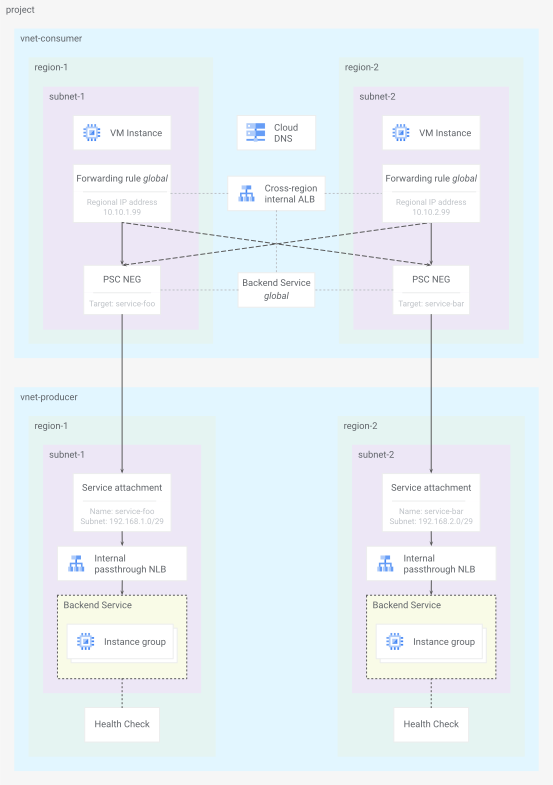
รูปที่ 1 โทโพโลยีเครือข่าย Codelab
ฝั่งผู้ให้บริการมีเครือข่ายย่อยระดับภูมิภาคที่มีตัวจัดสรรภาระงานเครือข่ายแบบส่งต่อภายในระดับภูมิภาคซึ่งแสดงบริการผ่านทรัพยากรไฟล์แนบบริการ PSC ระดับภูมิภาค บริการแบ็กเอนด์มีกลุ่มอินสแตนซ์ที่มีการจัดการ (MIG) ระดับภูมิภาค และได้รับการตรวจสอบประสิทธิภาพการทำงานโดยการตรวจสอบคำขอ http และการตรวจสอบการตอบสนอง 200 (OK)
โปรดดูเอกสารล่าสุดเกี่ยวกับความเข้ากันได้ของ Private Service Connect สำหรับการกำหนดค่าของผู้ผลิตเพื่อดูว่าตัวจัดสรรภาระงานใดรองรับการตรวจสอบประสิทธิภาพการทำงานแบบผสมสำหรับ PSC
ประสิทธิภาพบริการ
การตรวจสอบประสิทธิภาพการทำงานของบริการแบ็กเอนด์ของผู้ผลิต ซึ่งกำหนดค่าในระหว่างการสร้างตัวจัดสรรภาระงาน จะทำหน้าที่เป็นสัญญาณต้นทางสำหรับสถานะการทำงานแบบผสมสำหรับฟีเจอร์ PSC ทรัพยากรแหล่งข้อมูลด้านสุขภาพใช้สัญญาณดังกล่าวพร้อมกับข้อจำกัดเพิ่มเติมที่กำหนดไว้ในทรัพยากรนโยบายการรวบรวมข้อมูลด้านสุขภาพเพื่อกำหนดสถานะสุขภาพสำหรับบริการแบ็กเอนด์เดียว
โดยค่าเริ่มต้น ระบบจะถือว่าบริการอยู่ในสถานะปกติเมื่อเป็นไปตามข้อจำกัดทั้ง 2 ข้อต่อไปนี้
- แบ็กเอนด์อย่างน้อย
xเปอร์เซ็นต์มีประสิทธิภาพดี (ค่าเริ่มต้นคือ60) - แบ็กเอนด์อย่างน้อย
yรายการมีประสิทธิภาพดี (ค่าเริ่มต้นคือ1)
การตรวจสอบประสิทธิภาพการทำงานแบบผสมจะอ้างอิงแหล่งที่มาของข้อมูลด้านประสิทธิภาพการทำงานทั้งหมดสำหรับบริการแบ็กเอนด์ทั้งหมดเพื่อพิจารณาประสิทธิภาพการทำงานโดยรวมของบริการผู้ให้บริการระดับภูมิภาคทั้งหมด ในกรณีของ Lab นี้ บริการผู้ผลิตแต่ละภูมิภาคมีแหล่งที่มาของสถานะบริการแบ็กเอนด์เพียงแหล่งเดียวที่สรุปผลเป็นการตรวจสอบสถานะแบบคอมโพสิต 1 รายการ
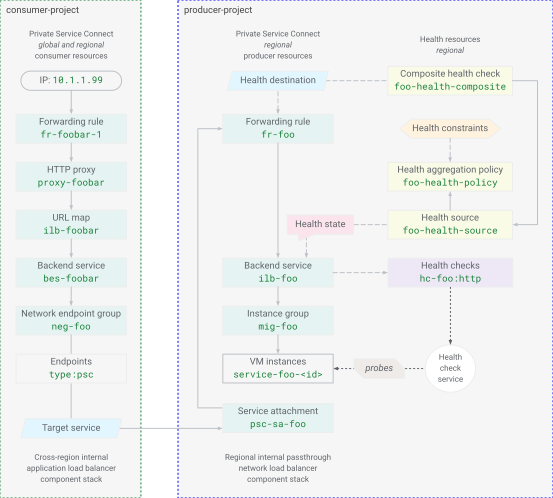
รูปที่ 2 รูปแบบทรัพยากร PSC สำหรับสุขภาพแบบองค์รวม
คำจำกัดความของทรัพยากรการตรวจสอบสถานะแบบคอมโพสิตยังอ้างอิงถึงกฎการส่งต่อของตัวจัดสรรภาระงานของบริการผู้ผลิตด้วย NEG ของ PSC แบ็กเอนด์ของตัวจัดสรรภาระงานการเข้าถึงของผู้ใช้จะเชื่อมต่อกับไฟล์แนบบริการ PSC ของผู้ผลิตและกฎการส่งต่อของตัวจัดสรรภาระงานของผู้ผลิตโดยตรรกะ ซึ่งจะเชื่อมโยงตัวโหลดบาลานซ์การเข้าถึงของผู้บริโภคกับสถานะการตรวจสอบสถานะแบบคอมโพสิตของบริการของผู้ผลิต จากนั้นระบบจะเผยแพร่สถานะการทำงานโดยรวมของบริการผู้ผลิตระดับภูมิภาคไปยังตัวจัดสรรภาระงานของผู้ใช้เพื่อเลือกแบ็กเอนด์ที่เหมาะสม
3. การตั้งค่าโปรเจ็กต์
เข้าถึงโปรเจ็กต์
Codelab นี้เขียนขึ้นเพื่อใช้โปรเจ็กต์ Google Cloud เดียว ขั้นตอนการกำหนดค่าใช้คำสั่ง gcloud และคำสั่ง Shell ของ Linux
หมายเหตุ: ในการติดตั้งใช้งานเวอร์ชันที่ใช้งานจริง โดยปกติแล้วทรัพยากรผู้ใช้ PSC และบริการของผู้ให้บริการจะอยู่ในโปรเจ็กต์ที่แตกต่างกัน
เริ่มต้นด้วยการเข้าถึงบรรทัดคำสั่งของโปรเจ็กต์ที่อยู่ในระบบคลาวด์ของ Google โดยใช้คำสั่งต่อไปนี้
- Cloud Shell
http://shell.cloud.google.com/หรือ - เทอร์มินัลในเครื่องที่
gcloudCLI ติดตั้งแล้ว
ตั้งค่ารหัสโปรเจ็กต์
gcloud config set project YOUR_PROJECT_ID_HERE
ตั้งค่าตัวแปรสภาพแวดล้อมของ Shell
export PROJECT_ID=$(gcloud config list --format="value(core.project)")
export REGION_1="us-west1"
export ZONE_1="us-west1-c"
export REGION_2="us-east1"
export ZONE_2="us-east1-c"
echo ${PROJECT_ID}
echo ${REGION_1}
echo ${ZONE_1}
echo ${REGION_2}
echo ${ZONE_2}
เปิดใช้บริการ API
gcloud services enable compute.googleapis.com
gcloud services enable dns.googleapis.com
4. บริการ Producer
สร้างแหล่งข้อมูลที่แชร์
สร้างเครือข่าย
gcloud compute networks create vnet-producer --subnet-mode=custom
สร้างซับเน็ต
# create subnet for service workload in region 1
gcloud compute networks subnets create subnet-foo \
  --network=vnet-producer \
  --region=${REGION_1} \
  --range=172.16.1.0/24 \
  --enable-private-ip-google-access

# create subnet for psc nat in region 1
gcloud compute networks subnets create subnet-foo-pscnat \
  --network=vnet-producer \
  --region=${REGION_1} \
  --range=192.168.1.0/29 \
  --purpose=PRIVATE_SERVICE_CONNECT
# create subnet for service workload in region 2
gcloud compute networks subnets create subnet-bar \
  --network=vnet-producer \
  --region=${REGION_2} \
  --range=172.16.2.0/24 \
  --enable-private-ip-google-access

# create subnet for psc nat in region 2
gcloud compute networks subnets create subnet-bar-pscnat \
  --network=vnet-producer \
  --region=${REGION_2} \
  --range=192.168.2.0/29 \
  --purpose=PRIVATE_SERVICE_CONNECT
สร้างคอมโพเนนต์ไฟร์วอลล์
คุณต้องมีกฎไฟร์วอลล์เพื่ออนุญาตการรับส่งข้อมูลไปยังทรัพยากร VM (กฎไฟร์วอลล์เริ่มต้นโดยนัยคือปฏิเสธการรับส่งข้อมูลขาเข้าและอนุญาตการรับส่งข้อมูลขาออก) นโยบายเป็นวิธีที่แนะนำในการใช้กฎไฟร์วอลล์โดยการสร้างทรัพยากรนโยบายไฟร์วอลล์เครือข่าย สร้างและเพิ่มกฎลงในนโยบาย จากนั้นเชื่อมโยงนโยบายกับเครือข่าย VPC
# create fw policy
gcloud compute network-firewall-policies create fw-policy-producer --global
# create fw policy rules
gcloud compute network-firewall-policies rules create 1001 \
  --description="allow iap for ssh" \
  --firewall-policy=fw-policy-producer \
  --global-firewall-policy \
  --action=allow \
  --direction=INGRESS \
  --layer4-configs=tcp:22  \
  --src-ip-ranges=35.235.240.0/20

gcloud compute network-firewall-policies rules create 1002 \
  --description="allow health checks" \
  --firewall-policy=fw-policy-producer \
  --global-firewall-policy \
  --action=allow \
  --direction=INGRESS \
  --layer4-configs=tcp,udp,icmp  \
  --src-ip-ranges=130.211.0.0/22,35.191.0.0/16

gcloud compute network-firewall-policies rules create 1003 \
  --description="allow psc nat clients" \
  --firewall-policy=fw-policy-producer \
  --global-firewall-policy \
  --action=allow \
  --direction=INGRESS \
  --layer4-configs=tcp:80  \
  --src-ip-ranges=192.168.1.0/29,192.168.2.0/29
# associate fw policy to vnet
gcloud compute network-firewall-policies associations create \
  --firewall-policy=fw-policy-producer \
  --network=vnet-producer \
  --name=fw-policy-association-producer \
  --global-firewall-policy
สร้าง Cloud Router และเกตเวย์ NAT
# create routers for nat in each region
gcloud compute routers create cr-nat-foo \
  --network=vnet-producer \
  --asn=16550 \
  --region=${REGION_1}

gcloud compute routers create cr-nat-bar \
  --network=vnet-producer \
  --asn=16550 \
  --region=${REGION_2}
# create nat gateways in each region
gcloud compute routers nats create natgw-foo \
  --router=cr-nat-foo \
  --region=${REGION_1} \
  --auto-allocate-nat-external-ips \
  --nat-all-subnet-ip-ranges

gcloud compute routers nats create natgw-bar \
  --router=cr-nat-bar \
  --region=${REGION_2} \
  --auto-allocate-nat-external-ips \
  --nat-all-subnet-ip-ranges
สร้างการกำหนดค่าการเริ่มต้น VM ด้วยเซิร์ฟเวอร์ HTTP
cat > vm-server-startup.sh << 'EOF'
#! /bin/bash
apt-get update
apt-get install apache2 -y
vm_hostname="$(curl -H "Metadata-Flavor:Google" \
http://169.254.169.254/computeMetadata/v1/instance/name)"
vm_zone="$(curl -H "Metadata-Flavor:Google" \
http://169.254.169.254/computeMetadata/v1/instance/zone)"
echo "Page served from: $vm_hostname in zone $vm_zone" | \
tee /var/www/html/index.html
systemctl restart apache2
EOF
ตั้งค่าบริการ foo ในภูมิภาค 1
สร้างคอมพิวเตอร์บริการ
# create managed instance group template
gcloud compute instance-templates create mig-template-foo \
  --machine-type=e2-micro \
  --network=vnet-producer \
  --region=${REGION_1} \
  --subnet=subnet-foo \
  --no-address \
  --shielded-secure-boot \
  --metadata-from-file=startup-script=vm-server-startup.sh
# create regional managed instance group
gcloud compute instance-groups managed create mig-foo \
  --region=${REGION_1} \
  --size=2 \
  --template=mig-template-foo \
  --base-instance-name=service-foo
สร้างคอมโพเนนต์ของตัวจัดสรรภาระงานของบริการ
# create lb health check
gcloud compute health-checks create http hc-foo-http \
  --region=${REGION_1} \
  --port=80 \
  --enable-logging
# create backend service
gcloud compute backend-services create ilb-foo \
  --load-balancing-scheme=INTERNAL \
  --protocol=tcp \
  --region=${REGION_1} \
  --health-checks=hc-foo-http \
  --health-checks-region=${REGION_1}

# add managed instance group to backend service
gcloud compute backend-services add-backend ilb-foo \
  --instance-group=mig-foo \
  --instance-group-region=${REGION_1} \
  --region=${REGION_1}
# create forwarding rule
gcloud compute forwarding-rules create fr-foo \
  --region=${REGION_1} \
  --load-balancing-scheme=INTERNAL \
  --network=vnet-producer \
  --subnet=subnet-foo \
  --address=172.16.1.99 \
  --ip-protocol=TCP \
  --ports=80 \
  --backend-service=ilb-foo \
  --backend-service-region=${REGION_1} \
  --allow-global-access
เผยแพร่บริการ PSC
# create psc service attachment
gcloud compute service-attachments create psc-sa-foo \
  --region=${REGION_1} \
  --target-service=projects/${PROJECT_ID}/regions/${REGION_1}/forwardingRules/fr-foo \
  --connection-preference=ACCEPT_AUTOMATIC \
  --nat-subnets=subnet-foo-pscnat
ตั้งค่าบริการ bar ในภูมิภาค 2
สร้างคอมพิวเตอร์บริการ
# create managed instance group template
gcloud compute instance-templates create mig-template-bar \
  --machine-type=e2-micro \
  --network=vnet-producer \
  --region=${REGION_2} \
  --subnet=subnet-bar \
  --no-address \
  --shielded-secure-boot \
  --metadata-from-file=startup-script=vm-server-startup.sh
# create regional managed instance group
gcloud compute instance-groups managed create mig-bar \
  --region=${REGION_2} \
  --size=2 \
  --template=mig-template-bar \
  --base-instance-name=service-bar
สร้างคอมโพเนนต์ของตัวจัดสรรภาระงานของบริการ
# create lb health check
gcloud compute health-checks create http hc-bar-http \
  --region=${REGION_2} \
  --port=80 \
  --enable-logging
# create backend service
gcloud compute backend-services create ilb-bar \
  --load-balancing-scheme=INTERNAL \
  --protocol=tcp \
  --region=${REGION_2} \
  --health-checks=hc-bar-http \
  --health-checks-region=${REGION_2}

# add managed instance group to backend service
gcloud compute backend-services add-backend ilb-bar \
  --instance-group=mig-bar \
  --instance-group-region=${REGION_2} \
  --region=${REGION_2}
# create forwarding rule
gcloud compute forwarding-rules create fr-bar \
  --region=${REGION_2} \
  --load-balancing-scheme=INTERNAL \
  --network=vnet-producer \
  --subnet=subnet-bar \
  --address=172.16.2.99 \
  --ip-protocol=TCP \
  --ports=80 \
  --backend-service=ilb-bar \
  --backend-service-region=${REGION_2} \
  --allow-global-access
เผยแพร่บริการ PSC
# create psc service attachment
gcloud compute service-attachments create psc-sa-bar \
  --region=${REGION_2} \
  --target-service=projects/${PROJECT_ID}/regions/${REGION_2}/forwardingRules/fr-bar \
  --connection-preference=ACCEPT_AUTOMATIC \
  --nat-subnets=subnet-bar-pscnat
5. การเข้าถึงของผู้บริโภค
ตั้งค่าทรัพยากรของลูกค้า
สร้างคอมโพเนนต์เครือข่าย
# create vpc network
gcloud compute networks create vnet-consumer --subnet-mode=custom
# create client subnet in each region
gcloud compute networks subnets create subnet-client-1 \
  --network=vnet-consumer \
  --region=${REGION_1} \
  --range=10.10.1.0/24 \
  --enable-private-ip-google-access

gcloud compute networks subnets create subnet-client-2 \
  --network=vnet-consumer \
  --region=${REGION_2} \
  --range=10.10.2.0/24 \
  --enable-private-ip-google-access
ตัวจัดสรรภาระงานของแอปพลิเคชันผู้ใช้ (อิงตามพร็อกซี) ต้องใช้ซับเน็ตเฉพาะพร็อกซี ซับเน็ตเหล่านี้มีกลุ่มที่อยู่ IP ที่ใช้โดยตัวจัดสรรภาระงานที่อิงตามพร็อกซีเป็นที่อยู่ต้นทางภายในเมื่อส่งการรับส่งข้อมูลไปยังแบ็กเอนด์
# create proxy subnet in each region
gcloud compute networks subnets create subnet-proxy-1 \
  --purpose=GLOBAL_MANAGED_PROXY \
  --role=ACTIVE \
  --network=vnet-consumer \
  --region=${REGION_1} \
  --range=10.10.128.0/23

gcloud compute networks subnets create subnet-proxy-2 \
  --purpose=GLOBAL_MANAGED_PROXY \
  --role=ACTIVE \
  --network=vnet-consumer \
  --region=${REGION_2} \
  --range=10.10.130.0/23
สร้างคอมโพเนนต์ไฟร์วอลล์
# create fw policy
gcloud compute network-firewall-policies create fw-policy-consumer --global
# create fw policy rules
gcloud compute network-firewall-policies rules create 1001 \
  --description="allow iap for ssh" \
  --firewall-policy=fw-policy-consumer \
  --global-firewall-policy \
  --action=allow \
  --direction=INGRESS \
  --layer4-configs=tcp:22  \
  --src-ip-ranges=35.235.240.0/20
# associate fw policy to vnet
gcloud compute network-firewall-policies associations create \
  --firewall-policy=fw-policy-consumer \
  --network=vnet-consumer \
  --name=fw-policy-association-consumer \
  --global-firewall-policy
สร้างคอมโพเนนต์ของตัวจัดสรรภาระงาน
# create psc network endpoint group per region
gcloud compute network-endpoint-groups create neg-foo \
  --network-endpoint-type=private-service-connect \
  --psc-target-service=projects/${PROJECT_ID}/regions/${REGION_1}/serviceAttachments/psc-sa-foo \
  --region=${REGION_1} \
  --network=vnet-consumer \
  --subnet=subnet-client-1

gcloud compute network-endpoint-groups create neg-bar \
  --network-endpoint-type=private-service-connect \
  --psc-target-service=projects/${PROJECT_ID}/regions/${REGION_2}/serviceAttachments/psc-sa-bar \
  --region=${REGION_2} \
  --network=vnet-consumer \
  --subnet=subnet-client-2
# verify psc connections
gcloud compute network-endpoint-groups list --format="value(selfLink, pscData.pscConnectionStatus)"
# create global backend service
gcloud compute backend-services create bes-foobar \
  --load-balancing-scheme=INTERNAL_MANAGED \
  --protocol=HTTP \
  --global
# add negs to backend service
gcloud compute backend-services add-backend bes-foobar \
  --network-endpoint-group=neg-foo \
  --network-endpoint-group-region=${REGION_1} \
  --global

gcloud compute backend-services add-backend bes-foobar \
  --network-endpoint-group=neg-bar \
  --network-endpoint-group-region=${REGION_2} \
  --global
# create global url map
gcloud compute url-maps create ilb-foobar \
  --default-service=bes-foobar \
  --global
# create global target proxy
gcloud compute target-http-proxies create proxy-foobar \
  --url-map=ilb-foobar \
  --global
# create global forwarding rule for region 1
gcloud compute forwarding-rules create fr-foobar-1 \
  --load-balancing-scheme=INTERNAL_MANAGED \
  --network=vnet-consumer \
  --subnet=subnet-client-1 \
  --subnet-region=${REGION_1} \
  --address=10.10.1.99 \
  --ports=80 \
  --target-http-proxy=proxy-foobar \
  --global
# create global forwarding rule for region 2
gcloud compute forwarding-rules create fr-foobar-2 \
  --load-balancing-scheme=INTERNAL_MANAGED \
  --network=vnet-consumer \
  --subnet=subnet-client-2 \
  --subnet-region=${REGION_2} \
  --address=10.10.2.99 \
  --ports=80 \
  --target-http-proxy=proxy-foobar \
  --global
สร้างระเบียน DNS
# create dns zone
gcloud dns managed-zones create zone-foobar \
  --description="private zone for foobar" \
  --dns-name=foobar.com \
  --networks=vnet-consumer \
  --visibility=private
# create geo dns record
gcloud dns record-sets create www.foobar.com \
  --zone=zone-foobar \
  --type=A \
  --ttl=300 \
  --routing-policy-type=GEO \
  --routing-policy-item="location=${REGION_1},rrdatas=10.10.1.99" \
  --routing-policy-item="location=${REGION_2},rrdatas=10.10.2.99"
สร้างทรัพยากรการประมวลผล
# create client vm in region 1
gcloud compute instances create client-1 \
  --machine-type=e2-micro \
  --zone=${ZONE_1} \
  --subnet=subnet-client-1 \
  --no-address \
  --shielded-secure-boot
# create client vm in region 2
gcloud compute instances create client-2 \
  --machine-type=e2-micro \
  --zone=${ZONE_2} \
  --subnet=subnet-client-2 \
  --no-address \
  --shielded-secure-boot
ทดสอบค่าพื้นฐานของบริการ
จาก VM ของไคลเอ็นต์ในภูมิภาค 1
# send request from vm to service using hostname
gcloud compute ssh client-1 --zone=${ZONE_1} --command='
  curl -s -v www.foobar.com'
# send request from vm to load balancer forwarding rule region 1
gcloud compute ssh client-1 --zone=${ZONE_1} --command='
  curl -s 10.10.1.99'
# send request from vm to load balancer forwarding rule region 2
gcloud compute ssh client-1 --zone=${ZONE_1} --command='
  curl -s 10.10.2.99'
ไม่บังคับ: ลองทำการทดสอบเดียวกันจาก VM ไคลเอ็นต์ในภูมิภาค 2: gcloud compute ssh client-2 --zone=${ZONE_2}
ประเด็นสำคัญ: ลักษณะการทำงานของตัวจัดสรรภาระงานปกติสำหรับคำขอของไคลเอ็นต์ที่เข้ากฎการส่งต่อใน region-x คือการเลือกใช้แบ็กเอนด์ใน region-x เดียวกัน หากทรัพยากรแบ็กเอนด์ทั้งหมดมีประสิทธิภาพดี ภูมิภาคที่มีเวลาในการตอบสนองต่ำที่สุดจะเป็นผู้ชนะ แบ็กเอนด์ส่วนกลางจะเฟลโอเวอร์ไปยังภูมิภาคอื่นที่มีสัญญาณสถานะที่เหมาะสม
แต่เนื่องจากทรัพยากรบริการของผู้ผลิตจริงอยู่เบื้องหลังตัวจัดสรรภาระงานของผู้ผลิตในเครือข่าย VPC ของผู้ผลิต สัญญาณสถานะนี้จึงไม่ชัดเจนสำหรับตัวจัดสรรภาระงานของผู้บริโภคก่อนหน้านี้ และด้วยเหตุนี้ฝั่งผู้บริโภคจึงไม่สามารถกำหนดการเฟลโอเวอร์ของแบ็กเอนด์ดังกล่าวได้ PSC health แก้ปัญหานี้ด้วยการเผยแพร่ข้อมูลสถานะบริการจากฝั่งผู้ผลิตไปยังฝั่งผู้บริโภค
6. แหล่งข้อมูลด้านสุขภาพ
ผู้ให้บริการจะกำหนดค่าสถานะความสมบูรณ์แบบผสมสำหรับทรัพยากร PSC เพื่อแสดงสถานะความสมบูรณ์โดยรวมของบริการระดับภูมิภาค นโยบายด้านสุขภาพอิงตามสิ่งที่ผู้ผลิตบริการกำหนดว่าเหมาะสมในการรักษาระดับการให้บริการที่ใช้งานได้ ระบบจะตั้งค่าเกณฑ์เพื่อแจ้งให้ผู้บริโภคทำการเฟลโอเวอร์เมื่อไม่เป็นไปตามเงื่อนไขที่ผู้ผลิตกำหนดอีกต่อไป
ตั้งค่าสถานะบริการ foo ในภูมิภาค 1
สร้างนโยบายการรวมข้อมูลสถานะ
gcloud compute health-aggregation-policies create foo-health-policy \
  --region=${REGION_1} \
  --healthy-percent-threshold=60 \
  --min-healthy-threshold=1
สร้างแหล่งข้อมูลด้านสุขภาพ
gcloud compute health-sources create foo-health-source \
  --region=${REGION_1} \
  --source-type=BACKEND_SERVICE \
  --sources=ilb-foo \
  --health-aggregation-policy=foo-health-policy
สร้างการตรวจสอบประสิทธิภาพการทำงานแบบรวม
gcloud compute composite-health-checks create foo-health-composite \
  --region=${REGION_1} \
  --health-sources=foo-health-source \
  --health-destination=projects/${PROJECT_ID}/regions/${REGION_1}/forwardingRules/fr-foo
ยืนยันfooการกำหนดค่าสถานะบริการ
ดูการกำหนดค่าทรัพยากรด้านสุขภาพได้ด้วยคำสั่ง list (และ describe) ต่อภูมิภาค
# show health aggregation policies
gcloud compute health-aggregation-policies list --regions=${REGION_1}

# show health sources
gcloud compute health-sources list --regions=${REGION_1}

# show composite health checks
gcloud compute composite-health-checks list --regions=${REGION_1}
ตั้งค่าสถานะบริการ bar ในภูมิภาค 2
สร้างนโยบายการรวมข้อมูลสถานะ
gcloud compute health-aggregation-policies create bar-health-policy \
  --region=${REGION_2} \
  --healthy-percent-threshold=60 \
  --min-healthy-threshold=1
สร้างแหล่งข้อมูลด้านสุขภาพ
gcloud compute health-sources create bar-health-source \
  --region=${REGION_2} \
  --source-type=BACKEND_SERVICE \
  --sources=ilb-bar \
  --health-aggregation-policy=bar-health-policy
สร้างการตรวจสอบประสิทธิภาพการทำงานแบบรวม
gcloud compute composite-health-checks create bar-health-composite \
  --region=${REGION_2} \
  --health-sources=bar-health-source \
  --health-destination=projects/${PROJECT_ID}/regions/${REGION_2}/forwardingRules/fr-bar
ยืนยันbarการกำหนดค่าสถานะบริการ
# show health aggregation policies
gcloud compute health-aggregation-policies list --regions=${REGION_2}

# show health sources
gcloud compute health-sources list --regions=${REGION_2}

# show composite health checks
gcloud compute composite-health-checks list --regions=${REGION_2}
ส่วนการกำหนดค่าก็จบลงเพียงเท่านี้... มาถึงส่วนการทดสอบกัน
7. การทดสอบเฟลโอเวอร์
สถานการณ์ที่บริการ foo ในภูมิภาค 1 มีประสิทธิภาพไม่ดี
สถานการณ์นี้จำลองความล้มเหลวของบริการผู้ให้บริการ PSC foo ในภูมิภาค 1 โดยการหยุดเว็บเซิร์ฟเวอร์ในอินสแตนซ์ VM 1 ใน 2 รายการ
ดูรายละเอียด VM ของเซิร์ฟเวอร์
# set env var for a foo service vm name
export FOO_FAIL_NAME=$(gcloud compute instance-groups managed list-instances mig-foo \
  --limit=1 \
  --region=${REGION_1} \
  --format="value(name)")
echo ${FOO_FAIL_NAME}
# set env var for a foo service zone
export FOO_FAIL_ZONE=$(gcloud compute instance-groups managed list-instances mig-foo \
  --limit=1 \
  --region=${REGION_1} \
  --format="value(ZONE)")
echo ${FOO_FAIL_ZONE}
หยุดเซิร์ฟเวอร์ http ในภูมิภาค 1
# stop apache http server to fail service
gcloud compute ssh ${FOO_FAIL_NAME} --zone=${FOO_FAIL_ZONE} --command='
  sudo systemctl stop apache2'
# verify service dead
gcloud compute ssh ${FOO_FAIL_NAME} --zone=${FOO_FAIL_ZONE} --command='
  sudo systemctl status apache2 | grep Active:'
ยืนยันว่าบริการระดับภูมิภาคมีประสิทธิภาพไม่ดี
# check health state of backend service
gcloud compute backend-services get-health ilb-foo --region=${REGION_1}
เอาต์พุตควรมีลักษณะคล้ายกับตัวอย่างต่อไปนี้
backend: .../regions/us-west1/instanceGroups/mig-foo
status:
  healthStatus:
  -   forwardingRule: .../regions/us-west1/forwardingRules/fr-foo
    forwardingRuleIp: 172.16.1.99
    healthState: UNHEALTHY
    instance: .../zones/us-west1-a/instances/service-foo-<UID_1>
    ipAddress: 172.16.1.2
    port: 80
  -   forwardingRule: .../regions/us-west1/forwardingRules/fr-foo
    forwardingRuleIp: 172.16.1.99
    healthState: HEALTHY
    instance: .../zones/us-west1-b/instances/service-foo-<UID_2>
    ipAddress: 172.16.1.3
    port: 80
  kind: compute#backendServiceGroupHealth
# check health state of health source
gcloud compute health-sources get-health foo-health-source --region=${REGION_1}
เอาต์พุตควรมีลักษณะคล้ายกับตัวอย่างต่อไปนี้
healthState: UNHEALTHY
kind: compute#healthSourceHealth
sources:
- backends:
  - endpointCount: 1
    group: .../zones/us-west1-a/instanceGroups/mig-foo
    healthyEndpointCount: 0
  - endpointCount: 0
    group: .../zones/us-west1-c/instanceGroups/mig-foo
    healthyEndpointCount: 0
  - endpointCount: 1
    group: .../zones/us-west1-b/instanceGroups/mig-foo
    healthyEndpointCount: 1
  forwardingRule: .../regions/us-west1/forwardingRules/fr-foo
  source: .../regions/us-west1/backendServices/ilb-foo
ทดสอบเฟลโอเวอร์ของไคลเอ็นต์ในภูมิภาค 1
# send request to service using hostname
gcloud compute ssh client-1 --zone=${ZONE_1} --command='
  curl -s -v www.foobar.com'
# curl to ilb vip in region 1
gcloud compute ssh client-1 --zone=${ZONE_1} --command='
  curl -s 10.10.1.99'
# curl to ilb vip in region 2
gcloud compute ssh client-1 --zone=${ZONE_1} --command='
  curl -s 10.10.2.99'
Composite Health สำหรับ PSC ได้อัปเดตตัวจัดสรรภาระงานของผู้บริโภคและสั่งให้หลีกเลี่ยงบริการแบ็กเอนด์ที่ไม่สมบูรณ์ในภูมิภาค 1 แต่ได้เปลี่ยนเส้นทางการรับส่งข้อมูลไปยังบริการที่มีประสิทธิภาพดี bar ในภูมิภาค 2 แทน
รีสตาร์ทเซิร์ฟเวอร์ในภูมิภาค 1 http
# start apache http server to return service to healthy
gcloud compute ssh ${FOO_FAIL_NAME} --zone=${FOO_FAIL_ZONE} --command='
  sudo systemctl start apache2'
# verify service running
gcloud compute ssh ${FOO_FAIL_NAME} --zone=${FOO_FAIL_ZONE} --command='
  sudo systemctl status apache2 | grep Active:'
# check health state of health source
gcloud compute health-sources get-health foo-health-source --region=${REGION_1}
ตอนนี้เอาต์พุตควรรายงานสถานะ HEALTHY ในลักษณะนี้
healthState: HEALTHY
kind: compute#healthSourceHealth
sources:
- backends:
  - endpointCount: 1
    group: .../zones/us-west1-a/instanceGroups/mig-foo
    healthyEndpointCount: 1
  - endpointCount: 0
    group: .../zones/us-west1-c/instanceGroups/mig-foo
    healthyEndpointCount: 0
  - endpointCount: 1
    group: .../zones/us-west1-b/instanceGroups/mig-foo
    healthyEndpointCount: 1
  forwardingRule: .../regions/us-west1/forwardingRules/fr-foo
  source: .../regions/us-west1/backendServices/ilb-foo
เปลี่ยนนโยบายด้านสุขภาพ
ผู้ผลิตสามารถปรับนโยบายด้านสถานะบริการตามเกณฑ์ต่างๆ ได้ แหล่งข้อมูลนโยบายการรวบรวมข้อมูลด้านสุขภาพจะระบุเกณฑ์ขั้นต่ำที่จำเป็นต่อการรักษาสถานะปกติในแหล่งข้อมูลด้านสุขภาพ (บริการแบ็กเอนด์) ทั้งหมด
อัปเดตนโยบายการรวบรวมข้อมูลสถานะบริการ bar
gcloud compute health-aggregation-policies update bar-health-policy \
  --region=${REGION_2} \
  --description="min 40% threshold" \
  --healthy-percent-threshold=40 \
  --min-healthy-threshold=2
# verify new policy is applied
gcloud compute health-aggregation-policies list --regions=${REGION_2}
การเปลี่ยนแปลงนโยบายด้านสุขภาพของผู้ผลิตนี้มีผลดังนี้
- ลดเปอร์เซ็นต์เกณฑ์ขั้นต่ำที่มีประสิทธิภาพจาก 60% เป็น 40% – ตอนนี้ความล้มเหลวของอินสแตนซ์ VM เพียงรายการเดียวจะไม่ทําให้เกิดสถานะไม่มีประสิทธิภาพตาม
--healthy-percent-threshold(สถานะความล้มเหลวจะเป็น 50% และต้องมีเพียง 40% เท่านั้นจึงจะมีประสิทธิภาพ) - เพิ่มจำนวนแบ็กเอนด์ที่มีประสิทธิภาพขั้นต่ำจาก 1 เป็น 2 อินสแตนซ์ VM - ตอนนี้ความล้มเหลวของอินสแตนซ์ VM เดียวจะทําให้เกิดสถานะไม่มีประสิทธิภาพตาม
--min-healthy-threshold(สถานะความล้มเหลวจะเป็น 1 แต่ต้องมี 2 รายการจึงจะมีประสิทธิภาพ)
สถานการณ์ที่บริการ bar ในภูมิภาค 2 มีประสิทธิภาพไม่ดี
สถานการณ์นี้จำลองความล้มเหลวของบริการผู้ให้บริการ PSC bar ในภูมิภาค 2 โดยการหยุดเว็บเซิร์ฟเวอร์ในอินสแตนซ์ VM 1 ใน 2 รายการ
ดูรายละเอียด VM ของเซิร์ฟเวอร์
# set env var for a bar service vm name
export BAR_FAIL_NAME=$(gcloud compute instance-groups managed list-instances mig-bar \
  --limit=1 \
  --region=${REGION_2} \
  --format="value(name)")
echo ${BAR_FAIL_NAME}
# set env var for a bar service zone
export BAR_FAIL_ZONE=$(gcloud compute instance-groups managed list-instances mig-bar \
  --limit=1 \
  --region=${REGION_2} \
  --format="value(ZONE)")
echo ${BAR_FAIL_ZONE}
หยุดเซิร์ฟเวอร์ภูมิภาค 2 http
# stop apache http server to fail service
gcloud compute ssh ${BAR_FAIL_NAME} --zone=${BAR_FAIL_ZONE} --command='
  sudo systemctl stop apache2'
# verify service dead
gcloud compute ssh ${BAR_FAIL_NAME} --zone=${BAR_FAIL_ZONE} --command='
  sudo systemctl status apache2 | grep Active:'
ยืนยันว่าบริการระดับภูมิภาคมีประสิทธิภาพไม่ดี
# check health state of backend service
gcloud compute backend-services get-health ilb-bar --region=${REGION_2}
เอาต์พุตควรมีลักษณะคล้ายกับตัวอย่างต่อไปนี้
backend: .../regions/us-east1/instanceGroups/mig-bar
status:
  healthStatus:
  -   forwardingRule: .../regions/us-east1/forwardingRules/fr-bar
    forwardingRuleIp: 172.16.2.99
    healthState: UNHEALTHY
    instance: .../zones/us-east1-b/instances/service-bar-<UID_1>
    ipAddress: 172.16.2.3
    port: 80
  -   forwardingRule: .../regions/us-east1/forwardingRules/fr-bar
    forwardingRuleIp: 172.16.2.99
    healthState: HEALTHY
    instance: .../zones/us-east1-d/instances/service-foo-<UID_2>
    ipAddress: 172.16.2.2
    port: 80
  kind: compute#backendServiceGroupHealth
# check health state of health source
gcloud compute health-sources get-health bar-health-source --region=${REGION_2}
เอาต์พุตควรมีลักษณะคล้ายกับตัวอย่างต่อไปนี้
healthState: UNHEALTHY
kind: compute#healthSourceHealth
sources:
- backends:
  - endpointCount: 1
    group: .../zones/us-east1-b/instanceGroups/mig-bar
    healthyEndpointCount: 0
  - endpointCount: 1
    group: .../zones/us-east1-d/instanceGroups/mig-bar
    healthyEndpointCount: 1
  - endpointCount: 0
    group: .../zones/us-east1-c/instanceGroups/mig-bar
    healthyEndpointCount: 0
  forwardingRule: .../regions/us-west1/forwardingRules/fr-bar
  source: .../regions/us-west1/backendServices/ilb-bar
ทดสอบการทำงานล้มเหลวของไคลเอ็นต์ในภูมิภาค 2
# send request to service using hostname
gcloud compute ssh client-2 --zone=${ZONE_2} --command='
  curl -s -v www.foobar.com'
# curl to ilb vip in region 1
gcloud compute ssh client-2 --zone=${ZONE_2} --command='
  curl -s 10.10.1.99'
# curl to ilb vip in region 2
gcloud compute ssh client-2 --zone=${ZONE_2} --command='
  curl -s 10.10.2.99'
Composite Health สำหรับ PSC ได้อัปเดตตัวจัดสรรภาระงานของผู้บริโภคและสั่งให้หลีกเลี่ยงบริการแบ็กเอนด์ที่ไม่สมบูรณ์ในภูมิภาค 2 แต่ได้เปลี่ยนเส้นทางการรับส่งข้อมูลไปยังบริการที่มีประสิทธิภาพดีfooในภูมิภาค 1 แทน
ในกรณีที่ตัวจัดสรรภาระงานของผู้บริโภคเห็นว่าบริการของผู้ผลิตทั้งหมดไม่สมบูรณ์ ตัวจัดสรรภาระงานจะเฟลโอเวอร์ไปยังอินสแตนซ์ที่สมบูรณ์ไม่ได้ ลักษณะการทำงานที่คาดไว้คือตัวโหลดบาลานซ์จะกระจายการเข้าชมไปยังแบ็กเอนด์ที่ไม่สมบูรณ์ทั้งหมด (เปิดล้มเหลว)
ส่วนการทดสอบก็มีเพียงเท่านี้... ไปที่การตรวจสอบกันต่อ
8. ตรวจสอบสุขภาพ
ระบบจะบันทึกการเปลี่ยนแปลงสถานะสุขภาพโดยค่าเริ่มต้น โปรเจ็กต์ผู้ผลิตจะดูบันทึกสำหรับแหล่งข้อมูลด้านสุขภาพและการตรวจสอบประสิทธิภาพการทำงานแบบคอมโพสิตได้ โปรเจ็กต์ผู้บริโภคจะดูบันทึกสำหรับ NEG ของ PSC ที่เชื่อมต่อกับบริการที่เผยแพร่โดยใช้การตรวจสอบสถานะแบบผสมได้
แม้ว่าแล็บนี้จะติดตั้งใช้งานทั้งทรัพยากรผู้บริโภคและผู้ผลิตในโปรเจ็กต์เดียวกันเพื่อให้ง่าย แต่เมื่อติดตั้งใช้งานในโปรเจ็กต์แยกกัน บันทึกจะแสดงบทบาททั้ง 2 ที่แยกออกจากกัน
ทรัพยากรที่มีการตรวจสอบ | ดู | ชื่อบันทึก |
แหล่งข้อมูลด้านสุขภาพและการตรวจสอบแบบผสม | มุมมองผู้ผลิต |
|
NEG ของ Private Service Connect | มุมมองของผู้บริโภค |
|
บันทึกของ Producer
บันทึกของผู้ผลิตจะแสดงการสรุปสถานะภายในของบริการของผู้ผลิต ดังนี้
HealthSource: สถานะของบริการแบ็กเอนด์แต่ละรายการ (เช่น สถานะ VM ของmig-barและmig-foo)CompositeHealthCheck: สุขภาพระดับภูมิภาคโดยรวมของบริการที่เผยแพร่ซึ่งแมปกับปลายทางของกฎการส่งต่อของผู้ผลิต (เช่นfr-barหรือfr-foo)
# query logs for producer
gcloud logging read \
  'logName="projects/'${PROJECT_ID}'/logs/compute.googleapis.com%2Fcompositehealth"' \
  --project=${PROJECT_ID} \
  --limit=10 \
  --format='table(
    timestamp.date(format="%I:%M:%S %p", tz=LOCAL):label=TIME,
    resource.type.basename():label=TYPE,
    resource.labels.location:label=REGION,
    jsonPayload.healthState:label=STATE,
    jsonPayload.sources[0].backends[].group.basename().join(","):label=BACKENDS,
    jsonPayload.sources[0].backends[].healthyEndpointCount.join(","):label=HEALTHY,
    jsonPayload.sources[0].backends[].endpointCount.join(","):label=TOTAL,
    jsonPayload.healthDestination.basename():label=DESTINATION
  )'
บันทึกผู้บริโภค
บันทึกของผู้ใช้จะแสดงสถานะประสิทธิภาพการทำงานที่ส่งต่อของทรัพยากรของผู้ใช้ ดังนี้
NetworkEndpointGroup: สถานะความสมบูรณ์ที่ส่งต่อของ PSC NEG ที่เชื่อมต่อกับบริการที่เผยแพร่ (เช่นneg-barและneg-foo)
ในการตั้งค่าผู้บริโภคและผู้ผลิตแยกกัน ให้ใช้การค้นหาบันทึกนี้ในโปรเจ็กต์ผู้บริโภคเพื่อกำหนดเป้าหมายเหตุการณ์ด้านสุขภาพแบบคอมโพสิตสำหรับ NEG ของ PSC...
# query logs for consumer
gcloud logging read \
  "logName=projects/${PROJECT_ID}/logs/compute.googleapis.com%2Fservicehealthchecks
  AND resource.type=\"compute.googleapis.com/NetworkEndpointGroupV2\"" \
  --project="${PROJECT_ID}" \
  --freshness=30m \
  --limit=10 \
  --format="table(
    timestamp.date(format='%I:%M:%S %p', tz=LOCAL):label=TIME,
    resource.labels.location:label=REGION,
    jsonPayload.serviceHealthCheckResult.healthState:label=STATE,
    jsonPayload.serviceHealthCheckResult.previousHealthState:label=PREV_STATE,
    resource.labels.network_endpoint_group_id:label=NEG_ID
  )"
ส่วนการตรวจสอบก็มีเพียงเท่านี้... มาถึงส่วนการล้างข้อมูลกัน
9. ล้างข้อมูล
# delete health resources
gcloud -q compute composite-health-checks delete foo-health-composite --region=${REGION_1}

gcloud -q compute health-sources delete foo-health-source --region=${REGION_1}

gcloud -q compute health-aggregation-policies delete foo-health-policy --region=${REGION_1}

gcloud -q compute composite-health-checks delete bar-health-composite --region=${REGION_2}

gcloud -q compute health-sources delete bar-health-source --region=${REGION_2}

gcloud -q compute health-aggregation-policies delete bar-health-policy --region=${REGION_2}
# delete consumer compute and load balancer resources
gcloud -q compute instances delete client-2 --zone=${ZONE_2}

gcloud -q compute instances delete client-1 --zone=${ZONE_1}

gcloud -q dns record-sets delete www.foobar.com --type=A --zone=zone-foobar

gcloud -q dns managed-zones delete zone-foobar

gcloud -q compute forwarding-rules delete fr-foobar-2 --global

gcloud -q compute forwarding-rules delete fr-foobar-1 --global

gcloud -q compute target-http-proxies delete proxy-foobar --global

gcloud -q compute url-maps delete ilb-foobar --global

gcloud -q compute backend-services delete bes-foobar --global
# delete consumer network resources
gcloud -q compute network-endpoint-groups delete neg-bar --region=${REGION_2}

gcloud -q compute network-endpoint-groups delete neg-foo --region=${REGION_1}

gcloud -q compute networks subnets delete subnet-proxy-2 --region=${REGION_2}

gcloud -q compute networks subnets delete subnet-proxy-1 --region=${REGION_1}

gcloud -q compute networks subnets delete subnet-client-2 --region=${REGION_2}

gcloud -q compute networks subnets delete subnet-client-1 --region=${REGION_1}

gcloud -q compute network-firewall-policies associations delete \
  --firewall-policy=fw-policy-consumer \
  --name=fw-policy-association-consumer \
  --global-firewall-policy

gcloud -q compute network-firewall-policies delete fw-policy-consumer --global

gcloud -q compute networks delete vnet-consumer
# delete producer load balancer resources
gcloud -q compute service-attachments delete psc-sa-bar --region=${REGION_2}

gcloud -q compute service-attachments delete psc-sa-foo --region=${REGION_1}

gcloud -q compute forwarding-rules delete fr-bar --region=${REGION_2}

gcloud -q compute forwarding-rules delete fr-foo --region=${REGION_1}

gcloud -q compute backend-services delete ilb-bar --region=${REGION_2}

gcloud -q compute backend-services delete ilb-foo --region=${REGION_1}

gcloud -q compute health-checks delete hc-bar-http --region=${REGION_2}

gcloud -q compute health-checks delete hc-foo-http --region=${REGION_1}
# delete producer compute resources
gcloud -q compute instance-groups managed delete mig-bar --region=${REGION_2}

gcloud -q compute instance-groups managed delete mig-foo --region=${REGION_1}

gcloud -q compute instance-templates delete mig-template-bar --global

gcloud -q compute instance-templates delete mig-template-foo --global
# delete producer network resources
gcloud -q compute networks subnets delete subnet-bar-pscnat --region=${REGION_2}

gcloud -q compute networks subnets delete subnet-foo-pscnat --region=${REGION_1}

gcloud -q compute networks subnets delete subnet-bar --region=${REGION_2}

gcloud -q compute networks subnets delete subnet-foo --region=${REGION_1}

gcloud -q compute routers delete cr-nat-bar --region=${REGION_2}

gcloud -q compute routers delete cr-nat-foo --region=${REGION_1}

gcloud -q compute network-firewall-policies associations delete \
  --firewall-policy=fw-policy-producer \
  --name=fw-policy-association-producer \
  --global-firewall-policy

gcloud -q compute network-firewall-policies delete fw-policy-producer --global

gcloud -q compute networks delete vnet-producer
# delete shell variables and script file
unset FOO_FAIL_NAME FOO_FAIL_ZONE BAR_FAIL_NAME BAR_FAIL_ZONE

unset PROJECT_ID REGION_1 ZONE_1 REGION_2 ZONE_2

rm vm-server-startup.sh
#
10. บทสรุป
ยินดีด้วย คุณกำหนดค่าสถานะสุขภาพแบบผสมสำหรับ PSC และทดสอบการทำงานล้มเหลวระดับภูมิภาคอัตโนมัติเรียบร้อยแล้ว
โปรดแสดงความคิดเห็น ถามคำถาม หรือแก้ไขโดยใช้แบบฟอร์มความคิดเห็นนี้
ขอขอบคุณ