

1. 簡介
本程式碼實驗室將探討 Private Service Connect (PSC) 的複合健康狀態,瞭解如何自動進行區域容錯移轉。PSC 的複合健康狀態是一項網路功能,可提升服務復原能力和可用性。
服務供應商可透過複合健康狀態定義自訂健康狀態政策 (狀態定義健康或不健康的服務),並透過 PSC 後端將這些信號自動傳播給連線至服務的服務消費者。這項功能專門用於支援自動跨區域容錯移轉。如果區域性生產者服務健康狀態不佳,消費者負載平衡器會自動停止將流量轉送至該區域,並將流量導向至其他區域的健康服務。
與先前的跨區域容錯移轉方法 (例如離群值偵測) 相比,複合健康狀態會直接根據生產者服務後端 (VM 執行個體群組或網路端點) 的匯總健康狀態,提供更準確的容錯移轉信號。製作人可以自行定義健康狀態邏輯,確保只有在服務真正符合必要健康狀態條件時,製作人才會收到流量。
課程內容
- 複合型健康狀態的元件,以及這些元件如何協同運作,判斷生產者服務的健康狀態
- 使用 gcloud 指令為生產者服務實作 PSC 複合健康狀態
- 設定跨區域 PSC 消費者存取負載平衡器,以使用生產者複合健康狀態政策的健康狀態信號
- 測試服務故障情境,並驗證自動跨區域容錯移轉
需求條件
- 具備 Google Cloud 專案
- 授予預先定義的
roles/compute.admin角色或廣泛的基本角色 (例如roles/admin或舊版roles/owner) 的 IAM 權限 - 熟悉 Google Cloud 網路概念,並會使用 Google Cloud CLI
2. 概念
PSC 網路
本程式碼實驗室的網路拓撲包含兩個有效 Google Cloud 區域中的用戶和供應商虛擬私有雲網路。
在用戶端,地區子網路具有用戶端 VM 執行個體,可透過跨地區內部應用程式負載平衡器存取生產者服務,並使用 PSC 網路端點群組 (NEG) 後端。有兩項區域負載平衡器轉送規則,具有區域 IP 位址,適用於全域 (跨區域) 用戶端連入。後端服務是全域資源,支援不同區域的 NEG。在容錯移轉情境中,連線至任一區域前端轉送規則的用戶端,都可以導向健康狀態良好的全域後端。
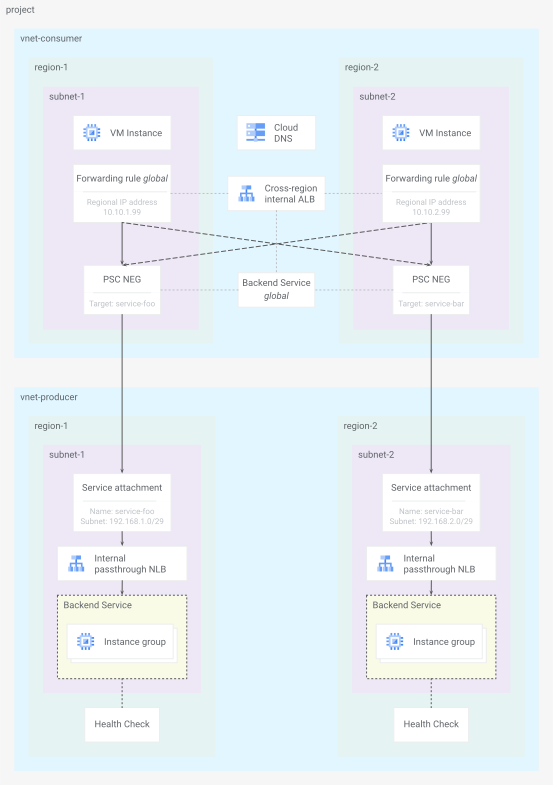
圖 1. 程式碼研究室網路拓撲
生產者端有區域子網路,以及區域內部直通式網路負載平衡器,透過區域 PSC 服務連結資源公開服務。後端服務包含區域受管理執行個體群組 (MIG),並透過探查 http 要求和驗證 200 (OK) 回應來檢查健康狀態。
請參閱有關 Producer 設定的 Private Service Connect 相容性最新說明文件,瞭解哪些負載平衡器支援 PSC 的複合健康狀態檢查。
服務健康狀態
在建立負載平衡器時設定的生產者後端服務健康狀態檢查,會做為 PSC 功能複合健康狀態的原始信號。健康狀態來源資源會使用該信號,以及健康狀態匯總政策資源中定義的其他限制,判斷單一後端服務的健康狀態。
根據預設,只要符合下列兩項限制,服務就會視為健康狀態良好:
- 至少有
x% 的後端健康狀態良好 (預設為60) - 至少有
y個後端健康狀態良好 (預設為1)
複合型健康狀態檢查會參照所有後端服務的所有健康狀態來源,判斷整個區域生產者服務的整體健康狀態。在本實驗室中,每個區域生產者服務只有一個後端服務健康狀態來源,會匯總至一個複合式健康狀態檢查。
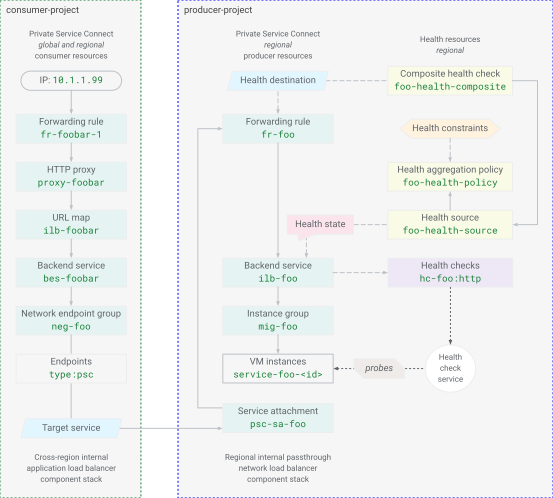
圖 2. PSC 資源模型的複合健康狀態
複合型健康狀態檢查資源定義也會參照生產者服務負載平衡器的轉送規則。用戶存取負載平衡器後端 PSC NEG 會在邏輯上連結至生產端 PSC 服務連結和生產端負載平衡器轉送規則。這會將消費者存取負載平衡器連結至生產者服務的複合健康狀態檢查狀態。接著,區域生產者服務的整體服務健康狀態會傳播至消費者負載平衡器,以選取適當的後端。
3. 專案設定
存取專案
本程式碼研究室是使用單一 Google Cloud 專案編寫而成。設定步驟會使用 gcloud 和 Linux 殼層指令。
注意:在正式環境部署中,PSC 消費端資源和生產端服務通常位於不同的專案。
首先,請使用下列指令存取 Google Cloud 雲端專案指令列:
- Cloud Shell
http://shell.cloud.google.com/,或 - 已安裝
gcloudCLI 的本機終端機
設定專案 ID
gcloud config set project YOUR_PROJECT_ID_HERE
設定殼層環境變數
export PROJECT_ID=$(gcloud config list --format="value(core.project)")
export REGION_1="us-west1"
export ZONE_1="us-west1-c"
export REGION_2="us-east1"
export ZONE_2="us-east1-c"
echo ${PROJECT_ID}
echo ${REGION_1}
echo ${ZONE_1}
echo ${REGION_2}
echo ${ZONE_2}
啟用 API 服務
gcloud services enable compute.googleapis.com
gcloud services enable dns.googleapis.com
4. 生產端服務
建立共用資源
建立網路
gcloud compute networks create vnet-producer --subnet-mode=custom
建立子網路
# create subnet for service workload in region 1
gcloud compute networks subnets create subnet-foo \
  --network=vnet-producer \
  --region=${REGION_1} \
  --range=172.16.1.0/24 \
  --enable-private-ip-google-access

# create subnet for psc nat in region 1
gcloud compute networks subnets create subnet-foo-pscnat \
  --network=vnet-producer \
  --region=${REGION_1} \
  --range=192.168.1.0/29 \
  --purpose=PRIVATE_SERVICE_CONNECT
# create subnet for service workload in region 2
gcloud compute networks subnets create subnet-bar \
  --network=vnet-producer \
  --region=${REGION_2} \
  --range=172.16.2.0/24 \
  --enable-private-ip-google-access

# create subnet for psc nat in region 2
gcloud compute networks subnets create subnet-bar-pscnat \
  --network=vnet-producer \
  --region=${REGION_2} \
  --range=192.168.2.0/29 \
  --purpose=PRIVATE_SERVICE_CONNECT
建立防火牆元件
您需要防火牆規則,才能允許流量傳送至 VM 資源 (默示預設防火牆規則會拒絕輸入流量,並允許輸出流量)。建議您使用政策部署防火牆規則,方法是建立網路防火牆政策資源、建立規則並新增至政策,然後將政策與虛擬私有雲網路建立關聯。
# create fw policy
gcloud compute network-firewall-policies create fw-policy-producer --global
# create fw policy rules
gcloud compute network-firewall-policies rules create 1001 \
  --description="allow iap for ssh" \
  --firewall-policy=fw-policy-producer \
  --global-firewall-policy \
  --action=allow \
  --direction=INGRESS \
  --layer4-configs=tcp:22  \
  --src-ip-ranges=35.235.240.0/20

gcloud compute network-firewall-policies rules create 1002 \
  --description="allow health checks" \
  --firewall-policy=fw-policy-producer \
  --global-firewall-policy \
  --action=allow \
  --direction=INGRESS \
  --layer4-configs=tcp,udp,icmp  \
  --src-ip-ranges=130.211.0.0/22,35.191.0.0/16

gcloud compute network-firewall-policies rules create 1003 \
  --description="allow psc nat clients" \
  --firewall-policy=fw-policy-producer \
  --global-firewall-policy \
  --action=allow \
  --direction=INGRESS \
  --layer4-configs=tcp:80  \
  --src-ip-ranges=192.168.1.0/29,192.168.2.0/29
# associate fw policy to vnet
gcloud compute network-firewall-policies associations create \
  --firewall-policy=fw-policy-producer \
  --network=vnet-producer \
  --name=fw-policy-association-producer \
  --global-firewall-policy
建立 Cloud Router 和 NAT 閘道
# create routers for nat in each region
gcloud compute routers create cr-nat-foo \
  --network=vnet-producer \
  --asn=16550 \
  --region=${REGION_1}

gcloud compute routers create cr-nat-bar \
  --network=vnet-producer \
  --asn=16550 \
  --region=${REGION_2}
# create nat gateways in each region
gcloud compute routers nats create natgw-foo \
  --router=cr-nat-foo \
  --region=${REGION_1} \
  --auto-allocate-nat-external-ips \
  --nat-all-subnet-ip-ranges

gcloud compute routers nats create natgw-bar \
  --router=cr-nat-bar \
  --region=${REGION_2} \
  --auto-allocate-nat-external-ips \
  --nat-all-subnet-ip-ranges
建立含有 HTTP 伺服器的 VM 啟動設定
cat > vm-server-startup.sh << 'EOF'
#! /bin/bash
apt-get update
apt-get install apache2 -y
vm_hostname="$(curl -H "Metadata-Flavor:Google" \
http://169.254.169.254/computeMetadata/v1/instance/name)"
vm_zone="$(curl -H "Metadata-Flavor:Google" \
http://169.254.169.254/computeMetadata/v1/instance/zone)"
echo "Page served from: $vm_hostname in zone $vm_zone" | \
tee /var/www/html/index.html
systemctl restart apache2
EOF
在區域 1 中設定服務 foo
建立服務運算資源
# create managed instance group template
gcloud compute instance-templates create mig-template-foo \
  --machine-type=e2-micro \
  --network=vnet-producer \
  --region=${REGION_1} \
  --subnet=subnet-foo \
  --no-address \
  --shielded-secure-boot \
  --metadata-from-file=startup-script=vm-server-startup.sh
# create regional managed instance group
gcloud compute instance-groups managed create mig-foo \
  --region=${REGION_1} \
  --size=2 \
  --template=mig-template-foo \
  --base-instance-name=service-foo
建立服務負載平衡器元件
# create lb health check
gcloud compute health-checks create http hc-foo-http \
  --region=${REGION_1} \
  --port=80 \
  --enable-logging
# create backend service
gcloud compute backend-services create ilb-foo \
  --load-balancing-scheme=INTERNAL \
  --protocol=tcp \
  --region=${REGION_1} \
  --health-checks=hc-foo-http \
  --health-checks-region=${REGION_1}

# add managed instance group to backend service
gcloud compute backend-services add-backend ilb-foo \
  --instance-group=mig-foo \
  --instance-group-region=${REGION_1} \
  --region=${REGION_1}
# create forwarding rule
gcloud compute forwarding-rules create fr-foo \
  --region=${REGION_1} \
  --load-balancing-scheme=INTERNAL \
  --network=vnet-producer \
  --subnet=subnet-foo \
  --address=172.16.1.99 \
  --ip-protocol=TCP \
  --ports=80 \
  --backend-service=ilb-foo \
  --backend-service-region=${REGION_1} \
  --allow-global-access
發布 PSC 服務
# create psc service attachment
gcloud compute service-attachments create psc-sa-foo \
  --region=${REGION_1} \
  --target-service=projects/${PROJECT_ID}/regions/${REGION_1}/forwardingRules/fr-foo \
  --connection-preference=ACCEPT_AUTOMATIC \
  --nat-subnets=subnet-foo-pscnat
在區域 2 中設定服務 bar
建立服務運算資源
# create managed instance group template
gcloud compute instance-templates create mig-template-bar \
  --machine-type=e2-micro \
  --network=vnet-producer \
  --region=${REGION_2} \
  --subnet=subnet-bar \
  --no-address \
  --shielded-secure-boot \
  --metadata-from-file=startup-script=vm-server-startup.sh
# create regional managed instance group
gcloud compute instance-groups managed create mig-bar \
  --region=${REGION_2} \
  --size=2 \
  --template=mig-template-bar \
  --base-instance-name=service-bar
建立服務負載平衡器元件
# create lb health check
gcloud compute health-checks create http hc-bar-http \
  --region=${REGION_2} \
  --port=80 \
  --enable-logging
# create backend service
gcloud compute backend-services create ilb-bar \
  --load-balancing-scheme=INTERNAL \
  --protocol=tcp \
  --region=${REGION_2} \
  --health-checks=hc-bar-http \
  --health-checks-region=${REGION_2}

# add managed instance group to backend service
gcloud compute backend-services add-backend ilb-bar \
  --instance-group=mig-bar \
  --instance-group-region=${REGION_2} \
  --region=${REGION_2}
# create forwarding rule
gcloud compute forwarding-rules create fr-bar \
  --region=${REGION_2} \
  --load-balancing-scheme=INTERNAL \
  --network=vnet-producer \
  --subnet=subnet-bar \
  --address=172.16.2.99 \
  --ip-protocol=TCP \
  --ports=80 \
  --backend-service=ilb-bar \
  --backend-service-region=${REGION_2} \
  --allow-global-access
發布 PSC 服務
# create psc service attachment
gcloud compute service-attachments create psc-sa-bar \
  --region=${REGION_2} \
  --target-service=projects/${PROJECT_ID}/regions/${REGION_2}/forwardingRules/fr-bar \
  --connection-preference=ACCEPT_AUTOMATIC \
  --nat-subnets=subnet-bar-pscnat
5. 消費者存取權
設定用戶端資源
建立網路元件
# create vpc network
gcloud compute networks create vnet-consumer --subnet-mode=custom
# create client subnet in each region
gcloud compute networks subnets create subnet-client-1 \
  --network=vnet-consumer \
  --region=${REGION_1} \
  --range=10.10.1.0/24 \
  --enable-private-ip-google-access

gcloud compute networks subnets create subnet-client-2 \
  --network=vnet-consumer \
  --region=${REGION_2} \
  --range=10.10.2.0/24 \
  --enable-private-ip-google-access
用戶端應用程式 (Proxy 型) 負載平衡器需要僅限 Proxy 的子網路。這些子網路提供 IP 位址集區,供 Proxy 型負載平衡器在將流量傳送至後端時,做為內部來源位址。
# create proxy subnet in each region
gcloud compute networks subnets create subnet-proxy-1 \
  --purpose=GLOBAL_MANAGED_PROXY \
  --role=ACTIVE \
  --network=vnet-consumer \
  --region=${REGION_1} \
  --range=10.10.128.0/23

gcloud compute networks subnets create subnet-proxy-2 \
  --purpose=GLOBAL_MANAGED_PROXY \
  --role=ACTIVE \
  --network=vnet-consumer \
  --region=${REGION_2} \
  --range=10.10.130.0/23
建立防火牆元件
# create fw policy
gcloud compute network-firewall-policies create fw-policy-consumer --global
# create fw policy rules
gcloud compute network-firewall-policies rules create 1001 \
  --description="allow iap for ssh" \
  --firewall-policy=fw-policy-consumer \
  --global-firewall-policy \
  --action=allow \
  --direction=INGRESS \
  --layer4-configs=tcp:22  \
  --src-ip-ranges=35.235.240.0/20
# associate fw policy to vnet
gcloud compute network-firewall-policies associations create \
  --firewall-policy=fw-policy-consumer \
  --network=vnet-consumer \
  --name=fw-policy-association-consumer \
  --global-firewall-policy
建立負載平衡器元件
# create psc network endpoint group per region
gcloud compute network-endpoint-groups create neg-foo \
  --network-endpoint-type=private-service-connect \
  --psc-target-service=projects/${PROJECT_ID}/regions/${REGION_1}/serviceAttachments/psc-sa-foo \
  --region=${REGION_1} \
  --network=vnet-consumer \
  --subnet=subnet-client-1

gcloud compute network-endpoint-groups create neg-bar \
  --network-endpoint-type=private-service-connect \
  --psc-target-service=projects/${PROJECT_ID}/regions/${REGION_2}/serviceAttachments/psc-sa-bar \
  --region=${REGION_2} \
  --network=vnet-consumer \
  --subnet=subnet-client-2
# verify psc connections
gcloud compute network-endpoint-groups list --format="value(selfLink, pscData.pscConnectionStatus)"
# create global backend service
gcloud compute backend-services create bes-foobar \
  --load-balancing-scheme=INTERNAL_MANAGED \
  --protocol=HTTP \
  --global
# add negs to backend service
gcloud compute backend-services add-backend bes-foobar \
  --network-endpoint-group=neg-foo \
  --network-endpoint-group-region=${REGION_1} \
  --global

gcloud compute backend-services add-backend bes-foobar \
  --network-endpoint-group=neg-bar \
  --network-endpoint-group-region=${REGION_2} \
  --global
# create global url map
gcloud compute url-maps create ilb-foobar \
  --default-service=bes-foobar \
  --global
# create global target proxy
gcloud compute target-http-proxies create proxy-foobar \
  --url-map=ilb-foobar \
  --global
# create global forwarding rule for region 1
gcloud compute forwarding-rules create fr-foobar-1 \
  --load-balancing-scheme=INTERNAL_MANAGED \
  --network=vnet-consumer \
  --subnet=subnet-client-1 \
  --subnet-region=${REGION_1} \
  --address=10.10.1.99 \
  --ports=80 \
  --target-http-proxy=proxy-foobar \
  --global
# create global forwarding rule for region 2
gcloud compute forwarding-rules create fr-foobar-2 \
  --load-balancing-scheme=INTERNAL_MANAGED \
  --network=vnet-consumer \
  --subnet=subnet-client-2 \
  --subnet-region=${REGION_2} \
  --address=10.10.2.99 \
  --ports=80 \
  --target-http-proxy=proxy-foobar \
  --global
建立 DNS 記錄
# create dns zone
gcloud dns managed-zones create zone-foobar \
  --description="private zone for foobar" \
  --dns-name=foobar.com \
  --networks=vnet-consumer \
  --visibility=private
# create geo dns record
gcloud dns record-sets create www.foobar.com \
  --zone=zone-foobar \
  --type=A \
  --ttl=300 \
  --routing-policy-type=GEO \
  --routing-policy-item="location=${REGION_1},rrdatas=10.10.1.99" \
  --routing-policy-item="location=${REGION_2},rrdatas=10.10.2.99"
建立運算資源
# create client vm in region 1
gcloud compute instances create client-1 \
  --machine-type=e2-micro \
  --zone=${ZONE_1} \
  --subnet=subnet-client-1 \
  --no-address \
  --shielded-secure-boot
# create client vm in region 2
gcloud compute instances create client-2 \
  --machine-type=e2-micro \
  --zone=${ZONE_2} \
  --subnet=subnet-client-2 \
  --no-address \
  --shielded-secure-boot
測試服務基準
從區域 1 的用戶端 VM
# send request from vm to service using hostname
gcloud compute ssh client-1 --zone=${ZONE_1} --command='
  curl -s -v www.foobar.com'
# send request from vm to load balancer forwarding rule region 1
gcloud compute ssh client-1 --zone=${ZONE_1} --command='
  curl -s 10.10.1.99'
# send request from vm to load balancer forwarding rule region 2
gcloud compute ssh client-1 --zone=${ZONE_1} --command='
  curl -s 10.10.2.99'
選用:從區域 2 的用戶端 VM 執行相同測試:gcloud compute ssh client-2 --zone=${ZONE_2}
重要事項:對於透過 region-x 轉送規則傳入的用戶端要求,負載平衡器通常會優先選擇位於相同 region-x 的後端。如果所有後端資源的運作狀態皆為良好,則延遲時間最短的區域會勝出。全域後端會容錯移轉至其他區域,並提供適當的健康狀態信號。
但由於實際的生產者服務資源位於生產者虛擬私有雲網路的生產者負載平衡器後方,這些健康狀態信號先前對消費者負載平衡器而言是不透明的,因此消費者端無法做出這類後端容錯移轉判斷。為解決這個問題,PSC 健康狀態會將服務健康狀態資訊從生產者端傳播至消費者端。
6. 健康資源
複合式健康狀態檢查會由生產者設定,代表區域服務的整體健康狀態。健康狀態政策的依據是服務生產者定義的適當條件,以維持正常運作的服務水準。設定門檻後,當製作人定義的條件不再符合時,系統就會通知消費者進行容錯移轉。
在區域 1 中設定服務健康狀態 foo
建立健康狀態匯總政策
gcloud compute health-aggregation-policies create foo-health-policy \
  --region=${REGION_1} \
  --healthy-percent-threshold=60 \
  --min-healthy-threshold=1
建立健康狀態來源
gcloud compute health-sources create foo-health-source \
  --region=${REGION_1} \
  --source-type=BACKEND_SERVICE \
  --sources=ilb-foo \
  --health-aggregation-policy=foo-health-policy
建立複合型健康狀態檢查
gcloud compute composite-health-checks create foo-health-composite \
  --region=${REGION_1} \
  --health-sources=foo-health-source \
  --health-destination=projects/${PROJECT_ID}/regions/${REGION_1}/forwardingRules/fr-foo
驗證服務 foo 健康狀態 設定
您可以使用各區域的清單 (和 describe) 指令,查看健康狀態資源設定
# show health aggregation policies
gcloud compute health-aggregation-policies list --regions=${REGION_1}

# show health sources
gcloud compute health-sources list --regions=${REGION_1}

# show composite health checks
gcloud compute composite-health-checks list --regions=${REGION_1}
在區域 2 中設定服務健康狀態 bar
建立健康狀態匯總政策
gcloud compute health-aggregation-policies create bar-health-policy \
  --region=${REGION_2} \
  --healthy-percent-threshold=60 \
  --min-healthy-threshold=1
建立健康狀態來源
gcloud compute health-sources create bar-health-source \
  --region=${REGION_2} \
  --source-type=BACKEND_SERVICE \
  --sources=ilb-bar \
  --health-aggregation-policy=bar-health-policy
建立複合型健康狀態檢查
gcloud compute composite-health-checks create bar-health-composite \
  --region=${REGION_2} \
  --health-sources=bar-health-source \
  --health-destination=projects/${PROJECT_ID}/regions/${REGION_2}/forwardingRules/fr-bar
驗證服務 bar 健康狀態 設定
# show health aggregation policies
gcloud compute health-aggregation-policies list --regions=${REGION_2}

# show health sources
gcloud compute health-sources list --regions=${REGION_2}

# show composite health checks
gcloud compute composite-health-checks list --regions=${REGION_2}
設定部分到此結束,接下來要進行測試。
7. 容錯移轉測試
服務 foo 區域 1 健康狀態不良情境
這個情境會停止其中一個 VM 執行個體上的網路伺服器,模擬區域 1 中 PSC 供應商服務 foo 發生故障。
取得伺服器 VM 詳細資料
# set env var for a foo service vm name
export FOO_FAIL_NAME=$(gcloud compute instance-groups managed list-instances mig-foo \
  --limit=1 \
  --region=${REGION_1} \
  --format="value(name)")
echo ${FOO_FAIL_NAME}
# set env var for a foo service zone
export FOO_FAIL_ZONE=$(gcloud compute instance-groups managed list-instances mig-foo \
  --limit=1 \
  --region=${REGION_1} \
  --format="value(ZONE)")
echo ${FOO_FAIL_ZONE}
停止區域 1 http 伺服器
# stop apache http server to fail service
gcloud compute ssh ${FOO_FAIL_NAME} --zone=${FOO_FAIL_ZONE} --command='
  sudo systemctl stop apache2'
# verify service dead
gcloud compute ssh ${FOO_FAIL_NAME} --zone=${FOO_FAIL_ZONE} --command='
  sudo systemctl status apache2 | grep Active:'
確認區域服務健康狀態不良
# check health state of backend service
gcloud compute backend-services get-health ilb-foo --region=${REGION_1}
輸出內容應與以下所示相似:
backend: .../regions/us-west1/instanceGroups/mig-foo
status:
  healthStatus:
  -   forwardingRule: .../regions/us-west1/forwardingRules/fr-foo
    forwardingRuleIp: 172.16.1.99
    healthState: UNHEALTHY
    instance: .../zones/us-west1-a/instances/service-foo-<UID_1>
    ipAddress: 172.16.1.2
    port: 80
  -   forwardingRule: .../regions/us-west1/forwardingRules/fr-foo
    forwardingRuleIp: 172.16.1.99
    healthState: HEALTHY
    instance: .../zones/us-west1-b/instances/service-foo-<UID_2>
    ipAddress: 172.16.1.3
    port: 80
  kind: compute#backendServiceGroupHealth
# check health state of health source
gcloud compute health-sources get-health foo-health-source --region=${REGION_1}
輸出內容應與以下所示相似:
healthState: UNHEALTHY
kind: compute#healthSourceHealth
sources:
- backends:
  - endpointCount: 1
    group: .../zones/us-west1-a/instanceGroups/mig-foo
    healthyEndpointCount: 0
  - endpointCount: 0
    group: .../zones/us-west1-c/instanceGroups/mig-foo
    healthyEndpointCount: 0
  - endpointCount: 1
    group: .../zones/us-west1-b/instanceGroups/mig-foo
    healthyEndpointCount: 1
  forwardingRule: .../regions/us-west1/forwardingRules/fr-foo
  source: .../regions/us-west1/backendServices/ilb-foo
測試區域 1 用戶端容錯移轉
# send request to service using hostname
gcloud compute ssh client-1 --zone=${ZONE_1} --command='
  curl -s -v www.foobar.com'
# curl to ilb vip in region 1
gcloud compute ssh client-1 --zone=${ZONE_1} --command='
  curl -s 10.10.1.99'
# curl to ilb vip in region 2
gcloud compute ssh client-1 --zone=${ZONE_1} --command='
  curl -s 10.10.2.99'
PSC 的複合健康狀態已更新消費者負載平衡器,並指示該平衡器避開區域 1 中健康狀態不良的後端服務。而是將流量導向區域 2 中健康狀態良好的服務 bar。
重新啟動區域 1 http 伺服器
# start apache http server to return service to healthy
gcloud compute ssh ${FOO_FAIL_NAME} --zone=${FOO_FAIL_ZONE} --command='
  sudo systemctl start apache2'
# verify service running
gcloud compute ssh ${FOO_FAIL_NAME} --zone=${FOO_FAIL_ZONE} --command='
  sudo systemctl status apache2 | grep Active:'
# check health state of health source
gcloud compute health-sources get-health foo-health-source --region=${REGION_1}
輸出內容現在應會回報類似以下的 HEALTHY 狀態...
healthState: HEALTHY
kind: compute#healthSourceHealth
sources:
- backends:
  - endpointCount: 1
    group: .../zones/us-west1-a/instanceGroups/mig-foo
    healthyEndpointCount: 1
  - endpointCount: 0
    group: .../zones/us-west1-c/instanceGroups/mig-foo
    healthyEndpointCount: 0
  - endpointCount: 1
    group: .../zones/us-west1-b/instanceGroups/mig-foo
    healthyEndpointCount: 1
  forwardingRule: .../regions/us-west1/forwardingRules/fr-foo
  source: .../regions/us-west1/backendServices/ilb-foo
變更健康狀態政策
製作人可以根據不同條件調整服務健康狀態政策。健康狀態匯總政策資源會指定最低門檻,確保所有不同健康狀態來源 (後端服務) 都能維持健康狀態。
更新 bar 服務健康狀態匯總政策
gcloud compute health-aggregation-policies update bar-health-policy \
  --region=${REGION_2} \
  --description="min 40% threshold" \
  --healthy-percent-threshold=40 \
  --min-healthy-threshold=2
# verify new policy is applied
gcloud compute health-aggregation-policies list --regions=${REGION_2}
這項製作人健康政策異動的目標如下:
- 將良好健康狀態最低門檻百分比從 60% 降至 40%:現在單一 VM 執行個體發生故障時,不會根據
--healthy-percent-threshold觸發不良狀態 (故障狀態為 50%,只需要 40% 即可保持良好狀態) - 將後端健康狀態良好的最低數量從 1 個 VM 執行個體增加至 2 個 VM 執行個體,現在單一 VM 執行個體發生故障會根據
--min-healthy-threshold觸發健康狀態不良 (故障狀態為 1,但需要 2 個才能健康)
服務 bar 區域 2 健康狀態不良情境
這個情境會停止其中一個 VM 執行個體上的網路伺服器,模擬區域 2 中 PSC 供應商服務 bar 發生故障。
取得伺服器 VM 詳細資料
# set env var for a bar service vm name
export BAR_FAIL_NAME=$(gcloud compute instance-groups managed list-instances mig-bar \
  --limit=1 \
  --region=${REGION_2} \
  --format="value(name)")
echo ${BAR_FAIL_NAME}
# set env var for a bar service zone
export BAR_FAIL_ZONE=$(gcloud compute instance-groups managed list-instances mig-bar \
  --limit=1 \
  --region=${REGION_2} \
  --format="value(ZONE)")
echo ${BAR_FAIL_ZONE}
停止區域 2 http 伺服器
# stop apache http server to fail service
gcloud compute ssh ${BAR_FAIL_NAME} --zone=${BAR_FAIL_ZONE} --command='
  sudo systemctl stop apache2'
# verify service dead
gcloud compute ssh ${BAR_FAIL_NAME} --zone=${BAR_FAIL_ZONE} --command='
  sudo systemctl status apache2 | grep Active:'
確認區域服務健康狀態不良
# check health state of backend service
gcloud compute backend-services get-health ilb-bar --region=${REGION_2}
輸出內容應與以下所示相似:
backend: .../regions/us-east1/instanceGroups/mig-bar
status:
  healthStatus:
  -   forwardingRule: .../regions/us-east1/forwardingRules/fr-bar
    forwardingRuleIp: 172.16.2.99
    healthState: UNHEALTHY
    instance: .../zones/us-east1-b/instances/service-bar-<UID_1>
    ipAddress: 172.16.2.3
    port: 80
  -   forwardingRule: .../regions/us-east1/forwardingRules/fr-bar
    forwardingRuleIp: 172.16.2.99
    healthState: HEALTHY
    instance: .../zones/us-east1-d/instances/service-foo-<UID_2>
    ipAddress: 172.16.2.2
    port: 80
  kind: compute#backendServiceGroupHealth
# check health state of health source
gcloud compute health-sources get-health bar-health-source --region=${REGION_2}
輸出內容應與以下所示相似:
healthState: UNHEALTHY
kind: compute#healthSourceHealth
sources:
- backends:
  - endpointCount: 1
    group: .../zones/us-east1-b/instanceGroups/mig-bar
    healthyEndpointCount: 0
  - endpointCount: 1
    group: .../zones/us-east1-d/instanceGroups/mig-bar
    healthyEndpointCount: 1
  - endpointCount: 0
    group: .../zones/us-east1-c/instanceGroups/mig-bar
    healthyEndpointCount: 0
  forwardingRule: .../regions/us-west1/forwardingRules/fr-bar
  source: .../regions/us-west1/backendServices/ilb-bar
測試區域 2 用戶端容錯移轉
# send request to service using hostname
gcloud compute ssh client-2 --zone=${ZONE_2} --command='
  curl -s -v www.foobar.com'
# curl to ilb vip in region 1
gcloud compute ssh client-2 --zone=${ZONE_2} --command='
  curl -s 10.10.1.99'
# curl to ilb vip in region 2
gcloud compute ssh client-2 --zone=${ZONE_2} --command='
  curl -s 10.10.2.99'
PSC 的複合健康狀態已更新消費者負載平衡器,並指示該平衡器避開區域 2 中健康狀態不佳的後端服務。而是將流量導向區域 1 中健康狀態良好的服務 foo。
如果取用端負載平衡器將所有生產端服務視為健康狀態不良,負載平衡器就無法容錯移轉至健康狀態良好的執行個體。預期的行為是負載平衡器會在所有健康狀態不良的後端之間分配流量 (故障開放)。
測試部分到此結束,接下來要進行監控。
8. 監測健康
系統預設會記錄健康狀態的變化。製作方專案可以查看健康狀態來源和複合健康狀態檢查的記錄。消費者專案可使用複合健康狀態,查看連至已發布服務的 PSC NEG 記錄。
雖然本實驗室為了簡化作業,將消費者和生產者資源部署在同一個專案中,但如果部署在不同專案中,記錄會顯示這兩個角色已分離。
受監控資源 | 查看 | 記錄檔名稱 |
健康狀態來源和複合型檢查 | 製作人檢視畫面 |
|
Private Service Connect NEG | 消費者檢視畫面 |
|
製作人記錄
生產者記錄會顯示生產者服務的內部健康狀態匯總:
HealthSource:個別後端服務的健康狀態 (例如mig-bar和mig-foo的 VM 狀態)CompositeHealthCheck:發布服務的匯總區域健康狀態,對應至生產者轉送規則目的地 (例如fr-bar或fr-foo)
# query logs for producer
gcloud logging read \
  'logName="projects/'${PROJECT_ID}'/logs/compute.googleapis.com%2Fcompositehealth"' \
  --project=${PROJECT_ID} \
  --limit=10 \
  --format='table(
    timestamp.date(format="%I:%M:%S %p", tz=LOCAL):label=TIME,
    resource.type.basename():label=TYPE,
    resource.labels.location:label=REGION,
    jsonPayload.healthState:label=STATE,
    jsonPayload.sources[0].backends[].group.basename().join(","):label=BACKENDS,
    jsonPayload.sources[0].backends[].healthyEndpointCount.join(","):label=HEALTHY,
    jsonPayload.sources[0].backends[].endpointCount.join(","):label=TOTAL,
    jsonPayload.healthDestination.basename():label=DESTINATION
  )'
消費者記錄
消費者記錄會顯示消費者資源的傳播健康狀態:
NetworkEndpointGroup:已發布服務所連線 PSC NEG 的傳播健康狀態 (例如neg-bar和neg-foo)
在獨立的消費者和生產者設定中,請在消費者專案中使用這項記錄查詢,針對 PSC NEG 的複合健康狀態事件...
# query logs for consumer
gcloud logging read \
  "logName=projects/${PROJECT_ID}/logs/compute.googleapis.com%2Fservicehealthchecks
  AND resource.type=\"compute.googleapis.com/NetworkEndpointGroupV2\"" \
  --project="${PROJECT_ID}" \
  --freshness=30m \
  --limit=10 \
  --format="table(
    timestamp.date(format='%I:%M:%S %p', tz=LOCAL):label=TIME,
    resource.labels.location:label=REGION,
    jsonPayload.serviceHealthCheckResult.healthState:label=STATE,
    jsonPayload.serviceHealthCheckResult.previousHealthState:label=PREV_STATE,
    resource.labels.network_endpoint_group_id:label=NEG_ID
  )"
監控部分到此結束,接下來要進行清理。
9. 清除
# delete health resources
gcloud -q compute composite-health-checks delete foo-health-composite --region=${REGION_1}

gcloud -q compute health-sources delete foo-health-source --region=${REGION_1}

gcloud -q compute health-aggregation-policies delete foo-health-policy --region=${REGION_1}

gcloud -q compute composite-health-checks delete bar-health-composite --region=${REGION_2}

gcloud -q compute health-sources delete bar-health-source --region=${REGION_2}

gcloud -q compute health-aggregation-policies delete bar-health-policy --region=${REGION_2}
# delete consumer compute and load balancer resources
gcloud -q compute instances delete client-2 --zone=${ZONE_2}

gcloud -q compute instances delete client-1 --zone=${ZONE_1}

gcloud -q dns record-sets delete www.foobar.com --type=A --zone=zone-foobar

gcloud -q dns managed-zones delete zone-foobar

gcloud -q compute forwarding-rules delete fr-foobar-2 --global

gcloud -q compute forwarding-rules delete fr-foobar-1 --global

gcloud -q compute target-http-proxies delete proxy-foobar --global

gcloud -q compute url-maps delete ilb-foobar --global

gcloud -q compute backend-services delete bes-foobar --global
# delete consumer network resources
gcloud -q compute network-endpoint-groups delete neg-bar --region=${REGION_2}

gcloud -q compute network-endpoint-groups delete neg-foo --region=${REGION_1}

gcloud -q compute networks subnets delete subnet-proxy-2 --region=${REGION_2}

gcloud -q compute networks subnets delete subnet-proxy-1 --region=${REGION_1}

gcloud -q compute networks subnets delete subnet-client-2 --region=${REGION_2}

gcloud -q compute networks subnets delete subnet-client-1 --region=${REGION_1}

gcloud -q compute network-firewall-policies associations delete \
  --firewall-policy=fw-policy-consumer \
  --name=fw-policy-association-consumer \
  --global-firewall-policy

gcloud -q compute network-firewall-policies delete fw-policy-consumer --global

gcloud -q compute networks delete vnet-consumer
# delete producer load balancer resources
gcloud -q compute service-attachments delete psc-sa-bar --region=${REGION_2}

gcloud -q compute service-attachments delete psc-sa-foo --region=${REGION_1}

gcloud -q compute forwarding-rules delete fr-bar --region=${REGION_2}

gcloud -q compute forwarding-rules delete fr-foo --region=${REGION_1}

gcloud -q compute backend-services delete ilb-bar --region=${REGION_2}

gcloud -q compute backend-services delete ilb-foo --region=${REGION_1}

gcloud -q compute health-checks delete hc-bar-http --region=${REGION_2}

gcloud -q compute health-checks delete hc-foo-http --region=${REGION_1}
# delete producer compute resources
gcloud -q compute instance-groups managed delete mig-bar --region=${REGION_2}

gcloud -q compute instance-groups managed delete mig-foo --region=${REGION_1}

gcloud -q compute instance-templates delete mig-template-bar --global

gcloud -q compute instance-templates delete mig-template-foo --global
# delete producer network resources
gcloud -q compute networks subnets delete subnet-bar-pscnat --region=${REGION_2}

gcloud -q compute networks subnets delete subnet-foo-pscnat --region=${REGION_1}

gcloud -q compute networks subnets delete subnet-bar --region=${REGION_2}

gcloud -q compute networks subnets delete subnet-foo --region=${REGION_1}

gcloud -q compute routers delete cr-nat-bar --region=${REGION_2}

gcloud -q compute routers delete cr-nat-foo --region=${REGION_1}

gcloud -q compute network-firewall-policies associations delete \
  --firewall-policy=fw-policy-producer \
  --name=fw-policy-association-producer \
  --global-firewall-policy

gcloud -q compute network-firewall-policies delete fw-policy-producer --global

gcloud -q compute networks delete vnet-producer
# delete shell variables and script file
unset FOO_FAIL_NAME FOO_FAIL_ZONE BAR_FAIL_NAME BAR_FAIL_ZONE

unset PROJECT_ID REGION_1 ZONE_1 REGION_2 ZONE_2

rm vm-server-startup.sh
#
10. 結語
恭喜!您已成功為 PSC 設定複合健康狀態檢查,並測試自動區域容錯移轉!
歡迎使用這份意見回饋表單提出任何意見、問題或修正建議。
感謝您!