
1. Case-study: Intelligent Retail
For the case-study we take a Retail Customer with a fast-growing digital marketplace. Customer's traditional data view is limited because it shows what people buy, but not how they are connected. This gap leads to missed opportunities and rising fraud. Now, they are pivoting to a Network-First philosophy to value social and logistics connections in addition to transactional data.
Core Business Challenges to address
You have four critical challenges that require understanding how customers and logistics are interconnected:
Challenge | The Problem | The Goal |
Influence Gap | Broad advertising yields low ROI; currently It's not possible to identify the real trendsetters (influencers). | Identify Influencers; that are central to the community through their connection in a connected network of customers. |
Logistics Resilience | The supply chain can be vulnerable (considering they operate in different geos). If one key hub fails, the entire region can potentially lose product access. | Identify Gatekeepers; those who are critical to bridge the logistics networks together. |
Ghost Networks | Fraud rings use fake profiles and shared addresses to coordinate theft and inflate ratings. | Expose Isolated Islands; hyper-connected groups with no ties to the legitimate community. |
Paradox of Choice | Current suggestion-/recommendation- engine is rudimentary, generic and often ignored (e.g., "Customers who bought this also bought ..."). | Build Behavioral Twins; i.e. recommendations based on similar shipping patterns and social circles. |
Mapping Business Challenges to a Technical Strategy (Rows → Relationships)
In a traditional database, data is stored in isolated silos: customers in one table, transactions in another, shipping in a third. While SQL is perfect for answering "Who bought what?", it struggles to answer network-based questions.
To solve these challenges, technical strategy is to shift this perspective:
- The Relational View (The "What"): Treats every customer as an isolated row. Finding a connection between a customer and a friend's purchase requires multiple complex "joins", which become exponentially slower as the network grows.
- The Graph View (The "How"): Treats relationships as first-class citizens. Instead of searching through lists, we navigate a map. We can see instantly that Customer A is connected to Customer B, who ships to Location Z.
Deep diving into requirements
Solution architects come to a conclusion that business requirements and technical strategy requires a multi-model approach, and identify the following key requirements.
How Cloud Spanner fits those technical requirements
Cloud Spanner is chosen as the heart of this transformation. It allows the Customer to keep its rock-solid relational foundation while simultaneously unlocking deep graph insights.
Here is a quick rundown of how Cloud Spanner addresses technical requirements and more.
On top of that Cloud Spanner provides a Future proof technical architecture
2. Setting up Data foundation
Following the business case we now move into the implementation phase. In this section, we define our data architecture, explore the limitations of the traditional relational model, and introduce the Property Graph as our primary tool for uncovering deep insights.
Setup Cloud Spanner Enterprise Instance
Step 1: Enable Cloud Spanner API
In the Google Cloud Console, click the Menu icon on the top left of the screen for the left navigation. Scroll down and select "Spanner", or alternatively search for "Spanner"
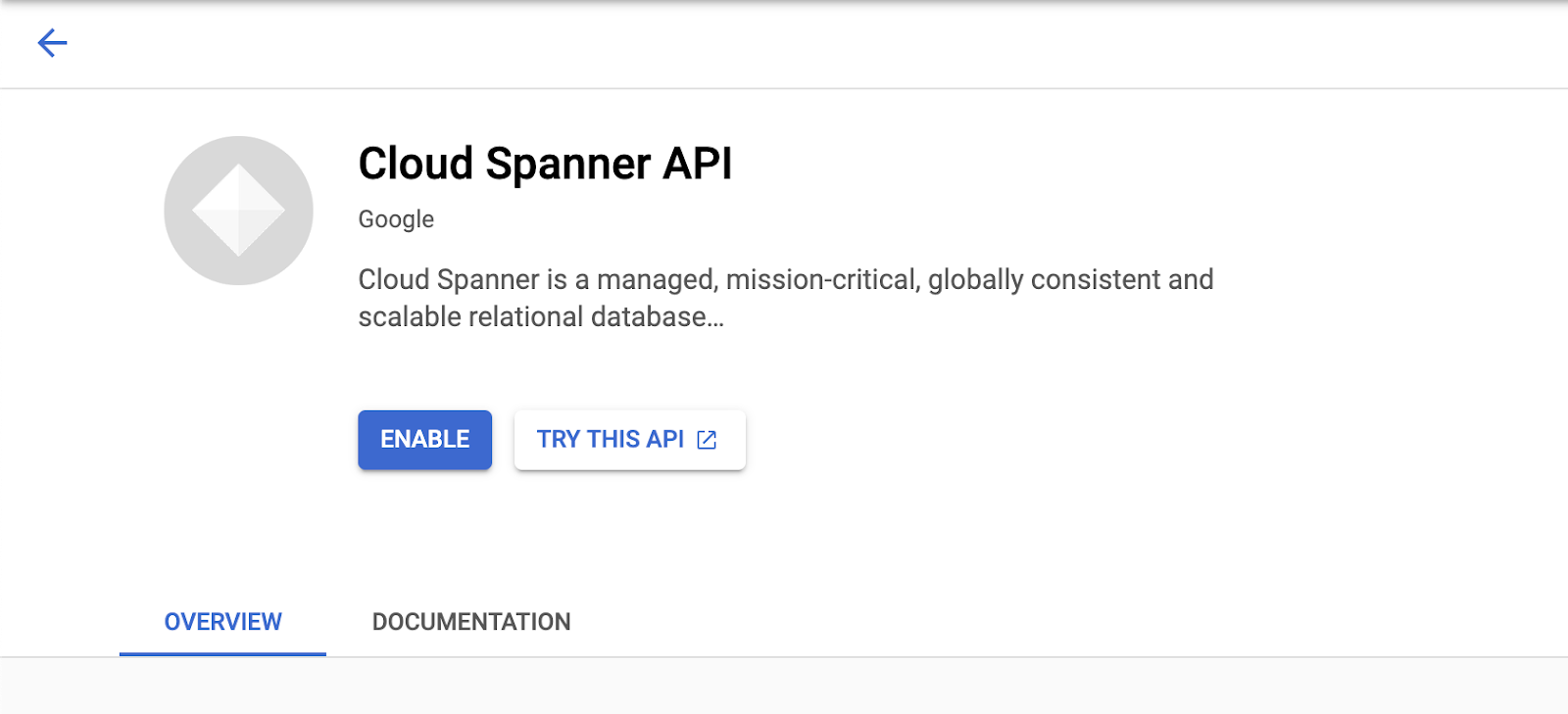
You should now see the Cloud Spanner UI, and assuming you are using a project that hasn't enabled the Cloud Spanner API yet, you will see a dialog asking you to enable it. If you have already enabled the API, you can skip this step.
Click on "Enable" to continue:
Step 2: Create Cloud Spanner Instance
First, you will create a Cloud Spanner instance. In the UI, click on "Create a Provisioned Instance" to create a new instance.
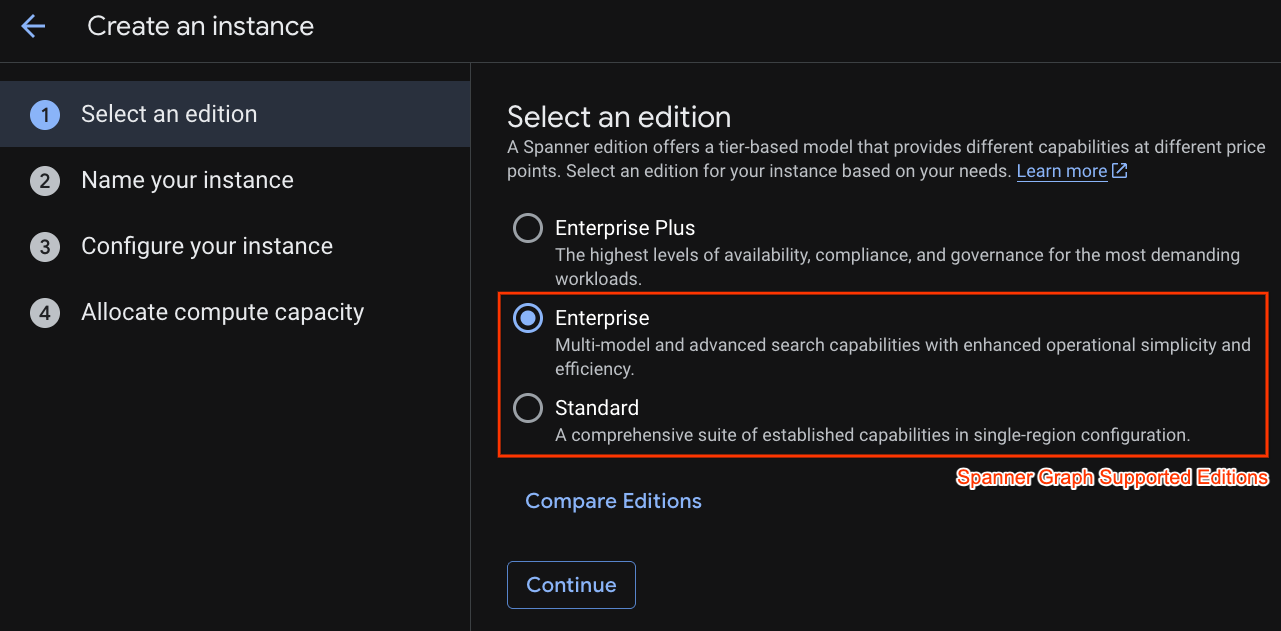
In the first step you have to select an edition. Please note that you can upgrade Edition afterwards as well. In order to use multi-model capabilities (Spanner Graph) we can go with Enterprise Edition.
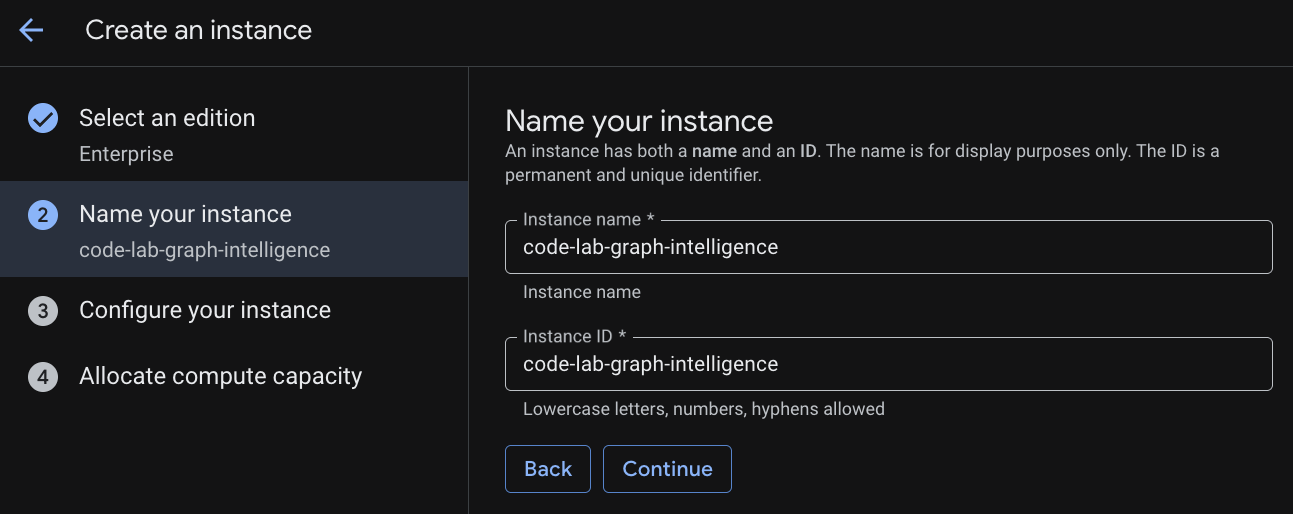
Naming your instance
Select a deployment configuration and select a regional of your choice.
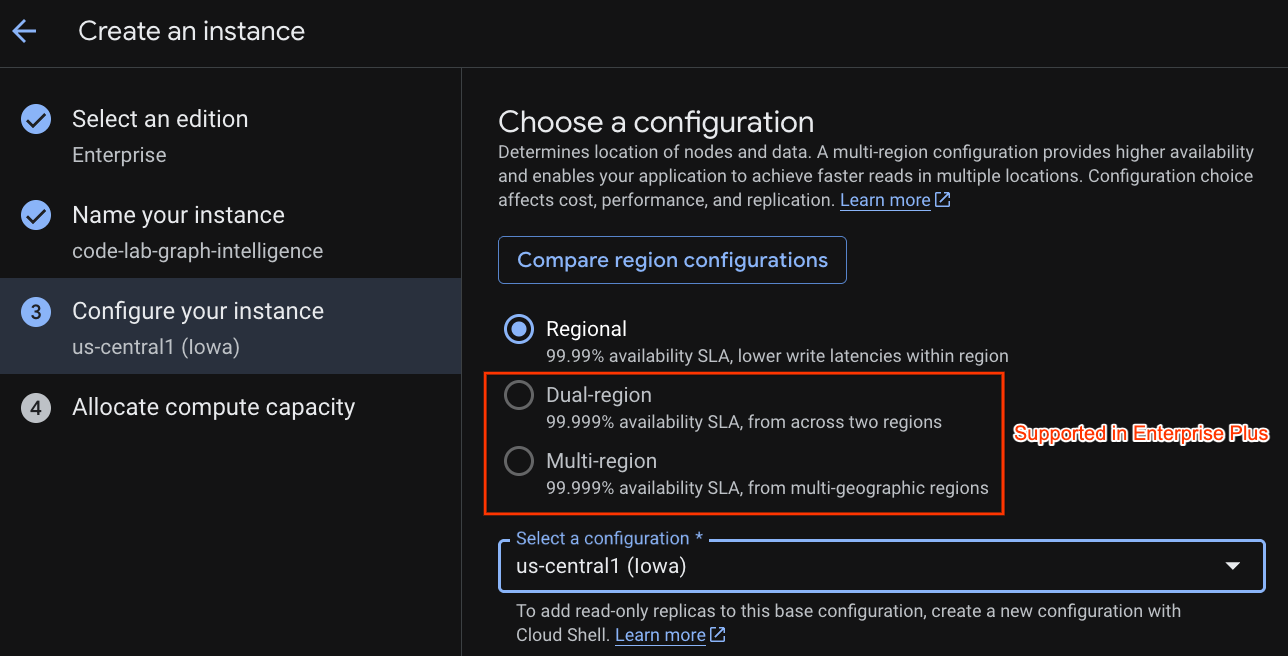
You can also compare various configuration options. For instance, the deployment configuration has at minimum 3 R/W replicas in 3 separate zones of your selected region. i.e. even if you go with a single node deployment you have 3 copies through 3 R/W replicas. In addition even with Regional deployment configuration you can further extend by having additional R/O replicas in your deployment topology.
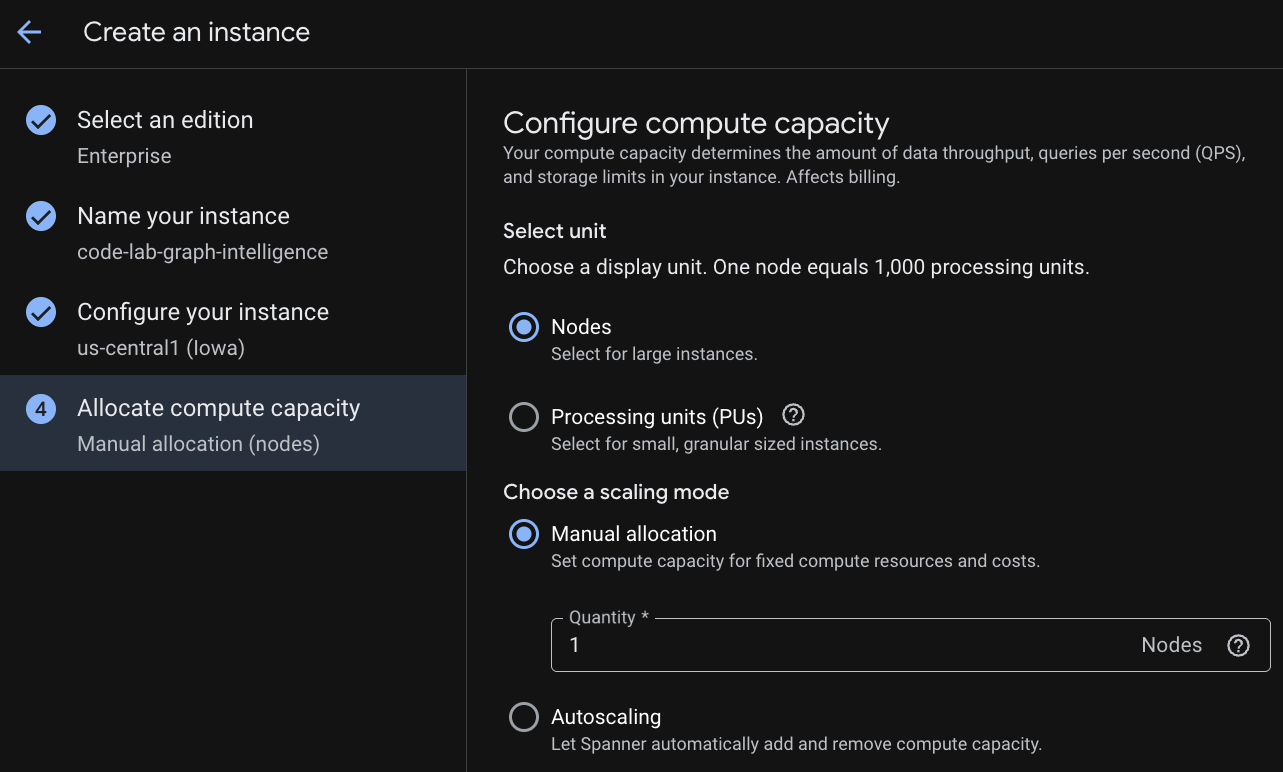
Upon configuration of capacity, you can either start at full-node and autoscaling at nodes; or you can use a granular instance (Processing Units; 1000 PUs = 1 node). Optionally you can also set autoscaling targets of instance. For low latency workloads, we recommend 65% for regional instances and 45% for multi-region instances.
Step 3: Create a Database
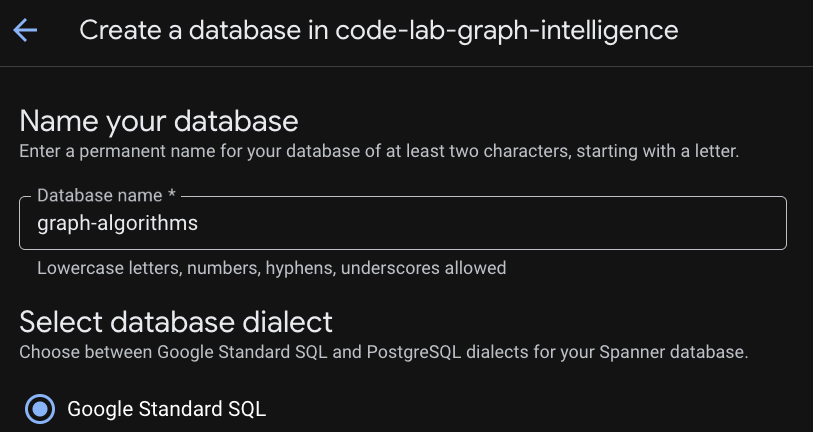
Once your instance is provisioned click "Create Database" to create a database for the rest of your codelab.
Setting-up a Relational Foundation
Our journey begins with the core tables that store operational data. In Cloud Spanner, we use Interleaving to physically co-locate related data, such as a customer's friendships and transactions directly with the customer record. This ensures high-performance access and physical locality.
DDL: Creating the Tables
Copy and execute the following blocks to establish your relational schema:
-- NODE: Customer (Parent)
CREATE TABLE Customer (
  customer_id STRING(60) NOT NULL,
  customer_email STRING(32),

  -- Placeholder fields for Algorithm results
  pagerank_score FLOAT64,
  centrality_score FLOAT64,
  community_id INT64
) PRIMARY KEY(customer_id);

-- EDGE: CustomerFriendship (Interleaved in Customer)
CREATE TABLE CustomerFriendship (
  customer_id STRING(60) NOT NULL,
  friend_id STRING(60) NOT NULL,
  friendship_strength FLOAT64,
  created_at TIMESTAMP,
  CONSTRAINT FK_Friend FOREIGN KEY(friend_id) REFERENCES Customer(customer_id)
) PRIMARY KEY(customer_id, friend_id),
  INTERLEAVE IN PARENT Customer ON DELETE CASCADE;

-- NODE: Product
CREATE TABLE Product (
  product_id STRING(60) NOT NULL,
  product_name STRING(32),
  unit_price FLOAT64,
  pagerank_score FLOAT64
) PRIMARY KEY(product_id);

-- NODE: Shipping
CREATE TABLE Shipping (
  shipping_id STRING(60) NOT NULL,
  city STRING(32),
  country STRING(32)
) PRIMARY KEY(shipping_id);

-- EDGE: Transactions (Interleaved in Customer)
CREATE TABLE Transactions (
  customer_id STRING(60) NOT NULL,
  row_id STRING(36) DEFAULT (GENERATE_UUID()),
  product_id STRING(60) NOT NULL,
  shipping_id STRING(60) NOT NULL,
  transaction_date TIMESTAMP,
  amount FLOAT64,
  CONSTRAINT FK_Prod FOREIGN KEY(product_id) REFERENCES Product(product_id),
  CONSTRAINT FK_Ship FOREIGN KEY(shipping_id) REFERENCES Shipping(shipping_id)
) PRIMARY KEY(customer_id, row_id),
  INTERLEAVE IN PARENT Customer ON DELETE CASCADE;
Seeding the Network
With our tables ready, we must populate them with the users, products, and connections that define The Customer's ecosystem.
-- Populate Products & Shipping
INSERT INTO Product (product_id, product_name, unit_price) VALUES
('P1', 'Smartphone Pro', 999.00), ('P2', 'Wireless Earbuds', 150.00),
('P3', 'USB-C Cable', 25.00), ('P4', '4K Monitor', 450.00),
('P5', 'Ergonomic Chair', 300.00), ('P6', 'Desk Lamp', 45.00);

INSERT INTO Shipping (shipping_id, city, country) VALUES
('S1', 'New York', 'USA'), ('S2', 'London', 'UK'), ('S3', 'Tokyo', 'Japan'),
('S4', 'San Francisco', 'USA'), ('S5', 'Berlin', 'Germany');

-- Populate Customers
INSERT INTO Customer (customer_id, customer_email) VALUES
('C1', 'alice@example.com'), ('C2', 'bob@example.com'), ('C3', 'charlie@example.com'),
('C4', 'david@example.com'), ('C5', 'eve@example.com'), ('C6', 'frank@example.com'),
('C7', 'grace@example.com'), ('C8', 'heidi@example.com'), ('C9', 'ivan@example.com'),
('C10', 'judy@example.com'), ('C11', 'mallory@example.com'), ('C12', 'trent@example.com');

-- Populate Friendships
INSERT INTO CustomerFriendship (customer_id, friend_id, friendship_strength, created_at) VALUES
('C1', 'C2', 1.0, CURRENT_TIMESTAMP()), ('C1', 'C3', 1.0, CURRENT_TIMESTAMP()),
('C2', 'C1', 0.8, CURRENT_TIMESTAMP()), ('C3', 'C1', 0.9, CURRENT_TIMESTAMP()),
('C3', 'C4', 0.5, CURRENT_TIMESTAMP()), ('C4', 'C5', 0.5, CURRENT_TIMESTAMP()),
('C5', 'C6', 1.0, CURRENT_TIMESTAMP()), ('C5', 'C7', 0.8, CURRENT_TIMESTAMP()),
('C7', 'C8', 0.7, CURRENT_TIMESTAMP()), ('C8', 'C5', 0.6, CURRENT_TIMESTAMP()),
('C11', 'C1', 1.0, CURRENT_TIMESTAMP()), ('C11', 'C5', 1.0, CURRENT_TIMESTAMP()),
('C11', 'C7', 1.0, CURRENT_TIMESTAMP()), ('C11', 'C12', 0.5, CURRENT_TIMESTAMP()),
('C1', 'C11', 0.9, CURRENT_TIMESTAMP()), ('C5', 'C11', 0.9, CURRENT_TIMESTAMP()),
('C9', 'C10', 1.0, CURRENT_TIMESTAMP()), ('C10', 'C9', 1.0, CURRENT_TIMESTAMP());

-- Populate Transactions
INSERT INTO Transactions (customer_id, product_id, shipping_id, amount, transaction_date) VALUES
('C1', 'P1', 'S1', 999.00, CURRENT_TIMESTAMP()), ('C2', 'P1', 'S1', 999.00, CURRENT_TIMESTAMP()),
('C11', 'P4', 'S4', 450.00, CURRENT_TIMESTAMP()), ('C11', 'P5', 'S4', 300.00, CURRENT_TIMESTAMP()),
('C7', 'P5', 'S5', 300.00, CURRENT_TIMESTAMP()), ('C8', 'P6', 'S5', 45.00, CURRENT_TIMESTAMP()),
('C9', 'P1', 'S1', 999.00, CURRENT_TIMESTAMP()), ('C10', 'P1', 'S1', 999.00, CURRENT_TIMESTAMP());
Relational Challenge
Before we introduce the graph, let's see how traditional SQL handles The Customer's challenges. Run this query to find "Social Spenders"customers who spend significantly and have several friends.
SELECT
    c.customer_id,
    c.customer_email,
    SUM(t.amount) AS total_spent,
    COUNT(DISTINCT f.friend_id) AS friend_count
FROM Customer AS c
LEFT JOIN Transactions AS t ON c.customer_id = t.customer_id
LEFT JOIN CustomerFriendship AS f ON c.customer_id = f.customer_id
GROUP BY c.customer_id, c.customer_email
HAVING total_spent > 500
ORDER BY total_spent DESC;
The Limitations of the Relational Approach
Overcoming Relational Challenges through a Property Graph
To overcome these limits, we define a Property Graph. This creates an "overlay" that allows us to treat relationships as first-class citizens without moving our data out of Spanner.
DDL: Creating the Property Graph
This DDL defines our Nodes (Entities) and Edges (Relationships). In this example we are following a schematized graph, however Spanner Graph allows allows modeling schemaless graphs to enable flexible, rapid iterative development and to handle evolving data models without constant DDL (Data Definition Language) changes.
CREATE OR REPLACE PROPERTY GRAPH RetailTransactionGraph
NODE TABLES (
  Customer KEY (customer_id),
  Product KEY (product_id),
  Shipping KEY (shipping_id)
)
EDGE TABLES (
  CustomerFriendship AS IsFriendsWith
    SOURCE KEY (customer_id) REFERENCES Customer (customer_id)
    DESTINATION KEY (friend_id) REFERENCES Customer (customer_id)
    LABEL IsFriendsWith,

  Transactions AS Purchased
    SOURCE KEY (customer_id) REFERENCES Customer (customer_id)
    DESTINATION KEY (product_id) REFERENCES Product (product_id)
    LABEL Purchased,

  Transactions AS LivesAt
    SOURCE KEY (customer_id) REFERENCES Customer (customer_id)
    DESTINATION KEY (shipping_id) REFERENCES Shipping (shipping_id)
    LABEL LivesAt
);
Navigating the Graph with GQL
Now that our graph is defined, we can use Graph Query Language (GQL) to perform multi-hop traversals with a simple, readable syntax.
Exploration 1: Collaborative Discovery
This query traverses the graph to find products purchased by your friends and serves as the foundation of a recommendation engine.
GRAPH RetailTransactionGraph
MATCH (me:Customer)-[:IsFriendsWith]->(friend:Customer)-[:Purchased]->(p:Product)
WHERE me.customer_id = 'C1'
RETURN
    me.customer_id AS my_id,
    friend.customer_id AS friend_id,
    p.product_name AS recommendation
Exploration 2: The Hybrid Query (Relational + Graph)
Spanner allows you to embed GQL patterns inside a standard SQL FROM clause using the GRAPH_TABLE function. This query finds customers who live at the same location as their friendsa "diamond" pattern match.
SELECT *
FROM GRAPH_TABLE(RetailTransactionGraph
  MATCH (a:Customer)-[:IsFriendsWith]-(b:Customer),
        (a)-[:LivesAt]->(loc:Shipping),
        (b)-[:LivesAt]->(loc)
  RETURN a.customer_id AS user_A, b.customer_id AS user_B, loc.city
)
Visualizing The Customer's Connections
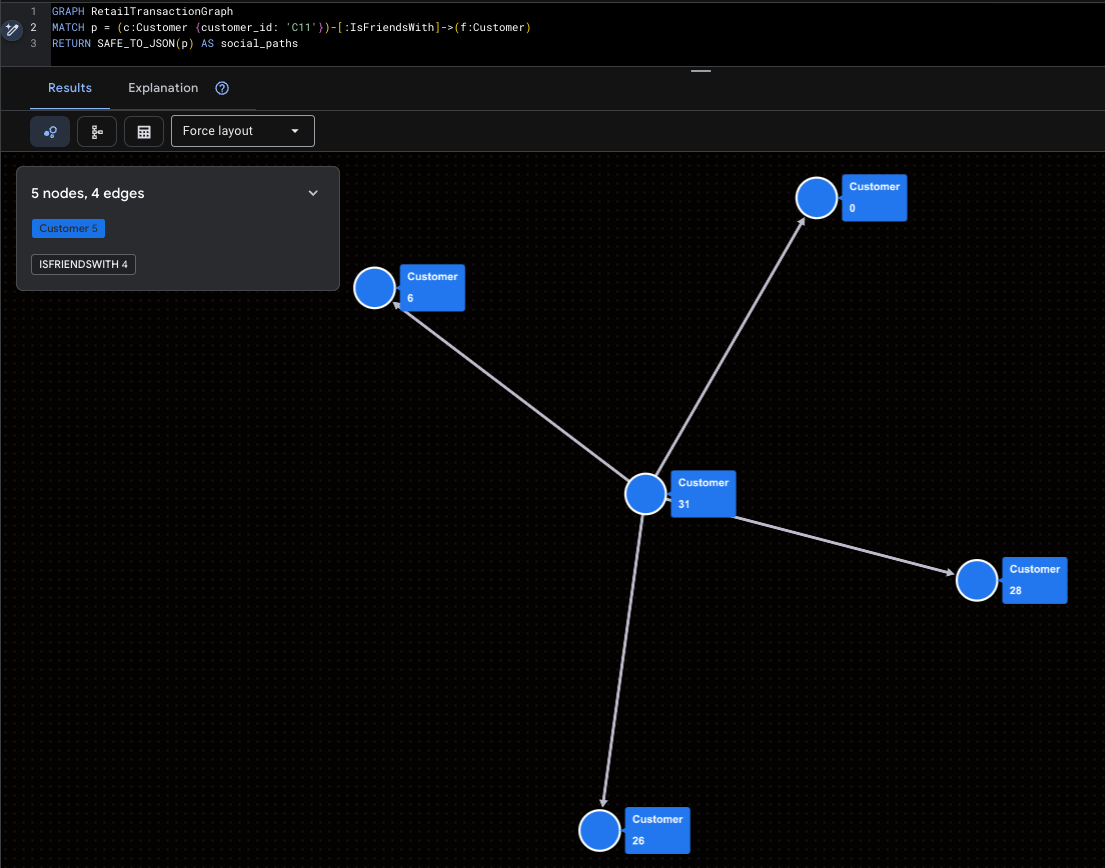
Finally, let's use GQL to visualize our network. These queries wrap the path results in SAFE_TO_JSON, allowing visualizers to draw the nodes and lines.
Visualizing the Super-Influencer
This highlights Mallory (C11) and her direct social reach.
GRAPH RetailTransactionGraph
MATCH p = (c:Customer {customer_id: 'C11'})-[:IsFriendsWith]->(f:Customer)
RETURN SAFE_TO_JSON(p) AS social_paths
Visualizing Potential Fraud Patterns
This query roots out the "Isolated Cluster" (Ivan & Judy) to see where their products are being shipped.
GRAPH RetailTransactionGraph
MATCH p = (c:Customer)-[:Purchased]->(prod:Product),
      q = (c)-[:LivesAt]->(loc:Shipping)
WHERE c.customer_id IN ('C9', 'C10')
RETURN SAFE_TO_JSON(p) AS purchase_path, SAFE_TO_JSON(q) AS shipping_path
3. Introduction to Spanner Graph Algorithms
To prepare for our deep dive into Graph Intelligence, this section outlines the technical architecture and foundational rules of Cloud Spanner Graph Algorithms. Understanding these principles is key to moving from simple traversals to petabyte-scale relationship analysis.
The Algorithm Portfolio
Cloud Spanner currently supports 14 industry-standard graph algorithms, categorized into four functional groups to solve diverse business problems:
Category | Supported Algorithms | Business Use Case |
Centrality | PageRank, Personalized PageRank, Betweenness, Closeness | Identify influencers, hubs, and bottlenecks. |
Community | WCC, Label Propagation, Clique Finding, Correlation Clustering | Detect fraud rings, social communities, and silos. |
Similarity | Jaccard, Cosine, Common Neighbors, Total Neighbors | Power recommendation engines and entity resolution. |
Path Finding | Set-to-set Shortest Path, GA Path helpers | Optimize logistics and traversal proximity. |
Crucial Schema & Query Considerations
In order to ensure efficient Graph algorithms execution, Spanner Graph needs to adhere to these rules:
Requirement 1. Physical Data Locality (Interleaving)
The most critical requirement for high-performance graph traversal is Interleaving. This ensures that edge data is physically stored on the same server split as the source node, minimizing network latency during algorithm execution.
- The Rule: Edge tables MUST be interleaved in their source node tables.
- Forward Traversal: Interleaving the edge table into the source node table ensures cache locality for outgoing links.
- Reverse Traversal: For efficient "incoming" link analysis, use Foreign Keys to automatically create backing indexes, or create a secondary index interleaved in the destination table.
Requirement 2. Unique Labeling Requirements
Every table participating in the property graph must have a unique identity. Algorithms rely on these labels to correctly identify and load the subgraphs they need to analyze.
- The Rule: Each input table must have a uniquely identifying label within the property graph.
- The Conflict: You cannot map a single label to multiple tables if you intend to run algorithms on them.
Logic | Example | Result |
❌ Bad | NODE TABLES (Person LABEL Entity, Account LABEL Entity) | Invalid: The algorithm cannot distinguish between a Person and an Account. |
✅ Good | NODE TABLES (Person LABEL Customer, Account LABEL Account) | Valid: Each entity has a distinct, unique label. |
Requirement 3. Algorithm Query Structure (The MATCH Clause)
When calling an algorithm, the MATCH clause follows more restrictive rules than standard GQL queries to ensure the execution engine can optimize the analytical pipeline.
- One Pattern Per MATCH: Each MATCH statement can only name one variable.
- No Multi-Node Patterns: You cannot define a relationship pattern (e.g., (a)-[e]->(b)) directly inside a MATCH clause intended for an algorithm call.
- Literal Filters Only: While you can use WHERE clauses to filter nodes (e.g., WHERE a.id > 400), query parameters (@param) are not currently supported in graph algorithm queries.
Requirement 4. The RETURN Clause (Scalars Only)
The RETURN clause in an algorithm query acts as the bridge between the graph world and the relational world. It is strictly limited to returning scalars and constants.
- The Rule: You cannot return a "Graph Element" (the raw node or edge object).
- No Transformations: You cannot perform mathematical operations or apply functions to the properties being returned within the RETURN statement itself.
RETURN Clause Restrictions
✅ Supported | ❌ Not Supported |
RETURN node.id, score | RETURN node, score (Cannot return Graph Element) |
RETURN PATH_LENGTH(p) | RETURN node.id + 1, score (No operations on properties) |
RETURN node.name | RETURN JSON_OBJECT(node.id, score) (No functions) |
Requirement 5. Data Integrity: Eliminating Dangling Edges
A "Dangling Edge" occurs when an edge points to a destination node that does not exist in the graph. This causes algorithm execution to fail because the graph structure is inconsistent.
- The Solution: Use referential constraints (Foreign Keys) and ON DELETE CASCADE to maintain graph integrity.
- Query Safety: When calling an algorithm, you must ensure that all nodes referred to by the selected edges are also included in the node_labels argument.
Persistent Output: EXPORT DATA Options
Because graph algorithms are compute-intensive, they are executed in Scale-up execution mode using the EXPORT DATA statement. This leverages Data Boost, using independent serverless compute resources to prevent any lag on your production transactions.
Option 1: Persist back to Cloud Spanner
To push results directly back into your tables (e.g., saving a PageRank score), use format = ‘CLOUD_SPANNER'.
update_ignore_all: Only updates rows for keys that already exist in the target table.upsert_ignore_all: Updates existing rows or inserts new rows if the keys are missing.
EXPORT DATA OPTIONS (
  format = 'CLOUD_SPANNER',
  table = 'Customer',
  write_mode = 'update_ignore_all'
) AS
GRAPH RetailTransactionGraph
CALL PageRank(...)
RETURN node.customer_id, score;
Option 2: Persist results to Google Cloud Storage (GCS)
For large-scale offline analysis, you can export to GCS in CSV, Avro, or Parquet formats.
- Wildcards: Use
uri => 'gs://bucket/file_*.csv'to enable sharded output, allowing Spanner to write to multiple files in parallel for massive datasets. - Compression: Supports GZIP, SNAPPY, and ZSTD to optimize storage costs.
EXPORT DATA OPTIONS (
  uri = 'gs://bucket/pagerank_*.csv',
  format = 'CSV',
  overwrite = true
) AS
GRAPH RetailTransactionGraph
CALL PageRank(...)
RETURN node.customer_id, score;
4. Challenge 1: Influence Gap (PageRank)
In this section, we tackle The Customer's first business hurdle: the "Influence Gap." We will move from a basic "popularity contest" to a mathematically driven map of true social influence.
Problem Statement: The Customer's marketing team has a problem. They are spending millions on broad advertising with shrinking returns because they cannot identify the "Social Superstars", those rare individuals whose endorsements ripple through the entire network.
To solve this, we need to rank our customers by Influence.
Relational Solution (Degree Centrality)
In a standard database, the easiest way to find an influencer is to simply count their followers (a metric known as Degree Centrality).
Run this query to find most "popular" users:
SELECT
    friend_id AS customer_id,
    COUNT(*) AS follower_count
FROM CustomerFriendship
GROUP BY friend_id
ORDER BY follower_count DESC;
customer_id | follower_count |
C1 | 3 |
C5 | 3 |
C11 | 2 |
C7 | 2 |
C10 | 1 |
C12 | 1 |
C2 | 1 |
C3 | 1 |
C4 | 1 |
C6 | 1 |
C8 | 1 |
C9 | 1 |
Graph Intelligence (PageRank)
To find the real leaders, we use PageRank. This is the same algorithm that powered early web search; it measures a node's importance based on the quantity AND the quality of incoming links .
- Random Surfer Model: PageRank simulates a user moving through the graph. The Damping Factor (default 0.85) represents the probability they continue clicking; otherwise, they "teleport" to a random node .
- Power of Association: A link from an influential person (like Mallory) is worth significantly more than a link from someone with no other connections.
We will execute PageRank Algorithm and use EXPORT DATA to save the results directly into our pagerank_score column .
EXPORT DATA OPTIONS (
  format = 'CLOUD_SPANNER',
  table = 'Customer',
  write_mode = 'update_ignore_all' -- Updates existing rows
) AS
GRAPH RetailTransactionGraph
CALL PageRank(
  node_labels => ['Customer'],      -- Target our Customer nodes
  edge_labels => ['IsFriendsWith'], -- Analyze the social ties
  damping_factor => 0.85,           -- Standard decay
  max_iterations => 10              -- Higher iterations for better precision
)
YIELD node, score
RETURN node.customer_id, score as pagerank_score;
"Influence" Dashboard using PageRank
Now that the scores are persisted, let's compare our "Before" (Follower Count) with our "After" (PageRank Score).
-- Note that Higher PageRank score means more influential
SELECT
    c.customer_id,
    c.customer_email,
    count_query.follower_count,
    c.pagerank_score
FROM Customer c
JOIN (
    SELECT friend_id, COUNT(*) AS follower_count
    FROM CustomerFriendship GROUP BY friend_id
) AS count_query ON c.customer_id = count_query.friend_id
ORDER BY c.pagerank_score DESC;
customer_id | customer_email | follower_count | pagerank_score |
C5 | eve@example.com | 3 | 0.158392489 |
C10 | judy@example.com | 1 | 0.1093561724 |
C9 | ivan@example.com | 1 | 0.1093561724 |
C1 | alice@example.com | 3 | 0.1000888124 |
C8 | heidi@example.com | 1 | 0.09759821743 |
C11 | mallory@example.com | 2 | 0.09466411918 |
C7 | grace@example.com | 2 | 0.08016719669 |
C6 | frank@example.com | 1 | 0.06022448093 |
C2 | bob@example.com | 1 | 0.0547891818 |
C3 | charlie@example.com | 1 | 0.0547891818 |
C12 | trent@example.com | 1 | 0.04029225558 |
C4 | david@example.com | 1 | 0.04028172791 |
Analysis: Who are the Real Superstars?
By analyzing the output, you can now make three critical marketing discoveries:
Business Takeaway
Instead of blindly emailing everyone with more than five followers, The Customer's marketing team can now focus exclusively on those with the highest pagerank_score. These individuals are the true "Social Superstars" capable of driving systemic virality across the entire marketplace.
Now lets try to identify the Gatekeepers that keep The Customer's logistics network running.
5. Challenge 2: Logistic Resilience (BetweennessCentrality)
In this section, we address Logistics Resilience. We will move beyond measuring success by "volume" to identifying the vital "gatekeepers" that keep the network connected.
Relational Solution (Volume-Based Analysis)
In a standard relational setup, a "critical" shipping hub is typically defined as the one processing the most orders or generating the most revenue.
Run this query to identify "top" hubs by transaction count:
-- Identify "Critical" hubs by transaction volume
SELECT
    s.city,
    s.country,
    COUNT(t.row_id) AS transaction_count,
    SUM(t.amount) AS total_revenue
FROM Shipping s
JOIN Transactions t ON s.shipping_id = t.shipping_id
GROUP BY s.city, s.country
ORDER BY transaction_count DESC;
city | country | transaction_count | total_revenue |
New York | USA | 4 | 3996 |
Berlin | Germany | 2 | 345 |
San Francisco | USA | 2 | 750 |
To address the mismatch, we will use both IsFriendsWith and LivesAt edges. This transforms our analysis from a transaction hub to also include social check.
Graph Intelligence (Betweenness Centrality)
To find the real bottlenecks, we use Betweenness Centrality. This algorithm quantifies how often a node acts as a "bridge" along the shortest paths between all other pairs of nodes in the graph. High scores pinpoint the true gatekeepers who control the flow of goods or information.
Running & Persisting Betweenness Centrality
We will execute the algorithm using EXPORT DATA and save the scores into the centrality_score column. We use Data Boost to ensure this heavy "shortest path" calculation has near-zero impact on The Customer's live operations.
EXPORT DATA OPTIONS (
  format = 'CLOUD_SPANNER',
  table = 'Customer',
  write_mode = 'update_ignore_all'
) AS
GRAPH RetailTransactionGraph
CALL BetweennessCentrality(
  -- We include both Customer and Shipping nodes for a full ecosystem view
  node_labels => ['Customer', 'Shipping'],
  -- We factor in social ties AND physical shipping locations
  edge_labels => ['IsFriendsWith', 'LivesAt'],
  num_source_nodes => 100
)
YIELD node, score
-- We only persist scores for Customers; Shipping node results are safely ignored
RETURN node.customer_id, score as centrality_score;
Analysis: Identifying the "Hidden Bottlenecks"
Now, we compare our structural risk (centrality_score) with our transactional volume (order_count) to find the nodes that The Customer's leadership should worry about.
SELECT
    c.customer_id,
    c.customer_email,
    c.centrality_score,
    count_query.order_count
FROM Customer c
LEFT JOIN (
    SELECT customer_id, COUNT(*) AS order_count
    FROM Transactions GROUP BY customer_id
) AS count_query ON c.customer_id = count_query.customer_id
ORDER BY c.centrality_score DESC;
customer_id | customer_email | centrality_score | order_count | |
C11 | mallory@example.com | 44.5 | 2 | |
C1 | alice@example.com | 35.5 | 1 | |
C5 | eve@example.com | 35.5 | ||
C7 | grace@example.com | 12 | 1 | |
C8 | heidi@example.com | 10 | 1 | |
C3 | charlie@example.com | 6 | ||
C4 | david@example.com | 3.5 | ||
C10 | judy@example.com | 0 | 1 | |
C12 | trent@example.com | 0 | ||
C2 | bob@example.com | 0 | 1 | |
C6 | frank@example.com | 0 | ||
C9 | ivan@example.com | 0 | 1 | |
By analyzing these results, The Customer makes three startling discoveries:
Business Takeaway
The Customer can now prioritize its logistics redundancy and security protocols based on multi-modal structural risk. Mallory, Alice, and Eve are the gatekeepers who must be protected to ensure the stability of the logistical network.
Now let's try to isolate fraud islands.
6. Challenge 3: Ghost Networks (WCC)
In this section, we tackle the third business hurdle: The "Ghost Networks." We will move from simple "hotspot" detection to uncovering sophisticated, isolated fraud rings using community detection. The challenge here is that bad actors create fake profiles that share shipping addresses or interact in closed loops to coordinate thefts and inflate product ratings. But they are often completely isolated from the legitimate The Customer community.
To solve this, we need to expose these "Isolated Islands."
Relational Solution (Shared Identifier Search)
Without graph algorithms, the standard way to find fraud is to look for "hotspots" of shared data, such as multiple customers shipping to the exact same address .
Run this query to find customers linked by a shared shipping location:
SELECT
    shipping_id,
    COUNT(DISTINCT customer_id) AS customer_count,
    ARRAY_AGG(customer_id) AS linked_customers
FROM Transactions
GROUP BY shipping_id
HAVING customer_count > 1;
shipping_id | customer_count | linked_customers |
S1 | 4 | ["C1","C10","C2","C9"] |
S5 | 2 | ["C7","C8"] |
To find the fraud networks, we need to understand transitive reachability.
Graph Intelligence (Weakly Connected Components)
To find the full extent of these rings, we use Weakly Connected Components (WCC). WCC is a clustering algorithm that identifies sets of nodes where a path exists between any two nodes, regardless of the direction of the edges.
- Reachability Zones: It effectively carves the graph into "islands" or "reachability zones".
- Unified Entity View: By analyzing both social ties (IsFriendsWith) and logistics ties (LivesAt) simultaneously, we can group fragmented profiles into a single, unified "Impact Cluster".
Running & Persisting WCC
We will execute the WCC algorithm and save the results into the community_id column. We use Data Boost to ensure this deep reachability analysis happens on independent compute resources.
EXPORT DATA OPTIONS (
  format = 'CLOUD_SPANNER',
  table = 'Customer',
  write_mode = 'update_ignore_all'
) AS
GRAPH RetailTransactionGraph
CALL WeaklyConnectedComponents(
  node_labels => ['Customer', 'Shipping'],
  edge_labels => ['IsFriendsWith', 'LivesAt']
)
YIELD node, cluster
-- node.customer_id will be NULL for Shipping nodes;
-- EXPORT DATA will safely ignore those rows.
RETURN node.customer_id, cluster AS community_id;
Analysis: Fraud Rings
Now, let's run a validation query to see our isolated communities. Legitimate users typically belong to the "Mainland," while fraudsters are often stranded on small "Islands".
SELECT
    community_id,
    COUNT(*) AS member_count,
    ARRAY_AGG(customer_email) AS members
FROM Customer
GROUP BY community_id
ORDER BY member_count ASC;
community_id | member_count | members |
1 | 2 | ["judy@example.com","ivan@example.com"] |
0 | 10 | ["alice@example.com","mallory@example.com","trent@example.com","bob@example.com","charlie@example.com","david@example.com","eve@example.com","frank@example.com","grace@example.com","heidi@example.com"] |
By running this community detection, you can identify a critical anomaly:
Business Takeaway
The Customer can now automate its security responses. Instead of manually chasing individual accounts, they can write a simple rule: "If a community_id has fewer than three members, flag the entire group for manual KYC (Know Your Customer) review"
.
With our fraud rings exposed, we can solve the "Behavioral Twin."
7. Challenge 4: Behavioral Twin (JaccardSimilarity)
In this final challenge, we address the fourth hurdle: the "Paradox of Choice"/"Behavioral Twin". We will move from generic "frequently bought together" lists to hyper-personalized recommendations based on behavioral "fingerprints."
The Customer's current product suggestions are too generic. Recommending a popular USB cable to every customer is safe, but it isn't personal. The Customer wants to build "Behavioral Twin" recommendations identifying customers who share unique shipping patterns and social circles to suggest products with high-precision matching.
To solve this, we need to calculate the "Proximity" between users.
Relational Solution (Absolute Overlap)
In a standard relational setup, you might look for people who ship to the same locations as a reference user, like Alice (C1).
Run this query to find Alice's geographic neighbors:
SELECT
    t2.customer_id AS similar_customer,
    COUNT(DISTINCT t1.shipping_id) AS shared_locations
FROM Transactions t1
JOIN Transactions t2 ON t1.shipping_id = t2.shipping_id
WHERE t1.customer_id = 'C1' AND t2.customer_id != 'C1'
GROUP BY similar_customer
ORDER BY shared_locations DESC;
similar_customer | shared_locations |
C2 | 1 |
C10 | 1 |
C9 | 1 |
Graph Intelligence (Jaccard Similarity)
To find true behavioral twins, we use Jaccard Similarity. This algorithm calculates a normalized score (0.0 to 1.0) by dividing the number of shared neighbors (Intersection) by the total number of unique neighbors (Union).
Here a "Behavioral Twin" is defined by more than just a shared shipping address. By analyzing the intersection of physical footprints (LivesAt) and social ecosystems (IsFriendsWith), we can identify users who share the same lifestyle and community influence, leading to far more accurate product recommendations.
First create a Mapping Table
Because similarity is a pairwise relationship (Customer A is similar to Customer B), we create a dedicated table interleaved in Customer to store these mappings.
CREATE TABLE CustomerSimilarity (
  customer_id STRING(60) NOT NULL, -- Renamed from source_id to match Parent PK
  target_id STRING(60) NOT NULL,
  similarity_score FLOAT64,
  CONSTRAINT FK_SourceCustomer FOREIGN KEY(customer_id) REFERENCES Customer(customer_id),
  CONSTRAINT FK_TargetCustomer FOREIGN KEY(target_id) REFERENCES Customer(customer_id)
) PRIMARY KEY(customer_id, target_id),
  INTERLEAVE IN PARENT Customer ON DELETE CASCADE;
Now Run Jaccard Similarity
We will now execute the algorithm. Note: This query includes a common "Guardrail" lesson. If you only select Customer nodes but use the LivesAt edge (which points to Shipping nodes), the query will fail citing a "Dangling Edge" . To fix this, we must include both node labels.
EXPORT DATA OPTIONS (
  format = 'CLOUD_SPANNER',
  table = 'CustomerSimilarity',
  write_mode = 'upsert_ignore_all'
) AS
GRAPH RetailTransactionGraph
CALL JaccardSimilarity(
  node_labels => ['Customer', 'Shipping'], -- Added Shipping to avoid dangling edges
  edge_labels => ['LivesAt', 'IsFriendsWith'], -- Use both logistics and social edges for holistic similarity
  source_nodes => ARRAY(
    SELECT s FROM GRAPH_TABLE(RetailTransactionGraph
      MATCH (s:Customer {customer_id: 'C1'})
      RETURN s)
  ),
  target_nodes => ARRAY(
    SELECT t FROM GRAPH_TABLE(RetailTransactionGraph
      MATCH (t:Customer)
      WHERE t.customer_id != 'C1'
      RETURN t)
  )
)
YIELD source_node, target_node, similarity
RETURN
    source_node.customer_id AS customer_id,
    target_node.customer_id AS target_id,
    similarity AS similarity_score;
Analysis: "Behavioral Twin" Check
Now that the analytical job is complete, we run a validation query. By joining our new mapping table (CustomerSimilarity) with our original Customer metadata, we can see exactly who Alice's "Behavioral Twins" are.
Run this query to inspect Alice's similarity rankings:
SELECT
    c.customer_email AS peer_email,
    s.similarity_score,
    c.community_id,
    c.pagerank_score
FROM CustomerSimilarity s
JOIN Customer c ON s.target_id = c.customer_id
WHERE s.customer_id = 'C1'
ORDER BY s.similarity_score DESC;
peer_email | similarity_score | community_id | pagerank_score |
judy@example.com | 0.200000003 | 1 | 0.1093561724 |
bob@example.com | 0.200000003 | 0 | 0.0547891818 |
ivan@example.com | 0.200000003 | 1 | 0.1093561724 |
eve@example.com | 0.1666666716 | 0 | 0.158392489 |
mallory@example.com | 0 | 0 | 0.09466411918 |
trent@example.com | 0 | 0 | 0.04029225558 |
charlie@example.com | 0 | 0 | 0.0547891818 |
david@example.com | 0 | 0 | 0.04028172791 |
frank@example.com | 0 | 0 | 0.06022448093 |
grace@example.com | 0 | 0 | 0.08016719669 |
heidi@example.com | 0 | 0 | 0.09759821743 |
What to look for in results:
Now lets try to build a final Unified Intelligence view.
8. Unified Intelligence
Now we move from individual technical tasks to Unified Intelligence. Here, we blend transactional data with all four graph algorithms to provide clear, actionable insights.
Report 1: Unified Intelligence
The power of a multi-model database like Spanner is the ability to join relational spend data with graph-derived influence, risk, and similarity scores in a single request. This query categorizes every customer into a specific business persona.
Run the Unified Intelligence query to see complete ecosystem:
SELECT
    c.customer_id,
    c.customer_email,
    -- Transactional Data (Relational)
    COALESCE(t.total_spend, 0) AS spend,
    -- Graph Intelligence Data (Algorithms)
    c.pagerank_score AS influence,
    c.centrality_score AS bottleneck_risk,
    c.community_id,
    -- Persona Categorization Logic
    CASE
        WHEN c.community_id = 1 THEN '🔴 HIGH RISK: Isolated Fraud Ring'
        WHEN c.centrality_score > 25 THEN '🔵 CRITICAL: Network Bridge'
        WHEN c.pagerank_score > 0.08 AND t.total_spend > 500 THEN '⭐ VIP: Influential Spender'
        WHEN c.pagerank_score > 0.08 THEN '📱 SOCIAL: High-Reach Influencer'
        WHEN sim.similarity_to_alice = 1.0 AND c.community_id != 0 THEN '⚠️ WARNING: Identity Anomaly'
        ELSE '🟢 STANDARD: Active Customer'
    END AS business_persona
FROM Customer c
LEFT JOIN (
    -- Aggregate total spend per customer
    SELECT customer_id, SUM(amount) AS total_spend
    FROM Transactions GROUP BY customer_id
) t ON c.customer_id = t.customer_id
LEFT JOIN (
    -- Pull similarity relative to our reference user 'C1'
    SELECT target_id, similarity_score AS similarity_to_alice
    FROM CustomerSimilarity WHERE customer_id = 'C1'
) sim ON c.customer_id = sim.target_id
ORDER BY c.centrality_score DESC, c.pagerank_score DESC;
customer_id | customer_email | spend | influence | bottleneck_risk | community_id | business_persona |
C11 | mallory@example.com | 750 | 0.09466411918 | 44.5 | 0 | 🔵 CRITICAL: Network Bridge |
C5 | eve@example.com | 0 | 0.158392489 | 35.5 | 0 | 🔵 CRITICAL: Network Bridge |
C1 | alice@example.com | 999 | 0.1000888124 | 35.5 | 0 | 🔵 CRITICAL: Network Bridge |
C7 | grace@example.com | 300 | 0.08016719669 | 12 | 0 | 📱 SOCIAL: High-Reach Influencer |
C8 | heidi@example.com | 45 | 0.09759821743 | 10 | 0 | 📱 SOCIAL: High-Reach Influencer |
C3 | charlie@example.com | 0 | 0.0547891818 | 6 | 0 | 🟢 STANDARD: Active Customer |
C4 | david@example.com | 0 | 0.04028172791 | 3.5 | 0 | 🟢 STANDARD: Active Customer |
C10 | judy@example.com | 999 | 0.1093561724 | 0 | 1 | 🔴 HIGH RISK: Isolated Fraud Ring |
C9 | ivan@example.com | 999 | 0.1093561724 | 0 | 1 | 🔴 HIGH RISK: Isolated Fraud Ring |
C6 | frank@example.com | 0 | 0.06022448093 | 0 | 0 | 🟢 STANDARD: Active Customer |
C2 | bob@example.com | 999 | 0.0547891818 | 0 | 0 | 🟢 STANDARD: Active Customer |
C12 | trent@example.com | 0 | 0.04029225558 | 0 | 0 | 🟢 STANDARD: Active Customer |
By blending these mathematical lenses, we move beyond "who spent the most" to "who matters the most." The unified dashboard integrates relational transaction data with multi-modal graph intelligence to categorize your ecosystem into three clear, actionable personas.
The "Critical Network Bridges" (Resilience)
Nodes like Mallory (C11), Eve (C5), and Alice (C1) are flagged because their bottleneck_risk (Betweenness Centrality) is >25.
- The Structural Anchors: Mallory holds the highest risk score at 44.5, marking her as the primary gateway for the entire network.
- The Zero-Spend Paradox: Eve (C5) has an order count of zero, yet she is structurally indispensable with a risk score of 35.5. Standard SQL would have ignored her entirely, but Graph Intelligence reveals she is a vital bridge to an entire sub-community.
- The High-Value Gateway: Alice (C1) tied with Eve at 35.5, proving that high spenders can also be critical structural anchors.
The "Social Superstars" (Reach)
Heidi (C8) and Grace (C7) are identified as high-reach influencers due to their PageRank scores .
The "Isolated Fraud Ring" (Anomalies)
Judy (C10) and Ivan (C9) are flagged because they belong to the isolated community_id 1
Business Insight to Strategic Actions
Persona | Key Metric | Business Insight | Strategic Action |
🔵 Network Bridges | High Centrality | Structural Anchors: Eve (C5) and Mallory (C11) hold the network together. | Retention: Protect these gatekeepers to prevent community fragmentation. |
📱 Social Superstars | High PageRank | Viral Engines: Users like Heidi (C8) have the highest reach in their circles. | Marketing: Use for high-impact referral and ambassador programs. |
🔴 Fraud Risks | Isolated WCC | Ghost Networks: Judy (C10) and Ivan (C9) are high-spenders but live on "islands." | Security: Immediate manual KYC review; these are classic fraud signatures. |
🟢 Standard Users | Balanced Scores | Healthy Core: The majority of the network, including "local" bridges like David (C4). | Growth: Apply standard personalized ads and "Behavioral Twin" recommendations. |
Report 2: The Identity Anomaly Report
Now you need to know if legitimate accounts are being "mimicked" by fraudsters. We can solve this by finding users who have 100% Behavioral Similarity but Zero Social Connection.
Run this query to flag potential "Identity Anomalies":
SELECT
    s.target_id AS suspect_id,
    c.customer_email,
    s.similarity_score AS behavioral_overlap,
    c.community_id AS social_group
FROM CustomerSimilarity s
JOIN Customer c ON s.target_id = c.customer_id
WHERE s.customer_id = 'C1' -- Reference Alice (Legitimate)
  AND s.similarity_score > 0.15
  AND c.community_id != 0 -- Filter for social strangers
ORDER BY s.similarity_score DESC;
The Identify Anomaly Report provides critical information. By isolating users who act like legitimate customers but lack their social ties, we move from guessing to mathematical certainty .
suspect_id | customer_email | behavioral_overlap | social_group |
C10 | judy@example.com | 0.200000003 | 1 |
C9 | ivan@example.com | 0.200000003 | 1 |
Analysis of Results
By unifying Similarity (Jaccard) with Community Detection (WCC), we expose hidden risks that traditional transactional data cannot see.
- The "Behavioral Twins" (Proximity): Nodes like Judy (C10) and Ivan (C9) are flagged because they share a Jaccard Similarity score of 0.20 relative to Alice (C1).
- Isolation Behavior: Judy (C10) and Ivan (C9) are grouped into the isolated community_id 1, while Alice belongs to the social "Mainland" (Community 0).
- Fraud Flags: The report identifies users with high behavioral overlap (>0.9) who remain socially disconnected from the primary network.
9. Congratulations and Summary
This lab shows how Cloud Spanner turns a relational database into a multi-model powerhouse. By applying graph intelligence to The Customer, we moved from static data to actionable business strategy.
The Spanner Multi-Model Advantage
- Unified Architecture: Spanner allows you to maintain a rock-solid relational foundation while instantly "overlaying" a property graph for relationship mining all without the risk and lag of ETL.
- Off-Box Analytical Isolation: By leveraging Data Boost, you can execute memory-intensive algorithms like PageRank or WCC on independent, serverless compute resources, ensuring zero impact on your production checkout performance.
- Interleaved Performance: Spanner's unique interleaving ensures that nodes and their relationships are physically co-located, turning complex global traversals into high-speed local lookups.
Surfacing "Hidden Gems" & Anomalies
- Identifying Structural Value: Graph algorithms like Betweenness Centrality revealed "Hidden Bridges" with zero spend who can be more critical to network's resilience than highest-spending customers.
- Exposing Behavioral Mimicry: By combining Jaccard Similarity and Weakly Connected Components, we identified "Social Strangers". These accounts look like legitimate customers but are mathematically proven to be isolated fraud rings.
- Global vs. Local Truth: While manual SQL analysis can surface bridges, global algorithms can surface key Gatekeepers of the network.
Making Data Intelligent and Actionable
- Persona-Driven Strategy: We successfully transformed our rows to relationship, and by running algorithms we can address four business problems, namely: Network Bridges, Social Superstars, Fraud Risks, and Standard Users.