
1. Introduction
Last Updated: 2026-03-04
Vector search, or Vector database, has become a foundational technology for modern AI systems. By representing data as high-dimensional embeddings that capture semantic meaning, it powers everything from semantic search that understands user intent, to recommendation engines that surface relevant content, to Retrieval-Augmented Generation (RAG) and AI Agents that ground LLM responses in real, up-to-date information. Major tech companies including Google rely on this technology at massive scale to process billions of searches, recommendations and groundings daily.
Yet building production-ready vector search remains challenging. Google recently released Vertex AI Vector Search 2.0 to change that — a fully managed service designed to eliminate the design and operational complexity that slows teams down.
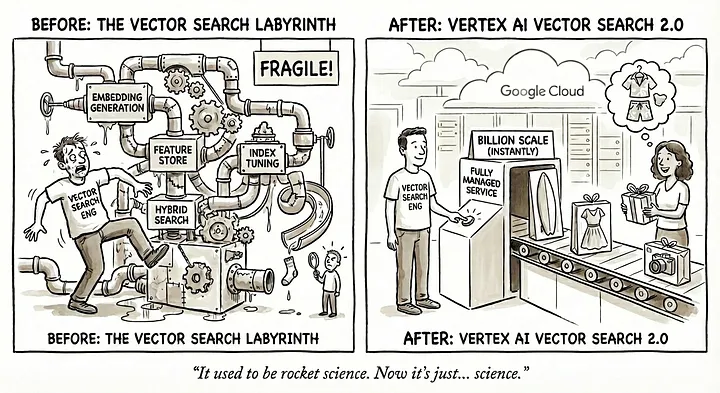
Why Vector Search Is Harder Than It Looks
The concept is simple. The implementation? That's where things get complicated.
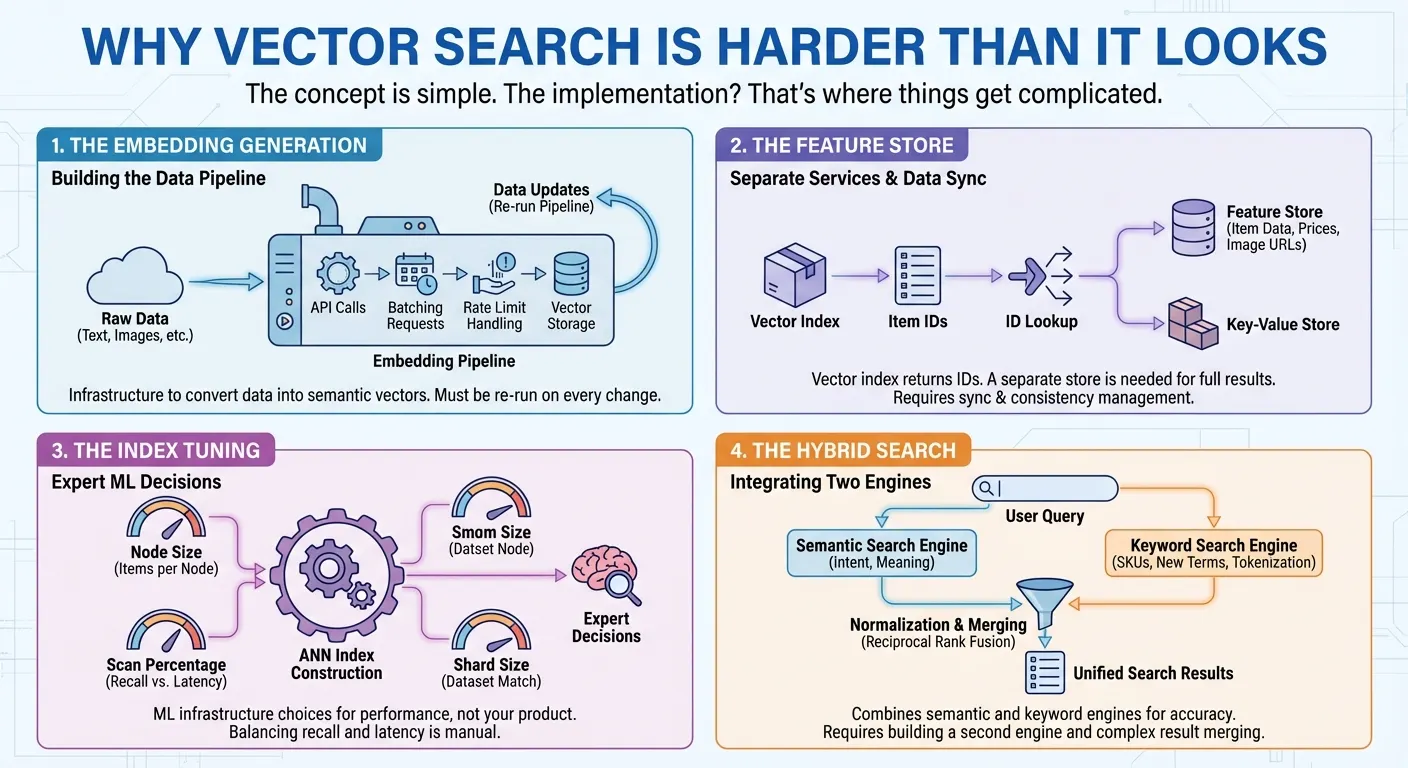
The embedding generation. Vector search requires converting your data into numerical representations (embeddings) that capture semantic meaning. This means you need to call an embedding API, batch your requests, handle rate limits, and store the vectors. Every time your data changes, you re-run the pipeline. It's infrastructure you have to build before you can even start searching.
The feature store. Many vector search products provide only a vector index that returns a list of item IDs for each search. To serve full search results to users, you need a separate feature store or key-value store to retrieve the actual item data — names, prices, categories, image URLs in millisecs — by passing those IDs. In many cases, you also need to implement complex filtering on item features such as price, category, or availability. This means building and maintaining two different services: one for vector search, one for data retrieval and filtering. Every update and query requires accessing and syncing both systems.
The index tuning. To build approximate nearest neighbor (ANN) indexes with millions of items, you need to make expert decisions to get the best performance: How many items should each index node hold? What percentage of the index should be scanned per query to balance recall against latency? What shard size matches your dataset? These are ML infrastructure decisions that have nothing to do with your actual product.
The hybrid search. Semantic search excels at understanding intent — finding "Board Shorts" when users search "men's outfit for beach." But it fails on product codes like "SKU-12345" that have no semantic meaning, and struggles with newly coined terms or brand names the embedding model has never seen. Keyword search handles these cases but misses semantic context. Users need both, which is why hybrid search has become essential. Building it, however, is far from trivial. You need a full-text search engine with tokenization, inverted indexes, or sparse embeddings — in addition to your vector search engine. Then you must run parallel queries on both engines, normalize their different scoring systems, and merge results with techniques like Reciprocal Rank Fusion.
How Vector Search 2.0 Solves These Problems
Vector Search 2.0 on Google Cloud directly addresses each of these challenges:
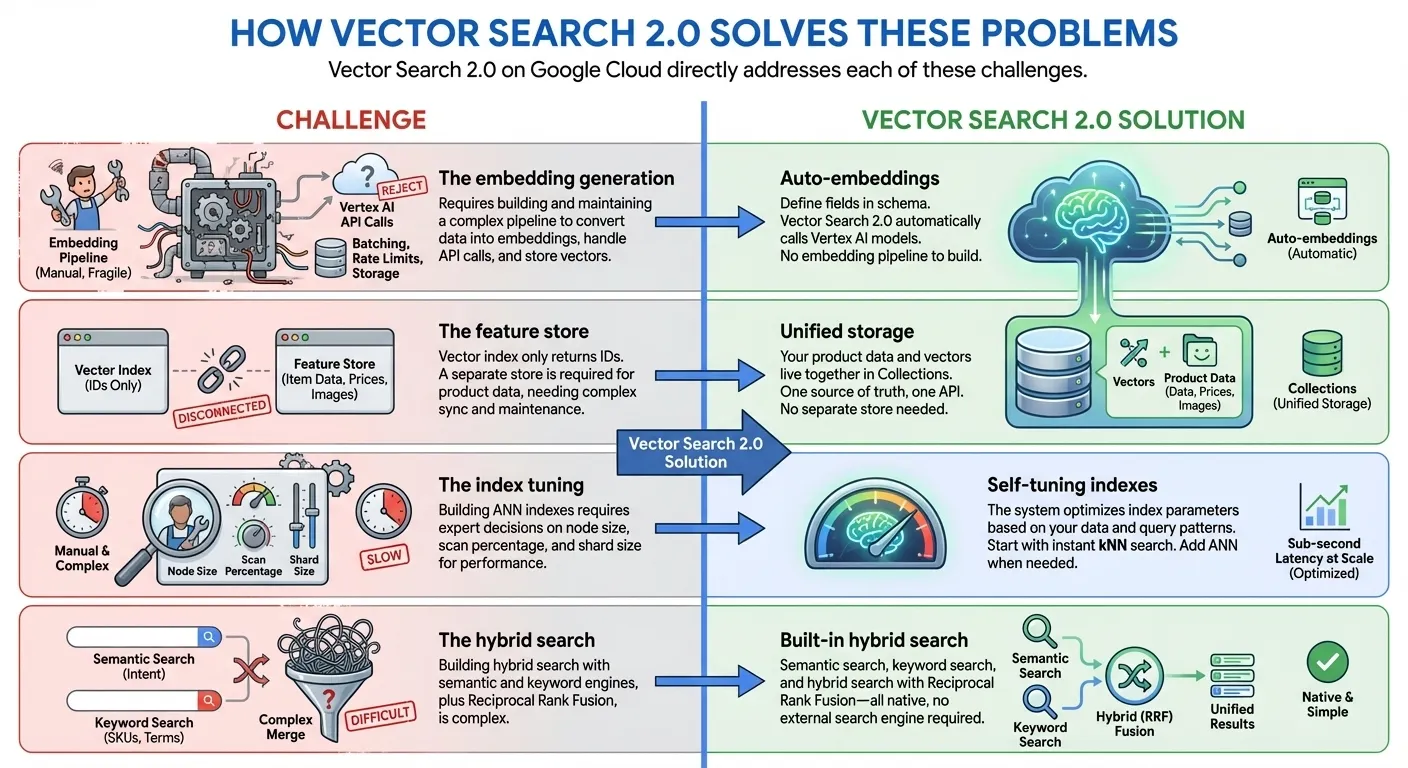
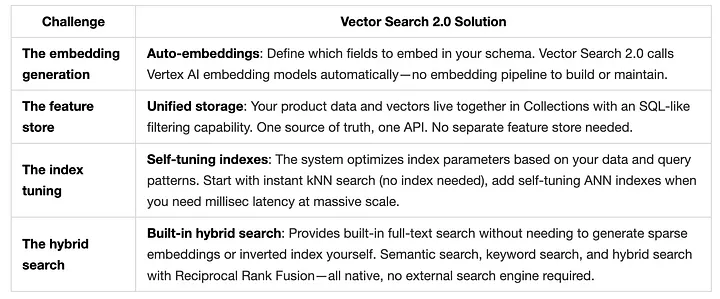
In this workshop, We'll build a fully-managed hybrid search using 10,000 fashion products from the TheLook e-commerce dataset.
What is Vector Search 2.0?
Vector Search 2.0 is Google Cloud's fully managed, self-tuning vector database built on Google's ScaNN (Scalable Nearest Neighbors) algorithm - the same technology powering Google Search, YouTube, and Google Play.
Key Differentiators
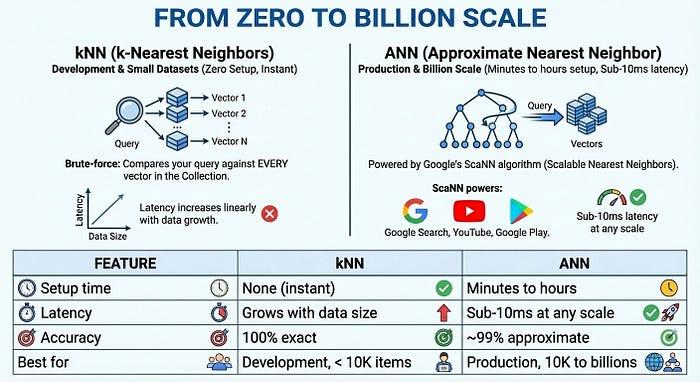
- Zero Indexing to Billion-Scale Index: Start developing immediately with zero indexing time using kNN (k-Nearest Neighbors), then scale to billions of vectors with millisec latency with Google-scale ANN (Approximate Nearest Neighbor) indexes for production - all with the same API and same dataset
- Unified Data Storage: Store both vector embeddings and user provided data together (no separate database or feature store needed)
- Auto-Embeddings: Automatically generate semantic embeddings using Vertex AI embedding models
- Built-in Full Text Search: Provides a built-in full-text search without needing to generate sparse embeddings by yourself. You can also choose to use your own sparse embeddings (e.g., BM25, SPLADE) with Vector Search for a customized full-text search.
- Hybrid Search: Combine semantic and keyword/token-based search in a single query with intelligent RRF ranking
- Self-Tuning: Auto-optimized performance without manual configuration
- Enterprise-Ready: Built-in scalability, security, and compliance
Core Architecture
Vector Search 2.0 has three main components:
- Collections: Schema-enforced containers for your data
- Data Objects: Individual items with data and vector embeddings
- Indexes: Instant nearest neighbor search your data with kNN. For low latency nearest neighbor search use an ANN index.
- Start fast: Use kNN immediately with zero setup time - perfect for development and small datasets
- Scale to production: Use ANN indexes for billion-scale search with sub-second latency powered by ScaNN algorithm
Let's explore each concept with hands-on examples!
2. Building TheLook Fashion Search
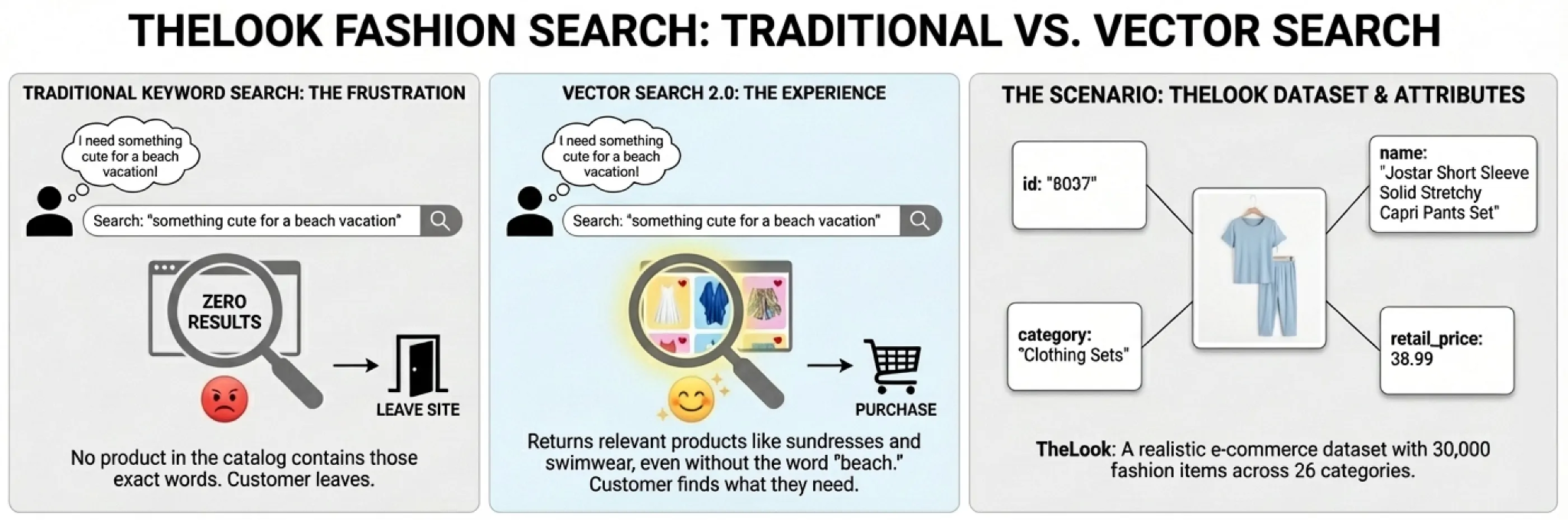
Imagine a customer lands on your e-commerce site and types "something cute for a beach vacation." With traditional keyword search, they get zero results — no product in your catalog contains those exact words. Frustrated, they leave.
Now imagine a different experience. The same query returns sundresses, swimwear cover-ups, and flowy shorts — products that perfectly match what the customer had in mind, even though none contain the word "beach" in their titles. That's the experience vector search enables.
To demonstrate how Vector Search 2.0 makes this possible, we'll build a product search system using TheLook, a realistic e-commerce dataset with 30,000 fashion items across 26 categories. Each product has attributes you'd find in any real catalog:
The Search Challenges We'll Solve
Real customers don't search the way databases expect. They search the way they think:
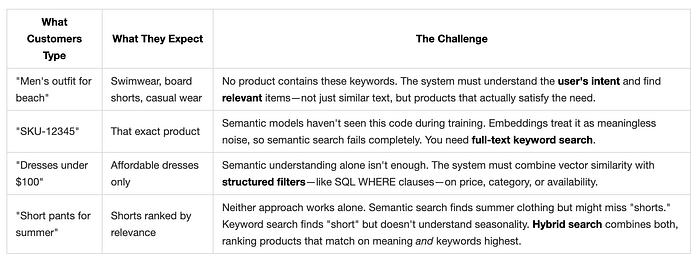
Vector Search 2.0 solves all four challenges with a unified architecture.
Vector Search 2.0 Data Architecture
Before diving into code, let's understand how Vector Search 2.0 organizes your data. The architecture centers on three key concepts: Collections, Data Objects, and Indexes.
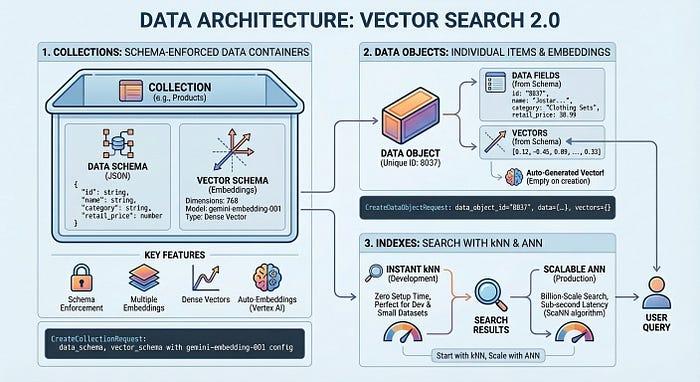
A Collection defines your data structure — the fields you want to store and which ones should be embedded. Data Objects are the actual items (products, documents, images) stored in a Collection, each with its data and auto-generated vectors or your own vectors. An Index optimizes queries at scale, enabling millisec latency across billions of items. You can start without an index for development with zero setup time, then add one when you need production performance.
Building TheLook Search: Step by Step
Now let's build a working product search system. We'll load 10,000 fashion items from TheLook, enable auto-embeddings, and run semantic, keyword, and hybrid searches — all in about 50 lines of code.
Open notebook: Introduction to Vertex AI Vector Search 2.0
Hybrid Search in Action
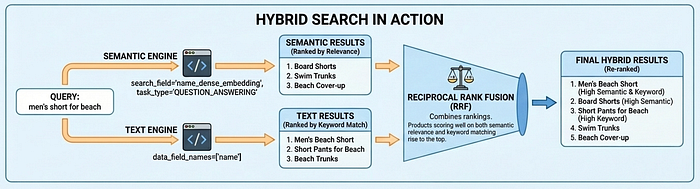
Vector Search 2.0 supports three search modes: semantic search (understands intent via embeddings), text search (keyword matching), and hybrid search (combines both). Hybrid search delivers the best results for most use cases — semantic search finds "Board Shorts" when users search "men's outfit for beach," while text search ensures exact matches like product codes aren't missed.
Why Task Type Embeddings Matter
Notice the task_type parameters in the code above: RETRIEVAL_DOCUMENT when indexing products, and QUESTION_ANSWERING when searching. This isn't arbitrary—it's a key technique for improving search quality by letting the embedding model work like a recommendation model.
Most vector search use cases rely on simple similarity matching, but this often fails to provide production-level search quality because questions and answers aren't inherently similar in embedding space. "What's good for a beach vacation?" and "Board Shorts" have different semantics, yet they should match. Task type embeddings solve this by optimizing the embedding model for asymmetric relationships: documents are embedded differently than queries, creating an embedding space where relevant matches cluster together — adding the capability of recommendation, finding relevant items based on user intent.
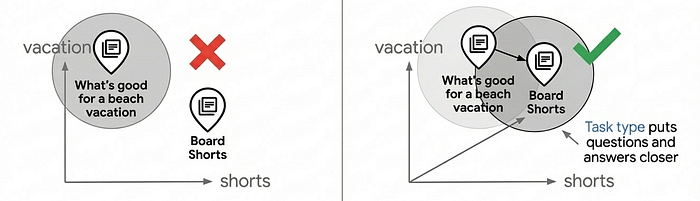
Using task-specific embeddings can improve search quality by 30–40% compared to generic embeddings. For a deep dive into how this works, see the Task Type Embedding notebook.
From Zero to Billion Scale
For production at scale, Vector Search 2.0 offers ANN (Approximate Nearest Neighbor) indexes powered by Google's ScaNN (Scalable Nearest Neighbors) algorithm — the same technology behind Google Search, YouTube, and Google Play. ANN trades a tiny amount of accuracy (~99%) for massive speed gains: sub-10ms latency even with billions of vectors.
The Complete Picture
In just five steps — with steps 1 through 4 taking only about 5 minutes — we built a production-ready product search system:
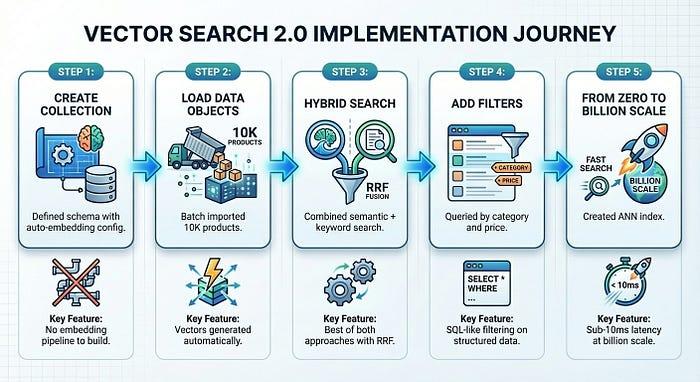
Vector Search 2.0 eliminates the infrastructure complexity that typically slows down vector search adoption. You focus on your product; the platform handles embeddings, indexing, and scaling.
3. Congratulations
Congratulations, you've successfully built your first application with Vector Search 2.0!