

1. The Mission

Acil durum yapay zekasına kendinizi tanıttınız ve artık gezegen haritasında sinyaliniz yanıp sönüyor ancak bu, statik gürültü arasında kaybolan bir titremeden ibaret. Yörüngeden tarama yapan kurtarma ekipleri, koordinatlarınızda bir şey görebiliyor ancak kilitlenemiyor. Sinyal çok zayıf.
Sinyalinizi tam güce ulaştırmak için tam konumunuzu onaylamanız gerekir. Kapsülün navigasyon sistemi bozulmuş olsa da kaza, kurtarılabilir kanıtları iniş alanına dağıtmıştır. Toprak örnekleri. Tuhaf bitki örtüsü. Uzaylıların gece gökyüzünün net görünümü.
Bu kanıtı analiz edip gezegenin hangi bölgesinde olduğunuzu belirleyebilirseniz yapay zeka, konumunuzu üçgenleme yöntemiyle bulabilir ve sinyal gücünü artırabilir. Ardından, belki de birileri sizi bulur.
Parçaları birleştirme zamanı.
Ön koşullar
⚠️ Bu seviye için 0. seviyenin tamamlanması gerekir.
Başlamadan önce şunlara sahip olduğunuzu doğrulayın:
- Proje kökündeki [ ]
config.jsonyerine katılımcı kimliğinizi ve koordinatlarınızı yazın. - [ ] Avatarınız dünya haritasında görünür
- [ ] İşaretçiniz koordinatlarınızda (soluk) gösteriliyor
0. seviyeyi tamamlamadıysanız önce buradan başlayın.
Ne Oluşturacaksınız?
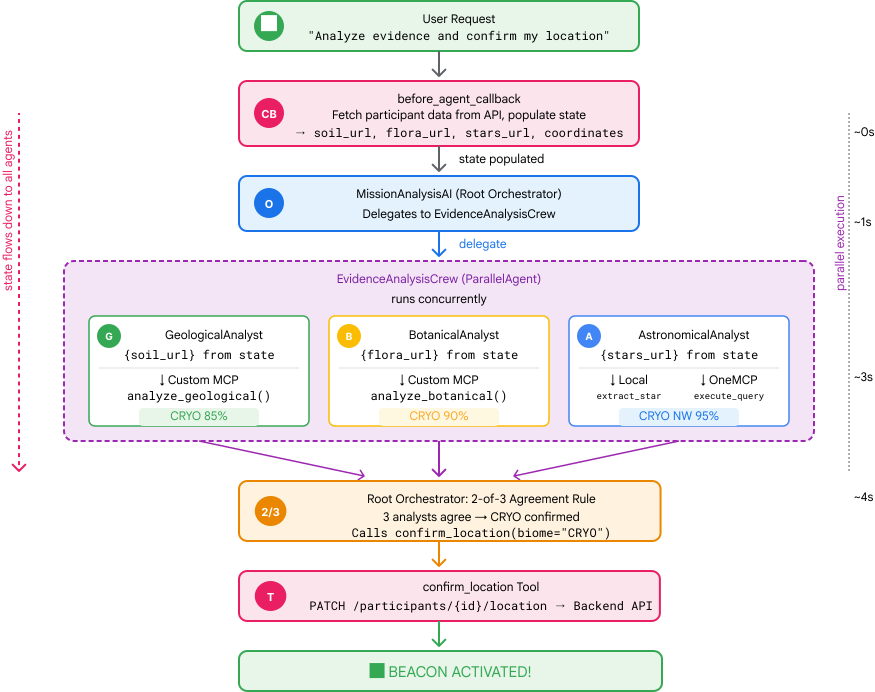
Bu seviyede, paralel işlemeyi kullanarak kaza yeri kanıtlarını analiz eden bir çoklu temsilci yapay zeka sistemi oluşturacaksınız:
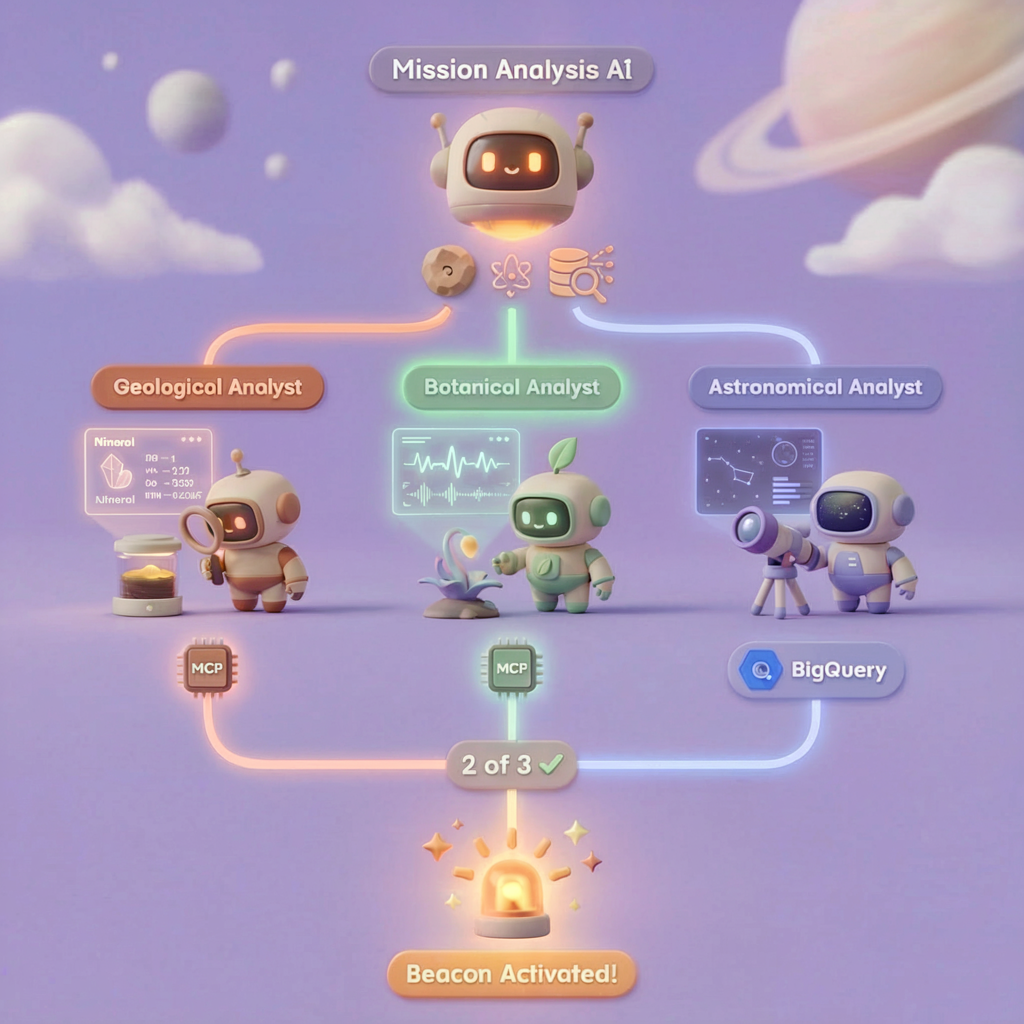
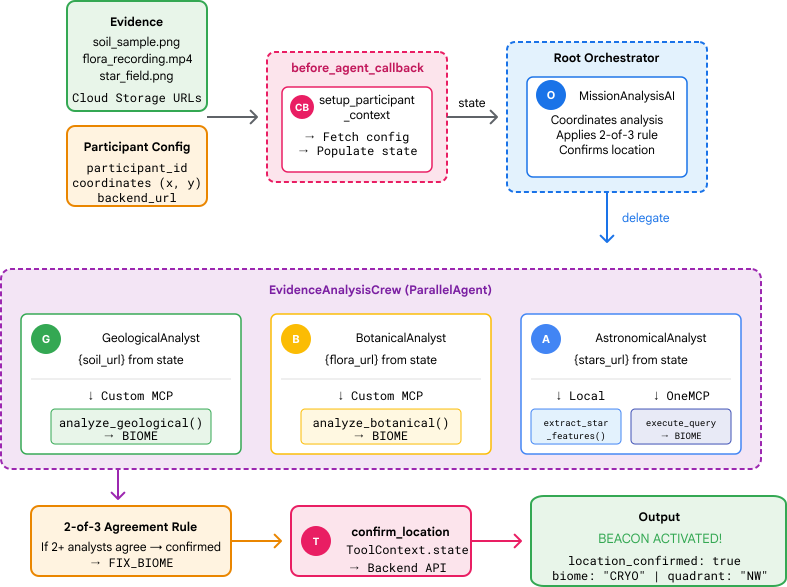
Öğrenme Hedefleri
Kavram | Neler Öğreneceksiniz? |
Çoklu aracı sistemleri | Tek bir sorumluluğu olan uzmanlaşmış ajanlar oluşturun |
ParallelAgent | Eşzamanlı olarak çalışacak bağımsız temsilciler oluşturma |
before_agent_callback | Aracı çalışmadan önce yapılandırmayı getirme ve durumu ayarlama |
ToolContext | Araç işlevlerinde durum değerlerine erişme |
Özel MCP Sunucuları | Zorunlu kalıp ile araç oluşturma (Cloud Run'da Python kodu) |
OneMCP BigQuery | BigQuery erişimi için Google'ın yönetilen MCP'sine bağlanma |
Çok formatlı yapay zeka | Gemini ile görüntüleri ve video+ses içeriklerini analiz etme |
Aracı düzenleme | Bir kök düzenleyiciyle birden fazla aracı koordine etme |
Cloud Deployment | MCP sunucusunu ve aracısını Cloud Run'a dağıtma |
A2A Hazırlığı | Gelecekteki ajanlar arası iletişim için aracıları yapılandırma |
Gezegenin Biyomları
Gezegen yüzeyi, her biri benzersiz özelliklere sahip dört farklı biyoma ayrılmıştır:
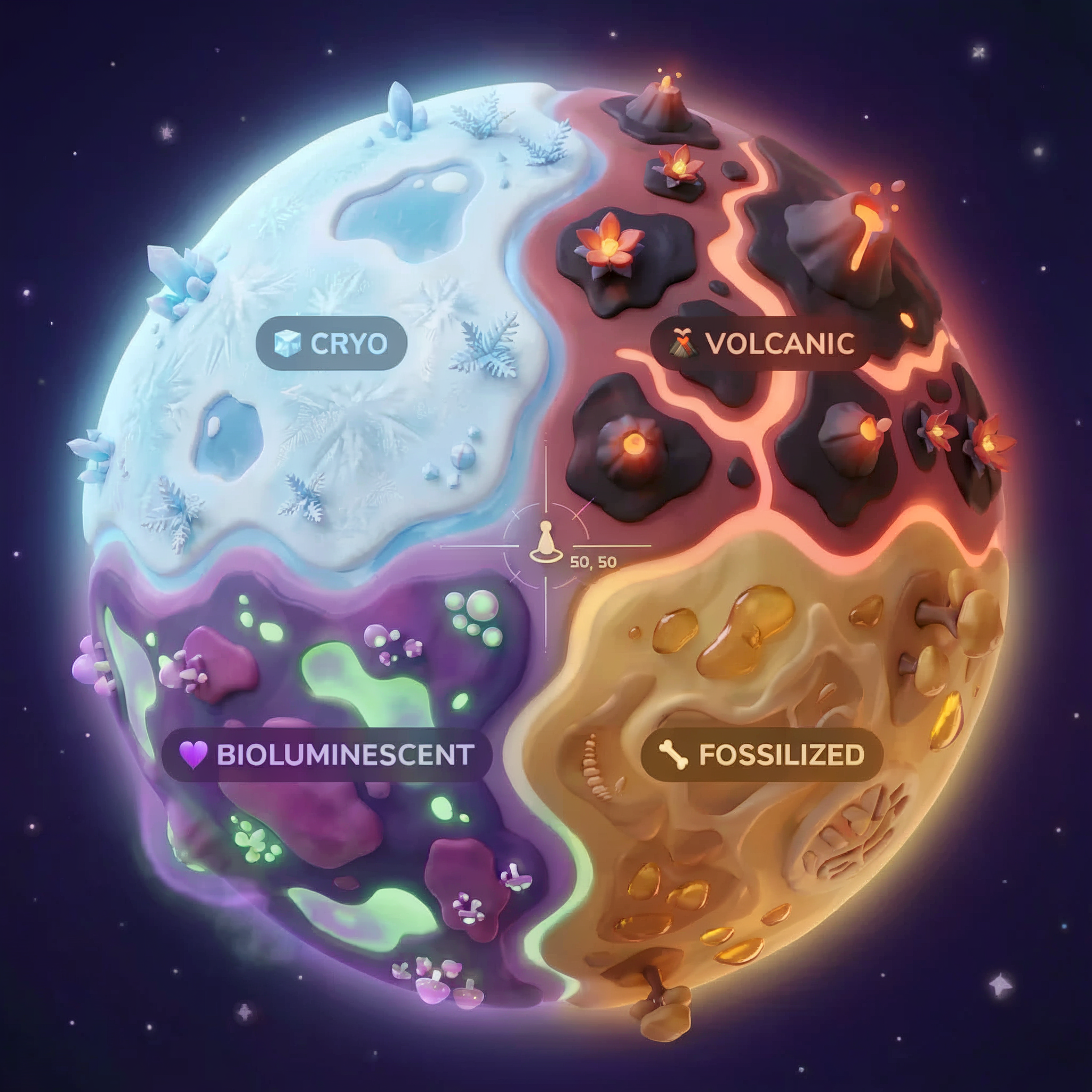
Koordinatlarınız, hangi biyomda kaza yaptığınızı belirler. Kaza yerinizdeki kanıtlar, biyomun özelliklerini yansıtır:
Biyom | Kuadrant | Jeolojik Kanıtlar | Botanik Kanıt | Astronomik Kanıtlar |
🧊 CRYO | NW (x<50, y≥50) | Donmuş metan, buz kristalleri | Buz eğrelti otları, kriyojenik flora | Mavi dev yıldız |
🌋 VOLCANIC | NE (x≥50, y≥50) | Obsidiyen,ite yatakları | Ateş çiçekleri, ısıya dayanıklı bitkiler | Kırmızı cüce ikili sistemi |
💜 BIOLUMINESCENT | SW (x<50, y<50) | Fosforlu toprak | Parlayan mantarlar, ışık yayan bitkiler | Yeşil pulsar |
🦴 FOSSILIZED (FOSİLLEŞMİŞ) | SE (x≥50, y<50) | Amber yatakları, ite mineralleri | Taşlaşmış ağaçlar, antik flora | Sarı güneş |
Göreviniz: Kanıtları analiz edebilen ve hangi biyomda olduğunuzu çıkarabilen yapay zeka aracıları oluşturmak.
2. Ortamınızı ayarlama
Ortam kurulumu komut dosyasını çalıştırma
Kanıt oluşturmadan önce, BigQuery için OneMCP de dahil olmak üzere gerekli Google Cloud API'lerini etkinleştirmeniz gerekir. Bu API, BigQuery'ye yönetilen MCP erişimi sağlar.
👉💻 Ortam kurulumu komut dosyasını çalıştırın:
cd $HOME/way-back-home/level_1
chmod +x setup/setup_env.sh
./setup/setup_env.sh
Şuna benzer bir çıkış görürsünüz:
================================================================
Level 1: Environment Setup
================================================================
Project: your-project-id

[1/6] Enabling core Google Cloud APIs...
      ✓ Vertex AI API enabled
      ✓ Cloud Run API enabled
      ✓ Cloud Build API enabled
      ✓ BigQuery API enabled
      ✓ Artifact Registry API enabled
      ✓ IAM API enabled

[2/6] Enabling OneMCP BigQuery (Managed MCP)...
      ✓ OneMCP BigQuery enabled

[3/6] Setting up service account and IAM permissions...
      ✓ Service account 'way-back-home-sa' created
      ✓ Vertex AI User role granted
      ✓ Cloud Run Invoker role granted
      ✓ BigQuery User role granted
      ✓ BigQuery Data Viewer role granted
      ✓ Storage Object Viewer role granted

[4/6] Configuring Cloud Build IAM for deployments...
      ✓ Cloud Build can now deploy services as way-back-home-sa
      ✓ Cloud Run Admin role granted to Compute SA

[5/6] Creating Artifact Registry repository...
      ✓ Repository 'way-back-home' created

[6/6] Creating environment variables file...
      Found PARTICIPANT_ID in config.json: abc123...
      ✓ Created ../set_env.sh

================================================================
✅ Environment Setup Complete!
================================================================
Kaynak ortam değişkenleri
👉💻 Ortam değişkenlerini kaynaklayın:
source $HOME/way-back-home/set_env.sh
Bağımlılıkları yükleme
👉💻 1. düzey Python bağımlılıklarını yükleyin:
cd $HOME/way-back-home/level_1
uv sync
Yıldız Kataloğu'nu ayarlama
👉💻 BigQuery'de yıldız kataloğunu ayarlayın:
uv run python setup/setup_star_catalog.py
Aşağıdaki bilgileri görürsünüz:
Setting up star catalog in project: your-project-id
==================================================
✓ Dataset way_back_home already exists
✓ Created table star_catalog
✓ Inserted 12 rows into star_catalog

📊 Star Catalog Summary:
----------------------------------------
  NE (VOLCANIC): 3 stellar patterns
  NW (CRYO): 3 stellar patterns
  SE (FOSSILIZED): 3 stellar patterns
  SW (BIOLUMINESCENT): 3 stellar patterns
----------------------------------------
✓ Star catalog is ready for triangulation queries

==================================================
✅ Star catalog setup complete!
3. Kaza yeri kanıtı oluşturma
Artık koordinatlarınıza göre kişiselleştirilmiş kaza yeri kanıtları oluşturabilirsiniz.
Kanıt Oluşturucu'yu çalıştırma
👉💻 level_1 dizininden şunu çalıştırın:
cd $HOME/way-back-home/level_1
uv run python generate_evidence.py
Şuna benzer bir çıkış görürsünüz:
✓ Welcome back, Explorer_Aria!
  Coordinates: (23, 67)
  Ready to analyze your crash site.

📍 Crash site analysis initiated...
   Generating evidence for your location...

🔬 Generating soil sample...
✓ Soil sample captured: outputs/soil_sample.png
✨ Capturing star field...
✓ Star field captured: outputs/star_field.png
🌿 Recording flora activity...
   (This may take 1-2 minutes for video generation)
   Generating video...
   Generating video...
   Generating video...
✓ Flora recorded: outputs/flora_recording.mp4

📤 Uploading evidence to Mission Control...
✓ Config updated with evidence URLs

==================================================
✅ Evidence generation complete!
==================================================
Kanıtınızı İnceleyin
👉 outputs/ klasöründe oluşturulan kanıt dosyalarınıza göz atın. Her biri, kaza yerinizin biyom özelliklerini yansıtır. Ancak yapay zeka aracınız bunları analiz edene kadar hangi biyom olduğunu bilemezsiniz.
Oluşturulan kanıtınız, bulunduğunuz yere bağlı olarak aşağıdakine benzer şekilde görünebilir:



4. Özel MCP sunucusunu oluşturma
Kaçış kapsülünüzün yerleşik analiz sistemleri hasar görmüş ancak ham sensör verileri kazadan kurtulmuş. FastMCP ile jeolojik ve botanik analiz araçları sağlayan bir MCP sunucusu oluşturacaksınız.
Jeolojik Analiz Aracı'nı oluşturma
Bu araç, mineral bileşimini belirlemek için toprak numunesi görüntülerini analiz eder.
👉✏️ $HOME/way-back-home/level_1/mcp-server/main.py uygulamasını açıp #REPLACE-GEOLOGICAL-TOOL simgesini bulun. Şununla değiştirin:
GEOLOGICAL_PROMPT = """Analyze this alien soil sample image.

Classify the PRIMARY characteristic (choose exactly one):

1. CRYO - Frozen/icy minerals, crystalline structures, frost patterns,
   blue-white coloration, permafrost indicators

2. VOLCANIC - Volcanic rock, basalt, obsidian, sulfur deposits,
   red-orange minerals, heat-formed crystite structures

3. BIOLUMINESCENT - Glowing particles, phosphorescent minerals,
   organic-mineral hybrids, purple-green luminescence

4. FOSSILIZED - Ancient compressed minerals, amber deposits,
   petrified organic matter, golden-brown stratification

Respond ONLY with valid JSON (no markdown, no explanation):
{
    "biome": "CRYO|VOLCANIC|BIOLUMINESCENT|FOSSILIZED",
    "confidence": 0.0-1.0,
    "minerals_detected": ["mineral1", "mineral2"],
    "description": "Brief description of what you observe"
}
"""


@mcp.tool()
def analyze_geological(
    image_url: Annotated[
        str,
        Field(description="Cloud Storage URL (gs://...) of the soil sample image")
    ]
) -> dict:
    """
    Analyzes a soil sample image to identify mineral composition and classify the planetary biome.

    Args:
        image_url: Cloud Storage URL of the soil sample image (gs://bucket/path/image.png)

    Returns:
        dict with biome, confidence, minerals_detected, and description
    """
    logger.info(f">>> 🔬 Tool: 'analyze_geological' called for '{image_url}'")

    try:
        response = client.models.generate_content(
            model="gemini-2.5-flash",
            contents=[
                GEOLOGICAL_PROMPT,
                genai_types.Part.from_uri(file_uri=image_url, mime_type="image/png")
            ]
        )

        result = parse_json_response(response.text)
        logger.info(f"    ✓ Geological analysis complete: {result.get('biome', 'UNKNOWN')}")
        return result

    except Exception as e:
        logger.error(f"    ✗ Geological analysis failed: {str(e)}")
        return {"error": str(e), "biome": "UNKNOWN", "confidence": 0.0}
Botanical Analysis Tool'u oluşturma
Bu araç, ses parçası da dahil olmak üzere flora video kayıtlarını analiz eder.
👉✏️ Aynı dosyada ($HOME/way-back-home/level_1/mcp-server/main.py) #REPLACE-BOTANICAL-TOOL ifadesini bulup aşağıdakilerle değiştirin:
BOTANICAL_PROMPT = """Analyze this alien flora video recording.

Pay attention to BOTH:
1. VISUAL elements: Plant appearance, movement patterns, colors, bioluminescence
2. AUDIO elements: Ambient sounds, rustling, organic noises, frequencies

Classify the PRIMARY biome (choose exactly one):

1. CRYO - Crystalline ice-plants, frost-covered vegetation,
   crackling/tinkling sounds, slow brittle movements, blue-white flora

2. VOLCANIC - Heat-resistant plants, sulfur-adapted species,
   hissing/bubbling sounds, smoke-filtering vegetation, red-orange flora

3. BIOLUMINESCENT - Glowing plants, pulsing light patterns,
   humming/resonating sounds, reactive to stimuli, purple-green flora

4. FOSSILIZED - Ancient petrified plants, amber-preserved specimens,
   deep resonant sounds, minimal movement, golden-brown flora

Respond ONLY with valid JSON (no markdown, no explanation):
{
    "biome": "CRYO|VOLCANIC|BIOLUMINESCENT|FOSSILIZED",
    "confidence": 0.0-1.0,
    "species_detected": ["species1", "species2"],
    "audio_signatures": ["sound1", "sound2"],
    "description": "Brief description of visual and audio observations"
}
"""


@mcp.tool()
def analyze_botanical(
    video_url: Annotated[
        str,
        Field(description="Cloud Storage URL (gs://...) of the flora video recording")
    ]
) -> dict:
    """
    Analyzes a flora video recording (visual + audio) to identify plant species and classify the biome.

    Args:
        video_url: Cloud Storage URL of the flora video (gs://bucket/path/video.mp4)

    Returns:
        dict with biome, confidence, species_detected, audio_signatures, and description
    """
    logger.info(f">>> 🌿 Tool: 'analyze_botanical' called for '{video_url}'")

    try:
        response = client.models.generate_content(
            model="gemini-2.5-flash",
            contents=[
                BOTANICAL_PROMPT,
                genai_types.Part.from_uri(file_uri=video_url, mime_type="video/mp4")
            ]
        )

        result = parse_json_response(response.text)
        logger.info(f"    ✓ Botanical analysis complete: {result.get('biome', 'UNKNOWN')}")
        return result

    except Exception as e:
        logger.error(f"    ✗ Botanical analysis failed: {str(e)}")
        return {"error": str(e), "biome": "UNKNOWN", "confidence": 0.0}
MCP sunucusunu yerel olarak test etme
👉💻 MCP sunucusunu test edin:
cd $HOME/way-back-home/level_1/mcp-server
pip install -r requirements.txt
python main.py
Aşağıdaki bilgileri görürsünüz:
[INFO] Initialized Gemini client for project: your-project-id
[INFO] 🚀 Location Analyzer MCP Server starting on port 8080
[INFO] 📍 MCP endpoint: http://0.0.0.0:8080/mcp
[INFO] 🔧 Tools: analyze_geological, analyze_botanical
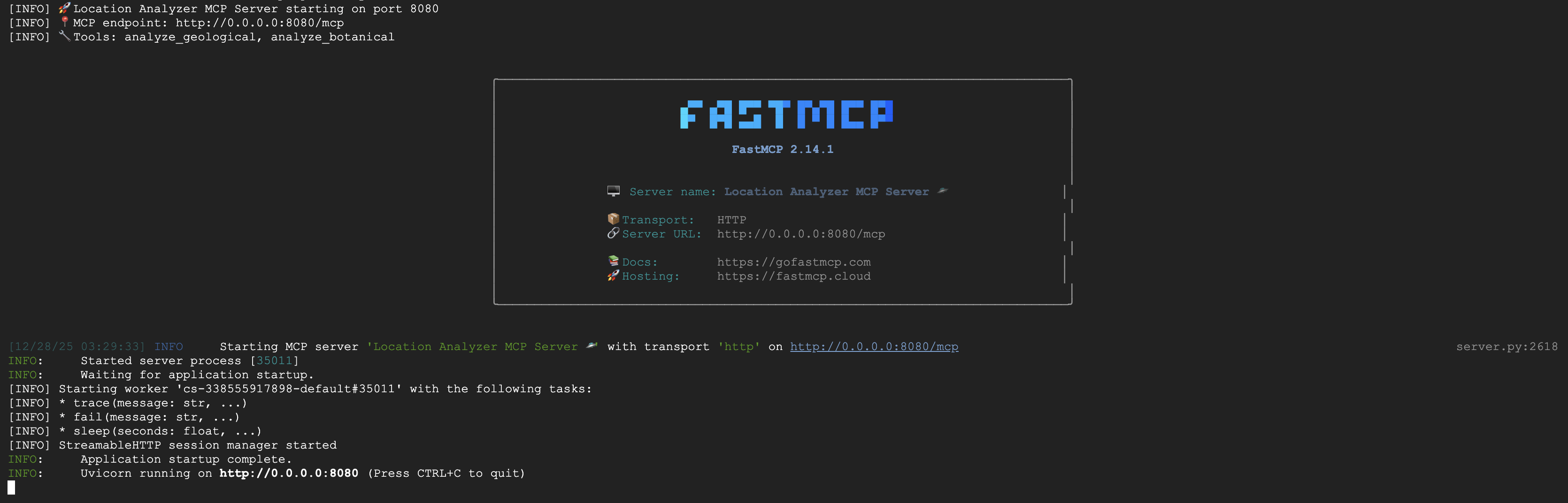
FastMCP sunucusu artık HTTP aktarımıyla çalışıyor. Durdurmak için Ctrl+C düğmesine basın.
MCP sunucusunu Cloud Run'a dağıtma
👉💻 Dağıtma:
cd $HOME/way-back-home/level_1/mcp-server
source $HOME/way-back-home/set_env.sh

gcloud builds submit . \
  --config=cloudbuild.yaml \
  --substitutions=_REGION="$REGION",_REPO_NAME="$REPO_NAME",_SERVICE_ACCOUNT="$SERVICE_ACCOUNT"
Hizmet URL'sini kaydetme
👉💻 Hizmet URL'sini kaydedin:
export MCP_SERVER_URL=$(gcloud run services describe location-analyzer \
  --region=$REGION --format='value(status.url)')
echo "MCP Server URL: $MCP_SERVER_URL"

# Add to set_env.sh for later use
echo "export MCP_SERVER_URL=\"$MCP_SERVER_URL\"" >> $HOME/way-back-home/set_env.sh
5. Uzman Ajanları Oluşturma
Şimdi her biri tek bir sorumluluğa sahip üç uzman aracı oluşturacaksınız.
Jeoloji Analisti Aracısı'nı oluşturma
👉✏️ agent/agents/geological_analyst.py uygulamasını açıp #REPLACE-GEOLOGICAL-AGENT simgesini bulun. Şununla değiştirin:
from google.adk.agents import Agent
from agent.tools.mcp_tools import get_geological_tool

geological_analyst = Agent(
    name="GeologicalAnalyst",
    model="gemini-2.5-flash",
    description="Analyzes soil samples to classify planetary biome based on mineral composition.",
    instruction="""You are a geological specialist analyzing alien soil samples.

## YOUR EVIDENCE TO ANALYZE
Soil sample URL: {soil_url}

## YOUR TASK
1. Call the analyze_geological tool with the soil sample URL above
2. Examine the results for mineral composition and biome indicators
3. Report your findings clearly

The four possible biomes are:
- CRYO: Frozen, icy minerals, blue/white coloring
- VOLCANIC: Magma, obsidian, volcanic rock, red/orange coloring
- BIOLUMINESCENT: Glowing, phosphorescent minerals, purple/green
- FOSSILIZED: Amber, ancient preserved matter, golden/brown

## REPORTING FORMAT
Always report your classification clearly:
"GEOLOGICAL ANALYSIS: [BIOME] (confidence: X%)"

Include a brief description of what you observed in the sample.

## IMPORTANT
- You do NOT synthesize with other evidence
- You do NOT confirm locations
- Just analyze the soil sample and report what you find
- Call the tool immediately with the URL provided above""",
    tools=[get_geological_tool()]
)
Botanical Analyst Agent'ı oluşturma
👉✏️ agent/agents/botanical_analyst.py uygulamasını açıp #REPLACE-BOTANICAL-AGENT simgesini bulun. Şununla değiştirin:
from google.adk.agents import Agent
from agent.tools.mcp_tools import get_botanical_tool

botanical_analyst = Agent(
    name="BotanicalAnalyst",
    model="gemini-2.5-flash",
    description="Analyzes flora recordings to classify planetary biome based on plant life and ambient sounds.",
    instruction="""You are a botanical specialist analyzing alien flora recordings.

## YOUR EVIDENCE TO ANALYZE
Flora recording URL: {flora_url}

## YOUR TASK
1. Call the analyze_botanical tool with the flora recording URL above
2. Pay attention to BOTH visual AND audio elements in the recording
3. Report your findings clearly

The four possible biomes are:
- CRYO: Frost ferns, crystalline plants, cold wind sounds, crackling ice
- VOLCANIC: Fire blooms, heat-resistant flora, crackling/hissing sounds
- BIOLUMINESCENT: Glowing fungi, luminescent plants, ethereal hum, chiming
- FOSSILIZED: Petrified trees, ancient formations, deep resonant sounds

## REPORTING FORMAT
Always report your classification clearly:
"BOTANICAL ANALYSIS: [BIOME] (confidence: X%)"

Include descriptions of what you SAW and what you HEARD.

## IMPORTANT
- You do NOT synthesize with other evidence
- You do NOT confirm locations
- Just analyze the flora recording and report what you find
- Call the tool immediately with the URL provided above""",
    tools=[get_botanical_tool()]
)
Astronomik Analist Aracısı oluşturma
Bu aracı, iki araç kalıbı kullanarak farklı bir yaklaşımla çalışır:
- Local FunctionTool: Yıldız özelliklerini çıkarmak için Gemini Vision
- OneMCP BigQuery: Google'ın yönetilen MCP'si aracılığıyla yıldız kataloğunu sorgulama
👉✏️ agent/agents/astronomical_analyst.py uygulamasını açıp #REPLACE-ASTRONOMICAL-AGENT simgesini bulun. Şununla değiştirin:
from google.adk.agents import Agent
from agent.tools.star_tools import (
    extract_star_features_tool,
    get_bigquery_mcp_toolset,
)

# Get the BigQuery MCP toolset
bigquery_toolset = get_bigquery_mcp_toolset()

astronomical_analyst = Agent(
    name="AstronomicalAnalyst",
    model="gemini-2.5-flash",
    description="Analyzes star field images and queries the star catalog via OneMCP BigQuery.",
    instruction="""You are an astronomical specialist analyzing alien night skies.

## YOUR EVIDENCE TO ANALYZE
Star field URL: {stars_url}

## YOUR TWO TOOLS

### TOOL 1: extract_star_features (Local Gemini Vision)
Call this FIRST with the star field URL above.
Returns: "primary_star": "...", "nebula_type": "...", "stellar_color": "..."

### TOOL 2: BigQuery MCP (execute_query)
Call this SECOND with the results from Tool 1.
Use this exact SQL query (replace the placeholders with values from Step 1):

SELECT quadrant, biome, primary_star, nebula_type
FROM `{project_id}.way_back_home.star_catalog`
WHERE LOWER(primary_star) = LOWER('PRIMARY_STAR_FROM_STEP_1')
  AND LOWER(nebula_type) = LOWER('NEBULA_TYPE_FROM_STEP_1')
LIMIT 1

## YOUR WORKFLOW
1. Call extract_star_features with: {stars_url}
2. Get the primary_star and nebula_type from the result
3. Call execute_query with the SQL above (replacing placeholders)
4. Report the biome and quadrant from the query result

## BIOME REFERENCE
| Biome | Quadrant | Primary Star | Nebula Type |
|-------|----------|--------------|-------------|
| CRYO | NW | blue_giant | ice_blue |
| VOLCANIC | NE | red_dwarf_binary | fire |
| BIOLUMINESCENT | SW | green_pulsar | purple_magenta |
| FOSSILIZED | SE | yellow_sun | golden |

## REPORTING FORMAT
"ASTRONOMICAL ANALYSIS: [BIOME] in [QUADRANT] quadrant (confidence: X%)"

Include a description of the stellar features you observed.

## IMPORTANT
- You do NOT synthesize with other evidence
- You do NOT confirm locations
- Just analyze the stars and report what you find
- Start by calling extract_star_features with the URL above""",
    tools=[extract_star_features_tool, bigquery_toolset]
)
6. MCP aracı bağlantılarını oluşturma
Şimdi ADK aracılarının MCP sunucularıyla iletişim kurmasını sağlayan Python sarmalayıcılarını oluşturacaksınız. Bu sarmalayıcılar, bağlantı yaşam döngüsünü (oturum oluşturma, araç çağırma ve yanıtları ayrıştırma) yönetir.
MCP Aracı Bağlantısı Oluşturma (Özel MCP)
Bu, Cloud Run'da dağıtılan özel FastMCP sunucunuza bağlanır.
👉✏️ agent/tools/mcp_tools.py uygulamasını açıp #REPLACE-MCP-TOOL-CONNECTION simgesini bulun. Şununla değiştirin:
import os
import logging

from google.adk.tools.mcp_tool.mcp_toolset import MCPToolset
from google.adk.tools.mcp_tool.mcp_session_manager import StreamableHTTPConnectionParams

logger = logging.getLogger(__name__)

MCP_SERVER_URL = os.environ.get("MCP_SERVER_URL")

_mcp_toolset = None

def get_mcp_toolset():
    """Get the MCPToolset connected to the location-analyzer server."""
    global _mcp_toolset

    if _mcp_toolset is not None:
        return _mcp_toolset

    if not MCP_SERVER_URL:
        raise ValueError(
            "MCP_SERVER_URL not set. Please run:\n"
            "  export MCP_SERVER_URL='https://location-analyzer-xxx.a.run.app'"
        )

    # FastMCP exposes MCP protocol at /mcp endpoint
    mcp_endpoint = f"{MCP_SERVER_URL}/mcp"
    logger.info(f"[MCP Tools] Connecting to: {mcp_endpoint}")

    _mcp_toolset = MCPToolset(
        connection_params=StreamableHTTPConnectionParams(
            url=mcp_endpoint,
            timeout=120,  # 2 minutes for Gemini analysis
        )
    )

    return _mcp_toolset

def get_geological_tool():
    """Get the geological analysis tool from the MCP server."""
    return get_mcp_toolset()

def get_botanical_tool():
    """Get the botanical analysis tool from the MCP server."""
    return get_mcp_toolset()
Yıldız Analizi Araçları Oluşturma (OneMCP BigQuery)
Daha önce BigQuery'ye yüklediğiniz yıldız kataloğu, her biyom için yıldız desenleri içerir. Sorgulamak için BigQuery istemci kodu yazmak yerine, Google'ın OneMCP BigQuery sunucusuna bağlanırız. Bu sunucu, BigQuery'nin execute_query özelliğini herhangi bir ADK aracısının doğrudan kullanabileceği bir MCP aracı olarak sunar.
👉✏️ agent/tools/star_tools.py uygulamasını açıp #REPLACE-STAR-TOOLS simgesini bulun. Şununla değiştirin:
import os
import json
import logging

from google import genai
from google.genai import types as genai_types
from google.adk.tools import FunctionTool
from google.adk.tools.mcp_tool.mcp_toolset import MCPToolset
from google.adk.tools.mcp_tool.mcp_session_manager import StreamableHTTPConnectionParams
import google.auth
import google.auth.transport.requests

logger = logging.getLogger(__name__)

# =============================================================================
# CONFIGURATION - Environment variables only
# =============================================================================

PROJECT_ID = os.environ.get("GOOGLE_CLOUD_PROJECT", "")

if not PROJECT_ID:
    logger.warning("[Star Tools] GOOGLE_CLOUD_PROJECT not set")

# Initialize Gemini client for star feature extraction
genai_client = genai.Client(
    vertexai=True,
    project=PROJECT_ID or "placeholder",
    location=os.environ.get("GOOGLE_CLOUD_LOCATION", "us-central1")
)

logger.info(f"[Star Tools] Initialized for project: {PROJECT_ID}")

# =============================================================================
# OneMCP BigQuery Connection
# =============================================================================

BIGQUERY_MCP_URL = "https://bigquery.googleapis.com/mcp"

_bigquery_toolset = None

def get_bigquery_mcp_toolset():
    """
    Get the MCPToolset connected to Google's BigQuery MCP server.

    This uses OAuth 2.0 authentication with Application Default Credentials.
    The toolset provides access to BigQuery's pre-built MCP tools like:
    - execute_query: Run SQL queries
    - list_datasets: List available datasets
    - get_table_schema: Get table structure
   """
    global _bigquery_toolset

    if _bigquery_toolset is not None:
        return _bigquery_toolset

    logger.info("[Star Tools] Connecting to OneMCP BigQuery...")

    # Get OAuth credentials
    credentials, project_id = google.auth.default(
        scopes=["https://www.googleapis.com/auth/bigquery"]
    )

    # Refresh to get a valid token
    credentials.refresh(google.auth.transport.requests.Request())
    oauth_token = credentials.token

    # Configure headers for BigQuery MCP
    headers = {
        "Authorization": f"Bearer {oauth_token}",
        "x-goog-user-project": project_id or PROJECT_ID
    }

    # Create MCPToolset with StreamableHTTP connection
    _bigquery_toolset = MCPToolset(
        connection_params=StreamableHTTPConnectionParams(
            url=BIGQUERY_MCP_URL,
            headers=headers
        )
    )

    logger.info("[Star Tools] Connected to BigQuery MCP")
    return _bigquery_toolset


# =============================================================================
# Local FunctionTool: Star Feature Extraction
# =============================================================================
# This is a LOCAL tool that calls Gemini directly - demonstrating that
# you can mix local FunctionTools with MCP tools in the same agent.

STAR_EXTRACTION_PROMPT = """Analyze this alien night sky image and extract stellar features.

Identify:
1. PRIMARY STAR TYPE: blue_giant, red_dwarf, red_dwarf_binary, green_pulsar, yellow_sun, etc.
2. NEBULA TYPE: ice_blue, fire, purple_magenta, golden, etc.
3. STELLAR COLOR: blue_white, red_orange, green_purple, yellow_gold, etc.

Respond ONLY with valid JSON:
{"primary_star": "...", "nebula_type": "...", "stellar_color": "...", "description": "..."}
"""


def _parse_json_response(text: str) -> dict:
    """Parse JSON from Gemini response, handling markdown formatting."""
    cleaned = text.strip()
    if cleaned.startswith("```json"):
        cleaned = cleaned[7:]
    elif cleaned.startswith("```"):
        cleaned = cleaned[3:]
    if cleaned.endswith("```"):
        cleaned = cleaned[:-3]
    cleaned = cleaned.strip()

    try:
        return json.loads(cleaned)
    except json.JSONDecodeError as e:
        logger.error(f"Failed to parse JSON: {e}")
        return {"error": f"Failed to parse response: {str(e)}"}


def extract_star_features(image_url: str) -> dict:
    """
    Extract stellar features from a star field image using Gemini Vision.

    This is a LOCAL FunctionTool - we call Gemini directly, not through MCP.
    The agent will use this alongside the BigQuery MCP tools.
    """
    logger.info(f"[Stars] Extracting features from: {image_url}")

    response = genai_client.models.generate_content(
        model="gemini-2.5-flash",
        contents=[
            STAR_EXTRACTION_PROMPT,
            genai_types.Part.from_uri(file_uri=image_url, mime_type="image/png")
        ]
    )

    result = _parse_json_response(response.text)
    logger.info(f"[Stars] Extracted: primary_star={result.get('primary_star')}")
    return result


# Create the local FunctionTool
extract_star_features_tool = FunctionTool(extract_star_features)
7. Orchestrator'ı oluşturma
Şimdi her şeyi koordine eden paralel ekip ve kök düzenleyiciyi oluşturun.
Paralel Analiz Ekibi'ni oluşturma
Üç uzmanı neden paralel olarak çalıştırmalısınız? Çünkü tamamen bağımsızdırlar. Jeolojik analist, botanik analistin sonuçlarını beklemek zorunda değildir ve bunun tersi de geçerlidir. Her uzman, farklı araçlar kullanarak farklı bir kanıtı analiz eder. ParallelAgent, üçünü de eşzamanlı olarak çalıştırarak toplam analiz süresini ~30 saniyeden (sıralı) ~10 saniyeye (paralel) düşürür.
👉✏️ agent/agent.py uygulamasını açıp #REPLACE-PARALLEL-CREW simgesini bulun. Şununla değiştirin:
import os
import logging
import httpx

from google.adk.agents import Agent, ParallelAgent
from google.adk.agents.callback_context import CallbackContext

# Import specialist agents
from agent.agents.geological_analyst import geological_analyst
from agent.agents.botanical_analyst import botanical_analyst
from agent.agents.astronomical_analyst import astronomical_analyst

# Import confirmation tool
from agent.tools.confirm_tools import confirm_location_tool

logger = logging.getLogger(__name__)


# =============================================================================
# BEFORE AGENT CALLBACK - Fetches config and sets state
# =============================================================================

async def setup_participant_context(callback_context: CallbackContext) -> None:
    """
    Fetch participant configuration and populate state for all agents.

    This callback:
    1. Reads PARTICIPANT_ID and BACKEND_URL from environment
    2. Fetches participant data from the backend API
    3. Sets state values: soil_url, flora_url, stars_url, username, x, y, etc.
    4. Returns None to continue normal agent execution
    """
    participant_id = os.environ.get("PARTICIPANT_ID", "")
    backend_url = os.environ.get("BACKEND_URL", "https://api.waybackhome.dev")
    project_id = os.environ.get("GOOGLE_CLOUD_PROJECT", "")

    logger.info(f"[Callback] Setting up context for participant: {participant_id}")

    # Set project_id and backend_url in state immediately
    callback_context.state["project_id"] = project_id
    callback_context.state["backend_url"] = backend_url
    callback_context.state["participant_id"] = participant_id

    if not participant_id:
        logger.warning("[Callback] No PARTICIPANT_ID set - using placeholder values")
        callback_context.state["username"] = "Explorer"
        callback_context.state["x"] = 0
        callback_context.state["y"] = 0
        callback_context.state["soil_url"] = "Not available - set PARTICIPANT_ID"
        callback_context.state["flora_url"] = "Not available - set PARTICIPANT_ID"
        callback_context.state["stars_url"] = "Not available - set PARTICIPANT_ID"
        return None

    # Fetch participant data from backend API
    try:
        url = f"{backend_url}/participants/{participant_id}"
        logger.info(f"[Callback] Fetching from: {url}")

        async with httpx.AsyncClient(timeout=30.0) as client:
            response = await client.get(url)
            response.raise_for_status()
            data = response.json()

        # Extract evidence URLs
        evidence_urls = data.get("evidence_urls", {})

        # Set all state values for sub-agents to access
        callback_context.state["username"] = data.get("username", "Explorer")
        callback_context.state["x"] = data.get("x", 0)
        callback_context.state["y"] = data.get("y", 0)
        callback_context.state["soil_url"] = evidence_urls.get("soil", "Not available")
        callback_context.state["flora_url"] = evidence_urls.get("flora", "Not available")
        callback_context.state["stars_url"] = evidence_urls.get("stars", "Not available")

        logger.info(f"[Callback] State populated for {data.get('username')}")

    except Exception as e:
        logger.error(f"[Callback] Error fetching participant config: {e}")
        callback_context.state["username"] = "Explorer"
        callback_context.state["x"] = 0
        callback_context.state["y"] = 0
        callback_context.state["soil_url"] = f"Error: {e}"
        callback_context.state["flora_url"] = f"Error: {e}"
        callback_context.state["stars_url"] = f"Error: {e}"

    return None


# =============================================================================
# PARALLEL ANALYSIS CREW
# =============================================================================

evidence_analysis_crew = ParallelAgent(
    name="EvidenceAnalysisCrew",
    description="Runs geological, botanical, and astronomical analysis in parallel.",
    sub_agents=[geological_analyst, botanical_analyst, astronomical_analyst]
)
Kök düzenleyiciyi oluşturma
Şimdi her şeyi koordine eden ve geri aramayı kullanan kök ajanı oluşturun.
👉✏️ Aynı dosyada (agent/agent.py) #REPLACE-ROOT-ORCHESTRATOR öğesini bulun. Şununla değiştirin:
root_agent = Agent(
    name="MissionAnalysisAI",
    model="gemini-2.5-flash",
    description="Coordinates crash site analysis to confirm explorer location.",
    instruction="""You are the Mission Analysis AI coordinating a rescue operation.

## Explorer Information
- Name: {username}
- Coordinates: ({x}, {y})

## Evidence URLs (automatically provided to specialists via state)
- Soil sample: {soil_url}
- Flora recording: {flora_url}
- Star field: {stars_url}

## Your Workflow

### STEP 1: DELEGATE TO ANALYSIS CREW
Tell the EvidenceAnalysisCrew to analyze all the evidence.
The evidence URLs are already available to the specialists.

### STEP 2: COLLECT RESULTS
Each specialist will report:
- "GEOLOGICAL ANALYSIS: [BIOME] (confidence: X%)"
- "BOTANICAL ANALYSIS: [BIOME] (confidence: X%)"
- "ASTRONOMICAL ANALYSIS: [BIOME] in [QUADRANT] quadrant (confidence: X%)"

### STEP 3: APPLY 2-OF-3 AGREEMENT RULE
- If 2 or 3 specialists agree → that's the answer
- If all 3 disagree → use judgment based on confidence

### STEP 4: CONFIRM LOCATION
Call confirm_location with the determined biome.

## Biome Reference
| Biome | Quadrant | Key Characteristics |
|-------|----------|---------------------|
| CRYO | NW | Frozen, blue, ice crystals |
| VOLCANIC | NE | Magma, red/orange, obsidian |
| BIOLUMINESCENT | SW | Glowing, purple/green |
| FOSSILIZED | SE | Amber, golden, ancient |

## Response Style
Be encouraging and narrative! Celebrate when the beacon activates!
""",
    sub_agents=[evidence_analysis_crew],
    tools=[confirm_location_tool],
    before_agent_callback=setup_participant_context
)
Konum Onay Aracı'nı oluşturma
Bu son parçadır. Görev Kontrol Merkezi'ne konumunuzu onaylayan ve sinyalinizi etkinleştiren araçtır. Kök düzenleyici, hangi biyomda olduğunuzu belirlediğinde (3'te 2 anlaşma kuralını kullanarak) sonucu arka uç API'ye göndermek için bu aracı çağırır.
Bu araç, ToolContext kullanır. Bu sayede, before_agent_callback tarafından daha önce ayarlanan durum değerlerine (ör. participant_id ve backend_url) erişebilir.
👉✏️ agent/tools/confirm_tools.py bölümünde #REPLACE-CONFIRM-TOOL öğesini bulun. Şununla değiştirin:
import os
import logging
import requests

from google.adk.tools import FunctionTool
from google.adk.tools.tool_context import ToolContext

logger = logging.getLogger(__name__)

BIOME_TO_QUADRANT = {
    "CRYO": "NW",
    "VOLCANIC": "NE",
    "BIOLUMINESCENT": "SW",
    "FOSSILIZED": "SE"
}


def _get_actual_biome(x: int, y: int) -> tuple[str, str]:
    """Determine actual biome and quadrant from coordinates."""
    if x < 50 and y >= 50:
        return "NW", "CRYO"
    elif x >= 50 and y >= 50:
        return "NE", "VOLCANIC"
    elif x < 50 and y < 50:
        return "SW", "BIOLUMINESCENT"
    else:
        return "SE", "FOSSILIZED"


def confirm_location(biome: str, tool_context: ToolContext) -> dict:
    """
    Confirm the explorer's location and activate the rescue beacon.

    Uses ToolContext to read state values set by before_agent_callback.
    """
    # Read from state (set by before_agent_callback)
    participant_id = tool_context.state.get("participant_id", "")
    x = tool_context.state.get("x", 0)
    y = tool_context.state.get("y", 0)
    backend_url = tool_context.state.get("backend_url", "https://api.waybackhome.dev")

    # Fallback to environment variables
    if not participant_id:
        participant_id = os.environ.get("PARTICIPANT_ID", "")
    if not backend_url:
        backend_url = os.environ.get("BACKEND_URL", "https://api.waybackhome.dev")

    if not participant_id:
        return {"success": False, "message": "❌ No participant ID available."}

    biome_upper = biome.upper().strip()

    if biome_upper not in BIOME_TO_QUADRANT:
        return {"success": False, "message": f"❌ Unknown biome: {biome}"}

    # Get actual biome from coordinates
    actual_quadrant, actual_biome = _get_actual_biome(x, y)

    if biome_upper != actual_biome:
        return {
            "success": False,
            "message": f"❌ Mismatch! Analysis: {biome_upper}, Actual: {actual_biome}"
        }

    quadrant = BIOME_TO_QUADRANT[biome_upper]

    try:
        response = requests.patch(
            f"{backend_url}/participants/{participant_id}/location",
            params={"x": x, "y": y},
            timeout=10
        )
        response.raise_for_status()

        return {
            "success": True,
            "message": f"🔦 BEACON ACTIVATED!\n\nLocation: {biome_upper} in {quadrant}\nCoordinates: ({x}, {y})"
        }

    except requests.exceptions.ConnectionError:
        return {
            "success": True,
            "message": f"🔦 BEACON ACTIVATED! (Local)\n\nLocation: {biome_upper} in {quadrant}",
            "simulated": True
        }

    except Exception as e:
        return {"success": False, "message": f"❌ Failed: {str(e)}"}


confirm_location_tool = FunctionTool(confirm_location)
8. ADK Web Kullanıcı Arayüzü ile test etme
Şimdi de çoklu aracı sistemin tamamını yerel olarak test edelim.
ADK web sunucusunu başlatma
👉💻 Ortam değişkenlerini ayarlayın ve ADK web sunucusunu başlatın:
cd $HOME/way-back-home/level_1
source $HOME/way-back-home/set_env.sh

# Verify environment is set
echo "PARTICIPANT_ID: $PARTICIPANT_ID"
echo "MCP Server: $MCP_SERVER_URL"

# Start ADK web server
uv run adk web
Aşağıdaki bilgileri görürsünüz:
+-----------------------------------------------------------------------------+
| ADK Web Server started                                                      |
|                                                                             |
| For local testing, access at http://localhost:8000.                         |
+-----------------------------------------------------------------------------+

INFO:     Application startup complete.
INFO:     Uvicorn running on http://0.0.0.0:8000 (Press CTRL+C to quit)
Web kullanıcı arayüzüne erişme
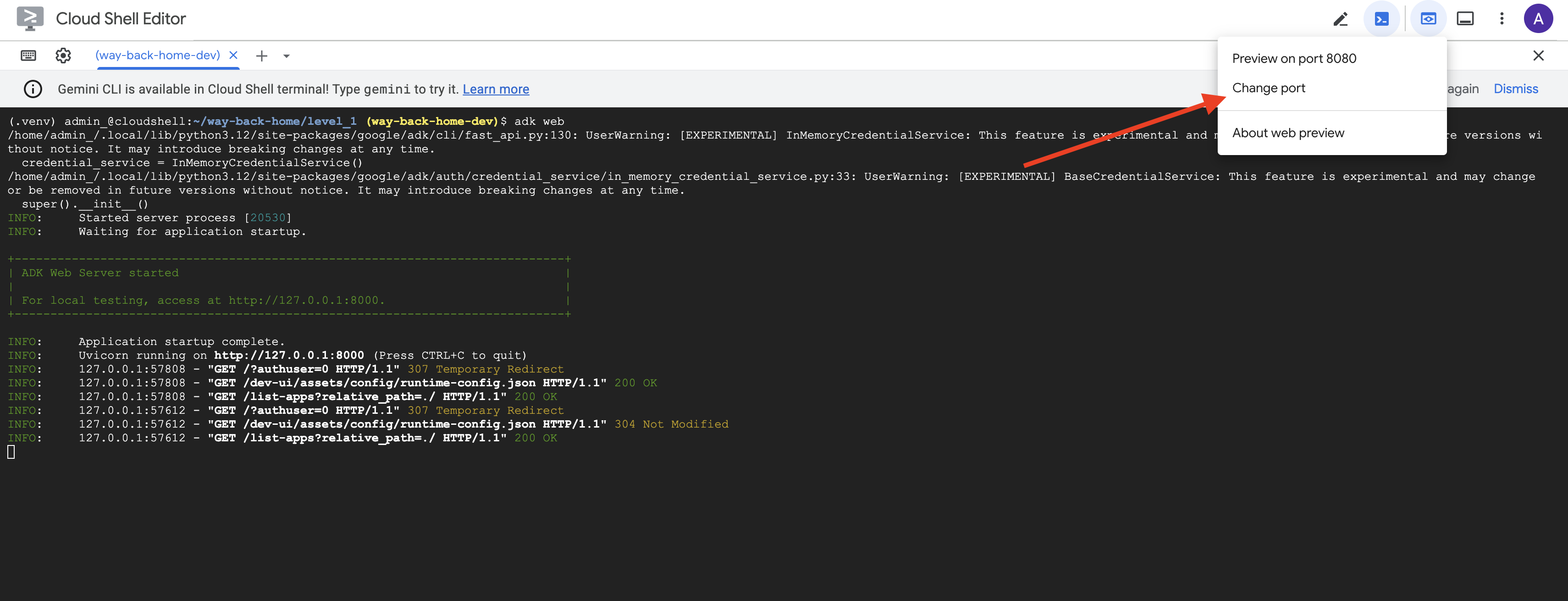
👉 Cloud Shell araç çubuğundaki (sağ üst) Web önizlemesi simgesinden Bağlantı noktasını değiştir'i seçin.
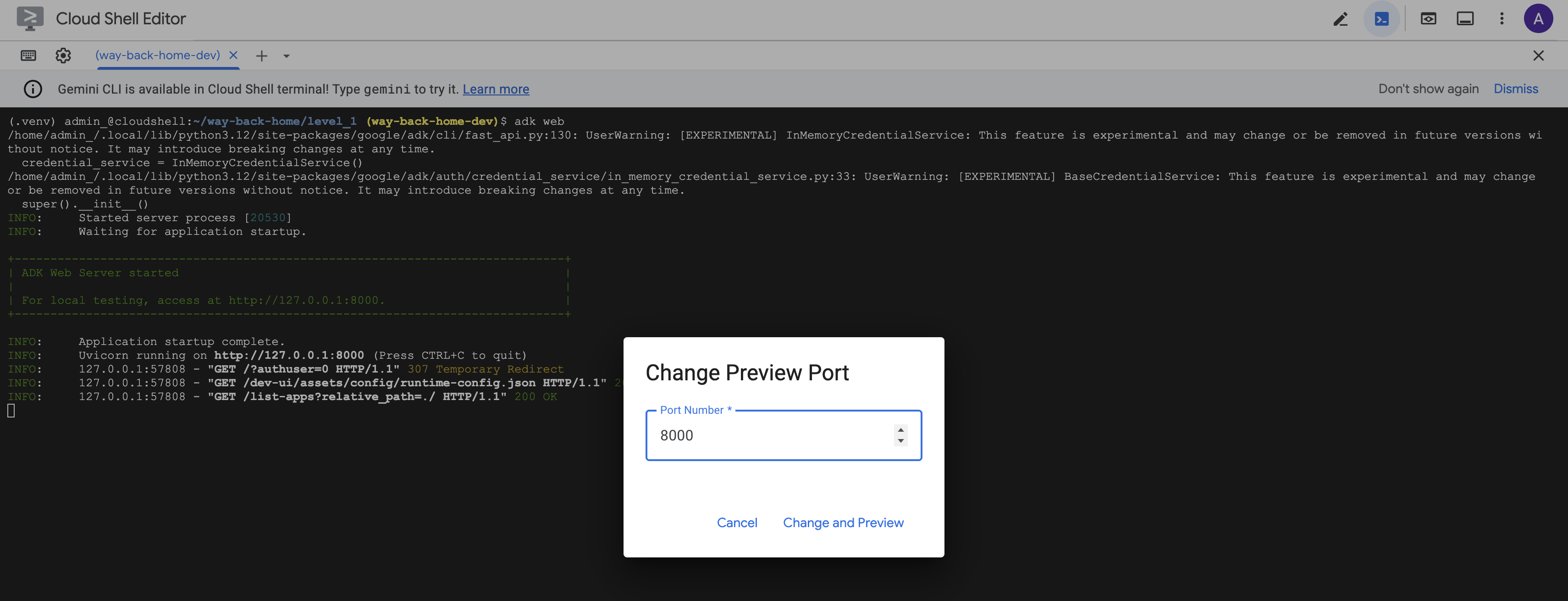
👉 Bağlantı noktasını 8000 olarak ayarlayın ve "Değiştir ve Önizle"'yi tıklayın.
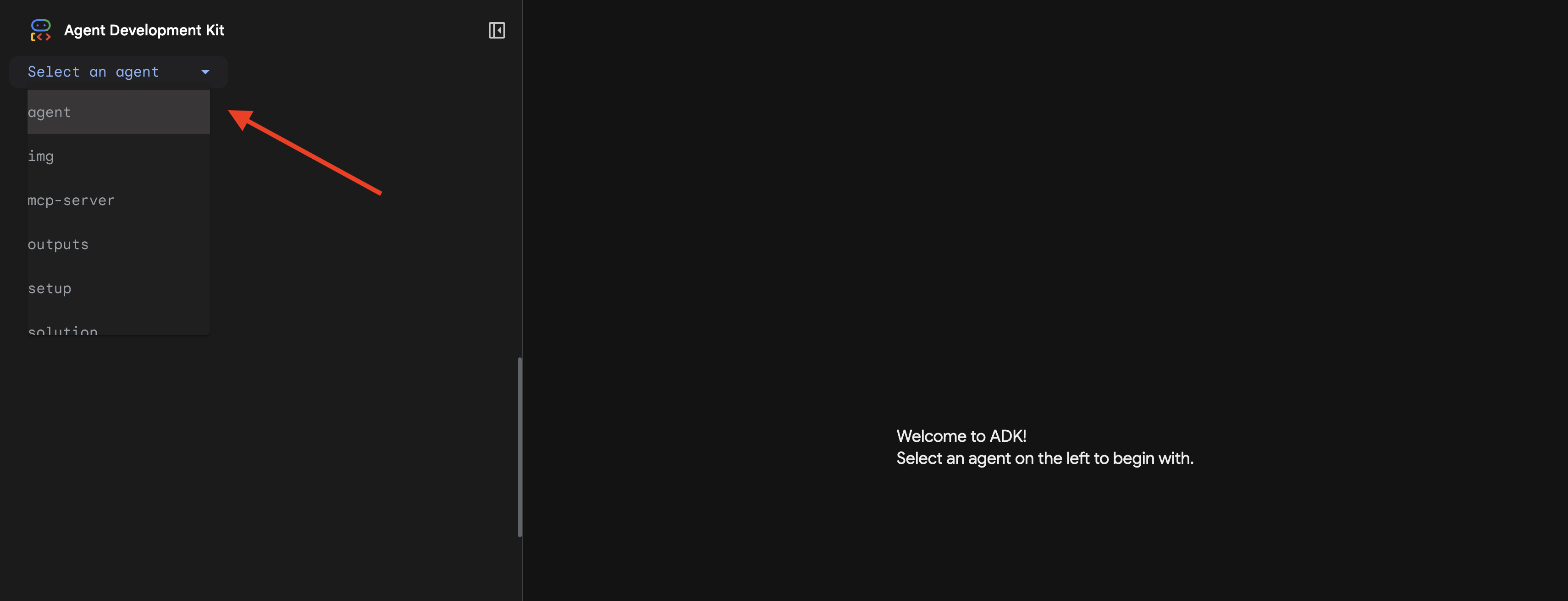
👉 ADK Web kullanıcı arayüzü açılır. Açılır menüden agent'ı seçin.
Analizi çalıştırma
👉 Sohbet arayüzünde şunu yazın:
Analyze the evidence from my crash site and confirm my location to activate the beacon.
Çok ajanlı sistemin işleyişini izleyin:
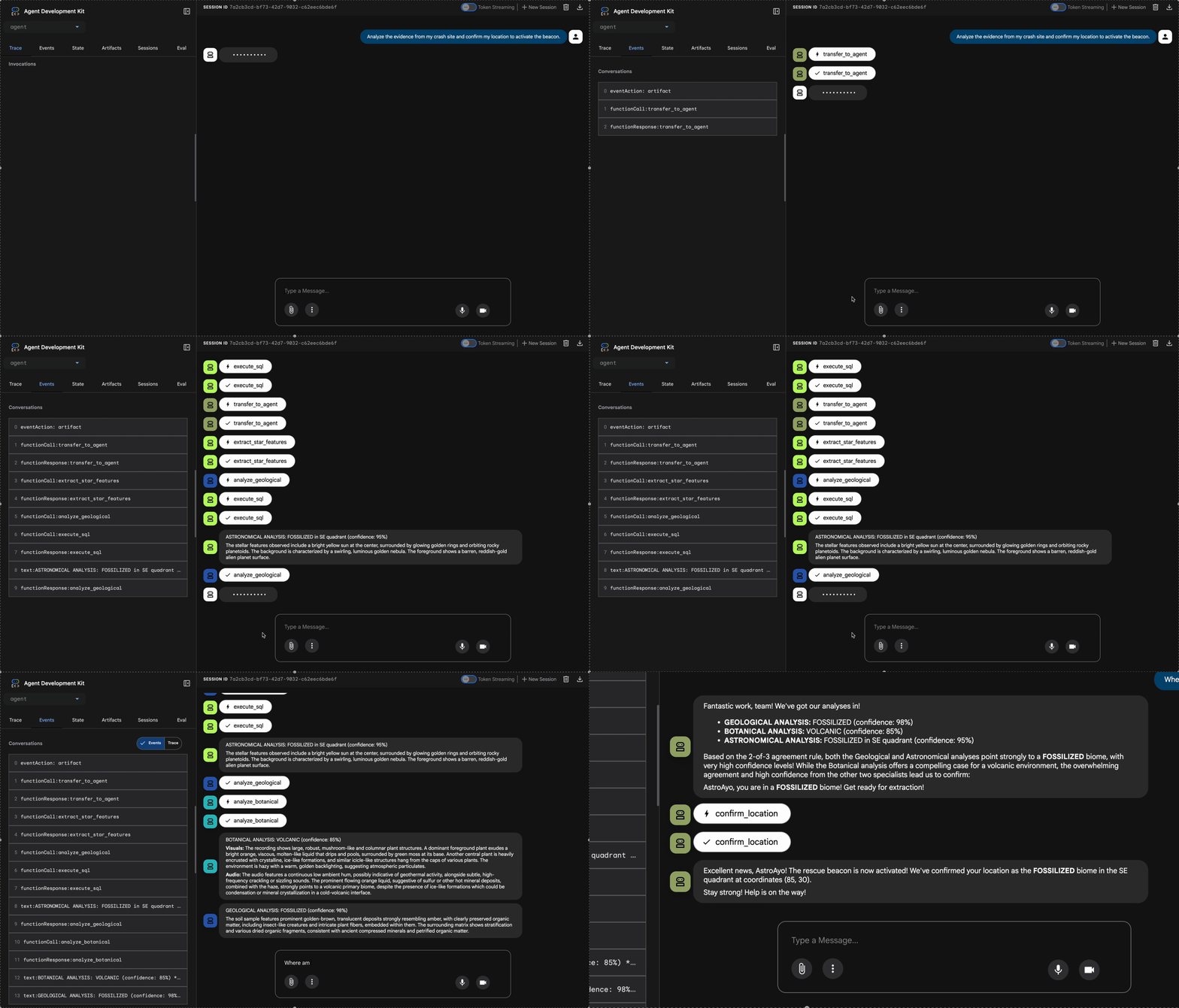
👉 Üç temsilci analizlerini tamamladığında şunu yazın:
Where am I?
Sistemin isteğinizi işleme şekli:
Sağdaki izleme panelinde tüm aracı etkileşimleri ve araç çağrıları gösterilir.
👉 Testi tamamladığınızda sunucuyu durdurmak için terminalde Ctrl+C tuşuna basın.
9. Cloud Run'a dağıt
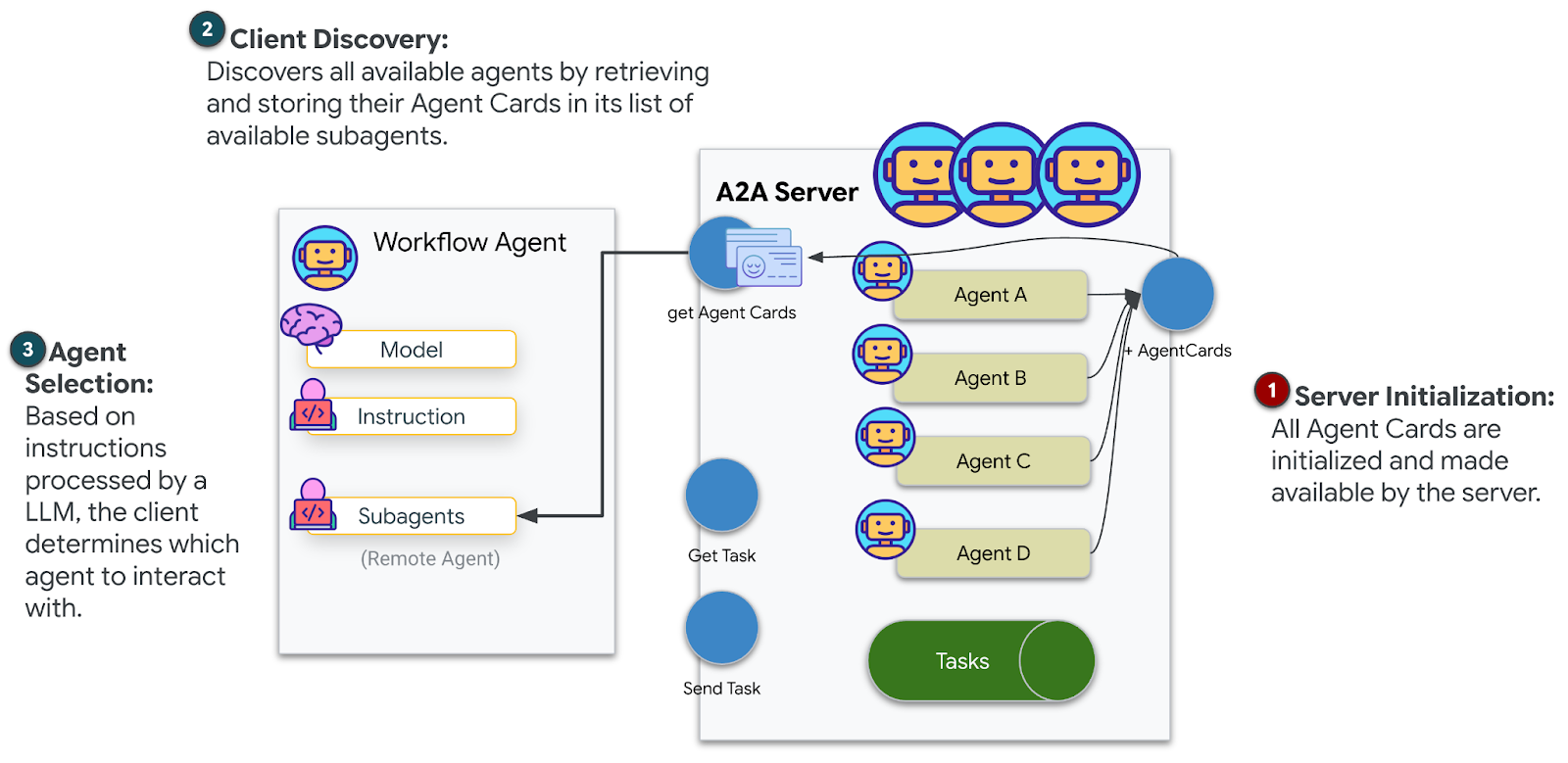
Şimdi çoklu temsilci sisteminizi A2A hazırlığı için Cloud Run'a dağıtın.
Aracıyı dağıtma
👉💻 ADK KSA'sını kullanarak Cloud Run'a dağıtma:
cd $HOME/way-back-home/level_1
source $HOME/way-back-home/set_env.sh

uv run adk deploy cloud_run \
  --project=$GOOGLE_CLOUD_PROJECT \
  --region=$REGION \
  --service_name=mission-analysis-ai \
  --with_ui \
  --a2a \
  ./agent
Do you want to continue (Y/n) ve Allow unauthenticated invocations to [mission-analysis-ai] (Y/n)? istendiğinde, A2A aracınızı dağıtmak ve herkese açık erişime izin vermek için her ikisine de Y girin.
Şuna benzer bir çıkış görürsünüz:
Building and deploying agent to Cloud Run...
✓ Container built successfully
✓ Deploying to Cloud Run...
✓ Service deployed: https://mission-analysis-ai-abc123-uc.a.run.app
Cloud Run'da ortam değişkenlerini ayarlama
Dağıtılan aracın ortam değişkenlerine erişmesi gerekir. Hizmeti güncelleyin:
👉💻 Gerekli ortam değişkenlerini ayarlayın:
gcloud run services update mission-analysis-ai \
  --region=$REGION \
  --labels=dev-tutorial=multi-modal \
  --set-env-vars="GOOGLE_CLOUD_PROJECT=$GOOGLE_CLOUD_PROJECT,GOOGLE_CLOUD_LOCATION=$REGION,MCP_SERVER_URL=$MCP_SERVER_URL,BACKEND_URL=$BACKEND_URL,PARTICIPANT_ID=$PARTICIPANT_ID,GOOGLE_GENAI_USE_VERTEXAI=True"
Ajan URL'sini kaydetme
👉💻 Dağıtılan URL'yi alın:
export AGENT_URL=$(gcloud run services describe mission-analysis-ai \
  --region=$REGION --format='value(status.url)')
echo "Agent URL: $AGENT_URL"

# Add to set_env.sh
echo "export LEVEL1_AGENT_URL=\"$AGENT_URL\"" >> $HOME/way-back-home/set_env.sh
Dağıtımı doğrulama
👉💻 Tarayıcınızda URL'yi açarak (--with_ui işareti ADK web arayüzünü dağıtır) veya curl aracılığıyla test ederek dağıtılan temsilciyi test edin:
curl -X GET "$AGENT_URL/list-apps"
Ajanınızın listelendiği bir yanıt görürsünüz.
10. Sonuç
🎉 1. Seviye Tamamlandı!
Kurtarma sinyaliniz artık tam güçte yayınlanıyor. Üçgenlenmiş sinyal, atmosferik paraziti aşarak "Buradayım. Hayatta kaldım. Gelip beni bul."
Ancak bu gezegende yalnız değilsiniz. İşaret cihazınız etkinleştiğinde ufukta diğer ışıkların da yanıp söndüğünü fark edersiniz: Diğer kurtulanlar, diğer kaza yerleri, diğer kaşifler...
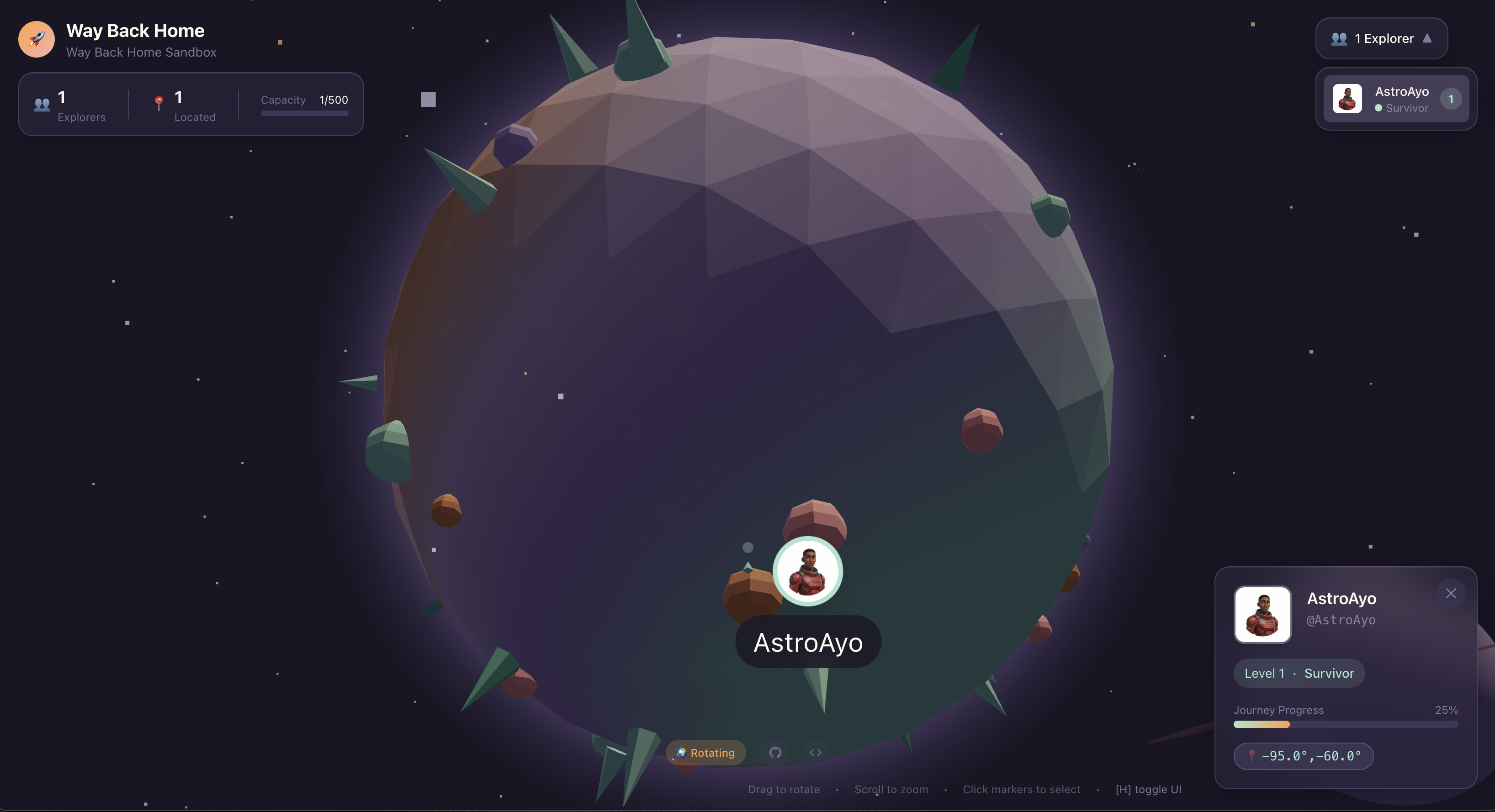
2. seviyede, gelen acil yardım sinyallerini işlemeyi ve diğer kurtulanlarla koordineli çalışmayı öğreneceksiniz. Kurtarma sadece bulunmakla ilgili değil, birbirini bulmakla da ilgilidir.
Sorun giderme
"MCP_SERVER_URL ayarlanmadı"
export MCP_SERVER_URL=$(gcloud run services describe location-analyzer \
  --region=$REGION --format='value(status.url)')
"PARTICIPANT_ID ayarlanmadı"
source $HOME/way-back-home/set_env.sh
echo $PARTICIPANT_ID
"BigQuery tablosu bulunamadı"
uv run python setup/setup_star_catalog.py
"Uzmanlar URL istiyor": Bu, {key} şablonunun çalışmadığı anlamına gelir. Denetle:
- Kök aracıda
before_agent_callbackayarlanmış mı? - Geri çağırma ayarı, durum değerlerini doğru şekilde ayarlıyor mu?
- Alt aracılar
{soil_url}kullanıyor mu (f-string'ler değil)?
"Üç analiz de aynı fikirde değil" Kanıtı yeniden oluşturun: uv run python generate_evidence.py
"Temsilci, adk web'de yanıt vermiyor"
- 8000 numaralı bağlantı noktasının doğru olup olmadığını kontrol edin.
- MCP_SERVER_URL ve PARTICIPANT_ID'nin ayarlandığını doğrulayın.
- Hata mesajı olup olmadığını görmek için terminali kontrol edin.
Mimari Özet
Bileşen | Tür | Kalıp | Amaç |
setup_participant_context | Geri Arama | before_agent_callback | Yapılandırmayı getirme, durumu ayarlama |
GeologicalAnalyst | Temsilci | {soil_url} şablonu | Toprak sınıflandırması |
BotanicalAnalyst | Temsilci | {flora_url} şablon oluşturma | Flora sınıflandırması |
AstronomicalAnalyst | Temsilci | {stars_url}, {project_id} | Yıldız üçgenlemesi |
confirm_location | Araç | ToolContext durumuna erişim | Sinyal cihazını etkinleştirme |
EvidenceAnalysisCrew | ParallelAgent | Alt ajan yapısı | Uzmanları eşzamanlı olarak çalıştırma |
MissionAnalysisAI | Temsilci (Kök) | Orchestrator + geri arama | Koordinasyon + sentez |
location-analyzer | FastMCP Sunucusu | Özel MCP | Jeolojik ve botanik analiz |
bigquery.googleapis.com/mcp | OneMCP | Yönetilen MCP | BigQuery erişimi |
Uzmanlaşılan Temel Kavramlar
✓ before_agent_callback: Yapılandırmayı, aracı çalışmadan önce getirme
✓ {key} State Templating: Durum değerlerine aracı talimatlarında erişme
✓ ToolContext: Durum değerlerine araç işlevlerinde erişme
✓ State Sharing: Üst durum, InvocationContext aracılığıyla alt aracılar tarafından otomatik olarak kullanılabilir
✓ Multi-Agent Architecture: Tek sorumluluklara sahip özel aracılar
✓ ParallelAgent: Bağımsız görevlerin eşzamanlı olarak yürütülmesi
✓ Custom MCP Server: Cloud Run'da kendi MCP sunucunuz
✓ OneMCP BigQuery: Veritabanı erişimi için yönetilen MCP kalıbı
✓ Cloud Deployment: Ortam değişkenlerini kullanarak durumsuz dağıtım
✓ A2A Preparation: Aracılar arası iletişime hazır aracı
Oyun Oynamayanlar İçin: Gerçek Hayattaki Uygulamalar
"Konumunuzu belirleme", Uzmanların Paralel Analizi ve Uzlaşma'yı (aynı anda birden fazla uzmanlaşmış yapay zeka analizi yapma ve sonuçları sentezleme) ifade eder.
Kurumsal Uygulamalar
Kullanım Örneği | Parallel Experts | Sentez Kuralı |
Tıbbi Teşhis | Görüntü analisti, belirti analisti, laboratuvar analisti | 2/3 güven eşiği |
Sahtekarlık Tespiti | İşlem analisti, davranış analisti, ağ analisti | 1 işaret = inceleme |
Belge İşleme | OCR aracısı, sınıflandırma aracısı, ayıklama aracısı | Herkesin kabul etmesi gerekir |
Kalite Kontrolü | Görsel denetçi, sensör analisti, spesifikasyon kontrolü | 2/3 geçiş |
Temel Mimari Analizler
- Yapılandırma için before_agent_callback: Yapılandırmayı başlangıçta bir kez getirin, tüm alt aracıların durumunu doldurun. Alt aracılarda yapılandırma dosyası okunmaz.
- {key} State Templating: Bildirimsel, temiz ve deyimseldir. f-string'ler, içe aktarmalar ve sys.path manipülasyonu yok.
- Konsensüs mekanizmaları: 2/3 anlaşma, oybirliği gerektirmeden belirsizliği güçlü bir şekilde ele alır.
- Bağımsız görevler için ParallelAgent: Analizler birbirine bağlı olmadığında, hız için bunları eşzamanlı olarak çalıştırın.
- İki MCP kalıbı: Özel (kendi MCP'nizi oluşturun) ve OneMCP (Google tarafından barındırılır). Her ikisi de StreamableHTTP kullanır.
- Durum bilgisiz dağıtım: Aynı kod hem yerel olarak hem de dağıtılmış şekilde çalışır. Ortam değişkenleri + arka uç API'si = kapsayıcılarda yapılandırma dosyası yok.
Sırada ne var?
2. Seviye: SOS Sinyal İşleme →
Etkinliğe dayalı kalıpları ve daha gelişmiş aracı koordinasyonunu kullanarak diğer kurtulanlardan gelen tehlike sinyallerini işlemeyi öğrenin.