

۱. مقدمه
Google Workspace Studio به شما امکان میدهد فرایندهای کسبوکار را در برنامههای Google Workspace مثل Gmail، Google Chat، Google Drive، و «کاربرگنگار Google» خودکارسازی کنید. وقتی گردشهای کاری شما باید از یک برنامه وب خارجی شروع شود یا منطق سفارشی را در محیط ابری خودتان اجرا کند، میتوانید Google Workspace Studio را با یک برافزای Google Workspace HTTP در Node.js در Cloud Run گسترش دهید:
- مرحله آغازگر سفارشی (
workflowTrigger): با فراخوانیnotifyUriراهانداز (یا Google Workspace Studiotriggers.fireREST API)، وقتی رویداد خارجی رخ میدهد—مثلاً مشتری در درگاه وب داخلی درخواست پشتیبانی ارسال میکند—جریان Google Workspace Studio را شروع میکند. - مرحله کنش سفارشی (
workflowAction): متغیرها را از مراحل قبلی در جریان دریافت میکند، منطق سفارشی یا استنباط هوش مصنوعی را در سرویس Node.js شما اجرا میکند، و متغیرهای برونداد را به Google Workspace Studio برمیگرداند.
در این codelab، یک افزونه HTTP کامل Node.js برای Google Workspace Studio در Cloud Run میسازید و مستقر میکنید، از Cloud Firestore برای حفظ اشتراکهای راهانداز جریان فعال و تیکتهای ارسالشده در بازبینیهای محفظه استفاده میکنید، از Cloud Tasks برای امتحان مجدد خودکار اعلانهای راهانداز درصورت عدم بازگشت پاسخ موفقیتآمیز از notifyUri استفاده میکنید، و فوریت تیکت را در مرحله کنش سفارشی خود بااستفاده از Gemini 3.8 Flash (gemini-3.8-flash) در Gemini Enterprise Agent Platform با یک جایگزین مقاوم دربرابر تطابق کلیدواژه طبقهبندی میکنید.
آنچه خواهید ساخت
- برنامه وب پورتال سریع پشتیبانی و «برافزای Google Workspace» HTTP ساختهشده با Node.js، Express، Firestore، و Cloud Tasks در Cloud Run.
- یک مرحله شروع سفارشی درخواست پشتیبانی جدید (
supportTicketTrigger) که اشتراکهای جریان فعال را در مجموعهstudio_triggersFirestore حفظ میکند، درخواستهای ارسالشده را در مجموعهsupport_ticketsFirestore ثبت میکند، و هر زمان که درخواستی در درگاه وب ارسال شود فعال میشود—ticketTitleوticketDescriptionرا به جریان Google Workspace Studio منتقل میکند. - کارگر تلاش مجدد Cloud Tasks (صف
studio-trigger-retriesوPOST /api/tasks/fire-trigger) که تماسهای راهانداز ناموفق را بااستفاده از پسگیری نمایی با جدیدترینuserOAuthTokenذخیرهشده در Firestore در صف قرار میدهد و دوباره امتحان میکند و تحویل بهnotifyUriرا تضمین میکند. - مرحله کنش سفارشی تشخیص فوریت (
urgencyDetectorStep) که فوریت بلیت را بااستفاده از Gemini 3.8 Flash (gemini-3.8-flash) در پلاتفرم Gemini Enterprise Agent (aiplatform.googleapis.com) طبقهبندی میکند و بهطور خودکار به مطابقت کلیدواژه (urgent،blocker،critical) برمیگردد.
معماری
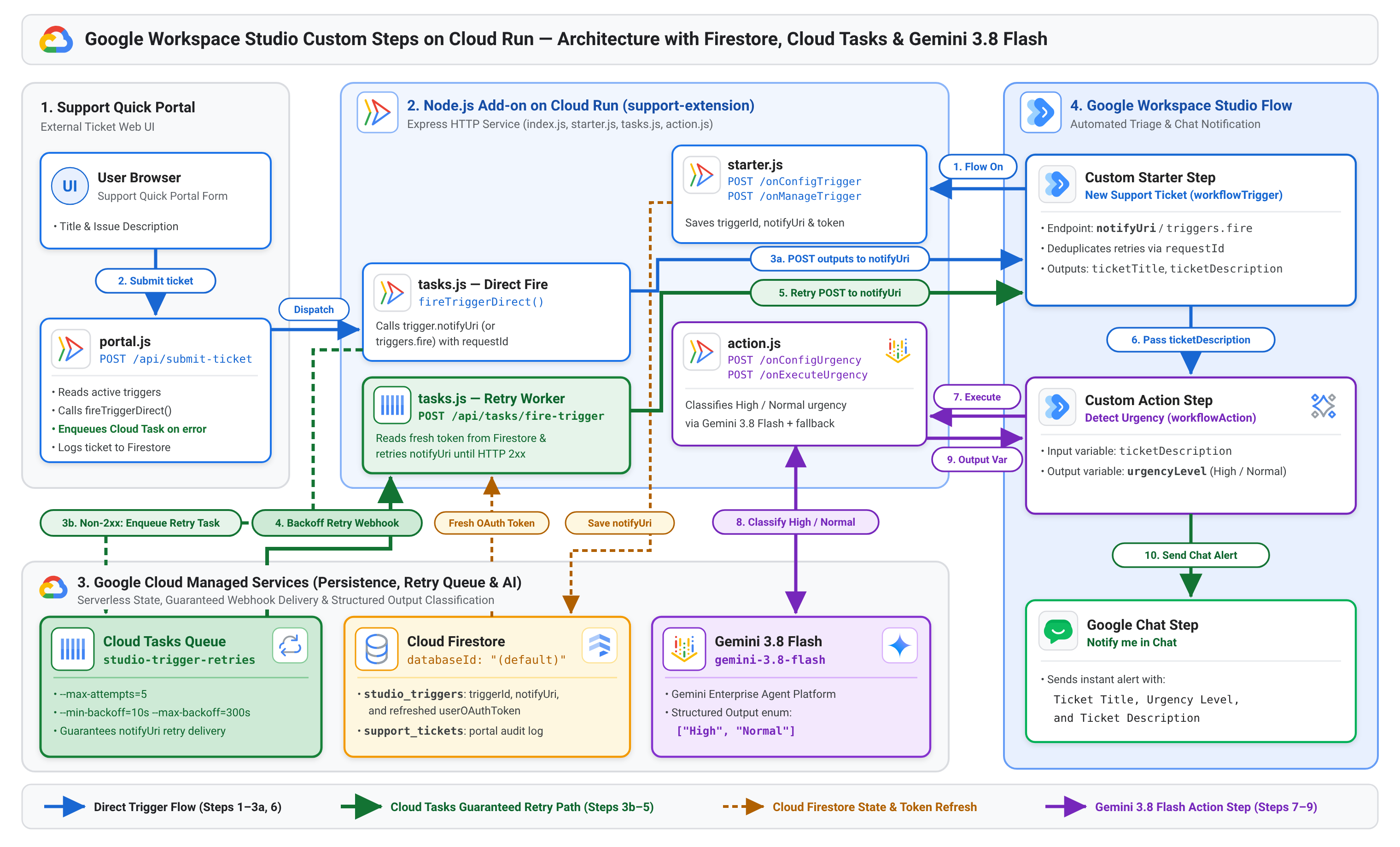
نمودار زیر نحوه تعامل «درگاه سریع پشتیبانی»، برافزای Node.js شما در Cloud Run، Cloud Firestore، Cloud Tasks (studio-trigger-retries)، Gemini 3.8 Flash، و Google Workspace Studio را از ثبت جریان تا ارائه محرک انعطافپذیر و اجرای کنش نشان میدهد:
آنچه خواهید آموخت
- نحوه پیکربندی مانیفست استقرار برافزای Google Workspace HTTP (
deployment.json) با عناصرworkflowTriggerوworkflowAction. - How to persist Google Workspace Studio trigger subscriptions (
triggerId,notifyUri, anduserOAuthToken) in astudio_triggersFirestore collection and fire flows usingnotifyUri/triggers.fire. - نحوه استفاده از Cloud Tasks (
@google-cloud/tasks) برای امتحان مجدد اعلانهای راهانداز ناموفق با عقبنشینی نمایی تا زمانی کهnotifyUriپاسخ موفقیت2xxرا برگرداند. - نحوه ساختن گام سفارشی
workflowActionدر Node.js بااستفاده از برونداد ساختاری Gemini 3.8 Flash (gemini-3.8-flash) در پلاتفرم Gemini Enterprise Agent با کلیدواژه برگشتی.
پیشنیازها
- حساب Google Workspace با دسترسی به استودیوی Google Workspace.
- پروژه Google Cloud با صورتحساب فعال، که در همان سازمان Google Workspace حساب کاربری شما ایجاد شده است تا بتوانید پیادهسازیهای برافزای منتشرنشده را برای آزمایش نصب کنید.
۲. راهاندازی پروژه Google Cloud، Firestore، و Cloud Tasks
در این مرحله، صفحه رضایت OAuth پروژهتان را پیکربندی میکنید، میاناهای برنامهسازی کاربردی Google Cloud و Google Workspace موردنیاز را در Cloud Shell فعال میکنید، پایگاه داده (default) Firestore خود را تأمین میکنید، صف تکرار مجدد Cloud Tasks خود را ایجاد میکنید، و حساب سرویس مجوز برافزایتان را مقداردهی اولیه میکنید.
- کنسول Google Cloud را باز کنید، پروژه Google Cloud خود را انتخاب کنید، و روی نماد فعالسازی Cloud Shell در نوار پیمایش بالا کلیک کنید.
- صفحه رضایت OAuth را پیکربندی کنید تا Google Workspace بتواند کارخواه OAuth را برای برافزایتان فراهم کند:
- صفحه نمانامسازی پلاتفرم Google Auth را باز کنید.
- درصورت درخواست، روی شروع به کار کلیک کنید. (اگر صفحه رضایت شما قبلاً پیکربندی شده است، به مرحله ۳ بروید.)
- در بخش اطلاعات برنامه،
Support Extensionرا برای نام برنامه وارد کنید، ایمیل پشتیبانی کاربر را انتخاب کنید، و روی بعدی کلیک کنید. - در بخش مخاطب، داخلی را انتخاب کنید و روی بعدی کلیک کنید.
- در بخش اطلاعات تماس، نشانی ایمیلتان را وارد کنید و روی بعدی کلیک کنید.
- در بخش پایان، با سرویسهای Google API: خطمشی دادههای کاربر موافقت کنید، روی ادامه کلیک کنید، و روی ایجاد کلیک کنید.
- در Cloud Shell، پروژه فعال خود را تنظیم کنید (
YOUR_PROJECT_IDرا با شناسه پروژه Google Cloud خود جایگزین کنید) و میاناهای برنامهسازی کاربردی موردنیاز را فعال کنید:gcloud config set project YOUR_PROJECT_ID gcloud services enable \ aiplatform.googleapis.com \ firestore.googleapis.com \ cloudtasks.googleapis.com \ run.googleapis.com \ cloudbuild.googleapis.com \ artifactregistry.googleapis.com \ appsmarket-component.googleapis.com \ gsuiteaddons.googleapis.com \ workspacestudio.googleapis.com - پایگاه داده
(default)Firestore و صفstudio-trigger-retriesCloud Tasks را درus-central1آمادهسازی کنید (اگر ازقبل وجود ندارند)، و حساب سرویس «برافزاهای Google Workspace» را مقداردهی اولیه کنید:gcloud firestore databases describe --database="(default)" >/dev/null 2>&1 || \ gcloud firestore databases create \ --database="(default)" \ --location=us-central1 \ --type=firestore-native \ --quiet gcloud tasks queues describe studio-trigger-retries --location=us-central1 >/dev/null 2>&1 || \ gcloud tasks queues create studio-trigger-retries \ --location=us-central1 \ --max-attempts=5 \ --min-backoff=10s \ --max-backoff=300s \ --max-doublings=4 gcloud workspace-add-ons get-authorization
۳. ساختن برنامه Node.js با Firestore، Cloud Tasks، و Gemini 3.8 Flash
در این مرحله، برنامه Node.js را در ~/studio-support-addon میسازید. برای اینکه کد مدولار و خوانا بماند، پروژه را در شش فایل متمرکز سازماندهی میکنید:
firestore.js: کارخواه Cloud Firestore (مجموعههایstudio_triggersوsupport_tickets) را مقداردهی اولیه میکند و ژتونهای OAuth ذخینهشده در حافظه نهان را بازآوری میکند.-
starter.js: وبقلابهای مرحله آغازگر سفارشی بلیت پشتیبانی جدید را پیادهسازی میکند (/onConfigTriggerو/onManageTrigger). action.js: وبقلابهای مرحله کنش سفارشی تشخیص فوریت (/onConfigUrgencyو/onExecuteUrgency) را بااستفاده از Gemini 3.8 Flash (gemini-3.8-flash) با بازگشت تطابق کلیدواژه پیادهسازی میکند.tasks.js: اعلانهای راهانداز را بهtrigger.notifyUri(با برگشت بهhttps://workspacestudio.googleapis.com/v1/triggers/{triggerId}:fire) ارسال میکند، تحویلهای ناموفق را در صفstudio-trigger-retriesCloud Tasks قرار میدهد، و نقطه پایانی کارگر تلاش مجددPOST /api/tasks/fire-triggerرا پیادهسازی میکند.portal.js: رابط کاربری وب پورتال سریع پشتیبانی (GET /) را ارائه میدهد و راهاندازهای فعال Google Workspace Studio (POST /api/submit-ticket) را فعال میکند، با گزینهای برای شبیهسازی یک خطای گذرا و تماشای تلاش مجدد Cloud Tasks.-
index.js: همه مسیرهای Express را بههم متصل میکند و سرور HTTP را راهاندازی میکند.
مقداردهی اولیه پروژه و package.json
- فهرست راهنمای پروژه را بسازید و به آن پیمایش کنید:
mkdir -p ~/studio-support-addon && cd ~/studio-support-addon -
package.jsonرا باexpress،@google-cloud/firestore،@google-cloud/tasks، و@google/genaiبسازید:cat << 'EOF' > package.json { "name": "studio-support-addon", "version": "1.0.0", "type": "module", "main": "index.js", "scripts": { "start": "node index.js" }, "dependencies": { "@google-cloud/firestore": "^7.11.0", "@google-cloud/tasks": "^5.6.0", "@google/genai": "^1.0.0", "express": "^4.21.2" } } EOF
firestore.js — وضعیت Firestore همرسانیشده و بازآوری کد OAuth
برای مدیریت دو مجموعه Firestore و بهروز نگه داشتن ژتونهای OAuth کاربر ذخیرهشده در حافظه نهان، firestore.js را ایجاد کنید:
studio_triggers: اشتراکهای فعال جریان «استودیوی Google Workspace» (triggerId،notifyUri، وuserOAuthToken) را ذخیره میکند تا درصورت راهاندازی مجدد محفظه Cloud Run و رویدادهای مقیاسبندی به صفر، حفظ شوند.support_tickets: سابقه هر درخواست پشتیبانی ارسالشده ازطریق درگاه را ذخیره میکند.refreshTokenInFirestore(req): هروقت «استودیوِ Google Workspace» با هریک از نقاط پایانی وبقلاب شما تماس میگیرد،authorizationEventObject.userOAuthTokenکوتاهمدتی را اضافه میکند. این کمککننده اسناد راهانداز فعال را با جدیدترین کد بهروز میکند تا تماسهایtriggers.fireپسزمینه همچنان مجاز باقی بمانند.
cat << 'EOF' > firestore.js
import { Firestore } from '@google-cloud/firestore';

export const db = new Firestore({
  projectId: process.env.GOOGLE_CLOUD_PROJECT || undefined,
  databaseId: '(default)',
  ignoreUndefinedProperties: true,
});

export const triggersCollection = db.collection(
  process.env.FIRESTORE_TRIGGERS_COLLECTION || 'studio_triggers'
);

export const ticketsCollection = db.collection(
  process.env.FIRESTORE_TICKETS_COLLECTION || 'support_tickets'
);

// Keep cached userOAuthToken fresh across active trigger documents
export async function refreshTokenInFirestore(req) {
  const freshToken = req.body?.authorizationEventObject?.userOAuthToken;
  if (!freshToken) return;
  try {
    const snapshot = await triggersCollection.get();
    if (snapshot.empty) return;
    const batch = db.batch();
    snapshot.docs.forEach((doc) => {
      batch.set(
        doc.ref,
        { userOAuthToken: freshToken, updatedAt: new Date().toISOString() },
        { merge: true }
      );
    });
    await batch.commit();
  } catch (err) {
    console.error('Error refreshing OAuth token in Firestore:', err.message);
  }
}
EOF
starter.js — مرحله شروع سفارشی (workflowTrigger)
starter.js را برای پیادهسازی دو نقطه پایانی وبقلاب موردنیاز برای مرحله شروع سفارشی Google Workspace Studio ایجاد کنید:
onConfigTrigger(POST /onConfigTrigger): زمانی فراخوانده میشود که کاربر درخواست پشتیبانی جدید را بهعنوان شروعکننده جاریسازی خود در «استودیو Google Workspace» انتخاب کند. یک کنش پیمایشpushCardرا که آغازگر را توصیف میکند برمیگرداند.onManageTrigger(POST /onManageTrigger): وقتی کاربر جریانی را روشن (req.body.workflow.triggerCreation) یا خاموش / حذف (req.body.workflow.triggerDeletion) میکند، فراخوانی میشود. سند اشتراک را در مجموعهstudio_triggersFirestore ذخیره یا حذف میکند.
cat << 'EOF' > starter.js
import { triggersCollection, refreshTokenInFirestore } from './firestore.js';

// Custom Starter Configuration Card
export async function onConfigTrigger(req, res) {
  await refreshTokenInFirestore(req);
  res.status(200).json({
    action: {
      navigations: [
        {
          pushCard: {
            sections: [
              {
                header: 'Support Ticket Listener',
                widgets: [
                  {
                    textParagraph: {
                      text: 'This starter listens for new tickets submitted through the Support Quick Portal and stores subscriptions in Firestore.',
                    },
                  },
                ],
              },
            ],
          },
        },
      ],
    },
  });
}

// Custom Starter Subscription Lifecycle (Firestore studio_triggers collection)
export async function onManageTrigger(req, res) {
  try {
    const triggerCreation = req.body?.workflow?.triggerCreation;
    const triggerDeletion = req.body?.workflow?.triggerDeletion;
    const userOAuthToken =
      req.body?.authorizationEventObject?.userOAuthToken || null;

    if (triggerCreation?.triggerId) {
      const triggerId = String(triggerCreation.triggerId);
      const docId = encodeURIComponent(triggerId);
      await triggersCollection.doc(docId).set(
        {
          triggerId,
          notifyUri: triggerCreation.notifyUri || null,
          ...(userOAuthToken ? { userOAuthToken } : {}),
          updatedAt: new Date().toISOString(),
        },
        { merge: true }
      );
    }

    if (triggerDeletion?.triggerId) {
      const triggerId = String(triggerDeletion.triggerId);
      const docId = encodeURIComponent(triggerId);
      await triggersCollection.doc(docId).delete();
    }

    if (!triggerCreation && !triggerDeletion && userOAuthToken) {
      await refreshTokenInFirestore(req);
    }
  } catch (err) {
    console.error('Error in /onManageTrigger:', err.message);
  }
  res.status(200).json({});
}
EOF
action.js — مرحله کنش سفارشی (workflowAction) با Gemini 3.8 Flash
action.js را برای پیادهسازی دو نقطه پایانی وبقلاب موردنیاز برای مرحله کنش سفارشی Google Workspace Studio ایجاد کنید:
onConfigUrgency(POST /onConfigUrgency): کارت پیکربندی با ابزارهtextInputبرمیگرداند کهhostAppDataSource.workflowDataSource.includeVariables: trueرا تنظیم میکند و به کاربران امکان میدهد متغیرticketDescriptionرا که توسط مرحله شروع تولید شده است انتخاب کنند.onExecuteUrgency(POST /onExecuteUrgency): ورودیticketDescriptionرا ازreq.body.workflow.actionInvocation.inputsمیخواند، تأثیر کسبوکار و فوریت آن را بااستفاده از Gemini 3.8 Flash (gemini-3.8-flash) در پلاتفرم Gemini Enterprise Agent با برونداد ساختاریافته (responseSchemaenum["High", "Normal"]) طبقهبندی میکند، اگر فراخوانی مدل ناموفق باشد بهdetectKeywordUrgency()(urgent،blocker،critical) برمیگردد، و متغیر بروندادurgencyLevelرا بااستفاده ازhostAppAction.workflowAction.returnOutputVariablesActionبرمیگرداند.
cat << 'EOF' > action.js
import { GoogleGenAI, Type } from '@google/genai';
import { refreshTokenInFirestore } from './firestore.js';

// Initialize Google GenAI SDK for the Gemini Enterprise Agent Platform
const ai = new GoogleGenAI({
  vertexai: true,
  project: process.env.GOOGLE_CLOUD_PROJECT,
  location: 'global',
});

// Fallback keyword classifier if the Gemini API call is unavailable
export function detectKeywordUrgency(description) {
  const lower = (description || '').toLowerCase();
  return lower.includes('urgent') ||
    lower.includes('blocker') ||
    lower.includes('critical')
    ? 'High'
    : 'Normal';
}

// Custom Action Step Configuration Card
export async function onConfigUrgency(req, res) {
  await refreshTokenInFirestore(req);
  res.status(200).json({
    action: {
      navigations: [
        {
          pushCard: {
            sections: [
              {
                header: 'Urgency Detector Step',
                widgets: [
                  {
                    textInput: {
                      name: 'ticketDescription',
                      label: 'Source Description',
                      hintText:
                        'Select the description variable outputted by the starter',
                      hostAppDataSource: {
                        workflowDataSource: {
                          includeVariables: true,
                        },
                      },
                    },
                  },
                ],
              },
            ],
          },
        },
      ],
    },
  });
}

// Custom Action Step Execution: Gemini 3.8 Flash with keyword fallback
export async function onExecuteUrgency(req, res) {
  await refreshTokenInFirestore(req);
  const inputs = req.body?.workflow?.actionInvocation?.inputs || {};
  const description = inputs.ticketDescription?.stringValues?.[0] || '';

  let urgencyLevel = detectKeywordUrgency(description);
  try {
    const response = await ai.models.generateContent({
      model: 'gemini-3.8-flash',
      contents: `Evaluate the business impact and time sensitivity of this support ticket description and classify its urgency:\n\n${description}`,
      config: {
        responseMimeType: 'text/x.enum',
        responseSchema: {
          type: Type.STRING,
          enum: ['High', 'Normal'],
        },
      },
    });
    const candidate = (response.text || '').trim();
    if (candidate === 'High' || candidate === 'Normal') {
      urgencyLevel = candidate;
    }
  } catch (err) {
    console.error('Gemini fallback to keyword matching:', err.message);
  }

  res.status(200).json({
    hostAppAction: {
      workflowAction: {
        returnOutputVariablesAction: {
          variables: {
            urgencyLevel: {
              stringValues: [urgencyLevel],
            },
          },
        },
      },
    },
  });
}
EOF
tasks.js — صف تلاش مجدد Cloud Tasks و نقطه پایانی کارگر
tasks.js را ایجاد کنید تا تماسهای راهانداز را به trigger.notifyUri ارسال کند (درصورت عدم موفقیت به https://workspacestudio.googleapis.com/v1/triggers/{triggerId}:fire برگردد)، تماسهای ناموفق را در صف studio-trigger-retries Cloud Tasks شما قرار دهد، و تلاشهای مجدد را در POST /api/tasks/fire-trigger پردازش کند:
resolveTriggerUrl(trigger): ازtrigger.notifyUriکه ازtriggerCreation.notifyUriباقی مانده است استفاده میکند، یا بهhttps://workspacestudio.googleapis.com/v1/triggers/{triggerId}:fireبرمیگردد.fireTriggerDirect(trigger, payload): درخواستPOSTرا با متغیرهای بروندادticketTitleوticketDescriptionوrequestIdخودتوان به نشانی وب راهانداز ارسال میکند.-
enqueueTriggerRetry(req, payload): هروقت تماس راهانداز اولیه ناموفق باشد یا وضعیت HTTP غیر2xx برگرداند، وظیفه HTTP را در صفstudio-trigger-retriesکه نقطه پایانیPOST /api/tasks/fire-triggerسرویس Cloud Run شما را هدفیابی میکند در صف قرار میدهد. handleFireTriggerTask(POST /api/tasks/fire-trigger): در هر تلاش مجدد، توسط Cloud Tasks فراخوانی میشود. جدیدترین سندtriggerرا درstudio_triggersاز Firestore جستجو میکند (تا مطمئن شود که تلاشهای مجدد همیشه از جدیدترینuserOAuthTokenاستفاده میکنند)، سرصفحهX-CloudTasks-TaskRetryCountرا بررسی میکند (اگرsimulateFailureفعال باشد، اولین اجرای Cloud Task با503ناموفق میشود تا بتوانید عقبنشینی Cloud Tasks را تماشا کنید و در تلاش مجدد#1موفق شوید)، و200 OKرا فقط زمانی برمیگرداند کهnotifyUriپاسخ موفقیت2xxرا برگرداند. هر پاسخ5xxبه Cloud Tasks میگوید که دوباره براساس خطمشی پسگرد صف شما تلاش کند.
cat << 'EOF' > tasks.js
import { CloudTasksClient } from '@google-cloud/tasks';
import { triggersCollection } from './firestore.js';

const tasksClient = new CloudTasksClient();
const PROJECT_ID = process.env.GOOGLE_CLOUD_PROJECT;
const LOCATION = process.env.CLOUD_TASKS_LOCATION || 'us-central1';
const QUEUE = process.env.CLOUD_TASKS_QUEUE || 'studio-trigger-retries';

// Prefer trigger.notifyUri from triggerCreation, falling back to triggers.fire
export function resolveTriggerUrl(trigger) {
  return (
    trigger.notifyUri ||
    `https://workspacestudio.googleapis.com/v1/triggers/${encodeURIComponent(trigger.triggerId)}:fire`
  );
}

// Call the Google Workspace Studio trigger URL directly
export async function fireTriggerDirect(
  trigger,
  { title, description, requestId }
) {
  const targetUrl = resolveTriggerUrl(trigger);
  const response = await fetch(targetUrl, {
    method: 'POST',
    headers: {
      Authorization: `Bearer ${trigger.userOAuthToken}`,
      'Content-Type': 'application/json',
    },
    body: JSON.stringify({
      name: 'triggers/' + trigger.triggerId,
      outputs: {
        ticketTitle: { stringValues: [title] },
        ticketDescription: { stringValues: [description] },
      },
      requestId,
    }),
  });
  return { ok: response.ok, status: response.status, targetUrl };
}

// Enqueue a retry task in Cloud Tasks targeting POST /api/tasks/fire-trigger
export async function enqueueTriggerRetry(req, payload) {
  const parent = tasksClient.queuePath(PROJECT_ID, LOCATION, QUEUE);
  const baseUrl = process.env.SERVICE_URL || `https://${req.get('host')}`;
  const workerUrl = `${baseUrl}/api/tasks/fire-trigger`;

  const task = {
    httpRequest: {
      httpMethod: 'POST',
      url: workerUrl,
      headers: { 'Content-Type': 'application/json' },
      body: Buffer.from(JSON.stringify(payload)).toString('base64'),
    },
  };

  const [response] = await tasksClient.createTask({ parent, task });
  return response.name;
}

// Cloud Tasks worker endpoint: retries calling notifyUri using fresh Firestore state
export async function handleFireTriggerTask(req, res) {
  const { triggerId, title, description, requestId, simulateFailure } =
    req.body || {};
  const retryCount = Number(req.get('X-CloudTasks-TaskRetryCount') || 0);

  if (!triggerId) {
    return res.status(200).json({ skipped: true, reason: 'Missing triggerId' });
  }

  try {
    const docId = encodeURIComponent(String(triggerId));
    const doc = await triggersCollection.doc(docId).get();
    if (!doc.exists) {
      return res
        .status(200)
        .json({ skipped: true, reason: 'Trigger no longer active' });
    }

    const trigger = doc.data();
    if (!trigger.userOAuthToken) {
      return res
        .status(503)
        .json({ ok: false, error: 'Missing userOAuthToken in Firestore' });
    }

    // When simulateFailure is enabled, fail the 1st Cloud Task attempt (retryCount === 0)
    // so learners can observe Cloud Tasks back off and succeed on retry #1.
    if (simulateFailure && retryCount < 1) {
      console.warn(
        `[Cloud Tasks] Simulated transient failure on initial task attempt (retryCount=${retryCount}) for trigger ${triggerId}`
      );
      return res
        .status(503)
        .json({ ok: false, simulated: true, retryCount, triggerId });
    }

    const outcome = await fireTriggerDirect(trigger, {
      title,
      description,
      requestId,
    });

    if (outcome.ok) {
      console.log(
        `[Cloud Tasks] Successfully delivered trigger ${triggerId} to ${outcome.targetUrl} on retryCount=${retryCount}`
      );
      return res
        .status(200)
        .json({ ok: true, status: outcome.status, retryCount });
    }

    console.error(
      `[Cloud Tasks] Non-2xx response (${outcome.status}) from ${outcome.targetUrl} on retryCount=${retryCount}`
    );
    return res
      .status(502)
      .json({ ok: false, status: outcome.status, retryCount });
  } catch (err) {
    console.error(
      `[Cloud Tasks] Error firing trigger ${triggerId} on retryCount=${retryCount}:`,
      err.message
    );
    return res
      .status(503)
      .json({ ok: false, error: err.message, retryCount });
  }
}
EOF
portal.js — پشتیبانی از میانای کاربری Quick Portal و توزیعکننده notifyUri با بازگشت به Cloud Tasks
portal.js را برای ارائه پورتال وب و ارسال درخواستهای تیکت به Google Workspace Studio با زمانبندی خودکار تکرار Cloud Tasks ایجاد کنید:
renderPortal(GET /): مجموعهstudio_triggersFirestore را پُرسمان میکند تا نشان دهد چند راهانداز فعال Google Workspace Studio ثبت شده است، و فرم ارسال تیکت HTML را ارائه میدهد (ازجمله چارگوش انتخاب شبیهسازی خطای گذرا برای آزمایش کردن تلاشهای مجدد Cloud Tasks).-
submitTicket(POST /api/submit-ticket): در همه سندهای محرک فعال درstudio_triggersتکرار میکند وfireTriggerDirect()را فرا میخواند. اگر نشانی وب راهانداز پاسخ غیر 2xx برگرداند، خطای شبکه ایجاد کند، یاsimulateFailureفعال باشد، بهطور خودکار تکلیف بازآزمایی را بااستفاده ازenqueueTriggerRetry()درstudio-trigger-retriesدر صف قرار میدهد و بلیت را در مجموعه Firestoresupport_ticketsثبت میکند.
cat << 'EOF' > portal.js
import { triggersCollection, ticketsCollection } from './firestore.js';
import { fireTriggerDirect, enqueueTriggerRetry } from './tasks.js';

// Support Quick Portal UI
export async function renderPortal(req, res) {
  let activeCount = 0;
  try {
    const snapshot = await triggersCollection.get();
    activeCount = snapshot.size;
  } catch (err) {
    console.error('Error reading studio_triggers collection:', err.message);
  }

  res.status(200).send(`<!DOCTYPE html>
<html>
  <head>
    <meta charset="utf-8">
    <title>Support Quick Portal</title>
    <style>
      body { font-family: Arial, sans-serif; padding: 24px; max-width: 540px; margin: auto; color: #202124; }
      .badge { background: #e8f0fe; color: #1967d2; padding: 8px 12px; border-radius: 6px; font-size: 14px; margin-bottom: 16px; }
      label { font-weight: bold; display: block; margin-top: 16px; }
      .checkbox-label { font-weight: normal; margin-top: 14px; display: flex; align-items: center; gap: 8px; cursor: pointer; }
      .checkbox-label input { width: auto; margin: 0; }
      input, textarea { width: 100%; margin-top: 6px; padding: 10px; box-sizing: border-box; border: 1px solid #dadce0; border-radius: 4px; }
      button { background-color: #1a73e8; color: white; border: none; padding: 10px 18px; margin-top: 16px; font-weight: bold; cursor: pointer; border-radius: 4px; }
      button:hover { background-color: #1557b0; }
      #status { margin-top: 16px; font-weight: bold; }
    </style>
  </head>
  <body>
    <h2>Support Quick Portal</h2>
    <div class="badge">
      Active Google Workspace Studio triggers in Firestore (<code>studio_triggers</code>):
      <strong id="trigger-count">${activeCount}</strong>
    </div>
    <p>Submit a support ticket below to fire your Google Workspace Studio flow.</p>

    <label for="title">Ticket Title</label>
    <input type="text" id="title" placeholder="e.g. Database failure">

    <label for="description">Issue Description</label>
    <textarea id="description" rows="4" placeholder="Describe the issue..."></textarea>

    <label class="checkbox-label" for="simulateFailure">
      <input type="checkbox" id="simulateFailure">
      Simulate transient failure (enqueue in Cloud Tasks and retry notifyUri)
    </label>

    <button onclick="submitTicket()">Submit Ticket</button>
    <div id="status"></div>

    <script>
      async function submitTicket() {
        const title = document.getElementById('title').value.trim();
        const description = document.getElementById('description').value.trim();
        const simulateFailure = document.getElementById('simulateFailure').checked;
        const statusEl = document.getElementById('status');

        if (!title || !description) {
          statusEl.style.color = '#d93025';
          statusEl.textContent = 'Please fill out both fields.';
          return;
        }

        statusEl.style.color = '#188038';
        statusEl.textContent = 'Submitting ticket...';

        try {
          const res = await fetch('/api/submit-ticket', {
            method: 'POST',
            headers: { 'Content-Type': 'application/json' },
            body: JSON.stringify({ title, description, simulateFailure }),
          });
          const data = await res.json();
          if (data.ok) {
            if (data.tasksQueued > 0) {
              statusEl.textContent =
                'Ticket saved! Initial notifyUri call did not succeed; queued ' +
                data.tasksQueued +
                ' retry task(s) in Cloud Tasks.';
            } else {
              statusEl.textContent =
                'Ticket saved to Firestore! Fired ' +
                data.triggersFired +
                ' Google Workspace Studio trigger(s).';
            }
          } else {
            statusEl.style.color = '#d93025';
            statusEl.textContent = 'Error: ' + (data.error || 'Unknown error');
          }
        } catch (err) {
          statusEl.style.color = '#d93025';
          statusEl.textContent = 'Request failed: ' + err.message;
        }
      }
    </script>
  </body>
</html>`);
}

// Portal Form Submission -> Call notifyUri directly, or enqueue Cloud Task on failure
export async function submitTicket(req, res) {
  const title = req.body?.title || 'Untitled Ticket';
  const description = req.body?.description || '';
  const simulateFailure = Boolean(req.body?.simulateFailure);
  const results = [];
  let triggersFired = 0;
  let tasksQueued = 0;

  try {
    const snapshot = await triggersCollection.get();
    for (const doc of snapshot.docs) {
      const trigger = doc.data();
      if (!trigger.triggerId || !trigger.userOAuthToken) continue;

      const requestId =
        'req_' + Date.now() + '_' + Math.floor(Math.random() * 1000);

      let outcome = { ok: false, status: 503 };
      if (!simulateFailure) {
        try {
          outcome = await fireTriggerDirect(trigger, {
            title,
            description,
            requestId,
          });
        } catch (fetchErr) {
          console.error(
            `Direct trigger call failed for ${trigger.triggerId}:`,
            fetchErr.message
          );
          outcome = { ok: false, status: 0, error: fetchErr.message };
        }
      }

      if (outcome.ok) {
        triggersFired++;
        results.push({
          triggerId: trigger.triggerId,
          status: outcome.status,
          queuedRetry: false,
        });
      } else {
        const taskName = await enqueueTriggerRetry(req, {
          triggerId: trigger.triggerId,
          title,
          description,
          requestId,
          simulateFailure,
        });
        tasksQueued++;
        results.push({
          triggerId: trigger.triggerId,
          status: outcome.status,
          queuedRetry: true,
          taskName,
        });
      }
    }

    await ticketsCollection.add({
      title,
      description,
      triggersFired,
      tasksQueued,
      createdAt: new Date().toISOString(),
    });

    res.status(200).json({
      ok: true,
      triggersFired,
      tasksQueued,
      results,
    });
  } catch (err) {
    console.error('Error in /api/submit-ticket:', err.message);
    res.status(500).json({ ok: false, error: err.message });
  }
}
EOF
index.js — نقطه ورودی سرور Express
index.js را ایجاد کنید تا مسیرهای درگاه، نقطه پایانی کارگر تلاش مجدد Cloud Tasks، و نقاط پایانی وبقلاب Google Workspace Studio را باهم در سرور Express HTTP که در PORT (پیشفرض 8080 در Cloud Run) گوش میدهد، سیمکشی کنید:
cat << 'EOF' > index.js
import express from 'express';
import { onConfigTrigger, onManageTrigger } from './starter.js';
import { onConfigUrgency, onExecuteUrgency } from './action.js';
import { renderPortal, submitTicket } from './portal.js';
import { handleFireTriggerTask } from './tasks.js';

const app = express();
app.use(express.json());

// Support Quick Portal routes
app.get('/', renderPortal);
app.post('/api/submit-ticket', submitTicket);

// Cloud Tasks retry worker route
app.post('/api/tasks/fire-trigger', handleFireTriggerTask);

// Google Workspace Studio Custom Starter Step webhooks
app.post('/onConfigTrigger', onConfigTrigger);
app.post('/onManageTrigger', onManageTrigger);

// Google Workspace Studio Custom Action Step webhooks
app.post('/onConfigUrgency', onConfigUrgency);
app.post('/onExecuteUrgency', onExecuteUrgency);

const PORT = process.env.PORT || 8080;
app.listen(PORT, () => {
  console.log(`Support Extension listening on port ${PORT}`);
});
EOF
۴. مستقر کردن در Cloud Run و نصب برافزا
در این مرحله، سرویس Node.js را در Cloud Run مستقر میکنید، اجازههای IAM را برای فراخواننده «برافزاهای Google Workspace» و Firestore، Cloud Tasks، و دسترسی زمان اجرای Agent Platform اعطا میکنید، مانیفست deployment.json را تولید میکنید، و استقرار برافزا را نصب میکنید.
- سرویس
support-extensionرا با متغیرهای محیطی پروژه، مجموعه Firestore، و صف Cloud Tasks در Cloud Run مستقر کنید:gcloud run deploy support-extension \ --source . \ --region us-central1 \ --allow-unauthenticated \ --set-env-vars="GOOGLE_CLOUD_PROJECT=$(gcloud config get-value project),FIRESTORE_TRIGGERS_COLLECTION=studio_triggers,FIRESTORE_TICKETS_COLLECTION=support_tickets,CLOUD_TASKS_QUEUE=studio-trigger-retries,CLOUD_TASKS_LOCATION=us-central1" \ --quiet - به حساب خدمات «برافزاهای Google Workspace» در سرویس Cloud Run
roles/run.invokerاعطا کنید تا «استودیو Google Workspace» بتواند نقطههای پایانی وبقلاب شما را فراخوانی کند:ADDON_SA=$(gcloud workspace-add-ons get-authorization --format="value(serviceAccountEmail)") gcloud run services add-iam-policy-binding support-extension \ --region=us-central1 \ --member="serviceAccount:${ADDON_SA}" \ --role="roles/run.invoker" \ --quiet roles/datastore.user(برای خواندن و نوشتن مجموعههای Firestorestudio_triggersوsupport_tickets)،roles/cloudtasks.enqueuer(برای صفبندی کردن تکالیف تکرار درstudio-trigger-retries)، وroles/aiplatform.user(برای فراخوانی Gemini در Gemini Enterprise Agent Platform) را به حساب سرویس زمان اجرای Cloud Run اعطا کنید:PROJECT_ID=$(gcloud config get-value project) PROJECT_NUMBER=$(gcloud projects describe "${PROJECT_ID}" --format="value(projectNumber)") RUNTIME_SA=$(gcloud run services describe support-extension --region=us-central1 --format="value(spec.template.spec.serviceAccountName)") RUNTIME_SA=${RUNTIME_SA:-"${PROJECT_NUMBER}-compute@developer.gserviceaccount.com"} gcloud projects add-iam-policy-binding "${PROJECT_ID}" \ --member="serviceAccount:${RUNTIME_SA}" \ --role="roles/datastore.user" \ --condition=None \ --quiet gcloud projects add-iam-policy-binding "${PROJECT_ID}" \ --member="serviceAccount:${RUNTIME_SA}" \ --role="roles/cloudtasks.enqueuer" \ --condition=None \ --quiet gcloud projects add-iam-policy-binding "${PROJECT_ID}" \ --member="serviceAccount:${RUNTIME_SA}" \ --role="roles/aiplatform.user" \ --condition=None \ --quiet- نشانی وب Cloud Run مستقرشده را بازیابی کنید و مانیفست
deployment.jsonرا که عناصرsupportTicketTrigger(workflowTrigger) وurgencyDetectorStep(workflowAction) را تعریف میکند تولید کنید:SERVICE_URL=$(gcloud run services describe support-extension --region=us-central1 --format="value(status.url)") cat << EOF > deployment.json { "oauthScopes": [ "https://www.googleapis.com/auth/workspace.studio.trigger", "https://www.googleapis.com/auth/userinfo.email" ], "addOns": { "common": { "name": "Support Extension", "logoUrl": "https://www.gstatic.com/images/branding/productlogos/buganizer/v1/192px.svg" }, "studio": { "flows": { "workflowElements": [ { "id": "supportTicketTrigger", "state": "ACTIVE", "name": "New Support Ticket", "description": "Fires when someone submits a ticket in the Support Quick Portal.", "workflowTrigger": { "inputs": [], "outputs": [ { "id": "ticketTitle", "description": "Ticket Title", "cardinality": "SINGLE", "dataType": { "basicType": "STRING" } }, { "id": "ticketDescription", "description": "Ticket Description", "cardinality": "SINGLE", "dataType": { "basicType": "STRING" } } ], "onConfigFunction": "${SERVICE_URL}/onConfigTrigger", "onManageFunction": "${SERVICE_URL}/onManageTrigger" } }, { "id": "urgencyDetectorStep", "state": "ACTIVE", "name": "Detect Urgency", "description": "Evaluates the ticket description to detect High or Normal urgency.", "workflowAction": { "inputs": [ { "id": "ticketDescription", "description": "Description to scan", "cardinality": "SINGLE", "dataType": { "basicType": "STRING" } } ], "outputs": [ { "id": "urgencyLevel", "description": "Detected Urgency (High / Normal)", "cardinality": "SINGLE", "dataType": { "basicType": "STRING" } } ], "onConfigFunction": "${SERVICE_URL}/onConfigUrgency", "onExecuteFunction": "${SERVICE_URL}/onExecuteUrgency" } } ] } }, "httpOptions": { "authorizationHeader": "SYSTEM_ID_TOKEN" } } } EOF - استقرار برافزای Google Workspace را برای حسابتان ایجاد (یا جایگزین) و نصب کنید و نشانی وب «درگاه سریع پشتیبانی» را چاپ کنید:
gcloud workspace-add-ons deployments create support-extension --deployment-file=deployment.json || \
  gcloud workspace-add-ons deployments replace support-extension --deployment-file=deployment.json
gcloud workspace-add-ons deployments install support-extension
echo "Support Quick Portal URL: ${SERVICE_URL}"
۵. مراحل سفارشی و تلاشهای مجدد «کارهای ابری» را آزمایش کنید
- Google Workspace Studio را باز کنید (اگر قبلاً باز بوده است، برگه مرورگر را بازآوری کنید) و روی جریان جدید کلیک کنید.
- روی انتخاب شروعکننده > افزونه پشتیبانی > بلیت پشتیبانی جدید کلیک کنید.
- روی افزودن مرحله (
+) > افزونه پشتیبانی > تشخیص فوریت کلیک کنید. در فیلد شرح منبع، روی + متغیرها کلیک کنید و شرح درخواست پشتیبانی را انتخاب کنید. - روی افزودن مرحله (
+) کلیک کنید و مرحله گپ > در Chat به من اطلاع بده را اضافه کنید که شامل متغیرهای عنوان درخواست پشتیبانی، سطح فوریت، و شرح درخواست پشتیبانی در پیام باشد. - جریان را در گوشه بالا سمت راست روشن کنید. «استودیوی Google Workspace» بلافاصله نقطه پایانی
/onManageTriggerشما را در Cloud Run فراخوانی میکند، که اشتراک راهانداز فعال (ازجملهtriggerId،notifyUri، وuserOAuthToken) را در مجموعهstudio_triggersدر Firestore مینویسد. - نشانی وب «درگاه سریع پشتیبانی» (
https://support-extension-...run.app) را در برگه جدیدی باز کنید، تأیید کنید که درگاه1محرک فعال را در Firestore نمایش میدهد، و دو درخواست پشتیبانی برای آزمایش طبقهبندی Gemini 3.8 Flash (gemini-3.8-flash) ارسال کنید:- درخواست پشتیبانی با تأثیر بالا (عنوان درخواست پشتیبانی:
London office lockout، شرح مشکل:All 500 employees in the London office are locked out of their workstations 20 minutes before the board presentation.): حتی بدون کلیدواژههای کدشده مانندurgentیاblocker،gemini-3.8-flashاین درخواست پشتیبانی را بهعنوان فوریتHighطبقهبندی میکند. - بلیت روال (عنوان بلیت:
Conference room adapters، شرح مشکل:Could we order two extra HDMI adapters for the third-floor conference room next month?):gemini-3.8-flashاین بلیت را بهعنوان فوریتNormalطبقهبندی میکند.
- درخواست پشتیبانی با تأثیر بالا (عنوان درخواست پشتیبانی:
- در Google Chat و در برگه فعالیت در Google Workspace Studio تأیید کنید که جریان شما برای هر دو بلیت با
Urgency Level: HighوUrgency Level: Normalاجرا شده است. - آزمایش تلاش مجدد Cloud Tasks برای ارسال وقتی
notifyUriناموفق است:- در درگاه سریع پشتیبانی، شبیهسازی خطای گذرا (صفبندی در Cloud Tasks و تلاش مجدد برای notifyUri) را بررسی کنید.
- عنوان درخواست پشتیبانی:
Checkout service outageو شرح مشکل:Production payment gateway is timing out for all customersرا وارد کنید، سپس روی ارسال درخواست پشتیبانی کلیک کنید. - توجه داشته باشید که درگاه بلافاصله با این پیام پاسخ میدهد:
Ticket saved! Initial notifyUri call did not succeed; queued 1 retry task(s) in Cloud Tasks. - در پسزمینه، Cloud Tasks
POST /api/tasks/fire-triggerرا اجرا میکند. اولین تلاش برای انجام تکلیف (retryCount=0) یک شکست503را شبیهسازی میکند، که باعث میشود Cloud Tasks برای10s(--min-backoff=10s) عقبنشینی کند و دوباره امتحان کند (retryCount=1)، کهnotifyUriرا فراخوانی میکند و موفق میشود. پساز حدود ۱۰ تا ۱۵ ثانیه، تأیید کنید که اعلان Google Chat شما دریافت میشود!
۶. مرتبسازی
برای جلوگیری از تحمیل هزینههای جاری به حساب Google Cloud، منابع مستقرشده را در Cloud Shell بردارید:
gcloud workspace-add-ons deployments uninstall support-extension
gcloud workspace-add-ons deployments delete support-extension --quiet
gcloud run services delete support-extension --region=us-central1 --quiet
gcloud tasks queues delete studio-trigger-retries --location=us-central1 --quiet
gcloud firestore databases delete --database="(default)" --quiet
۷. تبریک!
بااستفاده از Firestore، Cloud Tasks، Cloud Run، و Gemini 3.8 Flash در پلاتفرم کارگزار Gemini Enterprise، افزونه HTTP Node.js برای Google Workspace Studio ساختید، مستقر کردید، و آزمایش کردید!
آنچه پوشش دادهایم
- پیکربندی مانیفست برافزای HTTP در Google Workspace Studio (
deployment.json) با عناصرworkflowTriggerوworkflowAction. - اشتراکهای Google Workspace Studio
workflowTriggerدر مجموعهstudio_triggersFirestore ماندگار میشوند و ارسالهای درگاه درsupport_ticketsثبت میشوند تا محرکها از مقیاسبندی و استقرار مجدد Cloud Run جان سالم بهدر ببرند. - ارسال
notifyUri(triggers.fire) با Cloud Tasks (studio-trigger-retries) تضمین میشود، بنابراین خطاهای اچتیتیپی موقت بهطور خودکار با «پسگیری نمایی» بااستفاده از جدیدترینuserOAuthTokenاز Firestore مجدداً امتحان میشوند. - درحال ساختن مرحله
workflowActionکه پیامهای پشتیبانی را با Gemini 3.8 Flash (gemini-3.8-flash) برونداد ساختاریافته در پلاتفرم Gemini Enterprise Agent طبقهبندی میکند، با یک برگشت به تطبیق کلیدواژه انعطافپذیر.