

1. บทนำ
Google Workspace Studio ช่วยให้คุณปรับกระบวนการทางธุรกิจให้เป็นระบบอัตโนมัติในแอปพลิเคชัน Google Workspace เช่น Gmail, Google Chat, Google ไดรฟ์ และ Google ชีต เมื่อเวิร์กโฟลว์ต้องเริ่มต้นจากเว็บแอปพลิเคชันภายนอกหรือเรียกใช้ตรรกะที่กำหนดเองในสภาพแวดล้อมระบบคลาวด์ของคุณเอง คุณสามารถขยาย Google Workspace Studio ด้วย ส่วนเสริมของ Google Workspace HTTP ใน Node.js บน Cloud Run ได้ดังนี้
- ขั้นตอนเริ่มต้นที่กำหนดเอง (
workflowTrigger): เริ่มโฟลว์ Google Workspace Studio เมื่อเกิดเหตุการณ์ภายนอก เช่น ลูกค้าส่งตั๋วในเว็บพอร์ทัลภายใน โดยการเรียกใช้notifyUriของทริกเกอร์ (หรือ REST APItriggers.fireของ Google Workspace Studio) - ขั้นตอนการดำเนินการที่กำหนดเอง (
workflowAction): รับตัวแปรจากขั้นตอนก่อนหน้าในโฟลว์ เรียกใช้ตรรกะที่กำหนดเองหรือการอนุมาน AI ในบริการ Node.js และแสดงผลตัวแปรกลับไปยัง Google Workspace Studio
ใน Codelab นี้ คุณจะสร้างและติดตั้งใช้งานส่วนขยาย HTTP Node.js ที่สมบูรณ์สำหรับ Google Workspace Studio บน Cloud Run ใช้ Cloud Firestore เพื่อเก็บข้อมูลการสมัครใช้บริการทริกเกอร์โฟลว์ที่ใช้งานอยู่และตั๋วที่ส่งมาในการแก้ไขคอนเทนเนอร์ ใช้ Cloud Tasks เพื่อลองส่งการแจ้งเตือนทริกเกอร์อีกครั้งโดยอัตโนมัติหาก notifyUri ไม่แสดงผลการตอบกลับที่สำเร็จ และจัดประเภทความเร่งด่วนของตั๋วในขั้นตอนการดำเนินการที่กำหนดเองโดยใช้ Gemini 3.8 Flash (gemini-3.8-flash) บน แพลตฟอร์ม Agent ของ Gemini Enterprise พร้อมการสำรองข้อมูลการจับคู่คีย์เวิร์ดที่ยืดหยุ่น
สิ่งที่คุณจะได้สร้าง
- เว็บแอป พอร์ทัลการสนับสนุนด่วน และส่วนเสริมของ Google Workspace HTTP ที่สร้างด้วย Node.js, Express, Firestore และ Cloud Tasks บน Cloud Run
- ขั้นตอนเริ่มต้นที่กำหนดเอง คำขอแจ้งปัญหาใหม่ (
supportTicketTrigger) ที่เก็บข้อมูลการสมัครใช้บริการโฟลว์ที่ใช้งานอยู่ในคอลเล็กชันstudio_triggersของ Firestore บันทึกคำขอแจ้งปัญหาที่ส่งมาในคอลเล็กชันsupport_ticketsของ Firestore และเริ่มทำงานเมื่อมีการส่งคำขอแจ้งปัญหาในเว็บพอร์ทัล โดยส่งticketTitleและticketDescriptionไปยังโฟลว์ Google Workspace Studio - Worker ลองใหม่ของ Cloud Tasks (
studio-trigger-retriesคิวและPOST /api/tasks/fire-trigger) ที่จัดคิวและลองเรียกใช้ทริกเกอร์ที่ล้มเหลวอีกครั้งด้วย Exponential Backoff โดยใช้userOAuthTokenล่าสุดที่จัดเก็บไว้ใน Firestore ซึ่งรับประกันการส่งไปยังnotifyUri - ขั้นตอนการดำเนินการที่กำหนดเอง ตรวจหาความเร่งด่วน (
urgencyDetectorStep) ที่จัดประเภทความเร่งด่วนของตั๋วโดยใช้ Gemini 3.8 Flash (gemini-3.8-flash) บน แพลตฟอร์ม Agent ของ Gemini Enterprise (aiplatform.googleapis.com) พร้อมการสำรองข้อมูลการจับคู่คีย์เวิร์ด (urgent,blocker,critical) โดยอัตโนมัติ
สถาปัตยกรรม
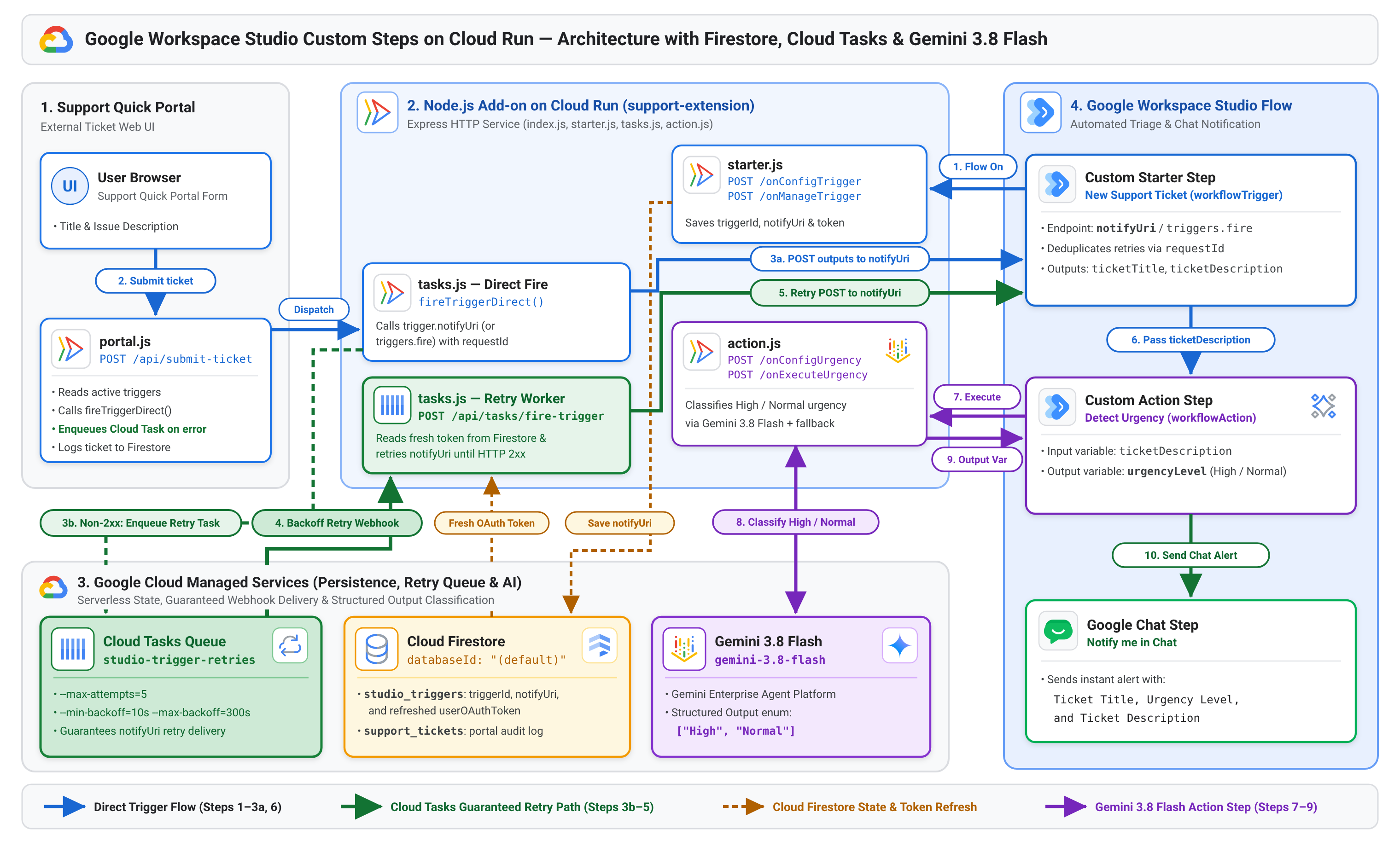
แผนภาพต่อไปนี้แสดงวิธีที่พอร์ทัลการสนับสนุนด่วน ส่วนเสริม Node.js ของคุณบน Cloud Run, Cloud Firestore, Cloud Tasks (studio-trigger-retries), Gemini 3.8 Flash และ Google Workspace Studio โต้ตอบกันตั้งแต่การลงทะเบียนโฟลว์ไปจนถึงการส่งทริกเกอร์และการดำเนินการที่ยืดหยุ่น
สิ่งที่คุณจะได้เรียนรู้
- วิธีกำหนดค่าไฟล์ Manifest การติดตั้งใช้งานส่วนเสริมของ Google Workspace HTTP (
deployment.json) ด้วยองค์ประกอบworkflowTriggerและworkflowAction - วิธีเก็บข้อมูลการสมัครใช้บริการทริกเกอร์ Google Workspace Studio (
triggerId,notifyUriและuserOAuthToken) ไว้ในคอลเล็กชันstudio_triggersของ Firestore และเริ่มโฟลว์โดยใช้notifyUri/triggers.fire - วิธีใช้ Cloud Tasks (
@google-cloud/tasks) เพื่อลองส่งการแจ้งเตือนทริกเกอร์ที่ล้มเหลวอีกครั้งด้วย Exponential Backoff จนกว่าnotifyUriจะแสดงผลการตอบกลับที่สำเร็จ2xx - วิธีสร้างขั้นตอนที่กำหนดเอง
workflowActionใน Node.js โดยใช้เอาต์พุตที่มีโครงสร้างของ Gemini 3.8 Flash (gemini-3.8-flash) บนแพลตฟอร์ม Agent ของ Gemini Enterprise พร้อมการสำรองข้อมูลคีย์เวิร์ด
ข้อกำหนดเบื้องต้น
- บัญชี Google Workspace ที่มีสิทธิ์เข้าถึง Google Workspace Studio
- โปรเจ็กต์ Google Cloud ที่เปิดใช้การเรียกเก็บเงินแล้ว ซึ่งสร้างขึ้นภายในองค์กร Google Workspace เดียวกับบัญชีผู้ใช้เพื่อให้คุณติดตั้งใช้งานส่วนเสริมที่ยังไม่ได้เผยแพร่เพื่อทำการทดสอบได้
2. ตั้งค่าโปรเจ็กต์ที่อยู่ในระบบคลาวด์ของ Google, Firestore และ Cloud Tasks
ในขั้นตอนนี้ คุณจะกำหนดค่าหน้าจอขอความยินยอม OAuth ของโปรเจ็กต์ เปิดใช้ Google Cloud และ Google Workspace API ที่จำเป็นใน Cloud Shell จัดเตรียมฐานข้อมูล (default) Firestore สร้างคิวลองใหม่ของ Cloud Tasks และเริ่มต้นบัญชีบริการการให้สิทธิ์ส่วนเสริม
- เปิดคอนโซล Google Cloud เลือกโปรเจ็กต์ที่อยู่ในระบบคลาวด์ Google Cloud แล้วคลิกไอคอนเปิดใช้งาน Cloud Shell ในแถบการนำทางด้านบน
- กำหนดค่าหน้าจอขอความยินยอม OAuth เพื่อให้ Google Workspace จัดเตรียมไคลเอ็นต์ OAuth สำหรับส่วนเสริมของคุณได้ โดยทำดังนี้
- เปิดหน้าการสร้างแบรนด์แพลตฟอร์มการตรวจสอบสิทธิ์ของ Google
- หากได้รับข้อความแจ้ง ให้คลิกเริ่มต้นใช้งาน (หากกำหนดค่าหน้าจอขอความยินยอมไว้แล้ว ให้ข้ามไปยังขั้นตอนที่ 3)
- ในส่วนข้อมูลแอป ให้ป้อน
Support Extensionสำหรับชื่อแอป เลือกอีเมลสนับสนุนสำหรับผู้ใช้ แล้วคลิกถัดไป - ในส่วนกลุ่มเป้าหมาย ให้เลือกภายใน แล้วคลิกถัดไป
- ในส่วนข้อมูลติดต่อ ให้ป้อนอีเมลแล้วคลิกถัดไป
- ในส่วนเสร็จสิ้น ให้ยอมรับบริการ Google API: นโยบายข้อมูลผู้ใช้ คลิกต่อไป แล้วคลิกสร้าง
- ใน Cloud Shell ให้ตั้งค่าโปรเจ็กต์ที่อยู่ในระบบคลาวด์ที่ใช้งานอยู่ (แทนที่
YOUR_PROJECT_IDด้วยรหัสโปรเจ็กต์ Google Cloud) และเปิดใช้ API ที่จำเป็นโดยทำดังนี้gcloud config set project YOUR_PROJECT_ID gcloud services enable \ aiplatform.googleapis.com \ firestore.googleapis.com \ cloudtasks.googleapis.com \ run.googleapis.com \ cloudbuild.googleapis.com \ artifactregistry.googleapis.com \ appsmarket-component.googleapis.com \ gsuiteaddons.googleapis.com \ workspacestudio.googleapis.com - จัดเตรียมฐานข้อมูล
(default)Firestore และคิวงานstudio-trigger-retriesCloud Tasks ในus-central1(หากยังไม่มี) และเริ่มต้นบัญชีบริการส่วนเสริมของ Google Workspace โดยทำดังนี้gcloud firestore databases describe --database="(default)" >/dev/null 2>&1 || \ gcloud firestore databases create \ --database="(default)" \ --location=us-central1 \ --type=firestore-native \ --quiet gcloud tasks queues describe studio-trigger-retries --location=us-central1 >/dev/null 2>&1 || \ gcloud tasks queues create studio-trigger-retries \ --location=us-central1 \ --max-attempts=5 \ --min-backoff=10s \ --max-backoff=300s \ --max-doublings=4 gcloud workspace-add-ons get-authorization
3. สร้างแอป Node.js ด้วย Firestore, Cloud Tasks และ Gemini 3.8 Flash
ในขั้นตอนนี้ คุณจะสร้างแอปพลิเคชัน Node.js ใน ~/studio-support-addon เราจะจัดระเบียบโปรเจ็กต์เป็น 6 ไฟล์ที่มุ่งเน้นเพื่อให้โค้ดเป็นแบบโมดูลาร์และอ่านง่าย ดังนี้
firestore.js: เริ่มต้นไคลเอ็นต์ Cloud Firestore (คอลเล็กชันstudio_triggersและsupport_tickets) และรีเฟรชโทเค็น OAuth ที่แคชไว้starter.js: ใช้เว็บฮุคของขั้นตอนเริ่มต้นที่กำหนดเอง คำขอแจ้งปัญหาใหม่ (/onConfigTriggerและ/onManageTrigger)action.js: ใช้เว็บฮุกของขั้นตอนการกระทำที่กำหนดเอง ตรวจหาความเร่งด่วน (/onConfigUrgencyและ/onExecuteUrgency) โดยใช้ Gemini 3.8 Flash (gemini-3.8-flash) พร้อมการสำรองข้อมูลการทำงานของคีย์เวิร์ดtasks.js: ส่งการแจ้งเตือนทริกเกอร์ไปยังtrigger.notifyUri(สำรองข้อมูลเป็นhttps://workspacestudio.googleapis.com/v1/triggers/{triggerId}:fire) จัดคิวการส่งที่ล้มเหลวลงในคิวstudio-trigger-retriesCloud Tasks และใช้ปลายทาง Worker ลองใหม่POST /api/tasks/fire-triggerportal.js: แสดง UI ของเว็บ พอร์ทัลการสนับสนุนด่วน (GET /) และเริ่มทริกเกอร์ Google Workspace Studio ที่ใช้งานอยู่ (POST /api/submit-ticket) พร้อมตัวเลือกในการจำลองความล้มเหลวชั่วคราวและดู Cloud Tasks ลองใหม่index.js: เชื่อมโยงเส้นทาง Express ทั้งหมดเข้าด้วยกันและเริ่มเซิร์ฟเวอร์ HTTP
เริ่มต้นโปรเจ็กต์และ package.json
- สร้างไดเรกทอรีโปรเจ็กต์และไปยังไดเรกทอรีดังกล่าวโดยทำดังนี้
mkdir -p ~/studio-support-addon && cd ~/studio-support-addon - สร้าง
package.jsonด้วยexpress,@google-cloud/firestore,@google-cloud/tasksและ@google/genaiโดยทำดังนี้cat << 'EOF' > package.json { "name": "studio-support-addon", "version": "1.0.0", "type": "module", "main": "index.js", "scripts": { "start": "node index.js" }, "dependencies": { "@google-cloud/firestore": "^7.11.0", "@google-cloud/tasks": "^5.6.0", "@google/genai": "^1.0.0", "express": "^4.21.2" } } EOF
firestore.js \- สถานะ Firestore ที่แชร์และการรีเฟรชโทเค็น OAuth
สร้าง firestore.js เพื่อจัดการคอลเล็กชัน Firestore 2 รายการและเก็บโทเค็น OAuth ของผู้ใช้ที่แคชไว้ให้เป็นปัจจุบันอยู่เสมอ โดยทำดังนี้
studio_triggers: จัดเก็บข้อมูลการสมัครใช้บริการโฟลว์ Google Workspace Studio ที่ใช้งานอยู่ (triggerId,notifyUriและuserOAuthToken) เพื่อให้ข้อมูลยังคงอยู่ได้แม้จะมีการรีสตาร์ทคอนเทนเนอร์ Cloud Run และเหตุการณ์การลดขนาดเหลือศูนย์support_tickets: จัดเก็บบันทึกของคำขอแจ้งปัญหาแต่ละรายการที่ส่งผ่านพอร์ทัลrefreshTokenInFirestore(req): เมื่อใดก็ตามที่ Google Workspace Studio เรียกปลายทางเว็บฮุกใดก็ตามของคุณ ระบบจะรวมauthorizationEventObject.userOAuthTokenที่มีอายุสั้นไว้ด้วย ฟังก์ชัน Helper นี้จะอัปเดตเอกสารทริกเกอร์ที่ใช้งานอยู่ด้วยโทเค็นล่าสุดเพื่อให้การเรียกใช้triggers.fireในเบื้องหลังยังคงได้รับอนุญาต
cat << 'EOF' > firestore.js
import { Firestore } from '@google-cloud/firestore';

export const db = new Firestore({
  projectId: process.env.GOOGLE_CLOUD_PROJECT || undefined,
  databaseId: '(default)',
  ignoreUndefinedProperties: true,
});

export const triggersCollection = db.collection(
  process.env.FIRESTORE_TRIGGERS_COLLECTION || 'studio_triggers'
);

export const ticketsCollection = db.collection(
  process.env.FIRESTORE_TICKETS_COLLECTION || 'support_tickets'
);

// Keep cached userOAuthToken fresh across active trigger documents
export async function refreshTokenInFirestore(req) {
  const freshToken = req.body?.authorizationEventObject?.userOAuthToken;
  if (!freshToken) return;
  try {
    const snapshot = await triggersCollection.get();
    if (snapshot.empty) return;
    const batch = db.batch();
    snapshot.docs.forEach((doc) => {
      batch.set(
        doc.ref,
        { userOAuthToken: freshToken, updatedAt: new Date().toISOString() },
        { merge: true }
      );
    });
    await batch.commit();
  } catch (err) {
    console.error('Error refreshing OAuth token in Firestore:', err.message);
  }
}
EOF
starter.js \- ขั้นตอนเริ่มต้นที่กำหนดเอง (workflowTrigger)
สร้าง starter.js เพื่อใช้ปลายทางเว็บฮุก 2 รายการที่ขั้นตอนเริ่มต้นที่กำหนดเองของ Google Workspace Studio กำหนดไว้ โดยทำดังนี้
onConfigTrigger(POST /onConfigTrigger): เรียกใช้เมื่อผู้ใช้เลือกคำขอแจ้งปัญหาใหม่ เป็นตัวเริ่มต้นของโฟลว์ใน Google Workspace Studio แสดงผลการดำเนินการนำทางpushCardที่อธิบายตัวเริ่มต้นonManageTrigger(POST /onManageTrigger): เรียกใช้เมื่อผู้ใช้เปิด โฟลว์ (req.body.workflow.triggerCreation) หรือปิด / ลบโฟลว์ (req.body.workflow.triggerDeletion) บันทึกหรือลบเอกสารการสมัครใช้บริการในคอลเล็กชันstudio_triggersของ Firestore
cat << 'EOF' > starter.js
import { triggersCollection, refreshTokenInFirestore } from './firestore.js';

// Custom Starter Configuration Card
export async function onConfigTrigger(req, res) {
  await refreshTokenInFirestore(req);
  res.status(200).json({
    action: {
      navigations: [
        {
          pushCard: {
            sections: [
              {
                header: 'Support Ticket Listener',
                widgets: [
                  {
                    textParagraph: {
                      text: 'This starter listens for new tickets submitted through the Support Quick Portal and stores subscriptions in Firestore.',
                    },
                  },
                ],
              },
            ],
          },
        },
      ],
    },
  });
}

// Custom Starter Subscription Lifecycle (Firestore studio_triggers collection)
export async function onManageTrigger(req, res) {
  try {
    const triggerCreation = req.body?.workflow?.triggerCreation;
    const triggerDeletion = req.body?.workflow?.triggerDeletion;
    const userOAuthToken =
      req.body?.authorizationEventObject?.userOAuthToken || null;

    if (triggerCreation?.triggerId) {
      const triggerId = String(triggerCreation.triggerId);
      const docId = encodeURIComponent(triggerId);
      await triggersCollection.doc(docId).set(
        {
          triggerId,
          notifyUri: triggerCreation.notifyUri || null,
          ...(userOAuthToken ? { userOAuthToken } : {}),
          updatedAt: new Date().toISOString(),
        },
        { merge: true }
      );
    }

    if (triggerDeletion?.triggerId) {
      const triggerId = String(triggerDeletion.triggerId);
      const docId = encodeURIComponent(triggerId);
      await triggersCollection.doc(docId).delete();
    }

    if (!triggerCreation && !triggerDeletion && userOAuthToken) {
      await refreshTokenInFirestore(req);
    }
  } catch (err) {
    console.error('Error in /onManageTrigger:', err.message);
  }
  res.status(200).json({});
}
EOF
action.js \- ขั้นตอนการดำเนินการที่กำหนดเอง (workflowAction) ด้วย Gemini 3.8 Flash
สร้าง action.js เพื่อใช้ปลายทางเว็บฮุค 2 รายการที่ขั้นตอนการกระทำที่กำหนดเองของ Google Workspace Studio กำหนดไว้ โดยทำดังนี้
onConfigUrgency(POST /onConfigUrgency): แสดงผลการ์ดการกำหนดค่าที่มีวิดเจ็ตtextInputซึ่งตั้งค่าhostAppDataSource.workflowDataSource.includeVariables: trueเพื่อให้ผู้ใช้เลือกตัวแปรticketDescriptionที่ขั้นตอนเริ่มต้นแสดงผลได้onExecuteUrgency(POST /onExecuteUrgency): อ่านอินพุตticketDescriptionจากreq.body.workflow.actionInvocation.inputsจัดประเภทผลกระทบต่อธุรกิจและความเร่งด่วนโดยใช้ Gemini 3.8 Flash (gemini-3.8-flash) บน แพลตฟอร์ม Agent ของ Gemini Enterprise พร้อม เอาต์พุตที่มีโครงสร้าง (responseSchemaenum["High", "Normal"]) สำรองข้อมูลเป็นdetectKeywordUrgency()(urgent,blocker,critical) หากการเรียกใช้โมเดลล้มเหลว และแสดงผลตัวแปรurgencyLevelโดยใช้hostAppAction.workflowAction.returnOutputVariablesAction
cat << 'EOF' > action.js
import { GoogleGenAI, Type } from '@google/genai';
import { refreshTokenInFirestore } from './firestore.js';

// Initialize Google GenAI SDK for the Gemini Enterprise Agent Platform
const ai = new GoogleGenAI({
  vertexai: true,
  project: process.env.GOOGLE_CLOUD_PROJECT,
  location: 'global',
});

// Fallback keyword classifier if the Gemini API call is unavailable
export function detectKeywordUrgency(description) {
  const lower = (description || '').toLowerCase();
  return lower.includes('urgent') ||
    lower.includes('blocker') ||
    lower.includes('critical')
    ? 'High'
    : 'Normal';
}

// Custom Action Step Configuration Card
export async function onConfigUrgency(req, res) {
  await refreshTokenInFirestore(req);
  res.status(200).json({
    action: {
      navigations: [
        {
          pushCard: {
            sections: [
              {
                header: 'Urgency Detector Step',
                widgets: [
                  {
                    textInput: {
                      name: 'ticketDescription',
                      label: 'Source Description',
                      hintText:
                        'Select the description variable outputted by the starter',
                      hostAppDataSource: {
                        workflowDataSource: {
                          includeVariables: true,
                        },
                      },
                    },
                  },
                ],
              },
            ],
          },
        },
      ],
    },
  });
}

// Custom Action Step Execution: Gemini 3.8 Flash with keyword fallback
export async function onExecuteUrgency(req, res) {
  await refreshTokenInFirestore(req);
  const inputs = req.body?.workflow?.actionInvocation?.inputs || {};
  const description = inputs.ticketDescription?.stringValues?.[0] || '';

  let urgencyLevel = detectKeywordUrgency(description);
  try {
    const response = await ai.models.generateContent({
      model: 'gemini-3.8-flash',
      contents: `Evaluate the business impact and time sensitivity of this support ticket description and classify its urgency:\n\n${description}`,
      config: {
        responseMimeType: 'text/x.enum',
        responseSchema: {
          type: Type.STRING,
          enum: ['High', 'Normal'],
        },
      },
    });
    const candidate = (response.text || '').trim();
    if (candidate === 'High' || candidate === 'Normal') {
      urgencyLevel = candidate;
    }
  } catch (err) {
    console.error('Gemini fallback to keyword matching:', err.message);
  }

  res.status(200).json({
    hostAppAction: {
      workflowAction: {
        returnOutputVariablesAction: {
          variables: {
            urgencyLevel: {
              stringValues: [urgencyLevel],
            },
          },
        },
      },
    },
  });
}
EOF
tasks.js \- คิวลองใหม่และปลายทาง Worker ของ Cloud Tasks
สร้าง tasks.js เพื่อส่งการเรียกใช้ทริกเกอร์ไปยัง trigger.notifyUri (สำรองข้อมูลเป็น https://workspacestudio.googleapis.com/v1/triggers/{triggerId}:fire) จัดคิวการเรียกใช้ที่ล้มเหลวลงในคิว studio-trigger-retries Cloud Tasks และประมวลผลการลองใหม่ที่ POST /api/tasks/fire-trigger โดยทำดังนี้
resolveTriggerUrl(trigger): ใช้trigger.notifyUriที่เก็บไว้จากtriggerCreation.notifyUriหากมี หรือสำรองข้อมูลเป็นhttps://workspacestudio.googleapis.com/v1/triggers/{triggerId}:firefireTriggerDirect(trigger, payload): ส่งคำขอPOSTไปยัง URL ของทริกเกอร์พร้อมตัวแปรเอาต์พุตticketTitleและticketDescriptionรวมถึงrequestIdที่ idempotentenqueueTriggerRetry(req, payload): จัดคิวงาน HTTP ในคิวstudio-trigger-retriesที่กำหนดเป้าหมายเป็นปลายทางPOST /api/tasks/fire-triggerของบริการ Cloud Run ทุกครั้งที่การเรียกใช้ทริกเกอร์ครั้งแรกไม่สำเร็จหรือแสดงผลสถานะ HTTP ที่ไม่ใช่ 2xxhandleFireTriggerTask(POST /api/tasks/fire-trigger): เรียกใช้โดย Cloud Tasks ในการลองใหม่แต่ละครั้ง ค้นหาเอกสารtriggerล่าสุดในstudio_triggersจาก Firestore (เพื่อให้แน่ใจว่าการลองใหม่จะใช้userOAuthTokenล่าสุดเสมอ) ตรวจสอบส่วนหัวX-CloudTasks-TaskRetryCount(หากเปิดใช้simulateFailureระบบจะทำให้การดำเนินการ Cloud Tasks ครั้งแรกไม่สำเร็จด้วย503เพื่อให้คุณดู Cloud Tasks รอแบบทวีคูณและสำเร็จในการลองใหม่#1) และแสดงผล200 OKก็ต่อเมื่อnotifyUriแสดงผลการตอบกลับที่สำเร็จ2xxการตอบกลับ5xxจะบอกให้ Cloud Tasks ลองอีกครั้งตามนโยบายการรอแบบทวีคูณของคิว
cat << 'EOF' > tasks.js
import { CloudTasksClient } from '@google-cloud/tasks';
import { triggersCollection } from './firestore.js';

const tasksClient = new CloudTasksClient();
const PROJECT_ID = process.env.GOOGLE_CLOUD_PROJECT;
const LOCATION = process.env.CLOUD_TASKS_LOCATION || 'us-central1';
const QUEUE = process.env.CLOUD_TASKS_QUEUE || 'studio-trigger-retries';

// Prefer trigger.notifyUri from triggerCreation, falling back to triggers.fire
export function resolveTriggerUrl(trigger) {
  return (
    trigger.notifyUri ||
    `https://workspacestudio.googleapis.com/v1/triggers/${encodeURIComponent(trigger.triggerId)}:fire`
  );
}

// Call the Google Workspace Studio trigger URL directly
export async function fireTriggerDirect(
  trigger,
  { title, description, requestId }
) {
  const targetUrl = resolveTriggerUrl(trigger);
  const response = await fetch(targetUrl, {
    method: 'POST',
    headers: {
      Authorization: `Bearer ${trigger.userOAuthToken}`,
      'Content-Type': 'application/json',
    },
    body: JSON.stringify({
      name: 'triggers/' + trigger.triggerId,
      outputs: {
        ticketTitle: { stringValues: [title] },
        ticketDescription: { stringValues: [description] },
      },
      requestId,
    }),
  });
  return { ok: response.ok, status: response.status, targetUrl };
}

// Enqueue a retry task in Cloud Tasks targeting POST /api/tasks/fire-trigger
export async function enqueueTriggerRetry(req, payload) {
  const parent = tasksClient.queuePath(PROJECT_ID, LOCATION, QUEUE);
  const baseUrl = process.env.SERVICE_URL || `https://${req.get('host')}`;
  const workerUrl = `${baseUrl}/api/tasks/fire-trigger`;

  const task = {
    httpRequest: {
      httpMethod: 'POST',
      url: workerUrl,
      headers: { 'Content-Type': 'application/json' },
      body: Buffer.from(JSON.stringify(payload)).toString('base64'),
    },
  };

  const [response] = await tasksClient.createTask({ parent, task });
  return response.name;
}

// Cloud Tasks worker endpoint: retries calling notifyUri using fresh Firestore state
export async function handleFireTriggerTask(req, res) {
  const { triggerId, title, description, requestId, simulateFailure } =
    req.body || {};
  const retryCount = Number(req.get('X-CloudTasks-TaskRetryCount') || 0);

  if (!triggerId) {
    return res.status(200).json({ skipped: true, reason: 'Missing triggerId' });
  }

  try {
    const docId = encodeURIComponent(String(triggerId));
    const doc = await triggersCollection.doc(docId).get();
    if (!doc.exists) {
      return res
        .status(200)
        .json({ skipped: true, reason: 'Trigger no longer active' });
    }

    const trigger = doc.data();
    if (!trigger.userOAuthToken) {
      return res
        .status(503)
        .json({ ok: false, error: 'Missing userOAuthToken in Firestore' });
    }

    // When simulateFailure is enabled, fail the 1st Cloud Task attempt (retryCount === 0)
    // so learners can observe Cloud Tasks back off and succeed on retry #1.
    if (simulateFailure && retryCount < 1) {
      console.warn(
        `[Cloud Tasks] Simulated transient failure on initial task attempt (retryCount=${retryCount}) for trigger ${triggerId}`
      );
      return res
        .status(503)
        .json({ ok: false, simulated: true, retryCount, triggerId });
    }

    const outcome = await fireTriggerDirect(trigger, {
      title,
      description,
      requestId,
    });

    if (outcome.ok) {
      console.log(
        `[Cloud Tasks] Successfully delivered trigger ${triggerId} to ${outcome.targetUrl} on retryCount=${retryCount}`
      );
      return res
        .status(200)
        .json({ ok: true, status: outcome.status, retryCount });
    }

    console.error(
      `[Cloud Tasks] Non-2xx response (${outcome.status}) from ${outcome.targetUrl} on retryCount=${retryCount}`
    );
    return res
      .status(502)
      .json({ ok: false, status: outcome.status, retryCount });
  } catch (err) {
    console.error(
      `[Cloud Tasks] Error firing trigger ${triggerId} on retryCount=${retryCount}:`,
      err.message
    );
    return res
      .status(503)
      .json({ ok: false, error: err.message, retryCount });
  }
}
EOF
portal.js \- UI ของพอร์ทัลการสนับสนุนด่วนและตัวส่ง notifyUri พร้อมการสำรองข้อมูล Cloud Tasks
สร้าง portal.js เพื่อแสดงพอร์ทัลเว็บและส่งการส่งตั๋วไปยัง Google Workspace Studio พร้อมการกำหนดเวลาลองใหม่ของ Cloud Tasks โดยอัตโนมัติ โดยทำดังนี้
renderPortal(GET /): ค้นหาคอลเล็กชันstudio_triggersของ Firestore เพื่อแสดงจำนวนทริกเกอร์ Google Workspace Studio ที่ใช้งานอยู่ที่ลงทะเบียนไว้ และแสดงแบบฟอร์มการส่งตั๋ว HTML (รวมถึงช่องทำเครื่องหมายจำลองความล้มเหลวชั่วคราว (จัดคิวใน Cloud Tasks และลอง notifyUri อีกครั้ง) เพื่อทดสอบการลองใหม่ของ Cloud Tasks)submitTicket(POST /api/submit-ticket): วนซ้ำเอกสารทริกเกอร์ที่ใช้งานอยู่ทั้งหมดในstudio_triggersและเรียกใช้fireTriggerDirect()หาก URL ของทริกเกอร์แสดงผลการตอบกลับที่ไม่ใช่ 2xx แสดงข้อผิดพลาดเกี่ยวกับเครือข่าย หรือเปิดใช้simulateFailureระบบจะจัดคิวงานลองใหม่ในstudio-trigger-retriesโดยอัตโนมัติโดยใช้enqueueTriggerRetry()และบันทึกคำขอแจ้งปัญหาในคอลเล็กชันsupport_ticketsของ Firestore
cat << 'EOF' > portal.js
import { triggersCollection, ticketsCollection } from './firestore.js';
import { fireTriggerDirect, enqueueTriggerRetry } from './tasks.js';

// Support Quick Portal UI
export async function renderPortal(req, res) {
  let activeCount = 0;
  try {
    const snapshot = await triggersCollection.get();
    activeCount = snapshot.size;
  } catch (err) {
    console.error('Error reading studio_triggers collection:', err.message);
  }

  res.status(200).send(`<!DOCTYPE html>
<html>
  <head>
    <meta charset="utf-8">
    <title>Support Quick Portal</title>
    <style>
      body { font-family: Arial, sans-serif; padding: 24px; max-width: 540px; margin: auto; color: #202124; }
      .badge { background: #e8f0fe; color: #1967d2; padding: 8px 12px; border-radius: 6px; font-size: 14px; margin-bottom: 16px; }
      label { font-weight: bold; display: block; margin-top: 16px; }
      .checkbox-label { font-weight: normal; margin-top: 14px; display: flex; align-items: center; gap: 8px; cursor: pointer; }
      .checkbox-label input { width: auto; margin: 0; }
      input, textarea { width: 100%; margin-top: 6px; padding: 10px; box-sizing: border-box; border: 1px solid #dadce0; border-radius: 4px; }
      button { background-color: #1a73e8; color: white; border: none; padding: 10px 18px; margin-top: 16px; font-weight: bold; cursor: pointer; border-radius: 4px; }
      button:hover { background-color: #1557b0; }
      #status { margin-top: 16px; font-weight: bold; }
    </style>
  </head>
  <body>
    <h2>Support Quick Portal</h2>
    <div class="badge">
      Active Google Workspace Studio triggers in Firestore (<code>studio_triggers</code>):
      <strong id="trigger-count">${activeCount}</strong>
    </div>
    <p>Submit a support ticket below to fire your Google Workspace Studio flow.</p>

    <label for="title">Ticket Title</label>
    <input type="text" id="title" placeholder="e.g. Database failure">

    <label for="description">Issue Description</label>
    <textarea id="description" rows="4" placeholder="Describe the issue..."></textarea>

    <label class="checkbox-label" for="simulateFailure">
      <input type="checkbox" id="simulateFailure">
      Simulate transient failure (enqueue in Cloud Tasks and retry notifyUri)
    </label>

    <button onclick="submitTicket()">Submit Ticket</button>
    <div id="status"></div>

    <script>
      async function submitTicket() {
        const title = document.getElementById('title').value.trim();
        const description = document.getElementById('description').value.trim();
        const simulateFailure = document.getElementById('simulateFailure').checked;
        const statusEl = document.getElementById('status');

        if (!title || !description) {
          statusEl.style.color = '#d93025';
          statusEl.textContent = 'Please fill out both fields.';
          return;
        }

        statusEl.style.color = '#188038';
        statusEl.textContent = 'Submitting ticket...';

        try {
          const res = await fetch('/api/submit-ticket', {
            method: 'POST',
            headers: { 'Content-Type': 'application/json' },
            body: JSON.stringify({ title, description, simulateFailure }),
          });
          const data = await res.json();
          if (data.ok) {
            if (data.tasksQueued > 0) {
              statusEl.textContent =
                'Ticket saved! Initial notifyUri call did not succeed; queued ' +
                data.tasksQueued +
                ' retry task(s) in Cloud Tasks.';
            } else {
              statusEl.textContent =
                'Ticket saved to Firestore! Fired ' +
                data.triggersFired +
                ' Google Workspace Studio trigger(s).';
            }
          } else {
            statusEl.style.color = '#d93025';
            statusEl.textContent = 'Error: ' + (data.error || 'Unknown error');
          }
        } catch (err) {
          statusEl.style.color = '#d93025';
          statusEl.textContent = 'Request failed: ' + err.message;
        }
      }
    </script>
  </body>
</html>`);
}

// Portal Form Submission -> Call notifyUri directly, or enqueue Cloud Task on failure
export async function submitTicket(req, res) {
  const title = req.body?.title || 'Untitled Ticket';
  const description = req.body?.description || '';
  const simulateFailure = Boolean(req.body?.simulateFailure);
  const results = [];
  let triggersFired = 0;
  let tasksQueued = 0;

  try {
    const snapshot = await triggersCollection.get();
    for (const doc of snapshot.docs) {
      const trigger = doc.data();
      if (!trigger.triggerId || !trigger.userOAuthToken) continue;

      const requestId =
        'req_' + Date.now() + '_' + Math.floor(Math.random() * 1000);

      let outcome = { ok: false, status: 503 };
      if (!simulateFailure) {
        try {
          outcome = await fireTriggerDirect(trigger, {
            title,
            description,
            requestId,
          });
        } catch (fetchErr) {
          console.error(
            `Direct trigger call failed for ${trigger.triggerId}:`,
            fetchErr.message
          );
          outcome = { ok: false, status: 0, error: fetchErr.message };
        }
      }

      if (outcome.ok) {
        triggersFired++;
        results.push({
          triggerId: trigger.triggerId,
          status: outcome.status,
          queuedRetry: false,
        });
      } else {
        const taskName = await enqueueTriggerRetry(req, {
          triggerId: trigger.triggerId,
          title,
          description,
          requestId,
          simulateFailure,
        });
        tasksQueued++;
        results.push({
          triggerId: trigger.triggerId,
          status: outcome.status,
          queuedRetry: true,
          taskName,
        });
      }
    }

    await ticketsCollection.add({
      title,
      description,
      triggersFired,
      tasksQueued,
      createdAt: new Date().toISOString(),
    });

    res.status(200).json({
      ok: true,
      triggersFired,
      tasksQueued,
      results,
    });
  } catch (err) {
    console.error('Error in /api/submit-ticket:', err.message);
    res.status(500).json({ ok: false, error: err.message });
  }
}
EOF
index.js \- จุดแรกเข้าของเซิร์ฟเวอร์ Express
สร้าง index.js เพื่อเชื่อมโยงเส้นทางพอร์ทัล ปลายทาง Worker ลองใหม่ของ Cloud Tasks และปลายทางเว็บฮุกของ Google Workspace Studio เข้าด้วยกันในเซิร์ฟเวอร์ HTTP Express ที่รับฟัง PORT (ค่าเริ่มต้นคือ 8080 ใน Cloud Run) โดยทำดังนี้
cat << 'EOF' > index.js
import express from 'express';
import { onConfigTrigger, onManageTrigger } from './starter.js';
import { onConfigUrgency, onExecuteUrgency } from './action.js';
import { renderPortal, submitTicket } from './portal.js';
import { handleFireTriggerTask } from './tasks.js';

const app = express();
app.use(express.json());

// Support Quick Portal routes
app.get('/', renderPortal);
app.post('/api/submit-ticket', submitTicket);

// Cloud Tasks retry worker route
app.post('/api/tasks/fire-trigger', handleFireTriggerTask);

// Google Workspace Studio Custom Starter Step webhooks
app.post('/onConfigTrigger', onConfigTrigger);
app.post('/onManageTrigger', onManageTrigger);

// Google Workspace Studio Custom Action Step webhooks
app.post('/onConfigUrgency', onConfigUrgency);
app.post('/onExecuteUrgency', onExecuteUrgency);

const PORT = process.env.PORT || 8080;
app.listen(PORT, () => {
  console.log(`Support Extension listening on port ${PORT}`);
});
EOF
4. ติดตั้งใช้งานลงใน Cloud Run และติดตั้งส่วนเสริม
ในขั้นตอนนี้ คุณจะติดตั้งใช้งานบริการ Node.js ลงใน Cloud Run ให้สิทธิ์ IAM สำหรับผู้เรียกใช้ส่วนเสริมของ Google Workspace และสิทธิ์เข้าถึงรันไทม์ของ Firestore, Cloud Tasks และแพลตฟอร์ม Agent สร้างไฟล์ Manifest deployment.json และติดตั้งใช้งานส่วนเสริม
- ติดตั้งใช้งานบริการ
support-extensionลงใน Cloud Run พร้อมตัวแปรสภาพแวดล้อมของโปรเจ็กต์ คอลเล็กชัน Firestore และคิวงาน Cloud Tasks โดยทำดังนี้gcloud run deploy support-extension \ --source . \ --region us-central1 \ --allow-unauthenticated \ --set-env-vars="GOOGLE_CLOUD_PROJECT=$(gcloud config get-value project),FIRESTORE_TRIGGERS_COLLECTION=studio_triggers,FIRESTORE_TICKETS_COLLECTION=support_tickets,CLOUD_TASKS_QUEUE=studio-trigger-retries,CLOUD_TASKS_LOCATION=us-central1" \ --quiet - ให้บทบาท
roles/run.invokerในบริการ Cloud Run แก่บัญชีบริการส่วนเสริมของ Google Workspace เพื่อให้ Google Workspace Studio เรียกปลายทางเว็บฮุกของคุณได้ โดยทำดังนี้ADDON_SA=$(gcloud workspace-add-ons get-authorization --format="value(serviceAccountEmail)") gcloud run services add-iam-policy-binding support-extension \ --region=us-central1 \ --member="serviceAccount:${ADDON_SA}" \ --role="roles/run.invoker" \ --quiet - ให้บทบาท
roles/datastore.user(สำหรับการอ่านและเขียนคอลเล็กชันstudio_triggersและsupport_ticketsของ Firestore),roles/cloudtasks.enqueuer(สำหรับการจัดคิวงานลองใหม่ลงในstudio-trigger-retries) และroles/aiplatform.user(สำหรับการเรียกใช้ Gemini บนแพลตฟอร์ม Agent ของ Gemini Enterprise) แก่บัญชีบริการรันไทม์ของ Cloud Run โดยทำดังนี้PROJECT_ID=$(gcloud config get-value project) PROJECT_NUMBER=$(gcloud projects describe "${PROJECT_ID}" --format="value(projectNumber)") RUNTIME_SA=$(gcloud run services describe support-extension --region=us-central1 --format="value(spec.template.spec.serviceAccountName)") RUNTIME_SA=${RUNTIME_SA:-"${PROJECT_NUMBER}-compute@developer.gserviceaccount.com"} gcloud projects add-iam-policy-binding "${PROJECT_ID}" \ --member="serviceAccount:${RUNTIME_SA}" \ --role="roles/datastore.user" \ --condition=None \ --quiet gcloud projects add-iam-policy-binding "${PROJECT_ID}" \ --member="serviceAccount:${RUNTIME_SA}" \ --role="roles/cloudtasks.enqueuer" \ --condition=None \ --quiet gcloud projects add-iam-policy-binding "${PROJECT_ID}" \ --member="serviceAccount:${RUNTIME_SA}" \ --role="roles/aiplatform.user" \ --condition=None \ --quiet - เรียก URL ของ Cloud Run ที่ติดตั้งใช้งานแล้วและสร้างไฟล์ Manifest
deployment.jsonที่กำหนดองค์ประกอบsupportTicketTrigger(workflowTrigger) และurgencyDetectorStep(workflowAction) โดยทำดังนี้SERVICE_URL=$(gcloud run services describe support-extension --region=us-central1 --format="value(status.url)") cat << EOF > deployment.json { "oauthScopes": [ "https://www.googleapis.com/auth/workspace.studio.trigger", "https://www.googleapis.com/auth/userinfo.email" ], "addOns": { "common": { "name": "Support Extension", "logoUrl": "https://www.gstatic.com/images/branding/productlogos/buganizer/v1/192px.svg" }, "studio": { "flows": { "workflowElements": [ { "id": "supportTicketTrigger", "state": "ACTIVE", "name": "New Support Ticket", "description": "Fires when someone submits a ticket in the Support Quick Portal.", "workflowTrigger": { "inputs": [], "outputs": [ { "id": "ticketTitle", "description": "Ticket Title", "cardinality": "SINGLE", "dataType": { "basicType": "STRING" } }, { "id": "ticketDescription", "description": "Ticket Description", "cardinality": "SINGLE", "dataType": { "basicType": "STRING" } } ], "onConfigFunction": "${SERVICE_URL}/onConfigTrigger", "onManageFunction": "${SERVICE_URL}/onManageTrigger" } }, { "id": "urgencyDetectorStep", "state": "ACTIVE", "name": "Detect Urgency", "description": "Evaluates the ticket description to detect High or Normal urgency.", "workflowAction": { "inputs": [ { "id": "ticketDescription", "description": "Description to scan", "cardinality": "SINGLE", "dataType": { "basicType": "STRING" } } ], "outputs": [ { "id": "urgencyLevel", "description": "Detected Urgency (High / Normal)", "cardinality": "SINGLE", "dataType": { "basicType": "STRING" } } ], "onConfigFunction": "${SERVICE_URL}/onConfigUrgency", "onExecuteFunction": "${SERVICE_URL}/onExecuteUrgency" } } ] } }, "httpOptions": { "authorizationHeader": "SYSTEM_ID_TOKEN" } } } EOF - สร้าง (หรือแทนที่) และติดตั้งใช้งานส่วนเสริมของ Google Workspace สำหรับบัญชีของคุณ รวมถึงพิมพ์ URL ของพอร์ทัลการสนับสนุนด่วน โดยทำดังนี้
gcloud workspace-add-ons deployments create support-extension --deployment-file=deployment.json || \
  gcloud workspace-add-ons deployments replace support-extension --deployment-file=deployment.json
gcloud workspace-add-ons deployments install support-extension
echo "Support Quick Portal URL: ${SERVICE_URL}"
5. ทดสอบขั้นตอนที่กำหนดเองและการลองใหม่ของ Cloud Tasks
- เปิด Google Workspace Studio (รีเฟรชแท็บเบราว์เซอร์หากเปิดอยู่แล้ว) แล้วคลิก โฟลว์ใหม่
- คลิกเลือกตัวเริ่มต้น > ส่วนขยายการสนับสนุน > คำขอแจ้งปัญหาใหม่
- คลิกเพิ่มขั้นตอน (
+) > ส่วนขยายการสนับสนุน > ตรวจหาความเร่งด่วน ในช่องคำอธิบายแหล่งที่มา ให้คลิก + ตัวแปร แล้วเลือกคำอธิบายตั๋ว - คลิกเพิ่มขั้นตอน (
+) แล้วเพิ่มขั้นตอนChat > แจ้งเตือนฉันใน Chat ที่มีตัวแปรชื่อตั๋ว ระดับความเร่งด่วน และคำอธิบายตั๋ว ในข้อความ - สลับโฟลว์เป็นเปิด ที่มุมขวาบน Google Workspace Studio จะเรียกปลายทาง
/onManageTriggerของคุณใน Cloud Run ทันที ซึ่งจะเขียนข้อมูลการสมัครใช้บริการทริกเกอร์ที่ใช้งานอยู่ (รวมถึงtriggerId,notifyUriและuserOAuthToken) ลงในคอลเล็กชันstudio_triggersใน Firestore - เปิด URL ของพอร์ทัลการสนับสนุนด่วน (
https://support-extension-...run.app) ในแท็บใหม่ ยืนยันว่าพอร์ทัลแสดงทริกเกอร์ที่ใช้งานอยู่1รายการใน Firestore และส่งตั๋ว 2 รายการเพื่อทดสอบการจัดประเภทของ Gemini 3.8 Flash (gemini-3.8-flash) โดยทำดังนี้- ตั๋วที่มีผลกระทบสูง (ชื่อตั๋ว:
London office lockout, คำอธิบายปัญหา:All 500 employees in the London office are locked out of their workstations 20 minutes before the board presentation.) แม้จะไม่มีคีย์เวิร์ดที่ฮาร์ดโค้ดไว้ เช่นurgentหรือblockerแต่gemini-3.8-flashจะจัดประเภทตั๋วนี้เป็นความเร่งด่วนHigh - ตั๋วทั่วไป (ชื่อตั๋ว:
Conference room adapters, คำอธิบายปัญหา:Could we order two extra HDMI adapters for the third-floor conference room next month?):gemini-3.8-flashจะจัดประเภทตั๋วนี้เป็นความเร่งด่วนNormal
- ตั๋วที่มีผลกระทบสูง (ชื่อตั๋ว:
- ตรวจสอบใน Google Chat และในแท็บกิจกรรม ของ Google Workspace Studio ว่าโฟลว์ทำงานสำหรับตั๋วทั้ง 2 รายการที่มี
Urgency Level: HighและUrgency Level: Normal - ทดสอบการส่งซ้ำของ Cloud Tasks เมื่อ
notifyUriล้มเหลว โดยทำดังนี้- ในพอร์ทัลการสนับสนุนด่วน ให้เลือกจำลองความล้มเหลวชั่วคราว (จัดคิวใน Cloud Tasks และลอง notifyUri อีกครั้ง)
- ป้อนชื่อตั๋ว:
Checkout service outageและคำอธิบายปัญหา:Production payment gateway is timing out for all customersแล้วคลิกส่งตั๋ว - สังเกตว่าพอร์ทัลจะตอบกลับทันทีด้วยข้อความ
Ticket saved! Initial notifyUri call did not succeed; queued 1 retry task(s) in Cloud Tasks. - ในเบื้องหลัง Cloud Tasks จะดำเนินการ
POST /api/tasks/fire-triggerการพยายามทำงานครั้งแรก (retryCount=0) จะจำลองความล้มเหลว503ซึ่งทำให้ Cloud Tasks รอแบบทวีคูณเป็นเวลา10s(--min-backoff=10s) และลองใหม่ (retryCount=1) ซึ่งจะเรียกใช้notifyUriและสำเร็จ หลังจากผ่านไปประมาณ 10-15 วินาที ให้ตรวจสอบว่าการแจ้งเตือน Google Chat มาถึงแล้ว
6. ล้างข้อมูล
หากต้องการหลีกเลี่ยงค่าใช้จ่ายที่เกิดขึ้นอย่างต่อเนื่องในบัญชี Google Cloud ให้ลบทรัพยากรที่ติดตั้งใช้งานแล้วใน Cloud Shell โดยทำดังนี้
gcloud workspace-add-ons deployments uninstall support-extension
gcloud workspace-add-ons deployments delete support-extension --quiet
gcloud run services delete support-extension --region=us-central1 --quiet
gcloud tasks queues delete studio-trigger-retries --location=us-central1 --quiet
gcloud firestore databases delete --database="(default)" --quiet
7. ยินดีด้วย
คุณได้สร้าง ติดตั้งใช้งาน และทดสอบส่วนขยาย HTTP Node.js สำหรับ Google Workspace Studio โดยใช้ Firestore, Cloud Tasks, Cloud Run, และ Gemini 3.8 Flash บน แพลตฟอร์ม Agent ของ Gemini Enterprise แล้ว
สิ่งที่เราได้กล่าวถึง
- การกำหนดค่าไฟล์ Manifest ส่วนเสริม HTTP ของ Google Workspace Studio (
deployment.json) ด้วยองค์ประกอบworkflowTriggerและworkflowAction - การเก็บข้อมูลการสมัครใช้บริการ
workflowTriggerของ Google Workspace Studio ไว้ในคอลเล็กชันstudio_triggersของ Firestore และบันทึกการส่งพอร์ทัลไว้ในsupport_ticketsเพื่อให้ทริกเกอร์ยังคงอยู่ได้แม้จะมีการปรับขนาดและการติดตั้งใช้งานใหม่ของ Cloud Run - การรับประกันการส่ง
notifyUri(triggers.fire) ด้วย Cloud Tasks (studio-trigger-retries) เพื่อให้ระบบลองใหม่โดยอัตโนมัติเมื่อเกิดความล้มเหลว HTTP ชั่วคราวด้วย Exponential Backoff โดยใช้userOAuthTokenล่าสุดจาก Firestore - การสร้างขั้นตอน
workflowActionที่จัดประเภทคำขอแจ้งปัญหาด้วยเอาต์พุตที่มีโครงสร้างของ Gemini 3.8 Flash (gemini-3.8-flash) บน แพลตฟอร์ม Agent ของ Gemini Enterprise พร้อมการสำรองข้อมูลการทำงานของคีย์เวิร์ดที่ยืดหยุ่น