
1. Introduction
As AI agents take on more responsibilities, a single agent doing everything becomes hard to maintain, scale, and evolve. Different capabilities often need different deployment strategies, update cycles, or even different teams owning them.
- The A2A (Agent2Agent) Protocol solves the communication side — standardizing how agents discover each other's capabilities and collaborate across frameworks and organizations.
- Gemini Enterprise Agent Platform Runtime solves the deployment side — a fully managed, serverless platform that hosts your agents with built-in A2A support, auto-scaling, secure endpoints, persistent sessions, and zero infrastructure management.
Together, they let you build specialized agents, deploy them as discoverable A2A services, and compose them into multi-agent systems.
What you'll build
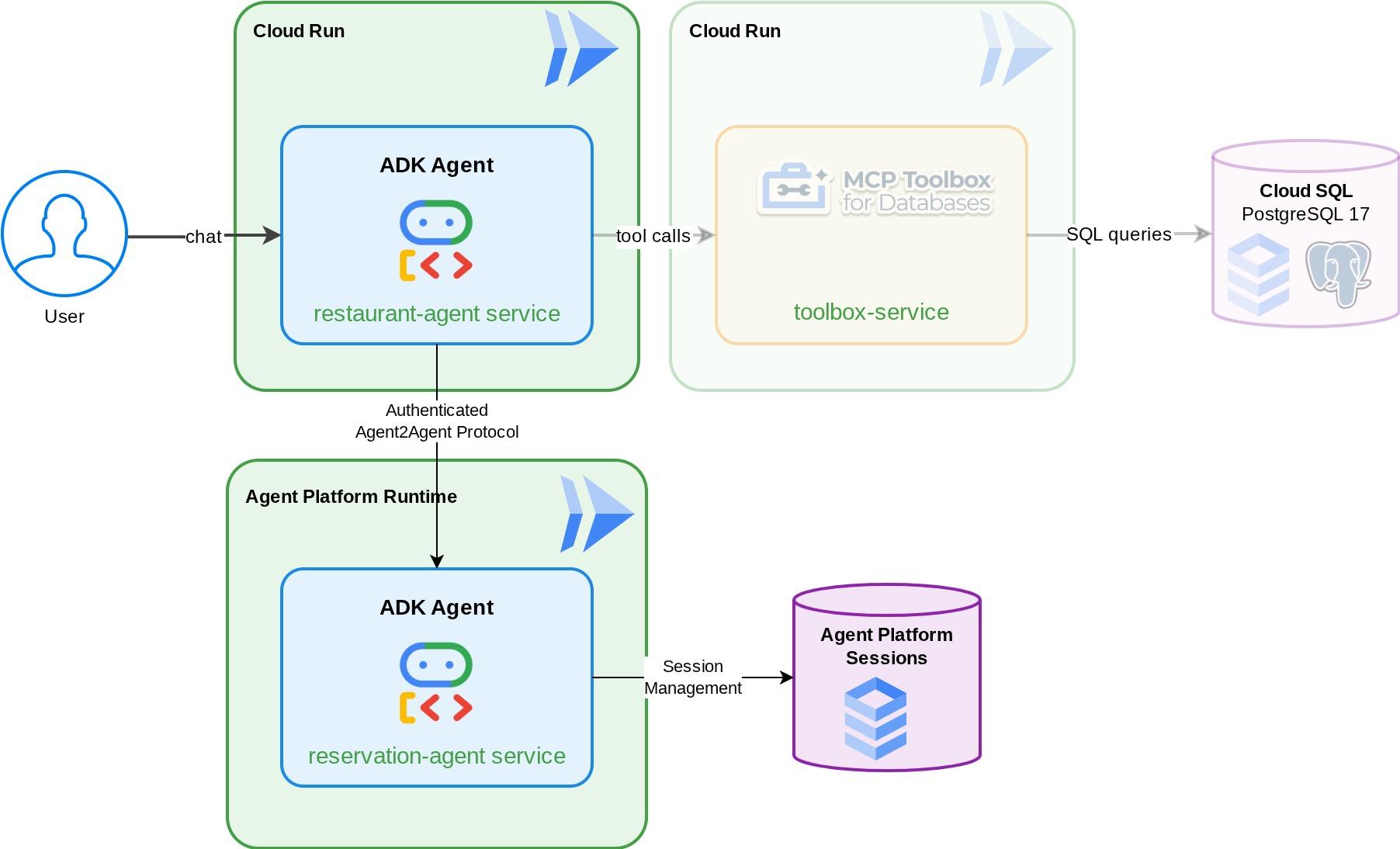
A Reservation Agent that manages restaurant table bookings (create, check, and cancel) using ADK session state which is managed by Gemini Enterprise Agent Platform Sessions. You deploy this agent to Gemini Enterprise Agent Platform Runtime where it becomes discoverable via the A2A protocol's agent card. Then you upgrade the Foodie Finds restaurant concierge agent (from the prerequisite codelab , don't worry if you haven't visited the codelab–we prepared a starter repository for you) to consume the Reservation Agent as a remote A2A sub-agent. The result: a multi-agent system where the orchestrator routes menu queries to MCP Toolbox and reservation requests to the remote A2A agent.
What you'll learn
- Build an ADK agent that uses managed session service to manage reservation data
- Expose an ADK agent as an A2A server with agent cards and skills
- Deploy an A2A agent to Gemini Enterprise Agent Runtime
- Consume a remote A2A agent from another ADK agent using
RemoteA2aAgentand handling authenticated request - Test multi-agent systems incrementally: local A2A, deployed A2A, partial integration, full deployment
Prerequisites
- (Recommended) Completed the following codelabs :
- Building Persistent AI Agents with ADK and CloudSQL -> more details about ADK session and state
- Agentic RAG with ADK, MCP Toolbox, and Cloud SQL -> you can continue building your agent from this codelab, the provided starter code is identical
- A Google Cloud account with an active billing account
- Basic familiarity with Python and ADK concepts
2. Environment Setup - Continuing from the previous codelab
The narratives that we provide in this codelab are actually the continuation from this prerequisite codelab: Agentic RAG with ADK, MCP Toolbox, and Cloud SQL . You can continue your work from the previous codelab
We can start building in the previous codelab working directory ( the working directory should be build-agent-adk-toolbox-cloudsql ). To avoid confusion, let's rename the directory with the same directory name we use when we start fresh
mv ~/build-agent-adk-toolbox-cloudsql ~/adk-a2a-agent-runtime-starter
cloudshell workspace ~/adk-a2a-agent-runtime-starter && cd ~/adk-a2a-agent-runtime-starter
source .env
Verify the key files from the previous codelab are in place:
echo "--- Restaurant Agent ---"
cat restaurant_agent/agent.py | head -5
echo ""
echo "--- Toolbox Config ---"
cat tools.yaml | head -5
You should see the restaurant_agent/agent.py file with the LlmAgent import, and the tools.yaml with your Toolbox configuration.
Next, let's reinitialize our python environment
rm -rf .venv
uv sync
Also, verify the database is seeded and ready:
uv run python scripts/verify_seed.py
If you follow each testing details from previous codelab, you might see output like this
Menu Items: 16/15
Embeddings: 16/15

✗ Database not ready
It's okay! The database check doesn't take into account the additional data you input from data ingestion check. As long as you have >=15 data, all good!
Activate Required API
Next, we will need to ensure that we enable the required API to interact with Gemini Enterprise Agent Platform
gcloud services enable \
  cloudresourcemanager.googleapis.com
You should already have necessary files and infra to continue to the next section: A2A Protocol and Gemini Enterprise Agent Runtime !
3. Environment Setup - Fresh start with the starter repo
This step prepares your Cloud Shell environment, configures your Google Cloud project, and clones the starter repository.
Open Cloud Shell
Open Cloud Shell in your browser. Cloud Shell provides a pre-configured environment with all the tools you need for this codelab. Click Authorize when prompted to
Then click "View" -> "Terminal" to open the terminal.Your interface should look similar to this
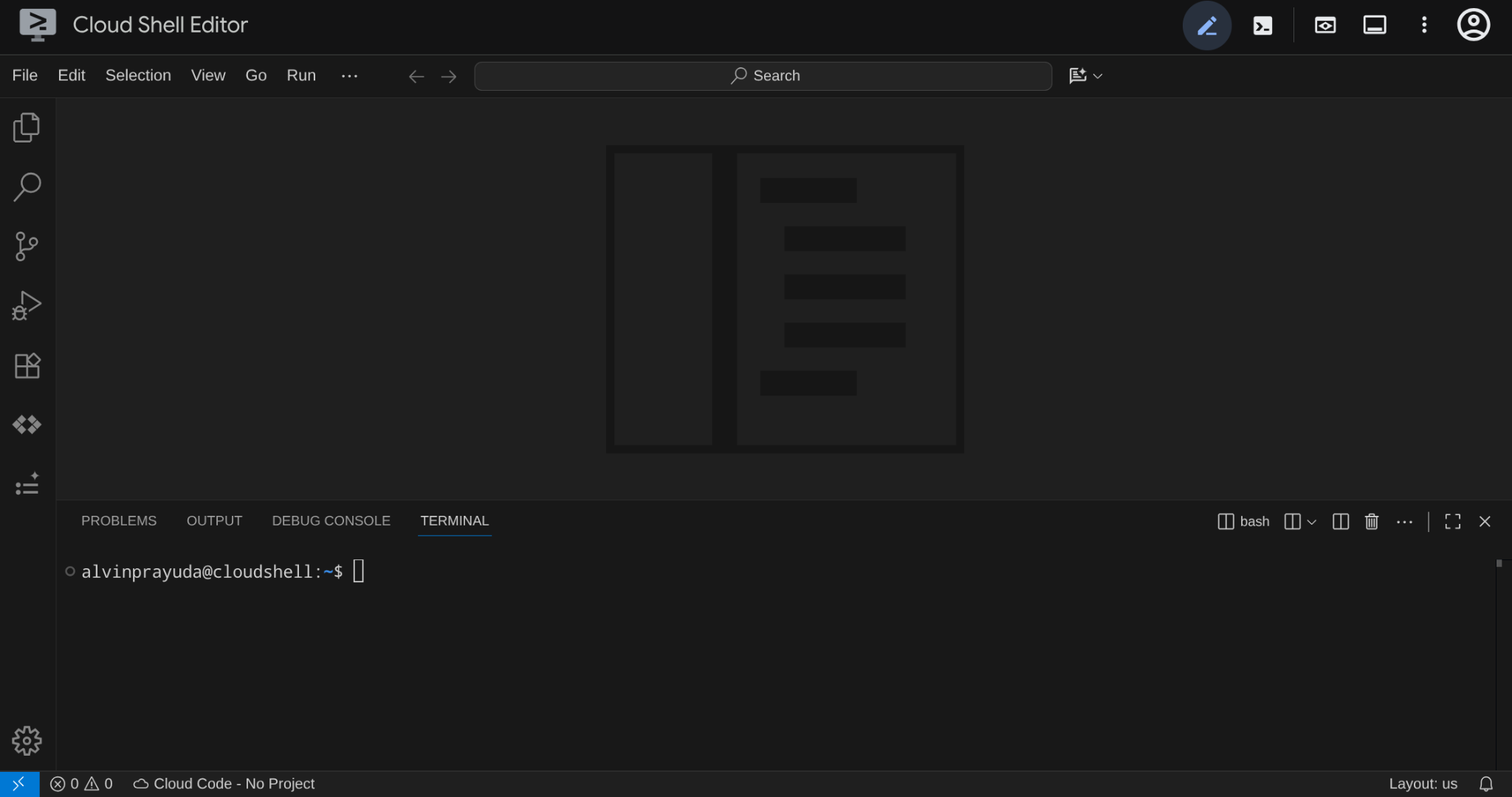
This will be our main interface, IDE on top, terminal on the bottom
Set up your working directory
Clone the starter repository, all code you write in this codelab lives here:
rm -rf ~/adk-a2a-agent-runtime-starter
git clone https://github.com/alphinside/adk-a2a-agent-runtime-starter.git
cloudshell workspace ~/adk-a2a-agent-runtime-starter && cd ~/adk-a2a-agent-runtime-starter
Create the .env file from the provided template:
cp .env.example .env
To simplify project setup in your terminal, download this project setup script into your working directory:
curl -sL https://raw.githubusercontent.com/alphinside/cloud-trial-project-setup/main/setup_verify_trial_project.sh -o setup_verify_trial_project.sh
Run the script. It verifies your trial billing account, creates a new project (or validates an existing one), saves your project ID to a .env file in the current directory, and sets the active project in gcloud.
bash setup_verify_trial_project.sh && source .env
The script will:
- Verify you have an active trial billing account
- Check for an existing project in
.env(if any) - Create a new project or reuse the existing one
- Link the trial billing account to your project
- Save the project ID to
.env - Set the project as the active
gcloudproject
Verify the project is set correctly by checking the yellow text next to your working directory in the Cloud Shell terminal prompt. It should display your project ID.

Activate Required API
Next, we will need to ensure that we enable the required API to interact with Gemini Enterprise Agent Platform
gcloud services enable \
  aiplatform.googleapis.com \
  cloudresourcemanager.googleapis.com
Starter Infrastructure Setup
First, we will need to install Python dependencies using uv, it is a fast Python package and project manager written in Rust ( uv documentations ). This codelab uses it for speed and simplicity in maintaining the Python project
uv sync
Then, run the full setup script, which creates the Cloud SQL instance, seeds data, and deploys the Toolbox service which will act as initial state of our restaurant agent
bash scripts/full_setup.sh > logs/full_setup.log 2>&1 &
4. Concept: Agent2Agent (A2A) Protocol and Gemini Enterprise Agent Runtime
Before building, let's take a brief moment to understand the two key technologies that are presented in this codelab to scale our agentic application.
The Agent2Agent (A2A) Protocol
The Agent2Agent (A2A) protocol is an open standard designed to enable seamless communication and collaboration between AI agents. Where MCP (Model Context Protocol) connects agents to tools and data, A2A connects agents to other agents — enabling them to discover each other's capabilities, delegate tasks, and collaborate across frameworks and organizations.
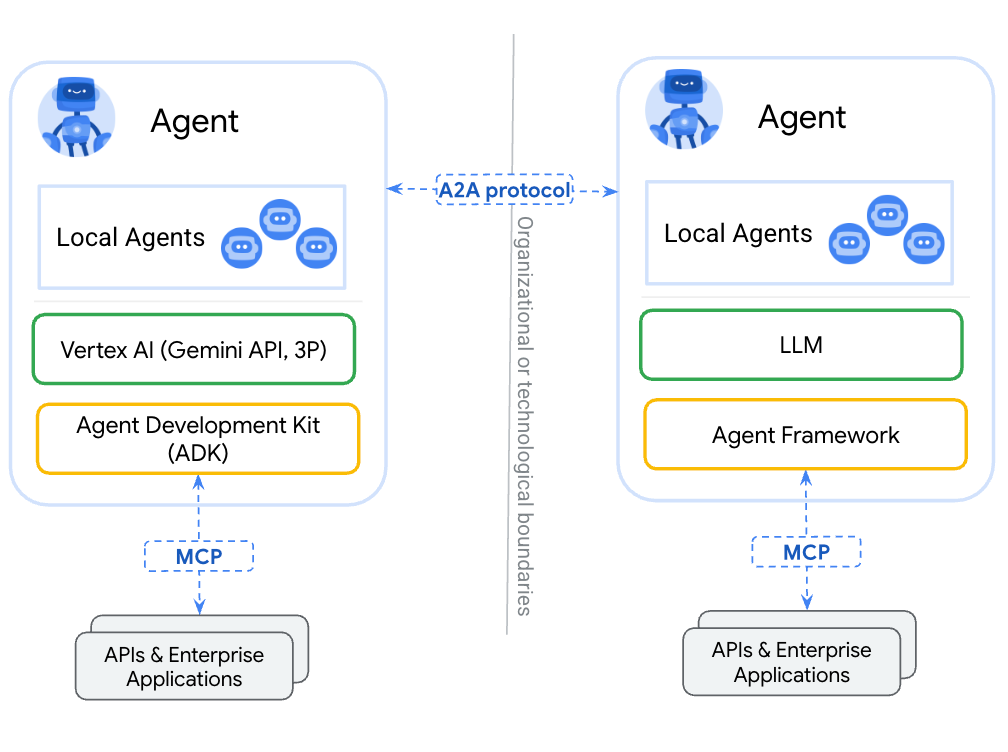
The key difference between wrapping an agent as a tool (via MCP) vs exposing it via A2A: tools are stateless and perform single functions, while A2A agents can reason, maintain state, and handle multi-turn interactions like negotiation or clarification. An agent exposed via A2A retains its full capabilities rather than being reduced to a function call.
A2A defines three core concepts:
- Agent Card — a JSON document describing what an agent does, its skills, and its endpoint. Other agents fetch this card to discover capabilities.
- Message — a user or agent request sent to an A2A endpoint, triggering a task.
- Task — a unit of work with a lifecycle (submitted → working → completed/failed) and artifacts containing the results.
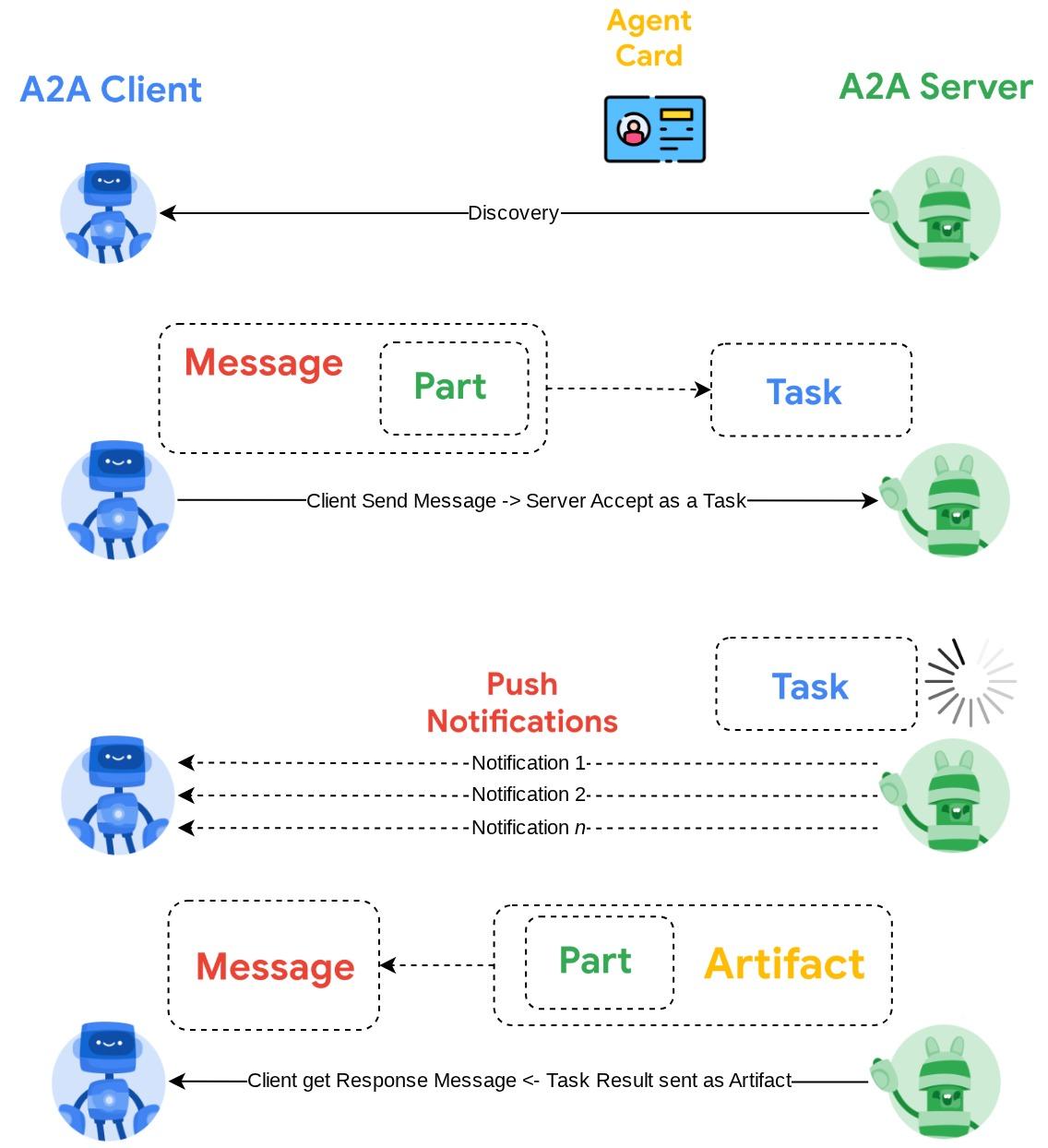
For a deeper dive, see What is A2A?
Gemini Enterprise Agent Platform Runtime
Agent Runtime is a fully managed service on Google Cloud for deploying, scaling, and managing AI agents in production with Enterprise security features (E.g. VPC Service Controls, CMEK ). It handles infrastructure so you can focus on agent logic.
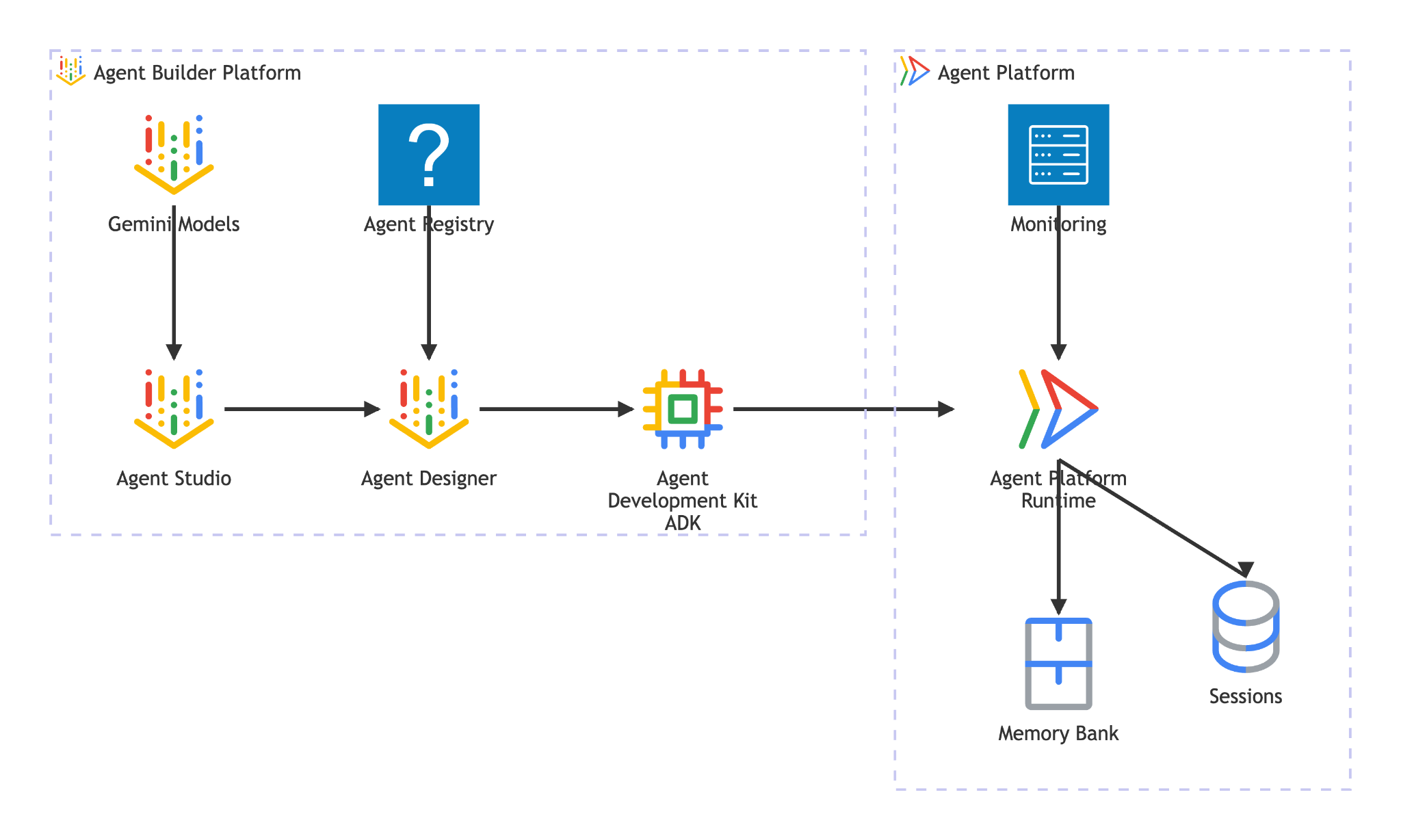
Agent Runtime provides:
- Managed deployment — deploy agents built with ADK, LangGraph, or any Python framework with a single SDK call
- A2A hosting — deploy agents as A2A-compliant endpoints with automatic agent card serving and authenticated access
- Persistent sessions —
VertexAiSessionServicestores conversation history and state across requests - Auto-scaling — scales from zero to handle traffic, with no infrastructure management
- Observability — built-in tracing, logging, and monitoring via Google Cloud's observability stack
- and many more features, see this documentation for details
In this codelab, you deploy the reservation agent to Agent Runtime. The deployment process serializes (pickles) your agent code and uploads it. Agent Runtime provisions a serverless endpoint that serves the A2A protocol — other agents (or clients) interact with it via standard HTTP calls, authenticated with Google Cloud credentials.
5. Build the Reservation Agent
This step creates a new ADK agent that handles restaurant reservations using session state. The agent supports three operations — create, check, and cancel — with the phone number as the lookup key. All reservation data lives in ADK's session state
Scaffold the agent
Use adk create to generate the agent directory structure with the correct model and project configuration:
source .env
uv run adk create reservation_agent \
    --model gemini-3.5-flash \
    --project ${GOOGLE_CLOUD_PROJECT} \
    --region ${GOOGLE_CLOUD_LOCATION}
This creates a reservation_agent/ directory with __init__.py, agent.py, and .env pre-configured for Gemini model on Agent Platform.
adk-a2a-agent-runtime-starter/
├── reservation_agent/
│   ├── __init__.py
│   ├── agent.py
│   └── .env
├── logs
├── scripts
└── ...
Next, let's update the agent code
Write the agent code
Open the generated agent file:
cloudshell edit reservation_agent/agent.py
Then replace the contents with the following:
# reservation_agent/agent.py
import os
from functools import cached_property
from typing import Any

from google.adk.agents import LlmAgent
from google.adk.models.google_llm import Gemini
from google.adk.tools import ToolContext
from google.genai import Client, types

# App-scoped state prefix ensures reservations persist across all sessions.
# See https://adk.dev/sessions/state/ for state scope details.
STATE_PREFIX = "app:reservation:"


class GeminiGlobal(Gemini):
    """Gemini with location pinned to 'global'.

    A2aAgent.set_up() on Agent Platform Runtime SDK overwrites GOOGLE_CLOUD_LOCATION with the Agent Platform Runtime
    region (e.g. us-central1), but the Gemini 3-family endpoint requires 'global'.
    """

    @cached_property
    def api_client(self) -> Client:
        project = os.getenv("GOOGLE_CLOUD_PROJECT")
        return Client(
            project=project,
            location="global",
            http_options=types.HttpOptions(
                headers=self._tracking_headers(),
                retry_options=self.retry_options,
            ),
        )


def create_reservation(
    phone_number: str,
    name: str,
    party_size: int,
    date: str,
    time: str,
    tool_context: ToolContext,
) -> dict:
    """Create a new restaurant reservation.

    Args:
        phone_number: Customer's phone number, used as the reservation ID.
        name: Name for the reservation.
        party_size: Number of guests.
        date: Reservation date (e.g., '2025-07-15' or 'this Friday').
        time: Reservation time (e.g., '7:00 PM').

    Returns:
        Confirmation of the reservation.
    """
    reservation = {
        "name": name,
        "party_size": party_size,
        "date": date,
        "time": time,
        "status": "confirmed",
    }
    tool_context.state[f"{STATE_PREFIX}{phone_number}"] = reservation
    return {
        "status": "confirmed",
        "message": f"Reservation created for {name}, party of {party_size} on {date} at {time}. Phone: {phone_number}.",
    }


def check_reservation(phone_number: str, tool_context: ToolContext) -> dict:
    """Look up an existing reservation by phone number.

    Args:
        phone_number: The phone number used when the reservation was created.
        tool_context: ADK tool context for state access.

    Returns:
        The reservation details, or a message if not found.
    """
    reservation = tool_context.state.get(f"{STATE_PREFIX}{phone_number}")
    if reservation:
        return {"found": True, "reservation": reservation}
    return {"found": False, "message": f"No reservation found for {phone_number}."}


def cancel_reservation(phone_number: str, tool_context: ToolContext) -> dict:
    """Cancel an existing reservation by phone number.

    Args:
        phone_number: The phone number used when the reservation was created.
        tool_context: ADK tool context for state access.

    Returns:
        Confirmation of cancellation, or a message if not found.
    """
    key = f"{STATE_PREFIX}{phone_number}"
    reservation = tool_context.state.get(key)
    if not reservation:
        return {
            "success": False,
            "message": f"No reservation found for {phone_number}.",
        }
    if reservation.get("status") == "cancelled":
        return {
            "success": False,
            "message": f"Reservation for {phone_number} is already cancelled.",
        }
    reservation["status"] = "cancelled"
    tool_context.state[key] = reservation
    return {
        "success": True,
        "message": f"Reservation for {reservation['name']} ({phone_number}) has been cancelled.",
    }


root_agent = LlmAgent(
    name="reservation_agent",
    model=GeminiGlobal(model="gemini-3.5-flash"),
    instruction="""You are a friendly reservation assistant for "Foodie Finds" restaurant.
You help diners create, check, and cancel table reservations.

When a diner wants to make a reservation, collect these details:
- Name for the reservation
- Phone number (used as the reservation ID)
- Party size (number of guests)
- Date
- Time

Always confirm the details before creating the reservation.
When checking or cancelling, ask for the phone number if not provided.
Be concise and professional.""",
    tools=[create_reservation, check_reservation, cancel_reservation],
)
6. Prepare the A2A Server Configuration
Define the A2A agent card
The agent card is a structured description of your agent's capabilities — other agents and clients use it to discover what your agent does. Create the card configuration:
cloudshell edit reservation_agent/a2a_config.py
Copy the following into reservation_agent/a2a_config.py:
# reservation_agent/a2a_config.py
from a2a.types import AgentSkill
from vertexai.preview.reasoning_engines.templates.a2a import create_agent_card

reservation_skill = AgentSkill(
    id="manage_reservations",
    name="Restaurant Reservations",
    description="Create, check, and cancel table reservations at Foodie Finds restaurant",
    tags=["reservations", "restaurant", "booking"],
    examples=[
        "Book a table for 4 on Friday at 7pm",
        "Check reservation for 555-0101",
        "Cancel my reservation, phone number 555-0101",
    ],
    input_modes=["text/plain"],
    output_modes=["text/plain"],
)

agent_card = create_agent_card(
    agent_name="Reservation Agent",
    description="Handles restaurant table reservations — create, check, and cancel bookings for Foodie Finds restaurant.",
    skills=[reservation_skill],
)
Create the A2A executor
The executor bridges the A2A protocol and the ADK agent. It receives A2A requests, runs them through the ADK agent, and returns results as A2A tasks:
cloudshell edit reservation_agent/executor.py
Copy the following into reservation_agent/executor.py:
# reservation_agent/executor.py
import os
from typing import NoReturn

import vertexai
from a2a.server.agent_execution import AgentExecutor, RequestContext
from a2a.server.events import EventQueue
from a2a.server.tasks import TaskUpdater
from a2a.types import TaskState, TextPart, UnsupportedOperationError
from a2a.utils import new_agent_text_message
from a2a.utils.errors import ServerError
from google.adk.artifacts import InMemoryArtifactService
from google.adk.memory.in_memory_memory_service import InMemoryMemoryService
from google.adk.runners import Runner
from google.adk.sessions import InMemorySessionService, VertexAiSessionService
from google.genai import types

from reservation_agent.agent import root_agent as reservation_agent


class ReservationAgentExecutor(AgentExecutor):
    """Bridge between the A2A protocol and the ADK reservation agent.

    Uses InMemorySessionService for local testing, VertexAiSessionService
    when deployed to Agent Runtime (detected via GOOGLE_CLOUD_AGENT_ENGINE_ID).
    """

    def __init__(self) -> None:
        self.agent = None
        self.runner = None

    def _init_agent(self) -> None:
        if self.agent is not None:
            return

        self.agent = reservation_agent
        engine_id = os.environ.get("GOOGLE_CLOUD_AGENT_ENGINE_ID")

        if engine_id:
            project = os.environ.get("GOOGLE_CLOUD_PROJECT")
            location = os.environ.get("GOOGLE_CLOUD_LOCATION", "us-central1")
            vertexai.init(project=project, location=location)
            session_service = VertexAiSessionService(
                project=project, location=location, agent_engine_id=engine_id,
            )
            app_name = engine_id
        else:
            session_service = InMemorySessionService()
            app_name = self.agent.name

        self.runner = Runner(
            app_name=app_name,
            agent=self.agent,
            artifact_service=InMemoryArtifactService(),
            session_service=session_service,
            memory_service=InMemoryMemoryService(),
        )

    async def execute(self, context: RequestContext, event_queue: EventQueue) -> None:
        if self.agent is None:
            self._init_agent()

        query = context.get_user_input()
        updater = TaskUpdater(event_queue, context.task_id, context.context_id)
        user_id = context.message.metadata.get("user_id", "a2a-user") if context.message.metadata else "a2a-user"

        if not context.current_task:
            await updater.submit()
        await updater.start_work()

        try:
            session = await self._get_or_create_session(context.context_id, user_id)
            content = types.Content(role="user", parts=[types.Part(text=query)])

            async for event in self.runner.run_async(
                session_id=session.id, user_id=user_id, new_message=content,
            ):
                if event.is_final_response():
                    parts = event.content.parts
                    answer = " ".join(p.text for p in parts if p.text) or "No response."
                    await updater.add_artifact([TextPart(text=answer)], name="answer")
                    await updater.complete()
                    break
        except Exception as e:
            await updater.update_status(
                TaskState.failed, message=new_agent_text_message(f"Error: {e!s}"),
            )
            raise

    async def _get_or_create_session(self, context_id: str, user_id: str):
        app_name = self.runner.app_name
        if context_id:
            session = await self.runner.session_service.get_session(
                app_name=app_name, session_id=context_id, user_id=user_id,
            )
            if session:
                return session
        session = await self.runner.session_service.create_session(
            app_name=app_name, user_id=user_id, session_id=context_id,
        )
        return session

    async def cancel(self, context: RequestContext, event_queue: EventQueue) -> NoReturn:
        raise ServerError(error=UnsupportedOperationError())
The executor auto-detects its environment: when GOOGLE_CLOUD_AGENT_ENGINE_ID is set (Agent Runtime injects this at deploy time), it uses VertexAiSessionService for persistent sessions. Locally, it falls back to InMemorySessionService.
Your reservation_agent directory should now contain:
reservation_agent/
├── __init__.py
├── agent.py
├── a2a_config.py
├── executor.py
└── .env
7. Preparing A2A Agent using Agent Platform SDK and Test Locally
This step wraps the reservation agent as an A2A-compliant agent using the Agent Platform SDK's ( SDK name is still using vertex term for backward compatibility ) A2aAgent class, then tests the full A2A protocol flow locally — agent card retrieval, message sending, and task retrieval. This is the same A2aAgent object you deploy to Agent Runtime in the next step.
Add dependencies
Install the Agent Platform SDK with Agent Runtime and ADK support, plus the A2A SDK:
uv add "google-cloud-aiplatform[agent_engines,adk]==1.149.0" "a2a-sdk==0.3.26"
Understand the A2A components
Wrapping an ADK agent for A2A requires three components:
- Agent Card — a "business card" that describes the agent's capabilities, skills, and endpoint URL. Other agents use this to discover what your agent does.
- Agent Executor — the bridge between the A2A protocol and your ADK agent's logic. It receives A2A requests, runs them through the ADK agent, and returns results as A2A tasks.
- A2aAgent — the Agent Platform SDK class that combines the card and executor into a deployable unit.
Create the test script
Create the following script to test locally
cloudshell edit scripts/test_a2a_agent_local.py
Copy the following into scripts/test_a2a_agent_local.py:
# scripts/test_a2a_agent_local.py
import asyncio
import json
import os
from pprint import pprint

from dotenv import load_dotenv
from starlette.requests import Request
from vertexai.preview.reasoning_engines import A2aAgent

from reservation_agent.a2a_config import agent_card
from reservation_agent.executor import ReservationAgentExecutor

load_dotenv()


# --- Helper functions for building mock requests ---

def receive_wrapper(data: dict):
    async def receive():
        byte_data = json.dumps(data).encode("utf-8")
        return {"type": "http.request", "body": byte_data, "more_body": False}
    return receive

def build_post_request(data: dict = None, path_params: dict = None) -> Request:
    scope = {"type": "http", "http_version": "1.1", "headers": [(b"content-type", b"application/json")], "app": None}
    if path_params:
        scope["path_params"] = path_params
    return Request(scope, receive_wrapper(data))

def build_get_request(path_params: dict) -> Request:
    scope = {"type": "http", "http_version": "1.1", "query_string": b"", "app": None}
    if path_params:
        scope["path_params"] = path_params
    async def receive():
        return {"type": "http.disconnect"}
    return Request(scope, receive)


# --- Helper: poll for task completion ---

async def wait_for_task(a2a_agent, task_id, max_retries=30):
    """Poll on_get_task until the task reaches a terminal state."""
    for _ in range(max_retries):
        request = build_get_request({"id": task_id})
        result = await a2a_agent.on_get_task(request=request, context=None)
        state = result.get("status", {}).get("state", "")
        if state in ["completed", "failed"]:
            return result
        await asyncio.sleep(1)
    return result


def print_task_answer(result):
    """Extract and print the answer from task artifacts."""
    print(f"Status: {result.get('status', {}).get('state')}")
    for artifact in result.get("artifacts", []):
        if artifact.get("parts") and "text" in artifact["parts"][0]:
            print(f"Answer: {artifact['parts'][0]['text']}")


# --- Local test ---

async def main():
    # Create and set up the A2A agent locally

    a2a_agent = A2aAgent(agent_card=agent_card, agent_executor_builder=ReservationAgentExecutor)
    a2a_agent.set_up()

    # 1. Get agent card
    print("=" * 50)
    print("1. Retrieving agent card...")
    print("=" * 50)
    request = build_get_request(None)
    card_response = await a2a_agent.handle_authenticated_agent_card(request=request, context=None)
    print(f"Agent: {card_response.get('name')}")
    print(f"Skills: {[s.get('name') for s in card_response.get('skills', [])]}")

    # 2. Create a reservation
    print("\n" + "=" * 50)
    print("2. Creating a reservation...")
    print("=" * 50)
    message_data = {
        "message": {
            "messageId": f"msg-{os.urandom(4).hex()}",
            "content": [{"text": "Book a table for 2 on Saturday at 6pm. Name: Bob, Phone: 555-0202"}],
            "role": "ROLE_USER",
        },
    }
    request = build_post_request(message_data)
    response = await a2a_agent.on_message_send(request=request, context=None)
    task_id = response["task"]["id"]
    context_id = response["task"].get("contextId")
    print(f"Task ID: {task_id}")

    # 3. Wait for result
    print("\n" + "=" * 50)
    print("3. Waiting for task result...")
    print("=" * 50)
    result = await wait_for_task(a2a_agent, task_id)
    print_task_answer(result)

    # 4. Check the reservation (same context for session continuity)
    print("\n" + "=" * 50)
    print("4. Checking the reservation...")
    print("=" * 50)
    check_data = {
        "message": {
            "messageId": f"msg-{os.urandom(4).hex()}",
            "content": [{"text": "Check the reservation for 555-0202"}],
            "role": "ROLE_USER",
            "contextId": context_id,
        },
    }
    request = build_post_request(check_data)
    check_response = await a2a_agent.on_message_send(request=request, context=None)
    check_result = await wait_for_task(a2a_agent, check_response["task"]["id"])
    print_task_answer(check_result)

    # 5. Cancel the reservation
    print("\n" + "=" * 50)
    print("5. Cancelling the reservation...")
    print("=" * 50)
    cancel_data = {
        "message": {
            "messageId": f"msg-{os.urandom(4).hex()}",
            "content": [{"text": "Cancel the reservation for 555-0202"}],
            "role": "ROLE_USER",
            "contextId": context_id,
        },
    }
    request = build_post_request(cancel_data)
    cancel_response = await a2a_agent.on_message_send(request=request, context=None)
    cancel_result = await wait_for_task(a2a_agent, cancel_response["task"]["id"])
    print_task_answer(cancel_result)

    print("\n" + "=" * 50)
    print("All tests passed!")
    print("=" * 50)


if __name__ == "__main__":
    asyncio.run(main())
The test script imports the agent card and executor you created in the previous step — no duplication. It will create a local A2aAgent, simulate A2A protocol calls via mock HTTP requests, and verify all three reservation operations.
Since no GOOGLE_CLOUD_AGENT_ENGINE_ID is set locally, the executor uses InMemorySessionService. When deployed to Agent Runtime, the same executor auto-switches to VertexAiSessionService for persistent sessions.
Run the test
PYTHONPATH=. uv run python scripts/test_a2a_agent_local.py
The output walks through five stages:
- Agent card — retrieves the agent's capabilities and skills
- Create reservation — books a table and returns a task with the confirmation
- Get task result — retrieves the completed task with the answer
- Check reservation — looks up the reservation by phone number
- Cancel reservation — cancels the booking and confirms
Example of the output like shown below
==================================================
1. Retrieving agent card...
==================================================
Agent: Reservation Agent
Skills: ['Restaurant Reservations']

==================================================
2. Creating a reservation...
==================================================
Task ID: f7f7004d-cfea-49c2-b57d-5bca9959e193

==================================================
3. Waiting for task result...
==================================================
Status: TASK_STATE_COMPLETED
Answer: Your reservation for Bob, party of 2, on Saturday at 6:00 PM has been confirmed. The phone number associated is 555-0202.

==================================================
4. Checking the reservation...
==================================================
Status: TASK_STATE_COMPLETED
Answer: I found a reservation for Bob, party of 2, on Saturday at 6:00 PM. The reservation status is confirmed.

==================================================
5. Cancelling the reservation...
==================================================
Status: TASK_STATE_COMPLETED
Answer: Your reservation for Bob (555-0202) has been cancelled.

==================================================
All tests passed!
==================================================
At this point you've verified: the A2A agent card describes the correct skills, all three reservation operations work through the A2A protocol's message/task flow, and state persists across messages within the same context.
8. Deploy the Reservation Agent to Agent Runtime
This step deploys the reservation agent to Gemini Enterprise Agent Platform Runtime — a fully managed, serverless platform that hosts your agent and exposes it as a secure A2A endpoint. After deployment, any authorized client can discover and interact with the agent via standard A2A HTTP endpoints.
Create the staging bucket
Create a Cloud Storage bucket for Agent Runtime staging. Agent Runtime uses this bucket to upload your agent's code and dependencies during deployment:
STAGING_BUCKET="${GOOGLE_CLOUD_PROJECT}-adk-a2a-agent-runtime"
gsutil mb -l $REGION -p $GOOGLE_CLOUD_PROJECT gs://$STAGING_BUCKET 2>/dev/null || echo "Bucket already exists"
echo "STAGING_BUCKET=$STAGING_BUCKET" >> .env
source .env
Create the deployment script
Next, we will need to prepare the deployment script
cloudshell edit scripts/deploy_a2a_agent_runtime.py
Copy the following into scripts/deploy_a2a_agent_runtime.py:
# scripts/deploy_a2a_agent_runtime.py
import os
from pathlib import Path

import vertexai
from dotenv import load_dotenv
from google.genai import types
from vertexai.preview.reasoning_engines import A2aAgent

from reservation_agent.a2a_config import agent_card
from reservation_agent.executor import ReservationAgentExecutor

load_dotenv()

PROJECT_ID = os.environ["GOOGLE_CLOUD_PROJECT"]
REGION = os.environ["REGION"]
STAGING_BUCKET = os.environ.get("STAGING_BUCKET", f"{PROJECT_ID}-adk-a2a-agent-runtime")
BUCKET_URI = f"gs://{STAGING_BUCKET}"

a2a_agent = A2aAgent(
    agent_card=agent_card,
    agent_executor_builder=ReservationAgentExecutor,
)


def main():
    vertexai.init(project=PROJECT_ID, location=REGION, staging_bucket=BUCKET_URI)
    client = vertexai.Client(
        project=PROJECT_ID,
        location=REGION,
        http_options=types.HttpOptions(api_version="v1beta1"),
    )

    print("Deploying Reservation Agent to Agent Runtime...")
    print("This may take 3-5 minutes.")

    remote_agent = client.agent_engines.create(
        agent=a2a_agent,
        config={
            "display_name": agent_card.name,
            "description": agent_card.description,
            "requirements": [
                "google-cloud-aiplatform[agent_engines,adk]==1.149.0",
                "a2a-sdk==0.3.26",
                "google-adk==1.29.0",
                "cloudpickle",
                "pydantic"
            ],
            "extra_packages": [
                "./reservation_agent",
            ],
            "http_options": {
                "api_version": "v1beta1",
            },
            "staging_bucket": BUCKET_URI,
        },
    )

    resource_name = remote_agent.api_resource.name
    print(f"\nDeployment complete!")
    print(f"Resource name: {resource_name}")

    env_path = Path(".env")
    lines = env_path.read_text().splitlines() if env_path.exists() else []
    lines = [l for l in lines if not l.startswith("RESERVATION_AGENT_RESOURCE_NAME=")]
    lines.append(f"RESERVATION_AGENT_RESOURCE_NAME={resource_name}")
    env_path.write_text("\n".join(lines) + "\n")
    print("Written RESERVATION_AGENT_RESOURCE_NAME to .env")


if __name__ == "__main__":
    main()
The deploy script imports the same agent_card and ReservationAgentExecutor used in local testing — no code duplication. Agent Runtime serializes (pickles) the A2aAgent object along with its dependencies for deployment. At the end of the deployment script, it will write the RESERVATION_AGENT_RESOURCE_NAME value to the .env file
Deploy to Agent Runtime
Run the deployment script:
PYTHONPATH=. uv run python scripts/deploy_a2a_agent_runtime.py
Deployment takes 3-5 minutes. The script provisions a serverless endpoint on Agent Runtime that hosts the reservation agent. After successful deployment you will see output similar like shown below
Deploying Reservation Agent to Agent Runtime...
This may take 3-5 minutes.

Deployment complete!
Resource name: projects/your-project-number/locations/us-central1/reasoningEngines/your-agent-deployment-unique-id
Written RESERVATION_AGENT_RESOURCE_NAME to .env
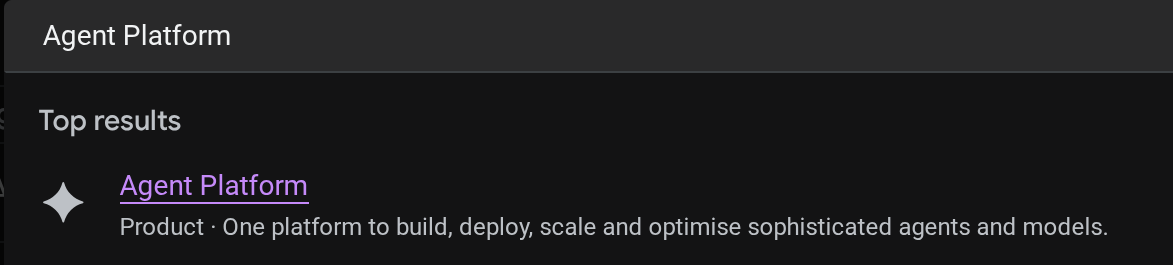
You can view the deployed agent in the cloud console. Search for Agent Platform in the console search bar
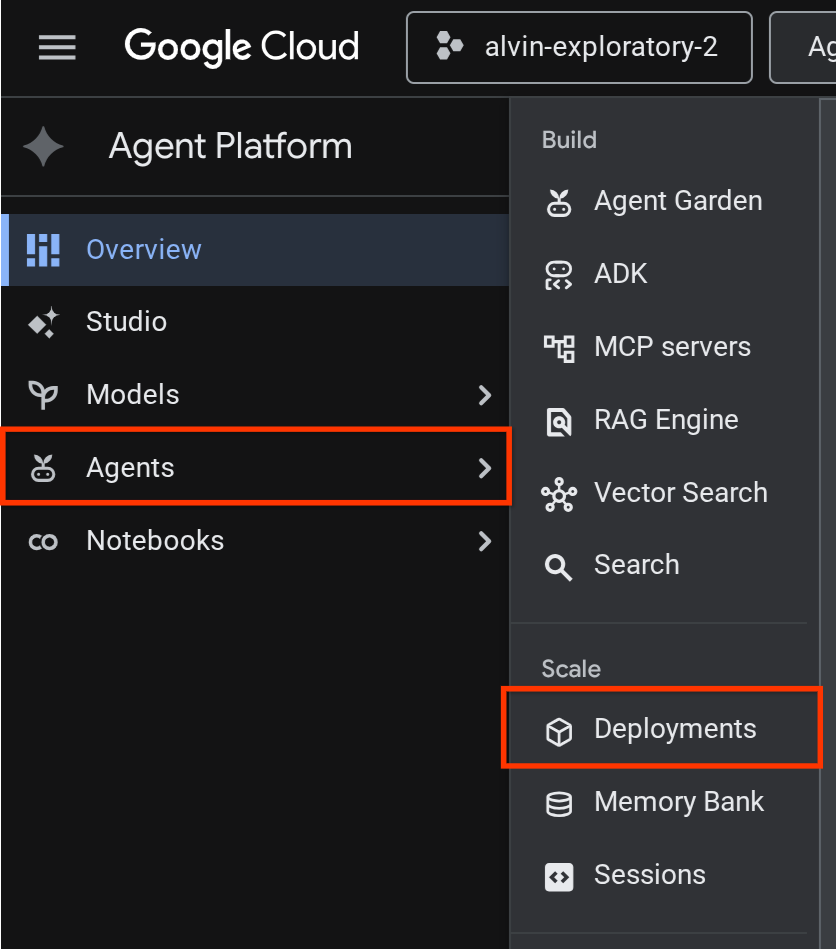
Then, on the left tab, hover to Agents and select Deployments
You will see the Reservation Agent listed on the deployment list like shown below

Test the deployed agent
Now, we're ready to test the deployed agent, create a test script for the deployed agent:
cloudshell edit scripts/test_a2a_agent_runtime.py
Copy the following into scripts/test_a2a_agent_runtime.py:
# scripts/test_a2a_agent_runtime.py
import asyncio
import os
import time

import vertexai
from a2a.types import TaskState
from dotenv import load_dotenv
from google.genai import types

load_dotenv()

PROJECT_ID = os.environ["GOOGLE_CLOUD_PROJECT"]
REGION = os.environ["REGION"]
RESOURCE_NAME = os.environ["RESERVATION_AGENT_RESOURCE_NAME"]


async def main():
    vertexai.init(project=PROJECT_ID, location=REGION)
    client = vertexai.Client(
        project=PROJECT_ID, location=REGION,
        http_options=types.HttpOptions(api_version="v1beta1"),
    )

    agent = client.agent_engines.get(name=RESOURCE_NAME)

    # 1. Get agent card
    print("=" * 50)
    print("1. Retrieving agent card...")
    print("=" * 50)
    card = await agent.handle_authenticated_agent_card()
    print(f"Agent: {card.name}")
    print(f"URL: {card.url}")
    print(f"Skills: {[s.name for s in card.skills]}")

    # 2. Send a reservation request
    print("\n" + "=" * 50)
    print("2. Sending reservation request...")
    print("=" * 50)
    message_data = {
        "messageId": "msg-remote-001",
        "role": "user",
        "parts": [{"kind": "text", "text": "Book a table for 3 on Sunday at noon. Name: Carol, Phone: 555-0303"}],
    }
    response = await agent.on_message_send(**message_data)

    task_object = None
    for chunk in response:
        if isinstance(chunk, tuple) and len(chunk) > 0 and hasattr(chunk[0], "id"):
            task_object = chunk[0]
            break

    task_id = task_object.id
    print(f"Task ID: {task_id}")
    print(f"Status: {task_object.status.state}")

    # 3. Poll for result
    print("\n" + "=" * 50)
    print("3. Waiting for result...")
    print("=" * 50)
    result = None
    for _ in range(30):
        try:
            result = await agent.on_get_task(id=task_id)
            if result.status.state in [TaskState.completed, TaskState.failed]:
                break
        except Exception:
            pass
        time.sleep(1)

    print(f"Final status: {result.status.state}")
    if result.artifacts:
        for artifact in result.artifacts:
            if artifact.parts and hasattr(artifact.parts[0], "root") and hasattr(artifact.parts[0].root, "text"):
                print(f"Answer: {artifact.parts[0].root.text}")

    print("\n" + "=" * 50)
    print("Remote agent test passed!")
    print("=" * 50)


if __name__ == "__main__":
    asyncio.run(main())
Then, let's run the test
source .env
uv run python scripts/test_a2a_agent_runtime.py
The output shows the agent card with the "Restaurant Reservations" skill, followed by the task completing with a reservation confirmation.
==================================================
1. Retrieving agent card...
==================================================
Agent: Reservation Agent
URL: https://us-central1-aiplatform.googleapis.com/v1beta1/projects/your-project-id/locations/us-central1/reasoningEngines/your-agent-unique-id/a2a
Skills: ['Restaurant Reservations']

==================================================
2. Sending reservation request...
==================================================
Task ID: b34585d0-5f03-4cb0-85a3-40710a0d224d
Status: TaskState.completed

==================================================
3. Waiting for result...
==================================================
Final status: TaskState.completed
Answer: Your reservation for Carol, party of 3 on Sunday at noon with phone number 555-0303 is confirmed.

==================================================
Remote agent test passed!
==================================================
The reservation agent is now running successfully as a managed A2A endpoint on Agent Runtime.
9. Integrate A2A Reservation Agent with Root Restaurant Agent
This step upgrades the restaurant agent to use the deployed reservation agent as a remote A2A sub-agent. The orchestrator runs locally while the reservation agent runs on Agent Runtime — a partial integration that validates the A2A connection before full deployment.
Resolve the A2A agent card URL
The RemoteA2aAgent needs the deployed reservation agent's card URL to discover its capabilities. Create a script that fetches this URL from Agent Runtime and writes it to the restaurant agent's .env:
cloudshell edit scripts/resolve_agent_card_url.py
Copy the following into scripts/resolve_agent_card_url.py:
# scripts/resolve_agent_card_url.py
import asyncio
import os
from pathlib import Path

import vertexai
from dotenv import load_dotenv
from google.genai import types

load_dotenv()

PROJECT_ID = os.environ["GOOGLE_CLOUD_PROJECT"]
REGION = os.environ["REGION"]
RESOURCE_NAME = os.environ["RESERVATION_AGENT_RESOURCE_NAME"]


async def main():
    vertexai.init(project=PROJECT_ID, location=REGION)
    client = vertexai.Client(
        project=PROJECT_ID, location=REGION,
        http_options=types.HttpOptions(api_version="v1beta1"),
    )

    agent = client.agent_engines.get(name=RESOURCE_NAME)
    card = await agent.handle_authenticated_agent_card()
    card_url = f"{card.url}/v1/card"

    print(f"Agent: {card.name}")
    print(f"Card URL: {card_url}")

    # Write to restaurant_agent/.env
    # Write to both restaurant_agent/.env (for adk web) and root .env (for Cloud Run deploy)
    for env_path in [Path("restaurant_agent/.env"), Path(".env")]:
        lines = env_path.read_text().splitlines() if env_path.exists() else []
        lines = [l for l in lines if not l.startswith("RESERVATION_AGENT_CARD_URL=")]
        lines.append(f"RESERVATION_AGENT_CARD_URL={card_url}")
        env_path.write_text("\n".join(lines) + "\n")
        print(f"Written RESERVATION_AGENT_CARD_URL to {env_path}")


if __name__ == "__main__":
    asyncio.run(main())
Run the script to populate the .env file with the agent card URL
uv run python scripts/resolve_agent_card_url.py
source .env
Update the restaurant agent
Open the restaurant agent file:
cloudshell edit restaurant_agent/agent.py
Then, replace the contents with the updated version that includes the remote reservation agent as a sub-agent:
# restaurant_agent/agent.py
import os

import httpx
from google.adk.agents import LlmAgent
from google.adk.agents.remote_a2a_agent import RemoteA2aAgent
from google.auth import default
from google.auth.transport.requests import Request as AuthRequest
from toolbox_adk import ToolboxToolset

TOOLBOX_URL = os.environ.get("TOOLBOX_URL", "http://127.0.0.1:5000")
RESERVATION_AGENT_CARD_URL = os.environ.get("RESERVATION_AGENT_CARD_URL", "")

toolbox = ToolboxToolset(TOOLBOX_URL)


class GoogleCloudAuth(httpx.Auth):
    """Auto-refreshing Google Cloud authentication for httpx.

    Refreshes the access token before each request if expired,
    so long-running agents never hit 401 errors.
    """

    def __init__(self):
        self.credentials, _ = default(
            scopes=["https://www.googleapis.com/auth/cloud-platform"]
        )

    def auth_flow(self, request):
        # Refresh the token if it is expired or missing
        if not self.credentials.valid:
            self.credentials.refresh(AuthRequest())

        request.headers["Authorization"] = f"Bearer {self.credentials.token}"
        yield request


reservation_remote_agent = RemoteA2aAgent(
    name="reservation_agent",
    description="Handles restaurant table reservations — create, check, and cancel bookings. Delegate to this agent when the user wants to book a table, check a reservation, or cancel a reservation.",
    agent_card=RESERVATION_AGENT_CARD_URL,
    httpx_client=httpx.AsyncClient(auth=GoogleCloudAuth(), timeout=60),
)

root_agent = LlmAgent(
    name="restaurant_agent",
    model="gemini-3.5-flash",
    instruction="""You are a friendly and knowledgeable concierge at "Foodie Finds," a restaurant. Your job:
- Help diners browse the menu by category or cuisine type.
- Provide full details about specific dishes, including ingredients, price, and dietary information.
- Recommend dishes based on natural language descriptions of what the diner is craving.
- Add new menu items when asked.
- For reservation requests (booking, checking, or cancelling tables), delegate to the reservation_agent.

When a diner asks about a specific dish by name or cuisine, use the get-item-details tool.
When a diner asks for a specific category or cuisine type, use the search-menu tool.
When a diner describes what kind of food they want — by flavor, texture, dietary needs, or cravings — use the search-menu-by-description tool for semantic search.

When in doubt between search-menu and search-menu-by-description, prefer search-menu-by-description — it searches dish descriptions and finds more relevant matches.
If a dish is not available (available is false), let the diner know and suggest similar alternatives from the search results.
Be conversational, knowledgeable, and concise.""",
    tools=[toolbox],
    sub_agents=[reservation_remote_agent],
)
The key changes from the previous version:
GoogleCloudAuth— a customhttpx.Authhandler that refreshes the Google Cloud access token before each request. Agent Runtime requires authenticated A2A calls, and tokens expire after a period of time.RemoteA2aAgentreadsRESERVATION_AGENT_CARD_URLfrom the.env(written by the resolve script) and uses the authenticatedhttpx_client- Registered as a sub-agent — ADK's orchestrator automatically delegates reservation requests to it
- Updated instruction to mention reservation delegation
Test the integrated agent locally
The starter agent required integration with MCP Toolbox, the required file should already have been provided from previous codelab or from the starter repo. We only need to ensure that the toolbox process runs properly.
If TOOLBOX_URL in your .env already points to a Cloud Run service (from the previous codelab or maybe from the starter repo's full_setup.sh), you can skip this — the agent will connect to the deployed Toolbox.
If you need a local Toolbox instead, check whether one is already running before starting a new instance:
if curl -s http://127.0.0.1:5000/api/toolsets > /dev/null 2>&1; then
  echo "Toolbox already running on port 5000"
else
  set -a; source .env; set +a
  ./toolbox --config=tools.yaml > logs/toolbox.log 2>&1 &
  echo "Toolbox started"
fi
Then, we can try to interact with the restaurant agent via ADK web dev UI
uv run adk web --allow_origins "regex:https://.*\.cloudshell\.dev" --port 8080
Open the ADK web UI using Cloud Shell Web Preview (click the Web Preview button, change port to 8080) and then select restaurant_agent
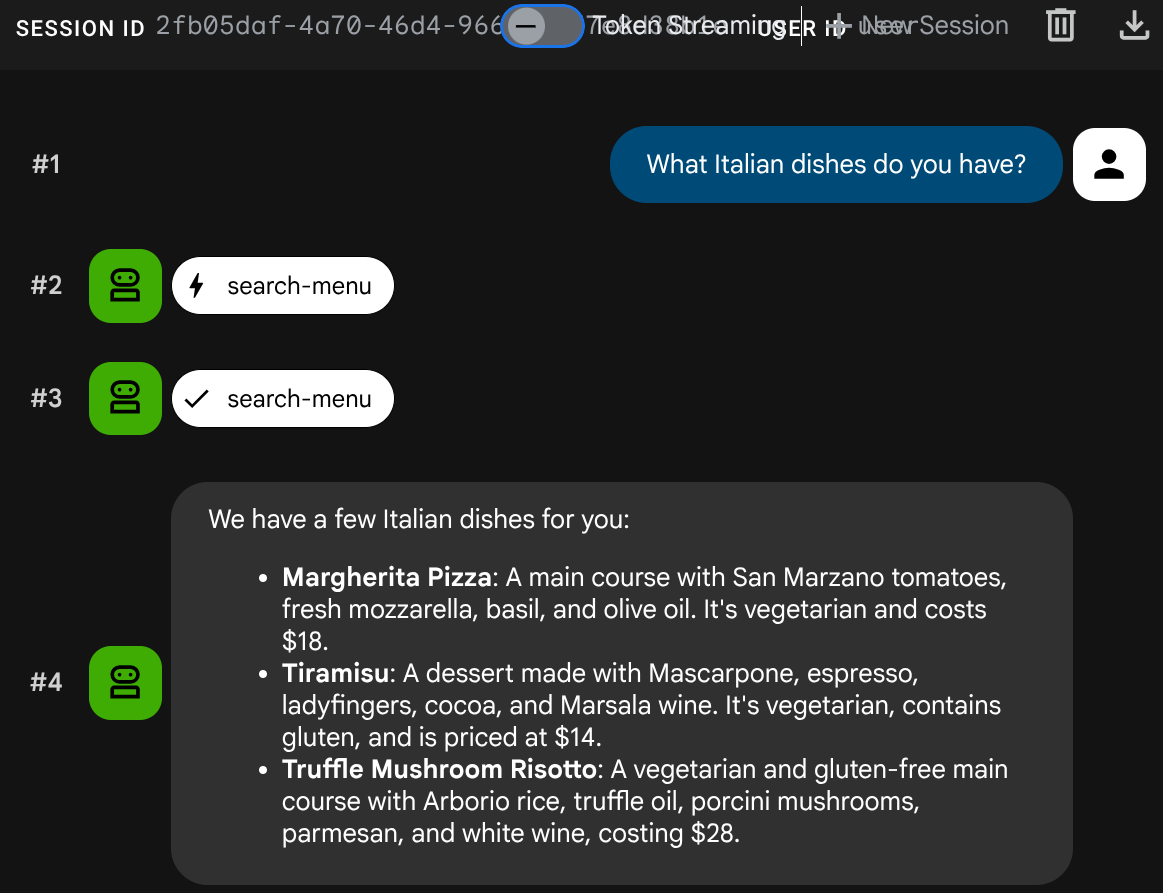
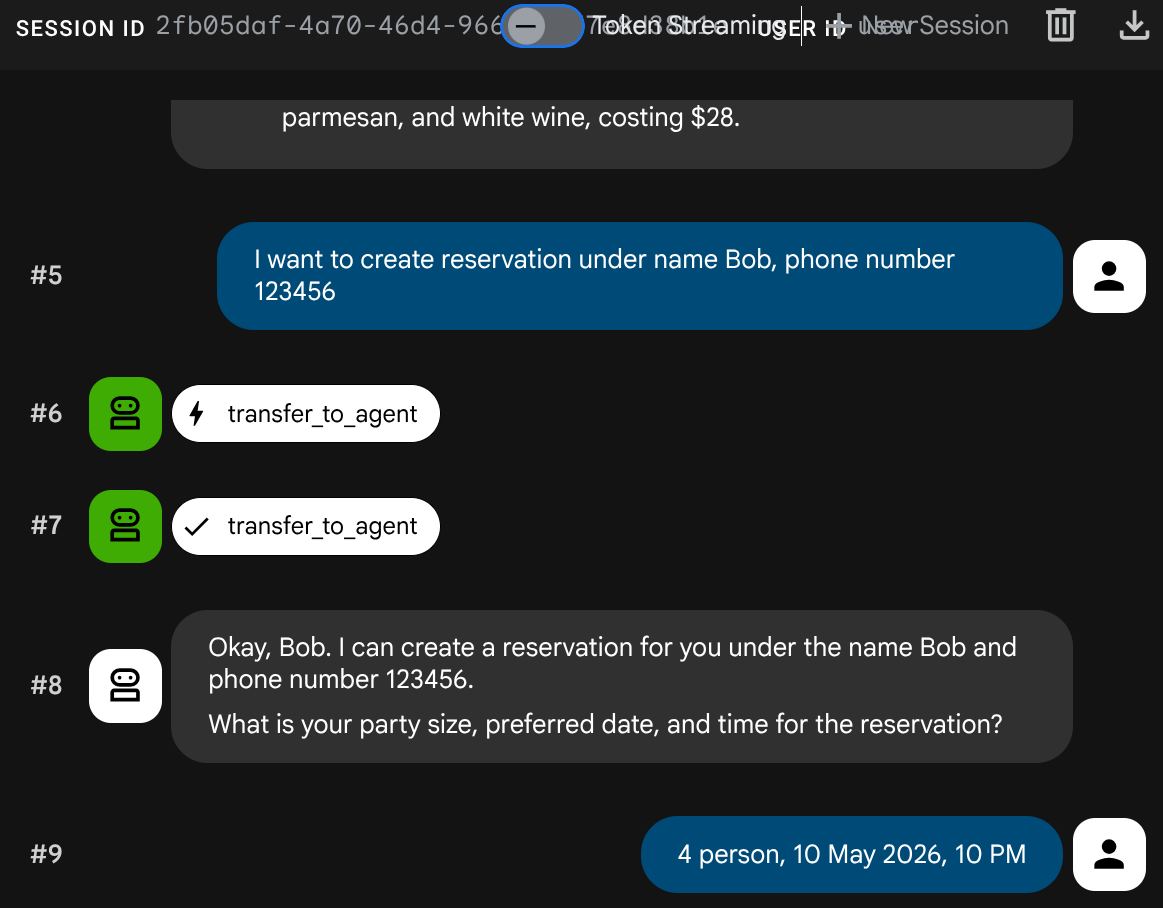
Test a mixed conversation:
Menu Query
What Italian dishes do you have?
Reservation request
I want to create reservation under name Bob, phone number 123456
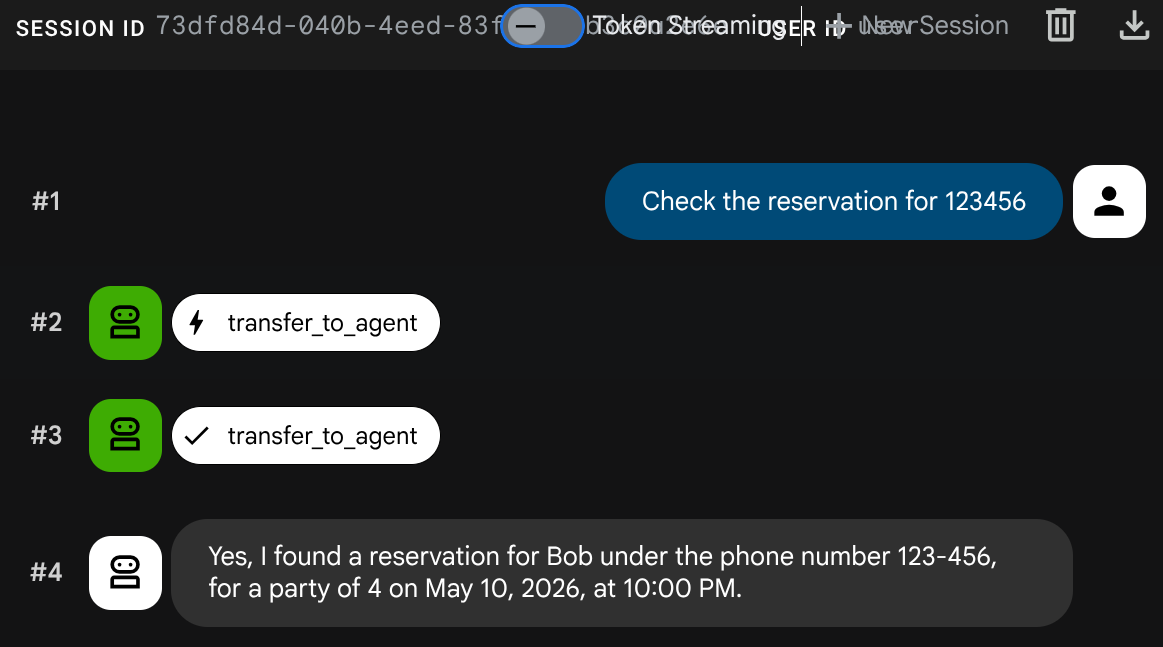
Check reservation
Create new session ( start fresh conversation ):
Check the reservation for 123456
Stop the adk web process with Ctrl+C twice. Next let's complete the system by fully deploy the agent
10. Deploy the Updated Restaurant Agent to Cloud Run
This step redeploys the restaurant agent to Cloud Run with the A2A integration, completing the fully deployed multi-agent system.
Grant permissions to access Agent Runtime
The Cloud Run service account needs permission to call Agent Runtime. Grant the roles/aiplatform.user role to the default Compute Engine service account:
PROJECT_NUMBER=$(gcloud projects describe $GOOGLE_CLOUD_PROJECT --format='value(projectNumber)')
gcloud projects add-iam-policy-binding $GOOGLE_CLOUD_PROJECT \
  --member="serviceAccount:${PROJECT_NUMBER}-compute@developer.gserviceaccount.com" \
  --role="roles/aiplatform.user"
Deploy to Cloud Run
In this setup, we assume that the restaurant agent service already exists from the previous codelab or by running the scripts/full_setup.sh if you start fresh. This redeploys with the updated code (new RemoteA2aAgent integration) and adds the reservation agent card URL as a new env var — existing env vars (TOOLBOX_URL, GOOGLE_CLOUD_PROJECT, etc.) are preserved:
gcloud run deploy restaurant-agent \
  --source . \
  --region=$REGION \
  --allow-unauthenticated \
  --update-env-vars="RESERVATION_AGENT_CARD_URL=$RESERVATION_AGENT_CARD_URL" \
  --min-instances=0 \
  --max-instances=1 \
  --memory=1Gi \
  --port=8080
Test the fully deployed system
Get the deployed service URL:
AGENT_URL=$(gcloud run services describe restaurant-agent --region=$REGION --format='value(status.url)')
echo "Agent URL: $AGENT_URL"
Open the URL in your browser. The ADK web UI loads — this is the same interface you used locally, now running on Cloud Run.
Feel free to chit chat with the agent
Menu Query
What spicy dishes do you have?
Reservation request
Book a table for 4 on Friday at 7pm. Name: Eve, Phone: 555-0505
Check reservation
Create new session ( start fresh conversation ):
Check reservation for 555-0505
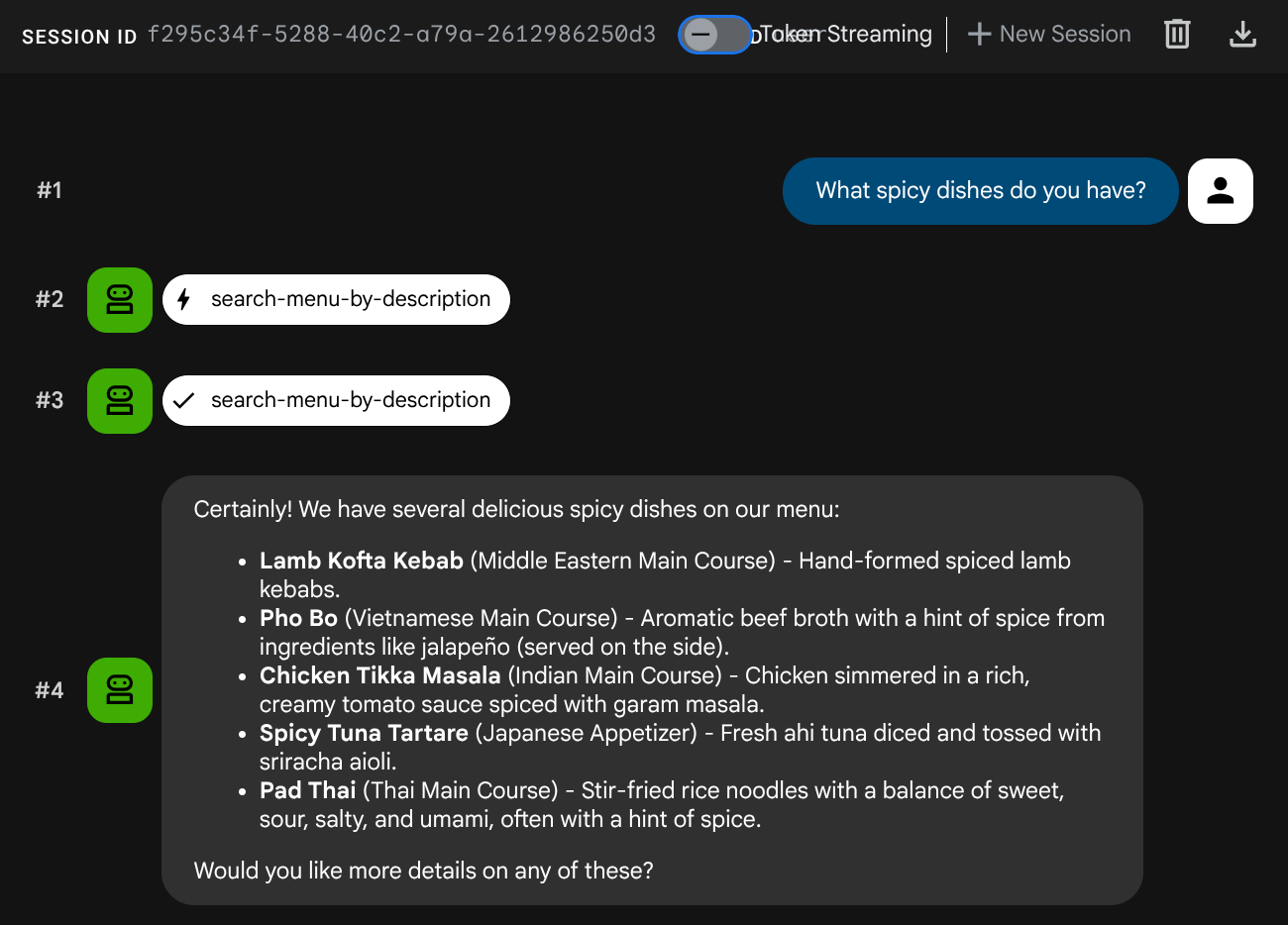
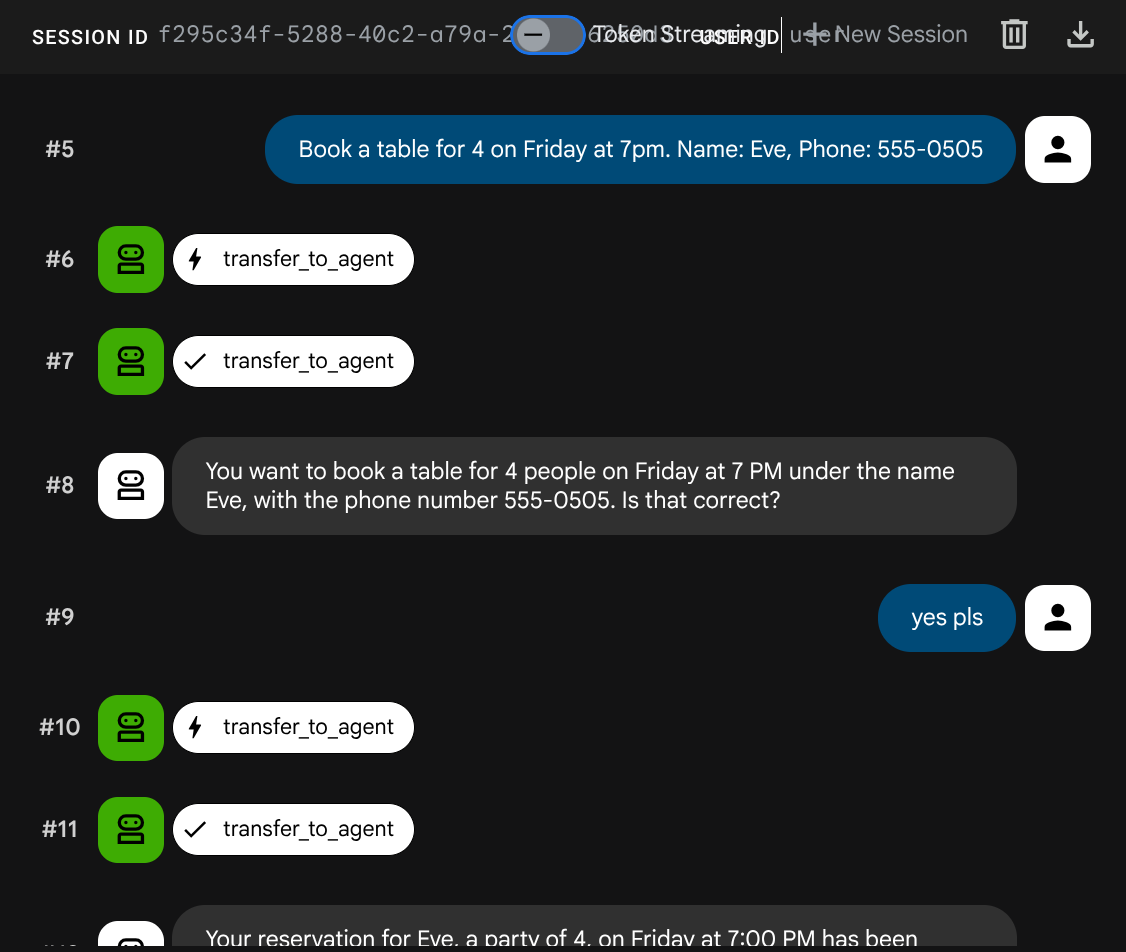
The multi-agent system is fully deployed. The restaurant agent on Cloud Run orchestrates between two backend services: MCP Toolbox for menu operations and the A2A reservation agent on Agent Runtime.
11. Congratulations!
You've built and deployed a multi-agent system using the A2A protocol on Google Cloud.
What you've learned
- Built an ADK agent that uses session state (
ToolContext) to manage reservation data without a database - Deployed an A2A agent to Agent Runtime using the Agent Platform SDK
- Consumed a remote A2A agent from another ADK agent using
RemoteA2aAgentas a sub-agent - Tested the system incrementally: local A2A → deployed A2A → partial integration → full deployment
What's next
- Explore other learning resources to build and deploy enterprise-grade agents with Gemini Enterprise Agent Ready (GEAR)
Clean up
To avoid incurring charges to your Google Cloud account, delete the resources created in this codelab.
Option 1: Delete the project (recommended)
gcloud projects delete $GOOGLE_CLOUD_PROJECT
Option 2: Delete individual resources
# Delete the Agent Runtime deployment
uv run python -c "
import vertexai
from google.genai import types
vertexai.init(project='$GOOGLE_CLOUD_PROJECT', location='$REGION')
client = vertexai.Client(
    project='$GOOGLE_CLOUD_PROJECT', location='$REGION',
    http_options=types.HttpOptions(api_version='v1beta1'),
)
agent = client.agent_engines.get(name='$RESERVATION_AGENT_RESOURCE_NAME')
agent.delete(force=True)
print('Agent Runtime deployment deleted.')
"

# Delete Cloud Run services
gcloud run services delete restaurant-agent --region=$REGION --quiet
gcloud run services delete toolbox-service --region=$REGION --quiet

# Delete Cloud SQL instance
gcloud sql instances delete $DB_INSTANCE --quiet

# Delete GCS staging bucket
gsutil rm -r gs://$STAGING_BUCKET