

1. Introduzione
Man mano che gli agenti AI assumono più responsabilità, diventa difficile mantenere, scalare ed evolvere un singolo agente che fa tutto. Funzionalità diverse spesso richiedono strategie di deployment, cicli di aggiornamento o persino team diversi.
- Il protocollo A2A (Agent2Agent) risolve il problema della comunicazione, standardizzando il modo in cui gli agenti scoprono le capacità reciproche e collaborano tra framework e organizzazioni.
- Gemini Enterprise Agent Platform Runtime risolve il problema del deployment: una piattaforma serverless completamente gestita che ospita i tuoi agenti con supporto A2A integrato, scalabilità automatica, endpoint sicuri, sessioni persistenti e gestione dell'infrastruttura zero.
Insieme, consentono di creare agenti specializzati, eseguirne il deployment come servizi A2A rilevabili e comporli in sistemi multi-agente.
Cosa creerai
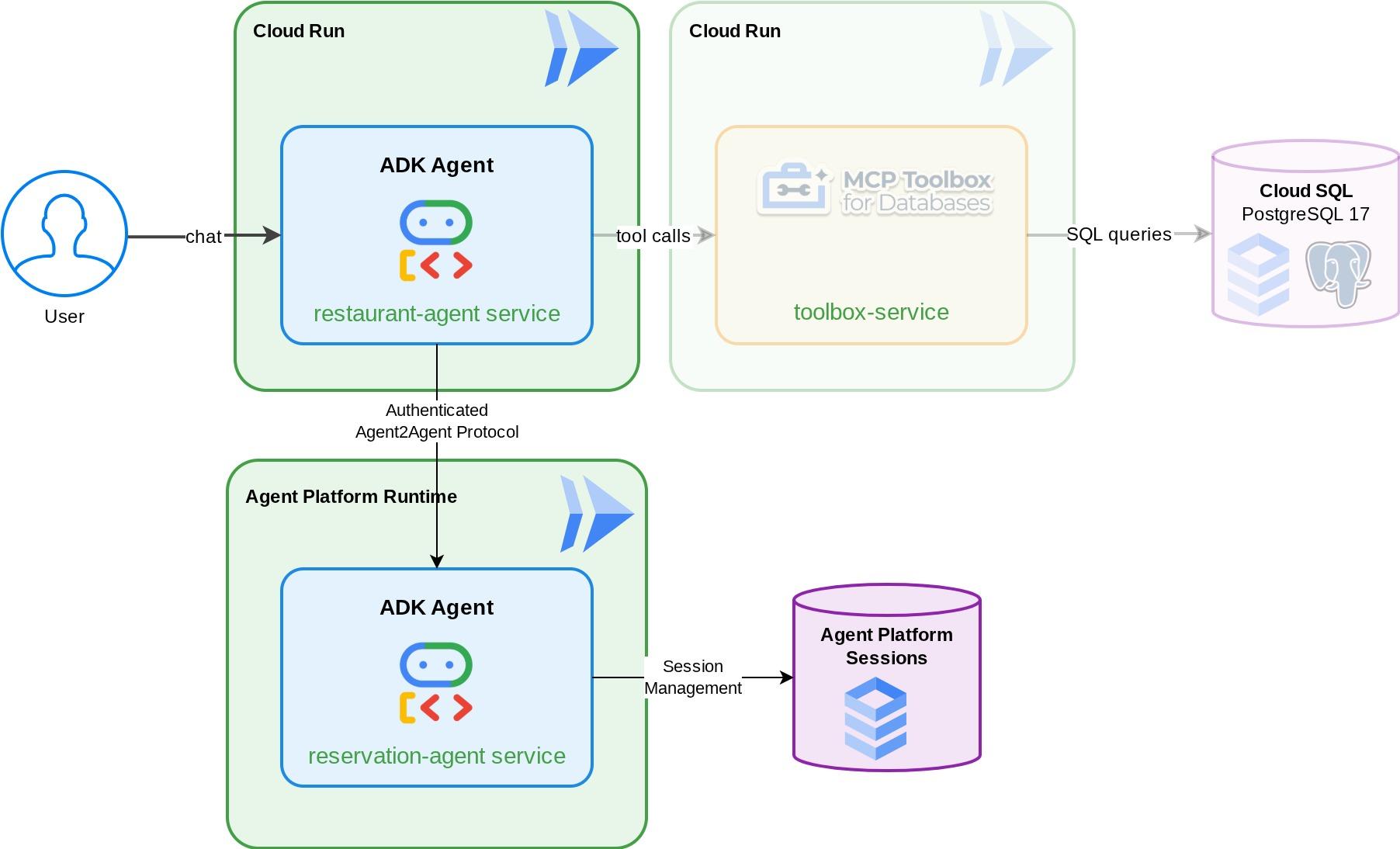
Un agente di prenotazione che gestisce le prenotazioni dei tavoli del ristorante (crea, controlla e annulla) utilizzando lo stato della sessione ADK, gestito da Gemini Enterprise Agent Platform Sessions. Esegui il deployment di questo agente in Gemini Enterprise Agent Platform Runtime, dove diventa rilevabile tramite la scheda dell'agente del protocollo A2A. Poi esegui l'upgrade dell'agente concierge del ristorante Foodie Finds (dal codelab dei prerequisiti , non preoccuparti se non l'hai visitato: abbiamo preparato un repository iniziale per te) per utilizzare l'agente di prenotazione come sub-agente A2A remoto. Il risultato è un sistema multi-agente in cui l'orchestratore indirizza le query del menu alla casella degli strumenti MCP e le richieste di prenotazione all'agente A2A remoto.
Cosa imparerai a fare
- Crea un agente ADK che utilizza il servizio di gestione delle sessioni per gestire i dati delle prenotazioni
- Esporre un agente ADK come server A2A con schede e skill dell'agente
- Esegui il deployment di un agente A2A in Gemini Enterprise Agent Runtime
- Utilizzare un agente A2A remoto da un altro agente ADK utilizzando
RemoteA2aAgente gestendo la richiesta autenticata - Testa i sistemi multi-agente in modo incrementale: A2A locale, A2A di cui è stato eseguito il deployment, integrazione parziale, deployment completo
Prerequisiti
- (Consigliato) Completa i seguenti codelab :
- Creazione di agenti AI persistenti con ADK e CloudSQL: ulteriori dettagli su sessione e stato di ADK
- RAG agentica con ADK, MCP Toolbox e Cloud SQL: puoi continuare a creare il tuo agente da questo codelab. Il codice di avvio fornito è identico.
- Un account Google Cloud con un account di fatturazione attivo
- Conoscenza di base di Python e dei concetti di ADK
2. Configurazione dell'ambiente - Proseguimento del codelab precedente
Gli scenari forniti in questo codelab sono la continuazione di questo codelab prerequisito: RAG agentica con ADK, MCP Toolbox e Cloud SQL . Puoi continuare il lavoro del codelab precedente
Possiamo iniziare a creare nella directory di lavoro del codelab precedente ( la directory di lavoro dovrebbe essere build-agent-adk-toolbox-cloudsql). Per evitare confusione, rinominiamo la directory con lo stesso nome che utilizziamo quando iniziamo da zero.
mv ~/build-agent-adk-toolbox-cloudsql ~/adk-a2a-agent-runtime-starter
cloudshell workspace ~/adk-a2a-agent-runtime-starter && cd ~/adk-a2a-agent-runtime-starter
source .env
Verifica che i file delle chiavi del codelab precedente siano presenti:
echo "--- Restaurant Agent ---"
cat restaurant_agent/agent.py | head -5
echo ""
echo "--- Toolbox Config ---"
cat tools.yaml | head -5
Dovresti visualizzare il file restaurant_agent/agent.py con l'importazione LlmAgent e il file tools.yaml con la configurazione di Toolbox.
Ora reinizializziamo l'ambiente Python
rm -rf .venv
uv sync
Inoltre, verifica che il database sia inizializzato e pronto:
uv run python scripts/verify_seed.py
Se segui ogni dettaglio del test del codelab precedente, potresti visualizzare un output simile a questo
Menu Items: 16/15
Embeddings: 16/15

✗ Database not ready
Non preoccuparti. Il controllo del database non tiene conto dei dati aggiuntivi inseriti dal controllo di acquisizione dei dati. Se hai almeno 15 dati, tutto bene.
Attiva l'API richiesta
Successivamente, dovremo assicurarci di abilitare l'API richiesta per interagire con Gemini Enterprise Agent Platform
gcloud services enable \
  cloudresourcemanager.googleapis.com
Dovresti già avere i file e l'infrastruttura necessari per continuare con la sezione successiva: A2A Protocol and Gemini Enterprise Agent Runtime.
3. Configurazione dell'ambiente: un nuovo inizio con il repository iniziale
Questo passaggio prepara l'ambiente Cloud Shell, configura il progetto Google Cloud e clona il repository iniziale.
Apri Cloud Shell
Apri Cloud Shell nel browser. Cloud Shell fornisce un ambiente preconfigurato con tutti gli strumenti necessari per questo codelab. Quando richiesto, fai clic su Autorizza.
Poi fai clic su "Visualizza" -> "Terminale" per aprire il terminale.L'interfaccia dovrebbe avere un aspetto simile a questo
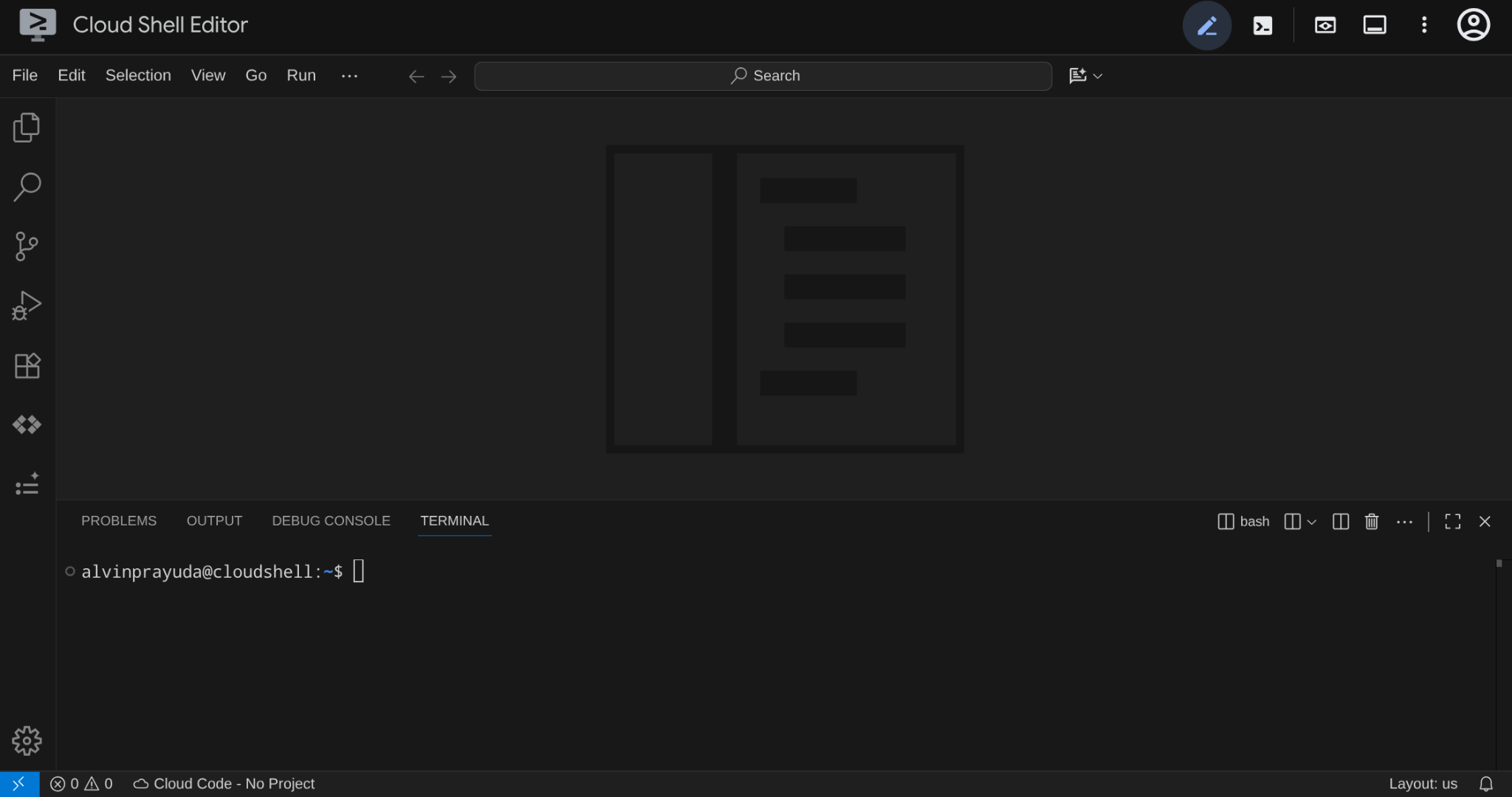
Questa sarà la nostra interfaccia principale, con l'IDE in alto e il terminale in basso.
Configurare la directory di lavoro
Clona il repository iniziale. Tutto il codice che scrivi in questo codelab si trova qui:
rm -rf ~/adk-a2a-agent-runtime-starter
git clone https://github.com/alphinside/adk-a2a-agent-runtime-starter.git
cloudshell workspace ~/adk-a2a-agent-runtime-starter && cd ~/adk-a2a-agent-runtime-starter
Crea il file .env dal modello fornito:
cp .env.example .env
Per semplificare la configurazione del progetto nel terminale, scarica questo script di configurazione del progetto nella tua directory di lavoro:
curl -sL https://raw.githubusercontent.com/alphinside/cloud-trial-project-setup/main/setup_verify_trial_project.sh -o setup_verify_trial_project.sh
Esegui lo script. Verifica il tuo account di fatturazione di prova, crea un nuovo progetto (o ne convalida uno esistente), salva l'ID progetto in un file .env nella directory corrente e imposta il progetto attivo in gcloud.
bash setup_verify_trial_project.sh && source .env
Lo script:
- Verificare di avere un account di fatturazione di prova attivo
- Controlla se esiste un progetto in
.env(se presente) - Crea un nuovo progetto o riutilizza quello esistente
- Collega l'account di fatturazione di prova al tuo progetto
- Salva l'ID progetto in
.env - Imposta il progetto come progetto
gcloudattivo
Verifica che il progetto sia impostato correttamente controllando il testo giallo accanto alla directory di lavoro nel prompt del terminale Cloud Shell. Dovrebbe essere visualizzato l'ID progetto.

Attiva l'API richiesta
Successivamente, dovremo assicurarci di abilitare l'API richiesta per interagire con Gemini Enterprise Agent Platform
gcloud services enable \
  aiplatform.googleapis.com \
  cloudresourcemanager.googleapis.com
Starter Infrastructure Setup
Innanzitutto, dovremo installare le dipendenze Python utilizzando uv, un gestore di pacchetti e progetti Python veloce scritto in Rust ( documentazione di uv). Questo codelab lo utilizza per la velocità e la semplicità di manutenzione del progetto Python
uv sync
Poi, esegui lo script di configurazione completo, che crea l'istanza Cloud SQL, inserisce i dati e implementa il servizio Toolbox che fungerà da stato iniziale del nostro agente ristorante
bash scripts/full_setup.sh > logs/full_setup.log 2>&1 &
4. Concetto: protocollo Agent2Agent (A2A) e runtime dell'agente Gemini Enterprise
Prima di iniziare a creare, prendiamoci un momento per comprendere le due tecnologie chiave presentate in questo codelab per scalare la nostra applicazione con agenti.
Protocollo Agent2Agent (A2A)
Il protocollo Agent2Agent (A2A) è uno standard aperto progettato per consentire una comunicazione e una collaborazione fluide tra gli agenti AI. Mentre MCP (Model Context Protocol) connette gli agenti a strumenti e dati, A2A li connette ad altri agenti, consentendo loro di scoprire le funzionalità reciproche, delegare attività e collaborare tra framework e organizzazioni.
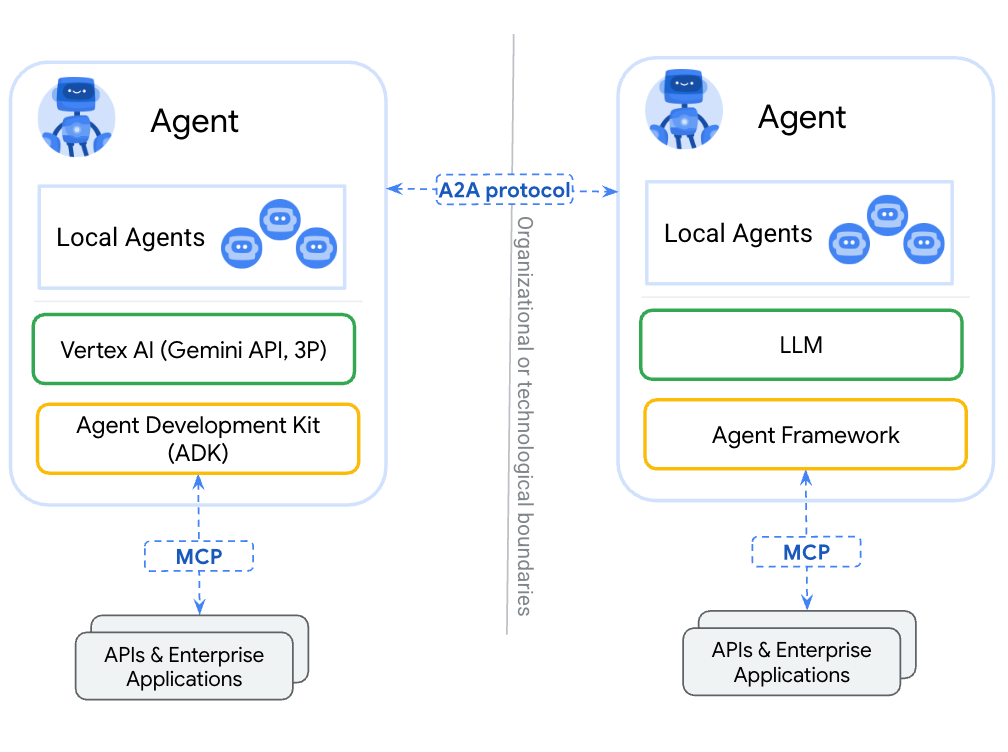
La differenza principale tra il wrapping di un agente come strumento (tramite MCP) e la sua esposizione tramite A2A è che gli strumenti sono stateless ed eseguono singole funzioni, mentre gli agenti A2A possono ragionare, mantenere lo stato e gestire interazioni multi-turno come la negoziazione o il chiarimento. Un agente esposto tramite A2A mantiene tutte le sue funzionalità anziché essere ridotto a una chiamata di funzione.
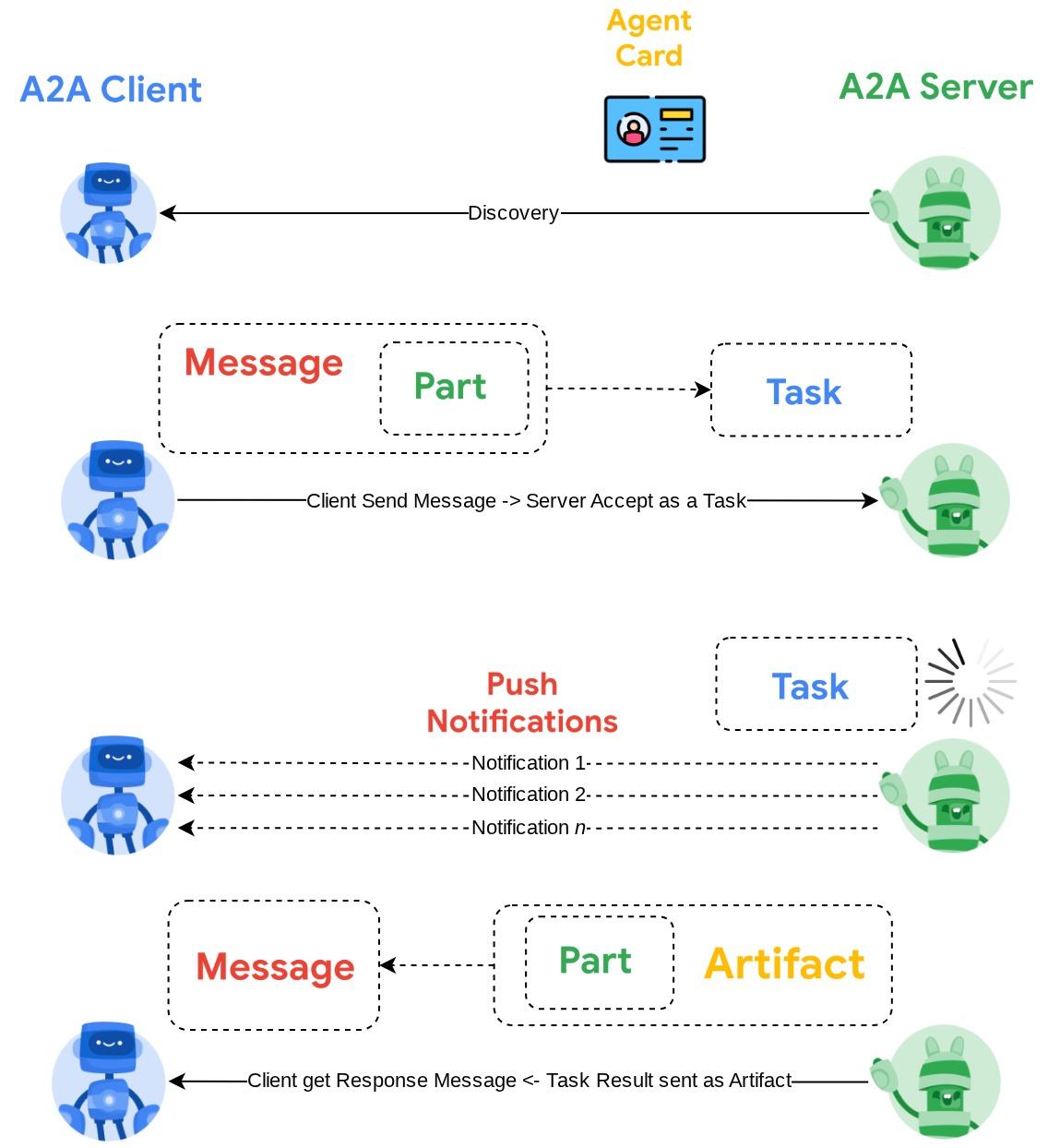
A2A definisce tre concetti principali:
- Scheda dell'agente: un documento JSON che descrive cosa fa un agente, le sue competenze e il suo endpoint. Altri agenti recuperano questa scheda per scoprire le funzionalità.
- Messaggio: una richiesta dell'utente o dell'agente inviata a un endpoint A2A, che attiva un'attività.
- Attività: un'unità di lavoro con un ciclo di vita (inviata → in corso → completata/non riuscita) e artefatti contenenti i risultati.
Per un approfondimento, vedi Che cos'è A2A?
Runtime di Gemini Enterprise Agent Platform
Agent Runtime è un servizio completamente gestito su Google Cloud per il deployment, lo scaling e la gestione degli agenti AI in produzione con funzionalità di sicurezza aziendale (ad es. Controlli di servizio VPC, CMEK). Gestisce l'infrastruttura in modo che tu possa concentrarti sulla logica dell'agente.
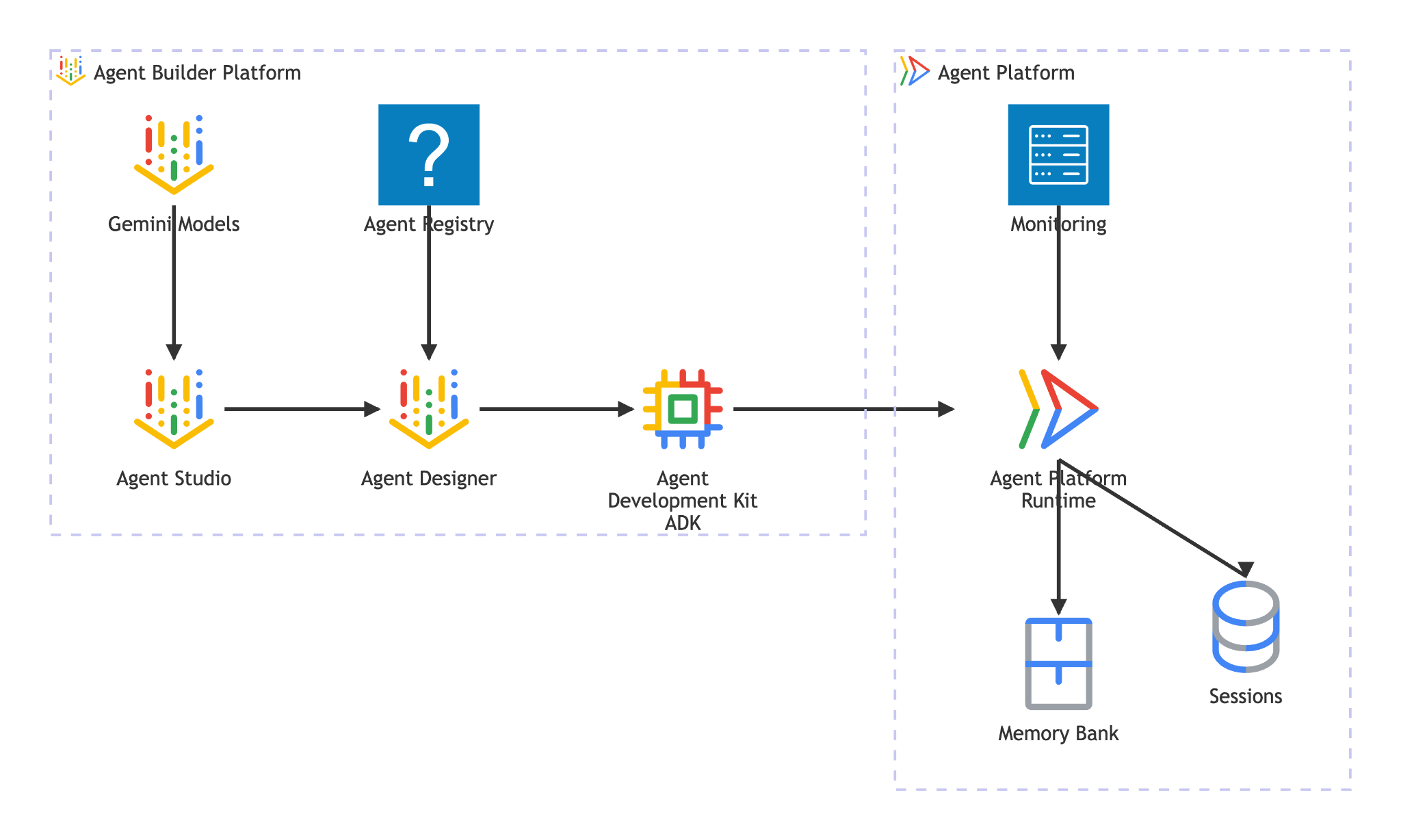
Agent Runtime offre:
- Deployment gestito: esegui il deployment di agenti creati con ADK, LangGraph o qualsiasi framework Python con una singola chiamata SDK
- Hosting A2A: esegui il deployment degli agenti come endpoint conformi ad A2A con pubblicazione automatica delle schede degli agenti e accesso autenticato
- Sessioni persistenti:
VertexAiSessionServicememorizza la cronologia e lo stato della conversazione tra le richieste - Scalabilità automatica: la scalabilità da zero per gestire il traffico, senza gestione dell'infrastruttura
- Osservabilità: tracciamento, logging e monitoraggio integrati tramite lo stack di osservabilità di Google Cloud
- e molte altre funzionalità. Per saperne di più, consulta questa documentazione.
In questo codelab, esegui il deployment dell'agente di prenotazione in Agent Runtime. Il processo di deployment serializza (pickle) il codice dell'agente e lo carica. Agent Runtime esegue il provisioning di un endpoint serverless che gestisce il protocollo A2A. Gli altri agent (o client) interagiscono con questo endpoint tramite chiamate HTTP standard, autenticate con le credenziali Google Cloud.
5. Crea l'agente prenotazioni
Questo passaggio crea un nuovo agente ADK che gestisce le prenotazioni del ristorante utilizzando lo stato della sessione. L'agente supporta tre operazioni: creazione, controllo e annullamento, con il numero di telefono come chiave di ricerca. Tutti i dati di prenotazione si trovano nello stato della sessione di ADK
Impalcatura dell'agente
Utilizza adk create per generare la struttura della directory dell'agente con la configurazione corretta del modello e del progetto:
source .env
uv run adk create reservation_agent \
    --model gemini-3.5-flash \
    --project ${GOOGLE_CLOUD_PROJECT} \
    --region ${GOOGLE_CLOUD_LOCATION}
In questo modo viene creata una directory reservation_agent/ con __init__.py, agent.py e .env preconfigurati per il modello Gemini su Agent Platform.
adk-a2a-agent-runtime-starter/
├── reservation_agent/
│   ├── __init__.py
│   ├── agent.py
│   └── .env
├── logs
├── scripts
└── ...
A questo punto, aggiorniamo il codice dell'agente.
Scrivi il codice dell'agente
Apri il file dell'agente generato:
cloudshell edit reservation_agent/agent.py
Quindi sostituisci i contenuti con quanto segue:
# reservation_agent/agent.py
import os
from functools import cached_property
from typing import Any

from google.adk.agents import LlmAgent
from google.adk.models.google_llm import Gemini
from google.adk.tools import ToolContext
from google.genai import Client, types

# App-scoped state prefix ensures reservations persist across all sessions.
# See https://adk.dev/sessions/state/ for state scope details.
STATE_PREFIX = "app:reservation:"


class GeminiGlobal(Gemini):
    """Gemini with location pinned to 'global'.

    A2aAgent.set_up() on Agent Platform Runtime SDK overwrites GOOGLE_CLOUD_LOCATION with the Agent Platform Runtime
    region (e.g. us-central1), but the Gemini 3-family endpoint requires 'global'.
    """

    @cached_property
    def api_client(self) -> Client:
        project = os.getenv("GOOGLE_CLOUD_PROJECT")
        return Client(
            project=project,
            location="global",
            http_options=types.HttpOptions(
                headers=self._tracking_headers(),
                retry_options=self.retry_options,
            ),
        )


def create_reservation(
    phone_number: str,
    name: str,
    party_size: int,
    date: str,
    time: str,
    tool_context: ToolContext,
) -> dict:
    """Create a new restaurant reservation.

    Args:
        phone_number: Customer's phone number, used as the reservation ID.
        name: Name for the reservation.
        party_size: Number of guests.
        date: Reservation date (e.g., '2025-07-15' or 'this Friday').
        time: Reservation time (e.g., '7:00 PM').

    Returns:
        Confirmation of the reservation.
    """
    reservation = {
        "name": name,
        "party_size": party_size,
        "date": date,
        "time": time,
        "status": "confirmed",
    }
    tool_context.state[f"{STATE_PREFIX}{phone_number}"] = reservation
    return {
        "status": "confirmed",
        "message": f"Reservation created for {name}, party of {party_size} on {date} at {time}. Phone: {phone_number}.",
    }


def check_reservation(phone_number: str, tool_context: ToolContext) -> dict:
    """Look up an existing reservation by phone number.

    Args:
        phone_number: The phone number used when the reservation was created.
        tool_context: ADK tool context for state access.

    Returns:
        The reservation details, or a message if not found.
    """
    reservation = tool_context.state.get(f"{STATE_PREFIX}{phone_number}")
    if reservation:
        return {"found": True, "reservation": reservation}
    return {"found": False, "message": f"No reservation found for {phone_number}."}


def cancel_reservation(phone_number: str, tool_context: ToolContext) -> dict:
    """Cancel an existing reservation by phone number.

    Args:
        phone_number: The phone number used when the reservation was created.
        tool_context: ADK tool context for state access.

    Returns:
        Confirmation of cancellation, or a message if not found.
    """
    key = f"{STATE_PREFIX}{phone_number}"
    reservation = tool_context.state.get(key)
    if not reservation:
        return {
            "success": False,
            "message": f"No reservation found for {phone_number}.",
        }
    if reservation.get("status") == "cancelled":
        return {
            "success": False,
            "message": f"Reservation for {phone_number} is already cancelled.",
        }
    reservation["status"] = "cancelled"
    tool_context.state[key] = reservation
    return {
        "success": True,
        "message": f"Reservation for {reservation['name']} ({phone_number}) has been cancelled.",
    }


root_agent = LlmAgent(
    name="reservation_agent",
    model=GeminiGlobal(model="gemini-3.5-flash"),
    instruction="""You are a friendly reservation assistant for "Foodie Finds" restaurant.
You help diners create, check, and cancel table reservations.

When a diner wants to make a reservation, collect these details:
- Name for the reservation
- Phone number (used as the reservation ID)
- Party size (number of guests)
- Date
- Time

Always confirm the details before creating the reservation.
When checking or cancelling, ask for the phone number if not provided.
Be concise and professional.""",
    tools=[create_reservation, check_reservation, cancel_reservation],
)
6. Prepara la configurazione del server A2A
Definisci la scheda dell'agente A2A
La scheda dell'agente è una descrizione strutturata delle funzionalità dell'agente. Gli altri agenti e client la utilizzano per scoprire cosa fa l'agente. Crea la configurazione della scheda:
cloudshell edit reservation_agent/a2a_config.py
Copia il seguente testo in reservation_agent/a2a_config.py:
# reservation_agent/a2a_config.py
from a2a.types import AgentSkill
from vertexai.preview.reasoning_engines.templates.a2a import create_agent_card

reservation_skill = AgentSkill(
    id="manage_reservations",
    name="Restaurant Reservations",
    description="Create, check, and cancel table reservations at Foodie Finds restaurant",
    tags=["reservations", "restaurant", "booking"],
    examples=[
        "Book a table for 4 on Friday at 7pm",
        "Check reservation for 555-0101",
        "Cancel my reservation, phone number 555-0101",
    ],
    input_modes=["text/plain"],
    output_modes=["text/plain"],
)

agent_card = create_agent_card(
    agent_name="Reservation Agent",
    description="Handles restaurant table reservations — create, check, and cancel bookings for Foodie Finds restaurant.",
    skills=[reservation_skill],
)
Crea l'executor A2A
L'executor fa da ponte tra il protocollo A2A e l'agente ADK. Riceve le richieste A2A, le esegue tramite l'agente ADK e restituisce i risultati come attività A2A:
cloudshell edit reservation_agent/executor.py
Copia il seguente testo in reservation_agent/executor.py:
# reservation_agent/executor.py
import os
from typing import NoReturn

import vertexai
from a2a.server.agent_execution import AgentExecutor, RequestContext
from a2a.server.events import EventQueue
from a2a.server.tasks import TaskUpdater
from a2a.types import TaskState, TextPart, UnsupportedOperationError
from a2a.utils import new_agent_text_message
from a2a.utils.errors import ServerError
from google.adk.artifacts import InMemoryArtifactService
from google.adk.memory.in_memory_memory_service import InMemoryMemoryService
from google.adk.runners import Runner
from google.adk.sessions import InMemorySessionService, VertexAiSessionService
from google.genai import types

from reservation_agent.agent import root_agent as reservation_agent


class ReservationAgentExecutor(AgentExecutor):
    """Bridge between the A2A protocol and the ADK reservation agent.

    Uses InMemorySessionService for local testing, VertexAiSessionService
    when deployed to Agent Runtime (detected via GOOGLE_CLOUD_AGENT_ENGINE_ID).
    """

    def __init__(self) -> None:
        self.agent = None
        self.runner = None

    def _init_agent(self) -> None:
        if self.agent is not None:
            return

        self.agent = reservation_agent
        engine_id = os.environ.get("GOOGLE_CLOUD_AGENT_ENGINE_ID")

        if engine_id:
            project = os.environ.get("GOOGLE_CLOUD_PROJECT")
            location = os.environ.get("GOOGLE_CLOUD_LOCATION", "us-central1")
            vertexai.init(project=project, location=location)
            session_service = VertexAiSessionService(
                project=project, location=location, agent_engine_id=engine_id,
            )
            app_name = engine_id
        else:
            session_service = InMemorySessionService()
            app_name = self.agent.name

        self.runner = Runner(
            app_name=app_name,
            agent=self.agent,
            artifact_service=InMemoryArtifactService(),
            session_service=session_service,
            memory_service=InMemoryMemoryService(),
        )

    async def execute(self, context: RequestContext, event_queue: EventQueue) -> None:
        if self.agent is None:
            self._init_agent()

        query = context.get_user_input()
        updater = TaskUpdater(event_queue, context.task_id, context.context_id)
        user_id = context.message.metadata.get("user_id", "a2a-user") if context.message.metadata else "a2a-user"

        if not context.current_task:
            await updater.submit()
        await updater.start_work()

        try:
            session = await self._get_or_create_session(context.context_id, user_id)
            content = types.Content(role="user", parts=[types.Part(text=query)])

            async for event in self.runner.run_async(
                session_id=session.id, user_id=user_id, new_message=content,
            ):
                if event.is_final_response():
                    parts = event.content.parts
                    answer = " ".join(p.text for p in parts if p.text) or "No response."
                    await updater.add_artifact([TextPart(text=answer)], name="answer")
                    await updater.complete()
                    break
        except Exception as e:
            await updater.update_status(
                TaskState.failed, message=new_agent_text_message(f"Error: {e!s}"),
            )
            raise

    async def _get_or_create_session(self, context_id: str, user_id: str):
        app_name = self.runner.app_name
        if context_id:
            session = await self.runner.session_service.get_session(
                app_name=app_name, session_id=context_id, user_id=user_id,
            )
            if session:
                return session
        session = await self.runner.session_service.create_session(
            app_name=app_name, user_id=user_id, session_id=context_id,
        )
        return session

    async def cancel(self, context: RequestContext, event_queue: EventQueue) -> NoReturn:
        raise ServerError(error=UnsupportedOperationError())
L'executor rileva automaticamente il suo ambiente: quando è impostato GOOGLE_CLOUD_AGENT_ENGINE_ID (Agent Runtime lo inserisce al momento del deployment), utilizza VertexAiSessionService per le sessioni persistenti. A livello locale, viene eseguito il fallback a InMemorySessionService.
La directory reservation_agent ora dovrebbe contenere:
reservation_agent/
├── __init__.py
├── agent.py
├── a2a_config.py
├── executor.py
└── .env
7. Preparare l'agente A2A utilizzando l'SDK Agent Platform e testarlo localmente
Questo passaggio esegue il wrapping dell'agente di prenotazione come agente conforme ad A2A utilizzando la classe A2aAgent dell'SDK Agent Platform ( il nome dell'SDK utilizza ancora il termine vertex per la compatibilità con le versioni precedenti), quindi testa il flusso completo del protocollo A2A in locale: recupero della scheda dell'agente, invio di messaggi e recupero delle attività. Si tratta dello stesso oggetto A2aAgent che esegui il deployment in Agent Runtime nel passaggio successivo.
Aggiungere dipendenze
Installa l'SDK Agent Platform con il supporto di Agent Runtime e ADK, oltre all'SDK A2A:
uv add "google-cloud-aiplatform[agent_engines,adk]==1.149.0" "a2a-sdk==0.3.26"
Informazioni sui componenti A2A
Il wrapping di un agente ADK per A2A richiede tre componenti:
- Scheda dell'agente: un "biglietto da visita" che descrive le funzionalità, le competenze e l'URL dell'endpoint dell'agente. Gli altri agenti lo utilizzano per scoprire cosa fa il tuo agente.
- Agent Executor: il ponte tra il protocollo A2A e la logica dell'agente ADK. Riceve le richieste A2A, le esegue tramite l'agente ADK e restituisce i risultati come attività A2A.
- A2aAgent: la classe dell'SDK Agent Platform che combina la scheda e l'executor in un'unità implementabile.
Creare lo script per il test
Crea il seguente script per eseguire test localmente
cloudshell edit scripts/test_a2a_agent_local.py
Copia il seguente testo in scripts/test_a2a_agent_local.py:
# scripts/test_a2a_agent_local.py
import asyncio
import json
import os
from pprint import pprint

from dotenv import load_dotenv
from starlette.requests import Request
from vertexai.preview.reasoning_engines import A2aAgent

from reservation_agent.a2a_config import agent_card
from reservation_agent.executor import ReservationAgentExecutor

load_dotenv()


# --- Helper functions for building mock requests ---

def receive_wrapper(data: dict):
    async def receive():
        byte_data = json.dumps(data).encode("utf-8")
        return {"type": "http.request", "body": byte_data, "more_body": False}
    return receive

def build_post_request(data: dict = None, path_params: dict = None) -> Request:
    scope = {"type": "http", "http_version": "1.1", "headers": [(b"content-type", b"application/json")], "app": None}
    if path_params:
        scope["path_params"] = path_params
    return Request(scope, receive_wrapper(data))

def build_get_request(path_params: dict) -> Request:
    scope = {"type": "http", "http_version": "1.1", "query_string": b"", "app": None}
    if path_params:
        scope["path_params"] = path_params
    async def receive():
        return {"type": "http.disconnect"}
    return Request(scope, receive)


# --- Helper: poll for task completion ---

async def wait_for_task(a2a_agent, task_id, max_retries=30):
    """Poll on_get_task until the task reaches a terminal state."""
    for _ in range(max_retries):
        request = build_get_request({"id": task_id})
        result = await a2a_agent.on_get_task(request=request, context=None)
        state = result.get("status", {}).get("state", "")
        if state in ["completed", "failed"]:
            return result
        await asyncio.sleep(1)
    return result


def print_task_answer(result):
    """Extract and print the answer from task artifacts."""
    print(f"Status: {result.get('status', {}).get('state')}")
    for artifact in result.get("artifacts", []):
        if artifact.get("parts") and "text" in artifact["parts"][0]:
            print(f"Answer: {artifact['parts'][0]['text']}")


# --- Local test ---

async def main():
    # Create and set up the A2A agent locally

    a2a_agent = A2aAgent(agent_card=agent_card, agent_executor_builder=ReservationAgentExecutor)
    a2a_agent.set_up()

    # 1. Get agent card
    print("=" * 50)
    print("1. Retrieving agent card...")
    print("=" * 50)
    request = build_get_request(None)
    card_response = await a2a_agent.handle_authenticated_agent_card(request=request, context=None)
    print(f"Agent: {card_response.get('name')}")
    print(f"Skills: {[s.get('name') for s in card_response.get('skills', [])]}")

    # 2. Create a reservation
    print("\n" + "=" * 50)
    print("2. Creating a reservation...")
    print("=" * 50)
    message_data = {
        "message": {
            "messageId": f"msg-{os.urandom(4).hex()}",
            "content": [{"text": "Book a table for 2 on Saturday at 6pm. Name: Bob, Phone: 555-0202"}],
            "role": "ROLE_USER",
        },
    }
    request = build_post_request(message_data)
    response = await a2a_agent.on_message_send(request=request, context=None)
    task_id = response["task"]["id"]
    context_id = response["task"].get("contextId")
    print(f"Task ID: {task_id}")

    # 3. Wait for result
    print("\n" + "=" * 50)
    print("3. Waiting for task result...")
    print("=" * 50)
    result = await wait_for_task(a2a_agent, task_id)
    print_task_answer(result)

    # 4. Check the reservation (same context for session continuity)
    print("\n" + "=" * 50)
    print("4. Checking the reservation...")
    print("=" * 50)
    check_data = {
        "message": {
            "messageId": f"msg-{os.urandom(4).hex()}",
            "content": [{"text": "Check the reservation for 555-0202"}],
            "role": "ROLE_USER",
            "contextId": context_id,
        },
    }
    request = build_post_request(check_data)
    check_response = await a2a_agent.on_message_send(request=request, context=None)
    check_result = await wait_for_task(a2a_agent, check_response["task"]["id"])
    print_task_answer(check_result)

    # 5. Cancel the reservation
    print("\n" + "=" * 50)
    print("5. Cancelling the reservation...")
    print("=" * 50)
    cancel_data = {
        "message": {
            "messageId": f"msg-{os.urandom(4).hex()}",
            "content": [{"text": "Cancel the reservation for 555-0202"}],
            "role": "ROLE_USER",
            "contextId": context_id,
        },
    }
    request = build_post_request(cancel_data)
    cancel_response = await a2a_agent.on_message_send(request=request, context=None)
    cancel_result = await wait_for_task(a2a_agent, cancel_response["task"]["id"])
    print_task_answer(cancel_result)

    print("\n" + "=" * 50)
    print("All tests passed!")
    print("=" * 50)


if __name__ == "__main__":
    asyncio.run(main())
Lo script per il test importa la scheda dell'agente e l'executor che hai creato nel passaggio precedente, senza duplicazioni. Verrà creato un A2aAgent locale, verranno simulate chiamate di protocollo A2A tramite richieste HTTP simulate e verranno verificate tutte e tre le operazioni di prenotazione.
Poiché non è impostato alcun GOOGLE_CLOUD_AGENT_ENGINE_ID a livello locale, l'esecutore utilizza InMemorySessionService. Quando viene eseguito il deployment in Agent Runtime, lo stesso executor passa automaticamente a VertexAiSessionService per le sessioni persistenti.
Esegui il test
PYTHONPATH=. uv run python scripts/test_a2a_agent_local.py
L'output illustra cinque fasi:
- Scheda Agente: recupera le funzionalità e le competenze dell'agente
- Crea prenotazione: prenota un tavolo e restituisce un'attività con la conferma
- Get task result (Ottieni risultato attività): recupera l'attività completata con la risposta.
- Controlla prenotazione: cerca la prenotazione in base al numero di telefono
- Annulla prenotazione: annulla la prenotazione e la conferma
Esempio di output come mostrato di seguito
==================================================
1. Retrieving agent card...
==================================================
Agent: Reservation Agent
Skills: ['Restaurant Reservations']

==================================================
2. Creating a reservation...
==================================================
Task ID: f7f7004d-cfea-49c2-b57d-5bca9959e193

==================================================
3. Waiting for task result...
==================================================
Status: TASK_STATE_COMPLETED
Answer: Your reservation for Bob, party of 2, on Saturday at 6:00 PM has been confirmed. The phone number associated is 555-0202.

==================================================
4. Checking the reservation...
==================================================
Status: TASK_STATE_COMPLETED
Answer: I found a reservation for Bob, party of 2, on Saturday at 6:00 PM. The reservation status is confirmed.

==================================================
5. Cancelling the reservation...
==================================================
Status: TASK_STATE_COMPLETED
Answer: Your reservation for Bob (555-0202) has been cancelled.

==================================================
All tests passed!
==================================================
A questo punto hai verificato che la scheda dell'agente A2A descrive le competenze corrette, che tutte e tre le operazioni di prenotazione funzionano tramite il flusso di messaggi/attività del protocollo A2A e che lo stato persiste nei messaggi all'interno dello stesso contesto.
8. Esegui il deployment dell'agente di prenotazione in Agent Runtime
Questo passaggio esegue il deployment dell'agente di prenotazione in Gemini Enterprise Agent Platform Runtime, una piattaforma serverless completamente gestita che ospita l'agente e lo espone come endpoint A2A sicuro. Dopo il deployment, qualsiasi client autorizzato può scoprire l'agente e interagire con lui tramite endpoint HTTP A2A standard.
Crea il bucket di staging
Crea un bucket Cloud Storage per lo staging di Agent Runtime. Agent Runtime utilizza questo bucket per caricare il codice e le dipendenze dell'agente durante il deployment:
STAGING_BUCKET="${GOOGLE_CLOUD_PROJECT}-adk-a2a-agent-runtime"
gsutil mb -l $REGION -p $GOOGLE_CLOUD_PROJECT gs://$STAGING_BUCKET 2>/dev/null || echo "Bucket already exists"
echo "STAGING_BUCKET=$STAGING_BUCKET" >> .env
source .env
Crea lo script di deployment
Successivamente, dovremo preparare lo script di deployment
cloudshell edit scripts/deploy_a2a_agent_runtime.py
Copia il seguente testo in scripts/deploy_a2a_agent_runtime.py:
# scripts/deploy_a2a_agent_runtime.py
import os
from pathlib import Path

import vertexai
from dotenv import load_dotenv
from google.genai import types
from vertexai.preview.reasoning_engines import A2aAgent

from reservation_agent.a2a_config import agent_card
from reservation_agent.executor import ReservationAgentExecutor

load_dotenv()

PROJECT_ID = os.environ["GOOGLE_CLOUD_PROJECT"]
REGION = os.environ["REGION"]
STAGING_BUCKET = os.environ.get("STAGING_BUCKET", f"{PROJECT_ID}-adk-a2a-agent-runtime")
BUCKET_URI = f"gs://{STAGING_BUCKET}"

a2a_agent = A2aAgent(
    agent_card=agent_card,
    agent_executor_builder=ReservationAgentExecutor,
)


def main():
    vertexai.init(project=PROJECT_ID, location=REGION, staging_bucket=BUCKET_URI)
    client = vertexai.Client(
        project=PROJECT_ID,
        location=REGION,
        http_options=types.HttpOptions(api_version="v1beta1"),
    )

    print("Deploying Reservation Agent to Agent Runtime...")
    print("This may take 3-5 minutes.")

    remote_agent = client.agent_engines.create(
        agent=a2a_agent,
        config={
            "display_name": agent_card.name,
            "description": agent_card.description,
            "requirements": [
                "google-cloud-aiplatform[agent_engines,adk]==1.149.0",
                "a2a-sdk==0.3.26",
                "google-adk==1.29.0",
                "cloudpickle",
                "pydantic"
            ],
            "extra_packages": [
                "./reservation_agent",
            ],
            "http_options": {
                "api_version": "v1beta1",
            },
            "staging_bucket": BUCKET_URI,
        },
    )

    resource_name = remote_agent.api_resource.name
    print(f"\nDeployment complete!")
    print(f"Resource name: {resource_name}")

    env_path = Path(".env")
    lines = env_path.read_text().splitlines() if env_path.exists() else []
    lines = [l for l in lines if not l.startswith("RESERVATION_AGENT_RESOURCE_NAME=")]
    lines.append(f"RESERVATION_AGENT_RESOURCE_NAME={resource_name}")
    env_path.write_text("\n".join(lines) + "\n")
    print("Written RESERVATION_AGENT_RESOURCE_NAME to .env")


if __name__ == "__main__":
    main()
Lo script di deployment importa gli stessi agent_card e ReservationAgentExecutor utilizzati nei test locali, senza duplicazione del codice. Agent Runtime serializza (pickle) l'oggetto A2aAgent insieme alle sue dipendenze per il deployment. Alla fine dello script di deployment, il valore RESERVATION_AGENT_RESOURCE_NAME verrà scritto nel file .env
Esegui il deployment in Agent Runtime
Esegui lo script di deployment:
PYTHONPATH=. uv run python scripts/deploy_a2a_agent_runtime.py
Il deployment richiede 3-5 minuti. Lo script esegue il provisioning di un endpoint serverless su Agent Runtime che ospita l'agente di prenotazione. Dopo il deployment riuscito, vedrai un output simile a quello mostrato di seguito
Deploying Reservation Agent to Agent Runtime...
This may take 3-5 minutes.

Deployment complete!
Resource name: projects/your-project-number/locations/us-central1/reasoningEngines/your-agent-deployment-unique-id
Written RESERVATION_AGENT_RESOURCE_NAME to .env
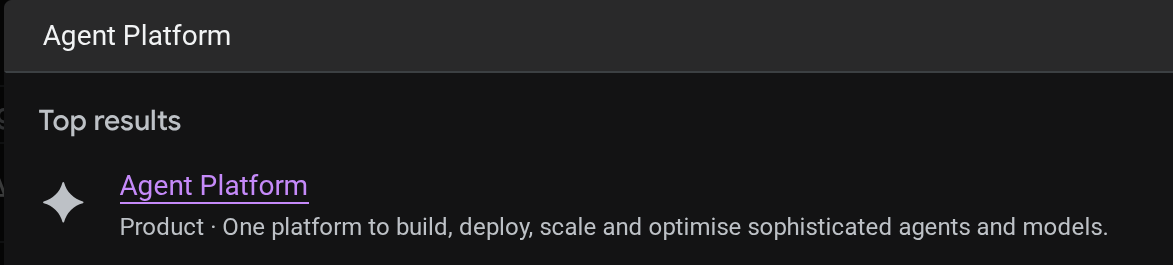
Puoi visualizzare l'agente di cui è stato eseguito il deployment nella console cloud. Cerca Agent Platform nella barra di ricerca della console.
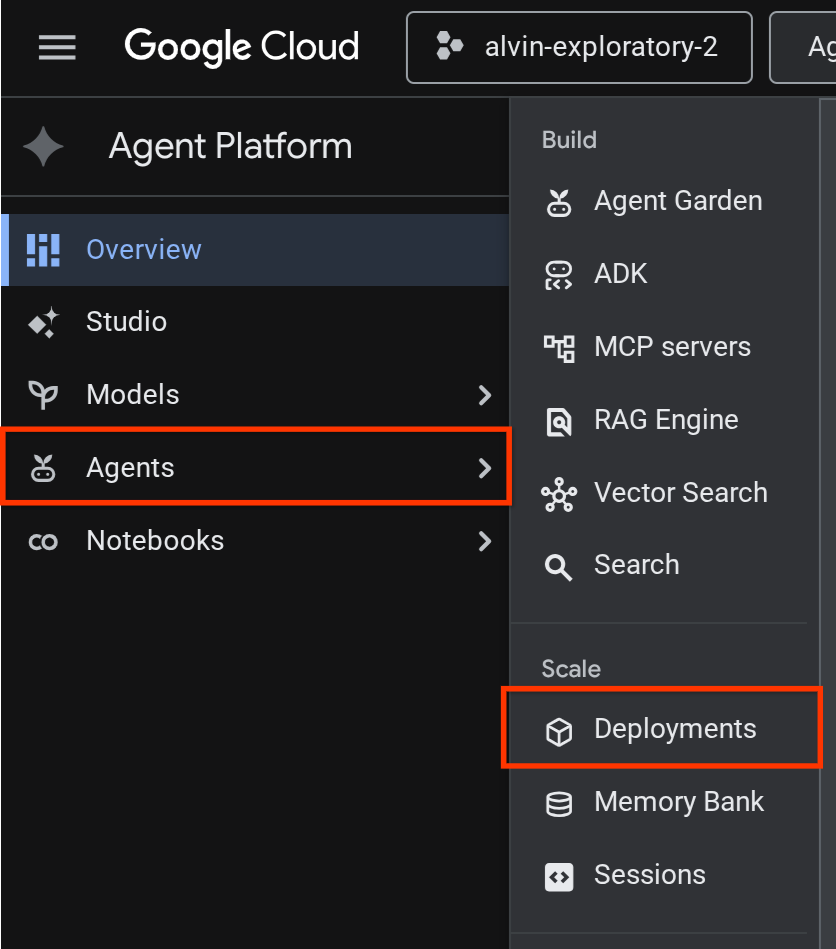
Poi, nella scheda a sinistra, passa il mouse sopra Agents e seleziona Deployments.
Vedrai Reservation Agent elencato nell'elenco dei deployment come mostrato di seguito

Testare l'agente di cui è stato eseguito il deployment
Ora siamo pronti per testare l'agente di cui è stato eseguito il deployment. Crea uno script per il test per l'agente di cui è stato eseguito il deployment:
cloudshell edit scripts/test_a2a_agent_runtime.py
Copia il seguente testo in scripts/test_a2a_agent_runtime.py:
# scripts/test_a2a_agent_runtime.py
import asyncio
import os
import time

import vertexai
from a2a.types import TaskState
from dotenv import load_dotenv
from google.genai import types

load_dotenv()

PROJECT_ID = os.environ["GOOGLE_CLOUD_PROJECT"]
REGION = os.environ["REGION"]
RESOURCE_NAME = os.environ["RESERVATION_AGENT_RESOURCE_NAME"]


async def main():
    vertexai.init(project=PROJECT_ID, location=REGION)
    client = vertexai.Client(
        project=PROJECT_ID, location=REGION,
        http_options=types.HttpOptions(api_version="v1beta1"),
    )

    agent = client.agent_engines.get(name=RESOURCE_NAME)

    # 1. Get agent card
    print("=" * 50)
    print("1. Retrieving agent card...")
    print("=" * 50)
    card = await agent.handle_authenticated_agent_card()
    print(f"Agent: {card.name}")
    print(f"URL: {card.url}")
    print(f"Skills: {[s.name for s in card.skills]}")

    # 2. Send a reservation request
    print("\n" + "=" * 50)
    print("2. Sending reservation request...")
    print("=" * 50)
    message_data = {
        "messageId": "msg-remote-001",
        "role": "user",
        "parts": [{"kind": "text", "text": "Book a table for 3 on Sunday at noon. Name: Carol, Phone: 555-0303"}],
    }
    response = await agent.on_message_send(**message_data)

    task_object = None
    for chunk in response:
        if isinstance(chunk, tuple) and len(chunk) > 0 and hasattr(chunk[0], "id"):
            task_object = chunk[0]
            break

    task_id = task_object.id
    print(f"Task ID: {task_id}")
    print(f"Status: {task_object.status.state}")

    # 3. Poll for result
    print("\n" + "=" * 50)
    print("3. Waiting for result...")
    print("=" * 50)
    result = None
    for _ in range(30):
        try:
            result = await agent.on_get_task(id=task_id)
            if result.status.state in [TaskState.completed, TaskState.failed]:
                break
        except Exception:
            pass
        time.sleep(1)

    print(f"Final status: {result.status.state}")
    if result.artifacts:
        for artifact in result.artifacts:
            if artifact.parts and hasattr(artifact.parts[0], "root") and hasattr(artifact.parts[0].root, "text"):
                print(f"Answer: {artifact.parts[0].root.text}")

    print("\n" + "=" * 50)
    print("Remote agent test passed!")
    print("=" * 50)


if __name__ == "__main__":
    asyncio.run(main())
Poi, eseguiamo il test
source .env
uv run python scripts/test_a2a_agent_runtime.py
L'output mostra la scheda dell'agente con la skill "Prenotazioni di ristoranti", seguita dal completamento dell'attività con una conferma della prenotazione.
==================================================
1. Retrieving agent card...
==================================================
Agent: Reservation Agent
URL: https://us-central1-aiplatform.googleapis.com/v1beta1/projects/your-project-id/locations/us-central1/reasoningEngines/your-agent-unique-id/a2a
Skills: ['Restaurant Reservations']

==================================================
2. Sending reservation request...
==================================================
Task ID: b34585d0-5f03-4cb0-85a3-40710a0d224d
Status: TaskState.completed

==================================================
3. Waiting for result...
==================================================
Final status: TaskState.completed
Answer: Your reservation for Carol, party of 3 on Sunday at noon with phone number 555-0303 is confirmed.

==================================================
Remote agent test passed!
==================================================
L'agente di prenotazione ora viene eseguito correttamente come endpoint A2A gestito su Agent Runtime.
9. Integrare l'agente di prenotazione A2A con l'agente ristorante principale
Questo passaggio esegue l'upgrade dell'agente del ristorante in modo che utilizzi l'agente di prenotazione di cui è stato eseguito il deployment come sub-agente A2A remoto. L'orchestratore viene eseguito localmente, mentre l'agente di prenotazione viene eseguito su Agent Runtime, un'integrazione parziale che convalida la connessione A2A prima dell'implementazione completa.
Risolvere l'URL della scheda agente A2A
RemoteA2aAgent ha bisogno dell'URL della scheda dell'agente di prenotazione di cui è stato eseguito il deployment per scoprire le sue funzionalità. Crea uno script che recuperi questo URL da Agent Runtime e lo scriva nel .env dell'agente del ristorante:
cloudshell edit scripts/resolve_agent_card_url.py
Copia il seguente testo in scripts/resolve_agent_card_url.py:
# scripts/resolve_agent_card_url.py
import asyncio
import os
from pathlib import Path

import vertexai
from dotenv import load_dotenv
from google.genai import types

load_dotenv()

PROJECT_ID = os.environ["GOOGLE_CLOUD_PROJECT"]
REGION = os.environ["REGION"]
RESOURCE_NAME = os.environ["RESERVATION_AGENT_RESOURCE_NAME"]


async def main():
    vertexai.init(project=PROJECT_ID, location=REGION)
    client = vertexai.Client(
        project=PROJECT_ID, location=REGION,
        http_options=types.HttpOptions(api_version="v1beta1"),
    )

    agent = client.agent_engines.get(name=RESOURCE_NAME)
    card = await agent.handle_authenticated_agent_card()
    card_url = f"{card.url}/v1/card"

    print(f"Agent: {card.name}")
    print(f"Card URL: {card_url}")

    # Write to restaurant_agent/.env
    # Write to both restaurant_agent/.env (for adk web) and root .env (for Cloud Run deploy)
    for env_path in [Path("restaurant_agent/.env"), Path(".env")]:
        lines = env_path.read_text().splitlines() if env_path.exists() else []
        lines = [l for l in lines if not l.startswith("RESERVATION_AGENT_CARD_URL=")]
        lines.append(f"RESERVATION_AGENT_CARD_URL={card_url}")
        env_path.write_text("\n".join(lines) + "\n")
        print(f"Written RESERVATION_AGENT_CARD_URL to {env_path}")


if __name__ == "__main__":
    asyncio.run(main())
Esegui lo script per compilare il file .env con l'URL della scheda dell'agente
uv run python scripts/resolve_agent_card_url.py
source .env
Aggiornare l'agente del ristorante
Apri il file dell'agente del ristorante:
cloudshell edit restaurant_agent/agent.py
Quindi, sostituisci i contenuti con la versione aggiornata che include l'agente di prenotazione remoto come subagente:
# restaurant_agent/agent.py
import os

import httpx
from google.adk.agents import LlmAgent
from google.adk.agents.remote_a2a_agent import RemoteA2aAgent
from google.auth import default
from google.auth.transport.requests import Request as AuthRequest
from toolbox_adk import ToolboxToolset

TOOLBOX_URL = os.environ.get("TOOLBOX_URL", "http://127.0.0.1:5000")
RESERVATION_AGENT_CARD_URL = os.environ.get("RESERVATION_AGENT_CARD_URL", "")

toolbox = ToolboxToolset(TOOLBOX_URL)


class GoogleCloudAuth(httpx.Auth):
    """Auto-refreshing Google Cloud authentication for httpx.

    Refreshes the access token before each request if expired,
    so long-running agents never hit 401 errors.
    """

    def __init__(self):
        self.credentials, _ = default(
            scopes=["https://www.googleapis.com/auth/cloud-platform"]
        )

    def auth_flow(self, request):
        # Refresh the token if it is expired or missing
        if not self.credentials.valid:
            self.credentials.refresh(AuthRequest())

        request.headers["Authorization"] = f"Bearer {self.credentials.token}"
        yield request


reservation_remote_agent = RemoteA2aAgent(
    name="reservation_agent",
    description="Handles restaurant table reservations — create, check, and cancel bookings. Delegate to this agent when the user wants to book a table, check a reservation, or cancel a reservation.",
    agent_card=RESERVATION_AGENT_CARD_URL,
    httpx_client=httpx.AsyncClient(auth=GoogleCloudAuth(), timeout=60),
)

root_agent = LlmAgent(
    name="restaurant_agent",
    model="gemini-3.5-flash",
    instruction="""You are a friendly and knowledgeable concierge at "Foodie Finds," a restaurant. Your job:
- Help diners browse the menu by category or cuisine type.
- Provide full details about specific dishes, including ingredients, price, and dietary information.
- Recommend dishes based on natural language descriptions of what the diner is craving.
- Add new menu items when asked.
- For reservation requests (booking, checking, or cancelling tables), delegate to the reservation_agent.

When a diner asks about a specific dish by name or cuisine, use the get-item-details tool.
When a diner asks for a specific category or cuisine type, use the search-menu tool.
When a diner describes what kind of food they want — by flavor, texture, dietary needs, or cravings — use the search-menu-by-description tool for semantic search.

When in doubt between search-menu and search-menu-by-description, prefer search-menu-by-description — it searches dish descriptions and finds more relevant matches.
If a dish is not available (available is false), let the diner know and suggest similar alternatives from the search results.
Be conversational, knowledgeable, and concise.""",
    tools=[toolbox],
    sub_agents=[reservation_remote_agent],
)
Le modifiche principali rispetto alla versione precedente:
GoogleCloudAuth: un gestorehttpx.Authpersonalizzato che aggiorna il token di accesso Google Cloud prima di ogni richiesta. Agent Runtime richiede chiamate A2A autenticate e i token scadono dopo un periodo di tempo.RemoteA2aAgentleggeRESERVATION_AGENT_CARD_URLda.env(scritto dallo script di risoluzione) e utilizzahttpx_clientautenticato- Registrato come subagente: l'orchestratore dell'ADK delega automaticamente le richieste di prenotazione
- Istruzioni aggiornate per menzionare la delega della prenotazione
Testare l'agente integrato localmente
L'agente iniziale richiedeva l'integrazione con MCP Toolbox. Il file richiesto dovrebbe essere già stato fornito dal codelab precedente o dal repository iniziale. Dobbiamo solo assicurarci che la procedura della cassetta degli attrezzi funzioni correttamente.
Se TOOLBOX_URL in .env punta già a un servizio Cloud Run (dal codelab precedente o forse da full_setup.sh del repository iniziale), puoi saltare questo passaggio: l'agente si connetterà a Toolbox di cui è stato eseguito il deployment.
Se invece ti serve una casella degli strumenti locale, controlla se ne è già in esecuzione una prima di avviare una nuova istanza:
if curl -s http://127.0.0.1:5000/api/toolsets > /dev/null 2>&1; then
  echo "Toolbox already running on port 5000"
else
  set -a; source .env; set +a
  ./toolbox --config=tools.yaml > logs/toolbox.log 2>&1 &
  echo "Toolbox started"
fi
A questo punto, possiamo provare a interagire con l'agente del ristorante tramite l'interfaccia utente di sviluppo web dell'ADK
uv run adk web --allow_origins "regex:https://.*\.cloudshell\.dev" --port 8080
Apri la UI web dell'ADK utilizzando l'anteprima web di Cloud Shell (fai clic sul pulsante Anteprima web, cambia la porta in 8080) e poi seleziona restaurant_agent
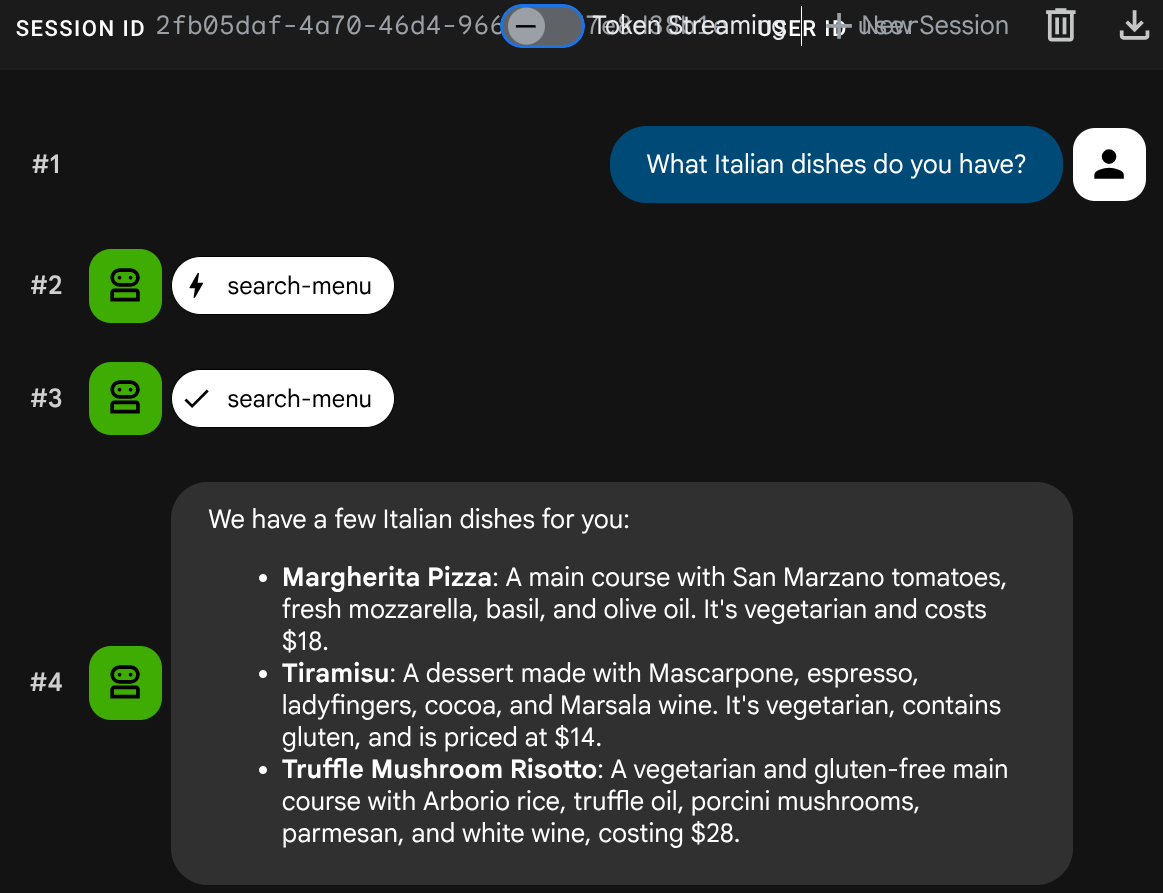
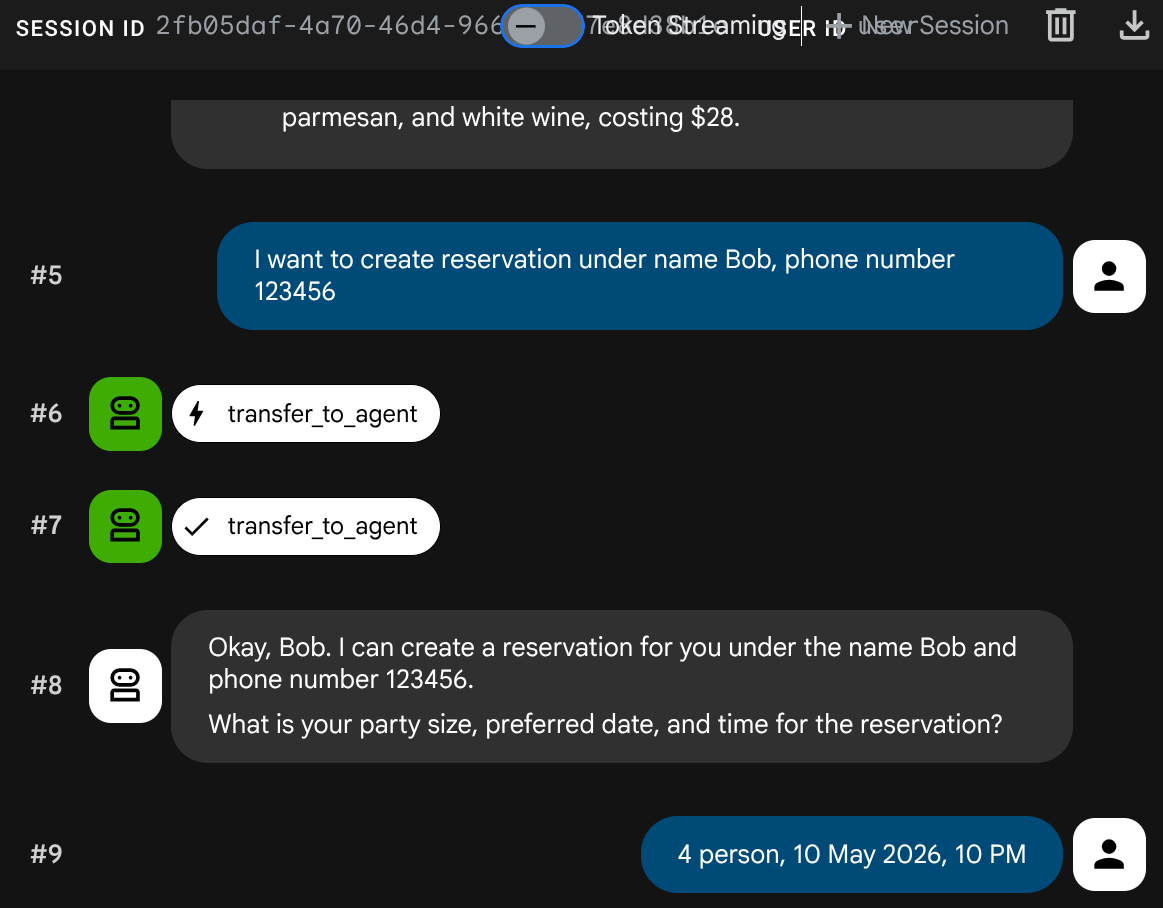
Prova una conversazione mista:
Menu Query
What Italian dishes do you have?
Richiesta di prenotazione
I want to create reservation under name Bob, phone number 123456
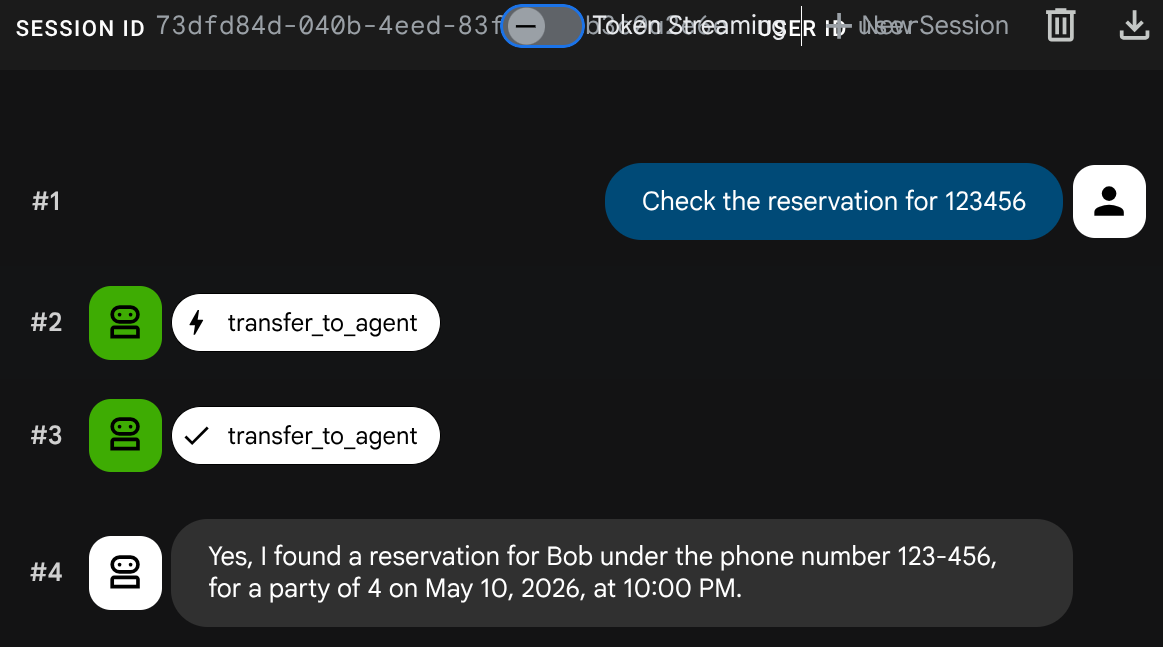
Controlla la prenotazione
Crea nuova sessione ( avvia una nuova conversazione):
Check the reservation for 123456
Interrompi il processo adk web con Ctrl+C due volte. Ora completiamo il sistema eseguendo il deployment completo dell'agente
10. Esegui il deployment dell'agente del ristorante aggiornato su Cloud Run
Questo passaggio esegue nuovamente il deployment dell'agente del ristorante su Cloud Run con l'integrazione A2A, completando il sistema multi-agente completamente implementato.
Concedere le autorizzazioni per accedere ad Agent Runtime
Il service account Cloud Run deve disporre dell'autorizzazione per chiamare Agent Runtime. Concedi il ruolo roles/aiplatform.user al service account Compute Engine predefinito:
PROJECT_NUMBER=$(gcloud projects describe $GOOGLE_CLOUD_PROJECT --format='value(projectNumber)')
gcloud projects add-iam-policy-binding $GOOGLE_CLOUD_PROJECT \
  --member="serviceAccount:${PROJECT_NUMBER}-compute@developer.gserviceaccount.com" \
  --role="roles/aiplatform.user"
Eseguire il deployment in Cloud Run
In questa configurazione, presupponiamo che il servizio di agente del ristorante esista già dal codelab precedente o eseguendo scripts/full_setup.sh se inizi da zero. Viene eseguito nuovamente il deployment con il codice aggiornato (nuova integrazione RemoteA2aAgent) e viene aggiunto l'URL della scheda dell'agente di prenotazione come nuova variabile di ambiente. Le variabili di ambiente esistenti (TOOLBOX_URL, GOOGLE_CLOUD_PROJECT e così via) vengono mantenute:
gcloud run deploy restaurant-agent \
  --source . \
  --region=$REGION \
  --allow-unauthenticated \
  --update-env-vars="RESERVATION_AGENT_CARD_URL=$RESERVATION_AGENT_CARD_URL" \
  --min-instances=0 \
  --max-instances=1 \
  --memory=1Gi \
  --port=8080
Testare il sistema completamente implementato
Ottieni l'URL del servizio di cui è stato eseguito il deployment:
AGENT_URL=$(gcloud run services describe restaurant-agent --region=$REGION --format='value(status.url)')
echo "Agent URL: $AGENT_URL"
Apri l'URL nel browser. Viene caricata la UI web dell'ADK, ovvero la stessa interfaccia che hai utilizzato localmente, ora in esecuzione su Cloud Run.
Puoi chiacchierare con l'agente
Menu Query
What spicy dishes do you have?
Richiesta di prenotazione
Book a table for 4 on Friday at 7pm. Name: Eve, Phone: 555-0505
Controlla la prenotazione
Crea nuova sessione ( avvia una nuova conversazione):
Check reservation for 555-0505
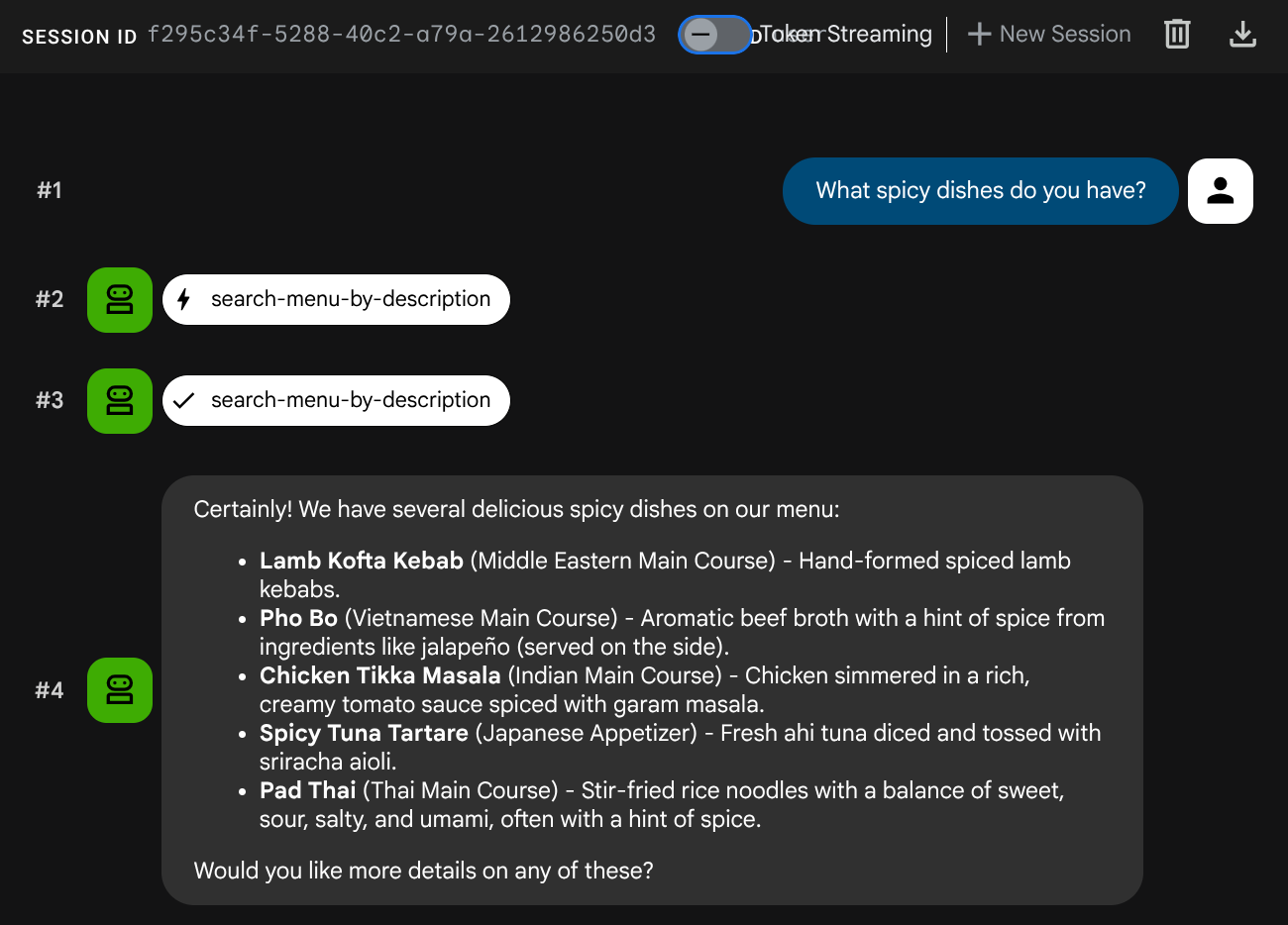
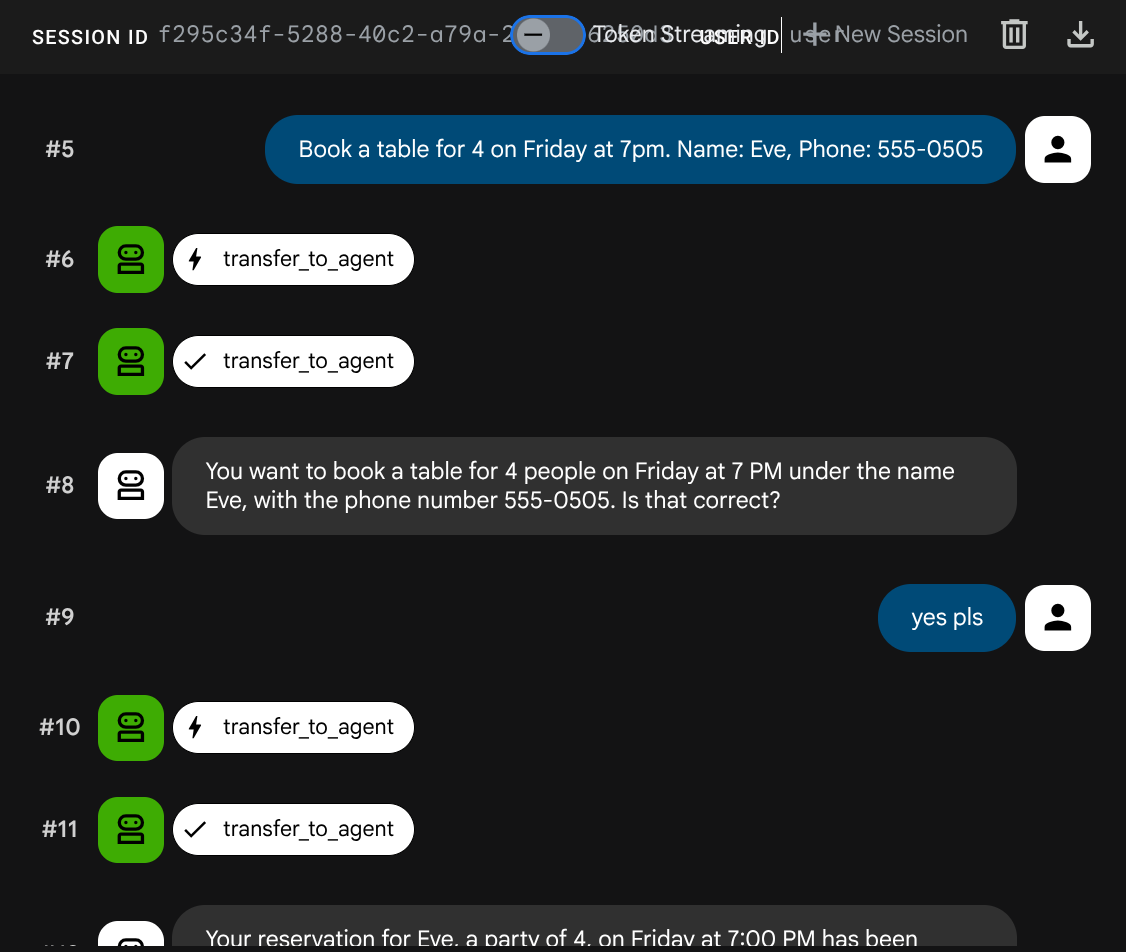
Il sistema multi-agente è completamente implementato. L'agente del ristorante su Cloud Run coordina due servizi di backend: MCP Toolbox per le operazioni sul menu e l'agente di prenotazione A2A su Agent Runtime.
11. Complimenti!
Hai creato e implementato un sistema multi-agente utilizzando il protocollo A2A su Google Cloud.
Che cosa hai imparato
- Ha creato un agente ADK che utilizza lo stato della sessione (
ToolContext) per gestire i dati delle prenotazioni senza un database - È stato eseguito il deployment di un agente A2A in Agent Runtime utilizzando l'SDK Agent Platform
- Utilizzo di un agente A2A remoto da un altro agente ADK utilizzando
RemoteA2aAgentcome sub-agente - Testato il sistema in modo incrementale: A2A locale → A2A di cui è stato eseguito il deployment → integrazione parziale → deployment completo
Pulizia
Per evitare che al tuo account Google Cloud vengano addebitati costi, elimina le risorse create in questo codelab.
Opzione 1: elimina il progetto (consigliata)
gcloud projects delete $GOOGLE_CLOUD_PROJECT
Opzione 2: elimina singole risorse
# Delete the Agent Runtime deployment
uv run python -c "
import vertexai
from google.genai import types
vertexai.init(project='$GOOGLE_CLOUD_PROJECT', location='$REGION')
client = vertexai.Client(
    project='$GOOGLE_CLOUD_PROJECT', location='$REGION',
    http_options=types.HttpOptions(api_version='v1beta1'),
)
agent = client.agent_engines.get(name='$RESERVATION_AGENT_RESOURCE_NAME')
agent.delete(force=True)
print('Agent Runtime deployment deleted.')
"

# Delete Cloud Run services
gcloud run services delete restaurant-agent --region=$REGION --quiet
gcloud run services delete toolbox-service --region=$REGION --quiet

# Delete Cloud SQL instance
gcloud sql instances delete $DB_INSTANCE --quiet

# Delete GCS staging bucket
gsutil rm -r gs://$STAGING_BUCKET