

1. 소개
AI 에이전트가 더 많은 책임을 맡게 되면서 모든 작업을 수행하는 단일 에이전트를 유지, 확장, 발전시키기가 어려워집니다. 기능에 따라 배포 전략, 업데이트 주기, 심지어 기능을 소유하는 팀이 다를 수 있습니다.
- A2A (Agent2Agent) 프로토콜은 에이전트가 서로의 기능을 발견하고 프레임워크와 조직 전반에서 협업하는 방법을 표준화하여 통신 측면을 해결합니다.
- Gemini Enterprise Agent Platform Runtime은 배포 측면을 해결합니다. 완전 관리형 서버리스 플랫폼으로, A2A 지원, 자동 확장, 보안 엔드포인트, 영구 세션, 인프라 관리 제로를 통해 에이전트를 호스팅합니다.
이러한 도구를 함께 사용하면 전문 에이전트를 빌드하고, 검색 가능한 A2A 서비스로 배포하고, 멀티 에이전트 시스템으로 구성할 수 있습니다.
빌드할 항목
Gemini Enterprise Agent Platform Sessions에서 관리하는 ADK 세션 상태를 사용하여 레스토랑 테이블 예약을 관리 (생성, 확인, 취소)하는 예약 에이전트 이 에이전트를 Gemini Enterprise Agent Platform Runtime에 배포하면 A2A 프로토콜의 에이전트 카드를 통해 검색할 수 있습니다. 그런 다음 Foodie Finds 레스토랑 컨시어지 에이전트 (기본 요건 Codelab에서 가져옴. Codelab을 방문하지 않았어도 괜찮음. 시작 저장소를 준비해 두었음)를 업그레이드하여 예약 에이전트를 원격 A2A 하위 에이전트로 사용합니다. 그 결과 오케스트레이터가 메뉴 쿼리를 MCP 도구 상자로 라우팅하고 예약 요청을 원격 A2A 에이전트로 라우팅하는 멀티 에이전트 시스템이 만들어집니다.
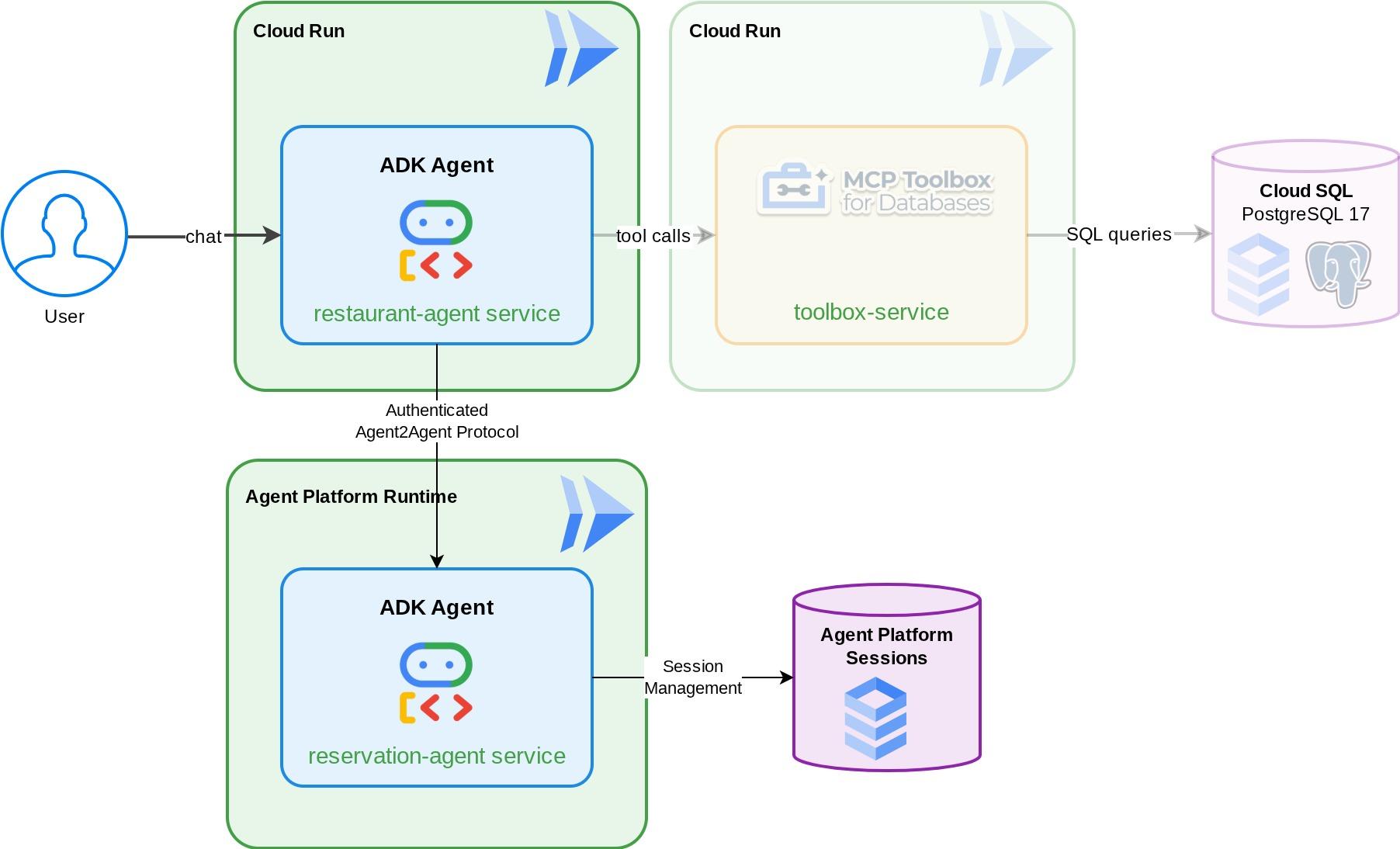
학습할 내용
- 관리 세션 서비스를 사용하여 예약 데이터를 관리하는 ADK 에이전트 빌드
- 에이전트 카드와 기술을 사용하여 ADK 에이전트를 A2A 서버로 노출
- A2A 에이전트를 Gemini Enterprise Agent Runtime에 배포
RemoteA2aAgent를 사용하여 다른 ADK 에이전트에서 원격 A2A 에이전트를 사용하고 인증된 요청 처리- 멀티 에이전트 시스템 점진적으로 테스트: 로컬 A2A, 배포된 A2A, 부분 통합, 전체 배포
기본 요건
- (권장) 다음 Codelab을 완료했습니다.
- ADK 및 Cloud SQL을 사용한 지속적인 AI 에이전트 빌드 -> ADK 세션 및 상태에 관한 자세한 내용
- ADK, MCP 도구 상자, Cloud SQL을 사용한 에이전트형 RAG -> 이 Codelab에서 에이전트를 계속 빌드할 수 있습니다. 제공된 시작 코드는 동일합니다.
- 활성 결제 계정이 있는 Google Cloud 계정
- Python 및 ADK 개념에 대한 기본적인 지식
2. 환경 설정 - 이전 Codelab에서 계속
이 Codelab에서 제공하는 설명은 필수 Codelab: ADK, MCP Toolbox, Cloud SQL을 사용한 에이전트형 RAG에서 이어집니다 . 이전 Codelab에서 계속 작업할 수 있습니다.
이전 Codelab 작업 디렉터리 ( 작업 디렉터리는 build-agent-adk-toolbox-cloudsql이어야 함)에서 빌드를 시작할 수 있습니다. 혼동을 피하기 위해 새로 시작할 때 사용하는 것과 동일한 디렉터리 이름으로 디렉터리 이름을 변경하겠습니다.
mv ~/build-agent-adk-toolbox-cloudsql ~/adk-a2a-agent-runtime-starter
cloudshell workspace ~/adk-a2a-agent-runtime-starter && cd ~/adk-a2a-agent-runtime-starter
source .env
이전 Codelab의 키 파일이 있는지 확인합니다.
echo "--- Restaurant Agent ---"
cat restaurant_agent/agent.py | head -5
echo ""
echo "--- Toolbox Config ---"
cat tools.yaml | head -5
LlmAgent 가져오기가 있는 restaurant_agent/agent.py 파일과 도구 상자 구성이 있는 tools.yaml가 표시됩니다.
이제 Python 환경을 다시 초기화해 보겠습니다.
rm -rf .venv
uv sync
또한 데이터베이스가 시드되고 준비되었는지 확인합니다.
uv run python scripts/verify_seed.py
이전 Codelab의 각 테스트 세부정보를 따르면 다음과 같은 출력이 표시될 수 있습니다.
Menu Items: 16/15
Embeddings: 16/15

✗ Database not ready
괜찮습니다. 데이터베이스 확인에서는 데이터 수집 확인에서 입력한 추가 데이터를 고려하지 않습니다. 데이터가 15개 이상이면 됩니다.
필수 API 활성화
다음으로 Gemini Enterprise Agent Platform과 상호작용하는 데 필요한 API를 사용 설정해야 합니다.
gcloud services enable \
  cloudresourcemanager.googleapis.com
다음 섹션인 A2A Protocol and Gemini Enterprise Agent Runtime로 계속 진행하는 데 필요한 파일과 인프라가 이미 있어야 합니다.
3. 환경 설정 - 스타터 저장소로 새로 시작
이 단계에서는 Cloud Shell 환경을 준비하고, Google Cloud 프로젝트를 구성하고, 시작 저장소를 클론합니다.
Cloud Shell 열기
브라우저에서 Cloud Shell을 엽니다. Cloud Shell은 이 Codelab에 필요한 모든 도구가 사전 구성된 환경을 제공합니다. 메시지가 표시되면 승인을 클릭합니다.
그런 다음 '보기' -> '터미널'을 클릭하여 터미널을 엽니다. 인터페이스는 다음과 유사해야 합니다.
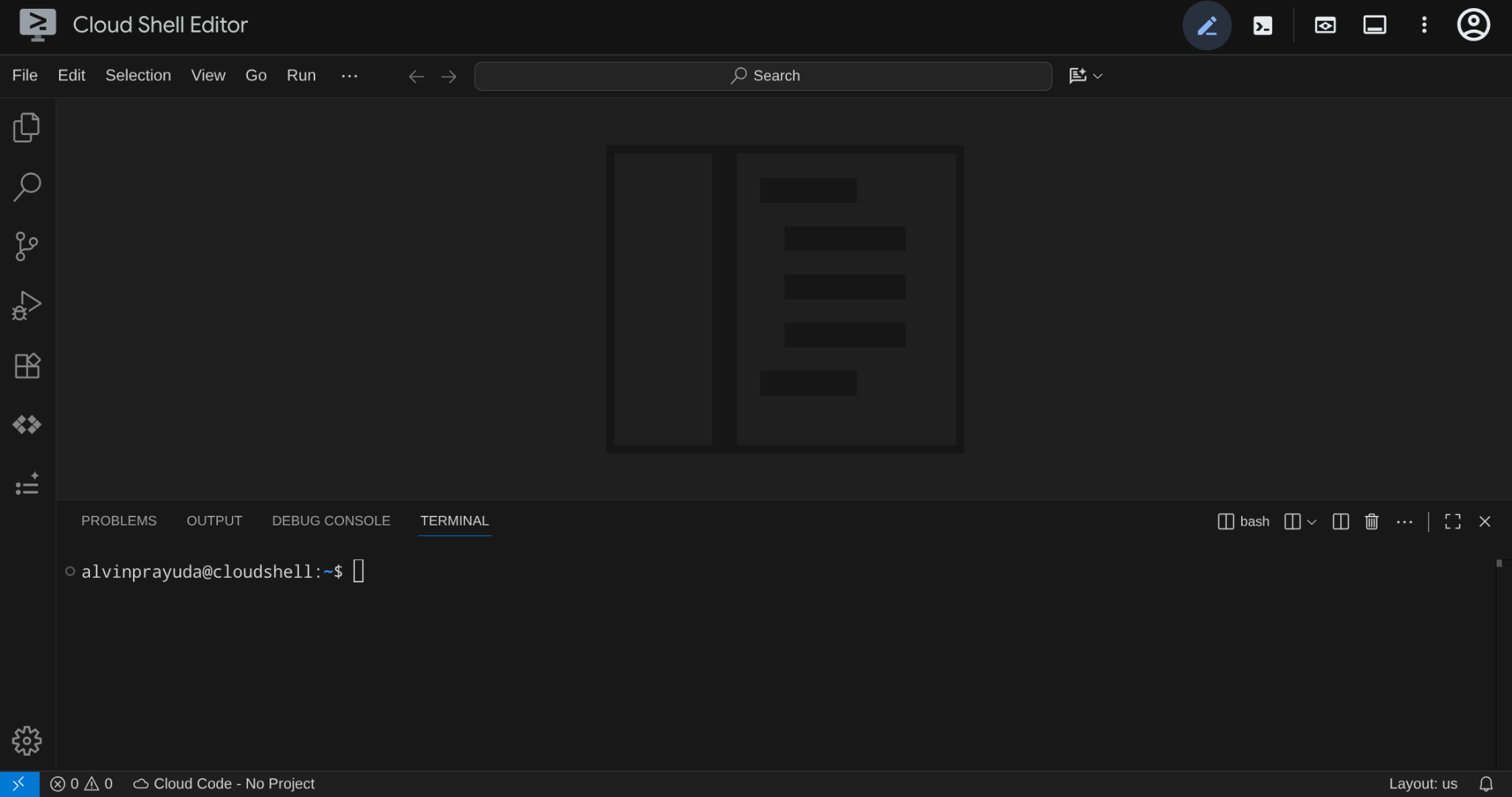
이것이 기본 인터페이스가 됩니다. 상단에 IDE, 하단에 터미널이 있습니다.
작업 디렉터리 설정하기
시작 저장소를 클론합니다. 이 Codelab에서 작성하는 모든 코드는 여기에 있습니다.
rm -rf ~/adk-a2a-agent-runtime-starter
git clone https://github.com/alphinside/adk-a2a-agent-runtime-starter.git
cloudshell workspace ~/adk-a2a-agent-runtime-starter && cd ~/adk-a2a-agent-runtime-starter
제공된 템플릿에서 .env 파일을 만듭니다.
cp .env.example .env
터미널에서 프로젝트 설정을 간소화하려면 이 프로젝트 설정 스크립트를 작업 디렉터리에 다운로드하세요.
curl -sL https://raw.githubusercontent.com/alphinside/cloud-trial-project-setup/main/setup_verify_trial_project.sh -o setup_verify_trial_project.sh
스크립트를 실행합니다. 체험판 결제 계정을 확인하고, 새 프로젝트를 만들거나 기존 프로젝트를 검증하고, 프로젝트 ID를 현재 디렉터리의 .env 파일에 저장하고, gcloud에서 활성 프로젝트를 설정합니다.
bash setup_verify_trial_project.sh && source .env
스크립트는 다음을 수행합니다.
- 활성 상태의 무료 체험 결제 계정이 있는지 확인
.env에 기존 프로젝트가 있는지 확인합니다 (있는 경우).- 새 프로젝트를 만들거나 기존 프로젝트를 재사용합니다.
- 무료 체험 결제 계정을 프로젝트에 연결
- 프로젝트 ID를
.env에 저장합니다. - 프로젝트를 활성
gcloud프로젝트로 설정
Cloud Shell 터미널 프롬프트의 작업 디렉터리 옆에 있는 노란색 텍스트를 확인하여 프로젝트가 올바르게 설정되었는지 확인합니다. 프로젝트 ID가 표시되어야 합니다.

필수 API 활성화
다음으로 Gemini Enterprise Agent Platform과 상호작용하는 데 필요한 API를 사용 설정해야 합니다.
gcloud services enable \
  aiplatform.googleapis.com \
  cloudresourcemanager.googleapis.com
시작 조건 인프라 설정
먼저 uv를 사용하여 Python 종속 항목을 설치해야 합니다. 는 Rust로 작성된 빠른 Python 패키지 및 프로젝트 관리자입니다 ( uv 문서). 이 Codelab에서는 Python 프로젝트를 유지관리할 때 속도와 단순성을 위해 이를 사용합니다.
uv sync
그런 다음 Cloud SQL 인스턴스를 만들고, 데이터를 시드하고, 레스토랑 에이전트의 초기 상태로 작동할 Toolbox 서비스를 배포하는 전체 설정 스크립트를 실행합니다.
bash scripts/full_setup.sh > logs/full_setup.log 2>&1 &
4. 개념: Agent2Agent (A2A) 프로토콜 및 Gemini Enterprise 에이전트 런타임
빌드하기 전에 이 Codelab에서 에이전트 애플리케이션을 확장하기 위해 소개하는 두 가지 주요 기술을 간략하게 살펴보겠습니다.
Agent2Agent (A2A) 프로토콜
Agent2Agent (A2A) 프로토콜은 AI 에이전트 간의 원활한 통신과 협업을 지원하도록 설계된 개방형 표준입니다. MCP (모델 컨텍스트 프로토콜) 가 에이전트를 도구 및 데이터에 연결하는 반면 A2A는 에이전트를 다른 에이전트에 연결하여 서로의 기능을 검색하고, 작업을 위임하고, 프레임워크와 조직 전반에서 공동작업할 수 있도록 지원합니다.
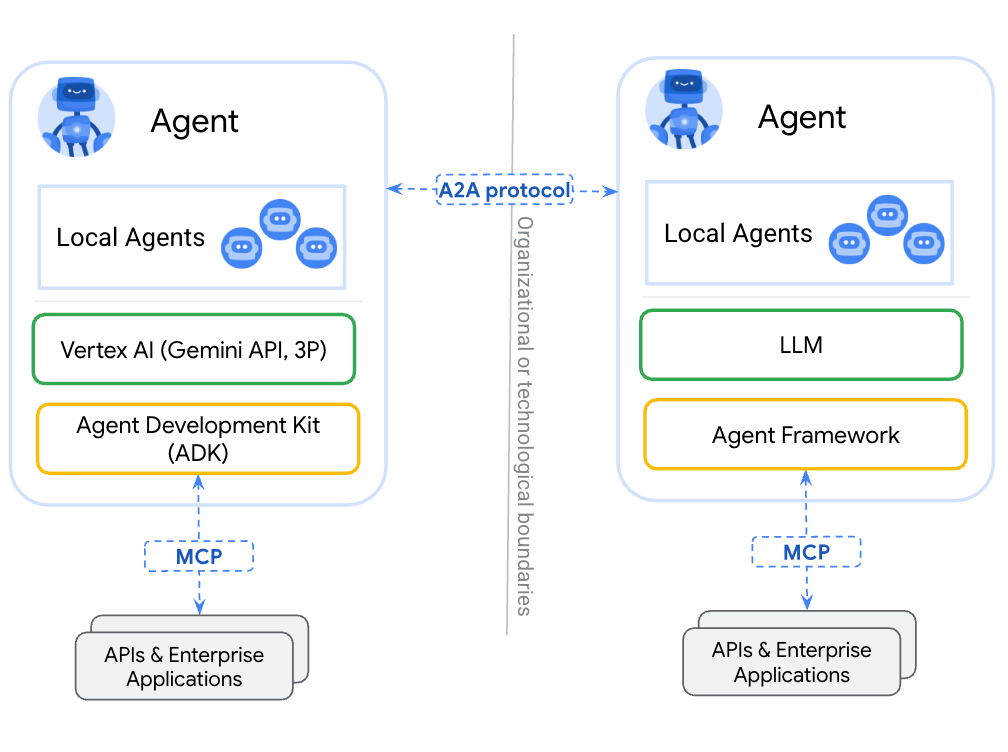
에이전트를 도구로 래핑(MCP 사용)하는 것과 A2A를 통해 노출하는 것의 주요 차이점은 다음과 같습니다. 도구는 스테이트리스(Stateless)이며 단일 기능을 수행하는 반면 A2A 에이전트는 추론하고, 상태를 유지하고, 협상이나 설명과 같은 멀티턴 상호작용을 처리할 수 있습니다. A2A를 통해 노출된 에이전트는 함수 호출로 축소되지 않고 전체 기능을 유지합니다.
A2A는 세 가지 핵심 개념을 정의합니다.
- 에이전트 카드: 에이전트의 기능, 기술, 엔드포인트를 설명하는 JSON 문서입니다. 다른 에이전트는 이 카드를 가져와 기능을 검색합니다.
- 메시지: A2A 엔드포인트로 전송되어 작업을 트리거하는 사용자 또는 에이전트 요청입니다.
- 작업: 수명 주기 (제출됨 → 작업 중 → 완료/실패)가 있고 결과를 포함하는 아티팩트가 있는 작업 단위입니다.
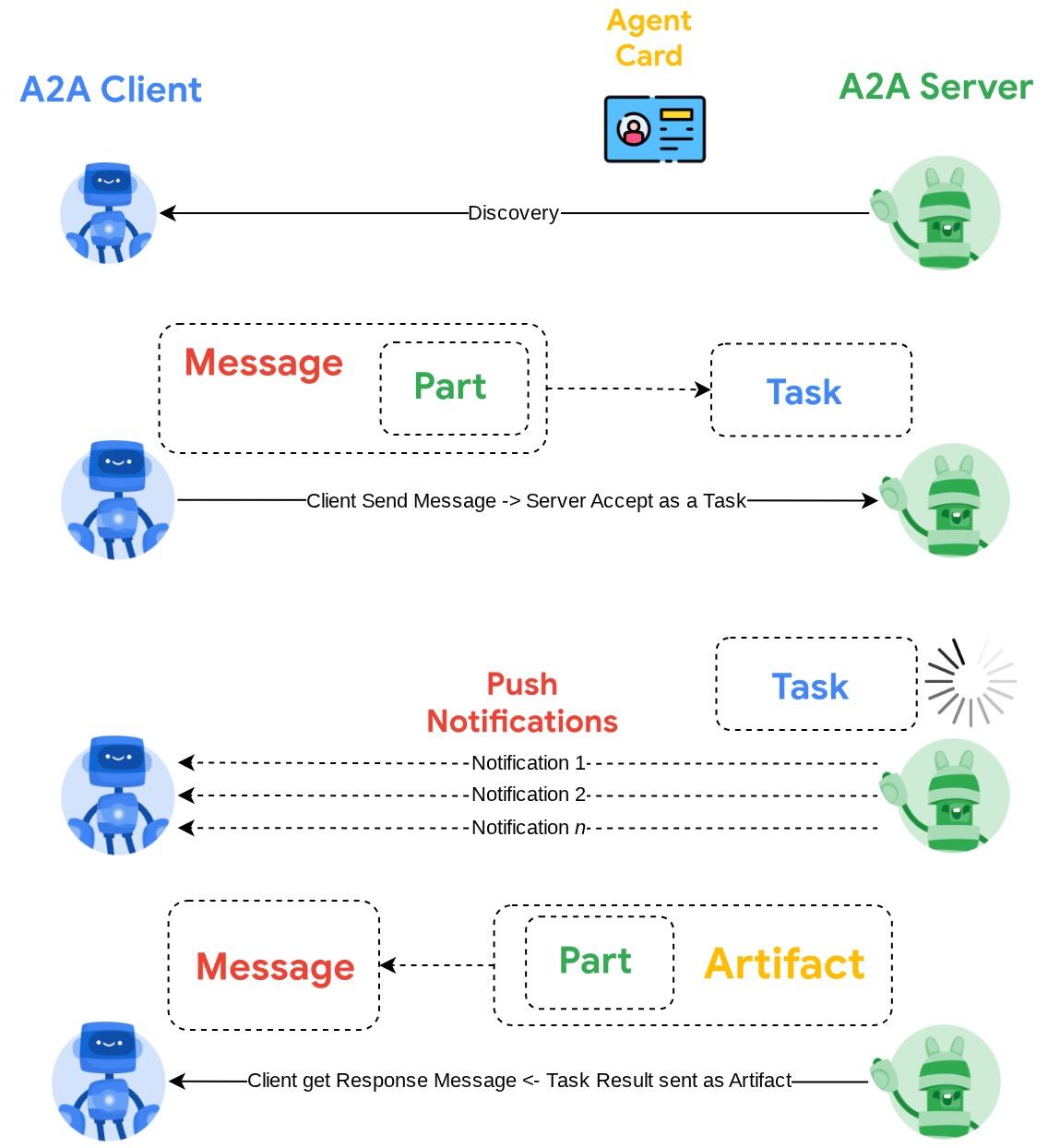
자세한 내용은 A2A란 무엇인가요?를 참고하세요.
Gemini Enterprise Agent Platform Runtime
Agent Runtime은 엔터프라이즈 보안 기능 (예: VPC 서비스 제어, CMEK)을 사용하여 프로덕션에서 AI 에이전트를 배포, 확장, 관리하는 Google Cloud의 완전 관리형 서비스입니다. 인프라를 처리하므로 개발자는 에이전트 로직에 집중할 수 있습니다.
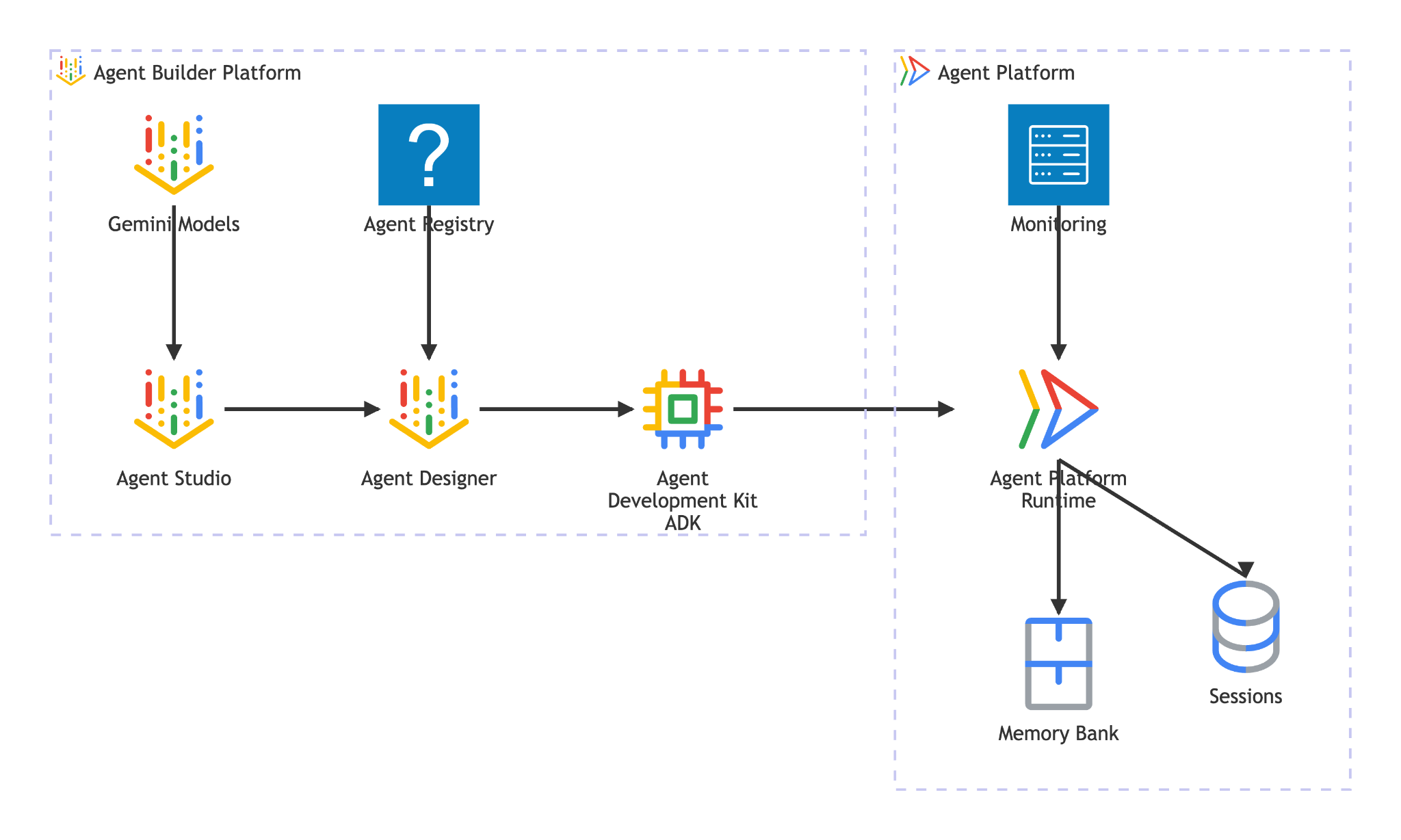
Agent Runtime은 다음을 제공합니다.
- 관리형 배포: 단일 SDK 호출로 ADK, LangGraph 또는 Python 프레임워크로 빌드된 에이전트 배포
- A2A 호스팅: 자동 에이전트 카드 제공 및 인증된 액세스를 통해 에이전트를 A2A 규격 엔드포인트로 배포
- 지속적인 세션:
VertexAiSessionService에서 요청 전반에 걸쳐 대화 기록과 상태를 저장합니다. - 자동 확장 - 인프라 관리 없이 트래픽을 처리하기 위해 0에서 확장
- 관측 가능성: Google Cloud의 관측 가능성 스택을 통한 내장 추적, 로깅, 모니터링
- 자세한 내용은 이 문서를 참고하세요.
이 Codelab에서는 예약 에이전트를 Agent Runtime에 배포합니다. 배포 프로세스에서는 에이전트 코드를 직렬화 (피클링)하여 업로드합니다. Agent Runtime은 A2A 프로토콜을 제공하는 서버리스 엔드포인트를 프로비저닝합니다. 다른 에이전트 (또는 클라이언트)는 Google Cloud 사용자 인증 정보로 인증된 표준 HTTP 호출을 통해 이 엔드포인트와 상호작용합니다.
5. 예약 에이전트 빌드
이 단계에서는 세션 상태를 사용하여 레스토랑 예약을 처리하는 새 ADK 에이전트를 만듭니다. 에이전트는 전화번호를 조회 키로 사용하여 만들기, 확인, 취소라는 세 가지 작업을 지원합니다. 모든 예약 데이터는 ADK의 세션 상태에 있습니다.
에이전트 스캐폴딩
adk create를 사용하여 올바른 모델 및 프로젝트 구성으로 에이전트 디렉터리 구조를 생성합니다.
source .env
uv run adk create reservation_agent \
    --model gemini-3.5-flash \
    --project ${GOOGLE_CLOUD_PROJECT} \
    --region ${GOOGLE_CLOUD_LOCATION}
이렇게 하면 Agent Platform의 Gemini 모델에 대해 사전 구성된 __init__.py, agent.py, .env이 포함된 reservation_agent/ 디렉터리가 생성됩니다.
adk-a2a-agent-runtime-starter/
├── reservation_agent/
│   ├── __init__.py
│   ├── agent.py
│   └── .env
├── logs
├── scripts
└── ...
다음으로 에이전트 코드를 업데이트합니다.
에이전트 코드 작성
생성된 에이전트 파일을 엽니다.
cloudshell edit reservation_agent/agent.py
그런 다음 콘텐츠를 다음으로 바꿉니다.
# reservation_agent/agent.py
import os
from functools import cached_property
from typing import Any

from google.adk.agents import LlmAgent
from google.adk.models.google_llm import Gemini
from google.adk.tools import ToolContext
from google.genai import Client, types

# App-scoped state prefix ensures reservations persist across all sessions.
# See https://adk.dev/sessions/state/ for state scope details.
STATE_PREFIX = "app:reservation:"


class GeminiGlobal(Gemini):
    """Gemini with location pinned to 'global'.

    A2aAgent.set_up() on Agent Platform Runtime SDK overwrites GOOGLE_CLOUD_LOCATION with the Agent Platform Runtime
    region (e.g. us-central1), but the Gemini 3-family endpoint requires 'global'.
    """

    @cached_property
    def api_client(self) -> Client:
        project = os.getenv("GOOGLE_CLOUD_PROJECT")
        return Client(
            project=project,
            location="global",
            http_options=types.HttpOptions(
                headers=self._tracking_headers(),
                retry_options=self.retry_options,
            ),
        )


def create_reservation(
    phone_number: str,
    name: str,
    party_size: int,
    date: str,
    time: str,
    tool_context: ToolContext,
) -> dict:
    """Create a new restaurant reservation.

    Args:
        phone_number: Customer's phone number, used as the reservation ID.
        name: Name for the reservation.
        party_size: Number of guests.
        date: Reservation date (e.g., '2025-07-15' or 'this Friday').
        time: Reservation time (e.g., '7:00 PM').

    Returns:
        Confirmation of the reservation.
    """
    reservation = {
        "name": name,
        "party_size": party_size,
        "date": date,
        "time": time,
        "status": "confirmed",
    }
    tool_context.state[f"{STATE_PREFIX}{phone_number}"] = reservation
    return {
        "status": "confirmed",
        "message": f"Reservation created for {name}, party of {party_size} on {date} at {time}. Phone: {phone_number}.",
    }


def check_reservation(phone_number: str, tool_context: ToolContext) -> dict:
    """Look up an existing reservation by phone number.

    Args:
        phone_number: The phone number used when the reservation was created.
        tool_context: ADK tool context for state access.

    Returns:
        The reservation details, or a message if not found.
    """
    reservation = tool_context.state.get(f"{STATE_PREFIX}{phone_number}")
    if reservation:
        return {"found": True, "reservation": reservation}
    return {"found": False, "message": f"No reservation found for {phone_number}."}


def cancel_reservation(phone_number: str, tool_context: ToolContext) -> dict:
    """Cancel an existing reservation by phone number.

    Args:
        phone_number: The phone number used when the reservation was created.
        tool_context: ADK tool context for state access.

    Returns:
        Confirmation of cancellation, or a message if not found.
    """
    key = f"{STATE_PREFIX}{phone_number}"
    reservation = tool_context.state.get(key)
    if not reservation:
        return {
            "success": False,
            "message": f"No reservation found for {phone_number}.",
        }
    if reservation.get("status") == "cancelled":
        return {
            "success": False,
            "message": f"Reservation for {phone_number} is already cancelled.",
        }
    reservation["status"] = "cancelled"
    tool_context.state[key] = reservation
    return {
        "success": True,
        "message": f"Reservation for {reservation['name']} ({phone_number}) has been cancelled.",
    }


root_agent = LlmAgent(
    name="reservation_agent",
    model=GeminiGlobal(model="gemini-3.5-flash"),
    instruction="""You are a friendly reservation assistant for "Foodie Finds" restaurant.
You help diners create, check, and cancel table reservations.

When a diner wants to make a reservation, collect these details:
- Name for the reservation
- Phone number (used as the reservation ID)
- Party size (number of guests)
- Date
- Time

Always confirm the details before creating the reservation.
When checking or cancelling, ask for the phone number if not provided.
Be concise and professional.""",
    tools=[create_reservation, check_reservation, cancel_reservation],
)
6. A2A 서버 구성 준비
A2A 에이전트 카드 정의
에이전트 카드는 에이전트의 기능을 구조적으로 설명한 것입니다. 다른 에이전트와 클라이언트는 이를 사용하여 에이전트가 하는 일을 파악합니다. 카드 구성을 만듭니다.
cloudshell edit reservation_agent/a2a_config.py
다음을 reservation_agent/a2a_config.py에 복사합니다.
# reservation_agent/a2a_config.py
from a2a.types import AgentSkill
from vertexai.preview.reasoning_engines.templates.a2a import create_agent_card

reservation_skill = AgentSkill(
    id="manage_reservations",
    name="Restaurant Reservations",
    description="Create, check, and cancel table reservations at Foodie Finds restaurant",
    tags=["reservations", "restaurant", "booking"],
    examples=[
        "Book a table for 4 on Friday at 7pm",
        "Check reservation for 555-0101",
        "Cancel my reservation, phone number 555-0101",
    ],
    input_modes=["text/plain"],
    output_modes=["text/plain"],
)

agent_card = create_agent_card(
    agent_name="Reservation Agent",
    description="Handles restaurant table reservations — create, check, and cancel bookings for Foodie Finds restaurant.",
    skills=[reservation_skill],
)
A2A 실행기 만들기
실행기는 A2A 프로토콜과 ADK 에이전트를 연결합니다. A2A 요청을 수신하고 ADK 에이전트를 통해 실행하며 결과를 A2A 작업으로 반환합니다.
cloudshell edit reservation_agent/executor.py
다음을 reservation_agent/executor.py에 복사합니다.
# reservation_agent/executor.py
import os
from typing import NoReturn

import vertexai
from a2a.server.agent_execution import AgentExecutor, RequestContext
from a2a.server.events import EventQueue
from a2a.server.tasks import TaskUpdater
from a2a.types import TaskState, TextPart, UnsupportedOperationError
from a2a.utils import new_agent_text_message
from a2a.utils.errors import ServerError
from google.adk.artifacts import InMemoryArtifactService
from google.adk.memory.in_memory_memory_service import InMemoryMemoryService
from google.adk.runners import Runner
from google.adk.sessions import InMemorySessionService, VertexAiSessionService
from google.genai import types

from reservation_agent.agent import root_agent as reservation_agent


class ReservationAgentExecutor(AgentExecutor):
    """Bridge between the A2A protocol and the ADK reservation agent.

    Uses InMemorySessionService for local testing, VertexAiSessionService
    when deployed to Agent Runtime (detected via GOOGLE_CLOUD_AGENT_ENGINE_ID).
    """

    def __init__(self) -> None:
        self.agent = None
        self.runner = None

    def _init_agent(self) -> None:
        if self.agent is not None:
            return

        self.agent = reservation_agent
        engine_id = os.environ.get("GOOGLE_CLOUD_AGENT_ENGINE_ID")

        if engine_id:
            project = os.environ.get("GOOGLE_CLOUD_PROJECT")
            location = os.environ.get("GOOGLE_CLOUD_LOCATION", "us-central1")
            vertexai.init(project=project, location=location)
            session_service = VertexAiSessionService(
                project=project, location=location, agent_engine_id=engine_id,
            )
            app_name = engine_id
        else:
            session_service = InMemorySessionService()
            app_name = self.agent.name

        self.runner = Runner(
            app_name=app_name,
            agent=self.agent,
            artifact_service=InMemoryArtifactService(),
            session_service=session_service,
            memory_service=InMemoryMemoryService(),
        )

    async def execute(self, context: RequestContext, event_queue: EventQueue) -> None:
        if self.agent is None:
            self._init_agent()

        query = context.get_user_input()
        updater = TaskUpdater(event_queue, context.task_id, context.context_id)
        user_id = context.message.metadata.get("user_id", "a2a-user") if context.message.metadata else "a2a-user"

        if not context.current_task:
            await updater.submit()
        await updater.start_work()

        try:
            session = await self._get_or_create_session(context.context_id, user_id)
            content = types.Content(role="user", parts=[types.Part(text=query)])

            async for event in self.runner.run_async(
                session_id=session.id, user_id=user_id, new_message=content,
            ):
                if event.is_final_response():
                    parts = event.content.parts
                    answer = " ".join(p.text for p in parts if p.text) or "No response."
                    await updater.add_artifact([TextPart(text=answer)], name="answer")
                    await updater.complete()
                    break
        except Exception as e:
            await updater.update_status(
                TaskState.failed, message=new_agent_text_message(f"Error: {e!s}"),
            )
            raise

    async def _get_or_create_session(self, context_id: str, user_id: str):
        app_name = self.runner.app_name
        if context_id:
            session = await self.runner.session_service.get_session(
                app_name=app_name, session_id=context_id, user_id=user_id,
            )
            if session:
                return session
        session = await self.runner.session_service.create_session(
            app_name=app_name, user_id=user_id, session_id=context_id,
        )
        return session

    async def cancel(self, context: RequestContext, event_queue: EventQueue) -> NoReturn:
        raise ServerError(error=UnsupportedOperationError())
실행기는 환경을 자동 감지합니다. GOOGLE_CLOUD_AGENT_ENGINE_ID가 설정된 경우 (Agent Runtime이 배포 시 이를 삽입함) 영구 세션에 VertexAiSessionService를 사용합니다. 로컬에서는 InMemorySessionService로 대체됩니다.
이제 reservation_agent 디렉터리에 다음이 포함됩니다.
reservation_agent/
├── __init__.py
├── agent.py
├── a2a_config.py
├── executor.py
└── .env
7. Agent Platform SDK를 사용하여 A2A 에이전트 준비 및 로컬 테스트
이 단계에서는 에이전트 플랫폼 SDK(SDK 이름은 이전 버전과의 호환성을 위해 여전히 vertex 용어를 사용함)의 A2aAgent 클래스를 사용하여 예약 에이전트를 A2A 호환 에이전트로 래핑한 다음, 로컬에서 전체 A2A 프로토콜 흐름(에이전트 카드 가져오기, 메시지 전송, 작업 가져오기)을 테스트합니다. 이는 다음 단계에서 Agent Runtime에 배포하는 것과 동일한 A2aAgent 객체입니다.
종속 항목 추가
에이전트 런타임 및 ADK 지원과 A2A SDK를 사용하여 Agent Platform SDK를 설치합니다.
uv add "google-cloud-aiplatform[agent_engines,adk]==1.149.0" "a2a-sdk==0.3.26"
A2A 구성요소 이해하기
A2A용 ADK 에이전트를 래핑하려면 다음 세 가지 구성요소가 필요합니다.
- 에이전트 카드: 에이전트의 기능, 기술, 엔드포인트 URL을 설명하는 '명함'입니다. 다른 에이전트는 이를 사용하여 내 에이전트의 기능을 파악합니다.
- 에이전트 실행기: A2A 프로토콜과 ADK 에이전트의 로직 간의 브리지입니다. A2A 요청을 수신하고 ADK 에이전트를 통해 실행하며 결과를 A2A 작업으로 반환합니다.
- A2aAgent: 카드와 실행기를 배포 가능한 단위로 결합하는 Agent Platform SDK 클래스입니다.
테스트 스크립트 만들기
로컬에서 테스트할 스크립트를 다음과 같이 만듭니다.
cloudshell edit scripts/test_a2a_agent_local.py
다음을 scripts/test_a2a_agent_local.py에 복사합니다.
# scripts/test_a2a_agent_local.py
import asyncio
import json
import os
from pprint import pprint

from dotenv import load_dotenv
from starlette.requests import Request
from vertexai.preview.reasoning_engines import A2aAgent

from reservation_agent.a2a_config import agent_card
from reservation_agent.executor import ReservationAgentExecutor

load_dotenv()


# --- Helper functions for building mock requests ---

def receive_wrapper(data: dict):
    async def receive():
        byte_data = json.dumps(data).encode("utf-8")
        return {"type": "http.request", "body": byte_data, "more_body": False}
    return receive

def build_post_request(data: dict = None, path_params: dict = None) -> Request:
    scope = {"type": "http", "http_version": "1.1", "headers": [(b"content-type", b"application/json")], "app": None}
    if path_params:
        scope["path_params"] = path_params
    return Request(scope, receive_wrapper(data))

def build_get_request(path_params: dict) -> Request:
    scope = {"type": "http", "http_version": "1.1", "query_string": b"", "app": None}
    if path_params:
        scope["path_params"] = path_params
    async def receive():
        return {"type": "http.disconnect"}
    return Request(scope, receive)


# --- Helper: poll for task completion ---

async def wait_for_task(a2a_agent, task_id, max_retries=30):
    """Poll on_get_task until the task reaches a terminal state."""
    for _ in range(max_retries):
        request = build_get_request({"id": task_id})
        result = await a2a_agent.on_get_task(request=request, context=None)
        state = result.get("status", {}).get("state", "")
        if state in ["completed", "failed"]:
            return result
        await asyncio.sleep(1)
    return result


def print_task_answer(result):
    """Extract and print the answer from task artifacts."""
    print(f"Status: {result.get('status', {}).get('state')}")
    for artifact in result.get("artifacts", []):
        if artifact.get("parts") and "text" in artifact["parts"][0]:
            print(f"Answer: {artifact['parts'][0]['text']}")


# --- Local test ---

async def main():
    # Create and set up the A2A agent locally

    a2a_agent = A2aAgent(agent_card=agent_card, agent_executor_builder=ReservationAgentExecutor)
    a2a_agent.set_up()

    # 1. Get agent card
    print("=" * 50)
    print("1. Retrieving agent card...")
    print("=" * 50)
    request = build_get_request(None)
    card_response = await a2a_agent.handle_authenticated_agent_card(request=request, context=None)
    print(f"Agent: {card_response.get('name')}")
    print(f"Skills: {[s.get('name') for s in card_response.get('skills', [])]}")

    # 2. Create a reservation
    print("\n" + "=" * 50)
    print("2. Creating a reservation...")
    print("=" * 50)
    message_data = {
        "message": {
            "messageId": f"msg-{os.urandom(4).hex()}",
            "content": [{"text": "Book a table for 2 on Saturday at 6pm. Name: Bob, Phone: 555-0202"}],
            "role": "ROLE_USER",
        },
    }
    request = build_post_request(message_data)
    response = await a2a_agent.on_message_send(request=request, context=None)
    task_id = response["task"]["id"]
    context_id = response["task"].get("contextId")
    print(f"Task ID: {task_id}")

    # 3. Wait for result
    print("\n" + "=" * 50)
    print("3. Waiting for task result...")
    print("=" * 50)
    result = await wait_for_task(a2a_agent, task_id)
    print_task_answer(result)

    # 4. Check the reservation (same context for session continuity)
    print("\n" + "=" * 50)
    print("4. Checking the reservation...")
    print("=" * 50)
    check_data = {
        "message": {
            "messageId": f"msg-{os.urandom(4).hex()}",
            "content": [{"text": "Check the reservation for 555-0202"}],
            "role": "ROLE_USER",
            "contextId": context_id,
        },
    }
    request = build_post_request(check_data)
    check_response = await a2a_agent.on_message_send(request=request, context=None)
    check_result = await wait_for_task(a2a_agent, check_response["task"]["id"])
    print_task_answer(check_result)

    # 5. Cancel the reservation
    print("\n" + "=" * 50)
    print("5. Cancelling the reservation...")
    print("=" * 50)
    cancel_data = {
        "message": {
            "messageId": f"msg-{os.urandom(4).hex()}",
            "content": [{"text": "Cancel the reservation for 555-0202"}],
            "role": "ROLE_USER",
            "contextId": context_id,
        },
    }
    request = build_post_request(cancel_data)
    cancel_response = await a2a_agent.on_message_send(request=request, context=None)
    cancel_result = await wait_for_task(a2a_agent, cancel_response["task"]["id"])
    print_task_answer(cancel_result)

    print("\n" + "=" * 50)
    print("All tests passed!")
    print("=" * 50)


if __name__ == "__main__":
    asyncio.run(main())
테스트 스크립트는 이전 단계에서 만든 에이전트 카드와 실행기를 가져오므로 중복이 없습니다. 로컬 A2aAgent를 만들고, 모의 HTTP 요청을 통해 A2A 프로토콜 호출을 시뮬레이션하고, 세 가지 예약 작업을 모두 확인합니다.
로컬로 설정된 GOOGLE_CLOUD_AGENT_ENGINE_ID가 없으므로 실행기는 InMemorySessionService을 사용합니다. Agent Runtime에 배포되면 동일한 실행기가 영구 세션을 위해 VertexAiSessionService로 자동 전환됩니다.
테스트 실행
PYTHONPATH=. uv run python scripts/test_a2a_agent_local.py
출력에는 다음 5단계가 표시됩니다.
- 에이전트 카드: 에이전트의 기능과 기술을 가져옵니다.
- 예약 만들기 - 테이블을 예약하고 확인이 포함된 작업을 반환합니다.
- 작업 결과 가져오기: 답변이 포함된 완료된 작업을 가져옵니다.
- 예약 확인 - 전화번호로 예약을 조회합니다.
- 예약 취소 - 예약을 취소하고 확인합니다.
아래와 같은 출력 예
==================================================
1. Retrieving agent card...
==================================================
Agent: Reservation Agent
Skills: ['Restaurant Reservations']

==================================================
2. Creating a reservation...
==================================================
Task ID: f7f7004d-cfea-49c2-b57d-5bca9959e193

==================================================
3. Waiting for task result...
==================================================
Status: TASK_STATE_COMPLETED
Answer: Your reservation for Bob, party of 2, on Saturday at 6:00 PM has been confirmed. The phone number associated is 555-0202.

==================================================
4. Checking the reservation...
==================================================
Status: TASK_STATE_COMPLETED
Answer: I found a reservation for Bob, party of 2, on Saturday at 6:00 PM. The reservation status is confirmed.

==================================================
5. Cancelling the reservation...
==================================================
Status: TASK_STATE_COMPLETED
Answer: Your reservation for Bob (555-0202) has been cancelled.

==================================================
All tests passed!
==================================================
이 시점에서 A2A 에이전트 카드에 올바른 기술이 설명되어 있고, 세 가지 예약 작업이 모두 A2A 프로토콜의 메시지/작업 흐름을 통해 작동하며, 동일한 컨텍스트 내의 메시지 간에 상태가 유지되는지 확인했습니다.
8. 예약 에이전트를 Agent Runtime에 배포
이 단계에서는 예약 에이전트를 Gemini Enterprise Agent Platform Runtime에 배포합니다. 이는 에이전트를 호스팅하고 안전한 A2A 엔드포인트로 노출하는 완전 관리형 서버리스 플랫폼입니다. 배포 후 승인된 클라이언트는 표준 A2A HTTP 엔드포인트를 통해 에이전트를 검색하고 상호작용할 수 있습니다.
스테이징 버킷 만들기
에이전트 런타임 스테이징을 위한 Cloud Storage 버킷을 만듭니다. Agent Runtime은 배포 중에 이 버킷을 사용하여 에이전트의 코드와 종속 항목을 업로드합니다.
STAGING_BUCKET="${GOOGLE_CLOUD_PROJECT}-adk-a2a-agent-runtime"
gsutil mb -l $REGION -p $GOOGLE_CLOUD_PROJECT gs://$STAGING_BUCKET 2>/dev/null || echo "Bucket already exists"
echo "STAGING_BUCKET=$STAGING_BUCKET" >> .env
source .env
배포 스크립트 만들기
다음으로 배포 스크립트를 준비해야 합니다.
cloudshell edit scripts/deploy_a2a_agent_runtime.py
다음을 scripts/deploy_a2a_agent_runtime.py에 복사합니다.
# scripts/deploy_a2a_agent_runtime.py
import os
from pathlib import Path

import vertexai
from dotenv import load_dotenv
from google.genai import types
from vertexai.preview.reasoning_engines import A2aAgent

from reservation_agent.a2a_config import agent_card
from reservation_agent.executor import ReservationAgentExecutor

load_dotenv()

PROJECT_ID = os.environ["GOOGLE_CLOUD_PROJECT"]
REGION = os.environ["REGION"]
STAGING_BUCKET = os.environ.get("STAGING_BUCKET", f"{PROJECT_ID}-adk-a2a-agent-runtime")
BUCKET_URI = f"gs://{STAGING_BUCKET}"

a2a_agent = A2aAgent(
    agent_card=agent_card,
    agent_executor_builder=ReservationAgentExecutor,
)


def main():
    vertexai.init(project=PROJECT_ID, location=REGION, staging_bucket=BUCKET_URI)
    client = vertexai.Client(
        project=PROJECT_ID,
        location=REGION,
        http_options=types.HttpOptions(api_version="v1beta1"),
    )

    print("Deploying Reservation Agent to Agent Runtime...")
    print("This may take 3-5 minutes.")

    remote_agent = client.agent_engines.create(
        agent=a2a_agent,
        config={
            "display_name": agent_card.name,
            "description": agent_card.description,
            "requirements": [
                "google-cloud-aiplatform[agent_engines,adk]==1.149.0",
                "a2a-sdk==0.3.26",
                "google-adk==1.29.0",
                "cloudpickle",
                "pydantic"
            ],
            "extra_packages": [
                "./reservation_agent",
            ],
            "http_options": {
                "api_version": "v1beta1",
            },
            "staging_bucket": BUCKET_URI,
        },
    )

    resource_name = remote_agent.api_resource.name
    print(f"\nDeployment complete!")
    print(f"Resource name: {resource_name}")

    env_path = Path(".env")
    lines = env_path.read_text().splitlines() if env_path.exists() else []
    lines = [l for l in lines if not l.startswith("RESERVATION_AGENT_RESOURCE_NAME=")]
    lines.append(f"RESERVATION_AGENT_RESOURCE_NAME={resource_name}")
    env_path.write_text("\n".join(lines) + "\n")
    print("Written RESERVATION_AGENT_RESOURCE_NAME to .env")


if __name__ == "__main__":
    main()
배포 스크립트는 로컬 테스트에 사용된 것과 동일한 agent_card 및 ReservationAgentExecutor를 가져오므로 코드 중복이 없습니다. Agent Runtime은 배포를 위해 종속 항목과 함께 A2aAgent 객체를 직렬화 (피클링)합니다. 배포 스크립트가 끝나면 RESERVATION_AGENT_RESOURCE_NAME 값을 .env 파일에 씁니다.
Agent Runtime에 배포
배포 스크립트를 실행합니다.
PYTHONPATH=. uv run python scripts/deploy_a2a_agent_runtime.py
배포에는 3~5분이 소요됩니다. 스크립트는 예약 에이전트를 호스팅하는 Agent Runtime에 서버리스 엔드포인트를 프로비저닝합니다. 배포가 완료되면 아래와 비슷한 출력이 표시됩니다.
Deploying Reservation Agent to Agent Runtime...
This may take 3-5 minutes.

Deployment complete!
Resource name: projects/your-project-number/locations/us-central1/reasoningEngines/your-agent-deployment-unique-id
Written RESERVATION_AGENT_RESOURCE_NAME to .env
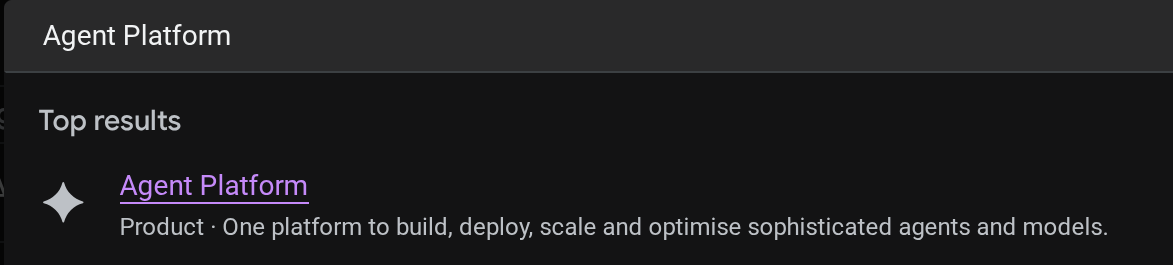
클라우드 콘솔에서 배포된 에이전트를 확인할 수 있습니다. 콘솔 검색창에서 Agent Platform 검색
그런 다음 왼쪽 탭에서 Agents에 마우스를 가져가 Deployments을 선택합니다.
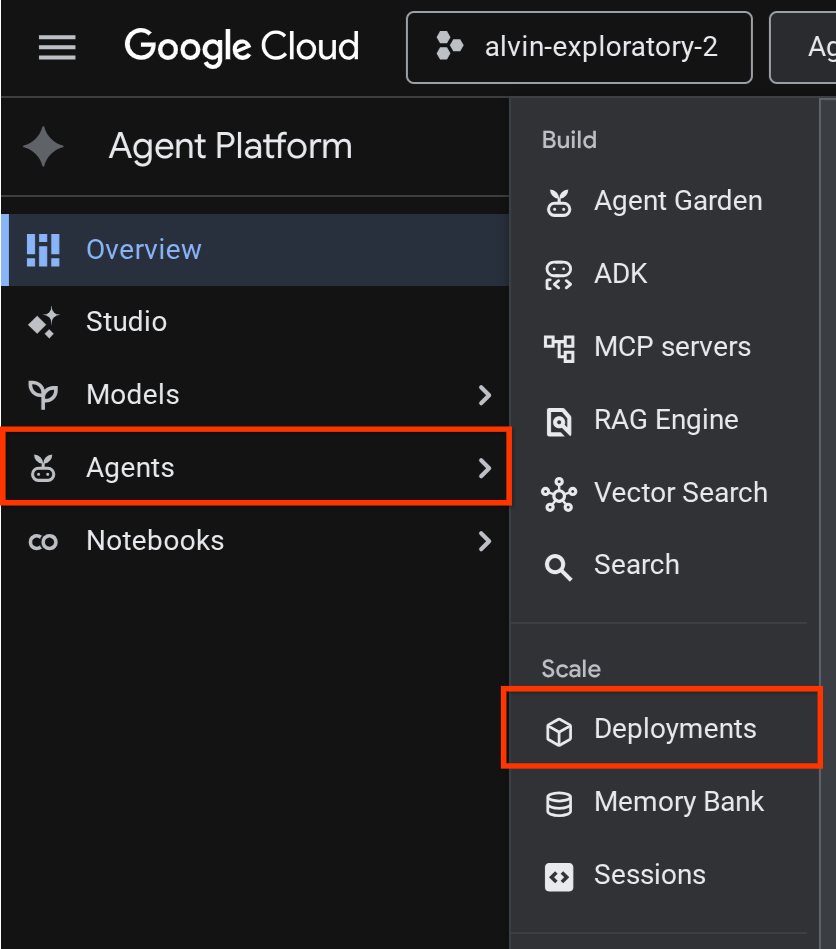
아래와 같이 배포 목록에 Reservation Agent가 표시됩니다.

배포된 에이전트 테스트
이제 배포된 에이전트를 테스트하고 배포된 에이전트의 테스트 스크립트를 만들 준비가 되었습니다.
cloudshell edit scripts/test_a2a_agent_runtime.py
다음을 scripts/test_a2a_agent_runtime.py에 복사합니다.
# scripts/test_a2a_agent_runtime.py
import asyncio
import os
import time

import vertexai
from a2a.types import TaskState
from dotenv import load_dotenv
from google.genai import types

load_dotenv()

PROJECT_ID = os.environ["GOOGLE_CLOUD_PROJECT"]
REGION = os.environ["REGION"]
RESOURCE_NAME = os.environ["RESERVATION_AGENT_RESOURCE_NAME"]


async def main():
    vertexai.init(project=PROJECT_ID, location=REGION)
    client = vertexai.Client(
        project=PROJECT_ID, location=REGION,
        http_options=types.HttpOptions(api_version="v1beta1"),
    )

    agent = client.agent_engines.get(name=RESOURCE_NAME)

    # 1. Get agent card
    print("=" * 50)
    print("1. Retrieving agent card...")
    print("=" * 50)
    card = await agent.handle_authenticated_agent_card()
    print(f"Agent: {card.name}")
    print(f"URL: {card.url}")
    print(f"Skills: {[s.name for s in card.skills]}")

    # 2. Send a reservation request
    print("\n" + "=" * 50)
    print("2. Sending reservation request...")
    print("=" * 50)
    message_data = {
        "messageId": "msg-remote-001",
        "role": "user",
        "parts": [{"kind": "text", "text": "Book a table for 3 on Sunday at noon. Name: Carol, Phone: 555-0303"}],
    }
    response = await agent.on_message_send(**message_data)

    task_object = None
    for chunk in response:
        if isinstance(chunk, tuple) and len(chunk) > 0 and hasattr(chunk[0], "id"):
            task_object = chunk[0]
            break

    task_id = task_object.id
    print(f"Task ID: {task_id}")
    print(f"Status: {task_object.status.state}")

    # 3. Poll for result
    print("\n" + "=" * 50)
    print("3. Waiting for result...")
    print("=" * 50)
    result = None
    for _ in range(30):
        try:
            result = await agent.on_get_task(id=task_id)
            if result.status.state in [TaskState.completed, TaskState.failed]:
                break
        except Exception:
            pass
        time.sleep(1)

    print(f"Final status: {result.status.state}")
    if result.artifacts:
        for artifact in result.artifacts:
            if artifact.parts and hasattr(artifact.parts[0], "root") and hasattr(artifact.parts[0].root, "text"):
                print(f"Answer: {artifact.parts[0].root.text}")

    print("\n" + "=" * 50)
    print("Remote agent test passed!")
    print("=" * 50)


if __name__ == "__main__":
    asyncio.run(main())
그런 다음 테스트를 실행합니다.
source .env
uv run python scripts/test_a2a_agent_runtime.py
출력에는 '식당 예약' 스킬이 있는 에이전트 카드와 예약 확인으로 완료되는 작업이 표시됩니다.
==================================================
1. Retrieving agent card...
==================================================
Agent: Reservation Agent
URL: https://us-central1-aiplatform.googleapis.com/v1beta1/projects/your-project-id/locations/us-central1/reasoningEngines/your-agent-unique-id/a2a
Skills: ['Restaurant Reservations']

==================================================
2. Sending reservation request...
==================================================
Task ID: b34585d0-5f03-4cb0-85a3-40710a0d224d
Status: TaskState.completed

==================================================
3. Waiting for result...
==================================================
Final status: TaskState.completed
Answer: Your reservation for Carol, party of 3 on Sunday at noon with phone number 555-0303 is confirmed.

==================================================
Remote agent test passed!
==================================================
이제 예약 에이전트가 Agent Runtime에서 관리 A2A 엔드포인트로 실행됩니다.
9. A2A 예약 에이전트를 루트 레스토랑 에이전트와 통합
이 단계에서는 배포된 예약 에이전트를 원격 A2A 하위 에이전트로 사용하도록 레스토랑 에이전트를 업그레이드합니다. 오케스트레이터는 로컬에서 실행되고 예약 에이전트는 Agent Runtime에서 실행됩니다. 이는 전체 배포 전에 A2A 연결을 검증하는 부분 통합입니다.
A2A 에이전트 카드 URL 확인
RemoteA2aAgent는 배포된 예약 에이전트의 카드 URL을 통해 기능을 검색해야 합니다. Agent Runtime에서 이 URL을 가져와 레스토랑 에이전트의 .env에 쓰는 스크립트를 만듭니다.
cloudshell edit scripts/resolve_agent_card_url.py
다음을 scripts/resolve_agent_card_url.py에 복사합니다.
# scripts/resolve_agent_card_url.py
import asyncio
import os
from pathlib import Path

import vertexai
from dotenv import load_dotenv
from google.genai import types

load_dotenv()

PROJECT_ID = os.environ["GOOGLE_CLOUD_PROJECT"]
REGION = os.environ["REGION"]
RESOURCE_NAME = os.environ["RESERVATION_AGENT_RESOURCE_NAME"]


async def main():
    vertexai.init(project=PROJECT_ID, location=REGION)
    client = vertexai.Client(
        project=PROJECT_ID, location=REGION,
        http_options=types.HttpOptions(api_version="v1beta1"),
    )

    agent = client.agent_engines.get(name=RESOURCE_NAME)
    card = await agent.handle_authenticated_agent_card()
    card_url = f"{card.url}/v1/card"

    print(f"Agent: {card.name}")
    print(f"Card URL: {card_url}")

    # Write to restaurant_agent/.env
    # Write to both restaurant_agent/.env (for adk web) and root .env (for Cloud Run deploy)
    for env_path in [Path("restaurant_agent/.env"), Path(".env")]:
        lines = env_path.read_text().splitlines() if env_path.exists() else []
        lines = [l for l in lines if not l.startswith("RESERVATION_AGENT_CARD_URL=")]
        lines.append(f"RESERVATION_AGENT_CARD_URL={card_url}")
        env_path.write_text("\n".join(lines) + "\n")
        print(f"Written RESERVATION_AGENT_CARD_URL to {env_path}")


if __name__ == "__main__":
    asyncio.run(main())
스크립트를 실행하여 .env 파일에 에이전트 카드 URL을 입력합니다.
uv run python scripts/resolve_agent_card_url.py
source .env
레스토랑 에이전트 업데이트
식당 에이전트 파일을 엽니다.
cloudshell edit restaurant_agent/agent.py
그런 다음 원격 예약 에이전트를 하위 에이전트로 포함하는 업데이트된 버전으로 콘텐츠를 바꿉니다.
# restaurant_agent/agent.py
import os

import httpx
from google.adk.agents import LlmAgent
from google.adk.agents.remote_a2a_agent import RemoteA2aAgent
from google.auth import default
from google.auth.transport.requests import Request as AuthRequest
from toolbox_adk import ToolboxToolset

TOOLBOX_URL = os.environ.get("TOOLBOX_URL", "http://127.0.0.1:5000")
RESERVATION_AGENT_CARD_URL = os.environ.get("RESERVATION_AGENT_CARD_URL", "")

toolbox = ToolboxToolset(TOOLBOX_URL)


class GoogleCloudAuth(httpx.Auth):
    """Auto-refreshing Google Cloud authentication for httpx.

    Refreshes the access token before each request if expired,
    so long-running agents never hit 401 errors.
    """

    def __init__(self):
        self.credentials, _ = default(
            scopes=["https://www.googleapis.com/auth/cloud-platform"]
        )

    def auth_flow(self, request):
        # Refresh the token if it is expired or missing
        if not self.credentials.valid:
            self.credentials.refresh(AuthRequest())

        request.headers["Authorization"] = f"Bearer {self.credentials.token}"
        yield request


reservation_remote_agent = RemoteA2aAgent(
    name="reservation_agent",
    description="Handles restaurant table reservations — create, check, and cancel bookings. Delegate to this agent when the user wants to book a table, check a reservation, or cancel a reservation.",
    agent_card=RESERVATION_AGENT_CARD_URL,
    httpx_client=httpx.AsyncClient(auth=GoogleCloudAuth(), timeout=60),
)

root_agent = LlmAgent(
    name="restaurant_agent",
    model="gemini-3.5-flash",
    instruction="""You are a friendly and knowledgeable concierge at "Foodie Finds," a restaurant. Your job:
- Help diners browse the menu by category or cuisine type.
- Provide full details about specific dishes, including ingredients, price, and dietary information.
- Recommend dishes based on natural language descriptions of what the diner is craving.
- Add new menu items when asked.
- For reservation requests (booking, checking, or cancelling tables), delegate to the reservation_agent.

When a diner asks about a specific dish by name or cuisine, use the get-item-details tool.
When a diner asks for a specific category or cuisine type, use the search-menu tool.
When a diner describes what kind of food they want — by flavor, texture, dietary needs, or cravings — use the search-menu-by-description tool for semantic search.

When in doubt between search-menu and search-menu-by-description, prefer search-menu-by-description — it searches dish descriptions and finds more relevant matches.
If a dish is not available (available is false), let the diner know and suggest similar alternatives from the search results.
Be conversational, knowledgeable, and concise.""",
    tools=[toolbox],
    sub_agents=[reservation_remote_agent],
)
이전 버전에서 변경된 주요 사항은 다음과 같습니다.
GoogleCloudAuth- 각 요청 전에 Google Cloud 액세스 토큰을 새로고침하는 맞춤httpx.Auth핸들러입니다. Agent Runtime에는 인증된 A2A 호출이 필요하며 토큰은 일정 시간이 지나면 만료됩니다.RemoteA2aAgent는.env(resolve 스크립트에 의해 작성됨)에서RESERVATION_AGENT_CARD_URL를 읽고 인증된httpx_client를 사용합니다.- 하위 에이전트로 등록됨: ADK의 오케스트레이터가 예약 요청을 자동으로 위임합니다.
- 예약 위임을 언급하도록 안내 업데이트
통합 에이전트를 로컬에서 테스트
시작 에이전트에는 MCP 도구 상자와의 통합이 필요하며, 필요한 파일은 이전 Codelab이나 시작 저장소에서 이미 제공되었어야 합니다. 툴박스 프로세스가 올바르게 실행되는지 확인하기만 하면 됩니다.
.env의 TOOLBOX_URL가 이미 Cloud Run 서비스를 가리키는 경우 (이전 Codelab 또는 시작 저장소의 full_setup.sh에서) 이 단계를 건너뛰어도 됩니다. 에이전트가 배포된 Toolbox에 연결됩니다.
대신 로컬 Toolbox가 필요한 경우 새 인스턴스를 시작하기 전에 이미 실행 중인 인스턴스가 있는지 확인하세요.
if curl -s http://127.0.0.1:5000/api/toolsets > /dev/null 2>&1; then
  echo "Toolbox already running on port 5000"
else
  set -a; source .env; set +a
  ./toolbox --config=tools.yaml > logs/toolbox.log 2>&1 &
  echo "Toolbox started"
fi
그런 다음 ADK 웹 개발 UI를 통해 음식점 에이전트와 상호작용해 볼 수 있습니다.
uv run adk web --allow_origins "regex:https://.*\.cloudshell\.dev" --port 8080
Cloud Shell 웹 미리보기를 사용하여 ADK 웹 UI를 열고 (웹 미리보기 버튼을 클릭하고 포트를 8080으로 변경) restaurant_agent를 선택합니다.
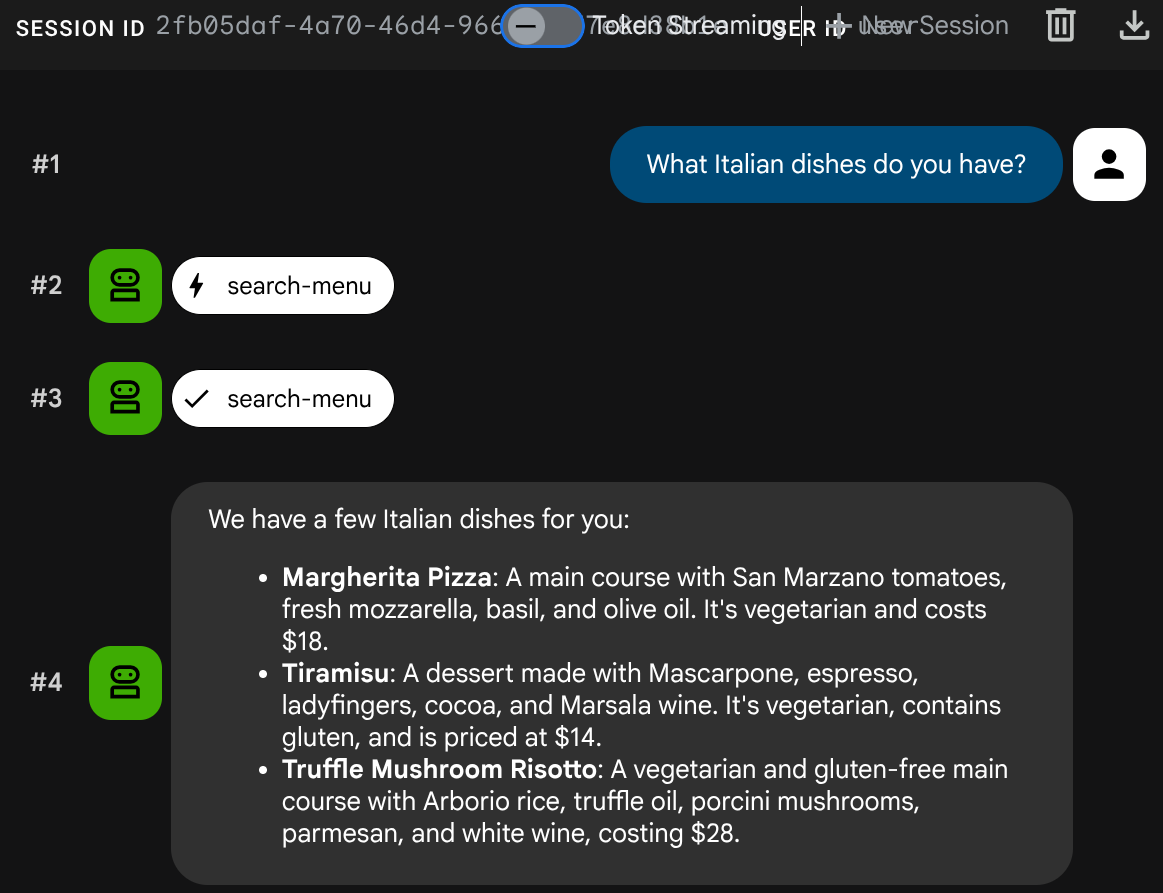
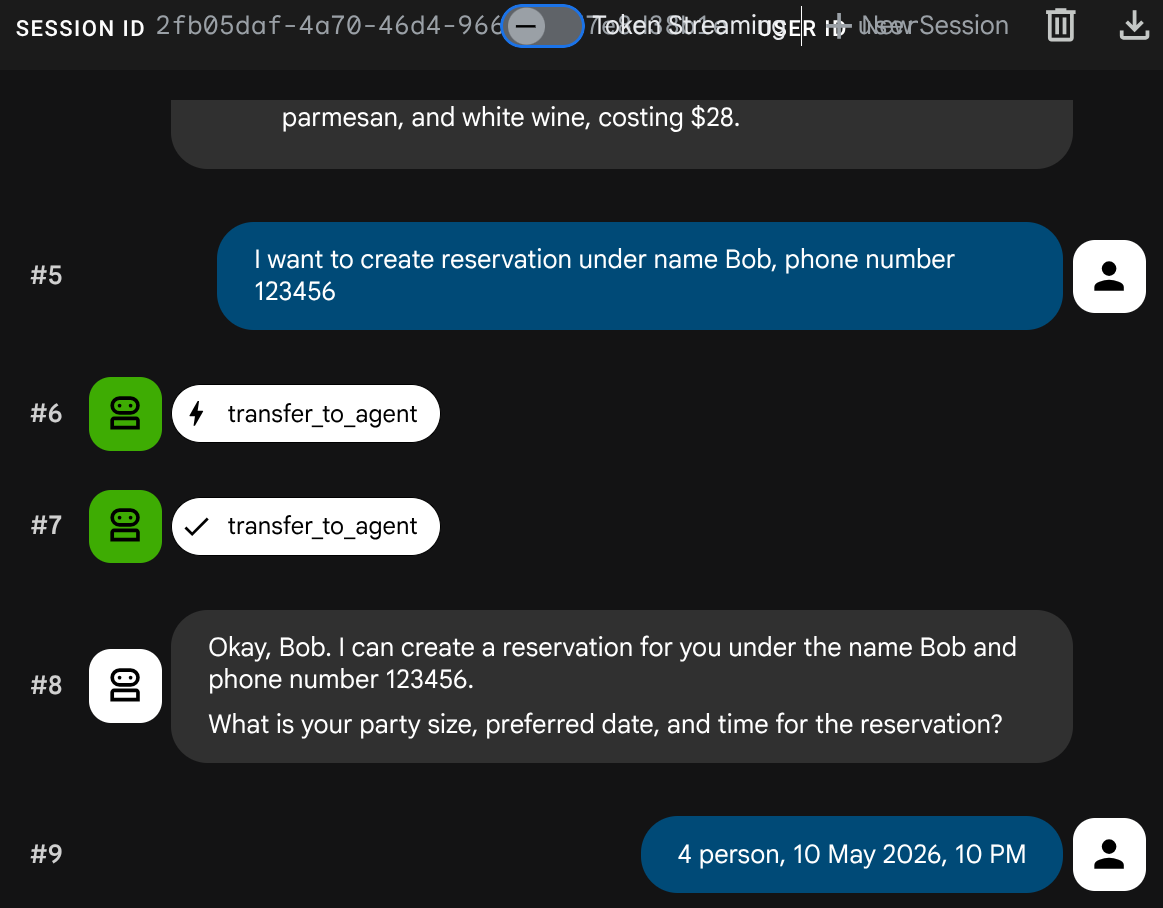
혼합 대화 테스트:
메뉴 쿼리
What Italian dishes do you have?
예약 요청
I want to create reservation under name Bob, phone number 123456
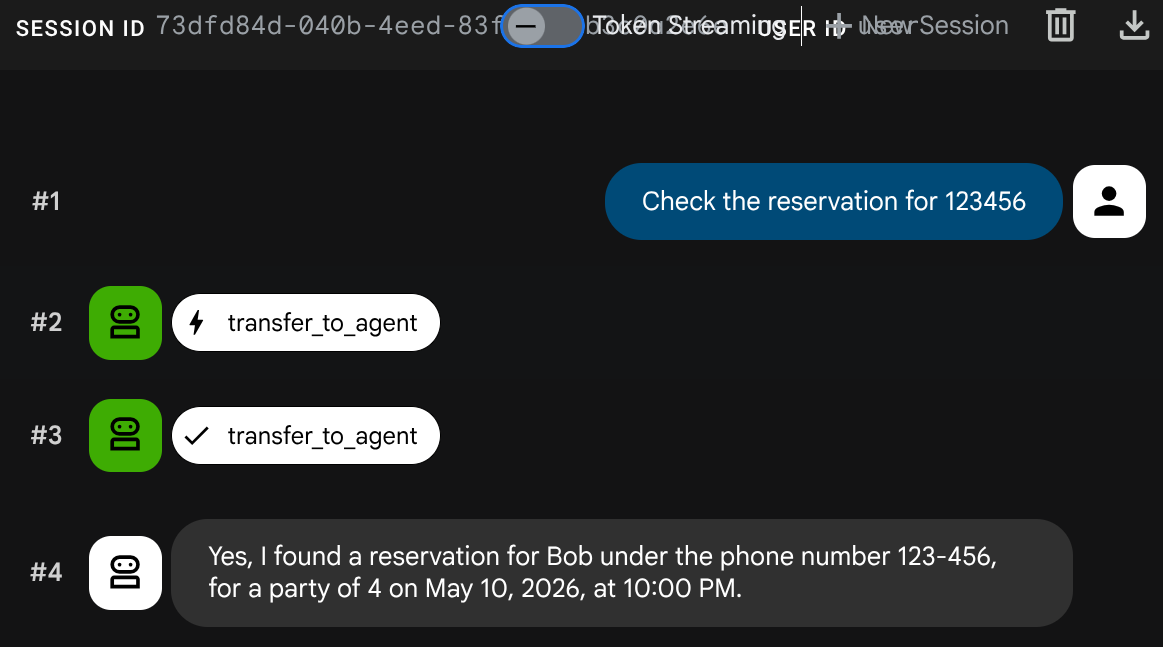
예약 확인
새 세션 만들기 ( 새 대화 시작):
Check the reservation for 123456
Ctrl+C를 두 번 눌러 adk web 프로세스를 중지합니다. 이제 에이전트를 완전히 배포하여 시스템을 완료해 보겠습니다.
10. 업데이트된 레스토랑 에이전트를 Cloud Run에 배포
이 단계에서는 A2A 통합을 사용하여 레스토랑 에이전트를 Cloud Run에 다시 배포하여 완전히 배포된 멀티 에이전트 시스템을 완성합니다.
Agent Runtime에 액세스할 권한 부여
Cloud Run 서비스 계정에는 Agent Runtime을 호출할 수 있는 권한이 필요합니다. 기본 Compute Engine 서비스 계정에 roles/aiplatform.user 역할을 부여합니다.
PROJECT_NUMBER=$(gcloud projects describe $GOOGLE_CLOUD_PROJECT --format='value(projectNumber)')
gcloud projects add-iam-policy-binding $GOOGLE_CLOUD_PROJECT \
  --member="serviceAccount:${PROJECT_NUMBER}-compute@developer.gserviceaccount.com" \
  --role="roles/aiplatform.user"
Cloud Run에 배포
이 설정에서는 이전 Codelab에서 레스토랑 에이전트 서비스가 이미 존재하거나 새로 시작하는 경우 scripts/full_setup.sh를 실행한다고 가정합니다. 이렇게 하면 업데이트된 코드 (새 RemoteA2aAgent 통합)로 재배포되고 예약 에이전트 카드 URL이 새 환경 변수로 추가됩니다. 기존 환경 변수 (TOOLBOX_URL, GOOGLE_CLOUD_PROJECT 등)는 유지됩니다.
gcloud run deploy restaurant-agent \
  --source . \
  --region=$REGION \
  --allow-unauthenticated \
  --update-env-vars="RESERVATION_AGENT_CARD_URL=$RESERVATION_AGENT_CARD_URL" \
  --min-instances=0 \
  --max-instances=1 \
  --memory=1Gi \
  --port=8080
완전히 배포된 시스템 테스트
배포된 서비스 URL을 가져옵니다.
AGENT_URL=$(gcloud run services describe restaurant-agent --region=$REGION --format='value(status.url)')
echo "Agent URL: $AGENT_URL"
브라우저에서 URL을 엽니다. ADK 웹 UI가 로드됩니다. 이는 로컬에서 사용한 것과 동일한 인터페이스로, 이제 Cloud Run에서 실행됩니다.
상담사와 편하게 대화하세요.
메뉴 쿼리
What spicy dishes do you have?
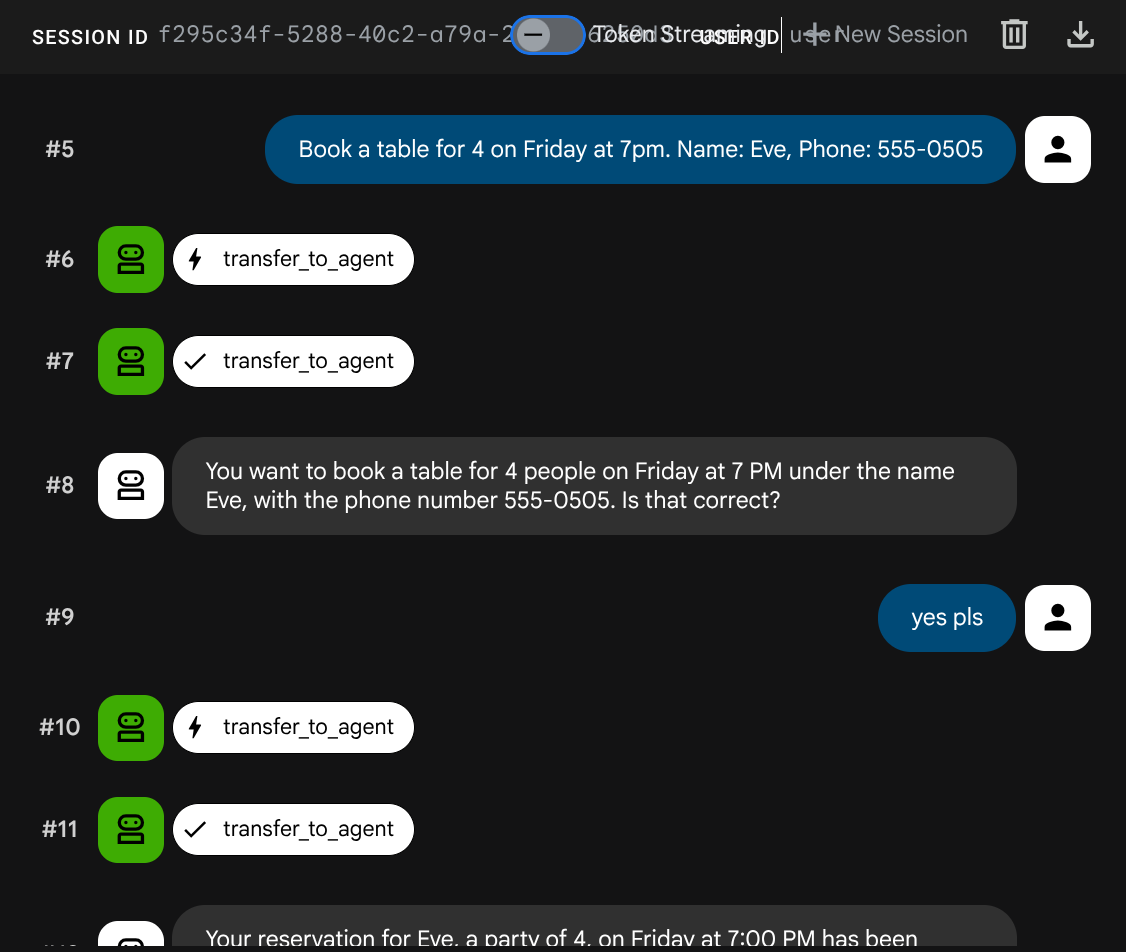
예약 요청
Book a table for 4 on Friday at 7pm. Name: Eve, Phone: 555-0505
예약 확인
새 세션 만들기 ( 새 대화 시작):
Check reservation for 555-0505
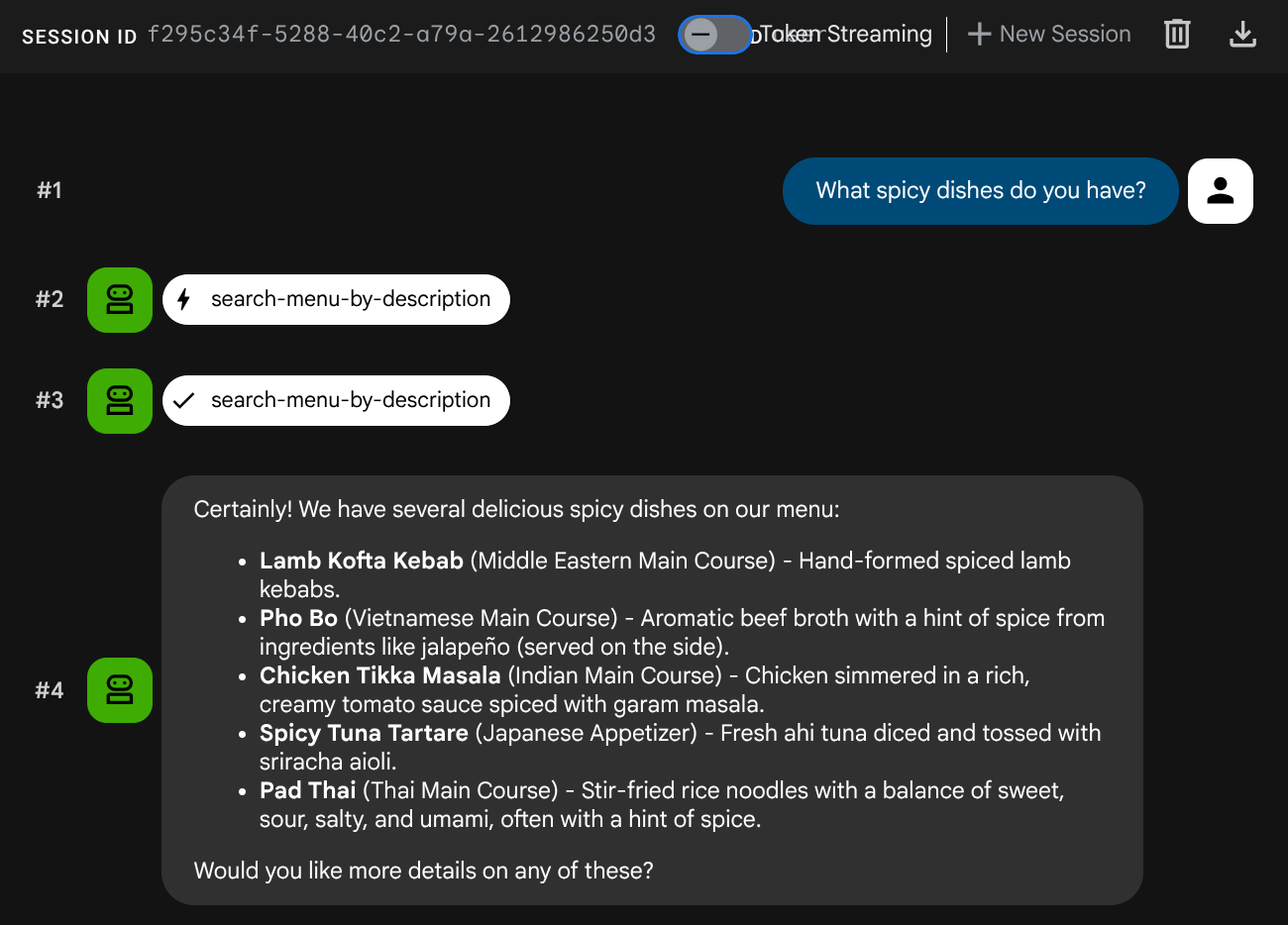
멀티 에이전트 시스템이 완전히 배포됩니다. Cloud Run의 레스토랑 에이전트는 메뉴 작업을 위한 MCP 도구 상자와 Agent Runtime의 A2A 예약 에이전트라는 두 백엔드 서비스 간의 오케스트레이션을 수행합니다.
11. 수고하셨습니다
Google Cloud에서 A2A 프로토콜을 사용하여 멀티 에이전트 시스템을 빌드하고 배포했습니다.
학습한 내용
- 데이터베이스 없이 세션 상태 (
ToolContext)를 사용하여 예약 데이터를 관리하는 ADK 에이전트를 빌드했습니다. - Agent Platform SDK를 사용하여 Agent Runtime에 A2A 에이전트 배포
RemoteA2aAgent를 하위 에이전트로 사용하여 다른 ADK 에이전트에서 원격 A2A 에이전트를 사용했습니다.- 로컬 A2A → 배포된 A2A → 부분 통합 → 전체 배포와 같이 시스템을 점진적으로 테스트했습니다.
정리
Google Cloud 계정에 비용이 청구되지 않도록 하려면 이 Codelab에서 만든 리소스를 삭제합니다.
옵션 1: 프로젝트 삭제 (권장)
gcloud projects delete $GOOGLE_CLOUD_PROJECT
옵션 2: 개별 리소스 삭제
# Delete the Agent Runtime deployment
uv run python -c "
import vertexai
from google.genai import types
vertexai.init(project='$GOOGLE_CLOUD_PROJECT', location='$REGION')
client = vertexai.Client(
    project='$GOOGLE_CLOUD_PROJECT', location='$REGION',
    http_options=types.HttpOptions(api_version='v1beta1'),
)
agent = client.agent_engines.get(name='$RESERVATION_AGENT_RESOURCE_NAME')
agent.delete(force=True)
print('Agent Runtime deployment deleted.')
"

# Delete Cloud Run services
gcloud run services delete restaurant-agent --region=$REGION --quiet
gcloud run services delete toolbox-service --region=$REGION --quiet

# Delete Cloud SQL instance
gcloud sql instances delete $DB_INSTANCE --quiet

# Delete GCS staging bucket
gsutil rm -r gs://$STAGING_BUCKET