

1. บทนำ
เมื่อ AI Agent มีความรับผิดชอบมากขึ้น การดูแล ปรับขนาด และพัฒนา Agent ตัวเดียวที่ทำทุกอย่างจึงเป็นเรื่องยาก ความสามารถที่แตกต่างกันมักต้องใช้กลยุทธ์การติดตั้งใช้งาน รอบการอัปเดต หรือแม้แต่ทีมที่แตกต่างกันในการเป็นเจ้าของ
- โปรโตคอล A2A (Agent2Agent) ช่วยแก้ปัญหาด้านการสื่อสาร โดยกำหนดมาตรฐานวิธีที่เอเจนต์ค้นพบความสามารถของกันและกัน และทำงานร่วมกันในเฟรมเวิร์กและองค์กรต่างๆ
- รันไทม์แพลตฟอร์มเอเจนต์ของ Gemini Enterprise ช่วยแก้ปัญหาด้านการติดตั้งใช้งาน ซึ่งเป็นแพลตฟอร์มแบบ Serverless ที่มีการจัดการครบวงจรซึ่งโฮสต์เอเจนต์ของคุณพร้อมการรองรับ A2A ในตัว การปรับขนาดอัตโนมัติ จุดปลายทางที่ปลอดภัย เซสชันแบบถาวร และการจัดการโครงสร้างพื้นฐานแบบไม่ต้องดำเนินการ
ซึ่งช่วยให้คุณสร้าง Agent เฉพาะทาง ติดตั้งใช้งานเป็นบริการ A2A ที่ค้นพบได้ และรวม Agent เหล่านั้นเป็นระบบแบบหลาย Agent
สิ่งที่คุณจะสร้าง
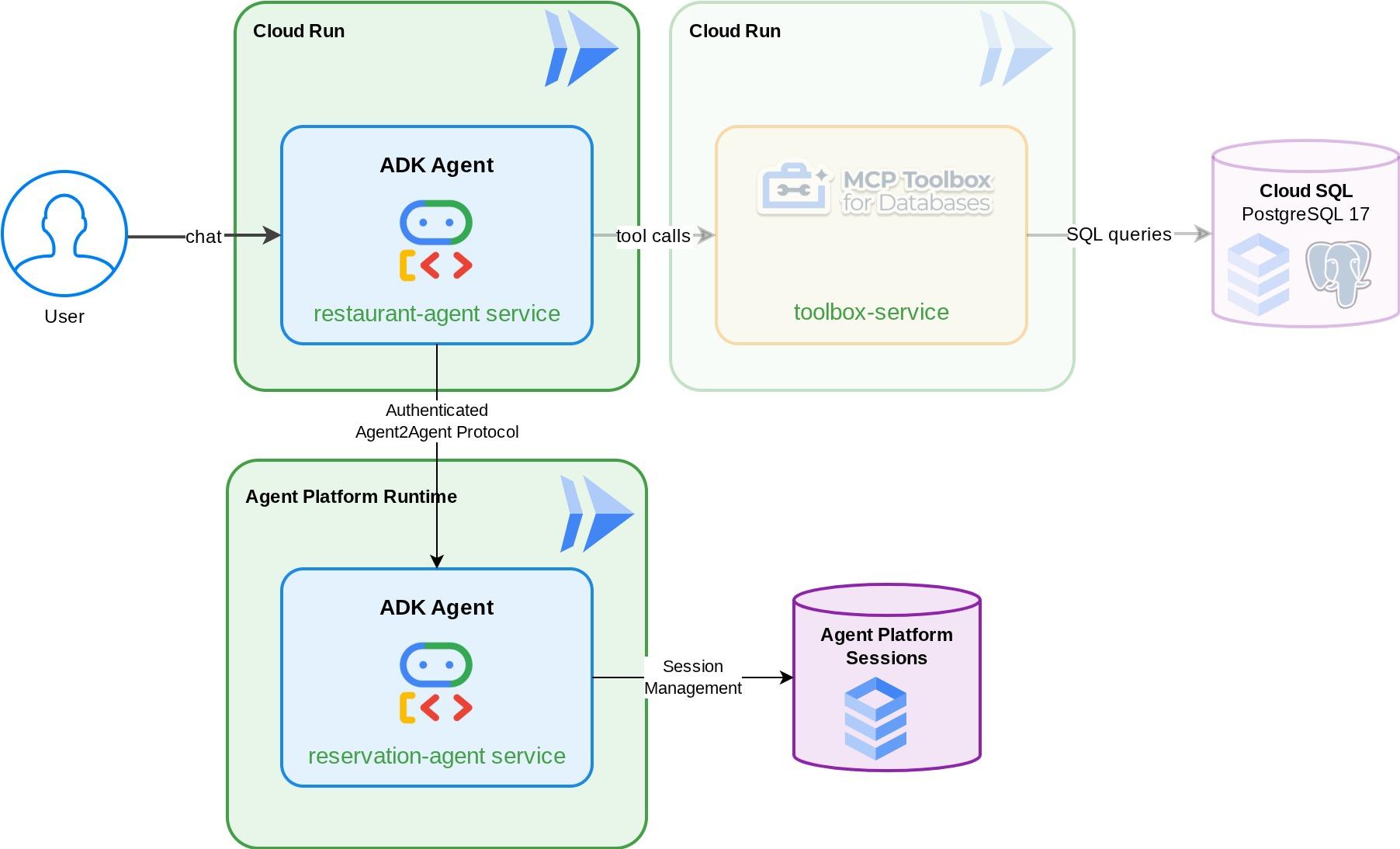
Agent การจองที่จัดการการจองโต๊ะร้านอาหาร (สร้าง ตรวจสอบ และยกเลิก) โดยใช้สถานะเซสชัน ADK ซึ่งจัดการโดย Gemini Enterprise Agent Platform Sessions คุณติดตั้งใช้งาน Agent นี้ใน Gemini Enterprise Agent Platform Runtime ซึ่งจะทำให้ค้นพบได้ผ่านการ์ด Agent ของโปรโตคอล A2A จากนั้นให้อัปเกรดตัวแทนเจ้าหน้าที่อำนวยความสะดวกของร้านอาหาร Foodie Finds (จาก Codelab ข้อกำหนดเบื้องต้น ไม่ต้องกังวลหากคุณยังไม่ได้ไปที่ Codelab เราได้เตรียมที่เก็บข้อมูลเริ่มต้นไว้ให้คุณแล้ว) เพื่อใช้ตัวแทนการจองเป็นตัวแทนย่อย A2A ระยะไกล ผลลัพธ์คือระบบหลาย Agent ที่ตัวจัดสรรจะกำหนดเส้นทางการค้นหาเมนูไปยังกล่องเครื่องมือ MCP และคำขอการจองไปยัง Agent A2A ระยะไกล
สิ่งที่คุณจะได้เรียนรู้
- สร้าง ADK Agent ที่ใช้บริการเซสชันที่มีการจัดการเพื่อจัดการข้อมูลการจอง
- แสดง Agent ของ ADK เป็นเซิร์ฟเวอร์ A2A ด้วยการ์ดและทักษะของ Agent
- ติดตั้งใช้งาน A2A Agent ใน Agent Runtime ของ Gemini Enterprise
- ใช้ Agent A2A ระยะไกลจาก Agent ADK อื่นโดยใช้
RemoteA2aAgentและจัดการคำขอที่ผ่านการตรวจสอบสิทธิ์ - ทดสอบระบบหลาย Agent แบบเพิ่มขึ้น: A2A ในเครื่อง, A2A ที่ติดตั้งใช้งาน, การผสานรวมบางส่วน, การติดตั้งใช้งานเต็มรูปแบบ
ข้อกำหนดเบื้องต้น
- (แนะนำ) ทำ Codelab ต่อไปนี้ให้เสร็จสมบูรณ์
- การสร้าง AI Agent แบบถาวรด้วย ADK และ CloudSQL -> รายละเอียดเพิ่มเติมเกี่ยวกับเซสชันและสถานะ ADK
- Agentic RAG พร้อม ADK, MCP Toolbox และ Cloud SQL -> คุณสร้าง Agent ต่อจาก Codelab นี้ได้ เนื่องจากโค้ดเริ่มต้นที่ให้มานั้นเหมือนกัน
- บัญชี Google Cloud ที่มีบัญชีสำหรับการเรียกเก็บเงินที่ใช้งานอยู่
- มีความคุ้นเคยพื้นฐานกับแนวคิด Python และ ADK
2. การตั้งค่าสภาพแวดล้อม - ดำเนินการต่อจาก Codelab ก่อนหน้า
เรื่องราวที่เรานำเสนอใน Codelab นี้เป็นเรื่องราวต่อเนื่องจาก Codelab ข้อกำหนดเบื้องต้น: Agentic RAG พร้อม ADK, MCP Toolbox และ Cloud SQL คุณสามารถทำงานต่อจาก Codelab ก่อนหน้าได้
เราสามารถเริ่มสร้างในไดเรกทอรีการทำงานของ Codelab ก่อนหน้าได้ ( ไดเรกทอรีการทำงานควรเป็น build-agent-adk-toolbox-cloudsql ) เพื่อไม่ให้เกิดความสับสน ให้เปลี่ยนชื่อไดเรกทอรีเป็นชื่อเดียวกับที่เราใช้เมื่อเริ่มต้นใหม่
mv ~/build-agent-adk-toolbox-cloudsql ~/adk-a2a-agent-runtime-starter
cloudshell workspace ~/adk-a2a-agent-runtime-starter && cd ~/adk-a2a-agent-runtime-starter
source .env
ตรวจสอบว่าไฟล์คีย์จาก Codelab ก่อนหน้าอยู่ในตำแหน่งที่ถูกต้อง
echo "--- Restaurant Agent ---"
cat restaurant_agent/agent.py | head -5
echo ""
echo "--- Toolbox Config ---"
cat tools.yaml | head -5
คุณควรเห็นไฟล์ restaurant_agent/agent.py ที่มีการนำเข้า LlmAgent และไฟล์ tools.yaml ที่มีการกำหนดค่ากล่องเครื่องมือ
จากนั้นมาเริ่มต้นสภาพแวดล้อม Python ของเราใหม่กัน
rm -rf .venv
uv sync
นอกจากนี้ ให้ตรวจสอบว่าฐานข้อมูลได้รับการเริ่มต้นและพร้อมใช้งาน
uv run python scripts/verify_seed.py
หากทำตามรายละเอียดการทดสอบแต่ละรายการจาก Codelab ก่อนหน้า คุณอาจเห็นเอาต์พุตดังนี้
Menu Items: 16/15
Embeddings: 16/15

✗ Database not ready
ไม่เป็นไร การตรวจสอบฐานข้อมูลจะไม่พิจารณาข้อมูลเพิ่มเติมที่คุณป้อนจากการตรวจสอบการนำเข้าข้อมูล หากมีข้อมูลมากกว่าหรือเท่ากับ 15 รายการ ก็ถือว่าใช้ได้
เปิดใช้งาน API ที่จำเป็น
จากนั้นเราจะต้องตรวจสอบว่าได้เปิดใช้ API ที่จำเป็นเพื่อโต้ตอบกับแพลตฟอร์ม Agent ของ Gemini Enterprise
gcloud services enable \
  cloudresourcemanager.googleapis.com
คุณควรมีไฟล์และโครงสร้างพื้นฐานที่จำเป็นอยู่แล้วเพื่อไปยังส่วนถัดไป: A2A Protocol and Gemini Enterprise Agent Runtime !
3. การตั้งค่าสภาพแวดล้อม - เริ่มต้นใหม่ด้วยที่เก็บเริ่มต้น
ขั้นตอนนี้จะเตรียมสภาพแวดล้อม Cloud Shell, กำหนดค่าโปรเจ็กต์ Google Cloud และโคลนที่เก็บข้อมูลเริ่มต้น
เปิด Cloud Shell
เปิด Cloud Shell ในเบราว์เซอร์ Cloud Shell มีสภาพแวดล้อมที่กำหนดค่าไว้ล่วงหน้าพร้อมเครื่องมือทั้งหมดที่คุณต้องการสำหรับ Codelab นี้ คลิกให้สิทธิ์เมื่อมีข้อความแจ้งให้ทำ
จากนั้นคลิก "ดู" -> "เทอร์มินัล" เพื่อเปิดเทอร์มินัล อินเทอร์เฟซของคุณควรมีลักษณะคล้ายกับภาพนี้
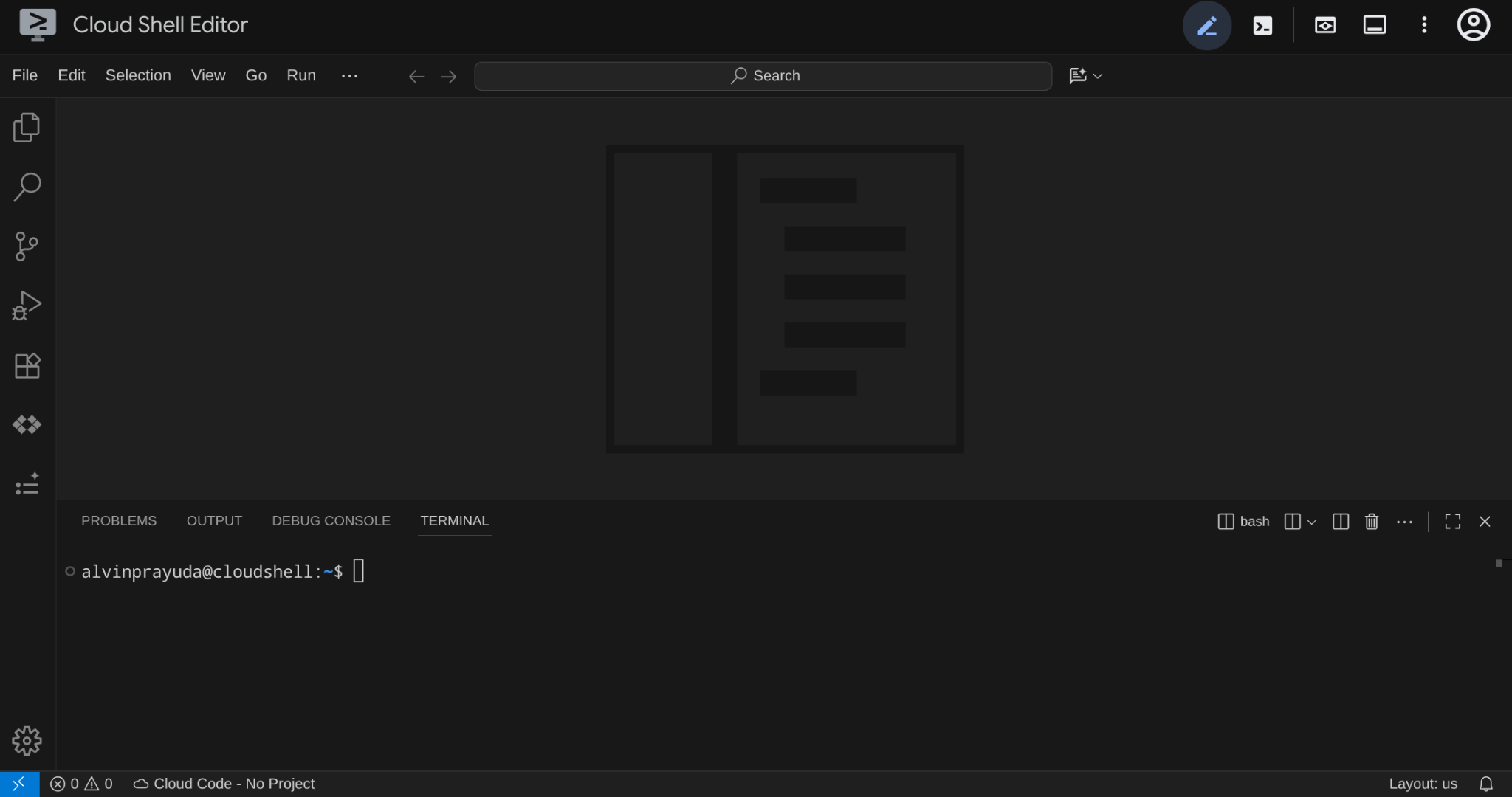
นี่จะเป็นอินเทอร์เฟซหลักของเรา โดยมี IDE อยู่ด้านบนและเทอร์มินัลอยู่ด้านล่าง
ตั้งค่าไดเรกทอรีการทำงาน
โคลนที่เก็บเริ่มต้น โค้ดทั้งหมดที่คุณเขียนใน Codelab นี้จะอยู่ในที่เก็บนี้
rm -rf ~/adk-a2a-agent-runtime-starter
git clone https://github.com/alphinside/adk-a2a-agent-runtime-starter.git
cloudshell workspace ~/adk-a2a-agent-runtime-starter && cd ~/adk-a2a-agent-runtime-starter
สร้างไฟล์ .env จากเทมเพลตที่ให้ไว้
cp .env.example .env
หากต้องการลดความซับซ้อนในการตั้งค่าโปรเจ็กต์ในเทอร์มินัล ให้ดาวน์โหลดสคริปต์การตั้งค่าโปรเจ็กต์นี้ลงในไดเรกทอรีการทำงาน
curl -sL https://raw.githubusercontent.com/alphinside/cloud-trial-project-setup/main/setup_verify_trial_project.sh -o setup_verify_trial_project.sh
เรียกใช้สคริปต์ โดยจะยืนยันบัญชีสำหรับการเรียกเก็บเงินของช่วงทดลองใช้ สร้างโปรเจ็กต์ใหม่ (หรือตรวจสอบโปรเจ็กต์ที่มีอยู่) บันทึกรหัสโปรเจ็กต์ลงในไฟล์ .env ในไดเรกทอรีปัจจุบัน และตั้งค่าโปรเจ็กต์ที่ใช้งานอยู่ใน gcloud
bash setup_verify_trial_project.sh && source .env
สคริปต์จะทำสิ่งต่อไปนี้
- ตรวจสอบว่าคุณมีบัญชีสำหรับการเรียกเก็บเงินสำหรับการทดลองใช้ที่ใช้งานอยู่
- ตรวจสอบโปรเจ็กต์ที่มีอยู่ใน
.env(หากมี) - สร้างโปรเจ็กต์ใหม่หรือใช้โปรเจ็กต์ที่มีอยู่
- ลิงก์บัญชีสำหรับการเรียกเก็บเงินของช่วงทดลองใช้กับโปรเจ็กต์
- บันทึกรหัสโปรเจ็กต์ไปยัง
.env - ตั้งค่าโปรเจ็กต์เป็นโปรเจ็กต์
gcloudที่ใช้งานอยู่
ยืนยันว่าตั้งค่าโปรเจ็กต์ถูกต้องแล้วโดยตรวจสอบข้อความสีเหลืองข้างไดเรกทอรีการทำงานในพรอมต์เทอร์มินัลของ Cloud Shell โดยควรแสดงรหัสโปรเจ็กต์ของคุณ

เปิดใช้งาน API ที่จำเป็น
จากนั้นเราจะต้องตรวจสอบว่าได้เปิดใช้ API ที่จำเป็นเพื่อโต้ตอบกับแพลตฟอร์ม Agent ของ Gemini Enterprise
gcloud services enable \
  aiplatform.googleapis.com \
  cloudresourcemanager.googleapis.com
การตั้งค่าโครงสร้างพื้นฐานเริ่มต้น
ก่อนอื่นเราจะต้องติดตั้งการอ้างอิง Python โดยใช้ uv ซึ่งเป็นแพ็กเกจ Python และเครื่องมือจัดการโปรเจ็กต์ที่รวดเร็วซึ่งเขียนด้วย Rust ( เอกสารประกอบ uv) Codelab นี้ใช้เพื่อความเร็วและความเรียบง่ายในการดูแลโปรเจ็กต์ Python
uv sync
จากนั้นเรียกใช้สคริปต์การตั้งค่าแบบเต็ม ซึ่งจะสร้างอินสแตนซ์ Cloud SQL, เริ่มต้นข้อมูล และติดตั้งใช้งานบริการ Toolbox ซึ่งจะทำหน้าที่เป็นสถานะเริ่มต้นของเอเจนต์ร้านอาหาร
bash scripts/full_setup.sh > logs/full_setup.log 2>&1 &
4. แนวคิด: โปรโตคอล Agent2Agent (A2A) และรันไทม์ของ Agent ของ Gemini Enterprise
ก่อนที่จะเริ่มสร้าง เรามาใช้เวลาสักครู่เพื่อทำความเข้าใจเทคโนโลยีสำคัญ 2 อย่างที่นำเสนอใน Codelab นี้เพื่อปรับขนาดแอปพลิเคชัน Agentic AI
โปรโตคอล Agent2Agent (A2A)
โปรโตคอล Agent2Agent (A2A) เป็นมาตรฐานแบบเปิดที่ออกแบบมาเพื่อช่วยให้ AI Agent สื่อสารและทำงานร่วมกันได้อย่างราบรื่น ในขณะที่ MCP (Model Context Protocol) เชื่อมต่อ Agent กับเครื่องมือและข้อมูล A2A จะเชื่อมต่อ Agent กับAgent อื่นๆ ซึ่งช่วยให้ Agent ค้นพบความสามารถของกันและกัน มอบหมายงาน และทำงานร่วมกันในเฟรมเวิร์กและองค์กรต่างๆ ได้
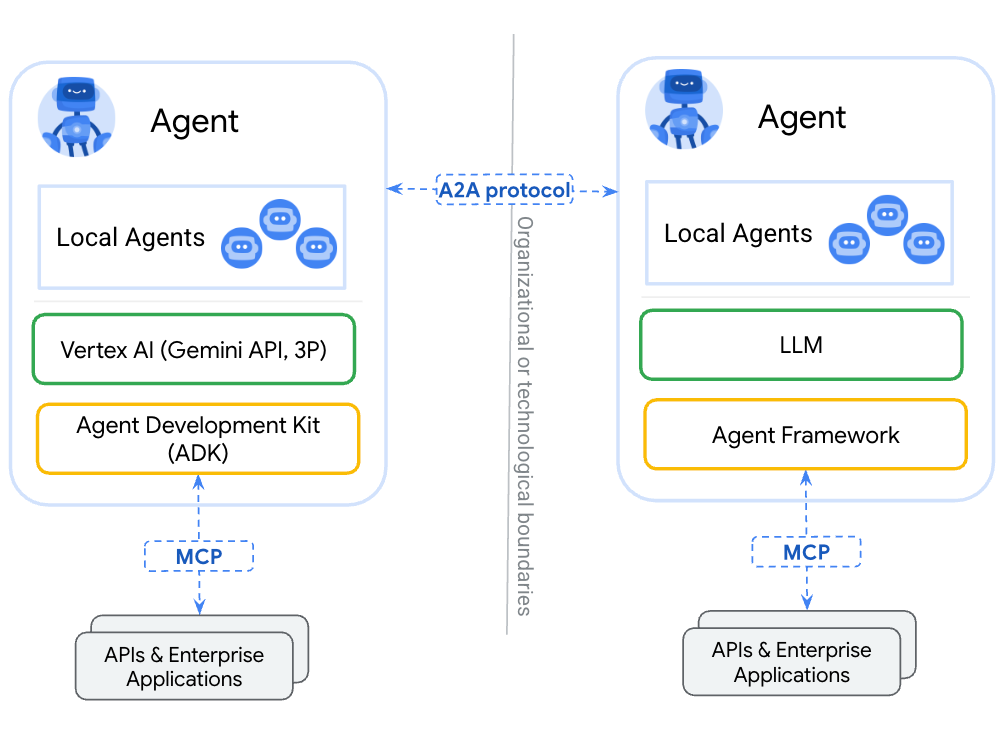
ความแตกต่างที่สำคัญระหว่างการห่อหุ้ม Agent เป็นเครื่องมือ (ผ่าน MCP) กับการเปิดเผยผ่าน A2A คือ เครื่องมือจะไม่มีสถานะและทำหน้าที่เดียว ในขณะที่ Agent ของ A2A สามารถให้เหตุผล รักษาสถานะ และจัดการการโต้ตอบแบบหลายรอบ เช่น การเจรจาหรือการชี้แจง Agent ที่เปิดเผยผ่าน A2A จะยังคงมีความสามารถเต็มรูปแบบแทนที่จะลดลงเหลือเพียงการเรียกใช้ฟังก์ชัน
A2A กำหนดแนวคิดหลัก 3 อย่างดังนี้
- การ์ด Agent - เอกสาร JSON ที่อธิบายสิ่งที่ Agent ทำ ทักษะ และปลายทาง Agent อื่นๆ จะดึงข้อมูลการ์ดนี้เพื่อค้นหาความสามารถ
- ข้อความ - คำขอของผู้ใช้หรือตัวแทนที่ส่งไปยังปลายทาง A2A ซึ่งทริกเกอร์งาน
- งาน - หน่วยงานที่มีวงจร (ส่ง → กำลังดำเนินการ → เสร็จสมบูรณ์/ล้มเหลว) และอาร์ติแฟกต์ที่มีผลลัพธ์
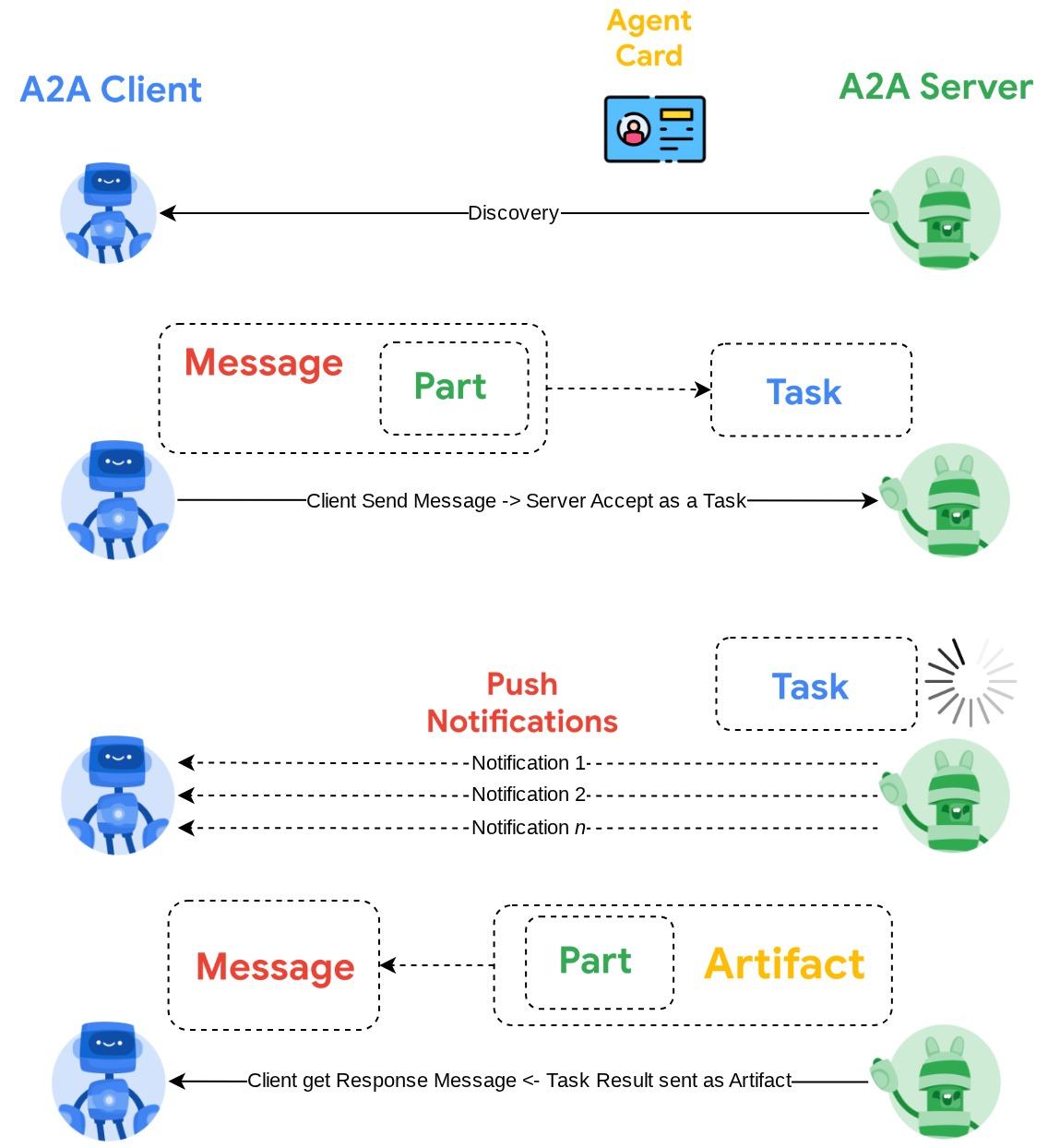
ดูข้อมูลแบบเจาะลึกได้ที่A2A คืออะไร
รันไทม์ของแพลตฟอร์ม Agent ของ Gemini Enterprise
Agent Runtime เป็นบริการที่มีการจัดการเต็มรูปแบบใน Google Cloud สำหรับการติดตั้งใช้งาน การปรับขนาด และการจัดการเอเจนต์ AI ในการผลิตด้วยฟีเจอร์ความปลอดภัยระดับองค์กร (เช่น การควบคุมบริการ VPC, CMEK) โดยจะจัดการโครงสร้างพื้นฐานเพื่อให้คุณมุ่งเน้นที่ตรรกะของเอเจนต์ได้
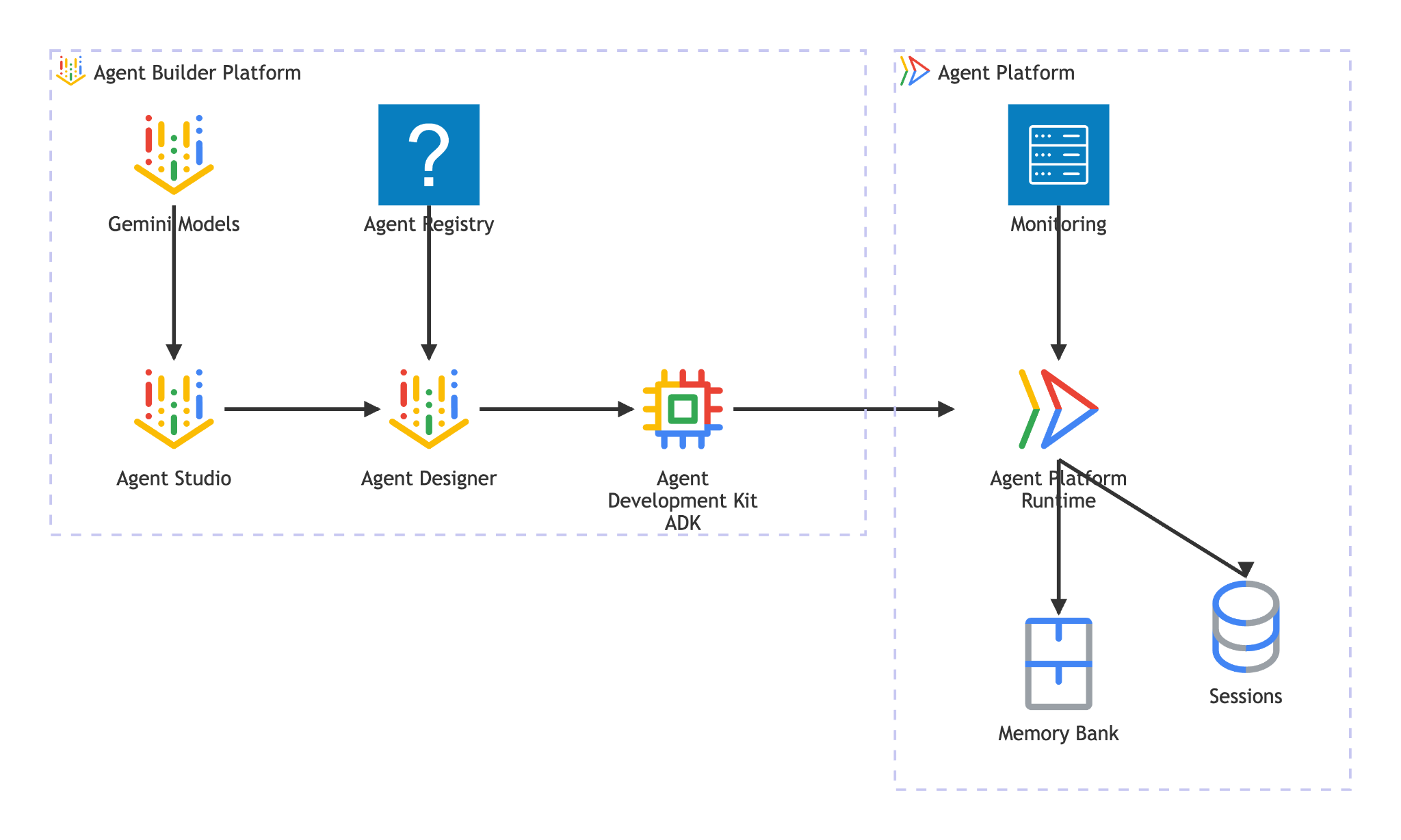
Agent Runtime มีฟีเจอร์ต่อไปนี้
- การติดตั้งใช้งานที่มีการจัดการ - ติดตั้งใช้งาน Agent ที่สร้างด้วย ADK, LangGraph หรือเฟรมเวิร์ก Python ใดก็ได้ด้วยการเรียก SDK ครั้งเดียว
- การโฮสต์ A2A - ติดตั้งใช้งาน Agent เป็นปลายทางที่สอดคล้องกับ A2A พร้อมการแสดงการ์ด Agent อัตโนมัติและการเข้าถึงที่ผ่านการตรวจสอบสิทธิ์
- เซสชันแบบต่อเนื่อง -
VertexAiSessionServiceจัดเก็บประวัติการสนทนาและสถานะในคำขอต่างๆ - การปรับขนาดอัตโนมัติ - ปรับขนาดจาก 0 เพื่อรองรับการรับส่งข้อมูลโดยไม่ต้องจัดการโครงสร้างพื้นฐาน
- ความสามารถในการสังเกต — การติดตาม การบันทึก และการตรวจสอบในตัวผ่านสแต็กความสามารถในการสังเกตของ Google Cloud
- และฟีเจอร์อื่นๆ อีกมากมาย โปรดดูรายละเอียดในเอกสารนี้
ใน Codelab นี้ คุณจะติดตั้งใช้งาน Agent การจองใน Agent Runtime กระบวนการติดตั้งใช้งานจะแปลงโค้ดของเอเจนต์เป็นรูปแบบอนุกรม (ดอง) แล้วอัปโหลด Agent Runtime จัดสรรปลายทางแบบ Serverless ที่ให้บริการโปรโตคอล A2A โดยที่ Agent (หรือไคลเอ็นต์) อื่นๆ จะโต้ตอบกับปลายทางนี้ผ่านการเรียก HTTP มาตรฐานที่ได้รับการตรวจสอบสิทธิ์ด้วยข้อมูลเข้าสู่ระบบของ Google Cloud
5. สร้างเอเจนต์การจอง
ขั้นตอนนี้จะสร้าง Agent ADK ใหม่ที่จัดการการจองร้านอาหารโดยใช้สถานะเซสชัน เอเจนต์รองรับการดำเนินการ 3 อย่าง ได้แก่ สร้าง ตรวจสอบ และยกเลิก โดยใช้หมายเลขโทรศัพท์เป็นคีย์การค้นหา ข้อมูลการจองทั้งหมดจะอยู่ในสถานะเซสชันของ ADK
สร้างโครงร่างของ Agent
ใช้ adk create เพื่อสร้างโครงสร้างไดเรกทอรีของเอเจนต์ด้วยการกำหนดค่าโมเดลและโปรเจ็กต์ที่ถูกต้อง
source .env
uv run adk create reservation_agent \
    --model gemini-3.5-flash \
    --project ${GOOGLE_CLOUD_PROJECT} \
    --region ${GOOGLE_CLOUD_LOCATION}
ซึ่งจะสร้างไดเรกทอรี reservation_agent/ ที่มี __init__.py, agent.py และ .env ที่กำหนดค่าไว้ล่วงหน้าสำหรับโมเดล Gemini ใน Agent Platform
adk-a2a-agent-runtime-starter/
├── reservation_agent/
│   ├── __init__.py
│   ├── agent.py
│   └── .env
├── logs
├── scripts
└── ...
จากนั้นมาอัปเดตโค้ดของ Agent กัน
เขียนโค้ดของ Agent
เปิดไฟล์ Agent ที่สร้างขึ้น
cloudshell edit reservation_agent/agent.py
จากนั้นแทนที่เนื้อหาด้วยข้อมูลต่อไปนี้
# reservation_agent/agent.py
import os
from functools import cached_property
from typing import Any

from google.adk.agents import LlmAgent
from google.adk.models.google_llm import Gemini
from google.adk.tools import ToolContext
from google.genai import Client, types

# App-scoped state prefix ensures reservations persist across all sessions.
# See https://adk.dev/sessions/state/ for state scope details.
STATE_PREFIX = "app:reservation:"


class GeminiGlobal(Gemini):
    """Gemini with location pinned to 'global'.

    A2aAgent.set_up() on Agent Platform Runtime SDK overwrites GOOGLE_CLOUD_LOCATION with the Agent Platform Runtime
    region (e.g. us-central1), but the Gemini 3-family endpoint requires 'global'.
    """

    @cached_property
    def api_client(self) -> Client:
        project = os.getenv("GOOGLE_CLOUD_PROJECT")
        return Client(
            project=project,
            location="global",
            http_options=types.HttpOptions(
                headers=self._tracking_headers(),
                retry_options=self.retry_options,
            ),
        )


def create_reservation(
    phone_number: str,
    name: str,
    party_size: int,
    date: str,
    time: str,
    tool_context: ToolContext,
) -> dict:
    """Create a new restaurant reservation.

    Args:
        phone_number: Customer's phone number, used as the reservation ID.
        name: Name for the reservation.
        party_size: Number of guests.
        date: Reservation date (e.g., '2025-07-15' or 'this Friday').
        time: Reservation time (e.g., '7:00 PM').

    Returns:
        Confirmation of the reservation.
    """
    reservation = {
        "name": name,
        "party_size": party_size,
        "date": date,
        "time": time,
        "status": "confirmed",
    }
    tool_context.state[f"{STATE_PREFIX}{phone_number}"] = reservation
    return {
        "status": "confirmed",
        "message": f"Reservation created for {name}, party of {party_size} on {date} at {time}. Phone: {phone_number}.",
    }


def check_reservation(phone_number: str, tool_context: ToolContext) -> dict:
    """Look up an existing reservation by phone number.

    Args:
        phone_number: The phone number used when the reservation was created.
        tool_context: ADK tool context for state access.

    Returns:
        The reservation details, or a message if not found.
    """
    reservation = tool_context.state.get(f"{STATE_PREFIX}{phone_number}")
    if reservation:
        return {"found": True, "reservation": reservation}
    return {"found": False, "message": f"No reservation found for {phone_number}."}


def cancel_reservation(phone_number: str, tool_context: ToolContext) -> dict:
    """Cancel an existing reservation by phone number.

    Args:
        phone_number: The phone number used when the reservation was created.
        tool_context: ADK tool context for state access.

    Returns:
        Confirmation of cancellation, or a message if not found.
    """
    key = f"{STATE_PREFIX}{phone_number}"
    reservation = tool_context.state.get(key)
    if not reservation:
        return {
            "success": False,
            "message": f"No reservation found for {phone_number}.",
        }
    if reservation.get("status") == "cancelled":
        return {
            "success": False,
            "message": f"Reservation for {phone_number} is already cancelled.",
        }
    reservation["status"] = "cancelled"
    tool_context.state[key] = reservation
    return {
        "success": True,
        "message": f"Reservation for {reservation['name']} ({phone_number}) has been cancelled.",
    }


root_agent = LlmAgent(
    name="reservation_agent",
    model=GeminiGlobal(model="gemini-3.5-flash"),
    instruction="""You are a friendly reservation assistant for "Foodie Finds" restaurant.
You help diners create, check, and cancel table reservations.

When a diner wants to make a reservation, collect these details:
- Name for the reservation
- Phone number (used as the reservation ID)
- Party size (number of guests)
- Date
- Time

Always confirm the details before creating the reservation.
When checking or cancelling, ask for the phone number if not provided.
Be concise and professional.""",
    tools=[create_reservation, check_reservation, cancel_reservation],
)
6. เตรียมการกำหนดค่าเซิร์ฟเวอร์ A2A
กำหนดการ์ด A2A Agent
การ์ด Agent คือคำอธิบายที่มีโครงสร้างเกี่ยวกับความสามารถของ Agent ซึ่ง Agent และไคลเอ็นต์อื่นๆ ใช้เพื่อค้นหาสิ่งที่ Agent ของคุณทำ สร้างการกำหนดค่าการ์ด
cloudshell edit reservation_agent/a2a_config.py
คัดลอกข้อความต่อไปนี้ลงใน reservation_agent/a2a_config.py
# reservation_agent/a2a_config.py
from a2a.types import AgentSkill
from vertexai.preview.reasoning_engines.templates.a2a import create_agent_card

reservation_skill = AgentSkill(
    id="manage_reservations",
    name="Restaurant Reservations",
    description="Create, check, and cancel table reservations at Foodie Finds restaurant",
    tags=["reservations", "restaurant", "booking"],
    examples=[
        "Book a table for 4 on Friday at 7pm",
        "Check reservation for 555-0101",
        "Cancel my reservation, phone number 555-0101",
    ],
    input_modes=["text/plain"],
    output_modes=["text/plain"],
)

agent_card = create_agent_card(
    agent_name="Reservation Agent",
    description="Handles restaurant table reservations — create, check, and cancel bookings for Foodie Finds restaurant.",
    skills=[reservation_skill],
)
สร้างตัวดำเนินการ A2A
ตัวดำเนินการจะเชื่อมต่อโปรโตคอล A2A กับ Agent ของ ADK โดยจะรับคำขอ A2A เรียกใช้ผ่านตัวแทน ADK และแสดงผลลัพธ์เป็นงาน A2A ดังนี้
cloudshell edit reservation_agent/executor.py
คัดลอกข้อความต่อไปนี้ลงใน reservation_agent/executor.py
# reservation_agent/executor.py
import os
from typing import NoReturn

import vertexai
from a2a.server.agent_execution import AgentExecutor, RequestContext
from a2a.server.events import EventQueue
from a2a.server.tasks import TaskUpdater
from a2a.types import TaskState, TextPart, UnsupportedOperationError
from a2a.utils import new_agent_text_message
from a2a.utils.errors import ServerError
from google.adk.artifacts import InMemoryArtifactService
from google.adk.memory.in_memory_memory_service import InMemoryMemoryService
from google.adk.runners import Runner
from google.adk.sessions import InMemorySessionService, VertexAiSessionService
from google.genai import types

from reservation_agent.agent import root_agent as reservation_agent


class ReservationAgentExecutor(AgentExecutor):
    """Bridge between the A2A protocol and the ADK reservation agent.

    Uses InMemorySessionService for local testing, VertexAiSessionService
    when deployed to Agent Runtime (detected via GOOGLE_CLOUD_AGENT_ENGINE_ID).
    """

    def __init__(self) -> None:
        self.agent = None
        self.runner = None

    def _init_agent(self) -> None:
        if self.agent is not None:
            return

        self.agent = reservation_agent
        engine_id = os.environ.get("GOOGLE_CLOUD_AGENT_ENGINE_ID")

        if engine_id:
            project = os.environ.get("GOOGLE_CLOUD_PROJECT")
            location = os.environ.get("GOOGLE_CLOUD_LOCATION", "us-central1")
            vertexai.init(project=project, location=location)
            session_service = VertexAiSessionService(
                project=project, location=location, agent_engine_id=engine_id,
            )
            app_name = engine_id
        else:
            session_service = InMemorySessionService()
            app_name = self.agent.name

        self.runner = Runner(
            app_name=app_name,
            agent=self.agent,
            artifact_service=InMemoryArtifactService(),
            session_service=session_service,
            memory_service=InMemoryMemoryService(),
        )

    async def execute(self, context: RequestContext, event_queue: EventQueue) -> None:
        if self.agent is None:
            self._init_agent()

        query = context.get_user_input()
        updater = TaskUpdater(event_queue, context.task_id, context.context_id)
        user_id = context.message.metadata.get("user_id", "a2a-user") if context.message.metadata else "a2a-user"

        if not context.current_task:
            await updater.submit()
        await updater.start_work()

        try:
            session = await self._get_or_create_session(context.context_id, user_id)
            content = types.Content(role="user", parts=[types.Part(text=query)])

            async for event in self.runner.run_async(
                session_id=session.id, user_id=user_id, new_message=content,
            ):
                if event.is_final_response():
                    parts = event.content.parts
                    answer = " ".join(p.text for p in parts if p.text) or "No response."
                    await updater.add_artifact([TextPart(text=answer)], name="answer")
                    await updater.complete()
                    break
        except Exception as e:
            await updater.update_status(
                TaskState.failed, message=new_agent_text_message(f"Error: {e!s}"),
            )
            raise

    async def _get_or_create_session(self, context_id: str, user_id: str):
        app_name = self.runner.app_name
        if context_id:
            session = await self.runner.session_service.get_session(
                app_name=app_name, session_id=context_id, user_id=user_id,
            )
            if session:
                return session
        session = await self.runner.session_service.create_session(
            app_name=app_name, user_id=user_id, session_id=context_id,
        )
        return session

    async def cancel(self, context: RequestContext, event_queue: EventQueue) -> NoReturn:
        raise ServerError(error=UnsupportedOperationError())
ตัวดำเนินการจะตรวจหาสภาพแวดล้อมโดยอัตโนมัติ เมื่อตั้งค่า GOOGLE_CLOUD_AGENT_ENGINE_ID (Agent Runtime จะแทรกค่านี้ในเวลาที่ทำการติดตั้งใช้งาน) ตัวดำเนินการจะใช้ VertexAiSessionService สำหรับเซสชันแบบถาวร ในพื้นที่ ระบบจะเปลี่ยนไปใช้ InMemorySessionService
ตอนนี้ไดเรกทอรี reservation_agent ควรมีไฟล์ต่อไปนี้
reservation_agent/
├── __init__.py
├── agent.py
├── a2a_config.py
├── executor.py
└── .env
7. เตรียม Agent A2A โดยใช้ Agent Platform SDK และทดสอบในเครื่อง
ขั้นตอนนี้จะรวม Agent การจองเป็น Agent ที่เป็นไปตามข้อกำหนดของ A2A โดยใช้คลาส A2aAgent ของ Agent Platform SDK ( ชื่อ SDK ยังคงใช้vertexเพื่อความเข้ากันได้แบบย้อนหลัง) จากนั้นจะทดสอบโฟลว์โปรโตคอล A2A ทั้งหมดในเครื่อง ได้แก่ การดึงข้อมูลการ์ด Agent การส่งข้อความ และการดึงข้อมูลงาน นี่คือA2aAgentออบเจ็กต์เดียวกันกับที่คุณจะนำไปใช้กับ Agent Runtime ในขั้นตอนถัดไป
เพิ่มการอ้างอิง
ติดตั้ง Agent Platform SDK พร้อมการรองรับ Agent Runtime และ ADK รวมถึง A2A SDK โดยทำดังนี้
uv add "google-cloud-aiplatform[agent_engines,adk]==1.149.0" "a2a-sdk==0.3.26"
ทำความเข้าใจคอมโพเนนต์ของ A2A
การห่อหุ้ม Agent ADK สำหรับ A2A ต้องมีคอมโพเนนต์ 3 อย่าง ได้แก่
- การ์ด Agent - "นามบัตร" ที่อธิบายความสามารถ ทักษะ และ URL ของปลายทางของ Agent Agent อื่นๆ ใช้ข้อมูลนี้เพื่อดูว่า Agent ของคุณทำอะไรได้บ้าง
- Agent Executor - ตัวเชื่อมระหว่างโปรโตคอล A2A กับตรรกะของ Agent ADK โดยจะรับคำขอ A2A เรียกใช้ผ่านตัวแทน ADK และแสดงผลลัพธ์เป็นงาน A2A
- A2aAgent - คลาส SDK ของแพลตฟอร์มตัวแทนที่รวมการ์ดและตัวดำเนินการไว้ในหน่วยที่สามารถติดตั้งใช้งานได้
สร้างสคริปต์การทดสอบ
สร้างสคริปต์ต่อไปนี้เพื่อทดสอบในเครื่อง
cloudshell edit scripts/test_a2a_agent_local.py
คัดลอกข้อความต่อไปนี้ลงใน scripts/test_a2a_agent_local.py
# scripts/test_a2a_agent_local.py
import asyncio
import json
import os
from pprint import pprint

from dotenv import load_dotenv
from starlette.requests import Request
from vertexai.preview.reasoning_engines import A2aAgent

from reservation_agent.a2a_config import agent_card
from reservation_agent.executor import ReservationAgentExecutor

load_dotenv()


# --- Helper functions for building mock requests ---

def receive_wrapper(data: dict):
    async def receive():
        byte_data = json.dumps(data).encode("utf-8")
        return {"type": "http.request", "body": byte_data, "more_body": False}
    return receive

def build_post_request(data: dict = None, path_params: dict = None) -> Request:
    scope = {"type": "http", "http_version": "1.1", "headers": [(b"content-type", b"application/json")], "app": None}
    if path_params:
        scope["path_params"] = path_params
    return Request(scope, receive_wrapper(data))

def build_get_request(path_params: dict) -> Request:
    scope = {"type": "http", "http_version": "1.1", "query_string": b"", "app": None}
    if path_params:
        scope["path_params"] = path_params
    async def receive():
        return {"type": "http.disconnect"}
    return Request(scope, receive)


# --- Helper: poll for task completion ---

async def wait_for_task(a2a_agent, task_id, max_retries=30):
    """Poll on_get_task until the task reaches a terminal state."""
    for _ in range(max_retries):
        request = build_get_request({"id": task_id})
        result = await a2a_agent.on_get_task(request=request, context=None)
        state = result.get("status", {}).get("state", "")
        if state in ["completed", "failed"]:
            return result
        await asyncio.sleep(1)
    return result


def print_task_answer(result):
    """Extract and print the answer from task artifacts."""
    print(f"Status: {result.get('status', {}).get('state')}")
    for artifact in result.get("artifacts", []):
        if artifact.get("parts") and "text" in artifact["parts"][0]:
            print(f"Answer: {artifact['parts'][0]['text']}")


# --- Local test ---

async def main():
    # Create and set up the A2A agent locally

    a2a_agent = A2aAgent(agent_card=agent_card, agent_executor_builder=ReservationAgentExecutor)
    a2a_agent.set_up()

    # 1. Get agent card
    print("=" * 50)
    print("1. Retrieving agent card...")
    print("=" * 50)
    request = build_get_request(None)
    card_response = await a2a_agent.handle_authenticated_agent_card(request=request, context=None)
    print(f"Agent: {card_response.get('name')}")
    print(f"Skills: {[s.get('name') for s in card_response.get('skills', [])]}")

    # 2. Create a reservation
    print("\n" + "=" * 50)
    print("2. Creating a reservation...")
    print("=" * 50)
    message_data = {
        "message": {
            "messageId": f"msg-{os.urandom(4).hex()}",
            "content": [{"text": "Book a table for 2 on Saturday at 6pm. Name: Bob, Phone: 555-0202"}],
            "role": "ROLE_USER",
        },
    }
    request = build_post_request(message_data)
    response = await a2a_agent.on_message_send(request=request, context=None)
    task_id = response["task"]["id"]
    context_id = response["task"].get("contextId")
    print(f"Task ID: {task_id}")

    # 3. Wait for result
    print("\n" + "=" * 50)
    print("3. Waiting for task result...")
    print("=" * 50)
    result = await wait_for_task(a2a_agent, task_id)
    print_task_answer(result)

    # 4. Check the reservation (same context for session continuity)
    print("\n" + "=" * 50)
    print("4. Checking the reservation...")
    print("=" * 50)
    check_data = {
        "message": {
            "messageId": f"msg-{os.urandom(4).hex()}",
            "content": [{"text": "Check the reservation for 555-0202"}],
            "role": "ROLE_USER",
            "contextId": context_id,
        },
    }
    request = build_post_request(check_data)
    check_response = await a2a_agent.on_message_send(request=request, context=None)
    check_result = await wait_for_task(a2a_agent, check_response["task"]["id"])
    print_task_answer(check_result)

    # 5. Cancel the reservation
    print("\n" + "=" * 50)
    print("5. Cancelling the reservation...")
    print("=" * 50)
    cancel_data = {
        "message": {
            "messageId": f"msg-{os.urandom(4).hex()}",
            "content": [{"text": "Cancel the reservation for 555-0202"}],
            "role": "ROLE_USER",
            "contextId": context_id,
        },
    }
    request = build_post_request(cancel_data)
    cancel_response = await a2a_agent.on_message_send(request=request, context=None)
    cancel_result = await wait_for_task(a2a_agent, cancel_response["task"]["id"])
    print_task_answer(cancel_result)

    print("\n" + "=" * 50)
    print("All tests passed!")
    print("=" * 50)


if __name__ == "__main__":
    asyncio.run(main())
สคริปต์การทดสอบจะนำเข้าการ์ดเอเจนต์และผู้ดำเนินการที่คุณสร้างไว้ในขั้นตอนก่อนหน้าโดยไม่มีการทำซ้ำ โดยจะสร้าง A2aAgent ในเครื่อง จำลองการเรียกโปรโตคอล A2A ผ่านคำขอ HTTP แบบจำลอง และยืนยันการดำเนินการจองทั้ง 3 รายการ
เนื่องจากไม่ได้ตั้งค่า GOOGLE_CLOUD_AGENT_ENGINE_ID ในเครื่อง ตัวดำเนินการจึงใช้ InMemorySessionService เมื่อติดตั้งใช้งานใน Agent Runtime ตัวดำเนินการเดียวกันจะเปลี่ยนไปใช้ VertexAiSessionService โดยอัตโนมัติสำหรับเซสชันแบบถาวร
ทำการทดสอบ
PYTHONPATH=. uv run python scripts/test_a2a_agent_local.py
เอาต์พุตจะแสดงขั้นตอน 5 ขั้นตอน ได้แก่
- การ์ด Agent — ดึงความสามารถและทักษะของ Agent
- สร้างการจอง - จองโต๊ะและแสดงงานพร้อมการยืนยัน
- รับผลลัพธ์ของงาน - ดึงข้อมูลงานที่เสร็จสมบูรณ์พร้อมคำตอบ
- ตรวจสอบการจอง - ค้นหาการจองตามหมายเลขโทรศัพท์
- ยกเลิกการจอง - ยกเลิกการจองและยืนยัน
ตัวอย่างเอาต์พุตดังที่แสดงด้านล่าง
==================================================
1. Retrieving agent card...
==================================================
Agent: Reservation Agent
Skills: ['Restaurant Reservations']

==================================================
2. Creating a reservation...
==================================================
Task ID: f7f7004d-cfea-49c2-b57d-5bca9959e193

==================================================
3. Waiting for task result...
==================================================
Status: TASK_STATE_COMPLETED
Answer: Your reservation for Bob, party of 2, on Saturday at 6:00 PM has been confirmed. The phone number associated is 555-0202.

==================================================
4. Checking the reservation...
==================================================
Status: TASK_STATE_COMPLETED
Answer: I found a reservation for Bob, party of 2, on Saturday at 6:00 PM. The reservation status is confirmed.

==================================================
5. Cancelling the reservation...
==================================================
Status: TASK_STATE_COMPLETED
Answer: Your reservation for Bob (555-0202) has been cancelled.

==================================================
All tests passed!
==================================================
ในตอนนี้ คุณได้ยืนยันแล้วว่าการ์ดเอเจนต์ A2A อธิบายทักษะที่ถูกต้อง การดำเนินการจองทั้ง 3 รายการทำงานผ่านโฟลว์ข้อความ/งานของโปรโตคอล A2A และสถานะจะยังคงอยู่ตลอดข้อความภายในบริบทเดียวกัน
8. ทำให้ Agent การจองใช้งานได้กับ Agent Runtime
ขั้นตอนนี้จะติดตั้งใช้งาน Agent การจองใน Gemini Enterprise Agent Platform Runtime ซึ่งเป็นแพลตฟอร์มแบบ Serverless ที่จัดการครบวงจรซึ่งโฮสต์ Agent ของคุณและแสดงเป็นปลายทาง A2A ที่ปลอดภัย หลังจากติดตั้งใช้งานแล้ว ไคลเอ็นต์ที่ได้รับอนุญาตจะค้นพบและโต้ตอบกับเอเจนต์ผ่านปลายทาง HTTP ของ A2A มาตรฐานได้
สร้างที่เก็บข้อมูลสำหรับ Staging
สร้าง Bucket ของ Cloud Storage สำหรับการจัดเตรียมรันไทม์ Agent Agent Runtime ใช้ที่เก็บข้อมูลนี้เพื่ออัปโหลดโค้ดและทรัพยากร Dependency ของเอเจนต์ในระหว่างการติดตั้งใช้งาน
STAGING_BUCKET="${GOOGLE_CLOUD_PROJECT}-adk-a2a-agent-runtime"
gsutil mb -l $REGION -p $GOOGLE_CLOUD_PROJECT gs://$STAGING_BUCKET 2>/dev/null || echo "Bucket already exists"
echo "STAGING_BUCKET=$STAGING_BUCKET" >> .env
source .env
สร้างสคริปต์การติดตั้งใช้งาน
จากนั้นเราจะต้องเตรียมสคริปต์การติดตั้งใช้งาน
cloudshell edit scripts/deploy_a2a_agent_runtime.py
คัดลอกข้อความต่อไปนี้ลงใน scripts/deploy_a2a_agent_runtime.py
# scripts/deploy_a2a_agent_runtime.py
import os
from pathlib import Path

import vertexai
from dotenv import load_dotenv
from google.genai import types
from vertexai.preview.reasoning_engines import A2aAgent

from reservation_agent.a2a_config import agent_card
from reservation_agent.executor import ReservationAgentExecutor

load_dotenv()

PROJECT_ID = os.environ["GOOGLE_CLOUD_PROJECT"]
REGION = os.environ["REGION"]
STAGING_BUCKET = os.environ.get("STAGING_BUCKET", f"{PROJECT_ID}-adk-a2a-agent-runtime")
BUCKET_URI = f"gs://{STAGING_BUCKET}"

a2a_agent = A2aAgent(
    agent_card=agent_card,
    agent_executor_builder=ReservationAgentExecutor,
)


def main():
    vertexai.init(project=PROJECT_ID, location=REGION, staging_bucket=BUCKET_URI)
    client = vertexai.Client(
        project=PROJECT_ID,
        location=REGION,
        http_options=types.HttpOptions(api_version="v1beta1"),
    )

    print("Deploying Reservation Agent to Agent Runtime...")
    print("This may take 3-5 minutes.")

    remote_agent = client.agent_engines.create(
        agent=a2a_agent,
        config={
            "display_name": agent_card.name,
            "description": agent_card.description,
            "requirements": [
                "google-cloud-aiplatform[agent_engines,adk]==1.149.0",
                "a2a-sdk==0.3.26",
                "google-adk==1.29.0",
                "cloudpickle",
                "pydantic"
            ],
            "extra_packages": [
                "./reservation_agent",
            ],
            "http_options": {
                "api_version": "v1beta1",
            },
            "staging_bucket": BUCKET_URI,
        },
    )

    resource_name = remote_agent.api_resource.name
    print(f"\nDeployment complete!")
    print(f"Resource name: {resource_name}")

    env_path = Path(".env")
    lines = env_path.read_text().splitlines() if env_path.exists() else []
    lines = [l for l in lines if not l.startswith("RESERVATION_AGENT_RESOURCE_NAME=")]
    lines.append(f"RESERVATION_AGENT_RESOURCE_NAME={resource_name}")
    env_path.write_text("\n".join(lines) + "\n")
    print("Written RESERVATION_AGENT_RESOURCE_NAME to .env")


if __name__ == "__main__":
    main()
สคริปต์การติดตั้งใช้งานจะนำเข้า agent_card และ ReservationAgentExecutor เดียวกันที่ใช้ในการทดสอบในเครื่อง ซึ่งจะไม่มีการทำซ้ำโค้ด Agent Runtime จะทำการซีเรียลไลซ์ (ดอง) ออบเจ็กต์ A2aAgent พร้อมกับการขึ้นต่อกันเพื่อการติดตั้งใช้งาน ที่ส่วนท้ายของสคริปต์การติดตั้งใช้งาน สคริปต์จะเขียนค่า RESERVATION_AGENT_RESOURCE_NAME ลงในไฟล์ .env
ทำให้ใช้งานได้กับ Agent Runtime
เรียกใช้สคริปต์การติดตั้งใช้งาน
PYTHONPATH=. uv run python scripts/deploy_a2a_agent_runtime.py
การทำให้ใช้งานได้ใช้เวลา 3-5 นาที สคริปต์จะจัดสรรปลายทางแบบ Serverless ใน Agent Runtime ที่โฮสต์เอเจนต์การจอง หลังจากติดตั้งใช้งานสำเร็จแล้ว คุณจะเห็นเอาต์พุตคล้ายกับที่แสดงด้านล่าง
Deploying Reservation Agent to Agent Runtime...
This may take 3-5 minutes.

Deployment complete!
Resource name: projects/your-project-number/locations/us-central1/reasoningEngines/your-agent-deployment-unique-id
Written RESERVATION_AGENT_RESOURCE_NAME to .env
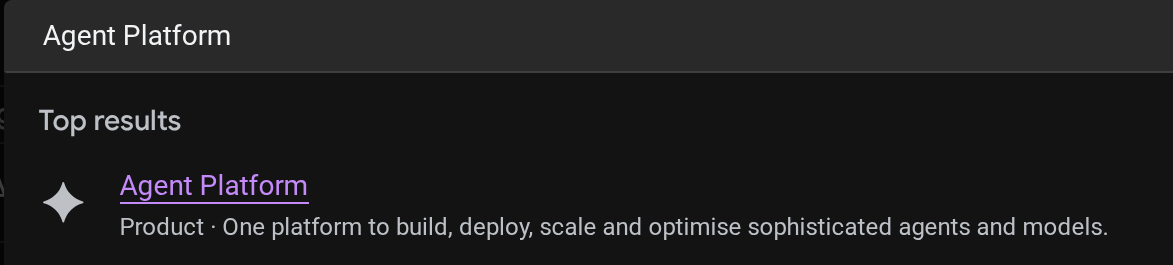
คุณดู Agent ที่ติดตั้งใช้งานแล้วได้ในคอนโซลระบบคลาวด์ ค้นหา Agent Platform ในแถบค้นหาของคอนโซล
จากนั้นในแท็บด้านซ้าย ให้วางเมาส์เหนือ Agents แล้วเลือก Deployments
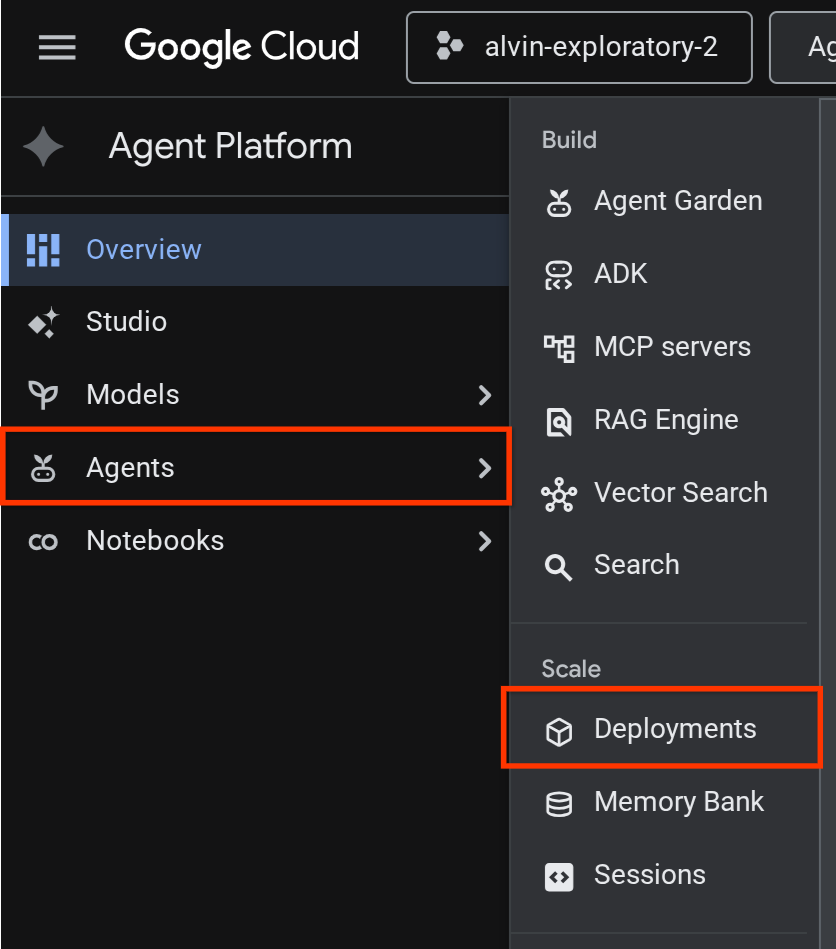
คุณจะเห็น Reservation Agent แสดงอยู่ในรายการการติดตั้งใช้งานดังที่แสดงด้านล่าง

ทดสอบ Agent ที่ติดตั้งใช้งาน
ตอนนี้เราพร้อมที่จะทดสอบ Agent ที่ทำให้ใช้งานได้แล้ว สร้างสคริปต์การทดสอบสำหรับ Agent ที่ทำให้ใช้งานได้แล้ว
cloudshell edit scripts/test_a2a_agent_runtime.py
คัดลอกข้อความต่อไปนี้ลงใน scripts/test_a2a_agent_runtime.py
# scripts/test_a2a_agent_runtime.py
import asyncio
import os
import time

import vertexai
from a2a.types import TaskState
from dotenv import load_dotenv
from google.genai import types

load_dotenv()

PROJECT_ID = os.environ["GOOGLE_CLOUD_PROJECT"]
REGION = os.environ["REGION"]
RESOURCE_NAME = os.environ["RESERVATION_AGENT_RESOURCE_NAME"]


async def main():
    vertexai.init(project=PROJECT_ID, location=REGION)
    client = vertexai.Client(
        project=PROJECT_ID, location=REGION,
        http_options=types.HttpOptions(api_version="v1beta1"),
    )

    agent = client.agent_engines.get(name=RESOURCE_NAME)

    # 1. Get agent card
    print("=" * 50)
    print("1. Retrieving agent card...")
    print("=" * 50)
    card = await agent.handle_authenticated_agent_card()
    print(f"Agent: {card.name}")
    print(f"URL: {card.url}")
    print(f"Skills: {[s.name for s in card.skills]}")

    # 2. Send a reservation request
    print("\n" + "=" * 50)
    print("2. Sending reservation request...")
    print("=" * 50)
    message_data = {
        "messageId": "msg-remote-001",
        "role": "user",
        "parts": [{"kind": "text", "text": "Book a table for 3 on Sunday at noon. Name: Carol, Phone: 555-0303"}],
    }
    response = await agent.on_message_send(**message_data)

    task_object = None
    for chunk in response:
        if isinstance(chunk, tuple) and len(chunk) > 0 and hasattr(chunk[0], "id"):
            task_object = chunk[0]
            break

    task_id = task_object.id
    print(f"Task ID: {task_id}")
    print(f"Status: {task_object.status.state}")

    # 3. Poll for result
    print("\n" + "=" * 50)
    print("3. Waiting for result...")
    print("=" * 50)
    result = None
    for _ in range(30):
        try:
            result = await agent.on_get_task(id=task_id)
            if result.status.state in [TaskState.completed, TaskState.failed]:
                break
        except Exception:
            pass
        time.sleep(1)

    print(f"Final status: {result.status.state}")
    if result.artifacts:
        for artifact in result.artifacts:
            if artifact.parts and hasattr(artifact.parts[0], "root") and hasattr(artifact.parts[0].root, "text"):
                print(f"Answer: {artifact.parts[0].root.text}")

    print("\n" + "=" * 50)
    print("Remote agent test passed!")
    print("=" * 50)


if __name__ == "__main__":
    asyncio.run(main())
จากนั้นมาทำการทดสอบกัน
source .env
uv run python scripts/test_a2a_agent_runtime.py
เอาต์พุตจะแสดงการ์ดเอเจนต์ที่มีทักษะ "การจองร้านอาหาร" ตามด้วยการทำงานให้เสร็จสมบูรณ์พร้อมการยืนยันการจอง
==================================================
1. Retrieving agent card...
==================================================
Agent: Reservation Agent
URL: https://us-central1-aiplatform.googleapis.com/v1beta1/projects/your-project-id/locations/us-central1/reasoningEngines/your-agent-unique-id/a2a
Skills: ['Restaurant Reservations']

==================================================
2. Sending reservation request...
==================================================
Task ID: b34585d0-5f03-4cb0-85a3-40710a0d224d
Status: TaskState.completed

==================================================
3. Waiting for result...
==================================================
Final status: TaskState.completed
Answer: Your reservation for Carol, party of 3 on Sunday at noon with phone number 555-0303 is confirmed.

==================================================
Remote agent test passed!
==================================================
ตอนนี้ Agent การจองทำงานเป็นปลายทาง A2A ที่มีการจัดการใน Agent Runtime เรียบร้อยแล้ว
9. ผสานรวม A2A Reservation Agent กับ Root Restaurant Agent
ขั้นตอนนี้จะอัปเกรด Agent ของร้านอาหารให้ใช้ Agent การจองที่ติดตั้งใช้งานเป็น Agent ย่อย A2A ระยะไกล Orchestrator จะทำงานในเครื่อง ขณะที่ตัวแทนการจองจะทำงานใน Agent Runtime ซึ่งเป็นการผสานรวมบางส่วนที่ตรวจสอบการเชื่อมต่อ A2A ก่อนการติดตั้งใช้งานแบบเต็ม
แก้ไข URL ของการ์ด A2A Agent
RemoteA2aAgent ต้องใช้ URL ของการ์ดตัวแทนการจองที่ติดตั้งใช้งานเพื่อค้นหาความสามารถของตัวแทน สร้างสคริปต์ที่ดึงข้อมูล URL นี้จากรันไทม์ Agent และเขียนลงใน .env ของ Agent ร้านอาหาร
cloudshell edit scripts/resolve_agent_card_url.py
คัดลอกข้อความต่อไปนี้ลงใน scripts/resolve_agent_card_url.py
# scripts/resolve_agent_card_url.py
import asyncio
import os
from pathlib import Path

import vertexai
from dotenv import load_dotenv
from google.genai import types

load_dotenv()

PROJECT_ID = os.environ["GOOGLE_CLOUD_PROJECT"]
REGION = os.environ["REGION"]
RESOURCE_NAME = os.environ["RESERVATION_AGENT_RESOURCE_NAME"]


async def main():
    vertexai.init(project=PROJECT_ID, location=REGION)
    client = vertexai.Client(
        project=PROJECT_ID, location=REGION,
        http_options=types.HttpOptions(api_version="v1beta1"),
    )

    agent = client.agent_engines.get(name=RESOURCE_NAME)
    card = await agent.handle_authenticated_agent_card()
    card_url = f"{card.url}/v1/card"

    print(f"Agent: {card.name}")
    print(f"Card URL: {card_url}")

    # Write to restaurant_agent/.env
    # Write to both restaurant_agent/.env (for adk web) and root .env (for Cloud Run deploy)
    for env_path in [Path("restaurant_agent/.env"), Path(".env")]:
        lines = env_path.read_text().splitlines() if env_path.exists() else []
        lines = [l for l in lines if not l.startswith("RESERVATION_AGENT_CARD_URL=")]
        lines.append(f"RESERVATION_AGENT_CARD_URL={card_url}")
        env_path.write_text("\n".join(lines) + "\n")
        print(f"Written RESERVATION_AGENT_CARD_URL to {env_path}")


if __name__ == "__main__":
    asyncio.run(main())
เรียกใช้สคริปต์เพื่อป้อนข้อมูล URL ของการ์ดตัวแทนลงในไฟล์ .env
uv run python scripts/resolve_agent_card_url.py
source .env
อัปเดตตัวแทนร้านอาหาร
เปิดไฟล์ตัวแทนร้านอาหาร
cloudshell edit restaurant_agent/agent.py
จากนั้นแทนที่เนื้อหาด้วยเวอร์ชันที่อัปเดตแล้วซึ่งมีตัวแทนการจองระยะไกลเป็นตัวแทนย่อย โดยทำดังนี้
# restaurant_agent/agent.py
import os

import httpx
from google.adk.agents import LlmAgent
from google.adk.agents.remote_a2a_agent import RemoteA2aAgent
from google.auth import default
from google.auth.transport.requests import Request as AuthRequest
from toolbox_adk import ToolboxToolset

TOOLBOX_URL = os.environ.get("TOOLBOX_URL", "http://127.0.0.1:5000")
RESERVATION_AGENT_CARD_URL = os.environ.get("RESERVATION_AGENT_CARD_URL", "")

toolbox = ToolboxToolset(TOOLBOX_URL)


class GoogleCloudAuth(httpx.Auth):
    """Auto-refreshing Google Cloud authentication for httpx.

    Refreshes the access token before each request if expired,
    so long-running agents never hit 401 errors.
    """

    def __init__(self):
        self.credentials, _ = default(
            scopes=["https://www.googleapis.com/auth/cloud-platform"]
        )

    def auth_flow(self, request):
        # Refresh the token if it is expired or missing
        if not self.credentials.valid:
            self.credentials.refresh(AuthRequest())

        request.headers["Authorization"] = f"Bearer {self.credentials.token}"
        yield request


reservation_remote_agent = RemoteA2aAgent(
    name="reservation_agent",
    description="Handles restaurant table reservations — create, check, and cancel bookings. Delegate to this agent when the user wants to book a table, check a reservation, or cancel a reservation.",
    agent_card=RESERVATION_AGENT_CARD_URL,
    httpx_client=httpx.AsyncClient(auth=GoogleCloudAuth(), timeout=60),
)

root_agent = LlmAgent(
    name="restaurant_agent",
    model="gemini-3.5-flash",
    instruction="""You are a friendly and knowledgeable concierge at "Foodie Finds," a restaurant. Your job:
- Help diners browse the menu by category or cuisine type.
- Provide full details about specific dishes, including ingredients, price, and dietary information.
- Recommend dishes based on natural language descriptions of what the diner is craving.
- Add new menu items when asked.
- For reservation requests (booking, checking, or cancelling tables), delegate to the reservation_agent.

When a diner asks about a specific dish by name or cuisine, use the get-item-details tool.
When a diner asks for a specific category or cuisine type, use the search-menu tool.
When a diner describes what kind of food they want — by flavor, texture, dietary needs, or cravings — use the search-menu-by-description tool for semantic search.

When in doubt between search-menu and search-menu-by-description, prefer search-menu-by-description — it searches dish descriptions and finds more relevant matches.
If a dish is not available (available is false), let the diner know and suggest similar alternatives from the search results.
Be conversational, knowledgeable, and concise.""",
    tools=[toolbox],
    sub_agents=[reservation_remote_agent],
)
การเปลี่ยนแปลงที่สำคัญจากเวอร์ชันก่อนหน้ามีดังนี้
GoogleCloudAuth- ตัวแฮนเดิลhttpx.Authที่กำหนดเองซึ่งรีเฟรชโทเค็นเพื่อการเข้าถึง Google Cloud ก่อนคำขอแต่ละรายการ Agent Runtime ต้องใช้การเรียก A2A ที่ตรวจสอบสิทธิ์แล้ว และโทเค็นจะหมดอายุหลังจากผ่านไประยะเวลาหนึ่งRemoteA2aAgentอ่านRESERVATION_AGENT_CARD_URLจาก.env(เขียนโดยสคริปต์การแก้ไข) และใช้httpx_clientที่ได้รับการตรวจสอบสิทธิ์- ลงทะเบียนเป็น Agent ย่อย - ตัวจัดระเบียบของ ADK จะมอบหมายคำขอการจองให้โดยอัตโนมัติ
- อัปเดตวิธีการเพื่อกล่าวถึงการมอบสิทธิ์การจอง
ทดสอบเอเจนต์ที่ผสานรวมในเครื่อง
ตัวแทนเริ่มต้นต้องผสานรวมกับ MCP Toolbox และควรมีไฟล์ที่จำเป็นอยู่แล้วจาก Codelab ก่อนหน้าหรือจากที่เก็บเริ่มต้น เราเพียงแค่ต้องตรวจสอบว่ากระบวนการของกล่องเครื่องมือทำงานได้อย่างถูกต้อง
หาก TOOLBOX_URL ใน .env ชี้ไปยังบริการ Cloud Run อยู่แล้ว (จาก Codelab ก่อนหน้าหรืออาจมาจาก full_setup.sh ของที่เก็บเริ่มต้น) คุณสามารถข้ามขั้นตอนนี้ได้ โดยเอเจนต์จะเชื่อมต่อกับกล่องเครื่องมือที่ติดตั้งใช้งาน
หากต้องการใช้ Toolbox ในเครื่องแทน ให้ตรวจสอบว่ามี Toolbox ทำงานอยู่แล้วหรือไม่ก่อนที่จะเริ่มอินสแตนซ์ใหม่
if curl -s http://127.0.0.1:5000/api/toolsets > /dev/null 2>&1; then
  echo "Toolbox already running on port 5000"
else
  set -a; source .env; set +a
  ./toolbox --config=tools.yaml > logs/toolbox.log 2>&1 &
  echo "Toolbox started"
fi
จากนั้นเราจะลองโต้ตอบกับตัวแทนของร้านอาหารผ่าน UI ของ ADK Web Dev
uv run adk web --allow_origins "regex:https://.*\.cloudshell\.dev" --port 8080
เปิด UI เว็บของ ADK โดยใช้ตัวอย่างเว็บของ Cloud Shell (คลิกปุ่มตัวอย่างเว็บ เปลี่ยนพอร์ตเป็น 8080) แล้วเลือก restaurant_agent
ทดสอบการสนทนาแบบผสม
การค้นหาเมนู
What Italian dishes do you have?
คำขอการจอง
I want to create reservation under name Bob, phone number 123456
ตรวจสอบการจอง
สร้างเซสชันใหม่ ( เริ่มการสนทนาใหม่):
Check the reservation for 123456
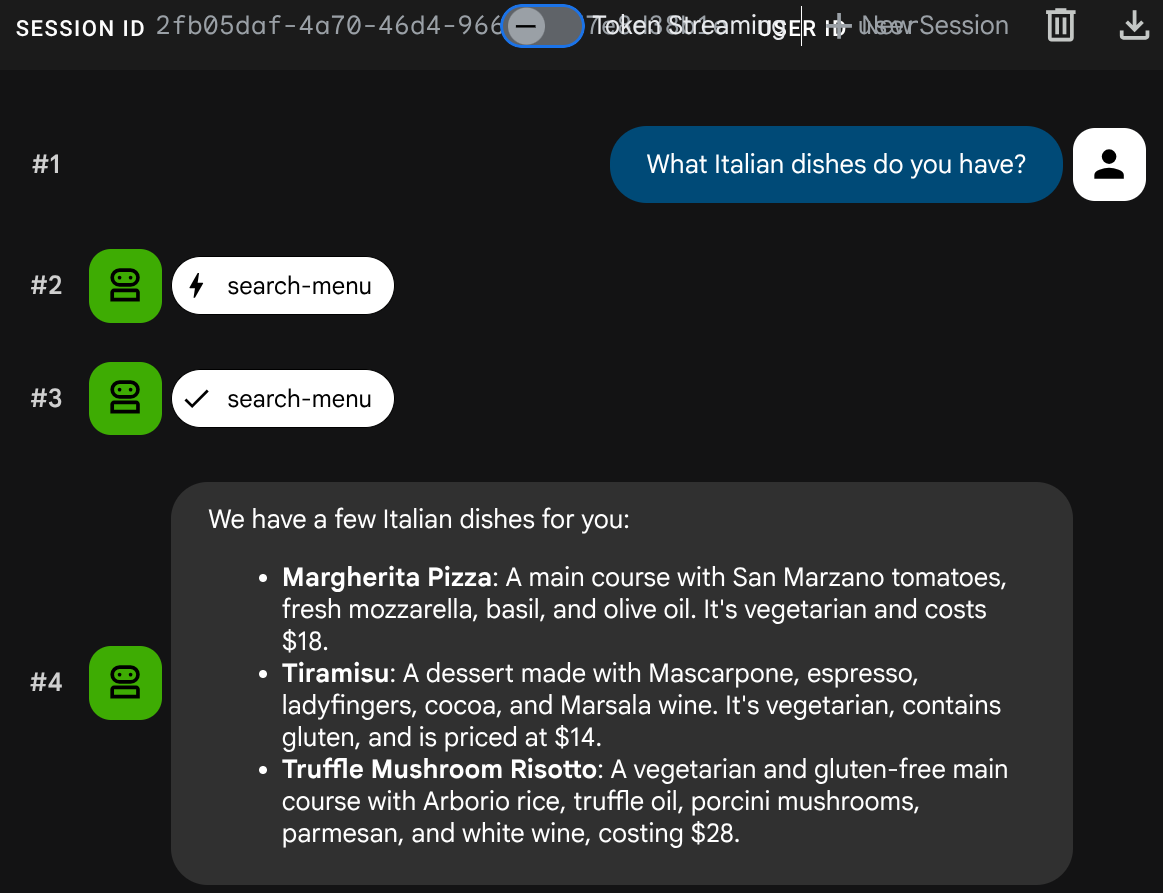
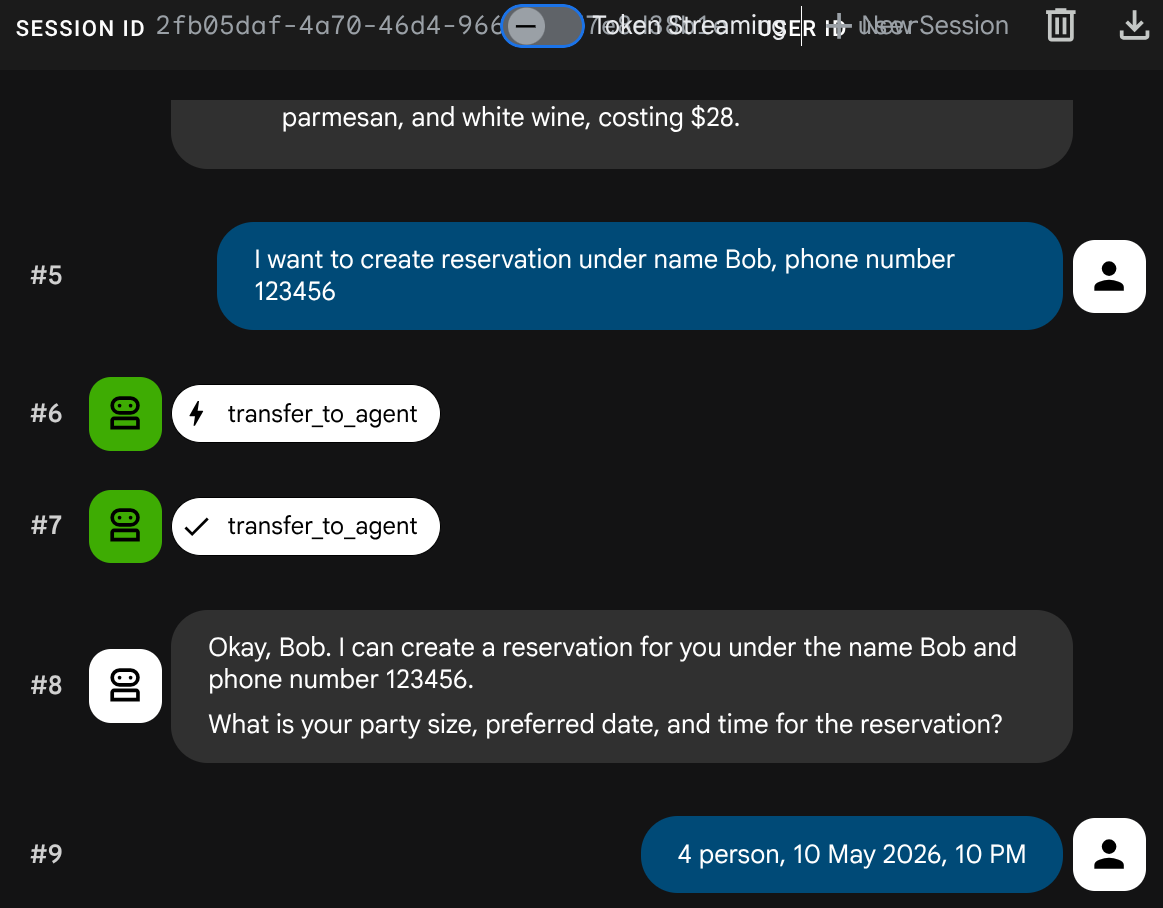
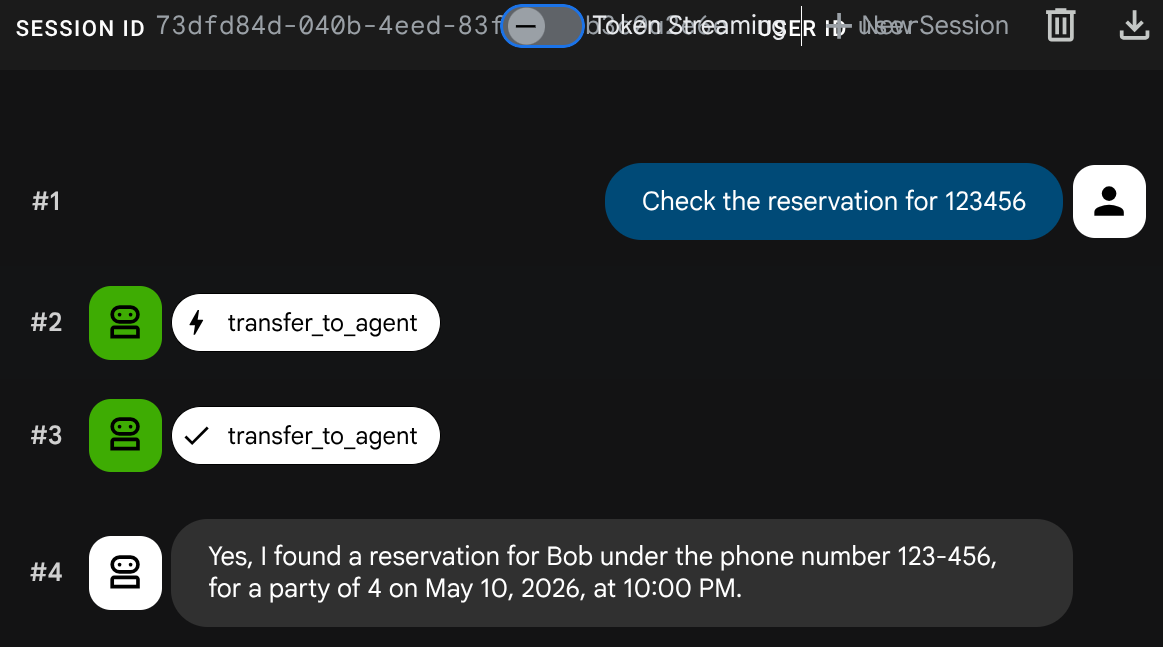
หยุดกระบวนการ adk web ด้วย Ctrl+C 2 ครั้ง จากนั้นมาทำให้ระบบสมบูรณ์ด้วยการติดตั้งใช้งานเอเจนต์อย่างเต็มรูปแบบ
10. ติดตั้งใช้งาน Restaurant Agent ที่อัปเดตแล้วใน Cloud Run
ขั้นตอนนี้จะติดตั้งใช้งาน Agent ของร้านอาหารใน Cloud Run อีกครั้งโดยมีการผสานรวม A2A ซึ่งจะทำให้ระบบแบบหลาย Agent ที่ติดตั้งใช้งานอย่างเต็มรูปแบบเสร็จสมบูรณ์
ให้สิทธิ์เข้าถึง Agent Runtime
บัญชีบริการ Cloud Run ต้องมีสิทธิ์เรียกใช้รันไทม์ของ Agent มอบบทบาท roles/aiplatform.user ให้กับบัญชีบริการ Compute Engine เริ่มต้น
PROJECT_NUMBER=$(gcloud projects describe $GOOGLE_CLOUD_PROJECT --format='value(projectNumber)')
gcloud projects add-iam-policy-binding $GOOGLE_CLOUD_PROJECT \
  --member="serviceAccount:${PROJECT_NUMBER}-compute@developer.gserviceaccount.com" \
  --role="roles/aiplatform.user"
ทำให้ใช้งานได้กับ Cloud Run
ในการตั้งค่านี้ เราถือว่าบริการตัวแทนร้านอาหารมีอยู่แล้วจาก Codelab ก่อนหน้าหรือโดยการเรียกใช้ scripts/full_setup.sh หากคุณเริ่มต้นใหม่ การดำเนินการนี้จะนำไปใช้ใหม่พร้อมกับโค้ดที่อัปเดต (การผสานรวม RemoteA2aAgent ใหม่) และเพิ่ม URL ของการ์ดตัวแทนการจองเป็นตัวแปรสภาพแวดล้อมใหม่ โดยจะเก็บตัวแปรสภาพแวดล้อมที่มีอยู่ (TOOLBOX_URL, GOOGLE_CLOUD_PROJECT ฯลฯ) ไว้
gcloud run deploy restaurant-agent \
  --source . \
  --region=$REGION \
  --allow-unauthenticated \
  --update-env-vars="RESERVATION_AGENT_CARD_URL=$RESERVATION_AGENT_CARD_URL" \
  --min-instances=0 \
  --max-instances=1 \
  --memory=1Gi \
  --port=8080
ทดสอบระบบที่ติดตั้งใช้งานอย่างเต็มรูปแบบ
รับ URL ของบริการที่ติดตั้งใช้งานแล้ว
AGENT_URL=$(gcloud run services describe restaurant-agent --region=$REGION --format='value(status.url)')
echo "Agent URL: $AGENT_URL"
เปิด URL ในเบราว์เซอร์ เว็บ UI ของ ADK จะโหลดขึ้นมา ซึ่งเป็นอินเทอร์เฟซเดียวกันกับที่คุณใช้ในเครื่อง แต่ตอนนี้ทำงานบน Cloud Run
คุณสามารถพูดคุยกับตัวแทนได้อย่างอิสระ
การค้นหาเมนู
What spicy dishes do you have?
คำขอการจอง
Book a table for 4 on Friday at 7pm. Name: Eve, Phone: 555-0505
ตรวจสอบการจอง
สร้างเซสชันใหม่ ( เริ่มการสนทนาใหม่):
Check reservation for 555-0505
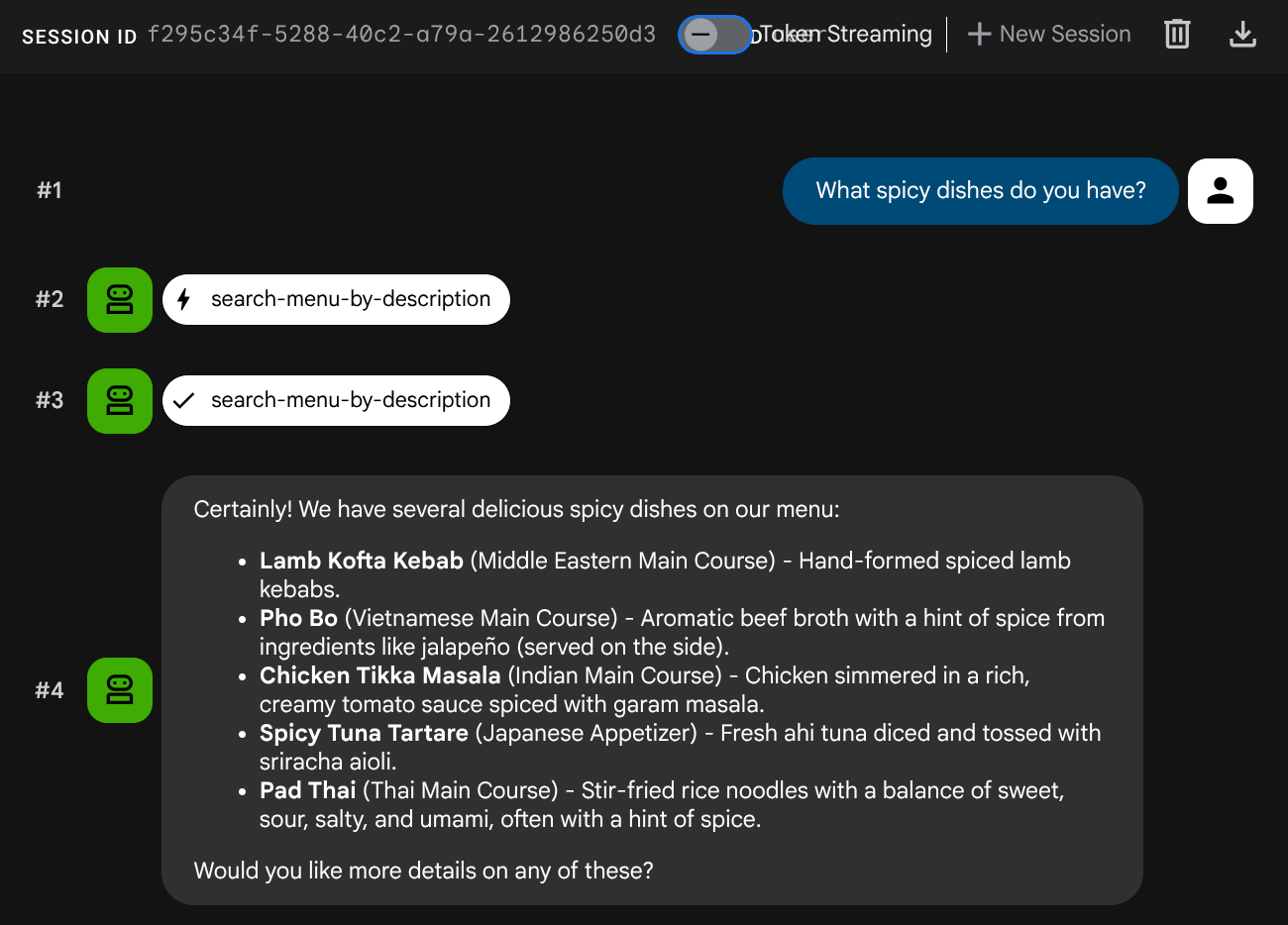
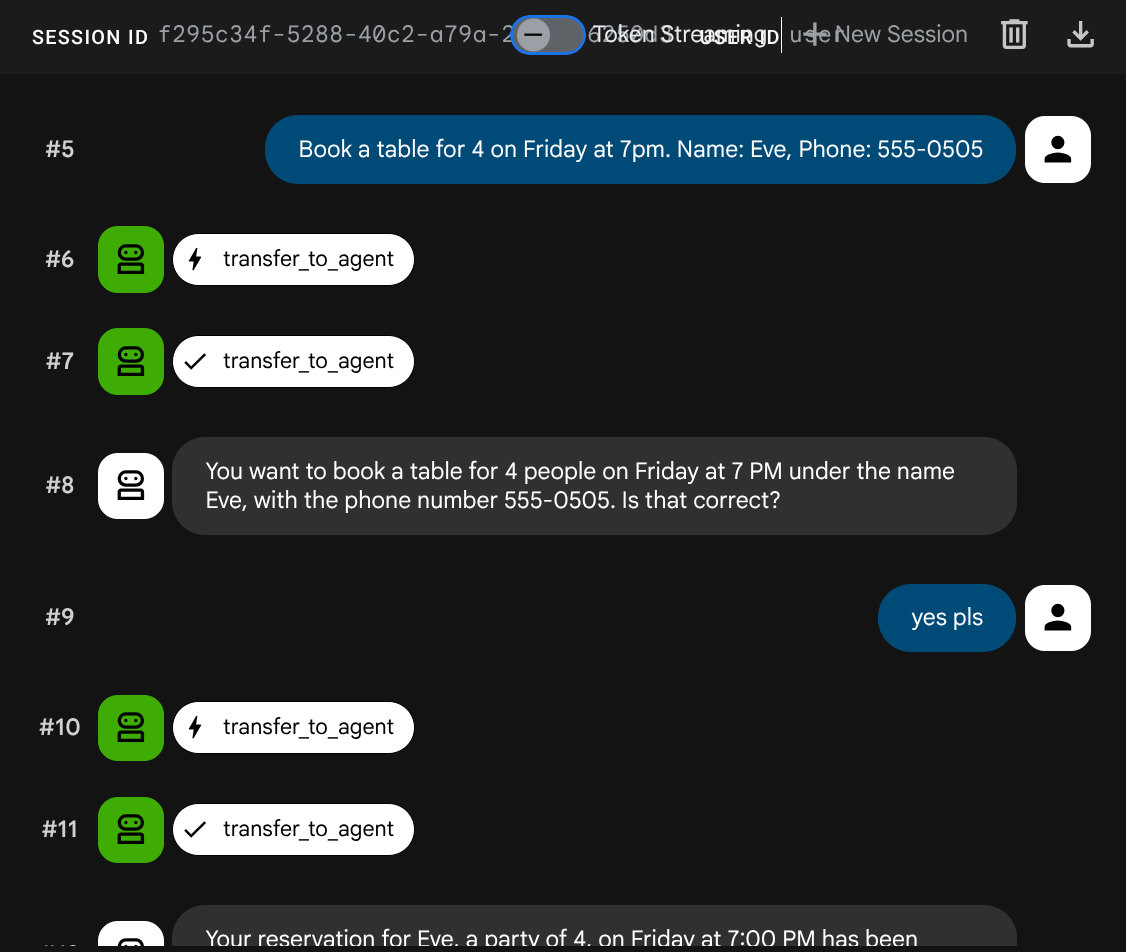
ระบบหลายเอเจนต์ได้รับการติดตั้งใช้งานอย่างเต็มรูปแบบ Agent ของร้านอาหารใน Cloud Run จะประสานงานระหว่างบริการแบ็กเอนด์ 2 รายการ ได้แก่ MCP Toolbox สำหรับการดำเนินการกับเมนู และ Agent การจอง A2A ใน Agent Runtime
11. ยินดีด้วย
คุณได้สร้างและติดตั้งใช้งานระบบแบบหลาย Agent โดยใช้โปรโตคอล A2A ใน Google Cloud
สิ่งที่คุณได้เรียนรู้
- สร้างเอเจนต์ ADK ที่ใช้สถานะเซสชัน (
ToolContext) เพื่อจัดการข้อมูลการจองโดยไม่ต้องใช้ฐานข้อมูล - ติดตั้งใช้งาน A2A Agent ใน Agent Runtime โดยใช้ Agent Platform SDK
- ใช้ Agent A2A ระยะไกลจาก Agent ADK อื่นโดยใช้
RemoteA2aAgentเป็น Agent ย่อย - ทดสอบระบบทีละขั้น: A2A ในพื้นที่ → A2A ที่ติดตั้งใช้งาน → การผสานรวมบางส่วน → การติดตั้งใช้งานเต็มรูปแบบ
ล้างข้อมูล
โปรดลบทรัพยากรที่สร้างขึ้นในโค้ดแล็บนี้เพื่อหลีกเลี่ยงการเรียกเก็บเงินจากบัญชี Google Cloud
ตัวเลือกที่ 1: ลบโปรเจ็กต์ (แนะนำ)
gcloud projects delete $GOOGLE_CLOUD_PROJECT
ตัวเลือกที่ 2: ลบทรัพยากรแต่ละรายการ
# Delete the Agent Runtime deployment
uv run python -c "
import vertexai
from google.genai import types
vertexai.init(project='$GOOGLE_CLOUD_PROJECT', location='$REGION')
client = vertexai.Client(
    project='$GOOGLE_CLOUD_PROJECT', location='$REGION',
    http_options=types.HttpOptions(api_version='v1beta1'),
)
agent = client.agent_engines.get(name='$RESERVATION_AGENT_RESOURCE_NAME')
agent.delete(force=True)
print('Agent Runtime deployment deleted.')
"

# Delete Cloud Run services
gcloud run services delete restaurant-agent --region=$REGION --quiet
gcloud run services delete toolbox-service --region=$REGION --quiet

# Delete Cloud SQL instance
gcloud sql instances delete $DB_INSTANCE --quiet

# Delete GCS staging bucket
gsutil rm -r gs://$STAGING_BUCKET