
1. Introduction
Overview
This lab is a follow-up to Build Multi-Agent Systems with ADK.
In that lab, you built a Course Creation System consisting of:
- Researcher Agent: Using google_search to find up-to-date information.
- Judge Agent: Critiquing the research for quality and completeness.
- Content Builder Agent: Turning the research into a structured course.
- Orchestrator Agent: Managing the workflow and communication between these specialists.
It also included a Web App that allowed users to submit a course creation request, and get a course as a response.
Researcher, Judge, and Content Builder are deployed as A2A agents in separate Cloud Run services. Orchestrator is another Cloud Run service with ADK Service API.
For this lab, we modified the Researcher agent to use Wikipedia Search tool instead of Google Search capability of Gemini. It allows us to inspect how custom tool calls are traced and evaluated.
So, we built a distributed multi-agent system. But how do we know if it's actually working well? Does the Researcher always find relevant info? Does the Judge correctly identify bad research?
In this lab, you will trade subjective "vibe checks" for data-driven assessment using the Vertex AI Gen AI Evaluation Service. You will implement Adaptive Rubrics and Tool Use Quality metrics to rigorously evaluate the distributed Multi-Agent System built in Lab 1. Finally, you will automate this process within a CI/CD pipeline, ensuring that every deployment maintains the reliability and accuracy of your production agents.
You will build a Continuous Evaluation Pipeline for your agents. You will learn how to:
- Deploy your agents to a private tagged revision in Google Cloud Run (shadow deployment).
- Run an automated evaluation suite against that specific revision using Vertex AI Gen AI Evaluation Service.
- Visualize and analyze the results.
- Use the evaluation as part of your CI/CD pipeline.
2. Core Concepts: Agent Evaluation Theory
When developing and running AI Agents, we perform two kinds of assessment: Offline Experimentation and Continuous Evaluation with Automated Regression Testing. The first is the creative engine of the development process, where we run ad-hoc experiments, refine prompts, and iterate rapidly to unlock new capabilities. The second is the defensive layer within our CI/CD pipeline, where we execute continuous evaluations against a "golden" dataset to ensure that no code change inadvertently degrades the agent's proven quality.
The fundamental difference lies in Discovery versus Defense:
- Offline Experimentation is a process of optimization. It is open-ended and variable. You are actively changing inputs (prompts, models, parameters) to maximize a score or solve a specific problem. The goal is to raise the "ceiling" of what the agent can do.
- Continuous Evaluation (Automated Regression Testing) is a process of verification. It is rigid and repetitive. You hold the inputs constant (the "golden" dataset) to ensure the outputs remain stable. The goal is to prevent the "floor" of performance from collapsing.
In this lab, we will focus on Continuous Evaluation. We will develop an Automated Regression Testing Pipeline that is supposed to run every time someone makes a change in the AI Agent, just like those unit tests.
Before writing code, it is critical to understand what we are measuring.
The "Vibe Check" Trap
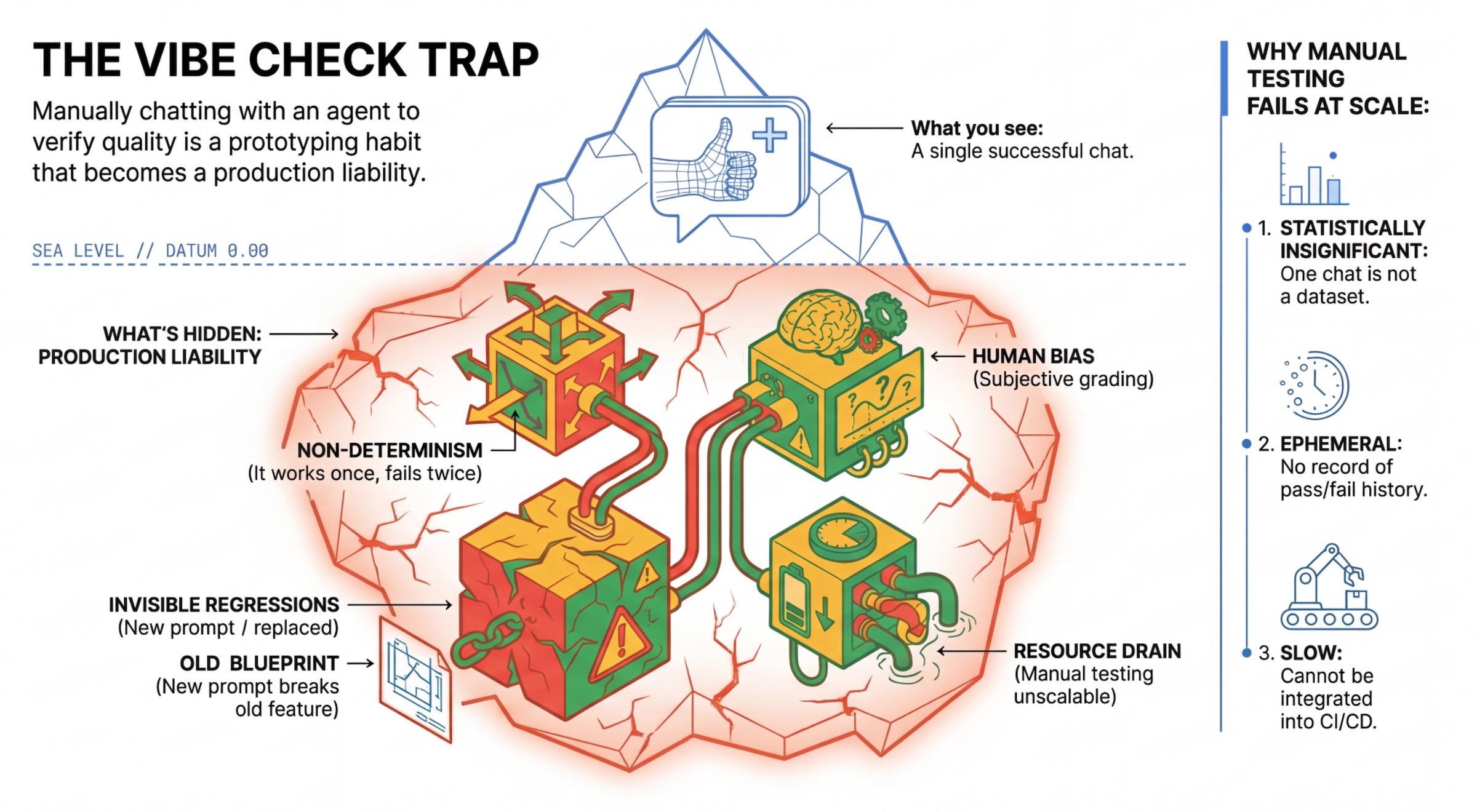
Many developers test agents by manually chatting with them. This is known as "vibe checking." While useful for prototyping, it fails in production because:
- Non-Determinism: Agents can answer differently each time. You need statistically significant sample sizes.
- Invisible Regressions: Improving one prompt might break a different use case.
- Human Bias: "It looks good" is subjective.
- Time-consuming Work: It's slow to manually test dozens of scenarios with every commit.
Two ways to grade Agent's Performance
To build a robust pipeline, we combine different types of graders:
- Code-Based Graders (Deterministic):
- What they measure: Strict constraints (e.g., "Did it return valid JSON?", "Did it call the
searchtool?"). - Pros: Fast, cheap, 100% accurate.
- Cons: Cannot judge nuance or quality.
- What they measure: Strict constraints (e.g., "Did it return valid JSON?", "Did it call the
- Model-Based Graders (Probabilistic):
- Also known as "LLM-as-a-Judge". We use a strong model (like Gemini 3 Pro) to evaluate the agent's output.
- What they measure: Nuance, reasoning, helpfulness, safety.
- Pros: Can evaluate complex, open-ended tasks.
- Cons: Slower, more expensive, requires careful prompt engineering for the judge.
Vertex AI Evaluation Metrics
In this lab, we use Vertex AI Gen AI Evaluation Service, which provides managed metrics so you don't have to write every judge from scratch.
There are multiple ways to group metrics for agent evaluation:
- Rubric-based metrics: Incorporate LLMs into evaluation workflows.
- Adaptive rubrics: Rubrics are dynamically generated for each prompt. Responses are evaluated with granular, explainable pass or fail feedback specific to the prompt.
- Static rubrics: Rubrics are defined explicitly and the same rubric applies to all prompts. Responses are evaluated with the same set of numerical scoring-based evaluators. A single numerical score (such as 1-5) per prompt. When an evaluation is required on a very specific dimension or when the exact same rubric is required across all prompts.
- Computation-based metrics: Evaluate responses with deterministic algorithms, usually using ground truth. A numerical score (such as 0.0-1.0) per prompt. When ground truth is available and can be matched with a deterministic method.
- Custom function metrics: Define your own metric through a Python function.
Specific Metrics we will use:
Final Response Match: (Reference-based) Does the answer match our "Golden Answer"?Tool Use Quality: (Reference-free) Did the agent use relevant tools in a proper way?Hallucination: (Reference-free) Are the claims in the response supported by the retrieved context?Tool Trajectory PrecisionandTool Trajectory Recall(Reference-based) Did the agent select the right tool and provide valid arguments? UnlikeTool Use Quality, these custom metrics use reference trajectory - a sequence of expected tools calls and arguments.
3. Setup
Configuration
- Open Cloud Shell: Click the Activate Cloud Shell icon in the top-right of the Google Cloud Console.
- Run the following command to refresh sign in and update Application Default Credentials (ADC):
gcloud auth login --update-adc - Set an active project for gcloud CLI.Run the following command to get current gcloud project:
gcloud config get-value projectgcloud config set project YOUR_PROJECT_IDYOUR_PROJECT_IDwith your project's ID.
- Set default region where your Cloud Run services will be deployed.
gcloud config set run/region us-west1us-west1, you can use any Cloud Run region closer to you.
Code and Dependencies
- Clone the starter code and change directory to the root of the project.
cd ~ git clone https://github.com/vladkol/agent-evaluation-lab -b starter cd agent-evaluation-lab - Create
.envfile:echo "GOOGLE_GENAI_USE_VERTEXAI=true" > .env echo "GOOGLE_CLOUD_PROJECT=$(gcloud config get-value project -q)" >> .env echo "GOOGLE_CLOUD_REGION=$(gcloud config get-value run/region -q)" >> .env echo "GOOGLE_CLOUD_LOCATION=global" >> .env - Install dependencies by running the following command in the terminal window:
uv sync
4. Understanding Safe Deployment
Before we evaluate, we need to deploy. But we don't want to break the live application if our new code is bad.
Revision Tags and Shadow Deployment
Google Cloud Run supports Revisions. Every time you deploy, a new immutable revision is created. You can assign Tags to these revisions to access them via a specific URL, even if they are receiving 0% of public traffic.
Why not just run assessments locally?
While the ADK supports local evaluation, deploying to a hidden revision offers critical advantages for Production Systems. This distinguishes System-Level Evaluation (what we are doing) from Unit Testing:
- Environment Parity: Local environments are different (different network, different CPU/Memory, different secrets). Testing in the cloud ensures your agent works in the actual runtime environment (System Test).
- Multi-Agent Interaction: In a distributed system, agents talk over HTTP. "Local" tests often mock these connections. Shadow deployment tests the actual network latency, timeout configurations, and authentication between your microservices.
- Secrets & Permissions: It verifies that your service account actually has the permissions it needs (e.g., to call Vertex AI or read from Firestore).
Note: This is Proactive Evaluation (checking before users see it). Once deployed, you would use Reactive Monitoring (Observability) to catch issues in the wild.
The CI/CD Workflow: Deploy, Assess, Promote
We use this for a robust Continuous Deployment pipeline:
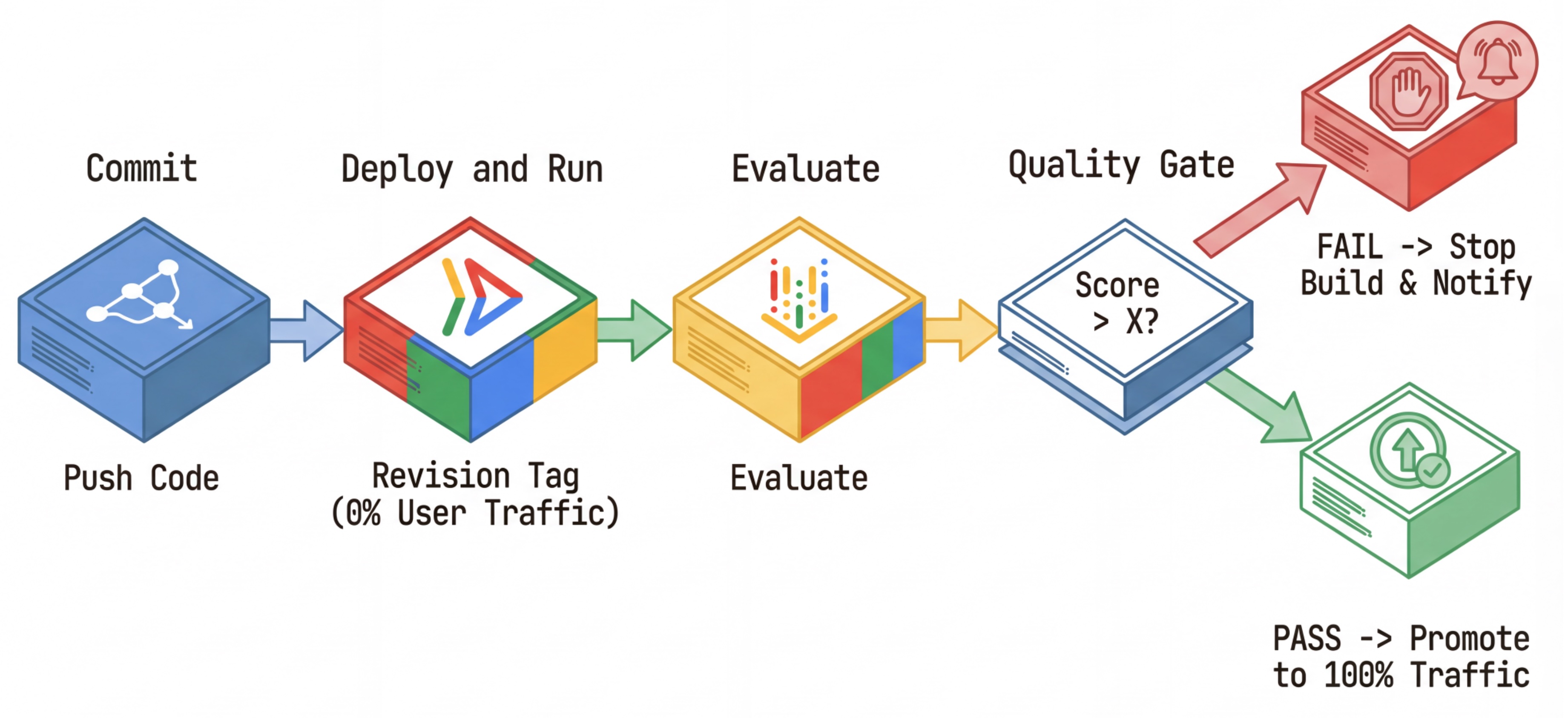
- Commit: You change the agent's prompt, and push to the repository.
- Deploy (Hidden): It triggers deployment of a new revision tagged with the commit hash (e.g.,
c-abc1234). This revision receives 0% of public traffic. - Evaluate: The evaluation script targets the specific revision URL
https://c-abc1234---researcher-xyz.run.app. - Promote: If (and only if) the evaluation passes and other tests succeed, you migrate traffic to this new revision.
- Rollback: If it fails, users never saw the bad version, and you can simply ignore or delete the bad revision.
This strategy allows you to test in production without affecting customers.
Analyze evaluate.sh
Open evaluate.sh. This script automates the process.
export COMMIT_SHORT_HASH=$(git rev-parse --short HEAD)
export COMMIT_REVISION_TAG="c-${COMMIT_SHORT_HASH}"

# ...

# Deploy services with a revision tag and NO traffic
source ./deploy.sh --revision-tag $COMMIT_REVISION_TAG --no-redeploy

# Run the evaluation against that specific tag
uv run -m evaluator.evaluate_agent
The deploy.sh takes care of revision deployment with --no-traffic and --tag options. If there is already a running service, it will not be affected. The new "hidden" revision will receive no traffic unless you explicitly call it with a special URL containing the revision tag (e.g. https://c-abc1234---researcher-xyz.run.app)
5. Implement the Evaluation Script
Now, let's write the code that actually runs the tests.
- Open
evaluator/evaluate_agent.py. - You will see imports and setup, but the metrics and execution logic are missing.
Define the Metrics
For the Researcher Agent, we have a "Golden Answers"/"Ground Truth" with expected answers. This is a Capability Eval: we are measuring if the agent can do the job correctly.
We want to measure:
- Final Response Match: (Capability) Does the answer match the expected answer? This is a reference-based metric. It uses a judge LLM to compare the agent's output against the expected answer. It doesn't expect the answer to be exactly the same, but semantically and factually similar.
- Tool Use Quality: (Quality) A targeted adaptive rubrics metric that evaluates the selection of appropriate tools, correct parameter usage, and adherence to the specified sequence of operations.
- Tool Use Trajectory: (Trace) 2 custom metrics that measure the agent's tool usage trajectory (precision and recall) against the expected trajectories. These metrics are implemented in
shared/evaluation/tool_metrics.pyas custom functions. Unlike Tool Use Quality, this metric is a deterministic reference-based metric - the code literally looks whether the actual tools calls match the reference data (reference_trajectoryin the evaluation data).
Custom Tool Use Trajectory Metrics
For custom Tool Use Trajectory metrics, we created a set of Python functions in shared/evaluation/tool_metrics.py. To allow Vertex AI Gen AI Evaluation Service to execute these functions, we need to pass that Python code to it.
It's done by defining an EvaluationRunMetric object with a UnifiedMetric and CustomCodeExecutionSpec configuration. The parameter remote_custom_function is a string that contains the Python code of the function. The function must be named as evaluate:
def evaluate(
    instance: dict
) -> float:
    ...
We created get_custom_function_metric helper (in shared/evaluation/evaluate.py) that converts a Python function to a custom code evaluation metric.
It gets the code of the function's module (to capture local dependencies), creates an extra evaluate function that calls the original function, and returns a EvaluationRunMetric object with a CustomCodeExecutionSpec.
import inspect
module_source = inspect.getsource(
    inspect.getmodule(metrics_function)
)
module_source += (
    "\n\ndef evaluate(instance: dict) -> float:\n"
    f"    return {metrics_function.__name__}(instance)\n"
)
return types.EvaluationRunMetric(
    metric=metric_name,
    metric_config=types.UnifiedMetric(
        custom_code_execution_spec=types.CustomCodeExecutionSpec(
            remote_custom_function=module_source
        )
    )
)
Gen AI Evaluation Service will execute that code in a sandbox execution environment, and will pass the evaluation data to it.
Add the Metrics and the Evaluation code
Add the following code to evaluator/evaluate_agent.py after if __name__ == "__main__": line.
It defines the metrics list for the Researcher agent, and runs the evaluation.
    eval_data_researcher = os.path.dirname(__file__) + "/eval_data_researcher.json"
    metrics=[
        # Compares the agent's output against a "Golden Answer"
        types.RubricMetric.FINAL_RESPONSE_MATCH,
        # Did the agent use the tools effectively?
        types.RubricMetric.TOOL_USE_QUALITY,
        # Custom metrics for tools trajectory analysis
        get_custom_function_metric("trajectory_precision", trajectory_precision_func),
        get_custom_function_metric("trajectory_recall", trajectory_recall_func)
    ]

    print("🧪 Running Researcher Evaluation...")
    eval_results = asyncio.run(
        # Run the evaluation and retrieve the results.
        evaluate_agent(
            agent_api_server=RESEARCHER_URL, # Agent Service URL (in Cloud Run).
            agent_name="agent", # Agent name as it's exposed by the server.
            evaluation_data_file=eval_data_researcher, # Evaluation data file.
            # GCS location for the Evaluation Service to store the result to.
            evaluation_storage_uri=f"gs://{GOOGLE_CLOUD_PROJECT}-agents/evaluation",
            metrics=metrics, # Metrics to use when evaluating the agent.
            project_id=GOOGLE_CLOUD_PROJECT,
            location=GOOGLE_CLOUD_REGION
        )
    )
    print(f"\n🧪 Researcher Evaluation results:\n{eval_results}")
    print(f"Evaluation Run ID: {eval_results.run_id}")
In a real production pipeline, you need an Evaluation Success Criteria. Once the evaluation is done, and metrics are ready. You would have a Gating Step here. For example: "If Final Response Match score < 0.75, fail the build." This prevents bad revisions from ever receiving traffic.
Append the following code to evaluator/evaluate_agent.py:
    METRIC_THRESHOLD = 0.75
    researcher_eval_failed = False
    if eval_results.state != types.EvaluationRunState.SUCCEEDED:
        print(f"🛑 Researcher Evaluation failed with state {eval_results.state}.")
        researcher_eval_failed = True
    else:
        for metric_name, metric_values in eval_results.metrics.items():
            if metric_values["mean"] < METRIC_THRESHOLD:
                print(f"🛑 Researcher Evaluation failed with metric `{metric_name}` below {METRIC_THRESHOLD} threshold.")
                researcher_eval_failed = True
    if researcher_eval_failed:
        exit(1)
Whenever the mean value of any of the evaluation metrics is below a threshold (0.75), the deployment should fail.
[Optional] Add Evaluation with Reference-Free Metrics for the Orchestrator
For the Orchestrator Agent, the interactions are more complex, and we might not always have a single "correct" answer. Instead, we evaluate general behavior using one of the Reference-Free Metrics.
- Hallucination: A score-based metric that checks for factuality and consistency of text responses by segmenting the response into atomic claims. It verifies if each claim is grounded or not based on tool usage in the intermediate events. This is critical for open-ended agents where "correctness" is subjective but "truthfulness" is non-negotiable. The score is calculated as the percentage of claims that are grounded in the source content. In our case, we expect the final response from the Orchestrator (that Content Builder produced) to be factually grounded in the content that Researcher retrieved using Wikipedia Search tool.
Add the evaluation logic for the Orchestrator:
    eval_data_orchestrator = os.path.dirname(__file__) + "/eval_data_orchestrator.json"
    metrics=[
        types.RubricMetric.HALLUCINATION,
    ]

    print("🧪 Running Orchestrator Evaluation...")
    eval_results = asyncio.run(evaluate_agent(
        agent_api_server=ORCHESTRATOR_URL,
        agent_name="agent",
        evaluation_data_file=eval_data_orchestrator,
        evaluation_storage_uri=f"gs://{GOOGLE_CLOUD_PROJECT}-agents/evaluation",
        metrics=metrics,
        project_id=GOOGLE_CLOUD_PROJECT,
        location=GOOGLE_CLOUD_REGION
    ))
    print(f"\n🧪 Orchestrator Evaluation results:\n{eval_results}")
    print(f"Evaluation Run ID: {eval_results.run_id}")
    METRIC_THRESHOLD = 0.75
    orchestrator_eval_failed = False
    if eval_results.state != types.EvaluationRunState.SUCCEEDED:
        print(f"🛑 Orchestrator Evaluation failed with state {eval_results.state}.")
        orchestrator_eval_failed = True
    else:
        for metric_name, metric_values in eval_results.metrics.items():
            if metric_values["mean"] < METRIC_THRESHOLD:
                print(f"🛑 Orchestrator Evaluation failed with metric `{metric_name}` below {METRIC_THRESHOLD} threshold.")
                orchestrator_eval_failed = True
    if orchestrator_eval_failed:
        exit(1)
Inspect Evaluation Data
Open the evaluator/ directory. You will see two data files:
eval_data_researcher.json: Prompts and Golden/Ground-Truth references for the Researcher.eval_data_orchestrator.json: Prompts for the Orchestrator (we only perform reference-free evaluation for the Orchestrator).
Each entry typically contains:
prompt: The prompt for the agent.reference: The ideal answer (ground truth), if applicable.reference_trajectory: The expected sequence of tool calls.
6. Understand the Evaluation Code
Open shared/evaluation/evaluate.py. This module contains the core logic for running evaluations. The key function is evaluate_agent.
It performs the following steps:
- Data Loading: Reads the evaluation dataset (prompts and references) from a file.
- Parallel Inference: Runs the agent against the dataset in parallel. It handles session creation, sends prompts, and captures both the final response and the intermediate tool execution trace.
- Vertex AI Evaluation: It merges the original evaluation data with the final responses and the intermediate tool execution trace, and submits the results to the Vertex AI Evaluation Service with GenAI Client in Vertex AI SDK. This service runs the configured Metrics to grade the agent's performance.
The key moment of the last step is calling the create_evaluation_run function of the eval module of Gen AI SDK:
evaluation_run = client.evals.create_evaluation_run(
    dataset=agent_dataset_with_inference,
    agent_info=agent_info,
    metrics=metrics,
    dest=evaluation_storage_uri
)
We do so in evaluate_agent function in shared/evaluation/evaluate.py.
It gets the merged evaluation dataset, the information about the agent, metrics to use, and the destination storage URI. The function creates an evaluation run in the Vertex AI Evaluation Service and returns the evaluation run object.
The Agent Info API
To perform accurate evaluation, the Evaluation Service needs to know the agent's configuration (system instructions, description, and available tools). We pass it to create_evaluation_run as agent_info parameter.
But how do we get this information? We make it part of the ADK Service API.
Open shared/adk_app.py and search for def agent_info. You will see that the ADK application exposes a helper endpoint:
@app.get("/apps/{agent_name}/agent-info")
async def agent_info(agent_name: str) -> typing.Dict[str, typing.Any]:
    # ...
    return {
        "name": agent.name,
        "instruction": str(getattr(agent, "instruction", None)),
        "tool_declarations": tools_dict_list
    }
This endpoint (enabled via --publish_agent_info flag) allows the evaluation script to dynamically fetch the agent's runtime configuration. This is crucial for metrics that assess tool usage, as the judge model can better evaluate the agent's tool usage if it knows specifically which tools were available to the agent during the conversation.
7. Run the Evaluation
Now that you've implemented the evaluator, let's run it!
- Run the evaluation script from the root of the repository:
./evaluate.sh- It gets your current git commit hash.
- It invokes
deploy.shto deploy a revision with a tag based on the commit hash. - Once deployed, it starts
evaluator.evaluate_agent. - You will see progress bars as it runs the test cases against your cloud service.
- Finally, it prints a summary JSON of the results.
Deploying from source requires an Artifact Registry Docker repository to store built containers. A repository named [cloud-run-source-deploy] in region [us-west1] will be created.

Do you want to continue (Y/n)?
Note: The first run might take a few minutes to deploy the services.
8. Visualize Results in Notebook
Raw JSON output is hard to read. Gen AI Client in Vertex AI SDK provides a way to track these runs over time. We'll use a Colab notebook to visualize the results.
- Open
evaluator/show_evaluation_run.ipynbin Google Colab using this link. - Set
GOOGLE_CLOUD_PROJECT,GOOGLE_CLOUD_REGION, andEVAL_RUN_IDvariables to your project ID, region, and run ID.
- Install dependencies and authenticate.
Retrieve the Evaluation Run and Display the Results
We need to fetch the evaluation run data from Vertex AI. Find the cell under Retrieve Evaluation Run and Display Results and replace the # TODO line with the following code block:
from google.genai import types as genai_types
from vertexai import Client

# Initialize SDK
client = Client(
    project=GOOGLE_CLOUD_PROJECT,
    location=GOOGLE_CLOUD_REGION,
    http_options=genai_types.HttpOptions(api_version="v1beta1"),
)

evaluation_run = client.evals.get_evaluation_run(
    name=EVAL_RUN_ID,
    include_evaluation_items=True
)
evaluation_run.show()
Interpreting the Results
When you look at the results, keep the following in mind:
- Regression vs Capability:
- Regression: Did the score drop on old tests? (Not good, requires investigation).
- Capability: Did the score improve on new tests? (Good, this is progress).
- Failure Analysis: Don't just look at the score.
- Look at the trace. Did it call the wrong tool? Did it fail to parse the output? This is where you find bugs.
- Look at the explanation and verdicts provided by the judge LLM. They often give you a good idea of why the test failed.
Pass@1 vs Pass@k: When running a certain test once, we get Pass@1 score. If an agent fails, it might be due to non-determinism. In sophisticated setups, you might run each test k times (e.g., 5 times) and calculate pass@k (did it succeed at least once?) or pass^k (did it succeed every time?). This is what many metrics already do under the hood. For example, types.RubricMetric.FINAL_RESPONSE_MATCH (Final Response Match) makes 5 calls to the judge LLM to determine the final response match score.
9. Continuous Integration and Deployment (CI/CD)
In a production system, the agent evaluation should be run as part of the CI/CD pipeline. Cloud Build is a good choice for that.
For every commit pushed to the agent's code repository, evaluation will run along with the rest of the tests. If they pass, the deployment can be "promoted" to serving user requests. If they fail, everything stays as is, but the developer can take a look what went wrong.
Cloud Build Configuration
Now, let's create a Cloud Run deployment configuration script that performs the following steps:
- Deploys Services to a private revsion.
- Runs Agent Evaluation.
- If evaluation passes, it "promotes" revision deployments to serving 100% of traffic.
Create cloudbuild.yaml:
steps:
- name: gcr.io/google.com/cloudsdktool/google-cloud-cli:latest
  entrypoint: /bin/bash
  env:
      - 'BUILD_ID=$BUILD_ID'
  args:
      - "-c"
      - |
        if [[ "$_COMMIT_SHORT_HASH" != "" ]]; then
          export COMMIT_SHORT_HASH=$_COMMIT_SHORT_HASH
        else
          export COMMIT_SHORT_HASH=$SHORT_SHA
        fi
        export COMMIT_REVISION_TAG="c-$${COMMIT_SHORT_HASH}"
        echo "Deploying with revision tag: $$COMMIT_REVISION_TAG"
        set -e
        # Install uv and sync dependencies.
        curl -LsSf https://astral.sh/uv/install.sh | sh
        source $$HOME/.local/bin/env
        uv sync

        # Deploy services with the revision tag.
        source ./deploy.sh --revision-tag $$COMMIT_REVISION_TAG --no-redeploy

        # Run evaluation.
        uv run -m evaluator.evaluate_agent
        # If evaluation fails, the deployment will stop here.

        # If evaluation passes, it will continue with promoting the revisions to serve 100% of traffic.
        echo "Promoting revisions $$COMMIT_REVISION_TAG to serve 100% of traffic."
        gcloud run services update-traffic researcher --to-tags $$COMMIT_REVISION_TAG=100 --region $$GOOGLE_CLOUD_REGION --project $$GOOGLE_CLOUD_PROJECT
        gcloud run services update-traffic judge --to-tags $$COMMIT_REVISION_TAG=100 --region $$GOOGLE_CLOUD_REGION --project $$GOOGLE_CLOUD_PROJECT
        gcloud run services update-traffic content-builder --to-tags $$COMMIT_REVISION_TAG=100 --region $$GOOGLE_CLOUD_REGION --project $$GOOGLE_CLOUD_PROJECT
        gcloud run services update-traffic orchestrator --to-tags $$COMMIT_REVISION_TAG=100 --region $$GOOGLE_CLOUD_REGION --project $$GOOGLE_CLOUD_PROJECT
        gcloud run services update-traffic course-creator --to-tags $$COMMIT_REVISION_TAG=100 --region $$GOOGLE_CLOUD_REGION --project $$GOOGLE_CLOUD_PROJECT

options:
  substitutionOption: 'ALLOW_LOOSE'
  defaultLogsBucketBehavior: REGIONAL_USER_OWNED_BUCKET
Running the Pipeline
Finally, we can run the evaluation pipeline.
Before we run the evaluation pipeline that makes requests to Cloud Run services, we need a separate Service Account with a number of permissions. Let's write a script that does that and launches the pipeline.
- Create script
run_cloud_build.sh:#!/bin/bash set -e source .env BUILD_SA_NAME="agent-eval-build-sa" BUILD_SA_EMAIL="${BUILD_SA_NAME}@${GOOGLE_CLOUD_PROJECT}.iam.gserviceaccount.com" COMMIT_SHORT_HASH=$(git rev-parse --short HEAD) # Creating service account for Cloud Build. Granting necessary roles to it. if ! gcloud iam service-accounts describe "${BUILD_SA_EMAIL}" --project "${GOOGLE_CLOUD_PROJECT}" &> /dev/null; then echo "Creating service account ${BUILD_SA_NAME} for Cloud Build." gcloud iam service-accounts create ${BUILD_SA_NAME} --project "${GOOGLE_CLOUD_PROJECT}" --display-name "Agent Build Service Account" echo "Granting roles to service account ${BUILD_SA_NAME}..." sleep 10 ROLES=( "roles/cloudbuild.builds.builder" "roles/run.admin" "roles/run.invoker" "roles/iam.serviceAccountOpenIdTokenCreator" "roles/iam.serviceAccountUser" "roles/serviceusage.serviceUsageAdmin" "roles/serviceusage.serviceUsageConsumer" "roles/aiplatform.user" "roles/logging.logWriter" "roles/storage.admin" "roles/artifactregistry.writer" ) # Loop through and grant each role for ROLE in "${ROLES[@]}"; do gcloud projects add-iam-policy-binding "$GOOGLE_CLOUD_PROJECT" \ --member="serviceAccount:$BUILD_SA_EMAIL" \ --role="$ROLE" \ --condition=None \ --quiet done echo "Waiting for 60 seconds for the permission changes to propagate..." sleep 60 fi gcloud builds submit --config cloudbuild.yaml \ --service-account="projects/${GOOGLE_CLOUD_PROJECT}/serviceAccounts/${BUILD_SA_EMAIL}" \ --machine-type=e2-highcpu-32 \ --timeout=120m \ --substitutions _COMMIT_SHORT_HASH=$COMMIT_SHORT_HASH,_GOOGLE_CLOUD_PROJECT=$GOOGLE_CLOUD_PROJECT,_GOOGLE_CLOUD_LOCATION=$GOOGLE_CLOUD_LOCATION,_GOOGLE_CLOUD_REGION=$GOOGLE_CLOUD_REGION- Creates a dedicated Service Account
agent-eval-build-sa. - Grants it necessary roles (
roles/run.admin,roles/aiplatform.user, etc.). *. Submits the build to Cloud Build.
- Creates a dedicated Service Account
- Run the pipeline:
chmod +x run_cloud_build.sh
./run_cloud_build.sh
You can watch the build progress in the terminal or click the link to the Cloud Console.
Note: In a real production environment, you would set up a Cloud Build Trigger to run this automatically on every git push. The workflow is the same: the trigger would execute cloudbuild.yaml, ensuring every commit is evaluated.
10. Summary
You have successfully built a Evaluation Pipeline!
- Deployment: You used revision tags with git commit hash to safely deploy agents to real environment for testing without affecting production deployments.
- Evaluation: You defined evaluation metrics, and automated the evaluation process using Vertex AI Gen AI Evaluation Service.
- Analysis: You used a Colab Notebook to visualize evaluation results and improve your agent.
- Rollout: You used Cloud Build to execute the evaluation pipeline automatically and promote the best revision to serve 100% of traffic.
This cycle Edit Code -> Deploy Tag-> Run Eval and Tests -> Analyze -> Rollout -> Repeat is the core of Production-Grade Agentic Engineering.