

1. 概要
自然言語処理(NLP)は、テキストデータから分析情報を導き出し、分析を行う研究です。インターネット上で生成される文章の量が増え続ける中、組織はこれまで以上に、テキストを活用してビジネスに関連する情報を取得しようとしています。
NLP は、言語の翻訳から感情分析、文のゼロからの生成など、あらゆることに使用できます。これは、テキストの扱い方を一変させる活発な研究分野です。
大量のテキストデータに対して NLP を大規模に使用する方法について説明します。これは確かに大変な作業です。幸いなことに、Spark MLlib や spark-nlp などのライブラリを利用して、この作業を簡単にします。
2. ユースケース
(架空の)組織「FoodCorp」のチーフ データ サイエンティストは、食品業界のトレンドについて詳しく知りたいと考えています。Reddit のサブレディット r/food の投稿という形式のテキスト データのコーパスにアクセスできます。このコーパスを使用して、人々が何について話しているかを調べます。
この方法の一つとして、「トピック モデリング」と呼ばれる NLP 手法があります。トピック モデリングは、ドキュメント グループのセマンティックな意味の傾向を特定できる統計的手法です。つまり、Reddit の「投稿」のコーパスに基づいてトピックモデルを構築し、トレンドを表す「トピック」または単語のグループのリストを生成できます。
モデルを構築するには、テキストのクラスタリングによく使用される潜在的ディリクレ配分(LDA)と呼ばれるアルゴリズムを使用します。LDA の優れた入門ガイドについては、こちらをご覧ください。
3. プロジェクトの作成
Google アカウント(Gmail または Google Apps)をお持ちでない場合は、1 つ作成する必要があります。Google Cloud Platform のコンソール(console.cloud.google.com)にログインし、新しいプロジェクトを作成します。


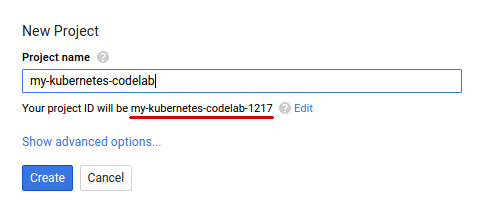
次に、Google Cloud リソースを使用するために、Cloud Console で課金を有効にする必要があります。
この Codelab の操作をすべて行って、費用が生じたとしても、少額です。ただし、リソースの使用量を増やしたり、実行したままにしたりすると、費用が増加する可能性があります。PySpark-BigQuery と Spark-NLP の各 Codelab の最後に「クリーンアップ」の説明があります。
Google Cloud Platform の新規ユーザーは、$300 の無料トライアルをご利用いただけます。
4. 環境をセットアップする
まず、Dataproc API と Compute Engine API を有効にする必要があります。
画面の左上にあるメニュー アイコンをクリックします。

プルダウンから [API Manager] を選択します。
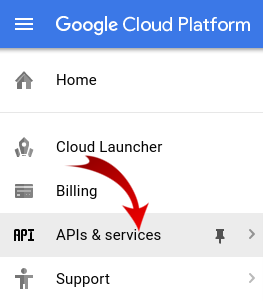
[API とサービスの有効化] をクリックします。

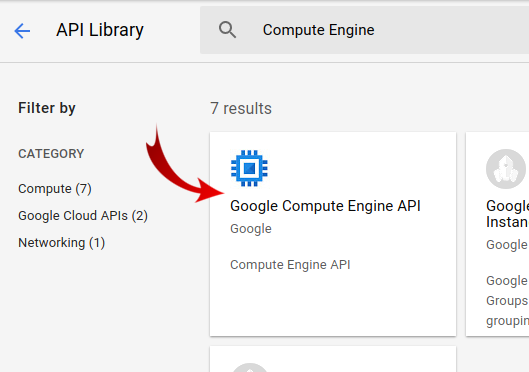
検索ボックスで「Compute Engine」を検索します。表示された結果リストで [Google Compute Engine API] をクリックします。
[Google Compute Engine] ページで、[有効にする] をクリックします。
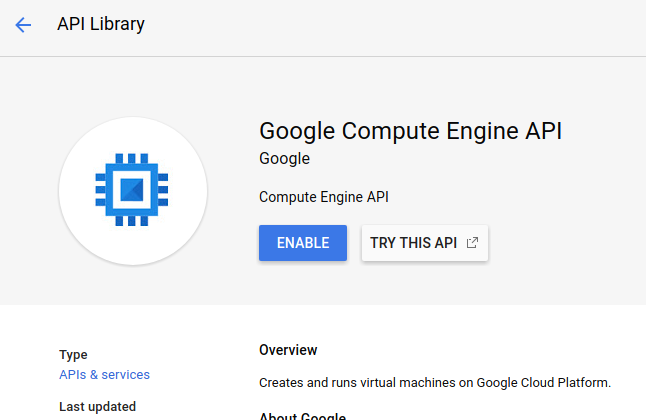
有効になったら、左向きの矢印をクリックして戻ります。
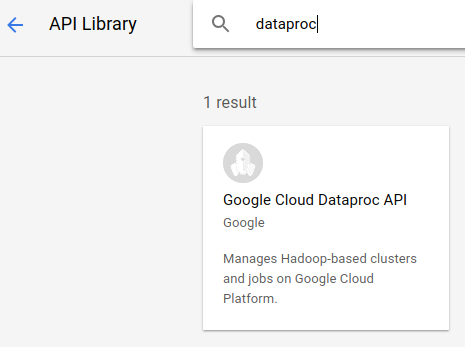
次に、「Google Dataproc API」を検索して有効にします。
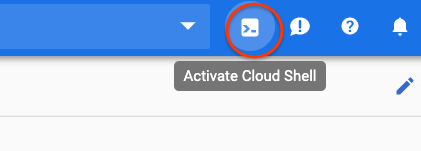
次に、Cloud コンソールの右上にあるボタンをクリックして Cloud Shell を開きます。
この Codelab では、環境変数をいくつか設定します。これらの環境変数は、Codelab の手順を進める中で参照できます。まず、作成する Dataproc クラスタの名前(「my-cluster」など)を選択し、環境に設定します。任意の名前を使用してください。
CLUSTER_NAME=my-cluster
次に、こちらで利用可能なゾーンのいずれかを選択します。例: us-east1-b.
REGION=us-east1
最後に、ジョブがデータを読み取る移行元バケットを設定する必要があります。バケット bm_reddit にサンプルデータがありますが、このチュートリアルより前に PySpark for Preprocessing BigQuery Data を完了した場合は、そこから生成したデータを使用してもかまいません。
BUCKET_NAME=bm_reddit
環境変数を構成したら、次のコマンドを実行して Dataproc クラスタを作成します。
 gcloud beta dataproc clusters create ${CLUSTER_NAME} \
     --region ${REGION} \
     --metadata 'PIP_PACKAGES=google-cloud-storage spark-nlp==2.7.2' \
     --worker-machine-type n1-standard-8 \
     --num-workers 4 \
     --image-version 1.4-debian10 \
     --initialization-actions gs://dataproc-initialization-actions/python/pip-install.sh \
     --optional-components=JUPYTER,ANACONDA \
     --enable-component-gateway
これらの各コマンドについて見ていきましょう。
gcloud beta dataproc clusters create ${CLUSTER_NAME}: 先ほど指定した名前で Dataproc クラスタの作成を開始します。ここでは、以下で説明するコンポーネント ゲートウェイなどの Dataproc のベータ版機能を有効にするために beta を含めています。
--zone=${ZONE}: クラスタのロケーションを設定します。
--worker-machine-type n1-standard-8: ワーカーに使用するマシンのタイプ。
--num-workers 4: クラスタに 4 つのワーカーがあります。
--image-version 1.4-debian9: これは、使用する Dataproc のイメージ バージョンを示します。
--initialization-actions ...: 初期化アクションは、クラスタとワーカーの作成時に実行されるカスタム スクリプトです。ユーザーが作成して GCS バケットに保存することも、公開バケット dataproc-initialization-actions から参照することもできます。ここに記載されている初期化アクションを使用すると、--metadata フラグで指定された Pip を使用して Python パッケージをインストールできます。
--metadata 'PIP_PACKAGES=google-cloud-storage spark-nlp': Dataproc にインストールするパッケージのスペース区切りリスト。この場合、google-cloud-storage Python クライアント ライブラリと spark-nlp をインストールします。
--optional-components=ANACONDA: 省略可能なコンポーネントは、Dataproc で使用される一般的なパッケージで、作成時に Dataproc クラスタに自動的にインストールされます。初期化アクションよりもオプション コンポーネントを使用する利点としては、起動時間の短縮や、特定の Dataproc バージョンとの互換性がテストされていることなどが挙げられます。全体的に信頼性が高くなります。
--enable-component-gateway: このフラグを使用すると、Dataproc のコンポーネント ゲートウェイを利用して、Zeppelin、Jupyter、Spark History などの一般的な UI を表示できます。注: 一部の機能では、関連するオプション コンポーネントが必要です。
Dataproc の詳細については、こちらの Codelab をご覧ください。
次に、Cloud Shell で次のコマンドを実行して、サンプルコードを含むリポジトリのクローンを作成し、正しいディレクトリに移動します。
cd
git clone https://github.com/GoogleCloudPlatform/cloud-dataproc
cd cloud-dataproc/codelabs/spark-nlp
5. Spark MLlib
Spark MLlib は、Apache Spark で記述されたスケーラブルな ML ライブラリです。MLlib は、Spark の効率性と一連のファインチューニングされた ML アルゴリズムを活用して、大量のデータを分析できます。Java、Scala、Python、R の API があります。この Codelab では、特に Python に焦点を当てます。
MLlib には、さまざまな変換と推定器が含まれています。変換ツールは、通常 transform() 関数を使用してデータを変更または変換できるツールです。一方、推定ツールは、通常 fit() 関数を使用してデータをトレーニングできる事前構築済みのアルゴリズムです。
変換器の例を次に示します。
- トークン化(単語の文字列から数値のベクトルを作成する)
- ワンホット エンコーディング(文字列に含まれる単語を表す数値のスパース ベクトルを作成する)
- ストップワード削除ツール(文字列に意味的価値をもたらさない単語を削除)
推定量の例を次に示します。
- 分類(これはリンゴかオレンジか?)
- 回帰(このリンゴの値段はいくらですか?)
- クラスタリング(すべてのリンゴはどの程度似ていますか?)
- 決定木(色 == オレンジの場合、オレンジです。それ以外の場合はリンゴ)
- 次元削減(データセットから特徴を削除しても、リンゴとオレンジを区別できるか?)。
MLlib には、ハイパーパラメータの調整と選択、交差検証など、ML の他の一般的な手法のツールも含まれています。
また、MLlib には Pipelines API が含まれています。この API を使用すると、再実行可能なさまざまな変換ツールを使用してデータ変換パイプラインを構築できます。
6. Spark-NLP
Spark-nlp は、Spark を使用して効率的な自然言語処理タスクを実行するために John Snow Labs によって作成されたライブラリです。これには、次のような一般的なタスク用のアノテーターと呼ばれる組み込みツールが含まれています。
- トークン化(単語の文字列から数値のベクトルを作成する)
- 単語エンベディングの作成(ベクトルによる単語間の関係の定義)
- 品詞タグ(どの単語が名詞か、動詞かなど)動詞はどれですか?)。
この Codelab の範囲外ですが、spark-nlp は TensorFlow とも統合されています。
最も重要な点として、Spark-NLP は MLlib パイプラインに簡単に組み込めるコンポーネントを提供することで、Spark MLlib の機能を拡張します。
7. 自然言語処理のベスト プラクティス
データから有用な情報を抽出する前に、いくつかの準備を行う必要があります。実行する前処理の手順は次のとおりです。
トークン化
通常、まず行うのはデータの「トークン化」です。このプロセスでは、データを取り込み、「トークン」または単語に基づいて分割します。通常、このステップでは句読点を削除し、すべての単語を小文字に設定します。たとえば、次のような文字列があるとします。What time is it? トークン化後、この文は 4 つのトークンで構成されます。「what" , "time", "is", "it". モデルが単語 what を大文字と小文字が異なる 2 つの単語として扱うことを望んでいません。また、句読点は通常、単語から推論を学習するうえで役に立たないため、句読点も削除します。
正規化
多くの場合、データを「正規化」する必要があります。これにより、意味が似ている単語が同じものに置き換えられます。たとえば、テキストで「fought」、「battled」、「dueled」という単語が識別された場合、正規化によって「battled」と「dueled」が「fought」という単語に置き換えられることがあります。
ステミング
ステミングは、単語をその語幹に置き換えます。たとえば、「car」、「cars'」、「car's」はすべて「car」に置き換えられます。これらの単語はすべて、根本的に同じ意味を表しているためです。
ストップワードの削除
ストップワードとは、「and」や「the」など、通常は文の意味に価値を加えない単語のことです。通常、テキスト データセットのノイズを減らすために、これらの削除を試みます。
8. ジョブの実行
実行するジョブを見てみましょう。コードは cloud-dataproc/codelabs/spark-nlp/topic_model.py にあります。数分かけて、このコードと関連するコメントを読み、何が起こっているのかを理解してください。以下に、セクションの一部を抜粋します。
# Python imports
import sys

# spark-nlp components. Each one is incorporated into our pipeline.
from sparknlp.annotator import Lemmatizer, Stemmer, Tokenizer, Normalizer
from sparknlp.base import DocumentAssembler, Finisher

# A Spark Session is how we interact with Spark SQL to create Dataframes
from pyspark.sql import SparkSession

# These allow us to create a schema for our data
from pyspark.sql.types import StructField, StructType, StringType, LongType

# Spark Pipelines allow us to sequentially add components such as transformers
from pyspark.ml import Pipeline

# These are components we will incorporate into our pipeline.
from pyspark.ml.feature import StopWordsRemover, CountVectorizer, IDF

# LDA is our model of choice for topic modeling
from pyspark.ml.clustering import LDA

# Some transformers require the usage of other Spark ML functions. We import them here
from pyspark.sql.functions import col, lit, concat

# This will help catch some PySpark errors
from pyspark.sql.utils import AnalysisException

# Assign bucket where the data lives
try:
    bucket = sys.argv[1]
except IndexError:
    print("Please provide a bucket name")
    sys.exit(1)

# Create a SparkSession under the name "reddit". Viewable via the Spark UI
spark = SparkSession.builder.appName("reddit topic model").getOrCreate()

# Create a three column schema consisting of two strings and a long integer
fields = [StructField("title", StringType(), True),
          StructField("body", StringType(), True),
          StructField("created_at", LongType(), True)]
schema = StructType(fields)

# We'll attempt to process every year / month combination below.
years = ['2016', '2017', '2018', '2019']
months = ['01', '02', '03', '04', '05', '06',
          '07', '08', '09', '10', '11', '12']

# This is the subreddit we're working with.
subreddit = "food"

# Create a base dataframe.
reddit_data = spark.createDataFrame([], schema)

# Keep a running list of all files that will be processed
files_read = []

for year in years:
    for month in months:

        # In the form of <project-id>.<dataset>.<table>
        gs_uri = f"gs://{bucket}/reddit_posts/{year}/{month}/{subreddit}.csv.gz"

        # If the table doesn't exist we will simply continue and not
        # log it into our "tables_read" list
        try:
            reddit_data = (
                spark.read.format('csv')
                .options(codec="org.apache.hadoop.io.compress.GzipCodec")
                .load(gs_uri, schema=schema)
                .union(reddit_data)
            )

            files_read.append(gs_uri)

        except AnalysisException:
            continue

if len(files_read) == 0:
    print('No files read')
    sys.exit(1)

# Replacing null values with their respective typed-equivalent is usually
# easier to work with. In this case, we'll replace nulls with empty strings.
# Since some of our data doesn't have a body, we can combine all of the text
# for the titles and bodies so that every row has useful data.

df_train = (
    reddit_data
    # Replace null values with an empty string
    .fillna("")
    .select(
         # Combine columns
        concat(
            # First column to concatenate. col() is used to specify that we're referencing a column
            col("title"),
            # Literal character that will be between the concatenated columns.
            lit(" "),
            # Second column to concatenate.
            col("body")
        # Change the name of the new column
        ).alias("text")
    )
)

# Now, we begin assembling our pipeline. Each component here is used to some transformation to the data.
# The Document Assembler takes the raw text data and convert it into a format that can
# be tokenized. It becomes one of spark-nlp native object types, the "Document".
document_assembler = DocumentAssembler().setInputCol("text").setOutputCol("document")

# The Tokenizer takes data that is of the "Document" type and tokenizes it.
# While slightly more involved than this, this is effectively taking a string and splitting
# it along ths spaces, so each word is its own string. The data then becomes the
# spark-nlp native type "Token".
tokenizer = Tokenizer().setInputCols(["document"]).setOutputCol("token")

# The Normalizer will group words together based on similar semantic meaning.
normalizer = Normalizer().setInputCols(["token"]).setOutputCol("normalizer")

# The Stemmer takes objects of class "Token" and converts the words into their
# root meaning. For instance, the words "cars", "cars'" and "car's" would all be replaced
# with the word "car".
stemmer = Stemmer().setInputCols(["normalizer"]).setOutputCol("stem")

# The Finisher signals to spark-nlp allows us to access the data outside of spark-nlp
# components. For instance, we can now feed the data into components from Spark MLlib.
finisher = Finisher().setInputCols(["stem"]).setOutputCols(["to_spark"]).setValueSplitSymbol(" ")

# Stopwords are common words that generally don't add much detail to the meaning
# of a body of text. In English, these are mostly "articles" such as the words "the"
# and "of".
stopword_remover = StopWordsRemover(inputCol="to_spark", outputCol="filtered")

# Here we implement TF-IDF as an input to our LDA model. CountVectorizer (TF) keeps track
# of the vocabulary that's being created so we can map our topics back to their
# corresponding words.
# TF (term frequency) creates a matrix that counts how many times each word in the
# vocabulary appears in each body of text. This then gives each word a weight based
# on its frequency.
tf = CountVectorizer(inputCol="filtered", outputCol="raw_features")

# Here we implement the IDF portion. IDF (Inverse document frequency) reduces
# the weights of commonly-appearing words.
idf = IDF(inputCol="raw_features", outputCol="features")

# LDA creates a statistical representation of how frequently words appear
# together in order to create "topics" or groups of commonly appearing words.
lda = LDA(k=10, maxIter=10)

# We add all of the transformers into a Pipeline object. Each transformer
# will execute in the ordered provided to the "stages" parameter
pipeline = Pipeline(
    stages = [
        document_assembler,
        tokenizer,
        normalizer,
        stemmer,
        finisher,
        stopword_remover,
        tf,
        idf,
        lda
    ]
)

# We fit the data to the model.
model = pipeline.fit(df_train)

# Now that we have completed a pipeline, we want to output the topics as human-readable.
# To do this, we need to grab the vocabulary generated from our pipeline, grab the topic
# model and do the appropriate mapping.  The output from each individual component lives
# in the model object. We can access them by referring to them by their position in
# the pipeline via model.stages[<ind>]

# Let's create a reference our vocabulary.
vocab = model.stages[-3].vocabulary

# Next, let's grab the topics generated by our LDA model via describeTopics(). Using collect(),
# we load the output into a Python array.
raw_topics = model.stages[-1].describeTopics().collect()

# Lastly, let's get the indices of the vocabulary terms from our topics
topic_inds = [ind.termIndices for ind in raw_topics]

# The indices we just grab directly map to the term at position <ind> from our vocabulary.
# Using the below code, we can generate the mappings from our topic indices to our vocabulary.
topics = []
for topic in topic_inds:
    _topic = []
    for ind in topic:
        _topic.append(vocab[ind])
    topics.append(_topic)

# Let's see our topics!
for i, topic in enumerate(topics, start=1):
    print(f"topic {i}: {topic}")
ジョブの実行
では、ジョブを実行しましょう。次のコマンドを実行します。
gcloud dataproc jobs submit pyspark --cluster ${CLUSTER_NAME}\
    --region ${REGION}\
    --properties=spark.jars.packages=com.johnsnowlabs.nlp:spark-nlp_2.11:2.7.2\
    --driver-log-levels root=FATAL \
    topic_model.py \
    -- ${BUCKET_NAME}
このコマンドを使用すると、Dataproc Jobs API を活用できます。pyspark コマンドを含めることで、これが PySpark ジョブであることをクラスタに示します。クラスタ名、こちらで利用可能な省略可能なパラメータ、ジョブを含むファイルの名前を指定します。この例では、Spark、Yarn、Dataproc のさまざまなプロパティを変更できるパラメータ --properties を指定しています。Spark プロパティ packages を変更します。これにより、ジョブに spark-nlp をパッケージ化して含めることを Spark に通知できます。また、エラー以外の PySpark からのログ出力のほとんどを抑制するパラメータ --driver-log-levels root=FATAL も提供しています。一般的に、Spark ログはノイズが多くなりがちです。
最後に、-- ${BUCKET} はバケット名を提供する Python スクリプト自体のコマンドライン引数です。-- と ${BUCKET} の間にスペースがあることに注意してください。
ジョブの実行から数分後に、モデルを含む出力が表示されます。
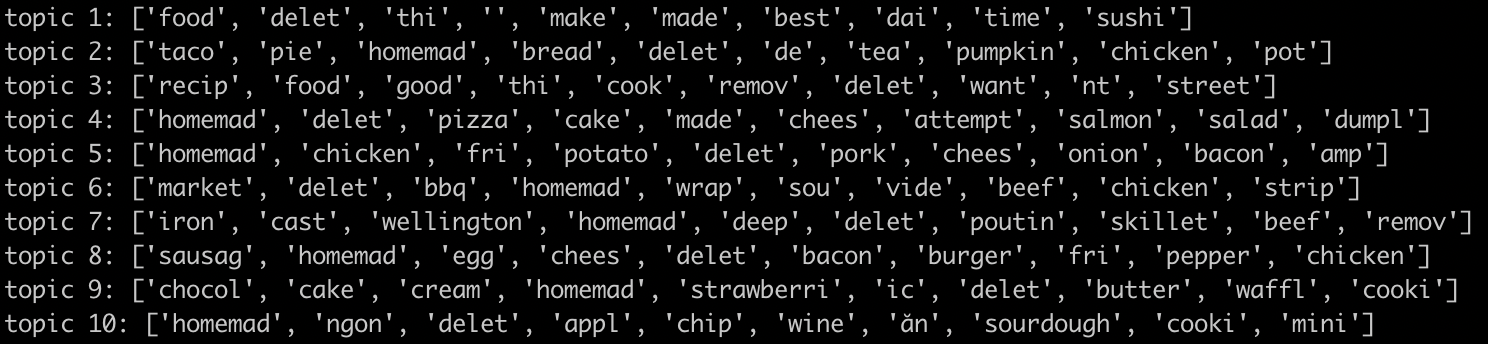
すばらしい!モデルの出力を確認して、傾向を推測できますか?私たちの場合はどうですか?
上記の出力から、トピック 8 の朝食とトピック 9 のデザートに関するトレンドを推測できます。
9. クリーンアップ
このクイックスタートの完了後に GCP アカウントに不要な料金が発生しないようにするには:
この Codelab 専用のプロジェクトを作成した場合は、必要に応じてプロジェクトを削除することもできます。
- GCP Console で、[プロジェクト] ページに移動します。
- プロジェクト リストで、削除するプロジェクトを選択し、[削除] をクリックします。
- ボックスにプロジェクト ID を入力し、[シャットダウン] をクリックしてプロジェクトを削除します。
ライセンス
この作品は、クリエイティブ・コモンズの表示 3.0 汎用ライセンスと Apache 2.0 ライセンスにより使用許諾されています。