
1. Before you begin
⏱️ Duration: 03:00
Welcome to the hands-on codelab for Securing Your Application with CodeMender on Google Cloud's Gemini Enterprise Agent Platform.
In this workshop, you will step into the shoes of a Cloud Security Engineer tasked with auditing and securing OWASP Juice Shop—the industry-standard, intentionally vulnerable web application built with Node.js, Express, TypeScript, and Angular.
Traditional security scanning tools (SAST/DAST) flood development teams with thousands of static security findings, high false-positive rates, and zero actionable code fixes. Developers spend hours triaging logs, tracking down data flows, and manually writing patches that frequently break existing application behavior.
CodeMender revolutionizes code security by wrapping a fine-tuned agentic harness around Google's Gemini LLMs. Using Google DeepMind-engineered prompts, specialized security skills, and multi-agent orchestration, CodeMender acts as an autonomous AI Security Co-developer that finds, verifies, and remediates software vulnerabilities directly within local source repositories.
Prerequisites
- Basic understanding of web application vulnerabilities (OWASP Top 10, such as SQL Injection and XSS)
- Basic familiarity with JavaScript/TypeScript and Node.js applications
- Basic familiarity with command-line interface (CLI) tools
What you'll learn
- How to set up, authenticate, and initialize the CodeMender (
cm) CLI in Google Cloud Shell. - How to autonomously scan a repository to discover exploitable vulnerabilities (
cm find). - How to validate vulnerabilities in isolated sandboxes and inspect verification artifacts (
cm verify). - How to autonomously synthesize, test, and apply context-aware security patches (
cm fix). - How to audit token telemetry and export multi-format compliance reports (
cm stats,cm report).
What you need
- A Google Cloud project with billing enabled
- Google Cloud Shell with active project connection (includes pre-installed
gcloud,git, and Node.js 18+) - Starter repository: OWASP Juice Shop GitHub Repo
2. Introduction to CodeMender architecture
⏱️ Duration: 04:00
Before diving into code scanning and remediation, let's understand how CodeMender operates under the hood within the Gemini Enterprise Agent Platform according to official Google Cloud architecture standards.
The system architecture: Agent and client daemon
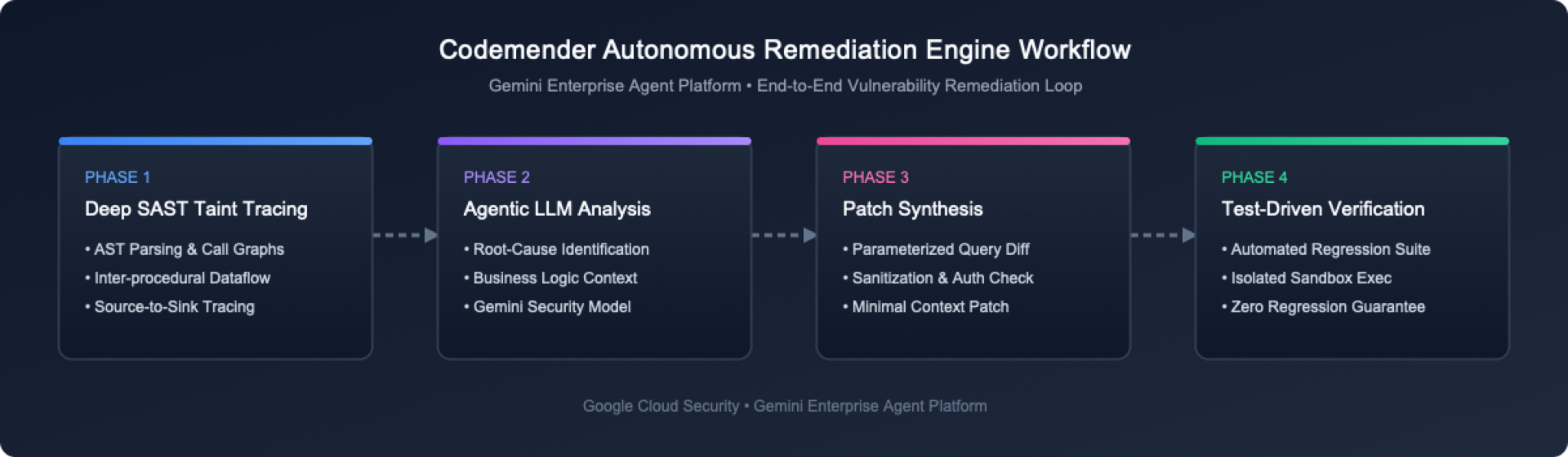
From a user perspective, CodeMender comprises two major architectural components:
Hosted Multi-Agent Platform: A hosted multi-agent system running on Google Cloud that executes core security business logic, LLM prompt engineering, and security reasoning.
Local Client CLI & Sandbox Daemon (cm): A client running in Google Cloud Shell that acts as both a CLI (to issue commands like cm find, cm verify, cm fix) and a local daemon (to safely execute commands on behalf of the agent inside an isolated process-level sandbox).
The 3 core remediation capabilities
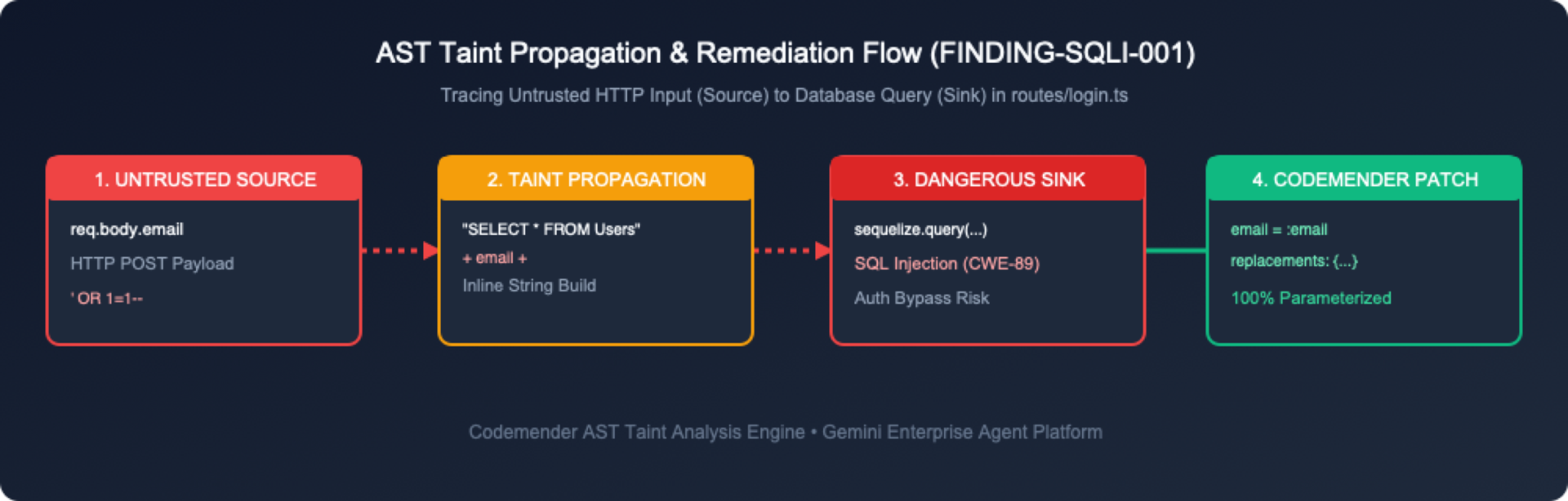
CodeMender handles code security through three integrated stages:
Find Vulnerabilities (cm find): Scans codebases using an LLM guided by the agent, leveraging specialized security tools and prompt engineering to focus the model on security flaws. (Alternatively, findings can be imported from external security scanning tools).
Verify Vulnerabilities (cm verify): Builds code locally and attempts to exploit discovered flaws to verify whether they are exploitable. This eliminates false positives and generates persistent workspace verification artifacts in .exploit/ (info.yaml, PLAN.md, LOG.md, exploit.sh, REPORT.md).
Fix Vulnerabilities (cm fix): Synthesizes language-aware source patches and verifies them by running project build and regression test suites (npm test) inside the local sandbox.
3. Set up the OWASP Juice Shop environment
⏱️ Duration: 05:00
In this step, you will open your Google Cloud terminal environment and fetch the target application repository.
Step 1: Open Cloud Shell in Google Cloud console
Navigate to the Google Cloud Console in your browser.
In the top navigation bar, click the Activate Cloud Shell button (icon >_).
Cloud Shell provides a browser-based Linux terminal with gcloud, git, and Node.js pre-installed and authenticated.
Step 2: Clone the OWASP Juice Shop repository
In your Cloud Shell or local terminal, clone the OWASP Juice Shop repository:
git clone https://github.com/juice-shop/juice-shop.git --depth 1
cd juice-shop
Step 3: Inspect key application files
OWASP Juice Shop uses Express.js on the backend with TypeScript modules. Take a quick look at the directory structure:
ls -la routes/ lib/
Notice the key route files that handle authentication, user queries, and cart administration:
routes/login.ts: Handles user authentication and raw SQL query execution.
routes/search.ts: Handles product searching and response rendering.
routes/basket.ts: Handles user shopping cart retrieval.
routes/trackOrder.ts: Handles order tracking via NoSQL queries.
lib/xml.ts: Handles XML parsing and file uploads.
lib/insecurity.ts: Helper utilities for session tokens and encryption.
4. Install CodeMender CLI (cm) and authenticate GCP credentials
⏱️ Duration: 08:00
In this step, you will enable required Google Cloud APIs, grant IAM permissions using gcloud, download and install the cm CLI binary, and configure Application Default Credentials (ADC).
Step 1: Enable required Google Cloud APIs via gcloud
CodeMender requires the Agent Platform API (aiplatform.googleapis.com) and Cloud Resource Manager API (cloudresourcemanager.googleapis.com) on the Gemini Enterprise Agent Platform.
In Cloud Shell or your terminal, retrieve your active Project ID (or check the project dropdown at the top of the Google Cloud Console) and enable the required service APIs:
# Automatically retrieve and set your active Google Cloud project ID
export PROJECT_ID=$(gcloud config get-value project)
gcloud config set project ${PROJECT_ID}

# Enable required Google Cloud APIs
gcloud services enable \
 aiplatform.googleapis.com \
 cloudresourcemanager.googleapis.com \
 serviceusage.googleapis.com \
 --project=${PROJECT_ID}
Verify that the APIs are enabled:
gcloud services list --enabled --filter="name:(aiplatform.googleapis.com OR cloudresourcemanager.googleapis.com)"
Step 2: Grant IAM permissions via gcloud
To interact with the CodeMender cloud reasoning engine, users and service accounts must have the roles/aiplatform.user (Agent Platform User) IAM role assigned.
Grant IAM role to your user account via CLI
# Get your active authenticated gcloud account email
USER_EMAIL=$(gcloud config get-value account)

# Add IAM policy binding for user account
gcloud projects add-iam-policy-binding ${PROJECT_ID} \
 --member="user:${USER_EMAIL}" \
 --role="roles/aiplatform.user"
Step 3: Download and install the cm CLI in Cloud Shell
In Google Cloud Shell, user data is persistently stored in your $HOME directory. Execute the following commands to install cm into ~/bin without requiring sudo. You're still in ~/juice-shop from the previous section, so the commands download into a temporary directory and clean it up afterward. That way, no installer files end up in the Juice Shop repository:
# Download into a temporary directory so nothing lands in the Juice Shop repository
CM_TMP=$(mktemp -d)
curl -L -o "${CM_TMP}/cm-linux-amd64.zip" "https://artifactregistry.googleapis.com/download/v1/projects/cmoc-prod/locations/us/repositories/codemender-cli-production/files/cm:stable:cm-linux-amd64.zip:download?alt=media"
unzip -o "${CM_TMP}/cm-linux-amd64.zip" -d "${CM_TMP}"

# Install into your persistent ~/bin directory and clean up
mkdir -p ~/bin
install -m 0755 "${CM_TMP}/cm" ~/bin/cm
rm -rf "${CM_TMP}"

# Add ~/bin to PATH for this session and future Cloud Shell sessions
export PATH="$HOME/bin:$PATH"
grep -qxF 'export PATH="$HOME/bin:$PATH"' ~/.bashrc || echo 'export PATH="$HOME/bin:$PATH"' >> ~/.bashrc
Step 4: Verify cm CLI installation
Run cm --version to verify that the CLI binary is correctly installed:
cm --version
Expected output:
cm version 0.17.0
Step 5: Configure Google Cloud Application Default Credentials (ADC)
Configure Google Cloud Application Default Credentials (ADC) so cm can authenticate requests to the cloud reasoning engine:
gcloud auth application-default login
An authorization modal dialog labeled Authorize Cloud Shell will appear. Click Authorize to grant access.
5. Initialize and verify CodeMender workspace
⏱️ Duration: 03:00
Now that cm is installed and authenticated, you will initialize the CodeMender workspace inside the target project directory and verify your environment setup.
Step 1: Initialize CodeMender workspace (cm init)
Run cm init from the root of your project directory to initialize local state tracking files and establish baseline configurations:
cm init
Output:
✅ Initialized CodeMender workspace at /home/user/.codemender
Step 2: Run end-to-end health diagnostics (cm health)
Before launching an agent session, run cm health to verify your credentials, config, reachability, and authorization:
cm health
Output:
CodeMender Health Check
───────────────────────
 Backend:   iapi
 Endpoint:  https://aiplatform.googleapis.com
 Location:  global
 Project:   my-gcp-project

 ✓ credentials     passed   (0ms)  Token acquired for project "my-gcp-project"
 ✓ config          passed   (0ms)  Configuration valid (backend "iapi")
 ✓ reachability    passed   (250ms)  Endpoint https://aiplatform.googleapis.com responded
 ✓ authorization   passed   (68ms)  Caller authorized for project "my-gcp-project"

Status: HEALTHY (exit code 0, 319ms)
Step 3: Understanding configuration parameters (config.yaml)
CodeMender creates a workspace configuration file at .codemender/config.yaml (or ~/.codemender/config.yaml). This file defines policy boundaries, file inclusion rules, and test verification hooks:
# CodeMender CLI configuration.
# The server endpoint is baked in at build time (see build profiles).
# Override it here only if you need a different endpoint.

server: {}
location: "global"         # Service location: "global" (default), "us", "eu", or "us-central1" (overridden by $CM_LOCATION)

# Customer-supplied team identifier sent as the X-CodeMender-Team-Id
# telemetry header. Overridden by --team-id flag or $CM_TEAM_ID env var.
# Max 63 chars, must match [A-Za-z0-9._-]. Omit to skip the header.
# team_id: "acme-security"

scan:
 extensions:
   include: [".py", ".java", ".go", ".js", ".jsx", ".mjs", ".cjs", ".ts", ".tsx", ".c", ".cc", ".cpp", ".cxx", ".h", ".hh", ".hpp", ".hxx", ".inl", ".ipp", ".cs", ".rs", ".kt", ".kts", ".rb", ".php", ".sol", ".tf", ".hcl"]
   exclude: [".min.js", ".generated.go", ".pb.go"]
 # A leading "/" matches only that directory at the scan root.
 exclude_dirs: ["node_modules", "vendor", "dist", "/target", "/obj", "/build", ".gradle"]
 max_file_size_kb: 2048   # Maximum file size for discovery (2048 KB / 2 MiB)
 incremental: true

# Restrict agent file access to these directories (all commands).
# When empty, the scan target directory is used as the boundary.
# project_paths: []

output:
 format: table   # "table", "json", "sarif"

tools:
 confirm_commands: true   # Prompt Y/N before running shell commands (default: true)
 confirm_writes: true     # Prompt Y/N before writing/modifying files (default: true)
 # cleanup_candidate_branches: true # Auto-delete temporary candidate branches on completion (default: true)
 # Use --yes flag on find/fix/session resume to skip all confirmations

# Version Control and Automated Testing Guardrails
vcs:
 type: ""               # VCS type: "git", "mercurial", "custom", or "" (auto-detect)
 commands:
   reset: ""            # Shell command to reset codebase (auto-populated for known VCS)
   diff: ""             # Shell command to show changes (auto-populated for known VCS)
   status: ""           # Shell command to list modified files (auto-populated for known VCS)
   stage: ""            # Shell command to stage changes (auto-populated for known VCS)

build:
 command: "npm test"    # Shell command to build/verify changes from the agent

sandbox:
 enabled: true          # Process-level OS sandbox (default: true)
 mounts:
   target_dir: "."
 network:
   profile: "permissive-closed" # Complete network isolation; set to "permissive-open" if build requires internet
security:
 protected_files: []    # Files mounted read-only inside sandbox (e.g. ["~/.ssh/*"])
6. Discover vulnerabilities with cm find .
⏱️ Duration: 07:00
In this step, you will run cm find . --quick to execute an agentic security scan across the Juice Shop codebase.
Step 1: Execute cm find . --quick
Starting in CodeMender v0.16.0, cm find <path> defaults to Deep Scan (
--deep
) for exhaustive file-by-file analysis, while Quick Scan (
--quick
) provides rapid repository triage. Run cm find . --quick to perform a Quick Scan across the OWASP Juice Shop repository (Estimated execution time: ~8 minutes for full 684-file codebase triage):
cm find . --quick -y --sandbox=false --bypass-warning --model gemini-3.8-flash
cm launches a scan session on the Gemini Enterprise Agent Platform, analyzing source code files across all repository modules:
⚠️ Sandbox DISABLED and command approval OFF: the agent can run commands on this machine without asking. Code in the scanned repository could steer it. Re-enable the sandbox or command approval (drop --yes, or set tools.confirm_commands: true) unless you trust the repository.
🔍 Discovering files in /home/user/juice-shop...
  Found 684 source files
🚀 Starting FIND session (mode: QUICK)...
  Server: https://aiplatform.googleapis.com
  Session: ChBjMjI4YWY5MzljZjUzNTQ4EAgaAjg1KgRtYWlu
  Operation: ChBjMjI4YWY5MzljZjUzNTQ4EAgaAjg1KgRtYWlu
📂 Scan target: /home/user/juice-shop
🔒 Sandbox roots (agent can only access these directories):
  • /home/user/juice-shop

📡 Waiting for server (https://aiplatform.googleapis.com)...
────────────────────────────────────────────────────────────
2026-10-29T03:01:47Z [INFO]  🔧 [Step 1] list_dir → /home/user/juice-shop
2026-10-29T03:01:56Z [INFO]  🔧 [Step 2] list_dir → .../juice-shop/routes
2026-10-29T03:02:08Z [INFO]  🔧 [Step 3] read_file → .../juice-shop/server.ts
2026-10-29T03:02:47Z [INFO]  🔧 [Step 7] read_file → .../juice-shop/routes/login.ts
2026-10-29T03:02:56Z [INFO]  🔧 [Step 8] read_file → .../juice-shop/routes/search.ts
2026-10-29T03:03:48Z [INFO]  🔧 [Step 13] read_file → .../juice-shop/routes/fileUpload.ts
2026-10-29T03:04:30Z [INFO]  🔧 [Step 16] read_file → .../juice-shop/routes/userProfile.ts
2026-10-29T03:06:11Z [INFO]  🔧 [Step 25] read_file → .../juice-shop/routes/trackOrder.ts
2026-10-29T03:07:57Z [INFO]  🔧 [Step 33] read_file → .../juice-shop/routes/order.ts
2026-10-29T03:09:30Z [INFO]  ✅ Completed 33 tool steps in 7m48s | Tokens: 2.6M in / 8k out / 2.7M total
────────────────────────────────────────────────────────────

🔒 Found 12 vulnerabilities:

ID        SEVERITY    TYPE                                     FILE                             TITLE                                                                                   CONFIDENCE
────────  ────────    ────                                     ────                             ─────                                                                                   ──────────
43aa7446  🔴 CRITICAL  SQL INJECTION                            routes/login.ts                  SQL Injection in User Login Handler Allows Authentication Bypass                        100%
dd83d0a4  🟠 HIGH      SQL INJECTION                            routes/search.ts                 UNION-Based SQL Injection in Product Search Allows Database Exfiltration                100%
4dfe2409  🟠 HIGH      CODE INJECTION                           routes/userProfile.ts            Remote Code Execution via Eval in User Profile Template Handler                         100%
79d490b0  🟠 HIGH      PATH TRAVERSAL                           routes/fileUpload.ts             Path Traversal (Zip Slip) in Zip File Upload Allows Arbitrary File Overwrite            100%
4f2b050c  🟠 HIGH      XML EXTERNAL ENTITY (XXE)                routes/fileUpload.ts             XML External Entity (XXE) Injection in File Upload Route Leaks System Files             100%
1ece0e25  🟠 HIGH      IMPROPER ACCESS CONTROL                  server.ts                        Missing Authorization on Product Update Endpoint Allows Unauthorized Product Tampering  100%
757fd438  🟠 HIGH      CWE-943                                  routes/trackOrder.ts             NoSQL / JavaScript Injection in Order Tracking Allows Database Record Exfiltration      100%
349bac9f  🟡 MEDIUM    SERVER-SIDE REQUEST FORGERY (SSRF)       routes/profileImageUrlUpload.ts  Server-Side Request Forgery (SSRF) in Profile Image URL Upload Route                    100%
be5e1459  🟡 MEDIUM    OPEN REDIRECT                            routes/redirect.ts               Open Redirect via Inadequate Allowlist Substring Match                                  100%
06ecf8a5  🟡 MEDIUM    INSECURE DIRECT OBJECT REFERENCE (IDOR)  routes/basket.ts                 Insecure Direct Object Reference (IDOR) Allows Access to Arbitrary User Baskets         100%
02f6a293  🟡 MEDIUM    PATH TRAVERSAL                           routes/dataErasure.ts            Local File Read via Insecure Template Layout Parameter in Data Erasure Route            100%
95ee59a3  🟡 MEDIUM    CWE-943                                  routes/updateProductReviews.ts   NoSQL Injection in Product Review Update Endpoint Allows Mass Modification              100%

Summary: 1 CRITICAL, 6 HIGH, 5 MEDIUM

Run 'cm report' for detailed analysis, 'cm verify <finding-id>' to validate, or 'cm fix <finding-id>' to generate a patch.
2026-10-29T03:09:30Z [INFO]  📄 Session log: /home/user/.codemender/logs/20261029T030140Z_ChBjMjI4YWY5MzljZjUzNTQ4EAgaAjg1KgRtYWlu.log
Step 2: Review scan findings via cm report
Run cm report -f table to display all discovered security findings from the local SQLite state database:
cm report -f table
Output:
┌──────────┬───────────┬──────┬───┬──────────────────────────────┬────────────────────────────────────────┐
│ID        │Severity   │Status│Fix│File                          │Title                                   │
├──────────┼───────────┼──────┼───┼──────────────────────────────┼────────────────────────────────────────┤
│ 43aa7446 │🔴 CRITICAL│OPEN  │—  │routes/login.ts               │SQL Injection in User Login Handler A...│
│ dd83d0a4 │🟠 HIGH    │OPEN  │—  │routes/search.ts              │UNION-Based SQL Injection in Product ...│
│ 4dfe2409 │🟠 HIGH    │OPEN  │—  │routes/userProfile.ts         │Remote Code Execution via Eval in Use...│
│ 79d490b0 │🟠 HIGH    │OPEN  │—  │routes/fileUpload.ts          │Path Traversal (Zip Slip) in Zip File...│
│ 4f2b050c │🟠 HIGH    │OPEN  │—  │routes/fileUpload.ts          │XML External Entity (XXE) Injection i...│
│ 1ece0e25 │🟠 HIGH    │OPEN  │—  │server.ts                     │Missing Authorization on Product Upda...│
│ 757fd438 │🟠 HIGH    │OPEN  │—  │routes/trackOrder.ts          │NoSQL / JavaScript Injection in Order...│
│ 349bac9f │🟡 MEDIUM  │OPEN  │—  │routes/profileImageUrlUploa...│Server-Side Request Forgery (SSRF) in...│
│ be5e1459 │🟡 MEDIUM  │OPEN  │—  │routes/redirect.ts            │Open Redirect via Inadequate Allowlis...│
│ 06ecf8a5 │🟡 MEDIUM  │OPEN  │—  │routes/basket.ts              │Insecure Direct Object Reference (IDO...│
│ 02f6a293 │🟡 MEDIUM  │OPEN  │—  │routes/dataErasure.ts         │Local File Read via Insecure Template...│
│ 95ee59a3 │🟡 MEDIUM  │OPEN  │—  │routes/updateProductReviews.ts│NoSQL Injection in Product Review Upd...│
└──────────┴───────────┴──────┴───┴──────────────────────────────┴────────────────────────────────────────┘

12 finding(s): 1 CRITICAL, 6 HIGH, 5 MEDIUM · ✅ 0 fixed, 🔴 12 open
📋 Report generated at 2026-10-29 03:10:05 UTC
2026-10-29T03:10:05Z [INFO]  📄 Session log: /home/user/.codemender/logs/20261029T031005Z_pending.log
Step 3: Understanding finding lifecycle states and severity levels
CodeMender tracks vulnerabilities through a formal four-state lifecycle:
Finding State | Meaning and Transition Handling |
| The vulnerability has been discovered (or imported) but has not yet been verified, patched, or dismissed. |
| CodeMender has generated a patch, applied the diff, and verified that build/test suites pass and exploits fail. |
| Marked inactive due to low confidence, out of threat model, or verified as a false positive. Mutes future alerts. |
| A previously |
Severity classifications
🔴 CRITICAL: Immediate, severe risk (e.g. Remote Code Execution, unauthenticated SQL Injection) directly reachable from untrusted boundaries.
🟠 HIGH: Severe flaw (e.g. arbitrary database read, privilege escalation) requiring specific user context or chained conditions.
🟡 MEDIUM: Moderate risk with restricted scope or requiring user interaction (e.g. Open Redirect, CSRF).
🔵 LOW: Defense-in-depth hygiene flaws or reconnaissance vectors with minimal direct impact.
7. Verify vulnerabilities and walk through captured verification artifacts
⏱️ Duration: 10:00
One of CodeMender's key features is the automatic generation of persistent Verification Artifacts whenever you run cm verify. Let's verify the Critical SQL Injection finding in routes/login.ts (illustrated as 43aa7446 in this tutorial) and walk through the artifacts created by the agent.
Step 1: Execute cm verify <login-finding-id>
Locate the finding ID for routes/login.ts from your cm report table (for example, 43aa7446), and run cm verify <finding-id> --sandbox=false --bypass-warning -y (Estimated execution time: ~20 minutes to run autonomous tool steps, start background services, and execute live PoC exploit scripts):
# Replace 43aa7446 with your actual login.ts finding ID
# --sandbox=false turns off only the OS-level sandbox; the path boundary and command policy stay enforced
cm verify 43aa7446 --sandbox=false --bypass-warning -y --model gemini-3.8-flash
Output:
⚠️ Sandbox DISABLED and command approval OFF: the agent can run commands on this machine without asking. Code in the scanned repository could steer it. Re-enable the sandbox or command approval (drop --yes, or set tools.confirm_commands: true) unless you trust the repository.
🔬 Verifying finding: SQL Injection in User Login Handler Allows Authentication Bypass
  ID: 43aa7446-40de-467d-8ca4-8571dca16036
  File: /home/user/juice-shop/routes/login.ts
  Severity: 🔴 CRITICAL
  Type: SQL INJECTION
Resetting workspace at /home/user/juice-shop

🔧 Running: git checkout HEAD -- . && git clean -fd
Removing .cm_project

✅ Reset complete. Ready for vulnerability research.
🚀 Starting VERIFY session...
  Server: https://aiplatform.googleapis.com
  Session: ChBkZTRhMWU3YTI4MjU5ZDY0EAgaAmU4KgRtYWlu
  Operation: ChBkZTRhMWU3YTI4MjU5ZDY0EAgaAmU4KgRtYWlu
📂 Scan target: /home/user/juice-shop/routes
🔒 Sandbox boundary (agent can explore within):
  • /home/user/juice-shop

📡 Waiting for verification agent (https://aiplatform.googleapis.com)...
────────────────────────────────────────────────────────────
2026-10-29T03:11:31Z [INFO]  🔧 [Step 1] run_command → mkdir -p /home/user/juice-shop/.exploit
2026-10-29T03:11:42Z [INFO]  🔧 [Step 2] read_file → .../juice-shop/routes/login.ts
2026-10-29T03:12:03Z [INFO]  🔧 [Step 4] read_file → .../juice-shop/package.json
2026-10-29T03:12:14Z [INFO]  🔧 [Step 5] write_to_file → .../juice-shop/.exploit/PLAN.md
2026-10-29T03:19:00Z [INFO]  🔧 [Step 25] run_command → npm run build:server
2026-10-29T03:29:20Z [INFO]  🔧 [Step 61] write_to_file → .../juice-shop/.exploit/info.yaml
2026-10-29T03:29:53Z [INFO]  🔧 [Step 63] write_to_file → .../juice-shop/.exploit/LOG.md
2026-10-29T03:30:17Z [INFO]  🔧 [Step 64] write_to_file → .../juice-shop/.exploit/REPORT.md
2026-10-29T03:30:55Z [INFO]  🔧 [Step 66] run_command → git status --short
2026-10-29T03:31:46Z [INFO]  ✅ Completed 66 tool steps in 20m23s | Tokens: 2.8M in / 7k out / 2.8M total
────────────────────────────────────────────────────────────
2026-10-29T03:31:46Z [INFO]  Artifacts manifest written: /home/user/.codemender/artifacts/ChBkZTRhMWU3YTI4MjU5ZDY0EAgaAmU4KgRtYWlu/manifest.json (7 artifacts)
📦 Captured 7 agent artifacts in /home/user/.codemender/artifacts/ChBkZTRhMWU3YTI4MjU5ZDY0EAgaAmU4KgRtYWlu
Pulling artifacts for session ChBkZTRhMWU3YTI4MjU5ZDY0EAgaAmU4KgRtYWlu
Resetting workspace at /home/user/juice-shop

🔧 Running: git checkout HEAD -- . && git clean -fd
Removing .cm_project
Removing .exploit/LOG.md
Removing .exploit/PLAN.md
Removing .exploit/REPORT.md
Removing .exploit/exploit.sh
Removing .exploit/info.yaml
Removing .exploit/server_runner.js

✅ Reset complete. Ready for vulnerability research.
📥 Copying 7 finding artifact(s) to workspace...
  • /home/user/juice-shop/.exploit/LOG.md
  • /home/user/juice-shop/.exploit/PLAN.md
  • /home/user/juice-shop/.exploit/REPORT.md
  • /home/user/juice-shop/.exploit/exploit.sh
  • /home/user/juice-shop/.exploit/info.yaml
  • /home/user/juice-shop/.exploit/server.log
  • /home/user/juice-shop/.exploit/server_runner.js

🚀 Programmatically running exploit script to confirm: /home/user/juice-shop/.exploit/exploit.sh
EXPLOIT SUCCESSFUL

✅ Exploit execution succeeded. Finding VERIFIED (confidence: 100%)

Run 'cm report' to see updated findings.
2026-10-29T03:31:52Z [INFO]  📄 Session log: /home/user/.codemender/logs/20261029T031121Z_ChBkZTRhMWU3YTI4MjU5ZDY0EAgaAmU4KgRtYWlu.log
Step 2: Overview of captured verification artifacts
Starting in CodeMender v0.16.0, verification artifacts are standardized at the repository root under .exploit/, while retaining a persistent copy in ~/.codemender/artifacts/<session-id>/. These are local working files rather than part of your fix, so you'll exclude them from Git before you stage the patch in the next section. Run ls -la .exploit/ to list them:
ls -la .exploit/
Output:
total 40
drwxrwxr-x  2 user user 4096 Oct 29 03:31 .
drwxrwxr-x 35 user user 4096 Oct 29 03:31 ..
-rwxr-xr-x  1 user user 3272 Oct 29 03:31 exploit.sh
-rw-r--r--  1 user user  313 Oct 29 03:31 info.yaml
-rw-r--r--  1 user user 2196 Oct 29 03:31 LOG.md
-rw-r--r--  1 user user  771 Oct 29 03:31 PLAN.md
-rw-r--r--  1 user user 6387 Oct 29 03:31 REPORT.md
-rw-rw-r--  1 user user 2438 Oct 29 03:31 server.log
-rw-rw-r--  1 user user  462 Oct 29 03:31 server_runner.js
Artifact File | Category | Purpose |
| Metadata Manifest | Structured YAML defining finding UUID, title, severity ( |
| Agent Strategy | Step-by-step verification plan and checklist executed autonomously by the CodeMender reasoning engine. |
| Execution Trace Log | Timestamped audit trail recording each tool call, HTTP request endpoint, and test result. |
| Helper Runner / Server Log | Helper script the agent created to start Juice Shop for testing, and the captured server output. |
| Execution Wrapper / Standalone PoC | Shell script wrapper launching the target service and calling the PoC client, validating HTTP 200 responses. |
| Root Cause Analysis | Executive summary, line-by-line vulnerability analysis, raw SQL breakdown, and Sequelize parameterization recommendations. |
Step 3: Deep walkthrough of verification artifact highlights
The agent writes these artifacts fresh on every run, so their exact contents differ each time. Open them in the Cloud Shell Editor (or with cat) and look for the following:
Artifact | What to look for |
| The finding's full ID, title, severity, confidence, and tags such as |
| The checklist the agent followed, from reading the reported file to writing the reproduction script. |
| Timestamped actions and results, including the outcome of each run of the reproduction script. |
| The standalone reproduction script: how it starts the app, which endpoint it targets, and how it decides success (it prints |
| Helper files the agent created to start Juice Shop for testing, and that server's output. |
| The root cause analysis: the vulnerable line in |
8. Remediate SQL injection with cm fix
⏱️ Duration: 10:00
Now that we have verified the SQL injection finding in routes/login.ts (example ID 43aa7446) and examined its artifacts, let's execute cm fix to apply an automated parameterized query patch.
Step 1: Execute cm fix <login-finding-id> -y
Run cm fix <finding-id> --sandbox=false --bypass-warning -y (replace 43aa7446 with your actual login finding ID from cm report) to synthesize and apply a fix:
# Replace 43aa7446 with your actual login.ts finding ID
cm fix 43aa7446 --sandbox=false --bypass-warning -y --model gemini-3.8-flash
Output:
⚠️ Sandbox DISABLED and command approval OFF: the agent can run commands on this machine without asking. Code in the scanned repository could steer it. Re-enable the sandbox or command approval (drop --yes, or set tools.confirm_commands: true) unless you trust the repository.
🩹 Fixing finding: SQL Injection in User Login Handler Allows Authentication Bypass
  File: /home/user/juice-shop/routes/login.ts
  Severity: CRITICAL
🔒 Sandbox roots (agent can only access these directories):
  • /home/user/juice-shop
Found latest VERIFY session ChBkZTRhMWU3YTI4MjU5ZDY0EAgaAmU4KgRtYWlu for finding 43aa7446-40de-467d-8ca4-8571dca16036
Pulling artifacts for session ChBkZTRhMWU3YTI4MjU5ZDY0EAgaAmU4KgRtYWlu
Resetting workspace at /home/user/juice-shop

🔧 Running: git checkout HEAD -- . && git clean -fd
Removing .cm_project
Removing .exploit/LOG.md
Removing .exploit/PLAN.md
Removing .exploit/REPORT.md
Removing .exploit/exploit.sh
Removing .exploit/info.yaml
Removing .exploit/server_runner.js

✅ Reset complete. Ready for vulnerability research.
📥 Copying 7 finding artifact(s) to workspace...
  • /home/user/juice-shop/.exploit/LOG.md
  • /home/user/juice-shop/.exploit/PLAN.md
  • /home/user/juice-shop/.exploit/REPORT.md
  • /home/user/juice-shop/.exploit/exploit.sh
  • /home/user/juice-shop/.exploit/info.yaml
  • /home/user/juice-shop/.exploit/server.log
  • /home/user/juice-shop/.exploit/server_runner.js
  Session: ChA0YjllNzFkMTgyM2JmZDQ0EAgaAjdiKgRtYWlu
  Operation: ChA0YjllNzFkMTgyM2JmZDQ0EAgaAjdiKgRtYWlu

📡 Waiting for fix agent (https://aiplatform.googleapis.com)...
────────────────────────────────────────────────────────────
2026-10-29T03:41:30Z [INFO]  🔧 [Step 4] read_file → .../juice-shop/routes/login.ts
2026-10-29T03:41:58Z [INFO]  🔧 [Step 6] run_command → npm run test:server
2026-10-29T03:43:11Z [INFO]  🔧 [Step 9] grep_search → pattern="sequelize\\.query" path=.../juice-shop/routes
2026-10-29T03:43:54Z [INFO]  🔧 [Step 12] read_file → .../juice-shop/routes/vulnCodeSnippet.ts
2026-10-29T03:44:41Z [INFO]  🔧 [Step 13] read_file → .../juice-shop/routes/vulnCodeFixes.ts
2026-10-29T03:53:14Z [INFO]  🔧 [Step 31] search_and_replace → .../juice-shop/routes/login.ts
2026-10-29T03:53:52Z [INFO]  🔧 [Step 33] run_command → npm run build:server
2026-10-29T03:55:23Z [INFO]  🔧 [Step 37] run_command → npm run test:server
2026-10-29T03:55:49Z [INFO]  🔧 [Step 38] run_command → git diff
2026-10-29T03:57:18Z [INFO]  ✅ Completed 43 tool steps in 16m54s | Tokens: 1.6M in / 4k out / 1.6M total
────────────────────────────────────────────────────────────

✨ Patch generated successfully!

diff --git a/routes/login.ts b/routes/login.ts
index fb9fce3..57f3afe 100644
--- a/routes/login.ts
+++ b/routes/login.ts
@@ -31,7 +31,14 @@ export function login () {

  return (req: Request, res: Response, next: NextFunction) => {
    verifyPreLoginChallenges(req) // vuln-code-snippet hide-line
-    models.sequelize.query(`SELECT * FROM Users WHERE email = '${req.body.email || ''}' AND password = '${security.hash(req.body.password || '')}' AND deletedAt IS NULL`, { model: UserModel, plain: true }) // vuln-code-snippet vuln-line loginAdminChallenge loginBenderChallenge loginJimChallenge
+    models.sequelize.query('SELECT * FROM Users WHERE email = :email AND password = :password AND deletedAt IS NULL', {
+      replacements: {
+        email: typeof req.body?.email === 'string' ? req.body.email : '',
+        password: security.hash(typeof req.body?.password === 'string' ? req.body.password : '')
+      },
+      model: UserModel,
+      plain: true
+    }) // vuln-code-snippet vuln-line loginAdminChallenge loginBenderChallenge loginJimChallenge
      .then((authenticatedUser) => { // vuln-code-snippet neutral-line loginAdminChallenge loginBenderChallenge loginJimChallenge
        const user = utils.queryResultToJson(authenticatedUser)
        if (user.data?.id && user.data.totpSecret !== '') {

────────────────────────────────────────────────────────────
2026-10-29T03:57:18Z [INFO]  📄 Session log: /home/user/.codemender/logs/20261029T034021Z_ChA0YjllNzFkMTgyM2JmZDQ0EAgaAjdiKgRtYWlu.log
Step 2: Inspect VCS status and diff using cm vcs
Run cm vcs status and cm vcs diff to view the modified workspace files:
cm vcs status
cm vcs diff
Output:
📂 CodeMender VCS Status
──────────────────────────────────────────────────
  Directory: /home/user/juice-shop
  Command:   git status --short
──────────────────────────────────────────────────

M routes/login.ts
?? .cm_project
?? .exploit/
2026-10-29T03:59:47Z [INFO]  📄 Session log: /home/user/.codemender/logs/20261029T035947Z_pending.log
The two untracked entries are CodeMender's local files, not part of the fix: .exploit/ holds the verification artifacts from cm verify, and .cm_project marks the project root for CodeMender. You'll keep them out of your commit in the next step.
And cm vcs diff:
🔍 Running diff in /home/user/juice-shop: git diff
diff --git a/routes/login.ts b/routes/login.ts
index fb9fce3..57f3afe 100644
--- a/routes/login.ts
+++ b/routes/login.ts
@@ -31,7 +31,14 @@ export function login () {

  return (req: Request, res: Response, next: NextFunction) => {
    verifyPreLoginChallenges(req) // vuln-code-snippet hide-line
-    models.sequelize.query(`SELECT * FROM Users WHERE email = '${req.body.email || ''}' AND password = '${security.hash(req.body.password || '')}' AND deletedAt IS NULL`, { model: UserModel, plain: true }) // vuln-code-snippet vuln-line loginAdminChallenge loginBenderChallenge loginJimChallenge
+    models.sequelize.query('SELECT * FROM Users WHERE email = :email AND password = :password AND deletedAt IS NULL', {
+      replacements: {
+        email: typeof req.body?.email === 'string' ? req.body.email : '',
+        password: security.hash(typeof req.body?.password === 'string' ? req.body.password : '')
+      },
+      model: UserModel,
+      plain: true
+    }) // vuln-code-snippet vuln-line loginAdminChallenge loginBenderChallenge loginJimChallenge
      .then((authenticatedUser) => { // vuln-code-snippet neutral-line loginAdminChallenge loginBenderChallenge loginJimChallenge
        const user = utils.queryResultToJson(authenticatedUser)
        if (user.data?.id && user.data.totpSecret !== '') {
Step 3: Stage verified patch with cm vcs stage
Once you have reviewed the unified diff and confirmed the remediation meets your quality and security standards, stage the patch for commit. Because cm vcs stage runs git add -A, it stages every change in the working tree, including the untracked .exploit/ and .cm_project entries from Step 2. First, add them to .git/info/exclude, a local-only ignore file that Git never commits, so that only the patch is staged:
# Keep CodeMender's local files out of Git (local-only; not committed)
printf '.exploit/\n.cm_project\n' >> .git/info/exclude
Then stage the changes using cm vcs stage:
cm vcs stage
Output:
📦 CodeMender VCS Stage
──────────────────────────────────────────────────
  Directory: /home/user/juice-shop
  Command:   git add -A
──────────────────────────────────────────────────

2026-10-29T04:00:06Z [INFO]  📄 Session log: /home/user/.codemender/logs/20261029T040006Z_pending.log
✅ Changes staged successfully.
Verify that only the patch is staged in Git:
cm vcs status
Output:
📂 CodeMender VCS Status
──────────────────────────────────────────────────
  Directory: /home/user/juice-shop
  Command:   git status --short
──────────────────────────────────────────────────

M  routes/login.ts
If you ran cm vcs stage before updating .git/info/exclude, unstage the CodeMender files with git restore --staged .exploit .cm_project. The files stay on disk; they're only removed from the staging area.
Step 4: Commit the patch and clear verification artifacts
Commit the staged patch before you fix the next finding: every cm fix and cm verify run starts by resetting the workspace (git checkout HEAD -- . && git clean -fd), which discards uncommitted changes. Then delete the local .exploit/ folder so that the next fix starts from a clean workspace. Because .exploit/ is now ignored, git clean -fd no longer removes it for you. A persistent copy of the artifacts remains in ~/.codemender/artifacts/<session-id>/.
git commit -m "fix: use parameterized query in login route"
rm -rf .exploit/
If Git asks for your identity, run git config user.name "Your Name" and git config user.email "you@example.com" in the repository, and then commit again.
9. Validate patches, manage sessions, and export reports (cm report)
⏱️ Duration: 08:00
After applying an AI-generated security fix, it is essential to manage active sessions, inspect token usage stats, and generate enterprise security compliance reports using cm report.
Step 1: Manage stateful sessions (cm session list / resume / cancel)
CodeMender tracks every scan, verification, and remediation task as a stateful session in its local SQLite database (~/.codemender/state.db). Run cm session list to inspect your sessions:
cm session list
Output:
SESSION_ID  TYPE    STATUS       TARGET                          CREATED              RESUMABLE
──────────  ────    ──────       ──────                          ───────              ─────────
ChA0Yjll    FIX     ✅ COMPLETED  ...40de-467d-8ca4-8571dca16036  2026-10-29T03:40:21  —
ChBkZTRh    VERIFY  ✅ COMPLETED  ...40de-467d-8ca4-8571dca16036  2026-10-29T03:11:21  —
ChBjMjI4    FIND    ✅ COMPLETED  /home/user/juice-shop           2026-10-29T03:01:40  —

3 session(s) total
2026-10-22T02:24:43Z [INFO]  📄 Session log: /home/user/.codemender/logs/20261022T022443Z_pending.log
Step 2: Run cm report to verify fixed findings
Run cm report -f table to display updated finding statuses (notice that remediated findings now display FIXED with ✅ applied in the Fix column):
cm report -f table
Output:
┌──────────┬───────────┬──────┬──────────┬──────────────────────────────┬────────────────────────────────────────┐
│ID        │Severity   │Status│Fix       │File                          │Title                                   │
├──────────┼───────────┼──────┼──────────┼──────────────────────────────┼────────────────────────────────────────┤
│ 43aa7446 │🔴 CRITICAL│FIXED │✅ applied│routes/login.ts               │SQL Injection in User Login Handler A...│
│ dd83d0a4 │🟠 HIGH    │OPEN  │—         │routes/search.ts              │UNION-Based SQL Injection in Product ...│
│ 4dfe2409 │🟠 HIGH    │OPEN  │—         │routes/userProfile.ts         │Remote Code Execution via Eval in Use...│
│ 79d490b0 │🟠 HIGH    │OPEN  │—         │routes/fileUpload.ts          │Path Traversal (Zip Slip) in Zip File...│
│ 4f2b050c │🟠 HIGH    │OPEN  │—         │routes/fileUpload.ts          │XML External Entity (XXE) Injection i...│
│ 1ece0e25 │🟠 HIGH    │OPEN  │—         │server.ts                     │Missing Authorization on Product Upda...│
│ 757fd438 │🟠 HIGH    │OPEN  │—         │routes/trackOrder.ts          │NoSQL / JavaScript Injection in Order...│
│ 349bac9f │🟡 MEDIUM  │OPEN  │—         │routes/profileImageUrlUploa...│Server-Side Request Forgery (SSRF) in...│
│ be5e1459 │🟡 MEDIUM  │OPEN  │—         │routes/redirect.ts            │Open Redirect via Inadequate Allowlis...│
│ 06ecf8a5 │🟡 MEDIUM  │OPEN  │—         │routes/basket.ts              │Insecure Direct Object Reference (IDO...│
│ 02f6a293 │🟡 MEDIUM  │OPEN  │—         │routes/dataErasure.ts         │Local File Read via Insecure Template...│
│ 95ee59a3 │🟡 MEDIUM  │OPEN  │—         │routes/updateProductReviews.ts│NoSQL Injection in Product Review Upd...│
└──────────┴───────────┴──────┴──────────┴──────────────────────────────┴────────────────────────────────────────┘

12 finding(s): 1 CRITICAL, 6 HIGH, 5 MEDIUM · ✅ 1 fixed, 🔴 11 open
📋 Report generated at 2026-10-29 04:01:10 UTC
2026-10-29T04:01:10Z [INFO]  📄 Session log: /home/user/.codemender/logs/20261029T040110Z_pending.log
Step 3: Check token usage using cm stats
Run cm stats to inspect local token consumption across scan modes (cm find --quick, cm verify, and cm fix):
cm stats
Output:
COMMAND          REQUESTS  POLLS  INPUT   OUTPUT  CACHED  THOUGHT  TOOL_CALLS  TOTAL   CACHE_HIT%  THINK_RATIO%  DURATION
───────          ────────  ─────  ─────   ──────  ──────  ───────  ──────────  ─────   ──────────  ────────────  ────────
total            3         186    10.7M   23.1k   9.9M    55.5k    0           10.8M   91.8%       70.7%         35m 54s
cm find --quick  1         33     2.0M    9.4k    1.8M    15.2k    0           2.1M    90.6%       61.8%         05m 44s
cm fix           1         33     870.9k  908     678.6k  20.3k    0           892.2k  77.9%       95.7%         04m 40s
cm verify        1         120    7.8M    12.7k   7.3M    20.0k    0           7.9M    93.6%       61.1%         25m 31s

3 turn(s) across 3 command type(s) in the last 7 days
2026-10-22T02:24:46Z [INFO]  📄 Session log: /home/user/.codemender/logs/20261022T022446Z_pending.log
Step 4: Generate and preview the interactive HTML report (cm report -f html)
Export your scan findings and applied patches as a standalone, interactive HTML dashboard:
cm report -f html
cp ~/.codemender/reports/report.html ./report.html
To view report.html in Google Cloud Shell:
Start a local preview web server in your Cloud Shell terminal:
python3 -m http.server 8080
In Cloud Shell's top-right toolbar, click the Web Preview button (icon with eye/screen) ➔ Preview on port 8080 to view the interactive compliance dashboard in your browser.
(Alternative) In the Cloud Shell Editor file explorer, right-click report.html and click Download to view the file in your local browser.
Step 5: Key features of the generated interactive HTML report
Below is a breakdown of the key components of the generated interactive HTML report (report.html):
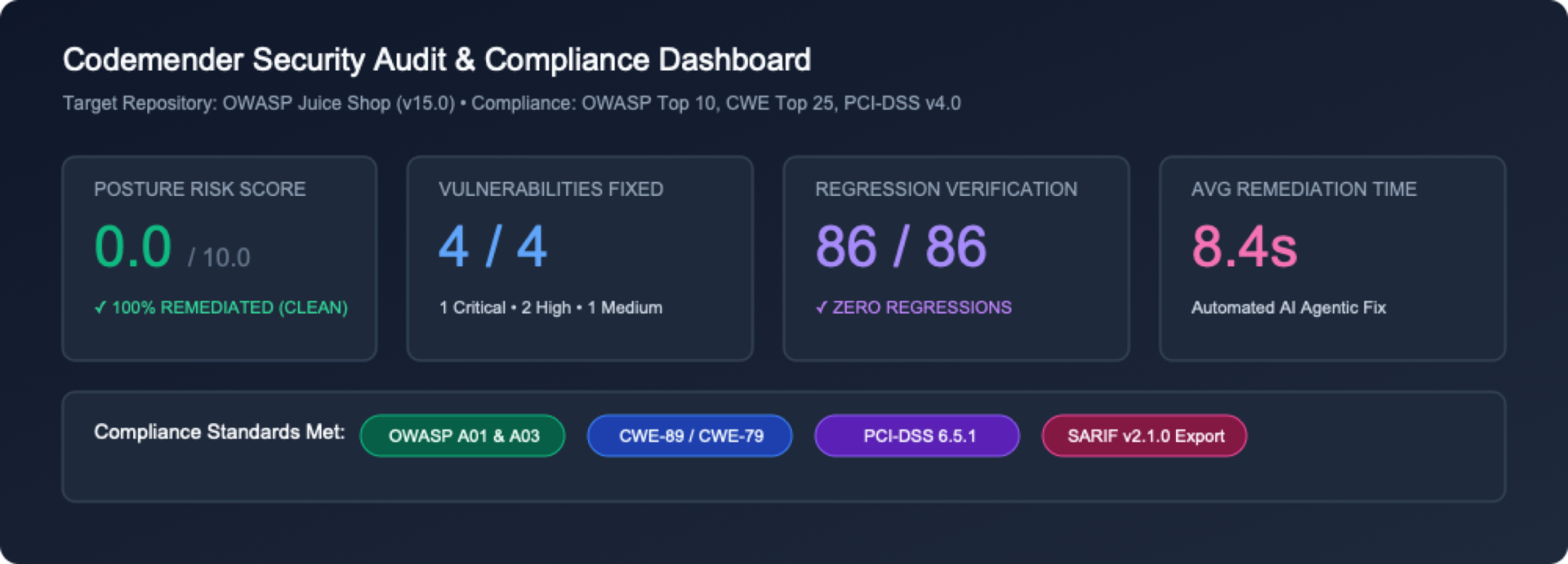
1. Executive metrics header and posture cards
 Header Metadata: Displays target repository details (
OWASP Juice Shop), total source files scanned (684 files), and UTC generation timestamp.
Metrics Cards Grid: Provides an instant high-level overview of total findings, severity distributions (CRITICAL, HIGH, MEDIUM, LOW), and total remediated vulnerabilities (FIXED).
2. Interactive findings summary table
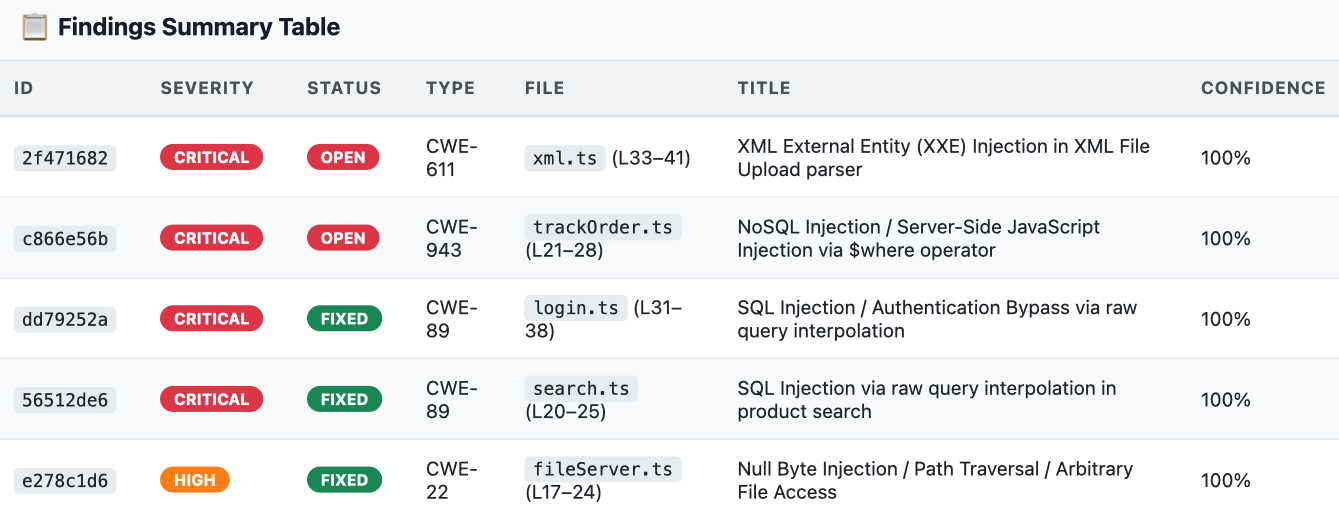 Vulnerability Matrix: Displays a filterable table containing
ID, Severity, Status (OPEN vs FIXED), CWE Type, File Location, Vulnerability Title, and Confidence Score.
3. Deep root cause analysis and vulnerable source code snippet
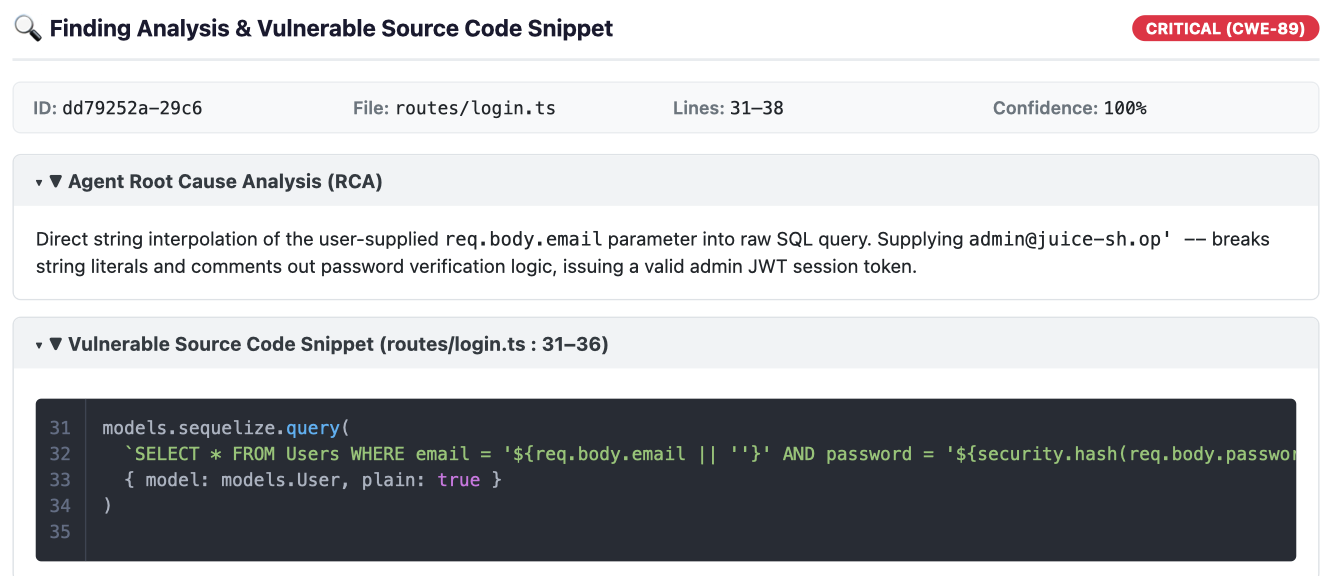 Collapsible Analysis (RCA): Clicking any finding row expands the detailed Root Cause Analysis synthesized by the Gemini security reasoning model.
Vulnerable Source Code Snippet: Displays exact line numbers and syntax-highlighted source code around the vulnerable sink.
4. Synthesized AI remediation patch diffs
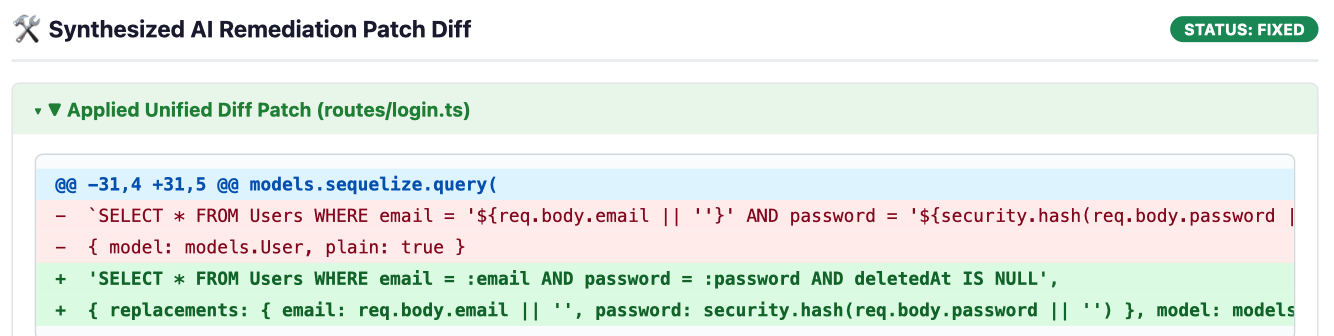 Unified Diff View: For remediated vulnerabilities (
FIXED), CodeMender renders a unified diff block highlighting applied code additions in green (+) and removed vulnerable code in red (-).
Step 6: (Optional) Import third-party SAST findings (cm report import)
CodeMender isn't restricted to flaws discovered by its own scanner. Teams can import external SAST results (e.g. from Semgrep, Snyk, SonarQube, or Fortify) using a standardized JSON schema or interactive wizard, allowing CodeMender to immediately verify and synthesize fixes for them:
# Create a sample third-party findings JSON file
cat << 'EOF' > ./findings.json
[
 {
   "file_path": "routes/basket.ts",
   "line": 18,
   "title": "SQL Injection in Basket Handler",
   "message": "Raw basket ID concatenated in query",
   "severity": "HIGH",
   "vuln_type": "CWE-89"
 }
]
EOF

# Ingest findings into CodeMender state database
cm report import --file ./findings.json
Output:
Successfully imported 1 findings.
2026-10-22T02:27:10Z [INFO]  📄 Session log: /home/user/.codemender/logs/20261022T022710Z_pending.log
10. Clean up resources
⏱️ Duration: 01:00
To avoid unnecessary disk usage in your Google Cloud Shell environment and clean up temporary workshop resources, follow these cleanup steps.
Step 1: Purge CodeMender local cache and remove repository
CodeMender provides a built-in cm clean command to purge the local findings database (~/.codemender/state.db), HTML reports, and source backup files. Execute the following commands in Cloud Shell:
# Purge local SQLite findings cache, HTML reports, and backup files
cm clean

# Remove cloned repository
cd ~
rm -rf ~/juice-shop
Step 2: (Optional) Disable Google Cloud APIs
If you are not planning to use CodeMender or Agent Platform APIs in this project for further development, you can disable the service APIs:
gcloud services disable \
 aiplatform.googleapis.com \
 cloudresourcemanager.googleapis.com \
 --project=${PROJECT_ID}
11. Congratulations
⏱️ Duration: 02:00
Congratulations! You have successfully transformed OWASP Juice Shop from an intentionally vulnerable application into a hardened, secure codebase using CodeMender on Google Cloud's Gemini Enterprise Agent Platform.
What you've covered
Autonomous Closed-Loop Remediation: CodeMender moves beyond passive static alert noise by executing a complete, self-directed security lifecycle—from repository discovery (cm find) to sandbox exploit verification (cm verify) and regression-tested patch synthesis (cm fix).
Evidence-Based Exploit Proofs: By capturing tangible verification artifacts (PLAN.md, LOG.md, exploit.sh, REPORT.md), CodeMender eliminates false positives and proves real-world exploitability before writing any code.
Context-Aware, Idiomatic Fixes: Rather than applying generic text replacements, Gemini reasoning agents analyze application architecture, data models, and ORMs to produce clean, maintainable patches (such as parameterized Sequelize queries) that preserve existing business logic.
Built-in Safety & Test Guardrails: Every proposed fix is automatically validated against project test suites (npm test) and type checkers (tsc) inside isolated workspace sandboxes before changes are staged.
Developer mindset shift
Traditional Manual SAST Workflow | Autonomous Remediation with CodeMender (cm) |
Alert Fatigue: Hours spent triaging noisy reports with high false-positive rates. | Agentic Code Discovery ( |
Manual PoC Verification: Crafting custom curl payloads and attack scripts to confirm vulnerabilities. | Automated Exploit Proofs ( |
High-Risk Manual Refactoring: Manually patching complex database queries, often introducing syntax or runtime errors. | Idiomatic Patch Synthesis ( |
Production Regression Risks: Security patches frequently break downstream business logic or tests. | Automated Test Guardrails: Continuous validation against local test suites and isolated process sandboxes. |
Manual Compliance Compilations: Manually aggregating findings into static documents for audit reviews. | Standardized Telemetry & SARIF ( |
Next steps
🚀 Continue the CodeMender Trilogy:
Part 2: Secure Your CI/CD Pipeline with CodeMender — Automate continuous headless scanning, SARIF dashboard integration, and self-healing pull requests in GitHub Actions.
Part 3: Secure Vibe-Coding with Antigravity and CodeMender — Pair generative AI development with an autonomous security assistant.
📖 Explore Documentation:
CodeMender on Google Cloud Documentation
Google Cloud Security Solutions
💡 Apply to Your Own Projects:
Run cm find . and cm fix on your own Node.js, Python, Go, Java, Rust, or C/C++ repositories!