

1. מבוא
Gemini CLI Security Extension הוא תוסף קוד פתוח ל-Gemini CLI שנוצר על ידי Google. התוסף מנתח קוד כדי לזהות סיכוני אבטחה ונקודות חולשה. אתם יכולים להשתמש בתוסף האבטחה עם Gemini CLI כדי לזהות בעיות אבטחה באופן מקומי, בדיוק כמו שאתם עושים עם כל תוסף ל-Gemini CLI. אפשר גם להפעיל אותו כדי לבדוק בקשות משיכה ב-GitHub. ב-Codelab הזה נסביר איך להשתמש בתוסף האבטחה במאגר GitHub.
מה תעשו
- הגדרת אימות מאובטח מ-GitHub ל-Google Cloud
- יצירת תהליך עבודה של GitHub Actions שקורא לתוסף האבטחה של Gemini CLI
- הרצת בדיקת אבטחה בבקשת משיכה חדשה או קיימת באמצעות GitHub Actions
מה תלמדו
- איך משתמשים באיחוד שירותי אימות הזהות של עומסי עבודה כדי לבצע אימות מאובטח מ-GitHub Actions ל-Google Cloud
- היתרונות של שימוש במאגר זהויות של עומסי עבודה ובספק מאגרי זהויות של עומסי עבודה לצורך אימות, לעומת שימוש במפתח Gemini API
- איך מריצים בדיקת אבטחה באמצעות בקשות משיכה
- איך מפרשים את בדיקות האבטחה שמוחזרות על ידי תוסף האבטחה
מה תצטרכו
- דפדפן אינטרנט
- חשבון ומאגר ב-GitHub
- פרויקט ב-Google Cloud
ה-Codelab הזה מיועד למפתחים שמכירים את תהליך העבודה של CI/CD ב-GitHub. לא נדרש ידע ב-Gemini CLI או בתוספים ל-Gemini CLI. אם אתם רוצים ללמוד איך תוספים עובדים, כדאי לעיין ב-codelab: Getting Started with Gemini CLI Extensions (תחילת העבודה עם תוספים ל-Gemini CLI).
ב-Codelab הזה תלמדו איך להגדיר את תוסף האבטחה של Gemini CLI במאגר GitHub. לא נציע קוד לפתיחת בקשת משיכה מול המאגר כדי להפעיל איתור של פרצת אבטחה.
2. לפני שמתחילים
יצירה או בחירה של פרויקט
- במסוף Google Cloud, בדף לבחירת הפרויקט, בוחרים או יוצרים פרויקט בענן.
- הקפידו לוודא שהחיוב מופעל בפרויקט שלכם ב-Cloud. איך מאמתים את החיוב
- פותחים את Cloud Shell, סביבת שורת פקודה שפועלת ב-Google Cloud. לוחצים על Activate Cloud Shell בחלק העליון של מסוף Google Cloud.

- אחרי שמתחברים ל-Cloud Shell, בודקים שהאימות בוצע והפרויקט מוגדר למזהה הפרויקט באמצעות הפקודה הבאה:
gcloud auth list
- מריצים את הפקודה הבאה כדי לוודא שהפקודה
gcloudמוגדרת לשימוש בפרויקט שלכם.
gcloud config list project
- אם הפרויקט לא מוגדר, משתמשים בפקודה הבאה כדי להגדיר אותו:
gcloud config set project ${GOOGLE_CLOUD_PROJECT}
3. הגדרת אימות מ-GitHub ל-Google Cloud
איך זה עובד
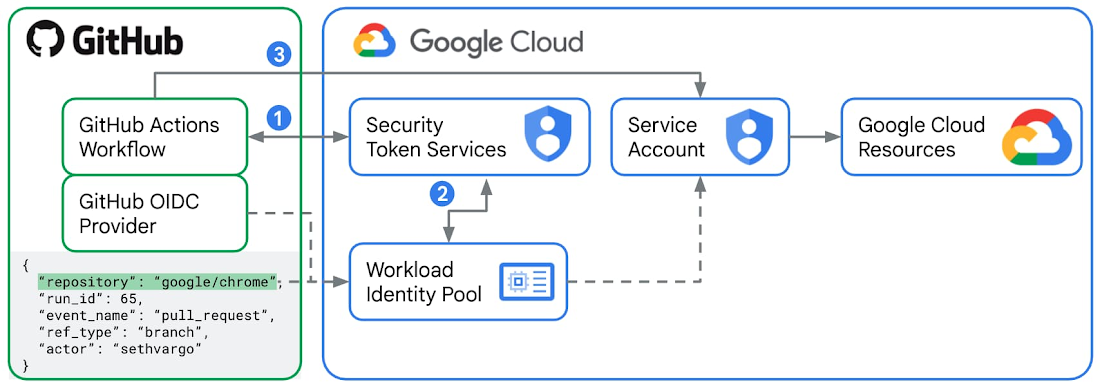
איחוד שירותי אימות הזהות של עומסי עבודה היא הדרך המומלצת לבצע אימות מ-GitHub Actions ל-Google Cloud.
- לכל הפעלה של משימה בתהליך עבודה של פעולות GitHub, GitHub כספק זהויות חיצוני מנפיק אסימון JWT (JSON Web Token) חתום. האסימון הזה מכיל 'הצהרות' כמו
repository,workflowו-job_workflow_ref, שמשמשות ככרטיס זהות דיגיטלי עבור הרץ הספציפי הזה. בשיעור ה-Lab הזה תיצרו תהליך עבודה של GitHub Actions עם משימה שמשתמשת בפעולהgoogle-github-actions/run-gemini-cli, שתבקש JWT מ-GitHub ותשלח את האסימון הזה אל Security Token Service (STS) ב-Google Cloud. - תגדירו מאגר זהויות של עומסי עבודה וספק ב-Google Cloud על ידי הגדרת כתובת ה-URL של מנפיק האסימונים לכתובת הרשמית של שירות האסימונים של GitHub
https://token.actions.githubusercontent.comוהגדרת 'מיפויי מאפיינים', שבדרך כלל כוללים את שמות המאגר והענף. שירות STS של Google Cloud מאמת את ה-JWT מול הכללים של מאגר הזהויות של עומסי עבודה. אם הכול תקין, כולל מיפוי המאפיינים, שירות ה-STS מחליף את אסימון GitHub באסימון גישה מאוחדת ל-Google Cloud לטווח קצר. - עכשיו הפעולה
google-github-actions/run-gemini-cliבתהליך העבודה של GitHub Actions יכולה להשתמש באסימון גישה מאוחד של Google Cloud קצר מועד כדי לבצע "התחזות" לחשבון שירות מקושר למאגר הזהויות של עומסי העבודה. לחשבון השירות המקושר צריכות להיות ההרשאות ותפקידי ה-IAM הנדרשים כדי לגשת למשאבים ולשירותים של Google Cloud.
היתרונות של שימוש באיחוד שירותי אימות הזהות של עומסי עבודה לעומת שימוש במפתח Gemini API
אפשר לאמת קריאות ל-Gemini CLI שמקורן ב-GitHub Actions באמצעות מפתח Gemini API. לשם כך צריך ליצור סוד חדש ב-GitHub Actions בשם GEMINI_API_KEY עם ערך המפתח המתאים. עם זאת, לא מומלץ לעשות זאת מסיבות האבטחה הבאות:
- למפתחות Gemini API יכולות להיות הרשאות רחבות מהקישורים המתאימים שלהם לתפקידי IAM. אם פרטי הכניסה נחשפים, הם מאפשרים גישה למגוון רחב של משאבים ושירותים של Google Cloud. איחוד שירותי אימות הזהות של עומסי עבודה משתמש בחשבונות שירות ובאסימוני גישה לטווח קצר, מה שמחזק משמעותית את תהליך האימות.
- גם מפתחות Gemini API קשה לנהל בקנה מידה נרחב. זיהוי תהליכי העבודה שמשתמשים במפתח חשוף לוקח זמן. גם סיבוב המפתחות באופן ידני לוקח זמן. מצד שני, אתם יכולים לחפש, לערוך ולמחוק בקלות מאגרי זהויות של עומסי עבודה וספקים שמשויכים למאגר שלכם במסוף Cloud.
- כשמשתמשים במפתחות Gemini API, צריך תמיד לוודא שלא חושפים אותם בטעות ביומני גישה או ביומני ניפוי באגים. עם איחוד שירותי אימות הזהות של עומסי עבודה, אתם לא מאחסנים סודות של תהליכי עבודה של GitHub Actions, אלא משתנים, שהם פחות רגישים.
הגדרת GitHub Actions ו-Google Cloud
- ב-Cloud Shell, מתחברים לחשבון GitHub.
gh auth login
- יוצרים קובץ חדש
setup_workload_identity.shומעתיקים אליו את הקוד שבהמשך.
set -e
# Colors for output
RED='\033[0;31m'
GREEN='\033[0;32m'
YELLOW='\033[1;33m'
BLUE='\033[0;34m'
NC='\033[0m' # No Color
# Helper functions
print_info() {
echo -e "${BLUE}ℹ️ $1${NC}"
}
print_success() {
echo -e "${GREEN}✅ $1${NC}"
}
print_warning() {
echo -e "${YELLOW}⚠️ $1${NC}"
}
print_error() {
echo -e "${RED}❌ $1${NC}"
}
print_header() {
echo -e "${BLUE}🚀 $1${NC}"
}
# Default values
GOOGLE_CLOUD_PROJECT=""
GOOGLE_CLOUD_LOCATION="global"
GITHUB_REPO=""
POOL_NAME=""
PROVIDER_NAME=""
# Show help
show_help() {
cat << EOF
Universal Direct Workload Identity Federation Setup for GitHub Actions
USAGE:
$0 --repo OWNER/REPO [OPTIONS]
REQUIRED:
-r, --repo OWNER/REPO GitHub repository (e.g., google/my-repo)
-p, --project GOOGLE_CLOUD_PROJECT Google Cloud project ID
OPTIONS:
--pool-name NAME Custom workload identity pool name (default: auto-generated)
--provider-name NAME Custom workload identity provider name (default: auto-generated)
-h, --help Show this help
EXAMPLES:
# Basic setup for a repository
$0 --repo google/my-repo --project my-gcp-project
# Custom pool name
$0 --repo google/my-repo --project my-gcp-project --pool-name my-pool
# Custom pool and provider names
$0 --repo google/my-repo --project my-gcp-project --pool-name my-pool --provider-name my-provider
ABOUT DIRECT WORKLOAD IDENTITY FEDERATION:
This script sets up Direct Workload Identity Federation (preferred method).
- No intermediate service accounts required
- Direct authentication from GitHub Actions to GCP resources
- Maximum token lifetime of 10 minutes
- You grant permissions directly to the Workload Identity Pool on GCP resources
EOF
}
# Parse command line arguments
while [[ $# -gt 0 ]]; do
case $1 in
-r|--repo)
GITHUB_REPO="$2"
shift 2
;;
-p|--project)
GOOGLE_CLOUD_PROJECT="$2"
shift 2
;;
--pool-name)
POOL_NAME="$2"
shift 2
;;
--provider-name)
PROVIDER_NAME="$2"
shift 2
;;
-l|--location)
GOOGLE_CLOUD_LOCATION="$2"
shift 2
;;
-h|--help)
show_help
exit 0
;;
*)
print_error "Unknown option: $1"
echo "Use --help for usage information."
exit 1
;;
esac
done
# Validate required arguments
if [[ -z "${GITHUB_REPO}" ]]; then
print_error "Repository is required. Use --repo OWNER/REPO"
echo ""
echo "💡 To find your repository name:"
echo " 1. Go to your GitHub repository"
echo " 2. The URL shows: https://github.com/OWNER/REPOSITORY"
echo " 3. Use: OWNER/REPOSITORY (e.g., google/golang)"
echo ""
echo "Use --help for usage information."
exit 1
fi
if [[ -z "${GOOGLE_CLOUD_PROJECT}" ]]; then
print_error "GCP project is required. Use --project GOOGLE_CLOUD_PROJECT"
echo ""
echo "💡 To find your project ID:"
echo " 1. Go to your Google Cloud console"
echo " 2. The URL displays: https://console.cloud.google.com/welcome?project=GOOGLE_CLOUD_PROJECT"
echo ""
echo "Use --help for usage information."
exit 1
fi
# Validate repository format
if [[ ! "${GITHUB_REPO}" =~ ^[a-zA-Z0-9._-]+/[a-zA-Z0-9._-]+$ ]]; then
print_error "Invalid repository format '${GITHUB_REPO}'"
echo "Expected format: owner/repo (e.g., google/my-repo)"
exit 1
fi
# Extract repository components
REPO_OWNER=$(echo "${GITHUB_REPO}" | cut -d'/' -f1)
# Generate unique names based on repository
REPO_HASH_INPUT=$(echo -n "${GITHUB_REPO}")
REPO_HASH_SHA=$(echo "${REPO_HASH_INPUT}" | shasum -a 256)
REPO_HASH=$(echo "${REPO_HASH_SHA}" | cut -c1-8)
# Use custom pool name if provided, otherwise generate one
if [[ -z "${POOL_NAME}" ]]; then
POOL_NAME="github-${REPO_HASH}"
fi
# Use custom provider name if provided, otherwise generate one
if [[ -z "${PROVIDER_NAME}" ]]; then
PROVIDER_NAME="gh-${REPO_HASH}"
fi
print_header "Starting Direct Workload Identity Federation setup"
echo "📦 Repository: ${GITHUB_REPO}"
echo "☁️ Project: ${GOOGLE_CLOUD_PROJECT}"
echo "🏊 Pool: ${POOL_NAME}"
echo "🆔 Provider: ${PROVIDER_NAME}"
echo ""
# Verify gcloud authentication
print_info "Verifying gcloud authentication..."
GCLOUD_AUTH_LIST_RAW=$(gcloud auth list --filter=status:ACTIVE --format="value(account)")
GCLOUD_AUTH_LIST=$(echo "${GCLOUD_AUTH_LIST_RAW}" | head -1)
if [[ -z "${GCLOUD_AUTH_LIST}" ]]; then
print_error "No active gcloud authentication found"
echo "Please run: gcloud auth login"
exit 1
fi
# Test project access
if ! gcloud projects describe "${GOOGLE_CLOUD_PROJECT}" > /dev/null 2>&1; then
print_error "Cannot access project '${GOOGLE_CLOUD_PROJECT}'"
echo "Please verify:"
echo " 1. Project ID is correct"
echo " 2. You have permissions on this project"
echo " 3. Project exists and is not deleted"
exit 1
fi
print_success "Authentication and project access verified"
# Step 1: Enable required APIs
print_header "Step 1: Enabling required Google Cloud APIs"
required_apis=(
"aiplatform.googleapis.com"
"cloudaicompanion.googleapis.com"
"cloudresourcemanager.googleapis.com"
"cloudtrace.googleapis.com"
"iam.googleapis.com"
"iamcredentials.googleapis.com"
"logging.googleapis.com"
"monitoring.googleapis.com"
"sts.googleapis.com"
)
gcloud services enable "${required_apis[@]}" --project="${GOOGLE_CLOUD_PROJECT}"
print_success "APIs enabled successfully."
# Step 2: Create Workload Identity Pool
print_header "Step 2: Creating Workload Identity Pool"
if ! gcloud iam workload-identity-pools describe "${POOL_NAME}" \
--project="${GOOGLE_CLOUD_PROJECT}" \
--location="${GOOGLE_CLOUD_LOCATION}" &> /dev/null; then
print_info "Creating Workload Identity Pool: ${POOL_NAME}"
gcloud iam workload-identity-pools create "${POOL_NAME}" \
--project="${GOOGLE_CLOUD_PROJECT}" \
--location="${GOOGLE_CLOUD_LOCATION}" \
--display-name="GitHub Actions Pool"
print_success "Workload Identity Pool created"
else
print_info "Workload Identity Pool '${POOL_NAME}' exists. Verifying state..."
# Fetch the current state of the existing pool.
POOL_STATE=$(gcloud iam workload-identity-pools describe "${POOL_NAME}" \
--project="${GOOGLE_CLOUD_PROJECT}" \
--location="${GOOGLE_CLOUD_LOCATION}" \
--format="value(state)")
if [[ "${POOL_STATE}" == "ACTIVE" ]]; then
# Pool exists and is in the correct state.
print_success "Workload Identity Pool already exists and is ACTIVE."
else
if [[ "${POOL_STATE}" == "DELETED" ]]; then
# Pool exists but is DELETED. Undelete the pool.
print_warning "Workload Identity Pool already exists but is in a DELETED state. Running 'undelete'."
gcloud iam workload-identity-pools undelete "${POOL_NAME}" \
--project="${GOOGLE_CLOUD_PROJECT}" \
--location="${GOOGLE_CLOUD_LOCATION}"
else
# Pool exists but is in an unexpected state.
print_error "Pool '${POOL_NAME}' is in an unexpected state: '${POOL_STATE}'. Expected states are: {'ACTIVE', 'DELETED'}. Exiting"
exit 1
fi
fi
fi
# Get the pool ID
WIF_POOL_ID=$(gcloud iam workload-identity-pools describe "${POOL_NAME}" \
--project="${GOOGLE_CLOUD_PROJECT}" \
--location="${GOOGLE_CLOUD_LOCATION}" \
--format="value(name)")
# Step 3: Create Workload Identity Provider
print_header "Step 3: Creating Workload Identity Provider"
ATTRIBUTE_CONDITION="assertion.repository_owner == '${REPO_OWNER}'"
if ! gcloud iam workload-identity-pools providers describe "${PROVIDER_NAME}" \
--project="${GOOGLE_CLOUD_PROJECT}" \
--location="${GOOGLE_CLOUD_LOCATION}" \
--workload-identity-pool="${POOL_NAME}" &> /dev/null; then
print_info "Creating Workload Identity Provider: ${PROVIDER_NAME}"
gcloud iam workload-identity-pools providers create-oidc "${PROVIDER_NAME}" \
--project="${GOOGLE_CLOUD_PROJECT}" \
--location="${GOOGLE_CLOUD_LOCATION}" \
--workload-identity-pool="${POOL_NAME}" \
--display-name="${PROVIDER_NAME}" \
--attribute-mapping="google.subject=assertion.sub,attribute.actor=assertion.actor,attribute.repository=assertion.repository,attribute.repository_owner=assertion.repository_owner" \
--attribute-condition="${ATTRIBUTE_CONDITION}" \
--issuer-uri="https://token.actions.githubusercontent.com"
print_success "Workload Identity Provider created"
else
print_info "Workload Identity Provider '${PROVIDER_NAME}' exists. Verifying state..."
# Fetch the current state of the existing provider.
PROVIDER_STATE=$(gcloud iam workload-identity-pools providers describe "${PROVIDER_NAME}" \
--project="${GOOGLE_CLOUD_PROJECT}" \
--location="${GOOGLE_CLOUD_LOCATION}" \
--workload-identity-pool="${POOL_NAME}" \
--format="value(state)")
if [[ "${PROVIDER_STATE}" == "ACTIVE" ]]; then
# Provider exists and is in the correct state.
print_success "Workload Identity Provider already exists and is ACTIVE."
else
if [[ "${PROVIDER_STATE}" == "DELETED" ]]; then
# Provider exists but is DELETED. Undelete the provider.
print_warning "Workload Identity Provider already exists but is in a DELETED state. Running 'undelete'."
gcloud iam workload-identity-pools providers undelete "${PROVIDER_NAME}" \
--project="${GOOGLE_CLOUD_PROJECT}" \
--location="${GOOGLE_CLOUD_LOCATION}" \
--workload-identity-pool="${POOL_NAME}"
else
# Provider exists but is in an unexpected state.
print_error "Provider '${PROVIDER_NAME}' is in an unexpected state: '${PROVIDER_STATE}'. Expected states are: {'ACTIVE', 'DELETED'}. Exiting"
exit 1
fi
fi
fi
# Step 4: Grant required permissions to the Workload Identity Pool
print_header "Step 4: Granting required permissions to Workload Identity Pool"
PRINCIPAL_SET="principalSet://iam.googleapis.com/${WIF_POOL_ID}/attribute.repository/${GITHUB_REPO}"
print_info "Skipped: Granting required permissions directly to the Workload Identity Pool..."
# Step 5: Create and Configure Service Account for Gemini CLI
print_header "Step 5: Create and Configure Service Account for Gemini CLI"
SERVICE_ACCOUNT_NAME="gemini-cli-${REPO_HASH}"
SERVICE_ACCOUNT_EMAIL="${SERVICE_ACCOUNT_NAME}@${GOOGLE_CLOUD_PROJECT}.iam.gserviceaccount.com"
# Create service account if it doesn't exist
if ! gcloud iam service-accounts describe "${SERVICE_ACCOUNT_EMAIL}" --project="${GOOGLE_CLOUD_PROJECT}" &> /dev/null; then
print_info "Creating Service Account: ${SERVICE_ACCOUNT_NAME}"
gcloud iam service-accounts create "${SERVICE_ACCOUNT_NAME}" \
--project="${GOOGLE_CLOUD_PROJECT}" \
--display-name="Gemini CLI Service Account"
print_success "Service Account created: ${SERVICE_ACCOUNT_EMAIL}"
else
print_success "Service Account already exists: ${SERVICE_ACCOUNT_EMAIL}"
fi
# Grant permissions to the service account on the project
print_info "Granting 'Cloud AI Companion User' role to Service Account..."
gcloud projects add-iam-policy-binding "${GOOGLE_CLOUD_PROJECT}" \
--role="roles/cloudaicompanion.user" \
--member="serviceAccount:${SERVICE_ACCOUNT_EMAIL}" \
--condition=None
# Allow the service account to generate an access tokens
print_info "Granting 'Service Account Token Creator' role to Service Account..."
gcloud projects add-iam-policy-binding "${GOOGLE_CLOUD_PROJECT}" \
--role="roles/iam.serviceAccountTokenCreator" \
--member="serviceAccount:${SERVICE_ACCOUNT_EMAIL}" \
--condition=None
# Grant logging permissions to the service account
print_info "Granting 'Logging Writer' role to Service Account..."
gcloud projects add-iam-policy-binding "${GOOGLE_CLOUD_PROJECT}" \
--role="roles/logging.logWriter" \
--member="serviceAccount:${SERVICE_ACCOUNT_EMAIL}" \
--condition=None
# Grant monitoring permissions to the service account
print_info "Granting 'Monitoring Editor' role to Service Account..."
gcloud projects add-iam-policy-binding "${GOOGLE_CLOUD_PROJECT}" \
--role="roles/monitoring.editor" \
--member="serviceAccount:${SERVICE_ACCOUNT_EMAIL}" \
--condition=None
# Grant tracing permissions to the service account
print_info "Granting 'Cloud Trace Agent' role to Service Account..."
gcloud projects add-iam-policy-binding "${GOOGLE_CLOUD_PROJECT}" \
--role="roles/cloudtrace.agent" \
--member="serviceAccount:${SERVICE_ACCOUNT_EMAIL}" \
--condition=None
# Grant Vertex AI permissions to the service account
print_info "Granting 'Vertex AI User' role to Service Account..."
gcloud projects add-iam-policy-binding "${GOOGLE_CLOUD_PROJECT}" \
--role="roles/aiplatform.user" \
--member="serviceAccount:${SERVICE_ACCOUNT_EMAIL}" \
--condition=None
# Allow the Workload Identity Pool to impersonate the Service Account
print_info "Allowing GitHub Actions from '${GITHUB_REPO}' to impersonate the Service Account..."
gcloud iam service-accounts add-iam-policy-binding "${SERVICE_ACCOUNT_EMAIL}" \
--project="${GOOGLE_CLOUD_PROJECT}" \
--role="roles/iam.workloadIdentityUser" \
--member="${PRINCIPAL_SET}"
print_success "GitHub Actions can now impersonate ${SERVICE_ACCOUNT_NAME}"
# Get the full provider name for output
WIF_PROVIDER_FULL=$(gcloud iam workload-identity-pools providers describe "${PROVIDER_NAME}" \
--project="${GOOGLE_CLOUD_PROJECT}" \
--location="${GOOGLE_CLOUD_LOCATION}" \
--workload-identity-pool="${POOL_NAME}" \
--format="value(name)")
# Step 6: Output configuration
print_header "🎉 Setup Complete!"
echo ""
print_success "Direct Workload Identity Federation has been configured for your repository!"
echo ""
print_header "Permissions Granted"
echo ""
print_success "The following permissions have been automatically granted to your repository:"
echo "• roles/logging.logWriter - Write logs to Cloud Logging"
echo "• roles/monitoring.editor - Create and update metrics in Cloud Monitoring"
echo "• roles/cloudtrace.agent - Send traces to Cloud Trace"
echo "• roles/aiplatform.user - Use Vertex AI for model inference"
echo ""
print_success "A Service Account (${SERVICE_ACCOUNT_EMAIL}) was created with the following roles:"
echo "• roles/cloudaicompanion.user - Use Code Assist for model inference"
echo "• roles/iam.serviceAccountTokenCreator"
echo ""
# Check for `gh` CLI and set variables automatically if available
if command -v gh &> /dev/null; then
print_info "The 'gh' CLI is installed. Setting variables automatically..."
gh variable set GCP_WIF_PROVIDER --body "${WIF_PROVIDER_FULL}" --repo "${GITHUB_REPO}"
gh variable set GOOGLE_CLOUD_PROJECT --body "${GOOGLE_CLOUD_PROJECT}" --repo "${GITHUB_REPO}"
gh variable set GOOGLE_CLOUD_LOCATION --body "${GOOGLE_CLOUD_LOCATION}" --repo "${GITHUB_REPO}"
gh variable set SERVICE_ACCOUNT_EMAIL --body "${SERVICE_ACCOUNT_EMAIL}" --repo "${GITHUB_REPO}"
gh variable set GOOGLE_GENAI_USE_VERTEXAI --body "true" --repo "${GITHUB_REPO}"
print_success "GitHub variables have been set automatically!"
else
print_warning "The 'gh' CLI was not found. Either install it and rerun this script OR set the below variables manually."
echo " For manual setup, go to https://github.com/${GITHUB_REPO}/settings/variables/actions and add the following repository variables:"
echo ""
echo "🔑 Variable Name: GCP_WIF_PROVIDER"
echo " Variable Value: ${WIF_PROVIDER_FULL}"
echo ""
echo "☁️ Variable Name: GOOGLE_CLOUD_PROJECT"
echo " Variable Value: ${GOOGLE_CLOUD_PROJECT}"
echo ""
echo "☁️ Variable Name: GOOGLE_CLOUD_LOCATION"
echo " Variable Value: ${GOOGLE_CLOUD_LOCATION}"
echo ""
echo "☁️ Variable Name: SERVICE_ACCOUNT_EMAIL"
echo " Variable Value: ${SERVICE_ACCOUNT_EMAIL}"
echo ""
fi
print_success "Setup completed successfully! 🚀"
- הופכים את הסקריפט לקובץ הפעלה.
chmod +x setup_workload_identity.sh
- מריצים את הסקריפט.
./setup_workload_identity.sh --repo {OWNER/REPO} --project {GOOGLE_CLOUD_PROJECT}
4. יצירת תהליך עבודה של GitHub Actions
- צפייה במאגר ב-GitHub שנמצא בבעלותכם.
git clone {YOUR_REPO}
cd {YOUR REPO}
- יוצרים תהליך עבודה של GitHub Actions שקורא לפקודה דרך שורת הפקודות
/security:analyze-github-prעל ידי העתקת סקריפט לדוגמה של תהליך עבודהymlממאגר/gemini-cli-extensions/security.
git checkout -b workflow
mkdir .github/ && cd .github/
mkdir workflows/ && cd workflows/
curl -L https://raw.githubusercontent.com/gemini-cli-extensions/security/refs/heads/main/.github/workflows/gemini-review.yml -o gemini-review.yml
- דוחפים את תהליך העבודה של GitHub Actions למקור המרוחק ב-GitHub.
git add .github/workflows/gemini-review.yml
git commit -m "add new gha workflow"
git push --set-upstream origin workflow
5. הפעלת תהליך עבודה של ניתוח אבטחה בבקשות חדשות ובקשות קיימות למשיכת שינויים
מתחילים בקשת מיזוג חדשה במאגר GitHub או מפרסמים תגובה חדשה "@gemini-cli /review" בתור בעלי המאגר או תורמים לו. הפעולה הזו תתחיל בדיקת אבטחה של בקשת משיכת השינויים. תוסף האבטחה של Gemini CLI מתהליך העבודה של GitHub Actions שהתחייבתם אליו במאגר שלכם יתייג כל ממצא אבטחה שהוא ימצא לפי קטגוריות חומרה מ'קריטית', 'גבוהה', 'בינונית' ועד 'נמוכה'.
דוגמה לבדיקת אבטחה בבקשת מיזוג חדשה ודוגמה לבדיקת אבטחה בבקשת מיזוג קיימת.
6. מידע נוסף
אנחנו ממליצים לכם לעיין ברשימה ההולכת וגדלה של פקודות מותאמות אישית שכוללות יכולות אבטחה חדשות בתוסף האבטחה של Gemini CLI, ולהתחיל להשתמש בו בתהליכי העבודה שלכם. לדוגמה:
-
/security:scan-depsמצליב בין התלויות של הפרויקט לבין OSV.dev.
בהערות לגבי הגרסה אפשר למצוא גם את התכונות החדשות ותיקוני הבאגים.
7. מזל טוב
הגדרתם בהצלחה את מאגר GitHub לשימוש בתוסף האבטחה של Gemini CLI כדי לנתח בקשות למשיכת קוד (PR) ולזהות סיכוני אבטחה ונקודות חולשה.