
1. Before you begin
Welcome to Part 3 of the DevSecOps with CodeMender Trilogy:
- Part 1: Secure Your Application with CodeMender (Developer Inner Loop auditing on OWASP Juice Shop).
- Part 2: Secure Your CI/CD Pipeline with CodeMender (Outer Loop pipeline automation with GitHub Actions, WIF, and SARIF).
- Part 3 (This Codelab): Secure Vibe-Coded Applications with CodeMender and Antigravity (AI-Native Security Loop for LLM-generated full-stack features).
The story
Your product manager wants a prototype of a Gemini-powered customer support assistant for OWASP Juice Shop, and wants it today. You describe the feature to Antigravity (
agy
), and a few minutes later it compiles. It looks done.
But AI coding assistants optimize for working code, not for secure code. They do what you ask, and they rarely add what you didn't ask for. So before you commit, you ask Antigravity to check your change with CodeMender. This codelab follows that story:
- You vibe-code the feature with Antigravity.
- CodeMender checks only what you changed, and blocks the commit on a SQL injection in the new route.
- You review the diff yourself and find what the scan didn't flag: without authentication on the new route, both endpoints—including paid Gemini calls—are open to anyone.
- CodeMender writes and validates the fix for the SQL injection. Antigravity adds the authentication.
- You commit, and a pre-commit hook keeps every future commit checked.
- You see what the CodeMender steps cost.
You never run security tools by hand. Antigravity uses the open-source codemender-security
plugin, which teaches it how to run CodeMender safely:
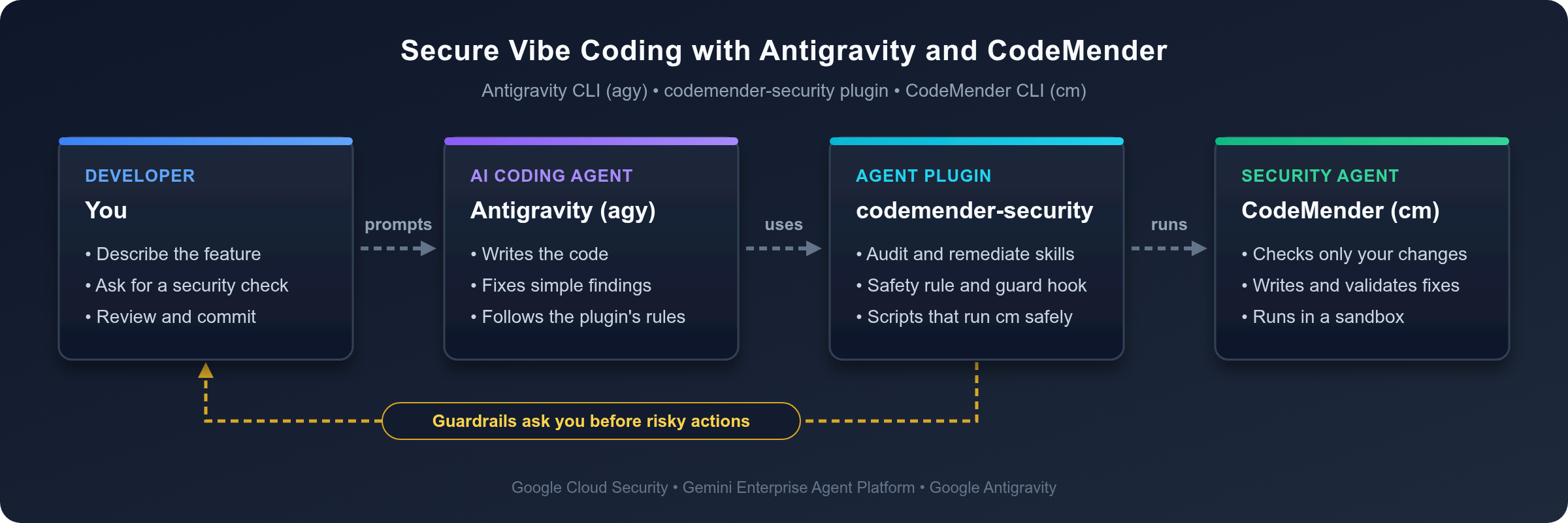
The plugin's guardrails also make Antigravity ask you before risky actions, such as installing software or changing how your commits work.
Prerequisites
- Basic familiarity with Node.js, Express, and TypeScript.
- Basic understanding of common web vulnerabilities, such as the OWASP Top 10.
- A Google Cloud project with billing enabled and access to CodeMender.
What you learn
- How to equip the Antigravity CLI (
agy) with thecodemender-securityplugin. - How to check only what you changed, including new files, before you commit.
- Why you still review the whole change after a scan: a scanner that uses AI can miss a finding.
- How to decide who fixes what: CodeMender for the findings that it reports, with fixes that it validates, and Antigravity for the changes that you specify.
- How a pre-commit hook keeps every future commit checked, without scanning the same change twice.
- How to read CodeMender's token usage and estimate its cost.
What you need
- A web browser, such as Google Chrome.
- Google Cloud Shell, which includes
gcloud,git, Node.js, and the Antigravity CLI (agy).
This codelab was tested with CodeMender CLI 0.22.0, version 1.8.0 of the codemender-security plugin, OWASP Juice Shop v20.3.0, and Node.js 22, 24, and 26. With other versions, your output can differ.
How to follow this codelab
- Prompts: Blocks after In Antigravity, enter are prompts. Type them at the Antigravity prompt.
- Commands: The other blocks that you type are shell commands. Run them in Cloud Shell: in your first tab until you launch Antigravity, and in a second tab after that.
- Output: Blocks after Output or The output looks similar to this show what to expect. In Antigravity, command output is collapsed by default (press
Ctrl+Oto expand a command), and Antigravity summarizes the result in its reply. Your finding IDs, timings, and token counts differ, and so can CodeMender's findings. - Steps that need a person: An agent can't sign in to Google Cloud in your browser, answer Antigravity's first-run prompts, or approve the plugin's requests to install the CodeMender CLI and the pre-commit hook. Do these yourself.
2. Set up Antigravity with the CodeMender plugin
In this step, you prepare Cloud Shell, install the plugin, get the Juice Shop code, and let Antigravity set up CodeMender.
Open Google Cloud Shell and configure credentials
Open your browser and go to Google Cloud Shell.
Confirm your active Google Cloud project:
export PROJECT_ID=$(gcloud config get-value project 2>/dev/null)
echo "Active Google Cloud Project: ${PROJECT_ID}"
If the project ID is empty, run gcloud config set project PROJECT_ID, replacing PROJECT_ID with your project ID, and then run the two commands again.
Enable the required Gemini Enterprise Agent Platform and Resource Manager APIs:
gcloud services enable \
  aiplatform.googleapis.com \
  cloudresourcemanager.googleapis.com \
  --project="${PROJECT_ID}"
Authenticate your environment with Google Cloud Application Default Credentials (ADC):
gcloud auth application-default login
Follow the on-screen browser link to grant consent and complete the authentication flow.
Install the CodeMender plugin into Antigravity
Install the codemender-security plugin with the Antigravity CLI:
agy plugin install https://github.com/edwardc-gcp/codemender-security.git
The output is similar to the following:
Cloning plugin from https://github.com/edwardc-gcp/codemender-security.git...
  [ok]    codemender-security
          ✔ skills      : 2 installed (codemender-audit, codemender-remediate)
          ✔ rules       : 1 installed (codemender-safety)
          ✔ hooks       : 1 installed (codemender-safety-guard)
          Installed to /home/<user>/.gemini/config/plugins/codemender-security
The plugin adds two skills that teach Antigravity how to audit and fix code with CodeMender, an always-on safety rule, and a hook that checks every shell command before Antigravity runs it. Check that the plugin is enabled:
agy plugin list
The output is similar to the following:
Installed plugins:
- codemender-security (enabled, 1.8.0)
    Source:     antigravity
    Components: 2 skills, 1 rule, 1 hook
Get the OWASP Juice Shop code
You use OWASP Juice Shop, the same Node.js and TypeScript application as in Part 1 and Part 2.
Clone the Juice Shop release that this codelab was tested with, and create a branch for your work:
cd ~
git clone --branch v20.3.0 --depth 1 https://github.com/juice-shop/juice-shop.git
cd juice-shop
git switch -c codelab
Juice Shop supports Node.js 22 through 26. Check your version:
node --version
In Cloud Shell, the output is similar to the following:
v26.13.0
If your version is lower than 22, install Node.js 22 and make it the default for new tabs:
nvm install 22
nvm alias default 22
Install the server dependencies and compile the server. The --ignore-scripts flag skips the Angular frontend build, which you don't need in this codelab:
npm install --ignore-scripts && npm run build:server
The output ends with lines similar to these. You can ignore the npm warn deprecated messages and the npm audit summary: they're about Juice Shop's dependencies, and this codelab focuses on the code that you add.
...
added 1333 packages, and audited 1334 packages in 1m
...
39 vulnerabilities (2 low, 13 moderate, 17 high, 7 critical)
...
npm notice run juice-shop@20.3.0 build:server
npm notice run tsc
Before CodeMender changes your code, the plugin commits your work as a checkpoint so that nothing gets lost, and you commit your feature at the end of this codelab. Both commits need a Git identity. Set one for this repository:
git config user.name "Codelab User"
git config user.email "codelab-user@example.com"
Launch Antigravity
The plugin's installer puts the CodeMender CLI (cm) in ~/.local/bin when that directory is on your PATH. Antigravity can sign in with the Application Default Credentials that you created with gcloud auth application-default login when AGY_ADC_AUTH is true (see Setting up Application Default Credentials (ADC)). Set both for this tab and in ~/.bashrc for new tabs and reconnects, and then launch Antigravity from the repository:
mkdir -p ~/.local/bin
export PATH="$HOME/.local/bin:$PATH"
grep -qxF 'export PATH="$HOME/.local/bin:$PATH"' ~/.bashrc || echo 'export PATH="$HOME/.local/bin:$PATH"' >> ~/.bashrc
export AGY_ADC_AUTH=true
grep -qxF 'export AGY_ADC_AUTH=true' ~/.bashrc || echo 'export AGY_ADC_AUTH=true' >> ~/.bashrc
agy
Antigravity signs in with your Application Default Credentials and uses Gemini in your Google Cloud project, so it doesn't ask you to sign in with your Google Account.
The first time that you launch agy, it shows a welcome screen similar to the following:
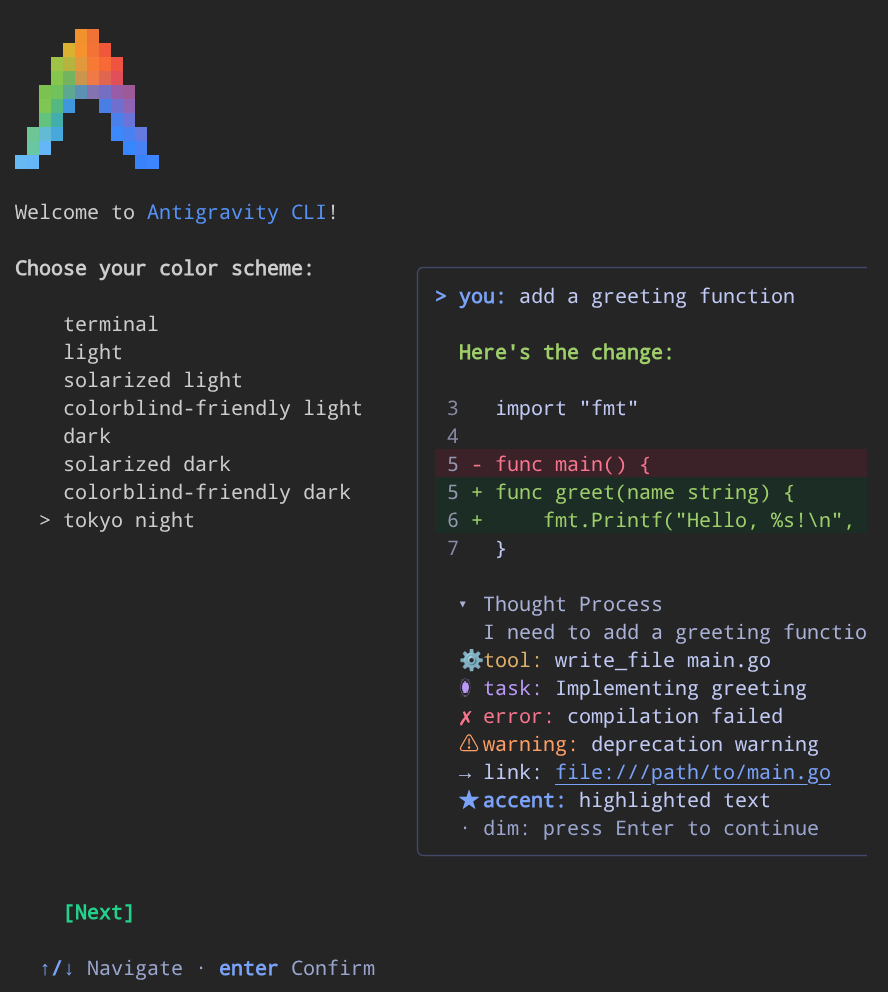
Complete the first-run prompts:
- Select your preferred color scheme with the Up and Down arrow keys, and then press Enter.
- Accept the terms of use when prompted.
- If prompted, confirm that you trust the current workspace directory,
~/juice-shop.
Enter the prompts in the rest of this codelab at the Antigravity prompt. Run shell commands in a second Cloud Shell tab.
Check the environment
In Antigravity, enter:
Check that the CodeMender plugin and its environment are ready.
Antigravity runs the plugin's environment check. In a new Cloud Shell, the CodeMender CLI isn't installed yet, so the output is similar to the following:
========================================================================
 🛡️  CodeMender Security Plugin (v1.8.0) - Diagnostic Health Check
========================================================================

CodeMender CLI                 : ❌ Missing
CLI Version                    : N/A
Google Cloud Project           : <your-project-id>
Google Cloud ADC               : ✔ Valid (run this check again after installing cm)
Active Skills Count            : 2 skills loaded (codemender-audit, codemender-remediate)
Runtime Hook Guard             : ✔ Registered (PreToolUse)
Workspace Data Protection      : ⚠️ Not Configured (cm_exec.sh adds the entries on first use)
========================================================================
⚠️ Action required:
   - Install the CodeMender CLI (ask before running install_cm.sh).
Antigravity asks for your permission before it downloads anything: the plugin's guardrails don't let an agent install software without your consent. Approve the installation. Antigravity installs cm and runs the check again. The output is similar to the following:
========================================================================
 🛡️  CodeMender Security Plugin (v1.8.0) - Diagnostic Health Check
========================================================================

CodeMender CLI                 : ✔ Installed (/home/<user>/.local/bin/cm)
CLI Version                    : cm version 0.22.0 (Latest)
Google Cloud Project           : <your-project-id>
CodeMender Health              : ✔ Healthy (credentials, config, reachability, authorization)
Active Skills Count            : 2 skills loaded (codemender-audit, codemender-remediate)
Runtime Hook Guard             : ✔ Registered (PreToolUse)
Workspace Data Protection      : ⚠️ Not Configured (cm_exec.sh adds the entries on first use)
========================================================================
✔ Environment is 100% READY for autonomous CodeMender security tasks.
Set up CodeMender for Juice Shop
CodeMender validates the patches that it writes by running a build command. In Antigravity, enter:
Set up CodeMender for this project, with npm run build:server as the build command, and check that the build passes in CodeMender's sandbox.
Antigravity initializes CodeMender, sets the build command, and checks the configuration. Expand the command output with Ctrl+O to see details similar to this:
✅ Initialized CodeMender workspace at /home/<user>/juice-shop/.codemender
...
✅ /home/<user>/juice-shop/.codemender/config.yaml: no problems found (0 warning(s), 0 note(s)).
🔍 CodeMender Environment Verification
───────────────────────────────────────────────────────
  ✅ Workspace directory    /home/<user>/juice-shop/.codemender
  ✅ Config file            /home/<user>/juice-shop/.codemender/config.yaml
  ✅ Config parsing         Config loaded successfully
  ✅ Server                 https://aiplatform.googleapis.com
  ⚠️ Server connectivity    Skipped — not supported by this client transport
  ✅ Build command          cd "$(git rev-parse --show-toplevel)" && npm run build:server
  ✅ VCS type               git (reset: git checkout HEAD -- . && git clean -fd)
  ⚠️ State database         Not yet created. Will be created on first scan/fix.
───────────────────────────────────────────────────────
  Results: 6 passed, 2 warnings

  All critical checks passed. Resolve warnings for best experience.
The two warnings are expected: this client doesn't support the connectivity check, and CodeMender creates its state database on the first scan. Antigravity may set build.command directly to "npm run build:server" (since npm walks up to find package.json) or prefix it with cd "$(git rev-parse --show-toplevel)" && so commands that require the repository root run from the right directory. The plugin also adds .codemender/ to .git/info/exclude, so CodeMender's local files never end up in your commits.
Antigravity then runs your build command in CodeMender's sandbox, the same way that CodeMender validates its fixes, so you know before the first fix that the validation can work. This check doesn't use any Gemini tokens. The output looks similar to this:
[INFO] Running: npm run build:server

npm notice run juice-shop@20.3.0 build:server
npm notice run tsc

[INFO] Sandbox violations detected during command:
sandbox: denied read /home/<user>/juice-shop/.npmrc

[OK] Build succeeded.
In the sandbox, the build has no network access and can write only inside your repository. The sandbox also blocked Juice Shop's .npmrc file (npm settings files can hold registry tokens) and ftp/encrypt.pyc (a compiled Python file from one of Juice Shop's challenges). The build doesn't need those files, so it succeeds. If your build fails here, fix the cause before you ask CodeMender for a fix, for example by installing missing dependencies first: the build can't download anything in the sandbox.
3. Vibe-code the AI support assistant
Now build the feature the way many developers do today: describe it, and let the AI write it.
Describe the feature
In Antigravity, enter:
In this Juice Shop codebase, build a new Express router in 'routes/aiAssistant.ts' and mount it in 'server.ts' at '/api/assistant', right after the '/dataerasure' route:
1. Create a GET '/order-status' endpoint: Read 'orderId' from req.query. Use models.sequelize.query() to fetch the matching order from the 'Deliveries' table so customer service can check shipment progress.
2. Create a POST '/refund-triage' endpoint: Read 'customerComplaint' from req.body. Prepend the prompt 'Summarize this customer complaint in 1 sentence and decide whether to approve an immediate refund:' and send the prompt to Gemini via @google/genai to triage customer requests.
3. Keep the implementation concise and modular for our MVP, and change only these two files and package.json.
Antigravity creates routes/aiAssistant.ts, installs the @google/genai package, and mounts the router in server.ts.
Check that it compiles
In your second Cloud Shell tab, run:
cd ~/juice-shop
npm run build:server && echo "Compilation: OK"
Output:
npm notice run juice-shop@20.3.0 build:server
npm notice run tsc
Compilation: OK
The feature compiles, and it does what you asked. It looks done, but don't commit it yet.
Optional: Use the reference version
AI assistants don't generate the same code every time. If Antigravity wrote different code, for example code that already uses a parameterized query, CodeMender's findings in the next steps can differ from this codelab. To follow along more closely, replace your version with the reference version. In your second tab, run:
cd ~/juice-shop
git checkout -- server.ts
npm install @google/genai
cat > routes/aiAssistant.ts <<'EOF'
import express, { type NextFunction, type Request, type Response } from 'express'
import { GoogleGenAI } from '@google/genai'
import * as models from '../models/index'

const router = express.Router()
const ai = new GoogleGenAI({ apiKey: process.env.GEMINI_API_KEY })

// GET /api/assistant/order-status?orderId=<id>: lets customer service check shipment progress
router.get('/order-status', async (req: Request, res: Response, next: NextFunction) => {
  try {
    const orderId = req.query.orderId
    const [orders] = await models.sequelize.query(`SELECT * FROM Deliveries WHERE id = '${orderId}'`)
    res.status(200).json({ status: 'success', data: orders })
  } catch (error) {
    next(error)
  }
})

// POST /api/assistant/refund-triage: triages customer requests with Gemini
router.post('/refund-triage', async (req: Request, res: Response, next: NextFunction) => {
  try {
    const customerComplaint = req.body?.customerComplaint
    const prompt = `Summarize this customer complaint in 1 sentence and decide whether to approve an immediate refund: ${customerComplaint}`
    const response = await ai.models.generateContent({
      model: 'gemini-2.5-flash',
      contents: prompt
    })
    res.status(200).json({ status: 'success', result: response.text })
  } catch (error) {
    next(error)
  }
})

export default router
EOF
sed -i "s#^import dataErasure from './routes/dataErasure'#&\nimport aiAssistant from './routes/aiAssistant'#" server.ts
sed -i "s#^  app.use('/dataerasure', dataErasure)#&\n\n  /* Route for the AI support assistant */\n  app.use('/api/assistant', aiAssistant)#" server.ts
npm run build:server && echo "Compilation: OK"
Check that the reference version is in place:
git status --short
grep -n "app.use('/api/assistant'" server.ts
Output:
 M package.json
 M server.ts
?? routes/aiAssistant.ts
688:  app.use('/api/assistant', aiAssistant)
If git status lists other files that Antigravity created, delete them.
4. Ask CodeMender before you commit
Before you commit AI-generated code, check it. In Antigravity, enter:
Is this safe to commit? Check my changes with CodeMender.
Antigravity runs a diff scan (cm_diff_scan.sh): CodeMender checks only what you changed, not the whole repository. The scan takes a few minutes, and Antigravity summarizes the result in its reply (press Ctrl+O on the scan command to view the full per-file job log):
No, these changes are not safe to commit.
The CodeMender diff scan identified 1 blocking HIGH-severity vulnerability introduced by the new changes, causing the pre-commit CI gate to fail (--fail-on=CRITICAL,HIGH).

 Severity │ Finding ID │ File & Line                │ Type                                │ CWE
──────────┼────────────┼────────────────────────────┼─────────────────────────────────────┼────────
 HIGH     │ 989cc3da   │ routes/aiAssistant.ts:9    │ SQL Injection in Order Status Query │ CWE-89
Here's what happened:
- Under the hood (visible if you press
Ctrl+Oto expand thecm_diff_scan.shstep), CodeMender checked your three changed files—including the untrackedroutes/aiAssistant.ts, which the plugin adds to the scan automatically—plus three 1-hop neighbor files affected by your change (app.ts,lib/utils.ts, andfrontend/src/app/Services/local-backup.service.ts). - Juice Shop is intentionally full of vulnerabilities, but CodeMender ignored pre-existing issues and reported only the
HIGH-severity SQL injection introduced by your change. - The
CI Gate Failure(--fail-on=CRITICAL,HIGH) means "don't commit yet". It's a scan result, not a crash, and any expected sandbox read blocks logged during the run (such as Juice Shop's.npmrcandftp/encrypt.pycfiles) don't affect the result.
The plugin runs CodeMender non-interactively (with -y, plus --bypass-warning when it fixes code), so CodeMender itself doesn't ask for confirmation. Antigravity and the plugin's guardrails for risky actions ask you instead.
5. Understand what the AI got wrong
Ask Antigravity what it got wrong. In Antigravity, enter:
Explain the findings and show me the vulnerable code.
SQL injection in the new file (CWE-89)
The /order-status endpoint puts the orderId query parameter straight into a SQL statement:
router.get('/order-status', async (req: Request, res: Response, next: NextFunction) => {
  try {
    const orderId = req.query.orderId
    const [orders] = await models.sequelize.query(`SELECT * FROM Deliveries WHERE id = '${orderId}'`)
    res.status(200).json({ status: 'success', data: orders })
  } catch (error) {
    next(error)
  }
})
Antigravity's breakdown traces the taint flow:
- Source (
req.query.orderId): untrusted user input from the query string. - Propagation (template literal): interpolated directly into
`... '${orderId}'`without escaping, type validation, or parameterization. - Sink (
models.sequelize.query(...)): passes the raw SQL string straight to SQLite.
The report also shows two attack vectors: anyone can send GET /api/assistant/order-status?orderId=1' OR '1'='1 to return all delivery records, or use UNION SELECT to read other tables, such as the user credentials in Users.
What the scan didn't flag: no authentication on the new route
CodeMender caught the SQL injection in routes/aiAssistant.ts, and Antigravity's exploit explanation even notes that an unauthenticated attacker can call the endpoint—yet the scan didn't flag server.ts. Check the rest of your change yourself. In your second tab, run:
cd ~/juice-shop
git diff server.ts
Output:
diff --git a/server.ts b/server.ts
index a8b429c..91d428e 100644
--- a/server.ts
+++ b/server.ts
@@ -78,6 +78,7 @@ import * as recycles from './routes/recycles'
 import * as twoFactorAuth from './routes/2fa'
 import { applyCoupon } from './routes/coupon'
 import dataErasure from './routes/dataErasure'
+import aiAssistant from './routes/aiAssistant'
 import { dataExport } from './routes/dataExport'
 import { chat } from './routes/chat'
 import { retrieveBasket } from './routes/basket'
@@ -683,6 +684,9 @@ function configureApp (app: ReturnType<typeof express>, seq: typeof sequelize) {
   /* Route for dataerasure page */
   app.use('/dataerasure', dataErasure)

+  /* Route for the AI support assistant */
+  app.use('/api/assistant', aiAssistant)
+
   /* Route for redirects */
   app.get('/redirect', performRedirect())
server.ts mounts /api/assistant publicly, without authentication or role checks such as security.isAuthorized(), unlike protected endpoints such as /rest/basket or /b2b/v2. That exposes both endpoints: an unauthenticated caller can exploit /order-status, and anyone can make your company pay for Gemini calls by sending requests to /refund-triage.
Even in runs where CodeMender does report server.ts as the unauthenticated path to the SQL injection, its report doesn't mention /refund-triage. Always read the diff of your whole change; a scan result isn't proof that your code is safe.
6. Fix each issue with the right tool
The two problems need different kinds of fixes:
- SQL injection: CodeMender reported it, so let CodeMender fix it. CodeMender writes a patch and validates it with your build command, and then the plugin checks the fix for new vulnerabilities.
- Missing authentication: The fix follows a pattern that
server.tsalready uses for other endpoints:security.isAuthorized(). You know exactly what the change should be, so tell Antigravity, and it makes the change in seconds. The fix protects both endpoints, including/refund-triage, which CodeMender's report doesn't mention.
Ask for both fixes
In Antigravity, enter:
Have CodeMender fix the SQL injection in routes/aiAssistant.ts, by its finding ID, and validate the fix. Fix the missing authentication yourself: add security.isAuthorized() to the /api/assistant route, like other endpoints in server.ts. Then stage all the changes, including the new file, and check the staged changes with CodeMender.
Antigravity runs CodeMender's remediation loop, edits server.ts, stages all three files, re-scans the staged diff, and prints a summary of all four actions (press Ctrl+O on any command to inspect the detailed logs).
CodeMender fixes the SQL injection. Antigravity runs the plugin's remediation loop for that one finding, which takes 10 to 15 minutes. Expanding the remediation output looks similar to this:
📌 Checkpointed uncommitted work as b70ebe3 so cm fix can see it and its workspace reset cannot delete it.
🧱 Checking build.command in CodeMender's sandbox before the first fix (cm build, no model tokens)...
✅ build.command passes in the sandbox, so cm fix can validate its patches.
🛠️  Remediating finding: 989cc3da-d9f2-5803-9d23-1c6a41bba185
...
📡 Waiting for fix agent (https://aiplatform.googleapis.com)...
...
✨ Patch generated successfully!

diff --git a/routes/aiAssistant.ts b/routes/aiAssistant.ts
index 1a6d972..cf6aa51 100644
--- a/routes/aiAssistant.ts
+++ b/routes/aiAssistant.ts
@@ -9,7 +9,9 @@ const ai = new GoogleGenAI({ apiKey: process.env.GEMINI_API_KEY })
 router.get('/order-status', async (req: Request, res: Response, next: NextFunction) => {
   try {
     const orderId = req.query.orderId
-    const [orders] = await models.sequelize.query(`SELECT * FROM Deliveries WHERE id = '${orderId}'`)
+    const [orders] = await models.sequelize.query('SELECT * FROM Deliveries WHERE id = :orderId', {
+      replacements: { orderId: orderId ?? null }
+    })
     res.status(200).json({ status: 'success', data: orders })
   } catch (error) {
     next(error)

────────────────────────────────────────────────────────────

[INFO] Running build and test validation: npm run build:server

npm notice run juice-shop@20.3.0 build:server
npm notice run tsc

[INFO] Sandbox violations detected during command:
sandbox: denied read /home/<user>/juice-shop/.npmrc

[OK] Build and test validation succeeded.
...
🧪 Running outer-shell build hard gate: npm run build:server
...
✅ Committed verified fix for 989cc3da-d9f2-5803-9d23-1c6a41bba185
🔍 Scanning the fix commit for regressions...
...
✅ No blocking findings in the last-commit scope (--fail-on=CRITICAL,HIGH). Report: /home/<user>/juice-shop/.codemender/remediate-last-commit.json
📋 Remediation summary: 1 fixed (989cc3da-d9f2-5803-9d23-1c6a41bba185), 0 not fixed.
🔄 Restored your uncommitted changes (now including any applied security fixes) on top of f189f52. Previously staged changes are now unstaged.
Here's how the plugin kept your work safe while CodeMender fixed it:
- It committed your uncommitted work as a checkpoint, so CodeMender works on exactly your code and its fix becomes a separate commit that the plugin can check. With CodeMender 0.17.0 or later, the plugin also tells
cm fixnot to reset your workspace (--no-reset). - It checked the build in CodeMender's sandbox again, without using tokens, so that it doesn't start a fix that CodeMender can't validate.
- CodeMender wrote a small patch that passes
orderIdto Sequelize as a bound:orderIdreplacement parameter, instead of putting it into the SQL string. - CodeMender validated the patch by running your build command in its sandbox, with the same result as your build check during setup. The plugin then ran the build again outside the sandbox before it committed the fix.
- The plugin checked the fix commit for new vulnerabilities, and found none.
- When it finished, the plugin restored your changes as uncommitted work, now including the fix.
Antigravity adds the authentication. It adds security.isAuthorized() to the line that mounts the router in server.ts. You review the exact change in the next step.
Antigravity checks everything again. It stages all the changes and runs another diff scan, which takes a few minutes:
════════════════════════════════════════════════════════════
🔍 Impact-Aware PR Delta Scan (--diff=STAGED)
════════════════════════════════════════════════════════════
   Modified files in PR: 3
     • package.json
     • routes/aiAssistant.ts
     • server.ts
   Modified symbols: configureApp
   1-Hop Impacted Neighbors: 3 file(s)
     • app.ts (Tier 1: same package import of 'server')
     • lib/utils.ts (Tier 2: sibling module import of 'package')
     • frontend/src/app/Services/local-backup.service.ts (Tier 4: imports modified module 'server')
   Running 6 diff audit jobs with 4 concurrent workers...

[1/6] ✅ app.ts [1-hop neighbor] (28s) | 27.9k tok - 0 vulnerabilities
...
[2/6] ✅ package.json [changed] (44s) | 80.5k tok - 0 vulnerabilities
[3/6] ✅ frontend/src/app/Services/local-backup.service.ts [1-hop neighbor] (17.4s) | 16.3k tok - 0 vulnerabilities
...
[4/6] ✅ lib/utils.ts [1-hop neighbor] (56.6s) | 163.8k tok - 0 vulnerabilities
...
[5/6] ✅ server.ts [changed] (3m4.7s) | 488.0k tok - 0 vulnerabilities
...
[6/6] ✅ routes/aiAssistant.ts [changed] (3m12.6s) | 236.8k tok - 0 vulnerabilities
────────────────────────────────────────────────────────────
📊 PR Delta Scan Complete: 6 jobs (6 succeeded, 0 failed) in 3m14s
...
   Total tokens consumed: 1.0M (in: 982.7k | out: 1.9k | thought: 28.7k | tool: 0)
💾 Report saved to /home/<user>/juice-shop/.codemender/last-diff-scan.json

✅ CI Gate Passed: 0 blocking vulnerabilities detected in PR diff.
No findings reported for this change.
✅ No blocking findings in the staged scope (--fail-on=CRITICAL,HIGH). Report: /home/<user>/juice-shop/.codemender/last-diff-scan.json
Both findings are gone: the SQL injection is fixed, and the check of everything that you're about to commit, including the new authentication, reports no findings.
Review the change
Nothing blocks the commit anymore, but you're still the one who commits it. In your second tab, run the server unit tests:
cd ~/juice-shop
npm run test:server
The end of the output looks similar to this:
ℹ tests 419
ℹ suites 133
ℹ pass 417
ℹ fail 0
ℹ cancelled 0
ℹ skipped 2
ℹ todo 0
ℹ duration_ms 8166.978622
Then review how the feature is mounted now:
git diff --staged server.ts
Output:
diff --git a/server.ts b/server.ts
index a8b429c..cb4cbf7 100644
--- a/server.ts
+++ b/server.ts
@@ -78,6 +78,7 @@ import * as recycles from './routes/recycles'
 import * as twoFactorAuth from './routes/2fa'
 import { applyCoupon } from './routes/coupon'
 import dataErasure from './routes/dataErasure'
+import aiAssistant from './routes/aiAssistant'
 import { dataExport } from './routes/dataExport'
 import { chat } from './routes/chat'
 import { retrieveBasket } from './routes/basket'
@@ -683,6 +684,9 @@ function configureApp (app: ReturnType<typeof express>, seq: typeof sequelize) {
   /* Route for dataerasure page */
   app.use('/dataerasure', dataErasure)

+  /* Route for the AI support assistant */
+  app.use('/api/assistant', security.isAuthorized(), aiAssistant)
+
   /* Route for redirects */
   app.get('/redirect', performRedirect())
7. Commit with a safety net
Nothing blocks your change anymore. Commit it, and make sure that every future commit gets checked too. In Antigravity, enter:
Install the CodeMender pre-commit hook, then commit the staged changes. They already passed a staged scan, so the hook can reuse that result.
A hook changes how every future commit in the repository works, so the plugin's guardrails make Antigravity ask for your permission first. The request explains why:
Installing the CodeMender git hook changes every future commit (or push) in this repository: each one with source changes runs a diff scan that takes minutes and uses tokens. Explicit user permission is required.
Approve it. Antigravity installs the hook and commits your change. The output looks similar to this:
✅ Copied the hook runner to /home/<user>/juice-shop/.git/codemender/ (run install again after updating the plugin).
✅ Installed the CodeMender pre-commit hook: /home/<user>/juice-shop/.git/hooks/pre-commit
   Each commit with source changes now runs a diff scan (often several minutes, and it uses tokens).
   Run cm_diff_scan.sh --scope staged before committing, and the hook reuses that result.
   Skip once with: git commit --no-verify (or CM_SKIP_HOOK=1).
✅ CodeMender: these staged changes already passed a diff scan, so they weren't scanned again.
[codelab a6da289] feat: add AI assistant endpoint with authorized access and secure query
 3 files changed, 45 insertions(+)
 create mode 100644 routes/aiAssistant.ts
The commit took less than a second. The hook saw that these exact staged changes had already passed a diff scan, so it didn't scan them again. From now on, every commit with source changes in this repository gets checked first, and a commit with blocking findings stays blocked until you fix them.
8. See what security cost you
In Antigravity, enter:
How much did CodeMender cost me? Show the token usage.
Antigravity runs cm stats (24 requests across 171 polls in 23m 46s). The breakdown looks similar to this:
 Command        │ Requests │ Input Tokens │ Cached Tokens │ Output Tokens │ Thought Tokens │ Total Tokens │ Cache Hit % │ Duration
────────────────┼──────────┼──────────────┼───────────────┼───────────────┼────────────────┼──────────────┼─────────────┼──────────
 cm find --diff │       23 │    2,529,320 │     1,813,096 │         6,606 │         88,338 │    2,624,264 │       71.7% │   16m 13s
 cm fix         │        1 │      640,418 │       493,851 │         1,571 │          6,944 │      648,933 │       77.1% │   07m 33s
 Total          │       24 │    3,169,738 │     2,306,947 │         8,177 │         95,282 │    3,273,197 │       72.8% │   23m 46s
To turn tokens into dollars, use the Gemini pricing for the model that CodeMender used, which your first scan names: Gemini 3.8 Flash (Standard, global). Cached input costs a tenth of the regular input price, and thinking tokens are billed as output:
Price per 1M tokens | Input | Cached input | Output (including thinking) |
Through December 31, 2026 | US$0.75 | US$0.075 | US$3.75 |
From January 1, 2027 | US$1.50 | US$0.15 | US$7.50 |
For the run above, that works out to:
Command | Uncached input | Cached input | Output and thinking | Through Dec 31, 2026 | From Jan 1, 2027 |
| 716,224 | 1,813,096 | 94,944 | US$1.03 | US$2.06 |
| 146,567 | 493,851 | 8,515 | US$0.18 | US$0.36 |
Total | 862,791 | 2,306,947 | 103,459 | US$1.21 | US$2.42 |
These numbers cover only CodeMender. Antigravity's own Gemini requests also run in your Google Cloud project, and cm stats doesn't count them.
What this tells you:
- Checking every change is cheap: the three diff scans (your first check, the loop's check of its fix commit, and the staged re-check) cost about US$1.03 together.
- Token counts aren't costs:
cm fixused nearly 649k tokens, and 77% of its input tokens were cached, so the validated fix cost about US$0.18. - The safety net costs nothing when it can reuse a scan: the hook reused the last scan, so the commit was free.
9. Clean up
Remove the pre-commit hook
In Antigravity, enter:
Uninstall the CodeMender pre-commit hook.
Output:
✅ Removed .git/hooks/pre-commit
✅ Removed the hook runner from .git/codemender/
Exit the Antigravity session
Exit Antigravity by entering /exit (or pressing Ctrl+D Ctrl+D) to return to your bash shell:
/exit
Delete the Juice Shop working copy
In your terminal, delete the repository. This also deletes CodeMender's local state and logs, which are stored in the repository's .codemender/ directory:
cd ~
rm -rf ~/juice-shop
Optionally, remove the CodeMender CLI, stop Antigravity from signing in with your Application Default Credentials, and revoke them:
rm ~/.local/bin/cm
sed -i '/^export AGY_ADC_AUTH=true$/d' ~/.bashrc
unset AGY_ADC_AUTH
gcloud auth application-default revoke
10. Congratulations
Congratulations! You have completed Part 3 and mastered the entire DevSecOps with CodeMender Trilogy.
The trilogy covers three loops of secure development:
- Part 1, the developer inner loop: Interactive, local-first repository auditing and patch verification with the CodeMender CLI (
cm find,cm verify, andcm fix). - Part 2, the CI/CD pipeline outer loop: Automated continuous security scanning, GitHub Actions integration, keyless Google Cloud Workload Identity Federation (WIF), and self-healing pull requests.
- Part 3, the AI-native vibe-coding loop (this codelab): Check AI-generated changes before you commit, fix each finding with the right tool, and keep every commit checked, all through conversation with Antigravity.
What you covered
- Check before you commit: CodeMender checked only your change, including a new file, and caught the SQL injection that the AI introduced.
- Review beyond the scan: You read the diff yourself and saw that the missing authentication exposes more than the SQL injection, because a scanner that uses AI doesn't report every problem in every run.
- The right tool for each fix: CodeMender wrote and validated the fix for the SQL injection. Antigravity added the authentication check that you asked for, with Juice Shop's own
security.isAuthorized()middleware. - Guardrails that ask first: The plugin made Antigravity ask before it installed the CodeMender CLI and the pre-commit hook. It also checked your build in CodeMender's sandbox before a fix could spend tokens, and it protected your uncommitted work while CodeMender fixed the code.
- A safety net for every commit: The pre-commit hook checks each future commit, and it reuses a scan that already passed.
- Cost awareness: The CodeMender steps cost about US$1.21 (about US$2.42 after the introductory pricing ends).
Developer mindset shift
Unchecked vibe coding | Vibe coding with CodeMender |
Commit when it compiles: Hope that the AI wrote secure code. | Check before you commit: A diff scan of only your change takes minutes. |
Review only what a scanner flags: Miss what the AI left out, like a missing authentication check in another file. | Review the whole change: CodeMender checks every changed file and the files that your change affects, and you still read the diff, because a scanner can miss a gap. |
Fix everything by hand, or not at all: Spend time on fixes that a tool could validate. | Use the right tool for each fix: Validated patches by CodeMender for the findings that it reports, precise changes by Antigravity for the gaps that you find. |
Rely on memory: Forget to check the next change. | Let a hook remember: Every commit gets checked, without scanning the same change twice. |
What's next
- Learn the CodeMender CLI behind the plugin in Part 1: Secure Your Application with CodeMender (
cm find,cm verify, andcm fixon OWASP Juice Shop). - Gate every pull request with the same checks in Part 2: Secure Your CI/CD Pipeline with CodeMender (GitHub Actions, WIF, and SARIF).
- Explore the Google Cloud CodeMender Documentation.
- Review the codemender-security Plugin GitHub Repository.
- Install the
codemender-securityplugin in your own Antigravity setup, and check AI-generated changes before you commit.