

1. 简介
随着 AI 智能体承担的责任越来越多,单个智能体很难维护、扩缩和发展。不同的功能通常需要不同的部署策略、更新周期,甚至需要不同的团队负责。
- A2A (Agent2Agent) 协议解决了通信方面的问题,可规范智能体如何发现彼此的功能,以及如何在框架和组织之间进行协作。
- Gemini Enterprise Agent Platform Runtime 可解决部署方面的问题,它是一个全托管式无服务器平台,可托管您的智能体,并提供内置的 A2A 支持、自动扩缩、安全端点、持久会话和零基础设施管理。
它们共同支持您构建专业智能体,将其部署为可发现的 A2A 服务,并将其组合成多智能体系统。
构建内容
一个预订代理,使用由 Gemini Enterprise Agent Platform Sessions 管理的 ADK 会话状态来管理餐厅预订(创建、检查和取消)。您将此智能体部署到 Gemini Enterprise Agent Platform Runtime,然后便可通过 A2A 协议的智能体卡片发现该智能体。然后,您将美食发现餐厅礼宾代理(来自前提条件 Codelab,如果您尚未完成该 Codelab,请不要担心,我们为您准备了一个起始代码库)升级为将预订代理作为远程 A2A 子代理来使用。最终形成一个多智能体系统,其中编排器会将菜单查询路由到 MCP Toolbox,并将预订请求路由到远程 A2A 智能体。
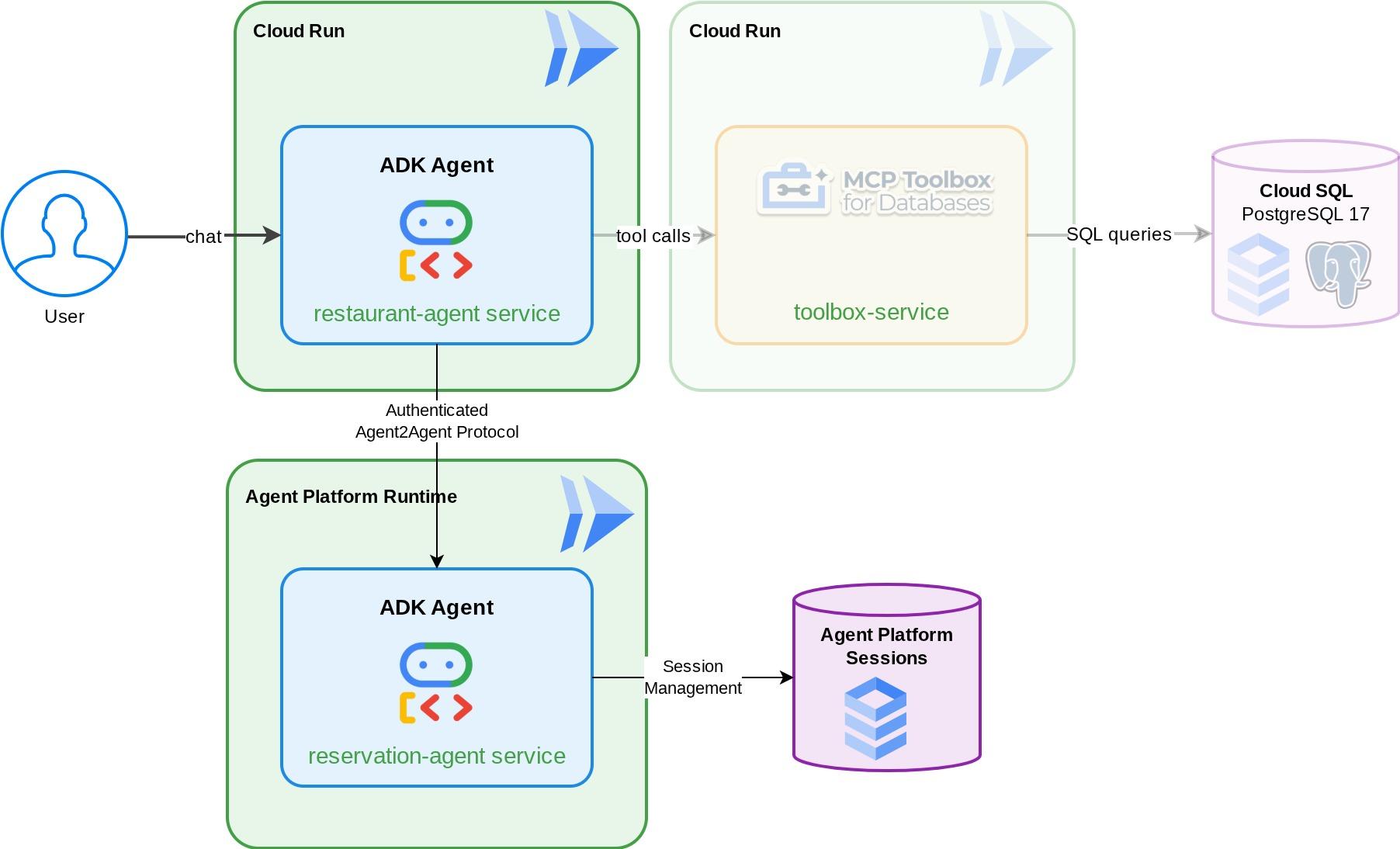
学习内容
- 构建一个使用托管会话服务来管理预订数据的 ADK 智能体
- 将 ADK 智能体作为具有智能体卡片和技能的 A2A 服务器公开
- 将 A2A 智能体部署到 Gemini Enterprise Agent Runtime
- 使用
RemoteA2aAgent从另一个 ADK 代理消耗远程 A2A 代理并处理经过身份验证的请求 - 逐步测试多智能体系统:本地 A2A、已部署的 A2A、部分集成、完全部署
前提条件
- (推荐)已完成以下 Codelab:
- 使用 ADK 和 CloudSQL 构建持久性 AI 智能体 -> 详细了解 ADK 会话和状态
- 使用 ADK、MCP Toolbox 和 Cloud SQL 的智能体 RAG - 您可以继续基于此 Codelab 构建智能体,提供的起始代码是相同的
- 具有有效结算账号的 Google Cloud 账号
- 基本熟悉 Python 和 ADK 概念
2. 环境设置 - 接续上一个 Codelab
本 Codelab 中提供的叙述实际上是前提 Codelab:使用 ADK、MCP Toolbox 和 Cloud SQL 的智能体 RAG 的延续。您可以继续上一个 Codelab 中的工作
我们可以从上一个 Codelab 的工作目录(工作目录应为 build-agent-adk-toolbox-cloudsql)开始构建。为避免混淆,我们使用与从头开始时相同的目录名称重命名该目录
mv ~/build-agent-adk-toolbox-cloudsql ~/adk-a2a-agent-runtime-starter
cloudshell workspace ~/adk-a2a-agent-runtime-starter && cd ~/adk-a2a-agent-runtime-starter
source .env
验证上一个 Codelab 中的密钥文件是否已就位:
echo "--- Restaurant Agent ---"
cat restaurant_agent/agent.py | head -5
echo ""
echo "--- Toolbox Config ---"
cat tools.yaml | head -5
您应该会看到包含 LlmAgent 导入的 restaurant_agent/agent.py 文件,以及包含您的 Toolbox 配置的 tools.yaml。
接下来,我们重新初始化 Python 环境
rm -rf .venv
uv sync
此外,还要验证数据库是否已完成初始配置并准备就绪:
uv run python scripts/verify_seed.py
如果您按照上一个 Codelab 中的每个测试详细信息进行操作,可能会看到如下输出
Menu Items: 16/15
Embeddings: 16/15

✗ Database not ready
没关系!数据库检查不会考虑您在数据注入检查中输入的其他数据。只要有 15 个以上的数据,就没问题!
激活必需的 API
接下来,我们需要确保启用必要的 API,以便与 Gemini Enterprise Agent Platform 互动
gcloud services enable \
  cloudresourcemanager.googleapis.com
您应该已经拥有必要的文件和基础架构,可以继续学习下一部分:A2A Protocol and Gemini Enterprise Agent Runtime!
3. 环境设置 - 从初始代码库开始
此步骤将准备 Cloud Shell 环境、配置 Google Cloud 项目并克隆起始代码库。
打开 Cloud Shell
在浏览器中打开 Cloud Shell。Cloud Shell 提供了一个预配置的环境,其中包含本 Codelab 所需的所有工具。在系统提示您
然后,依次点击“查看” ->“终端”,打开终端。您的界面应与下图类似
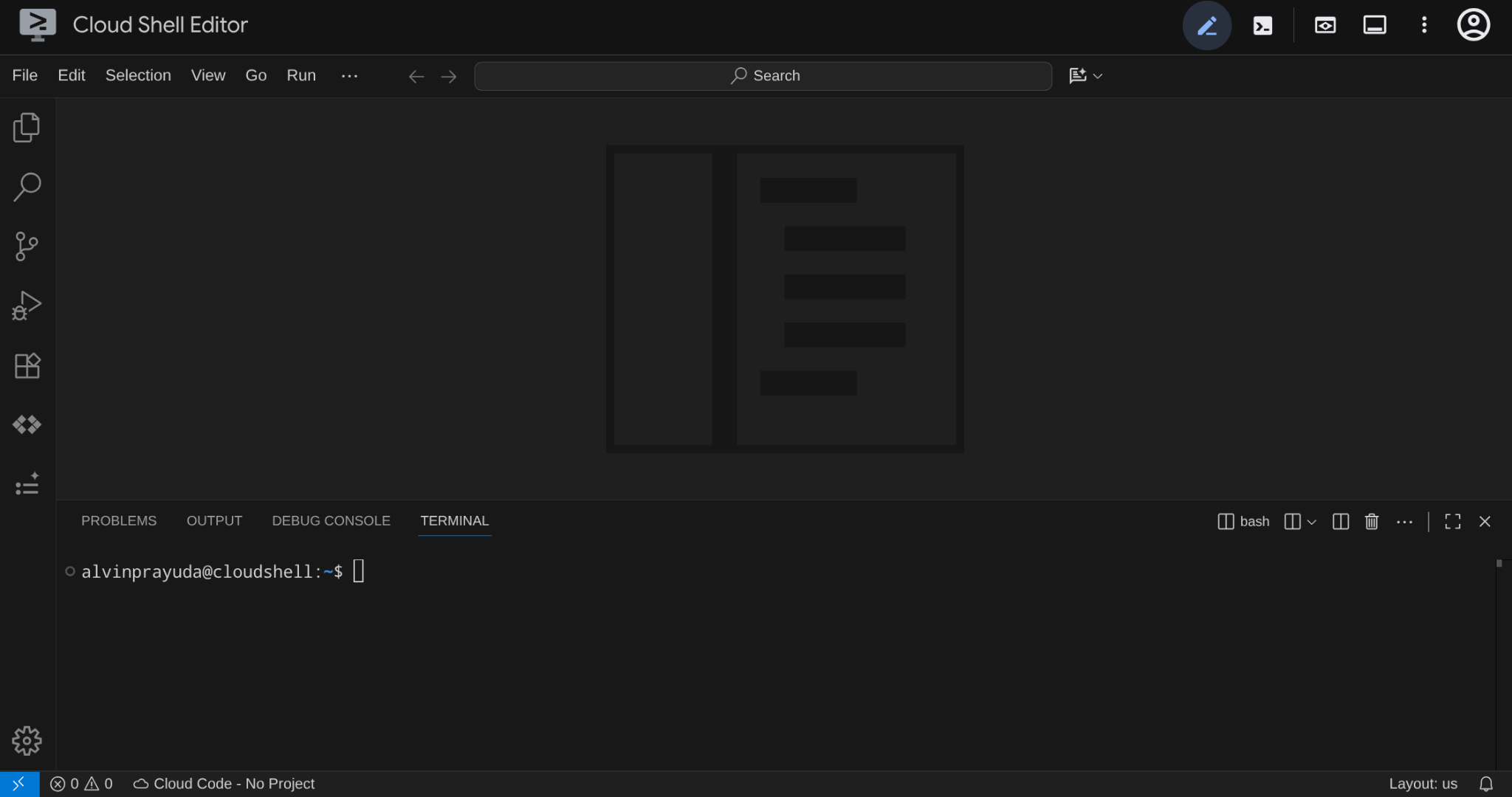
这将是我们的主要界面,顶部是 IDE,底部是终端
设置工作目录
克隆起始代码库,您在此 Codelab 中编写的所有代码都将位于此处:
rm -rf ~/adk-a2a-agent-runtime-starter
git clone https://github.com/alphinside/adk-a2a-agent-runtime-starter.git
cloudshell workspace ~/adk-a2a-agent-runtime-starter && cd ~/adk-a2a-agent-runtime-starter
根据提供的模板创建 .env 文件:
cp .env.example .env
为简化终端中的项目设置,请将此项目设置脚本下载到您的工作目录中:
curl -sL https://raw.githubusercontent.com/alphinside/cloud-trial-project-setup/main/setup_verify_trial_project.sh -o setup_verify_trial_project.sh
运行脚本。它会验证您的试用结算账号,创建新项目(或验证现有项目),将项目 ID 保存到当前目录中的 .env 文件,并在 gcloud 中设置有效项目。
bash setup_verify_trial_project.sh && source .env
该脚本将:
- 验证您是否拥有有效的试用结算账号
- 检查
.env中是否存在现有项目(如果有) - 创建新项目或重复使用现有项目
- 将试用结算账号与您的项目相关联
- 将项目 ID 保存到
.env - 将项目设置为活跃
gcloud项目
通过检查 Cloud Shell 终端提示中工作目录旁边的黄色文字,验证项目是否已正确设置。其中应显示您的项目 ID。

激活必需的 API
接下来,我们需要确保启用必要的 API,以便与 Gemini Enterprise Agent Platform 互动
gcloud services enable \
  aiplatform.googleapis.com \
  cloudresourcemanager.googleapis.com
入门级基础架构设置
首先,我们需要使用 uv 安装 Python 依赖项。 是一个用 Rust 编写的快速 Python 软件包和项目管理器(uv 文档)。本 Codelab 使用它来提高 Python 项目的维护速度并简化维护工作
uv sync
然后,运行完整设置脚本,该脚本会创建 Cloud SQL 实例、植入数据并部署 Toolbox 服务,该服务将充当餐厅代理的初始状态
bash scripts/full_setup.sh > logs/full_setup.log 2>&1 &
4. 概念:Agent2Agent (A2A) 协议和 Gemini Enterprise 代理运行时
在构建之前,我们先花点时间简要了解一下本 Codelab 中介绍的两种关键技术,以便扩展我们的智能体应用。
Agent2Agent (A2A) 协议
Agent2Agent (A2A) protocol 是一种开放标准,旨在让 AI 代理之间实现无缝通信和协作。MCP(Model Context Protocol) 将智能体连接到工具和数据,而 A2A 将智能体连接到其他智能体,使它们能够发现彼此的功能、委派任务,并在框架和组织之间进行协作。
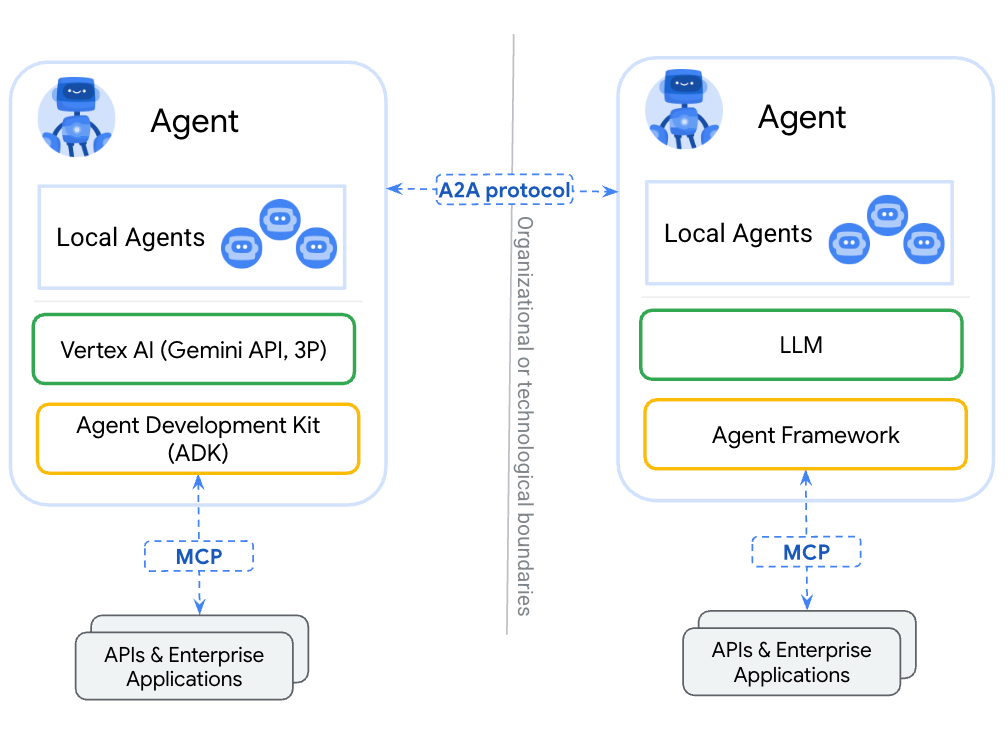
将代理封装为工具(通过 MCP)与通过 A2A 公开代理之间的主要区别在于:工具是无状态的,只能执行单一功能,而 A2A 代理可以推理、保持状态,并处理多轮互动,例如协商或澄清。通过 A2A 公开的代理会保留其全部功能,而不会缩减为函数调用。
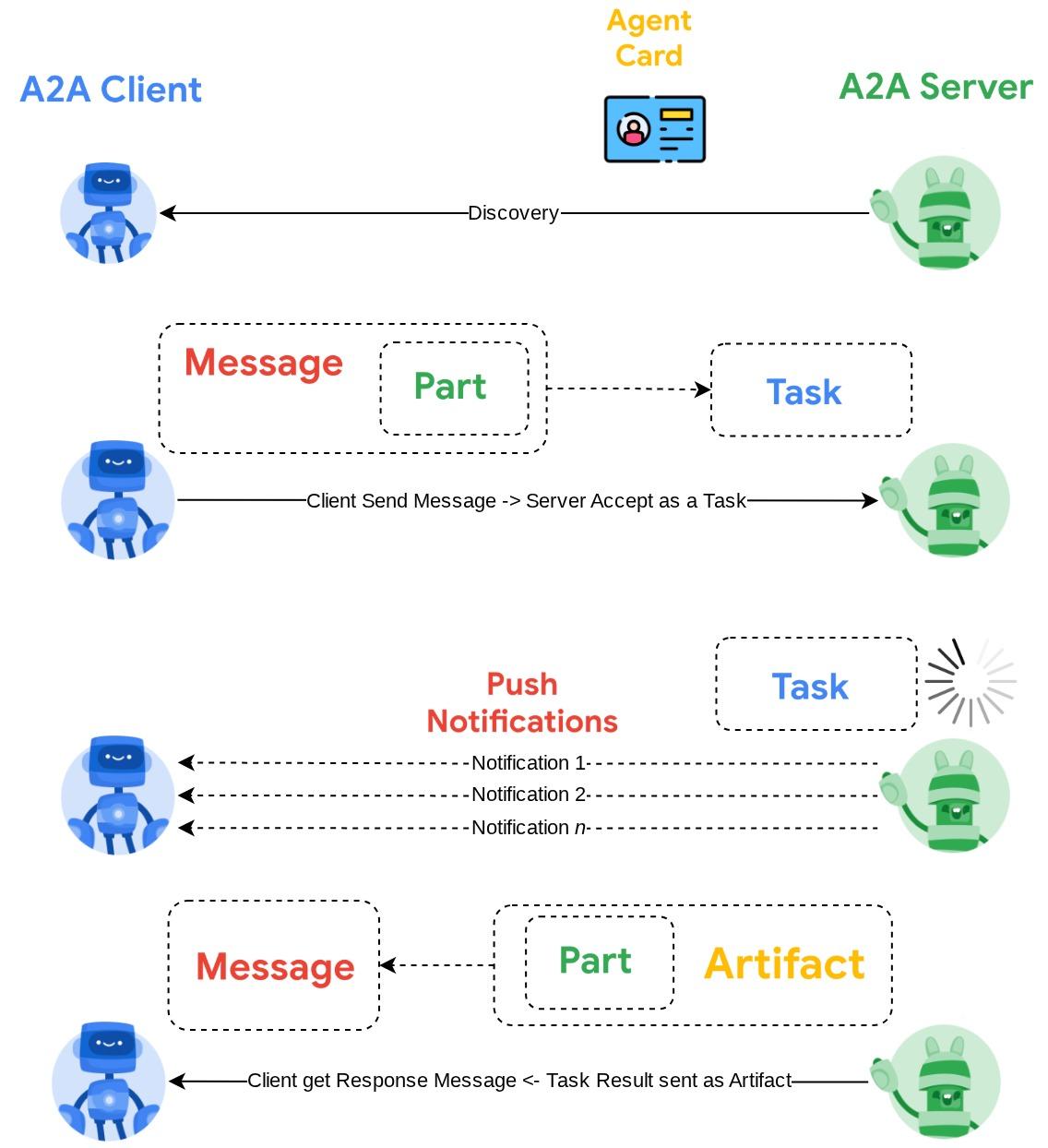
A2A 定义了三个核心概念:
- 智能体卡片 - 一种 JSON 文档,用于描述智能体的用途、技能和端点。其他代理会提取此卡片以发现功能。
- 消息 - 用户或代理发送到 A2A 端点的请求,用于触发任务。
- 任务 - 具有生命周期(已提交 → 正在运行 → 已完成/失败)的工作单元,以及包含结果的制品。
如需深入了解,请参阅什么是 A2A?
Gemini Enterprise Agent Platform 运行时
Agent Runtime 是一项全托管式 Google Cloud 服务,可用于在生产环境中部署、扩缩和管理 AI 代理,并提供企业级安全功能(例如 VPC Service Controls、CMEK)。它负责处理基础设施,因此您可以专注于代理逻辑。
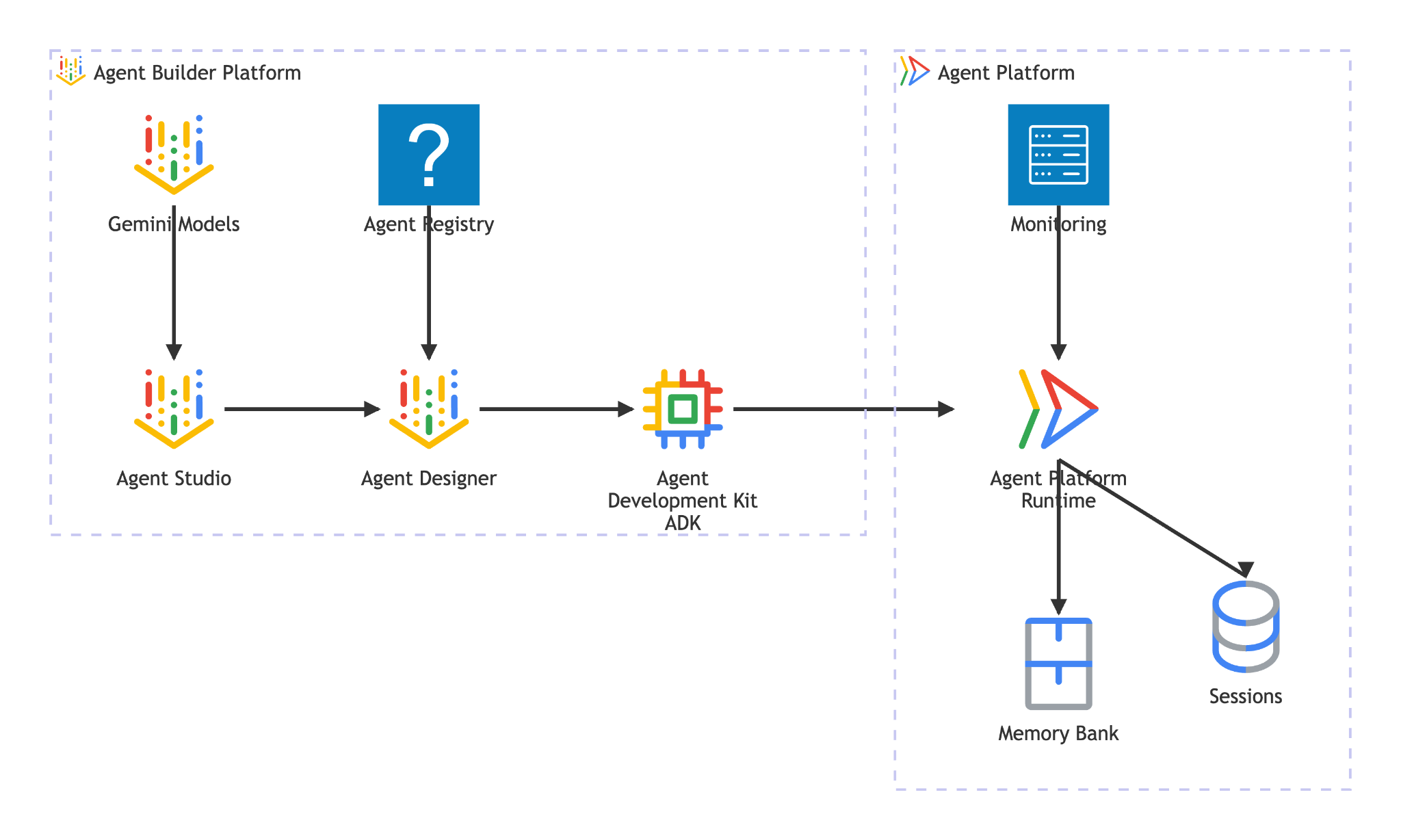
Agent Runtime 提供:
- 受管理的部署 - 通过一次 SDK 调用部署使用 ADK、LangGraph 或任何 Python 框架构建的代理
- A2A 托管 - 将代理部署为符合 A2A 标准的端点,并提供自动代理卡片服务和经过身份验证的访问权限
- 持久会话 -
VertexAiSessionService跨请求存储对话历史记录和状态 - 自动扩缩 - 从零开始扩缩以应对流量,无需管理基础架构
- 可观测性 - 通过 Google Cloud 的可观测性堆栈实现内置的跟踪、日志记录和监控
- 如需了解更多功能,请参阅此文档
在此 Codelab 中,您将预订客服部署到 Agent Runtime。部署过程会对您的代理代码进行序列化(pickle),然后上传。Agent Runtime 会预配一个用于提供 A2A protocol 的无服务器端点,其他代理(或客户端)可以通过标准 HTTP 调用与该端点进行交互,并使用 Google Cloud 凭据进行身份验证。
5. 构建预订代理
此步骤会创建一个新的 ADK 代理,该代理使用会话状态处理餐厅预订。该代理支持三种操作(创建、检查和取消),并使用电话号码作为查找键。所有预订数据都位于 ADK 的会话状态中
搭建代理框架
使用 adk create 生成具有正确模型和项目配置的代理目录结构:
source .env
uv run adk create reservation_agent \
    --model gemini-3.5-flash \
    --project ${GOOGLE_CLOUD_PROJECT} \
    --region ${GOOGLE_CLOUD_LOCATION}
这会创建一个 reservation_agent/ 目录,其中包含为 Agent Platform 上的 Gemini 模型预配置的 __init__.py、agent.py 和 .env。
adk-a2a-agent-runtime-starter/
├── reservation_agent/
│   ├── __init__.py
│   ├── agent.py
│   └── .env
├── logs
├── scripts
└── ...
接下来,我们来更新代理代码
编写代理代码
打开生成的代理文件:
cloudshell edit reservation_agent/agent.py
然后,将内容替换为以下内容:
# reservation_agent/agent.py
import os
from functools import cached_property
from typing import Any

from google.adk.agents import LlmAgent
from google.adk.models.google_llm import Gemini
from google.adk.tools import ToolContext
from google.genai import Client, types

# App-scoped state prefix ensures reservations persist across all sessions.
# See https://adk.dev/sessions/state/ for state scope details.
STATE_PREFIX = "app:reservation:"


class GeminiGlobal(Gemini):
    """Gemini with location pinned to 'global'.

    A2aAgent.set_up() on Agent Platform Runtime SDK overwrites GOOGLE_CLOUD_LOCATION with the Agent Platform Runtime
    region (e.g. us-central1), but the Gemini 3-family endpoint requires 'global'.
    """

    @cached_property
    def api_client(self) -> Client:
        project = os.getenv("GOOGLE_CLOUD_PROJECT")
        return Client(
            project=project,
            location="global",
            http_options=types.HttpOptions(
                headers=self._tracking_headers(),
                retry_options=self.retry_options,
            ),
        )


def create_reservation(
    phone_number: str,
    name: str,
    party_size: int,
    date: str,
    time: str,
    tool_context: ToolContext,
) -> dict:
    """Create a new restaurant reservation.

    Args:
        phone_number: Customer's phone number, used as the reservation ID.
        name: Name for the reservation.
        party_size: Number of guests.
        date: Reservation date (e.g., '2025-07-15' or 'this Friday').
        time: Reservation time (e.g., '7:00 PM').

    Returns:
        Confirmation of the reservation.
    """
    reservation = {
        "name": name,
        "party_size": party_size,
        "date": date,
        "time": time,
        "status": "confirmed",
    }
    tool_context.state[f"{STATE_PREFIX}{phone_number}"] = reservation
    return {
        "status": "confirmed",
        "message": f"Reservation created for {name}, party of {party_size} on {date} at {time}. Phone: {phone_number}.",
    }


def check_reservation(phone_number: str, tool_context: ToolContext) -> dict:
    """Look up an existing reservation by phone number.

    Args:
        phone_number: The phone number used when the reservation was created.
        tool_context: ADK tool context for state access.

    Returns:
        The reservation details, or a message if not found.
    """
    reservation = tool_context.state.get(f"{STATE_PREFIX}{phone_number}")
    if reservation:
        return {"found": True, "reservation": reservation}
    return {"found": False, "message": f"No reservation found for {phone_number}."}


def cancel_reservation(phone_number: str, tool_context: ToolContext) -> dict:
    """Cancel an existing reservation by phone number.

    Args:
        phone_number: The phone number used when the reservation was created.
        tool_context: ADK tool context for state access.

    Returns:
        Confirmation of cancellation, or a message if not found.
    """
    key = f"{STATE_PREFIX}{phone_number}"
    reservation = tool_context.state.get(key)
    if not reservation:
        return {
            "success": False,
            "message": f"No reservation found for {phone_number}.",
        }
    if reservation.get("status") == "cancelled":
        return {
            "success": False,
            "message": f"Reservation for {phone_number} is already cancelled.",
        }
    reservation["status"] = "cancelled"
    tool_context.state[key] = reservation
    return {
        "success": True,
        "message": f"Reservation for {reservation['name']} ({phone_number}) has been cancelled.",
    }


root_agent = LlmAgent(
    name="reservation_agent",
    model=GeminiGlobal(model="gemini-3.5-flash"),
    instruction="""You are a friendly reservation assistant for "Foodie Finds" restaurant.
You help diners create, check, and cancel table reservations.

When a diner wants to make a reservation, collect these details:
- Name for the reservation
- Phone number (used as the reservation ID)
- Party size (number of guests)
- Date
- Time

Always confirm the details before creating the reservation.
When checking or cancelling, ask for the phone number if not provided.
Be concise and professional.""",
    tools=[create_reservation, check_reservation, cancel_reservation],
)
6. 准备 A2A 服务器配置
定义 A2A 智能体卡片
智能体卡片是对智能体功能的结构化描述,其他智能体和客户端会使用它来了解您的智能体的功能。创建卡片配置:
cloudshell edit reservation_agent/a2a_config.py
将以下内容复制到 reservation_agent/a2a_config.py 中:
# reservation_agent/a2a_config.py
from a2a.types import AgentSkill
from vertexai.preview.reasoning_engines.templates.a2a import create_agent_card

reservation_skill = AgentSkill(
    id="manage_reservations",
    name="Restaurant Reservations",
    description="Create, check, and cancel table reservations at Foodie Finds restaurant",
    tags=["reservations", "restaurant", "booking"],
    examples=[
        "Book a table for 4 on Friday at 7pm",
        "Check reservation for 555-0101",
        "Cancel my reservation, phone number 555-0101",
    ],
    input_modes=["text/plain"],
    output_modes=["text/plain"],
)

agent_card = create_agent_card(
    agent_name="Reservation Agent",
    description="Handles restaurant table reservations — create, check, and cancel bookings for Foodie Finds restaurant.",
    skills=[reservation_skill],
)
创建 A2A 执行器
执行器用于桥接 A2A protocol 和 ADK 代理。它接收 A2A 请求,通过 ADK 代理运行这些请求,然后以 A2A 任务的形式返回结果:
cloudshell edit reservation_agent/executor.py
将以下内容复制到 reservation_agent/executor.py 中:
# reservation_agent/executor.py
import os
from typing import NoReturn

import vertexai
from a2a.server.agent_execution import AgentExecutor, RequestContext
from a2a.server.events import EventQueue
from a2a.server.tasks import TaskUpdater
from a2a.types import TaskState, TextPart, UnsupportedOperationError
from a2a.utils import new_agent_text_message
from a2a.utils.errors import ServerError
from google.adk.artifacts import InMemoryArtifactService
from google.adk.memory.in_memory_memory_service import InMemoryMemoryService
from google.adk.runners import Runner
from google.adk.sessions import InMemorySessionService, VertexAiSessionService
from google.genai import types

from reservation_agent.agent import root_agent as reservation_agent


class ReservationAgentExecutor(AgentExecutor):
    """Bridge between the A2A protocol and the ADK reservation agent.

    Uses InMemorySessionService for local testing, VertexAiSessionService
    when deployed to Agent Runtime (detected via GOOGLE_CLOUD_AGENT_ENGINE_ID).
    """

    def __init__(self) -> None:
        self.agent = None
        self.runner = None

    def _init_agent(self) -> None:
        if self.agent is not None:
            return

        self.agent = reservation_agent
        engine_id = os.environ.get("GOOGLE_CLOUD_AGENT_ENGINE_ID")

        if engine_id:
            project = os.environ.get("GOOGLE_CLOUD_PROJECT")
            location = os.environ.get("GOOGLE_CLOUD_LOCATION", "us-central1")
            vertexai.init(project=project, location=location)
            session_service = VertexAiSessionService(
                project=project, location=location, agent_engine_id=engine_id,
            )
            app_name = engine_id
        else:
            session_service = InMemorySessionService()
            app_name = self.agent.name

        self.runner = Runner(
            app_name=app_name,
            agent=self.agent,
            artifact_service=InMemoryArtifactService(),
            session_service=session_service,
            memory_service=InMemoryMemoryService(),
        )

    async def execute(self, context: RequestContext, event_queue: EventQueue) -> None:
        if self.agent is None:
            self._init_agent()

        query = context.get_user_input()
        updater = TaskUpdater(event_queue, context.task_id, context.context_id)
        user_id = context.message.metadata.get("user_id", "a2a-user") if context.message.metadata else "a2a-user"

        if not context.current_task:
            await updater.submit()
        await updater.start_work()

        try:
            session = await self._get_or_create_session(context.context_id, user_id)
            content = types.Content(role="user", parts=[types.Part(text=query)])

            async for event in self.runner.run_async(
                session_id=session.id, user_id=user_id, new_message=content,
            ):
                if event.is_final_response():
                    parts = event.content.parts
                    answer = " ".join(p.text for p in parts if p.text) or "No response."
                    await updater.add_artifact([TextPart(text=answer)], name="answer")
                    await updater.complete()
                    break
        except Exception as e:
            await updater.update_status(
                TaskState.failed, message=new_agent_text_message(f"Error: {e!s}"),
            )
            raise

    async def _get_or_create_session(self, context_id: str, user_id: str):
        app_name = self.runner.app_name
        if context_id:
            session = await self.runner.session_service.get_session(
                app_name=app_name, session_id=context_id, user_id=user_id,
            )
            if session:
                return session
        session = await self.runner.session_service.create_session(
            app_name=app_name, user_id=user_id, session_id=context_id,
        )
        return session

    async def cancel(self, context: RequestContext, event_queue: EventQueue) -> NoReturn:
        raise ServerError(error=UnsupportedOperationError())
执行器会自动检测其环境:当设置了 GOOGLE_CLOUD_AGENT_ENGINE_ID(Agent Runtime 在部署时注入此变量)时,它会使用 VertexAiSessionService 来实现持久会话。在本地,它会回退到 InMemorySessionService。
您的 reservation_agent 目录现在应包含:
reservation_agent/
├── __init__.py
├── agent.py
├── a2a_config.py
├── executor.py
└── .env
7. 使用 Agent Platform SDK 准备 A2A 智能体并在本地进行测试
此步骤使用 Agent Platform SDK(SDK 名称仍使用 vertex 一词,以实现向后兼容)的 A2aAgent 类将预订代理封装为符合 A2A 标准的代理,然后在本地测试完整的 A2A protocol 流程 - 代理卡片检索、消息发送和任务检索。这与您在下一步中部署到 Agent Runtime 的 A2aAgent 对象相同。
添加依赖项
安装支持代理运行时和 ADK 的 Agent Platform SDK,以及 A2A SDK:
uv add "google-cloud-aiplatform[agent_engines,adk]==1.149.0" "a2a-sdk==0.3.26"
了解 A2A 组件
为 A2A 封装 ADK 代理需要三个组件:
- 智能体卡片 - 一种“商家名片”,用于描述智能体的功能、技能和端点网址。其他智能体使用此信息来了解您的智能体的功能。
- Agent Executor - A2A protocol 与 ADK 智能体逻辑之间的桥梁。它接收 A2A 请求,通过 ADK 代理运行这些请求,然后以 A2A 任务的形式返回结果。
- A2aAgent - Agent Platform SDK 类,可将卡片和执行器合并为可部署的单元。
创建测试脚本
创建以下脚本以在本地进行测试
cloudshell edit scripts/test_a2a_agent_local.py
将以下内容复制到 scripts/test_a2a_agent_local.py 中:
# scripts/test_a2a_agent_local.py
import asyncio
import json
import os
from pprint import pprint

from dotenv import load_dotenv
from starlette.requests import Request
from vertexai.preview.reasoning_engines import A2aAgent

from reservation_agent.a2a_config import agent_card
from reservation_agent.executor import ReservationAgentExecutor

load_dotenv()


# --- Helper functions for building mock requests ---

def receive_wrapper(data: dict):
    async def receive():
        byte_data = json.dumps(data).encode("utf-8")
        return {"type": "http.request", "body": byte_data, "more_body": False}
    return receive

def build_post_request(data: dict = None, path_params: dict = None) -> Request:
    scope = {"type": "http", "http_version": "1.1", "headers": [(b"content-type", b"application/json")], "app": None}
    if path_params:
        scope["path_params"] = path_params
    return Request(scope, receive_wrapper(data))

def build_get_request(path_params: dict) -> Request:
    scope = {"type": "http", "http_version": "1.1", "query_string": b"", "app": None}
    if path_params:
        scope["path_params"] = path_params
    async def receive():
        return {"type": "http.disconnect"}
    return Request(scope, receive)


# --- Helper: poll for task completion ---

async def wait_for_task(a2a_agent, task_id, max_retries=30):
    """Poll on_get_task until the task reaches a terminal state."""
    for _ in range(max_retries):
        request = build_get_request({"id": task_id})
        result = await a2a_agent.on_get_task(request=request, context=None)
        state = result.get("status", {}).get("state", "")
        if state in ["completed", "failed"]:
            return result
        await asyncio.sleep(1)
    return result


def print_task_answer(result):
    """Extract and print the answer from task artifacts."""
    print(f"Status: {result.get('status', {}).get('state')}")
    for artifact in result.get("artifacts", []):
        if artifact.get("parts") and "text" in artifact["parts"][0]:
            print(f"Answer: {artifact['parts'][0]['text']}")


# --- Local test ---

async def main():
    # Create and set up the A2A agent locally

    a2a_agent = A2aAgent(agent_card=agent_card, agent_executor_builder=ReservationAgentExecutor)
    a2a_agent.set_up()

    # 1. Get agent card
    print("=" * 50)
    print("1. Retrieving agent card...")
    print("=" * 50)
    request = build_get_request(None)
    card_response = await a2a_agent.handle_authenticated_agent_card(request=request, context=None)
    print(f"Agent: {card_response.get('name')}")
    print(f"Skills: {[s.get('name') for s in card_response.get('skills', [])]}")

    # 2. Create a reservation
    print("\n" + "=" * 50)
    print("2. Creating a reservation...")
    print("=" * 50)
    message_data = {
        "message": {
            "messageId": f"msg-{os.urandom(4).hex()}",
            "content": [{"text": "Book a table for 2 on Saturday at 6pm. Name: Bob, Phone: 555-0202"}],
            "role": "ROLE_USER",
        },
    }
    request = build_post_request(message_data)
    response = await a2a_agent.on_message_send(request=request, context=None)
    task_id = response["task"]["id"]
    context_id = response["task"].get("contextId")
    print(f"Task ID: {task_id}")

    # 3. Wait for result
    print("\n" + "=" * 50)
    print("3. Waiting for task result...")
    print("=" * 50)
    result = await wait_for_task(a2a_agent, task_id)
    print_task_answer(result)

    # 4. Check the reservation (same context for session continuity)
    print("\n" + "=" * 50)
    print("4. Checking the reservation...")
    print("=" * 50)
    check_data = {
        "message": {
            "messageId": f"msg-{os.urandom(4).hex()}",
            "content": [{"text": "Check the reservation for 555-0202"}],
            "role": "ROLE_USER",
            "contextId": context_id,
        },
    }
    request = build_post_request(check_data)
    check_response = await a2a_agent.on_message_send(request=request, context=None)
    check_result = await wait_for_task(a2a_agent, check_response["task"]["id"])
    print_task_answer(check_result)

    # 5. Cancel the reservation
    print("\n" + "=" * 50)
    print("5. Cancelling the reservation...")
    print("=" * 50)
    cancel_data = {
        "message": {
            "messageId": f"msg-{os.urandom(4).hex()}",
            "content": [{"text": "Cancel the reservation for 555-0202"}],
            "role": "ROLE_USER",
            "contextId": context_id,
        },
    }
    request = build_post_request(cancel_data)
    cancel_response = await a2a_agent.on_message_send(request=request, context=None)
    cancel_result = await wait_for_task(a2a_agent, cancel_response["task"]["id"])
    print_task_answer(cancel_result)

    print("\n" + "=" * 50)
    print("All tests passed!")
    print("=" * 50)


if __name__ == "__main__":
    asyncio.run(main())
测试脚本会导入您在上一步中创建的代理卡和执行器,不会重复。它将创建本地 A2aAgent,通过模拟 HTTP 请求来模拟 A2A protocol 调用,并验证所有三项预订操作。
由于本地未设置 GOOGLE_CLOUD_AGENT_ENGINE_ID,因此执行器使用 InMemorySessionService。部署到 Agent Runtime 时,同一执行器会自动切换到 VertexAiSessionService 以实现持久会话。
运行测试
PYTHONPATH=. uv run python scripts/test_a2a_agent_local.py
输出会逐步显示五个阶段:
- 智能体卡片 - 检索智能体的功能和技能
- 创建预订 - 预订餐桌并返回包含确认信息的任务
- 获取任务结果 - 检索已完成的任务以及答案
- 查看预订 - 通过电话号码查找预订
- 取消预订 - 取消预订并确认
输出示例如下所示
==================================================
1. Retrieving agent card...
==================================================
Agent: Reservation Agent
Skills: ['Restaurant Reservations']

==================================================
2. Creating a reservation...
==================================================
Task ID: f7f7004d-cfea-49c2-b57d-5bca9959e193

==================================================
3. Waiting for task result...
==================================================
Status: TASK_STATE_COMPLETED
Answer: Your reservation for Bob, party of 2, on Saturday at 6:00 PM has been confirmed. The phone number associated is 555-0202.

==================================================
4. Checking the reservation...
==================================================
Status: TASK_STATE_COMPLETED
Answer: I found a reservation for Bob, party of 2, on Saturday at 6:00 PM. The reservation status is confirmed.

==================================================
5. Cancelling the reservation...
==================================================
Status: TASK_STATE_COMPLETED
Answer: Your reservation for Bob (555-0202) has been cancelled.

==================================================
All tests passed!
==================================================
此时,您已验证:A2A 智能体卡片描述了正确的技能;所有三个预订操作都通过 A2A protocol 的消息/任务流程正常运行;并且状态在同一上下文中的消息之间保持不变。
8. 将预订代理部署到 Agent Runtime
此步骤会将预订代理部署到 Gemini Enterprise Agent Platform 运行时环境,这是一个全托管式无服务器平台,用于托管您的代理并将其公开为安全的 A2A 端点。部署完成后,任何已获授权的客户端都可以通过标准 A2A HTTP 端点发现并与代理互动。
创建临时存储桶
创建 Cloud Storage 存储桶以用于 Agent Runtime 暂存。Agent Runtime 在部署期间使用此存储桶上传智能体的代码和依赖项:
STAGING_BUCKET="${GOOGLE_CLOUD_PROJECT}-adk-a2a-agent-runtime"
gsutil mb -l $REGION -p $GOOGLE_CLOUD_PROJECT gs://$STAGING_BUCKET 2>/dev/null || echo "Bucket already exists"
echo "STAGING_BUCKET=$STAGING_BUCKET" >> .env
source .env
创建部署脚本
接下来,我们需要准备部署脚本
cloudshell edit scripts/deploy_a2a_agent_runtime.py
将以下内容复制到 scripts/deploy_a2a_agent_runtime.py 中:
# scripts/deploy_a2a_agent_runtime.py
import os
from pathlib import Path

import vertexai
from dotenv import load_dotenv
from google.genai import types
from vertexai.preview.reasoning_engines import A2aAgent

from reservation_agent.a2a_config import agent_card
from reservation_agent.executor import ReservationAgentExecutor

load_dotenv()

PROJECT_ID = os.environ["GOOGLE_CLOUD_PROJECT"]
REGION = os.environ["REGION"]
STAGING_BUCKET = os.environ.get("STAGING_BUCKET", f"{PROJECT_ID}-adk-a2a-agent-runtime")
BUCKET_URI = f"gs://{STAGING_BUCKET}"

a2a_agent = A2aAgent(
    agent_card=agent_card,
    agent_executor_builder=ReservationAgentExecutor,
)


def main():
    vertexai.init(project=PROJECT_ID, location=REGION, staging_bucket=BUCKET_URI)
    client = vertexai.Client(
        project=PROJECT_ID,
        location=REGION,
        http_options=types.HttpOptions(api_version="v1beta1"),
    )

    print("Deploying Reservation Agent to Agent Runtime...")
    print("This may take 3-5 minutes.")

    remote_agent = client.agent_engines.create(
        agent=a2a_agent,
        config={
            "display_name": agent_card.name,
            "description": agent_card.description,
            "requirements": [
                "google-cloud-aiplatform[agent_engines,adk]==1.149.0",
                "a2a-sdk==0.3.26",
                "google-adk==1.29.0",
                "cloudpickle",
                "pydantic"
            ],
            "extra_packages": [
                "./reservation_agent",
            ],
            "http_options": {
                "api_version": "v1beta1",
            },
            "staging_bucket": BUCKET_URI,
        },
    )

    resource_name = remote_agent.api_resource.name
    print(f"\nDeployment complete!")
    print(f"Resource name: {resource_name}")

    env_path = Path(".env")
    lines = env_path.read_text().splitlines() if env_path.exists() else []
    lines = [l for l in lines if not l.startswith("RESERVATION_AGENT_RESOURCE_NAME=")]
    lines.append(f"RESERVATION_AGENT_RESOURCE_NAME={resource_name}")
    env_path.write_text("\n".join(lines) + "\n")
    print("Written RESERVATION_AGENT_RESOURCE_NAME to .env")


if __name__ == "__main__":
    main()
部署脚本导入了本地测试中使用的相同 agent_card 和 ReservationAgentExecutor,因此不会出现代码重复。Agent Runtime 会序列化 (pickle) A2aAgent 对象及其依赖项以进行部署。在部署脚本结束时,它会将 RESERVATION_AGENT_RESOURCE_NAME 值写入 .env 文件
部署到 Agent Runtime
运行部署脚本:
PYTHONPATH=. uv run python scripts/deploy_a2a_agent_runtime.py
部署需要 3-5 分钟。该脚本在托管预订代理的 Agent Runtime 上预配无服务器端点。成功部署后,您将看到类似于以下内容的输出
Deploying Reservation Agent to Agent Runtime...
This may take 3-5 minutes.

Deployment complete!
Resource name: projects/your-project-number/locations/us-central1/reasoningEngines/your-agent-deployment-unique-id
Written RESERVATION_AGENT_RESOURCE_NAME to .env
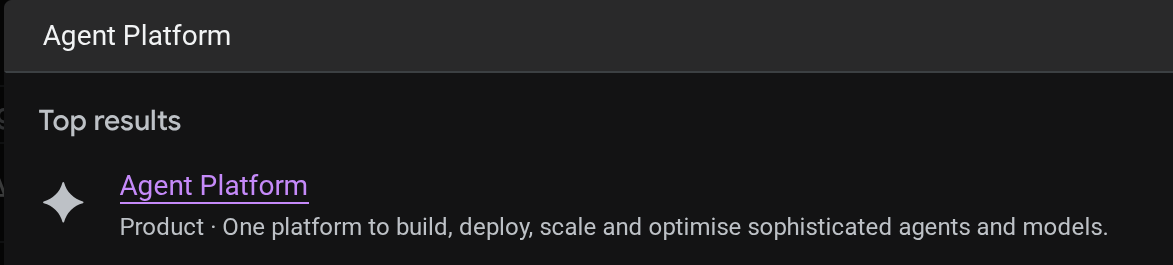
您可以在 Cloud 控制台中查看已部署的代理。在控制台搜索栏中搜索 Agent Platform
然后,在左侧标签页中,将光标悬停在 Agents 上,然后选择 Deployments
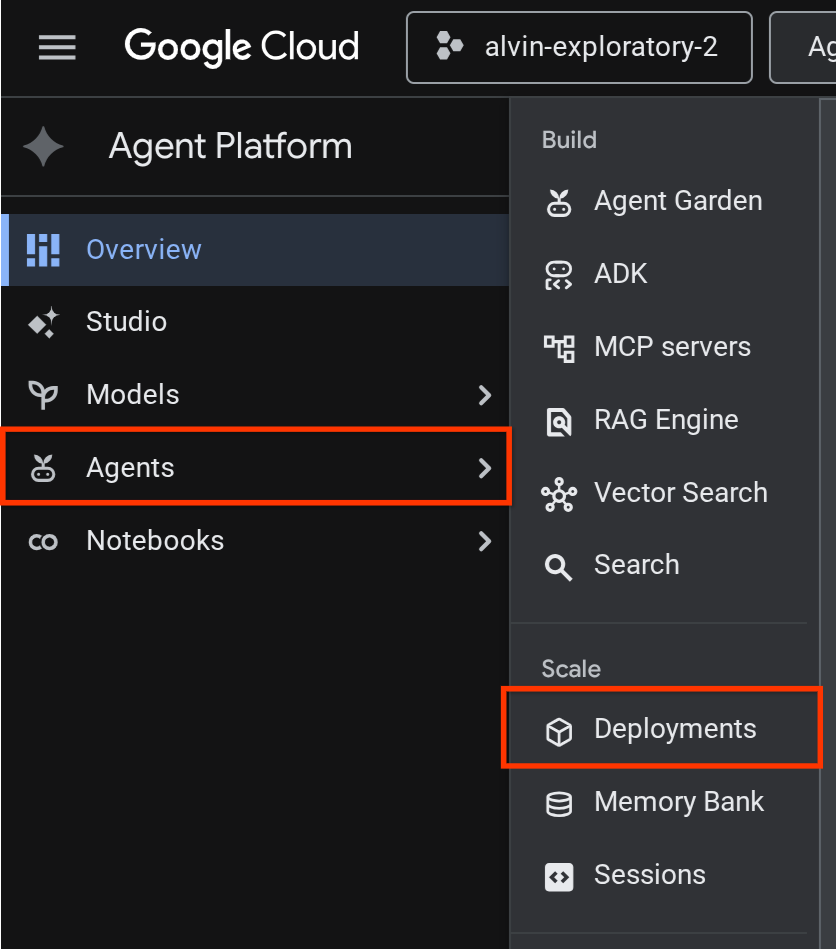
您会在部署列表中看到 Reservation Agent,如下所示

测试已部署的代理
现在,我们准备测试已部署的代理,为已部署的代理创建测试脚本:
cloudshell edit scripts/test_a2a_agent_runtime.py
将以下内容复制到 scripts/test_a2a_agent_runtime.py 中:
# scripts/test_a2a_agent_runtime.py
import asyncio
import os
import time

import vertexai
from a2a.types import TaskState
from dotenv import load_dotenv
from google.genai import types

load_dotenv()

PROJECT_ID = os.environ["GOOGLE_CLOUD_PROJECT"]
REGION = os.environ["REGION"]
RESOURCE_NAME = os.environ["RESERVATION_AGENT_RESOURCE_NAME"]


async def main():
    vertexai.init(project=PROJECT_ID, location=REGION)
    client = vertexai.Client(
        project=PROJECT_ID, location=REGION,
        http_options=types.HttpOptions(api_version="v1beta1"),
    )

    agent = client.agent_engines.get(name=RESOURCE_NAME)

    # 1. Get agent card
    print("=" * 50)
    print("1. Retrieving agent card...")
    print("=" * 50)
    card = await agent.handle_authenticated_agent_card()
    print(f"Agent: {card.name}")
    print(f"URL: {card.url}")
    print(f"Skills: {[s.name for s in card.skills]}")

    # 2. Send a reservation request
    print("\n" + "=" * 50)
    print("2. Sending reservation request...")
    print("=" * 50)
    message_data = {
        "messageId": "msg-remote-001",
        "role": "user",
        "parts": [{"kind": "text", "text": "Book a table for 3 on Sunday at noon. Name: Carol, Phone: 555-0303"}],
    }
    response = await agent.on_message_send(**message_data)

    task_object = None
    for chunk in response:
        if isinstance(chunk, tuple) and len(chunk) > 0 and hasattr(chunk[0], "id"):
            task_object = chunk[0]
            break

    task_id = task_object.id
    print(f"Task ID: {task_id}")
    print(f"Status: {task_object.status.state}")

    # 3. Poll for result
    print("\n" + "=" * 50)
    print("3. Waiting for result...")
    print("=" * 50)
    result = None
    for _ in range(30):
        try:
            result = await agent.on_get_task(id=task_id)
            if result.status.state in [TaskState.completed, TaskState.failed]:
                break
        except Exception:
            pass
        time.sleep(1)

    print(f"Final status: {result.status.state}")
    if result.artifacts:
        for artifact in result.artifacts:
            if artifact.parts and hasattr(artifact.parts[0], "root") and hasattr(artifact.parts[0].root, "text"):
                print(f"Answer: {artifact.parts[0].root.text}")

    print("\n" + "=" * 50)
    print("Remote agent test passed!")
    print("=" * 50)


if __name__ == "__main__":
    asyncio.run(main())
然后,运行测试
source .env
uv run python scripts/test_a2a_agent_runtime.py
输出显示了具有“餐厅预订”技能的智能体卡片,随后显示了完成任务并确认预订。
==================================================
1. Retrieving agent card...
==================================================
Agent: Reservation Agent
URL: https://us-central1-aiplatform.googleapis.com/v1beta1/projects/your-project-id/locations/us-central1/reasoningEngines/your-agent-unique-id/a2a
Skills: ['Restaurant Reservations']

==================================================
2. Sending reservation request...
==================================================
Task ID: b34585d0-5f03-4cb0-85a3-40710a0d224d
Status: TaskState.completed

==================================================
3. Waiting for result...
==================================================
Final status: TaskState.completed
Answer: Your reservation for Carol, party of 3 on Sunday at noon with phone number 555-0303 is confirmed.

==================================================
Remote agent test passed!
==================================================
预订代理现已在 Agent Runtime 上成功作为受管理的 A2A 端点运行。
9. 将 A2A 预订代理与根餐厅代理集成
此步骤会将餐厅代理升级为使用已部署的预订代理作为远程 A2A 子代理。编排器在本地运行,而预订代理在 Agent Runtime 上运行 - 这是一种部分集成,可在完全部署之前验证 A2A 连接。
解析 A2A 智能体卡片网址
RemoteA2aAgent需要已部署的预订代理的卡片网址才能发现其功能。创建一个脚本,用于从 Agent Runtime 中提取此网址并将其写入餐厅代理的 .env:
cloudshell edit scripts/resolve_agent_card_url.py
将以下内容复制到 scripts/resolve_agent_card_url.py 中:
# scripts/resolve_agent_card_url.py
import asyncio
import os
from pathlib import Path

import vertexai
from dotenv import load_dotenv
from google.genai import types

load_dotenv()

PROJECT_ID = os.environ["GOOGLE_CLOUD_PROJECT"]
REGION = os.environ["REGION"]
RESOURCE_NAME = os.environ["RESERVATION_AGENT_RESOURCE_NAME"]


async def main():
    vertexai.init(project=PROJECT_ID, location=REGION)
    client = vertexai.Client(
        project=PROJECT_ID, location=REGION,
        http_options=types.HttpOptions(api_version="v1beta1"),
    )

    agent = client.agent_engines.get(name=RESOURCE_NAME)
    card = await agent.handle_authenticated_agent_card()
    card_url = f"{card.url}/v1/card"

    print(f"Agent: {card.name}")
    print(f"Card URL: {card_url}")

    # Write to restaurant_agent/.env
    # Write to both restaurant_agent/.env (for adk web) and root .env (for Cloud Run deploy)
    for env_path in [Path("restaurant_agent/.env"), Path(".env")]:
        lines = env_path.read_text().splitlines() if env_path.exists() else []
        lines = [l for l in lines if not l.startswith("RESERVATION_AGENT_CARD_URL=")]
        lines.append(f"RESERVATION_AGENT_CARD_URL={card_url}")
        env_path.write_text("\n".join(lines) + "\n")
        print(f"Written RESERVATION_AGENT_CARD_URL to {env_path}")


if __name__ == "__main__":
    asyncio.run(main())
运行脚本以使用代理卡片网址填充 .env 文件
uv run python scripts/resolve_agent_card_url.py
source .env
更新餐厅代理
打开餐厅代理文件:
cloudshell edit restaurant_agent/agent.py
然后,将内容替换为包含远程预订代理(作为子代理)的更新版本:
# restaurant_agent/agent.py
import os

import httpx
from google.adk.agents import LlmAgent
from google.adk.agents.remote_a2a_agent import RemoteA2aAgent
from google.auth import default
from google.auth.transport.requests import Request as AuthRequest
from toolbox_adk import ToolboxToolset

TOOLBOX_URL = os.environ.get("TOOLBOX_URL", "http://127.0.0.1:5000")
RESERVATION_AGENT_CARD_URL = os.environ.get("RESERVATION_AGENT_CARD_URL", "")

toolbox = ToolboxToolset(TOOLBOX_URL)


class GoogleCloudAuth(httpx.Auth):
    """Auto-refreshing Google Cloud authentication for httpx.

    Refreshes the access token before each request if expired,
    so long-running agents never hit 401 errors.
    """

    def __init__(self):
        self.credentials, _ = default(
            scopes=["https://www.googleapis.com/auth/cloud-platform"]
        )

    def auth_flow(self, request):
        # Refresh the token if it is expired or missing
        if not self.credentials.valid:
            self.credentials.refresh(AuthRequest())

        request.headers["Authorization"] = f"Bearer {self.credentials.token}"
        yield request


reservation_remote_agent = RemoteA2aAgent(
    name="reservation_agent",
    description="Handles restaurant table reservations — create, check, and cancel bookings. Delegate to this agent when the user wants to book a table, check a reservation, or cancel a reservation.",
    agent_card=RESERVATION_AGENT_CARD_URL,
    httpx_client=httpx.AsyncClient(auth=GoogleCloudAuth(), timeout=60),
)

root_agent = LlmAgent(
    name="restaurant_agent",
    model="gemini-3.5-flash",
    instruction="""You are a friendly and knowledgeable concierge at "Foodie Finds," a restaurant. Your job:
- Help diners browse the menu by category or cuisine type.
- Provide full details about specific dishes, including ingredients, price, and dietary information.
- Recommend dishes based on natural language descriptions of what the diner is craving.
- Add new menu items when asked.
- For reservation requests (booking, checking, or cancelling tables), delegate to the reservation_agent.

When a diner asks about a specific dish by name or cuisine, use the get-item-details tool.
When a diner asks for a specific category or cuisine type, use the search-menu tool.
When a diner describes what kind of food they want — by flavor, texture, dietary needs, or cravings — use the search-menu-by-description tool for semantic search.

When in doubt between search-menu and search-menu-by-description, prefer search-menu-by-description — it searches dish descriptions and finds more relevant matches.
If a dish is not available (available is false), let the diner know and suggest similar alternatives from the search results.
Be conversational, knowledgeable, and concise.""",
    tools=[toolbox],
    sub_agents=[reservation_remote_agent],
)
与之前版本相比,主要变化如下:
GoogleCloudAuth- 一种自定义httpx.Auth处理程序,可在每次请求之前刷新 Google Cloud 访问令牌。Agent Runtime 需要经过身份验证的 A2A 调用,并且令牌会在一段时间后过期。RemoteA2aAgent从.env(由解析脚本写入)读取RESERVATION_AGENT_CARD_URL,并使用经过身份验证的httpx_client- 注册为子代理 - ADK 的编排器会自动将预订请求委托给它
- 更新了说明,提及了预留委托
在本地测试集成式代理
起始代理需要与 MCP Toolbox 集成,所需的文件应已在之前的 Codelab 或起始代码库中提供。我们只需要确保工具箱进程正常运行即可。
如果 .env 中的 TOOLBOX_URL 已指向 Cloud Run 服务(来自上一个 Codelab 或起始代码库的 full_setup.sh),您可以跳过此步骤,因为代理将连接到已部署的 Toolbox。
如果您需要本地 Toolbox,请在启动新实例之前检查是否已有实例在运行:
if curl -s http://127.0.0.1:5000/api/toolsets > /dev/null 2>&1; then
  echo "Toolbox already running on port 5000"
else
  set -a; source .env; set +a
  ./toolbox --config=tools.yaml > logs/toolbox.log 2>&1 &
  echo "Toolbox started"
fi
然后,我们可以尝试通过 ADK 网页开发者界面与餐厅代理进行交互
uv run adk web --allow_origins "regex:https://.*\.cloudshell\.dev" --port 8080
使用 Cloud Shell 网页预览功能打开 ADK 网页界面(点击“网页预览”按钮,将端口更改为 8080),然后选择 restaurant_agent
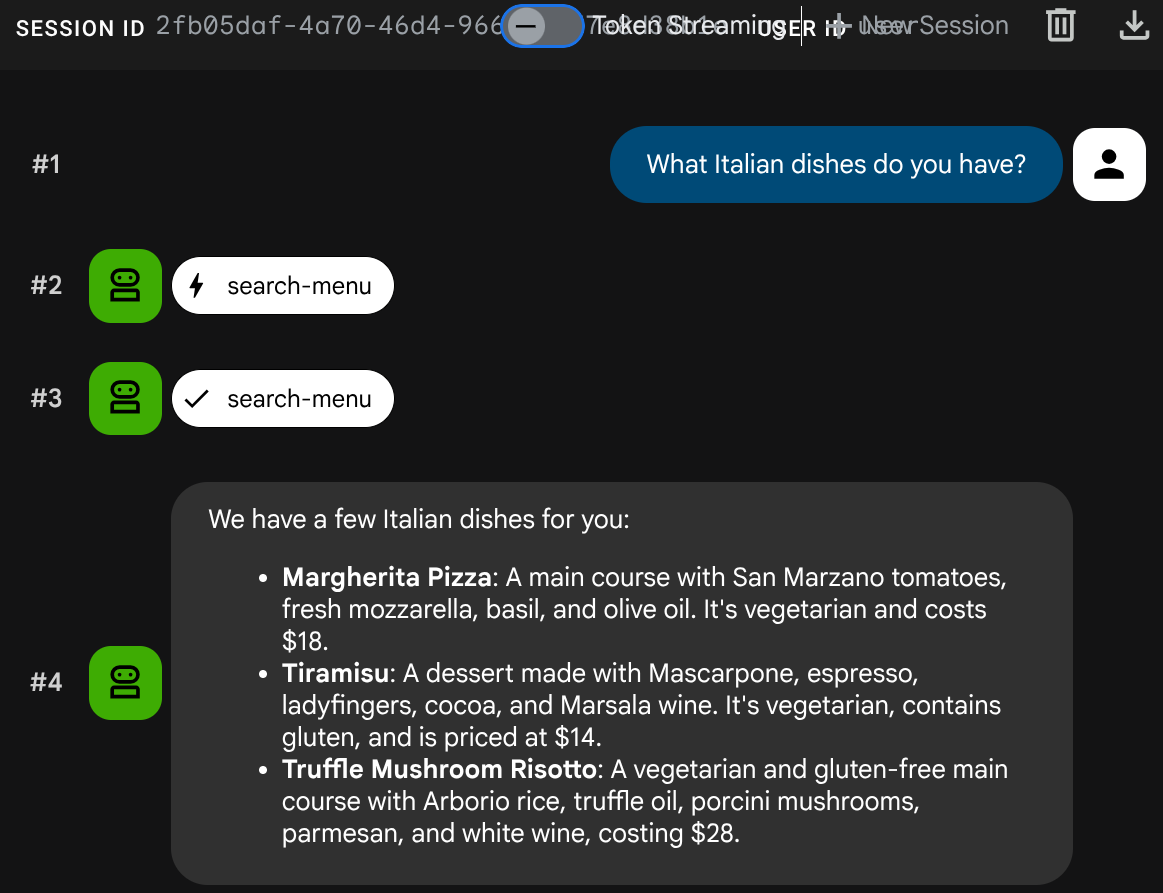
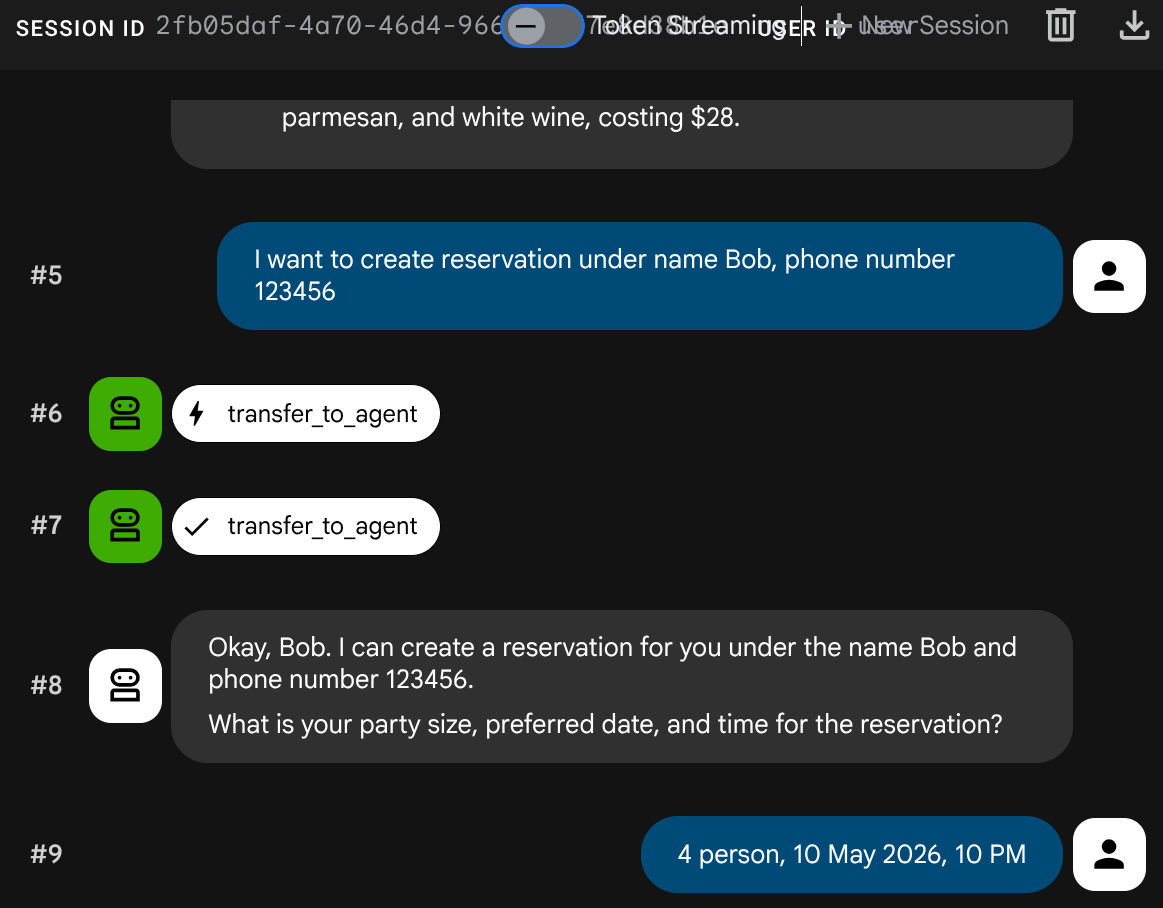
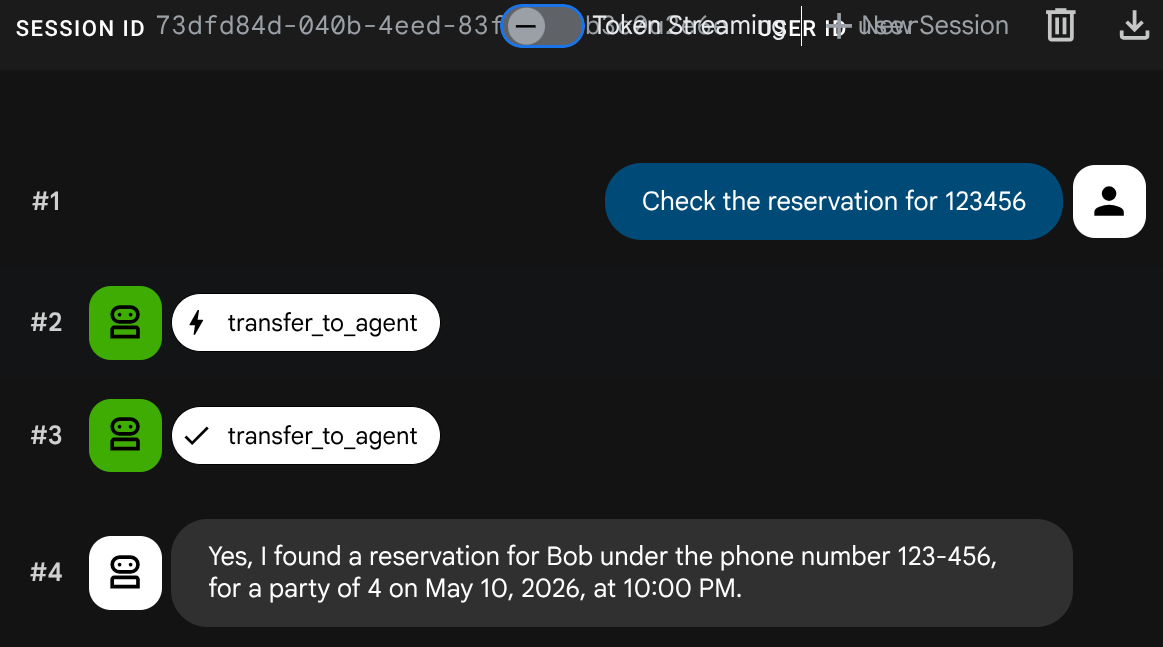
测试混合对话:
菜单查询
What Italian dishes do you have?
预留请求
I want to create reservation under name Bob, phone number 123456
检查预留
创建新会话(开始全新对话):
Check the reservation for 123456
按 Ctrl+C 两次,停止 adk web 进程。接下来,我们来完全部署代理,完成系统
10. 将更新后的餐厅代理部署到 Cloud Run
此步骤会将餐厅智能体重新部署到 Cloud Run,并进行 A2A 集成,从而完成完全部署的多智能体系统。
授予访问 Agent Runtime 的权限
Cloud Run 服务账号需要具有调用 Agent Runtime 的权限。向默认 Compute Engine 服务账号授予 roles/aiplatform.user 角色:
PROJECT_NUMBER=$(gcloud projects describe $GOOGLE_CLOUD_PROJECT --format='value(projectNumber)')
gcloud projects add-iam-policy-binding $GOOGLE_CLOUD_PROJECT \
  --member="serviceAccount:${PROJECT_NUMBER}-compute@developer.gserviceaccount.com" \
  --role="roles/aiplatform.user"
部署到 Cloud Run
在此设置中,我们假设餐厅代理服务已在上一个 Codelab 中创建,或者您从头开始运行 scripts/full_setup.sh。此命令会使用更新后的代码(新的 RemoteA2aAgent 集成)重新部署,并添加预订代理卡片网址作为新的环境变量 - 现有环境变量(TOOLBOX_URL、GOOGLE_CLOUD_PROJECT 等)会保留:
gcloud run deploy restaurant-agent \
  --source . \
  --region=$REGION \
  --allow-unauthenticated \
  --update-env-vars="RESERVATION_AGENT_CARD_URL=$RESERVATION_AGENT_CARD_URL" \
  --min-instances=0 \
  --max-instances=1 \
  --memory=1Gi \
  --port=8080
测试完全部署的系统
获取已部署服务的网址:
AGENT_URL=$(gcloud run services describe restaurant-agent --region=$REGION --format='value(status.url)')
echo "Agent URL: $AGENT_URL"
在浏览器中打开该网址。ADK 网页界面会加载,该界面与您在本地使用的界面相同,现在在 Cloud Run 上运行。
您可以随意与智能体聊天
菜单查询
What spicy dishes do you have?
预留请求
Book a table for 4 on Friday at 7pm. Name: Eve, Phone: 555-0505
检查预留
创建新会话(开始全新对话):
Check reservation for 555-0505
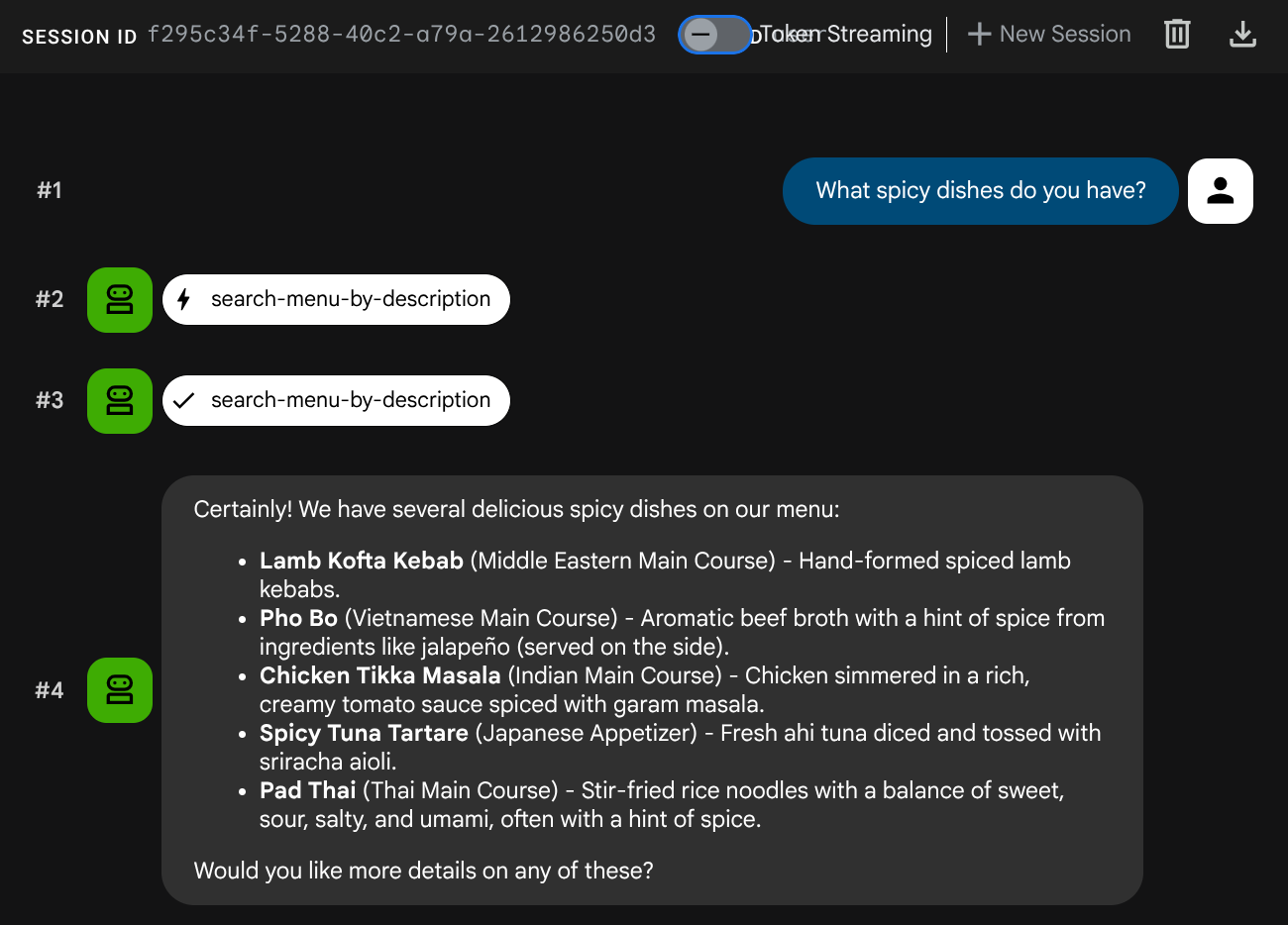
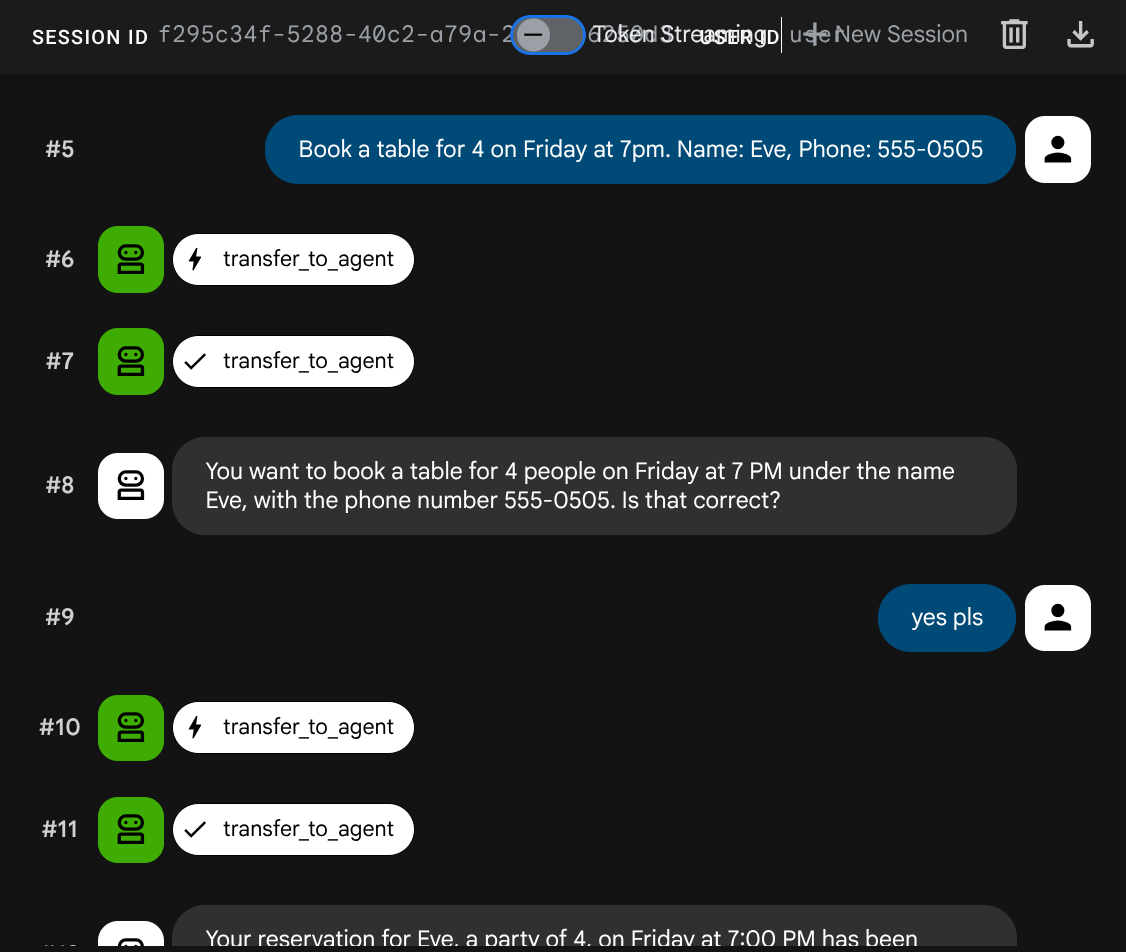
多智能体系统已完全部署。Cloud Run 上的餐厅智能体在两个后端服务之间进行协调:用于菜单操作的 MCP Toolbox 和 Agent Runtime 上的 A2A 预订智能体。
11. 恭喜!
您已使用 A2A protocol 在 Google Cloud 上构建并部署了多智能体系统。
您学到的内容
- 构建了一个使用会话状态 (
ToolContext) 来管理预订数据(无需数据库)的 ADK 智能体 - 使用 Agent Platform SDK 将 A2A 智能体部署到 Agent Runtime
- 使用
RemoteA2aAgent作为子代理,从另一个 ADK 代理消耗远程 A2A 代理 - 以增量方式测试系统:本地 A2A → 已部署的 A2A → 部分集成 → 完全部署
清理
为避免系统向您的 Google Cloud 账号收取费用,请删除在此 Codelab 中创建的资源。
方法 1:删除项目(推荐)
gcloud projects delete $GOOGLE_CLOUD_PROJECT
方法 2:删除单个资源
# Delete the Agent Runtime deployment
uv run python -c "
import vertexai
from google.genai import types
vertexai.init(project='$GOOGLE_CLOUD_PROJECT', location='$REGION')
client = vertexai.Client(
    project='$GOOGLE_CLOUD_PROJECT', location='$REGION',
    http_options=types.HttpOptions(api_version='v1beta1'),
)
agent = client.agent_engines.get(name='$RESERVATION_AGENT_RESOURCE_NAME')
agent.delete(force=True)
print('Agent Runtime deployment deleted.')
"

# Delete Cloud Run services
gcloud run services delete restaurant-agent --region=$REGION --quiet
gcloud run services delete toolbox-service --region=$REGION --quiet

# Delete Cloud SQL instance
gcloud sql instances delete $DB_INSTANCE --quiet

# Delete GCS staging bucket
gsutil rm -r gs://$STAGING_BUCKET